1
Vine Server Manual
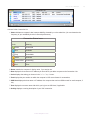
Columns in the Connection List
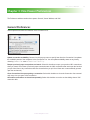
1 Status indicates a computer’s last known availability, denoted by a color-coded dot. (You can determine the
frequency of your availability checks in General preferences.)
Connection Status Icons
Color
Meaning
Green
Connected
Blue
Available
Gray
Unavailable
Yellow
Unknown
Partial Yellow
Connecting
Red
Error
2 Name contains the computer’s display name, if you assign one.
3 Host displays the host name or IP address you enter when you add a computer to the Connection List.
4 Color displays the setting you choose in the Color Depth menu.
5 Port displays the port number on which the computer’s VNC server listens for connections.
6 SSH Host displays the host name or IP address of a computer that can host SSH tunnels for each computer, if
any.
7 User displays the account name with which you log into an SSH host, if applicable.
8 Activity displays a running description of your VNC connection.
w w w. t e s t p l a n t . c o m
10