1
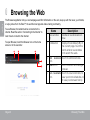
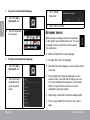
To go to a webpage. To bookmark a webpage. Bookmark your favourite webpages in order to visit them quickly without entering a URL. 1. Touch the Address bar at the top of the browser screen. The keyboard will open automatically. (If the address bar is not visible, drag the page down to return to the top of the browser screen.) 1. Go to the webpage that you want to bookmark 2. Use the keyboard to enter the address (URL) of the webpage (e.g., www.google. com). 3. If desired, you can modify the name of the bookmark or its location (URL address). Otherwise, touch OK to finish adding the bookmark. 3. Touch Enter key to open the webpage. Page 23 English Some common Browser actions are described below. 2. Touch the Add Bookmark icon. Browsing The Web