1
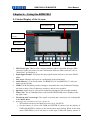
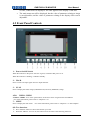
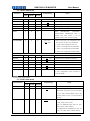
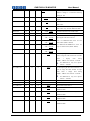
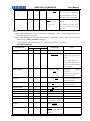
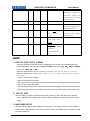
RMD7023 LCD MONITOR 8. User Manual Blue only and mono button: Blue only: press to eliminate the red and green signals. Only blue signal is displayed as an apparent monochrome picture on the screen. Mono: press to display a monochrome picture. Press the button repeatedly, the button function will circle as follows: Blue only 9. mono color mode Audio Selection and MUTE button Audio Selection: press to select the monitoring audio of the corresponding monitor. Mute: press to mute the sound. “MUTE” will show a continuous flickering lasting for 10S. To cancel the mute function, press the button again. Press the button repeatedly, the button function will circle as follows: Audio Selection Mute Note: Two monitors share one headphone jack. The indicator in lighting shows its audio is being monitored; in flickering shows its audio is being muted of corresponding monitor. 10: Enter Enter the menu items when menu is displayed; Enter instant parameters adjustment when menu isn’t displayed. The following parameters can be regulated: VOLUME, BRIGHTNESS, CONTRAST, SATURATION, SHARPNESS, HUE. (For more information, please refer to “Chapter 4.3.1”) 11: HEADPHONE Jack:3.5mm Stereo HEADPHONE Jack —6—