1
Tablet Charging
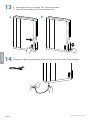
To begin charging the tablets, plug in the power cord.
The power cord is used to turn the power on and off. Charging occurs
whenever the power cord is connected to an outlet.
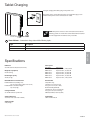
LED
NOTE: The power cord acts as the connect/disconnect device
switching power on and off. The socket outlet shall be installed
near the equipment and shall be easily accessible.
Power Indicator – Communicates charge status with the following signals:
Light
Description
Off
No power to the module.
On - solid
Tablets or Chromebooks are charging.
ENGLISH
Specifications
Dimensions
26.4”W x 35.6”H x 5.9”D (669 x 905 x 151 mm)
Weight (w/o equipment)
64.5 lbs (29.3 kg)
Rated weight capacity
44.4 lb (20.1 kg)
Maximum tablet or chromebook size
Individual dimensions (including cover):
up to 11.9” H x 8.9” W x 1.0” D (30 x 23 x 2.5 cm)
Individual tablet or chromebook weight:
up to 3 lb (1.4 kg)
Power system
Part number
DM12-1006-1
DM12-1006-2
DM12-1006-3
DM12-1006-4
DM12-1006-5
DM12-1006-6
Power System
Input: 100-120V~, 12A, 50/60 Hz
Input: 220-240V~, 8A, 50/60 Hz
Input: 220-240V~, 8A, 50/60 Hz
Input: 220-240V~, 8A, 50/60 Hz
Input: 220-240V~, 8A, 50/60 Hz
Input: 100-120V~, 12A, 50/60 Hz
Cooling/ventilation
One 12V DC continuous operation fan
Environmental
Temperature range:
Operating 0° to 30°C (32° to 86°F)
Storage -40° to 60°C (-40° to 140°F)
Relative humidity (maximum):
Operating 10%–90% (non condensing)
Storage 5%–95% (non condensing)
Altitude (maximum): 2000 m (6,562 ft)
Shipping dimensions
40.9” x 28.9” x 8.4” (1040 x 735 x 214 mm)
Compatibility:
Tablets and chromebooks
Shipping weight
77 lb (34.9 kg)
888-61-182-G-00 rev. B • 04/15
15 of 17