1
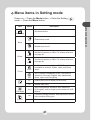
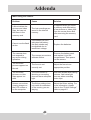
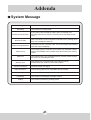
Menu items in Setting mode
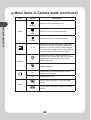
Power-on → Press the Mode button → Enter the Setting (
mode → Press the Menu button.
Option
30
-
Date & Time
Beep
On
Off
Flicker
50Hz
60Hz
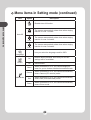
TV-out
Icon
LCD Bright
Format
Description
Set date and time.
Enable beep sound.
Disable beep sound.
Set flicker frequency to 50Hz. For settings reference,
see page 45.
Set flicker frequency to 60Hz. For settings reference,
see page 45.
NTSC
Set TV system compatibility to NTSC. This option
is suitable for America, Taiwan, Japan, and Korea
areas.
PAL
Set TV system compatibility to PAL. This option is
suitable for Germany, England, Italy, Netherlands,
China, Japan, and Hong Kong.
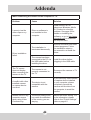
On
Enable OSD icons to display on the screen.
Off
Disable OSD icons.
-2~+2
Set LCD brightness. A positive value makes the
LCD brighter; while a negative value makes the LCD
dimmer.
Yes
Format the storage medium. Note that all files stored
in the medium will be gone.
No
Cancel action.
27
advanced operations
Item
)