1
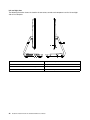
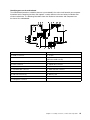
Left and right view
The following illustration shows the location of connectors, controls and components on the left and right
side of the computer.
8
7
1
2
3
4
5
6
1. Air vents
5. Optical drive eject button
2. USB 3.0 connector
6. Optical drive
3. HDMI-in connector (selected models only)
7. Power button
4. HDMI-out connector
8. Anti-scratch protector
22
IdeaCentre A530 All-In-One PC Hardware Maintenance Manual