1
2.4. DIP Switch Setting
2.4.2. Parallel Interface Specification
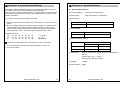
The OM-9300 is set up at the factory to be appropriate for almost all
users. It does, however, offer some settings for users with special
requirements. It has DIP switches that allow you to change communication
setting, such as handshaking and parity check, as well as print density. There
are two sets of DIP switches. The function of each switch is shown in the
following tables.
DIP Switch Set 1
2.4.1. Serial Interface Specifications
DIP Switch Set 1
SW
FUNCTION
ON
OFF
DEFAULT
1
Reserved
-
-
OFF
2
Hexadecimal
HEXDUMP
NORMAL
OFF
3
Reserved
-
-
OFF
4
Reserved
-
-
OFF
5
Reserved
-
-
OFF
6
Reserved
-
-
OFF
SW
FUNCTION
ON
OFF
DEFAULT
1
Data Receive Error
Ignore
Print “?”
OFF
Baud rate selection
2
Hexadecimal
HEXDUMP
NORMAL
OFF
Transmission speed
SW-7
SW-8
DEFAULT
-
-
OFF
3
Hands Shaking
XON/OFF
DTR/DSR
OFF
Reserved
4
Data Length
7bits
8bits
OFF
Reserved
-
-
OFF
5
Parity Check
ENABLED
DISABLED
OFF
Reserved
-
-
OFF
6
Parity Check
EVEN
ODD
OFF
Reserved
-
-
OFF
Baud rate selection
Print Density
Print Density
Transmission speed
SW-7
SW-8
Print Density
SW-9
SW-10
Print Density
SW-9
SW-10
4800 baud
ON
ON
Lower Power
ON
ON
Lower Power
ON
ON
600 baud
OFF
ON
Normal
OFF
ON
Normal
OFF
ON
ON
OFF
OFF
OFF
19200 baud
ON
OFF
Normal
ON
OFF
Normal
38400 baud
OFF
OFF
Dark
OFF
OFF
Dark
DIP Switch Set 2
DIP Switch Set 2
Functions
SW–1
SW-2
SW–3
SW-4
Remarks
Functions
SW–1
SW-2
SW–3
SW-4
Epson (TM-88)
OFF
OFF
-
-
Epson (TM-88)
OFF
OFF
-
-
Citizen (CBM-230)
ON
OFF
-
-
Citizen (CBM-230)
ON
OFF
-
-
Citizen (IDP-3540)
OFF
ON
-
-
Citizen (IDP-3540)
OFF
ON
-
-
-
-
-
-
-
-
-
-
-
-
www.omniprintinc.com
203 DPI
13
14
www.omniprintinc.com
Remarks
203 DPI