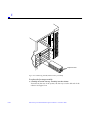
1
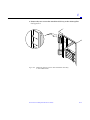
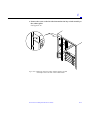
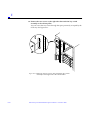
Ultra™ Enterprise™ 6000/5000/4000
Systems Manual
The Network Is the Computer™
Sun Microsystems Computer Company
2550 Garcia Avenue
Mountain View, CA 94043 USA
415 960-1300
fax 415 969-9131
Part No.: 802-3845-11
Revision A, November 1996
Copyright 1996 Sun Microsystems, Inc. 2550 Garcia Avenue, Mountain View, California 94043-1100 U.S.A.
All rights reserved. This product or document is protected by copyright and distributed under licenses restricting its use, copying, distribution,
and decompilation. No part of this product or document may be reproduced in any form by any means without prior written authorization of
Sun and its licensors, if any.
Portions of this product may be derived from the UNIX® system and from the Berkeley 4.3 BSD system, licensed from the University of
California. UNIX is a registered trademark in the United States and in other countries and is exclusively licensed by X/Open Company Ltd.
Third-party software, including font technology in this product, is protected by copyright and licensed from Sun’s suppliers.
RESTRICTED RIGHTS LEGEND: Use, duplication, or disclosure by the U.S. Government is subject to restrictions of FAR 52.227-14(g)(2)(6/87)
and FAR 52.227-19(6/87), or DFAR 252.227-7015(b)(6/95) and DFAR 227.7202-3(a).
Sun, Sun Microsystems, the Sun logo, Solaris, Enterprise, Ultra, UltraComputing, UltraServer, and UltraSPARC are trademarks or registered
trademarks of Sun Microsystems, Inc. in the United States and in other countries. All SPARC trademarks are used under license and are
trademarks or registered trademarks of SPARC International, Inc. in the United States and in other countries. Products bearing SPARC
trademarks are based upon an architecture developed by Sun Microsystems, Inc.
The OPEN LOOK® and Sun™ Graphical User Interfaces were developed by Sun Microsystems, Inc. for its users and licensees. Sun
acknowledges the pioneering efforts of Xerox Corporation in researching and developing the concept of visual or graphical user interfaces for the
computer industry. Sun holds a nonexclusive license from Xerox to the Xerox Graphical User Interface, which license also covers Sun’s licensees
who implement OPEN LOOK GUIs and otherwise comply with Sun’s written license agreements.
THIS PUBLICATION IS PROVIDED “AS IS” WITHOUT WARRANTY OF ANY KIND, EITHER EXPRESS OR IMPLIED, INCLUDING,
BUT NOT LIMITED TO, THE IMPLIED WARRANTIES OF MERCHANTABILITY, FITNESS FOR A PARTICULAR PURPOSE, OR
NON-INFRINGEMENT.
Copyright 1996 Sun Microsystems, Inc., 2550 Garcia Avenue, Mountain View, Californie 94043-1100 U.S.A.
Tous droits réservés. Ce produit ou document est protégé par un copyright et distribué avec des licences qui en restreignent l’utilisation, la copie
et la décompilation. Aucune partie de ce produit ou de sa documentation associée ne peut être reproduite sous aucune forme, par quelque moyen
que ce soit, sans l’autorisation préalable et écrite de Sun et de ses bailleurs de licence, s’il y en a.
Des parties de ce produit pourront être derivées du système UNIX® et du système Berkeley 4.3 BSD licencié par l’Université de Californie. UNIX
est une marque enregistrée aux Etats-Unis et dans d’autres pays, et licenciée exclusivement par X/Open Company Ltd. Le logiciel détenu par des
tiers, et qui comprend la technologie relative aux polices de caractères, est protégé par un copyright et licencié par des fournisseurs de Sun.
Sun, Sun Microsystems, le logo Sun, Solaris, Enterprise, Ultra, UltraComputing, UltraServer, et UltraSPARC sont des marques déposées ou
enregistrées de Sun Microsystems, Inc. aux Etats-Unis et dans d’autres pays. Toutes les marques SPARC, utilisées sous licence, sont des marques
déposées ou enregistrées de SPARC International, Inc. aux Etats-Unis et dans d’autres pays. Les produits portant les marques SPARC sont basés
sur une architecture développée par Sun Microsystems, Inc.
Les utilisateurs d’interfaces graphiques OPEN LOOK® et Sun™ ont été développés de Sun Microsystems, Inc. pour ses utilisateurs et licenciés.
Sun reconnaît les efforts de pionniers de Xerox Corporation pour la recherche et le développement du concept des interfaces d’utilisation visuelle
ou graphique pour l’industrie de l’informatique. Sun détient une licence non exclusive de Xerox sur l’interface d’utilisation graphique, cette
licence couvrant aussi les licenciés de Sun qui mettent en place les utilisateurs d’interfaces graphiques OPEN LOOK et qui en outre se
conforment aux licences écrites de Sun.
CETTE PUBLICATION EST FOURNIE "EN L’ETAT" SANS GARANTIE D’AUCUNE SORTE, NI EXPRESSE NI IMPLICITE, Y COMPRIS, ET
SANS QUE CETTE LISTE NE SOIT LIMITATIVE, DES GARANTIES CONCERNANT LA VALEUR MARCHANDE, L’APTITUDE DES
PRODUITS A REPONDRE A UNE UTILISATION PARTICULIERE OU LE FAIT QU’ILS NE SOIENT PAS CONTREFAISANTS DE PRODUITS
DE TIERS.
Please
Recycle
Contents
Preface . . . . . . . . . . . . . . . . . . . . . . . . . . . . . . . . . . . . . . . . . . . . . . .
xxv
Part 1—Product Description
1. Product Overview . . . . . . . . . . . . . . . . . . . . . . . . . . . . . . . . . . . . .
1-1
1.1 Standard Features . . . . . . . . . . . . . . . . . . . . . . . . . . . . . . . . .
1-1
1.2 Basic Definitions . . . . . . . . . . . . . . . . . . . . . . . . . . . . . . . . . .
1-5
1.3 Internal Options . . . . . . . . . . . . . . . . . . . . . . . . . . . . . . . . . .
1-7
2. Safety Precautions and Tools Requirements . . . . . . . . . . . . . .
2-1
2.1 Safety Precautions . . . . . . . . . . . . . . . . . . . . . . . . . . . . . . . .
2-1
2.2 Symbols . . . . . . . . . . . . . . . . . . . . . . . . . . . . . . . . . . . . . . . . .
2-2
2.3 Tools Required . . . . . . . . . . . . . . . . . . . . . . . . . . . . . . . . . . .
2-4
Part 2—System Components
3. CPU/Memory Boards and Components . . . . . . . . . . . . . . . . . .
3-1
3.1 Handling Boards and Assemblies . . . . . . . . . . . . . . . . . . .
3-2
3.2 Filler Panels and Load Boards . . . . . . . . . . . . . . . . . . . . . .
3-3
3.3 Hot-Plug Feature . . . . . . . . . . . . . . . . . . . . . . . . . . . . . . . . .
3-4
iii
3.4 CPU/Memory Boards . . . . . . . . . . . . . . . . . . . . . . . . . . . . .
3-5
3.4.1 Removing a Board. . . . . . . . . . . . . . . . . . . . . . . . . . . .
3-6
3.4.2 Installing a Board . . . . . . . . . . . . . . . . . . . . . . . . . . . .
3-9
3.4.3 UltraSPARC Modules . . . . . . . . . . . . . . . . . . . . . . . . . 3-14
3.4.4 Handling Precautions . . . . . . . . . . . . . . . . . . . . . . . . . 3-14
3.4.5 Memory Modules (SIMMs) . . . . . . . . . . . . . . . . . . . . 3-19
4. I/O Boards and Components . . . . . . . . . . . . . . . . . . . . . . . . . . . .
4-1
4.1 Handling Boards and Assemblies . . . . . . . . . . . . . . . . . . .
4-2
4.2 Filler Panels and Load Boards . . . . . . . . . . . . . . . . . . . . . .
4-3
4.3 SCSI Termination . . . . . . . . . . . . . . . . . . . . . . . . . . . . . . . . .
4-4
4.4 Hot-Plug Feature . . . . . . . . . . . . . . . . . . . . . . . . . . . . . . . . .
4-5
4.5 I/O Boards. . . . . . . . . . . . . . . . . . . . . . . . . . . . . . . . . . . . . . .
4-5
4.5.1 tpe-link-test? Variable . . . . . . . . . . . . . . . . . . . .
4-6
4.5.2 Removing a Board. . . . . . . . . . . . . . . . . . . . . . . . . . . . 4-11
4.5.3 Installing a Board . . . . . . . . . . . . . . . . . . . . . . . . . . . . 4-14
4.5.4 SBus Cards . . . . . . . . . . . . . . . . . . . . . . . . . . . . . . . . . . 4-19
4.5.5 Graphics (UPA) Cards . . . . . . . . . . . . . . . . . . . . . . . . 4-27
4.5.6 Fibre Cards. . . . . . . . . . . . . . . . . . . . . . . . . . . . . . . . . . 4-31
iv
5. Disk Boards and Components . . . . . . . . . . . . . . . . . . . . . . . . . .
5-1
5.1 Handling Boards and Assemblies . . . . . . . . . . . . . . . . . . .
5-2
5.2 Filler Panels and Load Boards . . . . . . . . . . . . . . . . . . . . . .
5-2
5.3 SCSI Termination . . . . . . . . . . . . . . . . . . . . . . . . . . . . . . . . .
5-4
5.4 Hot-Plug Feature . . . . . . . . . . . . . . . . . . . . . . . . . . . . . . . . .
5-5
5.5 Disk Boards . . . . . . . . . . . . . . . . . . . . . . . . . . . . . . . . . . . . . .
5-5
Ultra Enterprise 6000/5000/4000 Systems Manual—November 1996
5.5.1 Removing a Board. . . . . . . . . . . . . . . . . . . . . . . . . . . .
5-6
5.5.2 Installing a Board . . . . . . . . . . . . . . . . . . . . . . . . . . . .
5-8
5.5.3 Disk Drives . . . . . . . . . . . . . . . . . . . . . . . . . . . . . . . . . 5-13
6. Clock Board . . . . . . . . . . . . . . . . . . . . . . . . . . . . . . . . . . . . . . . . . .
6-1
6.1 Handling Boards and Assemblies . . . . . . . . . . . . . . . . . . .
6-2
6.2 Clock Board . . . . . . . . . . . . . . . . . . . . . . . . . . . . . . . . . . . . . .
6-2
6.2.1 ConsoleBus. . . . . . . . . . . . . . . . . . . . . . . . . . . . . . . . . .
6-4
6.2.2 Clocks . . . . . . . . . . . . . . . . . . . . . . . . . . . . . . . . . . . . . .
6-4
6.2.3 Reset logic . . . . . . . . . . . . . . . . . . . . . . . . . . . . . . . . . .
6-4
6.2.4 Removing a Clock Board . . . . . . . . . . . . . . . . . . . . . .
6-5
6.2.5 Installing a Clock Board . . . . . . . . . . . . . . . . . . . . . . .
6-6
7. Power Supplies . . . . . . . . . . . . . . . . . . . . . . . . . . . . . . . . . . . . . . .
7-1
7.1 Safety Precautions . . . . . . . . . . . . . . . . . . . . . . . . . . . . . . . .
7-2
7.2 Distribution . . . . . . . . . . . . . . . . . . . . . . . . . . . . . . . . . . . . . .
7-3
7.3 Peripheral Power Supply. . . . . . . . . . . . . . . . . . . . . . . . . . .
7-3
7.3.1 Troubleshooting a Peripheral Power Supply . . . . . .
7-4
7.3.2 Replacing a Peripheral Power Supply . . . . . . . . . . .
7-4
7.4 Power/Cooling Module (PCM) . . . . . . . . . . . . . . . . . . . . .
7-8
7.4.1 Power Requirements. . . . . . . . . . . . . . . . . . . . . . . . . .
7-9
7.4.2 Cooling Requirements . . . . . . . . . . . . . . . . . . . . . . . . 7-10
7.4.3 Troubleshooting a PCM . . . . . . . . . . . . . . . . . . . . . . . 7-11
7.4.4 Replacing a PCM . . . . . . . . . . . . . . . . . . . . . . . . . . . . . 7-11
8. Internal SCSI and Storage Devices . . . . . . . . . . . . . . . . . . . . . .
8-1
8.1 Tape and CD-ROM Drives. . . . . . . . . . . . . . . . . . . . . . . . . .
8-4
Contents
v
8.1.1 Use and Maintenance . . . . . . . . . . . . . . . . . . . . . . . . .
8-4
8.1.2 Removing/Replacing a Tape or CD-ROM Drive
in Enterprise 6000/5000 Systems . . . . . . . . . . . . . . .
8-5
8.1.3 Removing/Replacing a Tape or CD-ROM Drive
in an Enterprise 4000 System . . . . . . . . . . . . . . . . . . .
8-7
8.2 Multi-Tape Tray and SPARCstorage Library. . . . . . . . . . . 8-10
8.3 External Disk Drives . . . . . . . . . . . . . . . . . . . . . . . . . . . . . . 8-10
8.3.1 Use and Maintenance . . . . . . . . . . . . . . . . . . . . . . . . . 8-10
8.3.2 Removing and Installing a Disk Drive . . . . . . . . . . . 8-10
Part 3—Troubleshooting
vi
9. Troubleshooting Overview . . . . . . . . . . . . . . . . . . . . . . . . . . . . .
9-1
9.1 Using a Terminal. . . . . . . . . . . . . . . . . . . . . . . . . . . . . . . . . .
9-1
9.2 Hardware Indicators . . . . . . . . . . . . . . . . . . . . . . . . . . . . . .
9-2
9.2.1 System Front Panel LEDs . . . . . . . . . . . . . . . . . . . . . .
9-3
9.2.2 Clock Board LEDs . . . . . . . . . . . . . . . . . . . . . . . . . . . .
9-3
9.2.3 CPU/Memory and I/O Board LEDs . . . . . . . . . . . .
9-3
9.2.4 Disk Board LEDs . . . . . . . . . . . . . . . . . . . . . . . . . . . . .
9-5
9.2.5 Power Supplies . . . . . . . . . . . . . . . . . . . . . . . . . . . . . .
9-5
9.2.6 Disk Tray Indicators . . . . . . . . . . . . . . . . . . . . . . . . . .
9-6
9.3 Basic Definitions for the Card Cage . . . . . . . . . . . . . . . . . .
9-7
9.4 Diagnosing Problems . . . . . . . . . . . . . . . . . . . . . . . . . . . . . .
9-7
9.4.1 Error Messages . . . . . . . . . . . . . . . . . . . . . . . . . . . . . .
9-7
9.4.2 SunVTS . . . . . . . . . . . . . . . . . . . . . . . . . . . . . . . . . . . . .
9-8
9.4.3 prtdiag(1M) . . . . . . . . . . . . . . . . . . . . . . . . . . . . . . .
9-8
9.4.4 POST and OpenBoot . . . . . . . . . . . . . . . . . . . . . . . . . .
9-9
Ultra Enterprise 6000/5000/4000 Systems Manual—November 1996
9.4.5 Solstice SyMON. . . . . . . . . . . . . . . . . . . . . . . . . . . . . . 9-10
9.5 Specific Problems and Solutions . . . . . . . . . . . . . . . . . . . . . 9-11
9.5.1 Failure of Network Communications . . . . . . . . . . . . 9-11
9.5.2 Resetting and Power Cycling the System
from a Remote Console . . . . . . . . . . . . . . . . . . . . . . . 9-13
10. Flow Diagrams for Troubleshooting . . . . . . . . . . . . . . . . . . . . . 10-1
10.1 No AC or DC Power. . . . . . . . . . . . . . . . . . . . . . . . . . . . . . . 10-2
10.2 System Cannot Boot . . . . . . . . . . . . . . . . . . . . . . . . . . . . . . . 10-3
10.3 Defective CPU/Memory Board . . . . . . . . . . . . . . . . . . . . . 10-4
10.4 Defective I/O Interface Board. . . . . . . . . . . . . . . . . . . . . . . 10-5
10.5 Defective Disk Board . . . . . . . . . . . . . . . . . . . . . . . . . . . . . . 10-6
10.6 Defective Disk Drive . . . . . . . . . . . . . . . . . . . . . . . . . . . . . . 10-7
10.7 Defective Power Supplies . . . . . . . . . . . . . . . . . . . . . . . . . . 10-8
10.8 Defective Clock Board . . . . . . . . . . . . . . . . . . . . . . . . . . . . . 10-9
Part 4—Service Information
11. Safety and Tools . . . . . . . . . . . . . . . . . . . . . . . . . . . . . . . . . . . . . . 11-1
11.1 Safety Precautions . . . . . . . . . . . . . . . . . . . . . . . . . . . . . . . . 11-1
11.2 Symbols . . . . . . . . . . . . . . . . . . . . . . . . . . . . . . . . . . . . . . . . . 11-2
11.3 System Precautions. . . . . . . . . . . . . . . . . . . . . . . . . . . . . . . . 11-4
11.4 Tools Required . . . . . . . . . . . . . . . . . . . . . . . . . . . . . . . . . . . 11-5
12. Powering Off and On . . . . . . . . . . . . . . . . . . . . . . . . . . . . . . . . . . 12-1
12.1 Powering Off the System . . . . . . . . . . . . . . . . . . . . . . . . . . . 12-1
12.1.1 Enterprise 6000/5000 Cabinet Systems . . . . . . . . . . 12-1
12.1.2 Enterprise 4000 System. . . . . . . . . . . . . . . . . . . . . . . . 12-3
Contents
vii
12.2 Removing the External Cables . . . . . . . . . . . . . . . . . . . . . . 12-5
12.3 Restarting the System. . . . . . . . . . . . . . . . . . . . . . . . . . . . . . 12-7
12.4 Reading Boot Messages . . . . . . . . . . . . . . . . . . . . . . . . . . . . 12-10
13. Preparing for Service . . . . . . . . . . . . . . . . . . . . . . . . . . . . . . . . . . 13-1
13.1 Servicing Hot-Pluggable Components. . . . . . . . . . . . . . . . 13-1
13.2 Powering Off the System . . . . . . . . . . . . . . . . . . . . . . . . . . . 13-1
13.3 Internal Access - Enterprise 6000/5000 Systems . . . . . . . 13-2
13.3.1 Outer Cover Reference Guide . . . . . . . . . . . . . . . . . . 13-2
13.3.2 CD-ROM/Tape Device Door . . . . . . . . . . . . . . . . . . . 13-3
13.3.3 Top Front Bezel . . . . . . . . . . . . . . . . . . . . . . . . . . . . . . 13-3
13.3.4 Front Panels Hinged Door . . . . . . . . . . . . . . . . . . . . . 13-4
13.3.5 Rear Screen Panel . . . . . . . . . . . . . . . . . . . . . . . . . . . . 13-6
13.3.6 Side Panels . . . . . . . . . . . . . . . . . . . . . . . . . . . . . . . . . . 13-7
13.3.7 Fan Tray . . . . . . . . . . . . . . . . . . . . . . . . . . . . . . . . . . . . 13-8
13.3.8 Kick Panel . . . . . . . . . . . . . . . . . . . . . . . . . . . . . . . . . . 13-10
13.3.9 Stabilizer Bar . . . . . . . . . . . . . . . . . . . . . . . . . . . . . . . . 13-11
13.4 Internal Access - Enterprise 4000 System . . . . . . . . . . . . . 13-12
13.4.1 Top Bezel . . . . . . . . . . . . . . . . . . . . . . . . . . . . . . . . . . . 13-12
13.4.2 SCSI Tray . . . . . . . . . . . . . . . . . . . . . . . . . . . . . . . . . . . 13-13
13.5 Powering On the System . . . . . . . . . . . . . . . . . . . . . . . . . . . 13-13
Part 5—Appendixes
A. Specifications . . . . . . . . . . . . . . . . . . . . . . . . . . . . . . . . . . . . . . . . . A-1
A.1 Physical Specifications . . . . . . . . . . . . . . . . . . . . . . . . . . . . . A-1
A.2 Electrical Specifications . . . . . . . . . . . . . . . . . . . . . . . . . . . . A-3
viii
Ultra Enterprise 6000/5000/4000 Systems Manual—November 1996
A.3 Environmental Requirements . . . . . . . . . . . . . . . . . . . . . . . A-4
B. Functional Description . . . . . . . . . . . . . . . . . . . . . . . . . . . . . . . .
B-1
B.1 System Overview . . . . . . . . . . . . . . . . . . . . . . . . . . . . . . . . .
B-1
B.1.1 Board Types . . . . . . . . . . . . . . . . . . . . . . . . . . . . . . . . .
B-1
B.2 System Packaging . . . . . . . . . . . . . . . . . . . . . . . . . . . . . . . . .
B-3
B.2.1 Enterprise 6000 Server . . . . . . . . . . . . . . . . . . . . . . . .
B-3
B.2.2 Enterprise 5000 Server . . . . . . . . . . . . . . . . . . . . . . . .
B-4
B.2.3 Enterprise 4000 Standalone Server . . . . . . . . . . . . . .
B-5
B.3 Software . . . . . . . . . . . . . . . . . . . . . . . . . . . . . . . . . . . . . . . . .
B-6
B.4 Board Hot-Plug Procedures. . . . . . . . . . . . . . . . . . . . . . . . .
B-6
B.5 CPU/Memory Board . . . . . . . . . . . . . . . . . . . . . . . . . . . . . .
B-7
B.5.1 CPU Modules. . . . . . . . . . . . . . . . . . . . . . . . . . . . . . . .
B-8
B.5.2 System Master Board . . . . . . . . . . . . . . . . . . . . . . . . .
B-8
B.5.3 SIMMs. . . . . . . . . . . . . . . . . . . . . . . . . . . . . . . . . . . . . .
B-8
B.6 I/O Boards. . . . . . . . . . . . . . . . . . . . . . . . . . . . . . . . . . . . . . . B-10
B.7 Network Interfaces . . . . . . . . . . . . . . . . . . . . . . . . . . . . . . . . B-12
B.8 Disk Board . . . . . . . . . . . . . . . . . . . . . . . . . . . . . . . . . . . . . . . B-12
B.9 Power Supplies . . . . . . . . . . . . . . . . . . . . . . . . . . . . . . . . . . . B-12
B.9.1 Power/Cooling Modules (PCMs) . . . . . . . . . . . . . . . B-12
B.9.2 Peripheral Power Supply . . . . . . . . . . . . . . . . . . . . . . B-13
B.10 Clock Board . . . . . . . . . . . . . . . . . . . . . . . . . . . . . . . . . . . . . . B-14
B.11 Disk Trays . . . . . . . . . . . . . . . . . . . . . . . . . . . . . . . . . . . . . . . B-15
B.12 CD-ROM/Tape Tray. . . . . . . . . . . . . . . . . . . . . . . . . . . . . . . B-15
C. SCSI Devices . . . . . . . . . . . . . . . . . . . . . . . . . . . . . . . . . . . . . . . . .
Contents
C-1
ix
C.1 SCSI Tray Target IDs. . . . . . . . . . . . . . . . . . . . . . . . . . . . . . .
C-1
C.2 Disk Board Target IDs . . . . . . . . . . . . . . . . . . . . . . . . . . . . .
C-1
C.3 SCSI Cable Length . . . . . . . . . . . . . . . . . . . . . . . . . . . . . . . .
C-2
C.4 SCSI Termination . . . . . . . . . . . . . . . . . . . . . . . . . . . . . . . . .
C-2
D. Rules for System Configuration . . . . . . . . . . . . . . . . . . . . . . . . . D-1
x
D.1 Card Cage . . . . . . . . . . . . . . . . . . . . . . . . . . . . . . . . . . . . . . .
D-1
D.1.1 CPU/Memory Boards. . . . . . . . . . . . . . . . . . . . . . . . .
D-1
D.1.2 I/O Boards . . . . . . . . . . . . . . . . . . . . . . . . . . . . . . . . . .
D-1
D.1.3 Disk Board . . . . . . . . . . . . . . . . . . . . . . . . . . . . . . . . . .
D-2
D.1.4 Power Supplies and Fan Cooling . . . . . . . . . . . . . . .
D-2
D.1.5 Filler Panels and Load Boards . . . . . . . . . . . . . . . . . .
D-3
D.2 SBus Modules . . . . . . . . . . . . . . . . . . . . . . . . . . . . . . . . . . . .
D-3
D.3 CPU Modules . . . . . . . . . . . . . . . . . . . . . . . . . . . . . . . . . . . .
D-3
D.4 Memory Modules . . . . . . . . . . . . . . . . . . . . . . . . . . . . . . . . .
D-4
D.5 Power Supplies . . . . . . . . . . . . . . . . . . . . . . . . . . . . . . . . . . .
D-4
D.6 Disk Drive Trays . . . . . . . . . . . . . . . . . . . . . . . . . . . . . . . . . .
D-4
D.7 CD-ROM/Tape Drive Tray . . . . . . . . . . . . . . . . . . . . . . . . .
D-5
D.8 Connecting Cables . . . . . . . . . . . . . . . . . . . . . . . . . . . . . . . .
D-5
D.8.1 SCSI. . . . . . . . . . . . . . . . . . . . . . . . . . . . . . . . . . . . . . . .
D-5
D.8.2 Ethernet . . . . . . . . . . . . . . . . . . . . . . . . . . . . . . . . . . . .
D-5
D.8.3 Video Interface. . . . . . . . . . . . . . . . . . . . . . . . . . . . . . .
D-5
E. Non-Chassis Field Replaceable Units (FRUs) . . . . . . . . . . . . .
E-1
E.1 Enterprise 6000/5000 Systems . . . . . . . . . . . . . . . . . . . . . .
E-2
E.1.1 System Cabinet Fan Tray Assembly . . . . . . . . . . . . .
E-2
Ultra Enterprise 6000/5000/4000 Systems Manual—November 1996
E.1.2 Domestic and International System Cabinet
AC Input Cable Assembly . . . . . . . . . . . . . . . . . . . . .
E-4
E.1.3 Universal System Cabinet Power Sequencer . . . . . .
E-6
E.1.4 CD Tray Power and Data Cable Assemblies . . . . . .
E-7
E.1.5 Key Switch Assembly . . . . . . . . . . . . . . . . . . . . . . . . . E-11
E.1.6 SCSI Tape Adapter PCS Assembly . . . . . . . . . . . . . . E-18
E.1.7 Key Switch Adapter Assembly . . . . . . . . . . . . . . . . . E-20
E.1.8 Fan Tray Assembly, 200/240V . . . . . . . . . . . . . . . . . . E-21
E.1.9 Centerplane . . . . . . . . . . . . . . . . . . . . . . . . . . . . . . . . . E-23
E.2 Enterprise 4000 System . . . . . . . . . . . . . . . . . . . . . . . . . . . . E-26
E.2.1 Fan Tray Assembly, 100V/240V . . . . . . . . . . . . . . . . E-26
E.2.2 Key Switch Assembly . . . . . . . . . . . . . . . . . . . . . . . . . E-28
E.2.3 Centerplane . . . . . . . . . . . . . . . . . . . . . . . . . . . . . . . . . E-31
F. Illustrated Parts Breakdown (IPB) . . . . . . . . . . . . . . . . . . . . . . .
F-1
F.1 Enterprise 6000/5000 Systems . . . . . . . . . . . . . . . . . . . . . .
F-5
F.2 Enterprise 4000 System . . . . . . . . . . . . . . . . . . . . . . . . . . . . F-19
G. Connectors . . . . . . . . . . . . . . . . . . . . . . . . . . . . . . . . . . . . . . . . . . . G-1
G.1 CPU/Memory Board . . . . . . . . . . . . . . . . . . . . . . . . . . . . . .
G-2
G.1.1 Centerplane Connector. . . . . . . . . . . . . . . . . . . . . . . .
G-2
G.1.2 CPU Module Connectors . . . . . . . . . . . . . . . . . . . . . .
G-3
G.2 I/O Board . . . . . . . . . . . . . . . . . . . . . . . . . . . . . . . . . . . . . . .
G-5
G.2.1 Centerplane Connector. . . . . . . . . . . . . . . . . . . . . . . .
G-7
G.2.2 SBus Connectors . . . . . . . . . . . . . . . . . . . . . . . . . . . . .
G-7
G.2.3 UPA Connector Location . . . . . . . . . . . . . . . . . . . . . .
G-8
Contents
xi
G.2.4 Ethernet Connector (TPE) . . . . . . . . . . . . . . . . . . . . .
G-9
G.2.5 MII Connector . . . . . . . . . . . . . . . . . . . . . . . . . . . . . . .
G-9
G.2.6 Fiber Interface Connectors . . . . . . . . . . . . . . . . . . . . . G-10
G.2.7 SCSI Connector . . . . . . . . . . . . . . . . . . . . . . . . . . . . . . G-11
G.3 Disk Board . . . . . . . . . . . . . . . . . . . . . . . . . . . . . . . . . . . . . . . G-11
G.3.1 Centerplane Connector. . . . . . . . . . . . . . . . . . . . . . . . G-12
G.3.2 SCSI In Connector . . . . . . . . . . . . . . . . . . . . . . . . . . . . G-12
G.3.3 SCSI Out Connector . . . . . . . . . . . . . . . . . . . . . . . . . . G-13
G.4 Clock Board . . . . . . . . . . . . . . . . . . . . . . . . . . . . . . . . . . . . . . G-13
G.4.1 Centerplane Connector. . . . . . . . . . . . . . . . . . . . . . . . G-14
G.4.2 Serial Port Connectors . . . . . . . . . . . . . . . . . . . . . . . . G-14
G.4.3 Keyboard and Mouse Connector . . . . . . . . . . . . . . . G-15
Index . . . . . . . . . . . . . . . . . . . . . . . . . . . . . . . . . . . . . . . . . . .
xii
Ultra Enterprise 6000/5000/4000 Systems Manual—November 1996
Index-1
Figures
Figure 1-1
Ultra Enterprise Data Center System Cabinet and
Standalone Enclosure . . . . . . . . . . . . . . . . . . . . . . . . . . . . . . . . . .
1-1
Figure 1-2
Enterprise 6000/5000 System Cabinet (Front View) . . . . . . . .
1-3
Figure 1-3
Bezels for Cabinet System - Three Examples. . . . . . . . . . . . . . .
1-3
Figure 1-4
Enterprise 6000/5000 System Cabinet (Rear View) . . . . . . . . .
1-4
Figure 1-5
Enterprise 4000 System . . . . . . . . . . . . . . . . . . . . . . . . . . . . . . . . .
1-5
Figure 3-1
Filler Panel (Enterprise 5000/4000 Only). . . . . . . . . . . . . . . . . .
3-3
Figure 3-2
Load Board (Enterprise 6000 Systems Only) . . . . . . . . . . . . . . .
3-4
Figure 3-3
CPU/Memory Board Simplified Block Diagram . . . . . . . . . . .
3-6
Figure 3-4
Unlocking and Locking Quarter-Turn Access Slots . . . . . . . . .
3-7
Figure 3-5
CPU/Memory Board . . . . . . . . . . . . . . . . . . . . . . . . . . . . . . . . . .
3-8
Figure 3-6
Enterprise 6000 Board Locations . . . . . . . . . . . . . . . . . . . . . . . . .
3-10
Figure 3-7
Enterprise 5000/4000 Board Locations. . . . . . . . . . . . . . . . . . . .
3-11
Figure 3-8
Board Replacement . . . . . . . . . . . . . . . . . . . . . . . . . . . . . . . . . . . .
3-12
Figure 3-9
UltraSPARC Module Connector Detail . . . . . . . . . . . . . . . . . . .
3-14
Figure 3-10
Ultra SPARC Module Connector Detail. . . . . . . . . . . . . . . . . . .
3-15
Figure 3-11
UltraSPARC Module Removal and Replacement . . . . . . . . . .
3-16
xiii
xiv
Figure 3-12
Tightening Compression Connector Screws . . . . . . . . . . . . . . .
3-18
Figure 3-13
Layout of CPU/Memory Board . . . . . . . . . . . . . . . . . . . . . . . . .
3-19
Figure 3-14
Ejecting a SIMM . . . . . . . . . . . . . . . . . . . . . . . . . . . . . . . . . . . . . .
3-21
Figure 3-15
Orienting a SIMM . . . . . . . . . . . . . . . . . . . . . . . . . . . . . . . . . . . . .
3-23
Figure 3-16
Installing a SIMM . . . . . . . . . . . . . . . . . . . . . . . . . . . . . . . . . . . . .
3-24
Figure 4-1
Filler Panel (Enterprise 5000/4000 Only). . . . . . . . . . . . . . . . . .
4-3
Figure 4-2
Load Board (Enterprise 6000 System Only). . . . . . . . . . . . . . . .
4-4
Figure 4-3
SCSI Terminator. . . . . . . . . . . . . . . . . . . . . . . . . . . . . . . . . . . . . . .
4-4
Figure 4-4
SBus I/O Board Components Locations . . . . . . . . . . . . . . . . . .
4-7
Figure 4-5
Graphics I/O Board Components Locations. . . . . . . . . . . . . . .
4-8
Figure 4-6
SBus I/O Board Simplified Block Diagram . . . . . . . . . . . . . . . .
4-9
Figure 4-7
Graphics I/O Board Simplified Block Diagram . . . . . . . . . . . .
4-10
Figure 4-8
Unlocking and Locking Quarter-Turn Access Slots . . . . . . . . .
4-12
Figure 4-9
I/O Boards . . . . . . . . . . . . . . . . . . . . . . . . . . . . . . . . . . . . . . . . . . .
4-13
Figure 4-10
Enterprise 6000 Board Locations . . . . . . . . . . . . . . . . . . . . . . . . .
4-15
Figure 4-11
Enterprise 5000/4000 Board Locations. . . . . . . . . . . . . . . . . . . .
4-16
Figure 4-12
Board Replacement . . . . . . . . . . . . . . . . . . . . . . . . . . . . . . . . . . . .
4-17
Figure 4-13
I/O Board SBus Card Locations . . . . . . . . . . . . . . . . . . . . . . . . .
4-20
Figure 4-14
Locking and Unlocking Standoffs. . . . . . . . . . . . . . . . . . . . . . . .
4-21
Figure 4-15
Removing or Installing an SBus Card . . . . . . . . . . . . . . . . . . . .
4-22
Figure 4-16
SBus Card Rear Panel with Adapter. . . . . . . . . . . . . . . . . . . . . .
4-23
Figure 4-17
Card Retainer . . . . . . . . . . . . . . . . . . . . . . . . . . . . . . . . . . . . . . . . .
4-24
Figure 4-18
DSBE/S SBus Card . . . . . . . . . . . . . . . . . . . . . . . . . . . . . . . . . . . .
4-25
Figure 4-19
FSBE/S SBus Card. . . . . . . . . . . . . . . . . . . . . . . . . . . . . . . . . . . . .
4-25
Figure 4-20
Disabling and Enabling the Link Integrity Test . . . . . . . . . . . .
4-26
Ultra Enterprise 6000/5000/4000 Systems Manual—November 1996
Figure 4-21
Graphics (UPA) Card Connector Location . . . . . . . . . . . . . . . .
4-27
Figure 4-22
Removing or Installing a Graphics (UPA) Card . . . . . . . . . . . .
4-29
Figure 4-23
I/O Board Fibre Card Connector Locations . . . . . . . . . . . . . . .
4-32
Figure 4-24
Removing or Installing a Fibre Card . . . . . . . . . . . . . . . . . . . . .
4-33
Figure 5-1
Filler Panel (Enterprise 5000/4000 Only). . . . . . . . . . . . . . . . . .
5-3
Figure 5-2
Load Board (Enterprise 6000 Systems Only) . . . . . . . . . . . . . . .
5-4
Figure 5-3
SCSI Terminator. . . . . . . . . . . . . . . . . . . . . . . . . . . . . . . . . . . . . . .
5-4
Figure 5-4
Unlocking and Locking Quarter-Turn Access Slots . . . . . . . . .
5-7
Figure 5-5
Disk Board . . . . . . . . . . . . . . . . . . . . . . . . . . . . . . . . . . . . . . . . . . .
5-7
Figure 5-6
Enterprise 5000/4000 Board Locations. . . . . . . . . . . . . . . . . . . .
5-9
Figure 5-7
Board Replacement . . . . . . . . . . . . . . . . . . . . . . . . . . . . . . . . . . . .
5-11
Figure 5-8
Disk Drive with Ejector Drive Retainer Open . . . . . . . . . . . . . .
5-14
Figure 6-1
Clock Board Simplified Block Diagram . . . . . . . . . . . . . . . . . . .
6-3
Figure 6-2
Standalone Clock Board . . . . . . . . . . . . . . . . . . . . . . . . . . . . . . . .
6-6
Figure 6-3
Clock Board Slot Location (System Rear View) . . . . . . . . . . . .
6-8
Figure 7-1
Peripheral Power Supply . . . . . . . . . . . . . . . . . . . . . . . . . . . . . . .
7-3
Figure 7-2
Quarter-Turn Access Slot . . . . . . . . . . . . . . . . . . . . . . . . . . . . . . .
7-4
Figure 7-3
Replacing the Peripheral Power Supply in the
Enterprise 6000/5000 Systems. . . . . . . . . . . . . . . . . . . . . . . . . . .
7-5
Replacing the Peripheral Power Supply in the
Enterprise 4000 System . . . . . . . . . . . . . . . . . . . . . . . . . . . . . . . . .
7-6
Figure 7-5
PCM . . . . . . . . . . . . . . . . . . . . . . . . . . . . . . . . . . . . . . . . . . . . . . . . .
7-8
Figure 7-6
PCM - Front and Rear Installation . . . . . . . . . . . . . . . . . . . . . . .
7-12
Figure 7-7
Quarter-turn Access Slots. . . . . . . . . . . . . . . . . . . . . . . . . . . . . . .
7-13
Figure 7-8
Replacing the PCM in the Enterprise 6000/5000 Systems. . . .
7-13
Figure 7-9
Replacing the PCM in the Enterprise 4000 System. . . . . . . . . .
7-14
Figure 7-4
Figures
xv
xvi
Figure 8-1
Enterprise 6000 System . . . . . . . . . . . . . . . . . . . . . . . . . . . . . . . . .
8-2
Figure 8-2
Enterprise 5000 System . . . . . . . . . . . . . . . . . . . . . . . . . . . . . . . . .
8-3
Figure 8-3
Enterprise 4000 System . . . . . . . . . . . . . . . . . . . . . . . . . . . . . . . . .
8-4
Figure 8-4
Removing the Top Front Panel . . . . . . . . . . . . . . . . . . . . . . . . . .
8-5
Figure 8-5
CD-ROM/Tape Drive Removal and Replacement. . . . . . . . . .
8-6
Figure 8-6
Front Panel Bezel . . . . . . . . . . . . . . . . . . . . . . . . . . . . . . . . . . . . . .
8-8
Figure 8-7
SCSI Tray Removal and Replacement . . . . . . . . . . . . . . . . . . . .
8-9
Figure 9-1
TTY Serial Port A . . . . . . . . . . . . . . . . . . . . . . . . . . . . . . . . . . . . . .
9-2
Figure 10-1
Diagnosing AC/DC Power Problems . . . . . . . . . . . . . . . . . . . .
10-2
Figure 10-2
Diagnosing Operating System Problems . . . . . . . . . . . . . . . . . .
10-3
Figure 10-3
Diagnosing CPU/Memory Board Problems . . . . . . . . . . . . . . .
10-4
Figure 10-4
Replacing I/O Interface . . . . . . . . . . . . . . . . . . . . . . . . . . . . . . . .
10-5
Figure 10-5
Diagnosing Disk Board Problems . . . . . . . . . . . . . . . . . . . . . . . .
10-6
Figure 10-6
Diagnosing Disk Drive Problems . . . . . . . . . . . . . . . . . . . . . . . .
10-7
Figure 10-7
Diagnosing Power Supply Problems . . . . . . . . . . . . . . . . . . . . .
10-8
Figure 10-8
Diagnosing a Defective Clock Board . . . . . . . . . . . . . . . . . . . . .
10-9
Figure 12-1
Keyswitch Standby Position (Cabinet System) . . . . . . . . . . . . .
12-2
Figure 12-2
AC Power Switch (Cabinet Server) . . . . . . . . . . . . . . . . . . . . . . .
12-3
Figure 12-3
Keyswitch Standby Position (Standalone Server). . . . . . . . . . .
12-4
Figure 12-4
AC Power Switch and Power Receptacle
(Standalone Server) . . . . . . . . . . . . . . . . . . . . . . . . . . . . . . . . . . . .
12-5
Figure 12-5
Rear Screen and Kick Panel . . . . . . . . . . . . . . . . . . . . . . . . . . . . .
12-6
Figure 12-6
Local/Remote Switch . . . . . . . . . . . . . . . . . . . . . . . . . . . . . . . . . .
12-8
Figure 12-7
CPU Reset Switch on Clock Board . . . . . . . . . . . . . . . . . . . . . . .
12-9
Figure 12-8
Front Panel Status LEDs (Cabinet Server) . . . . . . . . . . . . . . . . . 12-10
Figure 12-9
Front Panel Status LEDs (Standalone Server) . . . . . . . . . . . . . . 12-11
Ultra Enterprise 6000/5000/4000 Systems Manual—November 1996
Figure 13-1
Removing the Front Bezel . . . . . . . . . . . . . . . . . . . . . . . . . . . . . .
13-4
Figure 13-2
Opening the Three-panel Hinged Door . . . . . . . . . . . . . . . . . . .
13-5
Figure 13-3
Removing the Rear Screen Panel. . . . . . . . . . . . . . . . . . . . . . . . .
13-6
Figure 13-4
Removing the Side Panels . . . . . . . . . . . . . . . . . . . . . . . . . . . . . .
13-7
Figure 13-5
Removing the Fan Tray Screen and Fan Tray . . . . . . . . . . . . . .
13-9
Figure 13-6
Removing the Kick Panel . . . . . . . . . . . . . . . . . . . . . . . . . . . . . . . 13-10
Figure 13-7
Stabilizer Bar and Levelling Pads . . . . . . . . . . . . . . . . . . . . . . . . 13-11
Figure 13-8
Removing the Top Bezel/Panel. . . . . . . . . . . . . . . . . . . . . . . . . . 13-12
Figure 13-9
Removing the SCSI Tray. . . . . . . . . . . . . . . . . . . . . . . . . . . . . . . . 13-13
Figure B-1
Enterprise System Logical Organization . . . . . . . . . . . . . . . . . .
B-2
Figure B-2
Ultra Enterprise System Cabinet . . . . . . . . . . . . . . . . . . . . . . . . .
B-3
Figure B-3
Enterprise 5000 Server . . . . . . . . . . . . . . . . . . . . . . . . . . . . . . . . .
B-5
Figure B-4
Enterprise 4000 Standalone Server . . . . . . . . . . . . . . . . . . . . . . .
B-6
Figure B-5
CPU/Memory Board . . . . . . . . . . . . . . . . . . . . . . . . . . . . . . . . . .
B-7
Figure B-6
SIMM Slot Locations . . . . . . . . . . . . . . . . . . . . . . . . . . . . . . . . . . .
B-9
Figure B-7
SBus I/O Board . . . . . . . . . . . . . . . . . . . . . . . . . . . . . . . . . . . . . . .
B-10
Figure B-8
Graphics I/O Board. . . . . . . . . . . . . . . . . . . . . . . . . . . . . . . . . . . .
B-11
Figure B-9
Peripheral Power Supply . . . . . . . . . . . . . . . . . . . . . . . . . . . . . . .
B-13
Figure B-10
Clock Board . . . . . . . . . . . . . . . . . . . . . . . . . . . . . . . . . . . . . . . . . .
B-14
Figure E-1
Replacing the Fan Tray Assembly
in the Enterprise 6000/5000 Systems . . . . . . . . . . . . . . . . . . . . .
E-3
Figure E-2
Opening the Power Connector Cover . . . . . . . . . . . . . . . . . . . .
E-5
Figure E-3
Replacing the Power Sequencer . . . . . . . . . . . . . . . . . . . . . . . . .
E-6
Figure E-4
Removing the Front Bezel . . . . . . . . . . . . . . . . . . . . . . . . . . . . . .
E-8
Figure E-5
Removing the Cable Assemblies
From the Back of the SCSI Tray. . . . . . . . . . . . . . . . . . . . . . . . . .
E-9
Figures
xvii
Figure E-6
Removing the Cable Assemblies
From the Front of the SCSI Adapter Tray . . . . . . . . . . . . . . . . .
E-10
Removing the Two Screws
That Attach the SCSI Tray to the Flange . . . . . . . . . . . . . . . . . .
E-12
Removing the Two Screws That Attach the SCSI Tray
to the Cabinet Pillar. . . . . . . . . . . . . . . . . . . . . . . . . . . . . . . . . . . .
E-13
Removing the SCSI Tray in the
Enterprise 6000/5000 Systems. . . . . . . . . . . . . . . . . . . . . . . . . . .
E-14
Removing the Screw That Attaches the Key Switch
Assembly to the Left Side of the Cabinet Pillar. . . . . . . . . . . . .
E-15
Removing the Two Screws That Attach the Key Switch
Assembly to the Right Side of the Cabinet Pillar . . . . . . . . . . .
E-16
Replacing the Key Switch Assembly in the
Enterprise 6000/5000 Systems. . . . . . . . . . . . . . . . . . . . . . . . . . .
E-17
Removing the SCSI Tape Adapter PCS Assembly
in the Enterprise 6000/5000 Systems . . . . . . . . . . . . . . . . . . . . .
E-19
Figure E-14
Removing the 200/240V Fan Tray Assembly . . . . . . . . . . . . . .
E-22
Figure E-15
Removing the Fan Tray in the Enterprise 4000 System . . . . . .
E-27
Figure E-16
Removing the Top Bezel. . . . . . . . . . . . . . . . . . . . . . . . . . . . . . . .
E-29
Figure E-17
Replacing the Key Switch/LED Tray Assembly in the
Enterprise 4000 System . . . . . . . . . . . . . . . . . . . . . . . . . . . . . . . . .
E-30
Figure E-18
Removing the SCSI tray . . . . . . . . . . . . . . . . . . . . . . . . . . . . . . . .
E-32
Figure G-1
CPU/Memory Board Connector Locations . . . . . . . . . . . . . . . .
G-2
Figure G-2
CPU/Memory Board Centerplane Connector Location . . . . .
G-3
Figure G-3
Centerplane Connector Detail . . . . . . . . . . . . . . . . . . . . . . . . . . .
G-3
Figure G-4
CPU Module 0 Connector (144 Pin) Location . . . . . . . . . . . . . .
G-4
Figure G-5
CPU Module 1 Connector (144 Pin) Location . . . . . . . . . . . . . .
G-4
Figure G-6
CPU Module 0 Connector (288 Pin) Location . . . . . . . . . . . . . .
G-5
Figure G-7
CPU Module 1 Connector (288 Pin) Location . . . . . . . . . . . . . .
G-5
Figure E-7
Figure E-8
Figure E-9
Figure E-10
Figure E-11
Figure E-12
Figure E-13
xviii
Ultra Enterprise 6000/5000/4000 Systems Manual—November 1996
Figure G-8
SBus I/O Board Connector Locations . . . . . . . . . . . . . . . . . . . .
G-6
Figure G-9
Graphics I/O Board Connector Location. . . . . . . . . . . . . . . . . .
G-6
Figure G-10
I/O Board SBus 0 Connector Locations . . . . . . . . . . . . . . . . . . .
G-7
Figure G-11
I/O Board SBus 1 Connector Location . . . . . . . . . . . . . . . . . . . .
G-7
Figure G-12
I/O Board SBus 2 Connector Locations . . . . . . . . . . . . . . . . . . .
G-8
Figure G-13
Graphics I/O Board UPA Connector Location . . . . . . . . . . . .
G-8
Figure G-14
I/O Board Ethernet Connector Locations . . . . . . . . . . . . . . . . .
G-9
Figure G-15
I/O Board MII Connector Locations. . . . . . . . . . . . . . . . . . . . . .
G-9
Figure G-16
I/O Board Fiber 0 Interface Connector Locations . . . . . . . . . . G-10
Figure G-17
I/O Board Fiber 1 Interface Connector Locations . . . . . . . . . . G-10
Figure G-18
I/O Board SCSI Connector Locations. . . . . . . . . . . . . . . . . . . . . G-11
Figure G-19
Disk Board Connector Locations. . . . . . . . . . . . . . . . . . . . . . . . . G-11
Figure G-20
Disk Board Centerplane Connector Location . . . . . . . . . . . . . . G-12
Figure G-21
Disk Board SCSI In Connector Location (Upper) . . . . . . . . . . . G-12
Figure G-22
Disk Board SCSI Out Connector Location (Lower) . . . . . . . . . G-13
Figure G-23
Clock Board Connector Locations. . . . . . . . . . . . . . . . . . . . . . . . G-13
Figure G-24
Clock Board Centerplane Connector Location . . . . . . . . . . . . . G-14
Figure G-25
Clock Board Serial Port Connectors Locations . . . . . . . . . . . . . G-14
Figure G-26
Serial Port A and B Connector Pinouts . . . . . . . . . . . . . . . . . . . G-15
Figure G-27
Clock Board Keyboard/Mouse Connector Location . . . . . . . . G-15
Figure G-28
Keyboard and Mouse Connector Pinouts . . . . . . . . . . . . . . . . . G-16
Figures
xix
xx
Ultra Enterprise 6000/5000/4000 Systems Manual—November 1996
Tables
Table 1-1
Definitions of Terms . . . . . . . . . . . . . . . . . . . . . . . . . . . . . . . . . . .
1-6
Table 1-2
Internal Options for the Ultra Enterprise Server Systems . . . .
1-7
Table 2-1
Safety Precautions . . . . . . . . . . . . . . . . . . . . . . . . . . . . . . . . . . . . .
2-1
Table 3-1
SIMM vs. DRAM . . . . . . . . . . . . . . . . . . . . . . . . . . . . . . . . . . . . . .
3-20
Table 7-1
Power Supply Summary. . . . . . . . . . . . . . . . . . . . . . . . . . . . . . . .
7-2
Table 7-2
Safety Precautions . . . . . . . . . . . . . . . . . . . . . . . . . . . . . . . . . . . . .
7-2
Table 7-3
Minimum and Redundant Working Power Supplies
Required to Power Active Boards . . . . . . . . . . . . . . . . . . . . . . . .
7-10
Table 9-1
System Status Codes . . . . . . . . . . . . . . . . . . . . . . . . . . . . . . . . . . .
9-3
Table 9-2
Board Status LED Codes. . . . . . . . . . . . . . . . . . . . . . . . . . . . . . . .
9-4
Table 9-3
Modular Power Supply LED Codes . . . . . . . . . . . . . . . . . . . . . .
9-6
Table 9-4
Remote Console Commands . . . . . . . . . . . . . . . . . . . . . . . . . . . .
9-13
Table 11-1
Safety Precautions . . . . . . . . . . . . . . . . . . . . . . . . . . . . . . . . . . . . .
11-1
Table 12-1
LED Status Indicators . . . . . . . . . . . . . . . . . . . . . . . . . . . . . . . . . . 12-11
Table 13-1
Cover Removal by Assembly. . . . . . . . . . . . . . . . . . . . . . . . . . . .
13-2
Table A-1
Cabinet Server Physical Specifications . . . . . . . . . . . . . . . . . . . .
A-1
Table A-2
Cabinet Server Clearance and Service Access . . . . . . . . . . . . . .
A-1
xxi
Table A-3
Cabinet Server Shipping Specifications . . . . . . . . . . . . . . . . . . .
A-2
Table A-4
Standalone Server Physical Specifications . . . . . . . . . . . . . . . . .
A-2
Table A-5
Standalone Server Clearance and Service Access . . . . . . . . . . .
A-2
Table A-6
Standalone Server Shipping Specifications . . . . . . . . . . . . . . . .
A-3
Table A-7
Cabinet Server Electrical Specifications . . . . . . . . . . . . . . . . . . .
A-3
Table A-8
Standalone Server Electrical Specifications . . . . . . . . . . . . . . . .
A-3
Table A-9
Cabinet Server Temperature, Humidity,
and Altitude Limits . . . . . . . . . . . . . . . . . . . . . . . . . . . . . . . . . . . .
A-4
Standalone Server Temperature, Humidity,
and Altitude Limits . . . . . . . . . . . . . . . . . . . . . . . . . . . . . . . . . . . .
A-4
Table C-1
SCSI Tray Default SCSI ID Numbers . . . . . . . . . . . . . . . . . . . . .
C-1
Table C-2
Disk Board Default SCSI Disk Drive ID Numbers . . . . . . . . . .
C-2
Table C-3
Internal SCSI Lengths (Approximate) . . . . . . . . . . . . . . . . . . . .
C-2
Table D-1
Example of CPU Placement . . . . . . . . . . . . . . . . . . . . . . . . . . . . .
D-4
Table E-1
List of Field Replaceable Units . . . . . . . . . . . . . . . . . . . . . . . . . .
E-1
Table F-1
List of Replaceable Components . . . . . . . . . . . . . . . . . . . . . . . . .
F-2
Table F-2
Enterprise 6000 System, Front View . . . . . . . . . . . . . . . . . . . . . .
F-5
Table F-3
Enterprise 6000 System, Rear View. . . . . . . . . . . . . . . . . . . . . . .
F-6
Table F-4
SCSI Tape Adapter PCS Assembly . . . . . . . . . . . . . . . . . . . . . . .
F-7
Table F-5
Key Switch Tray. . . . . . . . . . . . . . . . . . . . . . . . . . . . . . . . . . . . . . .
F-7
Table F-6
SunCD 4 . . . . . . . . . . . . . . . . . . . . . . . . . . . . . . . . . . . . . . . . . . . . .
F-8
Table F-7
Power Sequencer . . . . . . . . . . . . . . . . . . . . . . . . . . . . . . . . . . . . . .
F-9
Table F-8
Fan Tray Assembly . . . . . . . . . . . . . . . . . . . . . . . . . . . . . . . . . . . .
F-10
Table F-9
Centerplane Assembly . . . . . . . . . . . . . . . . . . . . . . . . . . . . . . . . .
F-11
Table F-10
Power/Cooling Module (PCM). . . . . . . . . . . . . . . . . . . . . . . . . .
F-12
Table F-11
Peripheral Power Supply . . . . . . . . . . . . . . . . . . . . . . . . . . . . . . .
F-12
Table A-10
xxii
Ultra Enterprise 6000/5000/4000 Systems Manual—November 1996
Table F-12
CPU/Memory Board . . . . . . . . . . . . . . . . . . . . . . . . . . . . . . . . . .
F-13
Table F-13
SBus I/O Board Assembly . . . . . . . . . . . . . . . . . . . . . . . . . . . . . .
F-14
Table F-14
Graphics I/O Board Assembly . . . . . . . . . . . . . . . . . . . . . . . . . .
F-15
Table F-15
Clock Board Assembly . . . . . . . . . . . . . . . . . . . . . . . . . . . . . . . . .
F-16
Table F-16
Disk Board Assembly . . . . . . . . . . . . . . . . . . . . . . . . . . . . . . . . . .
F-17
Table F-17
Load Board Assembly. . . . . . . . . . . . . . . . . . . . . . . . . . . . . . . . . .
F-18
Table F-18
Enterprise 4000 System, Front View . . . . . . . . . . . . . . . . . . . . .
F-19
Table F-19
Enterprise 4000 System, Rear View. . . . . . . . . . . . . . . . . . . . . . .
F-20
Table F-20
Key Switch Tray. . . . . . . . . . . . . . . . . . . . . . . . . . . . . . . . . . . . . . .
F-21
Table F-21
Fan Tray Assembly . . . . . . . . . . . . . . . . . . . . . . . . . . . . . . . . . . . .
F-21
Table F-22
Centerplane Assembly . . . . . . . . . . . . . . . . . . . . . . . . . . . . . . . . .
F-22
Table F-23
CD-ROM and Tape Devices. . . . . . . . . . . . . . . . . . . . . . . . . . . . .
F-23
Table F-24
68 Pin Terminator . . . . . . . . . . . . . . . . . . . . . . . . . . . . . . . . . . . . .
F-23
Tables
xxiii
xxiv
Ultra Enterprise 6000/5000/4000 Systems Manual—November 1996
Preface
The Ultra™ Enterprise™ 6000/5000/4000 Systems Manual is for the qualified
service-trained maintenance provider.
How This Book Is Organized
Information in this manual is organized in five parts:
Part 1 - ”Product Description,” provides an overview of the Enterprise
6000/5000/4000 server systems, safety precautions, and tools information.
Part 2 - “System Components,” provides descriptions and installation and
removal instructions for boards and components, power supplies, and internal
storage devices.
Part 3 - “Troubleshooting,” contains fault isolation information and flow
charts to help locate system hardware problems.
Part 4 - “Service Information,” explains how to prepare the system for service
and how to access subassemblies.
Part 5 - “Appendixes,” provides additional reference information such as
product specifications, illustrated parts breakdown, connector pinouts, and
other material of interest to qualified service-trained maintenance providers.
xxv
UNIX Commands
This document may not include specific software commands or procedures.
Instead, it may name software tasks and refer you to operating system
documentation or the handbook that was shipped with your new hardware.
The type of information that you might need to use references for includes:
•
•
•
•
Shutting down the system
Booting the system
Configuring devices
Other basic software procedures
See one or more of the following:
xxvi
•
Solaris 2.x Handbook for SMCC Peripherals contains Solaris™ 2.x software
commands.
•
On-line AnswerBook™ for the complete set of documentation supporting
the Solaris 2.x software environment.
•
Other software documentation and Platform Notes that you received with
your system.
Ultra Enterprise 6000/5000/4000 Systems Manual—November 1996
Typographic Conventions
The following table describes the typographic changes used in this book.
Typeface or
Symbol
Meaning
Example
AaBbCc123
The names of commands,
files, and directories;
on-screen computer output
Edit your .login file.
Use ls -a to list all files.
machine_name% You have mail.
AaBbCc123
What you type, contrasted
with on-screen computer
output
AaBbCc123
Command-line placeholder:
replace with a real name or
value
To delete a file, type rm filename.
AaBbCc123
Book titles, new words or
terms, or words to be
emphasized
Read Chapter 6 in the User’s Guide.
These are called class options.
You must be root to do this.
machine_name% su
Password:
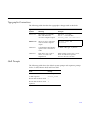
Shell Prompts
The following table shows the default system prompt and superuser prompt
for the C shell, Bourne shell, and Korn shell.
Shell
Prompt
C shell
machine_name%
C shell superuser
machine_name#
Bourne shell and Korn shell
$
Bourne shell and Korn shell
superuser
#
Preface
xxvii
Related Documents
The following documents contain topics that relate to the information
in Ultra Enterprise 6000/5000/4000 Systems Manual.
Application
Title
Part Number
Safety/EMI
Ultra Enterprise Server Cabinet Regulatory Compliance Manual
802-3846
Installation
Ultra Enterprise 6000/5000/4000 Systems Installation Guide
802-3844
Software
SMCC SPARC Hardware Platform Guide
802-5341
Solstice SyMON User’s Guide
802-5355
Expansion Cabinet Installation and Service Manual
802-6084
Enterprise Systems Boards Installation Guide
802-5030
UltraSPARC Module Installation Guide
802-5031
Enterprise Systems Memory Modules Installation Guide
802-5032
Enterprise Systems Peripheral Power Supply Installation Guide
802-5033
Enterprise Systems Power/Cooling Module Installation Guide
802-6244
Ultra Enterprise Cabinet Floor Brackets Mounting Guide
802-7543
Ultra Enterprise Caster Base Installation Guide
802-5034
Options
xxviii
Ultra Enterprise 6000/5000/4000 Systems Manual—November 1996
Ordering Sun Documents
The SunDocs Order Desk is a distribution center for Sun Microsystems
technical documents. You can use major credit cards and company purchase
orders. You can order documents in the following ways:
Country
Telephone
Fax
United States
1-800-873-7869
1-800-944-0661
United Kingdom
0-800-89-88-88
0-800-89-88-87
France
05-90-61-57
05-90-61-58
Belgium
02-720-09-09
02-725-88-50
Luxembourg
32-2-720-09-09
32-2-725-88-50
Germany
01-30-81-61-91
01-30-81-61-92
The Netherlands
06-022-34-45
06-022-34-46
Sweden
020-79-57-26
020-79-57-27
Switzerland
155-19-26
155-19-27
Japan
0120-33-9096
0120-33-9097
World Wide Web: http://www.sun.com/sunexpress/
Sun Welcomes Your Comments
Please use the Reader Comment Card that accompanies this document. We are
interested in improving our documentation and welcome your comments and
suggestions.
If a card is not available, you can email or fax your comments to us. Please
include the part number of your document in the subject line of your email or
fax message.
•
•
Email:
[email protected]
Fax:
SMCC Document Feedback
1-415-786-6443
Preface
xxix
xxx
Ultra Enterprise 6000/5000/4000 Systems Manual—November 1996
Notes, Cautions, and Warnings
Warning – This equipment contains lethal voltage. Accidental contact with
centerplane, card cage, and drive areas can result in serious injury or death.
!
Caution – Improper handling by unqualified personnel can cause serious
damage to this equipment. Unqualified personnel who tamper with this
equipment may be held liable for any resultant damage to the equipment.
Individuals who remove any outer panels or open covers to access this
equipment must observe all safety precautions and ensure compliance with
skill level requirements, certification, and all applicable local and national
laws.
Procedures contained in this document must be performed by qualified
service-trained maintenance providers.
Note – Before you begin, carefully read each of the procedures in this manual.
If you have not performed similar operations on comparable equipment, do
not attempt to perform these procedures.
Preface
xxxi
xxxii
Ultra Enterprise 6000/5000/4000 Systems Manual—November 1996
Part 1— Product Description
Chapter 1, Product Overview
page 1-1
Chapter 2, Safety Precautions and Tools Requirements
page 2-1
Product Overview
1
1.1 Standard Features
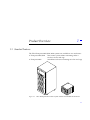
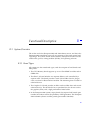
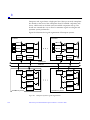
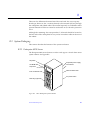
The Ultra Enterprise 6000/5000/4000 systems are available in two enclosures:
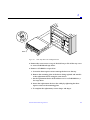
•
Enterprise 6000/5000
•
Enterprise 4000
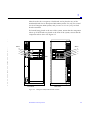
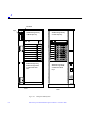
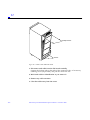
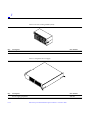
Figure 1-1
Data center system cabinet containing either a
16-slot or 8-slot card cage
Standalone enclosure containing an 8-slot card cage
Ultra Enterprise Data Center System Cabinet and Standalone Enclosure
1-1
1
The same CPU/Memory board, I/O boards, Disk board, processor modules,
memory modules, power supplies, fans, and internal disks are used in both
enclosures.
The minimum configuration for the Enterprise 6000/5000 systems is:
•
•
•
•
•
•
•
•
•
•
•
•
Data center system cabinet (system cabinet)
16-slot or 8-slot card cage
Power/cooling modules (2)
Quad fan tray
Clock board
CPU/Memory board
UltraSPARC™ module
Main memory
I/O board
Peripheral power supply
AC power sequencer
SCSI receptacle for removable media, including the SunCD™ 4 drive
The minimum configuration for the Enterprise 4000 system is:
•
•
•
•
•
•
•
•
•
•
•
1-2
8-slot card cage
Power/cooling modules (2)
Fan box
Clock board
CPU/Memory board
UltraSPARC module
Main memory
I/O board
Peripheral power supply
AC power sequencer
SCSI receptacle for removable media, including the SunCD 4 drive
Ultra Enterprise 6000/5000/4000 Systems Manual—November 1996
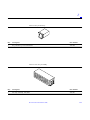
1
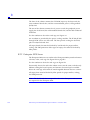
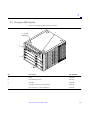
With panels
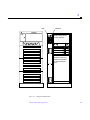
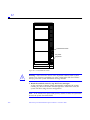
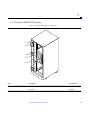
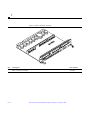
Figure 1-2
Enterprise 6000/5000 System Cabinet (Front View)
Multi-tape Backup Tray
Figure 1-3
Without panels
Tape Library
Blank
Bezels for Cabinet System - Three Examples
Product Overview
1-3
1
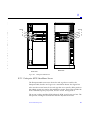
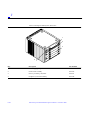
With rear screen
Figure 1-4
1-4
Without rear screen
Enterprise 6000/5000 System Cabinet (Rear View)
Ultra Enterprise 6000/5000/4000 Systems Manual—November 1996
1
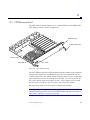
Front
Rear
Figure 1-5
Enterprise 4000 System
1.2 Basic Definitions
Ultra Enterprise server systems use a centerplane. Electrical traces embedded
in the centerplane serve both the front and rear sides of the centerplane;
therefore, the orientation of the sockets on the rear of the centerplane is
opposite the orientation of sockets on the front of the centerplane.
Boards in the front of the card cage are installed component side down, and
boards in the rear of the card cage are installed component side up. Similarly,
the orientation of the power/cooling modules installed in the rear of the
system chassis is opposite the orientation of power/cooling modules in the
front of the system chassis.
Since boards, modules, and power/cooling modules may be located on either
side of the Enterprise server chassis centerplane, the terms “front,” “rear,”
“right,” and “left” are defined in Table 1-1.
Product Overview
1-5
1
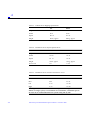
Table 1-1
Definitions of Terms
Server Orientation
Front
Keyswitch location
Rear
AC power switch and cable location
Power/Cooling Module, Board, and UltraSPARC Module Orientation
1-6
Front
Edge nearest you as you face the unit installed in a system
Right
Side to your right as you face the front of the installed unit
Left
Side to your left as you face the front of the installed unit
Ultra Enterprise 6000/5000/4000 Systems Manual—November 1996
1
1.3 Internal Options
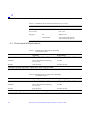
Table 1-2
Internal Options for the Ultra Enterprise Server Systems
Option
Enterprise 6000
Enterprise 5000/4000 Comments
CPU/Memory
boards, SBus
I/O boards,
and Graphics
I/O boards
16 total per system
8 total per system
Disk boards
2 per system (must 4 per system
use slot 15 if only 1
is installed)
UltraSPARC
modules
30
Each slot can accept any of these three types of boards:
CPU/Memory board, SBus I/O board, and Graphics I/O
board. Combinations can vary. One CPU/Memory board
becomes the system master automatically. Jumper changes
are not needed. For easier I/O boards cabling,
CPU/Memory boards can be installed in the front and I/O
boards in the rear of the Enterprise system.
Can be installed only in slot 14 and slot 15 in the
Enterprise 6000 system.
For easier Disk boards cabling, CPU/Memory boards can
be installed in the front and Disk boards in the rear of the
Enterprise system.
14
0-2 modules on each CPU/Memory board.
Memory
modules
0, 8, or 16 SIMMs
per CPU/Memory
board
0, 8, or 16 SIMMs
per CPU/Memory
board
SIMM sizes are 8, 32, or 128 Mbyte DRAM. Do not mix
sizes within the same bank.
Add 8 SIMMs at a time. Install SIMMs in all bank 0 sockets
first on each CPU/Memory board, from the lowest slot to
the highest. Once bank 0 is full, install remaining SIMMs in
bank 1 sockets in the same order.
SBus cards
15 per system
7 per system
0-3 cards per SBus I/O board, 0-2 cards per Graphics I/O
board.
Graphics (UPA) 4 per system
cards
4 per system
0-1 card per Graphics I/O board.
SCSI tray
CD-ROM and tape
drive
CD-ROM and tape
drive
SCSI tray takes removable-media drives only. One SunCD 4
is standard equipment per system. One optional tape drive
is supported in the SCSI tray.
Disk tray
The Enterprise 6000 system cabinet can hold 0-3 trays; the Enterprise 5000 system cabinet can hold 0-4.
The expansion cabinet can hold 1-8 trays; each disk tray holds up to six 5 1/4-inch form factor disk
drives. Refer to documentation that comes with the disk trays and expansion cabinet.
Multi-tape tray
or tape library
The Enterprise 6000/5000 system cabinet can hold 1 multi-tape backup tray or tape library.
The expansion cabinet can hold 1 or 2 multi-tape trays or tape libraries. Tape trays hold up to four
8 mm tape drives. Refer to documentation that comes with the tape trays and expansion cabinet.
Product Overview
1-7
1
1-8
Ultra Enterprise 6000/5000/4000 Systems Manual—November 1996
Safety Precautions and Tools
Requirements
2
2.1 Safety Precautions
For your protection, observe the following safety precautions when setting up
your equipment:
•
•
Follow all cautions, warnings, and instructions marked on the equipment.
•
Refer servicing of equipment to qualified personnel.
Never push objects of any kind through openings in the equipment as they
may touch dangerous voltage points or short out components that could
result in fire or electric shock.
To protect both yourself and the equipment, observe the following precautions:
Table 2-1
Safety Precautions
Item
Problem
Precaution
Wrist or
foot strap
ESD
Wear a conductive wrist strap or foot strap when handling printed
circuit boards.
2-1
2
Table 2-1
Safety Precautions (Continued)
Item
Problem
Precaution
ESD mat
ESD
An approved ESD mat provides protection from static damage when
used with a wrist strap or foot strap. The mat also cushions and protects
small parts that are attached to printed circuit boards.
Cover panels
System damage
and overheating
Re-install all cabinet cover panels after performing any service work on
the system.
Card cage slot filler
panels and load boards
System damage
and overheating
Make sure all empty board slots have a filler panel installed.
NOTE: You must use load boards instead of filler panels in the 16-slot
Enterprise 6000 system card cage.
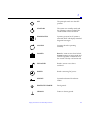
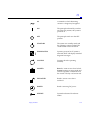
2.2 Symbols
The following symbols mean:
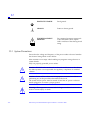
WARNING
Hazardous voltages are present. To
reduce the risk of electrical shock and
danger to personal health, follow the
instructions.
WARNING
Risk of personal injury. To reduce the
risk, follow the instructions.
CAUTION
Risk of equipment damage. To reduce
the risk, follow the instructions.
SURFACE
CAUTION: Hot surfaces. Avoid
contact. Surfaces are hot and may
cause personal injury if touched.
AC
A terminal to which alternating
current or voltage may be applied.
ON
The principal and stand-by switches
are in the ON position; the system is
powered on.
!
!
2-2
Ultra Enterprise 6000/5000/4000 Systems Manual—November 1996
2
OFF
The principal switch is in the OFF
position.
STAND-BY
The system is in standby mode and
the operating system is halted. The
circuit breaker can be turned off.
DIAGNOSTICS
System is powered on. If system is
rebooted, POST will display extended
diagnostic messages.
CYCLING
System or board is operating
normally.
LOCKED
Board: 1/4-turn access slot is locked.
System: running in secure mode and
will not respond to commands from
the console. The key can be removed.
UNLOCKED
Board 1/4-turn access slot is
unlocked.
POWER
Board is receiving DC power.
SERVICE
System has detected a hardware
failure.
PROTECTIVE EARTH
Earth ground.
CHASSIS
Frame or chassis ground.
Safety Precautions and Tools Requirements
2-3
2
!
FUSE REPLACEMENT
MARKING
For continued protection against risk
of fire and electric shock, replace
ONLY with fuse of the same type and
rating.
Ensure that the voltage and frequency of the power outlet to be used matches
the electrical rating labels on the equipment.
Wear antistatic wrist straps when handling any magnetic storage devices,
CPU/Memory boards, or other printed circuit boards.
Use only properly grounded power outlets as described in Section 1.3,
“Preparing the Electrical Circuits,” in the Ultra Enterprise 6000/5000/4000
Systems Installation Guide, part number 802-3844.
!
!
Caution – DO NOT make mechanical or electrical modifications to the cabinet.
Sun Microsystems™ is not responsible for regulatory compliance of modified
cabinets.
Caution – The chassis AC power cord must remain plugged in to ensure a
proper ground.
2.3 Tools Required
This list represents the minimum of tools and test equipment you will need:
•
•
•
•
•
•
•
•
•
•
•
•
2-4
Screwdriver, slotted, 3/16 inch
Screwdriver, Phillips #2
Screwdriver, Phillips #1
Hex driver, M-4
Hex driver, 3/16 inch
Hex driver, 9 mm
Wrench, 13 mm
DIP/IC extraction tool
ESD mat
Grounding wrist strap
Needlenose pliers
Hex driver, 3/32
Ultra Enterprise 6000/5000/4000 Systems Manual—November 1996
Part 2— System Components
Chapter 3, CPU/Memory Board
page 3-1
Chapter 4, I/O Boards
page 4-1
Chapter 5, Disk Board
page 5-1
Chapter 6, Clock Board
page 6-1
Chapter 7, Power Supplies
page 7-1
Chapter 8, Internal SCSI and Storage Devices
page 8-1
CPU/Memory Boards and
Components
3
To protect both yourself and the equipment, make sure you follow precautions
in Chapter 2, “Safety Precautions and Tools Requirements.”
Safety Precautions
page 2-1
Handling Boards and Assemblies
page 3-2
Filler Panels and Load Boards
page 3-3
Hot-Plug Feature
page 3-4
CPU/Memory Boards
page 3-5
UltraSPARC Modules
page 3-14
Memory Modules (SIMMs)
page 3-19
Connectors
page G-2
For your protection, also observe the following safety precautions when setting
up your equipment:
•
•
•
Follow all cautions, warnings, and instructions marked on the equipment.
Never push objects of any kind through openings in the equipment as they
may touch dangerous voltage points or short out components that could
result in fire or electric shock.
Refer servicing of equipment to qualified personnel.
3-1
3
3.1 Handling Boards and Assemblies
!
!
Caution – The chassis AC power cord must remain connected to ensure a
proper ground.
Caution – The CPU/Memory boards, modules, and cards have surface-mount
components that can be broken by flexing the boards.
To minimize the amount of board flexing, observe the following precautions:
•
•
•
•
•
•
•
!
!
!
3-2
Hold the board only by the edges near the middle of the board, where the
board stiffener is located. Do not hold the board only at the ends.
When removing the board from an antistatic bag, keep the board vertical
until you lay it on the Sun ESD mat.
Do not place the board on a hard surface. Use a cushioned antistatic mat.
The board connectors and components have very thin pins that bend easily.
Do not use an oscilloscope probe on the components. The soldered pins are
easily damaged or shorted by the probe point.
Transport the board in an antistatic bag.
Be careful of small parts located on the component side of the board.
Be careful not to drag boards across surfaces as board components are easily
damaged.
Caution – The heatsinks on the board can be damaged by incorrect handling.
Do not touch the heatsinks while installing or removing the board. Hold the
board only by the edges. If a heatsink is loose or broken, obtain a replacement
board.
Caution – When inserting a board into slot 4 or slot 10 of a 16-slot card cage,
lift the board slightly to avoid damage to the centerplane connectors.
Caution – The heatsinks on the board can be damaged by improper packaging.
When storing or shipping the board, ensure that the heatsinks have sufficient
protection.
Ultra Enterprise 6000/5000/4000 Systems Manual—November 1996
3
3.2 Filler Panels and Load Boards
All empty board slots in Enterprise systems must have either a filler panel or a
load board installed.
•
•
Empty slots in Enterprise 5000 and 4000 systems must have a filler panel
installed. See Figure 3-1.
Empty slots in Enterprise 6000 systems must have a load board installed.
See Figure 3-2.
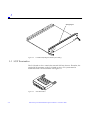
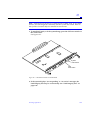
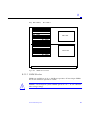
Load boards and filler panels are inserted into a board slot with the
springfingers facing down if inserted in the front of the system; the
springfingers face up if inserted in the rear of the system.
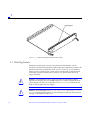
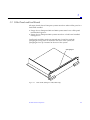
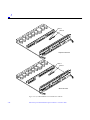
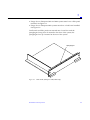
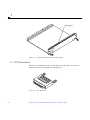
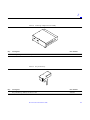
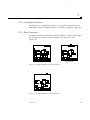
Springfingers
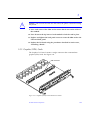
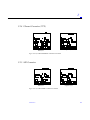
Figure 3-1
Filler Panel (Enterprise 5000/4000 Only)
CPU/Memory Boards and Components
3-3
3
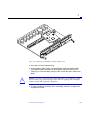
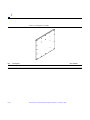
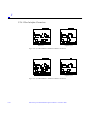
Springfingers
Figure 3-2
Load Board (Enterprise 6000 Systems Only)
3.3 Hot-Plug Feature
Enterprise systems have extensive error detection mechanisms, and an
Automatic System Reconfiguration (ASR) feature that enables the system to be
rebooted with failed components (such as CPUs, memory, or I/O) disabled.
When an error is detected, the system can be reconfigured so that the board
containing the failed components is placed in low power mode and is no
longer accessible.
3-4
!
Caution – The peripheral power supply provides the precharge voltages
required for hot-plug. Do not attempt hot-plug of a system component if the
power supply is missing or inoperative. Use prtdiag(1M)to determine the
status of the peripheral power supply.
!
Caution – If the message: NOTICE: Hot Plug not supported in this
system is displayed during boot, do NOT attempt hot-plug in this system or
damage to the hardware will occur.
Ultra Enterprise 6000/5000/4000 Systems Manual—November 1996
3
The hot-plug feature enables you to insert a new board into a powered on
system, despite the system being “live,” or being supplied with electrical
power. When the hot-plug feature is used to add a board to a powered on
system, the system will not use the new board until the system is rebooted.
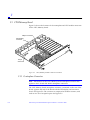
3.4 CPU/Memory Boards
Each CPU/Memory board supports up to two UltraSPARC modules and 16
SIMM slots for memory.
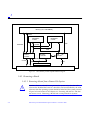
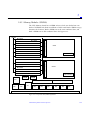
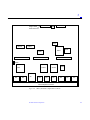
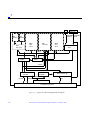
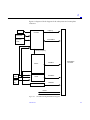
Figure 3-3 is a simplified block diagram of the CPU/Memory board. It includes
an Address Controller, 8 bit-sliced Data Controllers, a Bootbus Controller, onboard devices (including a Flash PROM, and SRAM), two CPU processor slots,
and slots for two memory banks of 8 SIMMs each.
CPU/Memory Boards and Components
3-5
3
Memory (16 x 72 bit SIMMs)
Address
UltraSPARC
module
UltraSPARC
module
Data
Control
Address
RAS/CAS
Data
Bootbus
controller
Address
controller
Data
(8)
controller
Bootbus
Control
Address
Data
On-board devices
Centerplane Connector
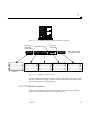
Figure 3-3
CPU/Memory Board Simplified Block Diagram
3.4.1 Removing a Board
3.4.1.1 Removing a Board from a Powered On System
!
3-6
Caution – Remove a board from a powered on system only after the ASR
software has disabled the board. If a board has not been disabled by the ASR
software, then the operating system should be halted and the system powered
off prior to board removal. See Chapter 12, “Powering Off and On” and then
see Section 3.4.1.2, “Removing a Board from a Nonpowered On System.”
Ultra Enterprise 6000/5000/4000 Systems Manual—November 1996
3
1. Ensure that the board has been disabled by the ASR software. See
Section 3.3, “Hot-Plug Feature.”
Once disabled by ASR, one of two results occurs:
• The three LEDs on the board are not lit (board has no power).
• The outer two green LEDs are not lit and the middle yellow LED is lit
(board in low power mode).
Note – System software operates such that the LED pattern described is the
same for a board that is component side down (installed in front of card cage)
or component side up (installed in rear of card cage).
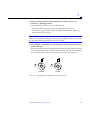
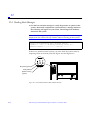
2. Use a Phillips #1 screwdriver to mechanically release the board from the
system card cage.
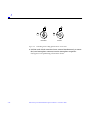
Insert the screwdriver into each quarter-turn access slot (the slots are located
on the left and right sides of the board front panel) and then turn a quarter
turn so that the arrow points to the unlocked position. See Figure 3-4.
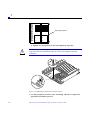
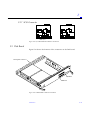
Unlocked
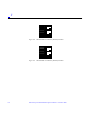
Figure 3-4
Locked
Unlocking and Locking Quarter-Turn Access Slots
CPU/Memory Boards and Components
3-7
3
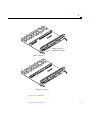
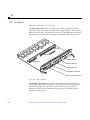
3. Pull the ends of both extraction levers outward simultaneously to unseat
the board centerplane connector from the centerplane receptacles.
See Figure 3-5 for the positioning of the levers.
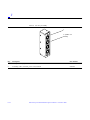
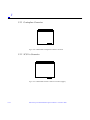
Extraction lever
in extract/insert
position
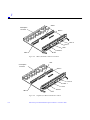
Figure 3-5
CPU/Memory Board
4. If a board is not immediately replaced, a load board (Enterprise 6000
systems only) or a filler panel (Enterprise 4000 and 5000 systems only)
must be installed in its place.
See Section 3.2, “Filler Panels and Load Boards.”
3.4.1.2 Removing a Board from a Nonpowered On System
1. Use a Phillips #1 screwdriver to mechanically release the board from the
system card cage.
Insert the screwdriver into each quarter-turn access slot (the slots are located
on the left and right sides of the board front panel) and then turn a quarter
turn so that the arrow points to the unlocked position. See Figure 3-4.
3-8
Ultra Enterprise 6000/5000/4000 Systems Manual—November 1996
3
2. Pull the ends of both extraction levers outward simultaneously to release
the board from the centerplane receptacles.
See Figure 3-5 for the positioning of the levers.
3. If a board is not immediately replaced, a load board (Enterprise 6000
systems only) or a filler panel (Enterprise 4000 and 5000 systems only)
must be installed in its place.
See Section 3.2, “Filler Panels and Load Boards.”
3.4.2 Installing a Board
3.4.2.1 Board Slot Selection
Note – Logically there is no difference between the board slots in the front or
rear of the card cage, and each slot can accept any board type. It is suggested
that CPU/Memory boards be installed in the front slots, and I/O and disk
boards be installed in the rear slots because of cabling. Should the need arise,
however, any of these three board types can be placed in any of the numbered
board slots, with the exception of slot 1. Slot 1 should be used by the first I/O
board because it is the only slot connected to the onboard SCSI devices.
The first CPU/Memory board is placed in slot 0, followed sequentially by all
remaining even numbered slots. If there are boards remaining, they can be
installed sequentially in odd numbered slots, if available, in the system rear
(with the exception of slot 1 as noted above). See Figure 3-6 and Figure 3-7 for
board slot locations.
For CPU/Memory boards being placed in the rear of the system, ensure that
the component side is up. If the boards are placed in the front of the system,
ensure that the component side is down. See Figure 3-8.
CPU/Memory Boards and Components
3-9
3
.
Slot #
0
2
4
6
8
10
12
14
Slot #
1
3
5
7
9
11
13
15
Front View
Figure 3-6
3-10
Rear View
Enterprise 6000 Board Locations
Ultra Enterprise 6000/5000/4000 Systems Manual—November 1996
3
Slot #
0
2
4
6
Slot #
1
3
5
7
PCM
Rear View
Front View
Figure 3-7
Enterprise 5000/4000 Board Locations
3.4.2.2 Cooling and Power Issues
There should be one power/cooling module (PCM) for every two boards to
adhere to cooling and power requirements. The PCMs must be installed
adjacent to populated board slots to ensure the fan in the PCM can cool the
respective boards.
CPU/Memory Boards and Components
3-11
3
Note – All empty board slots in Enterprise 4000 or 5000 systems must have a
filler panel installed to ensure proper cooling. All empty slots in Enterprise
6000 systems must have load boards installed.
3.4.2.3 Powered or NonPowered On System
1. Carefully insert the board (component side down if in front; component
side up if in the rear) in the proper slot in the card cage, ensuring that the
board does not slip out of the left and right card guides.
See Figure 3-8.
Board orientation for insertion
in the cabinet rear (component
side up)
Figure 3-8
3-12
Board orientation for insertion
in the cabinet front (component
side down)
Board Replacement
Ultra Enterprise 6000/5000/4000 Systems Manual—November 1996
3
2. Ensure that both extraction levers are in the insert position (arrow
pointing outward), and that the quarter-turn access slots are unlocked
(arrow indicates unlocked position) as you slide the board toward the
centerplane receptacles.
See Figure 3-4 and Figure 3-5. The board will not seat fully unless the levers
are in this starting position and both quarter-turn access slots are unlocked.
!
Caution – DO NOT FORCE any board into a slot; it can cause damage to the
board and system. The board should insert and seat smoothly. If it binds,
remove the board and inspect the card cage slot for any obvious obstructions.
Also inspect both the board and the centerplane for bent pins or other damage.
3. Push the board into the card cage, then simultaneously press both
extraction levers to seat the board on the centerplane.
Pushing both levers simultaneously avoids twisting the board and bending
the connector pins, and mates the board centerplane connector to the
matching receptacle on the centerplane. Do not press on board front panel to
seat it—doing so will damage the connector pins.
4. Mechanically lock the board to the system chassis by inserting a Phillips
#1 screwdriver into each quarter-turn access slot and then turning to the
locked position.
See Figure 3-4.
5. Once the board has been installed, a message similar to the following will
be displayed on the monitor (if the system is powered on):
Example depicts screen output when a new CPU/Memory board has been
hot-plugged into slot 6 of an operating Enterprise system:
NOTICE: CPU Board Hotplugged into Slot 6
NOTICE: Board 6 is ready to remove
This screen output indicates that the board has been detected by the system
and is in the low power mode. Additionally, any subsequent prtdiag(1M)
output would include information for board slot 6. Again, note that the
system will not use the new board until the system is rebooted.
6. Reboot the system now or schedule a later time to reboot when system
disruption will be minimized.
CPU/Memory Boards and Components
3-13
3
3.4.3 UltraSPARC Modules
Each CPU/Memory board has four connectors for UltraSPARC modules (up to
two modules per board, two connectors per module). For each module, there is
a connector with 144 pins and a connector with 288 pins. See Figure 3-9.
3.4.4 Handling Precautions
The following precautions should be exercised when handling UltraSPARC
modules:
•
•
•
UltraSPARC modules are static-sensitive and a grounding wrist strap field
kit must be used when handling the modules.
Always handle the modules by the edges and not by the smaller black heat
sinks that break easily if handled improperly.
Do not handle the modules by touching the gold pins on the compression
connectors. Natural oils on the hands cause these connectors to oxidize and
corrode over a period of time, resulting in the need for module cleaning or
replacement.
288 pin connector
144 pin connector
Screws
(3 places)
Screws
(2 places)
Figure 3-9
3-14
UltraSPARC Module Connector Detail
Ultra Enterprise 6000/5000/4000 Systems Manual—November 1996
3
3.4.4.1 Removing a Module
Each module is locked to the main board with a single standoff and is
connected to the main board by two connectors. The pins within the connectors
are compressed to the corresponding board mating surfaces by a metal
compression bar which, when secured with screws, compresses the module
connector pins to the board mating surfaces. See Figure 3-10.
Figure 3-10 Ultra SPARC Module Connector Detail
1. Use the procedures in Section 3.4.1, “Removing a Board,” to remove the
applicable CPU/Memory board.
Warning – The heatsinks on the UltraSPARC modules may be hot. Use caution
when removing or installing UltraSPARC modules and avoid contact.
CPU/Memory Boards and Components
3-15
3
2. Use a 3/32 Hex driver to loosen all screws on each of the compression
connectors on the module to be removed (three screws for the 288 pin
connector, two screws for the 144 pin connector).
See Figure 3-9.
3. Lift the module straight up, off the board mating surface and the single
standoff that locks the module to the board.
Use pressure applied with fingers to assist in removing module from
standoff. See Figure 3-11.
Standoff,
1 per module
Figure 3-11 UltraSPARC Module Removal and Replacement
4. Place the module in an antistatic bag.
3-16
Ultra Enterprise 6000/5000/4000 Systems Manual—November 1996
3
3.4.4.2 Installing a Module
To maximize performance when installing UltraSPARC modules on a
CPU/Memory board, use all CPU 0 connectors on the lowest numbered slot to
the highest numbered slot. After this, if there are modules remaining, use the
CPU 1 connectors in the same order.
1. Take the UltraSPARC module out of the protective packaging and inspect
for dust on the connectors.
If necessary, clean the connectors with a dry, stiff toothbrush.
2. Remove the applicable CPU/Memory board as indicated in Section 3.4.1,
“Removing a Board.”
3. Inspect the board module mating surface. If the surface requires cleaning,
use a dry, stiff toothbrush to clean debris from the mating surfaces.
Note – There are miniature silver alignment pins on the compression
connectors which, when the module is properly seated, align with related
receptacles on the mating surfaces of the CPU/Memory board. In addition,
there is a gold standoff mounted on the CPU/Memory board opposite the
module’s smaller board connector. This acts as a standoff for the module as
well as an alignment pin.
4. Align the module over the two board receptacles using the single standoff
as well as the alignment pins located on the module compression
connector as a guide.
See Figure 3-10 and Figure 3-11.
5. Holding the module by the edges, rest it on the board standoff, aligning
the compression connectors with the screws.
Firmly but gently press the module straight down until the standoff post
snaps into place and the module connectors are fully seated.
6. Tighten the 3/32 hex screws of the module in two stages:
a. Tighten to 3 inch-pounds in the tightening sequence as follows:
CPU/Memory Boards and Components
3-17
3
Tightening sequence
4 1 3
4 1 3
2
2
5
5
b. Tighten to 6 inch-pounds in the same tightening sequence.
!
Caution – Do not over-torque or under-torque the screws. Excessive force can
warp the connector. Insufficient force can cause an incomplete electrical
connection.
Figure 3-12 Tightening Compression Connector Screws
7. Use the procedures in Section 3.4.2, “Installing a Board,” to replace the
applicable CPU/Memory board.
3-18
Ultra Enterprise 6000/5000/4000 Systems Manual—November 1996
3
3.4.5 Memory Modules (SIMMs)
The CPU/Memory board has 16 SIMM sockets, which are divided into two
banks of 8 SIMMs each, Bank 0 and Bank 1. Bank 0 and Bank 1 SIMMs occupy
alternate slot locations; Bank 0 SIMMs are in the even numbered slots, and
Bank 1 SIMMs are in odd numbered slots. See Figure 3-13.
Bank 1
Bank 0
B0-J3100
B1-J3101
288 connector
B0-J3200
B1-J3201
B0-J3300
B1-J3301
B0-J3400
CPU1
144 connector
B1-J3401
B0-J3500
B1-J3501
288 connector
B0-J3600
B1-J3601
B0-J3700
B1-J3701
B0-J3800
CPU0
B1-J3801
SRAM
144 connector
SRAM
FHC
35W DC2DC
35W DC2DC
DC
DC
AC
DC
DC
DC
DC
DC
DC
720 centerplane connector
Figure 3-13 Layout of CPU/Memory Board
CPU/Memory Boards and Components
3-19
3
There are three types of SIMMs that can be used in both Bank 0 and Bank 1.
Each type is listed together with the DRAMs used in Table 3-1.
Table 3-1
SIMM vs. DRAM
SIMM
DRAM
8 Mbyte
1 Mbyte x4
32 Mbyte
4 Mbyte x4
128 Mbyte
16 Mbyte x4
3.4.5.1 Removing a Memory Module
1. Remove the CPU/Memory board from which the SIMM is to be removed.
See Section 3.4.1, “Removing a Board.”
2. Attach a wrist strap and place an antistatic surface next to the system.
3. Locate the slot for the SIMM you need to replace.
See Figure 3-13.
3-20
Ultra Enterprise 6000/5000/4000 Systems Manual—November 1996
3
4. Eject the faulty SIMM by pressing down on the ejection levers on both
sides of the SIMM connector.
See Figure 3-14.
Figure 3-14
Ejecting a SIMM
5. Holding the SIMM by its edges, remove it from the slot and place it on an
antistatic surface.
3.4.5.2 Installing a Memory Module
Requirements
All banks must have the same size SIMMs, however, SIMMs from different
manufactures are interchangeable in a single bank if the SIMMs all have the
same capacity and speed. Sort the SIMMs into banks of 8 using the same size
SIMMs.
CPU/Memory Boards and Components
3-21
3
Maximizing Performance
The following guidelines will result in optimal memory interleaving across
boards for performance. These guidelines are for optimal performance and are
not requirements for a functional system. The guidelines apply to systems with
no SIMMS installed and when adding SIMMs to a system; if you are adding
SIMMs, you may need to move some SIMMs to meet the guidelines.
1. Install one bank on each board before installing the second bank on any
board.
It does not matter whether the first bank is bank 0 or bank 1.
2. Begin with the largest density banks first (128 Mbyte SIMMs), continue
with medium sized banks (32 Mbyte SIMMs), and finish with the smallest
banks (8 Mbyte SIMMs).
3. If there is remaining memory, start filling the second banks on the boards
in the same order as the first banks.
Installation
1. Place the CPU/Memory board on which the SIMM is to be installed on an
antistatic mat.
2. Carefully remove the new SIMM from its protective packaging and place
it on an antistatic surface.
The bag that the SIMM is packed in makes a good antistatic surface.
3. Press down on the ejector levers at both ends of the SIMM connector slot
that will receive the new SIMM.
The connector slot will not accept the SIMM unless the levers are in the
insert position. See Figure 3-15.
4. Align the SIMM with the slot.
Hold the SIMM by its edges and orient it so that the two notches at the
bottom of the SIMM line up with the two tabs in the SIMM connector. See
Figure 3-15.
5. Place your thumbs on the top edge of the SIMM and push the SIMM
firmly into its connector.
See Figure 3-16.
3-22
Ultra Enterprise 6000/5000/4000 Systems Manual—November 1996
3
6. Lock the SIMM in place by pushing both ejector levers into the upright
position.
See Figure 3-16.
7. Install the CPU/Memory board and detach the wrist strap.
See Section 3.4.2, “Installing a Board.”
8. As you reboot the system, watch for the system banner to verify that the
new memory is recognized by the system.
Notch alignment
Figure 3-15
Orienting a SIMM
CPU/Memory Boards and Components
3-23
3
Figure 3-16
3-24
Installing a SIMM
Ultra Enterprise 6000/5000/4000 Systems Manual—November 1996
3
I/O Boards and Components
To protect both yourself and the equipment, make sure you follow precautions
in Chapter 2, “Safety Precautions and Tools Requirements.”
Safety Precautions
page 2-1
Handling Boards and Assemblies
page 3-2
Filler Panels and Load Boards
page 3-3
SCSI Termination
page 3-4
Hot-Plug Feature
page 3-5
I/O Boards
page 3-5
SBus Cards
page 3-19
Graphics (UPA) Cards
page 3-27
Fibre Cards
page 3-31
Connectors
page G-5
For your protection, also observe the following safety precautions when setting
up your equipment:
•
•
•
Follow all cautions, warnings, and instructions marked on the equipment.
Never push objects of any kind through openings in the equipment as they
may touch dangerous voltage points or short out components that could
result in fire or electric shock.
Refer servicing of equipment to qualified personnel.
3-1
3
3.1 Handling Boards and Assemblies
!
!
Caution – The chassis AC power cord must remain connected to ensure a
proper ground.
Caution – The I/O boards, their modules, and cards have surface-mount
components that can be broken by flexing the boards.
To minimize the amount of board flexing, observe the following precautions:
•
•
•
•
•
•
•
!
!
!
3-2
Hold the board only by the edges near the middle of the board, where the
board stiffener is located. Do not hold the board only at the ends.
When removing the board from an antistatic bag, keep the board vertical
until you lay it on the Sun ESD mat.
Do not place the board on a hard surface. Use a cushioned antistatic mat.
The board connectors and components have very thin pins that bend easily.
Do not use an oscilloscope probe on the components. The soldered pins are
easily damaged or shorted by the probe point.
Transport the board in an antistatic bag.
Be careful of small parts located on the component side of the board.
Be careful not to drag boards across surfaces as board components are easily
damaged.
Caution – The heatsinks on the board can be damaged by incorrect handling.
Do not touch the heatsinks while installing or removing the board. Hold the
board only by the edges. If a heatsink is loose or broken, obtain a replacement
board.
Caution – When inserting the board into slot 4 or slot 10 of a 16-slot card cage,
lift the board slightly to avoid damage to the centerplane connectors.
Caution – The heatsinks on the board can be damaged by improper packaging.
When storing or shipping the board, ensure that the heatsinks have sufficient
protection.
Ultra Enterprise 6000/5000/4000 Systems Manual—November 1996
3
3.2 Filler Panels and Load Boards
All empty board slots in Enterprise systems must have either a filler panel or a
load board installed.
•
•
Empty slots in Enterprise 5000 and 4000 systems must have a filler panel
installed.See Figure 3-1.
Empty slots in Enterprise 6000 systems must have a load board installed.
See Figure 3-2.
Load boards and filler panels are inserted into a board slot with the
springfingers facing down if inserted in the front of the system; the
springfingers face up if inserted in the rear of the system.
Springfingers
Figure 3-1
Filler Panel (Enterprise 5000/4000 Only)
I/O Boards and Components
3-3
3
Springfingers
Figure 3-2
Load Board (Enterprise 6000 System Only)
3.3 SCSI Termination
The I/O board in slot 1 controls the internal SCSI tray devices. Therefore, the
external SCSI connector on the I/O board in slot 1 of a system must be
terminated with a SCSI terminator. See Figure 3-3.
Figure 3-3
3-4
SCSI Terminator
Ultra Enterprise 6000/5000/4000 Systems Manual—November 1996
3
3.4 Hot-Plug Feature
Enterprise systems have extensive error detection mechanisms, and an
Automatic System Reconfiguration (ASR) feature that enables the system to be
rebooted with failed components (such as CPUs, memory, or I/O) disabled.
When an error is detected, the system can be reconfigured so that the board
containing the failed components is placed in low power mode and is no
longer accessible.
Caution – The peripheral power supply provides the precharge voltages
required for hot-plug. Do not attempt hot-plug of a system component if the
power supply is missing or inoperative. Use prtdiag(1M) to determine the
status of the peripheral power supply.
Caution – If the message: NOTICE: Hot Plug not supported in this
system is displayed during boot, do NOT attempt hot-plug in this system or
damage to the hardware will occur.
The hot-plug feature enables you to insert a new board into a powered on
system, despite the system being “live,” or being supplied with electrical
power. When the hot-plug feature is used to add a board to a powered on
system, the system will not use the new board until the system is rebooted.
3.5 I/O Boards
Enterprise systems support two types of I/O boards: SBus and Graphics. See
Figure 3-4 through Figure 3-7.
The SBus I/O board includes two SYSIO ASICs that provide two SBuses:
•
•
One for two plug-in SBus cards and two fiber interfaces
One for one plug-in SBus card and the on-board devices (10/100Mbyte TPE
and Single-ended Fast/Wide SCSI)
Note – SBus connector slots 1 and 2 on the SBus I/O board can accommodate a
double-wide SBus card.
I/O Boards and Components
3-5
3
The Graphics I/O board includes one SYSIO ASIC that provides a single SBus
for two plug-in SBus cards, two fiber interfaces, and the on-board devices
(10/100Mbyte TPE and Single-ended Fast/Wide SCSI).
3.5.1 tpe-link-test? Variable
If the system cannot communicate with a network, the tpe-link-test?
settings for the on-board Ethernet ports may be incompatible with the setting
at the network hub. The tpe-link-test? variable is set separately for the onboard Ethernet port on each I/O board. The variable is also set for any SBus
Ethernet cards in the system.
If you have problems verifying connection between Sun equipment and your
hub, verify that your hub also has the link test function enabled.
See Section 8.5.3.2, “printenv Command,” for information about displaying
configuration variables and Section 8.6.1, “Failure of Network
Communications,” for additional tpe-link-test? information. Also, refer to
the manual provided with your hub.
3-6
Ultra Enterprise 6000/5000/4000 Systems Manual—November 1996
3
TPE
Single-ended
SCSI connector
MII connector
PHY
Fibre 0
Fibre 1
SBus connector 2
RISC
FEPS
SOC
SBus connector 0
SBus connector 1
J2500
FHC
DC
SYSIO
DC
AC
DC
DC
RISC
SYSIO
DC
DC
DC
DC
720 Centerplane connector
Figure 3-4
SBus I/O Board Components Locations
I/O Boards and Components
3-7
3
TPE
Single-ended
SCSI connector
MII connector
PHY
Fibre 0
Fibre 1
FEPS
SOC
Graphics (UPA) connector
SBus connector 2
SBus connector 0
J2500
FHC
DC
SYSIO
DC
AC
DC
DC
RISC
DC
DC
720 Centerplane connector
Figure 3-5
3-8
Graphics I/O Board Components Locations
Ultra Enterprise 6000/5000/4000 Systems Manual—November 1996
DC
DC
3
TPE
Fiber
interface
10/100MB Fast/Wide
Ethernet
SCSI
Fiber
interface
SOC
slot 13 (d)
Single-ended
SCSI Conn
SBus
card
SBus
card
SBus
card
slot 2
slot 1
slot 0
FEPS
slot 3
SBus
SYSIO A
RISC
SYSIO B
RISC
Control
Address
Data
Bootbus
controller
Address
controller
Data controller (8)
Bootbus
Control
Address
Data
On-board devices
Centerplane connector
Figure 3-6
SBus I/O Board Simplified Block Diagram
I/O Boards and Components
3-9
3
TPE
Fiber
interface
10/100MB Fast/Wide
Ethernet
SCSI
Fiber
interface
SBus
card
SOC
UPA
connector
slot 2
slot 13 (d)
SBus
card
FEPS
slot 0
slot 3
SBus
SYSIO
RISC
Control
Address
Data
Bootbus
controller
Address
controller
Data controller (8)
Bootbus
Control
Address
Data
On-board devices
Centerplane connector
Figure 3-7
3-10
Single-ended
SCSI Conn
Graphics I/O Board Simplified Block Diagram
Ultra Enterprise 6000/5000/4000 Systems Manual—November 1996
3
3.5.2 Removing a Board
3.5.2.1 Removing a Board from a Powered On System
Caution – Remove a board from a powered on system only after the ASR
software has disabled the board. If a board has not been disabled by the ASR
software, then the operating system should be halted and the system powered
off prior to board removal. See Chapter 12, “Powering Off and On” and then
Section 3.5.2.2, “Removing a Board from a Nonpowered On System.”
1. Ensure that the board has been disabled by the ASR software. See
Section 3.4, “Hot-Plug Feature.”
Once disabled by ASR, one of two results occurs:
• The three LEDs on the board are not lit (board has no power).
• The outer two green LEDs are not lit and the middle yellow LED is lit
(board in low power mode).
Note – System software operates such that the LED pattern described is the
same for a board that is component side down (installed in front of card cage)
or component side up (installed in rear of card cage).
2. Unfasten any cable connectors from the front panel and set them aside.
Label cables to identify them for reconnection later.
3. Use a Phillips #1 screwdriver to mechanically release the board from the
system card cage.
Insert the screwdriver into each quarter-turn access slot (the slots are located
on the left and right sides of the board‘s front panel) and then turn a quarter
turn so that the arrow points to the unlocked position. See Figure 3-8.
I/O Boards and Components
3-11
3
Unlocked
Figure 3-8
Locked
Unlocking and Locking Quarter-Turn Access Slots
4. Pull the ends of both extraction levers outward simultaneously to unseat
the board centerplane connector from the centerplane receptacles.
See Figure 3-9 for positioning of extraction levers.
3-12
Ultra Enterprise 6000/5000/4000 Systems Manual—November 1996
3
Extraction levers in
extract/insert position
SBus I/O board
Graphics I/O board
Figure 3-9
I/O Boards
I/O Boards and Components
3-13
3
5. If a board is not immediately replaced, a load board (Enterprise 6000
systems only) or a filler panel (Enterprise 4000 and 5000 systems only)
must be installed in its place.
See Section 3.2, “Filler Panels and Load Boards.”
3.5.2.2 Removing a Board from a Nonpowered On System
1. Use a Phillips #1 screwdriver to mechanically release the board from the
system card cage.
Insert the screwdriver into each quarter-turn access slot (the slots are located
on the left and right sides of the board front panel) and then turn a quarter
turn so that the arrow points to the unlocked position. See Figure 3-8.
2. Unfasten any cable connectors from the front panel and set them aside.
Label cables to identify them for reconnection later.
3. Pull the ends of both extraction levers outward simultaneously to unseat
the board from the centerplane receptacles.
See Figure 3-9 for positioning of extraction levers.
3.5.3 Installing a Board
3.5.3.1 Board Slot Selection
Note – Logically there is no difference between the board slots in the front or
rear of the card cage, and each slot can accept any board type. It is suggested
that CPU/Memory boards be installed in the front slots, and I/O and disk
boards be installed in the rear slots because of cabling. Should the need arise,
however, any of these three board types can be placed in any of the numbered
board slots, with the exception of slot 1. Slot 1 should be used by the first I/O
board because it is the only slot connected to the onboard SCSI devices.
The first CPU/Memory board is placed in slot 0, followed sequentially by all
remaining even numbered slots. If there are boards remaining, they can be
installed sequentially in odd numbered slots, if available, in the system rear
(with the exception of slot 1 as noted above). See Figure 3-10 and Figure 3-11.
3-14
Ultra Enterprise 6000/5000/4000 Systems Manual—November 1996
3
For I/O boards being placed in the rear of the system, ensure that the
component side is up. If the boards are placed in the front of the system,
ensure that the component side is down. See Figure 3-12.
.
Slot #
0
2
4
6
8
10
12
14
Slot #
1
3
5
7
9
11
13
15
Front View
Rear View
Figure 3-10 Enterprise 6000 Board Locations
I/O Boards and Components
3-15
3
Slot #
0
2
4
6
Slot #
1
3
5
7
PCM
Front View
Rear View
Figure 3-11 Enterprise 5000/4000 Board Locations
3.5.3.2 Cooling and Power Issues
There should be one power/cooling module (PCM) for every two boards to
adhere to cooling and power requirements. The PCMs must be installed
adjacent to populated board slots to ensure the fan in the PCM can cool the
respective boards.
3-16
Ultra Enterprise 6000/5000/4000 Systems Manual—November 1996
3
Note – All empty board slots in Enterprise 4000 or 5000 systems must have a
filler panel installed to ensure proper cooling. All empty slots in Enterprise
6000 systems must have load boards installed.
3.5.3.3 Powered or Nonpowered On System
1. Carefully insert the board (component side down if in front; component
side up if in the rear) in the proper slot in the card cage, ensuring that the
board does not slip out of the left and right card guides.
See Figure 3-12
Board orientation for insertion
in the cabinet rear (component
side up)
Board orientation for insertion
in the cabinet front (component
side down)
Figure 3-12 Board Replacement
I/O Boards and Components
3-17
3
2. Ensure that both extraction levers are in the insert position (arrow
pointing outward), and that the quarter-turn access slots are unlocked
(arrow indicates unlocked position) as you slide the board toward the
centerplane receptacles.
See Figure 3-8 and Figure 3-9. The board will not seat fully unless the levers
are in this starting position and the access slots are unlocked.
!
Caution – DO NOT FORCE any board into a slot; this can cause damage to the
board and system. The board should insert and seat smoothly. If it binds,
remove the board and inspect the card cage slot for any obvious obstructions.
Also inspect both the board and the centerplane for bent pins or other damage.
3. Push the board into the card cage, then simultaneously press both
extraction levers to seat the board on the centerplane.
Pushing both levers simultaneously avoids twisting the board and bending
the connector pins, and mates the board centerplane connector to the
matching receptacle on the centerplane. Do not press on board front panel to
seat it—doing so will damage the connector pins.
4. Mechanically lock the board to the system chassis by inserting a Phillips
#1 screwdriver into each quarter-turn access slot and then turning to the
locked position.
See Figure 3-8.
5. Replace or connect all necessary cables to the front of the board.
Note – The I/O board in slot 1 controls the internal SCSI tray devices.
Therefore, the external SCSI connector on the I/O board in slot 1 of a system
must be terminated with a SCSI terminator. See Figure 3-3.
6. Terminate the board SCSI connector if required, see above note.
7. Once the board has been installed, a message similar to the following will
be displayed on the monitor (if the system is powered on):
Example depicts screen output when a new I/O board has been hot-plugged
into slot 6 of an operating Enterprise system:
NOTICE: I/O Board Hotplugged into Slot 6
NOTICE: Board 6 is ready to remove
3-18
Ultra Enterprise 6000/5000/4000 Systems Manual—November 1996
3
This screen output indicates that the board has been detected by the system
and is in the low power mode. Additionally, any subsequent prtdiag(1M)
output would include information for board slot 6. Again, note that the
system will not use the new board until the system is rebooted.
8. Reboot the system now or schedule a later time to reboot when system
disruption will be minimized.
3.5.4 SBus Cards
There are three SBus card locations on the SBus I/O board; the Graphics I/O
board has two. Figure 3-13 shows the SBus card locations for both types of
boards.
I/O Boards and Components
3-19
3
SBus 1
SBus 2
SBus I/O board
SBus 0
SBus 2
SBus 0
Graphics I/O board
Figure 3-13 I/O Board SBus Card Locations
3-20
Ultra Enterprise 6000/5000/4000 Systems Manual—November 1996
3
3.5.4.1 Plastic Standoffs
Plastic standoffs lock the SBus and graphics (UPA) cards to the I/O boards. See
Figure 3-14.
•
•
To unlock a standoff, pull up the tip insert.
To lock a standoff, first ensure that the module or card rests on the standoff
flange, then press down the tip insert.
SBus/graphics (UPA) cards
Standoff
Standoff
Tip insert
Flange
Locked
Unlocked
Figure 3-14 Locking and Unlocking Standoffs
3.5.4.2 Removing an SBus Card
1. Use the procedures in Section 3.5.2, “Removing a Board,” to
remove the applicable I/O board.
2. Use Figure 3-13 to locate the card to be removed.
I/O Boards and Components
3-21
3
3. Remove the two screws that secure the SBus card to the back panel.
Save the screws for installation of a replacement SBus card or a filler panel.
4. Unlock the SBus card by pulling up the tips of the two standoffs.
See Figure 3-14.
5. Hold the card by the edges near the connector and gently rock the card
back and forth to loosen it from the socket.
You may have to remove the SBus cards or the FFB card next to this card in
order to have enough room to hold onto the SBus card being removed.
!
Caution – The connector housing may break if the SBus card is tilted too far.
6. Lift the SBus card from the socket at an angle while guiding the face plate
out from the back panel opening.
See Figure 3-15.
Figure 3-15 Removing or Installing an SBus Card
3-22
Ultra Enterprise 6000/5000/4000 Systems Manual—November 1996
3
7. Place the SBus card in an antistatic bag.
8. If the SBus card is not immediately replaced, install a filler panel (part
number 340-2305) on the I/O board back panel opening. To secure the
filler panel, use the screws that were removed in Step 3.
!
Caution – Be sure to install the filler panel right-side up. Installing it upside
down creates a gap at the top edge of the SBus slot opening that can impair
system cooling and FCC regulatory compliance.
9. Replace the I/O board. Use the procedures in Section 3.5.3, “Installing a
Board.”
3.5.4.3 Preparing to Install an SBus Card
Note – If the new SBus card does not have an adapter plate or the Link
Integrity Test feature, proceed to “Installing an SBus Card” on page 3-26.
1. Attach a wrist strap and take the SBus card out of the protective
packaging and place the SBus card on an antistatic mat.
2. Remove the adapter bracket from the SBus card rear panel.
See Figure 3-16. Remove the two screws securing the adapter to the card
rear panel (the adapter bracket and the screws are not needed for this
installation).
Remove adapter
Remove screws
Figure 3-16 SBus Card Rear Panel with Adapter
I/O Boards and Components
3-23
3
3. Remove the black plastic card retainer shipped with the card.
See Figure 3-17. Spread the ends of the retainer apart to remove it from the
card (the retainer is not needed for this installation).
Card retainer
Figure 3-17 Card Retainer
Link Integrity Test
1. Ensure that the SBus card is on an antistatic mat.
2. For DSBE/S and FSBE/S cards: remove the two outer retaining screws (see
Figure 3-18), but do NOT remove the middle screw or the springfinger.
Use a #0 Phillips screwdriver and a 3/16 nut driver or socket wrench.
3. For DSBE/S and FSBE/S cards, configure jumper J0302 for Link Integrity
Test functionality. See Figure 3-18 (DSBE/S) or Figure 3-19 (FSBE/S).
a. Put the shunt over both pins to disable the Link Integrity Test. See
Figure 3-20 “Disabled.”
b. Put the shunt in one pin to enable the Link Integrity Test. See
Figure 3-20 “Enabled.”
!
3-24
Caution – If you choose to disable the test, it must be disabled both at the hub
and at the SBus card. In the event of “loss of carrier” or “not responding”
problems, check the status of the link enable on both the SBus card and the
hub.
Ultra Enterprise 6000/5000/4000 Systems Manual—November 1996
3
Jumper J0302
Springfinger
Back panel
Jackscrews
Phillips screw
Figure 3-18 DSBE/S SBus Card
J0302
Figure 3-19 FSBE/S SBus Card
I/O Boards and Components
3-25
3
1
2
Disabled
1
2
Enabled
Figure 3-20 Disabling and Enabling the Link Integrity Test
3.5.4.4 Installing an SBus Card
1. Use the procedures in Section 3.5.2, “Removing a Board,” to
remove the applicable I/O board.
2. Use Figure 3-13 to locate the SBus connector for the card that is to be
installed.
3. If a filler panel covers the back panel SBus slot, remove the two screws
and detach the filler panel.
Retain the screws to attach the SBus card to the back panel, unless the card
has a wide connector, or set of connectors.
4. Unlock the tip insert of the two standoffs for the SBus slot.
See Figure 3-14.
5. Attach a wrist strap and take the SBus card out of the protective
packaging. Inspect the pins in the connector to make sure they are not
bent.
6. Hold the SBus card at an angle and guide the SBus card face plate under
the springfingers and against the rear face of the I/O board front panel.
See Figure 3-15 on page 3-22. The I/O connectors of the SBus card should be
visible through the opening in the back panel.
7. Hold the card by the edges nearest the SBus connector and place the card
over the two standoffs.
8. Hold the SBus card by the edges near the connector and firmly but gently
press the card down until the connector is fully seated.
To align the connector and socket, push the card toward the I/O board back
panel.
3-26
Ultra Enterprise 6000/5000/4000 Systems Manual—November 1996
3
!
Caution – Do not rock the card onto the socket; the plastic connector housing
may break.
9. Press each corner of the SBus card to ensure that it rests on the collar of
the standoff.
10. Press down on the tip insert of each standoff to lock the card in place.
11. Replace and tighten the back panel screws to secure the SBus card to the
I/O board back panel.
12. Replace the I/O board using the procedures described in Section 3.5.3,
“Installing a Board.”
3.5.5 Graphics (UPA) Cards
The Graphics I/O board contains a single connector that accommodates
graphics (UPA) cards. See Figure 3-21.
UPA connector
Figure 3-21 Graphics (UPA) Card Connector Location
I/O Boards and Components
3-27
3
3.5.5.1 Removing a Graphics (UPA) Card
1. Use the procedures in Section 3.5.2, “Removing a Board,” to remove the
applicable Graphics I/O board.
2. Locate the card. See Figure 3-22.
3. Remove the two screws that secure the card to the Graphics I/O board
front panel.
Save the screws for installation of a replacement card or a filler panel.
4. Unlock the card by pulling up the tips of the two standoffs.
See Figure 3-14.
5. Hold the card by the edges near the connector and gently rock the card
back and forth to loosen it from the socket.
You may have to remove the SBus cards next to this card in order to have
enough room to hold onto the graphics (UPA) card being removed.
Caution – The connector housing may break if the card is tilted too far.
!
3-28
6. Lift the card from the socket at an angle while guiding the face plate out
from the back panel opening.
See Figure 3-22.
Ultra Enterprise 6000/5000/4000 Systems Manual—November 1996
3
Figure 3-22 Removing or Installing a Graphics (UPA) Card
7. Place the card in an antistatic bag.
8. If the graphics (UPA) card is not immediately replaced, install a filler
panel (part number 340-2305) on the Graphics I/O board back panel
opening. To secure the filler panel, use the screws that were removed in
Step 3.
!
Caution – Be sure to install the filler panel right-side up. Installing it upside
down creates a gap at the top edge of the card slot opening that can impair
system cooling and regulatory compliance.
9. Use the procedures in Section 3.5.3, “Installing a Board,” to replace the
Graphics I/O board.
I/O Boards and Components
3-29
3
3.5.5.2 Installing a Graphics (UPA) Card
1. Use the procedures described in Section 3.5.2, “Removing a Board,” to
remove the applicable Graphics I/O board.
Note – The connector pins on graphics (UPA) cards are extremely delicate, use
care when handling.
2. Attach a wrist strap and take the graphics (UPA) card out of the protective
packaging and place the card on an antistatic mat.
Inspect the pins in the connector to make sure they are not bent.
3. Remove the adapter bracket from the rear panel of the card.
See Figure 3-16. Remove the two screws securing the adapter to the card
rear panel (the adapter bracket and the screws are not needed for this
installation).
4. Locate the UPA connector for the card. See Figure 3-21.
5. If a filler panel covers the back panel slot for the graphics (UPA) card,
remove the two screws and detach the filler panel.
Retain the screws to attach the graphics (UPA) card to the back panel, unless
the card has a wide connector, or set of connectors.
6. Unlock the two standoffs for the UPA connector slot.
See Figure 3-14.
7. Hold the card at an angle and guide the card face plate under the
springfingers and against the rear face of the Graphics I/O board front
panel.
The I/O connectors of the card should be visible through the opening in the
I/O board front panel.
8. Hold the card by the edges nearest the UPA connector and position the
card over the two standoffs.
9. Hold the card by the edges near the connector and firmly but gently press
the card down until the connector is fully seated.
To align the connector and socket, push the card toward the Graphics I/O
board front panel.
3-30
Ultra Enterprise 6000/5000/4000 Systems Manual—November 1996
3
!
!
Caution – Graphics (UPA) cards have very fragile connectors. Press gently to
ensure pins do not break or bend.
Caution – Do not rock the card onto the socket; the plastic connector housing
may break.
10. Press each corner of the card to ensure that it rests on the collar of the
standoff.
11. Press down on the tip insert of each standoff to lock the card in place.
12. Replace and tighten the back panel screws to secure the card to the
Graphics I/O board front panel.
See Figure 3-15
13. Use the procedures in Section 3.5.3, “Installing a Board,” to replace the
Graphics I/O board.
3.5.6 Fibre Cards
3.5.6.1 Removing a Fibre Card
1. Use the procedures in Section 3.5.2, “Removing a Board,” to remove the
applicable I/O board.
2. Locate the card to be removed. See Figure 3-23.
You may have to remove the SBus cards over (or next to) this card in order
to have enough room to hold onto the fibre card being removed. See
Figure 3-24.
I/O Boards and Components
3-31
3
Fiber 1
Fiber 0
Graphics I/O board
Fiber 1
Fiber 0
SBus I/O board
Figure 3-23 I/O Board Fibre Card Connector Locations
3-32
Ultra Enterprise 6000/5000/4000 Systems Manual—November 1996
3
Note – There are four plastic standoffs located on the bottom of each card, two
on each end. These secure the card once they are inserted into corresponding
openings on the I/O board. See detail in Figure 3-24.
Standoff openings on
I/O board (4 per fibre
card)
Card standoffs
(4 per card)
Figure 3-24 Removing or Installing a Fibre Card
I/O Boards and Components
3-33
3
3. Unseat the card from the I/O board:
a. Grasp the card underneath each corner on the end of the card that
connects to the I/O board receptacle (opposite the I/O board front
panel end), then firmly unseat the two standoffs and the card
connector.
b. Grasp the card underneath each corner near the I/O board front panel,
and then firmly unseat the remaining two standoffs from the I/O
board.
4. Once the card standoffs and connector are unseated, hold the card at a
slight angle as shown in Figure 3-24 on page 3-33. Guide the card fiber
connector end from the front panel opening on the I/O board.
5. If the fibre card is not immediately replaced, install an OLC plug on the
I/O board front panel opening.
6. Use the procedures in Section 3.5.3, “Installing a Board,” to replace the
I/O board.
3.5.6.2 Installing a Fibre Card
1. Use the procedures in Section 3.5.2, “Removing a Board,” to remove the
applicable I/O board.
Note – If required, remove the OLC plug that protects the fiber optic connector
opening on the front panel of the I/O board. These OLC plugs are installed in
factory shipped systems without fibre cards installed.
2. Locate the card slot for installation.
See Figure 3-23 on page 3-32. You may need to remove the SBus cards over
(or next to) this card to have enough room to hold onto the fibre card being
installed.
Note – There are four plastic inserts located on the bottom of each card, two on
each end of the card. These secure the card once they are inserted into
corresponding openings on the I/O board. See detail in Figure 3-24 on
page 3-33.
3-34
Ultra Enterprise 6000/5000/4000 Systems Manual—November 1996
3
3. Hold the card at a slight angle and position it so the fiber connector end is
loosely inserted into the I/O board front panel opening.
4. Align the card over the I/O board fiber connector receptacle and over the
four standoff holes on the I/O board.
See Figure 3-24 on page 3-33.
5. Seat the card:
a. Grasp the card underneath each corner near where the card connects to
the I/O board fiber connector receptacle. Firmly seat the card on the
connector and on the two adjacent standoffs.
b. On the end of the card near the I/O board front panel, grasp the card
underneath each side and firmly seat the remaining two standoffs.
6. Use the procedures in Section 3.5.3, “Installing a Board,” to replace the
I/O board.
I/O Boards and Components
3-35
3
3-36
Ultra Enterprise 6000/5000/4000 Systems Manual—November 1996
5
Disk Boards and Components
To protect both yourself and the equipment, make sure you follow precautions
in Chapter 2, “Safety Precautions and Tools Requirements.”
Safety Precautions
page 2-1
Handling Boards and Assemblies
page 5-2
Filler Panels and Load Boards
page 5-2
SCSI Termination
page 5-4
Hot-Plug Feature
page 5-5
Disk Boards
page 5-5
Disk Drives
page 5-13
Connectors
page G-11
For your protection, also observe the following safety precautions when setting
up your equipment:
•
•
•
Follow all cautions, warnings, and instructions marked on the equipment.
Never push objects of any kind through openings in the equipment as they
may touch dangerous voltage points or short out components that could
result in fire or electric shock.
Refer servicing of equipment to qualified personnel.
5-1
5
5.1 Handling Boards and Assemblies
!
!
Caution – The chassis AC power cord must remain connected to ensure a
proper ground.
Caution – The Disk boards, their modules, and cards have surface-mount
components that can be broken by flexing the boards.
To minimize the amount of board flexing, observe the following precautions:
•
•
•
•
•
•
•
Hold the board only by the edges near the middle of the board, where the
board stiffener is located. Do not hold the board only at the ends.
When removing the board from an antistatic bag, keep the board vertical
until you lay it on the Sun ESD mat.
Do not place the board on a hard surface. Use a cushioned antistatic mat.
The board connectors and components have very thin pins that bend easily.
Do not use an oscilloscope probe on the components. The soldered pins are
easily damaged or shorted by the probe point.
Transport the board in an antistatic bag.
Be careful of small parts located on the component side of the board.
Be careful not to drag boards across surfaces as board components are easily
damaged.
!
Caution – The heatsinks on the board can be damaged by incorrect handling.
Do not touch the heatsinks while installing or removing the board. Hold the
board only by the edges. If a heatsink is loose or broken, obtain a replacement
board.
!
Caution – The heatsinks on the board can be damaged by improper packaging.
When storing or shipping the board, ensure that the heatsinks have sufficient
protection.
5.2 Filler Panels and Load Boards
All empty board slots in Enterprise systems must have either a filler panel or a
load board installed.
5-2
Ultra Enterprise 6000/5000/4000 Systems Manual—November 1996
5
•
•
Empty slots in Enterprise 5000 and 4000 systems must have a filler panel
installed. See Figure 5-1.
Empty slots in Enterprise 6000 systems must have a load board installed.
See Figure 5-2.
Load boards and filler panels are inserted into a board slot with the
springfingers facing down if inserted in the front of the system; the
springfingers face up if inserted in the rear of the system.
Springfingers
Figure 5-1
Filler Panel (Enterprise 5000/4000 Only)
Disk Boards and Components
5-3
5
Springfingers
Figure 5-2
Load Board (Enterprise 6000 Systems Only)
5.3 SCSI Termination
The last or only Disk board in a system must have the SCSI out connector
terminated with a SCSI terminator. See Figure 5-3.
Figure 5-3
5-4
SCSI Terminator
Ultra Enterprise 6000/5000/4000 Systems Manual—November 1996
5
5.4 Hot-Plug Feature
Enterprise systems have extensive error detection mechanisms, and an
Automatic System Reconfiguration (ASR) feature that enables the system to be
rebooted with failed components (such as CPUs, memory, or I/O) disabled.
When an error is detected, the system can be reconfigured so that the board
containing the failed components is placed in low power mode and is no
longer accessible.
Caution – The peripheral power supply provides the precharge voltages
required for hot-plug. Do not attempt hot-plug of a system component if the
peripheral power supply is missing or inoperative. Use prtdiag(1M)to
determine the status of the peripheral power supply.
Caution – If the message: NOTICE: Hot Plug not supported in this
system is displayed during boot, do NOT attempt hot-plug in this system or
damage to the hardware will occur.
The hot-plug feature enables you to insert a new board into a powered on
system, despite the system being “live,” or being supplied with electrical
power. When the hot-plug feature is used to add a board to a powered on
system, the system will not use the new board until the system is rebooted.
5.5 Disk Boards
A maximum of two Disk boards can be installed in Enterprise 6000 systems;
four Disk boards can be installed in Enterprise 5000/4000 systems.
Note – Disk boards can be installed only in slots 14 and 15 in Enterprise 6000
systems, and slot 15 must be used when installing only one Disk board.
Each Disk board contains a fast and wide single-ended SCSI chain with sockets
for two disks. There are three status and two activity LEDs; each activity LED
is driven directly by a disk drive.
Disk Boards and Components
5-5
5
5.5.1 Removing a Board
5.5.1.1 Removing a Board from a Powered On System
!
Caution – Remove a board from a powered on system only after the ASR
software has disabled the board. If a board has not been disabled by the ASR
software, then the operating system should be halted and the system powered
off prior to board removal. See Chapter 12, “Powering Off and On” and then
Section 5.5.1.2, “Removing a Board from a Nonpowered On System.”
1. Ensure that the board has been disabled by the ASR software. See
Section 5.4, “Hot-Plug Feature.”
Once disabled by ASR, one of two results occurs:
• The three LEDs on the board are not lit (board has no power)
• The outer two green LEDs are not lit and the middle yellow LED is lit
(board in low power mode).
Note – System software operates such that the LED pattern described is the
same for a board that is component side down (installed in front of card cage)
or component side up (installed in rear of card cage).
2. Unfasten any cable connectors from the front panel and set them aside.
Label cables to identify them for reconnection later.
3. Use a Phillips #1 screwdriver to mechanically release the board from the
system card cage.
Insert the screwdriver into each quarter-turn access slot (the slots are located
on the left and right sides of the board‘s front panel) and then turn a quarter
turn so that the arrow points to the unlocked position. See Figure 5-4.
5-6
Ultra Enterprise 6000/5000/4000 Systems Manual—November 1996
5
Unlocked
Figure 5-4
Locked
Unlocking and Locking Quarter-Turn Access Slots
4. Pull the ends of both extraction levers outward simultaneously to unseat
the board centerplane connector from the centerplane receptacles.
See Figure 5-5 for positioning of extraction levers.
Extraction lever in
extract/insert position
Figure 5-5
Disk Board
Disk Boards and Components
5-7
5
5. If a board is not immediately replaced, a filler panel or a load board (for
Enterprise 6000 systems only) must be installed in its place.
See Section 5.2, “Filler Panels and Load Boards.”
5.5.1.2 Removing a Board from a Nonpowered On System
1. Use a Phillips #1 screwdriver to mechanically release the board from the
system card cage.
Insert the screwdriver into each quarter-turn access slot (the slots are located
on the left and right sides of the board‘s front panel) and then turn a quarter
turn so that the arrow points to the unlocked position. See Figure 5-4 on
page 5-7.
2. Unfasten any cable connectors from the front panel and set them aside.
Label cables to identify them for reconnection later.
3. Pull the ends of both extraction levers outward simultaneously to unseat
the board from the centerplane receptacles.
See Figure 5-5 on page 5-7.
5.5.2 Installing a Board
5.5.2.1 Board Slot Selection
Note – Logically there is no difference between the board slots in the front or
rear of the card cage, and each slot can accept any board type. It is suggested
that CPU/Memory boards be installed in the front slots, and I/O and Disk
boards be installed in the rear slots because of cabling. Should the need arise,
however, any of these three board types can be placed in any of the numbered
board slots, with these exceptions:
Slot 1: Slot 1 should be used by the first I/O board because it is the only
slot connected to the onboard SCSI devices.
Slots 14 and 15: In Enterprise 6000 systems, Disk boards are supported
only in these two slots.
The first CPU/Memory board is placed in slot 0, followed sequentially by all
remaining even numbered slots. If there are boards remaining, they can be
installed sequentially in odd numbered slots, if available, in the system rear
(with the exception of slot 1 as noted above). See Figure 5-6.
5-8
Ultra Enterprise 6000/5000/4000 Systems Manual—November 1996
5
Other than the slot 1 exception, a Disk board can be placed in any of the
numbered board slots in Enterprise 5000/4000 systems. Use only slot 14 and
slot 15 in Enterprise 6000 systems, and you must use slot 15 if only one Disk
board is installed.
For boards being placed in the rear of the system, ensure that the component
side is up. If the boards are placed in the front of the system, ensure that the
component side is down. See Figure 5-7.
Slot #
0
2
4
6
Slot #
1
3
5
7
PCM
Rear View
Front View
Figure 5-6
Enterprise 5000/4000 Board Locations
Disk Boards and Components
5-9
5
5.5.2.2 Cooling and Power Issues
There should be one power/cooling module (PCM) for every two boards to
adhere to cooling and power requirements. The PCMs must be installed
adjacent to populated board slots to ensure the fan in the PCM can cool the
respective boards.
Note – All empty board slots in Enterprise 4000 or 5000 systems must have a
filler panel installed to ensure proper cooling. All empty slots in Enterprise
6000 systems must have load boards installed.
5.5.2.3 Powered or Nonpowered On System
1. Carefully insert the board (component side down if in front; component
side up if in the rear) in the proper slot in the card cage, ensuring that the
board does not slip out of the left and right card guides.
See Figure 5-7.
5-10
Ultra Enterprise 6000/5000/4000 Systems Manual—November 1996
5
Board orientation for insertion
in the cabinet rear (component
side up)
Figure 5-7
Board orientation for insertion
in the cabinet front (component
side down)
Board Replacement
2. Ensure that both extraction levers are in the insert position (arrow
pointing outward) and that the quarter-turn access slots are unlocked
(arrow indicates unlocked position) as you slide the board toward the
centerplane receptacles.
See Figure 5-4 on page 5-7 and Figure 5-5 on page 5-7. The board will not
seat fully unless the levers are in this starting position and both quarter-turn
access slots are unlocked.
!
Caution – DO NOT FORCE any board into a slot; this can cause damage to the
board and system. The board should insert and seat smoothly. If it binds,
remove the board and inspect the card cage slot for any obvious obstructions.
Also inspect both the board and the centerplane for bent pins or other damage.
Disk Boards and Components
5-11
5
3. Push the board into the card cage, then simultaneously press both
extraction levers to seat the board on the centerplane.
Pushing both levers simultaneously avoids twisting the board and bending
the connector pins, and mates the board centerplane connector to the
matching receptacle on the centerplane. Do not press on board front panel to
seat it—doing so will damage the connector pins.
4. Mechanically lock the board to the system chassis by inserting a Phillips
#1 screwdriver into each quarter-turn access slot and then turning to the
locked position.
See Figure 5-4 on page 5-7.
5. Replace or connect all necessary cables to the front of the board.
6. Terminate the SCSI out connector if necessary.
The SCSI out connector on Disk boards in a system, which are not daisy
chained to an additional device, must be terminated with a SCSI terminator.
See Figure 5-3 on page 5-4.
Note – The last or only Disk board in a system must have the SCSI out
connector terminated with a fast-wide SCSI terminator, part number 150-2267.
7. Once the board has been installed, a message similar to the following will
be displayed on the monitor (if the system is powered on):
Example depicts screen output when a new Disk board has been hotplugged into slot 6 of an operating Enterprise system:
NOTICE: Disk Board Hotplugged into Slot 6
NOTICE: Board 6 is ready to remove
This screen output indicates that the board has been detected by the system
and is in the low power mode. Additionally, any subsequent prtdiag(1M)
output would include information for board slot 6. Again, note that the
system will not use the new board until the system is rebooted.
8. Reboot the system now or schedule a later time to reboot when system
disruption will be minimized.
5-12
Ultra Enterprise 6000/5000/4000 Systems Manual—November 1996
5
5.5.2.4 Cabling Issues for Enterprise 6000 Systems
Slot 15 installation:
• Use an 80-cm SCSI cable to connect the Disk board to the SCSI Host
Adapter (on-board or SBus card).
Slot 14 installation:
• If an I/O board is installed in the front, use an 80-cm SCSI cable to connect
the Disk board to the SCSI Host Adapter.
• If all I/O Boards are installed in the rear, use a 2-meter SCSI cable (sold
separately) to connect the Disk board to the SCSI Host Adapter.
Route the cable down the side of the card cage, through the cable pass in
the cabinet.
5.5.3 Disk Drives
5.5.3.1 Removing a Disk Drive
1. Use the procedures described in, Section 5.5.1, “Removing a Board,” To
remove the applicable Disk board.
2. Unlatch and open the ejector drive retainer on the drive to be replaced.
See Figure 5-8. Using the extended drive retainer as a handle pull the drive
straight out to disengage it from the board mating receptacle and the drive
mounting bracket.
Disk Boards and Components
5-13
5
Latch
Figure 5-8
Disk Drive with Ejector Drive Retainer Open
3. If a new drive is to be installed, proceed to the next section.
If the drive is not to be replaced, replace the Disk board as described in
Section 5.5.2, “Installing a Board”.
5.5.3.2 Installing a Disk Drive
1. Inspect the shipping container upon receipt of your drive, and look for
evidence of damage.
If the carrier’s agent is not present when the container is opened, and the
contents are damaged, keep all contents and packing materials for the
agent’s inspection.
2. If there is no evidence of damage, carefully remove the drive from the
shipping container.
Save the carton and the packing material for possible later use.
3. Place the antistatic mat on a table or work surface.
4. Attach a grounding wrist strap.
Refer to the documentation that came with your ESD kit.
5. Remove the disk drive from its protective packaging.
Hold the disk drive by the edges, near the middle of the drive. Keep the
drive vertical until you lay it on the ESD mat.
5-14
Ultra Enterprise 6000/5000/4000 Systems Manual—November 1996
5
6. Place it on the antistatic mat with the component side of the disk drive
controller cards facing up.
7. Unlatch and then open the ejector drive retainer for the drive being
replaced or installed.
See Figure 5-8.
8. Using the drive retainer as a handle, slide the drive in and then seat it to
the board connector receptacle.
Close and latch the ejector drive retainer.
9. SCSI IDs for disk drives on Disk boards are selected on the Disk board.
See Appendix C, “SCSI Devices” to select the SCSI ID for the disk drive.
10. Check that the ejector drive retainers on both disk drives are closed,
latched in place, and do not extend past the edge of the board.
If an ejector drive retainer extends past the edge of the Disk board or is not
fully closed, the disk drive connector is not joined with the Disk board
connector. Do the following:
a. Use the unlatched drive retainer to unseat the drive from the board
connector receptacle and slide it out an inch or two.
b. Check that the connectors are not broken and that nothing blocks the
joining of these two connectors.
If there is a problem, put the disk drive back into its protective
packaging, and contact your service representative.
Note – Save the antistatic shipping bag and other original packing. You will
need these materials when transporting the disk drive.
11. Terminate the SCSI out connector, if necessary.
The SCSI out connector on Disk boards that are not daisy chained to an
additional device must be terminated with a SCSI terminator. See Figure 5-3
on page 5-4.
Note – The last or only disk board in a system must have the SCSI out
connector terminated with a fast-wide SCSI terminator, part number 150-2267.
12. Replace the Disk board as described in Section 5.5.2, “Installing a Board.”
Disk Boards and Components
5-15
5
5-16
Ultra Enterprise 6000/5000/4000 Systems Manual—November 1996
6
Clock Board
To protect both yourself and the equipment, make sure you follow precautions
in Chapter 2, “Safety Precautions and Tools Requirements.”
Safety Precautions
page 2-1
Handling Boards and Assemblies
page 6-2
Clock Board
page 6-2
Connectors
page G-13
For your protection, also observe the following safety precautions when setting
up your equipment:
•
•
•
Follow all cautions, warnings, and instructions marked on the equipment.
Never push objects of any kind through openings in the equipment as they
may touch dangerous voltage points or short out components that could
result in fire or electric shock.
Refer servicing of equipment to qualified personnel.
6-1
6
6.1 Handling Boards and Assemblies
!
!
Caution – The chassis AC power cord must remain connected to ensure a
proper ground.
Caution – The clock board and its modules have surface-mount components
that can be broken by flexing the board.
To minimize the amount of board flexing, observe the following precautions:
•
•
•
•
•
•
Hold the board only by the edges near the middle of the board, where the
board stiffener is located. Do not hold the board only at the ends.
When removing the board from an antistatic bag, keep the board vertical
until you lay it on the Sun ESD mat.
Do not place the board on a hard surface. Use a cushioned antistatic mat.
The board connectors and components have very thin pins that bend easily.
Do not use an oscilloscope probe on the components. The soldered pins are
easily damaged or shorted by the probe point.
Transport the board in an antistatic bag.
Be careful not to drag boards across surfaces as board components are easily
damaged.
6.2 Clock Board
There is one clock board to a system. The clock board provides:
•
•
•
•
•
Programmable system and processor clock
Serial, keyboard, and mouse ports for the console
Centralized Time-of-day (TOD) chip that includes NVRAM
Centralized reset logic
Status and control of power supplies
The clock board consists of the following subsystems:
•
•
•
•
•
6-2
Console Bus
Clocks
Reset logic
JTAG
Centerplane connector signals
Ultra Enterprise 6000/5000/4000 Systems Manual—November 1996
6
Figure 6-1 depicts a block diagram of the subsystems and centerplane
connector.
led[2..0]
LEDs
Console
Serial ports
ConsoleBus
Keyboard/
mouse
cb_sys_reset
Clock_Frequency
ClockBus
Clocks
Reset
button
cb_man_reset
Centerplane
connector
ResetBus
Reset
Reset
button
(xir)
JTAGBus
JTAG
+5VDC
+3.3VDC
Figure 6-1
Clock Board
Clock Board Simplified Block Diagram
6-3
6
6.2.1 ConsoleBus
The ConsoleBus provides system boards access to global system control and
status as well as to the keyboard, mouse, and serial ports. In addition, there is
a NVRAM/TOD chip that maintains the date and time and 8 Kbytes worth of
data when the power to the system is shut off.
The state of physical hardware conditions is maintained in registers on the
clock board. Each of these registers has inputs generated from other
subsystems on the clock board, from other boards, or from the power supplies
in the system. Some clock board registers are reserved for controlling various
states of the machine.
The ConsoleBus also provides a serial port interface and a keyboard/mouse
interface. The primary purpose of the serial port interface is to provide POST
messages during power-on. The serial port can be used as a console for
systems without a keyboard and display, and for standard serial peripheral
hook-us such as modems and printers.
6.2.2 Clocks
The clock subsystem generates the clocks for the entire system. The base clock
is synthesized and then divided into various frequencies. The base clocks are
then “fanned-out” and driven to the centerplane by an array of driver chips.
Two processor clocks and one system clock go to each of the board slots on the
centerplane.
6.2.3 Reset logic
The reset logic consists of four subcircuits for controlling the system reset and
error state:
•
•
•
•
6-4
Manual reset
System reset
XIR
System error
Ultra Enterprise 6000/5000/4000 Systems Manual—November 1996
6
6.2.4 Removing a Clock Board
!
!
Caution – The clock board is not hot-pluggable. Do not remove the clock
board until the system has been halted and powered-off.
Caution – To avoid damaging internal circuits, do not disconnect or connect
any cable while power is applied to the system.
Note – If you are replacing the clock board, then the TOD NVRAM from the
old board must be removed and placed on the new board. This is necessary to
match the host ID with the Ethernet ID. Note also that if a system is replaced,
then the TOD NVRAM on the clock board must also be changed.
1. You must halt the operating system before turning off the system power.
See Chapter 12, “Powering Off and On,” for this procedure.
2. Unfasten cable connectors from the board front panel and set them aside.
Label cables to identify them for reconnection later.
3. Loosen the two captive screws securing the board to the system chassis.
4. Pull the ends of both extraction levers outward simultaneously to release
the board from the centerplane receptacles.
See Figure 6-2.
Clock Board
6-5
6
TOD NVRAM
Figure 6-2
Standalone Clock Board
6.2.5 Installing a Clock Board
The clock board slot is located at the top of the system, immediately below the
peripheral power supply. See Figure 6-3.
Note – If you are replacing the clock board, then the TOD NVRAM from the
old board must be removed and placed on the new board. Note also that if a
system is replaced, then the TOD NVRAM on the clock board must also be
changed.
1. Carefully insert the board in the proper slot in the card cage, ensuring
that the board does not slip out of the left and right card guides.
The component side of the board must face up.
6-6
Ultra Enterprise 6000/5000/4000 Systems Manual—November 1996
6
2. Ensure that both extraction levers are in the outward position as you slide
the board toward the backplane connectors.
See Figure 6-2. The board will not seat fully unless the levers are in this
starting position.
!
Caution – DO NOT FORCE any board into a slot; this can cause damage to the
board and system. The board should insert and seat smoothly. If it binds,
remove the board and inspect the card cage slot for any obvious obstructions.
Also inspect both the board and the backplane for bent pins or other damage.
3. Use the extraction levers to seat the board.
Simultaneously swing both levers into the locked position. Do not press on
board front panel to seat it—doing so will damage the connector pins.
4. Secure the board to the chassis using the two captive screws, one on each
side.
5. Connect any applicable interface cables to the front panel of the board.
6. Turn on system power. See Chapter 12, “Powering Off and On," for this
procedure.
7. Boot the system.
Clock Board
6-7
6
Peripheral PS
Clock board
Slot # 1
3
5
7
9
11
13
15
PS 1
PS 3
PS 5
PS 7
Enterprise 6000 System
Peripheral PS
Clock board
PS 1
PS 3
Slot # 1
3
5
7
Enterprise 5000/4000 System
Figure 6-3
6-8
Clock Board Slot Location (System Rear View)
Ultra Enterprise 6000/5000/4000 Systems Manual—November 1996
6
Power Supplies
Safety Precautions
page 6-2
Distribution
page 6-3
Peripheral Power Supply
page 6-3
Troubleshooting a Peripheral Power Supply
page 6-4
Replacing a Peripheral Power Supply
page 6-4
Power/Cooling Module (PCM)
page 6-8
Troubleshooting a PCM
page 6-11
Replacing a PCM
page 6-11
This chapter describes the power supplies and environmental sensing and
reporting in Ultra Enterprise systems. There are differences in the power
distribution depending on the enclosure (16-slot or 8-slot).
There are two types of power supplies: a power/cooling module (PCM) and a
peripheral power supply (PPS).
Both types of power supplies are hot-pluggable. This feature allows you to
physically remove the failed component, despite its being “live,” or being
supplied with electrical power. In addition, a new component may be inserted
into a running system.
6-1
6
Note – A functioning peripheral power supply provides electrical precharge
that is required for the hot-plug feature. Use the prtdiag (1M) command to
determine if electrical precharge is available.
Table 6-1 lists the power supply voltages, their uses, and the power supplies
that generate them.
Table 6-1
Power Supply Summary
Voltage
Supply
Use
2.0V
PCM
GTL centerplane termination
3.3V
PCM
CPU/Memory Board (AC, DCs, FHC, SIMMs)
UltraSPARC Module (SRAMs, SDBs, CPU I/O)
5V
PCM, PPS
SBus, Clock Board
UltraSPARC Module power (via DC/DC converter)
12V
PPS
Peripherals (CD drive, tape drive)
6.1 Safety Precautions
To protect both yourself and the equipment, any servicing of equipment
should be performed by qualified personnel. Observe the precautions in
Table 6-2.
Table 6-2
Safety Precautions
Item
Problem
Precaution
Wrist or
foot strap
ESD
Wear a conductive wrist strap or foot strap when handling power supplies.
ESD mat
ESD
An approved ESD mat provides protection from static damage when used
with a wrist strap or foot strap.
Cover panels
System damage
and overheating
Re-install all cabinet cover panels after performing any service work on the
system.
SBus slot covers
System damage
and overheating
Install SBus slot covers in all unused SBus slots.
6-2
Ultra Enterprise 6000/5000/4000 Systems Manual—November 1996
6
6.2 Distribution
In the 16-slot and 8-slot systems there is a single peripheral power supply and
a slot for a PCM for each pair of board slots. There is a single alternating
current (AC) power cord for the whole system. AC is then distributed to each
of the PCMs within the chassis. The software monitors the status of the AC
power source. Current-sharing between power supplies provides redundant
power.
6.3 Peripheral Power Supply
The peripheral power supply in Figure 6-1 provides power to the peripheral
subsystems, the drives, the fans in the AC box, and the fan in the keyswitch
box. The PPS provides auxiliary 5V output to power the remote console. This
power supply incorporates current sharing to operate in redundant and
parallel operations. The peripheral power supply provides three precharge
outputs (3.3V, 5V, and 12V) to enable hot plug-in of system boards, PCMs, or
drives into an active centerplane.
In addition, the peripheral power supply incorporates current sharing on the
5V output for parallel operation with PCMs. Consequently, if a PCM fails, the
PPS provides redundant 5V output through the centerplane to the system
boards.
Figure 6-1
Peripheral Power Supply
Power Supplies
6-3
6
6.3.1 Troubleshooting a Peripheral Power Supply
A green LED is lit on the power supply when it is operational. When a
peripheral power supply fails, a yellow LED is lit on the power supply.
See Chapter 10, “Flow Diagrams for Troubleshooting,” for more information.
6.3.2 Replacing a Peripheral Power Supply
!
!
Caution – Remove and replace the peripheral power supply in a running
system (and not in the low power mode). In the low power mode, the front
panel and board LEDs are all off while the yellow LEDs are lit on the power
supplies.
Replacing the PPS during low power mode will cause the system to power up.
Caution – Be sure that onboard peripheral devices are not in use.
Note – While the peripheral power supply is removed:
• There is the loss of peripheral power.
• There is the loss of precharge (no hot-pluggable replacements are possible
except for the PPS).
• Onboard peripheral devices are not operational.
1. Mechanically release the power supply from the system chassis by
inserting a Phillips #1 screwdriver into each quarter-turn access slot and
then turning to the unlocked position.
See Figure 6-2.
Figure 6-2
6-4
Quarter-Turn Access Slot
Ultra Enterprise 6000/5000/4000 Systems Manual—November 1996
6
2. Pull the ends of the extraction levers outward to release the power supply
from the centerplane.
See Figure 6-3 and Figure 6-4.
Figure 6-3
Replacing the Peripheral Power Supply in the
Enterprise 6000/5000 Systems
Power Supplies
6-5
6
Figure 6-4
Replacing the Peripheral Power Supply in the
Enterprise 4000 System
3. Pull out the power supply.
You will see a message similar to the following example on your system
console:
WARNING: Peripheral 5.0 Volt Power Failing
WARNING: AC Power failure detected
WARNING: Peripheral 12 Volt Power Failing
WARNING: Auxiliary 5.0 Volt Power Failing
WARNING: Keyswitch fan failure detected
NOTICE: Peripheral Power Supply 0 Removed
WARNING: AC Box fan failure detected
4. Carefully insert the replacement power supply in the proper slot
(extraction levers at the bottom) using the guide slots.
6-6
Ultra Enterprise 6000/5000/4000 Systems Manual—November 1996
6
5. Slide the power supply toward the centerplane.
• Ensure that both extraction levers are in the outward position.
• Ensure that the arrows in the quarter-turn access slots point to the
unlocked position.
The power supply will not seat fully unless the levers are in this starting
position. See Figure 6-3 and Figure 6-4.
!
Caution – DO NOT FORCE the power supply into a slot; this can cause
damage to the power supply and system.
The power supply should insert and seat smoothly. If it binds, remove it,
and inspect the slot for any obvious obstructions. Do not damage the
springfingers at the bottom of the power supply.
6. Use the extraction levers to seat the power supply.
Simultaneously swing both levers inward to the locked position. Do not
press on the front panel of the power supply to seat it; doing so will damage
the connector pins.
7. Mechanically lock the power supply to the system chassis by inserting a
Phillips #1 screwdriver into each quarter-turn access slot and then turning
to the locked position.
See Figure 6-2.
Power Supplies
6-7
6
8. Be sure the green LED is lit.
If the green LED is not lit, the power supply may not be seated properly.
Check to see if it is seated properly by repeating Step 4 to Step 8. If the green
LED is still not lit, see Chapter 10, “Flow Diagrams for Troubleshooting,” for
more information.
You will see a message similar to the following example on your system
console:
NOTICE:
NOTICE:
NOTICE:
NOTICE:
NOTICE:
NOTICE:
NOTICE:
NOTICE:
NOTICE:
NOTICE:
NOTICE:
NOTICE:
Peripheral Power Supply 0 Installed
AC Power failure no longer detected
Peripheral Power Supply OK
Peripheral 5.0 Volt Power OK
Peripheral 12 Volt Power OK
Auxiliary 5.0 Volt Power OK
Peripheral 5.0 Volt Precharge OK
Peripheral 12 Volt Precharge OK
System 3.3 Volt Precharge OK
System 5.0 Volt Precharge OK
AC Box fans OK
Keyswitch fans OK
6.4 Power/Cooling Module (PCM)
The PCM provides sufficient power to the system for two boards. In addition,
the power supply provides power to two fans that cool the two boards.
Figure 6-5
6-8
PCM
Ultra Enterprise 6000/5000/4000 Systems Manual—November 1996
6
The PCM incorporates an AC inrush limit circuit and two precharge inputs
(3.3V and 5V) that enable it to be hot-pluggable into a live centerplane. A
current sharing scheme on the 2.0V, 3.3V, and 5V outputs enable the PCM to
operate in a parallel redundant mode. A maximum of eight PCMs are used
together in the redundant current sharing.
The 5V output is parallel in a system with all other PCMs and the 5V output of
a peripheral power supply. The 2.0V and 3.3V outputs are parallel in a system
with all other PCMs.
6.4.1 Power Requirements
In general, if a PCM fails, the system boards will continue to be powered and
cooled by the other power supplies provided redundancy (an additional power
supply) is present. For example, if an Enterprise system needs a minimum of
three power supplies and four are present, then the system has redundancy.
However, fully configured Enterprise systems represent a different situation
and are always hot-pluggable. That is, an Enterprise 5000 or 4000 system with
seven or eight boards and four PCMs is hot-pluggable. (The peripheral power
supply acts as the “extra” power supply.) Similarly, an Enterprise 6000 system
with fifteen or sixteen boards and eight power supplies is also hot-pluggable.
(Only seven PCMs are required to power sixteen active boards; the eighth PCM
is “extra.” However, the eighth PCM is required for cooling purposes.) See
Table 6-3.
Note – The presence of an additional (extra) PCM in the system provides
redundancy and allows hot-plug of PCMs.
Power Supplies
6-9
6
Table 6-3
Minimum and Redundant Working Power Supplies
Required to Power Active Boards
Enterprise 5000/4000 Systems
Enterprise 6000 System
Number of
Boards
Minimum Working
Power Supplies
Redundant Working
Power Supplies
(Hot-pluggable)
Minimum Working
Power Supplies
Redundant Working
Power Supplies
(Hot-pluggable)
1-2
1
2
1
2
3-4
2
3
2
3
5-6
3
4
3
4
4 + peripheral supply
4
5
5
6
7-8
3 + peripheral supply
1
9-10
11-12
6
7
13-14
7
8
15-16
72
8
1. System needs a fourth PCM for cooling purposes.
2. System needs an eighth PCM for cooling purposes.
Failed power supplies must be replaced as soon as practical. Otherwise, the
Enterprise system will lose its redundancy and result in an outage at the next
PCM failure.
6.4.2 Cooling Requirements
Note – In the Enterprise system, all boards must be adjacent to a PCM. The
fans in the PCM cool the boards. The minimum configuration is one PCM for
every two adjacent boards.
The power supplies incorporate redundant bulk fan power so that the fans
continue to operate in a failed power supply with the redundant fan power
from the peripheral power supply.
6-10
Ultra Enterprise 6000/5000/4000 Systems Manual—November 1996
6
6.4.3 Troubleshooting a PCM
A green LED is lit on the power supply when it is operational. When a PCM
fails, a yellow LED is lit on the power supply.
You will see a message similar to the following example on your system
console when a PCM fails:
WARNING: Core Power Supply 2 Failing
WARNING: Redundant power lost
See Chapter 10, “Flow Diagrams for Troubleshooting,” for more information.
6.4.4 Replacing a PCM
!
!
Caution – Remove and replace the PCM in a running system. Do not replace a
PCM while the system is in the low power mode. In the low power mode, the
front panel and board LEDs are all off while the yellow LEDs are lit on the
power supplies.
Replacing a PCM during low power mode will cause the system to power up
immediately and result in a severe overload condition for that PCM (the other
PCMs will remain in the low power mode).
Caution – Replace the PCM within several minutes or risk overheating the
board(s) cooled by the fans in that power supply.
Note – Remember the following rules when attempting the hot-plug
replacement of a PCM:
• The peripheral power supply is providing precharge.
• There is (power) redundancy in the system.
Use the printdiag (1M) command to determine if precharge current is
present.
When replacing a PCM, be sure that the extraction lever is on the outside edge
of the system. See Figure 6-6.
Power Supplies
6-11
6
Orientation for installation in the
back of the system chassis.
Figure 6-6
Orientation for installation in the
front of the system chassis.
PCM - Front and Rear Installation
1. Mechanically release the power supply from the system chassis by
inserting a Phillips #1 screwdriver into each quarter-turn access slot and
then turning to the unlocked position.
See Figure 6-7.
6-12
Ultra Enterprise 6000/5000/4000 Systems Manual—November 1996
6
Figure 6-7
Quarter-turn Access Slots
2. Pull the end of the extraction lever outward to release the power supply
from the centerplane.
See Figure 6-8 and Figure 6-9.
Figure 6-8
Replacing the PCM in the Enterprise 6000/5000 Systems
Power Supplies
6-13
6
Figure 6-9
Replacing the PCM in the Enterprise 4000 System
3. Pull out the power supply.
You will see a message similar to the following example on your system
console:
NOTICE: Core Power Supply 2 Removed
4. Carefully insert the replacement power supply in the proper slot.
Be sure that the extraction lever is on the outside edge of the system. See
Figure 6-6.
6-14
Ultra Enterprise 6000/5000/4000 Systems Manual—November 1996
6
5. Slide the power supply toward the centerplane.
• Ensure that the extraction lever is in the outward position.
• Ensure that the arrows in the quarter-turn access slots point to the
unlocked position.
See Figure 6-8 and Figure 6-9. The power supply will not seat fully unless
the lever is in this starting position.
!
Caution – DO NOT FORCE the power supply into a slot; this can cause
damage to the power supply and system.
The power supply should insert and seat smoothly. If it binds, remove it,
and inspect the slot for any obvious obstructions. Do not damage the
springfingers at the bottom of the power supply.
6. Use the extraction lever to seat the power supply.
Swing the lever inward to the locked position. Do not press on the front
panel of the power supply to seat it; doing so will damage the connector
pins.
7. Mechanically lock the power supply to the system chassis by inserting a
Phillips #1 screwdriver into each quarter-turn access slot and then turning
to the locked position.
See Figure 6-7.
8. Check to be sure the green LED is lit.
If the green LED is not lit, the power supply is not seated properly. Repeat
Step 4 to Step 8. If the green LED is still not lit, see Chapter 10, “Flow
Diagrams for Troubleshooting” for more information.
You will see a message similar to the following example on your system
console:
NOTICE: Core Power Supply 2 Installed
NOTICE: Core Power Supply 2 OK
NOTICE: Redundant power available
Power Supplies
6-15
6
6-16
Ultra Enterprise 6000/5000/4000 Systems Manual—November 1996
8
Internal SCSI and Storage Devices
Tape and CD-ROM Drives
page 8-4
Multi-Tape Tray and SPARCstorage Library
page 8-10
External Disk Drives
page 8-10
The following SCSI removable media devices are supported:
•
•
CD-ROM Drive
Tape Drive
The following storage devices are supported:
•
•
•
•
•
Multi-tape Tray
SPARCstorage™ Library
SPARCstorage Array
SPARCstorage RSM
Differential SCSI tray
Figure 8-1 through Figure 8-3 show the location of devices in each Enterprise
system.
8-1
8
CD-ROM
Tape
SPARCstorage library
or Multi-Tape tray
SPARCstorage library
or Multi-Tape tray
SPARCstorage array,
SPARCstorage RSM,
or differential SCSI
trays
SPARCstorage array,
SPARCstorage RSM,
or differential SCSI
trays
Front
Rear
Figure 8-1
8-2
Enterprise 6000 System
Ultra Enterprise 6000/5000/4000 Systems Manual—November 1996
8
Tape
CD-ROM
SPARCstorage library
or Multi-Tape tray
SPARCstorage array,
SPARCstorage RSM,
or differential SCSI
trays
Figure 8-2
Enterprise 5000 System
Internal SCSI and Storage Devices
8-3
8
CD-ROM
Tape
Figure 8-3
Enterprise 4000 System
Note – For cooling purposes, the tape drive in Enterprise 4000 configurations
should be installed in the right bay, closest to the keyswitch and fan.
8.1 Tape and CD-ROM Drives
8.1.1 Use and Maintenance
Refer to the documentation that came with your device for information on use
and maintenance. The procedures for the use and maintenance of these devices
are the same for the different Enterprise systems, whether the devices are
mounted horizontally (as in the Enterprise 4000 system) or vertically (as in the
Enterprise 5000 and 6000 systems).
8-4
Ultra Enterprise 6000/5000/4000 Systems Manual—November 1996
8
8.1.2 Removing/Replacing a Tape or CD-ROM Drive
in Enterprise 6000/5000 Systems
To remove and replace an existing device, perform steps 1 through 5. To install
a tape device for the first time, proceed to step 6.
!
Caution – To prevent breakage, do not grasp the panel by the bottom edge.
1. Remove the top panel.
Grasp the panel on both sides at the top and pull out far enough to just
disengage the ball studs. See Figure 8-4.
2. Remove the panel and set it aside.
Figure 8-4
Removing the Top Front Panel
Note – It is not necessary to remove the SCSI tray to replace a device; only the
device enclosure needs to be removed.
3. Release the device enclosure from the SCSI tray by removing three screws
on the left-hand side as depicted in Figure 8-5.
You will then be able to move the device enclosure forward to release the
data and power cables from the rear of each device.
Internal SCSI and Storage Devices
8-5
8
Figure 8-5
CD-ROM/Tape Drive Removal and Replacement
Note – If there are two devices in the enclosure, the data and power cables
must be removed from both devices before pulling out the enclosure.
4. Once the cabling is removed, remove the device enclosure from the SCSI
tray.
5. Remove the drive.
a. To remove a CD-ROM drive, remove two screws from each side where
the device is secured to the device enclosure and then proceed to
Step 7.
b. To remove a tape drive, remove 2 screws from each side where the tape
is fastened to the device enclosure, and then remove 4 screws securing
the device to the enclosure side plate.
Proceed to step 7.
8-6
Ultra Enterprise 6000/5000/4000 Systems Manual—November 1996
8
6. To install a tape drive for the first time, you must first remove the filler
mechanism:
a. Remove the filler panel from the device enclosure by loosening and
removing 4 screws.
b. Use the same 4 screws to secure the device to the device enclosure, two
screws on each side.
7. Set the replacement device SCSI ID address to 6 for a CD-ROM drive and
to 5 for a tape drive.
8. To complete installation of a CD-ROM or tape drive, reverse Step 1
through Step 4.
8.1.3 Removing/Replacing a Tape or CD-ROM Drive in an
Enterprise 4000 System
To remove and replace an existing device, perform steps 1 through 5. To install
a tape drive for the first time, proceed to step 6.
Note – For cooling purposes, the tape drive must be installed on the side
nearest the keyswitch.
1. Unlock and remove the front panel bezel.
a. To unlock the bezel, apply inward pressure on the serrated edges at the
lower left and right sides.
b. Tilt the bezel up 45 degrees to remove it.
See Figure 8-6.
Internal SCSI and Storage Devices
8-7
8
Figure 8-6
Front Panel Bezel
2. Loosen the bottom three captive screws securing the SCSI tray to the
chassis tray.
See Figure 8-7.
3. Insert a screwdriver in the notch at the top center of the SCSI tray to pull
out the tray and separate it from the rear slip connectors.
8-8
Ultra Enterprise 6000/5000/4000 Systems Manual—November 1996
8
Notch
Figure 8-7
SCSI Tray Removal and Replacement
4. Remove the seven screws on top of the SCSI tray to lift off the tray cover
to access CD-ROM and tape drives.
5. Remove a CD-ROM or a tape drive:
a. Loosen the three captive screws securing the device to the tray.
b. Remove the mounting plate of the device being replaced and attach it
to the replacement device using the same screws.
c. Set the replacement device SCSI address to 6 for a CD-ROM drive, 5
for a tape drive.
d. Secure the replacement device to the caddy by tightening the three
captive screws on the mounting plate.
e. To complete the replacement, reverse Step 1 and Step 2.
Internal SCSI and Storage Devices
8-9
8
Note – The tape drive must be installed on the side nearest the keyswitch for
cooling purposes.
6. To install a tape drive for the first time, you must first remove the filler
mechanism:
a. Remove the filler by loosening the three captive screws and then
removing the unit.
b. Separate the filler from what will become the device mounting plate by
loosening and then removing the four screws; discard the remaining
filler portion.
c. Secure the mounting bracket to the new device.
d. Set the SCSI address to 5.
e. Secure the device with the mounting bracket to the SCSI tray using the
three captive screws.
f. To complete the install, reverse Step 1 through Step 3 of this procedure.
8.2 Multi-Tape Tray and SPARCstorage Library
For use and maintenance of the Multi-tape Backup tray or the SPARCstorage
Array Library, refer to the documentation that came with the device.
8.3 External Disk Drives
There are many types of external disk drives supported by Enterprise systems,
including those contained in SPARCstorage arrays and Differential SCSI trays.
8.3.1 Use and Maintenance
For use and maintenance of individual drives, refer to the documentation that
came with the drive.
8.3.2 Removing and Installing a Disk Drive
For removal and installation of a disk drive, refer to the documentation that
came with the drive.
8-10
Ultra Enterprise 6000/5000/4000 Systems Manual—November 1996
Part 3— Troubleshooting
Chapter 9, Troubleshooting Overview
page 9-1
Chapter 10, Flow Diagrams for Troubleshooting
page 10-1
Troubleshooting Overview
9
9.1 Using a Terminal
If the system does not have a console, you can log in remotely through the
network or attach a terminal directly to the system.
To attach a terminal to the system:
1. Halt the system and turn off power.
2. Connect the terminal to serial port A on the clock board.
The clock board is located at the back of system, above the card cage.
Figure 9-1 shows the rear of an Enterprise 6000/5000 cabinet server. The
same clock board is used in the 8-slot Enterprise 4000 standalone server.
3. Power on the terminal.
4. Set up the terminal.
Refer to the OpenBoot Command Reference for instructions for using the setdefaults and printenv commands.
The settings will vary with the terminal type, but these settings are often
used:
•
•
•
•
•
9600 bps
8 data bits
1 stop bit
Even parity
Full duplex
9-1
9
5. Turn the keyswitch to the diagnostic position (
).
The system will turn on. The diagnostic position puts POST in interactive
mode and enables extensive POST tests.
TTY Serial Port A
Figure 9-1
TTY Serial Port A
9.2 Hardware Indicators
Use the LEDs on the system front panel or the clock board to determine if the
system is operating normally. Use the LEDs on individual boards and power
supplies to locate specific malfunctions.
Many of the LED codes listed in Table 9-1 are common to the system front
panel and various types of boards. See Table 9-2 for exceptions for LED codes
for system boards.
9-2
Ultra Enterprise 6000/5000/4000 Systems Manual—November 1996
9
9.2.1 System Front Panel LEDs
LEDs in the system are controlled by OpenBoot™ PROM programming (OBP).
Table 9-1 lists the LED codes for system operations.
Table 9-1
Power
System Status Codes
Service
Cycling
Condition
Off
Off
Off
No power or the key switch is in the Off position.
Off
On
Off
Failure mode. System has electrical power.
Off
Off
On
Failure mode. System has electrical power.
Off
On
On
Failure mode. System has electrical power.
On
Off
Off
System is hung, either in POST/OBP or in the
operating system.
On
Off
On
Hung in OS.
On
On
Off
(Hung in POST/OBP) or (hung in OS and failed
component in system).
On
On
On
(Hung in POST/OBP) or (hung in OS and failed
component in system).
On
Off
Flashing
OS running. System is operating normally.
On
On
Flashing
OS running and failed component in system.
On
Flashing
Off
Slow flash = POST. Fast flash = OBP.
On
Flashing
On
OS or OBP error.
9.2.2 Clock Board LEDs
The clock board also displays system status. The LED codes are the same as for
the front panel. See Table 9-1.
9.2.3 CPU/Memory and I/O Board LEDs
For hot-pluggable boards, most of the LED codes correspond to those shown in
Table 9-1. The most important exception is the second code (Off-On-Off). For
hot-pluggable boards, Off-On-Off indicates that the board is in low-power
mode and is ready for removal.
Troubleshooting Overview
9-3
9
!
Caution – If the left green LED is lit, do not remove the board. Electrical
shorting will result, damaging the board and the system.
For the CPU/Memory and I/O boards:
•
•
•
•
If the yellow LED (middle LED) is continuously lit (not flashing) the board
requires service.
If the left and right green LEDs are off, the board is ready for removal.
If no LEDs are flashing, the system is hung.
If no LEDs are lit, there is no electrical power to the board.
Table 9-2 summarizes LED codes for these boards. The symbols shown in the
table are marked on the card cage frame.
Table 9-2
Power
Board Status LED Codes
Service
Cycling
Condition
9-4
Off
Off
Off
Board has no electrical power.
Off
On
Off
Board is in low power mode, can be unplugged.
Off
Off
Flashing
Undefined.
Off
On
Flashing
Undefined.
On
Off
Off
System is hanging, either in POST/OBP or OS.
On
Off
On
Hung in OS.
On
On
Off
(Hung in POST/OBP) or (hung in OS and failed
component on board).
On
On
On
(Hung in POST/OBP) or (hung in OS and failed
component on board).
On
Off
Flashing
OS running. System is operating normally.
On
On
Flashing
OS running and failed component on board.
On
Flash
Off
Slow flash = POST. Fast flash = OBP.
On
Flash
On
OS or OBP error.
Ultra Enterprise 6000/5000/4000 Systems Manual—November 1996
9
9.2.4 Disk Board LEDs
The board status LED codes correspond to those shown in Table 9-2 for the
CPU/Memory and I/O boards. The Disk board has two additional LEDs on
the opposite side of the board to show the status of the two onboard disk
drives. The LED for disk drive 1 is nearer to the side of the Disk board, and the
LED for disk drive 0 is closer to the center of the board.
9.2.5 Power Supplies
A system has one peripheral power supply and up to four or eight CPU/IO
modular power supplies. All the power supplies have one green LED and one
yellow LED.
The control and status signals of all power supply modules connect to the
clock board. If the clock board LEDs indicate a problem, inspect the LEDs on
the power supplies to locate a faulty module, if any.
9.2.5.1 Peripheral Power Supply
The green LED is to the right of the yellow LED on the peripheral power
supply. The green LED indicates that the peripheral power supply is operating,
but does not necessarily indicate that the DC outputs are within specification.
When the peripheral power supply module yellow LED is lit, a DC power
output has malfunctioned or the voltage level is out of specification.
The peripheral power supply produces +5 VDC and +12 VDC current. The
current is available for peripherals such as a tape drive and/or CD-ROM drive.
In addition, the +5 VDC output of the peripheral power supply is available at
the center plane for current sharing with the +5 VDC outputs of the power
supply modules.
9.2.5.2 Power/Cooling Modules (PCMs)
For a PCM at the front of the card cage, the green LED is to the left of the
yellow LED. At the back of the card cage, the LED positions are reversed and
the green LED is to the right of the yellow LED. See Table 9-3.
Troubleshooting Overview
9-5
9
When the yellow LED is lit, a fan or a DC output has malfunctioned. Each
modular power supply contains two fans and three DC supplies (+3.3 VDC, +5
VDC, and +2 VDC).
The green LED indicates that the DC supplies are operating, but does not
guarantee that the DC outputs are within specification.
Table 9-3
Modular Power Supply LED Codes
Green
Yellow
Condition
Off
Off
No AC input or keyswitch is turned off.
On
Off
Normal operation.
On
On
A fan has failed or one or more voltages are out of
specification.
Off
On
One or more DC outputs have failed, or the voltages are out of
specification, or the system is in the low power state.
The PCMs operate in redundant current share mode. If a module fails, the
remaining modules may or may not provide enough current to continue
system operation. The system’s ability to continue operations depends on the
total demand for current.
9.2.6 Disk Tray Indicators
The availability and type of status information varies with the disk tray type
used in a system. Refer to the disk tray user manual for specific status
information.
9-6
Ultra Enterprise 6000/5000/4000 Systems Manual—November 1996
9
9.3 Basic Definitions for the Card Cage
When locating a board slot in the 8-slot and 16-slot card cages, remember:
Slot numbers
Even-numbered slots are at the front of the card cage. Oddnumbered slots are at the back.
In the front of the card cage, even-numbered slots begin with slot
0 at the top. At the rear of the card cage, odd-numbered slots
begin with slot 1 at the top.
Install the boards with component side down in the front slots and
with component side up in the rear slots.
For specific slot numbers, see Appendix B, “Functional
Description.”
Slot functions
All card cage slots are equivalent. However, for convenience in
installing I/O cables, it is suggested that you install
CPU/Memory boards at the front of the cage and install I/O
boards at the back of the cage. When all slots are filled on one
side of the cage, you can use the other side.
Slot 1 should contain an I/O board connected to the boot disk.
(This is not a requirement.)
Slot 0 should contain a CPU/master board with at least one CPU.
The POST diagnostics display more messages if slot 0 contains a
CPU/Memory board and a CPU. For an explanation, see the next
item, “Master board.”
Master board
There is no master board during normal system operations. The
first CPU/Memory board (in slot 0) functions temporarily as a
master board during some POST tests.
9.4 Diagnosing Problems
When board LED codes indicate a hardware problem, several types of software
programs are available to supply information about the problem.
9.4.1 Error Messages
Error messages and other system messages are saved in the file
/var/adm/messages.
Troubleshooting Overview
9-7
9
9.4.2 SunVTS
The latest version of SunVTS™ (on-line validation test suite) has several modes
of testing, including low-impact testing, which can run with minimum affect
on customer applications.
The SunVTS can also be used to stress-test Sun hardware, either in or out of the
Solaris operating environment. By running multiple and multithreaded
diagnostic hardware tests, the SunVTS software verifies the system
configuration and functionality of most hardware controllers and devices.
SunVTS tests many board and system functions, as well as interfaces for Fibre
Channel, SCSI, and SBus interfaces. SunVTS accepts user-written scripts for
automated testing.
Refer to the SunVTS User’s Guide for starting and operating instructions.
9.4.3 prtdiag(1M)
You can use the prtdiag command to display:
•
System configuration, including information about clock frequencies, CPUs,
memory, and I/O card types.
•
•
Diagnostic information
Failed field replaceable units (FRUs)
Refer to the prtdiag man page for instructions.
9.4.3.1 History Log Option
To isolate an intermittent failure, it may be helpful to maintain a prtdiag
history log. Use prtdiag with the -l (log) option to send output to a log file
in /var/adm.
9.4.3.2 Running prtdiag
To run prtdiag, type:
% /usr/platform/sun4u/sbin/prtdiag
9-8
Ultra Enterprise 6000/5000/4000 Systems Manual—November 1996
9
9.4.4 POST and OpenBoot
POST and OpenBoot work together in the system to test and manage system
hardware.
POST resides in the OpenBoot PROM on each CPU/Memory board, I/O board,
and Disk board. When the system is turned on, or if a system reset is issued,
POST detects and tests buses, power supplies, boards, CPUs, SIMMs, and
many board functions. POST controls the status LEDs on the system front
panel and all boards. POST displays diagnostic and error messages on a
console terminal, if available.
Only POST can configure the system hardware, and only POST can enable hotpluggable boards. If a new unit (board or modular power supply) is added to
the card cage after the system has booted, the new unit will not work until the
system is rebooted, at which time POST reconfigures the system, using the
units that are found in the system at that time.
OpenBoot provides basic environmental monitoring, including detection of
overheating conditions and out-of-tolerance voltages. For example, if an
overheated board is found, OpenBoot issues a warning message. If the
temperature passes the danger level, POST will put the overheated board(s) in
low power mode.
OpenBoot also provides a set of commands and diagnostics at the ok prompt.
For example, you can use OpenBoot to set NVRAM variables that reserve a
board or a set of SIMMs for hot-sparing.
The following OpenBoot commands may be useful for diagnosing problems:
9.4.4.1 show-devs Command
Use the show-devs command to list the devices that are included in the
system configuration.
9.4.4.2 printenv Command
Use the printenv command to display the system configuration variables
stored in the system NVRAM. The display includes the current values for these
variables, as well as the default values.
Troubleshooting Overview
9-9
9
If the system cannot communicate with a 10BASE-T network, the Ethernet link
test setting for the port may be incompatible with the setting at the network
hub. See Section 9.5.1, “Failure of Network Communications,” for further
details.
9.4.4.3 probe-scsi Command
The probe-scsi command locates and tests SCSI devices attached to the
system. probe-scsi is run from the OpenBoot prompt.
When it is not practical to halt the system, you can use SunVTS as an alternate
method of testing the SCSI interfaces.
9.4.4.4 Reference Documents for POST/OpenBoot
•
•
OpenBoot 3.x Command Reference, part number 802-3242
Writing FCode 3.x Programs, part number 802-3230
9.4.5 Solstice SyMON
The Solstice™ SyMON™ program monitors system functioning and features a
graphical user interface (GUI) to continuously display system status. Solstice
SyMON is intended to complement system management tools such as SunVTS.
Solstice SyMON is accessible through an SNMP interface from network tools
such as Solstice™ SunNet Manager™.
Refer to the Solstice SyMON User’s Guide manual, part number 802-5355, for
starting and operating instructions.
9-10
Ultra Enterprise 6000/5000/4000 Systems Manual—November 1996
9
9.5 Specific Problems and Solutions
9.5.1 Failure of Network Communications
Description of the Problem
The system cannot communicate with a network if the system and the network
hub are not set in the same way for the Ethernet Link Integrity Test. This
problem particularly applies to 10BASE-T network hubs, where the Ethernet
Link Integrity Test is optional. This is not a problem for 100BASE-T networks,
where the test is enabled by default.
If you connect the system to a network and the network does not respond, use
the OpenBoot command watch-net-all to display conditions for all network
connections:
ok watch-net-all
For SBus Ethernet cards, the test can be enabled or disabled with a hardware
jumper, which you must set manually. For the TPE and MII onboard ports on
the I/O board, the link test is enabled or disabled through software, as shown
below.
Remember also that the TPE and MII ports are not independent circuits and as
a result, both ports cannot be used at the same time.
Note – Some hub designs do not use a software command to enable/disable
the test, but instead permanently enable (or disable) the test through a
hardware jumper. Refer to the hub installation or user manual for details of
how the test is implemented.
Determining the Device Names of the I/O Boards
To enable or disable the link test for an on-board TPE (hme) port, you must first
know the device name for the I/O board. To list the device names:
1. Shut down the system and take the system into OpenBoot.
2. Determine the device names of the I/O boards:
Troubleshooting Overview
9-11
9
a. Type:
ok show-devs
b. In the show-devs listing, find the node names.
Node names take the general form /sbus@3,0/SUNW,hme@3,8c00000.
Solution 1
Use this method while the operating system is running:
1. Become superuser.
2. Type:
# eeprom nvramrc=”probe-all install-console banner apply disable-link-pulse device-name “
(Repeat for any additional device names.)
# eeprom “use-nvramrc?”=true
3. Reboot the system (when convenient) to make the changes effective.
Solution 2
Use this alternate method when the system is already in OpenBoot:
1. At the monitor OpenBoot prompt, type:
ok nvedit
0: probe-all install-console banner
1: apply disable-link-pulse device-name
(Repeat this step for other device names as needed.)
(Press CONTROL-C to exit nvedit.)
ok nvstore
ok setenv use-nvramrc? true
2. Reboot to make the changes effective.
9-12
Ultra Enterprise 6000/5000/4000 Systems Manual—November 1996
9
9.5.2 Resetting and Power Cycling the System
from a Remote Console
It is possible to reset the system or cycle power from the remote console under
these conditions:
•
•
The console must be connected to port A on the clock board.
•
•
Security features permit the use of the remote console.
The key switch must be in either the On or Diagnostic setting. If the key
switch is in the Secure or Off position, the remote key sequences and button
resets are ignored.
You must use a slow typing speed, not less than 0.5 seconds and not more
than 5 seconds between characters.
Table 9-4
Remote Console Commands
Command
Enter this sequence
Remote power off/on
<CR> <CR> <~> <Control-Shift-p>
Remote system reset
<CR> <CR> <~> <Control-Shift-r>
Remote XIR (CPU) reset
<CR> <CR> <~> <Control-Shift-x>
Key:
<CR> = ASCII 0d hexadecimal,
<~> = ASCII 7e hexadecimal,
<Control-Shift-p> = 10 hexadecimal,
<Control-Shift-r> = 12 hexadecimal,
<Control-Shift-x> = 18 hexadecimal.
Note – The remote console logic circuit continues to receive power even if you
have commanded system power off.
The remote system reset command is useful for resetting the system under
general conditions. The remote XIR reset command is used for software
development and debugging.
Troubleshooting Overview
9-13
9
9-14
Ultra Enterprise 6000/5000/4000 Systems Manual—November 1996
Flow Diagrams for Troubleshooting
10
This chapter discusses solutions for these subjects:
No AC or DC Power
page 10-2
System Cannot Boot
page 10-3
Defective CPU/Memory Board
page 10-4
Defective I/O Interface Board
page 10-5
Defective Disk Board
page 10-6
Defective Disk Drive
page 10-7
Defective Power Supplies
page 10-8
Defective Clock Board
page 10-9
10-1
10
10.1 No AC or DC Power
Begin
INDICATION
TEST/PROCEDURE
REFERENCE
Check incoming AC power.
See Section 12.3, “Restarting the
System.”
See Figure 12-2 (cabinet).
No AC,
fans aren’t turning,
no LEDs
Check AC circuit breaker on the AC
sequencer.
Check keyswitch setting.
Check position of the Local/Remote
switch (cabinet server only).
See Figure 12-1 (cabinet)
or Figure 12-3 (standalone).
See Figure 12-2 (cabinet)
or Figure 12-4 (standalone).
No DC
or yellow LED is lit
Check system LEDs (front panel or
clock board).
Check modular power supplies.
Check peripheral power supply.
Check CPU/Memory boards.
Check clock board. Operation may
be erratic.
See Table 9-1.
Check LEDs on:
Front panel or clock board
Peripheral PS module
Modular PS modules
CPU/Memory boards
I/O boards
Check /var/adm/messages
See Chapter 7, “Power Supplies.”
See Table 9-3.
System error messages
End
Figure 10-1 Diagnosing AC/DC Power Problems
10-2
Ultra Enterprise 6000/5000/4000 Systems Manual—November 1996
10
10.2 System Cannot Boot
Begin
INDICATION
TEST/PROCEDURE
REFERENCE
Check LEDs on front panel.
See Table 9-1.
Check LEDs on clock board.
See Table 9-1.
Are CPU/Memory board LEDs
cycling?
See Table 9-2, Table 9-1.
System cannot boot
or cannot load UNIX
Is boot disk running?
Is OBP set to boot automatically?
In POST, examine system status:
— connect a terminal to serial
port A on the clock board
— set keyswitch to diagnostic
position
— type v s
— select system configuration:
option 0
— select: option 2
— replace indicated components
System boots with errors
or runs with intermittent
problems
Check message files.
Run SunVTS to test suspected
boards, CPUs, SIMMs, power
supplies, other devices.
“Lost carrier” or “no carrier”
Refer to SunVTS User’s Guide.
See Section 9.5.1, “Failure of
Network Communications.”
Check /var/adm/messages
End
Figure 10-2 Diagnosing Operating System Problems
Flow Diagrams for Troubleshooting
10-3
10
10.3 Defective CPU/Memory Board
CPU/Memory boards are hot-pluggable.
Begin
INDICATION
TEST/PROCEDURE
REFERENCE
System error message or
LED code identifies a
specific board
Locate indicated board.
Check LEDs on board to verify ASR
has deactivated the board.
Replace the board or device.
Board is not active until system is
booted.
LED code must be Off-On-Off. See
Table 9-2.
See Section 3.3, “Hot-Plug Feature.”
Board not identified or
intermittent problem
Check /var/adm/messages
Run SunVTS to test suspected
boards, CPUs, SIMMs, power
supplies, other devices.
Check related modular power
supply.
Refer to SunVTS User’s Guide.
See Figure 10-7.
End
Figure 10-3 Diagnosing CPU/Memory Board Problems
10-4
Ultra Enterprise 6000/5000/4000 Systems Manual—November 1996
10
10.4 Defective I/O Interface Board
Interface boards are hot-pluggable in many instances.
Begin
INDICATION
TEST/PROCEDURE
REFERENCE
System error message or
LED code identifies a
specific board or I/O
problem
Board not identified or
intermittent problem
Locate indicated board.
Check LEDs on board to verify ASR
has deactivated the board.
Replace the board or device.
Board is not active until system is
booted.
Check /var/adm/messages
Run SunVTS to test suspected
boards, CPUs, SIMMs, power
supplies, other devices.
Check I/O cable connections.
Locate defective SCSI device with
probe-scsi-all (OpenBoot
command)
Check related modular power
supply.
LED code must be Off-On-Off. See
Table 9-2.
See Section 3.3, “Hot-Plug Feature.”
Refer to SunVTS User’s Guide.
See Figure 10-6.
End
Figure 10-4 Replacing I/O Interface
Flow Diagrams for Troubleshooting
10-5
10
10.5 Defective Disk Board
The disk board is hot-pluggable.
Begin
INDICATION
TEST/PROCEDURE
REFERENCE
System error message or
LED code identifies a
specific board
Locate indicated board.
Check LEDs on board to verify ASR
has deactivated the board.
Set the SCSI IDs of the
replacement drives.
Replace the board or device.
Board is not active until system is
booted.
LED code must be Off-On-Off. See
Table 9-2.
See Appendix C, “SCSI Devices.”
See Section 3.3, “Hot-Plug Feature.”
Board not identified or
intermittent problem
Check /var/adm/messages
Locate defective SCSI device with
probe-scsi-all (OpenBoot
command).
Check ID jumpers on board
Section C.2, “Disk Board Target IDs.”
End
Figure 10-5 Diagnosing Disk Board Problems
10-6
Ultra Enterprise 6000/5000/4000 Systems Manual—November 1996
10
10.6 Defective Disk Drive
Begin
INDICATION
TEST/PROCEDURE
REFERENCE
System error message or
device code identifies a
specific fault
Device not identified or
intermittent problem
Check /var/adm/messages
Halt access to device and power
down the device or tray.
Set ID code (if used) on
replacement device before
installing.
If replaced unit is SPARCstorage
Array disk tray or the tray
controller board, reset
world-wide name (WWN).
Run SunVTS.
For SCSI device, use OpenBoot
probe-scsi-all.
Check cable connection.
If replaced unit is SPARCstorage
Array disk tray or the tray
controller board, reset
world-wide name (WWN)
Internal drives: Chapter 6, “Clock
Board. “
Tray: see tray service manual.
Refer to drive or tray documentation for
ID code.
Refer to SPARCstorage Array
documentation.
Refer to SunVTS User’s Guide.
End
Figure 10-6 Diagnosing Disk Drive Problems
Flow Diagrams for Troubleshooting
10-7
10
10.7 Defective Power Supplies
The peripheral power supply and power/cooling modules are hot-pluggable.
Begin
!
Caution – Boards in slots adjacent to a modular power supply may overheat if
the supply is removed and not replaced. The modular power supply provides
cooling air to two board slots.
!
Caution – Do not hot-plug boards or modules if the peripheral power supply
is defective. The hot-plug feature requires a working peripheral power supply
for precharge current.
INDICATION
TEST/PROCEDURE
REFERENCE
Examine LEDs, system messages.
Before replacing module, verify:
Green LED off.
Yellow LED may be on.
Before replacing any other hotpluggable devices, replace
peripheral power supply first.
Table 9-1
Section 7.4.3, “Troubleshooting a
PCM.”
Module is ready for replacement if
the Yellow LED is on.
Section 7.4.4, “Replacing a PCM.”
Peripheral power supply:
System error message.
Peripheral device or
remote console (TTY A)
fails
Modular power supply:
System error message
Board fails
End
Figure 10-7 Diagnosing Power Supply Problems
10-8
Ultra Enterprise 6000/5000/4000 Systems Manual—November 1996
10
10.8 Defective Clock Board
There is one clock board in the system.
!
Begin
Caution – The clock board is not hot-pluggable. You must halt the operating
system and turn off AC power before replacing the clock board.
INDICATION
TEST/PROCEDURE
REFERENCE
Examine LED displays.
Table 9-1
System will not boot.
Clock board yellow “service”
LED does not light during
POST or remains lighted
after POST.
Check clock board.
System and board LEDs do not
flash, or fail POST
repeatedly with random
LED patterns.
Check clock board and power
supplies.
See Figure 10-7.
Check settings for the port.
Replace peripheral power supply.
Section 9.1, “Using a Terminal.”
TTY port A does not respond.
End
Figure 10-8 Diagnosing a Defective Clock Board
Flow Diagrams for Troubleshooting
10-9
10
10-10
Ultra Enterprise 6000/5000/4000 Systems Manual—November 1996
Part 4— Service Information
Chapter 11, Safety and Tools
page 11-1
Chapter 12, Powering Off and On
page 12-1
Chapter 13, Preparing for Service
page 13-1
Safety and Tools
11
11.1 Safety Precautions
For your protection, observe the following safety precautions when setting up
your equipment:
•
•
•
•
•
Follow all cautions, warnings, and instructions marked on the equipment.
Ensure that the voltage and frequency rating of the power outlet you use
matches the electrical rating label on the equipment and video monitor.
Use properly grounded power outlets only.
Never push objects of any kind through openings in the equipment as they
may touch dangerous voltage points or short out components that could
result in fire or electric shock.
Refer servicing of equipment to qualified personnel.
To protect both yourself and the equipment, observe the following precautions:
Table 11-1 Safety Precautions
Item
Problem
Precaution
Springfingers
Personal injury
The springfingers have sharp edges. Use care when handling springfingerequipped cabinet screens and system boards.
RFI leakage
Keep springfinger-equipped screens and panels in place when the system is
running. These assemblies suppress radio frequency interference (RFI) and
are required by law in many localities.
Damaged
springfingers
Look for any broken or twisted springfingers and replace any damaged
screen or board with a new assembly.
11-1
11
Table 11-1 Safety Precautions (Continued)
Item
Problem
Precaution
AC power cord
Electric shock
Unplug the AC cord from the AC wall socket before working inside the
system chassis.
Wrist strap or
Foot strap
ESD
Wear a conductive wrist strap or foot strap when handling printed circuit
boards.
ESD mat
ESD
An approved ESD mat provides protection from static damage when used
with a wrist strap or foot strap. The mat also cushions and protects small
parts that are attached to printed circuit boards.
Cover panels
System damage
and overheating
Attach all cabinet cover panels after performing any service work on the
system.
Filler panels and
load boards
System damage
and overheating
Install card cage filler panels in all unused card cage slots. Open slots
severely reduce the cooling capability of the system.
NOTE: You must use load boards instead of filler panels in the 16-slot
Enterprise 6000 system card cage.
SBus slot covers
System damage
and overheating
Install SBus slot covers in all unused system board SBus slots. Openings on
the backs of system boards reduce the cooling capability of the system.
11.2 Symbols
The following symbols mean:
WARNING
Hazardous voltages are present. To
reduce the risk of electrical shock and
danger to personal health, follow the
instructions.
WARNING
Risk of personal injury. To reduce the
risk, follow the instructions.
CAUTION
Risk of equipment damage. To reduce
the risk, follow the instructions.
SURFACE
CAUTION: Hot surfaces. Avoid
contact. Surfaces are hot and may
cause personal injury if touched.
!
!
11-2
Ultra Enterprise 6000/5000/4000 Systems Manual—November 1996
11
AC
A terminal to which alternating
current or voltage may be applied.
ON
The principal and stand-by switches
are in the ON position; the system is
powered on.
OFF
The principal switch is in the OFF
position.
STAND-BY
The system is in standby mode and
the operating system is halted. The
circuit breaker can be turned off.
DIAGNOSTICS
System is powered on. If system is
rebooted, POST will display extended
diagnostic messages.
CYCLING
System or board is operating
normally.
LOCKED
Board: 1/4-turn access slot is locked.
System: running in secure mode and
will not respond to commands from
the console. The key can be removed.
UNLOCKED
Board 1/4-turn access slot is
unlocked.
POWER
Board is receiving DC power.
SERVICE
System has detected a hardware
failure.
Safety and Tools
11-3
11
!
PROTECTIVE EARTH
Earth ground.
CHASSIS
Frame or chassis ground.
FUSE REPLACEMENT
MARKING
For continued protection against risk
of fire and electric shock, replace
ONLY with fuse of the same type and
rating.
11.3 System Precautions
Ensure that the voltage and frequency of the power outlet to be used matches
the electrical rating labels on the cabinet.
Wear antistatic wrist straps when handling any magnetic storage devices or
system boards.
Only use properly grounded power outlets.
!
Caution – DO NOT make mechanical or electrical modifications to the cabinet.
Sun Microsystems is not responsible for regulatory compliance of modified
cabinets.
!
Caution – Power off the cabinet and all equipment connected to it before
performing any of the procedures described in this book.
The system chassis power must be turned off and the AC power cord must
remain plugged in to ensure a proper ground.
Warning – This equipment contains lethal voltages. Accidental contact can
result in serious injury or death.
11-4
Ultra Enterprise 6000/5000/4000 Systems Manual—November 1996
11
!
Caution – Improper handling by unqualified personnel can cause serious
damage to this equipment. Unqualified personnel who tamper with this
equipment may be held liable for any resulting damage to the equipment.
Persons who remove any of the outer panels to access this equipment must
observe all safety precautions and ensure compliance with skill level
requirements, certification, and all applicable local and national laws.
All procedures contained in this document must be performed by qualified
service-trained maintenance providers.
!
Caution – Before you begin, carefully read each of the procedures in this
manual. If you have not performed similar operations on comparable
equipment, do not attempt to perform these procedures.
11.4 Tools Required
This list represents the minimum of tools and test equipment required to
service the system cabinet:
•
•
•
•
•
•
•
•
•
•
•
•
Screwdriver, slotted, 3/16 inch
Screwdriver, Phillips #2
Screwdriver, Phillips #1
Hex driver, M-4
Hex driver, 3/16 inch
Hex driver, 9 mm
Hex driver, 3/32
Wrench, 13 mm
DIP/IC extraction tool
ESD mat
Grounding wrist strap
Needlenose pliers
Safety and Tools
11-5
11
11-6
Ultra Enterprise 6000/5000/4000 Systems Manual—November 1996
Powering Off and On
12
This chapter contains information necessary to prepare the system for service.
Included are system power off and on, and external cable removal procedures.
Powering Off the System
page 12-1
Removing the External Cables
page 12-5
Restarting the System
page 12-7
Reading Boot Messages
page 12-10
12.1 Powering Off the System
Before turning off system power, halt the operating system as shown below.
Failure to halt the operating system properly can cause the loss of disk drive
data.
If you are troubleshooting system problems, you may find it convenient to
reset the system or even cycle system power from the console. See Section 9.5.2,
“Resetting and Power Cycling the System from a Remote Console,” on
page 9-13.
12.1.1 Enterprise 6000/5000 Cabinet Systems
1. Notify users that the system is going down.
2. Back up the system files and data to tape, if necessary.
12-1
12
3. Halt the system using the appropriate commands. Refer to the Solaris
Handbook for SMCC Peripherals that corresponds to your operating system.
4. Wait for the system-halted message and the boot monitor prompt.
5. Turn off the system power in this order:
a. External drives and expansion cabinets (if any)
b. System cabinet
c. Terminal
6. Turn the front panel key switch to the Standby position.
See Figure 12-1.
7. Turn the AC power sequencer power switch to Off.
The power sequencer is at the rear of the cabinet. See Figure 12-2.
!
Caution – Before attempting to service the system cabinet, turn off the AC
power on the rear of the system.
Standby
Figure 12-1 Keyswitch Standby Position (Cabinet System)
12-2
Ultra Enterprise 6000/5000/4000 Systems Manual—November 1996
12
AC power
sequencer
Figure 12-2 AC Power Switch (Cabinet Server)
12.1.2 Enterprise 4000 System
1. Notify users that the system is going down.
2. Back up the system files and data to tape, if necessary.
3. Halt the system using the appropriate commands. Refer to the Solaris
Handbook for SMCC Peripherals that corresponds to your operating system.
Powering Off and On
12-3
12
4. Wait for the system-halted message and the boot monitor prompt.
5. Turn the key switch on the front panel of the server to the Standby
position (fully counterclockwise).
See Figure 12-3.
6. Turn the AC power switch on the system rear off.
See Figure 12-4.
Standby
Figure 12-3 Keyswitch Standby Position (Standalone Server)
12-4
Ultra Enterprise 6000/5000/4000 Systems Manual—November 1996
12
AC connector
AC power switch
Figure 12-4 AC Power Switch and Power Receptacle
(Standalone Server)
12.2 Removing the External Cables
1. Position the server for easy access to the rear.
2. Enterprise 6000/5000 systems only: remove the rear screen panel and the
kick panel by loosening the screws.
Both the rear screen panel and kick panel are attached with two screws. See
Figure 12-5.
Note – If your system cabinet has a hinged rear door, use the sliding door latch
to open the door, remove the kick panel (if necessary), and proceed to Step 3.
Powering Off and On
12-5
12
Phillips screws
Screws
Figure 12-5 Rear Screen and Kick Panel
3. Disconnect each cable from the I/O boards carefully.
Squeeze the locking tabs on the sides of the connector body, or loosen any
retaining screws (if provided), and pull the connectors out.
4. Mark each cable for identification as you remove it.
5. Remove any cable restraints.
6. Clear the cables away from the server.
12-6
Ultra Enterprise 6000/5000/4000 Systems Manual—November 1996
12
12.3 Restarting the System
Note – As the system starts up, watch for error messages from the POST
diagnostic program. If a terminal is not already part of the system, install a
TTY terminal before continuing the startup. See Section 9.1, “Using a
Terminal,” on page 9-1 for terminal settings.
1. The system key switch must be turned to
See Figure 12-1 or Figure 12-3.
!
(the standby position).
Caution – The outlet must be a 120-240 VAC 30-ampere circuit, intended solely
for use by the server cabinet, as described in the site preparation instructions in
the Ultra Enterprise 6000/5000/4000 Systems Installation Guide. The electrical
receptacle must be grounded, and the grounding conductor serving this
receptacle must be connected to the earth ground at the service equipment.
2. Enterprise 6000/5000 systems only: turn the Local/Remote switch down, to
Local.
See Figure 12-6.
3. Turn on the AC power sequencer power switch.
See Figure 12-2 or Figure 12-4.
4. Turn on power to the terminal.
A terminal is required for viewing system messages. For setup instructions,
see Section 9.1, “Using a Terminal,” on page 9-1.
5. Turn the key switch to (the power on position).
See Figure 12-1 or Figure 12-3.
Several things will happen:
• The left front panel LED (green) turns on immediately to indicate the DC
power supply is functioning.
• The middle front panel LED (yellow) lights immediately and should turn
off after approximately 60 seconds.
• The right front panel LED (green) flashes after POST has ended to show
that booting is successful and the operating system is running.
• The terminal screen lights up upon completion of the internal self test.
Powering Off and On
12-7
12
Local/remote switch
AC power
sequencer
Figure 12-6 Local/Remote Switch
!
Warning – Never move the server or the expansion cabinets when system
power is on. Excessive movement can cause catastrophic disk drive failure.
Always power the system OFF before moving cabinets.
6. Watch the terminal screen for any POST error messages.
At the conclusion of testing, POST automatically configures the system,
omitting any devices that have failed diagnostics. After POST ends, the
system will boot using the new configuration.
Note – If the middle front panel LED (yellow) remains lit after the system has
booted, the system has failed POST.
12-8
Ultra Enterprise 6000/5000/4000 Systems Manual—November 1996
12
Note – POST does not test drives or internal parts of SBus cards. To test these
devices, run OBP diagnostics manually after the system has booted. Refer to
the OpenBoot Command Reference manual for instructions.
7. To start POST again, or if the system hangs, press the CPU reset switch on
the clock board.
See Figure 12-7.
System
reset switch
CPU
reset switch
Figure 12-7 CPU Reset Switch on Clock Board
8. If the system displays “not responding” or “no carrier” messages, the
Link Integrity Test may be set incorrectly. See “Link Integrity Test” on
page 4-24.
Powering Off and On
12-9
12
12.4 Reading Boot Messages
♦ Use the boot software messages to verify the presence of options in the
system. After POST completes the system self-test, a message similar to
the following will appear on your screen. The message lists hardware
detected in the system.
Note – The following screen display is only an example. The actual message
displayed on the screen will vary with the software running on the system.
16-slot Ultra Enterprise 6000, Keyboard Present
OpenBoot -.- FCS, --- MB memory installed, Serial #---.
Ethernet address -:-:--:-:--:--, Host ID: ------.
If there is no terminal on this system, you must check the system status by
inspecting LEDs on the front panel. See Figure 12-8 and Figure 12-9.
DC power (green)
Fault (yellow)
System running
(green)
Figure 12-8 Front Panel Status LEDs (Cabinet Server)
12-10
Ultra Enterprise 6000/5000/4000 Systems Manual—November 1996
12
DC power (green)
Fault (yellow)
System running
(green)
Figure 12-9 Front Panel Status LEDs (Standalone Server)
Table 12-1 summarizes the front panel LED status conditions during and after
POST.
Table 12-1 LED Status Indicators
Location
LED
Condition
Front panel
Left/Top LED
(green)
On — DC power supply is receiving AC current.
Off — There is no DC power.
Middle LED
(yellow)
On flashing— (first 60 seconds) Self tests are running.
Off — (after self tests end) No hardware failures.
On — (after self tests end) Hardware failure was detected.
Right/Bottom
LED (green)
Off — (first 60 seconds) Self tests are running.
On flashing— (after self tests end) System is running.
Off — (after self tests end) System cannot run; repair is needed.
Powering Off and On
12-11
12
12-12
Ultra Enterprise 6000/5000/4000 Systems Manual—November 1996
Preparing for Service
12
This chapter contains information about preparing the system for service after
the system has been powered off.
Servicing Hot-Pluggable Components
page 12-1
Powering Off the System
page 12-1
Internal Access - Enterprise 6000/5000 Systems
page 12-2
Internal Access - Enterprise 4000 System
page 12-12
Powering On the System
page 12-7
12.1 Servicing Hot-Pluggable Components
Hot-pluggable components can be removed and replaced without powering off
the system. For information about disconnecting and connecting hot-pluggable
components that require service, see Section 3.3, “Hot-Plug Feature,” on
page 3-4.
12.2 Powering Off the System
See Section 12.1, “Powering Off the System,” on page 12-1.
12-1
12
12.3 Internal Access - Enterprise 6000/5000 Systems
The Enterprise 6000/5000 system cabinet panels, shown in Figure 12-1 through
Figure 12-7, consist of the following:
•
•
•
•
•
•
•
•
CD/Tape device door
Top bezel
Front panels - hinged door consisting of three vented panels
Rear screen panel
Two side panels
Fan tray screen cover
Kick panel
Stabilizer bar
12.3.1 Outer Cover Reference Guide
Use Table 12-1 as a guide to determine which panels to remove to access
replaceable parts for the Enterprise cabinet systems.
Table 12-1 Cover Removal by Assembly
CD/Tape
Device
Door
SCSI Compartment
Top
Bezel
Front
Hinged
Door (3
Vented
Panels)
Rear
Screen
Left
Side
Panel
Right
Side
Panel
Fan Tray
Kick Screen
Panel Cover
X
Tape Tray or Tape Library
X
Fan Tray
X
Control Board
X
Centerplane
X
X
X
AC power sequencer
X
External Cables
X
CPU/Memory Board (Front load)
X
I/O or Disk Boards (Rear load)
Differential SCSI Trays
12-2
X
X
X
Ultra Enterprise 6000/5000/4000 Systems Manual—November 1996
X
12
12.3.2 CD-ROM/Tape Device Door
The small door to the left of the top panel can contain a CD-ROM drive and/or
a tape drive.
To open the door:
♦ Push on the top right corner of the door. The clasp will release and the
door will spring open.
To close the door:
♦ Press gently to engage the clasp.
12.3.3 Top Front Bezel
The top front bezel is retained by chassis-mounted ball studs that mate with
catches on the panel backside.
!
Caution – To prevent breakage, do not grasp the bezel by the bottom edge.
To remove the bezel:
1. Grasp the bezel on both sides at the top and pull out far enough to just
disengage the ball studs.
See Figure 12-1.
2. Remove the bezel. Set the bezel aside.
Preparing for Service
12-3
12
Figure 12-1 Removing the Front Bezel
To replace the bezel:
♦ Place the bezel against the chassis with ball studs aligned with the catches
on the bezel, and tap or press both sides of the bezel into place.
12.3.4 Front Panels Hinged Door
To open the hinged door:
1. Grasp the door handle (purple extruded strip on vent edge) on the right
side of the first panel, and firmly pull toward you.
See Figure 12-2.
The door, which consists of three panels, is secured closed by clips and ballstuds at the side opposite of the hinge. The door is released and swings
open if pulled firmly.
12-4
Ultra Enterprise 6000/5000/4000 Systems Manual—November 1996
12
Figure 12-2 Opening the Three-panel Hinged Door
To remove the hinged door:
1. Remove the top bezel. See Section 12.3.3, “Top Front Bezel.”
The top bezel must be removed to provide clearance.
2. Open the three-panel hinged door wide, past the bracket, and lift it free of
the bracket. Set the door aside.
Preparing for Service
12-5
12
12.3.5 Rear Screen Panel
To remove the rear screen panel:
1. Remove the two #10 Phillips screws securing the panel to the frame.
See Figure 12-3.
2. Tilt the panel top out and lift it free of the chassis. Set the panel aside.
There is a flange on the bottom of the rear screen.
#10 Phillips screws
Kick panel
Figure 12-3 Removing the Rear Screen Panel
Note – If your cabinet has a hinged rear door, remove the pins from the hinges
and lift the door free of the chassis. Reverse this procedure to replace the door.
To replace the rear screen panel:
1. Insert the panel so the bottom flange engages behind the top of the kick
panel.
2. Tilt the panel flush against the frame and secure using Phillips screws.
12-6
Ultra Enterprise 6000/5000/4000 Systems Manual—November 1996
12
12.3.6 Side Panels
To remove the left and right side panels:
1. Loosen two slot-head captive screws near the panel base.
2. Tilt the panel bottom out.
3. Lift the panel up until free of the tabs at the top of the chassis.
Set the panel aside.
Panel notches
Chassis tabs
Side panel
Captive screws
Figure 12-4 Removing the Side Panels
To replace the side panels:
1. Place the panel against the cabinet so the notches on the panel inside
align with tabs at the chassis top.
2. Lower the panel into place and allow it to hang flush against the chassis.
3. Tighten the two captive screws at the panel base.
Preparing for Service
12-7
12
12.3.7 Fan Tray
To remove the screen protecting the fan tray cables:
1. Loosen the top screw on the left and the three screws on the right.
It is not necessary to remove these four screws since the screen has slotted
screw holes.
2. Remove the two bottom screws on the left.
Removing these screws will ensure adequate clearance.
See Figure 12-5.
3. Lift the screen up until the slotted screw holes clear the screw heads.
Lift out the screen and set it aside.
To replace the fan tray screen cover, reverse these instructions.
To remove the fan tray:
1. Loosen the two captive fasteners at the top and bottom of the tray.
2. Pull the fan tray back, tilting the top out so that it clears the chassis.
Lift the fan tray out.
3. Remove the power cable and fan fail cable.
To keep the cables out of the way, feed them down through the opening
below the fan tray area.
To replace the fan tray, reverse these instructions.
12-8
Ultra Enterprise 6000/5000/4000 Systems Manual—November 1996
12
Fan tray
Fan tray screen
Figure 12-5 Removing the Fan Tray Screen and Fan Tray
Preparing for Service
12-9
12
12.3.8 Kick Panel
To remove the kick panel:
1. Loosen the two screws.
See Figure 12-6.
Kick panel
Figure 12-6 Removing the Kick Panel
To replace the kick panel:
1. Arrange cables (if applicable) neatly behind the kick panel, then fasten
the two screws to secure the panel in place.
12-10
Ultra Enterprise 6000/5000/4000 Systems Manual—November 1996
12
12.3.9 Stabilizer Bar
!
Warning – Always extend the stabilizer bar before pulling the disk drive trays
out for servicing.
The cabinet has six levelling pads. Four pads on the cabinet frame are lowered
to touch the floor and prevent the cabinet from rocking. Two levelling pads are
part of the stabilizer bar and should not touch the floor.
1. Extend the stabilizer bar fully from the bottom of the cabinet.
See Figure 12-7.
2. Screw the two stabilizer bar levelling pads down until they are 1/8- to
1/ -inch (3 to 6 mm) above the floor.
4
Ensure both pads are at equal heights. This clearance allows the stabilizer
bar to slide in and out easily, yet catch the cabinet if it should begin to tilt.
Leveller
pad
Stabilizer bar
Figure 12-7 Stabilizer Bar and Levelling Pads
Preparing for Service
12-11
12
12.4 Internal Access - Enterprise 4000 System
The Enterprise 4000 system has a top bezel that must be removed to access the
SCSI tray and the keyswitch tray.
12.4.1 Top Bezel
To remove the top bezel:
1. Grasp the bottom corners of both sides of the top bezel and pull it toward
you.
Apply inward pressure to release the snap locks on each side.
2. Tilt the top bezel upward to a 45o angle and remove the bezel.
Set the bezel aside. See Figure 12-8.
Figure 12-8 Removing the Top Bezel/Panel
To replace the top bezel, reverse these instructions.
12-12
Ultra Enterprise 6000/5000/4000 Systems Manual—November 1996
12
12.4.2 SCSI Tray
To remove the SCSI tray:
1. Remove the top bezel.
2. Loosen the three captive screws that hold the tray in place.
Insert a screwdriver in the notch at the top center of the SCSI tray to pull
out the SCSI tray. See Figure 12-9.
3. Remove the seven screws on top of the SCSI tray to lift off the tray cover
to access CD and tape drives.
See Figure 12-9.
Notch used
to pull out tray
Figure 12-9 Removing the SCSI Tray
To replace the SCSI tray, reverse these procedures.
12.5 Powering On the System
See Section 12.3, “Restarting the System,” to power-on after all panels have
been replaced.
Preparing for Service
12-13
12
12-14
Ultra Enterprise 6000/5000/4000 Systems Manual—November 1996
Part 5— Appendixes
Appendix A, Specifications
page A-1
Appendix B, Functional Description
page B-1
Appendix C, SCSI Devices
page C-1
Appendix D, General Rules for System Configuration
page D-1
Appendix E, Chassis Field Replaceable Units (FRUs)
page E-1
Appendix F, Illustrated Parts Breakdown (IPB)
page F-1
Appendix G, Connectors
page G-1
A
Specifications
A.1 Physical Specifications
Table A-1 Cabinet Server Physical Specifications
U.S.
Metric
Height
56 in
143 cm
Width
30 in
77 cm
Depth
39 in
99 cm
Weight
800 lb, approx
360 kg, approx
Power cord
15 ft
4.6 m
Table A-2 Cabinet Server Clearance and Service Access
U.S.
Metric
Front
48 in
122 cm
Rear
36 in
92 cm
Left
2 in
5 cm
Right
2 in
5 cm
A-1
A
Table A-3 Cabinet Server Shipping Specifications
U.S.
Metric
Height
62.0 in
157 cm
Width
39 in
99 cm
Depth
44.5 in
113 cm
Weight
875 lb, approx
400 kg, approx
Table A-4 Standalone Server Physical Specifications
U.S.
Metric
Height
13.5 in
34 cm
Width
19.7 in
50 cm
Depth
22
56 cm
Weight
150 lb, approx
68 kg, approx
Power cord
6 ft
1.8 m
in
Table A-5 Standalone Server Clearance and Service Access
U.S.
Metric
Front
18 in
47 cm
Rear
18 in
47 cm
Left
6 in*
16 cm*
Right
6 in*
16 cm*
*Although 6 in (16 cm) clearance is sufficient to prevent blocking the in and out
airflow of a single system, to avoid exhaust air recirculation, a minimum space of
36 in (92 cm) is recommended between systems sitting side by side.
A-2
Ultra Enterprise 6000/5000/4000 Systems Manual—November 1996
A
Table A-6 Standalone Server Shipping Specifications
U.S.
Metric
Height
19.0 in
48 cm
Width
23.8 in
60 cm
Depth
26.8 in
68 cm
Weight
160 lb, approx
72 kg, approx
A.2 Electrical Specifications
Table A-7 Cabinet Server Electrical Specifications
Parameter
Input current
Input power rating
Value
Voltage range
200-240 Vac
Current, maximum
24A
Current frequency range
47-63 Hz
Total continuous power
3500W (with 3 drive trays)
Volt-Ampere rating
3700 VA
BTU rating
12,000 BTU
Power factor
0.92 - 0.96
Plug type
U.S.
NEMA L6-30P for 200-240 Vac
International
32A, single phase IEC 309,
connected for 220-240 Vac
Table A-8 Standalone Server Electrical Specifications
Parameter
Input current
Input power rating
Volt-Ampere rating
Specifications
Value
Voltage range
100-120 Vac or 200-240 Vac
Current, maximum
12A
Current frequency range
47-63 Hz
Total continuous power
1370W
1440 VA
A-3
A
Table A-8 Standalone Server Electrical Specifications (Continued)
Parameter
Value
BTU rating
4680 BTU
Power factor
0.92 - 0.96
Plug type
U.S.
NEMA 5-15P
International
10A, single phase IEC 320,
connected for 220-240 Vac
A.3 Environmental Requirements
Table A-9 Cabinet Server Temperature, Humidity,
and Altitude Limits
Operating
Nonoperating
41°F to 95°F (5°C to 35°C)*
-4°F to 140°F (-20°C to 60°C)
Humidity
20% to 80% RH noncondensing,
27C max wb
93% RH
Altitude
9,843 ft (3 km)
39,370 ft (12 km)
Temperature
*Maximum operating temperature is 95°F (35°C) when using tape media.
Table A-10 Standalone Server Temperature, Humidity,
and Altitude Limits
Operating
Nonoperating
41°F to 104°F (5°C to 40°C)*
-4°F to 140°F (-20°C to 60°C)
Humidity
20% to 80% RH noncondensing,
27C max wb
93% RH
Altitude
9,843 ft (3 km)
39,370 ft (12 km)
Temperature
*Maximum operating temperature is 95°F (35°C) when using tape media.
A-4
Ultra Enterprise 6000/5000/4000 Systems Manual—November 1996
Functional Description
B
B.1 System Overview
The 16-slot and 8-slot Enterprise 6000 and 5000 cabinet servers, and the 8-slot
Enterprise 4000 standalone server, all use variations of the same general card
cage design. All systems feature shared-memory multiprocessors and use the
same boards, power/cooling modules (PCMs), and operating software.
B.1.1 Board Types
All systems use the same board types, with the exception of load boards and
filler panels.
1. The CPU/Memory board supports up to two UltraSPARC modules and 16
SIMM slots.
2. The SBus I/O board includes two separate SBuses, each controlled by a
separate ASIC. The board provides a total of three SBus slots for plug-in
cards, two slots for fiber interface modules. The remaining slots are used for
onboard devices.
3. The Graphics I/O board provides an SBus with two SBus slots and several
onboard devices. This board also has a specialized slot for devices such as
the graphics (UPA) card, a high performance frame buffer.
4. In the Enterprise 6000 system, empty board slots require load boards (part
number 501-3142) to reduce the possibility of RFI generation. The Enterprise
5000 and 4000 systems use filler panels (part number 540-2592).
B-1
B
Enterprise card cages feature a high-speed (2.6 Gbyte per second) centerplane
bus. Boards at the front of the centerplane must be installed component side
down, while boards at the back must be installed component side up. The
boards are oriented this way to allow for minimum signal trace lengths and
optimum system performance.
Figure B-1 illustrates the logical organization of Enterprise systems.
I/O board
I/O board
SBus 1
SBus 1
SYSIO 1
SYSIO 1
SBus 0
SBus 0
SYSIO 0
Address
controller
SYSIO 0
8x Data
controller
Address
controller
8x Data
controller
Address
controller
8x Data
controller
Address bus
Data bus
Address
controller
8x Data
controller
CPU 0
CPU 0
CPU 1
CPU 1
Memory
Memory
CPU/Memory board
CPU/Memory board
Figure B-1
B-2
Enterprise System Logical Organization
Ultra Enterprise 6000/5000/4000 Systems Manual—November 1996
B
There are few differences between board slots and each slot can accept any
board type. However, slot 1 connects directly to the internal SCSI tray through
the centerplane and related cables. The internal tape and/or CD-ROM or other
optional internal SCSI drives cannot be used unless an I/O board is present in
slot 1.
Although the remaining slots are equivalent, I/O boards should be located on
the back side of the centerplane for easy access to interface cables at the rear of
the cabinet.
B.2 System Packaging
This section describes the features of the system enclosures.
B.2.1 Enterprise 6000 Server
The Enterprise 6000 server features a 16-slot card cage in a 56-inch data center
system cabinet. See Figure B-2.
Keyswitch
Peripheral power supply
CD-ROM drive
Clock board
Tape drive
Odd-numbered slots
Even-numbered slots
AC power switch
Disk trays (optional)
Figure B-2
Ultra Enterprise System Cabinet
Functional Description
B-3
B
The front of the cabinet contains the CD-ROM/tape tray, the keyswitch, the
even-numbered board slots, and the even-numbered power/cooling module
(PCM) slots.
The rear of the cabinet contains the AC power switch, the peripheral power
supply, the clock board, the odd-numbered board slots, and the odd-numbered
PCM slots.
For slot numbers in the 16-slot card cage, see Figure 3-6.
Air circulation is provided by the power/cooling modules. The PCMs (PCM 0
through PCM 7) have two fans each. The fans provide cooling for the PCM,
plus two adjacent board slots.
All empty board slots must be blocked by load boards for proper airflow,
cooling, and EMI protection. Other types of empty slots must be blocked by
filler panels.
B.2.2 Enterprise 5000 Server
The Enterprise 5000 server is similar to the Enterprise 6000 system but features
a shorter, 8-slot, card cage. See Figure B-2 on page B-3.
For slot numbers in the 8-slot card cage, see Figure B-3.
Functionally, the 16-slot and 8-slot cabinet servers are the same, with the only
difference being the board capacity and amount of internal space available
below the card cage. All boards are interchangeable between the two versions.
All empty slots must be blocked by filler panels for proper airflow, cooling,
and EMI protection.
Note – The load board that is required for the 16-slot Enterprise 6000 server is
not required for the Enterprise 5000.
B-4
Ultra Enterprise 6000/5000/4000 Systems Manual—November 1996
B
Slot #
0
2
4
6
Slot #
1
3
5
7
Front View
Figure B-3
Rear View
Enterprise 5000 Server
B.2.3 Enterprise 4000 Standalone Server
The Enterprise 4000 server uses the 8-slot card cage that is used for the
Enterprise 5000, but the card cage is in a standalone cabinet. See Figure B-4.
Also note that several areas of the card cage that are covered by filler panels in
the cabinet version are used in the standalone version. These areas include the
SCSI CD-ROM/tape tray, keyswitch, and AC switch. See Figure B-4.
The power/cooling modules (PCM 0 through PCM 3) each have two fans. The
fans provide cooling for the PCM and the two adjacent board slots.
Functional Description
B-5
B
All empty slots must be blocked by filler panels for proper airflow, cooling,
and EMI protection.
Front view
Rear view
PCM 0
Slot 0
PCM 1
Slot 3
Slot 2
PCM 2
Slot 4
PCM 3
Slot 5
Slot 7
Slot 6
Figure B-4
Slot 1
Enterprise 4000 Standalone Server
B.3 Software
The Enterprise software includes two diagnostic packages, Solstice SyMON
and SunVTS. Refer to the online manuals for operating instructions.
B.4 Board Hot-Plug Procedures
The CPU/Memory board and the I/O board are hot-pluggable under certain
conditions. If the operating system detects a hardware failure in the board, the
system powers down the corresponding board slot and turns off the left green
status LED on the board. (See Table 9-2 for LED codes.)
When the left green LED is off, it is safe to remove the board even though the
system continues running.
B-6
Ultra Enterprise 6000/5000/4000 Systems Manual—November 1996
B
B.5 CPU/Memory Board
The CPU/Memory board supports up to 2 CPU modules and 16 SIMMs. The
CPU/Memory board is shown in Figure B-5.
Board lock (x2)
Extractor lever (x2)
CPU 0 slot
LEDs
CPU 1slot
Figure B-5
CPU/Memory Board
The CPU/Memory board should be installed from the smallest even-numbered
slot (0) to the largest even-numbered slot (14). The even-numbered slots are
located at the front of the cabinet. When located in these slots, the component
side of the board is down. If the front slots are filled, you can use slots at the
rear of the cabinet, with the exception of slot 1. Slot 1 requires an I/O board
because the slot connects to the SCSI tray in the front of the cabinet.
All empty slots must have a filler panel or load board installed.
Note – The 16-slot Enterprise 6000 card cage requires load boards to reduce the
potential for RFI generation. The 8-slot Enterprise 5000 and 4000 card cages use
filler panels, which do not have load circuits.
Functional Description
B-7
B
B.5.1 CPU Modules
Each CPU/Memory board has two sets of CPU connectors, marked “PROC 0”
and “PROC 1”.
B.5.2 System Master Board
A system master board is temporarily selected for some POST tests, primarily
to test I/O boards. The system master is normally the lowest-numbered slot
containing a board with a functional CPU. There is no system master during
normal system operation.
B.5.3 SIMMs
B.5.3.1 Slot Locations
The CPU/Memory board has 16 slots for SIMMs. SIMMs must be installed in
full banks of 8. Figure B-6 shows the slots by bank and connector number.
B-8
Ultra Enterprise 6000/5000/4000 Systems Manual—November 1996
B
Key: B0 = bank 0,
B1 = bank 1
B0 - J3100
B1 - J3101
B0 - J3200
B1 - J3201
B0 - J3300
B1 - J3301
CPU 1slot
B0 - J3400
B1 - J3401
B0 - J3500
B1 - J3501
B0 - J3600
B1 - J3601
B0 - J3700
CPU 0 slot
B1 - J3701
B0 - J3800
B1 - J3801
Figure B-6
SIMM Slot Locations
B.5.3.2 SIMM Selection
SIMMs are available in 8, 32, or 128 Mbyte capacities. All are 168-pin SIMMs.
Do not mix different capacities in a bank.
!
Caution – The Enterprise systems SIMMs operate at 3.3V — do not substitute
other voltage ratings.
Functional Description
B-9
B
B.6 I/O Boards
There are several types of I/O boards.
The SBus I/O board includes two ASICs. Each ASIC provides two SBuses.
Three SBus slots are available on this board for plug-in boards. The remaining
SBus slots are used for onboard devices such as 10/100 Mbit/second twistedpair Ethernet, Fast/Wide SCSI, and Fiber Channel interfaces. See Figure B-7.
SBus slot 2
SBus slot 1
Fiber interface 1
SBus slot 0
Fiber interface 0
Fast wide SCSI
Twisted-pair Ethernet
MII external transceiver
Figure B-7
SBus I/O Board
The Graphics I/O board includes one UPA-64 Slave Frame Buffer and one
SYSIO ASIC that provides one SBus for two SBus slots for two plug-in cards.
The remaining SBus slots are used for onboard devices such as 10/100
Mbyte/second twisted-pair Ethernet, Fast/Wide SCSI, and Fibre Channel
interfaces. See Figure B-8.
B-10
Ultra Enterprise 6000/5000/4000 Systems Manual—November 1996
B
SBus slot 2
UPA slot
Fiber interface 1
SBus slot 0
Fiber interface 0
Fast wide SCSI
Twisted-pair Ethernet
MII external transceiver
Figure B-8
Graphics I/O Board
Note – Slot 1 requires an SBus I/O board or Graphics I/O board because slot 1
connects with the internal SCSI tray. If slot 1 does not contain an I/O board,
the drives in the SCSI tray will not function.
For easy access to I/O cables, I/O boards should be installed in the rear of the
cabinet, with CPU/Memory boards in the front of the cabinet. I/O boards
should be installed from the smallest odd-numbered slot (1) to the largest oddnumbered slot (7 or 15). The odd-numbered slots are located at the rear of the
cabinet. When located in these slots, the board is oriented so that the
component side is up.
If the rear slots are filled, you can use slots at the front of the cabinet. When
located in a front slot, the board is oriented so that the component side is
down.
Functional Description
B-11
B
Note – All empty card cage slots must contain a load board (Enterprise 6000
server) or filler panel (Enterprise 5000 or 4000 servers).
B.7 Network Interfaces
Each SBus I/O board and Graphics I/O board has onboard connectors for
10BASE-T or 100BASE-T Ethernet. The two sockets (RJ-45 and 40-pin MII)
connect to the same interface circuit, so that only one socket is active at any
time.
Additional network interfaces can be added in the form of SBus cards. The
SBus I/O board will support up to three SBus interface cards. The Graphics
I/O board will support up to two SBus interface cards.
B.8 Disk Board
The Disk board (with two SCSI disks) is an available option for the Enterprise
systems. The Enterprise 6000 system supports two Disk boards (only in slots 14
and 15); the Enterprise 5000 and 4000 systems support four Disk boards.
The ID settings of the two disks on the Disk board vary according to the card
cage slot location. See Appendix C, “SCSI Devices.”
B.9 Power Supplies
There are two types of power supplies in the Enterprise 6000, 5000, and 4000
systems. The power/cooling modules (PCMs) provide DC current and cooling
air to boards in the card cage.
The peripheral power supply provides current for peripheral devices (such as a
tape or CD-ROM drive) in the SCSI tray.
B.9.1 Power/Cooling Modules (PCMs)
The DC power to the centerplane is supplied by one or more PCMs. Each PCM
also provides cooling air for two board slots. If a slot contains a board, the
adjacent PCM slot must contain a PCM to supply cooling air.
Current from individual PCMs is shared on the centerplane.
B-12
Ultra Enterprise 6000/5000/4000 Systems Manual—November 1996
B
With automatic system reconfiguration (ASR), a PCM can be taken offline and
replaced without halting the system. There are two restrictions:
1. The remaining power/cooling modules must provide sufficient electrical
power. As a general rule, the number of boards must be less than half the
number of PCMs.
2. The PCM should be replaced quickly so that any adjacent boards will not
overheat from lack of fan cooling.
B.9.2 Peripheral Power Supply
A system has one peripheral power supply. This power supply provides DC
power for the CD-ROM/tape tray and precharge power for hot-plugging
boards and power/cooling modules. The +5 VDC output of the peripheral
power supply is current shared with the +5 VDC outputs of the power/cooling
modules.
Figure B-9
Peripheral Power Supply
Functional Description
B-13
B
B.10 Clock Board
The clock board is located at the rear of the system, directly below the
peripheral power supply. When replacing the clock board, orient the board
with the component side up. See Figure B-10.
The clock board provides 16 pairs of system clocks, 32 pairs of processor
clocks.
All processors run at the same clock speed. The system clock and the processor
clocks are derived from a single clock source. The frequency of the clock source
as well as the processor and system clocks are programmable and set by
firmware. The processor clock frequency is set to match the lowest-frequency
processor in the system.
The clock board also includes central devices including serial ports, keyboard
and mouse, and a time of day (TOD) chip.
Figure B-10 Clock Board
B-14
Ultra Enterprise 6000/5000/4000 Systems Manual—November 1996
B
B.11 Disk Trays
Enterprise systems support Fibre Channel and/or SCSI disk trays.
•
•
•
The 16-slot Enterprise 6000 cabinet server has a capacity of three internal
trays.
The 8-slot Enterprise 5000 cabinet server has a capacity of four internal
trays.
The 8-slot Enterprise 4000 standalone server does not have a capacity for
internal trays.
B.12 CD-ROM/Tape Tray
All Enterprise servers include a tray for one CD-ROM drive and one tape
drive. The drives connect to the wide SCSI connector of the first I/O board (in
card cage slot 1).
Enterprise 6000/5000
Cabinet servers:
The tray is located in the front upper left part of the rack,
and the drives are mounted vertically.
Up to four additional SCSI drives may be mounted in the
area to the right of the CD-ROM/tape tray.
Enterprise 4000
Standalone server:
The tray is located in the front, immediately above the
card cage, and the drives are mounted horizontally.
The standalone server does not have space for additional
internal drives.
Functional Description
B-15
B
B-16
Ultra Enterprise 6000/5000/4000 Systems Manual—November 1996
SCSI Devices
B
B.1 SCSI Tray Target IDs
The default SCSI ID numbers for devices in the SCSI tray are:
Table B-1 SCSI Tray Default SCSI ID Numbers
Device
ID
CD-ROM
6
Tape drive
5
B.2 Disk Board Target IDs
Note – Default disk drive ID numbers are chosen so that IDs 4, 5, 6, and 7 are
unlikely to be assigned to disk drives. These IDs are in slots 0 and 1, which are
normally taken by a CPU/Memory board (slot 0) and an I/O board (slot 1).
The default SCSI ID numbers for disk drives located on the disk boards are
based on the board slot number as depicted in Table B-2. You can override the
default IDs by jumpers on each disk board. Each disk has an ID_ENABLE
jumper and four ID jumpers. If the ID_ENABLE jumper is not installed, the
disk drive uses the default SCSI ID. If the ID_ENABLE jumper is installed, the
disk drive uses the ID specified by the four ID jumpers located on the disk
board (an installed jumper indicates a logical 1).
B-1
B
Table B-2 Disk Board Default SCSI Disk Drive ID Numbers
Board Slot
Disk 0,1
Board Slot
Disk 0,1
0
4,5
1
6,7
2 or 14*
0,1
3 or 15*
10,11
4
2,3
5
12,13
6
8,9
7
14,15
*Enterprise 6000 systems: Disk boards can only be installed in slots 14 and 15.
B.3 SCSI Cable Length
The maximum combined length for a string of SCSI cables is six meters for
non-differential cables. For differential SCSI cables, the maximum is 25 meters.
To calculate the total length of a SCSI string, include external cables, internal
cables, and printed traces. Table B-3 lists measurements for Enterprise servers.
Table B-3 Internal SCSI Lengths (Approximate)
Location
Internal Length
Comments
Enterprise 6000 slot 1
3.7 meters
Includes I/O board traces and cables to SCSI tray
Enterprise 5000 slot 1
3.7 meters
Includes I/O board traces and cables to SCSI tray
Enterprise 4000 slot 1
1.4 meters
Includes I/O board traces and cables to SCSI tray
SBus I/O board
0.43 meter
Includes board traces only
Graphics I/O board
0.43 meter
Includes board traces only
Disk board
0.64 meter
Includes board traces only
B.4 SCSI Termination
The I/O board in slot 1 of any Enterprise server must be terminated. This slot
connects to the SCSI tray through cables and a connector on the centerplane.
An I/O board in any other slot does not require termination if no devices
connect to the SCSI bus on that board.
B-2
Ultra Enterprise 6000/5000/4000 Systems Manual—November 1996
Rules for System Configuration
C
Some of the following rules are suggestions for optimizing your system. Other
rules are strictly required and are marked with the notation: (Requirement) or
(Maximum).
C.1 Card Cage
As a general rule, all board slots in the card cage are interchangeable.
However, the requirements and limitations in the following sections apply
when you install boards.
C.1.1 CPU/Memory Boards
1. Install CPU/Memory boards at the front of the system, starting with the top
slot (slot 0). If you reserve the rear slots for I/O boards, I/O cable
attachments will be made easier.
2. After the front slots are filled, you may add CPU/Memory boards at the
rear of the system, below the I/O boards.
C.1.2 I/O Boards
1. An I/O board must always be in slot 1. This is the only slot that allows
access internally to the internal SCSI devices (tape and CD-ROM drives.)
(Requirement)
C-1
C
2. Install I/O boards at the rear of the system to facilitate I/O cable
attachments.
3. If you require additional slots, you may use those at the front of the card
cage, preferably below the CPU/Memory boards.
4. Up to four graphics (UPA) cards are supported in a system. (Maximum)
5. The I/O board in slot 1 of any Enterprise server must be terminated because
it connects to the SCSI tray. (Requirement)
6. An I/O board in a slot other than slot 1 does not require termination if no
devices connect to the SCSI bus on that board.
C.1.3 Disk Board
1. The 16-slot Enterprise 6000 system supports up to two Disk boards.
(Maximum)
a. Disk boards are supported only in slots 14 and 15.
b. Slot 15 must be used when installing only one Disk board.
2. The 8-slot Enterprise 5000 and 4000 systems support up to four disk boards.
(Maximum)
3. The disk board has a capacity of two disk drives. In addition to the three
status LEDs found on other types of boards, the disk board has two LEDs to
show the status of the individual disk drives. LEDs 1 and 2 represent drives
0 and 1, respectively.
C.1.4 Power Supplies and Fan Cooling
1. The fans in the power/cooling modules (PCMs) provide cooling air only for
the two adjacent board slots. Do not install a board in a slot that is not
cooled by a PCM. (Requirement)
2. You must fill all empty slots (board slots and power supply slots) to avoid
loss of cooling air to the active boards. (Requirement) For further
information on this subject, see Section C.1.5, “Filler Panels and Load
Boards.”
C-2
Ultra Enterprise 6000/5000/4000 Systems Manual—November 1996
C
3. Under some circumstances, you may remove a power/cooling module from
an active system for a short time. However, if the boards in the adjacent
slots create large quantities of heat, it is safer to halt and power off the
system first.
C.1.5 Filler Panels and Load Boards
1. All empty board slots must be filled with filler panels or load boards. For
Enterprise 6000 systems, use load boards. (Requirement) A load board (part
number 501-3142) is identified by the presence of connector sockets and
passive circuitry, which reduces electrical noise at the center plane. Do not
substitute filler panels, which do not have load circuits.
2. For Enterprise 5000 and 4000 systems, use filler panels (part number 5402592). (Requirement)
3. Filler panels are required for all unused PCM bays. (Requirement)
C.2 SBus Modules
1. Install double-wide SBus cards only on the SBus I/O board, at SBus slots 1
and 2. The location of SBus slot 0 prevents its use with double-wide cards.
2. Double-wide SBus cards cannot be used with the Graphics I/O board. The
middle card connector does not fit SBus cards.
C.3 CPU Modules
1. Each CPU/Memory board has two sets of CPU connectors, marked “PROC
0” and “PROC 1”.
2. Do not mix CPU speeds—all CPUs run at the lowest common frequency.
3. To run 250 MHz CPU modules, the following are requirements:
a. The system must have clock board part number 501-4286.
b. The system must not have 250 MHz CPU modules with CPU modules
of a different speed.
Rules for System Configuration
C-3
C
4. The order of filling CPU slots is not critical. However, to optimize heat
dissipation in the system:
• Fill all “PROC 0” locations on all CPU/Memory boards before filling any
“PROC 1” locations. To receive the maximum quantity of diagnostic
information, fill “PROC 0” on board 0.
• After all “PROC 0” locations are filled, you can begin filling the “PROC 1”
locations, again starting from the lowest slot number to the highest.
Table C-1 shows slot locations for an example of five CPUs on three
CPU/Memory boards.
Table C-1 Example of CPU Placement
Slot Number
“PROC 0”
“PROC 1”
0
in
in
2
in
in
4
in
—
C.4 Memory Modules
1. The SIMMs are 168-pin, JEDEC-standard devices. Do not use other types of
memory modules.
2. All SIMMs in a bank (eight SIMMs) must have the same capacity. Do not
mix 8, 32, or 128 Mbyte SIMMs in the same bank. (Requirement)
3. All SIMMs in a bank should have the same speed rating. If SIMMs of
different speeds are mixed in a bank, the bank will function, but at the
lowest speed.
C.5 Power Supplies
Only the peripheral power supply provides precharge current to the system.
The peripheral power supply must be fully functional if you replace a hotpluggable board or PCM. If the peripheral power supply cannot supply
precharge current, the hot-pluggable unit will be damaged. (Requirement)
C-4
Ultra Enterprise 6000/5000/4000 Systems Manual—November 1996
C
C.6 Disk Drive Trays
1. The disk drive tray containing the boot disk should be connected to the I/O
board in card cage slot 1.
2. Additional drive trays may be attached to I/O boards in any other card cage
slot.
3. In the Enterprise 6000 and 5000 systems, optional disk trays may be
mounted under the card cage. The maximum number of trays varies with
the server type and the physical size of the trays.
C.7 CD-ROM/Tape Drive Tray
1. For the 8-slot Enterprise 4000 system, the optional CD-ROM and tape drives
are mounted horizontally in a SCSI tray that is attached to the card cage.
2. For the 16-slot Enterprise 6000 and 8-slot Enterprise 5000 cabinets, the
optional CD-ROM and tape drives are mounted vertically in a SCSI tray that
is attached to the rack. Note that the 8-slot card cage is the same unit as is
used in the 8-slot standalone unit, but with filler panels in the unused card
cage SCSI tray and keyswitch compartments.
3. The Enterprise 6000 and 5000 systems have space above the card cage for an
optional multi-tape backup tray or tape library unit.
C.8 Connecting Cables
C.8.1 SCSI
1. The maximum length for a chain of non-differential SCSI cables is 6.0 meters
(20 feet). (Maximum)
2. The maximum length for a chain of differential SCSI cables is 25 meters (82
feet). (Maximum)
C.8.2 Ethernet
1. The main Ethernet should be connected to the I/O board in slot 1.
Rules for System Configuration
C-5
C
2. Additional Ethernet connections may be made to I/O boards in any other
card cage slot.
C.8.3 Video Interface
1. A system that is operated with a monitor may use a graphics adapter
mounted on either a Graphics I/O board or an SBus I/O board. The Sun
Creator and Creator 3D Graphics I/O boards are available.
2. Up to four Graphics I/O boards are supported in a system.
C-6
Ultra Enterprise 6000/5000/4000 Systems Manual—November 1996
Non-Chassis Field Replaceable
Units (FRUs)
E
Refer to the following pages to remove and replace system subassemblies:
Table E-1 List of Field Replaceable Units
FRU List Items
Part Number
Page Number
Assembly, cable, CD tray data, cabinet
530-2224
page E-7
Assembly, cable, CD tray power, cabinet
530-2223
page E-7
Assembly, system cabinet AC input, domestic
530-2265
page E-4
Assembly, system cabinet AC input,
international
530-2266
page E-4
Centerplane, Enterprise 6000/5000
501-2699/501-2978
page E-23
Centerplane, Enterprise 4000
501-2978
page E-31
Fan tray assembly, 100/240V
370-1811
page E-26
Fan tray assembly, 200/240V
370-1812
page E-21
Fan tray assembly, system cabinet
540-2709
page E-2
Key switch adapter assembly
370-2073
page E-20
Key switch tray, Enterprise 6000/5000
370-2161
page E-11
Key switch tray, Enterprise 4000
370-1810
page E-28
Power sequencer, universal, system cabinet
300-1290
page E-6
SCSI tape adapter PCS assembly
540-2713
page E-18
E-1
E
E.1 Enterprise 6000/5000 Systems
E.1.1 System Cabinet Fan Tray Assembly
You must remove the fan tray screen to reach the assembly.
To remove the fan tray screen:
1. Locate the system cabinet fan tray assembly at the right rear of the
cabinet.
2. Loosen the top screw on the left and the three screws on the right of the
fan tray screen.
It is not necessary to remove these four screws since the screen has slotted
screw holes.
3. Remove the two bottom screws on the left of the fan tray screen.
Removing these screws will ensure adequate clearance.
4. Lift the screen up until the slotted screw holes clear the screw heads, and
set it aside.
To remove the fan tray assembly:
1. Remove the power cable and fan cable assembly.
2. Loosen the two captive screws at the top and bottom of the fan tray
assembly.
See Figure E-1.
E-2
Ultra Enterprise 6000/5000/4000 Systems Manual—November 1996
E
Captive screws
Figure E-1
Replacing the Fan Tray Assembly
in the Enterprise 6000/5000 Systems
3. Tilt the fan tray assembly back slightly so that it clears the top of the
cabinet.
4. Remove the fan tray assembly.
To replace the fan tray assembly:
1. Tilt the fan tray assembly inward and lower it behind the upper
sequencer bracket.
2. Push the fan tray into the cabinet until the fan tray cannot be inserted any
further.
Non-Chassis Field Replaceable Units (FRUs)
E-3
E
3. Tighten the two captive screws at the top and bottom of the fan tray.
See Figure E-1.
4. Replace the power cable and fan fail cable.
To replace the fan tray screen:
1. Replace the screen so that the slotted screw holes clear the screw heads.
2. Tighten the top screw on the left and the three screws on the right.
3. Replace the two bottom screws on the left.
E.1.2 Domestic and International System Cabinet AC Input Cable
Assembly
To remove the AC input cable assembly:
1. Completely power off the Enterprise system.
See the power off instructions in Chapter 12, “Powering Off and On.”
2. Disconnect the AC power cord from the power outlet.
3. Push back and release the latch attaching the power cord to the power
inlet.
See Figure E-2.
4. Unplug the AC power cord from the power inlet.
Close the power connector cover over the power inlet.
E-4
Ultra Enterprise 6000/5000/4000 Systems Manual—November 1996
E
Figure E-2
Opening the Power Connector Cover
To replace the AC input cable assembly:
1. Pull back the power connector cover to expose the power inlet.
2. Connect the AC power cord into the power inlet.
See Figure E-2.
3. Pull the latch over the AC power cord.
4. Connect the AC power cord to the power outlet.
5. Power on the Enterprise system.
See the power on instructions in Chapter 12, “Powering Off and On.”
Non-Chassis Field Replaceable Units (FRUs)
E-5
E
E.1.3 Universal System Cabinet Power Sequencer
To remove the power sequencer:
1. Completely power off the Enterprise system.
See the power off instructions in Chapter 12, “Powering Off and On.”
2. Remove the power cord assembly from the back of the power sequencer.
See Section E.1.2, “Domestic and International System Cabinet AC Input
Cable Assembly,” for information on removing the power cord.
3. Remove the side panel closest to the power sequencer.
See Chapter 13, “Preparing for Service,” for information on removing the
side panel.
4. Disconnect all the cable assemblies from the front of the power
sequencer.
Reach through the space uncovered by the side panel to disconnect these
cable assemblies.
5. Remove the two screws at the top of the power sequencer.
See Figure E-3.
Screws
Screws
Figure E-3
E-6
Replacing the Power Sequencer
Ultra Enterprise 6000/5000/4000 Systems Manual—November 1996
E
6. Remove the two screws at the bottom of the power sequencer.
7. Tilt the power sequencer slightly so that it clears the top and lift it up and
out of the cabinet.
You may use the power inlet to obtain a grip on the power sequencer.
To replace the power sequencer:
1. Tilt the power sequencer inward and seat the bottom in the cabinet
opening.
There are two retainers at the bottom of the power sequencer which rest on
the sheet metal at the bottom of the cabinet opening.
2. Tilt the power sequencer so that it is flush against the cabinet.
3. Replace the two screws at the bottom of the power sequencer.
See Figure E-3.
4. Replace the two screws at the top of the power sequencer.
5. Connect all the cable assemblies to the front of the power sequencer.
Reach through the space uncovered by the side panel to replace these cable
assemblies.
6. Replace the side panel closest to the power sequencer.
See Chapter 13, “Preparing for Service,” for information on replacing the
side panel.
7. Replace the power cord assembly at the back of the power sequencer.
See Section E.1.2, “Domestic and International System Cabinet AC Input
Cable Assembly,” for information on replacing the power cord.
8. Power on the Enterprise system.
See the power on instructions in Chapter 12, “Powering Off and On.”
E.1.4 CD Tray Power and Data Cable Assemblies
To remove the cable assembly:
1. Completely power off the Enterprise system.
See the power off instructions in Chapter 12, “Powering Off and On.”
Non-Chassis Field Replaceable Units (FRUs)
E-7
E
2. Grasp the front bezel on both sides at the top and pull out far enough to
disengage the ball studs.
!
Caution – To prevent breakage, do not grasp the bezel by the bottom edge.
See Figure E-4.
Figure E-4
Removing the Front Bezel
3. Remove the bezel and set it aside.
4. Open the hinged door on the front panel by grasping the handle (purple
extruded strip on the vent edge) on the right side of the second panel, and
pulling it firmly toward you.
The door is released and swings open if pulled firmly.
5. Remove the side panel closest to the key switch assembly.
See Chapter 13, “Preparing for Service,” for information on removing the
side panel.
6. Remove the fan tray shelf cover.
Remove the 10 screws attaching the cover to the cabinet.
E-8
Ultra Enterprise 6000/5000/4000 Systems Manual—November 1996
E
7. Disconnect the CD tray power or data cable assembly from the back of the
SCSI tray.
See Figure E-5.
Figure E-5
Removing the Cable Assemblies
From the Back of the SCSI Tray
8. Pull the cable assembly through the opening in the cabinet to the front of
the card cage.
The cable assembly runs through the front of the fan tray shelf and the
system cabinet pillar to the SCSI adapter assembly.
Non-Chassis Field Replaceable Units (FRUs)
E-9
E
9. Disconnect the cable assembly from the front of the SCSI adapter
assembly and remove the cable assembly.
See Figure E-6.
Figure E-6
Removing the Cable Assemblies
From the Front of the SCSI Adapter Tray
To replace the cable assembly:
1. Connect the CD tray power or data cable assembly into the back of the
SCSI tray.
See Figure E-5.
2. Pull the cable assembly through the opening in the cabinet to the front of
the card cage.
The cable assembly runs through the front of the fan tray shelf and the
system cabinet pillar to the SCSI adapter assembly.
3. Connect the cable assembly into the front of the SCSI adapter assembly.
See Figure E-6.
E-10
Ultra Enterprise 6000/5000/4000 Systems Manual—November 1996
E
4. Replace the fan tray shelf cover.
Replace the 10 screws and attach the cover to the cabinet.
5. Replace the side panel.
See Chapter 13, “Preparing for Service,” for information on replacing the
side panel.
6. Close the hinged door on the front panel by grasping the door handle on
the right side of the second panel and securing the door to the cabinet.
7. Place the front bezel against the cabinet with the ball studs aligned with
the catches on the bezel.
Tap or press both sides of the bezel into place.
See Figure E-4.
8. Power on the Enterprise system.
See the power on instructions in Chapter 12, “Powering Off and On.”
E.1.5 Key Switch Assembly
To remove the key switch assembly:
1. Completely power off the Enterprise system.
See the power off instructions in Chapter 12, “Powering Off and On.”
2. Remove the side panel closest to the key switch assembly.
See Chapter 13, “Preparing for Service,” for information on removing the
side panel.
3. Remove the fan tray shelf cover.
Remove the 10 screws attaching the cover to the cabinet.
4. Disconnect the CD tray power and data cable assemblies from the back of
the SCSI tray.
See Figure E-5.
5. Remove the two screws that attach the SCSI tray to the flange on the side
of the fan tray shelf.
See Figure E-7.
Non-Chassis Field Replaceable Units (FRUs)
E-11
E
Figure E-7
E-12
Removing the Two Screws
That Attach the SCSI Tray to the Flange
Ultra Enterprise 6000/5000/4000 Systems Manual—November 1996
E
6. Remove the two screws that attach the SCSI tray to the cabinet pillar.
See Figure E-8.
Figure E-8
Removing the Two Screws That Attach the SCSI Tray
to the Cabinet Pillar
Non-Chassis Field Replaceable Units (FRUs)
E-13
E
7. Gently pull and remove the SCSI tray from the cabinet.
Set the SCSI tray to the side. See Figure E-9.
Figure E-9
Removing the SCSI Tray in the
Enterprise 6000/5000 Systems
8. Disconnect the cable from the back of the key switch assembly.
E-14
Ultra Enterprise 6000/5000/4000 Systems Manual—November 1996
E
9. Remove the screw on the left side that attaches the key switch assembly to
the cabinet pillar.
See Figure E-10.
Figure E-10 Removing the Screw That Attaches the Key Switch
Assembly to the Left Side of the Cabinet Pillar
Non-Chassis Field Replaceable Units (FRUs)
E-15
E
10. Remove the two screws on the right side that attach the key switch
assembly to the cabinet pillar.
You can access the two screws through the space previously occupied by the
SCSI tray. See Figure E-11.
Figure E-11 Removing the Two Screws That Attach the Key Switch
Assembly to the Right Side of the Cabinet Pillar
E-16
Ultra Enterprise 6000/5000/4000 Systems Manual—November 1996
E
11. Gently remove the key switch assembly from the cabinet.
Pull out the right side first and gently rock the assembly until the left flange
clears the cabinet. See Figure E-12.
Figure E-12 Replacing the Key Switch Assembly in the
Enterprise 6000/5000 Systems
To replace the key switch assembly:
1. Insert the key switch assembly into the cabinet until it is seated properly.
The key switch assembly is seated properly when the screw holes align with
the cabinet pillar. See Figure E-12.
2. Replace the two screws on the right side that attach the key switch
assembly to the cabinet pillar.
You can access the two screws through the space previously occupied by the
SCSI tray. See Figure E-11.
Non-Chassis Field Replaceable Units (FRUs)
E-17
E
3. Replace the screw on the left side that attaches the key switch assembly to
the cabinet pillar.
See Figure E-10.
4. Connect the key switch cable assembly into the back of the key switch
assembly.
5. Replace the SCSI tray into the cabinet using the support system cabinet
CD shelf as a guide.
When seated properly, the SCSI tray is flush with the key switch assembly in
the cabinet. See Figure E-9.
6. Replace the two screws that attach the SCSI tray to the cabinet pillar.
See Figure E-8.
7. Replace the two screws that attach the SCSI tray to the flange on the side
of the fan tray shelf.
See Figure E-7.
8. Connect the CD tray power and data cable assemblies into the back of the
SCSI tray.
See Figure E-5.
9. Replace the fan tray shelf cover.
Replace the 10 screws and attach the cover to the cabinet.
10. Replace the side panel closest to the key switch assembly.
See Chapter 13, “Preparing for Service,” for information on replacing the
side panel.
11. Power on the Enterprise system.
See the power on instructions in Chapter 12, “Powering Off and On.”
E.1.6 SCSI Tape Adapter PCS Assembly
To remove the SCSI adapter assembly:
1. Completely power off the Enterprise system.
See the power off instructions in Chapter 12, “Powering Off and On.”
2. Disconnect the two cable assemblies from the front of the SCSI adapter
assembly.
See Figure E-6.
E-18
Ultra Enterprise 6000/5000/4000 Systems Manual—November 1996
E
3. Loosen the three captive screws on the bottom that secure the SCSI
adapter assembly to the cabinet.
See Figure E-13.
Figure E-13 Removing the SCSI Tape Adapter PCS Assembly
in the Enterprise 6000/5000 Systems
4. Pull and slowly remove the SCSI adapter assembly from the cabinet.
To replace the SCSI adapter assembly:
1. Carefully insert the SCSI adapter assembly into the front of the
Enterprise system.
Non-Chassis Field Replaceable Units (FRUs)
E-19
E
!
Caution – DO NOT FORCE the SCSI adapter assembly into the slot; this can
cause damage to the assembly and system.
The SCSI adapter assembly should insert and seat smoothly. If it binds,
remove it, and inspect the slot for any obvious obstructions. Do not damage
the springfingers at the bottom of the assembly.
2. Tighten the three captive screws on the bottom that secure the SCSI
adapter assembly to the cabinet.
See Figure E-13.
3. Connect the two cable assemblies to the front of the SCSI adapter
assembly.
See Figure E-6.
4. Power on the Enterprise system.
See the power on instructions in Chapter 12, “Powering Off and On.”
E.1.7 Key Switch Adapter Assembly
To remove the key switch adapter assembly:
1. Completely power off the Enterprise 6000 system.
See the power off instructions in Chapter 12, “Powering Off and On.”
2. Disconnect the cable assembly from the front of the key switch adapter
assembly.
3. Loosen the two captive screws on the bottom that secure the key switch
adapter assembly to the cabinet.
4. Pull and slowly remove the key switch adapter assembly from the
cabinet.
To replace the key switch adapter assembly:
1. Carefully insert the key switch adapter assembly into the front of the
Enterprise 6000 system.
E-20
Ultra Enterprise 6000/5000/4000 Systems Manual—November 1996
E
!
Caution – DO NOT FORCE the key switch adapter assembly into the slot; this
can cause damage to the assembly and system.
The key switch adapter assembly should insert and seat smoothly. If it
binds, remove it, and inspect the slot for any obvious obstructions. Do not
damage the springfingers at the bottom of the assembly.
2. Tighten the two captive screws on the bottom that secure the key switch
adapter assembly to the cabinet.
3. Connect the cable assembly to the front of the key switch adapter
assembly.
4. Power on the Enterprise 6000 system.
See the power on instructions in Chapter 12, “Powering Off and On.”
E.1.8 Fan Tray Assembly, 200/240V
To remove the fan tray assembly:
1. Completely power off the Enterprise system.
See the power off instructions in Chapter 12, “Powering Off and On.”
2. Locate the fan tray assembly at the back of the system.
Viewed from the rear of the system, the fan tray is on the left side of the
cabinet. It includes two connectors and a switch.
3. Disconnect the cables from the fan tray assembly.
4. Loosen the two captive screws on the left side that secure the fan tray
assembly to the cabinet.
5. Pull and slowly remove the fan tray assembly from the cabinet.
See Figure E-14.
Non-Chassis Field Replaceable Units (FRUs)
E-21
E
Captive screws
Figure E-14 Removing the 200/240V Fan Tray Assembly
To replace the fan tray assembly:
1. Carefully insert the fan tray assembly into the cabinet.
Viewed from the rear of the system, the fan tray is on the left side of the
cabinet. See Figure E-14.
E-22
Ultra Enterprise 6000/5000/4000 Systems Manual—November 1996
E
!
Caution – DO NOT FORCE the fan tray assembly into the slot; this can cause
damage to the fan tray assembly and system.
The fan tray assembly should insert and seat smoothly. If it binds, remove it,
and inspect the slot for any obvious obstructions. Do not damage the
springfingers at the bottom of the fan tray assembly.
2. Tighten the two captive screws to secure the fan tray in place.
3. Reconnect the cables.
4. Power on the Enterprise system.
See the power on instructions in Chapter 12, “Powering Off and On.”
E.1.9 Centerplane
To remove the centerplane:
1. Completely power off the Enterprise system.
See the power off instructions in Chapter 12, “Powering Off and On.”
2. Remove the front bezel, hinged door and rear screen panel.
See Chapter 13, “Preparing for Service,” for information on removing these
assemblies.
3. Remove any assemblies above and below the Enterprise system.
Refer to the respective service manuals for further information.
4. Remove all the boards and power supplies.
See Chapters 3-6 for information on removing the boards and Chapter 7,
“Power Supplies,” for information on removing power supplies.
5. Remove the SCSI adapter assembly, the key switch adapter assembly, and
the 200/240V fan tray assembly.
See Section E.1.6, “SCSI Tape Adapter PCS Assembly,” Section E.1.7, “Key
Switch Adapter Assembly, and Section E.1.8, “Fan Tray Assembly,
200/240V” for information on removing these assemblies.
6. Disconnect any remaining cables from the Enterprise system main
cabinet.
7. Remove the two screws on each side of the system cabinet that attach the
top rails to the system cabinet.
Non-Chassis Field Replaceable Units (FRUs)
E-23
E
8. Loosen the four screws on each side of the system cabinet that attach the
top rails to the main chassis.
9. Remove the top rails and set them aside.
Guide the four screws through the key slots in each top rail.
10. Remove the four screws on each side of the system cabinet that attach the
bottom rails to the main chassis.
!
Warning – Use care when removing the Enterprise system chassis. It weighs
approximately 100 pounds.
11. Carefully slide the Enterprise system chassis out toward the front and
place it front side down onto a surface.
12. Remove the screws around the center of the main chassis.
• For the Enterprise 6000 system, there are a total of 32 screws, 8 per side.
• For the Enterprise 5000 system, there are a total of 26 screws.
13. Lift and remove the rear chassis and set it aside.
14. Remove the screws that hold the centerplane to the front chassis.
• For the Enterprise 6000 system, there are a total of 27 screws, 20 screws
around the side and 7 in the interior section.
• For the Enterprise 5000 system, there are a total of 20 screws.
Note – Remember the proper orientation of the centerplane when removing it
from the front chassis.
15. Lift the centerplane out and set it aside.
To replace the centerplane:
1. Place the centerplane in the front chassis.
Be sure the centerplane has the proper orientation when placed in the front
chassis.
2. Replace the screws that hold the centerplane to the front chassis.
• For the Enterprise 6000 system, there are a total of 27 screws, 20 screws
around the side and 7 in the interior section.
• For the Enterprise 5000 system, there are a total of 20 screws.
E-24
Ultra Enterprise 6000/5000/4000 Systems Manual—November 1996
E
3. Place the rear chassis on the front chassis.
4. Replace the screws around the center of the main chassis.
• For the Enterprise 6000 system, there are a total of 32 screws, 8 per side.
• For the Enterprise 5000 system, there are a total of 26 screws.
!
Warning – Use care when lifting the Enterprise system chassis. It weighs
approximately 100 pounds.
5. Slide the main chassis into the system cabinet.
Use the bottom rails as a guide.
6. Replace the four screws on each side of the system cabinet that attach the
bottom rails to the main chassis.
7. Replace the top rails.
a. Tighten the four screws on each side attaching the top rail to the main
chassis.
b. Replace the two screws on each side attaching the top rail to the system
cabinet.
8. Replace the SCSI adapter assembly, the key switch adapter assembly, and
the 200/240V fan tray assembly.
See Section E.1.6, “SCSI Tape Adapter PCS Assembly,” Section E.1.7, “Key
Switch Adapter Assembly, and Section E.1.8, “Fan Tray Assembly,
200/240V” for information on replacing these assemblies.
9. Replace all the boards and power supplies.
See Chapters 3-6 for information on replacing the boards and Chapter 7,
“Power Supplies,” for information on replacing power supplies.
10. Connect any remaining cables to the Enterprise system main cabinet.
11. Replace any assemblies above and below the Enterprise system.
Refer to the respective service manuals for further information.
12. Replace the front bezel, hinged door and rear screen panel.
See Chapter 13, “Preparing for Service,” for information on replacing these
assemblies.
13. Power on the Enterprise system.
See the power on instructions in Chapter 12, “Powering Off and On.”
Non-Chassis Field Replaceable Units (FRUs)
E-25
E
E.2 Enterprise 4000 System
E.2.1 Fan Tray Assembly, 100V/240V
To remove the fan tray assembly:
1. Completely power off the Enterprise system.
See the power off instructions in Chapter 12, “Powering Off and On.”
2. Locate the fan tray assembly at the rear of the system.
Viewed from the rear of the system, the fan tray is on the left side of the
enclosure. It includes the power cord connector and the AC power switch.
3. Disconnect the power cable from the fan tray assembly.
4. Loosen the two captive screws on the left side that secure the fan tray
assembly to the enclosure.
See Figure E-15.
E-26
Ultra Enterprise 6000/5000/4000 Systems Manual—November 1996
E
Figure E-15 Removing the Fan Tray in the Enterprise 4000 System
5. Pull the end of the extraction lever outward to release the fan tray
assembly from the centerplane.
6. Slowly remove the fan tray assembly from the enclosure.
To replace the fan tray assembly:
1. Carefully insert the fan tray assembly into the slot on the left side of the
Enterprise system.
Viewed from the rear of the system, the fan tray is on the left side of the
enclosure. See Figure E-15.
2. Ensure that the extraction lever is in the outward position as you slide the
fan tray assembly toward the centerplane.
The fan tray assembly will not seat fully unless the lever is in this starting
position.
Non-Chassis Field Replaceable Units (FRUs)
E-27
E
!
Caution – DO NOT FORCE the fan tray assembly into the slot; this can cause
damage to the fan tray assembly and system.
The fan tray assembly should insert and seat smoothly. If it binds, remove it,
and inspect the slot for any obvious obstructions. Do not damage the
springfingers at the bottom of the fan tray assembly.
3. Use the extraction lever to seat the fan tray assembly.
Swing the lever inwards to the locked position. Do not press on the fan tray
assembly to seat it; doing so will damage the connector pins.
4. Tighten the two captive screws to secure the fan tray in place.
5. Connect the power cord.
6. Power on the Enterprise system.
See the power on instructions in Chapter 12, “Powering Off and On.”
E.2.2 Key Switch Assembly
To remove the key switch assembly:
1. Completely power off the Enterprise system.
See the power off instructions in Chapter 12, “Powering Off and On.”
2. Remove the system key.
3. Grasp the bottom corners of both sides of the top bezel and pull it toward
you.
4. Tilt the top bezel upward to a 45o angle and remove the bezel.
Set the bezel aside. See Figure E-16.
E-28
Ultra Enterprise 6000/5000/4000 Systems Manual—November 1996
E
Figure E-16 Removing the Top Bezel
5. Loosen the two captive screws securing the key switch assembly to the
enclosure.
Viewed from the front of the system, the key switch assembly is on the right
side of the enclosure.
6. Gently pull the key switch assembly from the enclosure.
See Figure E-17.
Non-Chassis Field Replaceable Units (FRUs)
E-29
E
Figure E-17 Replacing the Key Switch/LED Tray Assembly in the
Enterprise 4000 System
To replace the key switch assembly:
1. Gently insert the key switch assembly in the enclosure.
Viewed from the front of the system, the key switch assembly is on the right
side of the enclosure. See Figure E-17.
!
Caution – DO NOT FORCE the key switch assembly into the slot; this can
cause damage to the key switch assembly and system.
The key switch assembly should insert and seat smoothly. If it binds,
remove it, and inspect the slot for any obvious obstructions. Do not damage
the springfingers at the bottom of the key switch assembly.
2. Tighten the two captive screws securing the key switch assembly to the
enclosure.
E-30
Ultra Enterprise 6000/5000/4000 Systems Manual—November 1996
E
3. Tilt the top bezel at a 45o angle and insert the lip of the bezel under the
top of the enclosure.
See Figure E-16.
4. Lower the top bezel.
The top bezel should snap into place.
5. Replace the system key.
6. Power on the Enterprise system.
See the power on instructions in Chapter 12, “Powering Off and On.”
E.2.3 Centerplane
To remove the centerplane:
1. Completely power off the Enterprise system.
See the power off instructions in Chapter 12, “Powering Off and On.”
2. Remove the top bezel.
See Chapter 13, “Preparing for Service,” for information on removing this
assembly.
3. Remove the side vents. Push each side vent backwards until it stops. Then
lift the vent off the Enterprise system and set it aside.
4. Remove the top cover.
a. Locate the four plugs in each corner of the enclosure.
b. Lift each plug by pushing down in the dotted area.
This action causes the plug to pop up.
c. Remove each plug.
d. Lift up the front of the top cover and slide it backwards approximately
6-10 millimeters. Remove the top cover and set it aside.
5. Remove all the boards and power supplies.
See Chapters 3-6 for information on removing the boards and Chapter 7,
“Power Supplies,” for information on removing power supplies.
Non-Chassis Field Replaceable Units (FRUs)
E-31
E
6. Loosen the bottom three captive screws securing the SCSI tray to the
enclosure.
Insert a screwdriver in the notch at the top center of the SCSI tray to pull
out the tray and separate it from the rear slip connectors. See Figure E-18.
Figure E-18 Removing the SCSI tray
7. Remove the key switch assembly and the 100/240V fan tray assembly.
See Section E.2.2, “Key Switch Assembly and Section E.2.1, “Fan Tray
Assembly, 100V/240V” for information on removing these assemblies.
8. Turn over the enclosure and remove the feet on the bottom.
a. Locate the four feet in each corner of the enclosure.
b. Unscrew and remove each foot.
9. Turn the enclosure front side down onto a surface.
10. Remove the 26 screws around the center of the main chassis.
11. Lift and remove the rear chassis and set it aside.
12. Remove the 20 screws that hold the centerplane to the front chassis.
E-32
Ultra Enterprise 6000/5000/4000 Systems Manual—November 1996
E
Note – Remember the proper orientation of the centerplane when removing it
from the front chassis.
13. Lift the centerplane out and set it aside.
To replace the centerplane:
1. Place the centerplane in the front chassis.
Be sure the centerplane has the proper orientation when placed in the front
chassis.
2. Replace the 20 screws that hold the centerplane to the front chassis.
3. Place the rear chassis on the front chassis.
4. Replace the 26 screws around the center of the main chassis.
5. Replace the feet on the bottom of the enclosure.
Screw in one foot in each corner.
6. Turn the enclosure over so that the feet are supporting the chassis.
7. Replace all boards and power supplies.
See Chapters 3-6 for information on replacing the boards and Chapter 7,
“Power Supplies,” for information on replacing power supplies.
8. Replace the SCSI tray.
Tighten the bottom three captive screws and secure the SCSI tray to the
enclosure. See Figure E-18.
9. Replace the key switch assembly and the 100/240V fan tray assembly.
See Section E.2.2, “Key Switch Assembly and Section E.2.1, “Fan Tray
Assembly, 100V/240V” for information on replacing these assemblies.
10. Replace the top cover.
a. Slide the top cover over the key slots until it fits securely on the main
chassis.
b. Replace each plug.
11. Replace the side vents. Place each vent alongside the main chassis and
push the vent forward until it stops.
Non-Chassis Field Replaceable Units (FRUs)
E-33
E
12. Replace the top bezel.
See Chapter 13, “Preparing for Service,” for information on replacing this
assembly.
13. Power on the Enterprise system.
See the power on instructions in Chapter 12, “Powering Off and On.
E-34
Ultra Enterprise 6000/5000/4000 Systems Manual—November 1996
Illustrated Parts Breakdown (IPB)
F
The illustrations and tables in this appendix are intended to supplement the
removal and replacement procedures described in previous chapters and
appendixes.
Note – Part numbers in this section may differ from those found in your
system. Before ordering replacement parts, find the label on the part to be
replaced and place your order using that number. Be sure to use the right part
number (for the entire assembly instead of the individual components) as
shown in Table F-1.
For example, the part number for the fan tray assembly in the data center
system cabinet is 540-2709. Although the individual fans in the assembly may
have a separate part number, the part number you should use when placing
your order is 540-2709 for the entire assembly.
Note – For information about additional capacity drives and other replacement
options, contact your sales representative.
F-1
F
Table F-1
General Category
List of Replaceable Components (1 of 3)
Description
Part Number
Page
Fan tray assembly, 200/240V
370-1812
Fan tray assembly, system cabinet
540-2709
page F-12
Centerplane assembly (Enterprise 6000)
501-3050
page F-13
Centerplane assembly (Enterprise 5000)
501-2978
page F-24
Assembly, cable, CD tray data
530-2224
Assembly, cable, CD tray power
530-2223
Terminator, 68 pin
150-2267
page F-25
SCSI tape adapter PCS assembly
540-2713
page F-9
SunCD 4
370-2203
page F-9
Key switch tray
370-2161
page F-9
Key switch adapter tray
370-2073
Cable, key switch adapter to remote key switch
530-2225
Power supply, peripheral
300-1301
page F-14
Power/cooling module (PCM)
300-1260
page F-14
PCM filler panel
540-2593
Cable, system cabinet AC input, domestic
530-2265
page F-11
Cable, system cabinet AC input, international
530-2266
page F-11
Cable, universal power cord, internal
530-2197
page F-12
Assembly, power cable, sequencer to AC input box
530-2213
Assembly, AC input/sequencer fan fail cable
530-2235
Power sequencer, universal, system cabinet
300-1290
page F-11
CPU/Memory board assembly
501-2976
page F-15
6 ns, 512 Kbyte CPU module
501-2941
page F-15
6 ns, 1 Mbyte CPU module
501-2959
page F-15
Enterprise 6000/5000
Systems
Fan tray
Centerplane
SCSI devices
Power
Boards
F-2
Ultra Enterprise 6000/5000/4000 Systems Manual—November 1996
F
Table F-1
General Category
List of Replaceable Components (2 of 3)
Description
Part Number
Page
6 ns, 2 Mbyte CPU module
501-2974
page F-15
Assembly, DRAM, 1MX72, JEDEC, SIMM, 60 ns
501-2652
page F-15
Assembly, DRAM, 4MX72, JEDEC, SIMM, 60 ns
501-2653
page F-15
Assembly, DRAM, 16MX72, JEDEC, SIMM, 60 ns
501-2654
page F-15
SBus I/O board assembly
501-2977
page F-16
Graphics I/O board assembly
501-2749
page F-17
Optical link card
370-1426
Clock board assembly
501-2975
page F-18
Disk board assembly (Enterprise 5000)
501-3113
page F-19
Load board assembly (Enterprise 6000)
501-3142
page F-19
Board, filler panel
540-2592
Fan tray assembly, 100/240V
370-1811
page F-23
Centerplane assembly, 8-slot
501-2978
page F-24
Terminator, 68 pin
150-2267
page F-25
Assembly, SCSI tray CD/tape drive
540-2587
page F-25
SunCD 4
370-2203
page F-25
Key switch tray, standalone, 8-slot
370-1810
page F-23
Power supply, peripheral
300-1301
page F-14
Power/cooling module (PCM)
300-1260
page F-14
PCM filler panel
540-2593
Enterprise 4000 System
Power
Boards
CPU/Memory board assembly
501-2976
page F-15
6 ns, 512 Kbyte CPU module
501-2941
page F-15
6 ns, 1 Mbyte CPU module
501-2959
page F-15
6 ns, 2 Mbyte CPU module
501-2974
page F-15
Assembly, DRAM, 1MX72, JEDEC, SIMM, 60 ns
501-2652
page F-15
Assembly, DRAM, 4MX72, JEDEC, SIMM, 60 ns
501-2653
page F-15
Illustrated Parts Breakdown (IPB)
F-3
F
Table F-1
General Category
List of Replaceable Components (3 of 3)
Description
Part Number
Page
501-2654
page F-15
SBus I/O board assembly
501-2977
page F-16
Graphics I/O board assembly
501-2749
page F-17
Clock board assembly
501-2975
page F-18
Disk board assembly
501-3113
page F-19
Board, filler panel
540-2592
Assembly, DRAM, 16MX72, JEDEC, SIMM, 60 ns
F-4
Ultra Enterprise 6000/5000/4000 Systems Manual—November 1996
F
F.1 Enterprise 6000/5000 Systems
Table F-2
Enterprise 6000 System, Front View
4
2
3
1
5
Key
Description
Part Number
1
CPU/Memory board
501-2976
2
SunCD 4
370-2203
Illustrated Parts Breakdown (IPB)
F-5
F
Table F-2
Enterprise 6000 System, Front View
4
2
3
1
5
Key
Description
Part Number
3
SCSI tape adapter PCS assembly
540-2713
4
Key switch tray, cabinet, 8-slot/16-slot
370-2161
5
PCM
300-1260
F-6
Ultra Enterprise 6000/5000/4000 Systems Manual—November 1996
F
Table F-3
Enterprise 6000 System, Rear View
6
9
8
7
11
10
Key
Description
Part Number
6
Fan tray assembly, system cabinet
540-2709
7
Power sequencer, universal, system cabinet
300-1290
8
Power supply, peripheral
300-1301
Illustrated Parts Breakdown (IPB)
F-7
F
6
9
8
7
11
10
Key
Description
Part Number
9
Clock board assembly
501-2975
10
SBus I/O board assembly
501-2977
11
Fan tray assembly, 200/240V
370-1812
F-8
Ultra Enterprise 6000/5000/4000 Systems Manual—November 1996
F
Table F-4
Key
Description
Part Number
SCSI tape adapter PCS assembly
540-2713
Table F-5
Key
SCSI Tape Adapter PCS Assembly
Key Switch Tray
Description
Part Number
Key switch tray, cabinet, 16-slot or 8-slot
370-2161
Illustrated Parts Breakdown (IPB)
F-9
F
Table F-6
SunCD 4
1
Key
Description
Part Number
1
SunCD 4
370-2203
F-10
Ultra Enterprise 6000/5000/4000 Systems Manual—November 1996
F
Table F-7
Power Sequencer
3
1, 2 (cable
not shown)
Key
Description
Part Number
1
Cable, system cabinet AC input, domestic
530-2265
2
Cable, system cabinet AC input, international
530-2266
3
Power sequencer, universal, system cabinet
300-1290
Illustrated Parts Breakdown (IPB)
F-11
F
Table F-8
Fan Tray Assembly
1
2 (cable not
shown)
Key
Description
Part Number
1
Fan tray assembly, system cabinet
540-2709
2
Assembly, cable, universal power cord, internal
530-2197
F-12
Ultra Enterprise 6000/5000/4000 Systems Manual—November 1996
F
Table F-9
Centerplane Assembly
Key
Description
Part Number
1
Centerplane assembly, 16-slot
501-3050
Illustrated Parts Breakdown (IPB)
F-13
F
Table F-10 Power/Cooling Module (PCM)
Key
Description
Part Number
PCM
300-1260
Table F-11 Peripheral Power Supply
Key
F-14
Description
Part Number
Power supply, peripheral
300-1301
Ultra Enterprise 6000/5000/4000 Systems Manual—November 1996
F
Table F-12 CPU/Memory Board
2
1
Key
1
2
Description
Part Number
CPU/Memory board assembly
501-2976
6 ns, 512 Kbyte CPU module
501-2941
6 ns, 1Mbyte CPU module
501-2959
6 ns, 2 Mbyte CPU module
501-2974
Assembly, DRAM, 1MX72, JEDEC, SIMM, 60 ns
501-2652
Assembly, DRAM, 4MX72, JEDEC, SIMM, 60 ns
501-2653
Assembly, DRAM, 16MX72, JEDEC, SIMM, 60 ns
501-2654
Illustrated Parts Breakdown (IPB)
F-15
F
Table F-13 SBus I/O Board Assembly
Key
F-16
Description
Part Number
SBus I/O board assembly
501-2977
Ultra Enterprise 6000/5000/4000 Systems Manual—November 1996
F
Table F-14 Graphics I/O Board Assembly
Key
Description
Part Number
Graphics I/O board assembly
501-2749
Illustrated Parts Breakdown (IPB)
F-17
F
Table F-15 Clock Board Assembly
Key
F-18
Description
Part Number
Clock board assembly
501-2975
Ultra Enterprise 6000/5000/4000 Systems Manual—November 1996
F
Table F-16 Disk Board Assembly
Key
Description
Part Number
Disk board assembly
501-3113
Illustrated Parts Breakdown (IPB)
F-19
F
Table F-17 Load Board Assembly
Key
F-20
Description
Part Number
Load board assembly
501-3142
Ultra Enterprise 6000/5000/4000 Systems Manual—November 1996
F
F.2 Enterprise 4000 System
Table F-18 Enterprise 4000 System, Front View
5
4 (under
top panel)
3
2
1
Key
Description
Part Number
1
PCM
300-1260
2
CPU/Memory board
501-2976
3
SunCD 4
370-2203
4
Assembly, SCSI tray, CD/tape drive
540-2587
5
Key switch tray, 8-slot standalone
370-1810
Illustrated Parts Breakdown (IPB)
F-21
F
Table F-19 Enterprise 4000 System, Rear View
1
2
4
3
Key
Description
Part Number
1
Power supply, peripheral
300-1301
2
Clock board assembly
501-2975
3
Fan tray assembly, 100/240V
370-1811
4
Graphics I/O board assembly
501-2749
F-22
Ultra Enterprise 6000/5000/4000 Systems Manual—November 1996
F
Table F-20 Key Switch Tray
Key
Description
Part Number
1
Key switch tray, 8-slot standalone
370-1810
Table F-21 Fan Tray Assembly
Key
Description
Part Number
1
Fan tray assembly, 100/240V
370-1811
Illustrated Parts Breakdown (IPB)
F-23
F
Table F-22 Centerplane Assembly
Key
Description
Part Number
1
Centerplane, 8-slot
501-2978
F-24
Ultra Enterprise 6000/5000/4000 Systems Manual—November 1996
F
Table F-23 CD-ROM and Tape Devices
1
2
Key
Description
Part Number
1
Assembly, SCSI tray, CD/tape drive
540-2587
2
SunCD 4
370-2203
Table F-24 68 Pin Terminator
Key
Description
Part Number
68 pin terminator
150-2267
Illustrated Parts Breakdown (IPB)
F-25
Connectors
F
CPU/Memory Board
page F-2
Centerplane Connector
page F-2
CPU Module Connectors
page F-3
I/O Board
page F-5
Centerplane Connector
page F-7
SBus Connectors
page F-7
UPA Connector Location
page F-8
Ethernet Connector (TPE)
page F-9
MII Connector
page F-9
Fiber Interface Connectors
page F-10
SCSI Connector
page F-11
Disk Board
page F-11
Centerplane Connector
page F-12
SCSI In Connector
page F-12
SCSI Out Connector
page F-13
Clock Board
page F-13
Centerplane Connector
page F-14
Serial Port Connectors
page F-14
Keyboard and Mouse Connector
page F-15
F-1
F
F.1 CPU/Memory Board
Figure F-1 shows the locations of the centerplane and CPU module connectors
for the CPU/Memory board.
288 pin connector
Centerplane
connector
144 pin
connector
Figure F-1
CPU/Memory Board Connector Locations
F.1.1 Centerplane Connector
Note – Information for the CPU/Memory board centerplane connector also
applies to the I/O and disk board centerplane connectors.
The CPU/Memory board centerplane connector is mounted on the rear of the
board, opposite the side of the board with the LED display and extraction
levers. See Figure F-2. The connector is comprised of modular sections, each
with its own set of receptacle pins. See Figure F-3.
F-2
Ultra Enterprise 6000/5000/4000 Systems Manual—November 1996
F
Figure F-2
Guide pin
receptacle
(2 per board)
CPU/Memory Board Centerplane Connector Location
Pre-power section
Spacer (4
per board)
(Rear view of board
component side up)
F 1----------------- ---- --- - 24 25--------------- --- --- - -48
E 1------------- ---- - --- ----24 25-------- -- --------- --- -48
D 1-------- --- ------ -------- 24 25------------ - -------- - -48
C 1------- ------ -------- ---- 24 25------- ----------- --- - -48
B 1------- ------ ------- ----- 24 25------------ ------- -- - -48
A 1---------------- - ------- - 24 25- -------- ----- --- ----- 48
Section 1
Section 2
Figure F-3
49-- ---------------- -----72
49- ------------------- ---72
49-- ------ ---------------72
49----- ----- -------------72
49---- --- ---- -----------72
49------- ------ ----------72
73- -- ---------------------96
73--- ---- -----------------96
73---- ---- ----------------96
73-- ------ ----------------96
73 ------ ------------------96
73---- ------- -------------96
Section 3
Section 4
97 ------------- ------ -- --120
97------ --------- -- -- ----120
97 --- ------ - -- ----------120
97 ------ --- ------ --------120
97- ------- ----- --- -------120
97 -- ---- ------ -----------120
Section 5
Centerplane Connector Detail
A three-bladed power section results in 12 pins on the board. There are six, 120
pin rows, labeled A through F, spread across the remaining five sections; each
section has 24 pins of each 120 pin row.
F.1.2 CPU Module Connectors
There are two connectors for each CPU module, one with 144 pins and the
other with 288 pins. See Figure F-4 through Figure F-6.
Connectors
F-3
F
F-4
Figure F-4
CPU Module 0 Connector (144 Pin) Location
Figure F-5
CPU Module 1 Connector (144 Pin) Location
Ultra Enterprise 6000/5000/4000 Systems Manual—November 1996
F
1
0
Figure F-6
CPU Module 0 Connector (288 Pin) Location
1
0
Figure F-7
CPU Module 1 Connector (288 Pin) Location
F.2 I/O Board
Figure F-8 and Figure F-9 show the locations of the connectors on the SBus I/O
and Graphics I/O boards.
Connectors
F-5
F
SBus 1
Centerplane
connector
SBus 2
Fiber 0
Fiber 1
SCSI
Ethernet
SBus 0
MII
Figure F-8
SBus I/O Board Connector Locations
UPA
Centerplane
connector
SBus 2
Fiber 0
Fiber 1
SCSI
Ethernet
SBus 0
MII
Figure F-9
F-6
Graphics I/O Board Connector Location
Ultra Enterprise 6000/5000/4000 Systems Manual—November 1996
F
F.2.1 Centerplane Connector
See Section F.1.1, “Centerplane Connector,” on page F-2. Information for the
CPU/Memory board centerplane and the I/O boards centerplane is the same.
F.2.2 SBus Connectors
The SBus I/O board has three SBus connectors (SBus 0, 1, and 2). The Graphics
I/O board has two (SBus 0 and 2). See Figure F-10, Figure F-11, and
Figure F-12.
SBus I/O
Graphics I/O
Figure F-10 I/O Board SBus 0 Connector Locations
SBus I/O
Figure F-11 I/O Board SBus 1 Connector Location
Connectors
F-7
F
SBus I/O
Graphics I/O
Figure F-12 I/O Board SBus 2 Connector Locations
F.2.3 UPA Connector Location
The Graphics I/O board has one UPA connector.
Graphics I/O
Figure F-13 Graphics I/O Board UPA Connector Location
F-8
Ultra Enterprise 6000/5000/4000 Systems Manual—November 1996
F
F.2.4 Ethernet Connector (TPE)
SBus I/O
Graphics I/O
Figure F-14 I/O Board Ethernet Connector Locations
F.2.5 MII Connector
SBus I/O
Graphics I/O
Figure F-15 I/O Board MII Connector Locations
Connectors
F-9
F
F.2.6 Fiber Interface Connectors
SBus I/O
Graphics I/O
Figure F-16 I/O Board Fiber 0 Interface Connector Locations
SBus I/O
Graphics I/O
Figure F-17 I/O Board Fiber 1 Interface Connector Locations
F-10
Ultra Enterprise 6000/5000/4000 Systems Manual—November 1996
F
F.2.7 SCSI Connector
SBus I/O
Graphics I/O
Figure F-18 I/O Board SCSI Connector Locations
F.3 Disk Board
Figure F-19 shows the locations of the connectors on the Disk board.
Centerplane connector
SCSI in
SCSI out
Figure F-19 Disk Board Connector Locations
Connectors
F-11
F
F.3.1 Centerplane Connector
Figure F-20 Disk Board Centerplane Connector Location
F.3.2 SCSI In Connector
Figure F-21 Disk Board SCSI In Connector Location (Upper)
F-12
Ultra Enterprise 6000/5000/4000 Systems Manual—November 1996
F
F.3.3 SCSI Out Connector
Figure F-22 Disk Board SCSI Out Connector Location (Lower)
F.4 Clock Board
Figure F-23 shows the clock board connector locations.
Centerplane connector
Serial port B
Keyboard/mouse
Serial port A
Not used
Figure F-23 Clock Board Connector Locations
Connectors
F-13
F
F.4.1 Centerplane Connector
The clock board centerplane connector interfaces the board to the system. The
connector is divided into six rows of pins labeled A through F; each row has 72
pins.
Figure F-24 Clock Board Centerplane Connector Location
F.4.2 Serial Port Connectors
A
B
Figure F-25 Clock Board Serial Port Connectors Locations
F-14
Ultra Enterprise 6000/5000/4000 Systems Manual—November 1996
F
14
DBA 15
16
DDA 17
18
19
DTRA 20
21
22
23
DAA 24
25
1
2
3
4
5
6
7
8
9
10
11
12
13
1
14
14
DBB 15
16
DDB 17
18
19
DTRB 20
21
22
23
DAB 24
25
TXDA
RXDA
RTSA
CTSA
DSRA
GND
DCDA
13
25
1
2
3
4
5
6
7
8
9
10
11
12
13
TXDB
RXDB
RTSB
CTSB
DSRB
GND
DCDB
1
14
13
25
Serial port connector B
Serial port connector A
End view
Figure F-26 Serial Port A and B Connector Pinouts
F.4.3 Keyboard and Mouse Connector
Figure F-27 Clock Board Keyboard/Mouse Connector Location
Connectors
F-15
F
8
7
6
5
4
3
2
1
Figure F-28 Keyboard and Mouse Connector Pinouts
F-16
Ultra Enterprise 6000/5000/4000 Systems Manual—November 1996
Index
A
C
AC power
switch, 12-5
access, internal
Enterprise 4000, 13-12
Enterprise 6000/5000, 13-2
adapter, SBus card, 4-23
adjust
levelling pads, 13-11
stabilizer bar, 13-11
assembly drawing See illustrated parts
breakdown
cabinet
access
Enterprise 4000, 13-12
Enterprise 6000/5000, 13-2
system, features, B-3
cable assembly
CD tray data
remove, E-7 to E-10
replace, E-10 to E-11
CD tray power
remove, E-7 to E-10
replace, E-10 to E-11
configuration, D-5
card
retainer, SBus, 4-24
See SBus card
card cage
configuration, D-1
definition, 9-7
CD-ROM
4000 systems
remove, 8-7
replace, 8-9
6000/5000 systems
remove, 8-5
replace, 8-7
SCSI target IDs, C-1
B
boards
clock, 6-2
configuration in card cage, D-1
CPU/Memory, 3-5
disk, 5-5
filler panel, 3-3
I/O, 4-5
LEDs, 7-11
load, 3-3
types of, B-1
boot, message, 12-10
Index-1
tray
configuration, D-5
description, B-15
centerplane
Enterprise 4000
remove, E-31 to E-33
replace, E-33 to E-34
Enterprise 6000/5000
remove, E-23 to E-24
replace, E-24 to E-25
clock board
clocks, 6-4
consoleBus, 6-4
description, B-14
handling, 6-2
installation, 6-6
LED codes, 9-3
remove, 6-5
reset logic, 6-4
slot selection, 6-8
components, definitions of, 1-5
configuration rules for system, D-1 to D-5
connectors, G1
consoleBus, clock board, 6-4
cooling and power issues, 5-10
CPU/Memory board, 3-11
disk board, 5-10
I/O board, 4-16
CPU/Memory board
cooling and power, 3-11
description, B-7
installation, 3-9
LED codes, 9-3, 9-5
module descriptions, B-8, D-3
remove, 3-6
slot selection, 3-9
D
definitions, system components, 1-5
card cage, 9-7
description
OpenBoot, 9-9
POST, 9-9
Index-2
system functional, B-1
diagnosing problems, 9-7
disable link integrity test, 4-24
disk board
cooling and power, 5-10
description, B-12
installation, 5-10
LEDs, 5-5
remove, 5-6
SCSI
target IDs, C-1
default, C-2
termination, 5-4
slot selection, 5-8
disk drive
caution, 12-8
installation, 5-14
remove, 5-13
tray
configuration, D-4
description, B-15
safety, 13-10
DRAM, SIMM, 3-20
drawing, assembly See illustrated parts
breakdown
drive, test manually, 12-9
DSBE/S card, preparing, 4-24
DWIS/S card, preparing, 4-24
E
electrical specification, A-3
enable link integrity test, 4-24
environmental requirements, A-4
Ethernet, configuration, D-5
external cables, 12-5
F
fan tray
Enterprise 4000
remove, E-26 to E-27
replace, E-27 to E-28
Enterprise 6000/5000
Ultra Enterprise 6000/5000/4000 Systems Manual—November 1996
200/240V
remove, E-21 to E-22
replace, E-22 to E-23
cabinet
remove, E-2 to E-3
replace, E-3 to E-4
rear screen
remove, E-2
replace, E-4
features, standard, 1-1
fibre card
installation, 4-34
remove, 4-31
filler panel
boards, 3-3
configuration, D-3
graphics (UPA) card, 4-30
load board, 4-3
SBus card, 4-26
front panel LED codes, 7-4, 9-3, 12-8
functional description, B-1
G
graphics (UPA) card
installation, 4-30
remove, 4-28
H
halting the system, 6-5
handling
boards, 6-2
UltraSPARC modules, 3-14
height adjust, levelling pads, 13-11
hinged door, 13-4
hot-pluggable components
features, 3-4, 4-5
overview, B-6
servicing, 13-1
I
cooling and power, 4-16
description, B-10
installation, 4-17
remove, 4-11
SCSI termination, 4-4
slot selection, 4-14
illustrated parts breakdown, table
Enterprise 4000, F-3 to F-4
Enterprise 6000/5000, F-2 to F-3
installation
clock board, 6-6
CPU/Memory board, 3-9
disk board, 5-10
disk drive, 5-14
fibre card, 4-34
graphics (UPA) card, 4-30
I/O board, 4-17
memory module, 3-21
SBus card, 4-23, 4-26
SIMM, 3-21
tape drive
4000 system, 8-10
6000/5000 systems, 8-7
UltraSPARC module, 3-17
interface, network, B-12
internal
access
Enterprise 4000, 13-12
Enterprise 6000/5000, 13-2
options, 1-7
K
key switch adapter assembly
remove, E-20
replace, E-20 to E-21
key switch assembly
Enterprise 4000
remove, E-28 to E-29
replace, E-30 to E-31
Enterprise 6000/5000
remove, E-11 to E-17
replace, E-17 to E-18
kick panel See panel, remove, kick
I/O board, 4-5
Index-3
L
P
LEDs
board, 7-11
clock, 9-3
CPU/Memory, 9-3, 9-5
disk, 5-5
front panel, 7-4, 9-3, 12-8
power supply, 7-4
modular, 9-6
peripheral, 9-5
leveling pads, adjust, 13-11
link integrity test, 4-24
description, 4-6
disabling and enabling, 4-26
load board
filler panel, 4-3
local/remote switch, 12-7
loss of carrier message, 4-24
panel
remove
guide to removing, 13-2
hinged front, open, 13-4
kick, 13-10
power supply cover, 13-8
rear screen, 13-6
side, 13-7
top front bezel, 13-3
replace
kick, 13-10
power supply cover, 13-8
rear screen, 13-6
side, 13-7
top front bezel, 13-4
parts, illustrated See illustrated parts
breakdown
PCM, 9-5
description, 7-8 to 7-11
replace, 7-11 to 7-15
peripheral power supply
description, 7-3
LED codes, 9-5
replace, 7-4 to 7-8
physical specification, A-1
POST
description, 9-9
LEDs, front panel, 12-8
restart, 12-9
power
AC switch, 12-5
and cooling issues, 3-11
cord
remove, E-4
replace, E-5
off, system
Enterprise 4000, 12-3
Enterprise 6000/5000, 12-1
on, system, 12-7
sequencer
remove, E-6 to E-7
replace, E-7
power supply
M
memory module
configuration, D-4
install, 3-21
remove, 3-20
message, boot, 12-10
modular power supply
LED codes, 9-6
module, UltraSPARC, 3-14
description, B-8, D-3
N
network interface, B-12
troubleshooting, 9-11
not responding message, 4-24
O
open CD-ROM/tape device door, 13-3
OpenBoot, description, 9-9
options, internal, 1-7
outer covers See panel, remove
overview, system, 1-1, B-1
Index-4
Ultra Enterprise 6000/5000/4000 Systems Manual—November 1996
configuration, D-2
description, B-12
LEDs, 7-4, 9-6
modular
LEDs, 9-6
PCM
description, 7-8 to 7-11
LEDs, 9-5
replace, 7-11 to 7-15
peripheral
description, 7-3
LEDs, 9-5
replace, 7-4 to 7-8
troubleshooting, 9-5
power/cooling module See PCM
precautions, system, 11-4
preparing for service, 13-1
probe-scsi command, 9-10
product overview, 1-1
prtdiag command, 9-8
R
rear screen panel See panel, remove
releasing the board, 5-7, 5-8, 6-5
remove
CD-ROM
4000 systems, 8-7
6000/5000 systems, 8-5
clock board, 6-5
CPU/Memory board, 3-6
disk board, 5-6
disk drive, 5-13
fibre card, 4-31
graphics (UPA) card, 4-28
filler panel, 4-30
I/O board, 4-11
memory module, 3-20
panel
fan tray rear screen, 13-8
guide to removing, 13-2
hinged front, open, 13-4
kick, 13-10
rear screen, 13-6
side, 13-7
top front bezel, 13-3
SBus card, 4-21
filler panel, 4-26
SIMM, 3-20
tape drive
4000 systems, 8-7
6000/5000 systems, 8-5
TOD NVRAM, 6-6
UltraSPARC module, 3-15
replace
CD-ROM
4000 systems, 8-9
6000/5000 systems, 8-7
clock board, 6-6
CPU/Memory board, 3-9
disk board, 5-10
disk drive, 5-14
graphics (UPA) card, 4-30
I/O board, 4-17
memory module, 3-21
panel
fan tray rear screen, 13-8
kick, 13-10
rear screen, 13-6
side, 13-7
top front bezel, 13-4
SBus card, 4-26
tape drive
4000 systems, 8-9
6000/5000 systems, 8-7
UltraSPARC module, 3-17
reset
logic, clock board, 6-4
switch, initiate POST, 12-9
restart
POST, 12-9
system, 12-7
retainer, SBus card, 4-24
S
SBus card
adapter, 4-23
configuration, D-3
filler panel, 4-26
Index-5
installation, 4-23, 4-26
link integrity test, 4-24
plastic standoffs, 4-21
lock and unlock, 4-21
remove, 4-21
replace, 4-23
retainer, 4-24
test manually, 12-9
SCSI
cable configuration, D-5
tape adapter PCS assembly
remove, E-18 to E-19
replace, E-19 to E-20
target IDs
CD-ROM, C-1
disk board, C-1
default, C-2
tape drive, C-1
termination
disk board, 5-4
I/O board, 4-4
tray, target IDs, C-1
service
hot-pluggable components, 13-1
preparing for, 13-1
setup, terminal, 9-1
shut down, system
Enterprise 4000, 12-3
Enterprise 6000/5000, 12-1
side panels See panel, remove
SIMM
description, B-8
DRAMS used, 3-20
installation, 3-21
maximizing performance, 3-22
remove, 3-20
selection, B-9
slot selection
clock board, 6-8
CPU/Memory board, 3-9
disk board, 5-8
I/O board, 4-14
Solstice Symon, 9-10
specification
Index-6
electrical, A-3
environment, A-4
physical, A-1
stabilizer bar
adjust for safety, 13-11
standard features, 1-1
standoff
lock and unlock, 4-21
using, 4-21
SunVTS on-line validation test suite, 9-8
switch
AC, 12-5
local/remote, 12-7
reset, initiate POST, 12-9
symbols, definitions, 11-2
system
cabinet features, B-3
master, B-8
overview, B-1
precautions, 11-4
restart, 12-7
T
tape drive
4000 system
installation, 8-10
4000 systems
remove, 8-7
replace, 8-9
6000/5000 systems
installation, 8-7
remove, 8-5
replace, 8-7
SCSI target IDs, C-1
tray
description, B-15
terminal settings, 9-1
termination
I/O board, 4-4
testing
drive, SBus card, 12-9
SunVTS on-line validation test
suite, 9-8
Ultra Enterprise 6000/5000/4000 Systems Manual—November 1996
TOD NVRAN
remove, 6-6
tools, 2-4, 11-5
top front bezel See panel, remove, top
front bezel
tray
configuration
CD-ROM/tape, D-5
disk drive, D-4
description, B-15
use stabilizer bar, 13-11
troubleshooting, 9-1
flow diagrams, 10-1 to 10-9
network, 9-11
power supply, 9-5
turning off, system
Enterprise 4000, 12-3
Enterprise 6000/5000, 12-1
turning on system, 12-7
U
UltraSPARC module, 3-14
handling precautions, 3-14
installation, 3-17
remove, 3-15
using standoffs, 4-21
V
video, configuration, D-5
Index-7
Index-8
Ultra Enterprise 6000/5000/4000 Systems Manual—November 1996
Reader Comment Card
Your comments and suggestions are important to us. Please let us know what
you think about the Ultra Enterprise 6000/5000/4000 Systems Manual, part
number 802-3845-11.
Yes ❑ No ❑
1. Were the procedures well documented?
Please explain:
Yes ❑ No ❑
2. Were the tasks easy to follow?
Please explain:
Yes ❑ No ❑
3. Were the illustrations clear?
Please explain:
Yes ❑ No ❑
4. Was the information complete and easy to find?
Please explain:
5. Do you have additional comments about the Ultra Enterprise 6000/5000/4000
Systems Manual?
You can send detailed comments via email to [email protected], or send
a fax to SMCC Doc Feedback at (415) 786-6443.
Your Name:
Title:
Company Name:
Address:
City:
Country:
State/Province:
Zip/Postal Code:
Email Address:
Telephone:
Revision A, November 1996
Thank you.