1
Cash Drawer
Connect one end of RJ-11 cable to the Cash Drawer port on the back panel of the
device, another end to your cash drawer.
Customer Display
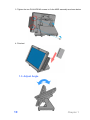
1. Remover the customer display mounting hole cover from the device and pull
out the connector from the device.
2. Adjust the hinge of the customer display, and then connect to the device as
shown below.
3. Mount the customer display to the device and tighten the two PHILLIPS M3
screws as shown below.
8
Chapter 1