1
3
Table of Contents
WELCOME
4
INSTALLING THE GSC300 SOFTWARE
Before you start.
Minimum Hardware Requirements.
Installing on Windows 98SE, 2000, ME, XP.
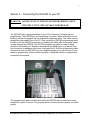
CONNECTING YOUR GSC300 TO YOUR PC
4
6
USING THE GSC300 CONFIGURATOR PROGRAM
Starting the Configurator program.
GSC300 Configuration using Configurator.
Load a Default Configuration File.
Load a User Defined Configuration File.
Manually Enter a Configuration File.
Reading Data from the GSC300.
Saving a Configuration File to Disk.
Set Port Address.
Customize Display Messages.
GSC300 PROGRAMMING USING CONFIGURATOR
Write data “as is” from a loaded configuration file.
Write modified data from a loaded configuration file.
Setting senders for input failures.
6
10
CONFIGURABLE FEATURES OF THE GSC300
14
TROUBLESHOOTING GUIDELINES
16
4016 Quartz Drive
Santa Rosa, CA 95405
Phone: 707 539-9003
Fax:
707 539-5212
Email: [email protected]
Web
www.generatorjoe.NET
Installation and User Manual for the GSC300 Configurator PC Software Interface