1
14.
Options
14.1
Communication software APT-COM™ 3 DataControlSystem (option)
The environmental simulation chamber MK is regularly equipped with a serial interface RS 422 that can
connect the BINDER communication software APT-COM™ 3 DataControlSystem. The actual temperature values are given at adjustable intervals. Programming can be performed graphically via PC. Up to 30
chambers with RS 422 interface can be cross-linked. For further information, please refer to the operating
manual of the BINDER communication software APT-COM™.
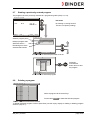
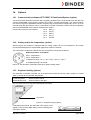
Pin allocation of the RS 422 interface:
14.2
pin 2:
pin 3:
pin 4:
pin 5:
pin 7:
RxD (+)
TxD (+)
RxD (-)
TxD (-)
Ground
Analog output for temperature (option)
With this option the chamber is equipped with an analog output 4-20 mA for temperature. This output
permits transmitting data to external data registration systems or devices.
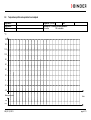
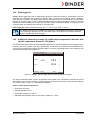
The connection is realized as a DIN socket (8) in the lateral control panel as follows:
ANALOG OUTPUT 4-20 mA DC
PIN 1: Temperature –
PIN 2: Temperature +
Temperature range: -40 °C / -40 °F up to +180 °C / -356 °F
A suitable DIN plug is enclosed.
Figure 10: Pin allocation of the DIN socket (8) for option analog output
14.3
Keyboard locking (option)
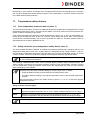
The keyboard of the MB1 controller can be locked and unlocked via the key switch (option). In locked
state, no entries to the controller are possible.
Locked keyboard:
Switch position vertical
Unlocked keyboard:
Switch position to the right
You can remove the key only when the keyboard is locked.
Key switch
Figure 11: Keyboard locking (option)
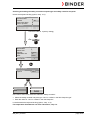
If the keyboard is locked, the notification “KEY LOCK” is displayed on the controller MB1 display next to a flashing blue
information symbol.
MK (E2.1) 01/2013
KEY LOCK
W
HAND
VIEW->
page 49/72