1
Installing PostgreSQL [Optional]
To install PostgreSQL, download (www.postgresql.org) and launch the installer for
your operating system (e.g. postgresql-x.x-int.msi for Windows XP). Then
go through the following steps:
1. Ensure that you are logged into the operating system with administrator
privileges.
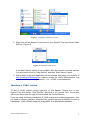
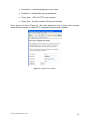
2. Choose to “Install as a service”, leave Account name as postgres and
choose an Account password (Figure 5). This will create a new user in the
operating system, without administrator privileges, that will act as Service User
for PostgreSQL. The Service User is used in order to create/remove database
connections in PostgreSQL. Then click Next.
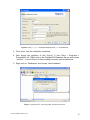
3. Leave Superusername as postgres and enter yawl as password (Figure 6).
This is the Superuser of the database cluster, and will be used to access,
create and remove tables.
Figure 5: Choose “Install as service” and an Account password of your choosing.
YAWL Installation Manual v3.0.1
8