1
Integrated High Definition LED
Television User’s Guide:
58L7350U / 65L7350U
If you need assistance:
Toshiba's Support Web site support.toshiba.com
For more information, see “Troubleshooting” on page 173 in this guide.
Owner's Record
The model number and serial number are on the back and side of your television.
Record these numbers, whenever you communicate with your Toshiba dealer about
this Television.
Model name:
Serial number:
Register your Toshiba Television at register.toshiba.com
Note: To display a High Definition
picture, the TV must be receiving a
High Definition signal (such as an overthe-air High Definition TV broadcast, a
High Definition digital cable program,
or a High Definition digital satellite
program). For details, contact your TV
antenna installer, cable provider, or
satellite provider
GMA300020011
3/13
2
CHILD SAFETY:
PROPER TELEVISION PLACEMENT MATTERS
TOSHIBA CARES
•M
anufacturers, retailers and the rest of the consumer electronics industry
are committed to making home entertainment safe and enjoyable.
• As you enjoy your television, please note that all televisions – new and
old- must be supported on proper stands or installed according to the
manufacturer’s recommendations. Televisions that are inappropriately
situated on dressers, bookcases, shelves, desks, speakers, chests, carts,
etc., may fall over, resulting in injury.
TUNE IN TO SAFETY
•A
LWAYS follow the manufacturer’s recommendations for the safe
installation of your television.
• ALWAYS read and follow all instructions for proper use of your television.
• NEVER allow children to climb on or play on the television or the
furniture on which the television is placed.
• NEVER place the television on furniture that can easily be used as steps,
such as a chest of drawers.
• ALWAYS install the television where it cannot be pushed, pulled over or
knocked down.
• ALWAYS route cords and cables connected to the television so that they
cannot be tripped over, pulled or grabbed.
WALL OR CEILING MOUNT YOUR TELEVISION
•A
LWAYS contact your retailer about professional installation if you have
any doubts about your ability to safely mount your television.
• ALWAYS use a mount that has been recommended by the television
manufacturer and has a safety certification by an independent laboratory
(such as UL, CSA, ETL).
• ALWAYS follow all instructions supplied by the television and mount
manufacturers.
• ALWAYS make sure that the wall or ceiling where you are mounting the
television is appropriate. Some mounts are not designed to be mounted
to walls and ceilings with steel studs or cinder block construction. If you
are unsure, contact a professional installer.
• Televisions can be heavy. A minimum of two people is required for a
wall or ceiling mount installation.
MOVING AN OLDER TELEVISION TO A NEW PLACE IN YOUR
HOME
•M
any new television buyers move their older CRT televisions into a
secondary room after the purchase of a flat-panel television. Special care
should be made in the placement of older CRT televisions.
• ALWAYS place your older CRT television on furniture that is sturdy and
appropriate for its size and weight.
• NEVER place your older CRT television on a dresser where children may
be tempted to use the drawers to climb.
• ALWAYS make sure your older CRT television does not hang over the
edge of your furniture.
CE.org/safety
3
Dear Customer,
Thank you for purchasing this Toshiba LED TV.
This document will help you use the many exciting
features of your new LED TV. Before operating your
LED TV, carefully read this manual completely.
Important Safety Instructions
1)
2)
3)
4)
Read these instructions.
Keep these instructions.
Heed all warnings.
Follow all instructions.
Safety Precautions
5) Do not use this apparatus near water.
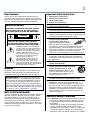
WARNING: TO REDUCE THE RISK OF FIRE
OR ELECTRIC SHOCK, DO NOT EXPOSE
THIS APPLIANCE TO RAIN OR MOISTURE.
7) Do not block any ventilation openings. Install in
accordance with the manufacturer’s instructions.
WARNING
RISK OF ELECTRIC SHOCK
DO NOT OPEN.
WARNING: TO REDUCE THE RISK OF ELECTRIC
SHOCK, DO NOT REMOVE COVER (OR BACK).
NO USER-SERVICEABLE PARTS INSIDE. REFER
SERVICING TO QUALIFIED SERVICE PERSONNEL.
The lightning flash with arrowhead
symbol, within an equilateral triangle,
is intended to alert the user to the
presence of uninsulated “dangerous
voltage” within the product’s
enclosure that may be of sufficient
magnitude to constitute a risk of
electric shock to persons.
The exclamation point within an
equilateral triangle is intended to
alert the user to the presence of
important operating and maintenance
(servicing) instructions in the literature
accompanying the appliance.
WARNING
To prevent injury, this apparatus must be securely
attached to the floor/wall in accordance with the
installation instructions. See item 26) on page 4.
WARNING: If you decide to wall mount this
television, always use a mounting bracket that has
been Listed by an independent laboratory (such as
UL, CSA, ETL) and is appropriate for the size and
weight of this television. The use of inappropriate or
non-Listed mounting brackets could result in serious
bodily injury and/or property damage. See “To Display
your LED TV using a Wall Bracket:” on page 6.
NOTE TO CATV INSTALLERS
This is a reminder to call the CATV system installer’s
attention to Article 820-40 of the U.S. NEC, which
provides guidelines for proper grounding and, in
particular, specifies that the cable ground shall be
connected to the grounding system of the building,
as close to the point of cable entry as practical. For
additional antenna grounding information, see items
33) and 34) on page 5.
6) Clean only with dry cloth.
8) Do not install near any heat sources such as
radiators, heat registers, stoves, or other products
(including amplifiers) that produce heat.
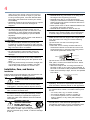
9) Do not defeat the safety
Wide blade
purpose of the polarized
or grounding type plug. A
polarized plug has two blades
with one wider than the other. A
grounding type plug has two blades and a third
grounding prong. The wide blade or the third
prong are provided for your safety. If the provided
plug does not fit into your outlet, consult an
electrician for replacement of the obsolete outlet.
10)Protect the power cord from being walked on
or pinched, particularly at plugs, convenience
receptacles, and the point where they exit from
the apparatus.
11)Only use attachments/accessories specified
by the manufacturer.
12)Use only with the cart, stand,
tripod, bracket, or table specified
by the manufacturer, or sold
with the apparatus. When a cart
is used, use caution when moving
the cart/apparatus combination to
avoid injury from tip-over.
13)Unplug this apparatus during lightning storms
or when unused for long periods of time.
14)Refer all servicing to qualified service
personnel. Servicing is required when the
apparatus has been damaged in any way, such
as power-supply cord or plug is damaged, liquid
has been spilled or objects have fallen into the
apparatus, the apparatus has been exposed to
rain or moisture, does not operate normally, or
has been dropped.
Additional Safety Precautions
14a) CAUTION: If the TV is dropped and the cabinet
or enclosure surface has been damaged or the
TV does not operate normally, take the following
precautions:
• ALWAYS turn off the TV and unplug the power
cord to avoid possible electric shock or fire.
• NEVER allow your body to come in contact with
any broken glass or liquid from the damaged
television. The LCD panel inside the TV contains
4
glass and a toxic liquid. If the liquid comes in
contact with your mouth or eyes, or your skin
is cut by broken glass, rinse the affected area
thoroughly with water and contact your doctor
immediately.
• ALWAYS contact a service technician to inspect
the TV any time it has been damaged or
dropped.
15)CAUTION:
• To reduce the risk of electric shock, do not
use the polarized plug with an extension cord,
receptacle, or other outlet unless the blades
can be inserted completely to prevent blade
exposure.
• To prevent electric shock, match wide blade of
plug to wide slot; fully insert.
16)CAUTION:
• Do not let children swallow any small parts
included on or with the product or play with the
plastic bag. Keep the small parts and the plastic
bag out of the reach of children.
17)CAUTION:
• Do not let water or other liquids come into
contact with the product, as it may result in
damage.
18)WARNING:
• To prevent the spread of fire, keep candles or
other open flames away from this product at all
times.
• Keep the product away from direct sunlight, fire
or a heat source such as a heater. This may
reduce the product lifetime or result in fire.
24)When selecting a location for the TV,
• NEVER allow any part of the TV to hang over
the edge of the supporting furniture,
• NEVER place the TV on tall furniture (for
example, entertainment centers or bookcases)
without anchoring both the furniture and the TV
to a suitable support,
• Never place cloth or other material between the
TV and the supporting furniture.
• NEVER allow children to climb on the TV.
25)To avoid damage to this product, never place or
store the TV in direct sunlight; hot, humid areas;
or areas subject to excessive dust or vibration.
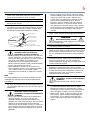
26)Always place the TV on the floor or a sturdy, level,
stable surface that can support the weight of the
unit. Secure the TV using one of the following
methods:
(1) Secure the TV with a mounting screw
(Recommended.)
• Place the TV on a sturdy surface that has a
sufficient thickness and screw the unit on the
surface securely by using the mounting screw
and the fall-prevention screw hole.
Mounting screw
TV Back
Screw hole
Installation, Care, and Service
Installation
Follow these recommendations and precautions and
heed all warnings when installing your TV:
19)
WARNING: NEVER expose batteries
to excessive heat such as sunshine
or fire.
20)ALWAYS plug the product into an outlet that is
located in such a manner that it can be easily
unplugged in case the product requires service.
21)NEVER route the product’s power cord inside a
wall or similar enclosed area.
22)Never modify this equipment. Changes or
modifications may void: a) the warranty, and b)
the user’s authority to operate this equipment
under the rules of the Federal Communications
Commission.
DANGER: RISK OF
SERIOUS PERSONAL
INJURY, DEATH, OR
EQUIPMENT DAMAGE
Never place the TV on an unstable
cart, stand, or table. The TV may fall, causing
serious personal injury, death, or serious damage
to the TV.
23)
(2) Secure the TV with a sturdy strap to a wall
stud, pillar, or other immovable structure. When
connecting the strap:
• attach the strap to the TV using the hooks on
the back of the TV, the clips on the pedestal, or
the hole in the base of the pedestal as available.
• make sure the strap is tight, secure, and parallel
to the floor.
Sturdy strap (as short as possible)
7”
min.
TV Side
Hook
TV Top
27)The apparatus shall not be exposed to dripping or
splashing, and that no objects filled with liquids,
such as vases, shall be placed on the apparatus.
28)Never block or cover the slots or openings in the
TV cabinet back, bottom, and sides. Never place
the TV:
• on a bed, sofa, rug, or similar surface;
• too close to drapes, curtains, or walls; or
• in a confined space such as a bookcase,
built-in cabinet, or any other place with poor
ventilation.
29)Always leave a space of at least 4 (four) inches
around the TV. The slots and openings are
provided to protect the TV from overheating and
to help maintain reliable operation of the TV.
5
30)Never allow anything to rest on or roll over the
power cord, and never place the TV where the
power cord is subject to wear or abuse.
31)Never overload wall outlets and extension cords.
32)Always operate this equipment from a 120V AC,
60 Hz power source.
33)Always make sure the antenna system is properly
grounded to provide adequate protection against
voltage surges and built-up static charges (see
Section 810 of the National Electric Code).
Ground clamp
Electric service equipment
Ground clamps
34)
Antenna lead-in wire
37)Never hit, press, or place anything on the back
cover. These actions will damage internal parts.
Antenna discharge unit
(NEC Section 810-20)
38)
Grounding conductors
(NEC Section 810-21)
Power service grounding
electrode system (NEC Art 250 Part-H)
DANGER: RISK OF SERIOUS
PERSONAL INJURY OR DEATH!
• When installing a rooftop antenna, use extreme
care to make sure you are never in a position
where your body (or any item you are in contact
with, such as a ladder or screwdriver) can
accidentally touch overhead power lines.
Never locate the antenna near overhead power
lines or other electrical circuits.
• Never attempt to install any of the following
during lightning activity: a) an antenna system;
or b) cables, wires, or any home theater
component connected to an antenna or phone
system.
Care
For better performance and safer operation of your
TOSHIBA TV, follow these recommendations and
precautions:
35)If you use the TV in a room whose temperature is
32° F (0° C) or below, the picture brightness may
vary until the LCD warms up. This is not a sign of
malfunction.
36)
• Always unplug the TV before cleaning. Gently
wipe the display panel surface (the TV screen)
using a dry, soft cloth (cotton, flannel, etc.).
A hard cloth may damage the surface of the
panel. Avoid contact with alcohol, thinner,
benzene, acidic or alkaline solvent cleaners,
abrasive cleaners, or chemical cloths, which
may damage the surface. Never spray volatile
compounds such as insecticide on the cabinet.
Such products may damage or discolor the
cabinet.
WARNING: RISK OF SERIOUS
PERSONAL INJURY OR EQUIPMENT
DAMAGE!
• Never use chemicals (such as air fresheners,
cleaning agents, etc.) on or near the TV
pedestal. Studies indicate that plastics may
weaken and crack over time from the combined
effects of chemical agents and mechanical
stress (such as the weight of the TV). Failure to
follow these instructions could result in serious
injury and/or permanent damage to TV and TV
pedestal.
WARNING:
RISK OF ELECTRIC SHOCK!
Never spill liquids or push objects of any kind into
the TV cabinet slots.
39)During a lightening storm, do not touch the
connecting cables or product.
40)For added protection of your TV from lightning and
power surges, always unplug the power cord and
disconnect the antenna from the TV if you leave
the TV unattended or unused for long periods of
time.
41)Always unplug the TV to completely disconnect
from mains power. When the TV is turned off
using the on/off switch, it is not completely
disconnected from power and a minute amount of
current is still consumed.
42)During normal use, the TV may make occasional
snapping or popping sounds. This is normal,
especially when the unit is being turned on or off.
If these sounds become frequent or continuous,
unplug the power cord and contact a Toshiba
Authorized Service Provider.
WARNING: RISK OF SERIOUS
PERSONAL INJURY OR EQUIPMENT
DAMAGE!
Never strike the screen with a sharp or heavy
object.
43)
44)• The LCD screen of this product can be damaged
by ultraviolet radiation from the sun. When
selecting a location for the television, avoid
locations where the screen may be exposed to
direct sunlight, such as in front of a window.
• Never touch, press, or place anything on the
LCD screen. These actions will damage the
LCD screen. If you need to clean the LCD
screen follow the instructions (in item 36) on
page 5.
6
Service
45)
WARNING:
RISK OF ELECTRIC SHOCK!
Never attempt to service the TV yourself. Opening
and removing the covers may expose you to
dangerous voltage or other hazards. Failure
to follow this WARNING may result in death or
serious injury. Refer all servicing not specified
in this manual to a Toshiba Authorized Service
Provider.
46)If you have the TV serviced:
• Ask the service technician to use only
replacement parts specified by the manufacturer.
• Upon completion of service, ask the service
technician to perform routine safety checks
to determine that the TV is in safe operating
condition.
Choosing a location for your LED TV
To Display your LED TV on the included Pedestal
Stand:
Observe the following safety precautions:
1) Read and follow the pedestal assembly
instructions included with the pedestal.
CAUTION: Before beginning pedestal assembly,
carefully lay the front of the LCD Panel face down
on a flat, cushioned surface such as a quilt or
blanket. Leave the bottom of the unit protruding
over the edge of the surface and assemble the
pedestal as indicated below.
Note: Extreme care should always be used when
attaching the pedestal stand to avoid damage to
the LCD panel.
2) Place the TV on a sturdy, level surface that can
support the weight of the TV.
3) Be sure to secure the TV to a wall, pillar, surface,
or other immovable structure see item 26) page
4 for additional details.
4) Always use the screws supplied or recommended
by the wall mount manufacturer.
5) Follow the instructions provided with your wall
bracket. Before proceeding, make sure the
appropriate bracket(s) are attached to the wall and
the back of the TV as described in the instructions
provided with the wall bracket.
6) After attaching the appropriate bracket(s) to the
wall and the back of the TV, remove the pedestal
stand from the TV, as described below.
7) VESA Mounting Pattern
TV Size
58L7350U
65L7350U
Hole Pattern (HxV)
400x400 mm
400x400 mm
Screw Size
M6
M6
(unit in mm)
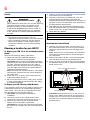
Removing the Pedestal Stand
1) Carefully lay the front of the unit face down on a
flat, cushioned surface such as a quilt or blanket.
Leave the stand protruding over the edge of the
surface.
Note: Extreme care should always be used when
removing the pedestal stand to avoid damage to
the LCD panel.
2) Remove the screws shown in the below diagram.
This will allow removal of the pedestal stand.
3) Once you have removed all of the screws holding
the pedestal stand in place, remove the pedestal
stand from the TV.
58"/ 65" VESA Mounting Pattern
To Display your LED TV using a Wall Bracket:
If you decide to wall mount your LED TV, always use
a wall bracket Listed by an independent laboratory
(such as UL, CSA, ETL) that is appropriate for the
size and weight of the TV (see page 3):
1) CAUTION: Two people are required for
installation.
2) Unplug and remove any cables and/or other
component connectors from the rear of the TV.
3) Remove the screws of the VESA Mounting
Pattern show in the table if applicable.
CAUTION: Do not use the screws removed from
the back cover to attach the wall mount bracket to
the TV.
Four stand screws
One clip
CAUTION: Always place the TV on the floor or a
sturdy, level, stable surface that can support the
weight of the unit. Secure the TV as described in
item 26) of the Important Safety Instructions in
this document.
7
Safety Precautions for 3D glasses
Such symptoms may occur when wearing 3D
glasses for long periods of time.
• Be careful not to pinch your fingers in the hinge
of the 3D glasses.
• The 3D function has been designed for
private use and entertainment in your home
environment. Please note that any commercial
use of the 3D function could lead to copyright
infringement of authors’ rights. Toshiba asks
you to respect the intellectual property rights of
third parties.
Cautions on watching the 3D images
Available 3D glasses
Toshiba FPT-AG03 (supplied)
Warning
DO NOT INGEST BATTERY, CHEMICAL BURN
HAZARD.
• This product contains a coin/button cell battery.
If the coin/button cell battery is swallowed, it
can cause severe internal burns in just 2 hours
and can lead to death.
• Keep new and used batteries away from
children. If the battery compartment does not
close securely, stop using the product and keep
it away from children.
• If you think batteries might have been
swallowed or placed inside any part of the body,
seek immediate medical attention.
About handling the 3D glasses
• Do not leave the 3D glasses or the accessories
within the reach of small children.
Inhaling or swallowing them may cause suffocation
or lesions in the stomach wall.
If swallowed, consult a doctor immediately.
• Do not repair, modify, or disassemble the 3D
glasses by yourself.
Doing so may cause a fire or cause you to become
indisposed while viewing 3D images.
• Do not expose the glasses to excessive heat
such as sunshine, fire, or the like.
Caution
About the 3D glasses
• Do not use the 3D glasses if they are cracked,
broken, or not working properly.
Continuing to use them in such a state may cause
injury, eye strain, or indisposition.
• Do not stand or walk while wearing 3D glasses.
You may lose your balance which could result in
falls or other accidents.
• Do not wear the 3D glasses for any purpose
other than viewing 3D programming.
3D glasses do not function as sunglasses.
• Do not drop, exert pressure on, or step on the
3D glasses.
Doing so may damage the glass section, which may
result in injury.
Exposing the 3D glasses to liquid or excessive heat
may damage the liquid crystal shutter function.
• If your nose or temple turns red, or you feel any
pain or discomfort, stop using the 3D glasses.
• Some viewers may experience a seizure or
blackout when exposed to certain flashing
images or lights contained in certain 3D
television pictures or video games.
Anyone who has had a seizure, loss of awareness,
or other symptoms linked to an epileptic condition,
or has a family history of epilepsy, should contact a
health care provider before using the 3D function.
- Due to the possible impact on vision development,
viewers of 3D video images should be age 6 or
above.
Children and teenagers may be more susceptible
to health issues associated with viewing in 3D and
should be closely supervised to avoid prolonged
viewing without rest.
• Avoid using the 3D function when under the
influence of alcohol.
• If you are ill or feel ill, you should refrain from
viewing 3D images, and consult your health
care provider as may be appropriate.
• If you experience any of the following symptoms
when viewing 3D video images, stop viewing
and contact your health care provider:
Convulsions, eye or muscle twitching, loss of
awareness, altered vision, involuntary movements,
disorientation, eye strain, nausea/vomiting,
dizziness, headaches.
• If you feel eye fatigue or other discomfort
from viewing 3D video images, remove the 3D
glasses and discontinue use until the condition
is eliminated.
• Viewing in 3D may cause dizziness and/or
disorientation for some viewers.
Therefore, to avoid injury do not place your TV near
open stairwells, balconies, or wires.
Also do not sit near objects that could be broken if
accidentally hit.
When viewing 3D images, always wear 3D glasses.
• Watching 3D images without 3D glasses may
cause eye strain.
Use specified 3D glasses.
• When watching 3D images, do not wear 3D
glasses at an angle and do not lie down.
If you watch while lying down or with the glasses
tilted, the 3D effect is lost and it may cause eye
strain.
• It is recommended that the viewer’s eyes and
3D glasses are level with the screen.
• If you have prescription eye glasses or contact
lenses, wear the 3D glasses over them.
Watching 3D images without appropriate eyewear
may cause eye strain.
• If 3D images often appear in double or if you
cannot see the images in 3D, stop viewing.
Continuous viewing may cause eye strain.
8
• Watching TV while sitting too close to the
screen for an extended period of time may
cause eye strain.
The ideal viewing distance should be at least three
times the screen height.
Screen height
• Use the 3D glasses in the following viewing
angle.
Otherwise, you may not see the correct 3D image.
Effective viewing angle:
- Within 30° horizontal, 20° vertical
Notes on handling the 3D glasses:
• When cleaning the 3D glasses, gently wipe with
a dry, soft cloth.
- First, remove any dirt or dust from the 3D glasses.
- Harsh rubbing or use of a dirty or coarse cloth will
scratch the 3D glasses.
• Do not use benzene, paint thinner, alcohol,
water, or abrasive cleaners, which may damage
the 3D glasses.
• When not using the 3D glasses, put them in the
supplied glasses pouch and store them away
from high temperatures and humidity.
• Do not store the 3D glasses in areas of extreme
heat or cold, as deformation can occur. If
deformation occurs, replace the 3D glasses.
• The lenses of the 3D glasses are different from
those of ordinary glasses, and are very thin. Be
very careful in handling the 3D glasses as the
lens can pop out easily.
Do not put excessive force on the lenses.
• Do not scratch the surface of the lenses with
sharp objects.
• Do not drop or bend the 3D glasses.
Notes on IR communication:
• Do not block the IR sensor for 3D glasses on the
TV by placing objects in front of it.
• Do not cover the IR sensor on the 3D glasses
with stickers or labels.
• Keep the IR sensor on the 3D glasses clean.
• The use of 3D glasses could interfere with
other IR communication devices. Other IR
communication devices may cause the 3D
glasses not to work correctly.
Use the TV and 3D glasses in a place where they
will not interfere with other devices or products.
Notes on watching the TV:
• Proper 3D effects or 3D-to-2D conversion
results may not be obtained depending on the
received 3D content.
• 3D effect and image quality may vary depending
upon content quality and display device
capability/functionality/settings.
• If you use any device, such as a mobile phone
or mobile wireless device, near the 3D glasses,
the 3D glasses may not work correctly.
• If there is fluorescent lighting in the viewing
area, it may flicker depending on the frequency
of the light. In this case, reduce the brightness
of the fluorescent light, or use another light. (It
is not recommended to watch the TV in a dark
room, especially for children.)
• Wear the 3D glasses properly, otherwise you
may not see the correct 3D images.
• When not viewing 3D images, take off the 3D
glasses; otherwise, it may be difficult to see the
display on other products such as PC, digital
clock, or calculator, etc.
• The 2D to 3D conversion function is activated
and controlled by you according to your
personal preferences.
• The 2D to 3D conversion function is meant for
enjoyment of 2D home video, and other 2D
content you create, in 3D according to your
personal preferences.
• The 2D to 3D conversion function is not
intended for use with pre-recorded 2D
copyrighted content owned by a third-party
unless the copyright owner has given direct or
indirect permission, or unless applicable law
permits such use.
FCC Caution
To assure continued compliance, follow the attached
installation instructions. Any changes or modifications
not expressly approved by Toshiba America
Information Systems, Inc. could void the user’s
authority to operate this device. Service Center or an
experienced radio/TV technician for help.
FCC Declaration of Conformity
Compliance Statement (Part 15):
Toshiba television models 58L7350U and
65L7350U comply with Part 15 of the FCC Rules.
Operation is subject to the following two conditions:
(1) This device may not cause harmful interference, and
(2) This device must accept any interference received,
including interference that may cause undesired operation.
The party responsible for compliance to these rules is:
9
Toshiba America Information Systems, Inc. 9740 Irvine
Blvd., Irvine, CA 92618. Phone: 800-631-3811
Note: This equipment has been tested and found
to comply with the limits for a Class B digital device,
pursuant to Part 15 of the FCC Rules. These limits
are designed to provide reasonable protection against
harmful interference in a residential installation. This
equipment generates, uses, and can radiate radio
frequency energy and, if not installed and used in
accordance with the instructions, may cause harmful
interference to radio communications. However, there
is no guarantee that interference will not occur in a
particular installation. If this equipment does cause
harmful interference to radio or television reception,
which can be determined by removing and applying
power to the equipment, the user is encouraged to
try to correct the interference by one of the following
measures:
• Reorient or relocate the receiving antenna.
• Increase the separation between the equipment and
receiver.
• Connect the equipment into an outlet on a circuit
different from that to which the receiver is connected.
• Consult the dealer or an experienced radio/TV technician
for help.
Caution: Changes or modifications to this equipment
not expressly approved by Toshiba could void the
user's authority to operate this equipment.
Wireless Radio
For product available in the USA/Canada market,
only channel 1–11 can be operated. Selection of other
channels is not possible. The device could automatically
discontinue transmission in case of absence of information
to transmit, or operational failure. Note that this is not
intended to prohibit transmission of control or signaling
information or the use of repetitive codes where required
by the technology. If this device is going to be operated in
5.15–5.25GHz frequency range, then it is restricted to an
indoor environment only.
Important: Any changes or modifications not
expressly approved by the party responsible for
compliance could void the user's authority to operate
this equipment. This device and its antenna(s) must
not be co-located or operating in conjunction with any
other antenna or transmitter.
FCC Radiation Exposure Statement: This equipment
complies with FCC radiation exposure limits set forth
for an uncontrolled environment. This equipment
should be installed and operated with minimum
distance 20cm between the radiator & your body.
Wireless Radio
For product available in the USA/Canada market, only
channel 1–11 can be operated. Selection of other channels
is not possible.
The device could automatically discontinue transmission
in case of absence of information to transmit, or
operational failure. Note that this is not intended to prohibit
transmission of control or signaling information or the use
of repetitive codes where required by the technology.
Important: Any changes or modifications not
expressly approved by the party responsible for
compliance could void the user's authority to operate
this equipment.
IMPORTANT NOTE:
IC Radiation Exposure Statement: This equipment
complies with IC RSS-102 radiation exposure limits
set forth for an uncontrolled environment. This
equipment should be installed and operated with
minimum distance 20cm between the radiator & your
body.
FCC Radiation Exposure Statement:
This equipment complies with FCC radiation exposure
limits set forth for an uncontrolled environment. This
equipment should be installed and operated with a
minimum distance of 20 cm between the radiator and your
body.
ENERGY STAR® User Information
ENERGY STAR User Information Statement: the factory
default settings of this television meet ENERGY STAR®
requirements. Changing Picture Settings may increase
energy consumption, possibly beyond the limits required
for ENERGY STAR qualification.
To ensure your television is operating at optimal energy
efficiency, select [Home] mode during initial activation.
To return to [Home] mode settings, select [Home] under
the Installation Tab of the TV Menu. [AutoView] mode is
recommended for normal home use.
ENERGY STAR® qualified TV.
Products that earn the ENERGY STAR
prevent green house gas emissions by
meeting strict guidelines set by the
U.S. Environmental Protection Agency.
ENERGY STAR and the ENERGY STAR
mark are registered U.S. marks.
10
Important notes about your TV
The following symptoms are technical limitations of
LCD Display technology and are not an indication of
malfunction; therefore, Toshiba is not responsible for
perceived issues resulting from these symptoms.
1) An afterimage (ghost) may appear on the screen
if a fixed, non-moving image appears for a long
period of time. The afterimage is not permanent
and will disappear in a short period of time.
2) The LCD panel contained in this TV is
manufactured using an extremely high level
of precision technology; however, there may
be an occasional pixel (dot of light) that does
not operate properly (does not light, remains
constantly lit, etc.). This is a structural property of
LCD technology, is not a sign of malfunction, and
is not covered under your warranty. Such pixels
are not visible when the picture is viewed from a
normal viewing distance.
Note: Interactive video games that involve shooting a
“gun” type of joystick at an on-screen target may not
work with this TV.
Trademark Information
• AutoView, Cinema Series, ClearScan, ColorMaster,
ColorStream, CQ Engine, DynaLight, GameTimer,
Native Mode, and TriVector are trademarks
or registered trademarks of Toshiba America
Information Systems, Inc.
• ActiveX is a registered trademark of the Microsoft
Corporation.
• Android is a trademark of Google Inc.
• Manufactured under license from
Audyssey Laboratories.
U.S. and foreign patents pending.
Audyssey Premium Television™ is a
trademark of Audyssey Laboratories.
Audyssey Premium Television™ is a
suite of technologies that remove the
acoustical problems caused by small
speakers and drivers.
Working together these technologies
deliver a better translation of the
audio content and make the television
experience sound closer to the original.
• Blu-ray Disc™, Blu-ray™, and the logos are
trademarks of the Blu-ray Disc Association
• CinemaNow is a registered trademark of BBY
Solutions, Inc.
• DivX®, DivX Certified®, DivX Plus® HD and
associated logos are trademarks of Rovi
Corporation or its subsidiaries and are used under
license.
• Manufactured under license from Dolby
Laboratories. Dolby and the double-D
symbol are trademarks of Dolby
Laboratories.
• ENERGY STAR and the ENERGY STAR mark are
registered U.S. marks.
• The terms HDMI and HDMI High-Definition
Multimedia Interface, and the HDMI logo are
trademarks or registered trademarks of HDMI
Licensing LLC in the United States and other
countries.
• Intel and the Intel logo are trademarks of Intel
Corporation in the U.S. and/or other countries.
• iTunes Store is a trademark of Apple Inc., registered
in the U.S. and other countries.
• MPEG Layer-3 audio coding technology licensed
from Fraunhofer IIS and Thomson.
• Netflix is a registered trademark of Netflix, Inc.
• Skype, the Skype logo and the "S" logo are
trademarks of Skype and are used with the
permission of Skype.
• VUDU, Vudu Apps, and Vudu HD Movies are
trademarks and registered trademarks of VUDU,
Inc
• Designed with UEI Technology™. Under License
from Universal Electronics Inc.
Portions © UEI 2000-2012.
• WiFi is a registered mark of the Wi-Fi Alliance.
• All other brand and product names are trademarks
or registered trademarks of their respective
companies.
• THIS PRODUCT IS LICENSED UNDER THE
AVC PATENT PORTFOLIO LICENSE FOR THE
PERSONAL AND NONCOMMERCIAL USE
OF A CONSUMER TO (i) ENCODE VIDEO IN
COMPLIANCE WITH THE AVC STANDARD
(“AVC VIDEO”) AND/OR (ii) DECODE AVC
VIDEO THAT WAS ENCODED BY A CONSUMER
ENGAGED IN A PERSONAL AND NONCOMMERCIAL ACTIVITY AND/OR WAS
OBTAINED FROM A VIDEO PROVIDER LICENSED
TO PROVIDE AVC VIDEO. NO LICENSE IS
GRANTED OR SHALL BE IMPLIED FOR ANY
OTHER USE. ADDITIONAL INFORMATION MAY
BE OBTAINED FROM MPEG LA, LLC. SEE
HTTP://WWW.MPEGLA.COM
• THIS PRODUCT IS LICENSED UNDER THE
VC-1 PATENT PORTFOLIO LICENSE FOR
THE PERSONAL AND NONCOMMERCIAL USE
OF A CONSUMER TO (i) ENCODE VIDEO IN
COMPLIANCE WITH THE VC-1 STANDARD
(“VC-1 VIDEO”) AND/OR (ii) DECODE VC-1
VIDEO THAT WAS ENCODED BY A CONSUMER
ENGAGED IN A PERSONAL AND NONCOMMERCIAL ACTIVITY AND/OR WAS
OBTAINED FROM A VIDEO PROVIDER LICENSED
11
TO PROVIDE VC-1 VIDEO. NO LICENSE IS
GRANTED OR SHALL BE IMPLIED FOR ANY
OTHER USE. ADDITIONAL INFORMATION MAY
BE OBTAINED FROM MPEG LA, LLC. SEE
HTTP://WWW.MPEGLA.COM
• THIS PRODUCT IS LICENSED UNDER THE
MPEG-4 VISUAL PATENT PORTFOLIO LICENSE
FOR THE PERSONAL AND NON-COMMERCIAL
USE OF A CONSUMER FOR (i) ENCODING
VIDEO IN COMPLIANCE WITH THE MPEG4 VISUAL STANDARD (“MPEG-4 VIDEO”) AND/
OR (ii) DECODING MPEG-4 VIDEO THAT WAS
ENCODED BY A CONSUMER ENGAGED IN A
PERSONAL AND NON-COMMERCIAL ACTIVITY
AND/OR WAS OBTAINED FROM A VIDEO
PROVIDER LICENSED BY MPEG LA TO PROVIDE
MPEG-4 VIDEO. NO LICENSE IS GRANTED
OR SHALL BE IMPLIED FOR ANY OTHER USE.
ADDITIONAL INFORMATION INCLUDING THAT
RELATING TO PROMOTIONAL,INTERNAL AND
COMMERCIAL USES AND LICENSING MAY BE
OBTAINED FROM MPEG powered LA,LLC. SEE
HTTP:// WWW.MPEGLA.COM
Copyright
This guide is copyrighted by Toshiba America Information
Systems, Inc. with all rights reserved. Under the copyright
laws, this guide cannot be reproduced in any form without
the prior written permission of Toshiba. No patent liability
is assumed, however, with respect to the use of the
information contained herein.
©2013 by Toshiba America Information Systems, Inc. All
rights reserved.
Notice
The information contained in this manual, including but not
limited to any product specifications, is subject to change
without notice.
TOSHIBA CORPORATION AND TOSHIBA
AMERICA INFORMATION SYSTEMS, INC.
(TOSHIBA) PROVIDES NO WARRANTY WITH
REGARD TO THIS MANUAL OR ANY OTHER
INFORMATION CONTAINED HEREIN AND
HEREBY EXPRESSLY DISCLAIMS ANY IMPLIED
WARRANTIES OF MERCHANTABILITY OR
FITNESS FOR ANY PARTICULAR PURPOSE WITH
REGARD TO ANY OF THE FOREGOING. TOSHIBA
ASSUMES NO LIABILITY FOR ANY DAMAGES
INCURRED DIRECTLY OR INDIRECTLY FROM
ANY TECHNICAL OR TYPOGRAPHICAL ERRORS
OR OMISSIONS CONTAINED HEREIN OR FOR
DISCREPANCIES BETWEEN THE PRODUCT
AND THE MANUAL. IN NO EVENT SHALL
TOSHIBA BE LIABLE FOR ANY INCIDENTAL,
CONSEQUENTIAL, SPECIAL, OR EXEMPLARY
DAMAGES, WHETHER BASED ON TORT,
CONTRACT OR OTHERWISE, ARISING OUT
OF OR IN CONNECTION WITH THIS MANUAL
OR ANY OTHER INFORMATION CONTAINED
HEREIN OR THE USE THEREOF.
Contents
Chapter 1: Introduction....................................................20
Safety icons................................................................ 20
Features..................................................................... 21
Overview of installation, setup, and use..................... 22
TV front and side panel controls and connections...... 24
Front panel........................................................... 24
Left side................................................................ 24
TV back panel controls and connections.................... 25
Back panel controls.............................................. 25
Back panel connections........................................ 26
Chapter 2: Connecting Your TV........................................27
Overview of cable types............................................. 27
Coaxial cable (F-type)........................................... 27
Standard AV cables (red/white/yellow)................. 27
Component video cables (red/green/blue)............ 28
HDMI™ cable (with HDMI Logo)............................ 28
Dual-wand IR blaster cable................................... 28
Optical audio cable............................................... 29
Analog RGB (15-pin) computer cable................... 29
3.5mm Stereo to RCA Y-cable.............................. 29
12
13
Contents
LAN cable............................................................. 30
About the connection illustrations........................ 30
Connecting an antenna, satellite receiver, and/or
cable TV box........................................................ 30
Connecting DVD to ColorStream® or VCR to
composite video.................................................. 32
Connecting remote IR devices.................................... 33
Using the IR blaster OUT terminal........................ 33
Connecting a digital audio system.............................. 36
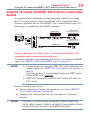
Connecting an HDMI™ or DVI device to the HDMI™
input.................................................................... 37
Using the TV remote and HDMI™ CEC Control to
control other devices........................................... 39
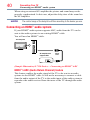
Connecting an HDMI™ audio system.......................... 40
Connecting a computer.............................................. 41
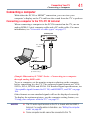
Connecting a computer to the TV’s PC IN
terminal........................................................... 41
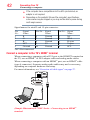
Connect a computer to the TV’s HDMI™
terminal........................................................... 42
Connecting to a home network................................... 43
Connecting the TV directly to a computer
without an Internet connection ...................... 43
Connecting the TV to a home network without an
Internet connection......................................... 44
Connecting the TV to a home network with an
Internet connection - wired............................. 45
Connecting the TV to a home network with an
Internet connection - wireless......................... 46
Chapter 3: Using the Remote Control...............................48
Controlling other devices........................................... 48
Installing batteries...................................................... 48
Remote control effective range.................................. 50
Learning about the remote control............................. 51
14
Contents
Chapter 4: Initial Setup and Menu....................................53
Initial setup................................................................ 53
Performing the initial setup.................................. 54
Navigating the menu system................................ 63
Quick Menu.......................................................... 64
Chapter 5: Setting up your TV..........................................65
How to navigate the menu.......................................... 65
Changing initial settings....................................... 65
Individual settings................................................ 65
Storing channels in memory (optional)................ 67
Skipping channels................................................ 68
Skipping video inputs........................................... 69
Labeling analog TV channels................................ 69
Labeling video inputs............................................ 70
Configuring shared input...................................... 70
Chapter 6: Basic features..................................................71
Using 3D functions..................................................... 71
Viewing 3D images............................................... 73
Setting the 3D PIN code....................................... 79
Displaying 3D Important Information................... 81
Adjusting 2D to 3D depth..................................... 82
Switching left and right images............................ 82
Tuning Channels......................................................... 82
Tuning to the next programmed channel.............. 82
Tuning to a specific channel (programmed or
unprogrammed).............................................. 82
Using Channel Return........................................... 83
Selecting the video input to view................................ 83
Using closed captions................................................ 84
Analog CC mode................................................... 84
Digital CC settings................................................ 85
15
Contents
Setting the PIN code............................................. 86
Entering a new PIN code...................................... 87
Changing or deleting your PIN code..................... 87
Forgotten PIN code............................................... 87
Using parental controls.............................................. 88
Blocking TV programs and movies by rating
(V-Chip).......................................................... 88
Downloading an additional rating system............. 88
Displaying ratings................................................. 91
Unlocking programs............................................. 91
Locking specific channels.......................................... 91
Locking video inputs............................................ 92
Setting a time limit for games............................... 92
Locking the control panel..................................... 93
Using HDMI™ CEC Control.......................................... 93
Controlling HDMI™ CEC playback devices............. 94
HDMI™ CEC Control input source selection........... 95
Adjusting the amplifier’s audio............................. 95
Other HDMI™ CEC Control functions..................... 96
Viewing the HDMI™ signal information....................... 96
Using your computer with the TV............................... 97
Adjusting the image.............................................. 97
Setting the computer audio.................................. 98
Setting the timer to turn on the TV............................. 98
Setting the sleep timer............................................... 99
Setting No Signal Power Down................................ 100
Setting TV Power On Control................................... 101
Displaying TV status information............................. 101
Viewing support information.................................... 102
Resetting to Factory Defaults................................... 103
Power failure............................................................ 103
16
Contents
Chapter 7: Picture and Sound Controls..........................104
Selecting the picture size.......................................... 104
Scrolling the picture................................................. 108
Using the Auto Aspect feature.................................. 109
Using the 4:3 Stretch............................................... 109
Adjusting the picture................................................ 110
Selecting the picture mode................................. 110
Adjusting the picture quality............................... 111
Using the advanced picture settings features........... 112
Edge Enhancer.................................................... 112
Dynamic Contrast............................................... 112
DynaLight®......................................................... 113
ClearScan® ........................................................ 113
MPEG NR........................................................... 113
UltraClear DNR................................................... 114
Ambient Light Sensor......................................... 114
ColorMaster™..................................................... 114
Base Color Adjustment....................................... 115
Color temperature............................................... 115
Resetting to the factory default........................... 116
Setting the expert picture settings............................ 116
Test Pattern........................................................ 116
RGB Filter........................................................... 116
White Balance..................................................... 117
Adjusting the audio.................................................. 118
Muting the sound............................................... 118
Selecting stereo/SAP broadcasts........................ 118
Adjusting the audio balance................................ 118
Adjusting the range............................................ 119
TV Speakers On/Off............................................ 119
Setting the Primary Audio Language.................. 119
Selecting the optical audio output format........... 119
Using the Dolby® Digital Dynamic Range Control
feature........................................................... 121
Audyssey Premium Television™......................... 121
17
Contents
Using Audyssey EQ® for Wall Mounted or
Table-top TVs................................................ 122
Using Audyssey Dynamic Volume ®................... 122
Audyssey ABX™................................................. 122
Using the surround sound feature...................... 122
Chapter 8: Advanced features.........................................123
Using your home network........................................ 123
When using a Wireless network connection....... 124
Setting up the Network............................................. 125
Wireless Setup................................................... 125
Advanced Network Setup.................................... 130
Network Connection Test.................................... 132
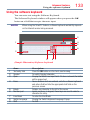
Using the software keyboard.................................... 133
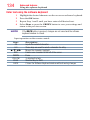
Enter text using the software keyboard............... 134
Performing a Software Upgrade............................... 135
Viewing the Software Licenses................................. 135
Using Intel® WiDi..................................................... 136
Changing the Intel® WiDi Device Name.............. 137
Device List.......................................................... 137
Using the Cloud TV Service...................................... 137
Using the Cloud TV features..................................... 138
eMANUAL........................................................... 138
Feature apps....................................................... 138
Netflix®............................................................... 139
VUDUTM HD Movies and VUDUTM Apps............... 140
Internet............................................................... 140
Using Skype™.................................................... 143
MediaShare (Videos, Music, and Photos)........... 153
MediaShare specifications.................................. 153
Basic operation................................................... 154
Viewing movie files............................................. 157
Playing music files.............................................. 162
Viewing photo files............................................. 164
Search................................................................ 167
18
Contents
Network Device Setup.............................................. 168
External Control Setup........................................ 168
Setting up the Media Renderer feature............... 169
Chapter 9: Cloud TV Companion Apps...........................170
Using Apps on a Tablet or Smart phone................... 170
Apps Control Profile................................................. 171
Pairing...................................................................... 172
Chapter 10:Troubleshooting............................................173
General troubleshooting........................................... 173
Picture problems...................................................... 174
Sound problems....................................................... 176
Remote control problems......................................... 176
Channel tuning problems......................................... 176
Closed caption problems.......................................... 177
Rating blocking (V-Chip) problems.......................... 177
HDMI™ CEC Control operation.................................. 177
HDMI™ problems...................................................... 178
Network problems.................................................... 178
Wireless network problems...................................... 180
MediaShare problems.............................................. 180
Light Indicator.......................................................... 181
Power On/Standby light........................................... 181
If the problem persists after trying the solutions..... 181
Appendix A:Specifications................................................182
Television system..................................................... 182
Channel coverage..................................................... 182
Power source........................................................... 183
Power consumption................................................. 183
Audio power............................................................. 183
Speaker type............................................................ 183
Video/audio terminals.............................................. 183
Video/audio input............................................... 183
ColorStream® (component video) HD input........ 183
HDMI™ input....................................................... 184
19
Contents
Digital audio output............................................ 184
PC input.............................................................. 184
Wireless connection................................................. 184
Ethernet.............................................................. 184
USB.................................................................... 184
Dimensions with table stand.................................... 184
Weight (mass) with stand........................................ 185
Operating conditions................................................ 185
Supplied accessories................................................ 185
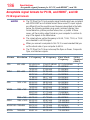
Acceptable signal formats for PC IN, and HDMI™,
and 3D............................................................... 186
PC IN signal formats........................................... 186
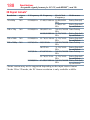
HDMI™ signal formats......................................... 187
3D Signal formats*............................................. 188
Operating the TV with combination buttons............. 189
Appendix B:Wireless QWERTY keyboard with touchpad.....190
International Key table........................................ 193
Index...............................................................................194
Chapter 1
Introduction
Safety icons
This manual contains safety instructions that must be observed to avoid
potential hazards that could result in personal injuries, damage to your
equipment, or loss of data. These safety cautions have been classified
according to the seriousness of the risk, and icons highlight these
instructions as follows:
Indicates an imminently hazardous situation which, if not avoided, will result in
death or serious injury.
Indicates a potentially hazardous situation which, if not avoided, could result in
death or serious injury.
Indicates a potentially hazardous situation which, if not avoided, may result in
minor or moderate injury.
Indicates a potentially hazardous situation which, if not avoided, may result in
property damage.
NOTE
20
Provides important information.
Introduction
Features
21
Features
❖❖ Integrated digital tuning (8VSB ATSC and QAM) —
Eliminates the need for a separate digital converter set-top box (in
most cases).
❖❖ 1920 x 1080 display resolution.
™
❖❖ Four HDMI —Digital, High-Definition Multimedia Interfaces
with 1080p input support
™
❖❖ HDMI capabilities ARC (Audio Return Channel)—Enables the
audio signal of the TV to be sent to an AV amplifier via an HDMI™
cable.
™
❖❖ HDMI CEC Control—Allows control of external devices from
the TV remote via HDMI™ connection
®
❖❖ ColorStream HD—High-resolution component video input.
®
❖❖ Digital Audio Out—Optical audio connection with Dolby Digital
optical output format, see “Connecting a digital audio system” on
page 36.
❖
❖ CQ Engine™—A powerful video processing engine with an array
of advanced technology including Edge Enhancement, Dynamic
Gamma, ColorMaster, Expert Mode and new UltraClear DNR that
creates superior picture quality.
❖❖ UltraClear DNR—New Dynamic Noise Reduction technology
that filters out video noise without decreasing picture sharpness for
clean, crystal-clear images, see “DNR” on page 114.
❖❖ PC IN (Analog RGB)—Computer Input terminal, see “Connecting
a computer” on page 41.
❖❖ IR Blaster Out— Controls infrared remote controlled devices from
the TV.
❖❖ Built-in WLAN—Allows the television to access your home
wireless network.
®
❖❖ Intel WiDi—Allows direct wireless connection between the TV
and Intel® WiDi equipped computers or mobile devices.
❖❖ ColorMaster™—Allows you to adjust the TV’s standard colors,
see “ColorMaster™” on page 114.
®
❖
❖ ClearScan —Uses both frame interpolation technology and
advanced backlight control with image synchronization to quadruple
the TV refresh rate for an even clearer fast motion video.
22 Introduction
Overview of installation, setup, and use
®
❖❖ DynaLight —Backlight control monitors the brightness of each
video frame and automatically adjusts backlight intensity based on
the content to create higher dynamic contrast, for deeper blacks and
increased depth.
®
❖
❖ AutoView —Allows you to automatically adjust picture settings
including Brightness, Contrast, Gamma, and Sharpness based
on ambient room light conditions and incoming picture content
to create the best possible picture settings without any manual
adjustment. See “ENERGY STAR® User Information” on page 9.
™
❖❖ Audyssey Premium Television —Includes innovative audio
enhancement technologies that create clear, rich, and natural sound.
These technologies include EQ®, ABX™, Dynamic Volume®,
Volume Extension™, and Day/Night and Wall/Table Modes. See
“Audyssey Premium Television™” on page 121.
❖❖ MediaShare—Allows you to view photo files and play music or
movie files, see “MediaShare (Videos, Music, and Photos)” on page
153.
❖❖ Cloud TV—Enhanced content discovery includes real time
streaming news, true social interaction features, and mobile device
interaction.
❖❖ Wireless QTWERY keyboard with built-in touchpad.
❖❖ 3D capability —Allows you to view and experience 3D content on
the television while using special glasses.
®
❖❖ ENERGY STAR qualified
Overview of installation, setup, and use
Follow these steps to set up your TV and begin using its many exciting
features.
1 Carefully read the important safety, installation, care, and service
information. Keep this manual for future reference.
2 To choose a location for the TV:
❖❖ Read “Important notes about your TV” on page 10.
❖❖ Place the TV on the floor or a sturdy, level, stable surface that
can support the weight of the unit. Secure the TV to a wall,
pillar, or other immovable structure, see 24) on page 4.
❖❖ Place the TV in a location where light does not reflect on the
screen.
Introduction
TV front and side panel controls and connections
3
4
5
6
7
8
9
10
11
12
13
23
❖❖ Place the TV far enough from walls and other objects to
allow proper ventilation. Inadequate ventilation may cause
overheating, which will damage the TV. THIS TYPE OF
DAMAGE IS NOT COVERED UNDER THE TOSHIBA
WARRANTY.
Do not plug in any power cords until after you have connected all
cables and devices to your TV.
Before connecting cables or devices to the TV, review the functions
of the TV’s connections and controls, see “Overview of cable types”
on page 27.
Connect your other electronic device(s) to the TV, see “Connecting
Your TV” on page 27.
Install the batteries in the remote control, see “Installing batteries”
on page 48.
See “Using the Remote Control” on page 48 for an overview of
the buttons on the remote control.
After connecting all cables and devices, plug in the power cords for
your TV and other devices. Then press the POWER button on the
TV control panel or remote control to turn on the TV.
NOTE: If the TV stops responding to the buttons on the remote
control or TV control panel and you cannot turn the TV off or on,
unplug the power cords for a few seconds and then plug them in and
try again.
See “Navigating the menu system” on page 63 for a quick
overview of navigating the TV’s menu system.
Program channels into the TV’s channel memory, see “Auto
Tuning” on page 67.
For details on using the TV’s features, see chapters 6, 7, and 8.
For help, refer to “Troubleshooting” on page 173.
For technical specifications, see “Specifications” on page 182.
24
Introduction
TV front and side panel controls and connections
TV front and side panel controls and connections
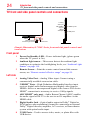
1 Analog
Video port
ARC HDMITM
only port
1 Digital
Audio jack
3 HDMITM ports
2 USB ports
3D IR
Remote sensor
Ambient light sensor
Power LED
(Sample Illustration) L7350U Series front and side panel controls and
connections
Front panel
1 Power On/Standby LED—Power indicator light, (glows green
when the TV power is On).
2 Ambient light sensor—This sensor detects the ambient light
conditions to optimize the backlighting levels, see “Ambient Light
Sensor” on page 114.
3 Remote Sensor—Point the remote control toward this remote
sensor, see “Remote control effective range” on page 50.
Left side
4 Analog Video Port—Analog Video input. Connect using a
commercially available conversion cable.
5 3 HDMI™ Ports—High-Definition Multimedia Interface input
receives digital audio and uncompressed digital video from an
HDMI™ device or uncompressed digital video from a DVI device.
HDMI™ connection is necessary to receive 1080p signals.
6 ARC HDMI™ only port—Audio Return Channel (ARC) enables
the audio signal of the TV to be sent to an AV amplifier via the
HDMI cable.
7 Digital Audio Jack—Optical audio output in Dolby® Digital or
PCM (pulse-code modulation) format for connecting an external
Dolby® Digital decoder, amplifier, A/V receiver, or home theater
system with optical audio input.
8 2 USB Ports—Used to access video, music, or photo files with
USB device.
Introduction
TV back panel controls and connections
25
TV back panel controls and connections
For explanations of cable types and connections, see “Connecting Your
TV” on page 27.
POWER button
IR Blaster OUT
Volume up
LAN
Volume down
LAN
HDMI IN
HDMITM IN port
4
OUT
IN
R
IR
OUT
FIXED
AUDIO
AUDIO L / MONO PR
Analog Audio OUT
OUT
PC / HDMI 2
AUDIO
PC IN
PC IN
PB
Y / VIDEO
Switches the function of VOL+/buttons to select volume, channel, or
input mode.
ANT/CABLE
COLOR STREAM HD / VIDEO 2 IN
Antenna / Cable
PC / HDMITM
Audio IN
Colorstream® HD /
Video 2 IN
(Sample Illustration) L7350U Series back panel controls and
connections
Back panel controls
1 POWER—Turns the TV On and Off.
2 VOL +/– —Adjust the volume level, change the channel, or change
the input or source you are viewing, depending on the mode, which
is selected by the CH/INPUT button.
3 CH / INPUT— Switches the function of the VOL +/– buttons to
select the volume, channel, or input mode.
❖❖ In Volume mode, the arrow buttons increase or decrease the
volume.
❖❖ In Channel mode, the arrow buttons change the channel up or
down.
26
Introduction
TV back panel controls and connections
❖❖ In Source mode, the arrow buttons toggle the input from one
source to the next.
The mode of the VOL +/– buttons change in the following order
each time the button is pressed:
→ Channel → Input → Volume →
Back panel connections
4 LAN IN—Connects the TV to your home network.
5 HDMI™ IN—High-Definition Multimedia Interface input receives
digital audio and uncompressed digital video from an HDMI™
device or uncompressed digital video from a DVI device. HDMI™
connection is necessary to receive 1080p signals.
6 Analog Audio Port—Analog audio outputs for connecting an audio
amplifier.
7 PC IN—For use when connecting a personal computer.
8 ANT/CABLE—Antenna input that supports analog (NTSC) and
digital (ATSC) off-air antenna signals and analog and digital Cable
TV (QAM) signals.
9 ColorStream® HD/ Video 2 IN—These include standard A/V
connections, see “Connecting DVD to ColorStream® or VCR to
composite video” on page 32.
10 PC/HDMI™ Audio IN—PC audio input terminals are shared
with HDMI™-2 analog audio input terminals, and their use can be
configured in the Configuring shared inputs menu, see “Configuring
shared inputs” on page 70.
11 IR Blaster OUT—Used to connect and control infrared remotecontrolled devices.
NOTE
Component/Standard (composite) video cables carry only video
information; separate audio cables are required.
Chapter 2
Connecting Your TV
Overview of cable types
Before purchasing cables, know the connector types your devices require.
You can purchase cables from most stores that sell audio/video devices.
Coaxial cable (F-type)
(Sample Illustration) Coaxial cable
Coaxial (F-type) cable connects your antenna, cable TV service, and/or
cable converter box to the ANT/CABLE input on your TV.
NOTE
Please tighten this connection by hand. Using tools may damage the
connection.
Standard AV cables (red/white/yellow)
(Sample Illustration) Standard A/V cables
27
28 Connecting Your TV
Overview of cable types
Standard A/V cables (composite video) usually come in sets of three, and
connect to video devices with analog audio and composite video output.
These cables (and the related inputs on your TV) are typically colorcoded according to use: yellow for video, red for stereo right audio, and
white for stereo left (or mono) audio.
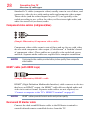
Component video cables (red/green/blue)
(Sample Illustration) Component video cables
Component video cables come in sets of three and are for use with video
devices with component video output. (ColorStream® is Toshiba’s brand
of component video.) These cables are typically color-coded red, green,
and blue. Separate audio cables are required for a complete connection.
NOTE
Component video cables provide better picture quality than composite
video cables.
HDMI™ cable (with HDMI Logo)
(Sample Illustration) HDMI™ cable
HDMI™ (High-Definition Multimedia Interface) cable connects to devices
that have an HDMI™ output. An HDMI™ cable delivers digital audio and
video in its native format. Separate audio cables are not required, see
“Connect a computer to the TV’s HDMI™ terminal” on page 42.
NOTEHDMI™ cables provide the best audio and picture quality.
Dual-wand IR blaster cable
Connect the dual-wand IR blaster cable to the IR blaster terminal to
control infrared remote controlled devices from the TV.
Connecting Your TV
Overview of cable types
29
Optical audio cable
(Sample Illustration) Optical audio cable
Optical audio cable connects receivers with Dolby® Digital or PCM
(pulse-code modulation) optical audio input to the TV’s Digital Audio
Out terminal, see “Connecting a digital audio system” on page 36.
Analog RGB (15-pin) computer cable
(Sample Illustration) Analog RGB (15-pin) computer cable
Analog RGB (15-pin) computer cable connects a computer to the to the
TV’s PC IN terminal, see “Connecting a computer to the TV’s PC IN
terminal:” on page 41.
NOTE
Separate audio cables are required.
3.5mm Stereo to RCA Y-cable
(Sample Illustration) 3.5mm Stereo to RCA Y- cable
3.5mm Stereo to RCA Y-cable connects an audio signal from DVI device
to TV.
30 Connecting Your TV
Connecting an antenna, satellite receiver, and cable TV box
LAN cable
(Sample Illustration) LAN cable
Standard LAN cable connects the TV to your home network, see
“Connecting the TV to a home network with an Internet connection wired” on page 45.
Crossover LAN cable connects the TV directly to a computer, see
“Connecting the TV directly to a computer without an Internet
connection” on page 43.
About the connection illustrations
You can connect different types and brands of devices to your TV in
several different configurations. The connection illustrations in this
manual are representative of typical device connections only. The input/
output terminals on your devices may differ from those illustrated. For
details on connecting and using your specific devices, refer to each
device’s owner’s manual.
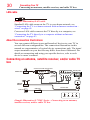
Connecting an antenna, satellite receiver, and/or cable TV
box
Satellite receiver with component video
Y
Satellite dish
AUDIO
OUT
PR
PB
L
W
Satellite
IN
VIDEO
OUT
COMPONENT VIDEO
R
R
AUDIO L / MONO PR
PB
Y / VIDEO
TV back panel
R
COLOR STREAM HD / VIDEO 2 IN
G
B
R
Standard
audio cable
R
W
R
G
B
ANT/CABLE
Component video cable
VHF/UHF
Antenna
Cable box
Cable TV
Coaxial cable
CH 3
CH 4
IN
OUT
R
White Red
Green Blue
(Sample Illustration) L7350U Series—Connecting to an antenna,
satellite receiver, and/or cable TV box
Connecting Your TV
Connecting an antenna, satellite receiver, and cable TV box
31
Items needed:
❖❖ Coaxial cables
❖❖ Standard AV cables
❖❖ Component video cables (red/green/blue)
NOTE
When you use a cable box, you may not be able to use the remote control
to program or access certain features on the TV.
To view the antenna or cable signal:
Select ANT/CABLE video input source on the TV.*
To view basic and premium cable channels:
Select the ANT/CABLE video input source on the TV.* Tune the TV to
channel 3 or 4 (whichever channel the cable box output is set to). Use the
cable box controls to change channels.
To view the VCR or camcorder video:
Turn On the VCR or camcorder video. Select VIDEO input source on the
TV.*
*To select the video input source, press the INPUT button on the remote
control, see “Selecting the video input to view” on page 83.
NOTE
The unauthorized recording, use, distribution, or revision of television
programs, videotapes, DVDs, and other materials is prohibited under the
Copyright Laws of the United States and other countries, and may subject
you to civil and criminal liability.
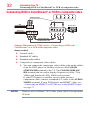
32 Connecting Your TV
Connecting DVD to ColorStream® or VCR to composite video
Connecting DVD to ColorStream® or VCR to composite video
R
Standard A/V cable
Y
VCR
W
Yellow White Red
R
R
L
W
COMPONENT VIDEO
Y
B
AUDIO OUT
L
PR
PB
G
TV back panel
AUDIO
R
DVD player
Y
R
VIDEO
Green Blue
R
PB
Y / VIDEO
COLOR STREAM HD / VIDEO 2 IN
R
W
AUDIO L / MONO PR
R
R
W
R
B
G
Standard audio cable
Component video cable
(Sample Illustration) L7350U Series—Connecting a DVD with
ColorStream® or a VCR with composite video
Items needed:
❖❖ Coaxial cables
❖❖ Standard AV cables
❖❖ Standard audio cables
❖❖ Composite or component video cables
❖❖ You can connect the component video cables (plus audio cables)
from the DVD player or satellite receiver to the COLOR
STREAM HD terminal in the TV. The COLOR STREAM
HD terminal can be used to display Progressive (480p, 720p,
1080p) and Interlaced (480i, 1080i) scan systems.
If your DVD player or satellite receiver does not have
component video, connect a standard A/V cable to the AUDIO/
VIDEO terminal. If your DVD player has HDMI™ video, see
“Connecting an HDMI™ or DVI device to the HDMI™ input”
on page 37.
NOTE
When you use ColorStream® HD or Video, please switch to the appropriate
AV mode.
Connecting Your TV
Connecting DVD to ColorStream® or VCR to composite videos
33
To view antenna or Cable channels:
Select the ANT/CABLE video input source on the TV.*
To view the DVD player:
Turn ON the DVD player. Select the ColorStream® HD video input source
on the TV.*
To view satellite programs using the component video connections:
Turn ON the satellite receiver. Select the ColorStream® HD video input
source on the TV.*
To view the VCR or view and record antenna channels:
Turn ON the VCR. Tune the VCR to the channel you want to watch.
Select the VIDEO video input source on the TV.*
To record a TV program while watching a DVD:
Turn ON the VCR. Tune the VCR to the channel to record. Select the
ColorStream® HD video input source on the TV* to view the DVD.
*To select the video input source, press the INPUT button on the remote
control, see “Selecting the video input to view” on page 83.
NOTE
The unauthorized recording, use, distribution, or revision of television
programs, videotapes, DVDs, and other materials is prohibited under the
Copyright Laws of the United States and other countries, and may subject
you to civil and criminal liability.
Connecting remote IR devices
Using the IR blaster OUT terminal
You can use the TV’s IR OUT terminal to remotely operate many infrared
remote-controlled devices enclosed in an entertainment center or similar
cabinet.
Items needed:
❖❖ Dual-wand IR blaster cable (see “Dual-wand IR blaster cable” on
page 28)
❖❖ Other cables as required to connect the device(s) to the TV (see
“Overview of cable types” on page 27)
See the remote IR blaster setup section (see page 59).
34 Connecting Your TV
Connecting remote IR devices
To connect the IR blaster cable:
1 Locate the infrared sensor on the front of your device. This sensor
is marked on some devices. If you are having issues locating the
device's infrared sensor, see “If you cannot locate the device’s
infrared sensor:” on page 35.
2 Align one of the IR blaster cable’s wands approximately 1 inch
away from the infrared sensor on the front of the device and attach
it using double-sided mounting tape. If you have a second device,
attach the second wand in a similar manner.
NOTE
If you do not have a second device, coil the second wand with a rubber
band and leave it behind the TV.
3 Plug the IR blaster cable’s plug into the TV’s IR Blaster Out
terminal.
Front of IR-controlled DVD player (for example)
Front of IR-controlled audio device (for example)
Infrared
sensor
IR blaster cable wand
(approx. 1 inch from device)
OUT
TV back panel
Dualwand IR
blaster
cable
IR
OUT
(Sample Illustration) L7350 Series—Using the IR blaster OUT terminal
Connecting Your TV
Connecting remote IR devices
35
To control the device(s):
Point the TV remote control toward the front of the TV and press the
button for the desired function. The signal passes from the remote
control through the TV to the device via the IR Blaster cable. For more
information, see “Setting the IR Blaster” on page 59.
(Sample Illustration) Controlling the device(s) - remote control
NOTE
The IR pass-through feature does not support all IR controlled devices.
Satisfactory quality may not be attainable with certain devices.
If you cannot locate the device’s infrared sensor:
1 Turn off the device.
2 Starting at the device’s lower-left corner, place the end of the
device’s remote control (with the infrared emitter) so it touches the
front of the device. Press the POWER button.
(Do not use the TV’s remote control for this step.)
3 If the device turns on, the sensor is located where the remote control
touched the device.
4 If the device does not turn on, move the remote control slightly to
the right and press the POWER button again.
5 Repeat the previous steps if necessary.
36 Connecting Your TV
Connecting a digital audio system
Connecting a digital audio system
The TV’s Digital Audio Out terminal outputs a Dolby® Digital or
2-channel down-mixed PCM (pulse-code modulation) signal for using
with an external Dolby® Digital decoder or other external audio systems
with optical audio input.
You will need an Optical audio cable (Use an optical audio cable that
has the larger “TosLink” connector and not the smaller “mini-optical”
connector.)
TV back panel
Digital audio system
HDMI IN
L
DIGITAL AUDIO
OUT
LINE IN
R
Optical
Audio IN
Optical audio cable
(Sample Illustration) L7350U Series—Connecting a digital audio
system
Before controlling the audio, see “Selecting the optical audio output
format” on page 119.
NOTE
Some audio systems may not be compatible with Dolby Digital bitstream
signals. Older audio systems that are not compatible with standard optical
out signals may not work properly, creating a high noise level that may
damage speakers or headphones. THIS DAMAGE IS NOT COVERED BY
YOUR WARRANTY. The DIGITAL AUDIO OUT terminal may not output some
digital audio sources because of copy restrictions.
❖❖ The Dolby Digital format is available in the following situations:
- When tuned to a digital RF channel
- When an HDMI input is used
- When network devices are used
37
Connecting Your TV
Connecting an HDMI™ or DVI device to the HDMI™ input
Connecting an HDMI™ or DVI device to the HDMI™ input
The HDMI™ input on your TV receives digital audio and uncompressed
digital video from an HDMI™ source device, or uncompressed digital
video from a DVI (Digital Visual Interface) source device.
This input is designed to accept HDCP (High- Bandwidth Digital-Content
Protection) program material in digital form from EIA/CEA-861-D–
compliant[1] consumer electronic devices (such as a set-top box or DVD
player with HDMI™ or DVI output).
The HDMI™ input can accept and display VGA, SVGA, XGA, WXGA,
SXGA, 480i (60Hz), 480p (60Hz), 720p (60Hz), 1080i (60Hz), and 1080p
(24Hz/30Hz/60Hz) signal formats. For detailed signal specifications, see
“HDMI™ signal formats” on page 187.
The supported Audio formats are Linear PCM and Dolby® Digital,
sampling rate 32/44.1/ 48 kHz.
NOTE
To connect a PC to the HDMI™ input, see “Connect a computer to the TV’s
HDMI™ terminal” on page 42.
To connect an HDMI™ device, you will need one HDMI™ cable (type A
connector) per HDMI™ device:
™
❖❖ For proper operation, it is recommended that you use an HDMI
™
cable with the HDMI Logo (
).
❖
To
display
an
1080ip/60Hz
signal
format,
you will need a High
❖
Speed HDMI™ cable. A conventional HDMI™/DVI cable may not
work properly.
™
❖❖ HDMI cables transfer both video and audio. Separate analog audio
cables are not required (see illustration).
TV back panel
HDMI IN
HDMITM device (satellite or
cable box, DVD player, etc)
4
HDMI OUT
HDMITM cable
DVI device
HDMI IN
HDMITM-to-DVI adapter cable
DVI/HDCP
OUT
OUT
IN
PC / HDMI 2
AUDIO
L
R
Analog audio cable
(Sample Illustration) L7350U Series—Connecting an HDMI™ or DVI
device to the HDMI™ Input
38 Connecting Your TV
Connecting an HDMI™ or DVI device to the HDMI™ input
To view the HDMI™ device video:
Select HDMI 1, HDMI 2, HDMI 3 or HDMI 4 video input source
on the TV. (Press the INPUT button on the remote control. For more
information, see “Selecting the video input to view” on page 83.
To connect a DVI device, you will need:
™
❖❖ HDMI to DVI adapter cable
For proper operation, the length of an HDMI™ to DVI adapter cable
should not exceed 9.8 ft (3m). The recommended length is 6.6 ft
(2m).
❖❖ 3.5mm Stereo to RCA Y-cable
An HDMI™ to DVI adapter cable transfers video only. Separate
analog audio cables are required (see illustration).
NOTE
To ensure that the HDMI™ or DVI device is reset properly:
❖❖ When turning on your electronic components, turn on the TV first, and
then the HDMI™ or DVI device.
❖❖ When turning off your electronic components, turn off the HDMI™ or
DVI device first, and then the TV.
NOTE
[1] EIA/CEA-861-D compliance covers the transmission of uncompressed
digital video with high-bandwidth digital content protection, which is being
standardized for reception of high definition video signals. Because this is
an evolving technology, it is possible that some devices may not operate
properly with the TV.
Connecting Your TV
Using the TV remote and HDMI™ CEC Control to control other devices
39
Using the TV remote and HDMI™ CEC Control to control other
devices
To control the basic functions of connected audio/video devices using
the TV’s remote control, connect an HDMI™ CEC compatible audio
system or playback device. The HDMI™ CEC Control feature uses CEC
technology as regulated by the HDMI™ standard.
Audio system
TV back panel
HDMI OUT
HDMI IN
HDMI IN
HDMITM cable
Playback device
(HDMI™ CEC DVD player, etc.)
HDMI OUT
Playback device
(HDMI™ CEC DVD player, etc.)
4
HDMITM cable
HDMI OUT
HDMI IN
(Sample Illustration) L7350U Series—Connecting an HDMI™ CEC
compatible audio system and playback device
To connect an audio system and playback devices, you will need HDMI™
cables, see “HDMI™ cable (with HDMI Logo)” on page 28.
NOTE
™
v If several devices are connected, HDMI CEC Control feature may not
operate properly, see “HDMI™ CEC Control input source selection” on
page 95.
For proper operation, it is recommended that you use HDMI™ cables
with the HDMI™ Logo (
).
™
❖❖ HDMI CEC devices can be controlled by TV remote only when it is
the TV mode.
Before controlling the devices:
❖❖ For an explanation of setup and operations, see “Other HDMI™
CEC Control functions” on page 96.
❖❖ Configure the connected devices. See each device’s operation
manual.
NOTE
This feature is limited to models incorporating Toshiba’s HDMI™ CEC
Control feature. However, Toshiba is not liable for those operations. See the
individual instruction manuals for compatibility information.
40 Connecting Your TV
Connecting an HDMI™ audio system
When using an external AV amplifier the picture and sound may not be
properly synchronized. In this case, adjust the delay time of the sound on
the AV amplifier.
NOTE
The control range of the delay time differs according to the device you use.
Connecting an HDMI™ audio system
If your HDMI™ audio system supports ARC, audio from the TV can be
sent to the audio system via an existing HDMI™ cable.
You will need an HDMI™ cable.
TV back panel
3
2
1
(ARC)
AV amplifier that
supports ARC
HDMI
cable
(Sample Illustration) L7350 Series— Connecting to HDMI™ ARC
HDMI™'s ARC (Audio Return Channel) feature
This feature enables the audio signal of the TV to be sent to an audio
system via the HDMI™ cable. It will not be necessary to connect a cable
from the audio output of the TV to the audio input of the audio system to
reproduce the audio received from the tuner of the TV through the audio
system.
Connecting Your TV
Connecting a computer
41
Connecting a computer
With either the PC IN or HDMI™ connection, you can view your
computer’s display on the TV and hear the sound from the TV’s speakers.
Connecting a computer to the TV’s PC IN terminal
When connecting a computer to the PC IN terminal on the TV, use an
analog RGB (15-pin) computer cable and a PC audio cable. For more
information, see “Overview of cable types” on page 27.
TV back panel
IN
PC / HDMI 2
AUDIO
PC IN
PC audio
cable
PC audio
output
Conversion adapter
(if necessary)
(Sample Illustration) L7350U Series—Connecting to a computer
through analog RGB cable
To use a computer, set the monitor output resolution on the computer
before connecting it to the TV. The supported signal formats are VGA,
SVGA, XGA, WXGA and SXGA. For detailed signal specifications, see
“Acceptable signal formats for PC IN, and HDMI™, and 3D” on page
186.
Other formats or non-standard signals will not be displayed correctly.
To display the optimum picture, use the computer setting feature, see
“Using your computer with the TV” on page 97.
NOTE
v The PC audio input terminal on the TV is shared with the HDMI 2
terminal. For configuration information, see “Setting the computer
audio” on page 98.
❖❖ Some computer models cannot be connected to this TV.
42 Connecting Your TV
Connecting a computer
❖❖ If the computer has a compatible mini D-sub15-pin terminal, an
adapter is not required.
❖
❖ Depending on the content’s title and the computer’s specifications,
some scenes may be skipped or you may not be able to pause during
multi-angle scenes.
Signal names for mini D-sub 15-pin connector:
Pin
Signal
No.:
Name:
1
R
2
G
3
B
4
NC*
5
Ground
*NC=Not connected
Pin No.: Signal
Name:
6
Ground
7
Ground
8
Ground
9
5V
10
Ground
Pin No.: Signal
Name:
11
NC
12
SDA
13
H-sync
14
V-sync
15
SCL
Connect a computer to the TV’s HDMI™ terminal
When connecting a computer with a DVI port to the HDMI™ terminal on
the TV, use an HDMI™ to DVI adapter cable and analog audio cables.
When connecting a computer with an HDMI™ port, use an HDMI™ cable
(type A connector). Separate analog audio cables may not be necessary,
depending on computer hardware and setup.
For more information, see “Overview of cable types” on page 27.
LAN
HDMI IN
4
OUT
IN
IR
OUT
PC / HDMI 2
AUDIO
FIXED
AUDIO
OUT
PC IN
(Sample Illustration) L7350U Series—Connecting to an HDMI™
terminal
Connecting Your TV
Connecting to a home network
43
The supported signal formats are VGA, SVGA, XGA, WXGA, SXGA,
480i (60Hz), 480p (60Hz), 720p (60Hz), 1080i (60Hz), and 1080p
(24Hz/30Hz/60Hz). For signal specifications, see “Acceptable signal
formats for PC IN, and HDMI™, and 3D” on page 186.
NOTE
v The edges of the picture may be hidden.
❖❖ If receiving a 480i (HDMI), 480p (HDMI), 720p, 1080i, or 1080p
signal program, Native mode scales the video to display the entire
picture within the borders of the screen (i.e. no overscanning).
Connecting to a home network
The LAN port allows your Toshiba TV to connect to your home network.
You can use this home network to access photos, movies, and music files
that are stored on a connected Media Server and play them on your TV.
Connecting the TV directly to a computer without an Internet connection
You will need a Crossover LAN cable.
LAN
(Sample Illustration) L7350U Series—Connecting a computer without
Internet connection
44 Connecting Your TV
Connecting to a home network
Connecting the TV to a home network without an Internet connection
Items needed:
❖❖ Standard LAN cables
❖❖ Router with a hub
Router with a hub
Computer
TV back panel
LAN
Computer
(Sample Illustration) L7350 Series—Connecting a network without
Internet connection
Connecting Your TV
Connecting to a home network
45
Connecting the TV to a home network with an Internet connection wired
Items needed:
❖❖ Coaxial or telephone cable (depending on your modem type)
❖❖ Standard LAN cables
❖❖ Router with Hub
❖❖ Modem (DSL or cable)
Modem (DSL or cable)
Router with a hub
1
2, 3
2
TV back panel
LAN
Cable or
Phone jack
Computer
2
(Sample Illustration) L7350U Series—Connecting with Internet
connection - wired
Item:
1
2
3
Description:
Coaxial or telephone cable (depending on your modem type)
Standard LAN cable
Do NOT connect a phone jack directly to the TV’s LAN
port.
46 Connecting Your TV
Connecting to a home network
Connecting the TV to a home network with an Internet connection wireless
Items needed:
❖❖ Coaxial or telephone cable (depending on your modem type)
❖❖ Standard LAN cables
❖❖ Wireless LAN access point or wireless router
❖❖ Modem (DSL or cable)
Modem (DSL or cable)
1
Wireless LAN access point
Built-in WLAN system:
It is not nessesary to connect an
external WLAN adaptor to the TV
2
Cable or
Phone jack
Computer
2
(Sample Illustration) L7350U Series—Connecting with Internet
connection - wireless
Item:
1
2
Description:
Coaxial or telephone cable (depending on your modem
type)
Standard LAN cable
The transmission speed over the wireless LAN and the distance over
which wireless LAN can reach may vary depending on surrounding
electromagnetic environment, obstacles, access point design and
configuration, and client design and software/hardware configurations.
The actual transmission speed will be lower than the theoretical maximum
speed.
NOTE
Connecting Your TV
Connecting to a home network
47
The Built-in WLAN Adapter is based on the IEEE 802.11n specification and
may not be fully compatible with, or support some features (e.g., security)
of certain Wi-Fi equipment that are based on the draft version of IEEE
802.11n.
Chapter 3
Using the Remote Control
Controlling other devices
The TV’s remote control can operate other devices as described in the IR
Blaster section on page 59.
Installing batteries
To install batteries:
1 Slide back and pull up to open the cover.
(Sample Illustration) Removing the battery cover
48
Using the Remote Control
Installing batteries
49
2 Install two AAA size batteries.
NOTE
Use carbon zinc batteries or alkaline batteries.
(Sample Illustration) installing the batteries
3 Slide on the cover.
Do not expose batteries to excessive heat such as sunshine, fire, etc.
NOTE
Dispose of batteries in a designated disposal area.
Always consider the environment when disposing of batteries.
Always follow applicable laws and regulations.
If the remote does not operate correctly, or if the operating range is
reduced, replace the batteries.
❖❖ Always replace both batteries with new ones. Never mix battery types
or use new and used batteries together.
❖❖ Always remove batteries from the remote if they are dead or if the
remote control is not to be used for an extended period of time.
This prevents battery acid from leaking into the battery compartment.
v
❖❖
❖❖
❖❖
50 Using the Remote Control
Remote control effective range
Remote control effective range
1 For optimum performance, aim the remote control directly at the TV
and make sure there are no obstructions between the remote control
and the TV.
16.4 ft (5m)
(Sample Illustration) Remote control effective range
Using the Remote Control
Learning about the remote control
51
Learning about the remote control
Only the buttons used to operate the TV are described in this section.
For the HDMI™ CEC Control functions, see “Using HDMI™ CEC
Control” on page 93.
1
2
4
5
7
3
6
8
9
10
11
13
14
12
16
18
19
21
23
17
20
25
27
28
29
31
32
34
35
(Sample Illustration) Remote control overview
15
22
24
26
30
33
36
52
Using the Remote Control
Learning about the remote control
NOTE
Item: Description:
1 POWER button
2
3
INPUT button
Light button
4
5
TV button
Cable/Satellite
button
BD/DVD button
DVR/VCR button
Audio button
Auxillary button
Channel Number
buttons (0-9)
(–) button
CH RTN button
6
7
8
9
10
11
12
13
14
15
16
17
18
19
20
The error message “Not Available” may appear if you press a button for a
function that is not available.
Function:
Turns the TV On and Off. When
the TV is on, the power LED
indicator on the TV front glows
green.
Selects the video input source.
Illuminates the keypad for five
seconds.
Sets the remote control mode to
control the device: TV, CABLE/
SAT, BD/DVD, DVR/VCR,
AUDIO, or AUX.
Item: Description:
21 QUICK button
22 GUIDE button
23
24
25
26
27
Directly tunes channels.
Enters 2-part channel numbers.
Returns to the last viewed
channel or source.
INFO button
Displays TV status information
as well as program details, when
available.
VOL (+ / -) buttons Adjusts the volume level.
CH (p/q) buttons Cycles through programmed
channels.
MUTE button
Reduces or turns off the sound.
MEDIA SHARE
Accesses the MediaShare
button
Service.
SEARCH button
Accesses the SearchAll function.
HOME button
Accesses the Cloud TV Portal
pages.
INTERNET button
Launches the web browser onscreen.
28
29
30
31
32
33
34
35
36
Function:
Launches the Quick menu.
Launches the MediaGuide
application on-screen.
(p/q/t/u)
Selects or adjusts programming
buttons menus when a menu is
on-screen.
OK button
Selects the highlighted items on
the screen.
BACK button
Returns to the previous screen.
EXIT button
Closes on-screen menus.
(u/tt/uu/Z/ u : PLAY button
tt : REWIND button
z/n/W)
uu : FAST FORWARD button
Z : SKIP-BACK button
z : SKIP-FORWARD button
: STOP button
W : PAUSE button
NETFLIX button
Launches the Netflix®
application on-screen.
eMANUAL button
Launches the eManual
application on-screen.
Internet connection required.
REC button
Used for TV, Cable/Sat, BD/
DVD, Aux devices
3D button
Accesses the 3D options.
PIC MODE button
Selects the picture mode.
SETUP button
Accesses the main TV menu
system.
MTS button
Accesses the MTS options.
CC button
Accesses the closed-caption
feature.
SLEEP button
Accesses the sleep timer.
Chapter 4
Initial Setup and Menu
Initial setup
When you first turn on or reset the TV, the Menu Language screen
appears.
NOTE
v You can stop initial setup by pressing the EXIT button. However, if you
do not finish Channel Tunning setting, the Quick Setup screen will
appear every time you turn on your TV.
❖❖ The EXIT button does not work until after you have set the Store/
Home Mode setting.
53
54 Initial Setup and Menu
Performing the initial setup
Performing the initial setup
1 Menu Language
Select a language and press the OK button.
Menu Language
Please press [OK] to proceed.
English
Français
Español
(Sample Illustration) Selecting Menu Language
❖❖ Quick Setup screen will appear.
About the Quick Setup screen
The Quick Setup screen is divided into the progress window and setup
window.
❖❖ The progress window shows the Quick Setup items being set up.
The finished items are dark, and the finish mark (3) appears by
them.
❖❖ The setup window shows the settings.
Progress window
Quick Setup
Country
Setup window
Country
Welcome
Thank you for choosing Toshiba TV
Time Zone
Store/Home Mode
Network
U.S.
Canada
Smart TV
Mexico
Channel Tuning
IR Blaster
Previous
Next
Next
(Sample Illustration) Quick Setup and Welcome window
55
Initial Setup and Menu
Performing the initial setup
Basic Operations in Quick Setup
1 Use the the p/q (arrow) buttons to select an item on the setup
window, and press the OK button.
2 Select Next and press the OK button.
The next item will appear.
❖❖ Some items have sub menus, which appear when the OK button is
pressed.
Use the p/q (arrow) buttons to select an item on the sub menu,
and press the OK button.
Quick Setup
Time Zone
1/3
Country
Submenu
Time Zone
Store/Home Mode
Eastern
Newfoundland
Network
Time Zone
Smart TV
Eastern
Daylight Saving Time
Off
Atlantic
Hawaii
Alaska
Pacific
Channel Tuning
Mountain
IR Blaster
Central
Previous
Next
(Sample Illustration) Quick Setup and Welcome window
❖❖ Alternatively, press the u (arrow) button to show the submenu.
❖❖ When the t (arrow) button is pressed on the setup window, the
focus moves to the progress window. On the progress window, you
can select a finished item using the the p/q (arrow) buttons.
Quick Setup
Can be selected
using the p/q
(arrow) buttons.
Network Type
1/5
Country
Time Zone
Store/Home Mode
Network
Smart TV
Channel Tuning
Network setup allows you to access content on your
home network and the internet. Enjoy online video,
music, games, news and more provided by Smart TV
portal and keep your TV up to date with new
software.
Availability is dependant on country selection
Please select from Wired or Wireless
Network Type
Wired
IR Blaster
Previous
Next
Skip
(Sample Illustration) Quick Setup and Welcome window
Repeat the above procedure to continue setting up.
56 Initial Setup and Menu
Performing the initial setup
Performing the Quick Setup
1 Country
Select a country then press the OK button.
2 Time Zone
Select Time Zone, and select a time zone from the submenu.
Select Daylight Saving Time, and select On or Off from the
submenu.
Select Next.
3 Store / Home Mode
Select Store / Home Mode, and select Home or Store from the
submenu.
To use at home, select Home.
Select Next.
NOTE
Store Mode is only available if the TV is set to Store Mode at initial setup.
This option is hidden in the Home Mode.
4 Network
❖❖ To make full use of the functions, it is recommended that you
set up a network and connect to the Internet.
To start the Network Setup, select Next on the screen or to skip
the setup, select Skip. If you skip this setup, you can setup the
Network at any time through the Network menu.
Network setup
1Select Network Type, and select Wired or Wireless from the
sub menu.
Select Next.
❖❖ If you select Wired, proceed to the Network Connection
Test (Step 3). If you selected Wireless, please proceed to
the following step.
2Select Wireless Setup, and select Easy Setup, Assisted
Setup, or Manual Setup from the sub menu.
Select Next.
Initial Setup and Menu
Performing the initial setup
NOTE
57
v Easy Setup. If your Access Point (AP) supports WPS, this method
can be used. WPS is a standard designed to simplify the connection of
wireless LAN equipment and the setup of network security features.
❖❖ Assisted Setup (setup using the AP's notification information).
The Network Name, Authentication, and Encryption are decided based
on information from the AP. You need to manually set the Security Key
for this method.
❖❖ Manual Setup (to input all settings manually).
3 Once your wired or wireless network has been configured,
perform a Network Connection Test.
A network connection test screen will appear while the test
is being performed. If the test was successful, the successful
connection screen will appear.
If the network connection test failed, the connection failure
screen will appear.
For more information, see “Setting up the Network” on page
125 .
4 Press the OK button.
When the network can be accessed, Software Upgrade
availability check starts automatically. When Software
Upgrade is completed, proceed to the next step.
NOTE
In order to secure your home network, it is strongly recommended that you
use a wireless access point with encryption.
5 Smart TV
Select TV Power On Control, and select Enabled or Disabled
from the sub menu.
If you select Enabled, you can turn on or off the television from
the companion devices such as Tablet or Smartphone.
Select Next.
❖❖ When Enabled is selected, perform the following procedure:
1Select Enable Control, and select On or Off from the sub
menu.
When On is selected, you can control the TV using companion
devices such as a tablet or smartphone.
58 Initial Setup and Menu
Performing the initial setup
2Select Media Renderer, and select On or Off from the sub
menu.
When On is selected, the Media Renderer function can be
used.
3Select Next.
6 Channel Tuning
Select Antenna or Cable, and select Start Scan.
Auto Tuning will start.
While scanning is in progress, the Auto Tuning Progress screen
appears.
NOTE
If you do not want to scan channels, you do not need to make a selection
for Channel Tuning. Select Skip to skip this step.
NOTE
If you want to stop scanning, pressing the EXIT button while scanning is in
process.
While scanning is in progress, the Auto Tuning Progress screen
appears.
After scanning is complete, the auto tuning results screen (such as
the one below) will appear.
Auto Tuning (Antenna)
Antenna Channels Found: 13
Ch.
Type
RF Ch.
201
ATV
11
101 - 201
DTV
22
201
ATV
33
101 - 201
DTV
44
201
ATV
55
101 - 201
DTV
66
201
ATV
77
0
101 - 201
(Sample Illustration) Auto Tuning Results screen
Press the OK button.
NOTE
The encrypted channels are not listed on the auto tuning result screen.
Initial Setup and Menu
Performing the initial setup
59
If some channels are not found after scanning:
❖❖ Check the antenna/cable connections, and scan again.
❖❖ Connect the TV to the antenna or cable box directly and scan again.
1 Press the SETUP button. Select Installation > Quick Setup
and press the OK button.
A confirmation message appears.
2Select Yes then press the OK button.
3 Repeat setup to step 6 (Channel Tuning).
❖❖ If you selected Antenna previously, selecting Cable
might be effective.
❖
❖ If you selected Cable previously, selecting Antenna
might be effective.
4Select Start Scan.
7 IR Blaster
Select Next or Skip.
❖❖ To start the IR Blaster setup, select Next on the screen, or to
skip the setup, select Skip. If you skip this setup, you can setup
the IR Blaster at any time through the Installation > IR Blaster
Setup menu.
NOTE
The IR Blaster may not work with some devices, and it may not control
certain features on your external devices.
Setting the IR Blaster
IR Blaster Setup
1Select Add on the screen.
Device Type screen will appear.
Device Type
1Select Device Type, and use the t/u (arrow) buttons to select
a device type from the following:
❖❖ Cable Box
❖❖ Satellite Box
❖❖ VCR
❖❖ Blu-ray, DVD Player
❖❖ Receiver, Misc Audio
❖❖ Amplifier
60 Initial Setup and Menu
Performing the initial setup
❖❖ CD Player
❖❖ Video Accessory
2 Press the q button then press the GREEN button.
The Brand screen will appear.
3 Use the p/q (arrow) buttons to select the brand name then
press the OK button.
❖❖ Select a field and press the OK button to show the
software keyboard. Enter the first few characters of the
brand name and press the Green button. The brand name
starting with the entered characters will appear on the
Brand screen.
4 Press the OK button.
Model Name screen will appear.
Model Name
1 Press the GREEN button.
The Model Name screen will appear.
2 Use the p/q (arrow) buttons to select the model name then
press the OK button.
❖❖ Select a field and press the OK button to show the
software keyboard. Enter the first few characters of the
model name and press the GREEN button. The model
name starting with the entered characters will appear on
the Model Name screen.
3 Press the q (arrow) button to select Code Set then press the
OK button.
Code Set screen will appear.
Code Set
1 Use the t/u (arrow) buttons to select the code.
❖❖ After the code is selected, press the RED button to show
the Test screen. The test will start automatically.
NOTE
If a model has more than one Code Set, a message will appear stating “This
model has more than one Code Set. Please select and test your preferred
Code Set.” You will need to choose a code set using the (p/q arrow)
buttons and perform the Test option to ensure the correct Code Set has
been selected.
Initial Setup and Menu
Performing the initial setup
61
2 Press the OK button.
Input & Mode Key screen will appear.
Input & Mode Key
1 Use the t/u (arrow) buttons to select the TV input to which
the IR device is connected.
❖❖ --- (Appears when Device Type is set to Receiver, Misc
Audio or Amplifier)
❖❖ ANT/CABLE
❖❖ Video1
❖❖ Video2 (If selected)
❖❖ ColorStream HD (If selected)
❖❖ HDMI 1
❖❖ HDMI 2
❖❖ HDMI 3
❖❖ HDMI 4
❖❖ PC
2 Press the q (arrow) button.
3 Use the t/u (arrow) buttons to select device mode key.
❖❖ CABLE/SAT
❖❖ BD/DVD
❖❖ DVR/VCR
❖❖ AUDIO
❖❖ AUX
4 Press the OK button.
❖❖ When Device Type is set to Receiver, Misc Audio or
Amplifier, the Volume Control screen will appear.
❖
❖ When Device Type is set to Cable Box, Satellite Box,
Blu-ray or DVD Player, the Guide Preferences screen
will appear.
❖❖ When Device Type is set to VCR, CD Player or Video
Accessory, press the OK button on the IR Blaster Setup
complete screen.
Support Information screen will appear.
62 Initial Setup and Menu
Performing the initial setup
Volume Control
1 Use the t/u (arrow) buttons to set up the Volume control to
select:
❖❖ TV (this is the default)
❖❖ External
The Volume + or – and MUTE buttons will control the
External equipment through the IR blaster.
2 Press the OK button.
Press the OK button on the IR Blaster Setup complete screen.
Support Information screen will appear.
Guide Preferences
1 Use the t/u (arrow) buttons to set up the Guide preferences
to select:
❖❖ TV MediaGuide
❖❖ External Device Guide
2 Press the q (arrow) button to select Interval Time.
❖❖ 0.125 sec
❖❖ 0.25 sec
❖❖ 0.375 sec
❖❖ 0.5 sec
❖❖ 0.625 sec
❖❖ 0.75 sec
❖❖ 0.875 sec
❖❖ 1 sec
❖❖ After the interval time is selected, press the RED button to
show the Test screen. The test will start automatically.
3 Press the OK button.
Press the OK button on the IR Blaster Setup complete screen.
Support Information screen will appear.
8 Support Information
Read through the information, and press the OK button.
❖❖ The initial setup is completed.
NOTE
Refer to this information if there is a problem and you need to contact
Customer Support. To find help, the following operation can be performed
at any time. SETUP button > Get Help > System Information > OK
button.
Initial Setup and Menu
Navigating the menu system
63
Navigating the menu system
❖❖ To open the menu system, press the SETUP button on the remote
control.
< Picture
Picture
Sound
Options
Installation
Network
3D
Picture Mode
Standard
Reset
Backlight
0
Contrast
100
Brightness
0
Color
0
Tint
0
Sharpness
0
Advanced Picture Settings
Expert Picture Settings
Timers
Display Settings
Get Help
(Sample Illustration) Main menu
❖❖ When a menu is open, press the p/q/t/u (arrow) buttons on the
remote control to move in the corresponding direction.
To show the setup items or sub menus, press the u (arrow) button (or
the OK button).
To select a highlighted item or save your menu settings, press the
OK button. (A highlighted menu item appears in a different color in
the menu.)
❖❖ All menus close automatically if no selection is made within
approximately 60 seconds.
❖❖ To close a menu instantly, press the EXIT button.
64 Initial Setup and Menu
Quick Menu
Quick Menu
Quick menu helps you access some options more quickly.
Press the QUICK button to display the Quick menu and press the p/q
(arrow) buttons to select an option.
NOTE
Quick menu items differ depending on the current mode.
Quick Menu
Intel® WiDi
Picture Mode
Picture Size
3D Settings
Sleep Timer
HDMI CEC Device Control
Speakers
Device Information
Wireless Information
Playback Mode
Interval Time
Repeat
Sound
Picture
Background Music
Play List
Item Page
page 136
page 110
page 104
page 76
page 99
page 94
page 119
page 156
page 129
page 165
page 165
page 158
page 118
page 110
page 166
page 158
Chapter 5
Setting up your TV
How to navigate the menu
❖❖ Press the SETUP button. Select Installation, Main menu,
Submenu, and then press the OK or EXIT button.
Changing initial settings
From Quick Setup:
1 Press the SETUP button.
2 Select Installation > Quick Setup, and press the OK button.
A confirmation message appears.
3 Press the t/u (arrow) buttons to select Yes.
4 Press the OK button.
To change settings, see “Initial setup” on page 53.
Individual settings
Menu Language
You can choose from three different menu language settings (English,
Français, and Español). The TV displays menus and messages in your
preferred language.
1 Press the SETUP button.
2 Select Installation > Menu Language and press the OK button.
3 Press the p/q (arrow) buttons to select your preferred language.
4 Press the OK button.
65
66 Setting up your TV
Individual settings
Country
You can select the country in which you reside.
1 Press the SETUP button.
2 Select Installation > Country and press the OK button.
3 Press the p/q (arrow) buttons to select the country.
4 Press the OK button.
Time Zone
This setting allows you to specify the correct time zone for your region.
1 Press the SETUP button.
2 Select Installation > Time Zone and press the OK button.
3 Press the p/q (arrow) buttons to select your time zone.
4 Press the OK button.
Daylight Saving Time
1 Press the SETUP button.
2 Select Installation > Daylight Saving Time and press the OK
button.
3 Press the p/q (arrow) buttons to select On or Off.
4 Press the OK button.
Store / Home Mode
You can select Store or Home to designate the TV location. Select Home
for normal home use.
1 Press the SETUP button.
2 Select Installation > Store / Home Mode and press the OK button.
3 Press the p/q (arrow) buttons to select Home or Store.
4 Press the OK button.
NOTE
Store Mode is only available if the TV is set to Store Mode at initial setup.
ANT/CABLE In
This setting configures the antenna input source for the ANT/CABLE
terminal.
1 Press the SETUP button.
2 Select Installation > Channel Tuning > ANT/CABLE In and
press the OK button.
Setting up your TV
Storing channels in memory (optional)
67
3 Press the p/q (arrow) buttons to select Antenna or Cable.
4 Press the OK button.
5 Select Start Scan.
After scanning is complete, the auto tuning results screen will
appear.
6 Press the OK or EXIT button.
Storing channels in memory (optional)
To make sure your TV stops only on the channels you want when you press
the CH p/q buttons on the remote control or the control panel, store
those channels in the TV’s memory.
Auto Tuning
NOTE
You must set up the antenna/cable input source first. See “Initial setup” on
page 53.
You can set up the TV to detect all active channels in your area and store
them in its memory. Then you can manually store or skip individual
channels from memory.
Option:
Cable
Description:
Note: If you select Cable, auto tuning deletes previously stored channels
from memory.
This setup requires some time, but you do not need to repeat the setup
unless your cable TV service’s lineup changes significantly.
To skip an antenna source channel and remove it from memory, set the
channel to be skipped. See “Skipping channels” on page 68.
Antenna
NOTE
To tune to channels not stored in memory, use buttons 0–9 and the DASH
button on the remote control.
1 Press the SETUP button.
2 Select Installation > Channel Tuning > Auto Tuning, and then
press the OK button.
A confirmation screen appears.
3 Press the OK button to start Auto Tuning or press the EXIT button
to abort.
The TV cycles through the channels and stores all active channels
in memory.
4 To view the programmed channels, press the CH p/q buttons.
68 Setting up your TV
Skipping channels
Manual Tuning
After storing channels in memory, you can manually enter channels if the
channel number is known.
1 Press the SETUP button.
2 Select Installation > Channel Tuning > Manual Tuning, and then
press the OK button.
3 Use buttons 0–9 on the remote control to enter the channel number
(for example, 56).
4 Press the OK button.
5 Press the OK button again to begin Manual Tuning.
The channels found are listed at the bottom of the screen.
Option:
ATV
DTV
Description:
Analog channel
Digital channel
Skipping channels
To prevent a channel from being viewed, you can set it to be skipped.
1 Press the SETUP button.
2 Select Options > Channel Options and then press the OK button.
The list of channels appears.
Channel Options
Ch
Type
Label
101 - 201
DTV
CH-1
201
ATV
CH-2
101 - 201
DTV
201
ATV
101 - 201
DTV
201
ATV
101 - 201
DTV
(Sample Image) Channel options
3 Press the t/u (arrow) buttons to select the Skip column (8) and
press the p/q (arrow) buttons to select a channel to skip.
4 Press the OK button.
The box is selected.
5 To clear the selection, press the OK button.
Setting up your TV
Skipping video inputs
NOTE
69
You cannot tune skipped channels using the CH or buttons. Use
buttons 0–9 and the DASH button on the remote control.
Skipping video inputs
You can set video inputs to be skipped when selecting inputs in the Input
selection screen.
To turn on skip
1 Press the SETUP button.
2 Select Options > Input Option > Input Labeling and press the
OK button.
3 Press the p/q (arrow) buttons to select the item you wish to skip.
Then press the RED button to turn on Skip.
To turn off skip
Press the RED button again to turn off Skip.
Labeling analog TV channels
1 Press the SETUP button.
2 Select Options > Channel Options, and then press the OK button.
The list of channels appears.
Channel Options
Ch
Type
Label
101 - 201
DTV
CH-1
201
ATV
CH-2
101 - 201
DTV
201
ATV
101 - 201
DTV
201
ATV
101 - 201
DTV
(Sample Image) Channel options
3 Press the p/q (arrow) buttons to select a channel to label.
4 Press the OK button.
The Software Keyboard window appears.
5 Input a name using the Software Keyboard, see “Using the software
keyboard” on page 133.
6 Press the GREEN button.
70 Setting up your TV
Labeling video inputs
Labeling video inputs
The input labels are shown in the input selector and banner displays. You
can label video inputs according to the devices you have connected to the
TV.
1 Press the SETUP button.
2 Select Options > Input Option > Input Labeling and press the
OK button.
3 Press the p/q (arrow) buttons to select the item you wish to label.
Press the t/u (arrow) buttons to select Receiver, Cable, DVD,
Game, PC, Recorder, Satellite, VCR or Blu-ray ™.
❖❖ When entering arbitrary characters, press the GREEN button.
The Software Keyboard window appears.
Input a name using the Software Keyboard, see “Using the
software keyboard” on page 133.
4 Repeat Step 3 for other video inputs.
Configuring shared input
To set Shared PC Audio
1 Press the SETUP button.
2 Select Options > Input Option > PC/HDMI 2 Audio and press the
OK button.
3 Press the p/q (arrow) buttons to select PC or HDMI 2.
NOTE
To apply the setting, switch the input to PC or HDMI 2.
Chapter 6
Basic features
Using 3D functions
Before using the 3D function, note the following:
In addition to compatible 3D glasses, viewing 3D programming requires
the following (not included):
❖❖ Available 3D glasses : Toshiba FPT-AG03 (supplied)
❖❖ Compatible 3D playback device or 3D source.
™
❖❖ 3D capable HDMI cable.
If you wish to obtain extra 3D glasses:
Toshiba provides 3D glasses for this television as an option.
To obtain them visit:
US: http://ceaccessories.toshiba.com/
Canada: http://www.shoptoshiba.ca/
NOTE
Use the type of 3D glasses that are compatible with to your TV.
71
72 Basic features
Using 3D functions
Health precautions:
❖❖ Due to the possible impact on vision development, viewers of 3D
programming should be age 6 or above. Children may be more
susceptible to health effects from viewing 3D images and should be
closely supervised.
❖❖ Some viewers may experience a seizure or blackout when exposed
to certain flashing images or lights contained in certain 3D television
pictures or video games. Anyone who has had a seizure, loss of
awareness, or other symptoms linked to an epileptic condition, or
has a family history of epilepsy, should contact a health care provider
before using the 3D function.
Handling the 3D glasses:
❖❖ When cleaning the 3D glasses, gently wipe with a dry, soft cloth.
❖❖ First, remove any dirt or dust from the 3D Glasses.
❖❖ Harsh rubbing or use of a dirty or coarse cloth will scratch the 3D
Glasses. Do not use benzene, paint thinner, alcohol, water, or abrasive
cleaners, which may damage the 3D glasses.
❖❖ When not using the 3D glasses, store them away from high
temperatures and humidity.
❖❖ Do not store the 3D glasses in areas of extreme heat or cold, as
deformation can occur. If deformation occurs, replace the 3D glasses.
❖❖ The lenses of the 3D glasses are different from those of ordinary
glasses, and are very thin. Be very careful in handling the 3D glasses
as the lens can pop out easily.
❖
❖ Do not put excessive force on the lenses.
❖❖ Do not scratch the surface of the lenses with sharp objects.
❖❖ Do not drop or bend the 3D glasses.
❖❖ Do not use benzene, paint thinner, alcohol, water, or abrasive cleaners,
which may damage the 3D glasses.
❖❖ The 3D glasses are not subject to repair. If the glasses are broken or
scratched, purchase a new pair of 3D glasses.
❖❖ The 3D glasses are not subject to repair, but can be replaced if a
problem occurs due to an initial fault with the glasses.
❖❖ Be careful not to pinch your fingers in the hinge of the 3D glasses.
Basic features
Using 3D functions
73
NOTE
Watching the TV:
❖❖ Proper 3D effects or 3D-to-2D conversion results may not be obtained
depending on the received 3D content.
❖❖ 3D effect and image quality may vary depending upon content quality
and display device capability/ functionality/settings.
❖❖ Wear the 3D glasses properly, otherwise you may not see the correct
3D images.
❖❖ When not viewing 3D images, take off the 3D glasses; otherwise, it
may be difficult to see the display on other products such as your
computer, digital clock, or calculator, etc.
❖❖ Use the 3D glasses at the proper viewing angle and distance, see
“Safety Precautions for 3D glasses” on page 7.
NOTE
Use a high-speed HDMI™ cable when you connect a device such as a 3D
compatible Blu-ray Disc™ player or computer to the TV. When you use a
standard HDMI™ cable, 3D images may not display correctly.
Some functions cannot be shown in 3D mode.
Viewing 3D images
Incoming video signals can either be in 2D or 3D format. A 2D signal
can be viewed in either 2D or 3D, and 3D can be viewed in either 2D or
3D. If the TV can detect the fact that a signal is 3D, it can change to 3D
mode automatically – see “Setting the auto start mode” on page 79.
Otherwise you can change the viewing mode using the 3D button. Finally,
the format of the 3D signal can be either Side by Side (SBS) or Top and
Bottom (TAB). You may have to choose the correct format if the TV can
not detect it automatically – see “Switching display mode or selecting 3D
format”, below.
Moreover, you can change 2D images to 3D images by pressing the 3D
button when viewing in 2D.
NOTE
v In order to switch to 3D, the TV must be receiving a 3D signal.
❖❖ If appropriate mode and format are not selected, 3D image will not be
correctly displayed.
❖❖ If the appropriate 3D mode and format are not selected, the 3D image
will not display correctly.
❖
❖ There are individual differences in perception of 3D images.
74 Basic features
Using 3D functions
❖❖ When viewing 3D images, wear the 3D glasses.
❖❖ The 2D to 3D conversion function is activated and controlled by you
according to your personal preferences.
❖❖ The 2D to 3D conversion function is meant for enjoyment of 2D home
video, and other 2D content you create, in 3D according to your
personal preferences.
❖❖ It is not intended for unauthorized use of copyrighted works. To the
extent that you need to obtain permission from a copyright holder
to view copyrighted works, it is your responsibility to obtain such
permission.
❖❖ The 2D to 3D conversion function is not intended for use with prerecorded 2D copyrighted content owned by a third-party unless the
copyright owner has given direct or indirect permission, or unless
applicable law permits such use. To the extent you need to obtain
permission from a copyright holder to view copyrighted works, it is
your responsibility to obtain such permission.
Switching display mode or selecting 3D format
There are four TV viewing modes:
Mode:
3D
2D
2D to 3D
Native
Description:
Displays 3D images.
Displays 2D images by changing 3D images to 2D.
Displays 3D images by changing 2D images to 3D.
Displays a received signal format as it is.
3D signals can be sent in one of three formats:
3D Format:
Side by Side (SBS)
Top and Bottom (TAB)
Frame Packing (FP)*
Description:
Images for the left and right eyes are positioned sideby-side.
Images for the left and right eyes are positioned at the
top and bottom of the screen
Images for the left and right eyes are positioned at the
top and bottom of the screen.
* This format cannot be selected manually.
❖❖ If the right and left images are the same in Native mode, select SBS.
❖❖ If the top and bottom images are the same in Native mode, select
TAB.
Basic features
Using 3D functions
75
The 3D button operation
Depending on the input mode, the 3D button function may be different
when viewing Native mode.
Input:
Analog Broadcast
Digital Broadcast
Analog Inputs
HDMI™
HDMI™ with 3D Auto Detect
Information
VOD Services
VOD Services with 3D Auto
Detect Infromation
MediaShare Photos
MediaShare Videos
NOTE
Function:
Changes the viewing mode to 2D to 3D mode.
Displays the selection window.
Changes the viewing mode to 2D to 3D mode.
Displays the selection window.
Changes the viewing mode to 3D mode.
Displays the selection window.
Changes the viewing mode to 3D mode.
Changes the viewing mode to 2D to 3D mode or 3D mode.
Displays the selection window.
v When viewing 3D mode or 2D to 3D mode, pressing the 3D button
changes the viewing mode to Native mode.
❖
❖ Operation may not be recognised depending on the status of the TV.
❖❖ When the TV is being used as a Media Renderer, operation is not
recognised.
❖❖ The 3D function and 2D to 3D conversion function may not be
supported depending on the VOD Service.
❖❖ The 3D function and 2D to 3D conversion function does not support
all content depending on its input source format.
76 Basic features
Using 3D functions
Switching to 3D mode
❖❖ Set 3D Auto Start to 3D.
❖❖ Press the 3D button and select 3D while viewing 2D mode or Native
mode.
Input Signal/Switching Display Mode Trigger
Type
Additional Information Format
Source
Signal
Press 3D Button
Select 3D
Select 2D to
3D
FP
With 3D Auto Detect
Information
3D Format
Signal
SBS
TAB
Without 3D Auto
Detect Information
SBS
TAB
2D Format Signal
* Correct 3D image.
Selecting 3D format from the Quick menu in 3D mode
1
2
3
4
Press the QUICK button.
Select 3D Settings > 3D Format Select.
Press the OK button.
Press the t/u (arrow) buttons to select Side by Side or Top and
Bottom.
Basic features
Using 3D functions
Input Signal/Switching Display Mode Trigger
Type
Additional
Information
Format
Source
Signal
77
Quick menu/
3D Format Select
SBS
TAB
FP
With 3D Auto Detect
SBS
Information
3D Format
Signal
TAB
Without 3D Auto
Detect Information
SBS
TAB
2D Format Signal
* Correct 3D image.
Switching to 2D mode
❖❖ Set 3D Auto Start to 2D.
❖❖ Press the 3D button while viewing 3D mode.
Input Signal/Switching Display Mode Trigger
Type
Additional
Format
Source
Information
Signal
FP
With 3D Auto Detect
SBS
Information
3D Format
Signal
TAB
Without 3D Auto
Detect Information
2D Format Signal
* Correct 2D image.
SBS
TAB
Press 3D Button
Select 3D Select 2D to 3D
78 Basic features
Using 3D functions
Selecting 2D format from the Quick menu in 2D mode
1
2
3
4
Press the QUICK button.
Select 3D Settings > 2D Format Select.
Press the OK button.
Press the t/u (arrow) buttons to select Side by Side or Top and
Bottom.
Input Signal/Switching Display Mode Trigger
Type
Additional
Information
Format
Source
Signal
Quick menu/
3D Format Select
SBS
TAB
Native
FP
3D Format
Signal
With 3D
Auto Detect
Information
SBS
TAB
Without 3D
Auto Detect
Information
SBS
TAB
2D Format Signal
* Correct 2D image.
NOTE
Take off the 3D glasses in 2D mode
Switching to Native mode
Press the 3D button while viewing 3D mode.
Press the 3D button while viewing 2D to 3D mode.
NOTE
When 3D format signal with 3D Auto Detect Information is received, it is
not possible to switch to Native.
Basic features
Using 3D functions
79
Quick menu in 2D mode
1 Press the QUICK button.
2 Select 3D Settings > 2D Format Select and press the OK button.
3 Press t/u (arrow) buttons to select Native.
To switch 2D to 3D mode
❖❖ Press the 3D button and select 2D to 3D while viewing 2D or Native
mode.
NOTE
When using ATV, Video, ColorStream HD, VOD Services, MediaShare
Photo or PC, the viewing mode can be changed to 2D to 3D mode by
pressing 3D.
Setting the auto start mode
This controls what the TV does when it detects a 3D format signal with
3D Auto Detect Information.
1 Press the SETUP button.
2 Select 3D > 3D Auto Start and press the OK button.
3 Press the p/q (arrow) buttons to select 3D, 2D, or Off.
Option:
3D
Description:
Displays in 3D mode automatically when 3D format signal with 3D Auto
Detect Information is received.
Displays in 2D mode automatically when 3D format signal with 3D Auto
Detect Information is received.
Displays a screen that allows you to select 3D or 2D when 3D format signal
with 3D Auto Detect Information is received.
2D
Off
Setting the 3D PIN code
A 3D PIN code is necessary for using 3D Safety Settings.
Enter a new PIN code
1
2
3
4
NOTE
Press the SETUP button.
Select 3D > 3D PIN.
Press the OK button.
Press the number buttons to enter a 4-digit number, and then
confirm the code.
The PIN code cannot be set to “0000.”
80 Basic features
Using 3D functions
Change or delete your PIN code
1
2
3
4
5
NOTE
Press the SETUP button.
Select 3D > 3D PIN.
Press the OK button.
Press the number buttons to enter your 4-digit PIN code.
Select Change PIN or Delete PIN, and then press the OK button.
v The PIN code cannot be set to “0000.”
❖❖ If PIN is deleted, 3D Safety Settings are grayed out, and the settings
are reset to the factory default.
Forgotten PIN codes
1
2
3
4
5
6
Press the SETUP button.
Select 3D > 3D PIN.
Press the OK button.
Press the INFO button 4 times quickly.
Select Change PIN and press the OK button.
Enter a new PIN code.
Setting the 3D start message
When this feature is set to On, a message displays on the screen when a
3D signal is received.
1 Press the SETUP button.
2 Select 3D > 3D Safety Settings.
3 Press the OK button.
4 Enter your 4-digit 3D PIN code.
5 Press the p/q (arrow) buttons to select 3D Start Message and
press the OK button.
6 Press the p/q (arrow) buttons to select On or Off.
Setting the 3D Lock
When this feature is set to On, you must enter your 3D PIN code to
change the display mode to 3D mode or 2D to 3D mode.
1 Press the SETUP button.
2 Select 3D > 3D Safety Settings.
3 Press the OK button.
Basic features
Using 3D functions
81
4 Enter your 4-digit 3D PIN code.
5 Press the p/q (arrow) buttons to select 3D Lock and press the OK
button.
6 Press the p/q (arrow) buttons to select On.
Setting the 3D Timer Lock
When the 3D Timer Lock feature is set to On, the PIN input window and
the 3D start message will not appear while the 3D Enable timer is active,
even if you switch to 3D Mode. This prevents it from asking for the 3D
Lock PIN, and will not display the 3D start message every you switch to
3D.
1 Press the SETUP button.
2 Select 3D > 3D Safety Settings.
3 Press the OK button.
4 Enter your 4-digit 3D PIN code.
5 Press the p/q (arrow) buttons to select 3D Timer Lock and press
the OK button.
6 Press the p/q (arrow) buttons to select On.
NOTE
The PIN input window appears when “continue” is selected in the reminder
dialogue box for Enable 3D Timer even if 3D Timer Lock is activated.
Setting the Enable 3D Timer
This feature allows you to set a reminder to not watch a 3D video for an
extended period of time. Once a set period of time has passed, a dialogue
box appear asking if you wish to continue viewing.
1 Press the SETUP button.
2 Select 3D > 3D Safety Settings.
3 Press the OK button.
4 Enter your 4-digit 3D PIN code.
5 Press the p/q (arrow) buttons to select Enable 3D Timer and
press the OK button.
6 Press the p/q (arrow) buttons to select 30, 60, 90, or 120 minutes.
7 To cancel the timer, select Off.
Displaying 3D Important Information
1 Press the SETUP button.
82 Basic features
Tuning Channels
2 Select 3D > 3D Important Info.
Read through the information.
3 Press the t/u (arrow) buttons to select Yes or No and press the OK
button.
Adjusting 2D to 3D depth
With this feature, you can adjust the level of 3D depth.
Within the Menu:
1 Press the SETUP button.
2 Select 3D > 2D to 3D Depth and press the OK button.
3 Press the t/u (arrow) buttons to select either 1, 2, 3, 4, or 5, and
press the OK button.
Within the Quick menu:
1 Press the QUICK button in 2D to 3D mode.
2 Select 3D Settings > 2D to 3D Depth.
3 Press the t/u (arrow) buttons to select either 1, 2, 3, 4, or 5, and
then press the OK button.
Switching left and right images
The left and right eye shutter timing of the glasses can be swapped. If 3D
images look blurred, switch the left and right sides of the 3D image.
1 Press the QUICK button to open the Quick menu.
2 Select 3D Settings > Left and Right Image and press the OK
button.
3 Press the p/q (arrow) buttons to select Swapped.
Tuning Channels
Tuning to the next programmed channel
Press the CH p/q buttons on the remote control or TV control panel.
Tuning to a specific channel (programmed or unprogrammed)
Channel:
Analog
Digital
Description:
Use the 0–9 buttons on the remote control. (For example, to select channel
125, press 1, 2, 5.), and then press the OK button.
Use the 0–9 buttons on the remote control to enter the major channel
number. (and press the DASH button if needed, (For example, to select
digital channel 125- 1, press 1, 2, 5, –, 1.)), and then press the OK button.
Basic features
Selecting the video input to view
83
Using Channel Return
You can switch between two channels without entering a channel number
each time. This feature also works for external inputs.
1 Select the first channel you want to view.
2 Select a second channel using the Channel Number buttons (and
press the DASH button if needed).
3 Each time you press the CH RTN button, the TV switches between
the last two channels that were tuned.
Selecting the video input to view
To select the video input to view:
1 Press the INPUT button.
2 Change the input:
❖❖ Press 0–7.
❖❖ Repeatedly press the p/q (arrow) buttons and then press the
OK button.
❖❖ Repeatedly press the INPUT button.
Inputs
0
1
2
3
4
5
6
7
NOTE
ANT/CABLE
Video 1
Video 2 / ColorStream HD
HDMI 1
HDMI 2
HDMI 3
HDMI 4
PC
v You can label the video input sources according to the specific devices
you have connected to the TV, see “Labeling video inputs” on page
70.
❖❖ You can skip sources, see “Skipping video inputs” on page 69.
❖❖ Inputs that are set to be skipped will be skipped when selecting by
repeatedly pressing the INPUT button or the p/q (arrow) buttons.
❖
❖ You can select inputs that are set to be skipped using the number
buttons.
™
™
❖❖ If one or more HDMI CEC devices are connected to an HDMI input,
the icon appears in the input selector. In this case, the label, see
“Labeling video inputs” on page 70 will not appear in the input
selector.
84 Basic features
Using closed captions
To select an HDMI™ CEC device:
1 Press the p/q (arrow) buttons to select an HDMI™ input.
2 Press the u (arrow) button. The list of HDMI™ CEC devices for
that input appears.
3 If the input has multiple HDMI™ CEC devices, press the p/q
(arrow) buttons to select a device.
4 Press the OK button.
Using closed captions
To turn on the closed caption mode:
1 Press the SETUP button.
2 Select Options > Closed Captions.
3 Press the OK button.
4 Press the p/q (arrow) buttons to select Closed Captions Display
and press the OK button.
5 Press the p/q (arrow) buttons to select On or Off.
NOTEIf Closed Captions Display is set to Off, Analog CC Mode and
Digital CC Settings will be not available.
Analog CC mode
The closed caption mode has two options:
Mode:
Captions
Text
Description:
Displays the dialogue, narration, and sound effects of TV programs
and videos that are closed captioned (usually marked “CC” in program
guides).
Displays information not related to the current program, such as weather
or stock data (when provided by individual stations).
To view captions or text:
1 Press the SETUP button.
2 Select Options > Closed Captions.
3 Press the OK button.
4 Press the p/q (arrow) buttons to select Analog CC Mode and
press the OK button.
Basic features
Using closed captions
85
To view captions:
Press the p/q (arrow) buttons to highlight CC1, CC2, CC3, or
CC4.
Giant pandas eat leaves.
(Sample Illustration) Captions
NOTE
If the program or video you have selected is not closed captioned, no
captions will be displayed.
To view text:
Press the p/q (arrow) buttons to highlight T1, T2, T3, or T4.
WORLD WEATHER
LONDON
MOSCOW
PARIS
ROME
TOKYO
Temps
F
C
51
11
57
14
53
12
66
19
65
18
Current
Weather
Clear
Cloudy
Clear
Cloudy
Rain
(Sample Illustration) Captions - text
NOTE
If text is not available in your area, a black rectangle may appear on the
screen. You can remove this rectangle by setting Closed Captions Display
to Off.
NOTE
A closed caption signal may not be displayed when a videotape is dubbed,
signal reception is weak, or signal reception is non-standard.
Digital CC settings
You can customize the closed caption display characteristics.
NOTE
v These settings are available for digital channels only.
❖❖ You cannot set Caption Text and Background as the same color.
86 Basic features
Using closed captions
Mode:
Caption Size
Caption Text Type
Caption Text Edge
Caption Text Color
Text Foreground Opacity
Background Color
Text Background Opacity
Caption Text Edge Color
Description:
Auto, Small, Standard, Large
Auto, Default, Mono (with Serif), Prop. (with Serif), Mono (without
Serif), Prop. (without Serif), Casual, Cursive, Small Capitals
Auto, None, Raised, Depressed, Uniform, Left Drop Shadow,
Right Drop Shadow
Auto, Black, White, Red, Green, Blue, Yellow, Magenta, Cyan
Auto, Transparent, Translucent, Flashing, Solid
Auto, Black, White, Red, Green, Blue, Yellow, Magenta, Cyan
Auto, Transparent, Translucent, Flashing, Solid
Auto, Black, White, Red, Green, Blue, Yellow, Magenta, Cyan
To customize the closed captions:
1 Press the SETUP button.
2 Select Options > Closed Captions.
3 Press the OK button.
4 Press the p/q (arrow) buttons to select Digital CC Settings.and
then press the OK button.
5 Press the p/q (arrow) buttons to select a characteristic and then
press the OK button.
Press the p/q (arrow) buttons to select the format for that
characteristic.
Using the Closed Caption button
If you press the CC button when an analog channel is tuned or from an
external input (480i signal from the video input):
❖❖ The CC bar will appear and will display the options, CC1-4, T1-4.
If you press the CC button when a digital channel is tuned:
❖❖ The CC bar will appear and will display the available caption
options for that channel or service.
Setting the PIN code
A PIN code is necessary for some menus.
NOTE
The Parental Control and Locks menu is grayed out if no PIN has been set.
Basic features
Using parental controls
87
Entering a new PIN code
1
2
3
4
NOTE
Press the SETUP button.
Select Options > Parental PIN Setup.
Press the OK button.
Use the number buttons to enter a 4-digit number, and then confirm
the code.
The PIN code cannot be set to “0000”.
Changing or deleting your PIN code
1
2
3
4
5
NOTE
Press the SETUP button.
Select Options > Parental PIN Setup.
Press the OK button.
Use the number buttons to enter your 4-digit PIN code.
Select Change PIN or Delete PIN, and then press the OK button.
v The PIN code cannot be set to “0000”.
❖❖ If you delete the PIN code, the settings of Parental Controls and Locks
are reset.
Forgotten PIN code
1
2
3
4
5
6
Press the SETUP button.
Select Options > Parental PIN Setup.
Press the OK button.
Press the INFO button 4 times quickly.
Select Change PIN and press the OK button.
Enter a new PIN code.
88 Basic features
Using parental controls
Using parental controls
Blocking TV programs and movies by rating (V-Chip)
Some TV programs and movies include signals that classify the content
of the program (as unsuitable for younger viewers). The V-Chip feature
in this TV detects the signals and blocks the programs according to the
ratings you select.
NOTE
1
2
3
4
5
6
7
8
9
10
NOTE
The V-Chip feature in this TV supports the U.S. V-Chip system only.
Press the SETUP button.
Select Options > Parental Control and Locks.
Press the OK button.
Enter your 4-digit PIN code.
Press the p/q (arrow) buttons to select Enable Rating Blocking
and press the OK button.
Press the p/q (arrow) buttons to select On.
Press the p/q (arrow) buttons to select Edit Rating Limits, and
then press the OK button.
The Edit Rating Limits screen appears.
Press the p/q/t/u (arrow) buttons.
Press the OK button to select a level of blocking.
A box with an “X” indicates a rating that will be blocked. As you
highlight a rating, the rating’s definition appears at the bottom of
the screen.
Select Done and then press the OK button.
This feature will not be available if no PIN code is set.
Downloading an additional rating system
An additional rating system may be available for use in selectively
blocking TV programs and movies.
NOTE
The currently tuned station must be receiving a digital signal before an
additional rating system can be downloaded.
Basic features
Using parental controls
1
2
3
4
5
6
7
8
NOTE
89
Press the SETUP button.
Select Options > Parental Control and Locks.
Press the OK button.
Enter your 4-digit PIN code.
The Parental Control and Locks screen appears.
Press the p/q (arrow) buttons to select Enable Rating Blocking
and press the OK button.
Press the p/q (arrow) buttons to select On.
Press the p/q (arrow) buttons to select Edit Rating Limits, and
then press the OK button.
The Edit Rating Limits screen appears.
Select Alt RS, and then press the OK button.
The Edit Alternate Ratings screen appears.
vThe Alt RS button is only available if an additional rating system is
currently available.
❖❖ The download may take several minutes.
❖❖ The information displayed on the Alternate Ratings screen depends on
the configuration of the additional rating system available at the time
of download.
9 Press the p/q/t/u (arrow) buttons.
10 Press the OK button to select the desired level of blocking. A box
with an “X” indicates the rating that will be blocked.
NOTE
v You can only download the additional rating system once. You cannot
download updates if they become available.
❖❖ The additional rating system is not designed, transmitted, or controlled
by the TV or Toshiba, nor is the availability of an additional rating
system determined or controlled by Toshiba.
Similarly, the rating of programs in an additional rating system is not
determined, transmitted, or controlled by the TV or Toshiba.
❖
❖ The additional rating system is an evolving technology; therefore,
availability, content, and format may vary.
90 Basic features
Using parental controls
Rating system
Independent rating system for broadcasters:
Ratings:
TV-MA
TV-14
TV-PG
TV-G
TV-Y7,
TV-Y7FV
TV-Y
Description and Content themes:
Mature Audience Only (This program is specifically designed to be viewed
by adults and therefore may be unsuitable for children under 17. L) Crude or
indecent language S) Explicit sexual activity V) Graphic violence
Parents Strongly Cautioned (This program contains some material that
many parents would find unsuitable for children under 14 years of age.)
D) Intensely suggestive dialogue L) Strong, coarse language S) Intense
sexual situations V) Intense violence
Parental Guidance Suggested (This program contains material parents
may find unsuitable for younger children.) D) Some suggestive dialogue L)
Infrequent coarse language S) Some sexual situations V) Moderate violence
General Audience (Most parents would find this program suitable for all
ages.)
Directed to Older Children (This program is designed for children age 7 and
above.
NOTE: Programs in which fantasy violence may be more intense or more
combative than other programs in this category are designated TV-Y7FV.)
All Children (This program is designed to be appropriate for all children.)
Independent rating system for movies
Ratings:
X
NC-17
R
PG-13
PG
G
Description and Content themes:
X-rated (For adults only)
Not intended for anyone 17 and under
Restricted (Under 17 requires accompanying parent or adult)
Parents Strongly Cautioned (Some material may be inappropriate for children
under 13)
Parents Strongly Cautioned (Some material may be inappropriate for children
under 13)
General Audience (Appropriate for all ages)
Indication other than rating system
Display:
NONE
(No rating appears)
Description:
The program is rated None.
No rating information is provided.
Basic features
Locking specific channels
NOTE
91
If you place an “X” in the box next to “Rated “None””, programs rated “None”
or “Not Rated” will be blocked; Programs that do not provide any rating
information will not be blocked.
Displaying ratings
To display the rating of the program you are watching, press the INFO
button on the remote control.
Unlocking programs
If you try to tune to a program that exceeds the rating limits you have set,
the TV will enter program lock mode and a warning message will appear
on screen. Follow the instructions to temporarily unlock the program.
Locking specific channels
A channel that is configured as Locked cannot be viewed unless the PIN
code is entered first, see “Setting the PIN code” on page 86.
1 Press the SETUP button.
2 Select Options > Channel Options.
3 Press the OK button.
The list of channels appears.
Channel Options
Ch
Type
Label
101 - 201
DTV
CH-1
201
ATV
CH-2
101 - 201
DTV
201
ATV
101 - 201
DTV
201
ATV
101 - 201
DTV
(Sample Illustration) Channel options
4 Press the u (arrow) button and then press the p/q (arrow) buttons
to select a channel in the lock column, and then press the OK
button.
5 You must enter your PIN code to lock channels.
NOTE
If no PIN code has been set, a warning appears. See, “Setting the PIN code”
on page 86.
6 The box is selected. To clear the selection, press the OK button.
92 Basic features
Locking specific channels
Locking video inputs
You can lock video inputs. You cannot view the input sources until you
unlock the inputs by entering the PIN code.
1 Press the SETUP button.
2 Select Options > Parental Control and Locks.
3 Press the OK button.
4 Enter your 4-digit PIN code.
5 Press the p/q (arrow) buttons to select Input Lock and press the
OK button.
6 Press the p/q (arrow) buttons to select Video or Off.
Mode:
Video
Description:
Locks Video 1, Video 2, ColorStream HD, HDMI 1, HDMI 2, HDMI 3,
HDMI 4, and PC.
Unlocks all video inputs.
Off
Setting a time limit for games
You can use the GameTimer® to set a time limit for playing a video game.
When the time expires, the TV locks all external inputs.
1 Press the SETUP button.
2 Select Timers > GameTimer.
3 Press the OK button.
4 Enter your 4-digit PIN code.
5 Press the p/q (arrow) buttons to select 30, 60, 90, or 120 minutes.
6 To cancel the timer, select Off.
To deactivate the Input Lock once the GameTimer® has activated it:
❖❖ Set the Input Lock to Off, see “Locking video inputs” on page 92.
NOTE
v A message appears when 10 minutes, 3 minutes, and 1 minute are
remaining.
❖❖ If the TV loses power with time remaining, the TV will enter Input
Lock mode when power is restored (as if the GameTimer had been
activated). You must deactivate the Input Lock, see “Locking video
inputs” on page 92.
Basic features
Using HDMI™ CEC Control
93
Locking the control panel
You can lock the control panel to prevent your settings from being
changed accidentally (by children, for example). When Panel Lock is set
to On, none of the controls on the control panel operate except POWER.
1 Press the SETUP button.
2 Select Options > Panel Lock and press the OK button.
3 Press the p/q (arrow) buttons to select On.
NOTEWhen Panel Lock is set to On, “Panel Lock” appears on screen when the
buttons on the TV control panel are pressed. Unless the TV is in "Active
Standby", then control panel POWER button can turn on the TV.
To unlock the control panel:
❖❖ Select Off in Step 3 above.
Using HDMI™ CEC Control
This feature uses CEC technology and allows you to control Toshiba
HDMI™ CEC compatible devices from the TV remote control via HDMI™
connection.
When Enable HDMI™ CEC Control in the HDMI™ CEC Control Setup
menu is set to On, the following HDMI™ CEC Control functions are
enabled.
To set HDMI™ CEC Control Setup
1 Press the SETUP button.
2 Select Options > HDMI CEC Control Setup and press the OK
button.
3 Press the p/q (arrow) buttons to select Enable HDMI CEC
Control and press the OK button.
4 Press the p/q (arrow) buttons to select On.
NOTE
If you set Enable HDMI CEC Control to Off, the other items under
HDMI CEC Control Setup will be grayed out.
5 Press the p/q (arrow) buttons to select an item and press the OK
button.
Press the p/q (arrow) buttons to select On or the desired mode:
❖❖ TV Auto Power: On/Off
❖❖ Auto Standby: On/Off
94
Basic features
Using HDMI™ CEC Control
❖❖ Amplifier Control: On/Off
❖❖ Initial Speaker Setting: TV Speakers/Amplifier
NOTE
These functions depend on the connected devices.
Controlling HDMI™ CEC playback devices
With your TV’s remote control, you can control the connected HDMI™
CEC playback device (DVD player, etc.) you are watching.
Button:
u
v
W
z
Z
uu
tt
pqtu
OK
RED, GREEN,
YELLOW, BLUE
0–9 buttons
Channel p/q
NOTE
Description:
Begins playback
Stops playback
Pauses the picture during play or record mode
Skips forward.
Skips backward.
Fast forward
Rewind/reverse
Menu navigation, etc.
Enters content with a menu
Controls various operation
Controls various operation, e.g. tuning to a specific channel for the
tuner device
Changes to the next available channel up or down in the sequence
These functions depend on the connected devices.
HDMI™ CEC Player Control menu functions
1 Press the QUICK button to open the Quick menu.
2 Select HDMI CEC Device Control, and then press the OK button.
3 Press the p/q (arrow) buttons to select the item you want to
control, and then press the OK button.
Item:
Power
Root Menu
Contents Menu
Setup Menu
Audio
Eject
Description:
Turns the selected device On and Off
Accesses the selected device’s top menu
Accesses the content list when the OK button is pressed
Accesses the device’s setup menu
Selects the device’s sound
Ejects the device’s media
Basic features
Using HDMI™ CEC Control
NOTE
95
These functions depend on the connected devices.
The HDMI™ CEC Device Control item is not available under the following
conditions:
™
❖❖ A non-HDMI input is selected
❖❖ The Enable HDMI CEC Control item is set to Off
™
❖❖ The connected HDMI CEC device is not a playback, recording or
tuner device
HDMI™ CEC Control input source selection
If an HDMI™ CEC device with HDMI™ switching capability (e.g. an
amplifier) is connected to the HDMI™ input, you can select another
HDMI™ CEC device that is connected to the master HDMI™ device.
Use the INPUT button on the remote control or the control panel, see
“Learning about the remote control” on page 51.
Adjusting the amplifier’s audio
Using the TV’s remote control, you can adjust or mute the sound volume
of your audio system.
❖❖ The VOL (+ -) buttons adjust the volume level.
❖❖ The MUTE button turns off the sound.
1 Press the SETUP button.
2 Select Options > HDMI CEC Control Setup and press the OK
button.
3 Press the p/q (arrow) buttons to select Initial Speaker Setting
and press the OK button.
4 Press the p/q (arrow) buttons to select Amplifier.
NOTE
Confirm that a connected HDMI™ CEC device (such as DVD player, etc.) is
selected for the Amplifier input source.
NOTE
v You can also use this function when the audio system is connected to
the TV’s DIGITAL AUDIO OUT terminal (not HDMI™ connection).
Select a digital audio input mode on the amplifier.
❖❖ These functions depend on the device connected.
96
Basic features
Viewing the HDMI™ signal information
Other HDMI™ CEC Control functions
When Enable HDMI CEC Control and all items in the HDMI™ CEC
Control Setup menu are set to On, the following functions will be
enabled:
Item:
TV Auto Power
Auto Standby
Amplifier Control
Initial Speaker
Setting
NOTE
Description:
If an HDMI™ CEC device is turned on, the TV turns on automatically.
If the TV is turned off, it will send a message to turn off all of the
HDMI™ CEC devices connected to the TV.
If Amplifier Control is set to On, you can adjust the sound volume or
turn off the sound using the remote control.
With this item, you can set your audio output preference to the TV
Speakers or the Amplifier. When this item is set to Amplifier, the remote
control can be used to adjust or mute the volume of the audio. This
item will not be available and set to TV Speakers automatically unless
an HDMI™ CEC compatible audio system is connected.
When you turn on the audio system, change its input source, or adjust the
sound volume, the sound will be output from the audio system’s speakers
even if TV Speakers has been selected. Turn the TV off and on again to
output the sound from the TV speakers.
Viewing the HDMI™ signal information
1 Press the SETUP button.
2 Select Options > HDMI Information Display and press the OK
button.
3 Press the p/q (arrow) buttons to select On.
4 Press the INFO button.
HDMI™ Information is shown (Resolution, Scan Type, Frame
Rate, Aspect, Bit Depth, Color Space, RGB/YUV, Chroma
Format), and the normal banner and signal information banner
appear.
NOTE
v The signal information banner will appear when this feature is set to
On and you watch an HDMI™ input and press the INFO button. The
signal information will disappear after 60 seconds.
❖❖ If you press the INFO button when this feature is set to Off, only the
normal banner will appear.
Basic features
Viewing the HDMI™ signal information
97
Using your computer with the TV
Adjusting the image
If the edges of the picture are hidden, readjust Horizontal Position and
Vertical Position. If the picture is affected by interference, readjust Clock
Phase and Sampling Clock.
1 Select PC input mode, see “Selecting the video input to view” on
page 83.
2 Press the SETUP button.
3 Select Picture > Display Settings and press the OK button.
4 Press the OK button.
5 Press the p/q (arrow) buttons to select PC Settings, and then
press the OK button.
NOTE
If a computer is not connected or there is no PC input signal, this menu will
not be available.
6 Press the p/q (arrow) buttons to select an item and press the OK
button.
7 Press the t/u (arrow) buttons to make adjustments.
NOTE
The screen is disrupted momentarily when adjusting the PC settings.This is
not a sign of malfunction.
Mode:
Horizontal Position
Vertical Position
Clock Phase
Sampling Clocks
Description:
Moves the picture left/right
Moves the picture up/down
Helps to reduce noise and sharpen
the picture
Helps to reduce noise and minimize
periodic vertical stripes on the screen
Adjustment Range
Within ±10 from center*
Within ±10 from center*
Within ±32 from center*
Within ±5 from center*
*The default settings and/or adjustment ranges vary depending on the input signal
format.
To reset the PC Settings:
Select Reset, and then press the OK button.
98
Basic features
Setting the timer to turn on the TV
Setting the computer audio
You can output sound from your computer when connecting it to your TV,
using the AUDIO IN terminal and PC audio cable.
1 Press the SETUP button.
2 Select Options > Input Options and press the OK button.
3 Press the p/q (arrow) buttons to select PC/HDMI 2 Audio and
press the OK button.
4 Press the p/q (arrow) buttons to select PC.
NOTE
To apply the setting, switch the input to PC or HDMI 2.
Setting the timer to turn on the TV
You can set the on timer to turn on the TV to a preset channel or input at a
preset time.
To activate the timer:
1 Press the SETUP button.
2 Select Timers > On Timer.
3 Press the OK button.
4 Press the p/q (arrow) buttons to select Enable On Timer and
press the OK button.
5 Press the t/u (arrow) buttons to select On.
NOTE
If the Enable On Timer is set to Off, other menus under On Timer
cannot be changed.
It can take the TV approximately 60 seconds to turn on through the On
Timer feature.
To set the timer:
1 Press the SETUP button.
2 Select Timers > On Timer.
3 Press the OK button.
4 Set these options to your preference:
Basic features
Setting the timer to turn on the TV
Item:
Input
Channel
Volume
Time until Power On
99
Description:
Video input source
Channel to view
Volume level
Desired length of time until the TV turns on:
minimum=00:10, maximum=12:00
Press the t/u (arrow) buttons
Use the number buttons
5 Select Done, and then press the OK button.
NOTE
If you do not operate the TV for 1 hour after it is powered on by the On
Timer feature, it turns off.
To cancel the timer:
1 Press the SETUP button.
2 Select Timers > On Timer.
3 Press the OK button.
4 Press the p/q (arrow) buttons to select Enable On Timer and
press the OK button.
5 Press the t/u (arrow) buttons to select Off.
Setting the sleep timer
You can set the TV to turn off after a specific amount of time
(maximum = 12 hours).
Using the remote control:
1 Press the SLEEP button.
2 Set the amount of time until the TV turns off.
❖❖ Repeatedly press the SLEEP button to increase the time.
❖❖ Press the p/q (arrow) buttons to increase or decrease the time.
Using the on-screen menus:
1 Press the SETUP button.
2 Select Timers > Sleep Timer.
3 Press the OK button.
4 Select the amount of time until the TV turns off.
❖❖ Use the number buttons.
❖❖ Press the p/q (arrow) buttons to increase or decrease the time.
100
NOTE
Basic features
Setting No Signal Power Down
If a power failure occurs, the sleep timer setting may be cleared.
To display the time remaining until the TV turns off, press the SLEEP
button.
To cancel the sleep timer, press the SLEEP button repeatedly or press the
p/q (arrow) buttons until it is set to 0 minutes.
NOTE
When the following features are set, the feature that is set for the nearest
time will function.
❖❖ Sleep Timer
❖❖ Auto shutdown after 1 hour of inactivity (after powering on by On
Timer)
❖❖ No signal auto power off (after approximately 15 minutes of no signal)
Setting No Signal Power Down
When an input's setting in this feature is set to On, The TV will
automatically turn itself off after about 15 minutes if no signal is detected.
You can change each input's setting to Off: ANT/CABLE, Video 1, Video
2, ColorStream HD, HDMI 1, HDMI 2, HDMI 3, HDMI 4, or PC.
1 Press the SETUP button.
2 Select Options > Power Management > No Signal Power Down,
and then press the OK button.
3 Press the p/q (arrow) buttons to select the item you want to
change and press the OK button.
4 Press the p/q (arrow) buttons to select On or Off.
5 Press the EXIT button.
NOTE
v Default setting for each input is On.
❖❖ A warning message will appear 1 minute before turning off.
Basic features
Setting TV Power On Control
101
Setting TV Power On Control
When the TV is connected to the home network via Wireless LAN with
the TV Power On Control in Enabled, your TV can be turned on by
control from Apps.
1 Press the SETUP button.
2 Select Options > Power Management > TV Power On Control
and press the OK button.
3 Press the p/q (arrow) buttons to select Enabled (Active Standby).
NOTE
v Depending on the device connected to the home network, it may take a
while for the TV to turn on.
❖❖ Depending on the device connected to the home network, this feature
may not work.
❖❖ If the unencrypted Wireless Setup is done, this feature can not be
used.
❖❖ The power consumption during Active Standby is more than it during
Normal Standby.
❖❖ After the change from Power On state to Active Standby, there may be a
period of several seconds when the TV does not receive the operation
from a remote control or external apparatus.
Displaying TV status information
To display TV status information, press INFO.
The following information will be displayed (if applicable):
❖❖ Current input (ANT/CABLE, Video, etc.)
❖❖ Either “CABLE” (for cable TV) or “ANT” (for over-the-air
broadcasts), if ANT/CABLE is the current input
❖❖ Channel number (if in ANT/CABLE mode)
❖❖ Input label (if set)
❖❖ Digital signal strength indicator (for ATSC/QAM signals only)
™
❖❖ Stereo, Mono, or SAP audio status (when in HDMI input mode,
PCM)
❖❖ Video resolution
❖❖ Aspect ratio of incoming video signal (4:3 or 16:9)
❖❖ V-Chip rating status (if available)
❖❖ GameTimer (if set)
102
Basic features
Viewing support information
❖❖ Channel Label (if set or received)
❖❖ Current display mode (Side by Side, Top and Bottom, or Frame
Packing)
❖❖ Current display format (3D, 2D to 3D, or 3D to 2D)
❖❖ Input video format (3D appears when video format is 3D)
To close the screen, press the INFO button again.
The following additional information (only available for ANT/CABLE
input) will display for digital channels (if applicable):
❖❖ Title
❖❖ Duration
❖❖ Detailed description
❖❖ Next program’s information
Viewing support information
1 Press the SETUP button.
2 Select Get Help > System Information.
3 Press the OK button to display support information containing Web/
Customer service numbers for US, Canada, and Mexico.
Basic features
Resetting to Factory Defaults
103
Resetting to Factory Defaults
You can reset all settings and channels to Factory Defaults.
1 Press the SETUP button.
2 Select Installation > Reset TV.
3 Enter your PIN code (if a PIN code has been set).
A confirmation screen appears.
4 Select Yes, and then press the OK button.
The TV will turn off automatically.
To cancel the reset:
❖❖ Press the t/u (arrow) buttons to select No, and then press the OK
button.
Power failure
If power is lost while you are watching the TV, the Last Mode Memory
feature automatically turns on the TV when power is restored.
Chapter 7
Picture and Sound
Controls
Selecting the picture size
You can view many program formats in several picture sizes— Native, 4:3,
Full, TheaterWide 1, TheaterWide 2, TheaterWide 3, Normal, and Dot by
Dot.
NOTE
104
v The picture size illustrations are examples only. The format of the
image (in any of the picture sizes) depends on the format of the signal
you are currently watching. Select the picture size that displays the
current program in the way that looks best to you.
❖❖ Using these functions to change the picture size (i.e., changing the
height/width ratio) for any purpose other than your private viewing
may be prohibited under the Copyright Laws of the United States and
other countries, and may subject you to civil and criminal liability.
❖❖ Some picture sizes may not be available depending on the format of
the signal being received.
®
❖❖ If you select a TheaterWide picture size, the top and bottom edges of
the picture (including subtitles or captions) may be hidden. To view
these edges, adjust the Picture Position or try viewing the program in
4:3 or Full, see “Scrolling the picture” on page 108.
Picture and Sound Controls
Selecting the picture size
105
You can save separate picture size preferences for each input on your TV.
To select the picture size using the Quick menu:
1 Press the QUICK button to open the Quick menu.
2 Select Picture Size, and then press the OK button.
3 Press the p/q (arrow) buttons to select the Picture Size, and then
press the OK button.
NOTE
When in 2D to 3D mode, 3D mode, or 2D mode, Picture Size does not
appear in the Quick menu.
Native Mode™
This applies pixel-for-pixel image reproductions of Full HD content and
eliminating overscanning; you see all of the original picture within the
screen and eliminate scaling artifacts for a more accurate image.
These settings are for viewing in 480i (HDMI™), 480p (HDMI™), 720p,
1080i, and 1080p signal programs.
(Sample Illustration) Picture size - Native Mode™
™
™
❖❖ If receiving a 1080i, 1080p, 720p, 480i (HDMI ), or 480p (HDMI )
signal program, the video is scaled to display the entire picture
within the borders of the screen (i.e. no overscanning).
❖
❖ This is especially useful for external HD sources such as DVHS
movies, video games, or computer graphics.
❖❖ None of the picture is hidden.
NOTE
™
v This mode is supported only for HDMI (1080i, 1080p, 720p, 480i,
®
and 480p), ColorStream (1080i and 720p), and ANT/CABLE (digital)
inputs (1080i, 1080p, and 720p).
❖❖ Depending on the input signal, the picture’s border may be hidden,
displayed in black, or noisy.
106
Picture and Sound Controls
Selecting the picture size
4:3
(Sample Illustration) Picture size - 4:3
Some program formats will display with sidebars and/or bars at the top
and bottom.
Full
This setting is for viewing in the 16:9 (480i, 480p) source programs only.
(Sample Illustration) Picture size - Full 16:9
If receiving a squeezed 4:3 format program, the picture is stretched
horizontally to fill the width of the screen but not stretched vertically.
This setting is for viewing in the 1080i, 1080p, and 720p program source.
(Sample Illustration) Picture size - Full
The edges of the picture may be hidden.
Picture and Sound Controls
Selecting the picture size
107
TheaterWide1
This setting is for viewing in 4:3 format programs.
(Sample Illustration) Picture size - TheaterWide1
The center of the picture remains close to its original proportions, but the
left and right edges are stretched horizontally to fill the screen.
TheaterWide2
This setting is for viewing letter box programs.
ABCDEFG----------------
(Sample Illustration) Picture size - TheaterWide2, letter box
The picture’s top and bottom edges may be hidden*.
TheaterWide3
This setting is for viewing letter box programs with subtitles.
ABCDEFG----------------
ABCDEFG--------------------------
(Sample Illustration) Picture size - TheaterWide 3, letter box with
subtitles
The picture’s top and bottom edges are hidden*.
108
Picture and Sound Controls
Scrolling the picture
Normal
This setting is for viewing SVGA, XGA, WXGA, and SXGA sources.
(Sample Illustration) Picture size - Normal
This size is a non-stretched display. Some input signal formats will
display with sidebars and/or bars at the top and bottom.
Dot by Dot
This setting is for viewing SVGA, XGA, WXGA, and SXGA sources.
(Sample Illustration) Picture size - Dot by Dot
“Dot by Dot” is a non-scaling display. Depending on the input signal
format, the picture appears with sidebars and/or bars at the top and
bottom, for example, SVGA input source.
* To view the hidden areas (such as subtitles or captions), see “Scrolling
the picture” on page 108.
Scrolling the picture
If the edges of the picture are hidden, you can adjust the image’s position.
NOTE
v You can adjust the picture position when the picture size is set to
TheaterWide2 or TheaterWide3.
❖❖ When viewing Cloud TV, MediaShare or Internet content this feature is
not available.
1 Press the SETUP button.
2 Select Picture > Display Settings > Picture Position and press the
OK button.
3 Press the p/q (arrow) buttons to select Vertical Position and press
the OK button.
4 Press the t/u (arrow) buttons to make the appropriate adjustments.
The adjustment range is from -5 to +10.
Picture and Sound Controls
Using the Auto Aspect feature
109
Using the Auto Aspect feature
When this feature is set to On, the TV will automatically select the picture
size when one of the following input sources is received:
❖❖ 480i, 480p, 720p, 1080i digital signal from the ANT/CABLE input
❖❖ 480i, 480p, 720p, 1080i, 1080p, or VGA (60/72/75 Hz) signal from
the HDMI™ 1/2/3/4 input
NOTE
The auto aspect ratio feature is not applicable to the PC input.
1 Press the SETUP button.
2 Select Picture > Display Settings > Auto Aspect and press the OK
button.
3 Press the p/q (arrow) buttons to select On.
4 Press the EXIT button.
Using the 4:3 Stretch
When 4:3 Stretch is activated, the TV displays 4:3 programs as a fullscreen picture.
NOTE
This feature is available when Auto Aspect is set to On.
1 Press the SETUP button.
2 Select Picture > Display Settings > 4:3 Stretch and press the OK
button.
3 Press the p/q (arrow) buttons to select On.
4 Press the EXIT button.
110
Picture and Sound Controls
Adjusting the picture
Adjusting the picture
Selecting the picture mode
You can select your desired picture settings from the modes described
below.
Mode:
AutoView®
Description:
Automatically adjusts multiple picture settings including Brightness,
Contrast, Gamma, and Sharpness based on ambient room light conditions
and incoming picture content to create the best possible picture settings
without any manual adjustment.
Maximizes Contrast, Color Saturation, Sharpness, Gray Scale and
Brightness to create more vivid and dynamic images
Standard picture settings
Lower contrast for a darkened room
Optimized for playing video games by displaying the images in their
purest form (4:4:4) without the loss of color information. The result is
superior image quality and shorter signal to screen time for a faster gaming
experience.
Optimized for viewing your personal computer.
Dynamic
Standard
Movie
Game
PC
NOTE
™
v PC mode is available for HDMI and PC inputs only (not displayed for
other input sources).
❖❖ Game Mode is not available in ANT/CABLE input.
1
2
3
4
Press the SETUP button.
Select Picture > Picture Mode and press the OK button.
Press the p/q (arrow) buttons to select a mode.
Press the EXIT button.
❖❖ The picture mode can also be changed by pressing the PIC MODE
button on the remote control.
NOTE
The picture mode you select affects the current input only. You can select a
different picture mode for each input.
Picture and Sound Controls
Adjusting the picture
111
Adjusting the picture quality
The adjustments you make to picture quality under a picture mode are
saved to that picture mode.
Selection
Backlight*
Contrast
Brightness
Color
Tint
Sharpness
Press (t)
Darker
Lower
Darker
Paler
Reddish
Softer
Press (u)
Lighter
Higher
Lighter
Deeper
Greenish
Sharper
*Backlight: Adjusts the brightness of the entire screen. When in video mode and
no signal is input, this selection is set to 0. (Settings are stored in memory.)
NOTE
Some settings cannot be adjusted when the picture mode is set to
AutoView.
To adjust the picture quality:
1 Press the SETUP button.
2 Select Picture and press the OK button.
3 Press the p/q (arrow) buttons to select the setting you would
like to adjust (Backlight, Contrast, Brightness, Color, Tint, or
Sharpness).
4 Press the u (arrow) button.
5 Press the t/u (arrow) buttons to adjust the setting.
6 Press the EXIT button.
NOTE
v Any picture settings that you adjust affect the current input only.
You can adjust the picture quality separately for each input.
❖❖ Depending on a Sharpness value, the Edge Enhancer effect may be
reduced.
To reset to the factory defaults:
1 Press the SETUP button.
2 Select Picture > Reset.
3 Press the OK button.
A confirmation screen appears.
4 Press the t/u (arrow) buttons to select Yes, and then press OK.
112
Picture and Sound Controls
Using the advanced picture settings features
Using the advanced picture settings features
NOTE
Some of the Advanced Picture Settings features will not be available for
adjustment when the picture mode is set to AutoView.
Edge Enhancer
If the Edge Enhancer set to On, the clarity levels can be adjusted
automatically.
1 Press the SETUP button.
2 Select Picture > Advanced Picture Settings > Edge Enhancer
and press the OK button.
3 Press the p/q (arrow) buttons to select On.
4 Press the EXIT button.
NOTE
v If the picture mode is set to AutoView, Edge Enhancer is not
available.
❖
❖ This feature may not work properly depending on the content.
❖❖ Noise may appear on the image depending on the device connected to
the TV (e.g. a device with a specific enhancer function).
Dynamic Contrast
Dynamic Contrast detects changes in picture quality that affect the
appearance of your contrast settings and then automatically adjusts the
video.
1 Press the SETUP button.
2 Select Picture > Advanced Picture Settings > Dynamic Contrast
and press the OK button.
3 Press the p/q (arrow) buttons to select High, Middle, Low, or
Off.
4 Press the EXIT button.
Picture and Sound Controls
Using the advanced picture settings features
113
DynaLight®
The DynaLight® dynamic backlight control monitors the brightness of
each video frame and automatically adjusts backlight intensity based
on the content to create higher dynamic contrast, for deeper blacks and
increased depth.
1 Press the SETUP button.
2 Select Picture > Advanced Picture Settings > DynaLight and
press the OK button.
3 Press the p/q (arrow) buttons to select On or Off.
4 Press the EXIT button.
ClearScan®
ClearScan® 240Hz uses both frame interpolation technology and
advanced backlight control with image synchronization to quadruple the
TV refresh rate for an even clearer fast motion video.
1 Press the SETUP button.
2 Select Picture > Advanced Picture Settings > ClearScan and
press the OK button.
3 Press the p/q (arrow) buttons to select Cinema, Smooth,
Standard, or Off.
4 Press the EXIT button.
NOTE
If the picture mode is set to Game or PC mode, this feature is automatically
not available.
MPEG NR
The MPEG noise reduction feature allows you to reduce visible
interference caused by MPEG compression.
1 Press the SETUP button.
2 Select Picture > Advanced Picture Settings > Noise Reduction
and press the OK button.
3 Press the p/q (arrow) buttons to select MPEG NR and press the
OK button.
4 Press the p/q (arrow) buttons to select Low, Middle, High, or
Off.
5 Press the EXIT button.
NOTE
If the picture mode is set to Game or PC, this feature is not available.
114
Picture and Sound Controls
Using the advanced picture settings features
UltraClear DNR
DNR is a Dynamic Noise Reduction technology that filters out video
noise without decreasing picture sharpness for clean, crystal-clear images.
1 Press the SETUP button.
2 Select Picture > Advanced Picture Settings > Noise Reduction
and press the OK button.
3 Press the p/q (arrow) buttons to select DNR and press the OK
button.
4 Press the p/q (arrow) buttons to select Low, Middle, High, Auto,
or Off.
5 Press the EXIT button.
NOTE
The differences may not always be noticeable. For the best results, use
lower settings, as picture quality may be greatly reduced if the setting is too
high.
If the picture mode is set to Game or PC, this feature is not available.
Ambient Light Sensor
When the ambient light function of Auto Brightness Sensor is set to On,
the TV optimizes the backlighting levels to suit ambient light conditions.
1 Press the SETUP button.
2 Select Picture > Advanced Picture Settings > Auto Brightness
Sensor Settings and press the OK button.
3 Press the p/q (arrow) buttons to select On or Off.
4 Press the EXIT button.
NOTE
When the picture mode is set to AutoView®, this feature is automatically
set to On.
ColorMaster™
The ColorMaster™ feature allows you to adjust standard colors.
1 Press the SETUP button.
2 Select Picture > Advanced Picture Settings > ColorMaster and
press the OK button.
3 Press the p/q (arrow) buttons to select On or Off.
4 Press the EXIT button.
Picture and Sound Controls
Using the advanced picture settings features
115
Base Color Adjustment
When ColorMaster™ is set to On, the list of base colors appears.
You can select a base color to adjust.
1 Press the SETUP button.
2 Select Picture > Advanced Picture Settings > Base Color
Adjustment.
3 Press the OK button.
The Base Color Adjustment screen appears.
4 Press the p/q (arrow) buttons to select a color. Press the u (arrow)
button.
5 Press the t/u (arrow) buttons to select Hue, Saturation, or
Brightness.
6 Press the p/q (arrow) buttons to adjust the setting.
7 Repeat Steps 4 through 6 to adjust other colors. To reset the
adjustments to the factory defaults, select Reset on the screen, and
then press the OK button. (A confirmation screen appears. Press the
◄/► (arrow) buttons to select Yes, and then press the OK button.)
Color temperature
1 Press the SETUP button.
2 Select Picture > Advanced Picture Settings > Color Temperature
and press the OK button.
3 Select Color Temperature and press the OK button. Press the p/
q (arrow) buttons to select Cool, Medium, or Warm.
4 Press the OK button.
5 Select Color Temperature and press the OK button. Press the p/
q (arrow) buttons to select the Red Level, Green Level, or Blue
Level.
6 Press the u (arrow) button.
7 Press the t/u (arrow) buttons to adjust the level. The adjustment
range is -10 (less of selected color) to +10 (more of
8 selected color).
9 Press the EXIT button.
NOTE This feature is not available in Standard and Movie mode.
116
Picture and Sound Controls
Setting the expert picture settings
Resetting to the factory default
1 Press the SETUP button.
2 Select Picture > Advanced Picture Settings > Reset.
3 Press the OK button.
A confirmation screen appears.
4 Select Yes, and then press the OK button.
Setting the expert picture settings
NOTE
This feature is only available in Standard and Movie mode.
Test Pattern
When the test pattern is on screen, you can navigate the Picture submenus
without removing the image. When you move to a non-Picture menu, or
close the menus, regular video will be restored.
1 Press the SETUP button.
2 Select Picture > Expert Picture Settings > Test Pattern and press
the OK button.
3 Press the p/q (arrow) buttons to select On.
4 Adjust picture settings.
NOTE
When the TV is in 2D to 3D mode or 3D mode, this feature is not available.
RGB Filter
This feature individually enables or disables the red, green, and blue
components of the picture to allow for more accurate adjustment of each
color.
1 Press the SETUP button.
2 Select Picture > Expert Picture Settings > RGB Filter and press
the OK button.
3 Press the p/q (arrow) buttons to select Red, Green, or Blue to
adjust.
4 Press the u (arrow) button.
5 Press the p/q (arrow) buttons to select On, and then press the OK
button.
6 Press the q (arrow) button to select Color or Tint, press the t/u
(arrow) buttons to adjust.
7 Press the EXIT button.
Picture and Sound Controls
Setting the expert picture settings
NOTE
117
It is not possible to turn off all three colors simultaneously.
White Balance
Window Display
This feature displays the Window Pattern to adjust the white balance.
1 Press the SETUP button.
2 Select Picture > Expert Picture Settings > White Balance and
press the OK button.
3 Press the p/q (arrow) buttons to select Window Display and press
the OK button.
4 Press the p/q (arrow) buttons to select On.
5 Adjust the picture settings.
Setting Type
You can adjust the white balance setting.
2P White Balance:
1 Press the SETUP button.
2 Select Picture > Expert Picture Settings > White Balance >
Setting Type and press the OK button.
3 Press the p/q (arrow) buttons to select 2P and the press the OK
button.
4 Press the p/q (arrow) buttons to select 2P White Balance and
press the OK button.
5 Press the p/q (arrow) buttons to select Red-Offset, Green-Offset,
Blue-Offset, Red-Gain, Green-Gain, or Blue-Gain.
6 Press the u (arrow) button.
7 Press the t/u (arrow) buttons to adjust.
10P White Balance:
1 Press the SETUP button.
2 Select Picture > Expert Picture Settings > White Balance >
Setting Type and press the OK button.
3 Press the p/q (arrow) buttons to select 10P and the press the OK
button.
4 Press the p/q (arrow) buttons to select 10P White Balance and
press the OK button.
5 Press the p/q (arrow) buttons to select IRE, Red, Green, or Blue.
118
Picture and Sound Controls
Adjusting the audio
6 Press the u (arrow) button.
7 Press the t/u (arrow) buttons to adjust.
Adjusting the audio
Muting the sound
Press the MUTE button to partially reduce (1/2 Mute) or turn off (Mute)
the sound. Each time you press the MUTE button, the mute mode
changes in the following order: 1/2 Mute, Mute, Volume, 1/2 Mute, etc.
NOTE
If you modify items in the Sound menu while Mute is active, Mute is
cancelled.
Selecting stereo/SAP broadcasts
The MTS (multi-channel TV sound) feature is only available for analog
signals on the ANT/CABLE input. When the TV receives a stereo or SAP
(second audio program) broadcast, the icon STEREO or SAP appears on
screen when the INFO button is pressed.
To listen in stereo sound:
1 Press the SETUP button.
2 Select Sound > MTS and press the OK button.
3 Press the p/q (arrow) buttons to select Stereo.
4 Press the EXIT button.
NOTE
v You can typically leave the TV in Stereo mode because it outputs the
type of sound being broadcast (stereo or monaural).
❖❖ If the sound is noisy, select Mono.
❖❖ If there is no sound in SAP mode, select Stereo.
Adjusting the audio balance
You can adjust the audio balance.
1 Press the SETUP button.
2 Select Sound > Balance and press the OK button.
3 Press the t/u (arrow) buttons to adjust the balance.
4 Press the EXIT button.
Picture and Sound Controls
Adjusting the audio
119
Adjusting the range
You can adjust bass and treble.
1 Press the SETUP button.
2 Select Sound > Bass or Treble.
3 Press the OK button.
4 Press the t/u (arrow) buttons to adjust the range.
5 Press the EXIT button.
TV Speakers On/Off
This feature allows you to turn the TV speakers off when connecting the
audio system.
1 Press the SETUP button.
2 Select Sound > TV Speakers and press the OK button.
3 Press the p/q (arrow) buttons to select On or Off.
To turn on the built-in speakers:
1 Choose On in step 3 above.
Setting the Primary Audio Language
You can set the Primary Audio Language of the digital broadcast.
1 Press the SETUP button.
2 Select Sound > Primary Audio Language and press the OK
button.
3 Press the p/q (arrow) buttons to select English, Français, or
Español.
4 Press the EXIT button.
Selecting the optical audio output format
You can select the optical audio output format when you connect a
Dolby® Digital decoder or other digital audio systems to the TV’s
DIGITAL AUDIO OUT terminal.
Audio Format
1 Press the SETUP button.
2 Select Sound > Digital Audio Output > Audio Format and press
the OK button.
3 Press the p/q (arrow) buttons to select Auto or PCM.
4 Press the EXIT button.
120
Picture and Sound Controls
Adjusting the audio
Audio Delay
1 Press the SETUP button.
2 Select Sound > Digital Audio Output > Audio Delay and press the
OK button.
3 Press the p/q (arrow) buttons to select Auto or Manual.
Auto: This mode automatically adjusts the audio timing to meet
the video timing.
The time lag might be large between the image and sound
depending on the connected equipment (amplifier etc.). In
that case, select Manual.
Manual:You can manually adjust the audio signal timing to meet
the video signal timing.
4 Press the EXIT button.
Delay Adjustment
1 Press the SETUP button.
2 Select Sound > Digital Audio Output > Delay Adjustment and
press the OK button.
3 Press the t/u (arrow) buttons to adjust the audio signal timing (0 –
250ms) to meet the video signal timing.
4 Press the EXIT button.
NOTE
v This feature is grayed out when Audio Delay is in Auto.
❖❖ A time lag will occur when the video signal or audio signal is changed.
Adjust the timing accordingly.
❖❖ When adjusting the timing, turn down the volume of the AV equipment
used as far as possible.
Depending on the equipment, noise etc. may occur when the signal is
changed.
❖❖ Depending on the connected equipment (amplifier, etc.), adjustment
may not be possible.
❖
❖ When the optical audio output setting (AutotPCM) is changed, it
may be necessary to adjust the timing again.
❖❖ Do not use other than for audio output from the AV amplifier, etc.
(Malfunction may occur)
Picture and Sound Controls
Adjusting the audio
121
Using the Dolby® Digital Dynamic Range Control feature
You can further compress Dolby® Digital and Dolby® Digital Plus
dynamic range so you can switch from digital to analog broadcasts at the
same dynamic range.
1 Press the SETUP button.
2 Select Sound > Dynamic Range Control and press the OK button.
3 Press the p/q (arrow) buttons to select On.
NOTE
This feature is available when Dolby® Digital or Dolby® Digital Plus is input
to the TV in the following situations:
❖❖ When tuned to a digital RF channel
™
❖❖ When an HDMI input is used
This feature is automatically set to Off when Dynamic Volume (Audyssey
Dynamic Volume®) is set to Day or Night.
This feature will also affect Digital Audio Output when the optical audio
output format is set to PCM.
Audyssey Premium Television™
These televisions use a suite of technologies for better sound including:
®
❖❖ Audyssey EQ —provides clear, accurate and natural sound right
out of the box. This technology ensures you enjoy your audio
experience as much as your video.
❖❖ Audyssey ABX™—technology uses sophisticated driver analysis
and low frequency monitoring to extend the range and bass of small
speakers. This enables the system to produce lower frequencies than
would be possible with a traditional system of the same size.
®
❖❖ Audyssey Dynamic Volume —automatically adjusts volume to
provide a consistent sound level between television programs,
commercials, and between the loud and soft passages of movies.
®
❖
❖ Audyssey Volume Extension —doubles the volume capability in
small speakers while blocking distortion so your TV gets loud and
still sounds great.
❖❖ Day/Night Modes—automatically keeps the volume of the TV at
the perfect level for day or night.
❖❖ Wall/Table Modes—automatically keeps the volume at the perfect
level for television mounted on a wall or located on a table-top.
122
Picture and Sound Controls
Adjusting the audio
Using Audyssey EQ® for Wall Mounted or Table-top TVs
This feature automatically keeps the volume at the perfect level for
television mounted on a wall or located on a table-top.
1 Press the SETUP button.
2 Select Sound > Audyssey Premium Television > TV Mounting
and press the OK button.
3 Press the p/q (arrow) buttons to select Wall or Table.
Using Audyssey Dynamic Volume ®
This feature provides a consistent sound volume between television
programs, commercials, and between the loud and soft passages of
movies.
1 Press the SETUP button.
2 Select Sound > Audyssey Premium Television > Dynamic
Volume and press the OK button.
3 Press the p/q (arrow) buttons to select Night, Day, or Off.
NOTE
vIf Dynamic Range Control is set to On, this feature is automatically
set to Off.
❖
❖ This feature does not affect the audio signal output from the DIGITAL
AUDIO OUT terminal.
Audyssey ABX™
Audyssey ABX™ technology uses sophisticated driver analysis and low
frequency monitoring to extend the range and bass of small speakers.
To turn on Audyssey ABX™:
1 Press the SETUP button.
2 Select Sound > Audyssey Premium Television > Audyssey ABX
and press the OK button.
3 Press the p/q (arrow) buttons to select Off, Low, or High.
Audyssey EQ® and Audyssey Volume Extension® are default settings that
are set to On.
Using the surround sound feature
Surround settings help to create a thrilling surround sound experience
with deep, rich bass from stereo sound sources. Your TV’s audio will
sound fuller, richer, and wider.
❖❖ Press the SETUP button. Select Sound > Surround, and then
select On or Off.
Chapter 8
Advanced features
Using your home network
❖❖ This TV can share videos, music, and photos across your home
network and other connected products through the MediaShare
feature. In order to do this, you will have to configure the network
settings on your TV, see “MediaShare (Videos, Music, and Photos)”
on page 153.
❖❖ If you want to use your home network with an Internet connection,
you will have to configure the network settings on your TV.
If necessary, change the network settings, see “Setting up the
Network” on page 125.
If you use Internet services, see the following note before use.
Third party Internet services are not provided by Toshiba, may change or
be discontinued at any time, and may be subject to third party restrictions.
Toshiba makes no warranties, representations, or assurances about the
content, availability, or functionality of third party content or services.
Third party internet services may require the creation of a separate
account through a computer with internet access, and payment of onetime and/or recurring charges.
Certain features currently not available in Canada/Mexico.
123
124
Advanced features
Using your home network
When using a Wireless network connection
Wireless LAN and your Health:
Wireless LAN products, like other radio devices, emit radio frequency
electromagnetic energy. However, the level of energy emitted by Wireless
LAN devices is much less than the electromagnetic energy emitted by
wireless devices like mobile phones.
Because Wireless LAN products operate within the guidelines found
in radio frequency safety standards and recommendations, Toshiba
believes Wireless LAN is safe for use by consumers. These standards
and recommendations reflect the consensus of the scientific community
and result from deliberations of panels and committees of scientists who
continually review and interpret the extensive research literature.
In some situations or environments, the use of Wireless LAN may be
restricted by the proprietor of the building or responsible representatives
of the organization. Such restrictions may apply in environments where
the risk of interference to other devices or services is perceived or
identified as harmful.
If you are uncertain of the policy that applies to the use of wireless
devices in a specific organization or environment, you are encouraged to
ask for authorization to use the Wireless LAN device prior to turning on
the equipment.
Using the TV in a wireless LAN environment:
❖❖ It is recommended to use IEEE 802.11a or IEEE 802.11n on 5 GHz
for audio and SD video streaming.
❖❖ It is recommended to use IEEE 802.11n on 5 GHz for HD video
streaming.
❖❖ It is recommended that the encoding rate of video content be 20
Mbps or less.
❖❖ It is not recommended to use 2.4 GHz for audio and video
streaming.
❖
❖ Content playback may be interrupted by surrounding interference.
Advanced features
Setting up the Network
125
Setting up the Network
You can select the Network Type.
1 Press the SETUP button.
2 Select Network > Network Setup > Connection Type and press
the OK button.
3 Press the p/q (arrow) buttons to select Wired or Wireless.
4 Press the OK button.
❖❖ If you select Wired, see “Advanced Network Setup” on page
130.
If you select Wireless, see the next section.
Wireless Setup
NOTE
Continued AP (Access Point) connection is not guaranteed.
Connection may be lost while watching TV.
There are three methods for wireless setup:
❖❖ Easy Setup (WPS)
If AP supports WPS, this can be used.
❖❖ WPS is a standard designed to simplify the connection of
wireless LAN equipment and the setup of network security
features.
❖❖ Assisted Setup (setup using the AP's notification information)
Network Name, Authentication, and Encryption are decided based
on information from the AP. You need to manually set the Security
Key.
❖❖ Manual Setup
Requires manually entering all settings.
NOTE
v In order to secure your home network, it is strongly recommended that
you use a wireless access point with encryption.
❖❖ When Encryption is set to “None”, data transmitted over a wireless
LAN is not securely protected. Unauthorized users may access your
data and network without appropriate security measures. Selecting an
encryption setting from your Toshiba TV and using a secure network
for wireless LAN transmissions may help avoid unauthorized access
to your important data and/or TV. Toshiba disclaims any and all
responsibility or liability resulting from any wireless transmissions
over the Internet through your Toshiba TV.
126
Advanced features
Setting up the Network
Easy Setup using PBC (Push button configuration)
1 Press the SETUP button.
2 Select Network > Network Setup > Wireless Setup and press the
OK button
3 Press the p/q (arrow) buttons to select Easy Setup and press the
OK button.
4 Press the p/q (arrow) buttons to select PBC.
5 Press the q (arrow) button to select Start Scan, and then press the
OK button.
6 Following the on-screen instructions, push the appropriate button on
your AP.
7 When a screen reporting that “the setup has succeeded” appears,
press the OK button.
To cancel searching for the AP:
❖❖ Press the BACK button while searching for the AP. A message
appears. Press the t/u (arrow) buttons to select Yes, and then press
the OK button.
Easy Setup using PIN (Personal Identification Number)
1 Press the SETUP button.
2 Select Network > Network Setup > Wireless Setup and press the
OK button.
3 Press the p/q (arrow) buttons to select Easy Setup and press the
OK button.
4 Press the p/q (arrow) buttons to select PIN.
5 Press the q (arrow) button to select Start Scan, and then press the
OK button.
The Scan screen appears.
6 Enter the PIN displayed on this screen into your computer or AP.
7 Press the p/q (arrow) buttons to select the desired AP, and then
press the OK button.
NOTE
Check the MAC address on the label or in the manual of the AP and select
an AP.
8 When a screen reporting that “the setup succeeded” appears, press
the OK button.
Advanced features
Setting up the Network
127
To cancel searching for the AP:
❖❖ Press the BACK button while searching for the AP. A message
appears. Press the t/u (arrow) buttons to select Yes, and then press
the OK button.
Assisted Setup
1 Press the SETUP button.
2 Select Network > Network Setup > Wireless Setup and press the
OK button.
3 Press the p/q (arrow) buttons to select Assisted Setup and press
the OK button.
4 Press the p/q (arrow) buttons to select the desired AP, and then
press the OK button.
NOTE
Check the MAC address on the label or in the manual of the AP and select
an AP.
5 Select Security Key, and then press the OK button.
The Software Keyboard appears.
6 Input the Security Key using the Software Keyboard. For more
information, see “Using the software keyboard” on page 133.
7 To save your settings, press the GREEN button.
NOTE
The Security Key must adhere to the following conditions:
❖❖ TKIP/AES: 8-63 ASCII or 64 Hex characters
❖❖ WEP: 5 or 13 ASCII or 10 or 26 Hex characters
8 Select Done, and then press the OK button.
NOTE
Settings are not saved if the BACK button is pressed before Done is
selected.
Manual Setup
1 Press the SETUP button.
2 Select Network > Network Setup > Wireless Setup and press the
OK button.
3 Press the p/q (arrow) buttons to select Manual Setup, and then
press the OK button.
128
Advanced features
Setting up the Network
4 Press the p/q (arrow) buttons to select Network Name, and then
press the OK button.
The Software Keyboard window appears.
5 Input the Network Name using the Software Keyboard. For more
information, see “Using the software keyboard” on page 133.
6 To save your settings, press the GREEN button.
7 Press the p/q (arrow) buttons to select Authentication and press
the OK button.
Press the p/q (arrow) buttons to select Open System, Shared
Key, WPA-PSK, or WPA2- PSK.
8 Press the p/q (arrow) buttons to select Encryption and press the
OK button.
Press the t/u (arrow) buttons to select None, WEP, TKIP, or
AES.
NOTE
Certain encryption types are only compatible with specific authentication
types.
❖❖ When Authentication is Open System and Shared Key, only WEP or
None are compatible.
❖❖ When Authentication is WPA-PSK or WPA2-PSK, only TKIP or AES
are compatible.
When incompatible Authentication/Encryption pairings are attempted, a
warning message will be displayed, and no connection attempt will be
made until the incompatibility is resolved.
9 Press the p/q (arrow) buttons to select Security Key, and then
press the OK button.
The Software Keyboard window appears.
10 Input the Security Key using the Software Keyboard. For more
information, see “Using the software keyboard” on page 133.
11 To save your settings, press the GREEN button.
NOTE
This item is grayed out when Encryption is set to None.
12 Select Done, and then press the OK button.
When Encryption is set to None, a message appears.
13 Press the t/u (arrow) buttons to select Yes, and then press the OK
button.
Advanced features
Setting up the Network
NOTE
129
Settings are not saved if the BACK button is pressed before Done is
selected.
Wireless Information
The settings configured in Wireless Setup can be confirmed.
1 Press the QUICK button.
2 Select Wireless Information, and then press the OK button.
3 Press the RED button to check the availability of surrounding APs.
A Wireless Information screen appears when a connection is
successfully made.
Item:
Status
Signal
Speed
Mode
Channel
Network name
Authentication
Encryption
Security key
AP MAC address
TV MAC address
DHCP
IP address
Subnet Mask
Default Gateway
DNS
NOTE
Description:
The message, “Connected” appears when the TV is connected to
the AP
The message, “Disconnected” appears when the TV is disconnected
from the AP
Connection signal strength with the AP (STRONG/MEDIUM/WEAK)
The link speed with the AP
Working mode (11a, 11b, 11g, 11n)
The channel in use (1-165)
SSID set
Authentication set
Encryption set
Security Key set
The AP’s MAC address appears when the TV is connected to the AP
The TV’s MAC address
The message, “Enabled” appears when you use DHCP.
The message, “Disabled” appears when you do not use DHCP.
The TV’s IP address
Value of the Subnet Mask
Default GATEWAY’s address
DNS’s address
Even if an AP for IEEE 802.11n is used when Encryption is set to WEP or
TKIP, the Speed value might be low. We recommend that the Encryption
setting are changed to AES (Under manual setup).
130
Advanced features
Setting up the Network
Advanced Network Setup
NOTE
When manually setting the IP Address, set Auto Setup to Off.
IP Address Setup
NOTE
The settings in Auto Setup are linked to those selected in the DNS Setup
menu. If Auto Setup is set to On, then Auto Setup in the DNS Setup menu
will also be set to On.
Auto Setup:
1 Press the SETUP button.
2 Select Network > Network Setup > Advanced Network Setup
and press the OK button.
3 Press the p/q (arrow) buttons to select IP Address Setup, and
then press the OK button.
4 Press the p/q (arrow) buttons to select Auto Setup and press the
OK button.
5 Press the p/q (arrow) buttons to select On.
NOTE
Other items are grayed out when Auto Setup is set to On.
Manual Setup:
1 Press the SETUP button.
2 Select Network > Network Setup > Advanced Network Setup
and press the OK button.
3 Press the p/q (arrow) buttons to select IP Address Setup, and
then press the OK button.
4 Press the p/q (arrow) buttons to select Auto Setup and press the
OK button.
5 Press the p/q (arrow) buttons to select Off.
6 Press the p/q (arrow) buttons to select IP Address.
7 Press the t/u (arrow) buttons to select the IP Address field and
use the 0-9 buttons to enter in a digit. Press the u (arrow) button
to select the subsequent fields. To save the setting, press the OK
button.
Advanced features
Setting up the Network
NOTE
131
IP address field numbers must be between 0 and 255. If you input an
incompatible number and press the OK button, the field number will be
reset to the previous value.
8 Press the p/q (arrow) buttons to highlight Subnet Mask, and edit
in the same way as IP Address.
9 Press the p/q (arrow) buttons to highlight Default Gateway, and
edit in the same way as IP Address.
NOTE
If you manually set the IP address, you must not use the same IP address
with any other device. The IP address you use should be a private address.
If you do not know the correct values to use, contact your network
administrator or internet service provider.
DNS Setup
NOTE
v When the DHCP function of the router connected to this TV is Off, set
Auto Setup to Off, and manually set the DNS address(es).
Your Internet Service Provider should have provided these to you.
❖❖ The settings in Auto Setup are linked to those selected in the IP
Address Setup menu. If Auto Setup is set to On, then Auto Setup
in the IP Address Setup menu will also be set to On.
Auto setup:
1 Press the SETUP button.
2 Select Network > Network Setup > Advanced Network Setup
and press the OK button.
3 Press the p/q (arrow) buttons to select DNS Setup, and then press
the OK button.
4 Press the p/q (arrow) buttons to select Auto Setup and press the
OK button.
5 Press the p/q (arrow) buttons to select On.
NOTE
Other items are grayed out when Auto Setup is set to On.
Manual setup:
1 Press the SETUP button.
2 Select Network > Network Setup > Advanced Network Setup
and press the OK button.
132
Advanced features
Setting up the Network
3 Press the p/q (arrow) buttons to select DNS Setup, and then press
the OK button.
4 Press the p/q (arrow) buttons to select Auto Setup and press the
OK button.
5 Press the p/q (arrow) buttons to select Off.
6 Press the p/q (arrow) buttons to select Primary DNS Address.
7 Press the t/u (arrow) buttons to select the field you want to
change, and then use the number buttons to input the Primary DNS
Address. To save the setting, press the OK button.
NOTE
DNS address field numbers must be between 0 and 255. If you input an
incompatible number and press the OK button, the field number will be
reset to the previous value.
8 Press the p/q (arrow) buttons to select Secondary DNS Address,
and edit in the same way as Primary DNS Address.
MAC Address
You can view the fixed MAC address for the TV.
1 Press the SETUP button.
2 Select Network > Network Setup > Advanced Network Setup
and press the OK button.
3 Press the p/q (arrow) buttons to select MAC Address, and then
press the OK button.
Network Connection Test
This function checks Internet connectivity.
1 Press the SETUP button.
2 Select Network > Network Setup > Network Connection Test,
and then press the OK button.
A message appears to indicate whether the connection was
successful or not.
NOTE
Favorable Network Connection Test results do not guarantee an Internet
Connection. Depending on the situation, some Internet features may not be
available.
To cancel Network Connection Test, press the EXIT button while
searching for the Internet connection.
Advanced features
Using the software keyboard
133
Using the software keyboard
You can enter text using the Software Keyboard.
The Software Keyboard window will appear when you press the OK
button on a field that accepts character input.
NOTE
When using the SmartTV features, software keyboard availability depends
on the Internet service being accessed.
3
1
Done
4
5
6
2
9
8 7
(Sample Illustration) Software keyboard
1
2
3
Item:
Text entry field
Symbol
Open
4
Done
5
6
Delete
Number pad
7
8
9
Line Break
Switch Language
Shift
Description:
Press the OK button on this field, caret moving.
To switch Symbol character.
Display the Multi Line Input field. If it does not work,the button
will be grayed out.
Saves whatever text was entered, exits the software keyboard
and enters that text into the appropriate text field on the
previous screen.
Deletes one character to the left of the cursor
Inputs numbers. In keypad, these keys are used to select a
character for entry.
To enter the Line Break.
Display the Switch Keyboard Language Popup.
To shift.
134
Advanced features
Using the software keyboard
Enter text using the software keyboard
1
2
3
4
Highlight the desired character on the on-screen software keyboard.
Press the OK button.
Repeat Step 1 and 2 until you have entered all desired text.
Select Done or press the GREEN button to save your settings and
return to the previous screen.
NOTE
If the BACK button is pressed, changes are not saved and the software
keyboard window is closed.
Input operation on the remote control:
Item:
OK
0-9
p/q/t/u
RED
GREEN
YELLOW
BLUE
BACK
Description:
Inputs the selected character
These keys are used to select a character for entry.
Moves the character highlight
Deletes one character to the left of the cursor
Done
To display the help
Shortcut key for Shift
Closes the Software Keyboard window without saving changes
Advanced features
Performing a Software Upgrade
135
Performing a Software Upgrade
TOSHIBA may offer upgrades for the TV's software in the future.
The TV's software is upgraded via the Network.
NOTE
An Internet connection is required.
Before downloading software:
1 Configure your TV to connect to the Internet.
NOTE
v You will not be able to use the TV set while performing the upgrade.
❖❖ Do not turn off the TV during the upgrade.
❖❖ By upgrading, the factory default values may be changed.
2 Press the SETUP button.
3 Select Get Help > Software Upgrade.
4 Press the OK button.
The Network Upgrade screen appears.
5 Press the OK button.
NOTE
If the network is not available, a warning message appears.
6 After a successful download, the TV software upgrade will start
automatically.
Viewing the Software Licenses
The Licenses for the software used in this TV are available for viewing.
1 Press the SETUP button.
2 Select Get Help > Software Licenses.
3 Press the OK button.
A screen appears displaying all the licensing information required
for the television’s software.
136
Advanced features
Using Intel® WiDi
Using Intel® WiDi
Intel® Wireless Display (Intel® WiDi) is supported on this TV. Toshiba has
also included peer-to-peer wireless technologies to allow direct wireless
connection between the TV and Intel® WiDi equipped PC or mobile
device. If your PC or mobile device has Intel® WiDi, the Toshiba Cloud
TVs allow you to display the small screen content on the big screen
quickly and easily.
1 Press the QUICK button to open the Quick Menu.
2 Press the p/q (arrow) buttons to select Intel® WiDi and then press
the OK button.
A prompt will appear on the screen when Connection Type is set to
Wireless. Select Yes.
3 Launch the Intel® WiDi software on your device and select “scan for
available adaptors”.
Intel® WiDi device name and ID list will then be displayed on the
device screen.
Select the TV which you wish to connect to.
“Connecting” will be shown on the TV.
4 Connecting your PC to the TV the first time
When selecting the Toshiba TV for the first time, a 4-digit or 8-digit
code will appear on your TV screen. This code needs to be inputted
into your computer to authenticate the connection.
If authentication has already taken place
“Please Wait” will appear on screen.
5 After the Intel® WiDi connection is complete, the TV screen will
mirror the content shown on the device screen.
NOTE
®
v When connecting Intel WiDi, device must have power turned on.
®
❖❖ When the TV Network Settings are set to Wireless and Intel WiDi
software is starting up, other TV applications cannot be used.
®
®
❖❖ Intel WiDi device name of the TV can be changed from the Intel
WiDi software.
To exit Intel® WiDi:
Exit Intel® Wireless Display by pushing the disconnect button on Intel®
WiDi software on the device or by pressing the EXIT button on the TV
remote control.
NOTE
If the device has been inactive for some time, the Intel® WiDi connection
will be disconnected automatically.
Advanced features
Using Intel® WiDi
137
Changing the Intel® WiDi Device Name
The TV's Intel® WiDi device name can be changed.
1 Press the SETUP button.
2 Select Network > Network Device Setup > Intel® WiDi Setup and
press the OK button.
3 Press the p/q (arrow) buttons to select Intel® WiDi Device Name
and press the OK button.
4 Select the Intel® WiDi Device Name and press the OK button.
The Software Keyboard window will appear.
5 Input the Intel® WiDi device name by using the software keyboard.
Press the GREEN button.
6 Select Done and press the OK button to save your setting.
Device List
Device List displays a list of MAC addresses for previously connected
device that have been connected before. The maximum number that can
be stored is 20.
If the list run out of space, the least-recently-used MAC address will be
deleted and the new MAC address added automatically.
1 Press the SETUP button.
2 Select Network > Network Device Setup > Intel® WiDi Setup and
press the OK button.
3 Press the p/q (arrow) buttons to select Device List and press the
OK button.
Device List will appear.
The registered device can be deleted one by one by pressing the Red
button in the List.
When doing so the following text can be seen “Do you want to
unregister this device? Yes/No” (default cursor is “No”).
Using the Cloud TV Service
Toshiba's universal portal for internet content and services. (services are
dependent on country).
NOTE
You need to connect to the Internet before using this feature, see “Setting
up the Network” on page 125.
138
Advanced features
Using the Cloud TV Service
1 Press the
button.
The menu screen of the Cloud TV service is displayed.
2 Press the p/q/t/u to select a Cloud TV service, and press the
OK button.
Using the Cloud TV features
NOTE
v You need to connect to the Internet before using this feature, see
“Setting up the Network” on page 125.
❖
❖ Certain services may not be currently available in your area.
❖❖ User registration or login may be required to use some services.
❖❖ Third party Internet services are not provided by Toshiba, may change
or be discontinued at any time and may be subject to Internet service
provider restrictions. Toshiba makes no warranties, representations,
or assurances about the content, availability or functionality of thirdparty content or services. Use of third party Internet services may
require the creation of a separate account through a computer with
Internet access and/or payment of one-time and/or recurring charges
and membership. Not all third party services may be available on or
compatible with this product. In order to experience the full suggested
capabilities of this product, fully-compatible devices may be required.
NOTE
v If the display of the date and time is wrong, try to turn off the TV, and
turn it on again.
❖❖ The menu items for features like the Apps may change in the upgrade
process.
eMANUAL
The eMANUAL provides on-screen, context-sensitive, instructions that
describe the TV features.
To access the eManual, press the eMANUAL button on the remote
control and select "eManual". Or you can access the eManual through
the icon on the Cloud TV Portal pages.
Feature apps
With easier content discovery, Cloud TV puts you closer than ever to
the things you love— like Netflix® and Hulu Plus®, along with video on
demand, broadcast programming, the Web, even music, photos and videos
on your home network.
NOTE
Advanced features
Using the Cloud TV features
139
Apps will vary by country and availability may change in the future with
respect to current apps.
Netflix®
Watching movies with Netflix®
1 Press the NETFLIX on the remote control and select the Netflix®
icon.
2 Follow the on-screen instructions.
After having activated Netflix® player and prepared an Instant Queue,
movies and TV episodes in your Instant Queue will appear on the TV
screen. Select the desired content using the remote control.
NOTE
®
v The resolution of video content streamed from Netflix varies
depending on the communication speed and bit-rate and is controlled
by Netflix®.
❖❖ Future upgrades can change the screens and messages displayed in
the Netflix® feature.
®
❖❖ Netflix is supported in the U.S. and Canada, and may not be available
in other countries or regions.
To close Netflix®, press the EXIT button.
To confirm the Netflix ESN (Electronic Serial Number):
1 Press the SETUP button.
2 Select Network > Smart Apps Setup > Netflix Setup and press the
OK button.
3 Press the p/q (arrow) buttons to select ESN, and then press the
OK button.
The Netflix ESN screen appears.
To deactivate your device:
1 Press the SETUP button.
2 Select Network > Smart Apps Setup > Netflix Setup and press the
OK button.
3 Press the p/q (arrow) buttons to select Deactivation, and then
press the OK button.
4 Press the t/u (arrow) buttons to select Yes, and then press the OK
button.
140
Advanced features
Using the Cloud TV features
VUDUTM HD Movies and VUDUTM Apps
VUDU™ HD Movies and VUDUTM Apps offer on-demand service that
offers high definition movies on the Web and much more.
1 Press the
button
The menu screen of the Cloud TV service is displayed.
2 Press the t/u (arrow) buttons to select VUDU, and then press the
OK button.
NOTE
v Use of VUDU™ requires a working broadband Internet connection (1
to 2 Mbps for SD video, 2.25 to 4.5 Mbps for HD video, and 4.5 to 9
Mbps for HDX video).
❖❖ The message "Buffering..." will display if the speed of your Internet
connection can not keep up with the speed of the streaming content
from VUDU™.
To close VUDU, press the EXIT button.
To deactivate your device:
1 Press the SETUP button.
2 Select Network > Smart Apps Setup > VUDU Deactivation.
3 Press the OK button.
4 Press the t/u (arrow) buttons to select Yes, and then press the OK
button.
Internet
Open Web Browser
The open/web browser with HTML5 video and audio codecs which allow
you to explore the web the way you want. Search for, bookmark, and
browse your favorite sites to enjoy the content you want, with simple,
intuitive navigation.
The web browser on this device:
®
❖❖ does not support platform-dependent technologies such as ActiveX .
❖❖ only supports preinstalled plug-ins.
❖❖ may not support media formats other than the following: JPEG /
PNG / GIF.
❖❖ uses a single built-in font. Some text may not be displayed as
intended.
❖❖ does not support downloading of files or fonts.
Advanced features
Using the Cloud TV features
141
❖❖ is a TV browser. It may work differently than PC browsers.
❖❖ does not support parental control or locks in the content, and it is
the responsibility of the user to monitor browser usage by minors.
NOTE
Some pages may not be displayed correctly or may display differently on
different devices.
Using the web browser
1 Connect to the network.
2 Press the button on the remote control to access the web browser
page.
3 Use the p/q/t/u (arrow) buttons to select to the URL Address
Bar and press the OK button.
4 Enter the desired URL address by using the software keyboard, see
“Using the software keyboard” on page 133.
Press the GREEN button when finished.
5 You can now browse websites on your TV using the p/q/t/u
(arrow) buttons on the remote control
NOTE
v When you press the GREEN button while browsing web content, you
can use the p/q/t/u (arrow) buttons on the remote control in
mouse control mode.
❖❖ You can use the Wireless QWERTY keyboard in addition to the
software keyboard.
Browsing favorite websites
1 Connect to the network.
2 Press the button on the remote control to access the web browser
page.
3 Use the p/q/t/u (arrow) buttons to select the Favorites STAR
icon on the browser menu bar and press the OK button.
NOTE
By adding frequently visited websites to Favorites, you can browse them
easily.
You can view the addresses of the websites you visited previously.
142
Advanced features
Using the Cloud TV features
4 Select the item or folders to move to the desired URL address and
press the OK button.
NOTE
You can press the GREEN button on the remote for thumbnail view of all
your favorites.
5 You can now browse websites on your TV using the p/q/t/u
(arrow) buttons on the remote control.
NOTE
When you press the GREEN button while browsing web content, you
can use the p/q/t/u (arrow) buttons on the remote control in mouse
control mode.
Adding favorite websites
1 Connect to the network.
2 Press the button on the remote control to access the web browser
page.
3 Follow “Using the web browser” on page 141 to display your
desired website.
4 Press the Navigation buttons to scroll to Favorites STAR on the
Browser Menu Bar and press the OK button.
NOTE
By adding frequently visited websites to Favorites, you can browse them
easily.
You can view the addresses of the websites you visited previously.
5 Press the OK button to save the desired website to your favorites.
NOTE
The desired website is highlighted and displayed on the top row with the +
(Add) icon.
The + (Add) icon will change to a page icon after the website has been
saved to favorites.
6 Press the BACK button on the remote to return to browsing your
website.
Advanced features
Using the Cloud TV features
143
PIP (Picture-in-picture) function
When viewing the web browser page, currently airing programs or images
from external inputs can be displayed in a PIP window (sub-screen).
1 Press the RED button while viewing the web browser page.
The currently airing program or images from external inputs are
displayed in a PIP window.
❖❖ The position of the PIP window, and whether it is displayed or
not can be set in the web browser Settings.
To stop displaying the PIP window:
Press the RED button when the PIP window is displayed.
NOTE
vThe CH p/q buttons cannot be used when the PIP window is
displayed.
❖❖ Images in the PIP window cannot be displayed in 3D.
❖❖ Images from 3D signals will not be displayed in the PIP window.
Using Skype™
Skype™-ready Toshiba TVs bring your family and friends closer to your
home. Skype™ on your Toshiba TV allows you to share special moments
no matter the distance.
Before using Skype™ - Preparation
❖❖ Connect the FREETALK HD Camera: TALK-7291 to the TV’s
USB terminal. Do not use a USB hub. For a Skype™-ready Toshiba
TV compatible camera, please visit the following website: http://
shop.skype.com
❖❖ Arrange the HD camera on top of the TV, ensuring it's in the center.
❖❖ Connect to the network.
NOTE
The HD camera is sold separately.
Do not connect a camera other than the recommended HD camera.
Using a wireless network may result in degraded call quality.
Some of the features available on other versions of Skype™ are not
available on the television.
❖❖ When using Skype™, some functions of the TV will not be available.
❖❖ The sound settings are switched to Skype™ mode.
v
❖❖
❖❖
❖❖
144
Advanced features
Using the Cloud TV features
❖❖ If you cannot hear the person you're speaking with, check your TV
volume.
❖
❖ When Optical Digital output or Analog output is used and you are
signed in, the ring tone may not sound.
❖❖ The volume level on Skype™ may differ from other features on your
TV.
❖❖ When the Reset TV feature is used from the TV Menu, Skype™
information is reset to factory default settings.
❖❖ Screenshots used in this manual may differ from the TV Menu,
Skype™ will be reset to its factory default settings.
No emergency calls with Skype™
Skype™ cannot be used for emergency calls.
Getting started
1 Press the
button on the remote control.
2 Select Skype and press the OK button.
“Welcome to Skype” screen appears.
Welcome to Skype
Skype Name
Press [OK]
Password
Press [OK]
Sign in when Skype starts
Start Skype when TV starts
Sign in
Create Account
(Sample Image) Welcome Skype screen
3 Select Sign in or Create Account.
To create a new account:
If you do not already have a Skype™ account, you can create a new one
from your TV.
Advanced features
Using the Cloud TV features
145
1 Select Create Account in the Welcome to Skype screen and press
the OK button.
Create new Skype account
Full Name
Skype Name
1~70 characters
6 and 32 characters
Password
6~20 characters
Repeat Password
6~20 characters
Email
Press [OK]
Yes, send me Skype news and special offers.
I have read and accept:
the Skype Terms of Use
the Skype Privacy Statement
I agree - create account
Cancel
Create new Skype account
Full Name
Skype Name
1~70 characters
6 and 32 characters
!
“
£
$
%
^
&
*
(
)
_
Q
W
E
R
T
Y
U
I
O
P
{
+
}
Alt
A
S
D
F
G
H
J
K
L
:
@
~
|
Z
X
C
V
B
N
M
<
>
?
Enter
(Sample Image) Create Account screen
2 Enter your Full Name, Skype Name, Password, Repeat password,
and Email.
❖❖ If you want to receive Skype™ news and special offers,
check the selection box. Skype™ will inform users about new
products, features and special offers by email.
3 Select “I agree - create an account” and press the OK button.
4 You'll now be signed into your new account.
NOTE
v Please ensure that you have entered your email address correctly. It is
required in case you lose or forget your password.
❖❖ If you forget your password, visit skype.com to retrieve it.
❖❖ If a message appears informing you that the entered Skype™ name is
already registered, please choose a different name.
146
Advanced features
Using the Cloud TV features
To Sign into Skype™:
If you have a Skype™ account, sign into Skype™ in the Welcome to
Skype screen.
1 Enter your Skype Name and Password.
2 Select Sign in and press the OK button.
❖❖ If “Sign in when Skype starts” is checked, your account will
sign in automatically when you launch Skype™ from the menu.
❖❖ If “Start Skype when TV starts” is checked, your account will
sign in automatically when you turn on the TV.
Basic Operation
Press the p/q (arrow) buttons to select a tab (Contacts/People, Recent,
Dialer, or Settings). Press the c/p/q (arrow) buttons to select a contact
from the list.
Your contact list will contain the following information:
Contact name / Current online status / Profile picture / Mood message
Your profile picture, status, Skype Name, mood message and available
Skype Credit.
Name
- TextTextTextTextTextTextTextTextTextTextTextText
Skype Credit
Contact List
Name Name
TextTextTextTextTextTextTextTextText
Name Name
TextTextTextTextTextTextTextTextText
Name Name
TextTextTextTextTextTextTextTextText
Name Name
TextTextTextTextTextTextTextTextText
+8888888888888
Status
Add Contact
Exit
Tab
Status: Change your availability status
Add Contact: Add a Skype account or phone number
EXIT: Return to previous screen. When at contact list, the EXIT button
will close Skype application without sign out.
The current status for each of your contacts are explained below:
: Online
: Offline
: Do not disturb
: Away
: Phone number
: Offline with voice messaging or
call forwarding enabled
(Sample Image) SkypeTM contact list menu
Advanced features
Using the Cloud TV features
147
Contacts/People
Press the p/q (arrow) buttons to select Contacts tab. Press the c/p/q
(arrow) buttons to select a contact.
After pressing the OK button on each contact, the following functions
will be displayed:
No blocked contactor
Name
- TextTextTextTextTextTextTextTextTextTextTextText
Skype Credit
Contact List
Name Name
Name Name
TextTextTextTextTextTextTextTextText
Name Name
TextTextTextTextTextTextTextTextText
Name Name
TextTextTextTextTextTextTextTextText
Name Name
TextTextTextTextTextTextTextTextText
+8888888888888
Video call
Voice call
View Profile
Send Voice Message
Block
Remove
Status
Add Contact
Exit
Initiate Video Call
View Profile
- View contact profile (including Skype name, full
name, birth date, gender, location, mobile
number and email).
Send Voice Message - Send Voice Message to contact
Block
- Block / unblock contact
Remove
- Remove contact from list
(Sample Image) SkypeTM contact list - select menu
Video or Voice call
Press the p/q/t/u (arrow) buttons to select Video call or Voice call,
your screen will now display your call as shown below.
Video call
Other side
Own side
Voice call
(Sample Image) SkypeTM video/voice call screen
148
Advanced features
Using the Cloud TV features
Below is all icon pictures in conversation window.
Start video
Stop video
Resume the call
Unmute the webcam mic
Mute the webcam mic
Normal size video
Full screen video
Open dial pad
End call ( Hang up the call )
Group calls
Using your Toshiba TV, you can join Skype™ group voice and video
calls. However, you can only send and receive audio while on these calls.
NOTE
You must be invited on to a group call, you cannot initiate it from the TV.
Incoming call
Incoming calls on Skype™ will be displayed on the bottom right hand
corner of your TV screen. You'll also hear a ring tone which can be
adjusted using the Volume buttons on your remote control.
Incoming Call...
Name
Video
Voice
Decline
TM
(Sample Image) Skype incoming call menu
You are given three options when an incoming call arrives:
❖❖ Video : Answer by video call.
❖❖ Voice : Answer by voice call.
❖❖ Decline : Decline the incoming call.
NOTE
If other applications are active or recording, you'll only get an "Incoming
call notification" until the application or recording has stopped.
Advanced features
Using the Cloud TV features
149
Status
When pressing the GREEN button, the change status window is
displayed as below. You can change your status by pressing the p/q
(arrow) buttons and then pressing the OK button. Exit by pressing the
BACK button.
Name
- TextTextTextTextTextTextTextTextTextTextTextText
Skype Credit
ist
Online Contact List
Do not disturb
Away
Name Name
TextTextTextTextTextTextTextTextText
Name Name
TextTextTextTextTextTextTextTextText
Invisible
Name Name
Sign Out
TextTextTextTextTextTextTextTextText
Name Name
TextTextTextTextTextTextTextTextText
+8888888888888
Status
TM
(Sample Image) Skype
Add Contact
Exit
status menu
Add Contact
You can add contacts to your contact list.
When you press the YELLOW button on the remote control, the Add
Contact Type menu window will appear on the screen.
Name
- TextTextTextTextTextTextTextTextTextTextTextText
Skype Credit
Contact List
Name Name
Add Contact Type
TextTextTextTextTextTextTextTextText
T
Name Name
Skype Contact
TextTextTextTextTextTextTextTextText
T
Name Name
Phone Number
TextTextTextTextTextTextTextTextText
T
Name Name
TextTextTextTextTextTextTextTextText
T
Exit
+8888888888888
Status
Add Contact
Exit
SkypeTM Add Contact Type menu
Two sub-functions are supported.
Press the p/q (arrow) buttons to select Skype Contact or Phone
Number and press the OK button.
❖❖ Skype Contact
Enter the Skype™ Name of the person you're looking for. The
search result will show up after get response from Skype™ server.
❖❖ Phone Number
You can also enter a phone number in the search window.
150
Advanced features
Using the Cloud TV features
Contact Search Results
Add a Skype contact
Search Result: (jackyding)
Full Name
Skype Name
Country
Aaaaaa_0101
Aaaaaa_0101
USA
Bbbbbb007
Bbbbbb007
UK
HK
Cccccc0709
Cccccc A01
Ddddddd
Ddddddd Ddd
Taiwan
Eeeeee_Eeee
EE_Eeeee
Japan
Ffffffffff_Fu
Ffffffffff_Ff
Taiwan
Gggggg_Ggg
Gggggg_Ggg
Taiwan
Back
(Sample Image) SkypeTM contact search results screen
You can send a contact request to a person displayed in the search results.
Press the p/q (arrow) buttons to select a person and press the OK
button.
Notification of authorization request
Name
- TextTextTextTextTextTextTextTextTextTextTextText
Skype Credit
Contact List
Name Name
TextTextTextTextTextTextTextTextText
Name Name
TextTextTextTextTextTextTextTextText
Name Name
TextTextTextTextTextTextTextTextText
Name Name
TextTextTextTextTextTextTextTextText
Notification
+8888888888888
You have received a contact request.
Status
Add Acount OK
Exit
TM
Skype notification of authorization request screen
When you receive a contact request, a pop-up menu will appear where
you can choose to Accept, Block or Decline the request.
Press the p/q (arrow) buttons to select and press the OK button.
Request Form
ms_audi
john5678236
Exit
(Sample Image) SkypeTM request form screen
Advanced features
Using the Cloud TV features
151
Press the t/u (arrow) to select and press the OK button.
ms_audi
Hello! Please add me to your Contacts.
Accept
Block
Decline
(Sample Image) SkypeTM request form screen
Recent
You can see a list of past events in “Recent”.
Press the p/q (arrow) buttons to select the Recent tab. Press the c/p/
q (arrow) buttons to select an item and press the OK button.
Name
- TextTextTextTextTextTextTextTextTextTextTextText
Skype Credit
Resent
Name Name
Name Name
Tue Jul 3 04:07:47 2012
Duration 00:10:00
Name Name
Tue Jul 3 03:44:58 2012
Duration 00:00:00
Mon Jul 2 10:01:11 2012
Duration 00:01:06
Duration 00:03:04
Name Name
Tue Jun 28 03:30:17 2012
Voice call
Send Voice Message
Listen to Voice Message
Name Name
Mon Jul 2 06:36:49 2012
Video call
View Profile
Name Name
Add to Contacts
Delete This Item
Duration 00:00:08
Status
Add Contact
Exit
(Sample Image) SkypeTM history screen
Press the t/u (arrow) buttons to select Video call or Voice call.
Each call has an icon with it. The meaning of each icon is as follows:
Icons
Description
Incoming call
Outgoing call
Missed call
Unread voice message
Voice Message
Dialer
You can call mobiles and landlines from this screen.
Press the p/q (arrow) buttons to select the Dialer tab. Press the c/p/q
(arrow) buttons to navigate this screen.
152
Advanced features
Using the Cloud TV features
Name
- TextTextTextTextTextTextTextTextTextTextTextText
Skype Credit
Dialer
Please input the country code
-Select OneTaiwan
+886
Tajikistan
+992
Tanzania
+255
Thailand
+66
Timor-Leste
+670
Togo
+228
Status
Add Contact
Exit
(Sample Image) SkypeTM dialer screen
Select the country or region first, and then enter the phone number with
area code. You'll need a little Skype™ Credit in your account to call
mobiles or landlines using Skype™.
Emergency calls over Skype™ are not supported.
Emergency calls over Skype™ are not supported.
Settings
Press the p/q to select the Settings tab and press the OK button.
The Settings page will appear.
Settings
User Profile
Name Name
(1/2)
Change Password
General Settings
Audio Settings
Privacy Settings
Blocked Contacts
Gender -Select OneBirth Date
(D)
(M)
(Y)
Country/Region -Select OneState/Province
Press [OK]
City
Press [OK]
Home Phone
Press [OK]
Call Settings
Office Phone
Press [OK]
About Skype
Mobile Phone
Press [OK]
Exit
(Sample Image) SkypeTM options screen.
You can change the following settings:
❖❖ User Profile
Add or change your personal information e.g. birth date, country/
region or phone number.
❖
❖ Change Password
You can change your password by entering your existing password
and new password twice.
❖❖ General Settings
Select whether Skype™ should automatically start when turning on
the TV.
Advanced features
Using the Cloud TV features
153
❖❖ Audio Settings
Adjust the speaker / ringtone volume manually.
The volume of your speakers will be different on Skype™ compared
to your normal TV volume level. The speaker volume range is 0 100% by 1 steps, and ringtone volume is 0 - 100% by 25 steps.
❖
❖ Privacy Settings
Set who you allow calls from, whether it's Anyone or People in my
Contact list only.
❖❖ Blocked Contacts
If you do not want someone to reach you, simply block them by
entering their Skype™ Name or phone number from this menu.
Successfully blocked contacts are displayed in this window.
❖❖ Call Settings
If you're not signed into Skype™, you can forward incoming calls
to another phone number, Skype™ name or choose to accept voice
messages. However you'll need to have Skype™ Credit to turn this
feature on.
❖❖ About Skype
Displays information about Skype™.
MediaShare (Videos, Music, and Photos)
MediaShare provides a simple graphic interface to quickly access and
share videos, music, and image files across your home network and the
other connected devices.
To access the MediaShare Service, press the MEDIA SHARE button on
the remote or select the MediaShare tab from the Cloud TV Portal pages.
NOTE
v To use MediaShare please configure the network settings on your TV.
For more information, see “Connecting to a home network” on page
43.
❖
❖ Do not insert/remove a USB device while in use.
❖❖ The SETUP button is not available while using the MediaShare
feature.
MediaShare specifications
Devices:
❖❖ USB device: USB Mass Storage Class devices (MSC)
❖❖ Connected Media Server:
Your computer (for example)
154
Advanced features
Using the Cloud TV features
NOTE
v Connectivity is not guaranteed for all devices.
❖❖ Some functionality may be lost with a USB HUB connection.
Supported file system:
❖❖ FAT16 and FAT32
NOTE
You must obtain any required permission from copyright owners to
download or use copyrighted content. Toshiba cannot and does not grant
such permission.
Basic operation
Using MediaShare with a USB device
When Auto Start is enabled, you will be asked if you want to start the
MediaShare when a USB device is inserted. If Auto Start is disabled
(or if you want to connect to a media server on the network), you must
manually start the MediaShare from the Cloud TV Portal pages or press
the MEDIA SHARE buton on the remote control.
To change the Auto Start setting
1 Press the SETUP button.
2 Select Options > MediaShare Setup > USB Auto Start and press
the OK button.
3 Press the p/q (arrow) buttons to select On or Off.
Auto Start
1 Insert a USB device into the USB terminal.
A prompt appears.
2 Press the t/u (arrow) buttons to select Yes, and then press the OK
button.
3 Press the p/q (arrow) buttons to select Videos, Music, or Photos,
and then press the OK button.
4 To change the device, press the p/q/t/u (arrow) buttons to select
the devices on the screen, and then press the OK button.
5 Press the p/q (arrow) buttons to select the device and then press
the OK button.
6 Press the p/q (arrow) buttons to select OK and then press the OK
button.
Advanced features
Using the Cloud TV features
NOTE
155
If Auto Start is set to Off, you can start the MediaShare (Media Player)
manually.
Manual Start
1 Insert a USB device into the USB terminal.
2 Press the MEDIA SHARE button.
3 To change the device, press the p/q/t/u (arrow) buttons to select
the devices on the screen, and then press the OK button.
4 Press the p/q (arrow) buttons to select the device and then press
the OK button.
5 Press the p/q (arrow) buttons to select OK and then press the OK
button.
To select a file in the list of contents
1 Press the p/q/t/u (arrow) buttons to select a file or folder.
File:
Press the OK button to play or view.
Folder:
Press the OK button to move to the next layer, or press the BACK
button to return to the previous layer.
Sort
1 Select the Sort and press the OK button.
2 Press the p/q (arrow) buttons to select the sorting rule (File
Name, New or Old) and press the OK button.
3 Select OK and press the OK button.
NOTE
Sorting may take a little time.
To close the MediaShare
1 Press the EXIT button.
2 Press the t/u (arrow) buttons to select Yes and then press the OK
button.
The TV will return to the last-viewed channel or video input.
156
Advanced features
Using the Cloud TV features
Using MediaShare with a Media Server
You need to configure a home network before using this feature, see
“Setting up the Network” on page 125.
1 Press the MEDIA SHARE button.
2 To change the device press the p/q/t/u (arrow) buttons to select
the Device Name button on the screen, and then press the OK
button.
3 Press the p/q (arrow) buttons to select the device and then press
the OK button.
4 Press the p/q (arrow) buttons to select OK and then press the OK
button.
To select a file in the list of contents
1 Press the p/q/t/u (arrow) buttons to select a file or folder.
File:
Press the OK button to play or view.
Folder:
Press the OK button to move to the next layer, or press the BACK
button to return to the previous layer.
Sort
1 Select the Sort and press the OK button.
2 Press the p/q (arrow) buttons to select the sorting rule (Title, New
or Old) and press the OK button.
3 Select OK and press the OK button.
NOTE
v Sorting may take a little time.
❖❖ Depending on the Media server, this function may not be usable.
To close the MediaShare
1 Press the EXIT button.
2 Press the t/u (arrow) buttons to select Yes and then press the OK
button.
The TV will return to the last-viewed channel or video input.
To display the device information
1 Press the QUICK button to open the Quick menu in list mode or
Multi View mode.
2 Press the p/q (arrow) buttons to select Device Information.
Advanced features
Using the Cloud TV features
157
Viewing movie files
Basic Playback
1 Select a file, see “To select a file in the list of contents” on page 155.
2 Press the OK button or PLAY button to begin playback.
NOTE
v Depending on the file size, it may take some time to start playback.
❖❖ Depending on the images, the 3D function may turn on when the 3D
button is pressed. Refer to “Using 3D functions” on page 71 for
information about operation and settings.
3 Press the STOP button to stop playback.
The screen returns to the list.
If playback finishes before the STOP button is pressed, the screen
returns to the list.
NOTE
When the repeat mode is set to All, the next file will start playing
automatically.
Resume Playback
You can resume playback from where it was last stopped.
❖❖ Press the STOP button while playing the movie to memorize the
stopped position.
If the same file is selected and played, playback will resume from
the last stopped position.
NOTE
v If you play different content or exit MediaShare, the memorized
stopped position will be deleted.
❖❖ This function may not be available depending on the content.
To pause playback
❖❖ Press the PAUSE button during playback.
❖❖ To resume normal playback, press the PLAY button.
NOTE
The PAUSE button or operations during Pause may not be functional
depending on content or media server.
158
Advanced features
Using the Cloud TV features
To locate a specific file
❖❖ Press the Skip Reverse or Skip Forward button repeatedly to
access the desired file.
❖❖ (Z): Playback starts from the beginning of the current file or
previous file.
❖❖ (z): To locate subsequent files.
To play in fast reverse or fast forward directions
❖❖ Press the CC or cc button during playback. Each time you press
the CC or cc button, the playback speed will change.
NOTE
These features may not be operable depending on the content or media
server.
To set the repeat mode
1 Press the QUICK button.
2 Press the p/q (arrow) buttons to select Repeat.
The current repeat setting appears.
3 Press the t/u (arrow) buttons to select Off, All, or 1.
4 Press the BACK button.
The setting is effective until the TV is turned off.
Mode:
Off
All
1
Description:
The content is played back only once
All contents in the same folder are repeatedly played back
The same content is repeatedly played back
To select a movie from Play List (except for DMR)
While playing a movie, you can select a different movie from the Play
List.
1 Press the QUICK button to open the Quick Menu.
2 Press the B/b (arrow) buttons to select Play List and press the OK
button.
The Movie List will appear.
3 Press the B/b (arrow) buttons to select a file name.
To display the file status information
1 Press the INFO button during playback.
The information will be displayed at the bottom of the screen.
2 Press the INFO button again to hide the information.
Advanced features
Using the Cloud TV features
NOTE
159
The information may not correctly display depending on the content or
media server.
To register your TV to a DivX® account:
This TV allows you to play back files purchased or rented from DivX®
Video-On Demand (VOD) services. When you purchase or rent DivX®
VOD files on the internet, you will be asked to enter a registration code.
1 Press the SETUP button.
2 Select Options > MediaShare Setup > DivX® VOD and press the
OK button.
3 Press the p/q (arrow) buttons to select DivX® VOD Registration,
and then press the OK button.
4 The DivX® VOD window will appear and you will see the
registration code. For details on registration, please visit the DivX®
website at
http://vod.divx.com
5 Copy the activation file to a memory device and play it on the TV.
To unregister your device:
1 Press the SETUP button.
2 Select Options > MediaShare Setup > DivX® VOD and press the
OK button.
3 Press the p/q (arrow) buttons to select DivX® VOD
Deregistration, and then press the OK button.
4 A confirmation message will appear. Select Yes and press the OK
button.
5 The DivX® VOD window will appear and you will see the
deregistration code. For details on registration, please visit the
DivX® website at
http://vod.divx.com
ABOUT DIVX VIDEO: DivX® is a digital video format created by DivX,
LLC, a subsidiary of Rovi Corporation. This is an official DivX Certified®
device that plays DivX video. Visit divx.com for more information and
software tools to convert your files into DivX videos.
ABOUT DIVX VIDEO-ON-DEMAND: This DivX Certified® device
must be registered in order to play purchased DivX Video-on-Demand
(VOD) movies. To obtain your registration code, locate the DivX
160
Advanced features
Using the Cloud TV features
VOD section in your device setup menu. Go to vod.divx.com for more
information on how to complete your registration.
DivX Certified® to play DivX® and DivX Plus® HD (H.264/MKV) video
up to 1080p HD including premium content.
To playback DivX Plus® HD content:
❖❖ To play in fast reverse or fast forward directions, press the CC or
cc button during playback. Each time you press the CC or cc
button, the playback speed will change.
❖❖ If the content contains no chapter, this TV generates original chapter
point in 10% increments for 10 chapters in total, that are accessible
by using the Number buttons on the remote control.
During playback, press the z button to skip to the beginning of the next
chapter. When the z button is pressed twice in succession, it will repeat
two times of above. If the z button is pressed at the last chapter, the
confirmation message will appear. If Yes is selected, playback will skip to
the beginning of the next content.
Press the Z button to skip to the beginning of the current chapter.
When the Z button is pressed twice in succession, it will skip to the
beginning of the previous chapter. If the Z button is pressed twice
continuously at the first chapter, playback of the current content will stop
and the confirmation message will appear. If Yes is selected, playback
will skip to the beginning of the previous content.
❖❖ Press the p (arrow) button to skip to the beginning of the previous
content.
Press the q (arrow) button to skip to the beginning of the next
content.
The Number button is used for direct jump.
For example: If you press the 3 button and then press the OK button,
playback will jump to the beginning of 3rd chapter.
NOTE
v Depending on the content data will not be operated.
❖❖ The playback speed (CC / cc) may not change depending on the
stream.
Advanced features
Using the Cloud TV features
161
Using Multi Title and Alternative Timelines Multi Title
DivX Plus® HD files may contain up to 100 titles.
You can change the title (It contains same video file) by pressing the RED
button.
When the RED button is pressed, it will display the title change window
at the bottom on the screen (same as Subtitle or Audio change window).
The title is changed cyclically each time the RED button is pressed.
Playback starts from the beginning of the title, which is selected by the B
or b (arrow) buttons.
❖❖ Pressing the t/u (arrow) buttons also changes the multi title.
NOTE
Depending on the content data will not be operated.
File specifications:
USB use:
❖❖ File format: MPEG2 PS, MPEG2 TS, MPEG-2 VOB, AVI, MOV,
MP4, ASF, DivX, Xvid, MKV, RealMedia, Flash Video(FLV1),
3GPP, Motion JPEG
❖❖ Video: MPEG2, H.264, MPEG-4 part2, DivX, Xvid, VC1(WMV9), RealVideo 8,9,10, Sorenson H.263(FLV1), JPEG
®
❖❖ Audio: MPEG1-Layer2/MPEG1-Layer3/Dolby Digital (AC3)/
LPCM, AAC, WMA7/8/9, ADPCM
❖❖ Maximum number of files: 1000 per folder
❖❖ Maximum video resolution: 640x480(Motion JPEG), 1920 x
1080(other)
Content on a connected Media Server:
❖❖ File format: MPEG2 PS, MPEG2 TS, MP4(Low resolution)
❖❖ Video: MPEG2(PS), H.264
❖❖ Audio: LPCM/MPEG1-Layer2/MPEG2-Layer2/Dolby Digital
(AC3)/AAC
❖❖ Maximum number of files: 1000 per folder
❖❖ Maximum video resolution: 1920 x 1080
NOTE
It may not be possible to use certain playback or display some files. In
some cases certain files and servers may not support playback features,
such as pause.
162
Advanced features
Using the Cloud TV features
Playing music files
Basic Playback
1 Select a file, see “To select a file in the list of contents” on page 155.
Press the OK button or PLAY button to begin playback.
NOTE
Depending on the file size, it may take some time to start playback.
2 Press the STOP button to stop playback.
The screen returns to the list.
If playback finishes before the STOP button is pressed, the screen
returns to the list.
To pause playback
1 Press the PAUSE button during playback.
2 To resume normal playback, press the PLAY button.
NOTEThe PAUSE button or operations during Pause may not be functional
depending on content or media server. Certain processes may take some
time to complete.
To locate a specific file
❖❖ Press the SKIP REVERSE or SKIP FORWARD button repeatedly
to access the desired file.
❖❖ (Z): Playback starts from the beginning of the current file or
previous file.
❖❖ (z): To locate subsequent files.
To play in fast reverse or fast forward directions
❖❖ Press the CC or cc button during playback. Each time you press
the CC or cc button, the playback speed will change.
NOTE
These features may not be operable depending on the content or media
server.
To set the repeat mode
1 Press the QUICK button.
2 Press the p/q (arrow) buttons to select the Repeat.
The current repeat setting appears.
Advanced features
Using the Cloud TV features
163
3 Press the t/u (arrow) buttons to select Off, All, or 1.
4 Press the BACK button.
The setting is effective until the TV is turned off.
Mode:
Off
All
1
Description:
The content is played back only once
All contents in the same folder are repeatedly played back
The same content is repeatedly played back
To select a music from Play List (except for Media Renderer
function)
While playing a music file, you can select a different music file from the
Play List.
1 Press the QUICK button to open the Quick Menu.
2 Press the B/b (arrow) buttons to select Play List and press the OK
button.
The Music List will appear.
3 Press the B/b (arrow) buttons to select a file name.
To display the file status information:
1 Press the INFO button during playback.
The information appears at the bottom of the screen.
2 Press the INFO button again to hide the information.
NOTE
The information may not correctly display depending on the content or
media server.
File specifications:
USB use:
❖❖ File format: MP3, MP4 (AAC), WMA7/8/9, WAV(LPCM)
❖❖ Sampling frequency: 32 kHz, 44.1 kHz, 48 kHz
❖❖ Bit rate: From 32 to 320 kbps
❖❖ Maximum number of files: 1000 per folder
Content on a connected Media Server:
❖❖ File format: MP3, MP4 (AAC), WMA9 std, LPCM
❖❖ Sampling frequency: 32 kHz, 44.1 kHz, 48 kHz
❖❖ Bit rate: From 32 to 320 kbps
❖❖ Maximum number of files: 1000 per folder
164
NOTE
Advanced features
Using the Cloud TV features
It may not be possible to use certain playback features or display some
files. In some cases certain files and servers may not support playback
features, such as fast-forward.
Viewing photo files
Multi View mode
This view mode allows you to search for photos in a grid format.
These pictures are displayed using thumbnail data in each image file.
1 Press the p/q/t/u (arrow) buttons to move the highlight by one
window.
If all of the photos will not fit in one screen, when pressing the p
(arrow) button at the top thumbnail, the screen will scroll up one by
one. Similarly, when pressing the q (arrow) button at the bottom
thumbnail, the screen will scroll down one by one.
2 When you select a folder, press the OK button to move to the next
layer.
Press the BACK button to move back to the previous layer.
3 Press the OK button to view the selected photo in Single View
mode.
NOTE
v Displaying thumbnail data may take time.
❖❖ In order to use the p/q (arrow) buttons to scroll the screen, there
must be enough content to take up two screens.
Single View mode
In this view mode, only files located in the selected directory are
displayed. When moving from Multi View mode to Single View mode,
the currently selected photo appears.
1 On Multi view mode, press the p/q/t/u (arrow) buttons to select
a file, and then press the OK button.
2 Press the t/u (arrow) buttons to view the next or previous file.
NOTE
Single view mode is changed to Multi View mode when the BACK button is
pressed.
Advanced features
Using the Cloud TV features
165
Slide Show mode
This view allows you to watch a slide show of the photos. In this mode,
only files located in the selected directory appear.
1 To switch to Slide Show mode, press the OK button while in Single
View mode.
To return to Single View mode, press the OK button again.
2 Press the t/u (arrow) buttons to view the next or previous file.
Mode settings
1 Press the QUICK button to open the Quick menu while in Single
View mode or Slide Show mode.
2 Press the p/q (arrow) buttons to select the item (Interval Time or
Repeat).
3 Press the t/u (arrow) buttons to adjust the setting.
4 Press the BACK button to return to Single View mode or Slide
Show mode.
Mode:
Interval Time
Repeat
Description:
Sets a time interval at which to view photos
Displays photos in the same directory repeatedly (On/Off)
Selecting the Playback Mode
You can view 3D photos in 3D and you can also view 2D photos in 3D.
1 Press the 3D button while in Single View mode or Slideshow mode.
The mode switches between 2D Mode and 3D Mode each time the
3D button is pressed.
❖❖ 2D Mode
All photos are displayed in 2D.
❖
❖ 3D Mode
The photos are displayed in the 3D mode selected in the Quick
Menu Playback Mode. For the Quick Menu Playback Mode,
refer to the following:
Setting the Playback Mode in Quick Menu
1 Press the QUICK button to open the Quick Menu.
2 Select Playback Mode and press the OK button.
166
Advanced features
Using the Cloud TV features
3 Press the p/q (arrow) buttons to select 3D Mode 1 or 3D Mode 2
and then press the OK button.
❖❖ 3D Mode 1
3D photos in the USB memory are displayed in 3D. 2D photos
are displayed in 2D.
❖❖ Some 3D photos cannot be displayed in 3D.
❖❖ 3D Mode 2
All photos are displayed in 3D.
2D photos are converted and displayed in 3D, and 3D photos
are displayed in 3D.
To zoom in/out photos (except for Media Renderer function)
During the Single View mode or Slideshow mode, the zoom function can
be used. The Slideshow mode changes to the Single View mode.
RED button : Zoom in
x1 S x2 S x4 S x8 zoom
GREEN button : Zoom out
x8 S x4 S x2 S x1 zoom
p/q/t/u buttons: Vertical or Horizontal scrolling
To set Background Music
1 Press the QUICK button to open the Quick Menu while in the Slide
Show mode or Single View mode.
2 Select Background Music and press the OK button.
3 Press the B/b (arrow) buttons to select On.
The music file in the same folder as the displayed photo will start
playing.
NOTE
v When the music file repeat mode is set to All , all the music files in
the same folder as the photo will be played repeatedly.
❖❖ To stop music file playback, select Off in Background Music
Rotate the image
While viewing the image in Single View mode or Slide Show mode, press
the p/q (arrow) buttons to rotate the image 90 degrees.
To select a photo from Play List (except for Media Renderer
function)
While in the Single View mode or Slide Show mode, you can select a
different photo from the Play List.
Advanced features
Using the Cloud TV features
167
1 Press the QUICK button to open the Quick Menu from Single View
mode or Slide Show mode.
2 Press the B/b (arrow) buttons to select Play List and press the OK
button.
The Photo List will appear.
3 Press the B/b (arrow) buttons to select a file name.
Display file status information
1 Press the INFO button.
The information appears at the bottom of the screen.
2 Press the INFO button again to hide the information.
NOTE
The information may not correctly display depending on the content or
media server. Certain processes may take some time to complete.
File specifications:
USB use:
❖❖ Data compatibility: JPEG Exif ver 2.2
❖❖ File format: JPEG, BMP
❖❖ Maximum viewable resolution: 15360 × 8640 (JPEG:Base-line),
1024 × 768 (JPEG:Progressive), 9600 × 6400 (BMP)
❖❖ Maximum number of files: 1000 per folder
Content on a connected Media:
❖❖ Data compatibility: JPEG Exif ver 2.2
❖❖ File format: JPEG
❖❖ Maximum photo resolution: 4096 x 4096
❖❖ Maximum number of files: 1000 per folder.
Search
To search for content,
1 Select the search.
2 Enter in keyword and the search will search for:
❖❖ Media Server
Videos; Title name
Music; Title name/Artist name/ Album name
Photos; Title name
❖❖ USB
Videos/Music/Photos; File name
168
Advanced features
Network Device Setup
NOTE
Folders are not subject to the search function.
3 The retrieval result is displayed.
4 Select one of the search results.
5 The selected content will play.
NOTE
The search retrieval stops when content is being played.
❖❖ The results screen shows different categories of media; Videos,
Music and Photos. Select the b below a category and press the
OK button to display results only for that category of media on the
screen.
b
❖❖ To return to the previous display, select B and press the OK button.
Network Device Setup
In order to set the access the External Control Setup, Media Renderer
Setup, or Device Name Setup, you must use the Network Device Setup
menu.
External Control Setup
1 Press the SETUP button.
2 Select Network > Network Device Setup > External Control
Setup and press the OK button.
3 Use the p/q (arrow) buttons to select and set Enable Control to
On or Off.
To access the Home Control Profile:
1 Press the SETUP button.
2 Select Network > Network Device Setup > External Control
Setup and press the OK button.
3 Use the p/q (arrow) buttons to select and set Enable Control to
On or Off.
4 Use the p/q (arrow) buttons to select Home Control Profile and
press the OK button.
The Home Control Profile window will appear.
Advanced features
Network Device Setup
169
5 Use the p/q/t/u (arrow) buttons to navigate to the User Name
or Password field. Input the user name and password using the
Software Keyboard or Wireless QWERTY keyboard.
❖
❖ For more information, see “Using the software keyboard” on page
133.
NOTE
Only the 0-9 and capital/lowercase A-Z characters may be used for the user
name and password.
Setting up the Media Renderer feature
The TV can be configured as a Media Renderer. When operating as a
Media Renderer, the TV displays content provided by mobile devices or
PCs. The selection of the media is done by the media controller.
The TV can play photo, movie, or audio files when operating as a Media
Renderer.
1 Press the SETUP button.
2 Select Network > Network Device Setup > Media Renderer and
press the OK button.
3 Press the p/q (arrow) buttons to select On or Off, and then press
the OK button.
Device Name setup
The device name as a Media Renderer can be changed.
1 Press the SETUP button.
2 Select Network > Network Device Setup > Device Name Setup
and press the OK button.
3 Select the Device Name field. Press the OK button.
The Software Keyboard screen appears.
4 Input the device name by using the Software Keyboard. To save
your setting, press the GREEN button.
5 Select Done. Press the OK button.
NOTE
The maximum number of characters allowed for the device name is 15.
Only 0-9, A - Z (upper case only), "-" can be used in the device name.
Chapter 9
Cloud TV Companion
Apps
Using Apps on a Tablet or Smart phone
Toshiba provides apps for tablets and smart phones. The apps will vary by
country and availability may change in the future with respect to current
apps
NOTE
Apps will vary by country and availability may change in the future on
current apps.
These apps are available for compatible Toshiba equipment using
compatible tablets and smart phones powered by Android™ or iOS. You
can download these apps through the Google Play™ or the iTunes Store.
In order to use these apps, you must configure the settings through the
Apps Control Profile.
NOTE
170
v Third party Internet services are not provided by Toshiba, may change
or be discontinued at any time, and may be subject to Internet service
provider restrictions. Toshiba makes no warranties, representations,
or assurances about the content, availability, or functionality of thirdparty content or services. Use of third-party Internet services may
require the creation of a separate account through a computer with
Internet access and/or payment of one-time and/or recurring charges
and membership. Not all third-party services may be available on or
compatible with this product. In order to experience the full suggested
capabilities of this product, fully-compatible devices may be required.
Apps Collaboration
Apps Control Profile
171
❖❖ Apps can only be used when your TV and your tablet or smart phone
are connected to the Internet.
❖
❖ Starting and operation of this service may take several minutes.
❖❖ Software updates may be needed in order to use this service.
❖❖ In order to experience the full suggested capabilities of this product,
fully-compatible devices may be required.
❖❖ Certain features may not be available in all countries.
❖❖ Companion Apps available through the Cloud may be changed
or removed at any time. Not all operating system Apps may be
compatible with the Cloud. Services depicted in this document and
provided through the Cloud may not be available in your region and
may not be available to you. Please check your individual device for
app compatibility.
❖❖ As soon as the application is deployed, this feature can be used.
Apps Control Profile
To select the Apps Control Profile
1 Press the SETUP button.
2 Select Network > Network Device Setup > External Control
Setup and press the OK button.
3 Press the p/q (arrow) buttons to select and set Apps Control
Profile and press the OK button.
The Apps Control Profile window will appear.
4 Press the p/q (arrow) buttons to select Device Registration Setup
and press the OK button.
The Device Registration Setup window will appear.
5 Use the p/q (arrow) buttons to select the Companion Device ID.
6 Select the Cancel, All, or Delete buttons.
NOTE
v If the maximum number of registered devices (20) is exceeded, no
additional devices can be registered. Delete unnecessary devices
before registering a new device.
❖❖ When re-registering a device which has been deleted from the list,
pairing must be carried out again.
Apps Collaboration
172Pairing
To enable the New Device Detection:
1 Press the SETUP button.
2 Select Network > Network Device Setup > External Control
Setup and press the OK button.
3 Press the p/q (arrow) buttons to select and set Apps Control
Profile and press the OK button.
The Apps Control Profile window will appear.
4 Press the p/q (arrow) buttons to select New Device Detection and
press the OK button.
5 Use the t/u (arrow) buttons to select Enable or Disable.
6 Press the OK button to submit.
Pairing
To use Apps, it is necessary to connect a compatible tablet or smart phone
and this TV to your home network, and carry out pairing (using a 4 or 8
digit password to authenticate the device).
Refer to the Apps manual for more details about pairing.
NOTE
v Pairing with external devices cannot be carried out when the TV is
connected to an unencrypted wireless LAN access point. Activate the
encryption settings for the wireless LAN access point before carrying
out Pairing.
❖
❖ When the Enable Control is not set to ON in External Control Setup,
Apps functions including Pairing cannot be used.
Chapter 10
Troubleshooting
General troubleshooting
Before calling a service technician, review this chapter or visit the
Toshiba Technical Support Website at "support.toshiba.com" for possible
causes/solutions for the problem you are experiencing.
Before you begin to troubleshoot any problem, first unplug the TV from
the AC wall outlet, wait approximately one minute, and then plug the
TV back into the AC wall outlet. If the problem still exists attempt to
troubleshoot the problem.
Black box on screen.
The closed caption feature is set to one of the Text modes (T1, T2, T3, or
T4). Set the closed caption feature to Off, see “Using closed captions” on
page 84.
TV stops responding to controls.
If the TV stops responding to the buttons on the remote control or TV
control panel and you cannot turn off the TV, unplug the TV from the AC
wall outlet and plug it back in.
If you cause a static discharge when touching the TV and the TV fails to
function, simply unplug the TV from the AC outlet and plug it back in.
The TV should return to normal operation.
173
174
Troubleshooting
Picture problems
Other problems.
If your TV’s problem is not addressed in this Troubleshooting chapter or
the recommended solution has not worked, use the Reset Factory Defaults
procedure, see “Resetting to Factory Defaults” on page 103.
TV will not turn on.
Check the AC wall outlet by trying another device in the AC wall outlet.
Ensure the power cord is plugged in properly, and then press the POWER
button.
Replace the batteries in the remote control, see “Installing batteries” on
page 48.
Try the control panel buttons on the TV.
3D problems.
Watch the TV at a proper viewing angle and distance, see “Safety
Precautions for 3D glasses” on page 7.
If 3D images are not correct, the 3D format may be different.
Change the 3D format in the Quick menu, see “Selecting 3D format from
the Quick menu in 3D mode” on page 76.
The left and right sides of 3D images may be reversed. Switch the left and
right, see “Switching left and right images” on page 82.
If 2D images are not correct, the 2D format may be different.
Change the 2D format in the Quick menu, see “Selecting 2D format from
the Quick menu in 2D mode” on page 78.
Picture problems
General picture problems.
Check the antenna/cable connections, see “Connecting Your TV” on page
27.
Press INPUT on the remote control or on the TV and select a valid video
input source, see “Selecting the video input to view” on page 83. If you
have no picture after selecting a Input source, check the device connected
to that input for proper operation. For device connection details, see
“Connecting Your TV” on page 27.
Antenna reception may be poor. Use a highly directional outdoor antenna
(if applicable).
The station may be having broadcast difficulties. Try another channel.
Adjust the picture quality, see “Using the advanced picture settings
features” on page 112.
Troubleshooting
Picture problems
175
If Edge Enhancer does not achieve a sharper picture, change the
Sharpness value to increase the sharpness level, see “Edge Enhancer” on
page 112.
Video Input Selection problems.
If the Input Selection window does not appear when you press INPUT
on the remote control or the TV control panel, press INPUT a second
time. The TV displays the next video input source and the Input Selection
screen.
Cannot view external signals.
If you cannot view signals from external devices connected to VIDEO 1,
VIDEO 2, ColorStream HD, HDMI 1, HDMI 2, HDMI 3, HDMI 4 or PC,
ensure that the Input Lock is set to Off, see “Locking video inputs” on
page 92.
Poor display color or no color.
Check for proper hookup connections between your devices.
The station may be having broadcast difficulties. Try another channel.
Adjust the Tint and/or Color, see “ColorMaster™” on page 114.
Poor composite picture.
If the TV is connected to an external A/V device (e.g. DVD player, video
game system, set-top box, etc.) try using a ColorStream or HDMI™ video
connection instead.
Picture and sound are out of sync.
As with all products that contain a digital display, this may occur in
rare instances, when viewing certain content (e.g. television broadcasts,
video games, DVDs). The cause may include, without limitation, video
processing within the TV, video processing in an attached gaming system,
and video processing or different compression rates used by broadcasters
in their programming.
Try the following:
❖❖ If the TV is connected to an A/V receiver that has a programmable
audio delay feature, use this feature to help synchronize the sound
to the picture.
❖❖ If the problem occurs only on certain TV channels, inform your
local broadcast, cable, or satellite provider.
❖❖ The settings of PC/HDMI 2 Audio may be not correct. Check the
connections, see “Connecting a computer” on page 41.
❖❖ Turn off and unplug the TV from the AC wall outlet for a few
seconds and plug it back in.
176
Troubleshooting
Sound problems
Sound problems
Check the antenna/cable connections, see “Connecting a digital audio
system” on page 36.
The station may be having broadcast difficulties. Try another channel.
The sound may be muted. Press the VOL (+ -) buttons or MUTE button.
If you connect a computer using either the PC IN terminal or an HDMI™
terminal, make sure that the Rear Shared Audio setting is properly set, see
“Connecting a digital audio system” on page 36.
Remote control problems
Remove all obstructions between the remote control and the TV.
Replace the remote control’s batteries, see “Installing batteries” on page
48.
Your TV’s remote control may not operate certain features on your
external device. Refer to the owner’s manual for your other device to
determine its available features. If your TV remote control does not
operate a specific feature on another device, use the remote control that
came with the device, see “Learning about the remote control” on page
51.
If the TV still does not act as expected, perform the Reset Factory
Defaults procedure, see “Resetting to Factory Defaults” on page 103.
Channel tuning problems
Ensure that the remote control is set to the correct device mode, see
“Learning about the remote control” on page 51.
The Auto Tuning feature may have erased the channel from memory. To
add the channel to the channel memory, see “Manual Tuning” on page
68.
The Lock feature may have blocked the channel. To unblock the channel,
see “Unlocking programs” on page 91.
If you cannot tune digital channels, check the antenna configuration, see
“Initial setup” on page 53. If the problem persists, clear all channels
from the channel list and reprogram channels into memory, see “Storing
channels in memory (optional)” on page 67. For additional information,
see “TV stops responding to controls.” on page 173. If the problem
persists, use the Reset Factory Defaults procedure, see “Resetting to
Factory Defaults” on page 103.
Troubleshooting
Closed caption problems
177
Closed caption problems
If the program or video you have selected is not closed captioned, no
captions appear on the screen.
If text is not available, a black rectangle may appear. If this happens, turn
off the closed caption feature, see “Using closed captions” on page 84.
A closed caption signal may not display correctly under the following
circumstances:
❖❖ The recording is dubbed
❖❖ The signal reception is weak
❖❖ The signal reception is nonstandard
For additional information, see “Using closed captions” on page 84.
Rating blocking (V-Chip) problems
Forgotten PIN code.
When the PIN code screen appears, press the INFO button 4 times within
approximately 5 seconds. The old PIN code is cleared, see “Forgotten
PIN code” on page 87.
The V-Chip feature is available for U.S. V-Chip systems only, see “Using
parental controls” on page 88.
HDMI™ CEC Control operation
HDMI™ CEC Control feature is available for Toshiba HDMI™ CEC
compatible devices.
HDMI™ cables.
Ensure that HDMI™ cables with the (
) Logo are used.
®
™
The HDMI CEC operation is not working correctly.
When the connected HDMI™ CEC device does not work correctly after
you have changed the device’s settings, turn off the TV and unplug the
power cord. After approximately one minute, plug the power cord in and
turn on the TV. You may also try using a different HDMI™ cable.
If several devices are connected, the HDMI™ CEC Control feature may
not operate properly. Make sure the CEC function is set to On in the TV
settings and that the controlling device(s) you support CEC.
Read the instruction manual of the connected HDMI™ CEC device.
Troubleshooting
178HDMI
problems
™
HDMI™ problems
HDMI™ cables.
®) Logo are used, see
Ensure that HDMI™ cables with the (
“Connecting an HDMI™ or DVI device to the HDMI™ input” on page
37.
Network problems
Cannot connect to the Internet.
Check the modem and its incoming cable/telephone connections, see
“Connecting to a home network” on page 43.
Confirm your modem’s operation.
Ensure your IP address is set up correctly, see “IP Address Setup” on
page “IP Address Setup” on page 130.
No network connection.
If using a wired network connection, check to ensure that the LAN cables
are connected properly, see “Connecting the TV to a home network with
an Internet connection - wired” on page 45.
Ensure that the modem and router power cords are plugged in and the
devices are operating properly.
Ensure that your IP address is set up correctly, see “IP Address Setup” on
page 130.
Check to ensure proper operation of other network connected devices.
Network Setup fails (Auto).
Check to ensure that the LAN cables are connected properly, see
“Connecting the TV to a home network with an Internet connection wired” on page 45.
DHCP is not enabled on the router, or no router is present. Refer to your
router’s documentation for instructions on enabling DHCP. If your router
does not support DHCP, you must manually set up the IP address.
Internet service is not available. Check your cable/DSL modem or contact
your ISP for Internet service issues.
Network Setup fails (Manual).
Ensure that the TV IP address is not the same as any other device on the
network.
❖❖ Example: IP address 192.168.0.100 and IP address 192.168.0.101
are different addresses on the same network.
Troubleshooting
Network problems
179
Make sure the TV IP address is on the same subnet as the networked
computer.
❖❖ Example of proper setup: The computer has the IP address
192.168.0.100 with the Subnet mask 255.255.255.0, the TV has the
IP address 192.168.0.101 with the Subnet mask 255.255.255.0; both
are on the same subnet.
❖❖ Example of improper setup: The computer has the IP address
192.168.1.100 with the Subnet mask 255.255.255.0, the TV has the
IP address 192.168.0.101 with the Subnet mask 255.255.253.0; they
are on different subnets.
Unstable network connection.
When using a wired home network connection, unplug the LAN cables,
and then reconnect them.
When using a wireless home network connection:
❖❖ Reboot the router:
1 Remove AC power from the router and the television for
approximately one minute.
2 Reconnect AC power to the router.
3 Reconnect AC power to the television and turn it On.
4 After approximately two minutes, check connection stability.
❖❖ Connect with LAN cables, if possible, and check connection
stability.
❖
❖ Repeat the wireless network setup procedure and check connection
stability.
The media server name is not displayed.
The LAN cables, if used, are not connected properly, see “Connecting the
TV to a home network with an Internet connection - wired” on page 45.
The WLAN, if used, is not configured properly.
The network setup on the Server is incorrect. Make sure both the media
server and TV are using the same network type (DHCP/manual) and have
compatible network settings.
Too many devices are connected. You cannot connect more than 32
sharing devices at one time.
The media server is not turned On.
The “server” is not a media server device.
Check the firewall and streaming settings on the media server.
180
Troubleshooting
Wireless network problems
Wireless network problems
Check that the router/AP (Access point) power is On.
After starting wireless network setup, confirm that the network is
configured properly by performing the network connection test, see
“Network Connection Test” on page 132.
Check the router/AP’s connection status.
If the router/AP does not support PBC or WPS, Easy Setup (PBC) will
not work even if the push-button is pressed, see “Wireless Setup” on page
125.
If the available router/AP list is not displayed in Easy Setup (PBC) or
Assisted Setup, the power of the router/AP may be Off. Check that it is
On, and then try restarting the scan for available routers/APs, see “Easy
Setup using PBC (Push button configuration)” on page 126.
Refer to the router/AP’s instruction manual.
MediaShare problems
Ensure that the devices (TV and Server) are connected correctly.
Incorrect functionality may occur when using a USB HUB connection.
Photo files that were processed and edited using the computer’s
application software may not be viewable.
When viewing content that supports two or more formats the TV may
select one format automatically.
Copyright protected content stored on the media server may not be
playable on the TV.
Content playback stability may be affected by heavy network traffic.
Content originally recorded on a computer may not play correctly.
Set the media sharing of the media server to the correct settings,
according to the media server instruction manual.
Confirm that the contents of either the media server or the USB storage
device are in formats that are supported by this TV, see “MediaShare
specifications” on page 153.
Depending on the media server, access may be limited by the MAC
address. Set the server according to the media server’s instruction manual.
This TV’s MAC Address can be confirmed in the Network Setup portion
of the User Menu, see “MAC Address” on page 132.
Troubleshooting
Light Indicator
181
For Connected MediaShare
Depending on the media server, it may take time to display the list.
Media Renderer
Depending the state of this TV, Media Controller may not be able to
control a Media Renderer playback.
If Media Renderer playback starts regardless of the user's intention, set
Media Renderer to Off.
Light Indicator
The Power light on the front of the TV indicates the TV’s status, as
described below.
Power On/Standby light
Green:
❖❖ The TV is On and operating properly.
Red:
❖❖ The power is Off or in Standby.
If the problem persists after trying the solutions
In the U.S., visit TAIS Consumer Solutions on the web at
"support.toshiba.com" or call 800-631-3811.
In Canada, locate the nearest Toshiba authorized service depot. or
Visit www.toshiba.ca, click “Home Entertainment,” and then click
“Support.”
Appendix A
Specifications
NOTE
v This model complies with the specifications listed below.
❖❖ Designs and specifications are subject to change without notice.
❖❖ This model may not be compatible with features and/or specifications
that may be added in the future.
Television system
NTSC standard
ATSC standard
Digital Cable
8VSB
64 QAM, 256 QAM; in-the-clear, unencrypted
Channel coverage
VHF
UHF
Cable TV
182
2 through 13
14 through 69
Mid band (A-8 through A-1, A through I)
Super band (J through W)
Hyper band (AA through ZZ, AAA, BBB)
Ultra band (65 through 94, 100 through 135)
Specifications
Power source
183
Power source
120 V AC, 60 Hz
Power consumption
58L7350U
65L7350U
1.5 A (maximum current)
0.3 W in Standby mode
1.8 A (maximum current)
0.3 W in Standby mode
Audio power
58L7350U
65L7350U
10 W + 10 W
10 W + 10 W
Speaker type
58L7350U
65L7350U
Main 16.5 cm x 2.8 cm (6 1/2 x 1 1/10 inch) x 2 pcs
Main 3.5 cm x 7.5 cm (2/5 x 2 19/20 inch) x 2 pcs
Video/audio terminals
Video/audio input
Video
Audio
1 V (p-p), 75 ohm, negative sync, NTSC.
200 mV (rms) (-20dBFS)
ColorStream® (component video) HD input
Video
Audio
Y: 1V (p-p), 75 ohm
PR: 0.7V (p-p), 75 ohm
PB: 0.7V (p-p), 75 ohm
Suggested formats: 1080p (60Hz), 1080i (60Hz), 720p
(60Hz), 480p, 480i
200 mV (rms) 22 k ohm or greater
184
Specifications
Wireless connection
HDMI™ input
HDMI™ compliant
HDCP compliant
Suggested formats
HDMI™ Audio
See table on page 187
Dolby® Digital and 2-channel Linear-PCM; 32/44.1/48
kHz sampling frequency; 16/20/24 bits per sample
Digital audio output
Optical type
PC input
15-Pin D-sub Analog RGB
Wireless connection
Standard
Host Interface
Frequency Range
Security
IEEE 802.11a/b/g/n/
USB 2.0 compatible
5.15-5.35 GHz, 5.47-5.725 GHz, 5.725-5.850 GHz,
2.400–2.473 GHz
WEP 64/128, TKIP, AES, WPA/WPA2-PSK, WPS, None
Ethernet
IEEE 802.3.
USB
Universal Serial Bus Specification, Revison 1.1.
Universal Serial Bus Specification, Revison 2.0.
Dimensions with table stand
58L7350U
65L7350U
Width 51.4” (1306 mm)
Height 33.5” (851 mm)
Depth 13.1” (334 mm)
Width 57.9” (1470 mm)
Height 36.9” (938 mm)
Depth 14.1” (357 mm)
Specifications
Mass (weight)
185
Weight (mass) with stand
58L7350U
65L7350U
61.1 lbs (27.7 kg)
79.8 lbs (36.2 kg)
Operating conditions
Temperature
Humidity
32º - 95º F (0º - 35º C)
20 - 80% (no moisture condensation)
Supplied accessories
❖❖ Universal remote control (2x AAA batteries)
❖❖ L7350U model number: CT-90427
❖❖ Resource Guide
❖❖ Pedestal and hardware
❖❖ Warranty information
❖❖ Wireless QWERTY keyboard with touchpad (2x AA batteries)
❖❖ Not available in Mexico.
❖❖ IR blaster cable
❖❖ Toshiba 3D glasses: FPT-AG03 (1x CR2032 battery) x 2
NOTE
The Wireless QWERTY keyboard supplied with this TV is a standard U.S.
layout keyboard. The accented characters for French and Spanish may not
be available in certain cases.
186
Specifications
Acceptable signal formats for PC IN, and HDMI™, and 3D
Acceptable signal formats for PC IN, and HDMI™, and 3D
PC IN signal formats
NOTE
v The PC IN on this TV only accepts signal formats which are compliant
with VESA-DMT as in the table below. Since some PCs input signals
are different from the resolution and frequency described in the table
below, the following problems may occur: incorrect display, false
format detection, picture position failure, blur, or judder. In these
cases, set the monitor output format on your computer to conform to
any of the signals in the table below.
❖❖ The signals whose vertical frequency is 56 Hz, 70 Hz, 72 Hz, or 75 Hz
are converted to a 60 Hz signal.
❖❖ When you connect a computer to this TV, it is recommended that you
set the refresh rate of your computer to 60 Hz.
❖❖ The PC IN on this TV does not accept the Sync on Green, Composite
Sync, and Interlace signals.
Format
Resolution V. Frequency H. Frequency Pixel Clock
Frequency
VGA
640 x 480
59.940/60 Hz
72.809 Hz
75.000 Hz
SVGA
800 x 600
56.250 Hz
60.317 Hz
72.188 Hz
75.000 Hz
XGA
1024 x 768 60.004 Hz
70.069 Hz
75.029 Hz
WXGA
1280 x 768 59.995 Hz
59.870 Hz
74.893 Hz
1360 x 768 60.015 Hz
SXGA
1280 x 1024 60.020 Hz
75.025 Hz
WXGA1280 1280x800
59.810 Hz
74.934 Hz
WXGA+
1440x900
59.887 Hz
VESA
Standard
(DMT)
31.469/31.500 kHz 25.175/25.200 MHz
•
37.861 kHz
31.500 MHz
•
37.500 kHz
31.500 MHz
•
35.156 kHz
36.000 MHz
•
37.879 kHz
40.000 MHz
•
48.077 kHz
50.000 MHz
•
46.875 kHz
49.500 MHz
•
48.363 kHz
65.000 MHz
•
56.476 kHz
75.000 MHz
•
60.023 kHz
78.750 MHz
•
47.396 kHz
68.250 MHz
•
47.776 kHz
79.500 MHz
•
60.289 kHz
102.250 MHz
•
47.712 kHz
85.500 MHz
•
63.981 kHz
108.000 MHz
•
79.976 kHz
135.000 MHz
•
49.702 kHz
83.500 MHz
•
62.795 kHz
106.500 MHz
55.935 kHz
106.500 MHz
Specifications
Acceptable signal formats for PC IN, and HDMI™, and 3D
187
HDMI™ signal formats
NOTE
™
v The HDMI inputs on this TV only accept VGA, SVGA, XGA, WXGA,
and SXGA signal formats which are compliant with VESA-DMT as in
the table below. Since some computer, HDMI™, or DVI device input
signals are different from the resolution and frequency described in
the table below, the following problems may occur: incorrect display,
false format detection, picture position failure, blur, or judder. In these
cases, set the monitor output format on your computer, HDMI™, or DVI
device to conform to any of the signals in the table below.
❖❖ The signals whose vertical frequency is 24 Hz, 56 Hz, 70 Hz, 72 Hz, or
75 Hz are converted to a 60 Hz signal.
❖❖ When you connect a computer to this TV, it is recommended that you
set the refresh rate of your computer to 60 Hz.
Format Resolution V. Frequency H. Frequency Pixel Clock
Frequency
VGA
640 x 480
SVGA
800 x 600
XGA
1024 x 768
WXGA
1280 x 768
SXGA
1360 x 768
1280 x 1024
480i
480p
720p
1080i
1080p
720 x 480i
720 x 480p
1280 x 720p
1920 x 1080i
1920 x 1080p
59.940 Hz
72.809 Hz
75.000 Hz
56.250 Hz
60.317 Hz
72.188 Hz
75.000 Hz
60.004 Hz
70.069 Hz
75.029 Hz
59.995 Hz
59.870 Hz
74.893 Hz
60.015 Hz
60.020 Hz
75.000 Hz
59.940/60 Hz
59.940/60 Hz
59.940/60 Hz
59.940/60 Hz
23.976/24 Hz
29.970/30 Hz
59.940/60 Hz
31.469 kHz
37.861 kHz
37.500 kHz
35.156 kHz
37.879 kHz
48.077 kHz
46.875 kHz
48.363 kHz
56.476 kHz
60.023 kHz
47.396 kHz
47.776 kHz
60.289 kHz
47.712 kHz
63.981 kHz
79.976 kHz
15.734/15.750 kHz
31.469/31.500 kHz
44.955/45.000 kHz
33.716/33.750 kHz
26.973/27.000 kHz
33.720/33.750 kHz
67.433/67.500 kHz
25.175 MHz
31.500 MHz
31.500 MHz
36.000 MHz
40.000 MHz
50.000 MHz
49.500 MHz
65.000 MHz
75.000 MHz
78.750 MHz
68.250 MHz
79.500 MHz
102.250 MHz
85.500 MHz
108.000 MHz
135.000 MHz
27.000/27.027 MHz
27.000/27.027 MHz
74.176/74.250 MHz
74.176/74.250 MHz
74.176/74.250 MHz
74.176/74.250 MHz
148.352/148.500 MHz
VESA
Standard
(DMT)
•
•
•
•
•
•
•
•
•
•
•
•
•
•
•
•
188
Specifications
Acceptable signal formats for PC IN, and HDMI™, and 3D
3D Signal formats*
Resolution
720 x 480p
Aspect
ratio
16:9
V. Frequency H. Frequency
3D Structure
59.940/60 Hz
Side by Side (full)
1280 x 720p
16:9
59.940/60 Hz
1920 x 1080i
16:9
59.940/60 Hz
1920 x 1080p
16:9
23.976/24 Hz
29.97/30 Hz
59.940/60 Hz
Pixel Clock
Frequency
31.469/31.500 kHz 54.000/54.054
MHz
27.000/27.027
MHz
Side by Side (half)
Top and Bottom
90.0/89.91 kHz
148.352/148.500 Frame Packing
MHz
44.955/45.000 kHz 74.176/74.250 Side by Side (half)
MHz
Top and Bottom
33.716/33.750 kHz 74.176/74.250 Side by Side (half)
MHz
Top and Bottom
54/53.94 kHz
148.352/148.500 Frame Packing
MHz
26.973 kHz
74.176/74.250 Side by Side (half)
MHz
Top and Bottom
67.5/67.43 kHz
148.352/148.500 Frame Packing
MHz
33.716/33.75 kHz 74.176/74.250 Side by Side (half)
MHz
Top and Bottom
67.433/67.500 kHz 148.352/148.500 Side by Side (half)
MHz
Top and Bottom
*Some content may not be supported depending on the input source format.
*In the 2D to 3D mode, the PC format resolution is only available at 60Hz.
Specifications
Operating the TV with combination buttons
189
Operating the TV with combination buttons
You can directly operate the TV power, input, picture size, and picture
mode by pressing a combination button while holding down a color
button.
Button Color
RED
GREEN
YELLOW
Combination Button
INPUT
POWER
1
2
3
4
5
6
7
8
0
MUTE
1
2
3
4
5
6
7
8
MUTE
1
2
3
4
5
6
7
8
MUTE
Behavior/Mode
Power Off
Power On
Input 1
Input 2
Input 3
Input 4
Input 5
Input 6
Input 7
Input 8
ANT/CABLE
Mute On
Native (picture size)
4:3 (picture size)
TheaterWide 1 (picture size)
TheaterWide 2 (picture size)
TheaterWide 3 (picture size)
Full (picture size)
Normal (picture size)
Dot by Dot (picture size)
1/2 Mute On
AutoView (picture mode)
Dynamic (picture mode)
Standard (picture mode)
Movie (picture mode)
- (picture mode)
Store (picture mode)
Game (picture mode)
PC (picture mode)
Mute Off
Appendix B
Wireless QWERTY
keyboard with touchpad
❖❖ How to enter French or Spanish characters using the Wireless
QWERTY keyboard with touchpad
❖❖ For how to use the Wireless QWERTY keyboard with touchpad,
refer to the User's Guide that comes with the keyboard.
Setting the keyboard layout
Before entering French or Spanish characters, configure the following
setting on the TV:
1 Press the SETUP button.
2 Select Options > USB Keyboard Layout.
3 Press the OK button.
4 Press the p/q (arrow) buttons to select U.S. International Layout
and press the OK button.
For how to enter characters, refer to the table below:
NOTE
190
The input characters may be different from the table below depending on
the situation you are entering characters.
191
Printing\Simultaneous Key
a and A
b and B
c and C
d and D
e and E
f and F
g and G
h and H
i and I
j and J
k and K
l and L
m and M
n and N
o and O
p and P
q and Q
r and R
s and S
t and T
u and U
v and V
w and W
x and X
y and Y
z and Z
1 and !
2 and @
3 and #
4 and $
5 and %
6 and ^
7 and &
8 and *
9 and (
0 and )
Spacebar
- and _ (underscore)
= and +
[ and {
normal
Shift
a or A *1
b or B *1
c or C *1
d or D *1
e or E *1
f or F *1
g or G *1
h or H *1
i or I *1
j or J *1
k or K *1
l or L *1
m or M *1
n or N *1
o or O *1
p or P *1
q or Q *1
r or R *1
s or S *1
t or T *1
u or U *1
v or V *1
w or W *1
x or X *1
y or Y *1
z or Z *1
1
!
2
@
3
#
4
$
5
%
6
7
&
8
*
9
(
0
)
Space
Space
_
(underscore)
=
+
[
{
Right Alt(Alt Gr) Shift + Right Alt
á or Á *1
©
Ð
¢
ð
é or É *1
í or Í *1
œ or Œ *1
ø or Ø *1
μ
ñ or Ñ *1
ó or Ó *1
ö or Ö *1
ä or Ä *1
®
ß
§
þ or Þ *1
ú or Ú *1
å or Å *1
ü or Ü *1
æ or Æ *1
¡
²
³
¤
€
¼
½
¾
‘
’
£
¥
×
«
÷
“
192
Printing\Simultaneous Key
] and }
\backslash and |
; and :
‘ and “
Grave Accent(`) and
Tilde(~)
, and <
. and >
/ and ?
Keypad /
Keypad *
Keypad Keypad +
Keypad 1
Keypad 2
Keypad 3
Keypad 4
Keypad 5
Keypad 6
Keypad 7
Keypad 8
Keypad 9
Keypad 0
Keypad .
normal
]
\
;
Shift
}
|
:
,
.
/
/
*
+
1
2
3
4
5
6
7
8
9
0
.
<
>
?
/
*
+
*1: Character is Depends on CapsLock On/Off
Right Alt(Alt Gr)
»
¬
¶
´
Shift + Right Alt
”
ç or Ç *1
¿
°
¨
193
International Key table
To enter special characters, follow the table below:
Diacritic
press first press second
(Dead key) Space E
Acute
' or ´
'
É
Grave
`
`
È
Umlaut
Shift + ' (")
¨
Ë
Tilde
Shift + ` (~)
~
Ẽ
Circumflex Shift + 6 (^)
^
Ê
Breve
Alt Gr +
˘
Ĕ
Shift + 9
Háček
Alt Gr +
ˇ
Ě
Shift + . (>)
Double
Alt Gr +
˝
acute
Shift + 2
Ogonek
Alt Gr +
˛
Ę
Shift + 8
Macron
Alt Gr +
¯
Ē
Shift + 3
Overdot
Alt Gr + .
˙
Ė
Underdot
Ring
Alt Gr +
Shift + Alt Gr +
Shift + 0
.
Ẹ
e
é
è
ë
ẽ
ê
A
Á
À
Ä
Ã
Â
a
á
à
ä
ã
â
O
Ó
Ò
Ö
Õ
Ô
o
ó
ò
ö
õ
ô
U
Ú
Ù
Ü
Ũ
Û
u
ú
ù
ü
ũ
û
ĕ
Ă
ă
Ŏ
ŏ
Ŭ
ě
Ǎ
ǎ
Ǒ
ǒ
Ő
I
Í
Ì
Ï
Ĩ
Î
i
í
ì
ï
ĩ
î
ŭ
Ĭ
ĭ
Ǔ
ǔ
Ǐ
ǐ
ő
Ű
ű
Į
į
ę
Ą
ą
Ǫ
ǫ
Ų
ų
ē
Ā
ā
Ō
ō
Ū
ū
ė
Ȧ
ȧ
Ȯ
o·
ẹ
Ạ
ạ
Ọ
ọ
Å
å
N
Ń
Ǹ
n
ń
ǹ
Ñ
ñ
0
press first press second
(Dead key) Space M m
Acute
' or ´
'
Ḿ ḿ
Grave
`
`
Umlaut
Shift + ' (")
¨
Tilde
Shift + ` (~)
~
Circumflex Shift + 6 (^)
^
Breve
Alt Gr +
˘
Shift + 9
Háček
Alt Gr +
ˇ
Shift + . (>)
Double
Alt Gr +
˝
acute
Shift + 2
Ogonek
Alt Gr +
˛
Shift + 8
Macron
Alt Gr +
¯
Shift + 3
Y
Ý
Ỳ
Ÿ
Ỹ
Ŷ
y
ý
ỳ
ÿ
ỹ
ŷ
Z
Ź
z
ź
R
Ŕ
r
ŕ
Ẑ
ẑ
Ž
ž
Ř
ř
Ȳ
ȳ
Ī
ī
Ẏ
ẏ
İ
ı
Ż
ż
Ṙ
ṙ
Ỵ
ỵ
Ị
ị
Ẓ
ẓ
Ṛ
ṛ
K
Ḱ
k
ḱ
L
Ĺ
l
ĺ
Ụ
ụ
Ů
ů
W
Ẃ
Ẁ
Ẅ
w
ẃ
ẁ
ẅ
S
Ś
s
ś
G
Ǵ
g
ǵ
Ŵ
ŵ
Ŝ
ŝ
Ĝ
ĝ
Ğ
ğ
ẙ
Diacritic
Overdot
Underdot
Ring
Alt Gr + .
Alt Gr +
Shift + Alt Gr +
Shift + 0
Ň
ň
˙
Ṁ
ṁ
Ṅ
ṅ
.
Ṃ
ṃ
Ṇ
ṇ
0
P
Ṕ
Ṗ
p
ṕ
ṗ
Š
š
Ǧ
ǧ
Ġ
ġ
Ẇ
ẇ
Ṡ
ṡ
Ẉ
ẉ
Ṣ
ṣ
ẘ
Ǩ
ǩ
Ľ
ľ
Ḳ
ḳ
Ḷ
ḷ
C
Ć
c
ć
Ĉ
ĉ
Č
č
Ċ
ċ
Index
Numerics
3D
2D from Quick menu 78
3D from Quick menu 76
3D lock 80
3D timer lock 81
adjusting 2D to 3D depth 82
auto start mode 79
button operation 75
change pin code 80
delete pin code 80
enable 3D timer 81
enter new pin code 79
forgotten pin code 80
functions 71
Native mode 78
selecting format 74
setting 3D pin code 79
start message 80
switch left right images 82
switching display mode 74
switching to 2D mode 77
switching to 3D mode 76
viewing images 73
4/3 stretch
using 109
194
A
advanced picture settings
Ambient Light Sensor 114
Base Color Adjustment 115
ClearScan® 113
Color temperature 115
ColorMaster™ 114
DNR 114
DynaLight® 113
Dynamic Contrast 112
Edge Enhancer 112
MPEG NR 113
resetting to factory default 116
using 112
audio
adjusting balance 118
adjusting range 119
Audyssey Dynamic Volume®
122
bass/treble 126
Dolby® Digital Dynamic Range
Control 121
muting sound 118
optical audio output format 119
Index
Auto Aspect
using 109
C
cables
3.5mm to RCA Y-cable 29
analog RGB (15-pin) 29
coaxial (F-type) 27
component video (red/green/blue)
28
Dual-wand IR blaster cable 28
HDMI™ 28
LAN 30
optical audio 29
overview of cables 27
standard A/V (red/white/yellow)
27
channel return 83
channels
auto tuning 67
labeling analog TV channels
69
labeling video inputs 70
locking specific channels 91
manual tuning 68
next programmed channel 82
skipping 68
skipping video inputs 69
specific channel 82
storing in memory 67
closed captions
Analog CC mode 84
button 86
Digital CC settings 85
using 84
computer
adjusting image 97
setting the audio 98
to the TV’s HDMI™ 42
using with the TV 97
195
connecting
a computer 41
audio system 36
cable TV 30
camcorder 30
computer to TV’s PC IN 41
DVD player with ColorStream®
32
DVI device to HDMI™ input
37
HDMI™ audio system 40
HDMI™ device to HDMI™ input
37
IR devices 33
satellite receiver 30
to a computer (no Internet
connection) 43
to a home network 43
to a home network (no Internet
connection) 44
to a home network (wired Internet
connection) 45
to a home network (wireless
Internet connection) 46
TV’s HDMI™ 42
VCR 32
VCR and antenna 30
control other devices
HDMI™-CEC Control 39
control panel
lock 93
controlling other devices
TV remote 39
E
expert picture settings
RGB Filter 116
setting 116
Test Pattern 116
White Balance 117
External Control Setup 168
196
Index
F
Factory Defaults
reset 103
favorites
adding 142
browsing 141
features 21
H
HDMI™
viewing signal information 96
HDMI™ CEC
adjusting amplifier’s audio 95
controlling playback devices
94
input source selection 95
other functions 96
HDMI™ CEC Control
using 93
HDMI™ settings feature
using 96
home network
using 123
I
icon
safety 20
IR Blaster Out terminal
using 33
IR Blaster setup 59
M
Media Renderer
device name setup 169
setup 169
MediaShare (Media Player)
basic operation 154
playing music files 162
specifications 153
viewing movie files 157
viewing photo files 164
N
network
advanced setup 130
connection test 132
DNS setup 131
quick setup 56
setup 125
wireless setup 125
Network Device Setup 168
no signal power down
set 100
O
overview
installation 22
setup 22
use 20
P
parental controls
blocking programs/movies by
rating (V-Chip) 88
using 88
picture
adjusting 110
adjusting quality 111
picture mode
selecting 110
picture size
4/3 106
Dot by Dot 108
Full 106
Native 105
Normal 108
selecting 104
TheaterWide 1 107
TheaterWide 2 107
TheaterWide 3 107
Index
pin code
changing 80
deleting 80
entering new pin code 79
forgotten 80
setting pin code 79
power failure 103
program ratings
displaying 91
unlocking programs 91
Q
quick setup
channel tuning 58
country 56
IR Blaster 59
network 56
smart TV 57
store / home mode 56
time zone 56
R
rating system 90
downloading additional 88
S
safety
icons 20
scrolling the picture 108
shared inputs
configuring 70
SmartTV
using 138
SmartTV™
Netflix® 139
VUDU™ 140
software keyboard
using 133
software licenses
show 135
software upgrade
performing 135
197
specifications
3D Signal formats 188
acceptable signal formats 186
audio power 183
channel coverage 182
ColorStream® HD input 183
Digital audio output 184
ethernet 184
HDMI™ input 184
HDMI™ signal formats 187
mass (weight) 185
operating conditions 185
PC IN signal formats 186
PC input 184
power consumption 183
power source 183
remote, combination buttons
189
speaker type 183
supplied accessories 185
TV system 182
USB 184
video/audio terminals 183
wireless connection 184
support information
show 102
T
time limit
set for games 92
timer
sleep timer 99
turn on TV 98
troubleshooting 173
channel tuning problems 176
closed caption problems 177
contact Toshiba 181
HDMI™ 178
HDMI™ CEC Control problems
177
light indicator 181
light indicator functions 181
198
Index
MediaShare (Media Player)
problems 180
network problems 178
picture problems 174
Rating blocking problems 177
remote control problems 176
sound problems 176
wireless network problems 180
TV connections
front 24
side 24
TV panel connections
back 25
TV panel controls
front 24
left side 24
side 24
TV remote
control other devices 48
effective range 50
functionality 51
install batteries 48
TV status information
show 101
V
Video
video input
locking 92
selecting 83
W
web browser 140
access web page 142
adding favorites 142
browsing favorites 141