1
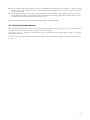
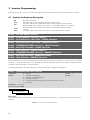
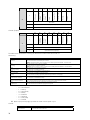
Bits
Values
Bit 0
Setting for DO1 (RL1)
Bit 1
Setting for DO2 (RL2)
Bit 2
Setting for DO3 (RL3)
Bit 3
Setting for DO4
Bit 4
Setting for DO5
Bits 5 to 15
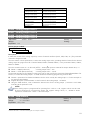
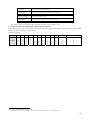
P0696
P0697
P0698
P0699
–
–
–
–
Analog
Analog
Analog
Analog
Adjustable
Range:
Output
Output
Output
Output
Value
Value
Value
Value
0: DO1 output open.
1: DO1 output closed.
0: DO2 output open.
1: DO2 output closed.
0: DO3 output open.
1: DO3 output closed.
0: DO4 output open.
1: DO4 output closed.
0: DO5 output open.
1: DO5 output closed.
Reserved
1
2
3
4
-32768 – 32767
Factory 0
Setting:
Proprieties: Net
Access groups via HMI:
01 PARAMETER GROUPS.
∟ 49 Communication .
∟ 111 Status/Commands
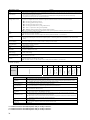
Description:
It allows the control of the analog outputs by means of network interfaces (Serial, USB, CAN, etc.) This parameter
cannot be changed via HMI.
The value written in these parameters is used as the analog output value, providing that the function for the desired
analog output be programmed for “Content P0696/ P0697/ P0698/ P0696”, in the parameters P0251, P0254,
P0257 or P0260.
The value must be written in a 15 bit scale (7FFFh = 32767) 5 to represent 100% of the output desired value, i.e.:
; P0696 = 0000h (0 decimal)
→ analog output value = 0 %
; P0696 = 7FFFh (32767 decimal)
→ analog output value = 100 %
The showed example was for P0696, but the same scale is also used for the parameters P0697/P0698/P069. For
instance, to control the analog output 1 via CAN interface the following programming must be done:
; Choose a parameter from P0696 to P0699 to be the value used by the analog output 1. For this example we
are going to select P0696.
; Program the option “Content P0696” as the function for the analog output 1 in P0254.
; Using the CAN interface, write in P0696 the desired value for the analog output 1, between 0 and 100%,
according to the parameter scale.
NOTE!
If the analog output is programmed for operating from -10V to +10V, negative values must be used
for these parameters to command the output with negative voltage values, i.e, -32768 to 32767
represent a variation from -10V to +10V at the output.
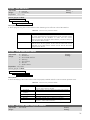
P0700 – CAN Protocol
Adjustable
Range:
1 = CANopen
2 = DeviceNet
Factory 2
Setting:
Proprieties: CFG, CAN
5
Refer to the CFW-11 manual for knowing the actual output resolution.
19