1
Chapter 3
Working with Projects
This chapter explains how to use CodeWarrior tools to create and work with projects.
NOTE
The scope of this chapter is limited to the use of the
CodeWarrior IDE to write and debug applications for the target
platform.
This chapter explains:
•
•
•
•
•
Launching CodeWarrior IDE
Creating Projects
Building Projects
Debugging Projects
Deleting a Project
3.1 Launching CodeWarrior IDE
This section provides the steps required to launch CodeWarrior IDE.
To launch the CodeWarrior IDE, perform these steps:
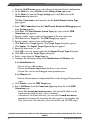
1. Select Start > All Programs > Freescale CodeWarrior > CW for Power
Architecture vnumber > CodeWarrior IDE, where number is the version number
of your product.
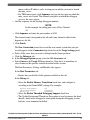
The Workspace Launcher dialog box appears, prompting you to select a workspace
to use.
CodeWarrior Development Studio for Power Architecture Processors Getting Started Guide, Rev. 10.5.0,
06/2015
Freescale Semiconductor, Inc.
21