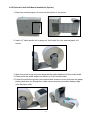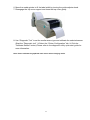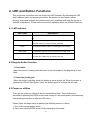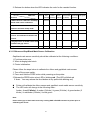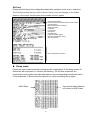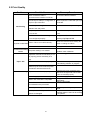
1
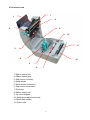
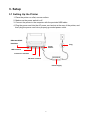
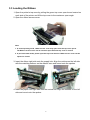
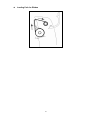
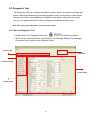
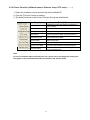
Cub CB-424e THERMAL TRANSFER / DIRECT THERMAL BAR CODE PRINTER USER’S MANUAL Contents 1. Introduction ........................................... ii 1.1 Product Introduction ...............................................................................ii 1.2 Compliances ............................................................................................ii 2. Operations Overview ..................................... 1 2.1 Unpacking and Inspection ......................................................................1 2.2 Printer Overview ......................................................................................2 2.2.1 Front View ......................................................................................2 2.2.2 Interior view....................................................................................4 2.2.3 Rear View........................................................................................5 3. Setup ................................................. 6 3.1 Setting Up the Printer ..............................................................................6 3.2 Open / Close the Top Cover ....................................................................7 3.3 Loading the Ribbon .................................................................................8 3.4 Loading the Media ................................................................................. 11 3.4.1 Loading the media ....................................................................... 11 3.4.2 External Label Roll Mount Installation (Option) ........................13 3.4.3 Loading Media in Peel-off Mode (Option) ..................................15 3.4.4 Loading Media in Cutter Mode (Option).....................................17 3.5 Diagnostic Tool ......................................................................................18 3.5.1 Start the Diagnostic Tool.............................................................18 3.5.2 Printer Function (Calibrate sensor, Ethernet setup, RTC setup………) ..........................................................................................19 3.6 Install SD Memory Card.........................................................................20 4. LED and Button Functions ................................ 22 4.1 LED indicator .........................................................................................22 4.2 Regular button function ........................................................................22 4.3 Power on utilities ...................................................................................22 4.3.1 Ribbon and Gap/Black Mark Sensor Calibration ......................23 4.3.2 Gap/Black Mark Calibration, Self-test and Dump Mode ...........24 4.3.3 Printer Initialization......................................................................26 4.3.4 Set Black Mark Sensor as Media Sensor and Calibrate the Black Mark Sensor ..........................................................................................27 4.3.5 Set Gap Sensor as Media Sensor and Calibrate the Gap Sensor 27 4.3.6 Skip AUTO.BAS............................................................................27 i 5. Troubleshooting ........................................ 28 5.1 LED Status..............................................................................................28 5.2 Print Quality ...........................................................................................29 6. Maintenance ........................................... 30 ii i 1. Introduction 1.1 Product Introduction Thank you for purchasing the Cub CB-424e bar code printer. Although the printer takes only a a small amount of space, it delivers reliable, superior performance. This printer provides both thermal transfer and direct thermal printing at user selectable speeds of: 2.0, 3.0, 4.0 or 5.0 ips. It accepts roll feed and fan-fold labels for both thermal transfer and direct thermal printing. The unit will print all common 1D & 2D bar code formats. Fonts and bar codes can be printed in 4 directions, 8 different alphanumeric bitmap fonts fonts are preloaded into the printers memory. The unit also supports type fonts. 1.2 Compliances CE Class B: EN55022: 1998+A1: 2000+A2: 2003 EN55024: 1998+A1: 2001+A2: 2003 IEC 61000-4 Series EN61000-3-2: 2006 & EN61000-3-3: 1995+A1: 2001 FCC Part 15, Class B UL, CUL C-Tick: CFR 47, Part 15/CISPR 22 3rd Edition: 1997, Class B ANSI C63.4: 2003 Canadian ICES-003 TÜV-GS: EN60950: 2000 Wichtige Sicherheits-Hinweise 1.Bitte lesen Sie Diese Hinweis sorgfältig durch 2.Heben Sie diese Anleitung fűr den späteren Gebrauch auf. 3.Vor jedem Reinigen ist das Gerät vom Stromentz zu trennen. Verwenden Sie Keine Flűssig-oder Aerosolreiniger. Am besten eignet sich ein angefeuchtetes Tuch zur Reinigung. 4.Die Netzanschlußsteckdose soll nahe dem Gerät angebraucht und leicht zugänglich sein. 5.Das Gerät ist vor Feuchtigkeit zu schűtzen. 6.Bei der Aufstellung des Gerätes ist auf sicheren Stand zu achten. Ein Kippen oder Fallen könnte Beschädigungen hervorrufen. 7.Beáchten Sie beim Anschluß an das stromnetz die Anschlußwerte. 8. Dieses das Gerät kann bis zu einer Außentemperatur von maximal 40℃ betieben werden. ii WARNING HAZARDOUS MOVING PARTS KEEP FINGERS AND OTHER BODY PARTS AWAY CAUTION RISK OF EXPLOSION IF BATTERY IS REPLACED BY AN INCORRECT TYPE. DISPOSE OF USED BATTERIES ACCORDING TO THE INSTRUCTIONS WARNUNG! GEFÄHRLICHE BEWEGLICHE TEILE – FINGER UND ANDERE KÖRPERTEILE FERNHALTEN! VORSICHT! EXPLOSIONSGEFAHR BEI ERSATZ DER BATTERIE DURCH UNZULÄSSIGEN TYP. VERBRAUCHTE BATTERIEN IMMER VORSCHRIFTSGEMÄSS ENTSORGEN! Note: * Continuous printing may cause the printers motor to overheat. The printer will stop printing automatically for about 10~15 minutes until motor has cooled down. Please do not turn power off when printer pauses or the data transfered to the printer buffer will be lost. * The maximum printing ratio per dot line is 15% for this printer. To print the full web black line, the maximum black line height is limited to 40 dots, which is 5mm for 203 DPI resolution printer and 3.3mm for 300 DPI resolution printer. iii 2. Operations Overview 2.1 Unpacking and Inspection This printer has been specially packaged to withstand damage during shipping. Please carefully inspect the packaging and printer upon receiving the unit. Please retain the packaging materials in case you need to reship the printer. The following items are included with the printer. One Cub CB-424e printer One Software & Documentation CD One quick installation guide One power cord One auto switching power supply One USB interface cable If any parts are missing, please contact the Customer Service Department of your purchased reseller or distributor. 2.2 Printer Overview 2.2.1 Front View 3 1 4 5 2 6 1. Ribbon access cover 2. Top cover open lever 3. Media view window 4. LED indicator 5. Feed button 6. SD card socket * Recommended SD card specification. SD card spec SD card capacity Approved SD card manufacturer V1.0, V1.1 128 MB SanDisk, Transcend V1.0, V1.1 256 MB SanDisk, Transcend, Panasonic V1.0, V1.1 512 MB SanDisk, Transcend, Panasonic V1.0, V1.1 1 GB SanDisk, Transcend, Panasonic V2.0 SDHC CLASS 4 4 GB V2.0 SDHC CLASS 6 4 GB SanDisk, Transcend, Panasonic V1.0, V1.1 microSD 128 MB Transcend, Panasonic V1.0, V1.1 microSD 256 MB Transcend, Panasonic 2 V1.0, V1.1 microSD 512 MB Panasonic V1.0, V1.1 microSD 1 GB Transcend, Panasonic V2.0 SDHC CLASS 4 microSD 4 GB Panasonic V2.0 SDHC CLASS 6 microSD 4 GB Transcend V1.0, V1.1 miniSD 128 MB Transcend, Panasonic V1.0, V1.1 miniSD 256 MB Transcend, Panasonic V1.0, V1.1 miniSD 512 MB Transcend, Panasonic V1.0, V1.1 miniSD 1 GB Transcend, Panasonic V2.0 SDHC CLASS 4 miniSD 4 GB Transcend V2.0 SDHC CLASS 6 miniSD 4 GB - The DOS FAT file system is supported for the SD card. - Folders/files stored in the SD card should be in the 8.3 filename format - The miniSD/microSD card to SD card slot adapter is required. 3 2.2.2 Interior view 7 1 8 2 9 10 11 3 4 12 5 6 1. Ribbon rewind hub 2. Ribbon rewind gear 3. Gap sensor (receiver) 4. Media holder 5. Media holder lock switch 6. Gap sensor (transmitter) 7. Printhead 8. Ribbon supply hub 9. Top cover support 10. Media guide adjustment knob 11. Black mark sensor 12. Platen roller 4 2.2.3 Rear View 7 1 2 3 4 1. Ethernet interface 2. USB interface 3. Centronics interface 4. RS-232C interface 5. Power jack socket 6. Power switch 7. Fan-fold paper entrance chute 5 5 6 3. Setup 3.1 Setting Up the Printer 1. Place the printer on a flat, secure surface. 2. Make sure the power switch is off. 3. Connect the printer to the computer with the provided USB cable. 4. Plug the power cord into the AC power cord socket at the rear of the printer, and then plug the power cord into a properly grounded power outlet. Ethernet RJ-45 interface Plug Power Switch USB interface Centronics interface RS-232C interface Power Supply 6 3.2 Opening & Closing the Top Cover 1. To open the printer top cover pull the green tabs located on each side toward the front of the printer, then lift the top cover to the maximum open angle. 2. The top cover support at the rear of the printer will engage with the lower cover to hold the printer top cover open. 3. Hold the top cover and press the top cover support to disengage the top cover support with the lower cover. Gently close the top cover. 7 3.3 Loading the Ribbon 1. Open the printer’s top cover by pulling the green top cover open levers located on each side of the printer and lift the top cover to the maximum open angle. 2. Open the ribbon access cover. Note: 1. In normal printing mode, ribbon access cover may open while the top cover opens. The Ribbon access cover can be closed or open while the top cover is closed. 2. In peel and cutter mode, please open the top cover then the ribbon access cover can be opened or closed. 3. Insert the ribbon right side onto the supply hub. Align the notches on the left side with the matching nothces on the ribbons core and mount onto the spokes. 4. Insert the paper core right side onto the rewind hub. Align the notches on the left side and mount onto the spokes. 8 5. Stick the ribbon onto the ribbon rewind paper core. 6. Turn the ribbon rewind gear until the ribbon plastic leader is thoroughly wound and the black section of the ribbon covers the print head. Close the ribbon access cover and the top cover. 9 z Loading Path for Ribbon 10 3.4 Loading the Media 3.4.1 Loading the media 1. Open the printer top cover by pulling the green tabs located on each side towards the front of the printer, then lift the top cover to the maximum open angle. 2. Separate and hold open the media holders. 3. Place the roll between the holders and close them onto the core. 4. Press down the media holder lock switch to hold the label roll firmly. 5. Place the paper, printing side face up, through the media sensor and place the label leading edge onto the platen roller. Move the media guides to fit the label width by turning the guide adjuster knob. Disengage the top cover support and close the top 11 cover gently. 6. Use “Diagnostic Tool” to set the media sensor type and calibrate the selected sensor. (Start the “Diagnostic tool” Æ Select the “Printer Configuration” tab Æ Click the “Calibrate Sensor” button ) Please refer to the diagnostic utility quick start guide for more information. Note: Please calibrate the gap/black mark sensor when changing media. z Loading path for roll labels 12 3.4.2 External Label Roll Mount Installation (Option) 1. Attach an external paper roll mount on the bottom of the printer. 2. Insert a 3” label spindle into a paper roll. And install it on the external paper roll mount. 3. Open the printer’s top cover and separate the media holders to fit the media width. 4. Press down the media holder lock switch to fix the media holder. 5. Feeds the media through the rear external label entrance chute. And place the paper, printing side face up, through the media sensor and place the label leading edge onto the platen roller. 13 6. Move the media guides to fit the label width by turning the guide adjuster knob. 7. Disengage the top cover support and close the top cover gently. 8. Use “Diagnostic Tool” to set the media sensor type and calibrate the selected sensor. (Start the “Diagnostic tool” Æ Select the “Printer Configuration” tab Æ Click the “Calibrate Sensor” button) Please refer to the diagnostic utility quick start guide for more information. Note: Please calibrate the gap/black mark sensor when changing media. 14 3.4.3 Loading Media in Peel-off Mode (Option) 1. Refer to section 3.4.1 to load the media. 2. Feed the paper, printing side facing up, through the paper guide and pass over the platen. 3. Move the media guides to fit the label width by turning the guide adjuster knob. 4. Use “Diagnostic Tool” to set the media sensor type and calibrate the selected sensor. (Start the “Diagnostic tool” Æ Select the “Printer Configuration” tab Æ Click the “Calibrate Sensor” button) Please refer to the diagnostic utility quick start guide for more information. 5. Open the peel-off panel by pulling it out. Peel-off panel 6. Lead the media through the backing paper opening, beneath the peel-off roller. Peel-off roller Backing paper opening 7. Push the peel-off panel back to the printer 15 8. Disengage the top cover support and close the top cover gently. 9. Peeling will automatically start. Press the FEED button to test. Backing paper (Liner) Note: Please calibrate the gap/black mark sensor when changing media. 16 3.4.4 Loading Media in Cutter Mode (Option) 1. Refer to section 3.4.1 to load the media. 2. Lead the media through the cutter paper opening. 3. Move the media guides to fit the label width by turning the guide adjuster knob. 4. Disengage the top cover support and close the top cover gently. 5. Use “Diagnostic Tool” to set the media sensor type and calibrate the selected sensor. (Start the “Diagnostic tool” Æ Select the “Printer Configuration” tab Æ Click the “Calibrate Sensor” button) Please refer to the diagnostic utility quick start guide for more information. Note: Please calibrate the gap/black mark sensor when changing media. 17 3.5 Diagnostic Tool The Diagnostic Utility is a toolbox that allows users to explore the printer's settings and status; change printer settings; download graphics, fonts, and firmware; create printer bitmap fonts; and to send additional commands to the printer. Using this convenient tool you can explore the printer status, settings and troubleshoot the printer. Note: This utility works with printer firmware V6.00 and later. 3.5.1 Start the Diagnostic Tool 1. Double click on the Diagnostic tool icon to start the software. 2. There are four features (Printer Configuration, File Manager, Bitmap Font Manager, Command Tool) included in the Diagnostic utility. Features tab Interface Printer functions Printer setup Printer Status 18 3.5.2 Printer Function (Calibrate sensor, Ethernet setup, RTC setup………) 1. Select the interface used to connect the printer with the PC. 2. Click the “Function” button to setting. 3. The detail functions in the Printer Function Group are listed below. Function Description Factory Default Initialize the printer and restore the settings to factory default. Dump Text To activate the printer dump mode. Configuration Page Print printer configuration. RTC Setup Synchronize printer Real Time Clock with PC. Calibrate Sensor Calibrate the sensor specified in the Printer Setup group media sensor field. Reset Printer Reboot the printer. Print Test Page Print a test page. Ignore AUTO.BAS Ignore the downloaded AUTO.BAS program. Ethernet Setup Setup the IP address, subnet mask, gateway for the on board Ethernet. Note: For more information about the Diagnostic Tool, please refer to the diagnostic utility quick start guide on the provided Software & Documentation CD, Utilities folder. 19 3.6 Install SD Memory Card 1. Open the SD memory card cover. 2. Plug the SD card into the main board. 3. Close the memory card cover. * Recommended SD card specification. SD card spec SD card capacity Approved SD card manufacturer V1.0, V1.1 128 MB SanDisk, Transcend V1.0, V1.1 256 MB SanDisk, Transcend, Panasonic V1.0, V1.1 512 MB SanDisk, Transcend, Panasonic V1.0, V1.1 1 GB SanDisk, Transcend, Panasonic V2.0 SDHC CLASS 4 4 GB V2.0 SDHC CLASS 6 4 GB SanDisk, Transcend, Panasonic V1.0, V1.1 Transcend, Panasonic microSD 128 MB 20 V1.0, V1.1 microSD 256 MB Transcend, Panasonic V1.0, V1.1 microSD 512 MB Panasonic V1.0, V1.1 microSD 1 GB Transcend, Panasonic V2.0 SDHC CLASS 4 microSD 4 GB Panasonic V2.0 SDHC CLASS 6 microSD 4 GB Transcend V1.0, V1.1 miniSD 128 MB Transcend, Panasonic V1.0, V1.1 miniSD 256 MB Transcend, Panasonic V1.0, V1.1 miniSD 512 MB Transcend, Panasonic V1.0, V1.1 miniSD 1 GB Transcend, Panasonic V2.0 SDHC CLASS 4 miniSD 4 GB Transcend V2.0 SDHC CLASS 6 miniSD 4 GB - The DOS FAT file system is supported for the SD card. - Folders/files stored in the SD card should be in the 8.3 filename format - The miniSD/microSD card to SD card slot adapter is required. 21 4. LED and Button Functions This printer has one button and one three-color LED indicator. By indicating the LED with a different color and pressing the button the printer can feed labels, pause printing, select and calibrate the media sensor, print a self-test and reset the printer to defaults (initialization). Please refer to the button operation below for different functions. 4.1 LED indicator LED Color Green/ Solid Description This indicates that the power is on and the device is ready for use. Green/ Flashing This indicates that the system is downloading data from PC to the printer memory or that the printer is paused. Amber This indicates that the system is clearing data from printer. Red / Solid This indicates and error such as head open or cutter error. Red / Flash This indicates a printing error, such as head open, paper out, paper jam, ribbon out, or memory error etc. 4.2 Regular button function 1. Feed labels When the printer is ready, press the button to feed one label to the beginning of next label. 2. Pause the printing job When the printer is printing, press the button to pause a print job. When the printer is paused the LED will blink green. Press the button again to continue the print job. 4.3 Power on utilities There are six power-on utilities to set up and test the printer. These utilities are activated by pressing the FEED button while turning on the printer power simultaneously and releasing the button at different LED colors. Please follow the steps below to perform the different power-on utilities. 1. Turn off the printer power switch. 2. Press and hold the FEED button while powering on the printer. 22 3. Release the button when the LED indicates the color for the needed function. Power on utilities The LED color will be changed as following pattern: LED color Amber Red Amber Green Functions (5 blinks) (5 blinks) (5 blinks) 1. Ribbon Sensor Calibration and Gap / Release Green/Amber Red/Amber Solid green (5 blinks) (5 blinks) black mark sensor calibration 2. Gap / black mark sensor calibration, Release Self-test and enter dump mode 3. Printer initialization Release 4. Set black mark sensor as media Release sensor and calibrate the black mark sensor 5. Set gap sensor as media sensor and Release calibrate the gap sensor 6. Skip AUTO.BAS Release 4.3.1 Ribbon and Gap/Black Mark Sensor Calibration Gap/black mark sensor sensitivity should be calibrated at the following conditions: 1. First time printer use. 2. When changing label stock. 3. Printer initialization. Please follow the steps below to calibrate the ribbon and gap/black mark sensor. 1. Turn off the power switch. 2. Press and hold the FEED button while powering on the printer. 3 Release the FEED button when LED is blinking red. (The LED will blink red 5 times. You may release the feed button at any point while blinking red). Printer will calibrate the ribbon sensor and gap/black mark media sensor sensitivity. The LED color will change in the following order: Amber Æ red (5 blinks) Æ amber (5 blinks) Æ green (5 blinks) Æ green/amber (5 blinks) Æ red/amber (5 blinks) Æ solid green Note: Please select gap or black mark sensor by sending GAP or BLINE command to printer prior to calibrating the sensor. 23 4.3.2 Gap/Black Mark Calibration, Self-test and Dump Mode During calibration of the gap/black mark sensor, the printer will measure the label length, print the internal configuration (self-test) label and then enter dump mode. Gap or black mark sensor calibration is based upon the sensor setting for the previous print job. Please follow the steps below to calibrate the sensor. 1. Turn off the power switch. 2. Press and hold the FEED button while powering on the printer. 3. Release the FEED button when the LED is blinking amber. (The LED will blink amber 5 times. You may release the feed button at any point while blinking amber) The LED color will change in the following order. Amber Æ red (5 blinks) Æ amber (5 blinks) Æ green (5 blinks) Æ green/amber (5 blinks) Æ red/amber (5 blinks) Æ solid green 4. The printer will calibrate the sensor and measure the label length. It will print the internal setting label and enter the dump mode. Note: Please select gap or black mark sensor by Diagnostic Tool or by GAP or BLINE command prior to calibrating the sensor. 24 Self-test Printer will print the printer configuration label after gap/black mark sensor calibration. The Self-test printout can be used to check if there is any dot damage on the heater element, view printer configuration and available memory space. Print head test pattern Printer model name & Main board firmware version Printed mileage Main board firmware checksum Serial port setting Code page Country code Print speed Print darkness Label size (width, height) Gap size (vertical gap, offset) Sensor sensitivity File management information Dump mode Printer will enter dump mode after printing printer configuration. In the dump mode, all characters will be printed in 2 columns as following. The left side characters are received from your system and right side data are the corresponding hexadecimal value of the characters. It allows users or engineers to verify and debug the program. Hex decimal data related to left column of ASCII data ASCII Data 25 Note: 1. Dump mode requires 4” wide paper. 2. Cycle the power to resume normal printing. 3. Press FEED button to go back to the previous menu. 4.3.3 Printer Initialization Printer initialization is used to clear DRAM and restore printer settings to defaults. The only exception is ribbon sensitivity, which will not be restored to default. Printer initialization is activated by the following procedures. 1. Turn off the power switch. 2. Press and hold the FEED button while powering on the printer. 3. Release the FEED button when LED is blinking green. (The LED will blink green 5 times. You may release the feed button at any point while blinking green). The LED color will change in the following order: Amber Æ red (5 blinks) Æ amber (5 blinks) Æ green (5 blinks) Æ green/amber (5 blinks) Æ red/amber (5 blinks) Æ solid green Printer configuration will be restore to defaults as below after initialization. Parameter Speed Default setting 127 mm/sec (5 ips) (203DPI) 76 mm/sec (3 ips) (300DPI) Density 8 Label Width 4” (101.5 mm) Label Height 4” (101.5 mm) Sensor Type Gap sensor Gap Setting 0.12” (3.0 mm) Print Direction 0 Reference Point 0,0 (upper left corner) Offset 0 Tear Mode On Peel off Mode Off Cutter Mode Off Serial Port Settings 9600 bps, none parity, 8 data bits, 1 stop bit Code Page 850 Country Code 001 Clear Flash Memory No IP Address DHCP 26 4.3.4 Set Black Mark Sensor as Media Sensor and Calibrate the Black Mark Sensor Please follow the steps as below. 1. Turn off the power switch. 2. Press and hold the FEED button while powering on the printer. 3. Release the FEED button when LED is blinking green/amber. (The LED will blink green/ amber 5 times. You may release the feed button at any point while blinking green/amber). The LED color will be changed as following: Amber Æ red (5 blinks) Æ amber (5 blinks) Æ green (5 blinks) Æ green/amber (5 blinks) Æ red/amber (5 blinks) Æ solid green 4.3.5 Set Gap Sensor as Media Sensor and Calibrate the Gap Sensor Please follow the steps as below. 1. Turn off the power switch. 2. Press and hold the FEED button while powering on the printer. 3. Release the FEED button when LED is blinking red/amber. (The LED will blink red/ amber 5 times. You may release the feed button at any point while blinking red/amber). The LED color will be changed as following: Amber Æ red (5 blinks) Æ amber (5 blinks) Æ green (5 blinks) Æ green/amber (5 blinks) Æ red/amber (5 blinks) Æ solid green 4.3.6 Skip AUTO.BAS TSPL2 programming language allows the user to download an auto execution file to flash memory. Printer will run the AUTO.BAS program immediately when turning on printer power. The AUTO.BAS program can be interrupted without running the program by the following power-on utility. Please follow the procedures below to skip an AUTO.BAS program. 1. Turn off printer power. 2. Press and hold the FEED button while powering on the printer. 3. Release the FEED button when LED is solid green. The LED color will be changed as following: Amber Æ red (5 blinks) Æ amber (5 blinks) Æ green (5 blinks) Æ green/amber (5 blinks) Æ red/amber (5 blinks) Æ solid green 4. Printer will not run the AUTO.BAS program. 27 5. Troubleshooting The following guide lists the most common problems that may be encountered when operating this bar code printer. If the printer still does not function after all suggested solutions have been invoked, please contact the Customer Service Department of your purchased reseller or distributor for assistance. 5.1 LED Status This section lists the common problems according to the LED status and other problems you may encounter when operating the printer. Also, it provides solutions. LED Status / Color OFF Printer Status No response Possible Cause No power Recovery Procedure * Turn on the power switch. * Check if the green LED is lit on power supply. If it is not lit, power supply may be defective. * Check both power connections from the power cord to the power supply and from the power supply to the printer power jack. Be sure they are connected securely. Solid Green ON The printer is ready to * No action necessary. use Green with Pause The printer is paused * Press the FEED button to resume printing. blinking Red with blinking Error The printer is out of 1. Out of label or ribbon labels or ribbon, the * Load a roll of labels and follow the instructions settings are not correct for loading the media then press the FEED button to resume printing. * Load a roll of ribbon and follow the instructions for loading the ribbon then press the FEED button to resume printing. 2. Printer setting is not correct * Initialize the printer by instructions in “Power on Utility” or “Diagnostic Tool”. Note: Printer status can be easily shown from the Diagnostic Tool. For more information about the Diagnostic Tool, please refer to the utilities folder on the provided Software & Documentation CD. 28 5.2 Print Quality Problem Possible Cause Check if interface cable is Recovery Procedure Re-connect cable to interface. connected to the interface connector. The serial port cable pin configuration is Please replace the cable with pin to pin Not Printing not pin to pin connected. connected. The serial port setting is not consistent Please reset the serial port setting. between host and printer. The port specified in the Windows driver Select the correct printer port in the is not correct. driver. The Ethernet IP, subnet mask, gateway Configure the IP, subnet mask and is not configured properly. No print on the label Label or ribbon not loaded correctly. Ribbon ran out. Continuous feeding labels gateway using Diagnostic Tool. Follow the instructions for loading the media or loading the ribbon. Loading the ribbon. The printer setting is not correct. Please do the initialization and gap/black mark calibration. Gap/black mark sensor sensitivity is not Calibrate the gap/black mark sensor. set properly (sensor sensitivity is to low) Paper Jam Make sure label size is set properly. Set label size exactly as installed paper in the labeling software or program. Labels may be stuck inside the printer Remove the stuck label. mechanism near the sensor area. Poor Print Quality Top cover is not closed properly. Close the top cover completely and make sure the right side and left side levers are latched properly Check if supply is loaded correctly. Reload the supply. Ribbon and media are incompatible. Change the ribbon or label combination. Clean the print head. Check if dust or adhesives are accumulated on the print head. Check if print density is set properly. Check print head test pattern if head element is damaged. 29 Adjust the print density and print speed. Run printer self-test and check the print head test pattern if there is dot missing in the pattern. 6. Maintenance This session presents the cleaning tools and methods to maintain your printer. 1. Please use one of following materials to clean the printer. Cotton swab (Head cleaner pen) Lint-free cloth Vacuum / Blower brush 100% ethanol 2. The cleaning process is described as following: Printer Part Method Interval 1. Always turn off the printer before cleaning Clean the print head when changing a new roll of ribbon the print head. 2. Allow the print head to cool for a minimum of one minute. 3. Use a cotton swab and 100% ethanol to clean the print head surface. Print Head Platen Roller 1. Turn the power off. Clean the platen roller when changing 2. Rotate the platen roller and wipe it a new roll of ribbon thoroughly with 100% ethanol and a cotton swab, or lint-free cloth. Tear Bar/Peel Bar Use the lint-free cloth with 100% ethanol to As needed wipe it. Sensor Compressed air or vacuum Monthly Exterior Wipe it with water-dampened cloth As needed Interior Brush or vacuum As needed Note: z Do not touch printer head with your hand, if touched please use ethanol to clean it. 30 z Please use 100% Ethenol. DO NOT use medical alcohol, which may damage the printer head. z Regularly clean the print head and supply sensors when changing a new ribbon to keep printer performance and extend printer life. z Continuous printing may cause the printers motor to overheat. The printer will stop printing automatically for about 10~15 minutes until the motor has cooled down. Please don't turn power off when printer pauses or the data trans fered to the printer buffer will be lost. z The maximum printing ratio per dot line is 15% for this printer. To print the full web black line, the maximum black line height is limited to 40 dots, which is 5mm for 203 DPI resolution printer and 3.3mm for 300 DPI resolution printer. 31 32