1
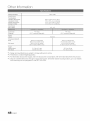
Figures and illustrations in this User Manual are provided for reference only and may differ from actual product appearance.
Product design and specifications may be changed without notice.
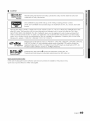
'_L_ See the warranty card for more information on warranty terms.
Wide screen format LCD Displays (16:9, the aspect ratio of the screen width to height) are primarily designed to vies! wide screen format fullmotion video. The images displayed on them should primarily be in the wide screen 16:9 ratio format, or expanded to fill the screen if your model
offers this feature and the images are constantly moving. Displaying stationary graphics and images on screen, such as the dark sidebars on
nonexpanded standard format television video and programming, should be limited to no more than 5% of the total television viewing per week.
Additionally, viewing other stationary images and text such as stock market reports, video game displays, station Iogos, web sites or computer
graphics and patterns, should be limited as described above for all televisions. Displaying stationary images that exceed the above guidelines
can cause uneven aging of LCD Displays that leave subtle, but permanent bumeddn ghost images in the LCD picture. To avoid this, vary the
programming and images, and primarily display full screen moving images, not stationary patterns or dark bars. On LCD models that offer picture
sizing features, use these controls to view different formats as a full screen picture.
Be careful in the selection and duration of television formats used for viewing. Uneven LCD aging as a result of format selection and use, as well as
bumeddn images, are not covered by your Samsung limited warranty.
,,
SAMSUNG ELECTRONICS NORTH AMERICAN LIMITED WARRANTY STATEMENT
Subject to the requirements, conditions, exclusions and limitations of the original Limited Warranty supplied with Samsung Electronics
(SAMSUNG) products, and the requirements, conditions, exclusions and limitations contained herein, SAMSUNG will additionally provide
Warranty Repair Service in the United States on SAMSUNG products purchased in Canada, and in Canada on SAMSUNG products
purchased in the United States, for the warranty period originally specified, and to the Original Purchaser only.
The above described warranty repairs must be performed by a SAMSUNG Authorized Service Center. Along with this Statement, the Original
Limited Warranty Statement and a dated Bill of Sale as Proof of Purchase must be presented to the Service Center. Transportation to and
from the Service Center is the responsibility of the purchaser. Conditions covered are limited only to manufacturing defects in material or
workmanship, and only those encountered in normal use of the product.
Excluded, but not limited to, are any originally specified provisions for, in-home or on-site services, minimum or maximum repair times,
exchanges or replacements, accessories, options, upgrades, or consumables.
For the location of a SAMSUNG Authorized Service (}enter, please call toll-free:
In the United States : 1-800-SAMSUNG (1-800-726-7864)
In Canada : 1-800-SAMSUNG
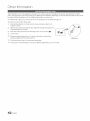
Avoid displaying still images (such as jpeg picture files) or still image elements (such as TV channel Iogos, panorama or 4:3 image format, stock
or news bars at screen bottom etc.) on the screen. Constant displaying of still pictures can cause ghosting of LCD screen, which will affect image
quality. To reduce risk of this effect, please folios! below recommendations:
,,
Avoid displaying the same TV channel for long periods.
,,
Always try to display any image on full screen, use TV set picture format menu for best possible match.
,,
Reduce brightness and contrast values to minimum required to achieve desired picture quality, exceeded values may speed up the burnout
process.
,,
Frequently use all TV features designed to reduce image retention and screen burnout, refer to proper user manual section for details.
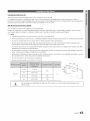
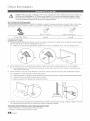
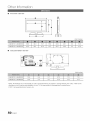
Keep the required distances between the product and other objects (e.g. walls) to ensure proper ventilation.
Failing to do so may result in fire or a problem with the product due to an increase in the internal temperature of the product.
'_L_ When using a stand or wall-mount, use parts provided by Samsung Electronics only.
* If you use parts provided by another manufacturer, it may result in a problem with the product or an injury due to the product falling.
'_L_ The appearance may differ depending on the product.
Be careful when you contact the TV because some parts can be somewhat hot.
i
i
'I'4inche
s
i
i
4inches
i
i
i
4inches
//_l 4inches
'
I
1_
4inches
4inchesll___
_I
I
4inches
@ 2011 Samsung Electronics Co., Ltd. All rigtlts reserved.
English