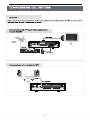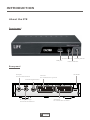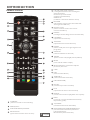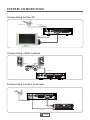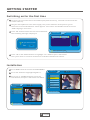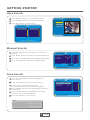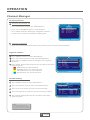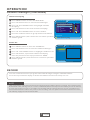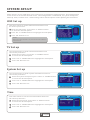
1
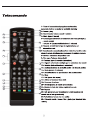
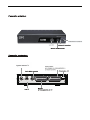
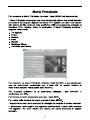
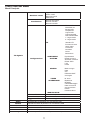
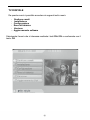
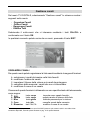
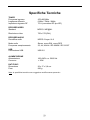
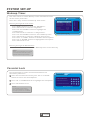
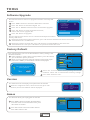
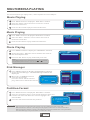
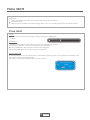
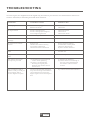
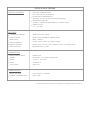
63.DVBT2 Manuale d'uso Vi raccomandiamo di leggere il presente Manuale d'uso prima di procedere all'utilizzo del prodotto. Indice Caratteristiche ................................................................................. pag. 1 Telecomando ................................................................................... pag. 2 Pannello anteriore ........................................................................... pag. 3 Pannello posteriore ......................................................................... pag. 3 Connessione del sistema ................................................................ pag. 4 Utilizzo del ricevitore ....................................................................... pag. 5 Prima accensione............................................................................ pag. 5 Selezione rapida ............................................................................. pag. 6 Menù Principale .............................................................................. pag. 8 Struttura del Menù........................................................................... pag. 9 TV DIGITALE .................................................................................. pag. 10 Gestione canali ............................................................................... pag. 11 Installazione (sintonizzazione canali) ............................................. pag. 14 Configurazione ................................................................................ pag. 15 Reset di fabbrica ............................................................................. pag. 19 Versione .......................................................................................... pag. 19 Aggiorna Software........................................................................... pag. 19 VIDEO/ MUSICA / FOTO ................................................................ pag. 20 GIOCHI ........................................................................................... pag. 20 FUNZIONE PVR ............................................................................. pag. 21 GESTIONE DISCO ......................................................................... pag. 21 Soluzione problemi più frequenti ..................................................... pag. 22 Specifiche Tecniche ........................................................................ pag. 23 Avvertenze ...................................................................................... pag. 24 Garanzia .......................................................................................... pag. 25 Smaltimento del prodotto a fine vita ................................................ pag. 25 Ricevitore Digitale Terrestre Caratteristiche Ricevitore DVBT per canali in chiaro Connessione USB per riproduzione file MULTIMEDIALI Funzione PVR per registrazione diretta dei programmi TV Ricerca canali automatica e manuale Memoria 1000 canali TV e Radio 8 liste canali preferiti Menù a video di facile uso (multi-lingue) Supporta audio in più lingue Supporta sottotitoli in più lingue Supporta televideo (se disponibile sulla TV) Accensione automatica (8 timer programmabili) Funzione di blocco canali Formato schermo 4:3 e 16:9 Risoluzione video 720x576 (PAL) 2 uscite SCART Connessione USB 2.0 Standard di trasmissione DVB-T, MPEG-2 Decodifica video compatibile ISO/IEC 13818-2 MPEG-2 MP@ML Decodifica audio MPEG-2 Layer I e II Ricezione banda UHF Aggiornamento software tramite connessione USB Alimentazione 220/240Vc.a. 50/60 Hz Consumo stand-by 5W Consumo max 13W I marchi registrati sono di proprietà dei rispettivi titolari. Dotazione Ricevitore Digitale Terrestre Telecomando 2 batterie AAA 1,5V Manuale d’uso in Italiano © Cobra SpA 2008 1 Rev. 1208 Utilizzo del ricevitore ATTENZIONE Le spiegazioni che seguono presumono che il ricevitore sia già stato installato correttamente e cioè che: • L’antenna terrestre sia correttamente orientata e collegata al ricevitore • Il ricevitore sia correttamente collegato alla TV e alimentato • Il telecomando sia correttamente alimentato con 2 batterie AAA 1,5V. Prima accensione 1) Accendere il vostro apparecchio TV e selezionare l’ingresso AV dove è connesso il DVBT 2) Collegare l’alimentazione del DVBT. L’indicatore luminoso si accenderà di colore verde. Tramite i tasti “destro” (V+) e “sinistro” (V-) impostare la “lingua OSD” ed il “Paese”. 3) Premere il tasto “OK” per attivare la PRIMA CONFIGURAZIONE. Il seguente messaggio verrà visualizzato: “AVVIARE L’INSTALLAZIONE” SI / NO. 4) Utilizzare i tasti “destro” (V+) e “sinistro” (V-), per posizionarsi su “SI” e premere “OK”. Il sistema inizierà la ricerca automatica dei canali Radio e TV disponibili. 5) Terminata la ricerca uscite dal menù con il tasto EXIT. 5 Selezione Rapida I canali memorizzati sono organizzati in una lista generale suddivisa tra canali TV e canali Radio. Per richiamare questa lista sullo schermo premete il tasto OK del telecomando: la lista identifica i canali mediante numero e nome. Muovetevi tra i canali della lista utilizzando i tasti CH+/CH- e confermate con OK. Per passare dai canali TV ai canali Radio premete il tasto TV / RADIO Una volta definite le liste dei canali preferiti (vedi par. “Ragruppa Canali” a pag. 12), è possibile spostarsi da una lista all’altra mediante i tasti V-/V+. Le liste disponibili sono: Nessuna, News, Scienza, Sport, Film, Ragazzi, Musica, Moda. Per uscire dalla lista canali premere il tasto EXIT INFORMAZIONI CANALE Per visualizzare la barra canale con il nome del canale che state guardando, premete una volta il tasto Info. Per vedere informazioni aggiuntive sullo stesso canale, premete una seconda volta lo stesso tasto. Lo schermo mostrerà i seguenti dati: Nome canale Frequenza PID Audio Numero canale PID Video Service ID PID PCR Informazioni relative alla programmazione del canale Intensità segnale nn % Qualità segnale nn % Per uscire dalla schermata premere EXIT. REGOLAZIONE VOLUME Premendo i tasti V+/V- del telecomando regolate il volume a piacere. Per azzerare temporaneamente l’audio, premete il tasto MUTE. 6 MODO AUDIO / LINGUA AUDIO Premendo il tasto AUDIO del telecomando è possibile: - modificare il modo audio del programma che si sta guardando selezionando con i tasti V+/V- una delle opzioni disponibili (Sinistro/Destro/Stereo); - impostare la 1° lingua e la 2° lingua di ascolto audio selezionando con i tasti CH+ /CH- una delle opzioni disponibili. SOTTOTITOLI È possibile richiamare i sottotitoli (se disponibili) premendo il tasto SUBTITLE sul telecomando. TELEVIDEO È possibile richiamare la funzione Televideo (se disponibile) premendo il tasto TELETEXT del telecomando. Premere il tasto OK per confermare. Selezionate la pagina che vi interessa utilizzando i tasti numerici 0÷9. Per passare alla pagina successiva/precedente utilizzare i tasti CH+/CH-. Per uscire dalla funzione Televideo, premere il tasto EXIT. TASTO INFO All'interno dei vari menù, premendo il tasto "INFO", è possibile visualizzare a video la spiegazione dei tasti funzione da utilizzare. © Cobra SpA 2008 7 Rev. 1208 STRUTTURA DEL MENU Menù Principale Gestione canali Installazione TV digitale Configurazione Organizza canali Ordina canali Ragruppa canali Elimina tutti Ricerca automatica Ricerca manuale Ricerca intervallo OSD Sfondo OSD Visualizza ora Durata OSD Trasparenza Lingua OSD Lingua sottotitoli Cod.Sottotitoli MP4 1° Lingua audio 2° Lingua audio TV Standard TV Formato schermo Uscita video Luminosità Contrasto Colore Saturazione CONFIGURA SISTEMA ORARIO TIMER ACCENSIONE MODIFICA PIN Reset di fabbrica Versione Aggiorna SW Video Musica Foto Giochi Gestione Disco Formatta partizione Equalizzatore Effetto sorround Alimentaz. Antenna Effetto JPEG LCN Paese Modo orologio Data Ora Differenza GMT Ora legale Nr. timer Ripetizione Modalità Canale/Messaggio Data accensione Ora accensione Durata Partizione disco Consente di ripristinare i dati di fabbrica Visualizza informazioni sul prodotto Consente di aggiornare il SW da USB Visualizza film da periferica con connessione USB Riproduce musica da periferica con connessione USB Visualizza foto da periferica con connessione USB Giochi elettronici disponibili sul ricevitore Gestione dei file presenti sul dispositivo USB Inserire la pass. 0000 e dare OK per formattare la partizione TV DIGITALE Da questo menù è possibile accedere ai seguenti sotto menù: - Gestione canali Installazione Configurazione Reset di fabbrica Versione Aggiornamento software Selezionate il menù che vi interessa mediante i tasti CH+/CH- e confermate con il tasto OK © Cobra SpA 2008 10 Rev. 1208 Gestione canali Dal menù TV DIGITALE, selezionando “Gestione canali” lo schermo mostra i seguenti sotto-menù: - Organizza Canali Ordina Canali Raggruppa Canali Elimina Tutti Selezionate il sotto-menù che vi interessa mediante i tasti CH+/CH- e confermate con il tasto OK. In qualsiasi momento potete uscire da un menù, premendo il tasto EXIT. ORGANIZZA CANALI Da questo menù potete organizzare la lista canali mediante le seguenti funzioni: A. B. C. D. E. selezionare i canali da inserire nelle liste favoriti modificare l’ordine dei canali impostare il blocco della visione sui canali da proteggere cancellare dalla memoria i canali che non vi interessano modificare il nome di un canale Ciascuna di queste funzioni è richiamata con uno specifico tasto del telecomando, come segue: A. B. C. D. E. FAV Sposta Bloc Canc Rinomina tasto rosso tasto verde tasto giallo tasto blu tasti V+ / V- imposta come canale favorito2 sposta canale all’interno della lista richiede password per la visione cancella canale dalla memoria modifica il nome di un canale 2 I canali impostati in questa sezione come FAVORITI potranno poi essere inseriti in una delle 8 liste tematiche disponibili, secondo quanto illustrato a pag. 12 di questo Manuale. © Cobra SpA 2008 11 Rev. 1208 Dalla lista posta sul lato sinistro dello schermo selezionate, uno alla volta, i canali da modificare utilizzando i tasti CH+/CH-, quindi richiamate la funzione che interessa premendo il relativo tasto sul telecomando (rosso=FAV, verde=SPOSTA, giallo=BLOCCA, blu=CANC): sul lato destro dello schermo, in corrispondenza del canale selezionato, compare una specifica icona. Nota: Premendo il tasto giallo per la funzione Blocca Canale, viene richiesta la password (pre-impostata in fabbrica “0000”; è possibile modificarla seguendo la procedura descritta a pag.18). Per deselezionare la funzione attivata, premete nuovamente lo stesso tasto in corrispondenza del canale che interessa: la relativa icona scompare. Per salvare le impostazioni, uscite dal menù premendo EXIT. Rinomina canale: se volete modificare il nome di un canale, selezionatelo e premete i tasti V-/V+ del telecomando. Compare una finestra che specifica le corrispondenze tra lettere e tasti numerici del telecomando, oltre alle funzioni minuscolo-MAIUSCOLO (a-A), spazio (INS) e cancella (DEL). Dopo aver inserito il nuovo nome del canale confermate con OK. Terminate tutte le impostazioni, confermate mediante il tasto EXIT. ORDINA CANALI Questa funzione consente di ordinare la Lista Canali in funzione delle vostre esigenze. Impostate la lista in base ai seguenti 3 criteri: - 1° opzione: area geografica - 2° opzione: tipo di canale (in chiaro / criptati / tutti) - 3° opzione: alfabetico (A-Z, Z-A, LCN+3, LCN-3, tutti) Selezionate ciascuna delle 3 opzioni mediante i tasti CH+/CH-, quindi specificate il tipo di classificazione mediante i tasti V+/V-. Confermate premendo OK ed uscite premendo EXIT. RAGGRUPPA CANALI Questa funzione consente di raggruppare i canali in memoria in diverse liste tematiche: Nessuna, Notizie, Scienza, Sport, Cinema, Ragazzi, Musica, Moda, (selezionando la modalità “Nessuna” non viene impostata nessuna lista preferiti). Mediante i tasti CH+/CH- richiamate il canale da posizionare in una Lista 3 LNC (Logical Channel Number): con questa modalità, il ricevitore imposterà la lista dei canali secondo un ordine logico preimpostato dalla rete (es.1-RaiUno, 2-RaiDue, 3-RaiTre, 4-Rete4, 5-Canale5, 6-Italia1, etc.) © Cobra SpA 2008 12 Rev. 1208 Favoriti, quindi selezionate la lista che vi interessa mediante il numero di riferimento (1÷8). Terminate tutte le impostazioni, confermate mediante il tasto EXIT. Dopo avere impostato le liste dei canali favoriti, è possibile richiamarle premendo il tasto OK del telecomando e selezionare la lista che interessa mediante i tasti V-/V+ (selezionando l’opzione “nessuna”si visualizza la lista completa dei canali in memoria). Per richiamare tutti i canali impostati come “favoriti”, premere il tasto FAV del telecomando. ELIMINA TUTTI Questa funzione consente di cancellare tutti i canali presenti in memoria. Per entrare nella funzione viene richiesta la password (password pre-impostata in fabbrica “0000”). Mediante i tasti CH+/CH- selezionate i canali da cancellare (TV oppure Radio). Nella finestra di conferma che compare, selezionate Sì oppure No mediante i tasti V+/V- e confermate con il tasto OK. 13 INSTALLAZIONE Dal menù TV DIGITALE, selezionando “INSTALLAZIONE” lo schermo mostra i seguenti sotto-menù: - Ricerca automatica - Ricerca manuale Selezionate il sotto-menù che vi interessa mediante i tasti CH+/CH- e confermate con il tasto OK. RICERCA AUTOMATICA Questo menù consente di effettuare la ricerca automatica dei canali disponibili nella vostra zona sulle frequenze del segnale digitale terrestre. Avviate la procedura di ricerca automatica mediante il tasto OK: una finestra mostra lo stato di avanzamento del processo (la ricerca può durare alcuni minuti). Alla fine della ricerca automatica, lo schermo mostrerà la lista dei Canali TV e dei Canali Radio memorizzati. RICERCA MANUALE Questo menù consente di ricercare manualmente uno specifico canale. In questo caso dovete specificare il riferimento del numero di canale, dopodiché verranno rilevati automaticamente i dati di frequenza e banda relativi a quel canale. Verificate il livello e la qualità del segnale (indicati nella parte inferiore dello schermo): se il segnale è sufficiente, avviate la ricerca del canale mediante il tasto OK. Una finestra mostra lo stato di avanzamento del processo. Al termine della ricerca lo schermo mostra i nuovi dati memorizzati. © Cobra SpA 2008 14 Rev. 1208 CONFIGURAZIONE Dal menù TV DIGITALE, selezionando “Configurazione” lo schermo mostra i seguenti sotto-menù: - OSD TV Configura Sistema Orario Timer Accensione Modifica PIN Selezionate il sotto-menù che vi interessa mediante i tasti CH+/CH- e confermate con OK. OSD Questa funzione consente di impostare i seguenti parametri, selezionandoli mediante i tasti CH+/CH- ed impostandoli con i tasti V+/V-: - Sfondo OSD: richiama diversi colori dello sfondo per il menù a video Visualizza ora: attiva/disattiva la visualizzazione dell’ora corrente Durata OSD: imposta il tempo di visualizzazione della Barra Informazioni (1”÷6”) Trasparenza: imposta la percentuale di trasparenza del menù a video rispetto all’immagine sottostante, scegliendo tra 0 (no trasparenza) ÷ 60% Lingua OSD: imposta la lingua del menù a video Lingua sottotitoli: imposta la lingua dei sottotitoli dei video MP4 1° lingua audio: imposta la 1° lingua audio 2° lingua audio: imposta la 2° lingua audio Per confermare ed uscire dal sotto-menù premete EXIT. © Cobra SpA 2008 15 Rev. 1208 TV Questa funzione consente di impostare i seguenti parametri: - Standard TV: mediante i tasti V+/V- selezionate tra AUTO / PAL / NTSC (nota: per l’Italia impostare PAL oppure AUTO) - Formato schermo: mediante i tasti V+/V- selezionate tra 4:3 LB (LetterBox), 4:3 PS (PanScan) oppure 16:9 - Uscita video: mediante i tasti V+/V- selezionate tra CVBS, RGB o S-Video - Luminosità: mediante i tasti V+/V- selezionate tra 0 ÷ 100% (default 70%) - Contrasto: mediante i tasti V+/V- selezionate tra 0 ÷ 100% (default 60%) - Colore: mediante i tasti V+/V- selezionate tra -6 ÷ +6 (default 0) - Saturazione: mediante i tasti V+/V- selezionate tra 0 ÷ 12 (default 0) Per confermare ed uscire dal sotto-menù premete OK. CONFIGURA SISTEMA Questa funzione consente di impostare i seguenti parametri: - Equalizzatore: mediante i tasti V+/V- selezionate tra Normale, Classica, Rock, Jazz, Pop. - Effetto surround: mediante i tasti V+/V- selezionate tra OFF, Concerto, Cattedrale, Passiva, Dal vivo. - Alimentazione Antenna: ON/OFF - Effetto JPEG: mediante i tasti V+/V- selezionate tra ON/OFF. - LCN: mediante i tasti V+/V- selezionate tra ON/OFF. - Paese: mediante i tasti V+/V- impostate il Paese di utilizzo del ricevitore. Per confermare ed uscire dal sotto-menù premete OK. ORARIO Questo menù consente di impostare l’orologio selezionando tra la modalità manuale o automatica: - per la modalità “Manuale” procedete impostando i parametri “Data” (mm/gg/aaaa) e “Ora” (hh:mm) utilizzando il tasto OK, i tasti V+/V- e i tasti numerici. - per la modalità “Automatico” l’ora sarà impostata dal ricevitore sulla base del segnale di Greenwich (GMT – Greenwich Mean Time): in questo caso impostate il parametro “Fuso GMT” specificando la differenza di fuso orario del vostro Paese rispetto a Greenwich (per l’Italia inserire +1.00) ed il parametro “Ora legale” specificando ON in periodo di “ora legale” (orario estivo) oppure OFF in periodo di “ora solare” (orario invernale). Per confermare ed uscire dal sotto-menù premete OK. © Cobra SpA 2008 16 Rev. 1208 Reset di fabbrica Questo menù consente di ripristinare le impostazioni di fabbrica del ricevitore, cancellando tutte le altre impostazioni ed i canali memorizzati. Selezionando il sotto-menù “Impostazioni di fabbrica” viene richiesta l’immissione della password (password pre-impostata in fabbrica “0000”). Dopo avere inserito la password, compare una finestra di conferma: selezionare Sì per procedere, No per annullare. Attenzione: selezionando Sì, tutte le precedenti impostazioni saranno cancellate. Versione Questo menù mostra alcune informazioni sul prodotto: - Versione HW Versione SW Versione FW Controllo Aggiorna software Dal menù TV DIGITALE, selezionando “Aggiornamento software” è possibile effettuare eventuali aggiornamenti software tramite connessione alla porta USB. © Cobra SpA 2008 19 Rev. 1208 VIDEO / MUSICA / FOTO Collegando una periferica alla presa USB del ricevitore, è possibile riprodurre i file contenuti nella memoria esterna. Dal Menù Principale potete selezionare i seguenti 3 menù per accedere ai file della memoria esterna: - Video - Musica - Foto Il ricevitore digitale è in grado di riprodurre file video MP4 (AVI), file audio MP3 o immagini JPEG. Selezionando uno dei 3 menù compare la lista dei file contenuti nella periferica. Inoltre viene visualizzata la directory /PVR che contiene le eventuali registrazioni dei programmi TV effettuate dal ricevitore (vedi paragrafo “Funzione PVR” a pag. 21 per la procedura di registrazione). Selezionate il file che interessa mediante i tasti CH+/CH- e confermate con OK: il file (filmato, brano o immagine) sarà riprodotto dal ricevitore. È possibile sospendere la riproduzione del filmato o del brano musicale mediante il tasto X/. Premendo nuovamente lo stesso tasto la riproduzione viene ripresa. Con i tasti e è possibile effettuare lo scorrimento veloce (x2, x4, x8) rispettivamente in avanti o indietro del file. Per passare da un file ad un altro utilizzare i tasti e GIOCHI Da questo sotto-menù è possibile accedere ai giochi elettronici disponibili nel ricevitore: - Box Man - Tetris - Hit Rat © Cobra SpA 2008 20 Rev. VIDEO FUNZIONE PVR Il ricevitore consente di registrare i programmi TV direttamente su di un dispositivo USB esterno. Per effettuare la registrazione di un programma televisivo, visualizzatelo e premete il tasto RECORD: Sullo schermo compare la scritta “REC” ad indicare che la registrazione è in corso. Per interrompere la registrazione premete il tasto STOP. Per visualizzare la registrazione effettuata, entrate nel Menu Principale e selezionate “Video” (come descritto a pag. 20). In alternativa, dal modo TV premete il tasto FILE: sullo schermo comparirà la lista delle registrazioni effettuate. Selezionare il filmato che desiderate visualizzare con i tasti CH-/CH+ e premete OK. GESTIONE DISCO Da questo sotto-menu è possibile visualizzare l’anteprima delle registrazioni effettuate dal ricevitore oppure cancellare le registrazioni. Per passare dal modo “Play” (riproduzione anteprima) al modo “Cancella” utilizzate il tasto verde del telecomando. La funzione di cancellazione prevede due opzioni: x Cancellare una singola registrazione x Cancellare tutte le registrazioni presenti sul dispositivo USB Per cancellare una singola registrazione, dal sotto-menù “Gestione Disco” selezionate l’opzione “Cancella” con il tasto verde. Quindi selezionate la registrazione che desiderate cancellare con i tasti CH+/CH- e premete il tasto OK. Per cancellare tutte le registrazioni, dal sotto-menù "Gestione Disco" selezionate l’opzione “Cancella Tutti” con il tasto verde. Quindi premete il tasto OK del telecomando. © Cobra SpA 2008 21 Rev. 1208 Soluzione problemi più frequenti In questa sezione elenchiamo i più frequenti problemi relativi all’utilizzo del ricevitore. PROBLEMA © Cobra SpA 2008 SOLUZIONE 22 Rev. 1208 Specifiche Tecniche TUNER Frequenza ingresso Larghezza di banda Impedenza ingresso RF 470÷860 MHz 6 MHz / 7MHz / 8MHz 75 : (connettore RF tipo IEC) DECODER VIDEO Standard MPEG-2 MP@ML Risoluzione video 750 x 576 (PAL) DECODER AUDIO Decodifica audio MPEG-2 Layer I & II Modo audio Frequenza campionamento Stereo, mono-SIN, mono-DES 32, 44, 48 kHz IEC-60958 / IEC-61937 USB Connessione USB USB 2.0 ALIMENTAZIONE Alimentazione Consumo 100÷240V c.a. 50/60 Hz < 20W DATI FISICI Dimensione Peso 26 x 17 x 3,8 cm. 930 g. Nota: le specifiche tecniche sono soggette a modifica senza preavviso. © Cobra SpA 2008 23 Rev. 1208 Avvertenze Prima di collegare il ricevitore alla rete elettrica, assicurarsi che la tensione di rete corrisponda a quanto indicato sulla targhetta. Collegare l'apparecchio alla rete solo dopo aver effettuato tutti gli altri collegamenti. Non modificare i collegamenti ad apparecchio acceso; spegnere sempre il ricevitore prima di connettere/disconnettere i cavi. Nel caso in cui l’apparecchio non venga utilizzato per un lungo periodo, togliere il collegamento dalla rete. Non esporre il ricevitore alla luce diretta del sole, né posizionarlo vicino a fonti di calore. Non esporre il ricevitore a pioggia o umidità, né porlo a contatto con l’acqua. Assicurarsi che le fessure di ventilazione del ricevitore siano libere da ostruzioni. Non posizionare altri apparecchi o oggetti vicino alle fessure. Non posizionare il ricevitore su tappeti o altri materiali soffici. Non aprire il ricevitore, non rimuovere parti del case. Tenere lontano dalla portata dei bambini. © Cobra SpA 2008 24 Rev. 1208 ELECTRONICS S.p.A. GARANZIA 1. La garanzia entra in vigore alla data del documento fiscale. NOTA BENE: SI HA DIRITTO ALLA GARANZIA SOLO SE SI ESIBISCE IL PRESENTE CERTIFICATO DI GARANZIA INSIEME ALLA FOTOCOPIA DELLO SCONTRINO FISCALE (O FATTURA) ENTRO I TERMINI STABILITI DALLA LEGGE. 2. In caso di guasto dell’apparecchio, l’acquirente dovrà recarsi presso il proprio rivenditore LIFE. 3. L’unico documento valido per ottenere la garanzia è lo scontrino fiscale (oppure la fattura). 4. Non sono coperte da garanzia le parti esterne dell’apparecchio né i danni provocati al prodotto da imperfetta installazione, cattivo uso da parte dell’utente ed interventi/patch e modifiche operate sull’apparecchio. Sono esclusi da garanzia i danni provocati da agenti atmosferici, sbalzi di tensione, incendi, nonché guasti provocati durante il trasporto. Se il numero di matricola dell’apparecchio viene rimosso, cambiato oppure reso irriconoscibile, la garanzia decade automaticamente. É escluso il riconoscimento di danni diretti e indiretti di qualsiasi natura a persone e cose per l’uso improprio o per la sospensione d’uso dell’apparecchio. 5. Per richieste di garanzia senza un ben motivato difetto, così come per l’installazione ed illustrazione delle norme d’uso dell’apparecchio, verranno addebitate al cliente tutte le spese sostenute. 6. La garanzia non sarà applicata in caso di rimozione, o danneggiamento del sigillo di garanzia ed etichette apposte per l’identificazione del prodotto. Al momento dell’acquisto, fate apporre dal rivenditore timbro e data. Modello Nr. Matricola___63.DVBT2_______________________________________________________________________ Cognome_____________________________________________________________________________________________ Nome_______________________________________________________________________________________________ Via _____________________________________________________________________________________Nr.__________ Timbro e firma del rivenditore Scontrino fiscale Località_____________________________________________________________________________________________ Prov. ______________________________________________C.A.P. ____________________________________________ Firma Cliente _______________________________________________Data d’acquisto ____________________________ Importato da: LIFE ELECTRONICS S.p.A. www.life-electronics.com SMALTIMENTO In ottemperanza alla Direttiva Europea 2002/96/CE, si raccomanda di non smaltire il prodotto come rifiuto urbano e di effettuare, invece, raccolta separata (tramite lo stesso rivenditore o apposite aree predisposte) poiché l’errato smaltimento dei prodotti AEE potrebbe avere effetti negativi sull’ambiente e sulla salute umana. USB Recorder 63.DVBT2 USER MANUAL Read this manual before installation and use. SAFETY INFORMATIONS TO REDUCE THE RISK OF FIRE AND ELECTRIC SHOCK, DO NOT EXPOSE THIS UNITTO RAIN OR MOISTURE. Please read these precautions before operating this unit. Power cord protection To avoid any malfunctions of the unit, and to protect against electric shock, fire or personal injury, please observethe following. Hold the plug firmly when connecting or disconnecting the AC power cord. Keep the AC power cord away from heating appliances. Never put any heavy object on the AC power cord. Do not attempt to repair or reconstruct the AC power cord in any way. Never make or change connections with the power switched on. Placement Avoid placing the unit in areas of: Direct sunlight or heating radiators, or closed automobiles high temperature (over 350C) or high humidity (over 90%) much dust as the internal parts may be seriously damaged. Non-use periods When the unit is not being used, turn it off. When left unused for a long period of time, the unit should be unplugged from the household AC outlet. No fingers or other objects inside Touching internal parts of this unit is dangerous, and may cause serious damage to the unit. Do not atte important to disassemble the unit. Do not put any foreign object in this unit. Keep away from water/magnet Keep the unit away from flower vases, tubs, sinks, etc. If liquids are spilled into the unit, serious damage could occur. Never bring a magnet or magnetized object near the unit. Stacking Place the unit in a horizontal position, and do not place anything heavy on it. Condensation Moisture may form on the lens in the following conditions: Immediately after a heater has been turned on in a steamy or very humid room when the unit is suddenly moved from a cold environment to a warm one. If moisture forms inside this unit, it may not operate properly. In this case, turn on the power and wait about one hour for the moisture to evaporate. If there is noise interference on the TV while a broadcast is being received Depending on the reception condition of the TV, interference may appear on the TV monitor while you watch a TV broadcast and the unit is left on. This is not a malfunction of the unit or the TV. To watch a TV broadcast,turn off the unit. Recycling This symbol on the product or in the instructions means that your electrical and electronic equipment should be disposed at the end of its life separately from your household waste. There are separate collection systems for recycling in the EU. For more information, please contact the local authority or your retailer where you purchased the product. CONTENTS SAFETY INFORMATION INTRODUCTION About the STB Front panel Rear panel Remote control 1 1 2 SYSTEM CONNECTION Connecting to the TV Connecting a HiFi system Connecting a video recorder 3 3 3 GETTING STARTED Switching on for the first time Installation Auto search Manual search Area search 4 4 4 5 5 OPERATION Channels Manager Changing Channel Organize Channel Channel Sorting Channel Grouping Delete All Record 6 6 6 6 7 7 7 SYSTEM SET-UP OSD Set up TV Set up System Set up Time Wakeup Timer Parental Lock 8 8 8 8 8 9 TOOLS Software Upgrade Factory Default Version Game 10 10 10 10 Multimedia Playing Movie Playing Music Playing Photo Playing Disk Manager Partition-Format 11 11 11 11 11 Time shift 12 TROUBLESHOOTING 13 SPECIFICATIONS INTRODUCTION About the STB Front panel Remote sensor USB port Standby button Power indicator Rear panel RF Input for an external aerial TV Scart for connection to your TV Coaxial Digital Audio VCR Scart for connection to a VCR RF Loop through for an external device 1 English AC Mains INTRODUCTION Remote control STANDBY SUBTITLE AUDIO 5 CH+CH-/VOL+VOL- Button ( navigation buttons use to navigate with the menus Channel Up and Down Volume Up and Down) OK Button (Confirm a selection within a menu) 6 RECORD (Record the current TV to the Hard disk through the USB slot) 7 Numeric entry (Enter numeric values and select channel numbers) 8 DEVICE (Change the working section of Hard disk) 9 FAVORITE (Open the Favorite list) 12 MUTE 13 1 14 PLAY/PAUSE 2 3 15 STOP MENU 16 EXIT CH+ 4 17 5 VOL- OK 10 TELETEXT (Open the interactive function) 11 DIGEST (Enter multi-picture to get digest of all programs) 12 SUBTITLE (switch subtitles on and off) 13 AUDIO (Select audio: Left/Right/Stereo/Mono) 14 MUTE (Turn off the audio output) 15 Multimedia files or photoes skip the previous /the next 21 16 STOP 22 17 EXIT (Exit from the Menu) 18 TIMESHIFT (Active timeshift function) 19 (NO FUNCTION) 20 RECALL (Switch to previous channel) 21 FILE (Open the file list of the recorded) 22 REPEAT (Choose the mode of playback and repeat) 23 INFO (Press for current channel information/ Operation guide) 24 TV/RADIO (Switch between TV and Radio) 25 RED/GREEN/YELLOW/BLUE Buttons (For interactive function/Submenu function buttons) Blue button(Timer function) VOL+ TIMESHIFT RECORD 18 6 CH- 19 RECALL 7 20 8 FAV DEVICE FILE REPEAT 9 TELETEXT DIGEST TV/RADIO INFO 10 23 11 24 25 1 STANDBY (switch the STB on and standby) 2 PAUSE/PLAY 3 Search backward /forward 4 Menu Button (open and close the menu screen) 2 English SYSTEM CONNECTION Connecting to the TV RF cable Antenna RF cable Scart cable Connecting a HiFi system Hi-Fi Coaxial cable Connecting a video recorder RF cable Scart cable VCR Video Cassette Recorder 4 RF cable 3 English GETTING STARTED Switching on for the first time 1 Turn on your TV set and select the SCART input (with the AV key, or simular on the television remote control). 2 Plug the Set Top Box into the mains supply. The power indicator on the panel is green. Then the "First Time Installation" menu appears. Press "LEFT" and "RIGHT" button to choose "OSD Language" and "Area". 3 Press "OK" button to start the first time installation. The following message is displayed. ? Init Install OSD Language English Area xxxxxx Do you want to install? Yes No INFO: Operation guide 4 Press "LEFT" and "RIGHT" button to highlight "Yes" and then press "OK" button. The system starts to search all channels for available radio and TV stations. Installation 1 Press "MENU" button to enter the MAIN MENU. 2 Press "OK" button to highlight "Digital TV". 3 Press "UP" or "DOWN" button to select the "Installation",and press "OK" button to confirm. Digital TV Channel Manager Installation Configuration Factory Default Version Installation Software Upgrade Auto Search Manual Search INFO: Operation guide Area Search INFO: Operation guide 4 English English xxxxxx xxxxxx xxxxxx GETTING STARTED Menu Auto Search 1 Press "MENU" button to enter the Main Menu. 2 Press "DOWN" button to Select the Installation. 3 Press "OK" button to "Auto Search". Auto Search Manual Search Area Search Channel Search S.No. TV Channel Installation S.No. Radio Channel INFO: Operation guide Channel xx UHF Progress xxxxxxKHz/8M 86% Manual Search 1 Select the Manual Search and press "OK" button to confirm . 2 Press "RIGHT" button to select the Channel Name list. 3 Press "UP" or "DOWN" button to highlight the Number. 4 Press "OK" button to confirm the Channel Name. Manual Search Channel Name Freq(KHz) BandWidth 21 474000 8M Strength Quality 20% 2% INFO: Operation guide Area Search 1 Press "UP" or "DOWN" button to highlight the "Area Search" . Area Search 2 Press "OK" button to enter the "Area Search" . Start Freq(KHZ) 474000 3 A Area Search window will displayed, Press the numeric buttons to "Start Freq(KHZ)" End Freq(KHZ) BandWidth 474000 4 Press "DOWN" button to "End Freq(KHZ)" and enter a frequence. 5 Press "DOWN" buttonto "BandWith",Use "RIGHT" button to choose the "BandWidth". 6 Press "OK" button to "Area Search". 8M INFO: Operation guide NOTE You can change the frequence and bandwidth by choosing the "Area ". Select the configuration menu, set the "Area" at the "System Setup " or choose the Area when the initialization of the STB. 5 English 21 22 23 24 25 26 27 28 29 OPERATION Channel Manager Changing Channel 1 Selection by Channel list QUICK SELECT None Press "OK" button to enter the "QUICK SELECT". Press "UP" or "DOWN" button to select channel . Press "INFO" button to display the navigation window. Perform the correlative operation with the guide. S.No. Channel Name 0104 0100 0083 0082 Channel Name Teletext on 4 Sky Spts News Sky News INFO: Operation INFO: Operation guide guide 2 Selection by Number Enter the channel list number directly by remote control to select desired channel. Organize Channel 1 Press "MENU" button to enter "Main Menu". 2 Press "OK" button third to enter "ChannelOrganizer". 3 Press "UP" or "DOWN" button to achannel for "Organize selection". 4 Press "INFO" button,then perform the correlative operation with the guide . Channel Organizer RED button: For fav selection GREEN button : For move selection YELLOW button: For lock selection BLUE button: For delete selection S.No 0001 0002 0007 0011 0012 0030 Channel name Fav Move Lock Del BBC ONE BBC TWO BBC THREE SKY THERR UKTV History CCBC Channel England Rowridge 666000KHz/8M INFO: Operation guide Channel Sorting 1 Press "MENU" button to enter " Main Menu". 2 Press "OK" button twice to enter Channel Manager. Channel Sorting 3 Press "CH+/CH-" button to select " Channel Sorting". 4 Press "OK" button to enter the " Channel Sorting" window. 5 Press "INFO" button,then do the correlative operation with the guide. NOTE The default password for Lock and Deletion is "0000". The super password is "8888". 6 English First Option Second Option Third Option S.No 0102 0500 0723 0724 0725 All Area Scramble LCN- Channel Name Teletext cars TPS talksport 3C Premier Radio INFO: Operation guide Greece Austrialia All Area Freq Bandwidth 546000k 8M 546000K 8M 562000k 8M 562000K 8M 562000K 8M OPERATION Channel Manager (Continued) Channel Grouping 1 Press "MENU" button to enter the Main Menu. 2 Press "OK" button twice to enter Channel Manager. 3 Press "UP" and "DOWN" button to highlight " Channel Grouping " . 4 Press "OK" button to select the " Channel Grouping" . 5 Press "UP" and "DOWN" button to select channel. 6 Press the numberic button to group theselected channel. 7 Press "INFO" button ,then choose the correlative operation with the guide. Channel Grouping S.No Channel Name 0102 0500 0723 0724 0725 0728 Fav Group Teletext Cars TPS talkSPORT 3C Premier Radio Heart 1 2 3 4 5 6 7 8 None News Scien Sport Movi Kids Music Fashi Channel List INFO: Operation guide Delete All 1 Press "MENU" button to enter the "MainMenu". 2 Press "OK" button twice to select the"Channel Manager". 3 Press "UP" and "DOWN" button to highlight the"Delete All" 4 Press "OK" button, a password window will display, enter the password. The super password is "8888". 5 Press "INFO" button ,then choose the correlative operation with the guide. Delete All All TV Channels All Radio Channels INFO: Operation guide RECORD You can record the current TV program to the Hard Disk by pressing the "RECORD "button. Press the "stop" button to display an interactive window and choose to stop it or not. NOTE YOU would better collect the hard disk to the STB through the USB slot before recording. The hard disk of PCI, NUSLIM-NEC CHIP, Moving Star, AL cormicro, SAMSUNG, HITACHI had passed the stability test of the USB 2.0, So some may not be succeed to record. Be sure the hard disk has enough space to record . A partition error would made when the STB lost the power at the recording. You can repair or format the hard disk to resolve. The STB only supply the FAT format of HDD. 7 English SYSTEM SET-UP Many aspects of your STB can be set to reflect your circumstances and preference. The Configuration menu screen is accessed from main menu. The Configuration contains OSD, TV, System Setup,Time, Wakeup Timer, Parental Lock. All the setting will be effective perform after quitting the main menu. OSD Set up This menu allows to set the OSD information based on the viewer preference . 1 Enter the OSD menu, press "LEFT" or "RIGHT" button to select the desired option. 2 Press "UP" or "DOWN" button to highlight the next option. 3 Press "OK" button to set. NOTE When the"Time on OSD "is on, the function of subtitle is automatic off . OSD OSD Theme1 Time on OSD ON OSD Timeout 1sec OSD Trans 10% OSD Language English MP4 Subtitle Langua English MP4 Sub codepage 8859 1st Audio Language English 2st Audio Language English Themel Theme2 Theme3 Theme4 Theme5 INFO: Operation guide TV Set up This menu allows to set the TV information based on the viewer preference . Enter the TV menu, press "LEFT" or "DOWN" button 1 to select the desired option. 2 Press "UP" or "DOWN" button to highlight the next option. 3 Press "OK" button to set. TV Display Mode Aspect Ratio Video Output Brightness Contrast HUE Saturation PAL 4:3PS RGB 80% 80% 0 0 Auto PAL NTSC INFO: Operation guide System Set up This menu allows to set the System information based on the viewer preference . 1 Enter the System Setup menu, press "LEFT" or "DOWN" button to select the desired option. 2 Press "UP" or "DOWN" button to highlight the next option. 3 Press "OK" button to set. System Setup EQ Setup Standard Surround OFF Active Antenna OFF JPEG Effect ON LCN ON Area England Standard Classic Rock Jazz POP INFO: Operation guide Time This menu allows to set the Time information based on the viewer preference. 1 Enter the Time menu, press "LEFT" or "RIGHT" button to select the desired option. 2 Press "UP" or "DOWN" button to highlight the next option. 3 Press "OK" button to set. Time System Setup EQ Setup Standard Auto Timer Mode 01/01/2000 Date Surround OFF OFF Active 01:37 Time Antenna ON JPEG Effect Auto GMT Offset ON LCN OFF Summer Time England Area INFO: Operation guide 8 English Auto Standard Classic Manual Rock Jazz POP SYSTEM SET-UP Wakeup Timer This menu allows to set the Wakeup Timer information based on the viewer preference . There are 2 ways to enter the Wakeup Timer menu. Wakeup Timer Timer NO Entering through the main menu: Press "MENU" button to enter the "MainMenu". Press "OK" button to enter the "DigitalTV". Press "UP" and "DOWN" button to highlight the "configuration". Press "OK" button to enter the "configuration". Press "UP" and "DOWN" button to select"Wakeup timer". Press "OK" button to enter the "Wakeup Timer"menu, Press "LEFT" or "RIGHT" button to selectthe desired option. Press "UP" or "DOWN" button to highlightthe next option. Press "OK" button to set. 1 Timer Mode Wakeup Mode Wakeup Channel Wakeup Date On Time Duration Default Partition Off Message BBC FOUR 01/01/2000 01:42 00:00 /sda 1 INFO: Operation guide Entering through the BLUE button: Press "BLUE" button can enter Wakeup Timer menu directly. NOTE When you complete your setup, you must exit all menus ,then system will save your setup. Parental Lock This menu allows to set the TV information based on the viewer preference . 1 Enter the Parental Lock menu, press "LEFT" or "RIGHT" button to select the desired option. Parental Lock Enter Old Password 2 Press "UP" or "DOWN" button to highlight the next option. 3 Press "OK" button to set. Enter New Password Confirm New Password Enter password NOTE The default password for Lock and Deletion is "0000". The super password is "8888". 9 English 1 2 3 4 5 6 7 TOOLS Software Upgrade We offer the function for user to upgrade software version by USB device . 1 Press "MENU" button to enter the "Main Menu" window. 2 Press "OK" button to select the "Digital TV". 3 Press "UP" or "DOWN" button to select the Software Upgrade. 4 Press "OK" button to enter the download route, choose the correct upgrade file . 5 Press "OK" button to upgrade. USB Upgrade [OK] [OK] 1.Read Date 2.Check Checksum 3.Update FLASH 4.Restart System 3.Update FLASH We also offer the function for users to download and upload channel data by USB device. 1 High light "Download channel data" item, press "OK" button to download channel list named "channeldata. bin" in USB Device. 2 High light "Upload channel dat" ,press "OK" button to enter USB Device and select file "channeldata. bin" then press "OK" button to upload channel list to flash. Factory Default This function allows you to re-set the STB back to factory settings, clear all existed channels. 1 Enter "Digital TV" menu, select "Factory Default", press "OK" button, you are asked to input a password. 2 Input a correct password using the numeric buttons(the super password is "8888"), a confirmation window is displayed. Digital TV Channel Manager Installation ConfigurationEnter password ? Factory Default Version ? Software Upgrade Do you want to perform factory default? INFO: Operation guide Yes No 3 Select "Yes" to return back to factory settings and clear all channels. Select "No" to cancel back to factory settings. 4 Press "EXIT" button to exit . Version Version The Version menu can display some parameters of this STB. H/W version S/W version F/W version Checksum 1 Enter the "Digital TV" menu, select the Version, press "OK" button, the Version window will be displayed. Games This function allows you to play game on the STB. Native Games 1 Press "MENU" button to display the Main Menu, move the cursor to select the Games item, press "OK" button to confirm . 2 Press "OK" button to enter the "Native Games". Press "EXIT" button to exit. Box Man Tetris Hit Rat INFO: Operation guide 10 English DVB-T Vx.x xxxxxx_Vx.x xxx_xxx_xxxx_xxxx_xxx xxxxxxxx MULTIMEDIA PLAYING This function allows you to play video , audio or photo files from USB port. Movie Playing 1 Movie Press "MENU" button to display the "Main Menu" window. 0001/sda 2 Select the "Movie". Move the cursor to enter the route of the desired video files. 3 Press the "OK" button to play the desired video files. Music Playing 1 Press "MENU" button to display the "Main Menu" window. 2 Select the " Music". Move the cursor to enter the route of the desired audio files. 3 Press the " OK" button to play the desired audio files. Music 0001/sda Photo Playing 1 Press "MENU" button to display the "Main Menu" window. 2 Select the "Photo" . Move the cursor to enter the route of the desired photo files . 3 Press the "OK" button to play the desired photo files. Photo 0001/sda NOTE Press "RED" button once, and then press can zoom the photo at 2,3,4,1/2,1/3,1/4. or button , Disk Manager 1 2 Press " MENU" button to display the " Main Menu" window. Select the "Disk Manager". The Disk Manager window will displayed. Move "UP" or " DOWN" button to select the desired files. Press the "Green" button to select play, delete one or delete all of the file. Disk Manager Play 0001 0002 0003 0004 0005 0006 0007 0008 Delete the select file? ? Yes No BBC NEWS 24(06) E4+1(080317_1 SKY THREE(0604 SKY THREE(0604 SKY THREE(0604 SKY THREE(0604 SKY THREE(0604 SKY THREE(0604 PLAY/DEL/Rename Partition-Format 1 Press "MENU" button to display the "Main Menu" window. 2 Select the "Partition-Format". Press the "OK" button to enter the Partition-Format menu Move the cursor to highlight the desired HDD. 3 ? Press the "OK" button to format the partition. NOTE Partition-Format 0001/sda Do you want to format this partition? Yes No When play the multimedia files, make sure the USB is collected to the STB. When select the "Movie" , the STB just can play the video files or the recorded files. When select the "Music"/"Photo", the STB just can play the audio files or the photo files. The Disk Manager can perform the recorded files only. 11 English Time Shift Plugging an external Mass Storage Device on the USB port gives you access to Time Shift a broadcast programme. Pause a broadcast programme and continue watching it later (Time Shift ) Record Time Shift. When the space available on the Mass Storage Device runs out, recording operation of broadcast will stop. Time Shift Initiate Time Shift can be done in viewing mode by pressing the "TIME SHIFT " button. PAUSE-00:03:44 Trickmodes During the playback, it is possible to perform the following actions : Press "PLAY/PAUSE " button to play/pause the playback Press "FORWARD " button to fast forward the playback Press "BACKWARD " button to rewind the playback Stop the Time Shift Press "EXIT" button to stop Time Shift. Then, a confirmation window appears, you are asked to save buffer or not Select Yes to record Time Shift buffering. Select No to viewing mode displaying the present program. ? 12 English Do you want to save buffer? Yes No TROUBLESHOOTING In some region, the digital terrestrial signal may be weak. So you'd better use the antenna in which the booster was built,for watching the weak sinal channels. Problem Possible cause What to do Standby light not lit Mains lead unplugged Mains fuse blown Check mains lead Check fuse No signal found Aerial is disconnected Aerial is damaged/misaligned Out of digital signal area Check aerial lead Check aerial Check with dealer No picture or sound Tuned to digital teletext channel Reduce to another channel Scrambled channel message Channel is scrambled Select alternative channel No response to remote control Receiver off Handset not aimed correctly Front panel obstructed Hand set batteries exhausted Plug in and turn on plug Aim handset at front panel Check for obstructions Replace handset batteries Forgotten channel lock code Re-install channels to cancel channel lock Forgotten menu lock code Contact help line The remote control will not operate your STB (1) The batteries in your remote control need replacing (2) There is an obstruction blocking the signal path between the remote control and the box. (1) Replace the batteries (2) Check that there is nothing in the way of the path between the remote control and the receiver After moving the STB to another room you find you are no longer able to receive digital reception The aerial feed former new point may come through a distribution system which may reduce the digital signal now received by the box. Try a direct feed from the antenna 13 English SPECIFICATIONS TUNER & CHANNEL RF INPUT CONNECTOR x1 (IEC-TYPE, IEC169-2, FEMALE) RF OUTPUT CONNECTOR x1 (IEC-TYPE, IEC169-2, MALE (LOOPTHROUGH)) FREQUENCY RANGE: 174MHz~230MHz(VHF)&470MHz ~862MHz (UHF) SIGNAL LEVEL: -15 ~ -70 dbm DECODER TRANSPORT STREAM MPEG-2 ISO/IEC 13818 PROFILE LEVEL MPEG-2 MAIN PROFILE @MAIN LEVEL INPUT RATE MAX. 15Mbit/s VIDEO FORMATS AUTO, 4:3PS, 4:3LB, 16:9 SWITCHABLE, AUDIO FORMATS MPEG Layer I & II, 32 / 44.1 / 48KHz Dobly AC-3(Digital out) VIDEO OUTPUT RGB(DEFAULT) , CVBS CONNECTION MAIN POWER CABLE FIXED TYPE TUNER RF INPUTx1, RF LOOP THROUGH x1 SCART TO TV x1, TO VCR x1 SPDIF COAXIAL x1 DATA PORT USB2.0 x1 POWER SUPPLY INPUT VOLTAGE AC220-240V ~ 50/60Hz POWER CONSUMPTION MAX. 10W Design and Specifications are subject to change without notice.