1
OPERATION
Your semi automatic press features Automatic Opening at the end of
each count down timer setting. The press will simply release and open.
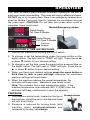
DO NOT pry or try to open press, there is an emergency release lever
atop the handle if you ever need to interrupt the countdown and get
the press open. CAUTION: Do not lean over press when cycle is
complete. Injury could occur.
Manual/Emergency release
Digital Display
For Class D Models
Digital Display
For Class P Models
Pressure
Readout
TEMPERATURE & TIME INSTRUCTIONS
1. Turn on the machine by pushing the on/off switch.
2. To change or set the temperature, press the menu button on the
digital control. The light next to “TEMP” will light. Press the up ▲,
or down ▼, button to your desired setting.
3. To change or set the time, press the menu button a second time on
the digital control. The light next to “TIME” will light. Press the up
▲, or down ▼, button to your desired setting.
4. When you have your desired settings press the menu button a
third time to lock in your settings otherwise the machines
previous settings will revert back.
5. When the machine reaches the preset temperature, the
controller will beep once. Machine is now ready to use.
Note: The controller has a high temperature alarm. If the
machine temperature ever exceeds 460° F (238C) then the
controller will beep continuously to alert the operator.
PRESSURE
1. The pressure control knob, located on the top of
the machine, should be set so that the heat head
will lock down firmly.
2. Pressure is reduced by turning knob (with
machine open) counterclockwise and
increased by turning it clockwise.
3
Pressure knob