1
User manual - METER SRT-N118
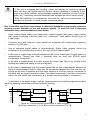
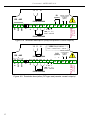
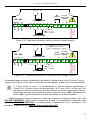
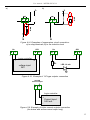
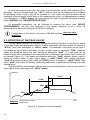
Figure 6.5 presents the principle of relay outputs operation for two thresholds mode, and
an example values of other parameters. In this mode parameter “SEt2” is accessible in
common with “SEtP”, this parameter describes a second threshold of the relay output. The
parameters “HYSt”, “modE”, “t on”, “toFF”, “unit” and “AL” are connected with both
“SEtP” and “SEt2” thresholds. While the controlling process, the relay output changes his
state depends of both “SEtP” and “SEt2” thresholds in similar way as it was described in one
threshold mode.
If two threshold mode is used, “modE” parameter defines state of the relay output when
the input value occurs in a particular zone defined by border values of both thresholds. The
relay can be turned on if the input value is contained in zone A (“modE” = ”in”) or zone B
(“modE” = ”out”) and turned off if it is contained in the second one (Figure 6.5).
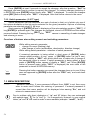
i
The sequence of thresholds “SEtP” and “SEt2” can be set in any order, due to the
control of relay outputs is done depend on difference between thresholds values
(zone A ) and outside of threshold values (zone B).
7. DEVICE PROGRAMMING
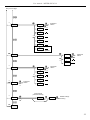
The device menu allow user to set all parameters connected to operation of
measurement input, control modes, critical situations behaviour, communication via RS-485
and access settings. The meaning of the particular parameters is described in paragraph
MENU DESCRIPTION.
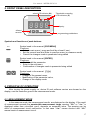
Some of the parameters can be accessed without menu entering (quick view mode).
After pressing [^] or [v] button, name of the threshold (e.g.”rEL1”) and his value will be
displayed on the display in alternating mode. If [^] or [v] will be pressed in 5 sec again, the
next threshold will be displayed, else the device comes back to the measurement mode. If a
free access is enabled (see description of ”SECu” menu), user can change the value of
particular threshold pressing button [ENTER] (see: PARAMETERS EDITION).
i
If particular parameter has been changed and confirmed in quick view mode, its
new value is displayed in alternating mode with parameter name by few seconds.
Confirmed changes may be checked or user can switch viewed parameter pressing
[^] or [v] button.
7.1. PROGRAMMING MENU
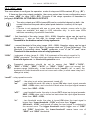
To enter main menu (being in the measurement mode) operator must to press and hold
at least 2 sec. [ESC/MENU] button.
If the user password is defined (see parameter “Scod“, menu ”SECU”), operator have
to enter correct one before proceeding to menu options . Entering of the passwords is similar
to the edition of numeric parameters (see: PARAMETERS EDITION ), however presently editing
digit is showed only on the display, other digits are replaced by “-” sign.
After entering of last digit of the password first menu position will be displayed (if the password
is correct) or warning ”Err” in other case.
!
22
Pay attention when device parameters are being changed. If it is possible, turn off
controlled installation (machine).