1
S70 DeviceNet Servo
Installation & Maintenance Manual
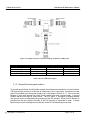
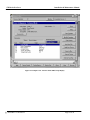
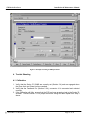
Figure 6: An example display of a network created from EDS information
When the S70 Servo EDS file is accessed through an application as shown in Figure 7, all of
the parameters available for monitoring and configuration are displayed. Since there are more
parameters available than can be displayed on the screen at the same time, the parameters can
be also displayed in groups. In Figure 8, the Parameter Group “Actuator Status” is displayed.
The S70 Servo divides the display into the following groups:
Actuator Status - Actuator Status Group
Actuator Control - Actuator Control Group
Speed Control - Actuator Speed Control Group
Default Behavior - Actuator Default Behavior Group
DeviceNet - DeviceNet settings Group
Product Information - Product Information Group
2000 BRAY CONTROLS
Page 17 of 24