1
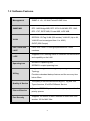
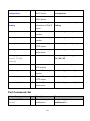
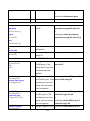
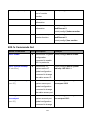
ip dhcp
G
Enable DHCP client
switch(config)#ip dhcp
function of switch
show ip
P
Show IP information of switch#show ip
switch
no ip dhcp
G
Disable DHCP client
switch(config)#no ip dhcp
function of switch
reload
G
Halt and perform a cold
restart
switch(config)#reload
default
G
Restore to default
switch(config)#default
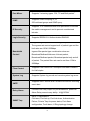
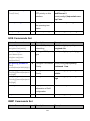
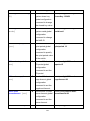
admin username
G
Changes a login
switch(config)#admin username
username.
xxxxxx
[Username]
(maximum 10 words)
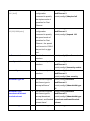
admin password
G
[Password]
show admin
P
Specifies a password switch(config)#admin password
(maximum 10 words)
xxxxxx
Show administrator
switch#show admin
information
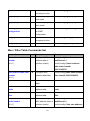
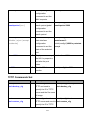
dhcpserver enable
G
Enable DHCP Server switch(config)#dhcpserver enable
Dhcpserver disable
G
Disable DHCP Server switch(config)#no dhcpserver
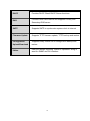
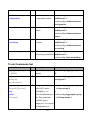
dhcpserver lowip
G
Configure low IP
switch(config)#dhcpserver lowip
address for IP pool
192.168.1.100
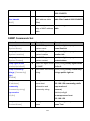
Configure high IP
switch(config)#dhcpserver highip
address for IP pool
192.168.1.200
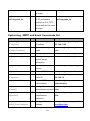
Configure subnet
switch(config)#dhcpserver
[Low IP]
dhcpserver highip
G
[High IP]
dhcpserver subnetmask
G
[Subnet mask]
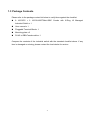
dhcpserver gateway
mask for DHCP clients subnetmask 255.255.255.0
G
[Gateway]
dhcpserver dnsip
G
[DNS IP]
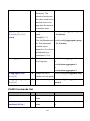
dhcpserver leasetime
G
[Hours]
dhcpserver ipbinding
[IP address]
I
Configure gateway for switch(config)#dhcpserver
DHCP clients
gateway 192.168.1.254
Configure DNS IP for
switch(config)#dhcpserver dnsip
DHCP clients
192.168.1.1
Configure lease time
switch(config)#dhcpserver
(in hour)
leasetime 1
Set static IP for DHCP switch(config)#interface
clients by port
fastEthernet 2
switch(config)#dhcpserver
ipbinding 192.168.1.1
120