1
DCN Next Generation Synoptic Microphone Control
An on-screen page with the requested information
will appear.
2.2.3 Keyboard
This gives information on which keys on your
keyboard can be used with the software. This
includes using keys to activate menu items, to move
around in dialogue boxes, for short cuts, and to select
options from the main window. To access the
‘Keyboard’ help facility:
•
Select the ‘Help’ menu and click on ‘Keyboard’.
A list of different key types is given. For more
information on any key type contained in the list:
•
Click on the required key type in the list.
An on-screen page with the requested information
will appear.
2.2.4 Commands
This gives information on all menu options, covering
the ‘File’, ‘Edit’, ‘View’, ‘Settings’ and ‘Help’ menus.
To access the ‘Commands’ help facility:
•
Click on the required menu group in the list.
A list of options in the selected menu group is given.
For more information on any option contained in the
list:
•
•
Select the ‘Help’ menu and click on ‘Glossary’.
A list of terms used in the help facility is given in
alphabetical order. For more information on any
term contained in the glossary:
•
Click on the required subject in the index.
A window with the requested information will appear.
2.2.7 Using Help
This gives information on how to use the help facility.
To access the ‘Using Help’ facility:
•
Select the ‘Help’ menu and click on ‘Using Help’.
A list of topics is given. For more information on any
topic contained in the list:
•
Click on the required topic in the list.
A list of options for the selected topic is given. For
more information on any option contained in the list:
•
Click on the required option in the list.
An on-screen page with the requested information
will appear.
Select the ‘Help’ menu and click on ‘Commands’.
A list of menu groups is given. For more information
on any menu group contained in the list:
•
en | 7
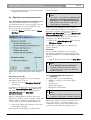
2.2.8 About
This provides software release information. To
display the ‘About...’ window:
•
Select the ‘Help’ menu and click on ‘About Syn.
Mic. Control...’.
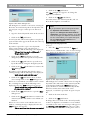
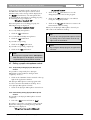
The following window appears:
Click on the required option in the list.
An on-screen page with the requested information
will appear.
2.2.5 Procedures
This gives information on how to use the software.
To access the ‘Procedures’ help facility:
•
Select the ‘Help’ menu and click on ‘Procedures’.
A list of topics is given. For more information on any
topic contained in the list:
•
Click on the required topic in the list.
A list of options for the selected topic is given. For
more information on any option contained in the list:
•
Click on the required option in the list.
An on-screen page with the requested information
will appear.
Figure 2 The ‘About...’ window
2.2.6 Glossary
To access the glossary:
To remove this window:
•
Bosch Security Systems B.V. | 2005 January | 9922 141 70351
Click on the ‘OK’ push button.