1
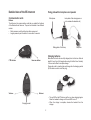
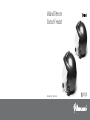
Detailed view of the BT-Intercom
Fixing plate with microphone and speaker
Communication units
Microphone
Buttons
The buttons on the communication units lets you enable the functions
of the Bluetooth and Intercom. They can be activated in two different
modes:
• Short pressure: push the button less than one second
• Longer pressure: push the button for more than 3 seconds
back-plate of the clamp (press on
arc to release the headset unit)
Sliding-plate of the clamp
Earphone
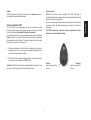
Charging batteries
CTRL button
Make sure that both units are fully charged prior to initial use. Allow at
least4-5hoursforafullchargebeforeusingforthefirsttime.Normally
3-4hourswillsufficeforcompletecharge.
Charge the units by inserting the wall-charger into the charging socket
(lift the rubber cover to insert the plug).
Intercom button
Volume -
Volume +
•
•
Charging socket
2
The red LED on the BT-Intercom will turn on when charging begins.
Allow the headset to charge until the red LED turns off.
When the charge is complete, release the headset from the
charger.