1
™
OneCommand Manager
Application
Version 6.0
User Manual
P007450-01A Rev. A
Emulex Connects™
Servers, Storage and People
Copyright © 2003-2011 Emulex. All rights reserved worldwide. No part of this document may be reproduced by any
means or translated to any electronic medium without the prior written consent of Emulex.
Information furnished by Emulex is believed to be accurate and reliable. However, no responsibility is assumed by
Emulex for its use; or for any infringements of patents or other rights of third parties which may result from its use.
No license is granted by implication or otherwise under any patent, copyright or related rights of Emulex.
Emulex, the Emulex logo, AutoPilot Installer, AutoPilot Manager, BlockGuard, Connectivity Continuum,
Convergenomics, Emulex Connect, Emulex Secure, EZPilot, FibreSpy, HBAnyware, InSpeed, LightPulse,
MultiPulse, OneCommand, OneConnect, One Network. One Company., SBOD, SLI, and VEngine are trademarks of
Emulex. All other brand or product names referenced herein are trademarks or registered trademarks of their
respective companies or organizations.
Emulex provides this manual "as is" without any warranty of any kind, either expressed or implied, including but not
limited to the implied warranties of merchantability or fitness for a particular purpose. Emulex may make
improvements and changes to the product described in this manual at any time and without any notice. Emulex
assumes no responsibility for its use, nor for any infringements of patents or other rights of third parties that may
result. Periodic changes are made to information contained herein; although these changes will be incorporated into
new editions of this manual, Emulex disclaims any undertaking to give notice of such changes.
Emulex, 3333 Susan Street
Costa Mesa, CA 92626
OpenSolaris DHCHAP Notice.
Contains portions of Covered Software subject to the Common Development and Distribution License (CDDL)
Version 1.0. Such portions of Covered Software in Source Code form may be obtained from the web site
www.opensolaris.org, or by contacting online support from the web site www.emulex.com.
Derived from the RSA Data Security, Inc. MD5 Message-Digest Algorithm.
Copyright (C) 1991-2, RSA Data Security, Inc. Created 1991. All rights reserved.
The OneCommand Manager User Manual
Page ii
Introduction.............................................................................................................. 1
New Features in this Release............................................................................ 1
Compatibility...................................................................................................... 1
Supported Features by Operating System......................................................... 2
Known Issues .................................................................................................... 3
Installing and Uninstalling OneCommand Manager
Application Components .......................................................................................... 4
Installing the OneCommand Manager Application............................................. 4
In Windows ................................................................................................. 4
Attended Installation in Windows .......................................................... 4
Unattended Installation in Windows ...................................................... 7
In Solaris ..................................................................................................... 8
In Linux ....................................................................................................... 9
In VMware ESX Server ............................................................................. 10
Installing the OneCommand Manager Application Web Launch Interface ....... 11
Prerequisites ............................................................................................. 11
Procedures................................................................................................ 12
Installing the OneCommand Manager Application Command Line Interface ... 13
In Windows ............................................................................................... 14
Unattended Installation in Windows .................................................... 15
In VMware ESX Server ............................................................................. 15
Prerequisites....................................................................................... 15
Procedures ......................................................................................... 15
In a VMware ESX Server with an Existing HBAnyware CLI Kit Installed ... 16
Uninstalling Older HBAnyware Kits on VMware .................................. 16
In Linux ..................................................................................................... 16
Prerequisites....................................................................................... 16
Procedures ......................................................................................... 17
In a Linux System with an Existing HBAnyware CLI Kit Installed
....... 17
Uninstalling Older HBAnyware Kits on Linux....................................... 18
In Solaris ................................................................................................... 19
Prerequisites....................................................................................... 19
Procedures ......................................................................................... 19
Upgrading from the OneCommand Manager Application CLI to the
Full-Featured OneCommand Manager Application Enterprise Kit ................... 19
In Windows ............................................................................................... 19
In Linux ..................................................................................................... 20
In Solaris ................................................................................................... 20
In VMware ESX Server ............................................................................. 20
Uninstalling the OneCommand Manager Application
................................ 20
In Windows ............................................................................................... 20
In Solaris ................................................................................................... 21
In Linux .................................................................................................... 21
In VMware ................................................................................................. 21
Uninstalling the OneCommand Manager Application Web Launch
Interface Only .................................................................................................. 21
Starting and Stopping the OneCommand Manager
Application ............................................................................................................. 22
Starting the OneCommand Manager Application Web Launch Interface ......... 23
Managing Files when Running the OneCommand Manager
Application Web Launch Interface............................................................. 23
The OneCommand Manager User Manual
Page iii
Using the OneCommand Manager Application ...................................................... 24
The OneCommand Manager Application Window Element Definitions ........... 24
The Menu Bar ........................................................................................... 25
The Toolbar ............................................................................................... 25
The Toolbar Buttons .................................................................................. 25
The Discovery-Tree................................................................................... 26
Discovery-Tree Icons .......................................................................... 27
Expanding or Collapsing the Discovery-Tree View.............................. 28
The Property Tabs..................................................................................... 28
The Status Bar .......................................................................................... 28
Changing Management and Read-Only Mode................................................. 28
The Management Host.............................................................................. 29
In Windows ......................................................................................... 29
In Solaris............................................................................................. 30
In Linux ............................................................................................... 30
Configuring Discovery ........................................................................................... 30
Automatic FC Discovery .................................................................................. 30
Remote SAN Management Using TCP/IP Access Protocol ............................. 31
The Hosts File ................................................................................................. 32
Manually Editing the Hosts File ................................................................. 32
Copying the File ........................................................................................ 33
Adding a Single Host ....................................................................................... 33
Adding a Range of Hosts................................................................................. 34
Removing Hosts .............................................................................................. 36
Configuring Discovery and CIM Credentials .................................................... 36
Configuring iSCSI Target Discovery ................................................................ 39
Adding Target Portals ................................................................................ 40
Removing a Target Portal.......................................................................... 40
Logging into Targets.................................................................................. 40
Manually Adding an iSCSI Target.............................................................. 42
Removing Targets ..................................................................................... 42
Viewing Target Sessions ........................................................................... 42
Logging out of Target Sessions ................................................................. 42
Configuring iSNS for iSCSI Target Discovery .................................................. 45
Viewing Discovery Information............................................................................... 47
Viewing Host Grouping Information ................................................................. 48
Viewing Host Information................................................................................. 48
Grouping Hosts ............................................................................................... 50
Managing Host Groups ............................................................................. 51
Creating a Host Group ........................................................................ 52
Deleting a Host Group ........................................................................ 52
Adding a Host to a Host Group ........................................................... 53
Removing a Host from a Host Group .................................................. 53
Restoring a Host Group ...................................................................... 53
Restoring all Host Groups ................................................................... 53
Exporting Host Grouping Configurations............................................. 53
Searching for Hosts ......................................................................................... 54
Viewing Adapter Information ........................................................................... 54
Viewing FC Adapter Information ............................................................... 54
Viewing OneConnect Adapter Information ................................................ 55
Viewing OneConnect Multi-ASIC Adapter Information .............................. 58
Viewing ASIC Information................................................................................ 58
The OneCommand Manager User Manual
Page iv
Viewing Port Information ................................................................................. 60
Viewing FC Port Information ..................................................................... 60
Viewing FCoE Port Information ................................................................. 62
Viewing iSCSI Port Information ................................................................. 64
Viewing NIC Port Information .................................................................... 66
Viewing Physical Port Information (OneConnect Adapters Only) .................... 68
Viewing Port Statistics ..................................................................................... 69
Viewing FC/FCoE Port Statistics ............................................................... 69
Viewing iSCSI Statistics ............................................................................ 72
Viewing FC Virtual Port Information (FC and FCoE Adapters Only) ............... 74
Viewing FC Fabric Information (FC and FCoE Adapters Only) ........................ 74
Viewing Transceiver Information ..................................................................... 75
Viewing FC Transceiver Information.......................................................... 75
Viewing OneConnect Adapter Transceiver Information ............................. 77
Viewing PHY Data (OneConnect OCe11100 series Adapters Only) ................ 78
Viewing Vital Product Data (VPD).................................................................... 80
Viewing VPD (FC adapters) ...................................................................... 80
Viewing VPD (OneConnect adapters) ....................................................... 80
Viewing Maintenance/Firmware Information .................................................... 81
Viewing FC Maintenance Information........................................................ 81
Viewing FCoE Maintenance Information ................................................... 83
Viewing OneConnect Adapter Firmware Information................................. 85
Viewing Target Information .............................................................................. 86
Viewing FC/FCoE Target Information ........................................................ 87
Viewing iSCSI Target Information.............................................................. 87
Viewing LUN Information ................................................................................. 89
Viewing FC/FCoE LUN Information ........................................................... 89
Viewing iSCSI LUN Information ................................................................ 91
Viewing FC/FCoE Target Mapping (Windows and Solaris) .............................. 92
Viewing Target Mapping (Linux and VMware ESX) ......................................... 93
Viewing iSCSI and NIC PCI Registers............................................................. 94
Viewing iSCSI PCI Registers .................................................................... 94
Viewing NIC PCI Registers ....................................................................... 95
Managing Adapters ............................................................................................... 96
Managing Devices using CIM.................................................................... 96
Showing and Installing Licenses for OneConnect Adapters ............................ 96
Showing Licenses ..................................................................................... 97
Installing Licenses..................................................................................... 98
Changing Personalities on OneConnect Adapters........................................... 99
Configuring the FC/FCoE Adapter Driver ...................................................... 100
The Host Driver Parameters Tab ............................................................. 101
Setting Driver Parameters ....................................................................... 103
Setting Driver Parameters for a Single Adapter ................................ 103
Restoring All Parameters to Their Earlier Values .............................. 104
Resetting All Default Values.............................................................. 104
Setting an Adapter Parameter Value to the Host Adapter
Parameter Value ............................................................................... 105
Saving Adapter Driver Parameters to a File ...................................... 105
Setting Driver Parameters for All Adapters in a Host ........................ 105
Changing Non-dynamic Parameter Values (Linux 8.2)...................... 106
Changing Non-dynamic Parameter Values (VMware ESX) ............... 107
Creating a Batch Mode Driver Parameters File ....................................... 107
Assigning Batch Mode Parameters ................................................... 108
The OneCommand Manager User Manual
Page v
Configuring DCB (Data Center Bridging) Parameters................................... 110
Configuring CEE/FCoE-Specific Parameters (LP21000 Series
Adapters Only) ........................................................................................ 110
Configuring DCB Parameters for OneConnect Adapter Ports ..................111
Configuring DCB Parameters for iSCSI Adapter Ports ............................ 116
Configuring DCB Parameters for NIC-Only Adapter Ports ...................... 120
Configuring FCoE Initialization Protocol (FIP) for FCoE Adapters ................. 124
Managing Ports ................................................................................................... 125
Changing Adapter Port Names (FC Ports Only) ............................................ 125
Resetting Adapter Ports (FC/FCoE Ports Only)............................................. 126
Modifying TCP/IP iSCSI Port Configuration................................................... 127
Advanced TCP/IP Configuration ............................................................. 128
Enabling and Disabling FC Ports................................................................... 129
Enabling and Disabling Physical Ports (OneConnect Adapters Only)............ 129
Setting Port Speed and DAC Cable Length (OneConnect OCe11102
Series Adapters Only) ................................................................................... 129
Configuring iSCSI Port Initiator Login Options............................................... 131
Changing World Wide Name Configuration (FC/FCoE Ports Only) ............... 134
Creating and Deleting FC Virtual Ports (FC and FCoE Ports Only) ............... 137
Creating Virtual Ports .............................................................................. 137
Deleting Virtual Ports .............................................................................. 139
Using FC-SP DHCHAP Authentication (Windows, Linux 8.2 and Solaris) ........... 141
Linux Considerations ..................................................................................... 142
Enabling Authentication................................................................................. 142
The DHCHAP Tab ......................................................................................... 143
Changing Authentication Configuration ................................................... 144
Changing Your Password.................................................................. 145
Viewing the Error and Event Log ...................................................... 145
Updating Adapter Firmware ................................................................................. 146
Updating Firmware for a Single Adapter........................................................ 146
Updating Firmware for Multiple Adapters ...................................................... 147
Updating CEE Firmware for a Single Adapter (LP21000 Series
Adapters Only) .............................................................................................. 150
Updating CEE Firmware on Multiple Adapters (LP21000 Series
Adapters Only) .............................................................................................. 152
Mapping and Masking (FC and FCoE Ports Only) ............................................... 155
Automapping SCSI Devices (Windows)......................................................... 155
Mapping and Masking Defaults (Windows) ............................................. 156
Masking and Unmasking LUNs (Windows) ............................................. 156
Using Automapping and Persistent Binding (Windows) ................................. 158
Changing Automapping Settings ............................................................. 158
Adding a Persistent Binding .................................................................... 159
Binding a Target that Does Not Appear in the Persistent
Binding Table .......................................................................................... 160
Adding New Targets Using sd.conf (Solaris 8, 9 and 10)......................... 161
Configuring Boot from SAN ................................................................................. 161
Boot Types .................................................................................................... 161
Boot Device Parameters................................................................................ 162
Configuring Advanced Settings (Boot from SAN) .......................................... 165
The OneCommand Manager User Manual
Page vi
Exporting SAN Information .................................................................................. 169
Diagnostics .......................................................................................................... 170
LightPulse FC HBA Diagnostics .................................................................... 170
Viewing Flash Contents, PCI Registers and Wakeup Information ........... 171
Viewing Flash Contents........................................................................... 171
Viewing Overlay Details .......................................................................... 172
Viewing the PCI Registers....................................................................... 172
Running a Quick Test .............................................................................. 172
Running a Power On Self Test (POST) ................................................... 173
Using Beaconing ..................................................................................... 173
Creating Diagnostic Dumps..................................................................... 173
Running Advanced Diagnostic Tests ....................................................... 175
Running Loopback Tests ......................................................................... 176
Loopback Test Combinations .................................................................. 176
Running End-to-End (ECHO) Tests ......................................................... 178
Saving the Log File ................................................................................. 179
OneConnect Diagnostics............................................................................... 180
OneConnect Loopback Test Combinations ............................................. 181
Using Beaconing ..................................................................................... 183
Saving the Log File ................................................................................. 183
Creating Diagnostic Dumps..................................................................... 184
Using the OneCommand Manager Application Command Line
Interface .............................................................................................................. 187
Managing Devices Using CIM ....................................................................... 187
The CLI Client Command Reference ................................................................... 191
Using the CLI Client ...................................................................................... 191
Syntax Rules ........................................................................................... 191
Syntax Rules for CIM ........................................................................ 191
The Command Reference ............................................................................. 193
Commands Not Supported in Linux and Solaris ..................................... 193
Commands Not Supported in VMware ESX ............................................ 193
Commands Supported in CIM Interface .................................................. 193
Commands Supported in CIM Provider 3.0....................................... 193
Commands Supported in CIM Provider 3.1....................................... 194
Commands Supported in CIM Provider 3.2....................................... 194
Commands Supported in CIM Provider 3.4.4.................................... 194
Commands Supported in CIM Provider 3.5....................................... 194
Commands Supported in Target-mode Ports ......................................... 195
Parameters Not Supported in the CIM Interface...................................... 195
Read-Only Mode ..................................................................................... 195
Help Command ............................................................................................. 196
Help ........................................................................................................ 196
Adapter License Management Commands ................................................... 196
InstallAdapterLicense .............................................................................. 196
ShowAdapterLicenseFeatures ................................................................ 197
ShowLicenseAdapterID........................................................................... 197
Attributes Commands .................................................................................... 198
HbaAttributes .......................................................................................... 198
PortAttributes .......................................................................................... 198
PortStatistics ........................................................................................... 199
ServerAttributes ...................................................................................... 199
The OneCommand Manager User Manual
Page vii
SetPfcThrottle ......................................................................................... 199
SetPortEnabled ....................................................................................... 200
SetPhyPortSpeed.................................................................................... 200
Authentication Commands ............................................................................ 201
AuthConfigList......................................................................................... 201
DeleteAuthConfig .................................................................................... 201
GetAuthConfig ........................................................................................ 202
GetAuthStatus ......................................................................................... 202
InitiateAuth .............................................................................................. 202
SetAuthConfig ......................................................................................... 202
SetPassword ........................................................................................... 203
Boot Commands............................................................................................ 204
EnableBootCode ..................................................................................... 204
GetBootParams....................................................................................... 204
SetBootParam......................................................................................... 206
CEE Commands............................................................................................ 206
CEEDownload......................................................................................... 206
GetCEEParams....................................................................................... 207
SetCEEParam......................................................................................... 207
Data Center Bridging Commands .................................................................. 208
GetDCBParams ...................................................................................... 208
GetPGInfo ............................................................................................... 208
SetCnaPGBW ......................................................................................... 209
SetDCBParam......................................................................................... 209
SetDCBPriority ........................................................................................ 211
FCoE Adapter Specific Rules:........................................................... 211
iSCSI Adapter Specific Rules:........................................................... 211
NIC Adapter Specific Rules:.............................................................. 211
Diagnostic Commands .................................................................................. 212
EchoTest ................................................................................................. 212
GetBeacon .............................................................................................. 212
GetXcvrData ........................................................................................... 213
LoadList .................................................................................................. 213
LoopBackTest ......................................................................................... 214
LoopMap ................................................................................................. 214
PciData ................................................................................................... 215
PostTest .................................................................................................. 216
SetBeacon .............................................................................................. 216
SetCableNVP .......................................................................................... 217
Wakeup ................................................................................................... 217
Driver Parameter Commands ....................................................................... 218
DriverConfig ............................................................................................ 218
GetDriverParams .................................................................................... 218
GetDriverParamsGlobal .......................................................................... 219
SaveConfig ............................................................................................ 219
SetDriverParam ...................................................................................... 220
SetDriverParamDefaults.......................................................................... 220
Dump Commands.......................................................................................... 221
DeleteDumpFiles..................................................................................... 221
Dump ...................................................................................................... 221
GetDumpDirectory .................................................................................. 222
SetDumpDirectory................................................................................... 222
GetDumpFile ........................................................................................... 223
GetDumpFileNames................................................................................ 224
The OneCommand Manager User Manual
Page viii
GetRetentionCount ................................................................................. 224
SetRetentionCount.................................................................................. 225
FCoE Commands .......................................................................................... 225
GetFCFInfo ............................................................................................. 225
GetFIPParams ........................................................................................ 226
SetFIPParam .......................................................................................... 226
iSCSI Commands .......................................................................................... 227
AddARPTableEntry ................................................................................. 227
AddRouteTableEntry ............................................................................... 228
AddTarget................................................................................................ 228
AddTargetPortal ...................................................................................... 229
CleariSNSServer..................................................................................... 231
DelARPTableEntry .................................................................................. 231
DelRouteTableEntry ................................................................................ 231
DiscoveriSNSServer ............................................................................... 232
GetInitiatorProperties .............................................................................. 232
GetiSCSILuns ......................................................................................... 232
GetiSCSIPortStats................................................................................... 233
GetSessionInfo ....................................................................................... 233
iSCSIPing................................................................................................ 233
ListSessions ............................................................................................ 234
RemoveTarget......................................................................................... 234
RemoveTargetPortal ............................................................................... 234
SetInitiatorProperties .............................................................................. 235
SetNetworkConfiguration ........................................................................ 236
SetTargetLoginProperties........................................................................ 237
SetTargetProperties ................................................................................ 238
SetTPLoginProperties ............................................................................. 238
ShowARPTable ....................................................................................... 239
ShowiSNSServer .................................................................................... 240
ShowRouteTable ..................................................................................... 240
ShowTarget ............................................................................................. 240
ShowTargetPortal.................................................................................... 241
TargetLogin ............................................................................................. 241
TargetLogout ........................................................................................... 242
UpdateiSNSServer .................................................................................. 243
LUN Masking Commands ............................................................................. 243
GetLunList............................................................................................... 243
GetLunUnMaskByHBA............................................................................ 244
GetLunUnMaskByTarget ......................................................................... 244
RescanLuns ............................................................................................ 244
SetLunMask ............................................................................................ 245
Miscellaneous Commands ............................................................................ 245
AddHost .................................................................................................. 245
CnaClearEventLog .................................................................................. 246
CnaGetEventLog..................................................................................... 246
Download ................................................................................................ 246
ExportSANInfo ....................................................................................... 247
GetCimCred ............................................................................................ 247
GetElxSecInfo ......................................................................................... 248
GetQoSInfo ............................................................................................. 248
GetVPD................................................................................................... 248
ListHBAs ................................................................................................. 249
RemoveHost ........................................................................................... 249
The OneCommand Manager User Manual
Page ix
Reset ...................................................................................................... 250
SetCimCred ............................................................................................ 250
TargetMapping ........................................................................................ 251
Version .................................................................................................... 251
Persistent Binding Commands ..................................................................... 251
AllNodeInfo ............................................................................................. 252
BindingCapabilities.................................................................................. 252
BindingSupport ....................................................................................... 252
PersistentBinding .................................................................................... 252
RemoveAllPersistentBinding ................................................................... 253
RemovePersistentBinding ....................................................................... 253
SetBindingSupport .................................................................................. 254
SetPersistentBinding............................................................................... 254
Personality Change Commands .................................................................... 255
ChangePersonality.................................................................................. 255
ShowPersonalities................................................................................... 256
Virtual Port (VPort) Commands ..................................................................... 256
CreateVPort ............................................................................................ 256
DeleteVPort............................................................................................. 257
ListVMs ................................................................................................... 257
ListVPorts................................................................................................ 258
VPortTargets ........................................................................................... 258
WWN Management Commands ................................................................... 258
ChangeWWN .......................................................................................... 258
GetWWNCap .......................................................................................... 259
ReadWWN .............................................................................................. 259
RestoreWWN .......................................................................................... 260
Troubleshooting ................................................................................................... 261
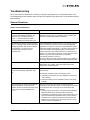
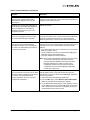
General Situations......................................................................................... 261
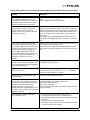
Emulex Driver for Linux and OneCommand Manager
Application Situations .................................................................................... 263
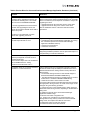
Emulex Driver for Solaris and OneCommand Manager Application
Situations ...................................................................................................... 268
VPorts and OneCommand Manager Application Situations........................... 268
The OneCommand Manager User Manual
Page x
Introduction
The Emulex® OneCommandTM Manager application is a comprehensive management utility for Emulex
LightPulse® host bus adapters (HBAs) and OneConnectTM universal converged network adapters
(UCNAs) that provides a powerful, centralized adapter management suite. Adapter management
includes discovery, reporting and management of local and remote adapters from a single console
anywhere in the Storage Area Network (SAN) and across operating system platforms. Remote
configuration capability can be provided by either Fibre Channel (FC) access via host systems on the
same FC SAN or by Transmission Control Protocol/Internet Protocol (TCP/IP) access from IP addresses
of remote machines. The OneCommand Manager application contains a graphical user interface (GUI)
and a command line interface (CLI). This manual describes the OneCommand Manager application for
the following operating systems:
•
Windows
•
Linux
•
VMware ESX Server
•
Solaris
This OneCommand Manager installation includes options to install the OneCommand Vision Sensor
Application. The OneCommand Vision Sensor is designed to work with the Emulex OneCommand
Vision system, it is designed to collect critical I/O performance data while consuming the smallest
possible production server memory and CPU footprint.
The OneCommand Vision system is an intelligent application that enables proactive management of I/O
within a data center environment. OneCommand Vision gives IT administrators the ability to maximize
I/O resource utilization, identify bottlenecks, and enhance performance and availability by monitoring
and analyzing the I/O traffic within the infrastructure. OneCommand Vision collects, analyzes and
organizes critical I/O performance data; helping organizations establish performance baselines,
proactively monitor performance against those baselines, and lower time to resolution when problems
occur. For more information please visit http://www.emulex.com/vision/.
New Features in this Release
•
Supports Emulex multi-ASIC OneConnect adapters
•
Supports Emulex 16 Gb/s host bus adapters
•
Management host mode with push discovery of remote hosts
•
Windows OneInstall to install all drivers and the OneCommand Manager application in a single
installation kit
•
Installs the OneCommand Vision Sensor if desired.
Compatibility
See the Emulex website for specific information regarding supported operating systems and platforms.
The OneCommand Manager User Manual
Page 1
Supported Features by Operating System
Not all OneCommand Manager application features are supported across all operating systems. The
following table lists the OneCommand Manager application features and their operating system support.
Table 1: Supported Features by Operating System Cross-Reference
Feature/Task
Windows
Solaris
Linux
VMware ESX
Server
OneCommand Manager
application GUI
OneCommand Manager
application CLI
OneCommand Manager
application Web Launch
Interface utility
Discover local hosts, adapters,
targets and LUNs
Discover remote hosts,
adapters, targets and LUNs
Enable local discovery of
Emulex and OEM branded
Emulex adapters
Enable FC discovery of
Emulex and OEM branded
Emulex adapters
Change an adapter’s WWPN
or WWNN
Reset adapters
X
X
X
X*
X
X
X
X
X
X
X
X
X
X
X*
X
X
X
X*
X
X
X
X*
X
X
X
X*
X
X
X
X*
X
X
X
X*
Set up persistent binding
X
Simultaneously set adapter
driver parameters to multiple
adapters
Set global driver parameters to
adapters
FC/FCoE Boot from SAN
X
X
X
X
X
X
X**
X
X
X
X
iSCSI configuration
X
X
X
Update firmware and FC boot
code on a single adapter or
multiple adapters using batch
update
Enable or disable the x86
BootBIOS, EFI or OpenBoot,
PXE Boot
Run diagnostic tests on
adapters
Manage local adapters
X
X
X
X*
X
X
X
X*
X
X
X
X
X
X
X
X*
Manage FC remote and
TCP/IP accessed adapters
Locate adapters using
beaconing
Mask and unmask LUNS
X
X
X
X*
X
X
X
X
X
X
Perform authentication using
FC-SP DHCHAP
X
The OneCommand Manager User Manual
X***
Page 2
Table 1: Supported Features by Operating System Cross-Reference (Continued)
VMware ESX
Server
Feature/Task
Windows
Solaris
Linux
Create and delete virtual ports
X
X
X
Run in read-only mode
X
X
X
X*
Configure boot from SAN
X
X
X
X*
Modify an IP port number
X
X
X
X*
View vital product data
X
X
X
X*
View transceiver information
X
X
X
X*
Create SAN element reports
X
X
X
X*
Manage adapters using CIM
X
Enable or disable FIP
X
X
X
X*
COMSTAR support
X****
Adapter hot swapping/hot
plugging
Licensing
X
X
X
X
X
Personality change
X
X
X
X
Host grouping
X
X
X
vNIC^
X
Installs OneCommand Vision
Sensor
Emulex dual-ASIC 4 port
8Gb/sec FC adapters
Emulex 16 Gb/s host bus
adapters
X
X
X^^
X^^
X
X
X
X
X
X
X
X
X
*
Supported only by hbacmd for the VMware release of the OneCommand Manager application. Remote
management clients can perform these functions on ESX Server adapters using the OneCommand Manager
application GUI.
** Temporary (not persistent) driver parameters are supported on VMware ESX 3i Update 4 and versions of
VMware ESX 3.5 prior to Update 4.
***DHCHAP is not supported on RHEL6 and SLES11-SP1.
****Supported on OpenSolaris only.
^ vNIC is supported only on IBM virtual fabric adapters.
^^ Not supported on IA64 Windows 7 and x86/x64 Solaris 10, 11 systems
Note: The features described in this manual depend on the driver version installed on the
adapter. Not all features may be available to you.
Known Issues
See the product release notes for the latest information.
The OneCommand Manager User Manual
Page 3
Installing and Uninstalling OneCommand Manager
Application Components
Installing the OneCommand Manager Application
In Windows
There are two ways to install the OneCommand Manager application in Windows:
•
Attended installation using the GUI.
•
Unattended installation using the command line.
Note: If you are running the OneCommand Vision application, you must stop the
OneCommand Vision sensor before installing the OneCommand Manager
application.
To stop the sensor:
1. Select Start > Programs > Administrative Tools > Services.
2. Stop the EmulexSensor service.
3. Stop the EmulexWMIAgent service.
4. Stop the Emulex PDH agent service.
5. Stop the EmulexScope agent service.
6. Install the OneCommand Manager application.
To restart the sensor after the installation is complete:
1. Stop SNMP service if SNMPv2c [Stop Net-SNMP Agent if SNMPv3].
2. Start SNMP service if SNMPv2c [Start Net-SNMP Agent if SNMPv3].
3. Start the EmulexSensor service.
Attended Installation in Windows
To install the OneCommand Manager application in Windows:
1. From the Emulex website, download the x64 or x86 OneCommand Manager Enterprise Kit
installation file.
Note: For IA64 systems, use the x86 OneCommand Manager Enterprise installation file.
2. Navigate to the directory to which you downloaded the file.
The OneCommand Manager User Manual
Page 4
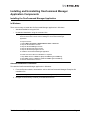
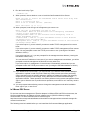
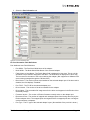
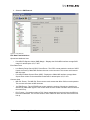
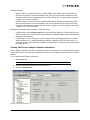
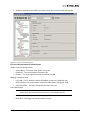
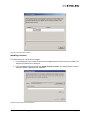
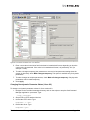
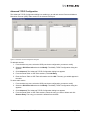
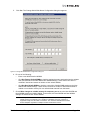
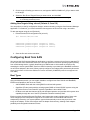
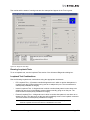
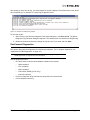
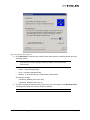
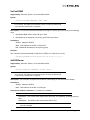
3. Double click the elxocm<version>.exe. The Emulex OCManager Enterprise window appears.
Figure 1: OCManager Enterprise window
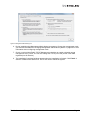
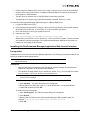
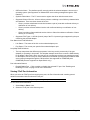
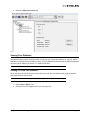
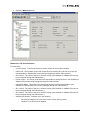
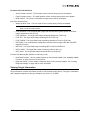
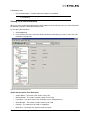
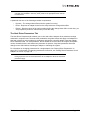
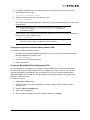
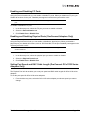
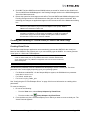
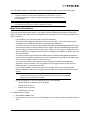
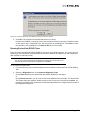
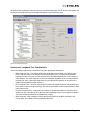
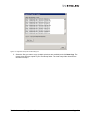
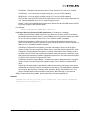
4. Click Next. The Installation Options window appears.
Figure 2: OCManager Enterprise Installation Options window
5. Check the applications that you want to install and click Install.
Note: You can also install the OneCommand Vision Sensor, but you must have the
Windows SNMP service installed or the sensor installation will fail.
The OneCommand Manager User Manual
Page 5
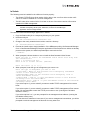
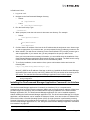
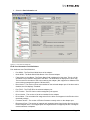
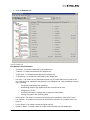
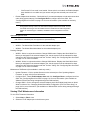
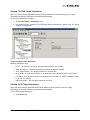
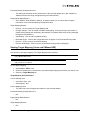
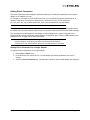
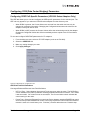
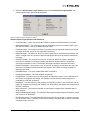
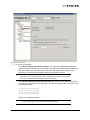
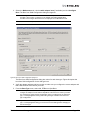
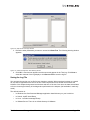
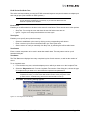
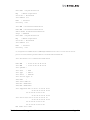
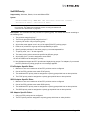
Figure 3: Management Mode dialog box
6. During installation the Management Mode dialog box appears. Choose the management mode
you want and click OK. See “Changing Management and Read-Only Mode” on page 28 for more
information about configuring management mode.
7. Check or uncheck the Enable TCP/IP Management checkbox to enable or disable remote
management over TCP/IP. You can also change the TCP/IP port used (23333 is the IANA
registered port for Emulex).
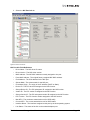
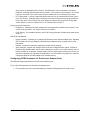
8. The Installation Completed window appears when the installation is finished. Click Finish. A
shortcut is added to the Start menu. You do not need to reboot the system.
The OneCommand Manager User Manual
Page 6
Unattended Installation in Windows
To install the OneCommand Manager application in Windows:
1. From the Emulex website, download the x64 or x86 OneCommand Manager Enterprise Kit
installation file to your system.
The kit is activated with the optional switch /q or /q2. The /q switch displays progress reports.
The /q2 switch does not display progress reports.
You must select a Management Mode by adding the mmode argument and the ability to change
that Management Mode by adding the change argument with selected values as in the example
below.
For example at the command prompt type:
elxocm-windows-x86-5.01.00.10-4.exe mmode=3 achange=1 /q2
The following are the possible mmode values:
1. Local Only Management Mode
2. Local Plus Management Mode
3. Full Management Mode
4. Local Plus Management Mode and Read Only
5. Full Management Mode and Read Only
6. Management host
The following are the possible achange values:
0. Do not allow Management Mode to change
1. Allow Management Mode to change
2. You can also set the following optional parameters:
•
MHost - This optional switch allows a non-management-host user to select a Management
Host with which to register. If this switch is not specified, the default value of 0 will be used
and the feature will be disabled. If the switch is specified, the value can be a host name or
an IP address which will be validated by the installer. An error message appears if /mmode
is set as Local Only or Management Host.
•
excl - This optional switch allows the non-management-host user to select whether it will
process requests exclusively from the Management Host specified by the MHost switch.
This option is only accepted if accompanied by a valid MHost value; otherwise an error
message appears. If this switch is not specified, the default value of 0 will be used. If the
switch is specified, the valid values are as follows:
0. Remotely managed by other hosts.
1. Remotely managed by Management Host ONLY
•
Mtcp - This optional switch allows you to enable or disable remote management and to
specify the TCP/IP port number over which management will occur. If this switch is not
specified, the default TCP/IP port number 2333 will be used.
If the management host option is selected, you must either select the default port number or
enter a valid TCP/IP port number on the command line. A value of 0 will not be accepted.
If one of the non-management host options is selected, the TCP/IP port number may be
entered on the command line.
The OneCommand Manager User Manual
Page 7
In Solaris
The following must be installed for the utilities to function properly:
•
The Solaris FC/FCoE inbox driver version 2.60 or later or the out of box driver version elxfc
4.00.xx.xx must be installed for FC/FCoE management.
•
The NIC inbox driver version OCe1.20 or later or the out of box driver version 4.00 must be
installed for UCNA management.
Note: If Emulex OneConnect UCNAs are installed on the system, the NIC driver must be
installed and reporting all NIC ports. Otherwise, the OneCommand Manager
application cannot manage UCNAs.
To install the OneCommand Manager application in Solaris:
1. Copy the Solaris utility kit to a temporary directory on your system.
2. Untar the utility kit:
tar xvf elxocm-solaris-<version>.tar
3. Change to the newly created elxocm-solaris-<version> directory:
cd ./elxocm-solaris-<version>/
4. Execute the install script to begin installation. If the HBAnyware utility, OneCommand Manager
Core or OneCommand Manager Enterprise applications or the Solaris driver utilities are already
present on the system, the install script attempts to remove them first:
./install
5. When prompted, choose whether or not to install the OneCommand Vision Sensor:
Would you like to install the OneCommand Vision Sensor kits along with
this installation?
Enter y to install the kit.
Enter n not to install the kit. (default)
Enter the letter 'y' or 'n' y
6. When prompted, enter the type of management you want to use:
Enter the type of management you want to use:
1 Local Mode : HBA's on this Platform can be managed by OneCommand
clients on this Platform Only.
2 Managed Mode: HBA's on this Platform can be managed by local or
remote OneCommand clients.
3 Remote Mode : Same as '2' plus OneCommand clients on this Platform
can manage local and remote HBA's.
4 Management Host : Same as '1' plus OneCommand clients on this Platform
can manage remote HBA's.
If you select option 2, you are asked if you want to enable TCP/IP management from remote
hosts.
If you select option 3, you are asked if you want to enable TCP/IP management of/from remote
hosts. You are prompted to enter the TCP/IP port number to use. (Leaving the field blank
defaults to 23333.)
If you select options 2 or 3, you are prompted for the managment host address. (Leaving the
field blanks means none.)
You can enter an IP address or host name. If you enter a management host address, you will be
prompted to exclude management of this host from any other host.
The OneCommand Manager User Manual
Page 8
If you select option 4, management of remote hosts is automatically selected and you are
prompted to enter the TCP/IP port number to use. (Leaving the field blank defaults to 23333.)
Note: Management hosts cannot be managed by remote hosts
7. If you answered 2, 3 or 4 in step 5, you must decide if you want the OneCommand Manager
application to operate in read-only mode. Read-only mode prevents users from performing
certain operations such as resetting adapters, updating an adapter's firmware and changing
adapter driver properties and bindings. It only affects the local OneCommand Manager
application interface. These operations can still be performed using remote management. Enter
<y> for yes to allow the user to perform these operations, enter <n> for no if read-only mode is
desired.
8. You are prompted about allowing users to change the management mode after installation.
Enter <y> for yes, or <n> for no.
In Linux
The following must be installed before you can install the OneCommand Manager application:
•
The appropriate driver for your operating system:
•
Linux driver version 8.2.0.33.3p or later (For RHEL5 and SLES10 operating systems.)
•
Linux driver version 8.3.5.X or later (For RHEL 6 SLES 11 SP1 operating systems.)
Note: The RHEL 6 Enterprise kit requires the intallation of the libstdc++-5.so library. This
library is available through the compat-libstdc++-33-3.2.3-68.<arch>.rpm or later. The
PPC and x86_64 builds require the 64bit version installed which is installed in
/usr/lib64.The i386 build requires the 32bit version installed which is installed in
/usr/lib.
•
Previous versions of the Linux driver must be uninstalled. You must run the uninstall script that
shipped with the version of the Linux driver you want to remove.
To install the OneCommand Manager application in Linux:
1. Log on as ‘root’.
2. Download the utilities from the Emulex website or copy them from the installation CD.
3. Copy the installation and uninstallation scripts to a known location, for easy access by other
users.
4. Copy the OneCommand elxocm-<Platform>-<AppsRev>.tgz file to a directory on the install
machine.
5. Change to the directory to which you copied the tar file.
6. Untar the file.
•
For RHEL 5 and RHEL 6 type:
tar zxvf elxocm-rhel5-rhel6-<apps_ver>-<rel>.tgz
•
For SLES 10 and SLES 11 type:
tar zxvf elxocm-sles10-sles11-<apps_ver>-<rel>.tgz
7. Change to the elxocm directory created in step 6.
•
For RHEL 5 and RHEL 6 type:
•
For SLES 10 and SLES 11 type:
cd elxocm-rhel5-rhel6-<apps_ver>-<rel>
cd elxocm-sles10-sles11-<apps_ver>-<rel>
The OneCommand Manager User Manual
Page 9
8. Run the install script. Type:
./install.sh
9. When promted, choose whether or not to install the OneCommand Vision Sensor:
Would you like to install the OneCommand Vision Sensor kits along with
this installation?
Enter y to install the kit.
Enter n not to install the kit. (default)
Enter the letter 'y' or 'n' y
10. When prompted, enter the type of management you want to use:
Enter the type of management you want to use:
1 Local Mode : HBA's on this Platform can be managed by OneCommand
clients on this Platform Only.
2 Managed Mode: HBA's on this Platform can be managed by local or
remote OneCommand clients.
3 Remote Mode : Same as '2' plus OneCommand clients on this Platform
can manage local and remote HBA's.
4 Management Host : Same as '1' plus OneCommand clients on this Platform
can manage remote HBA's.
If you select option 2, you are asked if you want to enable TCP/IP management from remote
hosts.
If you select option 3, you are asked if you want to enable TCP/IP management of/from remote
hosts. You are prompted to enter the TCP/IP port number to use. (Leaving the field blank
defaults to 23333.)
If you select options 2 or 3, you are prompted for the management host address. (Leaving the
field blanks means none.)
You can enter an IP address or host name. If you enter a management host address, you will be
prompted to exclude management of this host from any other host.
If you select option 4, management of remote hosts is automatically selected and you are
prompted to enter the TCP/IP port number to use. (Leaving the field blank defaults to 23333.)
Note: Management hosts cannot be managed by remote hosts
11. If you answered 2, 3 or 4 in step 5, you must decide if you want the OneCommand Manager
application to operate in read-only mode. Read-only mode prevents users from performing
certain operations such as resetting adapters, updating an adapter's firmware and changing
adapter driver properties and bindings. It only affects the local OneCommand Manager
application interface. These operations can still be performed using remote management. Enter
<y> for yes to allow the user to perform these operations, enter <n> for no if read-only mode is
desired.
12. You are prompted about allowing users to change the management mode after installation.
Enter <y> for yes, or <n> for no.
In VMware ESX Server
For the best real-time management of Emulex adapters in VMware ESX and ESXi environments, the
OneCommand Manager for VMware vCenter software plug-in (OCM for VMware) is highly
recommended. For more information and to download go to
http://www.emulex.com/products/software-solutions/device-management/onecommand-manager-forvmware/overview.html.
The following must be installed before you can install the OneCommand Manager application:
The OneCommand Manager User Manual
Page 10
•
Emulex Driver for VMware ESX, version 8.2 or later is required only if FC/FCoE functionality is
desired. Refer to the Emulex Driver for VMware ESX User Manual for specific information on
driver support in ESX Releases.
•
The NIC driver is required only if FCoE/iSCSI/NIC functionality is desired.
•
The iSCSI driver is required only if iSCSI functionality is desired. (ESX 4.1 or later)
To install the OneCommand Manager application agent in VMware ESX Server:
1. Log into the ESX Server COS.
2. Copy the elxocmcore-esx<NN>-<version>.<arch>.rpm file to a directory on the install machine,
where NN is 40 for ESX 4.0, 41 for an ESX 4.1 or 50 for an ESXi 5.0 system.
3. CD to the directory to which you copied the rpm file.
4. Install the rpm. Type:
rpm -Uvh elxocmcore-esx<NN>-<version>.<arch>.rpm
Where NN is 40 for ESX 4.0, 41 for an ESX 4.1 or 50 for an ESXi 5.0 system. The rpm contents
are installed in /usr/sbin/ocmanager. The OneCommand Manager application Command Line
Interface is also located in this directory.
Installing the OneCommand Manager Application Web Launch Interface
Prerequisites
In addition to the driver and OneCommand Manager application, the following prerequisites must be met
before you install the Web Launch feature:
Note: The OneCommand Manager application Web Launch Interface is not supported on
VMware ESX Server.
In Windows:
•
Microsoft Internet Information Services (IIS) Server must be installed. See the Microsoft
website for information on downloads and installation.
•
The Windows Firewall feature may be enabled by default. If it is, you must add and enable
three exceptions: HTTP port, java.exe and rmiregistry.exe.
Note: Allowing programs and/or ports through the firewall may increase the security risks.
Use at your own discretion.
To enable the HTTP port:
1. Click Add Port... The Add a Port dialog box is displayed.
2. On the Add a Port dialog box, type HTTP as the Name and 80 as the Port Number.
3. Leave TCP enabled and click OK.
To enable the java.exe program:
1. Click Add Program... The Add a Program dialog box is displayed.
2. Click Browse...
3. Specify java.exe located in the OneCommand Manager JRE installation path. For
example: C:\Program Files\Emulex\util\JRE\bin\java.exe.
4. Click OK.
The OneCommand Manager User Manual
Page 11
To enable the rmiregistry.exe program:
1. Click Add Program...The Add a Program dialog box is displayed.
2. Click Browse... and specify the rmiregistry.exe located in the OneCommand Manager
JRE installation path. For example:
C:\Program Files\Emulex\util\JRE\bin\rmiregistry.exe.
3. Click OK.
4. Click OK to apply the new firewall settings.
To add the MIME type:
1. Launch Server Manager.
2. Expand Roles.
3. Under Roles, expand Web Server (IIS).
4. Under Web Server (IIS), Click Internet Information Services (IIS) Manager.
5. In the right pane, find your server name under "Start Page" and click on it.
6. Double-click MIME Types listed under IIS group.
7. A MIME Types page appears. Under "Actions", click Add... A popup dialog box appears.
8. Add "jnlp" (without quotes) to the File name extension field.
9. Add "application/x-java-jnlp-file" (without quotes) to the MIME type field.
10. Click OK.
In Solaris and Linux:
•
Apache Web server must be installed and running on the server that is hosting the Web
Launch Service software.
•
The Java Web Start application must be installed and running on the browser host.
The server on which you are installing the Web Launch Service package requires:
•
•
An HTTP server configured to handle the JNLP MIME file type. The following MIME file type/
file extension must be added to your server configuration:
MIME type: application/x-java-jnlp-file
File Extension: jnlp
The HTTP server must be running.
The client on which you are running the browser requires:
•
Java must be installed. The specific requirements are:
•
Sun 32-bit Java 6.0 or later for Intel based systems (x86 and IA64)
•
32-bit Java 6.0 or later for x86-64 systems
•
32-bit Java 6.0 or later for RHEL 5 and SLES 10 (ppc64)
Refer to the appropriate vendor documentation for detailed instructions about configuring MIME
types, configuring and starting the HTTP server and installing the JRE. See
/opt/ELXocm/README_WEBLAUNCH.txt (Solaris) or
/usr/sbin/ocmanager/README_WEBLAUNCH.txt (Linux) for more setup information.
Procedures
To install the OneCommand Manager application Web Launch Interface:
In Windows (Windows Server 2003, Windows Server 2008 and Windows Server 2008 R2):
1. Click Programs>Emulex >OCManager WebLaunch Install. Web Launch installation begins.
The OneCommand Manager User Manual
Page 12
In Solaris and Linux:
1. Log on as ‘root’.
2. Navigate to the OneCommand Manager directory.
•
Solaris:
•
Linux:
cd /opt/ELXocm
cd /usr/sbin/ocmanager
3. Run the install script. Type:
./wsinstall
4. When prompted, enter the web server's document root directory. For example:
•
Solaris:
/var/apache/htdocs
•
Linux:
/srv/www/htdocs
or
/var/www/html
5. Confirm that the IP address of the host is the IP address that the web server uses. Answer <y>
or <n> as appropriate. If you answer <n>, you are prompted for the IP address you want to use.
6. When asked if your web server is listening on the normal default HTTP port (80), answer <y> or
<n> as appropriate. If you answer <n>, you are prompted for the port you want to use.
Once you have entered the necessary information, you are notified when the installation of the
OneCommand Manager application Web Launch package is complete. The Web Launch configuration files are created and Web Launch Service automatically starts.
7. To verify the installation, locate another client, open a web browser window and enter the
following URL:
http://IP_ADDR:PORT_NUM/ocmanager.jnlp
where IP_ADDR is the IP address of the host on which you installed the OneCommand Manager
application Web Launch service, and PORT_NUM is the TCP port number of the listening host’s
web server. The standard OneCommand Manager application user interface appears.
Note: It is not necessary to enter a port number if the standard HTTP port was chosen
during configuration.
Installing the OneCommand Manager Application Command Line Interface
The OneCommand Manager application Command Line Interface (CLI) is a comprehensive
management utility for Emulex host bus adapters (HBAs) and converged network adapters (CNAs) that
provides support for commonly used commands without requiring installation of the OneCommand
Manager application GUI. The OneCommand Manager application CLI can be installed separately
without installing the OneCommand Manager application GUI. The OneCommand Manager CLI console
application, named hbacmd, can be installed on Windows, Solaris, Linux and versions of VMware ESX
Server that include a Console Operating System (COS). A single operation is performed by entering
’hbacmd’ followed by the command at the command line. For syntax information and details on using the
OneCommand Manager application CLI, see “Using the OneCommand Manager Application Command
Line Interface” on page 187.
Note: If you installed the OneCommand Manager application, the CLI is already installed.
The OneCommand Manager User Manual
Page 13
In Windows
There are two ways to install the OneCommand Manager application CLI in Windows:
•
Attended installation using the GUI.
•
Unattended installation using the command line.
Attended Installation in Windows
To install the OneCommand Manager application CLI:
1. From the Emulex website, download the x64 or x86 OneCommand Manager Core Kit installation
file.
Note: For IA64 systems, use the x86 OneCommand Manager Core Kit installation file.
2. Navigate to the system directory where you download the file.
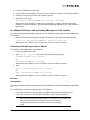
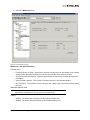
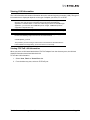
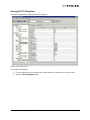
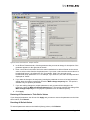
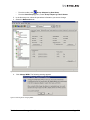
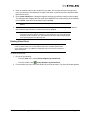
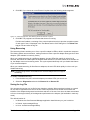
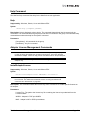
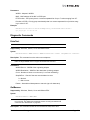
3. Double click the elxocmcore<version>.exe. The Emulex OCManager CLI window appears.
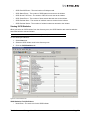
Figure 4: OCManager CLI window
The OneCommand Manager User Manual
Page 14
4. Click Next. The Installation options window appears.
Figure 5: OCManager CLI Installation options window
5. Click Install. The Operation in Progress window appears. The Installation completed window
appears when the installation is finished.
6. Click Finish. You do not need to reboot the system.
Unattended Installation in Windows
To install the OneCommand Manager CLI application in Windows:
1. From the Emulex website, download the x64 or x86 OneCommand Manager Core Kit installation
file to your system.
2. At the command prompt, set the optional switch to /q or /q2. The kit is activated with this optional
switch. The /q switch displays some progress reports. The /q2 switch does not display progress
reports.
For example:
elxocmcore-windows-x64-5.01.00.10-4.exe
/q2
In VMware ESX Server
To install the OneCommand Manager application CLI on a new system, install the specific rpm file for the
driver for your VMware version.
Prerequisites
•
To manage FCoE adapters, load LPFC driver version 8.2, or later.
•
To manage NIC or iSCSI adapters, load driver version 2.102.440.0, or later.
•
To manage iSCSI adapters, load the iSCSI driver.
Note: The iSCSI driver is not supported for VMware ESX 4.0.
Procedures
To install the OneCommand Manager application CLI:
The OneCommand Manager User Manual
Page 15
1. Log into the ESX Server Host COS.
2. Copy the elxocmcore-esxNN-<kit version>.<arch>.rpm file to a directory on the install machine.
3. Change to the directory to which you copied the rpm file.
4. Install the rpm file. Type:
rpm -Uvh elxocmcore-esxNN-<kit version>.<arch>.rpm
Where NN is 40 for an ESX 4.0 system or 41 for an ESX 4.1 system. The rpm contents are
installed in /usr/sbin/ocmanager. The OneCommand Manager application CLI is also located in
this directory.
In a VMware ESX Server with an Existing HBAnyware CLI Kit Installed
To install the OneCommand Manager application CLI on a VMware system with an existing HBAnyware
CLI installed:
1. Install the rpm file by entering the following command all on one line at the comand prompt:
# rpm -Uvh elxocmcore-esxNN-<kit version>.<arch>.rpm
Where NN is 40 for ESX 4.0, 41 for an ESX 4.1 or 50 for an ESXi 5.0 system.
Uninstalling Older HBAnyware Kits on VMware
To uninstall an older HBAnyware Kit on VMware:
1. Log into the ESX Server COS.
2. Type: rpm -qa | grep elx and locate either of the following rpm files:
elxvmwarecorekit-<kit version>
Or
elxocmcore-esxNN-<kit version>
Where NN is 40 for ESX 4.0, 41 for an ESX 4.1 or 50 for an ESXi 5.0 system.
3. Type:
rpm -e elxvmwarecorekit-<kit version>
Or
rpm -e elxocmcore-esxNN-<kit version>
Where NN is 40 for ESX 4.0, 41 for an ESX 4.1 or 50 for an ESXi 5.0 system.
In Linux
Prerequisites
For existing systems install the following drivers before installing the OneCommand Manager application
CLI:
On LP21000 series adapters and OneConnect FCoE adapters:
•
Linux driver version 8.2.0.33.3p or later (For RHEL5 and SLES10 operating systems.)
•
Linux driver version 8.3.5.X (For RHEL6 and SLES 11 SP1 operating systems.)
Note: The RHEL 6 Enterprise kit requires the intallation of the libstdc++-5.so library. This
library is available through the compat-libstdc++-33-3.2.3-68.<arch>.rpm or later. The
PPC and x86_64 builds require the 64bit version which is installed in
/usr/lib64.The i386 build requires the 32bit version which is installed in
/usr/lib.
The OneCommand Manager User Manual
Page 16
On OneConnect iSCSI adapters:
•
iSCSI driver
On OneConnect NIC adapters:
•
NIC driver
Note: The NIC driver must also be installed if the adapter personality is iSCSI-NIC or
FCoE-NIC.
•
Use the latest or matching driver from the Emulex website.
For new systems, the specific driver rpm file for your Linux version must be installed.
Note: On RHEL 5.5, RHEL 5.6 and RHEL 6, the OneCommand Core rpm file requires the
“Libnl” library. This library is not installed by default, but can be obtained from the OS
distribution media.
•
For i386 RHEL 5.5, RHEL 5.6 and RHEL 6, use the 32bit libnl library.
•
For x86_64 RHEL 5.5, RHEL 5.6 and RHEL 6, use the 64bit libnl library.
•
For ia64 RHEL 5.5, RHEL 5.6 and RHEL 6, use the 64bit libnl library.
•
For PPC RHEL 5.5, RHEL 5.6 and RHEL 6, use the 32bit libnl library.
Procedures
To install the OneCommand Manager application CLI:
1. Copy the applications kit tar file to a directory on the installation machine.
2. Change to the directory where you copied the tar file.
3. Untar the file.
tar zxvf elxocmcore-<supported_os>-<app_ver>-<rel>.tgz
4. Change (use cd command) to the core kit directory created in step 3.
cd elxocmcore-<supported_os>-<app_ver>-<rel>
5. Run the install.sh script.
./install.sh
Note: The core kit consists of 2 rpm files for each supported architecture and each
supported version of Linux:
1. elxocmlibhbaapi-*.rpm
2. elxocmcore-*.rpm
In a Linux System with an Existing HBAnyware CLI Kit Installed
Note: The OneCommand Manager application core kit cannot be installed if a previous
version of HBAnyware is installed.
You have two options when installing the OneCommand Manager application CLI on a Linux system:
•
Upgrade - preserve existing settings
•
Clean install - overwrite existing settings
To upgrade:
1. You must install the current core kit as detailed in “In Linux” on page 16.
The rpm file handles the configuration file upgrade.
The OneCommand Manager User Manual
Page 17
The install script executes an rpm upgrade (rpm -U *.rpm) to upgrade the installed version of the
core kit to the current version.
Note: There is no upgrade path from an HBAnyware 4.x or 3.x core kit to a OneCommand
Manager application 5.2.0.x core kit. You must uninstall previous versions of the
HBAnyware utility before installing a OneCommand Manager application core kit. For
information on uninstalling older versions of HBAnyware, see “Uninstalling Older
HBAnyware Kits on Linux” on page 18.
To perform a clean install:
1. Uninstall the existing OneCommand Manager application CLI using the uninstall script included
in the tar file or in /usr/sbin/ocmanager/scripts directory.
Note: If an HBAnyware CLI or enterprise kit is installed, follow the procedure for
“Uninstalling Older HBAnyware Kits on Linux” on page 18.
Note: Your configuration files are backed up by rpm with an .rpmsave extension.
2. Install the specific rpm file for your driver for Linux version. For information on installing the rpm
file, see “In Linux” on page 16.
Uninstalling Older HBAnyware Kits on Linux
Uninstalling an older HBAnyware core kit:
1. Run the following command to remove the core kit.
rpm -e elxlinuxcorekit
Uninstalling an older HBAnyware enterprise kit:
1. Run the uninstall script located in /usr/sbin/hbanyware/scripts to remove the enterprise kit.
Or
Run the uninstall script located in the tar file to remove the enterprise kit.
If the HBAnyware Security Configurator is installed, it must be uninstalled before uninstalling the
HBAnyware utility. You must run the uninstall script that shipped with the version of HBAnyware
Security Configurator that you want to remove. Proceed to step 2. If the Security Configurator is
not installed, proceed to step 3.
2. If the HBAnyware Security Configurator is installed, follow these steps:
a. Log on as ‘root’.
b.
c.
d.
e.
Change to the directory to which you copied the tar file.
Extract the tar file using the tar -xvf command.
Change to the newly created directory.
Run the uninstall script with the ssc parameter specified. Type:
./uninstall ssc
3. Uninstall the HBAnyware utility and the Application Helper Module:
a. Log on as ‘root’.
b.
c.
d.
e.
Change to the directory to which you copied the tar file.
Extract the tar file using the tar -xvf command.
Change to the newly created directory.
Uninstall any previously installed versions. Type:
./uninstall
The OneCommand Manager User Manual
Page 18
In Solaris
Prerequisites
•
The Solaris FC/FCoE driver version 2.60 or later must be installed for FC/FCoE management.
•
The NIC driver version 1.20 or later must be installed for UCNA management.
Note: If Emulex OneConnect UCNAs are installed on the system, the NIC driver must be
installed and reporting all NIC ports. Otherwise, the OneCommand Manager
application cannot manage UCNAs.
Procedures
To install the OneCommand Manager application CLI:
1. Copy the OneCommand Manager application core kit to a temporary directory on the system.
2. Untar the core kit. Type:
tar xvf elxocmcore-<kit version>.tar
3. Change to the newly created elxocmcore-<kit version> directory:
cd ./elxocmcore-<kit version>/
4. Run the install script and follow the instructions.
./install
If the HBAnyware utility, the OneCommand Manager application core kit, the OneCommand
Manager application enterprise kit, or the Solaris driver utilities are already present on the system, the install script attempts to first remove them.
Upgrading from the OneCommand Manager Application CLI to the FullFeatured OneCommand Manager Application Enterprise Kit
Note: An upgrade can be performed only if the version of the OneCommand Manager
application enterprise kit is the same or later than the OneCommand Manager
application CLI version. You cannot downgrade a OneCommand Manager application
CLI with a previous version of the OneCommand Manager application enterprise kit.
Note: When the OneCommand Vision Sensor software is installed on production servers
with Emulex adapters installed, the Sensor software may load and use some of the
software components included in the OneCommand Manager application or
HBAnyware utility software stacks. It is essential that the OneCommand Vision
Sensor software be stopped before performing any upgrades, or updates, to the
OneCommand Manager application or HBAnyware software stack components. For
information on stopping the Sensor, refer the OneCommand Vision user manual.
In Windows
To upgrade from the OneCommand Manager application CLI to the full-featured OneCommand Manager
application kit:
1. From the desktop, run the elxocm-windows-<kit version>.exe file that contains the full
application kit.
Running this executable file removes the OneCommand Manager application CLI and installs a
full-featured version of the OneCommand Manager application that includes the CLI and the
GUI.
The OneCommand Manager User Manual
Page 19
In Linux
To upgrade from the OneCommand Manager application CLI to the full-featured OneCommand Manager
application kit:
1. Run the install.sh script of the OneCommand Manager application enterprise kit.
The install script executes an rpm upgrade (rpm -U *.rpm) to upgrade the installed core kit to an
enterprise kit.
In Solaris
To upgrade from the OneCommand Manager application CLI to the full-featured OneCommand Manager
application kit:
1. Download the OneCommand Manager application enterprise kit to a temporary directory on your
system.
2. Untar the OneCommand Manager application enterprise kit tar file:
tar xvf elxocm-<kit version>.tar
3. Change to the newly created elxocm-<kit version> directory:
cd ./elxocm-<kit version>/
4. Run the install script and follow the instructions.
./install
In VMware ESX Server
The full-featured OneCommand Manager application kit is not supported for VMware ESX Server.
Uninstalling the OneCommand Manager Application
Note: Do not uninstall the OneCommand Manager application if you are running, or intend
to run, OneCommand Vision.
Note: Uninstalling the OneCommand Manager application also uninstalls the
OneCommand Vision application.
To uninstall the OneCommand Manager application and OneCommand Manager application Web
Launch Interface:
In Windows
1. (Windows 2003) Select Start>Control Panel>Add/Remove Programs.
or
(Windows 2008 & Windows 2008 R2) Select Start>Control Panel>Programs>Uninstall a Program.
2. If present, select Emulex Common SAN Management [version] and click Remove or
Uninstall. Click Yes. The Emulex Common SAN Management components are removed from
the system.
3. Select Emulex OCManager Enterprise [version] or Emulex OCManager CLI [version] and
click Remove or Uninstall.
The OneCommand Manager User Manual
Page 20
In Solaris
Note: If you installed the OneCommand Manager application Web Launch Interface, you
must uninstall it before uninstalling the OneCommand Manager application. See
“Uninstalling the OneCommand Manager Application Web Launch Interface Only” on
page 21.
1. Log on as ‘root’.
2. Run the OneCommand Manager uninstall script:
/opt/ELXocm/scripts/uninstall
In Linux
Note: If you installed the OneCommand Manager application Web Launch Interface, you
must uninstall it before uninstalling the OneCommand Manager application. See
“Uninstalling the OneCommand Manager Application Web Launch Interface Only” on
page 21.
1. Log in as ‘root’.
2. Change to the elxocm-<platform>-<version> installation directory.
3. Type:
./uninstall
In VMware
1. Log in as 'root'.
2. Type:
rpm -e elxocmcore-esxNN-<version>
Where NN is 40 for ESX 4.0, 41 for an ESX 4.1 or 50 for an ESXi 5.0 system.
Uninstalling the OneCommand Manager Application Web Launch Interface
Only
To uninstall the OneCommand Manager application Web Launch, but leave the OneCommand Manager
application installed:
In Windows:
1. Select Start>Programs>Emulex>OCManager WebLaunch Uninstall. The following screen
appears:
Figure 6: OneCommand Manager Web Launch Uninstallation screen
The OneCommand Manager User Manual
Page 21
2. The OneCommand Manager application Web Launch Interface is removed. Press any key to
continue.
In Solaris and Linux:
1. Log on as ‘root’.
Note: If you installed the OneCommand Manager application Web Launch Interface, you
must uninstall it before uninstalling the OneCommand Manager application.
2. Execute the uninstallation script.
•
Solaris:
/opt/ELXocm/wsuninstall
•
Linux:
/usr/sbin/ocmanager/wsuninstall
This script stops the OneCommand Manager application Web Launch Interface service daemons (if they
are running) and removes all Web Launch related files from the host.
Starting and Stopping the OneCommand Manager
Application
In Windows:
To start the OneCommand Manager application:
1. On the Windows desktop, select Start>All Programs>Emulex>OCManager.
To stop the OneCommand Manager application:
1. From the OneCommand Manager application select File>Exit.
In Linux and Solaris:
On Linux and Solaris machines, you can stop and start the OneCommand Manager daemon processes
using the "stop_ocmanager" and "start_ocmanager" scripts respectively. These are found in the
following OneCommand Manager installation directory:
Linux - /usr/sbin/ocmanager
Solaris - /opt/ELXocm
There are three basic daemon processes, included with OneCommand Manager installations, that are
affected by these scripts. They are:
•
elxhbamgrd - Remote management daemon which services requests from OneCommand
Manager clients running on remote host machines.
•
mili2d - MILI daemon that routes major portions of the local OneCommand Manager client CNA
management requests.
•
elxdiscoveryd - Discovery daemon responsible for maintaining all discovery data (remote and
local) for OneCommand Manager clients running on the local machine.
elxhbamgrd and mili2d start at system boot time. elxdiscoveryd starts whenever the OneCommand
Manager GUI process first runs on the host machine.
Additionally if the web-launch component of OneCommand Manager is installed, the daemon process,
rmiserver, starts at system boot time. The start_weblaunch script starts this daemon, while the
stop_weblaunch stops it.
The OneCommand Manager User Manual
Page 22
Starting the OneCommand Manager Application Web Launch Interface
After the OneCommand Manager application Web Launch Interface software is installed and the Web
Launch server is initialized, you can launch the OneCommand Manager application directly with your
Web browser.
Note: Only the OneCommand Manager application GUI is exported to the requesting client.
All adapter discovery and remote management operations are performed by
resources running on the remote host that served the GUI component. Therefore, the
SAN view displayed by the GUI is not from the client running the GUI, but rather from
the host from which this GUI was retrieved.
To launch the OneCommand Manager application with your Web browser:
1. Open your web browser. Linux and Solaris users must log on as ‘root’.
2. Enter the URL of the ocmanager.jnlp file. Make sure that the URL specifies a remote server
which has the OneCommand Manager application Web Launch Interface software installed and
running.
http://IP_ADDR:PORT_NUM/ocmanager.jnlp
where IP_ADDR is the IP address of the host on which you installed the OneCommand Manager
Web Launch Service, and PORT_NUM is the TCP port number of the listening hosts' Web
server. If the port number is omitted, the default port 80 is used. The standard OneCommand
Manager application user interface is displayed.
Managing Files when Running the OneCommand Manager Application Web
Launch Interface
When running the OneCommand Manager application Web Launch Interface, all files (log files, driver
parameter files, firmware files, etc.) are located on the browser launch host, which is not necessarily the
same as the remote host that is specified in the Web Launch address.
The OneCommand Manager User Manual
Page 23
Using the OneCommand Manager Application
Note: To properly view the OneCommand Manager application, ensure your system meets the
following display requirements:
For Windows systems, the display resolution must be set to 800 by 600 or better.
For Linux and Solaris systems, the display resolution must be set to 1024 by 768 or better.
The display must run in 256-color mode or higher. OneCommand Manager application icons
use 256 colors. If the display is set for 16 color mode, OneCommand Manager application
icons are not displayed.
The OneCommand Manager Application Window Element Definitions
The OneCommand Manager application window contains five basic components: the menu bar, the
toolbar, the discovery-tree, the property tabs and the status bar.
Figure 7: OneCommand Manager application window
Note: The element you select in the discovery-tree determines whether a menu item or
toolbar icon is active. For example, if you select the local host or other system host,
the Reset Adapter item on the Adapter menu is unavailable. The Reset Adapter
toolbar button is unavailable as well.
Note: Screenshots in this manual are for illustrative purposes only. Your system information
can vary.
Note: The features displayed by your local OneCommand Manager application interface will
match those of the remote server. When accessing a remote server running an older
version of the OneCommand Manager application, features that are not supported by
the server’s older version of the OneCommand Manager application are unavailable.
Note: In some instances, the type of information displayed and available functionality is
determined by the operating system in use.
The OneCommand Manager User Manual
Page 24
The Menu Bar
The menu bar contains commands that enable you to perform a variety of tasks such as exiting the
OneCommand Manager application, resetting adapters and sorting items in the discovery-tree view.
Many of the menu bar commands are also available from the toolbar.
The Toolbar
The toolbar contains buttons that enable you to refresh the discovery-tree, reset the selected adapter
and choose how you want to view discovered SAN elements in the discovery-tree. Many of the toolbar
functions are also available from the menu bar.
Figure 8: Toolbar
The toolbar is visible by default. Use the Toolbar item in the View menu to hide the toolbar. If the item is
checked, the toolbar is visible.
The Toolbar Buttons
The toolbar buttons perform the following tasks:
Discovery Refresh button
• Initiates a discovery refresh cycle.
Reset button
• Resets the selected adapter.
The View Buttons on the Toolbar
The View buttons on the toolbar enable you to view SAN elements from the host, fabric, virtual ports, or
by local or remote adapter perspective. By default, both local and remote adapters are displayed in
Host view. The OneCommand Manager application displays elements in ascending order.
Host View button (default)
• Displays the host system.
Note: You cannot change host names using the OneCommand Manager application; names
must be changed locally on that system.
•
•
•
•
•
•
Displays the installed adapters within each host system.
Displays adapter ports and the port numbers if available.
Displays adapters by the WWNN if multiple adapters have the same model number.
Displays the WWPN if targets are present. Multiple adapters can refer to the same target.
Displays the LUN number if LUNs are present.
COMSTAR ports are located on the same level in the discovery-tree as initiator ports,
meaning that they branch out from adapters. Unlike initiator ports, however, targets do not
branch out from COMSTAR ports. (COMSTAR ports are supported on OpenSolaris only.)
Note: COMSTAR ports are supported on OpenSolaris only.
Fabric View button
• Displays the FC/FCoE fabrics in the SAN with their fabric IDs.
• Displays the ports under each switch.
• If targets are present, displays each WWPN. Multiple adapters can refer to the same
target.
• If LUNs are present, displays each LUN number.
• If the fabric ID is all zeros, no fabric is attached.
The OneCommand Manager User Manual
Page 25
Note: iSCSI and NIC ports are not displayed in Fabric View.
Virtual Ports View button
• Displays virtual ports in the SAN.
Note: The Emulex emlxs driver for Solaris does not support COMSTAR running over virtual
ports, so the Virtual Ports view only displays initiator ports.
Note: COMSTAR ports are supported on OpenSolaris only.
Note: iSCSI and NIC ports are not displayed in Virtual Ports View.
Local HBAs Only button
• Displays only local adapters.
Show Host Groups button and menu
• Displays hosts by their associated groups.
• Displays available host groups.
Find Host button and search field
• Enables you to search by host name for a particular host in the discovery-tree.
Refresh LUNS button
• Initiates a LUN discovery refresh cycle.
Help button
• Displays the OneCommand Manager application’s online help.
The Discovery-Tree
The discovery-tree (left pane) has icons that represent discovered hosts, adapters, ports, virtual ports,
fabrics, targets and LUNs.
Using the View menu, the OneCommand Manager application allows you to control the way iSCSI
initiator and target ports are identified in the discovery-tree. The "iSCSI Names" option displays all iSCSI
ports by their iSCSI Qualified Name (IQN). The "iSCSI Alias" option displays each port by its alias.
Figure 9: Discovery-tree
The OneCommand Manager User Manual
Page 26
Discovery-Tree Icons
Discovery-tree icons represent the following:
The local host.
Other hosts connected to the system.
A green adapter icon with black descriptive text represents an online adapter. Blue text
represents an adapter port that had previously been discovered, but currently is not being
seen by the discovery engine (service). The adapter is removed from the discovery-tree if it
still is not seen after the undiscovered adapter expiration time has elapsed (default is 1800
seconds, or 30 minutes). If the adapter is discovered again before the expiration time has
elapsed, it reverts back to normal black text. See “Configuring Discovery and CIM
Credentials” on page 36 for more information about discovery settings.
The port icon represents an adapter port. A port icon with a red X indicates the port is down.
Note: Multiport adapters are represented in the discovery-tree with separate port icons for
each port with the port number displayed next to the icon.
The iSCSI icon represents an iSCSI PCI function instance. iSCSI functions can support up
to sixteen logical adapters, with each logical adapter appearing in the discovery-tree as a
separate child node under the respective iSCSI function. The green iSCSI icon represents
an iSCSI PCI function on-line instance. A black iSCSI icon represents an iSCSI PCI function
port-disabled instance. A red iSCSI icon represents an iSCSI PCI function link down
instance.
The green FCoE icon represents an FCoE PCI function on-line instance. A black FCoE icon
represents an FCoE PCI function port-disabled instance. A red FCoE icon represents an
FCoE PCI function link down instance.
The NIC icon represents a NIC-Only PCI function instance. A green icon indicates this
function instance is on-line, black indicates it is disabled, and red indicates a link down
instance.
The ASIC node icon, only displayed for OneConnect dual ASIC 4 port 8Gb/sec FC
adapters, represents each ASIC on the adapter. Each ASIC is managed independently. The
ASIC node format: "ASIC bus#-sub-adapter#" represents the PCI bus number and the subadapter number which is a concatenation of the discovered port numbers for the ASIC. For
example, "ASIC 64-12" represents PCI bus number 64 and 12 represents ports 1 and 2. If
there were no discovered functions for a port on that ASIC the label would be "ASIC 64-2"
(port 1 is missing).
The Virtual Port icon represents a virtual port.
The COMSTAR icon represents COMSTAR target mode ports. COMSTAR ports are unique
in that a single port can be shown simultaneously as both a manageable adapter port and a
regular target. When a COMSTAR port is seen as a target, it displays the Target discoverytree icon and Target dialog box information. A COMSTAR icon with a red X indicates the
port is down. (COMSTAR ports are supported on OpenSolaris only.)
The Target icon represents connections to individual storage devices.
The LUN icon represents connections to individual disk LUNs.
The OneCommand Manager User Manual
Page 27
The Media Exchanger icon represents conections to individual media exchangers. A media
exchanger is a jukebox-like device that is capable of swapping various media device
instances (e.g. records or CDs) in and out.
The Tape LUN icon represents LUNs that are tape devices.
The Target Controller LUN icon represents LUNs that are storage controllers.
The Switch icon represents connections to the switch.
Expanding or Collapsing the Discovery-Tree View
You can also use the Expand/Collapse feature on the View menu to change the way discovered
elements are displayed. By selecting one of the four levels the discovery-tree is expanded or collapsed
to that level. You can choose Hosts/Fabrics (depending on the view), HBAs, Ports and Targets.
The Property Tabs
The property tabs display configuration, statistical and status information for network elements. The set
of available tabs is context-sensitive, depending on the type of network element or adapter port currently
selected in the discovery-tree.
The Status Bar
The status bar is located near the bottom of the OneCommand Manager application window. The status
bar displays messages about OneCommand Manager application functions, such as “Discovery in
progress” or the progress when performing an "Export SAN Info" operation.
The status bar is visible by default. Use the Status Bar item in the View menu to hide the status bar.
When checked, the status bar is visible.
Changing Management and Read-Only Mode
During installation, a management and a read-only mode are selected. If modification of these settings
after installation was selected, you can change the management mode:
•
Strictly Local Management - This setting only allows management of adapters on this host.
Management of adapters on this host from other hosts is not allowed.
•
Local Management Plus - This setting only allows management of adapters on this host, but
management of adapters on this host from another host is possible.
•
Full Management - This setting enables you to manage adapters on this host and other hosts
that allow it.
•
Management Host - This setting allows this host to manage other hosts, but prevents it from
being managed by other hosts.
•
Enable TCP/IP Management (of/from remote host) - This setting enables you to manage
remotes hosts or to manage this host remotely. If enabled, you must supply the port number
(between 1024 and 65535). The default port number is 23333. If the port number or the Enable
TCP/IP Management checkbox is changed, a set of warning messages may appear before
changes are made. Click Yes to continue with the change.
If the IP port number is changed, the utility restarts the OneCommand Manager Application discovery server and management agent to use the new settings. If the servers cannot be stopped
The OneCommand Manager User Manual
Page 28
and restarted, you are prompted to reboot the host for the new TCP/IP management settings to
take effect.
CAUTION: The IP port number must be the same for all hosts that are to be managed. Setting an IP port
number for one host to a different value than the other hosts will make the host unable to manage
other hosts over TCP/IP using a different port, as well as make the host unmanageable over
TCP/IP from other hosts using a different port.
•
Register this host with specific management host - This setting enables you to register this host
with a specific host for management. If enabled, you must supply the IP address or host name of
the management host. You can also choose to prevent management of this host from any other
host, but the management host. See “The Management Host” on page 29 for more information.
If Local Management Plus or Full Management mode are selected, you can also set read-only mode.
•
Read-only operation - This setting prevents certain operations from being performed, such as
resetting adapters, updating the adapter firmware image and changing adapter settings and
driver properties. Dialog box controls that pertain to these tasks are completely hidden or
disabled.
The Management Host
The OneCommand Manager application Management Host feature provides enhanced discovery and
security by enabling a managed host to register with a management host. The management host
receives these registrations when the remote host is started and updates its hosts file so the discovery
server discovers the remotely managed host. You do not need to manually add remote hosts to be
managed.
If you choose to exclude management from all hosts except the management host, the managed host
will only respond to requests from the management host. All requests from other hosts are rejected. This
TCP/IP management security solution only allows the management host to manage the remote host.
To change management/read-only mode:
Note: After making changes, you must restart the OneCommand Manager application to
see the new management mode settings.
In Windows
1. From the File menu, select Management Mode. The Management Mode dialog box appears.
Figure 10: Management Mode dialog box
The OneCommand Manager User Manual
Page 29
2. Choose the management type and read-only mode you want.
3. Click OK.
In Solaris
1. Run the following script:
/opt/ELXocm/set_operating_mode
2. Choose the management type and read-only mode you want.
In Linux
1. Stop the OneCommand Manager application.
2. Run the following script:
/usr/sbin/ocmanager/set_operating_mode
3. Choose the management type and read-only mode you want.
Configuring Discovery
Automatic FC Discovery
Adapters that have a physical FC connection to the same SAN are discovered automatically when the
OneCommand Manager application is launched. Adapters that do not have a physical FC connection to
the SAN, where the OneCommand Manager application is launched, can be discovered by sending
management requests to the remote host using TCP/IP.
Note: The OneCommand Manager application can only discover and manage remote
adapters on hosts running the OneCommand Manager application’s remote
management server. Remote FC capabilities of the OneCommand Manager
application are subject to fabric zoning. Hosts you want to discover and manage
using the OneCommand Manager application must be in the same zone or
discovered and managed through TCP/IP access.
Note: After adding an adapter to a running Windows system (commonly called a hot plug),
click Discovery Refresh ( ) or reconnect to the discovery server to display the new
adapter port in the discovery-tree. Hot plug is only supported by the OneCommand
Manager application on Windows platforms.
The OneCommand Manager User Manual
Page 30
Figure 11: Discovery Information
Remote SAN Management Using TCP/IP Access Protocol
You can discover adapters on IPv4 and IPv6 TCP/IP hosts and on hosts configured to support the CIM
interface that have the OneCommand Manager application installed. Remote SAN management over
TCP/IP sends remote management requests using TCP/IP access protocol to remote hosts. TCP/IP
access enables you to access adapters via their host IP-address or by the name of the host on which
they reside. Since adapters can exist on a host, but not be a part of an FC network or are zoned on the
switch to be hidden to other adapters, they do not appear during normal FC discovery. Thus, TCP/IP
access enlarges the number of adapters that can be discovered and managed.
Note: In Windows, if you are running a firewall you may need to add the OneCommand
Manager application remote server to the firewall’s exception list. This remote
server’s path is:
\Program Files\Emulex\Util\Common\rmserver.exe
On an Itanium 64 host the path is:
\Program Files (x86)\Emulex\Util\Common\rmserver.exe
The principle differences between FC and TCP/IP access are:
•
A TCP/IP host with or without an adapter installed does not need to connect to a fabric to
manage other hosts.
•
A TCP/IP management host can manage all of the adapters in a remote host, not just the ones
connected to the same fabric. FC can only manage adapters connected to the same fabric.
•
You can manage many more hosts since TCP/IP access is not constrained by the boundaries of
a fabric or zoning.
•
True board status (e.g. link down) is available since the FC path is not necessary to send a
status request to the remote host.
•
Adapter security in a TCP/IP environment is much more important since many more hosts are
available for management and TCP/IP access is not affected by fabrics or zoning.
•
Discovery of hosts in a TCP/IP environment is not automatic like FC discovery. You must add
the hosts to be managed.
The OneCommand Manager User Manual
Page 31
•
You can add multiple IP addresses for the same host. However, only one of the IP addresses
will be used by OneCommand Manager to manage the adapters on that host.
The Hosts File
The TCP/IP discovery function of the OneCommand Manager application discovery server relies on a
file called the hosts file. This plain text file contains a list of hosts the utility attempts to discover. The
discovery server does not attempt to discover hosts over TCP/IP through any other mechanisms (e.g.
ping sweeps, broadcasts, etc.).
The hosts file is automatically created or modified when you perform any of the following operations:
•
Adding a single host from the Add Remote Host window. If the host is discovered, the
OneCommand Manager application adds its IP address and name to the host file.
•
Scanning a range of IP addresses for hosts that can be managed. This function is performed in
the Add Remote Hosts window. For each discovered host, the OneCommand Manager
application adds its IP address and name to the host file.
•
Removing a host from the host file using the Remove Remote Hosts window. For each removed
host, the OneCommand Manager application removes its IP address and name from the host
file.
•
Adding or removing a host using the CLI.
Manually Editing the Hosts File
You can open the hosts file with any text editor, modify the contents and save the file. The name of the
host file is “hbahosts.lst”. Once the file is modified and saved, the updated file is used after the next
TCP/IP discovery cycle is complete. If the discovery server is running, it does not need to be restarted.
To manually edit the hosts file:
1. Locate and open the hosts file.
Windows: The file is located on the system drive in the directory "\Program Files\Emulex\Util" or
"\Program Files (x86)\Emulex\Util" for Itanium 64 hosts.
Solaris: The file is located in the directory "/opt/ELXocm".
Linux: The file is located in the directory "/usr/sbin/ocmanager".
2. Edit the file. Guidelines for editing the file are as follows:
•
Each line of the file starts with an IPv4 or IPv6 address. Following the IP address can be any
number of tabs or spaces. This is followed by a “#” character, zero or more tabs or spaces
and the name of the host for that IP address. The host name is not required for discovery. Its
purpose is to make the file more readable and is used by the OneCommand Manager
application to display the host name in the Remove Remote Hosts window when the host is
not discovered. However, the discovery server only needs the IP address to discover the
host.
•
IPv6 address tuples are delimited by colons and can be added in shortened notation as
defined by the IPv6 address specification.
•
An IP port number can be specified after the IPv4 address by appending a colon and port
number to the address (e.g. 10.192.80.24:23333).
•
An IP port number can be specified after an IPv6 address by putting the IPv6 address in
brackets and following it with a colon and the port number. For example,
[fe80::50f1:832:3ce4:8d30]:23333
The OneCommand Manager User Manual
Page 32
•
Each line in the file can be up to 1023 characters, although this is longer than is typically
needed for a host IP address and host name. A line longer than 1023 characters is
truncated, possibly causing discovery to not discover some of the hosts.
•
Blank lines are ignored.
3. Save the file.
Copying the File
A hosts file on one host can be copied and used on another host. This is useful when there are multiple
hosts on the same network running the OneCommand Manager application. For example, once the
remote hosts are added to the hosts file on one host, you can copy it to other hosts so you do not need
to create another hosts file.
Note: Due to the line terminator differences between Windows and Solaris or Linux hosts,
the files cannot be shared between Windows hosts and Solaris or Linux hosts.
Adding a Single Host
The OneCommand Manager application enables you to specify a single TCP/IP host to manage. You
can add a Remote Management Application Programming Interface (RMAPI) host or CIM host using the
host name or IP address. If the host is successfully discovered it is added to the hosts file. If it has not
been discovered over FC already, the host and its adapter ports are added to the discovery-tree. (Not
available in read-only mode.)
Prerequisites
•
The OneCommand Manager application must be installed on the remote host.
Procedure
To add a single host:
1. From the Discovery menu, select TCP/IP>Add Host. The Add Remote TCP/IP Host dialog box
appears.
Figure 12: Add Remote TCP/IP Host dialog box
2. Enter the name or the IPv4 or IPv6 address of the host to be added.
Note: Entering the IP address to identify the host avoids possible name resolution issues.
Note: IPv6 address tuples are delimited by colons and can be entered in a shortened form
(i.e. supressing 0's) as defined by the IPv6 address specification.
3. Configure the discovery method:
The OneCommand Manager User Manual
Page 33
•
If you want to add the host using default discovery methods, check Add using default
credentials and click Add Host. You will receive a message indicating whether the new
host was successfully added.
•
If you want to add the new host using specific CIM credentials, check Add using specific CIM credentials, modify any additional CIM settings and click Add Host. The Add
Remote TCP/IP Host dialog box appears with default CIM settings.
Note: CIM clients are only supported on Windows remote GUI OneCommand Manager
systems.
Figure 13: Add Remote TCP/IP Host dialog box with CIM Credentials
4. Edit the default CIM settings if necessary and click Add Host. You will receive a message
indicating the new host was successfully added.
Adding a Range of Hosts
You find the TCP/IP-accessed manageable hosts by searching a range of IP addresses. The Add Range
of TCP/IP Hosts dialog box enables you to build the initial list of TCP/IP accessed manageable hosts.
(Not available in read-only mode.)
Note: The ranges of IP addresses are only scanned each time you open the Add Remote
TCP/IP Hosts dialog box and click Start Discovery. The ranges are NOT
automatically scanned by the discovery server during its discovery cycles.
Note: CIM is only supported on Windows systems.
Note: Adding a range of hosts is only supported for IPv4 addresses. It is not supported for
IPv6 addresses.
The OneCommand Manager User Manual
Page 34
Figure 14: Add Range of TCP/IP Hosts dialog box
Prerequisites
•
The OneCommand Manager application must be installed on all remote hosts.
Procedure
To add a range of remote hosts:
1. From the Discovery menu, select TCP/IP>Add Range of Hosts. The Add Range of TCP/IP
Hosts dialog box appears.
2. Enter the complete start and end address range (IPv4 only) and click Add. The added address
range appears in the dialog box. Add any additional ranges you want to search.
The OneCommand Manager User Manual
Page 35
3. Click Start Discovery. If an address is remotely manageable, it is added to the list of addresses
that the discovery server will attempt to discover. The utility creates a host file if necessary, and
checks each address in the range to determine if the host is available and remotely
manageable. The number of addresses (of manageable hosts) discovered is periodically
updated on the dialog box.
Note: The number of addresses does not correspond directly to the number of hosts added
to the discovery-tree.
For example, some of the addresses discovered may be for hosts that have already
been discovered over FC. However, new adapters can be discovered on those hosts
that were not discovered over FC.
Also, a host can have more than one IP address assigned to it. If multiple IP
addresses for a host are discovered during the search, the host will be added to the
discovery tree only once.
4. You can save the IP address ranges. Click Save Ranges to File to save the specified range(s)
to a file so that these address ranges appear the next time you use the Add Range of TCP/IP
Hosts dialog box.
Removing Hosts
Removing hosts that are no longer discovered improves the operation of the discovery server. For
example, you may want to remove a host when it is removed from the network. (Not available in readonly mode.)
To remove hosts:
1. From the Discovery menu, select TCP/IP>Remove Host(s). The Remove Hosts dialog box
shows a list of discovered hosts. Any host that is not currently discovered appears in red. Click
Show Undiscovered Hosts Only to display only currently undiscovered hosts.
2. From the Remove Hosts dialog box, select the hosts you want to remove. You can select all the
displayed hosts by clicking Select All.
3. Click Remove to remove the selected hosts.
Configuring Discovery and CIM Credentials
Use the OneCommand Manager application Discovery Settings dialog box to configure several
discovery server parameters. You can define when to start the discovery server, when to refresh FC and
TCP/IP accessed discoveries and when to remove previously discovered adapters that are no longer
being discovered. You can also define default CIM credentials such as the protocol, user name, port
number, password and name space.
Note: Management of CIM hosts is only supported on Windows systems.
Note: The number of addresses does not correspond directly to the number of hosts added
to the discovery-tree.
For example, some of the addresses discovered may be for hosts that have already been discovered
over FC. However, new adapters can be discovered on those hosts that were not discovered over FC.
Also, a host can have more than one IP address assigned to it. If multiple IP addresses for a host are
The OneCommand Manager User Manual
Page 36
discovered during the search, the host will be added to the discovery-tree only once. If the same host
name appears for more than one host, the adapters of all these hosts will be displayed by the
OneCommand Manager application as a single host entry.
Figure 15: Discovery Settings dialog box
To configure discovery settings:
1. From the Discovery menu, select Modify Settings. The Discovery Settings dialog box appears.
2. Define the discovery properties you want.
3. The CIM credentials group can be used to set the default CIM credentials which will be used by
default to connect to all the ESX hosts that are managed through the CIM interface.
•
Protocol: The http or https protocol can be used to connect to the ESX hosts. The default
port numbers used for http and https are 5988 and 5989 respectively. The port number will
change automatically according to the protocol selected. The user can also manually
change the port number. Since, by default, the HTTP is disabled on sfcb in ESXi host, user
should use HTTPS to communicate to the ESXi host.
•
User name: The user name field contains the username with which to connect to the ESX
hosts. By default this will be ‘root’
•
Password: This password field will contain the password of the user name which will be
used to connect to the ESX host.
•
Namespace: Namespace is the namespace of the emulex provider.
For ESX/ESXi 40 and 41, the namespace is ‘root/emulex’.
For ESX 3.5, the namespace is ‘elxhbacmpi/cimv2 ’.
The OneCommand Manager User Manual
Page 37
Note: If the Emulex CIM Provider present in ESXi / ESX is inbox provider, then the namespace to be used is
“elxhbacmpi/cimv2”. If the out-of-box CIM Provider is installed, then the namespace to be used is “root/
emulex”.
Table 2, “Namespaces Used for Providers,” lists the namespaces to be used with the
inbox providers and the out-of-the-box providers for various versions of ESX/ESXi:
Table 2: Namespaces Used for Providers
Namespace
Inbox Provider
ESX/ESXi 3.5
ESX/ESXi4.0
ESX/ESXi4.1
elxhbacmpi/cimv2
elxhbacmpi/cimv2
elxhbacmpi/cimv2
Out-of-Box Provider
elxhbacmpi/cimv2
root/emulex
root/emulex
To check whether the CIM Provider is inbox or out-of-box, enter the following command on the
ESX/ESXi host.
~ # esxupdate --vib-view query | grep emulex-cim-provider
If the provider name is prefixed with deb, it is an inbox provider. If the provider name is prefixed with
cross, it is an out-of-box provider as shown in the following response samples:
deb_emulex-cim-provider_410.2.0.32.1-207424
installed
2010-04-01T07:00:00+00:00
cross_emulex-cim provider_410.3.1.16.1235786
installed
2010-10-11T09:39:04.047082+00:00
4. Choose the refresh rate settings you want to apply.
5. Click OK to apply your changes. Click Defaults to return the discovery properties to their default
settings.
The OneCommand Manager User Manual
Page 38
Configuring iSCSI Target Discovery
The iSCSI Target Discovery tab allows you to configure iSCSI target discovery related parameters.
Figure 16: iSCSI Target Discovery tab
To display the iSCSI Target Discovery tab:
1. From the discovery-tree, select the iSCSI port whose discovery settings you want to configure.
2. Select the iSCSI Target Discovery tab.
Target Discovery Field Definitions
•
Target Portals - The Target Portals table contains all target portals that are queried for targets.
Depending on the SAN setup, the contents of this table may be a subset of the available target
portals, or it could contain the full set of target portals for all iSCSI targets.
•
Targets - The Targets table contains all currently discovered targets. Targets in this table come
from one of three possible sources:
•
The target was manually added.
•
The target was discovered via a target portal.
•
The target was found through an iSNS server query.
The OneCommand Manager User Manual
Page 39
Target Discovery Buttons
•
Add Portal - Click to add a target portal. See “Adding Target Portals” on page 40 for more
information.
•
Remove Portal - Click to remove a portal. See “Removing a Target Portal” on page 40 for more
information.
•
Target Login - Click to log in to a selected target. See “Logging into Targets” on page 40 for more
information.
•
Target Sessions - Click to view active sessions for the selected target. See “Viewing Target
Sessions” on page 42 for more information.
•
Manually Add Target - Click to manually add an iSCSI target. See “Manually Adding an iSCSI
Target” on page 42 for more information.
•
Remove Target - Click to manually remove an iSCSI target. See “Removing Targets” on page 42
for more information.
•
Refresh Targets - Click to manually force a complete rediscovery of the targets, querying all
configured iSNS servers and target portals.
Adding Target Portals
To add a target portal:
1. From the iSCSI Target Discovery tab, click Add Portal. The Add Target Portal dialog box
appears.
2. Enter the server IP address and TCP port number and click OK. After successfully adding a
target portal, that target portal's targets are discovered and appear in the target list.
3. Specify the Portal Login Options and Authentication type you want to use.
4. Click OK.
Removing a Target Portal
To remove a target portal:
1. From the iSCSI Target Discovery tab, select the target portal you want to remove in the Target
Portals table.
2. Click Remove Portal.
Note: The targets discovered on the target portal are not removed from the Targets list by
the operation. They must be specifically removed by selecting them and clicking the
Removet target button. However (except on ESX hosts), targets that are not logged
in when the system is rebooted are removed.
Logging into Targets
Only connected targets, that is targets that are successfully logged into, are displayed in the discoverytree. However, the Targets table in the iSCSI Target Discovery tab is composed of all discovered targets
regardless of their connection status. The connection status of each target is displayed in the 'Status'
column of the Targets table. Disconnected targets are targets that have not yet been logged into by the
initiator.
Note: The target's login options are set at the time they are discovered from the target
portal and match the target portal's login options. Changing the login options in the
Initiator Login Options tab does not change the discovered targets login options.
The OneCommand Manager User Manual
Page 40
Figure 17: Target Login dialog box
To log into a target:
1. From the iSCSI Target Discovery tab, select the target from the Targets table.
2. Click Target Login. The Target Login dialog box appears. The dialog box displays the Target
Name and Target Alias of the target. When you log into a target and reboot the system, the
OneConnect adapter automatically logs in to that target after the reboot is complete.
3. Specify the Target Login Options and Authentication type you want to use.
4. If more than one Target Portal is available to login into the target, you can select the target portal
you want to use from the Target Portal list. To use the default Target Portal, check “Use default
target portal.”
5. Click OK. If the target was successfully logged into, the target's status in the Targets table
changes to 'Connected'.
Note: If you are logging into a target more than once, or you are logging into the same
target from multiple iSCSI ports, you must have multi-pathing software installed to
properly present the target‘s LUN(s) to the operating system.
The OneCommand Manager User Manual
Page 41
Manually Adding an iSCSI Target
The iSCSI Target Discovery tab enables you to manually add and log into iSCSI targets.
To manually add an iSCSI target:
1. From the iSCSI Target Discovery tab, click Manually Add Target. The Add iSCSI Target dialog
box appears.
2. Enter the target iSCSI name, target IP address and TCP port number.
3. Specify the Target Login Options and Authentication type you want to use.
4. Click OK. If the target was successfully added and logged into, the target appears as
‘Connnected’ in the Targets table.
Removing Targets
To remove a target:
1. Log out of all sessions for the target you want to remove.
2. From the iSCSI Target Discovery tab, select the target you want to remove and click Remove
Target.
Note: In cases where the target still exists on the network, the removed target(s) may
reappear (targets are periodically refreshed on the host system). Removing a target
permanently removes targets from the OneCommand Manager configuration only
after the target portal is removed from the OneCommand Manager configuration or
the target portal or target have been physically removed from the network.
Viewing Target Sessions
The Target Sessions dialog box enables you to view active sessions for a currently connected target.
To view active sessions for a connected target:
1. From the iSCSI Target Discovery tab, select the target whose sessions you want to view and
click Target Sessions. The Target Sessions dialog box appears.
If there are multiple active sessions in progress, use the Session pull-down menu to select the
session whose information you want to view. Click Close to close the dialog box.
Logging out of Target Sessions
The Target Sessions dialog box enables you to log out of active sessions for a currently connected
target.
To log out of active sessions for a connected target:
1. From the iSCSI Target Discovery tab, select the target whose sessions you want to log out of
and click Target Sessions. The Target Sessions dialog box appears.
2. From the Session pull-down menu, select the session from which you want to log out.
3. Click Close Session to log out of the session.
Note: If all sessions are logged out, the target is disconnected and removed from the
discovery-tree.
The OneCommand Manager User Manual
Page 42
Figure 18: Target Sessions dialog box
Target Sessions Field Definitions
•
Initiator Name - The initiator named used to log into the session.
•
Status - The session status (logged in, login in progress, login failed, recovery, unknown).
•
ISID - The initiator session identifier (unique for each session).
•
ISID Qualifier - The first two bytes of the ISID (unique for each session).
•
TSIH - The target session identifier handle. A tag generated by an iSCSI target to identify an
iSCSI session with a specific iSCSI initiator.
•
iSCSI Boot - “Yes” indicates a boot session. Logout is not possible from a boot session.
The OneCommand Manager User Manual
Page 43
Session Negotiated Login Options Area
•
InitialR2T - The initial request to transmit. When set to Yes, the initiator has to wait for the target
to solicit SCSI data before sending it. When set to No, it allows the initiator to send a burst of
unsolicited FirstBurstLength bytes.
•
Immediate Data - When set to Yes, it allows the initiator to append unsolicited data to a
command.
•
MaxConnections - The maximum number of connections to targets that are allowed within a
single session.
•
MaxOutstandingR2T - The maximum number of outstanding request to transmits (R2Ts) per task
within a session, each up to MaxBurstLength bytes.
•
FirstBurstLength - The maximum amount of unsolicited data (in bytes) the initiator can send to
the target during the execution of a single iSCSI command.
•
MaxBurstLength - The maximum amount of either unsolicited or solicited data the initiator may
send in a single burst. Any amount of data exceeding this value must be explicitly solicited by
the target.
•
DefaultTimeToWait - The minimum time to wait, in seconds, before the initiator attempts to
reconnect or reassign a connection (or task) that has been dropped after an unexpected
connection termination or reset. The initiator and target negotiate to determine this value.
•
DefaultTimeToRetain - The maximum time, in seconds, to reassign a connection after the initial
wait that is indicated in DefaultTimeToWait has elapsed. The initiator and target negotiate to
determine this value.
•
ErrorRecoveryLevel - The operational ErrorRecoveryLevel for the session. 0 indicates recovery
only by session restart. 1 indicates recovery by reissuing commands, data, or status. 2 indicates
connection failure recovery.
•
DataPDUInOrder - The order of data protocol data units (PDUs) within a sequence.
•
DataSequenceInOrder - The order between sequences.
Session Statistics Area
•
Session Direction - The direction of iSCSI session. Valid values are InboundSession and
OutboundSession.
•
Cmd PDUs - The count of Command PDUs transferred on this session.
•
Response PDUs - The count of Response PDUs transferred on this session.
•
Xmt Data Octets - The count of data octets that were transmitted by the local iSCSI node on this
session.
•
Recv Data Octets - The count of data octets that were received by the local iSCSI node on this
session.
•
Digest Errors - The count of PDUs which were received on the session and contained header or
data digest errors.
•
Connection Timeouts - The count of connections within this session which have been terminated
due to a timeout.
•
Session Target Alias - The target alias for the session.
Connection Information Area
•
iSCSI Connection ID - The iSCSI Connection ID assigned to the connection.
•
Status - The status of the connection. Valid values are connected and unknown.
•
Source IP Address - The source IP address for the connection.
•
Source Port - The source TCP port number for the connection.
The OneCommand Manager User Manual
Page 44
•
Destination IP Address - The destination IP address for the connection.
•
Destination Port - The destination TCP port number for the connection.
•
Redirected Destination - The redirected IP address for the target.
•
Redirected Destination Port - The redirected port number for the target.
Connection Negotiated Login Options
•
Authentication Method - The authentication method used for connection. Valid values are None,
Mutual CHAP and One-Way CHAP.
•
MaxRecdDataSegmentLength - The maximum data segment length in bytes an initiator or target
can receive in an iSCSI PDU.
•
Header Digest - When set to CRC32C, the integrity of an iSCSI PDU's header segments is
protected by a CRC32C checksum.
•
Data Digest - When set to CRC32C, the integrity of an iSCSI PDU's data segments is protected
by a CRC32C checksum.
•
TCPMSS - The maximum segment size for this connection. The driver uses this to determine
the size of the data PDU whenever it is required to transmit the entire PDU with a single iSCSI
header.
Configuring iSNS for iSCSI Target Discovery
An Internet Storage Name Server (iSNS) maintains a database of storage network elements that can be
queried by other hosts within the SAN. iSCSI storage devices in particular can register targets with the
iSNS for efficient discovery by iSCSI clients such as the OneCommand Manager application.
Use the iSCSI SNS tab to configure the iSNS server or to discover the server using DHCP.
The OneCommand Manager User Manual
Page 45
Figure 19: iSCSI SNS tab
To add a server:
1. Click Update iSNS Server. The Update iSNS Server dialog box appears.
2. Enter the server address and port and click OK.
The new iSNS server is also queried for iSCSI targets and any discovered targets are added to
the Target's table on the main Target Discovery tab.
To remove a server:
1. Click Clear iSNS. The iSNS server is removed and no longer queried during a target refresh.
Note: The targets discovered using iSNS are not removed by clearing the iSNS server.
They must be specifically removed in the iSCSI Target Discovery tab. However
(except on ESX hosts), targets that are not logged in when the system is rebooted
are removed.
To discover servers using DHCP:
1. Click Discover thru DHCP. If an iSNS server can be discovered through a DCHP server, it is
configured and queried for targets.
The OneCommand Manager User Manual
Page 46
Viewing Discovery Information
The Discovery Information page contains a general summary of the discovered elements. The Host,
Fabric or Virtual Port icon, depending upon which view you select, is the root of the discovery-tree, but it
does not represent a specific network element. Expanding it reveals all hosts, LUNs, targets, adapter
ports and virtual ports that are visible on the SAN.
To view discovery information:
1. Click the Hosts, Fabrics or Virtual Port icon at the root of the discovery-tree. Discovered SAN
elements appear in the discovery-tree.
2. Select an element from the discovery-tree to learn more about it.
Figure 20: Discovery Information (Host view selected)
Discovery Information Field Definitions
•
Number of Hosts - The total number of discovered host computers containing manageable
Emulex adapters. This includes servers, workstations, personal computers, multiprocessor
systems and clustered computer complexes.
•
Number of Fabrics - The total number of discovered fabrics.
•
Number of Adapters - The total number of discovered adapters.
•
Number of Physical Ports - The number of discovered physical ports that can be managed by
this host.
The OneCommand Manager User Manual
Page 47
Viewing Host Grouping Information
The Host Group Information tab displays information about the selected host group, such as the group
name, the total number of hosts and so on. See “Grouping Hosts” on page 50 to learn about creating
host groups.
Note: Host grouping is not supported for VMware.
To view host grouping information:
1. From the discovery-tree, select the host group whose information you want to view.
Figure 21: Host Group Information tab
Host Group Information Field Definitions
•
Group Name - The name of the selected group.
•
Number Hosts - The total number of hosts assigned to the group.
•
Number of Adapters - The total number of discovered adapters in the group.
•
Number of Ports - The total number of ports in the group.
Viewing Host Information
There are two tabs that show host information: the Host Information tab and the Host Driver Parameters
tab. The Host Information tab is read-only. The Host Driver Parameters tab enables you to view and
define adapter driver settings for a specific host. See “The Host Driver Parameters Tab” on page 101 for
more information about the Host Driver Parameters tab.
To view the Host Information and Host Driver Parameters tabs:
1. Do one of the following:
•
From View menu, click Group Adapters by Host Name.
•
From the toolbar, click
Group Adapters by Host Name.
2. Select a host in the discovery-tree.
3. Select the Host Information tab or the Host Driver Parameters tab.
The OneCommand Manager User Manual
Page 48
The Host Information tab displays information for the selected host including the number of adapters
installed in the selected host, the number of fabrics to which it is connected and so on.
Figure 22: Host Information tab
Host Information Field Definitions
•
Operating System - The operating system and version installed on the selected host.
•
Management IP Address - If the host is discovered with FC, the Management IP Address field
displays “Host discovered over Fibre Channel”. If the host has been added with TCP/IP access,
the Management IP Address field displays the host's IP address, for example, 138.239.82.131.
"Local Host" is displayed if you selected the host you are actually launching from.
•
Remote Manager Server Version - The version of the OneCommand Manager application
server that is running on the host. If different versions of the OneCommand Manager application
are installed on different hosts in the SAN, those differences appear in this field.
•
Number of Adapters - The number of adapters installed in the host.
•
Number of Physical Ports - The number of discovered physical ports that can be managed by
this host.
•
CIM Provider Version - If the host is being managed using the CIM interface, the "CIM Provider
Version" field displays the version of the Emulex CIM provider that is running on the remotely
managed system.
Note: The CIM Provider Version field only appears if the host is managed through the CIM
interface.
The OneCommand Manager User Manual
Page 49
Function Summary Area
•
NIC Functions - The number of NIC functions running on the discovered adapters on this host.
•
FC Functions - The number of FC functions running on the discovered adapters on this host.
•
FCoE Functions - The number of FCoE functions running on the discovered adapters on this
host.
•
FC Targets - The number of FC targets discovered on the FC/FCoE functions on this host.
•
VPorts - The number of discovered virtual ports that can be managed by this host. (Not
supported on VMware ESX servers being managed through the CIM interface.)
•
iSCSI Functions - The number of iSCSI functions running on the discovered adapters on this
host.
•
iSCSI Targets - The number of iSCSI targets discovered on the iSCSI functions on this host.
Grouping Hosts
The OneCommand Manager application enables you to assign related hosts to host groups. Typically,
hosts within the same host group share some common function or they may simply reside within the
same organizational unit within an enterprise such as "Payroll" group, or a "Shipping/Receiving" group.
You can display the hosts in the discovery-tree in either a group centric format or in the host-based flat
format. The Host grouping feature is available in Host view, Vport view or Fabric view mode.
Note: The same fabric may appear under more than one host group. For example, some
ports on the fabric may be attached to ports/hosts in one host group, and other ports
on the same fabric may be attached ports/hosts in a different host group.
You can also perform batch operations such as firmware download and driver parameter updates on a
selected set of groups. See “Updating Firmware for Multiple Adapters” on page 147 for more
information.
Note: Grouping hosts is not supported on VMware.
To display all hosts without grouping:
1. Do one of the following:
•
From the View menu, uncheck Show Groups.
•
From the toolbar
unclick Show Host Groups.
To display all hosts groups:
1. Do one of the following:
•
From the View menu, check Show Groups.
•
From the toolbar
click Show Host Groups.
2. From the Available Host Group list choose All.
To display all hosts assigned to a particular group:
1. Do one of the following:
•
From the View menu, check Show Groups.
•
From the toolbar
click Show Host Groups.
The OneCommand Manager User Manual
Page 50
2. From the Available Host Group list choose the group whose hosts you want to view.
Managing Host Groups
Use the Host Group Management dialog box to create and delete host groups, add and remove hosts
and restore host groups.
Note: Managing host groups is not supported on VMware.
Figure 23: Host Group Management dialog box
Host Group Management Field Definitions
•
Available Hosts -The list of hosts that can be added to a host group. You can select a host and
right-click to see its group assignments.
•
Show ungrouped hosts - When checked, displays only hosts that are currently assigned to a
host group.
•
Hosts in Selected Group - The list of hosts assigned to the currently selected host group.
•
Groups - The list of the currently defined host groups. When you select a group in this list its
host members appear in the Hosts in Selected Group list.
Host Group Management Buttons
•
Add Host - Adds selected available hosts to the currently selected group.
•
Remove Host - Removes selected hosts from the currently selected group.
The OneCommand Manager User Manual
Page 51
•
Create New Group - Enables you to create a new host group.
•
Delete Group - Removes the currently selected host group.
•
Restore Group - Returns the selected group's configuration to its original state.
•
Restore All Groups - Returns all groups to to their original state.
•
OK - Saves the current configuration changes and closes the dialog box.
•
Cancel - Discards changes and closes the dialog box.
Host Group Management Icons
•
Indicates that the host is currently assigned to a single host group.
•
Indicates that the host is currently assigned to multiple host groups.
Creating a Host Group
To create a new host group:
1. From the View menu, select Manage Groups. The Host Group Management dialog box
appears.
2. Click Create New Group. The Create New Host Group dialog box is displayed.
Figure 24: Create New Host Group dialog box
3. Enter the name of the group you want to create and click OK. The new group appears in the
Groups list on the Host Group Management dialog box.
Deleting a Host Group
To delete a host group:
1. From the View menu, select Manage Groups. The Host Group Management dialog box
appears.
2.
From the Groups list, select the group you want to delete. The Host Group Management
warning dialog box appears.
Figure 25: Host Group Management warning dialog box
3. Click Yes to delete the selected host group.
The OneCommand Manager User Manual
Page 52
Adding a Host to a Host Group
To add a host to a group:
1. From the View menu, select Manage Groups. The Host Group Management dialog box
appears.
2. From the Groups list, select the group to which you want to add the host.
3. From the Available Hosts list, select the host you want to add (or select multiple hosts by using
Ctrl-Click or Shift-Click), and click Add Host. The selected host is removed from the Available
Hosts list and is added to the Hosts in Selected Group list.
4. Click OK to commit your changes. The discovery-tree displays the new configuration.
Removing a Host from a Host Group
To remove a host from a host group:
1. From the View menu, select Manage Groups. The Host Group Management dialog box
appears.
2. From the Groups list, select the group containing the host you want to remove.
3. From the Hosts in Selected Group list, select the host you want to remove and click Remove
Host. The selected host is removed from the Hosts in Selected Group list and is added to the
Available Hosts list.
4. Click OK to commit your changes. The discovery-tree displays the new configuration.
Restoring a Host Group
Click Restore Group to return the configuration settings for the currently selected host group to those in
use when the dialog box was opened.
Note: If the currently selected group was created during the current configuration session,
clicking Restore Group deletes the new group name.
Restoring all Host Groups
Click Restore All Groups to return the entire host group configuration to the state that existed when the
dialog was opened. All host group assignments are returned to their original configuration. Any newly
added host groups yet to be committed are removed, and any host groups that were deleted are
restored.
Exporting Host Grouping Configurations
To export the host grouping configuration to a remote host, you must copy the various host group
configuration files from the host on which the configuration was created to the remote host. Copy the
entire contents of the config/hostgroups subdirectory under the OneCommand installation directory to
the equivalent location on the remote system. The host groups configuration file locations for the
supported platforms are:
Windows: InstallationDriveLetter:\Program Files\Emulex\Util\Config\hostgroups
Windows Itanium64: InstallationDriveLetter:\Program Files (x86)\Emulex\Util\Config\hostgroups
Linux: /usr/sbin/ocmanager/config/hostgroups
Solaris: /opt/ELXocm/config/hostgroups
The OneCommand Manager User Manual
Page 53
Note: The host group configuration files are completely interchangeable between different
operating systems. For example, the host group configuration files created on a
Solaris hosts can be copied directly to a Linux or Windows host, with no conversion
required.
Searching for Hosts
The OneCommand Manager application enables you to search the discovery-tree for a particular host by
the host’s name. If the specified host name is found, the discovery-tree scrolls up or down to bring the
desired host name into view.
This feature is especially useful when you are searching for a host in large installation with hundreds or
thousands of hosts. It is also helpful in Fabric view mode, since the ports on a specific host may be
dispersed among several fabrics making the ports on that host difficult to find in the discovery-tree.
To search for a host:
1. Do one of the following:
•
From the Edit menu, select Find... and enter the name of the host you are searching for into
the Find Host field.
•
From the toolbar, enter the name of the host you are searching for into the Find Host field.
2. From the toolbar
click Find Host or press <Enter> on the keyboard.
The host you are searching for is highlighted in the discovery-tree.
The Find Next option on the Edit menu, or pressing F3, enables you to continue searching for
more instances of the name you specified.
Viewing Adapter Information
The adapter information that is displayed depends upon the type of adapter you select; LightPulse (FC)
or OneConnect.
Viewing FC Adapter Information
When you select a FC adapter from the discovery-tree, the Adapter Information tab contains general
attributes associated with the selected FC adapter.
Note: Not all information is displayed on systems using CIM provider v1.2.1 on ESX 3i.
To view FC adapter information:
1. Select Host, Fabric or Virtual Ports view.
The OneCommand Manager User Manual
Page 54
2. Select an FC adapter in the discovery-tree.
Figure 26: FC Adapter Information tab
FC Adapter Information Field Definitions
•
Model - The complete model name of the adapter.
•
Serial Number - The manufacturer's serial number for the selected adapter.
•
Hardware Version - For LightPulse adapters it displays the JEDEC ID. For OneConnect
adapters it displays the board type and revision code.
•
Device ID - The default device ID for the selected adapter. (Not supported on VMware ESX
servers being managed through the CIM interface.)
•
Adapter Temperature - If the adapter's temperature is not available, “Not Supported” is
displayed. (Not supported on VMware ESX servers being managed through the CIM interface.)
If supported by the adapter, this field displays the adapter's temperature and one of the following
temperature-related status messages:
•
Normal: The adapter’s temperature is within normal operational range.
•
Warning: The adapter’s temperature is beyond normal operational range. If the temperature
continues to increase, the adapter shuts down. You must determine the cause of the
temperature problem and fix it immediately. Check for system cooling issues. Common
causes of system cooling issues include clogged air filters, inoperable fans and air
conditioning problems that cause high ambient air temperatures.
•
Exceeds operational range - Adapter stopped: The temperature has reached critical limit,
forcing the adapter to shut down. You must determine the cause of the temperature problem
and fix it before resuming operation. Check for system cooling issues. Common causes of
system cooling issues include clogged air filters, inoperable fans and air conditioning
problems that cause high ambient air temperatures.
After the system overheating issue is resolved and the adapter has cooled down, reboot the system or, if the system supports hot swapping, cycle the power of the adapter slot.
Viewing OneConnect Adapter Information
When you select a OneConnect adapter from the discovery-tree, the Adapter Information tab contains
general attributes associated with the selected OneConnect adapter. You can also use this tab to view
and enable licenses. See “Showing and Installing Licenses for OneConnect Adapters” on page 96 for
more information.
To view general OneConnect adapter information:
The OneCommand Manager User Manual
Page 55
1. Select Host view.
2. Select a OneConnect adapter in the discovery-tree.
Figure 27: iSCSI Adapter Information tab
OneConnect Adapter Information Field Definitions
•
Model - The model of the selected adapter.
•
Serial Number - The serial number of the selected adapter.
•
Active Firmware Version - The version of the firmware running on the selected adapter.
•
Firmware State - The condition of the firmware.
•
BIOS Version - The version of the BIOS in use.
•
HW Version - The hardware version of the selected adapter.
•
NCSI Version - The Network Controller Sideband Interface version.
•
IPL File Name - The name of the IPL (Initial Program Load) file currently loaded.
•
PCI Express Link Speed - The speed of the PCI bus in which the adapter running.
•
PCI Express Bus Width - The number of lanes for the slot in which the adapter is running.
•
Adapter Temperature - If the adapter's temperature is not available, “Not Supported” is
displayed. (Not supported on VMware ESX servers being managed through the CIM interface.)
If supported by the adapter, this field displays the adapter's temperature and one of the following
temperature-related status messages:
•
Normal: The adapter’s temperature is within normal operational range.
The OneCommand Manager User Manual
Page 56
•
Warning: The adapter’s temperature is beyond normal operational range. If the temperature
continues to increase, the adapter shuts down. You must determine the cause of the
temperature problem and fix it immediately. Check for system cooling issues. Common
causes of system cooling issues include clogged air filters, inoperable fans and air
conditioning problems that cause high ambient air temperatures.
•
Exceeds operational range: The temperature has reached critical limit. You must determine
the cause of the temperature problem and fix it before resuming operation. Check for system
cooling issues. Common causes of system cooling issues include clogged air filters,
inoperable fans and air conditioning problems that cause high ambient air temperatures.
After the system overheating issue is resolved and the adapter has cooled down, reboot the system or, if the system supports hot swapping, cycle the power of the adapter slot.
Personality Area
•
Current - The current personality in use by the adapter.
•
After Reboot
•
FCoE - Check to choose the FCoE personality.
•
iSCSI - Check to choose the iSCSI personality.
•
NIC Only - Check to choose the NIC only personality.
Note: Some of the personalities may be disabled if the personality is not available on the
adapter.
•
Apply button - Click to apply the personality you choose. The system must be rebooted for your
selection to take affect.
License Features Area
•
Show License Features button - Click to show available licenses. See “Showing and Installing
Licenses for OneConnect Adapters” on page 96 for more information.
•
Install License Features button - Click to install licenses. See “Showing and Installing Licenses
for OneConnect Adapters” on page 96 for more information.
The OneCommand Manager User Manual
Page 57
Viewing OneConnect Multi-ASIC Adapter Information
When you select a OneConnect multi-ASIC adapter from the discovery-tree, the Adapter Information tab
contains general attributes associated with the selected dual ASIC four-port OneConnect adapter.
To view general OneConnect multi-ASIC adapter information:
1. Select Host view.
2. Select a OneConnect multi-ASIC adapter in the discovery-tree.
Figure 28: OneConnect multi-ASIC Adapter Information
OneConnect Multi-ASIC Adapter Information Field Definitions
•
Model - The model of the selected adapter.
•
Serial Number - The serial number of the selected adapter.
•
HW Version - The hardware version of the selected adapter.
•
ASICs - The number of ASICs on the selected adapter.
Viewing ASIC Information
When you select a OneConnect multi-ASIC adapter from the discovery-tree, the ASIC Information tab
contains general attributes associated with the selected ASIC. You can also use this tab to view and
enable licenses. See “Showing and Installing Licenses for OneConnect Adapters” on page 96 for more
information.
To view general ASIC information:
1. Select Host view.
The OneCommand Manager User Manual
Page 58
2. Select a OneConnect four-port adapter ASIC in the discovery-tree.
Figure 29: ASIC Information tab
ASIC Information Field Definitions
•
Model - The model of the selected adapter.
•
Serial Number - The serial number of the selected adapter.
•
Active Firmware Version - The version of the firmware running on the selected adapter.
•
Firmware State - The condition of the firmware.
•
BIOS Version - The version of the BIOS in use.
•
HW Version - The hardware version of the selected adapter.
•
NCSI Version - The Network Controller Sideband Interface version.
•
IPL File Name - The name of the IPL (Initial Program Load) file currently loaded.
•
PCI Express Link Speed - The speed of the PCI bus in which the adapter running.
•
PCI Express Bus Width - The number of lanes for the slot in which the adapter is running.
•
Adapter Temperature - If the adapter's temperature is not available, “Not Supported” is
displayed. (Not supported on VMware ESX servers being managed through the CIM interface.)
If supported by the adapter, this field displays the adapter's temperature and one of the following
temperature-related status messages:
•
Normal: The adapter’s temperature is within normal operational range.
•
Exceeded operational range - Critical: The adapter’s temperature is beyond normal
operational range. If the temperature continues to increase, the adapter shuts down. You
must determine the cause of the temperature problem and fix it immediately. Check for
system cooling issues. Common causes of system cooling issues include clogged air filters,
inoperable fans and air conditioning problems that cause high ambient air temperatures.
•
Exceeds operational range: The temperature has reached critical limit. You must determine
the cause of the temperature problem and fix it before resuming operation. Check for system
cooling issues. Common causes of system cooling issues include clogged air filters,
inoperable fans and air conditioning problems that cause high ambient air temperatures.
The OneCommand Manager User Manual
Page 59
•
After the system overheating issue is resolved and the adapter has cooled down, reboot the
system or, if the system supports hot swapping, cycle the power of the adapter slot.
Personality Area
•
Current - The current personality in use by the adapter.
•
After Reboot
•
FCoE - Check to choose the FCoE personality.
•
iSCSI - Check to choose the iSCSI personality.
•
NIC Only - Check to choose the NIC only personality.
Note: Some of the personalities may be disabled if the personality is not available on the
adapter.
•
Apply button - Click to apply the personality you choose. The system must be rebooted for your
selection to take affect.
License Features Area
•
Show License Features button - Click to show available licenses. See “Showing and Installing
Licenses for OneConnect Adapters” on page 96 for more information.
•
Install License Features button - Click to install licenses. See “Showing and Installing Licenses
for OneConnect Adapters” on page 96 for more information.
Viewing Port Information
The Port Information tab contains detailed information associated with the selected adapter port. The
port information that is displayed depends upon the type of adapter you select, FC, FCoE, iSCSI or NIC.
Note: Not all information is displayed on systems using CIM provider v1.2.1 on ESX 3i.
Viewing FC Port Information
When you select an FC port from the discovery-tree, the Port Information tab contains general attributes
associated with the selected FC adapter.
Note: Not all information is displayed on systems using CIM provider v1.2.1 on ESX 3i.
To view FC Port information:
1. Select Host or Fabric view.
2. Select a FC port in the discovery-tree.
The OneCommand Manager User Manual
Page 60
3. Select the Port Information tab.
Figure 30: FC Port Information tab
FC Port Information Field Definitions
Port Attributes Area Field Definitions
•
Port WWN - The Port World Wide Name of the adapter.
•
Node WWN - The Node World Wide Name of the selected adapter.
•
Fabric Name or Host Name - The Fabric Name field is displayed in Host view. This is a 64-bit
worldwide unique identifier assigned to the fabric. The Host Name is displayed in Fabric view.
The host name is the name of the host containing the adapter. (Not supported on VMware ESX
servers being managed through the CIM interface.)
•
Boot Version - The version of boot code installed on the selected adapter port. If the boot code is
disabled, the field displays ”Disabled”.
•
Port FC ID - The FC ID for the selected adapter port.
•
Driver Version - The version of the driver installed for the adapter.
•
Driver Name - The executable file image name for the driver as it appears in the Emulex driver
download package.
•
Firmware Version - The version of Emulex firmware currently active on the adapter port.
•
Discovered Ports - The number of mapped and unmapped ports found during discovery by the
Emulex adapter driver. The mapped ports are targets and the unmapped ports are non-targets
such as switches or adapters.
•
Port Type - The FC type of the selected adapter’s port. (Not available if the port link is down.)
The OneCommand Manager User Manual
Page 61
•
OS Device Name - The platform-specific name by which the selected adapter is known to the
operating system. (Not supported on VMware ESX servers being managed through the CIM
interface.)
•
Symbolic Node Name - The FC name used to register the driver with the name server.
•
Supported Class of Service - A frame delivery scheme exhibiting a set of delivery characteristics
and attributes. There are three classes of service.
•
•
Class 1 provides a dedicated connection between a pair of ports with confirmed delivery or
notification of non-delivery.
•
Class 2 provides a frame switched service with confirmed delivery or notification of nondelivery.
•
Class 3 provides a frame switched service similar to Class 2 but without notification of frame
delivery or non-delivery.
Supported FC4 Types - A 256-bit (8-word) map of the FC-4 protocol types supported by the port
containing the selected adapter.
Port Status Area Field Definitions
•
Link Status - The status of the link on the selected adapter port.
•
Port Speed - The current port speed of the selected adapter port.
Loop Map Table Definitions
•
The loop map shows the different ports present in the loop, and is present only if the port
(adapter) is operating in loop mode. The simplest example would be to connect a JBOD directly
to an adapter. When this is done, the port type is a private loop, and the loop map has an entry
for the adapter, and one entry for each of the disks in the JBOD. (Not supported on VMware ESX
servers being managed through the CIM interface. Not supported for COMSTAR ports.
COMSTAR ports are supported on OpenSolaris only.)
Port Information Buttons
•
Enable\Disable Port - Click to enable or disable the selected FC port. See “Enabling and
Disabling FC Ports” on page 129 for more information.
Viewing FCoE Port Information
When you select an FCoE port from the discovery-tree, the Port Information tab contains general
attributes associated with the selected FCoE port.
Note: Not all information is displayed on systems using CIM provider v1.2.1 on ESX 3i.
To view FCoE Port information:
1. Select Host or Fabric view.
2. Select an FCoE port in the discovery-tree.
The OneCommand Manager User Manual
Page 62
3. Select the Port Information tab.
Figure 31: FCoE Port Information tab
FCoE Port Information Field Definitions
Port Attributes Area Field Definitions
•
Port WWN - The Port World Wide Name of the adapter.
•
Node WWN - The Node World Wide Name of the selected adapter.
•
Fabric Name or Host Name - The Fabric Name field is displayed in Host view. This is a 64-bit
worldwide unique identifier assigned to the fabric. The Host Name is displayed in Fabric view.
The host name is the name of the host containing the adapter. (Not supported on VMware ESX
servers being managed through the CIM interface.)
•
Boot Version - The version of boot code installed on the selected adapter port. If the boot code is
disabled, the field displays ”Disabled”.
•
Port FC ID - The FCoE ID for the selected adapter port.
•
PCI Function - The PCI funtion number assigned by the system.
•
Driver Version - The version of the driver installed for the adapter.
•
Driver Name - The executable file image name for the driver as it appears in the Emulex driver
download package.
•
Firmware Version - The version of Emulex firmware currently active on the adapter port.
•
Discovered Ports - The number of mapped and unmapped ports found during discovery by the
Emulex adapter driver. The mapped ports are targets and the unmapped ports are non-targets
such as switches or adapters.
The OneCommand Manager User Manual
Page 63
•
Port Type - The current operational mode of the selected adapter’s port.
•
Enable PFC Throttle checkbox - PFC throttle is enabled by default to prevent the loss of FCoE
packets. Uncheck the box to disable PFC throttle.
Note: The checkbox does not appear if the adapter does not support PFC throttle.
•
OS Device Name - The platform-specific name by which the selected adapter is known to the
operating system. (Not supported on VMware ESX servers being managed through the CIM
interface.)
•
Symbolic Node Name - The FC name used to register the driver with the name server.
•
Supported Class of Service - A frame delivery scheme exhibiting a set of delivery characteristics
and attributes. There are three classes of service.
•
•
Class 1 provides a dedicated connection between a pair of ports with confirmed delivery or
notification of non-delivery.
•
Class 2 provides a frame switched service with confirmed delivery or notification of nondelivery.
•
Class 3 provides a frame switched service similar to Class 2 but without notification of frame
delivery or non-delivery.
Supported FC4 Types - A 256-bit (8-word) map of the FC-4 protocol types supported by the port
containing the selected adapter.
Port Status Area Field Definitions
•
Link Status - The status of the link on the selected adapter port.
•
Port Speed - The current port speed of the selected adapter port.
•
Bandwidth Limit - The QoS bandwidth restriction on the port.
Viewing iSCSI Port Information
When you select an iSCSI port from the discovery-tree, the iSCSI Port Info tab contains general
attributes associated with the selected iSCSI adapter. You can also change the iSCSI port’s TCP/IP
configuration. See “Modifying TCP/IP iSCSI Port Configuration” on page 127 for more information. If the
adapter supports vNIC, vNIC data is also displayed.
Note: No iSCSI port information is displayed by the CIM provider on any version of VMware
ESX.
Note: vNIC is supported only on IBM virtual fabric adapters. For specific information as to
whether it is supported on a specific adapter, see the release notes that are available
on the IBM adapter pages on the Emulex website.
To view iSCSI port information:
1. Select Host or Fabric view.
2. Select an iSCSI port in the discovery-tree.
The OneCommand Manager User Manual
Page 64
3. Select the iSCSI Port Info tab.
Figure 32: iSCSI Port Information tab
iSCSI Port Info Field Definitions
•
Driver Name - The iSCSI driver file name.
•
Driver Version - The iSCSI driver version.
•
MAC Address - The iSCSI MAC address currently assigned to the port.
•
Perm MAC Address - The original factory-assigned iSCSI MAC address.
•
Device ID - The PCI device ID assigned to the iSCSI function.
•
Vendor ID - The PCI vendor ID assigned to the iSCSI function.
•
PCI Function - The PCI function number assigned to the iSCSI function.
•
LDTO - (Link Down Time Out) The amount of time in seconds that the iSCSI driver delays
reporting a link down error to the operating system.
•
Max MTU - Maximum transmission unit for iSCSI traffic.
•
Default ETO - The default extended timeout.
•
Max CDB Length - Maximum SCSI command descriptor block size.
•
SubSys Device ID - The PCI subsystem ID assigned to the iSCSI function.
•
SubSys Vendor ID - The PCI subsystem vendor ID assigned to the iSCSI function.
TCP/IP Configuration Area
•
DHCP Enabled - The DHCP authentication status of the selected port.
The OneCommand Manager User Manual
Page 65
•
IP Address - The iSCSI initiator IP address.
•
Subnet Mask - The iSCSI initiator subnet mask.
•
Gateway Address - The iSCSI initiator gateway address.
•
VLAN Enabled - The VLAN enabled state for the iSCSI interface.
•
VLAN ID - The VLAN identifier to use 0-4094 (only valid when VLAN is enabled). 0 indicates the
VLAN is disabled.
•
VLAN Priority - The VLAN priority for the iSCSI interface.
Network Info Area
•
Link Status - The status of the link on the selected adapter port.
•
Port Speed - The port speed at which the selected port is running.
vNIC Info Area (If supported)
•
Name - The name assigned to the vNIC by an administrator during switch configuration.
•
Outer VLAN ID - The VLAN identifier used between the NIC port and the switch. The switch
maps this value into the VLAN ID used on the network.
•
Min. Bandwidth - The minimum bandwidth (i.e. speed) at which the port is guaranteed to run.
•
Max. Bandwidth - The maximum bandwidth (i.e. speed) at which the port is guaranteed to run.
Port Information Buttons (Not available in read-only mode.)
•
Modify - Enables you to change TCP/IP settings for the selected port. You can change the port’s
VLAN tag, priority, IP address and more. See “Modifying TCP/IP iSCSI Port Configuration” on
page 127 for more information.
Viewing NIC Port Information
When you select a NIC port from the discovery-tree, the NIC Port Info tab contains general attributes
associated with the selected NIC port. If the adapter supports vNIC, vNIC data is also displayed.
Note: NIC ports do not exist only on NIC-Only adapters. NIC ports can also exist on iSCSI
and FCoE adapters.
Note: vNIC is supported only on IBM virtual fabric adapters. For specific information as to
whether it is supported on a specific adapter, see the release notes that are available
on the IBM adapter pages on the Emulex website.
To view general NIC port information:
1. Select Host or Virtual Ports view.
Note: In Virtual Ports view, NIC ports only appear on FCoE adapters. They do not appear
on iSCSI or NIC-only adapters.
2. Select a NIC-Only adapter in the discovery-tree.
The OneCommand Manager User Manual
Page 66
3. Select the NIC Port Info tab.
Figure 33: NIC Port Info tab
NIC Port Info Field Definitions
•
Driver Name - The NIC driver file name.
•
Driver Version - The NIC driver version.
•
MAC Address - The NIC MAC address currently assigned to the port.
•
Perm MAC Address - The original factory assigned NIC MAC address.
•
IPv4 Address - The IPv4 address for the NIC port.
•
Subnet Mask - The subnet mask for the NIC port.
•
IP Address Origin - The origin of the IP address (DHCP or Static).
•
Device ID - The PCI device ID assigned to the NIC function.
•
Subsys Device ID - The PCI subsystem ID assigned to the NIC function.
•
Vendor ID - The PCI vendor ID assigned to the NIC function.
•
Subsys Vendor ID - The PCI subsystem vendor ID assigned to the NIC function.
•
PCI Function - The PCI function number assigned to the NIC function.
•
Max MTU - The maximum transmission unit for iSCSI traffic.
•
Current MTU - The current transmission unit for iSCSI traffic.
•
Interface Name - The interface assigned to this port by the host operating system.
•
Link Status - The status of the link on the selected adapter port.
The OneCommand Manager User Manual
Page 67
•
Bandwidth Limit - The QoS bandwidth restriction on the port. (Non vNIC adapters only)
vNIC Info Area (If supported)
•
Name - The name assigned to the vNIC by an administrator during switch configuration.
•
Outer VLAN ID - The VLAN identifier used between the NIC port and the switch. The switch
maps this value into the VLAN ID used on the network.
•
Min. Bandwidth - The minimum bandwidth (i.e. speed) at which the port is guaranteed to run.
•
Max. Bandwidth - The maximum bandwidth (i.e. speed) at which the port is guaranteed to run.
Checkboxes
•
Enable PXE Boot - (Preboot Execution Environment) Check the box to enable PXE Boot on the
selected port.
Note: PXE Boot is only available on ports with PCI function 0 or 1.
Viewing Physical Port Information (OneConnect Adapters Only)
The Physical Port Info tab contains a general summarization of the PCI functions under that physical
port and the current physical port status.
OneConnect OCe11100 series adapters also display additional Physical Port Status information
including interface type, configured speed and DAC cable length. You can set the port speed and DAC
cable length. See “Setting Port Speed and DAC Cable Length (OneConnect OCe11102 Series Adapters
Only)” on page 129 for more information.
It also allows you to enable or disable the physical port. See “Enabling and Disabling Physical Ports
(OneConnect Adapters Only)” on page 129 for more information.
To view physical port information:
1. Select Host view.
2. Select a OneConnect adapter port in the discovery-tree.
The OneCommand Manager User Manual
Page 68
3. Select the Physical Port Info tab.
Figure 34: Physical Port Info tab (OCE11102 adapter port selected)
Viewing Port Statistics
The Statistics tab provides cumulative totals for various error events and statistics on the port. Some
statistics are cleared when the adapter is reset. The Port Statistics information that is displayed depends
upon the type of adapter you select, FC, iSCSI or NIC-Only.
Note: Not all information is displayed on systems using CIM provider v1.2.1 on ESX 3i.
Viewing FC/FCoE Port Statistics
When you select an FC/FCoE port from the discovery-tree, the Port Statistics tab contains statistics
associated with the selected port.
Note: Not all information is displayed on systems using CIM provider v1.2.1 on ESX 3i.
To view FC port statistics:
1. Select Host or Fabric view.
2. Select an FC/FCoE adapter port in the discovery-tree.
The OneCommand Manager User Manual
Page 69
3. Click the Statistics tab.
Figure 35: Statistics tab
Port Statistics Field Definitions
•
Tx Frames - FC frames transmitted by this adapter port.
•
Tx Words - FC words transmitted by this adapter port.
•
Tx KB Count - FC kilobytes transmitted by this adapter port.
•
Tx Sequences - FC sequences transmitted by this adapter port.
•
LIP count - The number of loop initialization primitive (LIP) events that have occurred for the
port. This field is not supported if the topology is not arbitrated loop. Loop initialization consists
of the following:
•
Temporarily suspending loop operations.
•
Determining whether loop capable ports are connected to the loop.
•
Assigning AL_PA IDs.
•
Providing notification of configuration changes and loop failures.
•
Placing loop ports in the monitoring state.
•
Error Frames - The number of frames received with cyclic redundancy check (CRC) errors.
•
Link Failures - The number of times the link has failed. A link failure is a possible cause of a
timeout.
•
Loss of Signal - The number of times the signal was lost.
•
Invalid Tx Words - The total number of invalid words transmitted by this adapter port.
The OneCommand Manager User Manual
Page 70
•
Ex Count Orig - The number of FC exchanges originating on this port. (Not supported on
VMware ESX servers being managed through the CIM interface.)
•
Active XRIs - The number of active exchange resource indicators. (Not supported on VMware
based ESX platforms using the CIM interface.)
•
Received P_BSY - The number of FC port-busy link response frames received.
•
Link Transitions - The number of times the SLI port sent a link attention condition.
•
Elastic Buf Overruns - The number of times the link interface has had its elastic buffer overrun.
•
Rx Frames - The number of FC frames received by this adapter port.
•
Rx Words - The number of FC words received by this adapter port.
•
Rx KB Count - The received kilobyte count by this adapter port.
•
Rx Sequences - The number of FC sequences received by this adapter port. (Not supported on
VMware ESX servers being managed through the CIM interface.)
•
NOS count - The number of NOS events that have occurred on the switched fabric. (Not
currently supported for Emulex Windows drivers or arbitrated loop.)
•
Dumped Frames - The number of frames that were lost due to a lack of host buffers available.
(Not currently supported for the SCSIport Miniport driver, the Storport Miniport driver or the
driver for Solaris.)
•
Loss of Sync - The number of times loss of synchronization has occurred.
•
Prim Seq Prot Errs - The primitive sequence protocol error count. This counter is incremented
whenever there is any type of protocol error.
•
Invalid CRCs - The number of frames received that contain CRC failures.
•
Ex Count Resp - The number of FC exchange responses made by this port. (Not supported on
VMware ESX servers being managed through the CIM interface.)
•
Active RPIs - The number of remote port indicators. (Not supported on VMware ESX servers
being managed through the CIM interface.)
•
Receive F_BSY - The number of FC port-busy link response frames received.
•
Primitive Seq Timeouts - The number of times a primitive sequence event timed out. (Not
supported on VMware ESX servers being managed through the CIM interface.)
•
Arbitration Timeouts - The number of times the arbitration loop has timed out. Large counts
could indicate a malfunction somewhere in the loop or heavy usage of the loop. (Not supported
on VMware ESX servers being managed through the CIM interface.)
If you selected a COMSTAR port, the following information is also displayed:
Note: COMSTAR ports are supported on OpenSolaris only.
•
SCSI Write I/O Count - The number of SCSI write I/O requests received.
•
SCSI Write KB Count - The total number of kilobytes written.
•
Total SCSI I/O Count - The number of SCSI I/O requests received.
•
No Receive Buffer Count - The number of SCSI I/O requests that were dropped.
•
Queue Depth Overflow Count - The number of SCSI I/O requests received after a QFULL
condition.
•
Dropped SCSI I/O Count - The number of dropped SCSI I/O operations.
•
Aborted SCSI I/O Count - The number of aborted SCSI I/O operations.
•
Outstanding SCSI I/O Count - The number of SCSI I/O requests currently pending.
•
SCSI Read I/O Count - The number of SCSI Read I/O requests received.
The OneCommand Manager User Manual
Page 71
•
SCSI Read KB Count - The total number of kilobytes read.
•
SCSI Status Errors - The number of SCSI status errors sent to the initiator.
•
SCSI Queue Full Errors - The number of QFULL errors sent to the initiator.
•
SCSI Sense Errors - The number of times sense data was sent to the initiator.
•
SCSI Residual Over - The number of residual overruns returned to the initiator.
•
SCSI Residual Under - The number of residual underruns returned to the initiator.
Viewing iSCSI Statistics
When you select an iSCSI initiator from the discovery-tree, the iSCSI Statistics tab contains statistics
associated with the selected initiator.
Note: No iSCSI information is displayed when using the CIM provider for VMware ESX.
To view iSCSI port statistics:
1. Select Host view.
2. Select an iSCSI initiator node in the discovery-tree.
3. Click the iSCSI Statistics tab.
Figure 36: iSCSI Statistics tab
iSCSI Statistics Field Definitions
•
Node Roles - The node role for this iSCSI initiator.
The OneCommand Manager User Manual
Page 72
•
Portal Count - The number of rows in the iscsiPortaltypeTable which are currently associated
with this iSCSI instance.
•
Node Count - The number of rows in the iscsiNodetypeTable which are currently associated with
this iSCSI instance.
•
Session Count -The number of rows in the iscsiSessiontypeTable which are currently associated
with this iSCSI instance.
•
Session Failure Count - The number of times a session belonging to this port has failed.
•
Last Session Failure Type - The type of failure encountered in the last session failure.
•
Last Session Remote Node Name - The iSCSI name of the remote node from the failed session.
•
Session Digest Errors - The count of sessions which failed due to receipt of a PDU containing
header or data digest errors.
•
Session Connection Timeout - The count of sessions which failed due to a sequence exceeding
a time limit.
•
Session Format Errors - The count of sessions which failed due to receipt of an iSCSI PDU that
contained a format error.
•
Login Failures - The number of times a login from this initiator failed.
•
Last Failure Time - The timestamp of the most recent failure of a login attempt from this initiator.
A value of 0 indicates that no failures have occurred.
•
Last Failure Type - A description of the last failure.
•
Last Target Failure Name - The UTF-8 string name of the target that most recently failed a login
request from this initiator.
•
Last Target Failure Address - The Internet Network Address of the target that most recently
failed.
•
Login Accept Responses - The count of Login Response PDUs received by this initiator that
were accepted.
•
Login Other Fail Responses - The count of Login Response PDUs received by this initiator with
any status code not counted by the other objects.
•
Login Redirect Responses - The count of Login Response PDUs received by the initiator with
status class Redirection.
•
Login Authentication Fail Responses - The count of Login Response PDUs with status class
0x201 Authentication Failed received by this initiator.
•
Login Authentication Failures - The number of times the initiator has aborted a login because the
target could not be authenticated.
•
Login Negotiation Failures - The number of times the initiator has aborted a login because
parameter negotiation with the target failed.
•
Logout Normals - The count of Logout Command PDUs generated by this initiator with reason
code normal.
•
Logout Others - The count of Logout Command PDUs generated by this initiator with any status
code other than normal.
•
Port Row Status - This field allows entries to be dynamically added and removed from this table
via Simple Network Management Protocol (SNMP).
•
Portal Role - The role of a portal. A portal can operate in either one of two roles as a target portal
and/or an initiator portal.
•
Portal Protocol - The portal's transport protocol.
•
Portal Tag - The portal’s aggregation tag when the portal is used as an initiator.
The OneCommand Manager User Manual
Page 73
Viewing FC Virtual Port Information (FC and FCoE Adapters Only)
Use the Virtual Ports tab to view information about FC virtual ports and their associated targets and
LUNs.
To view virtual port information:
1. Do one of the following:
•
From the View menu, select Group Adapters by Virtual Port.
•
From the toolbar, click
Group Adapters by Virtual Port.
Figure 37: Virtual Ports Information
Virtual Port Information Field Definitions
•
Number of Hosts - The total number of hosts discovered in the SAN.
•
Number of Fabrics - The total number of fabrics discovered in the SAN.
•
Number of Adapters - The total number of adapters discovered in the SAN.
•
Number of Physical Ports - The total number of physical ports discovered in the SAN.
•
Number of Virtual Ports - The total number of virtual ports discovered in the SAN.
Viewing FC Fabric Information (FC and FCoE Adapters Only)
The Discovery Information tab contains information about the selected fabric.
To view fabric discovery information:
1. Do one of the following:
•
From the View menu, select Group Adapters by Fabric Address.
•
From the toolbar, click
Group Adapters by Fabric Address.
The OneCommand Manager User Manual
Page 74
The Discovery Information tab shows information about the fabric.
Figure 38: Fabric Discovery Information
Discovery Information Field Definitions
•
Number of Hosts - The number of hosts discovered or seen by this host on the selected fabric.
•
Number of Fabrics - The number fabrics identified during discovery.
•
Number of Adapters - The number of adapters discovered by this host on the selected fabric.
•
Number of Physical Ports - The number of discovered physical ports on this host that can be
managed by this host.
Viewing Transceiver Information
The Transceiver Data tab enables you to view transceiver information such as vendor name, serial
number, part number and so on. If the adapter/transceiver does not support some or all of the
transceiver data, the fields display N/A.
Where the Transceiver tab is found depends upon the type of adapter you select, FC or OneConnect.
Note: Not supported on systems using CIM provider v1.2.1 on ESX 3i.
Viewing FC Transceiver Information
When you select an FC port from the discovery-tree, the Transceiver Data tab contains information
associated with the selected port.
To view FC transceiver information:
1. Select Host or Fabric view.
2. In the discovery-tree, select the FC port whose transceiver information you want to view.
The OneCommand Manager User Manual
Page 75
3. Select the Transceiver Data tab.
Figure 39: FC Transceiver Data tab
Transceiver Data Field Definitions
Module Attributes Area
•
Vendor - The name of the vendor.
•
Identifier/Type - The identifier value that specifies the physical device described by the serial
information.
•
Ext. Identifier - Additional information about the transceiver.
•
Connector - The external optical or electrical cable connector provided as the media interface.
•
Wavelength - The nominal transmitter output wavelength at room temperature.
•
OUI - The vendor’s Organizationally Unique Identifier. It is also known as the IEEE Company
Identifier for the vendor.
•
Date - The vendor’s date code in the MM/DD/YY format.
•
Serial Number - The serial number provided by the vendor.
•
Part Number - The part number provided by the SFP vendor.
•
Revision - The vendor revision level.
Diagnostic Data Area
•
Temperature - The internally measured module temperature.
•
Supply Voltage - The internally measured supply voltage in the transceiver.
The OneCommand Manager User Manual
Page 76
•
TX Bias Current - The internally measured TX bias current.
•
TX Output Power - The measured TX output power
•
RX Input Power - The measured RX input power.
Viewing OneConnect Adapter Transceiver Information
When you select an OneConnect adapter port from the discovery-tree, the Transceiver Data tab
contains information associated with the selected port.
To view OneConnect transceiver information:
1. Select Host or Fabric view.
Note: iSCSI and NIC-Only adapters do not appear in Fabric view.
2. In the discovery-tree, select the OneConnect adapter port whose transceiver information you
want to view.
3. Select the Transceiver Data tab.
Figure 40: OneConnect Transceiver Data tab
Transceiver Data Field Definitions
Module Attributes Area
•
Vendor - The name of the vendor.
•
Identifier/Type - The identifier value that specifies the physical device described by the serial
information.
•
Ext. Identifier - Additional information about the transceiver.
The OneCommand Manager User Manual
Page 77
•
Connector - The external optical or electrical cable connector provided as the media interface.
•
Wavelength - The nominal transmitter output wavelength at room temperature.
•
OUI - The vendor’s Organizationally Unique Identifier. It is also known as the IEEE Company
Identifier for the vendor.
•
Date - The vendor’s date code in the MM/DD/YY format.
•
Serial Number - The serial number provided by the vendor.
•
Part Number - The part number provided by the SFP vendor.
•
Revision - The vendor revision level.
Diagnostic Data Area
•
Temperature - The internally measured module temperature.
•
Supply Voltage - The internally measured supply voltage in the transceiver.
•
TX Bias Current - The internally measured TX bias current.
•
TX Output Power - The measured TX output power.
•
RX Input Power - The measured RX input power.
Viewing PHY Data (OneConnect OCe11100 series Adapters Only)
The PHY Data Tab displays port level operational parameters, error rates, and counters that are protocol
and personality independent for OneConnect OCe11100 series adapter ports.
To view OneConnect OCe11100 series adapter port PHY information:
1. Select Host or Fabric view.
Note: iSCSI and NIC-Only adapters do not appear in Fabric view.
2. In the discovery-tree, select the OneConnect OCe11100 series adapter port whose PHY
information you want to view.
The OneCommand Manager User Manual
Page 78
3. Select the PHY Data tab.
Figure 41: PHY Data tab
PHY Data Field Definitions
Operational Attributes Area
•
Pair A/B/C/D Signal-to-Noise (SNR) Margin - Displays the CNA's MDI interface average SNR
margin for twisted pairs A, B, C & D.
Error Rates Area
•
Low Density Parity Check (LDPC) Frame Errors - The LDPC counter tracks the number of LDPC
frames received by CNA's MDI interface that can not be corrected. This counter self-clears at
MDI link down.
•
Pair A/B/C/D Mean Squared Error (MSE) - Displays the CNA's MDI interface average Mean
Square Error relative to the transmitted codewords for twisted pairs A, B, C & D.
Counters Area
•
MDI PLL Events - The MDI PLL Event counter tracks events that affect CNA's normal operation.
This counter self-clears at MDI link down.
•
10G EMI Events - The 10G EMI Event counter tracks the number of single-tone interference
detected by CNA's MDI signals. This counter holds its value at MDI link down and self-clears at
the next link up.
•
PHY Frames - Counts the number of PHY frames transmitted and received since the MDI link
has been established. This counter holds its value at MDI link down and self-clears at the next
link up.
The OneCommand Manager User Manual
Page 79
Viewing Vital Product Data (VPD)
Viewing VPD (FC adapters)
The VPD tab displays vital product data (if available) for the selected FC adapter port such as the
product name, part number, serial number and so on.
Note: Not supported on systems using CIM provider v1.2.1 on ESX 3i.
To view VPD information:
1. Select Host or Fabric view.
2. In the discovery tree, select the FC port whose VPD information you want to view.
3. Select the VPD tab.
Figure 42: FC VPD tab
VPD Table Definitions
•
Product Name - Product information about the selected adapter port.
•
PN (Part Number) - The adapter's part number.
•
SN (Serial Number) - The adapter's serial number.
•
VO - Vendor unique data. “V” indicates a vendor-specific field. An adapter may have none, one
or more of these fields defined. Valid values for this field are “VO” (the letter “O”, not the number
zero) and “Vx” (where “x” is a number).
Note: Some adapters may show additional VPD information such as EC (EC level) and MN
(manufacturer ID).
Viewing VPD (OneConnect adapters)
The VPD tab displays vital product data (if available) for the selected OneConnect adapter port such as
the product name, part number, serial number and so on.
Note: Not supported on systems using CIM provider v1.2.1 on ESX 3i.
To view VPD information:
1. Select Host or Fabric view.
2. In the discovery tree, select the OneConnect NIC, iSCSI or FCoE port whose VPD information
you want to view.
The OneCommand Manager User Manual
Page 80
3. Select the VPD tab.
Figure 43: OneConnect VPD tab
VPD Table Definitions
•
Product Name - Product information about the selected adapter port.
•
PN (Part Number) - The adapter's part number.
•
SN (Serial Number) - The adapter's serial number.
•
VO - Vendor unique data. “V” indicates a vendor-specific field. An adapter may have none, one
or more of these fields defined. Valid values for this field are “VO” (the letter “O”, not the number
zero) and “Vx” (where “x” is a number).
Note: Some adapters may show additional VPD information such as EC (EC level) and MN
(manufacturer ID).
Viewing Maintenance/Firmware Information
Use the Maintenance or Firmware tabs to view firmware information and update firmware for LightPulse
adapters. For FC/FCoE adapters, you can also configure boot from SAN and change WWPN and
WWNN information for the selected adapter port. (Not available in read-only mode.)
The maintenance/firmware information that is displayed depends upon the type of adapter you select,
FC/FCoE.
Note: Not all information is displayed on systems using CIM provider v1.2.1 on ESX 3i. and
CIM provider v2.0 on ESX 4i.
Viewing FC Maintenance Information
To view FC firmware information:
1. Select Host or Fabric view.
2. Select an FC adapter port in the discovery-tree.
The OneCommand Manager User Manual
Page 81
3. Select the Maintenance tab.
Figure 44: FC Maintenance tab
Maintenance Tab Field Definitions
Firmware Area
•
Current Version - The Emulex firmware version number for this model of adapter.
•
Initial Load - The firmware version stub responsible for installing SLI code into its proper slot.
(Not available on VMware ESX servers being managed through the CIM interface.)
•
SLI-2 Name - The name of the SLI-2 firmware overlay. (Not available on VMware ESX servers
being managed through the CIM interface.)
•
Kernel Version - The version of the firmware responsible for starting the driver. (Not available on
VMware ESX servers being managed through the CIM interface.)
•
Operational Name - The name of the operational firmware for the selected adapter. (Not
available on VMware ESX servers being managed through the CIM interface.)
•
SLI-1 Name - The name of the SLI-1 firmware overlay. (Not available on VMware ESX servers
being managed through the CIM interface.)
•
SLI-3 Name - The name of the SLI-3 firmware overlay. (Not available on VMware ESX servers
being managed through the CIM interface.)
•
Adapter Boot Version - Displays one of the following:
•
The selected adapter port's boot code version if boot code is present.
•
“Disabled” if the boot code is disabled.
The OneCommand Manager User Manual
Page 82
•
•
“Not Present” if boot code is not loaded. If boot code is not loaded, the Enable Adapter
boot checkbox is not visible and you cannot configure the selected port to boot from
SAN.
Enable adapter boot checkbox - Check this box if you want the adapter to load and execute boot
code during system startup. Click Configure Boot to configure boot from SAN. See
“Configuring Boot from SAN” on page 161 for more information. (Not available in read-only
mode.)
Note: Enabling adapter boot only causes the adapter to load the boot code and execute it
during system startup. It does not mean that the adapter will boot from SAN. To boot
from SAN, the boot type must be enabled. Do this in the Boot from SAN configuration
window for each boot type. In addition, the BIOS must be configured to boot from
SAN.
WWN Management Area
Note: Not supported on COMSTAR and VMware ESX servers being managed through the
CIM interface. COMSTAR ports are supported on OpenSolaris only.
Current
•
WWPN - The World Wide Port Name for the selected adapter port.
•
WWNN - The World Wide Node Name for the selected adapter port.
Pending Changes
•
WWPN - Works in conjunction with the Change WWN button. Displays the World Wide Port
Name you assigned for the selected adapter port, but the system must be rebooted for these
changes to take effect and appear under the “Current” listing. See “Configuring Boot from SAN”
on page 161 for more information.
•
WWNN - Works in conjunction with the Change WWN button. Displays the World Wide Node
Name you assigned for the selected adapter port, but the system must be rebooted for these
changes to take effect and appear under the “Current” listing. See “Configuring Boot from SAN”
on page 161 for more information.
Maintenance Tab Buttons (Not available in read-only mode.)
•
Update Firmware - Click to update firmware on the selected port. See “Updating Adapter
Firmware” on page 146 for more information.
•
Configure Boot - Check Enable adapter boot and click Configure Boot to configure boot from
SAN. See “Configuring Boot from SAN” on page 161 for more information. (Not available on
VMware ESX servers being managed through the CIM interface.)
•
Change WWN - Click to change the selected adapter port's World Wide Node Name or World
Wide Port Name. See “Changing World Wide Name Configuration (FC/FCoE Ports Only)” on
page 134 for more information. (Not available on VMware ESX servers being managed through
the CIM interface.)
Viewing FCoE Maintenance Information
To view FCoE firmware information:
1. Select Host or Fabric view.
2. Select an FCoE adapter port in the discovery-tree.
The OneCommand Manager User Manual
Page 83
3. Select the Maintenance tab.
Figure 45: FCoE Maintenance tab
Maintenance Tab Field Definitions
Firmware Area
•
Firmware Version on Flash - Specifies the firmware version stored on the adapter’s non-volatile
storage. When the system restarts, this version becomes the active firmware version.
•
Service Processor FW Version - Specifies the firmware version that is currently operational on
the adapter.
•
Active Firmware Version - The version of firmware running on the selected adapter.
•
ULP FW Name - The firmware version running on the (Upper Layer Protocol) processors within
the ASIC.
WWN Management Area
Note: Not supported on COMSTAR and VMware ESX servers being managed through the
CIM interface. COMSTAR ports are supported on OpenSolaris only.
Current
•
WWPN - The World Wide Port Name for the selected adapter port.
•
WWNN - The World Wide Node Name for the selected adapter port.
The OneCommand Manager User Manual
Page 84
Pending Changes
•
WWPN - Works in conjunction with the Change WWN button. Displays the World Wide Port
Name you assigned for the selected adapter port, but the system must be rebooted for these
changes to take effect and appear under the “Current” listing. See “Configuring Boot from SAN”
on page 161 for more information.
•
WWNN - Works in conjunction with the Change WWN button. Displays the World Wide Node
Name you assigned for the selected adapter port, but the system must be rebooted for these
changes to take effect and appear under the “Current” listing. See “Configuring Boot from SAN”
on page 161 for more information.
Maintenance Tab Buttons (Not available in read-only mode.)
•
Configure Boot - Click Configure Boot to configure boot from SAN. See “Configuring Boot from
SAN” on page 161 for more information. (Not available on VMware ESX servers being managed
through the CIM interface.)
•
Change WWN - Click to change the selected adapter port's World Wide Node Name or World
Wide Port Name. See “Changing World Wide Name Configuration (FC/FCoE Ports Only)” on
page 134 for more information. (Not available on VMware ESX servers being managed through
the CIM interface.)
Viewing OneConnect Adapter Firmware Information
Unlike LightPulse adapters, OneConnect adapter firmware is maintained on an adapter-specific instead
of port-specific basis. Use this tab to download firmware and create diagnostic dumps for the selected
adapter.
To view OneConnect firmware information:
1. Select Host view.
Note: iSCSI and NIC-Only adapters do not appear in Fabric view.
2. Select a OneConnect adapter in the discovery-tree.
3. Select the Firmware tab.
Figure 46: OneConnect Firmware Tab
The OneCommand Manager User Manual
Page 85
Firmware Tab Field Definitions
•
Active Firmware Version - The firmware version currently being used by the adapter.
•
Flash Firmware Version - The flash firmware version currently being used by the adapter.
•
BIOS Version - The version of the BIOS currently being used by the adapter.
Boot Code Versions Area
•
Startup-up Boot Code - The boot code version currently being used by the adapter.
Note: This is the version of the code that boots the adapter. It has no relation to the FC,
iSCSI, or PXE boot code versions.
•
FCoE Universal - The combined flash image that includes three system specific FCoE Boot
images (Open Boot, x86, EFI 2.0).
•
FCoE x86 BIOS - The single flash image containing x86 Boot for FCoE only.
•
FCoE EFI - The single flash image containing EFI for FCoE only.
•
FCoE FCODE - The single flash image containing Open Boot FCode for FCoE only.
•
UEFI BIOS - The combined flash image that includes two boot images (UEFI NIC and UEFI
Open Boot FCode).
•
UEFI NIC - The single flash image containing UEFI for NIC and PXE Boot.
•
UEFI FCODE - The single flash image containing Fcode for NIC only.
•
UEFI iSCSI - The single flash image containing UEFI for iSCSI only.
Firmware Tab Buttons (Not available in read-only mode.)
•
Download Firmware - Click to update firmware on the selected adapter. See “Updating Adapter
Firmware” on page 146 for more information.
•
Diagnostic Dump - Click to create a diagnostic dump for the selected adapter. See “Creating
Diagnostic Dumps” on page 184 for more information.
Viewing Target Information
Target Information contains information specific to the selected storage device. The type of information
that is displayed depends on the type of adapter you select, FC or iSCSI.
The OneCommand Manager User Manual
Page 86
Viewing FC/FCoE Target Information
When you select a target associated with an FC/FCoE adapter from the discovery-tree, the Target
Information tab displays information associated with that target.
To view FC/FCoE target information:
1. Select Host, Fabric or Virtual Port view.
2. In the discovery-tree, select the FC/FCoE target whose information you want to view. The Target
Information tab appears.
Figure 47: Target Information tab
Target Information Field Definitions
Mapping Information Area
•
FC ID - The FC ID for the target; assigned automatically in the firmware.
•
SCSI Bus Number - The SCSI bus number to which the target is mapped.
•
SCSI Target Number - The target's identifier on the SCSI bus.
•
Node WWN - A unique 64-bit number, in hexadecimal, for the target (N_PORT or NL_PORT).
•
Port WWN - A unique 64-bit number, in hexadecimal, for the fabric (F_PORT or Switched Fabric
Loop Port [FL_PORT]).
•
OS Device Name - The operating system device name.
Viewing iSCSI Target Information
When you select a target associated with a iSCSI adapter from the discovery-tree, the Target
Information tab displays information associated with that target.
To view iSCSI target information:
1. Select Host view.
The OneCommand Manager User Manual
Page 87
2. In the discovery-tree, select the iSCSI target whose information you want to view. The Target
Information tab appears.
Figure 48: iSCSI Target Information tab
Target Information Field Definitions
•
Target iSCSI Name - The iSCSI name assigned to the target.
•
Target Alias - The iSCSI alias assigned to the target. This is assigned at the target portal, not by
the OneCommand Manager application.
•
ETO - (Extended Timeout Value) The ETO for the target. The driver ensures that I/Os are not
“timed out” until this time has expired (from the time the target stopped responding). You can
change this value if you want.
Target Portal Information Area
•
IP Address - The IP address through which the initiator communicates with the target.
•
Port - The TCP port through which the initiator communicates with the target.
•
Group Tag - The tag of the group for which sub-groups must be refreshed.
Target Information Buttons
•
Sessions... - Click to view the currently active sessions for the target. See “Viewing Target
Sessions” on page 42 for more information.
•
Apply - Click to save and apply your ETO changes.
The OneCommand Manager User Manual
Page 88
Viewing LUN Information
The LUN Information tab contains information about the selected logical unit number (LUN). The type of
information that is displayed depends on the type of adapter you select, FC or iSCSI.
Note: LUNs that are associated with a manageable COMSTAR port do not appear in the
discovery-tree and cannot be configured using the OneCommand Manager
application or hbacmd utilities. To view the LUNs using the OneCommand Manager
application, you must view the COMSTAR port as a target. COMSTAR ports are
supported on OpenSolaris only.
Note: The Refresh LUNs button only refreshes the LUN list for the currently selected target.
Note: On Linux systems, to make LUNs that are newly added to a storage array appear on
the host, the following script must run from the command shell:
/usr/sbin/lpfc/lun_scan all
This prevents you from having to reboot. If the host machine is rebooted after the
LUN is added to the target array, you do not need to run the script.
Viewing FC/FCoE LUN Information
When you select a LUN associated with an FC/FCoE adapter from the discovery-tree, the LUN tab
displays information associated with that LUN.
To view the LUN information:
1. Select Host, Fabric or Virtual Port view.
2. From the discovery-tree, select an FC/FCoE port.
The OneCommand Manager User Manual
Page 89
3. Select the LUN whose information you want to view. The LUN Information tab appears.
Figure 49: FC/FCoE LUN Information tab
FC/FCoE LUN Information Field Definitions
Vendor Product Information Area
•
Vendor Name - The name of the vendor of the LUN.
•
Product ID - The vendor-specific ID for the LUN.
•
Revision - The vendor-specific revision number for the LUN.
Mapping Information Area
•
FCP LUN - The FC identifier used by the adapter to map to the SCSI OS LUN.
•
SCSI OS LUN - The SCSI identifier used by the OS to map to the specific LUN.
•
OS Device Name - The name assigned by the OS to the LUN.
LUN CapacityArea
Note: LUN capacity information is only provided when the LUN is a mass-storage (disk)
device. Other devices like tapes and scanners, etc. do not display capacity.
•
Capacity - The capacity of the LUN, in megabytes.
•
Block Size - The length of a logical unit block in bytes.
The OneCommand Manager User Manual
Page 90
LUN Masking Area
•
Current Mask Status - Possible states are masked or unmasked.
Note: See “Masking and Unmasking LUNs (Windows)” on page 156 for more information
on LUN Masking.
Viewing iSCSI LUN Information
When you select a LUN associated with an iSCSI adapter from the discovery-tree, the LUN Information
tab displays information associated with that LUN.
To view the LUN information:
1. Select Host view.
2. From the discovery-tree, select the iSCSI LUN whose information you want to view. The LUN
Information tab appears.
Figure 50: iSCSI LUN Information tab
iSCSI LUN Information Field Definitions
•
Vendor Name - The name of the vendor of the LUN.
•
Model Number - The vendor’s model number for the LUN.
•
LUN Name - The name of the LUN. (Available only on ESX platforms.)
•
Serial Number - The vendor’s serial number for the LUN.
•
Capacity - The capacity of the LUN, in megabytes.
•
Block Size - The length of a logical unit block in bytes.
The OneCommand Manager User Manual
Page 91
Viewing FC/FCoE Target Mapping (Windows and Solaris)
The Target Mapping tab enables you to view current target mapping and to set up persistent binding.
Note: Persistent binding is not supported on Solaris systems.
Note: The Target Mapping tab is not available on COMSTAR ports.
To view target mapping:
1. Select Host or Fabric view.
2. In the discovery-tree, select the FC/FCoE adapter port whose target mapping information you
want to view.
3. Select the Target Mapping tab.
Figure 51: Target Mapping tab
Target Mapping Field Definitions
Current Settings Area
•
Active Bind Type - WWPN, WWNN, or a destination identifier (D_ID).
•
Automapping - The current state of SCSI device automapping: enabled (default) or disabled.
Current Mappings Area
•
This table lists current mapping information for the selected adapter port.
The OneCommand Manager User Manual
Page 92
Persistent Binding Configuration Area
•
This table lists persistent binding information for the selected adapter port. (Not available on
VMware ESX servers being managed through the CIM interface.)
Display Mode Radio Buttons
•
Show WWPN, Show WWNN or Show D_ID options enable you to choose how to display
information in the Persistent Binding Configuration table.
Target Mapping Buttons
•
Refresh - Click to refresh the Target Mapping tab.
•
Change Settings - Click to enable or disable automapping, choose a bind type and enable or
disable LUN mapping and unmasking. (Not available on VMware ESX servers being managed
through the CIM interface.)
•
Add Binding - Click to add a persistent binding.
•
Bind New Target - Click to add a target that does not appear in the Persistent Binding table.
•
Remove - Click to remove the selected binding.
•
Remove All Bindings - Click to remove all persistent bindings that are displayed.
Viewing Target Mapping (Linux and VMware ESX)
Use this tab to view target mapping. The Target Mapping tab is read-only.
Note: Persistent binding is not supported by the Linux 2.6 kernel, the Emulex 8.2 version of the driver for Linux
or by VMware ESX Server.
Note: Not all information is displayed on systems using CIM provider v1.2.1 on ESX 3i and
CIM provider v2.0 on ESX 4i.
To view target mapping:
1. Select Host or Fabric view.
2. Select the adapter port in the discovery-tree whose target mapping information you want to view.
3. Select the Target Mapping tab.
Target Mapping Field Definitions
Current Settings Area
•
Active Bind Type - N/A
•
Automapping - N/A
Current Mappings Area
•
This table lists current mapping information for the selected adapter.
Persistent Binding Configuration Area
•
N/A
Display Mode Radio Buttons
•
N/A
Target Mapping Buttons
•
N/A
The OneCommand Manager User Manual
Page 93
Viewing iSCSI and NIC PCI Registers
The PCI Registers tab contains PCI information about the selected NIC or iSCSI function. The type of
information that is displayed depends on the type of function you select, FC, iSCSI, or NIC -only. See
“Viewing the PCI Registers” on page 172 for FC PCI register information.
Viewing iSCSI PCI Registers
The iSCSI PCI Registers tab displays base PCI registers.
Figure 52: iSCSI PCI Registers tab
To view iSCSI PCI registers:
1. From the discovery-tree, select the iSCSI function whose PCI information you want to view.
2. Select the iSCSI PCI Registers tab.
The OneCommand Manager User Manual
Page 94
Viewing NIC PCI Registers
The NIC PCI Registers tab displays base PCI registers.
Figure 53: NIC PCI Registers tab
To view NIC PCI registers:
1. From the discovery-tree, select the NIC function whose PCI information you want to view.
2. Select the NIC PCI Registers tab.
The OneCommand Manager User Manual
Page 95
Managing Adapters
This section describes the various adapter management functions you can perform using the
OneCommand Manager application.
Managing Devices using CIM
VMware on the Visor-based ESX platforms uses the Common Interface Model (CIM) as the only
standard management mechanism for device management. OneCommand Manager uses the standard
CIM interfaces to manage the adapters in the ESX COS and Visor environments and supports CIMbased device and HBA management. OneCommand Manager also supports existing HBA management
functionality based on its proprietary management stack and the standard HBAAPI interface.
To manage the adapters on an ESX/ESXi host using OneCommand Manager, you must install the
Emulex CIM Provider on the host.
ESX/ESXi 3.5, 4.0 , 4.1 and 5.0 come with an inbox Emulex CIM Provider. The inbox Emulex CIM
Provider enables you to manage Emulex LightPulse adapters, but not Emulex UCNA adapters. To
manage Emulex UCNA adapters, you must install the out-of-box Emulex CIM Provider. The Emulex CIM
Provider is available as a 'core kit' rpm in the ESX COS platform and as an offline bundle in ESXi
platforms. VMWare recommends using the offline bundle to upgrade software on VMWare platforms.
For more information about the ESX Patch Management activities, refer to the VMware website.
Showing and Installing Licenses for OneConnect Adapters
The OneCommand Manager application allows you to view available licenses and install licenses to
enable features such as FCoE or iSCSI personalities on OneConnect adapters without having to "rewire" the adapter.
The OneCommand Manager User Manual
Page 96
Using the Adapter Information tab, you can view what licenses are available and install licenses for a
OneConnect adapter.
Figure 54: OneConnect Adapter Information tab
Showing Licenses
To view the available licenses for a OneConnect adapter:
1. From the discovery-tree, select the OneConnect adapter whose licenses you want to view. The
Adapter Information tab is displayed.
2. On the Adapter Information tab click Show License Features. The License Features window
appears. An X in the Enabled column indicates that the feature is licensed and enabled for that
adapter.
Note: An empty Feature list means the adapter has no licensable features.
The OneCommand Manager User Manual
Page 97
Figure 55: Licensed Features window
Installing Licenses
To install licenses for a OneConnect adapter:
1. From the discovery-tree, select the OneConnect adapter whose licenses you want to install. The
Adapter Information tab is displayed.
2. From the Adapter Information tab, click Install Feature Licenses. The Install Feature Licenses
dialog box appears displaying the AdapterID.
Figure 56: Install Feature Licenses dialog box
The OneCommand Manager User Manual
Page 98
3. Following the instructions you received with the Entitlement Code, go to the License website and
enter the AdapterID and Entitlement Code.
Note: The Copy to Clipboard button enables you to copy the AdapterID to the clipboard so
you can paste it into a file or in the AdapterID field at the License website.
4. When the AdapterID and Entitlement Code are successfully validated, download a License Key
File containing one or more activation keys.
5. Using the Install Feature Licenses dialog box, enter the name of the License Key File (or click
Browse to use a file browser to find the file) and click OK.
6. A dialog box appears confirming that you want to install the licenses. Click OK.
7. A dialog box appears notifying you that the installation was successful or why it failed. Click OK.
Changing Personalities on OneConnect Adapters
The OneCommand Manager application enables you to change the personality or protocol running on
OneConnect adapters.
When you change the personality of the adapter and reboot the host, the adapter starts running the new
personality or protocol. The personalities that OneConnect adapters currently run are NIC-only, NIC +
FCoE, and NIC + iSCSI. In some cases the adapters are pre-configured to support multiple
personalities. In other cases you must install a license key before the adapter can support multiple
personalities. See “Showing and Installing Licenses for OneConnect Adapters” on page 96 for more
information.
Note: The three different personalities may not always be available on an adapter. For
example, a NIC + FCoE adapter can change to a NIC-only or NIC + iSCSI adapter,
but an iSCSI adapter may not be able to change to a NIC + FCoE adapter.
Use the Adapter Information tab to make personality changes.
The OneCommand Manager User Manual
Page 99
Figure 57: OneConnect Adapter Information tab
To change the personality of a OneConnect adapter:
1. From the discovery-tree, select the OneConnect adapter whose personality you want to change.
The Adapter Information tab is displayed.
2. From the Personality area of the Adapter Information tab, select the personality type you want
and click Apply.
Note: If the adapter does not support personalities, personality controls are not displayed.
Also, if the adapter does not support a particular personality type that control is
disabled.
3. Reboot the host for the personality change to take effect.
Configuring the FC/FCoE Adapter Driver
The OneCommand Manager application displays available driver parameters along with their defaults
and maximum and minimum settings. A description of the selected parameter is also provided. This
section contains information you should be aware of when working with driver parameters. For a more
detailed description of specific driver parameters, refer to the appropriate Emulex driver User Manual.
(Not available in read-only mode.)
Note: This section only applies to FC and FcoE adapters. It does not apply to NIC-Only and
iSCSI adapters.
The OneCommand Manager User Manual
Page 100
Note: In Solaris and Linux, you can also specify parameters when loading the driver
manually. (Not available in read-only mode.) Refer to the appropriate driver manual
for instructions.
Activation Requirements
A parameter has one of the following activation requirements:
•
Dynamic - The change takes effect while the system is running.
•
Reset - Requires an adapter reset from the utility before the change takes effect.
•
Reboot - Requires reboot of the entire machine before the change takes effect. In this case, you
are prompted to perform a reboot when you exit the utility.
The Host Driver Parameters Tab
The Host Driver Parameters tab enables you to view and edit the adapter driver parameter settings
contained in a specific host. The host driver parameters are global values and apply to all adapters in
that host unless they are overridden by parameters assigned to a specific adapter using the adapter
Driver Parameters tab. For each parameter, the tab shows the current value, the range of acceptable
values, the default value, and whether the parameter is dynamic. A dynamic parameter allows the
change to take effect without resetting the adapter or rebooting the system.
For information on changing parameters for a single adapter, see “Setting Driver Parameters” on
page 103. For information on changing parameters for the host, see “Setting Driver Parameters for All
Adapters in a Host” on page 105.
Note: If there are no discovered FC or FCoE adapters, the entire Host Driver Parameters
tab is grayed-out. This occurs because there are no adapters to which the host driver
parameters apply.
The OneCommand Manager User Manual
Page 101
Figure 58: Host Driver Parameters tab
Host Driver Parameters Tab Field Definitions
•
Installed Driver Type - The current drivers installed on this host. If there is more than one driver
type installed, the Installed Driver Types drop-down menu shows a list of all driver types that are
installed on the adapters in the host and enables you to select the particular driver type to
configure.
•
Adapter Parameter table - A list of adapter driver parameters for the selected driver type and
their current values.
Modify Adapter Parameter Area
•
Adapter-specific information is displayed in this area. This can include value, range, default,
activation requirements and description.
Driver Parameters Tab Buttons (Not available in read-only mode.)
•
Restore - If you changed driver parameters, but did not click Apply and you want to restore the
parameters to their last saved values, click Restore.
•
Defaults - Click to reset all driver parameter values to their default (out-of-box) values.
Note: Driver parameter values are not supported on hosts being managed through the CIM
interface.
•
Apply - Click to apply any driver parameter changes. If you changed a driver parameter that is
not dynamic, you may need to reset the adapter port or create a new ramdisk and reboot the
system.
The OneCommand Manager User Manual
Page 102
Setting Driver Parameters
The Driver Parameters tab for adapters and hosts enable you to modify driver parameters for a specific
adapter or all adapters in a host.
For example, if you select a host in the discovery-tree, you can globally change the parameters for all
adapters in that host. If you select an adapter port in the discovery-tree, you can change the
lpfc_use_adisc, lpfc_log_verbose and the lpfc_nodev_tmo parameters for only that adapter.
Note: VMware supports local and global parameter changes for all driver parameters.
For each parameter, the Driver Parameters tabs show the current value, the range of acceptable values,
the default value, and the activation requirement. You can also restore parameters to their default settings.
You can apply driver parameters for one adapter to other adapters in the system using the Driver
Parameters tab, thereby simplifying multiple adapter configuration. See “Creating a Batch Mode Driver
Parameters File” on page 107 for more information.
Note: The Linux 2.6 kernel only supports setting some of the driver parameters for
individual adapters. Some driver parameters must be applied to all adapters
contained in the host. See the Emulex Driver for Linux User Manual for more detail.
Setting Driver Parameters for a Single Adapter
To change the driver parameters for a single adapter:
1. Select Host or Fabric view.
2. In the discovery-tree, select the FC or FCoE adapter port whose parameters you want to
change.
3. Select the Driver Parameters tab. The parameter values for the selected adapter are displayed.
The OneCommand Manager User Manual
Page 103
Figure 59: Driver Parameters tab - Adapter Selected
4. In the Driver Parameters tab, click the parameter that you want to change. A description of the
parameter appears on the right side of the tab.
5. Enter a new value in the Value field in the same hexadecimal or decimal format as the current
value or select a value from the drop-down menu. If you enter a value and the current value is in
hexadecimal format, it is prefaced by “0x” (for example, 0x2d). You can enter a new
hexadecimal value without the “0x”. For example, if you enter ff10, this value is interpreted and
displayed as “0xff10”.
6. If you want the change to be temporary (causing the parameter to revert to its last permanent
setting when the system is rebooted), check the Make change temporary box. This option is
available only for dynamic parameters.
7. If you are making changes to multiple parameters, and you want all the changes to be
temporary, check the Make all changes temporary box. This setting overrides the setting of the
Make change temporary box. Only dynamic parameters can be made temporary.
8. Click Apply.
Restoring All Parameters to Their Earlier Values
If you changed parameters, but did not click Apply and you want to restore the parameters to their last
saved values, click Restore.
Resetting All Default Values
To reset all parameter values to their default (factory) values, click Defaults.
The OneCommand Manager User Manual
Page 104
Setting an Adapter Parameter Value to the Host Adapter Parameter Value
To set an adapter parameter value to the corresponding host parameter value:
1. Select Host or Fabric view.
2. In the discovery-tree, select the adapter port.
3. Select the Driver Parameters tab.
4. Click Globals. All parameter values are now the same as the global, or host, values.
5. To apply the global values, click Apply.
Saving Adapter Driver Parameters to a File
To save a desired adapter parameter configuration click Save. To apply your configuration changes,
click Apply.
Note: OneCommand Manager application Web Launch Interface driver parameters files are
saved on the host that the browser was launched from, not the host IP specified in
browser.
Each definition is saved in a comma-delimited file with the following format:
<parameter-name>=<parameter-value>
The file is saved in the Emulex Repository directory.
In Windows: \Program Files\Emulex\Util\Emulex Repository or
\Program Files (x64)\Emulex\Util\Emulex Repository for any IA64/x64 systems
In Linux: /usr/sbin/ocmanager/RMRepository
In VMware ESX: /etc/cim/emulex/RMRepository
In Solaris: /opt/ELXocm/RMRepository
The OneCommand Manager application can then use the Batch Driver Parameter Update function to
apply these saved settings to any or all compatible adapters on the SAN.
Note: Host driver parameters and persistent binding settings cannot be saved.
Setting Driver Parameters for All Adapters in a Host
To change the driver parameters for all adapters installed in a host:
1. Do one of the following:
•
From the View menu, click Group Adapters by Host Name.
•
From the toolbar, click
Group Adapters by Host Name.
2. In the discovery-tree, click the host whose adapter driver parameters you want to change.
3. Select the Host Driver Parameters tab. If there are adapters with different driver types
installed, the Installed Driver Types menu shows a list of all driver types and driver versions
that are installed. Select the driver whose parameters you want to change. This menu does not
appear if all the adapters are using the same driver.
4. In the Host Driver Parameters tab, click the parameter that you want to change. A description of
the parameter appears on the right side of the tab.
The OneCommand Manager User Manual
Page 105
Figure 60: Host Driver Parameters tab - Host Selected
5. Enter a new value in the Value field in decimal or hexadecimal format, depending on how the
current value is presented. If the value is in hexadecimal format, it is prefaced by “0x” (for
example -”0x2d”).
6. To make a change temporary (the parameter to revert to its last permanent setting when the
system is rebooted), check Make changes temporary. This option is available only for dynamic
parameters.
7. To make changes to multiple parameters, check Make all changes temporary. Only dynamic
parameters can be made temporary.
8. Click Apply.
Changing Non-dynamic Parameter Values (Linux 8.2)
To change non-dynamic parameter values for Linux version 8.2:
1. Navigate to the /usr/sbin/ocmanager directory and run the scripts to stop the OneCommand
Manager application processes. Type:
./stop_ocmanager
2. Stop all I/O to LPFC attached devices.
3. Unload the LPFC driver. Type:
modprobe -r lpfc
4. Reload the driver. Type:
modprobe lpfc
The OneCommand Manager User Manual
Page 106
5. If DHCHAP authentication is currently employed on this machine, start up the Emulex FC
authentication service. Type:
/etc/init.d/fcauthd start
6. Start the elxhbamgr service (remote service). Type:
./start_ocmanager
The OneCommand Manager application discovery service starts automatically when you launch
the application.
Note: If DHCHAP authentication is currently employed on Emulex adapters on this
machine, you must type "/etc/init.d/fcauthd start" to restart the
authentication daemon.
If the machine has the OneCommand Manager application Web Launch Interface installed, the
RMI services must be restarted. Type:
./start_weblaunch
Note: For changes to persist after a reboot, you must create a new ramdisk image. Refer to
the Emulex Driver for Linux User Manual for more information.
Changing Non-dynamic Parameter Values (VMware ESX)
To change non-dynamic parameter values:
1. Navigate to the /usr/sbin/ocmanager directory and run the scripts to stop the OneCommand
Manager application processes. Type:
./stop_ocmanager
2. Stop all I/O to LPFC attached devices.
3. Reboot the system.
Creating a Batch Mode Driver Parameters File
You can apply driver parameters for one adapter to other adapters in the system using the Driver
Parameters tab. When you define parameters for an adapter, you create a .dpv file. The .dpv file
contains parameters for that adapter. After you create the .dpv file, the OneCommand Manager
application enables you to assign the .dpv file parameters to multiple adapters in the system. (Not
available in read-only mode.)
To create the .dpv file:
1. Select Host or Fabric view.
2. Select the adapter port whose parameters you want to apply to other adapters from the
discovery-tree.
3. Select the Driver Parameters tab.
4. Set the driver parameters.
5. After you define the parameters for the selected adapter, click Apply.
The OneCommand Manager User Manual
Page 107
6. Click Save. The Save Driver Parameters dialog box appears. You can save the file to a different
directory or change its name.
Figure 61: Save Driver Parameters dialog box
7. Use the two radio buttons to choose the type of parameters to save. You can save all
parameters or only those parameters whose current values differ from their corresponding
default values.
A list of the saved parameters and their current values show in the Saved Parameters box.
8. Click Save.
Assigning Batch Mode Parameters
To assign batch mode parameters to adapters:
1. From the Batch menu, select Update Driver Parameters. (You do not need to select any
discovery-tree elements at this time.)
2. When the Batch Driver Parameter Update dialog box appears, click Browse.
3. The Driver Parameter File Selection dialog box appears. Select the file you want to use and click
OK. A dialog box appears notifying you that the OneCommand Manager application is searching
for compatible adapters.
Once compatible adapters are found, the Driver Parameter File field of the Batch Driver Parameter Update dialog box displays the selected file's path. The “Supported Models” text field displays a list of all adapter models that are compatible with the selected file. The set of compatible
adapters appears in the dialog box’s discovery-tree.
Using the Display Options settings you can choose how adapters are displayed in the discoverytree. Clicking Group by Host displays adapters in a host-centric view. Clicking Group by Fabric shows hosts in a fabric-centric view with their fabric addresses. The WWPN and host name
for each downloadable port is displayed under its respective fabric.
You can also display host groups by checking Show Host Groups. To display a particular host
group, choose that group from the Host Group menu.
Checkboxes next to the host and adapter entries are used to select or deselect an entry. Checking an adapter selects or removes that adapter; checking a host removes or selects all eligible
adapters for that host.
The OneCommand Manager User Manual
Page 108
Figure 62: Batch Driver Parameters Update dialog box
4. Make your selections and click Start Update. The OneCommand Manager application Batch
Driver Parameter Update dialog box shows the current status of the update. When the update
completes, a final summary shows the number of adapters that were successfully processed,
and the number of adapters for which one or more parameter updates failed.
5. If you want, click Save Log File to save a report of the update.
The OneCommand Manager User Manual
Page 109
Configuring DCB (Data Center Bridging) Parameters
Configuring CEE/FCoE-Specific Parameters (LP21000 Series Adapters Only)
The CEE tab allows you to view and configure the CEE-specific parameters for the selected port. The
CEE tab only appears if you select an LP21000 series adapter from the discovery-tree.
•
When DCBX is present, the Current Values are received from the switch and can only be
changed by configuring the switch. Changing the Configured Values saves the values to the
adapter, but they will not be used.
•
When DCBX is NOT present, the Current Values reflect the values being used by the adapter.
Changes to Configured Values take effect immediately and are copied to the Current Values
column.
To view and configure DCB/FCoE parameters for FC adapters:
1. From the discovery-tree, select an FC CEE adapter (such as an LP21000).
2. Select the CEE/FCoE tab.
3. Make any setting changes you want.
4. Click Apply Changes.
Figure 63: CEE/FCoE tab, Configuration area
CEE/FCoE Tab Field Definitions
Converged Enhanced Ethernet Area Field Definitions
•
UIF Port Type - Select between Access and Trunk port types using the menu. The DCBX Sync
column indicates if the feature parameter exchange with the switch was successful. “Yes” means
it was successful. “No” means it was not successful. The Current Value column indicates the
current setting for the value.
•
Pause Type - Select the Ethernet flow control type. Select between standard PAUSE flow control
and Per Priority based PAUSE flow control. Per Priority based flow control means the Ethernet
network is seen as 8 virtual lanes (a.k.a. “Priorities”) of traffic rather than one. Possible drop
The OneCommand Manager User Manual
Page 110
down values are Standard and Per Priority. The DCBX Sync column indicates if the feature
parameter exchange with the switch was successful. “Yes” means it was successful. “No” means
it was not successful. The Current Value column indicates the current setting for the value.
•
PFC Priority Map - A series of eight checkboxes that can only be selected if the Pause Type is
set to “Per Priority”. Selected values correspond to the flow control priorities being used by the
board. The value of the FCoE Priority must always be included among the PFC Priority Map
values. Select a number of values from 1 to 8. Possible values are 0 to 7.
Priority Area Field Definitions
•
DCBX Sync - Indicates if the feature parameter exchange with the switch was successful. “Yes”
means it was successful. “No” means it was not successful.
•
FCoE Priority - The available values for the FCoE Priority parameter. Possible drop down values
are 0 to 7.
CEE/FCoE Tab Buttons
•
Update Firmware - Enables you to update CEE firmware on the selected adapter. See “Updating
CEE Firmware for a Single Adapter (LP21000 Series Adapters Only)” on page 150 for more
information.
•
Defaults - Returns the dialog box parameters to their factory settings.
•
Apply Changes - Applies any changes made under the Configured Value column. If DCBX is
present on the attached fabric switch, these changes are saved in non-volatile memory, but not
loaded. If DCBX is not present, changes made in the Configured Value column may or may not
take effect, depending on the switch's configuration. You are notified of any failures to save the
configured values to the CEE adapter's non-volatile memory.
Configuring DCB Parameters for OneConnect Adapter Ports
The DCB tab displays parameters for OneConnect adapter ports.
To view the DCB parameters for OneConnect adapter ports:
1. From the discovery-tree, select the adapter port whose DCB properties you want to view.
The OneCommand Manager User Manual
Page 111
2. Select the DCB tab.
Figure 64: DCB tab (FCoE adapter port selected)
DCB Tab Field Definitions
•
DCBX State - The current DCBX (Data Center discovery and Capability exchange protocol)
state (enabled or disabled).
•
DCBX Mode - The DCBX mode can be either DCB or CIN.
Note: DCBX mode also configures FIP mode. If DCBX mode is DCB, FIP is enabled. If it is
CIN, FIP is disabled.
•
LLDP Transmit State - DCBX uses Link Layer Discovery Protocol (LLDP) to exchange
parameters between two link peers. For the DCBX protocol to operate correctly, both LLDP Rx
and Tx must be enabled. If either Rx or Tx is disabled, DCBX is disabled.
•
LLDP Receive State - DCBX uses LLDP to exchange parameters between two link peers. For
the DCBX protocol to operate correctly, both LLDP Rx and Tx must be enabled. If either Rx or Tx
is disabled, DCBX is disabled.
PFC Properties Area
•
State - Enabled means that flow control in both directions (Tx and Rx) is enabled.
•
Active Priority - Lists the priorities with PFC set to Enabled.
•
Sync’d - If yes, the PFC priorities have been set by the peer. This parameter cannot be set.
The OneCommand Manager User Manual
Page 112
•
Error - The state of Error feature. The error feature indicates whether an error has occurred
during the configuration exchange with the peer. Error is also set to YES when the Compatible
method for the feature fails.
FCoE Properties Area (FCoE ports only)
•
State - The FCoE state. It can be Enabled or Disabled.
•
Active Priorites - The current active priority assigned for FCoE.
•
Sync’d - If yes, the FCoE priority has been set by the peer. This parameter cannot be set.
•
Error - The state of FCoE Error feature. The error feature indicated whether an error has
occurred during the configuration exchange with the peer. Error is also set to YES when the
Compatible method for the feature fails.
ETS Priority Group Properties Area
•
State - The FCoE or NIC-only state. It can be Enabled or Disabled.
•
Sync’d - If yes, the Priority Groups have been set by the peer. This parameter cannot be set.
•
Error - The state of Error feature. The error feature indicated whether an error has occurred
during the configuration exchange with the peer. Error is also set to YES when the Compatible
method for the feature fails.
Active Groups
•
PG - The Priority Group number. It can be 0 to 7.
•
Priorities - The priorities that are assigned to each Priority Group. It is represented in comma
separated format.
•
Bandwidth % - The percentage of available link bandwidth allocated to a particular Priority
Group.
•
Max Configurable PGs - This field indicates maximum number of priority groups that can be
configured on the selected OneConnect adapter port.
DCB Tab Buttons
•
Configure DCB - Click to configure DCB parameters. See the instructions below.
To configure DCB for OneConnect adapter ports:
1. From the discovery-tree, select the adapter port whose DCB properties you want to configure.
2. Select the DCB tab.
3. Click Configure DCB. The Configure DCB dialog box appears.
4. Configure the settings you want and click OK.
Note: An error message is displayed if you try to configure more priority groups than the
adapter supports. The “Max Configurable PGs” field shows the number of priority
groups supported by the adapter.
The OneCommand Manager User Manual
Page 113
Figure 65: Configure DCB dialog box for FCoE adapter ports (DCBX enabled)
Configure DCB Dialog Box Field Definitions
DCBX Settings Area
•
Enabled - DCBX can be enabled or disabled. With DCBX enabled, the configured values are
used only if the switch does not provide them. With DCBX disabled, the configured values are
used.
•
DCBX Mode - The DCBX mode can be set to CEE or Cisco-Intel-Nuova (CIN). Changes to the
DCBX mode require a reboot of the host.
•
Operating Version - Operating version of the DCBX protocol. The system adjusts as needed to
operate at the highest version supported by both link partners. This setting cannot be changed.
•
Maximum Version - The highest DCBX protocol version supported by the system. Version
numbers start at zero. The DCBX protocol must be backward compatible with all previous
versions. This setting cannot be changed.
LLDP Settings Area
•
Transmit Enabled - LLDP Transmit can be enabled or disabled.
•
Transmit Port Description Enabled - Provides a description of the port in an alpha-numeric
format. The value equals the ifDescr object, if the LAN device supports RFC 2863.
•
Transmit System Name Enabled - Provides the system's assigned name in an alpha-numeric
format. The value equals the sysName object, if the LAN device supports RFC 3418.
The OneCommand Manager User Manual
Page 114
•
Transmit System Description Enabled - Provides a description of the network entity in an alphanumeric format. This includes system's name and versions of hardware, operating system and
networking software supported by the device. The value equals the sysDescr object, if the LAN
device supports RFC 3418.
•
Transmit System Capabilities Enabled - Indicates the primary function(s) of the device and
whether or not these functions are enabled on the device. The capabilities are indicated by two
octets. Bits 0 through 7 indicate Other, Repeater, Bridge, WLAN AP, Router, Telephone,
DOCSIS cable device and Station respectively. Bits 8 through 15 are reserved.
•
Receive Enabled - LLDP Receive can be enabled or disabled.
PFC Priorities Area
•
Active Priorities - The priorities that are marked active for PFC.
•
Enable - When checked, PFC is enabled.
•
Configured Priorities - The priorities that are configured, but might not yet be active.
FCoE Priority Area (FCoE ports only)
•
Active Priority - The active FCoE priority.
•
Configured Priority - The configured FCoE priority.
ETS Priority Groups Area
Active Groups
•
Group ID - The Priority Group ID.
•
Priority Membership - The different priorities that are assigned to the various Priority Groups.
This is the currently active configuration.
•
Bandwidth - The bandwidths that are assigned to different Priority Groups. This is the currently
active configuration.
Configured Groups
•
Group ID - The Priority Group ID.
•
Priority Membership - The configured priority membership grouping.
•
Bandwidth % - The configured value of bandwidth for the different Priority Groups.
•
Max Configurable PGs - The maximum number of Priority Groups that can be configured.
Configure DCB Dialog Box Buttons
•
Defaults - Click to return parameters to default FCoE DCB settings.
•
Configuration Rules - Click to display the window that lists the rules for configuring FCoE priority
group information.
You must observe the following rules when configuring priority groups for FCoE adapter ports:
The OneCommand Manager User Manual
Page 115
1
One and only one priority is configured for the FCoE priority.
2. A maximum of two PFC priorities can be selected and one of them must match the
FCoE priority.
Note: Not all adapters support two PFC priorities. Adapters that do not support two PFC
priorities display an error message if you try to configure more than one PFC priority.
3. The priority group to which the FCoE priority is assigned must contain no other priorities.
4. The additional PFC priority must be assigned to a priority group which has no other
priorities.
5. Bandwidths of all the priority groups must add up to 100%.
•
OK - Click to apply and save your changes.
•
Cancel - Click to discard any changes you made.
Configuring DCB Parameters for iSCSI Adapter Ports
The DCB tab displays parameters for iSCSI adapter ports.
To view the DCB parameters for iSCSI adapter ports:
1. From the discovery-tree, select the iSCSI adapter port whose DCB properties you want to view.
2. Select the DCB tab.
Figure 66: DCB tab for iSCSI adapter ports (OneConnect adapter selected)
The OneCommand Manager User Manual
Page 116
DCB Tab Field Definitions
•
DCBX State -The current DCBX (Data Center discovery and Capability exchange protocol) state
(enabled or disabled).
•
DCBX Mode - The DCBX mode can be either CEE or CIN.
•
LLDP Transmit State - DCBX uses Link Layer Discovery Protocol (LLDP) to exchange
parameters between two link peers. For the DCBX protocol to operate correctly, both LLDP Rx
and Tx must be enabled. If either Rx or Tx is disabled, DCBX is disabled.
•
LLDP Receive States - DCBX uses LLDP to exchange parameters between two link peers. For
the DCBX protocol to operate correctly, both LLDP Rx and Tx must be enabled. If either Rx or Tx
is disabled, DCBX is disabled.
PFC Properties Area
Note: PFC is not supported on all the iSCSI adapter ports.
•
State - Enabled means that flow control in both directions (Tx and Rx) is enabled.
•
Active Priority - Lists the priorities with PFC set to Enabled.
•
Sync’d - If yes, the PFC priorities have been set by the peer. This parameter cannot be set.
•
Error - The state of Error feature. The error feature indicates whether an error has occurred
during the configuration exchange with the peer or when the compatible method for the feature
fails.
iSCSI Properties Area
•
State - The iSCSI state. It can be Enabled or Disabled.
•
Active Priority - The current active priority assigned for iSCSI.
•
Sync’d - If yes, the iSCSI priority has been set by the peer. This parameter cannot be set.
•
Error - The state of the iSCSI Error feature. The error feature indicates whether an error has
occurred during the configuration exchange with the peer.
ETS Priority Group Properties Area
•
State - The current Priority Group state. It can be Enabled or Disabled.
•
Sync’d - If yes, the Priority Groups have been set by the peer. This parameter cannot be set.
•
Error - The state of iSCSI Error feature. The error feature indicates whether an error has
occurred during the configuration exchange with the peer.
Active Groups
•
PG - The Priority Group number. It can be 0 to 7.
•
Priorities - The priorities that are assigned to each Priority Group. It is represented in comma
separated format.
•
Bandwidth % - The percentage of available link bandwidth allocated to a particular Priority
Group.
•
Max Configurable PGs - This field indicates maximum number of priority groups that can be
configured on the selected OneConnect adapter port.
DCB Tab Buttons
•
Configure DCB - Click to configure DCB parameters. See the instructions below.
The OneCommand Manager User Manual
Page 117
To configure DCB for iSCSI adapter ports:
1. From the discovery-tree, select the iSCSI adapter port whose CEE properties you want to
configure.
2. Select the DCB tab.
3. Click Configure DCB. The Configure DCB dialog box appears.
4. Configure the settings you want and click OK.
Note: An error message is displayed if you try to configure more priority groups than the
adapter supports. The “Max Configurable PGs” field shows the number of priority
groups supported by the adapter.
Figure 67: Configure DCB dialog box for iSCSI adapter ports (DCBX enabled)
Configure DCB Dialog Box Field Definitions
DCBX Settings Area
•
Enabled - DCBX can be enabled or disabled. With DCBX enabled, the configured values are
used only if the switch does not provide them. With DCBX disabled, the configured values are
used. Changes to the DCBX state require a reboot of the host.
•
DCBX Mode - The DCBX mode can be set to CEE or CIN. Changes to the DCBX mode require
a reboot of the host.
•
Operating Version - The operating version of the DCBX protocol. The system adjusts as needed
to operate at the highest version supported by both link partners. This setting cannot be
changed.
The OneCommand Manager User Manual
Page 118
•
Maximum Version - The highest DCBX protocol version supported by the system. Version
numbers start at zero. The DCBX protocol must be backward compatible with all previous
versions. This setting cannot be changed.
LLDP Settings Area
•
Transmit Enabled - LLDP Transmit can be enabled or disabled.
•
Transmit Port Description Enabled - Provides a description of the port in an alpha-numeric
format. The value equals the ifDescr object, if the LAN device supports RFC 2863.
•
Transmit System Name Enabled - Provides the system's assigned name in an alpha-numeric
format. The value equals the sysName object, if the LAN device supports RFC 3418.
•
Receive Enabled - LLDP Receive can be enabled or disabled.
•
Transmit System Description Enabled - Provides a description of the network entity in an alphanumeric format. This includes the system's name and versions of hardware, operating system
and networking software supported by the device. The value equals the sysDescr object, if the
LAN device supports RFC 3418.
•
Transmit System Capabilities Enabled - Indicates the primary function(s) of the device and
whether or not these functions are enabled on the device. The capabilities are indicated by two
octets. Bits 0 through 7 indicate Other, Repeater, Bridge, WLAN AP, Router, Telephone,
DOCSIS cable device and Station respectively. Bits 8 through 15 are reserved.
PFC Priorities Area
•
Active Priorities - The priorities that are marked active for PFC.
•
Enable - When checked, PFC is enabled.
•
Configured Priorities - The priorities that are configured, but might not yet be active. A
maximum of two PFC priority check boxes can be selected, out of which one of them must
match the iSCSI priority. The additional PFC priority would be for the Ethernet traffic. This
additional PFC priority must be assigned to a priority group which has no other priorities.
iSCSI Priority Area
•
Active Priority - The active iSCSI priority.
•
Configured Priority - The configured iSCSI priority.
ETS Priority Groups Area
Active Groups
•
Group ID - The Priority Group ID.
•
Priority Membership - The different priorities that are assigned to the various Priority Groups.
This is the currently active configuration.
•
Bandwidth % - The bandwidths that are assigned to different Priority Groups. This is the
currently active configuration.
Configured Groups
•
Group ID - The Priority Group ID.
•
Priority Membership - The configured priority membership grouping.
•
Bandwidth % - The configured value of bandwidth for the different Priority Groups.
•
Max Configurable PGs - The maximum number of Priority Groups that can be configured.
Configure DCB Dialog Box Buttons
•
Defaults - Click to return parameters to default iSCSI DCB settings.
The OneCommand Manager User Manual
Page 119
•
Configuration Rules - Click to display the iSCSI Priority window that lists the rules for configuring
iSCSI priorities.
You must observe the following rules when configuring priority groups for iSCSI adapter ports:
1
Only one priority can be configured as the iSCSI priority.
2. A maximum of two PFC priorities can be selected and one of them must match the
iSCSI priority.
Note: Not all adapters support two PFC priorities. Adapters that do not support two PFC
priorities display an error message if you try to configure more than one PFC priority.
3. The priority group to which the iSCSI priority is assigned must contain no other priorities.
4. The additional PFC priority must be assigned to a priority group which has no other
priorities.
5. Bandwidths of all the priority groups must add up to 100%.
•
OK - Click to apply and save your changes.
•
Cancel - Click to discard any changes you made.
Configuring DCB Parameters for NIC-Only Adapter Ports
The DCB tab displays parameters for NIC-only adapter ports.
Note: Only OneConnect OCe11102 UCNAs support DCB for NIC-only ports.
To view the DCB parameters for NIC-only adapter ports:
1. From the discovery-tree, select the NIC adapter port whose DCB properties you want to view.
2. Select the DCB tab.
Figure 68: DCB tab for NIC adapter ports (OneConnect adapter selected)
The OneCommand Manager User Manual
Page 120
DCB Tab Field Definitions
•
DCBX State -The current DCBX (Data Center discovery and Capability exchange protocol) state
(enabled or disabled).
•
DCBX Mode - The DCBX mode can be either CEE or CIN.
•
LLDP Transmit State - DCBX uses Link Layer Discovery Protocol (LLDP) to exchange
parameters between two link peers. For the DCBX protocol to operate correctly, both LLDP Rx
and Tx must be enabled. If either Rx or Tx is disabled, DCBX is disabled.
•
LLDP Receive States - DCBX uses LLDP to exchange parameters between two link peers. For
the DCBX protocol to operate correctly, both LLDP Rx and Tx must be enabled. If either Rx or Tx
is disabled, DCBX is disabled.
PFC Properties Area
Note: PFC is not supported on all the iSCSI adapter ports.
•
State - Enabled means that flow control in both directions (Tx and Rx) is enabled.
•
Active Priority - Lists the priorities with PFC set to Enabled.
•
Sync’d - If yes, the PFC priorities have been set by the peer. This parameter cannot be set.
•
Error - The state of Error feature. The error feature indicates whether an error has occurred
during the configuration exchange with the peer or when the compatible method for the feature
fails.
NIC Properties Area
•
State - The NIC state. It can be Enabled or Disabled.
•
Active Priority - The current active priority assigned for NIC.
•
Sync’d - If yes, the NIC priority has been set by the peer. This parameter cannot be set.
•
Error - The state of the NICI Error feature. The error feature indicates whether an error has
occurred during the configuration exchange with the peer.
ETS Priority Group Properties Area
•
State - The current Priority Group state. It can be Enabled or Disabled.
•
Sync’d - If yes, the Priority Groups have been set by the peer. This parameter cannot be set.
•
Error - The state of NIC Error feature. The error feature indicates whether an error has occurred
during the configuration exchange with the peer.
Active Groups
•
PG - The Priority Group number. It can be 0 to 7.
•
Priorities - The priorities that are assigned to each Priority Group. It is represented in comma
separated format.
•
Bandwidth % - The percentage of available link bandwidth allocated to a particular Priority
Group.
•
Max Configurable PGs - This field indicates maximum number of priority groups that can be
configured on the selected OneConnect adapter port.
DCB Tab Buttons
•
Configure DCB - Click to configure DCB parameters. See the instructions below.
The OneCommand Manager User Manual
Page 121
To configure DCB for NIC adapter ports:
1. From the discovery-tree, select the NIC adapter port whose CEE properties you want to
configure.
2. Select the DCB tab.
3. Click Configure DCB. The Configure DCB dialog box appears.
4. Configure the settings you want and click OK.
Note: An error message is displayed if you try to configure more priority groups than the
adapter supports. The “Max Configurable PGs” field shows the number of priority
groups supported by the adapter.
Figure 69: Configure DCB dialog box for NIC adapter ports (DCBX enabled)
Configure DCB Dialog Box Field Definitions
DCBX Settings Area
•
Enabled - DCBX can be enabled or disabled. With DCBX enabled, the configured values are
used only if the switch does not provide them. With DCBX disabled, the configured values are
used. Changes to the DCBX state require a reboot of the host.
•
DCBX Mode - The DCBX mode can be set to CEE or CIN. Changes to the DCBX mode require
a reboot of the host.
•
Operating Version - The operating version of the DCBX protocol. The system adjusts as needed
to operate at the highest version supported by both link partners. This setting cannot be
changed.
The OneCommand Manager User Manual
Page 122
•
Maximum Version - The highest DCBX protocol version supported by the system. Version
numbers start at zero. The DCBX protocol must be backward compatible with all previous
versions. This setting cannot be changed.
LLDP Settings Area
•
Transmit Enabled - LLDP Transmit can be enabled or disabled.
•
Transmit Port Description Enabled - Provides a description of the port in an alpha-numeric
format. The value equals the ifDescr object, if the LAN device supports RFC 2863.
•
Transmit System Name Enabled - Provides the system's assigned name in an alpha-numeric
format. The value equals the sysName object, if the LAN device supports RFC 3418.
•
Receive Enabled - LLDP Receive can be enabled or disabled.
•
Transmit System Description Enabled - Provides a description of the network entity in an alphanumeric format. This includes the system's name and versions of hardware, operating system
and networking software supported by the device. The value equals the sysDescr object, if the
LAN device supports RFC 3418.
•
Transmit System Capabilities Enabled - Indicates the primary function(s) of the device and
whether or not these functions are enabled on the device. The capabilities are indicated by two
octets. Bits 0 through 7 indicate Other, Repeater, Bridge, WLAN AP, Router, Telephone,
DOCSIS cable device and Station respectively. Bits 8 through 15 are reserved.
PFC Priorities Area
•
Active Priorities - The priorities that are marked active for PFC.
•
Enable - When checked, PFC is enabled.
•
Configured Priorities - The priorities that are configured, but might not yet be active. A
maximum of two PFC priority check boxes can be selected, out of which one of them must
match the iSCSI priority. The additional PFC priority would be for the Ethernet traffic. This
additional PFC priority must be assigned to a priority group which has no other priorities.
ETS Priority Groups Area
Active Groups
•
Group ID - The Priority Group ID.
•
Priority Membership - The different priorities that are assigned to the various Priority Groups.
This is the currently active configuration.
•
Bandwidth % - The bandwidths that are assigned to different Priority Groups. This is the
currently active configuration.
Configured Groups
•
Group ID - The Priority Group ID.
•
Priority Membership - The configured priority membership grouping.
•
Bandwidth % - The configured value of bandwidth for the different Priority Groups.
•
Max Configurable PGs - The maximum number of Priority Groups that can be configured.
Configure DCB Dialog Box Buttons
•
Configuration Rules - Click to display the NIC Priority window that lists the rules for configuring
NIC priorities.
You must observe the following rules when configuring priority groups for NIC-Only adapter
ports:
The OneCommand Manager User Manual
Page 123
1
Only one PFC priority can be configured.
2. The PFC Priority must be assigned to a priority group which has no other priorities.
3. Bandwidths of all the priority groups must add up to 100%.
•
OK - Click to apply and save your changes.
•
Cancel - Click to discard any changes you made.
Configuring FCoE Initialization Protocol (FIP) for FCoE Adapters
The FIP tab enables you to configure FIP for FCoE adapters.
To configure FIP:
1. From the discovery-tree, select the FCoE adapter whose FIP properties you want to configure.
2. Select the FIP tab.
3. Set the parameters you want and click Apply Changes.
Figure 70: FIP tab for FCoE adapters
FIP Dialog Box Field Descriptions
DCB Settings Area
Note: DCB settings are only applicable when the DCBX Mode in the DCB tab is set to DCB.
The OneCommand Manager User Manual
Page 124
Note: In the illustration, the "DCB (FIP) Settings" group box also has "Active" its title. This
means that DCB (FIP) is the current DCBX mode (DCBX mode is set from the DCB
tab). If CIN (Non-FIP) was the current DCBX mode, "Active" would be in the "CIN
(Non-FIP) Settings" group box title.
•
Primary Fabric Name - Indicates the FC Fabric's WWN to which to connect. If the Primary Fabric
Name is wild, i.e. all 0xFFs, then connection to any fabric name is allowed.
•
Primary Switch Name - Indicates the FC Switch's WWN to which to connect. If the Primary
Switch Name is wild, i.e. all 0xFFs, then connection to any switch name is allowed.
•
VLAN ID - Determines the VLAN where the adapter FCoE services are available. It can have a
value from 0-4095 and supports wild card values if “Any” is checked.
•
Any VLAN ID is valid check box - When checked, the VLAN ID field of the FCoE forwarder can
be any valid value.
CIN Settings Area
•
FC Map - Enter the bit value that completes the fabric-provided MAC address (FPMA).
•
VLAN ID - Determines the VLAN where the adapter FCoE services are available. It can have a
value from 0-4095.
Managing Ports
Changing Adapter Port Names (FC Ports Only)
The OneCommand Manager application enables you to change FC adapter port names. (Not available
in read-only mode.)
For example, you may want to identify a particular adapter port with the function it supports, such as a
tape drive, scanner, or some other device. Use any characters you want for names, and names can be
up to 255 characters in length. You can also revert to the adapter's default name.
Note: Although you can change the adapter port’s displayed name from the default WWN, the
change occurs in the discovery-tree only. The WWN is still active, it is simply replaced for
display purposes with the name you enter. For example, the Port WWN field of the Port
Information tab is not changed. Also, any change you make to the adapter port names in
your discovery-tree are seen only by you; users running the OneCommand Manager
application on another host do not see your name changes.
To change the name of an adapter:
1. From the discovery-tree, select the FC port whose name you want to change.
2. Do one of the following:
3.
•
Select Edit Name from the Port menu.
•
From the discovery-tree, right-click the port whose name you want to change and select
Change Name.
Edit the port name in the discovery-tree.
To use the adapter port’s default name:
1. From the discovery-tree, select the FC port whose name you want to change.
2. Do one of the following:
•
Select Use Default Name from the Port menu.
The OneCommand Manager User Manual
Page 125
•
From the discovery-tree, right-click the port whose name you want to change and select
Restore Default Name.
Resetting Adapter Ports (FC/FCoE Ports Only)
You can reset remote and local adapter ports. (Not available in read-only mode or on NIC or iSCSI
adapter ports.)
Caution: Do not reset your adapter port while copying or writing files.
This could result in data loss or corruption.
Note: For OneConnect FCoE ports, a reset is only necessary to activate updated driver
parameters or FIP settings. It does not actually perform an adapter level reset of the
port.
To reset the adapter port:
1. In the discovery-tree, select the adapter port you want to reset.
2. Do one of the following:
•
From the Port menu, click Reset Port.
•
Click the Reset toolbar button
.
The following warning appears:
Figure 71: Reset Warning
3. Click Yes. The adapter port resets.
The reset can require several seconds to complete. While the adapter port is resetting, the status bar shows “Reset in progress.” When the reset is finished, the status bar shows “Reset Completed”.
The OneCommand Manager User Manual
Page 126
Modifying TCP/IP iSCSI Port Configuration
The Modify TCP/IP Configuration dialog box allows you to enable or disable VLANs, assign VLAN IDs
and priorities, enable or disable DHCP and change the IP address and subnet mask and gateway
address for the selected iSCSI port.
Note: Checking DHCP Enabled to automatically obtain an IP address disables the IP
address and subnet mask fields.
Figure 72: Modify TCP/IP Configuration dialog box
To modify TCP/IP configurations for iSCSI ports:
1. From the discovery-tree, select the iSCSI port whose configuration you want to modify.
2. Select the iSCSI Port Info tab and click Modify. The Modify TCP/IP Configuration dialog box
appears.
3. Make your changes and click OK.
The OneCommand Manager User Manual
Page 127
Advanced TCP/IP Configuration
The Advanced TCP/IP Configuration dialog box enables you to add and remove Route and Address
Resolution Procotol (ARP) Table entries for the selected iSCSI port.
Figure 73: Advanced TCP/IP Configuration dialog box
To add table entries:
1. From the discovery-tree, select the iSCSI port whose configuration you want to modify.
2. Select the iSCSI Port Info tab and click Modify. The Modify TCP/IP Configuration dialog box
appears.
3. Click Advanced. The Advanced TCP/IP Configuration dialog box appears.
4. From the Route Table or ARP Table sections, click Add Entry.
5. Enter the Route Table or ARP Table information and click OK. The entry you added appears in
the table.
To delete table entries:
1. From the discovery-tree, select the iSCSI port whose configuration you want to modify.
2. Select the iSCSI Port Info tab and click Modify. The Modify TCP/IP Configuration dialog box
appears.
3. Click Advanced. The Advanced TCP/IP Configuration dialog box appears.
4. From the Route Table or ARP Table sections, select the entry you want to delete and click
Remove Entry. The entry you removed is deleted from the table.
The OneCommand Manager User Manual
Page 128
Enabling and Disabling FC Ports
Using the Port Information tab you can enable or disable FC ports. When you disable an FC port, you
disable all functions for the port. Disabled ports appear in the discovery-tree with a red X.
Note: Ensure there is no I/O traffic on the port before disabling it and never disable a boot
port.
To enable or disable an FC port:
1. In the discovery-tree, select the FC port you want to enable or disable.
2. Select the Port Information tab.
3. Click Enable Port or Disable Port.
Enabling and Disabling Physical Ports (OneConnect Adapters Only)
Using the Physical Port Info tab you can enable or disable the physical port. When you disable a
physical port, you disable all functions, such as iSCSI and NIC, for the port. Disabled ports appear in the
discovery-tree with a red X.
Note: You cannot disable a port if PXE Boot is enabled or if any of the iSCSI target sessions
are boot sessions.
To enable or disable a physical port:
1. In the discovery-tree, select the physical port you want to enable or disable.
2. Select the Physical Port Info tab.
3. Click Enable Port or Disable Port.
Setting Port Speed and DAC Cable Length (OneConnect OCe11102 Series
Adapters Only)
The Physical Port info tab enables you to set port speed and DAC cable lengths for OCe11102 series
adapters.
To set the port speed for OCe11102 series adapters:
1. From the discovery-tree, select the OCe11102 series adapter port whose speed you want to
change.
The OneCommand Manager User Manual
Page 129
2. Click Set Speed on the Physical Port Info tab. The Change Port Speed dialog box appears.
Figure 74: Change Port Speed dialog box (Force mode/10Gb speed selected)
3. Set the desired mode and port speed.
4. If you set the Mode to “Force” and the Speed to “10 GB SFP+” you must set the DAC cable
length.
5. Click OK.
The OneCommand Manager User Manual
Page 130
Configuring iSCSI Port Initiator Login Options
The iSCSI Initiator Login Options dialog box enables you to configure the set of login options used by
the iSCSI initiator when logging into a target portal or by the target portal when it is discovering targets.
The discovered targets inherit the login options used during this discovery. Target portals discovered via
iSNS also use these login options. The dialog box contains the initiator iSCSI Qualified Name (IQN) and
fields for manually entering the IQN and an optional initiator alias. Initiator login options are controlled
using several drop down boxes. You can also configure the initiator authentication method and view the
factory default login options.
Figure 75: iSCSI Initiator Login Options tab
Initiator Login Options Tab Field Definitions
iSCSI Names Area
•
Initiator iSCSI Name - The iSCSI qualifier name of the initiator.
•
Initiator Alias - An optional non-unique string used to identify the initiator.
Initiator Login Options Area
•
ImmediateData - Defines whether the initiator may append unsolicited data to a SCSI command.
Possible values are “Yes” and “No”.
The OneCommand Manager User Manual
Page 131
•
HeaderDigest - When set to “CRC32C”, and the initiator is configured accordingly, the integrity
of an iSCSI PDU's header segments are protected by a CRC32C checksum. Possible values
are “CRC32C” and “None”.
•
DataDigest - When set to “CRC32C” and the initiator is configured accordingly, the integrity of an
iSCSI PDU's data segment is protected by a CRC32C checksum. Possible values are
“CRC32C” and “None”.
Authentication Area
•
Authentication Method - Three options are available for the Authentication method: “None”,
“One-Way CHAP” and “Mutual CHAP”. One-Way CHAP requires only that the authenticator
(iSCSI target) authenticate the iSCSI initiator. Mutual CHAP requires that both the iSCSI target
and iSCSI initiator authenticate each other. When “None” is selected, no authentication is
performed.
•
Target CHAP Name - The iSCSI login name sent by the initiator to the target for authentication.
This parameter is required for both One-Way CHAP and Mutual CHAP authentication. The
parameter is also known as the username. It can be any sequence of characters and numbers.
The minimum length of the name is 1 character and the maximum length is 256 characters.
•
Target Secret - The iSCSI login secret sent by the initiator to the target for authentication. This
parameter is required for both One-Way CHAP and Mutual CHAP authentication. It can be any
sequence of characters and numbers. The minimum length of the secret is 12 characters and
maximum length is 16 characters.
•
Initiator CHAP Name - The iSCSI login name sent by the target to the initiator for authentication.
This parameter is only required for Mutual CHAP authentication. The parameter is also known
as the username. It can be any sequence of characters and numbers. The minimum length of
the name is 1 character and the maximum length is 256 characters.
•
Initiator Secret - The iSCSI login secret sent by the target to the initiator for authentication. This
parameter is only required for Mutual CHAP authentication. It can be any sequence of
characters and numbers. The minimum length of the secret is 12 characters and the maximum
length is 16 characters.
Target Information Tab Buttons
•
View Default Login Options - Click this button to see the default login settings.
•
Apply Changes - Click this button to save and apply your changes.
To configure iSCSI port initiator login:
1. In the discovery-tree, select the iSCSI port you want to configure.
2. Select the iSCSI Initiator Login Options tab and make your changes.
3. Click Apply Changes.
Note: Any changes to the iSCSI initiator name and alias apply to all ports on the adapter
(i.e. all iSCSI ports share the iSCSI initiator name and alias).
Note: On Windows platforms running the Microsoft iSCSI initiator, the initiator iSCSI name
is the Microsoft iSCSI iqn. If you change it, the change remains in effect until the
system is rebooted. After reboot, the Microsoft iqn is used again as the iSCSI initiator
name.
To view default login options:
1. In the discovery-tree, select the iSCSI port whose default login settings you want to view.
The OneCommand Manager User Manual
Page 132
2. Select the iSCSI Initiator Login Options tab and click View Default Login Options. The
Initiator Default Login Options window appears.
Figure 76: Initiator Default Login Options window
Initiator Default Login Options Field Definitions
•
Immediate Data - If set to Yes, allows the initiator to append unsolicited data to a command.
•
MaxOutstandingR2T - The maximum number of outstanding request to transmit's (R2T's) per
task within a session, each up to MaxBurstLength bytes.
•
FirstBurstLength - The maximum amount of unsolicited data (in bytes) the initiator can send to
the target during the execution of a single iSCSI command.
•
MaxBurstLength - The maximum amount of either unsolicited or solicited data the initiator may
send in a single burst. Any amount of data exceeding this value must be explicitly solicited by
the target.
•
DefaultTime2Wait - The minimum time to wait, in seconds, before the initiator attempts to
reconnect or reassign a connection (or task) that has been dropped after an unexpected
connection termination or reset. The initiator and target negotiate to determine this value.
•
DefaultTime2Retain - The maximum time, in seconds, to reassign a connection after the initial
wait that is indicated in DefaultTime2Wait has elapsed. The initiator and target negotiate to
determine this value.
•
DataPDUInOrder - The order of data PDUs within a sequence.
•
DataSequenceInOrder - The order between sequences.
•
HeaderDigest - The valid values for this property are CRC32C or None. If set to CRC32C and
the initiator is configured accordingly, the integrity of an iSCSI PDU's header segments is
protected by a CRC32C checksum.
•
DataDigest - The valid values for this property are CRC32C or None. If set to CRC32C and the
initiator is configured accordingly, the integrity of an iSCSI PDU's data segment is protected by a
CRC32C checksum.
•
MaxConnections - The maximum number of connections to targets that are allowed within a
single session.
•
MaxRecvDataSegmentLength - The maximum data segment length in bytes an initiator or target
can receive in an iSCSI PDU.
•
ErrorRecoveryLevel - The operational ErrorRecoveryLevel for the session. 0 indicates recovery
only by session restart. 1 indicates recovery by reissuing commands, data, or status. 2 indicates
connection failure recovery.
The OneCommand Manager User Manual
Page 133
Changing World Wide Name Configuration (FC/FCoE Ports Only)
The Maintenance tab enables you to change the World Wide Port Name (WWPN) and the World Wide
Node Name (WWNN) of a selected adapter port. For example, you might want to use an installed
adapter as a standby in case another installed adapter fails. By changing the standby adapter's WWPN
or WWNN it can assume the identity and configuration (e.g. driver parameters, persistent binding
settings, etc.) of the failed adapter.
There are three options for referencing WWNs:
•
Factory Default WWN - As shipped from the factory.
•
Non-Volatile WWN - Values that are saved in non-volatile adapter’s flash memory that survives a
reboot and/or power outage.
•
Volatile WWN - A temporary value that is saved in volatile memory on the flash. If volatile WWNs
are set, they are used instead of the non-Volatile WWNs.
Volatile WWN changes require a warm system reboot in order to take effect. Volatile WWN
changes are lost on systems that power cycle the adapters during the reboot.
Caution: Changing volatile WWNs takes the selected adapter offline.
Ensure that this adapter is not controlling a boot device and
all I/O activity on this adapter is stopped before proceeding.
Emulex assumes no responsibility for the consequences of
making volatile WWN changes on a boot adapter.
Note: To avoid address conflicts, do not assign a WWNN or WWPN with the OneCommand
Manager application if you also use another address management tool.
Note: The Change WWN button is disabled for adapters selected on remote hosts running
older versions of the OneCommand Manager application . The WWPN and WWNN in
the Pending Changes area show “n/a” instead of “none”. This also happens when the
remote host is busy processing some critical task and WWN Management cannot
obtain the current state of WWN management.
Note: In an environment where preboot management exists, A WWPN/WWNN modified by
the OneCommand Manager application can be overridden by preboot management
such as IBM BOFM and industry standard CLP.
For example:
1. In an environment with CLP/BOFM:
The OneCommand Manager application modifies the WWNN/WWPN. The
OneCommand Manager application requires a reboot to complete the change. After
reboot, the CLP string is sent during system boot and rewrites the WWNN/WWPN or
EFIBoot finds the BOFM protocol and uses the default WWNN/WWPN per BOFM's
command.
2. In environment without CLP/BOFM:
The OneCommand Manager application modifies the WWNN/WWPN. The
OneCommand Manager application requires a reboot to complete the change. The
system comes up and the OneCommand Manager application-modified WWNN/
WWPN is used.
To change a port's WWPN or WWNN:
1. Do one of the following:
•
From the View menu, click Group Adapters by Host Name.
The OneCommand Manager User Manual
Page 134
•
From the toolbar, click
Group Adapters by Host Name.
•
From the Host Grouping menu, select Group Adapter by Fabric Names.
2. In the discovery-tree, select the port whose information you want to change.
3. Select the Maintenance tab.
Figure 77: Maintenance tab
4.
Click Change WWN. The following warning appears:
Figure 78: Warning About Changing WWN
The OneCommand Manager User Manual
Page 135
5.
Click Yes. The Change World Wide Name Configuration dialog box appears.
Figure 79: Change World Wide Name Configuration dialog box
6. Do one of the following:
•
Enter a new WWPN and/or WWNN.
•
Click Get Factory Default WWNs to load the settings that were assigned when the adapter
was manufactured to the New WWPN and WWNN settings. These values can then be
modified if desired and saved as Volatile or Non-Volatile WWNs.
•
Click Get Non-Volatile WWNs to load the current Non-Volatile WWN settings to the New
WWPN and WWNN settings. These values can then be modified if desired and saved to
volatile or non-volatile memory.You can edit the data returned from the button.
7. Check Write changes to volatile memory for temporary use to save the New WWPN and
New WWNN settings as Volatile WWNs. If unchecked, the New WWPN and New WWNN
settings are saved as Non-Volatile WWNs.
Note: If the adapter or firmware does not support Volatile WWNs, the “Write changes to
volatile memory for temporary use” checkbox is disabled. This type of change is
supported locally and via TCP/IP connections. This checkbox is disabled for remote
in-band adapters regardless of adapter models and firmware version.
The OneCommand Manager User Manual
Page 136
8. Click OK. The New WWPN and new WWNN values are saved for Volatile or Non-Volatile use.
The new WWPN and WWNN appear in the Pending Changes section in the WWN Management
area of the Maintenance tab.
9. Reboot the system for the changes to take effect. The new WWPN and WWNN will appear in the
Pending Changes section of the Maintenance dialog box until the system is rebooted. After
rebooting, the changes are applied and appear in the Current section of the Maintenance dialog
box.
Note: For VMware ESX 3i and ESXi 4.x: After changing the WWN of an adapter, you must
reboot the system before trying to access the adapter on that system. Refer to
VMware’s documentation to learn how.
Note: For ESXi 4.x: If you are using the CIM Interface to access adapters, after changing
the WWN of an adapter you must restart the CIMOM (i.e. SFCB) on the ESX 4.0
system before trying to access the adapter on that system. Refer to VMware’s
documentation to learn how to restart the CIMOM.
Creating and Deleting FC Virtual Ports (FC and FCoE Ports Only)
Creating Virtual Ports
The OneCommand Manager application can automatically generate the WWPN for the virtual port
based on the WWPN for the physical port or you can manually type the WWPN. You cannot generate
virtual ports on 1 Gb/s and 2 Gb/s adapters.
Note: Neither the OneCommand Manager application nor the hbacmd utility can be used to
create or delete virtual ports on any VMware ESX server. Whereas VMware ESX
server supports NPIV, only VMware management tools can be used to create and
delete virtual ports.
Note: In Linux, virtual ports do not persist across system reboots.
The NPIV driver parameter must be enabled before attempting to create a virtual port. The driver
parameter name varies slightly depending upon your operating system:
•
For Windows: enableNPIV. On the Storport Miniport system, the SLIMode driver parameter
must also be set to 0 or 3.
•
For Solaris: enable-npiv
•
For Linux 8.2: lpfc_enable_npiv
See “Configuring the FC/FCoE Adapter Driver” on page 100 for more information on enabling driver
parameters.
To create a virtual port:
1. Do one of the following:
•
From the View menu, select Group Adapters by Virtual Ports.
•
From the toolbar, click
Group Adapters by Virtual Ports.
2. From the discovery-tree, select the adapter port on which you want to create a virtual port. The
Virtual Ports tab appears.
The OneCommand Manager User Manual
Page 137
Figure 80: Virtual Ports tab
3. Do one of the following:
•
Check Auto-generate world wide port name. The OneCommand Manager application
creates the unique WWPN for the new virtual port based on the WWPN of the physical port.
This option allows you to automatically create up to 255 unique virtual ports for each
physical port. It also has the advantage that the new WWPN is unique.
Note: After auto-generating 255 unique virtual ports, you cannot auto-generate any more
virtual ports even if you delete existing auto-generated ports. However, you can still
enter your own World-Wide Port Name to create a virtual port.
•
Check Use the following world-wide port name and enter a unique WWPN you want to
use. You can create as many virtual ports as you want. A valid port name must have one of
the following formats:
10:00:xx:xx:xx:xx:xx:xx
2x:xx:xx:xx:xx:xx:xx:xx
3x:xx:xx:xx:xx:xx:xx:xx
5x:xx:xx:xx:xx:xx:xx:xx
where x is a hexadecimal value.
Caution: Ensure that a manually entered WWPN is unique to your particular SAN. Failure
to do so could result in a non-functioning SAN and data loss.
The OneCommand Manager User Manual
Page 138
4. Enter an optional name for the virtual port if you want. You can give the new virtual port any
name you want up to 99 characters in length. This name is used as part of the Symbolic Node
Name for the VPort.
5. Click Create Virtual Port. A dialog box appears notifying you that the virtual port was created.
The dialog box also displays the new virtual port's WWPN. Each virtual port has its own WWPN,
but its WWNN is the same as the physical port's WWNN.
Note: If you entered a WWPN that is already in use, you are prompted to enter another
WWPN.
6. Click OK. The new virtual port is added to the discovery-tree under the physical port where it
was created and the Number of Virtual Ports field is updated.
Note: The OneCommand Manager application automatically refreshes its discovery after a
virtual port is created. However, targets for a new virtual port may not be discovered
during the refresh. Therefore, you must refresh the discovery until the targets appear
under the virtual port in the discovery-tree.
Deleting Virtual Ports
Note: Neither the OneCommand Manager application nor the hbacmd utility can be used to
create or delete virtual ports on any VMware ESX server. Whereas VMware ESX
server supports NPIV, only VMware management tools can be used to create and
delete virtual ports.
To delete a virtual port:
1. Do one of the following:
•
From the View menu, select Group Adapters by Virtual Ports.
•
From the toolbar, click
Group Adapters by Virtual Ports.
2. From the discovery-tree, select the virtual port you want to delete. The Virtual Ports tab appears.
The OneCommand Manager User Manual
Page 139
Figure 81: Virtual Port tab
3. Click Remove Virtual Port. The Delete Virtual Port Warning dialog box appears.
The OneCommand Manager User Manual
Page 140
Figure 82: Delete Virtual Port Warning
Note: The link on the physical port must be up to delete a virtual port. The Remove Virtual
Port button on the Virtual Port tab is disabled if the link is down.
4. Check It is OK to delete the virtual port and click OK. You are notified that the virtual port is no
longer available and that it was removed from the discovery-tree.
5. Click OK.
Using FC-SP DHCHAP Authentication (Windows, Linux 8.2
and Solaris)
Use the DHCHAP tab to view and configure FC-SP DHCHAP (Diffie-Hellmann Challenge Handshake
Authentication Protocol). You can authenticate an adapter to a switch.
Note: DHCHAP is available only for physical ports, not for virtual ports.
Note: DHCHAP is not supported on COMSTAR ports.
Note: DHCHAP is not supported on RHEL6+ and SLES11-SP1+.
Note: DHCHAP is not supported on OneConnect adapters.
Once DHCHAP has been activated and configured, manually initiate authentication per adapter by
clicking on the Initiate Authentication button or by inducing a fabric login (FLOGI) time per the FC-SP
standard to the switch. A FLOGI can also be caused by bringing the link between the switch and adapter
down and then up. (Not available in read-only mode.)
The OneCommand Manager User Manual
Page 141
Authentication must be enabled at the driver level. Authentication is disabled by default. To enable
DHCHAP using the Driver Parameters tab, enable one of the following parameters: enable-auth (in
Windows), enable-auth (Solaris) or enable-auth (in Linux 8.2).
Note: The authentication driver parameters are only available on local hosts. The
OneCommand Manager application GUI does not display this driver parameter for
any remote hosts.
Linux Considerations
To activate FC-SP/Authentication between the adapter host port and fabric F_Port using DHCHAP, you
must modify the DHCHAP-associated driver properties in the driver configuration file.
The Emulex driver for Linux version 8.2.0.x supports MD5 and SHA-1 hash functions and supports the
following DH groups: Null, 1024, 1280, 1536, and 2048.
Note: This version of the driver supports N-Port to F-Port authentication only and does not
support N-Port to N-Port authentication.
Enabling Authentication
Enabling authentication is a two step process. To enable authentication:
•
The fcauthd daemon must be running.
•
The lpfc_enable_auth module parameter must be set to enabled.
The lpfc_enable_auth Module Parameter
Use the lpfc_enable_auth module parameter to enable or disable authentication support. This module
parameter can be set when loading the driver to enable or disable authentication on all Emulex adapters
in the system, or it can be set dynamically after the driver is loaded to enable or disable authentication
for each port (physical and virtual). The default setting for the lpfc-enable-auth module parameter is
disabled.
The fcauthd Daemon
The Emulex LPFC driver requires the fcauthd daemon to perform authentication tasks for it. To enable
authentication you must have this daemon running. If you want to load the driver with authentication
enabled, the fcauthd daemon should be running prior to driver load. The driver can start with
authentication enabled if the daemon is not running, but all ports are placed into an error state. When
the daemon is started the driver should discover the daemon and reset the adapter to enable the driver
to perform authentication. To test if this daemon is running, start the daemon, or stop the daemon, you
must use the /etc/init.d/fcauthd script. This script accepts the standard daemon parameters: start, stop,
reload, status, restart, and condrestart.
The script syntax is /etc/init.d/fcauthd <parameter>.
Note: The 8.2.0.X driver connects directly to the fcauthd daemon. To unload the driver you
must first stop the fcauthd daemon. This closes the netlink connection and allows the
LPFC driver to unload.
fcauthd Daemon Parameters
The fcauthd daemon supports the following parameters:
•
start - To start the fcauthd daemon pass the start command to the fcauthd script. This command
loads the daemon into memory, opens a netlink connection to the driver, and reads the
authentication configuration database into memory for use by the LPFC driver.
The OneCommand Manager User Manual
Page 142
•
stop - To stop the fcauthd daemon pass the stop command to the fcauthd script. This command
takes down the netlink connection between the fcauthd daemon and the LPFC driver and stops
the fcauthd daemon.
•
reload - The reload command reloads the authentication configuration database into memory.
This is done whenever the database is changed by another application (the OneCommand
Manager application) or by you. If the database is changed, the new configuration information is
not used until the fcauthd daemon reloads the database.
•
status - This command is used to show the current status of the fcauthd daemon. The status
should be either running or stopped.
•
restart - The restart command performs a stop and then a start.
•
condrestart - The conditional restart command checks the status of the fcauthd daemon. If it is
running it issues a stop and then a start command. If the fcauthd daemon is not running nothing
happens.
The DHCHAP Tab
The DHCHAP tab enables you to configure authentication.
Figure 83: DHCHAP tab
DHCHAP Tab Field Definitions
•
Source - The WWPN of the adapter port.
•
Destination - The fabric (switch).
The OneCommand Manager User Manual
Page 143
Configuration Area
•
Mode - The mode of operation. There are three modes: Enabled, Passive and Disabled.
•
Enabled - The adapter initiates authentication after issuing an FLOGI to the switch. If the
connecting device does not support DHCHAP authentication, the software still continues
with the rest of the initialization sequence.
•
Passive - The adapter does not initiate authentication, but participates in the authentication
process if the connecting device initiates an authentication request.
•
Disabled - The adapter does not initiate authentication or participate in the authentication
process when initiated by a connecting device. This is the default mode.
•
Timeout - During the DHCHAP protocol exchange, if the switch does not receive the expected
DHCHAP message within a specified time interval, authentication failure is assumed (no
authentication is performed). The time value ranges from 20 to 999 seconds.
•
Bi-Directional - If enabled, the adapter driver supports authentication initiated by either the
switch or the adapter. If disabled, the driver supports adapter initiated authentication only.
•
Re-authenticate - If enabled, the driver can periodically initiate authentication.
•
Re-auth Interval - The value in minutes that the adapter driver uses to periodically initiate
authentication. Valid interval ranges are 10 to 3600 minutes. The default is 300 minutes.
•
DH Priority - The priority of the five supported DH Groups (Null group, and groups 1,2,3, and 4)
that the adapter driver presents during the DHCHAP authentication negotiation with the switch.
•
Hash Priority - The priority of the two supported hash algorithms (MD5 and SHA1) that the
adapter driver presents during the DHCHAP authentication negotiation with the switch (default is
MD5 first, then SHA1,2,3...).
•
State - Possible states are Not Authenticated, Authentication In Progress, Authentication
Success and Authentication Failed.
Changing Authentication Configuration
To view or change authentication configuration:
1. In the discovery-tree, select the adapter whose configuration you want to view or change.
2. Select the DHCHAP tab. (If the fields on this tab are “grayed out” (disabled) authentication has
not been enabled at the driver level.)
3. Change configuration values as you want.
Note: You can only configure DHCHAP on the local host.
4. Click Apply. You are prompted for the current password (local password) to validate the
configuration change request. The verification request only appears if a local password has
been defined for this adapter.
5. Enter the password and click OK.
To return settings to the status before you started this procedure, click Restore before you click
Apply. Once you click Apply, changes can not be cancelled.
To return all settings to the default configuration, click Defaults. Be careful as this also resets
the password(s) to NULL for this configuration.
To initiate an immediate authentication, click Initiate Authentication. This request is sent to the
driver, even if you have not made any changes to the setup.
Note: To successfully authenticate with the switch using DHCHAP, you only need to set the
configuration mode to enabled and set the local password. The local password must
be set to the identical value as the switch for the DHCHAP authentication to succeed.
The OneCommand Manager User Manual
Page 144
Changing Your Password
To change your password:
1. From the discovery-tree, select the adapter whose password you wish to change.
2. Select the DHCHAP tab and click Set Password. The Password dialog box is displayed.
3.
Choose Set Local Password or Set Remote Password.
•
Local password is used by the adapter driver when the adapter initiates authentication to the
switch (typical use).
•
Remote password is used by the adapter driver when the switch authenticates with the
adapter. This is only possible when bi-directional is checked on the DHCHAP tab.
4. If you want to see the password characters entered in the dialog box, check Show Characters.
5. Provide the current value for the password to validate the 'set new password' request
(unnecessary if this is the first time the password is set for a given adapter).
6. Enter the new password.
7. Select alpha-numeric or hex format.
8. Click OK.
Caution: Do not forget the password once one has been assigned. Once a password is
assigned to an adapter, subsequent DHCHAP configuration settings for that
adapter including 'default configuration' or new passwords require you to enter the
existing password to validate your request (i.e. no further changes can be made
without the password).
Note: Additional help is available by clicking Help on the Set Password dialog box.
Viewing the Error and Event Log
For Solaris and Linux systems, a simple shell script checks the /var/adm/messages and
/var/log/messages files respectively for recent Emulex driver DHCHAP events and outputs them to a
default location.
To view the error and event log:
1. Click Event Log History on the Authenticate tab.
The OneCommand Manager User Manual
Page 145
Updating Adapter Firmware
The OneCommand Manager application enables you to update firmware for a single adapter or
simultaneously for multiple adapters.
Updating Firmware for a Single Adapter
Using the Maintenance or Firmware tab, you can update firmware on local and remote adapters. The
firmware file must be downloaded from the Emulex website and extracted to a local drive before you can
perform this procedure. (Not available in read-only mode.)
•
The Emulex driver must be installed.
•
The OneCommand Manager application must be installed.
•
The firmware zip file must be downloaded from the Emulex website, unzipped and extracted to a
folder on a local drive.
•
If the adapter is already connected to a boot device, the system must be in a state in which this
type of maintenance can be performed:
•
I/O activity on the bus has been stopped.
•
Cluster software, or any other software that relies on the adapter to be available, is
stopped or paused.
Note: For OEM branded adapters, see the OEM’s website or contact the OEM’s customer
service department or technical support department for the firmware files.
Note: You cannot update firmware with the OneCommand Manager application on a Sunbranded adapter.
To update firmware for a single adapter, adapter port or ASIC:
Note: For FC adapters you update the firmware on the port. (For example, multi-port
adapters require a firmware download on each port.) For OneConnect UCNAs and
OneConnect 16 Gb/s HBAs you update the firmware for the entire adapter. For
OneConnect dual ASIC 4 port 8Gb/sec FC adapters, you update the firmware on the
ASIC. (For example, dual ASIC 4 port 8Gb/sec FC adapters require a firmware
download on each ASIC.)
1. Select Host or Fabric view.
2. In the discovery-tree, select the adapter, FC port or ASIC whose firmware you want to update.
The OneCommand Manager User Manual
Page 146
3. Select the Maintenance or Firmware tab and click Update Firmware. If the warning screen
appears, click Yes. The Firmware Download dialog box appears.
Figure 84: Firmware Download dialog box
4. Using the Firmware Download dialog box, navigate to the unzipped, extracted image file you
want to download. The firmware image may be specified either by entering the image file's full
pathname in the “Firmware File” field or by clicking the Browse button.
If you click Browse, the Firmware File Selection dialog box appears. Select the file you want to
use and click OK. The Firmware Download dialog box appears.
5. Click Start Download. A warning dialog box appears.
6. Click Yes. A status bar shows the progress of the download. The adapter in the discovery-tree is
displayed in black text when the update is complete.
Note: The adapter in the discovery-tree is displayed in red text when it is offline.
7. Click Close. The Firmware tab displays the updated firmware information for the selected
adapter.
If you are updating the firmware on a dual-channel FC adapter, repeat steps 1 through 7 to
update the firmware on the second port or use the “Updating Firmware for Multiple Adapters”
procedure.
Note: If the state of the FC boot code on the board has changed, this change is reflected
immediately on the Port Information tab.
Updating Firmware for Multiple Adapters
Use batch mode to install firmware on multiple adapters in a single step. Batch firmware loading is
restricted to a single firmware file and to all accessible adapters for which that file is compatible. (Not
available in read-only mode).
Note: Stop other OneCommand Manager application functions while batch loading is in progress.
Note: When using the OneCommand Manager application Web Launch Interface the
firmware file must reside on the host where the browser window was launched from,
not the host that was specified in the web address.
The OneCommand Manager User Manual
Page 147
Note: VMware ESX hosts managed through the CIM interface will list all the adapters
regardless of whether the selected firmware can update the adapter. You must
manually deselect the non-matching adapters.
Before you can perform a batch update, the firmware file must be downloaded from the Emulex website
and extracted to a directory on your local drive.
To update firmware for multiple adapters:
1. From the Batch menu, select Download Firmware.
Note: You do not need to select a particular tree element for this operation.
2. When the Batch Firmware Download dialog box appears, click Browse.
3. The Firmware File Selection dialog box appears. Select the file you want to use and click OK. A
dialog box appears notifying you that the OneCommand Manager application is searching for
compatible adapters.
Once compatible adapters are found, the “Firmware File” text area of the main Batch Download
dialog displays the selected image file's path. The “Supported Models” text field displays a list of
all adapter models that are compatible with the selected image file. The set of compatible adapters appears in the dialog box’s discovery-tree.
Using the Display Options settings you can choose how adapters are displayed in the discoverytree. Clicking Group by Host displays adapters in a host-centric view. Clicking Group by Fabric shows hosts in a fabric-centric view with their fabric addresses. The WWPN and host name
for each downloadable port is displayed under its respective fabric.
You can also display host groups by checking Show Host Groups. To display a particular host
group, choose that group from the Host Group menu.
Checkboxes next to the host, adapter and ASIC entries are used to select or deselect an entry.
Checking an adapter selects or removes that adapter; checking a host removes or selects all eligible adapters for that host.
For adapters where each individual port or ASIC can have new firmware downloaded, you can
select the ports or ASICs on the adapter to which you want to download firmware.
The OneCommand Manager User Manual
Page 148
Figure 85: Batch Firmware Download dialog box, selecting adapters to update
4. Make your selections and click Start Download. When downloading begins, the tree-view
displays the progress. As firmware for a selected adapter is being downloaded, it appears
orange in the tree-view. Once successful downloading is complete, the entry changes to green.
If the download fails, the entry changes to red.
The OneCommand Manager User Manual
Page 149
Figure 86: Batch Firmware Download dialog box, download complete
5. When downloading is finished, you can click Save Log File to save copy of the activity log.
Updating CEE Firmware for a Single Adapter (LP21000 Series Adapters
Only)
To support configuration of LP21000 and LP21002 adapters, the OneCommand Manager application
includes a CEE/FCoE tab. This tab is only shown when an LP21000 or LP21002 adapter is selected in
the discovery-tree. The CEE/FCoE tab allows you to update firmware on the adapter port and to
configure or view CEE/FCoE-specific settings.
Note: CEE firmware image filenames end with a .bin extension.
Note: CEE is not supported on VMware ESX servers being managed through the CIM
interface.
The OneCommand Manager User Manual
Page 150
To update CEE firmware on a single LP21000 or LP21002 port:
1. Select Host or Fabric view.
2. In the discovery-tree, select the LP21000 or LP21002 port whose firmware you want to update.
3. Select the CEE/FCoE tab.
Figure 87: CEE/FCoE tab
4. Click Update Firmware. The CEE Firmware Download dialog box is displayed.
Figure 88: CEE Firmware Download dialog box
The OneCommand Manager User Manual
Page 151
5. Specify the desired firmware image. Do one of the following in the CEE Firmware Download
dialog box:
•
Type the firmware file name. There are two ways to enter the file name in the Firmware File
field:
•
If the file is not located in the OneCommand Manager application repository, type the
full path and filename of the firmware image file.
•
If the firmware file is located in the OneCommand Manager application repository, type
only the filename. The OneCommand Manager application repository can be found in
the following paths:
•
•
•
•
•
/opt/ELXocm/RMRepository/ (Solaris)
/usr/sbin/ocmanager/RMRepository/ (Linux)
C:\Program Files\Emulex\Util\Emulex Repository\ (Windows)
/etc/cim/emulex/RMRepository/(VMware ESX 4.0 and VMware ESX 4.1)
Click Browse. Use the Firmware File Selection dialog box to locate the firmware image and
click OK. The CEE Firmware Download dialog box is displayed with the path you just
browsed to.
6. Click Start Download on the CEE Firmware Download dialog box. A warning message similar
to the following is displayed:
Figure 89: CEE Download Firmware warning
7. Click Yes on the Download Firmware warning. The status of the download appears on the
OneCommand Manager Application Firmware Download window.
Updating CEE Firmware on Multiple Adapters (LP21000 Series Adapters
Only)
Use batch mode to install CEE firmware on multiple LP21000 or LP21002 adapters in a single step.
Batch firmware loading is restricted to a single firmware file and to all accessible adapters for which the
file is compatible. (Not available in read-only mode).
Note: Stop other OneCommand Manager application functions while batch loading is in progress.
Before you can perform a batch update, the firmware file must be downloaded from the Emulex website
and extracted to a directory on your local drive.
To update CEE firmware on multiple adapters:
The OneCommand Manager User Manual
Page 152
1. From the Batch menu, select Download CEE Firmware. The Batch CEE Firmware Download
dialog box appears.
Note: You do not need to select a particular tree element for this operation.
2. Click Browse. The Firmware File Selection dialog box appears.
3. Navigate to the firmware file you want to use and click OK.
A tree-view appears showing all adapters and their corresponding hosts for which the selected
firmware file is compatible. Checkboxes next to the host and adapter entries are used to select
or deselect an entry. Checking an adapter selects or removes that adapter; checking a host
removes or selects all eligible adapters for that host.
Using the Display Options settings you can choose how adapters are displayed in the discoverytree. Clicking Group by Host displays adapters in a host-centric view. Clicking Group by Fabric shows hosts in a fabric-centric view with their fabric addresses. The WWPN and host name
for each downloadable port is displayed under its respective fabric.
You can also display host groups by checking Show Host Groups. To display a particular host
group, choose that group from the Host Group menu.
You can display host groups by checking Show Host Groups. To display a particular host
group, choose that group from the Host Group menu.
The OneCommand Manager User Manual
Page 153
Figure 90: Batch CEE Firmware Download dialog box, selecting adapters to update
4. Make your selections and click Start Download.
The OneCommand Manager User Manual
Page 154
When downloading begins, the tree-view displays the progress. As firmware for a selected
adapter is being downloaded, it appears orange in the tree-view. Once successful downloading
is complete, the entry changes to green. If the download fails, the entry is changed to red.
Figure 91: Batch CEE Firmware Download dialog box, download complete
5. When downloading is finished, you can click Save Log File to save a copy of the activity log.
Mapping and Masking (FC and FCoE Ports Only)
Automapping SCSI Devices (Windows)
The driver defaults to automatically mapping SCSI devices. The procedures in this section apply if the
default has been changed.
The OneCommand Manager User Manual
Page 155
To automap SCSI devices:
1. Display driver parameters for the host or adapter - select the Driver Parameters tab or the Host
Driver Parameters tab.
2. Select the AutoMap parameter. Several fields about the parameter appear on the right side of
the tab.
3. Select Enabled.
4. To apply your changes, click Apply.
5. Reboot the system for this change to take effect.
Mapping and Masking Defaults (Windows)
Table 3: Mapping and Masking Window Defaults
Field (Function)
Default
Description
Window
Globally Automap
All Targets
Enabled
Emulex driver detects all FC devices attached to the Emulex
adapters.
Global
Automap
Globally Automap
All LUNs
Enabled
Assigns an operating system LUN ID to a FC LUN ID for all
LUNs behind all targets in the system area network.
Global
Automap
Globally Unmask
All LUNs
Enabled
Allows the operating system to see all LUNs behind all targets.
Global
Automap
Automap All
LUNs (Target
Level)
Disabled
With Globally Automap All LUNs disabled, this parameter
assigns an operating system LUN ID to a FC LUN ID for all
LUNs behind the selected target.
LUN
Mapping
LUN Unmasking
(Target Level)
Disabled
Allows the operating system to see all LUNs behind the
selected target. With this parameter disabled, each individual
LUN can be masked or unmasked.
LUN
Mapping
Masking and Unmasking LUNs (Windows)
LUN masking refers to whether or not a LUN is visible to the operating system. A LUN that has been
masked is not available and is not visible to the OS. You can use the OneCommand Manager
application to mask or unmask LUNs at the host level.
Note: The LUN Masking tab is not shown in Virtual Port view because LUN masking is not
available for virtual ports.
The OneCommand Manager User Manual
Page 156
Figure 92: LUN Masking tab
LUN Masking Conventions and Guidelines
LUN icons in the discovery-tree reflect the live mask state currently in use by the driver. Green LUN
icons indicate unmasked LUNs. Gray LUN icons indicate masked LUNs. Red text indicates that a LUN
mask has been changed, but not applied (saved).
LUN Masking Column Definitions
•
LUN – The FC LUN number.
•
On Reboot – The 'On Reboot' column shows the mask configuration currently saved to the
configuration file on disk (Solaris) or to the Registry (Windows). Normally, for a specific LUN, the
states reported in the 'On Reboot' and 'Current' column are identical. However, there can be
times where these do not match. For example, the hbacmd utility can be used to change only
the 'Current' mask state for a LUN and not touch the 'On Reboot' mask state contained in the
configuration file.
•
Current – The 'Current' column displays the live mask state currently in use by the driver. When
you first see the LUN Masking tab, the mask states displayed in the 'Current' column are
identical to the mask states for the corresponding LUNs in the discovery-tree.
To change the mask status of a LUN:
1. Select Host view.
2. From the discovery-tree, select the SCSI target whose LUN masking state you want to change.
A set of LUNs appears below the selected SCSI target.
The OneCommand Manager User Manual
Page 157
3. Select the LUN Masking tab. This tab contains a list of the same set of LUNs that appear below
the SCSI target in the discovery-tree.
4. In the LUN list of the LUN Masking tab, select one or more LUNs. The Mask Selected LUNs,
Unmask Selected LUNs, Unmask All LUNs, Restore and Apply buttons become active as
appropriate. For example, if the LUN is currently unmasked, only the Mask Selected LUNs
button is active.
5. Change the mask status: click Mask Selected LUN(s), Unmask Selected LUN(s) or Unmask
All LUNs as appropriate. Mask status changes appear in red text.
Note: To return all mask settings to their status before you started this procedure,
click Restore before you click Apply. Once you click Apply, changes cannot
be cancelled by clicking Restore. To unmask all LUNs, click Unmask All
LUNs. This button is always active. Be sure to also click Apply to commit the
changes.
6. Click Apply to commit the changes. An informational message is displayed that confirms the
mask status has changed and the red text changes to black.
Using Automapping and Persistent Binding (Windows)
Set up persistent binding on remote and local adapters. Global automapping assigns a binding type,
target ID, SCSI Bus and SCSI ID to the device. The binding type, SCSI Bus and SCSI ID can change
when the system is rebooted. With persistent binding applied to one of these targets, the WWPN, SCSI
Bus and SCSI ID remain the same when the system is rebooted. (Not available in read-only mode.)
The driver refers to the binding information at during system boot. When you create a persistent binding,
the OneCommand Manager application tries to make that binding dynamic. However, the binding must
meet all of the following criteria to be dynamic:
•
The SCSI ID (target/bus combination) specified in the binding request must not be mapped to
another target. For example, the SCSI ID must not already appear in the 'Current Mappings'
table under 'SCSI ID'. If the SCSI ID is already in use, then the binding cannot be made
dynamic, and a reboot is required.
•
The target (WWPN, WWNN or DID) specified in the binding request must not be mapped to a
SCSI ID. If the desired target is already mapped, then a reboot is required.
•
The bind type (WWPN, WWNN or DID) specified in the binding request must match the currently
active bind type shown in the Current Settings area of the Target Mapping tab. If they do not
match, then the binding cannot be made active.
Changing Automapping Settings
To change automapping settings:
1. Select Host or Fabric view.
2. In the discovery-tree, select the adapter port you want to set up with persistent binding.
3. Select the Target Mapping tab. All targets are displayed.
The OneCommand Manager User Manual
Page 158
Figure 93: Target Mapping tab
4. Target mappings are displayed by WWPN, WWNN, or D_ID. “PB”, indicates mapping from
persistent binding, while “Auto”, indicates an automapped target. In the Display Mode section,
choose the display mode you want to use.
5. If you want click Change Settings. The Mapped Target Settings dialog box appears. You can
enable or disable auto-mapping and change the active bind type. Click OK.
6. Reboot the system for changes to take effect.
Adding a Persistent Binding
To add a persistent binding:
1. Select Host or Fabric view.
2. In the discovery-tree, select the adapter port you want to set up with persistent binding.
3. Select the Target Mapping tab. All targets are displayed. In the Targets Table, click the target
that you want to bind.
4. Click Add Binding. The Add Persistent Binding dialog box is displayed.
The OneCommand Manager User Manual
Page 159
Figure 94: Add Persistent Binding dialog box
5. Select the bind type that you want to use (WWPN, WWNN or D_ID).
6. Select the Bus ID and target ID that you want to bind, and click OK.
Note: Automapped targets have entries only in the second column of the Targets Table.
Persistently bound targets have entries in the second and third columns. In this case,
the third column contains the SCSI Bus and target numbers you specified in the Add
Persistent Binding dialog box. This binding takes effect only after the local machine is
rebooted.
Binding a Target that Does Not Appear in the Persistent Binding Table
To bind a target that does not appear in the Persistent Binding table on the Target Mapping tab:
Note: It is possible to specify a SCSI bus and target that have already been used on behalf
of a different FC target. Attempting to bind a target already in the Persistent Binding
table on the Target Mapping tab results in an error message, “Target already in target
list. Use the Add Binding button.”
1. Select Host or Fabric view.
2. In the discovery-tree, select the adapter port you want to set up with persistent binding.
3. Select the Target Mapping tab. All targets are displayed.
4. Click Bind New Target. The Bind New Target dialog box is displayed.
Figure 95: Bind New Target dialog box
The OneCommand Manager User Manual
Page 160
5. Click the type of binding you want to use, and type the WWPN, WWNN or D_ID you want to bind
to the target.
6. Select the Bus ID and Target ID that you want to bind, and click OK.
Note: A target does not appear on the target list if automapping is disabled and the target
is not already persistently bound.
Adding New Targets Using sd.conf (Solaris 8, 9 and 10)
You can perform on-the-fly configuration changes, without rebooting, using the OneCommand Manager
application. For Solaris 8, you must first add the new targets to the sd.conf file using a text editor.
To add new targets using sd.conf (Solaris 8):
1. Edit the Solaris SCSI configuration file (sd.conf):
#vi /kernel/drv/sd.conf
.
.
.
name="sd" parent="lpfc" target=17 lun=1;
name="sd" parent="lpfc" target=18 lun=10;
name="sd" parent="lpfc" target=19 lun=15;
.
.
.
2. Save the file and exit the text editor.
Configuring Boot from SAN
You can use the OneCommand Manager application to configure a system to boot from an attached FC/
FCoE LUN. Boot from SAN allows servers on a storage network to boot their operating systems directly
from a SAN storage device, typically identified by its WWPN and a LUN located on the device. By
extending the server system BIOS, boot from SAN functionality is provided by the BootBIOS contained
on an Emulex adapter in the server. When properly configured, the adapter then permanently directs the
server to boot from a LUN on the SAN as if it were a local disk. (COMSTAR ports do not support boot
from SAN.)
Boot Types
Using the Maintenance tab, you can enable, disable or configure boot from SAN for x86 BootBIOS,
EFIBoot and OpenBoot (also know as FCode).
•
x86 BootBIOS works with the existing BIOS on x64 and x86 systems.
•
OpenBoot (FCode) works with the existing system BIOS on Solaris SPARC systems using the
SFS driver and on Linux PowerPC systems. OpenBoot is also called FCode.
•
EFIBoot works with Intel Itanium 64-bit and x64-based systems and provides 64-bit system boot
capability through the use of the EFI (Extensible Firmware Interface) Shell.
Emulex provides Universal Boot and Pair Boot code images that contain multiple types of boot code.
These images provide multi-platform support for boot from SAN. Universal Boot and Pair Boot
transparently determine your system platform type and automatically execute the proper boot code
image in the adapter. These code images reside in adapter flash memory, allowing easier adapter
portability and configuration between servers.
The OneCommand Manager User Manual
Page 161
The configuration regions on the adapter store the configuration data for each of these boot types.
Note: x86 and OpenBoot share the same configuration memory space. You cannot
configure an adapter for both x86 and OpenBoot at the same time. If you try, a
message appears that the existing boot type configuration will be overwritten by the
new configuration.
Note: Boot from SAN configuration does not affect current system operation. The changes
only take effect upon reboot if you have configured it correctly.
Boot Device Parameters
The boot LUN for all three boot types is in the range of 0-255. EFIBoot and OpenBoot (FCode) also
support an 8-byte LUN, which you can use instead of the single-byte LUN. You must select which LUN
type to configure.
•
For OpenBoot, you must also provide a Target ID parameter.
•
The OneCommand Manager application runs on a running OS, so you must boot the host to
configure boot from SAN with the OneCommand Manager application.
•
You must work from a running host that supports the OneCommand Manager application. Often,
this host has booted from a direct-attached drive. With the OneCommand Manager application,
you can configure a direct boot host to boot from a SAN. You can modify an existing boot from
SAN configuration or configure boot from SAN on an adapter for installation in another host so it
can boot from SAN.
•
You must know what boot code type the adapter has; the OneCommand Manager application
cannot detect this. Without knowing this, you could configure a boot type but not be able to boot
from it since the adapter lacks the correct boot code.
•
You must know what boot code type the system supports; the OneCommand Manager
application cannot detect this. You can configure any boot type, but if the system does not
support that type, it cannot boot from SAN.
•
If you manage adapters on a remote host that is running a version of the OneCommand
Manager application that does not support boot from SAN, the Configure Boot button does not
appear.
Note: You can configure boot from SAN before boot by using the Emulex Boot BIOS setup
command line interface that runs during system startup. See the Emulex Boot BIOS
setup program documentation for details.
•
One of the following FC or FCoE adapter drivers must be installed:
•
Storport Miniport or UCNA driver for Windows
•
Emulex driver for Linux
•
Solaris emlxs FCA Driver
•
VMware ESX 4.0 or 4.1
To configure boot from SAN:
1. Select Host or Fabric view.
2. In the discovery-tree, click the FC or FCoE adapter port on which you want to enable boot from
SAN.
The OneCommand Manager User Manual
Page 162
3. Select the Maintenance tab, check enable adapter boot (if available) and click Configure
Boot. The Boot from SAN Configuration dialog box appears.
Note: The Configure Boot button is disabled if the Enable Adapter Boot checkbox is not
checked. If boot code is not present on the adapter, the Enable Adapter Boot
checkbox and Configure Boot button are not displayed on the Maintenance tab.
Note: For OneConnect adapters, boot is always enabled and cannot be disabled.
Figure 96: Boot from SAN Configuration dialog box
The Boot from SAN Configuration dialog box varies for each boot type. Figure 96 depicts the
boot from SAN configuration for the x86 type boot.
4. Verify the adapter address and boot version to make sure you configure the correct adapter and
that it has the boot code version you want.
5. From the Boot Type menu, select x86, EFIBoot or OpenBoot.
Note: x86 and OpenBoot share the same configuration memory space. You cannot
configure an adapter for both x86 and OpenBoot at the same time. When you select
one of these boot types and the configuration region is configured for the other boot
type, a message appears warning that making changes overwrites the other boottype configuration.
Note: If you modified the settings for the current boot type and then change to a new boot
type, a message appears telling you to save the current settings before changing to
the new boot type.
The OneCommand Manager User Manual
Page 163
6. Check Enable Boot from SAN and for FC ports, set the Topology and Link Speed.
Note: Topology and link speed are not available for OneConnect adapters.
•
•
Topology options are :
•
Auto, Loop First (default)
•
Auto, Point to Point First
•
Loop
•
Point to Point
Link speed options are:
•
Auto (default)
•
1 Gb/s (if available)
•
2 Gb/s (if available)
•
4 Gb/s (if available)
•
8 Gb/s (if available)
7. If you want, click Advanced Settings to configure autoscan, spinup delay and so on. See
“Configuring Advanced Settings (Boot from SAN)” on page 165 for more information.
8. For x86 and EFIBoot, select one or more boot devices. For OpenBoot, select only one boot
device.
9. Do one of the following on the Boot from SAN Configuration window:
•
Select Target WorldWide Port Names, type the numbers and click OK.
•
Select Target D_ID, type the numbers and click OK.
•
Select Target LUN, type the number and click OK.
•
•
For EFIBoot and OpenBoot, type in an 8-byte LUN (hex) and a target ID for the
LUN. Also, you must enter the LUN value in “big endian” (most-significant byte,
or “big end” first) order and enter all 16 characters including leading zeroes.
Click Select from List, select the target from a list of discovered LUNs (if available) and
click OK on the Select Boot Device window. While you can manually enter the target and
LUN from the Boot from SAN Configuration dialog box, it is easier to select an existing
LUN from this window. (See Figure 97.) The OneCommand Manager application
attempts to update the boot parameters. If successful, a window appears with a confirmation message. Click OK on this confirmation window.
The OneCommand Manager User Manual
Page 164
Figure 97: Select Boot Device window (for x86 or EFIBoot)
10. On the Boot from SAN Configuration dialog box, click Apply to save your changes, but leave
the dialog box open or click OK to apply the changes and close the dialog box.
Note: Click Close to close the Boot from SAN Configuration dialog box without saving your
changes. A message appears to discard your changes.
11. Reboot the system for your changes to take effect.
Configuring Advanced Settings (Boot from SAN)
The OneCommand Manager application provides advanced settings for each boot type. From the Boot
from SAN Configuration dialog box, click Advanced Settings. A boot type-specific dialog box allows
you to enable options such as spinup delay and autoscan. If you do not use advanced settings, the
default values are used.
The OneCommand Manager User Manual
Page 165
If you make changes you must click OK to save the changes and close the dialog box. You can click
Cancel and close the dialog box without saving the changes.
Note: If you do not enter the advanced settings and the configuration for the boot type is
new, default values are used. The default settings are given with descriptions of the
Advanced Adapter Settings dialog boxes in the following sections.
x86 Boot Advanced Adapter Settings dialog box
Using this dialog box, you configure advanced settings for the selected x86 adapter. All checkboxes are
cleared (off) by default. All changes require a reboot to activate.
Figure 98: x86 Boot Advanced Adapter Settings dialog box
x86 Boot Advanced Adapter Settings Definitions
•
Enable Start unit command - Issues the SCSI start unit command. You must know the specific
LUN to issue.
•
Enable EDD 3.0 - Enables the Enhanced Disk Drive (EDD) option (shows the path to the boot
device). Available on Intel Itanium servers only.
Note: An x86 series system could hang during Windows 2000 Server installation if EDD 3.0
is enabled.
•
Enable spinup delay - If at least one boot device has been defined, and the spinup delay is
enabled, the BIOS searches for the first available boot device.
•
If a boot device is present, the BIOS boots from it immediately.
The OneCommand Manager User Manual
Page 166
•
If a boot device is not ready, the BIOS waits for the spinup delay and, for up to three
additional minutes, continues the boot scanning algorithm to find another multi-boot device.
Note: The default topology is auto topology with loop first. Change this topology setting, if
necessary, before configuring boot devices.
•
If no boot devices have been defined and auto scan is enabled, then the BIOS waits for five
minutes before scanning for devices.
•
In a private loop, the BIOS attempts to boot from the lowest target AL_PA it finds.
•
In an attached fabric, the BIOS attempts to boot from the first target found in the
NameServer data.
•
Enable environment variable - Sets the boot controller order if the system supports the
environment variable.
•
Enable auto boot sector - Automatically defines the boot sector of the target disk for the
migration boot process, which applies only to HP MSA1000 arrays. If there is no partition on the
target, the default boot sector format is 63 sectors.
•
Set Auto Scan - With auto scan enabled, the first device issues a Name Server Inquiry. The boot
device is the first DID, LUN 0, or not LUN 0 device returned, depending on the option you select.
Only this device is the boot device and it is the only device exported to the Multi-boot menu.
Auto Scan is available only if none of the eight boot entries is configured to boot via DID or
WWPN. Emulex strongly recommends that you use the Configure Boot Devices menu to
configure eight boot entries for fabric point-to-point, public loop or private loop configurations.
Set to one of the following:
•
•
•
Disabled (default)
•
Any First Device
•
First LUN 0 Device
•
First non-LUN 0 Device
Set the PLOGI Retry Timer - Sets the interval for the PLOGI (port log in) retry timer. This option
is especially useful for Tachyon-based RAID arrays. Under very rare occasions, a Tachyonbased RAID array resets itself and the port goes offline temporarily in the loop. When the port
comes to life, the PLOGI retry interval scans the loop to discover this device. This default setting
is None (0 msec). Set to one of the following:
•
None (default)
•
50 ms
•
100 ms
•
200 ms
Type the Default AL_PA number - It has a range of 00-EF (default=0). Changes the AL_PA
(Arbitrated Loop Physical Address) of the selected adapter. (Not available for OneConnect
adapters.)
The OneCommand Manager User Manual
Page 167
EFIBoot Advanced Adapter Settings dialog box
Use the EFIBoot Advanced Adapter Settings dialog box to configure the advanced settings for the
selected EFIBoot adapter.
Figure 99: EFIBoot Advanced Adapter Settings dialog box
EFIBoot Advanced Adapter Settings Field Definitions
•
•
Device Path - Makes the Fibre driver appear as a SCSI driver.
•
Fibre (default)
•
SCSI
Boot Target Scan - This option is available only if none of the eight boot entries are configured to
boot via DID or WWPN.
•
NVRAM Targets (default) - Discovers only LUNs that are saved to the adapter Non-Volatile Random Access Memory (NVRAM).
•
Discovered Targets - Discovers all devices that are attached to the FC port. Discovery
can take a long time on large SANs.
•
None
•
EFIBootFCScanLevel: NVRAM Targets and EFIBootFCScanLevel: Discovered Targets Allows 3rd party software to toggle between Boot Path from NVRAM and Boot Path from
Discovered Targets by manipulating an EFI system NVRAM variable.
•
Maximum LUNs per Target - Sets the maximum number of LUNs that are polled during device
discovery. The range is 1 to 4096. The default is 256.
•
Reset Delay Timer in seconds - Sets a value for delay device discovery. The range is 0 to 255.
The default is 0.
•
PLOGI Retry Timer - Sets the interval for the PLOGI (port log in) retry timer. This option is
especially useful for Tachyon-based RAID arrays. Under very rare occasions, a Tachyon-based
RAID array resets itself and the port goes offline temporarily in the loop. When the port comes
online again the PLOGI retry interval scans the loop to discover this device.
•
50 ms
•
100 ms
The OneCommand Manager User Manual
Page 168
•
•
200 ms
Default AL_PA number - The range is 0x 00-EF. The default is 0x00. This option changes the
AL_PA (Arbitrated Loop Physical Address) of the selected adapter. (Not available for
OneConnect adapters.)
OpenBoot Advanced Adapter Settings dialog box
Use this dialog box to configure the Advanced Adapter Settings for the selected OpenBoot adapter.
Figure 100: OpenBoot Advanced Settings dialog box
OpenBoot Advanced Adapter Field Definitions
•
PLOGI Retry Timer - Sets the PLOGI Retry timer value. Range is 0 to 0xFF.
•
Default AL_PA (hex) - Sets the default AL_PA. The range is 0 to 0xEF. The default is 0. (Not
available for OneConnect adapters.)
•
Enable the Software Foundation Suite (SFS) - Check to enable the Software Foundation Suite
(SFS) driver (the emlxs driver). The default is the LPFC driver.
Exporting SAN Information
The OneCommand Manager application enables you to create reports about discovered SAN elements.
Reports are generated in .xml and .csv format and include all the SAN information that is displayed
through the various OneCommand Manager application tabs.
Note: Creating a SAN report can take several minutes for a large SAN.
To create a SAN report:
1. From the File menu, select Export SAN Info.
2. Browse to a folder and enter a filename with the .xml or .csv extension.
3. Click Save to start the export process.
During the export process, progress is displayed in the lower right hand side of the progress bar.
On Windows, you cannot change views, reset, or download firmware during the export process.
The OneCommand Manager User Manual
Page 169
Diagnostics
Note: Diagnostic tests can only be performed on a local adapter or on a remote adapter
connected via TCP/IP. Diagnostic tests cannot be performed on remote adapters
connected via FC.
Note: Diagnostic dumps can only be generated for local LightPulse adapters or for remote
LightPulse adapters connected via TCP/IP. Diagnostic dumps cannot be generated
for remote adapters connected via FC.
Note: Not supported on systems using CIM provider v1.2.1 on ESX 3i. and only partially
supported on systems using CIM provider v2.0 on ESXi 4.x.
Note: Quick Test, POST Test, and the Advanced Diagnostic Test buttons are disabled for
any remote adapter that is managed in-band.
Note: Diagnostics are not supported on COMSTAR ports.
LightPulse FC HBA Diagnostics
This section describes the diagnostics available for LightPulse FC adapters. For OneConnect adapter
diagnostics, see “OneConnect Diagnostics” on page 180.
Use the Diagnostics tab to:
•
View flash load list, PCI registers and wakeup parameter information.
•
Run these tests on Emulex adapters installed in the system: (Not available in read-only mode.)
•
PCI Loopback
•
Internal Loopback
•
External Loopback
•
Power-On Self Test (POST)
•
Echo (End-to-End)
•
Quick Test
•
Perform a diagnostic dump and retrieve dump files from remote hosts. (Not available in readonly mode. For 16Gb/s HBAs, refer to “Creating Diagnostic Dumps” on page 184 in the
"OneConnect Diagnostics" section.)
•
Control adapter beaconing (Not available in read-only mode.)
All functions are supported locally and remotely on hosts managed with TCP/IP access.
The OneCommand Manager User Manual
Page 170
Viewing Flash Contents, PCI Registers and Wakeup Information
The Diagnostics tab shows PCI register dump information and flash memory contents. The information
is read-only and is depicted below.
Figure 101: PCI Registers and Flash Contents of the Diagnostics tab
Viewing Flash Contents
If you check the Show Wakeup Image Only checkbox, the flash overlays that are not loaded when the
system is booted no longer display. This checkbox defaults to unchecked.
The OneCommand Manager User Manual
Page 171
Viewing Overlay Details
If you double-click on a flash overlay, another window appears with details about that overlay.
Figure 102: Overlay Detail window
To see the details of a different flash overlay image, you can either close the details window and doubleclick on another overlay name, or choose a different overlay name from the Flash overlay menu.
Viewing the PCI Registers
The PCI Registers appear directly on the Diagnostics tab.
Running a Quick Test
The Diagnostics tab enables you to run a “quick” diagnostics test on a selected adapter. The Quick Test
consists of 50 PCI Loopback test cycles and 50 Internal Loopback test cycles. (Not available in readonly mode or on LightPulse adapters in ESXi hosts.)
Note: Internal and External Loopback tests are not available for LP2100 and LP21002
adapters.
To use quick test:
1. From the discovery-tree, select the adapter port on which you want to run the Quick Test.
2. Select the Diagnostics tab and click Quick Test. A warning message appears.
Figure 103: Quick Test Warning
3. Click OK to run the test. The Quick Diagnostic Test window appears displaying the PCI
Loopback and Internal Loopback test results.
The OneCommand Manager User Manual
Page 172
Running a Power On Self Test (POST)
The POST is a firmware test normally performed on an adapter after a reset or restart. The POST does
not require any configuration to run. (Not available in read-only mode or on LightPulse adapters in ESXi
hosts.)
To run the POST:
1. From the discovery-tree, select the adapter port on which you want to run the POST.
2. Select the Diagnostics tab and click Power-on Self Test (POST). A warning dialog box
appears.
3. Click OK. A POST window appears displaying POST information.
Using Beaconing
The beaconing feature enables you to force a specific adapter’s LEDs to blink in a particular sequence.
The blinking pattern acts as a beacon, making it easier to locate a specific adapter among racks of other
adapters. (Not available in read-only mode.)
When you enable beaconing, the two LEDs blink rapidly in unison for 24 seconds, after which the LEDs
report the adapter health status for 8 seconds. When the 8 seconds are up, the adapter returns to
beaconing mode. This cycle repeats indefinitely until you disable this feature or you reset the adapter.
Note: The beaconing buttons are disabled if the selected adapter does not support
beaconing.
To enable or disable beaconing:
1. From the discovery-tree, select the adapter port whose LEDs you want to set.
2. Select the Diagnostics tab and click Beacon On or Beacon Off.
Creating Diagnostic Dumps
The diagnostic dump feature enables you to create a “dump” file for a selected adapter. Dump files
contain various information such as firmware version, driver version and so on, that is particularly useful
when troubleshooting an adapter. You can also retrieve dump files from remote hosts. (Not available in
read-only mode. For 16Gb/s HBAs refer to the OneConnect section “Creating Diagnostic Dumps” on
page 184.)
Caution: Disruption of service can occur if a diagnostic dump is run during I/O activity.
To start a diagnostic dump:
1. From the discovery-tree, select an adapter port whose diagnostic information you want to dump.
2. Select the Diagnostics tab and click Diagnostic Dump. The Diagnostic Dump dialog box
appears. You can specify how many files you want to retain using the Files Retained counter.
Click Delete Existing Dump Files to remove existing dump files for the selected adapter port
from your system.
The OneCommand Manager User Manual
Page 173
Figure 104: Diagnostic Dump dialog box
3. Click Start Dump. A warning message appears about taking the adapter offline.
Note: For VMware systems you must set a dump directory before initiating a dump. The
dump directory must be a "Storage" partition (a datastore) under the directory
/vmfs/volumes.
4. Click OK. Dump files are created. Where these files are created depends upon your operating
system:
•
Windows - %ProgramFiles%Util\Dump\
•
Solaris - /opt/ELXocm/Dump
•
Linux - /usr/sbin/ocmanager/Dump
•
VMware - a dump directory you created under /vmfs/volumes.
Two files are created:
•
<Hostname_WWPN_Date-Time>.dmp
•
<Hostname_WWPN_Date-Time>.txt
5. To obtain remote host dump files and copy them to your local system, click Get Dump Files.
The Diagnostic Dump File Transfer dialog box appears.
Note: The Get Dump Files button is disabled when a local adapter port is selected.
The OneCommand Manager User Manual
Page 174
Figure 105: Diagnostic Dump File Transfer dialog box
6. Select the files you want to copy (multiple selections are available) and click Start Copy. The
remote dump files will be copied to your local Dump folder. The local dump folder locations are
described in step 4.
Running Advanced Diagnostic Tests
The Advanced Diagnostics feature gives you greater control than the Quick Test over the type of
diagnostics tests that run. Through Advanced Diagnostics, you can specify which tests to run, the
number of cycles to run and what to do in the event of a test failure. (Not available in read-only mode or
on LightPulse adapters in ESXi hosts.)
Note: Internal and External Loopback tests are not available for LP21000 and LP21002
adapters.
To run advanced diagnostics tests:
Click Advanced Diagnostic Tests on the Diagnostics tab to view the Diagnostic Test Setup dialog box.
You can run four types of tests:
•
PCI Loopback
•
Internal Loopback
•
External Loopback
•
End-to-End (ECHO)
Note: You cannot run the External Loopback test and ECHO test concurrently. If you select
External Loopback the ECHO test section is disabled and vice versa.
The OneCommand Manager User Manual
Page 175
Test results and the status of running tests are time stamped and appear in the Test Log area.
Figure 106: Diagnostic Test Setup
Running Loopback Tests
To run a loopback test, use the Loopback Test section of the Advanced Diagnostics dialog box.
Loopback Test Combinations
Run the following loopback test combinations using the appropriate checkboxes:
•
PCI Loopback Test - A firmware controlled diagnostic test in which a random data pattern is
routed through the PCI Bus without being sent to an adapter link port. The returned data is
subsequently validated for integrity.
•
Internal Loopback Test - A diagnostic test in which a random data pattern is sent down to an
adapter link port, then is immediately returned without actually going out on the port. The
returned data is subsequently validated for integrity.
•
External Loopback Test - A diagnostic test in which a random data pattern is sent down to an
adapter link port. The data goes out the port and immediately returns via a loopback connector.
The returned data is subsequently validated for integrity.
Note: You cannot run the External Loopback test and ECHO test concurrently. If you select
External Loopback the ECHO test section is disabled and vice versa.
The OneCommand Manager User Manual
Page 176
Error Action
Enables you to define what is to be done in the event of a test failure. There are two error action options:
•
Stop Test - Do not log the error and abort the test. No further tests are run.
•
Ignore - Log the error and proceed with the next test cycle.
Test Cycles
Enables you to specify test cycles three ways:
•
Select an established cycle count by clicking on the corresponding radio button.
•
Enter a custom cycle count in the blank field in the Test Cycles area.
•
Set the test to run until you manually click Stop Test, by selecting the Infinite radio button.
Test Pattern
Enter a custom test pattern to be used in tests that transfer data. The test pattern can be up to 8
hexadecimal bytes.
Test Status
The Test Status area displays how many completed cycles of each test ran, as well as the number of
errors.
To run loopback tests:
1. From the discovery-tree, select the adapter port on which you want to run the Loopback Test.
2. Select the Diagnostics tab and click Advanced Diagnostics Tests. From the Loopback Test
section of the dialog box, choose the type of Loopback test you want to run and define the
loopback test parameters.
Note: You must insert a loopback plug in the selected adapter before running an External
Loopback test.
3. Click Start. The following warning appears:
Figure 107: Run Diagnostic Tests Warning
4. Click OK. If you choose to run an External Loopback test the following window appears:
The OneCommand Manager User Manual
Page 177
Figure 108: Advanced Diagnostic Tests Warning window for External Loopback
5. Click OK. The progress bar indicates that the test is running.
Periodic test feedback, consisting of the current loopback test/cycle plus the completion status
of each type of test, is displayed in the Test Log section of the dialog box. Click Clear to erase
the contents of the log display or click Save to File to save the log file.
Running End-to-End (ECHO) Tests
Run echo tests using the End-to-End (ECHO) Test section of the Diagnostics tab. The end-to-end test
enables you send an ECHO command/response sequence between an adapter port and a target port.
(Not available in read-only mode.)
Note: Not all remote devices respond to an echo command.
You cannot run the ECHO test and the External Loopback test concurrently. If you
select the ECHO Test the External Loopback test is disabled.
To run end-to-end echo tests:
1. From the discovery-tree, select the adapter port from which to initiate the End-to-End (ECHO)
Test.
2. Select the Diagnostics tab. Click Advanced Diagnostic Tests.
Check Echo Test. Enter the World Wide Port Name (WWPN) for the target.
or
Click Select From List if you do not know the actual WWPN of the test target. The Select Echo
Test Target dialog box appears. Select the port to test from the tree-view and click Select. All
relevant information for the selected port is automatically added to the Target Identifier section of
the Diagnostics dialog box.
The OneCommand Manager User Manual
Page 178
Figure 109: Select Echo Test Target window
3. Define the other parameters you want to use and click Start Test. The following warning window
appears:
Figure 110: Advanced Diagnostic Tests Warning window
4. Click OK. A result screen appears and the test results appear in the Test Log. Click Clear to
erase the contents of the log display or click Save to File to save the log file.
Saving the Log File
You can save the test log to a log file for later viewing or printing. When new data is written to a saved
file, the data is appended to the end of the file. Each entry has a two-line header that contains the
identifier of the adapter being tested and the date and time of the test. Over time, the data accumulates
to form a chronological history of the diagnostics performed on the adapter. (Not available in read-only
mode.)
The default location is:
•
In Windows: the OneCommand Manager application install directory on your local drive
•
In Solaris: /opt/ELXocm/Dump
•
In Linux: /usr/sbin/ocmanager/Dump
•
In VMware Server: There is no default directory for VMware.
The OneCommand Manager User Manual
Page 179
After writing an entry into the log, you are prompted to clear the display. The default name of the saved
file is DiagTest.log. An example of a saved log file appears below:
Figure 111: Example of a DiagTest.log window
To save the log file:
1. After running a test from the Diagnostic Test Setup dialog box, click Save to File. The Select
Diagnostic Log file Name dialog box appears. The default name of a saved file is DiagTest.log.
2. Browse to the desired directory, change the log file name if you want and click Save.
OneConnect Diagnostics
This section describes the diagnostics for OneConnect adapters. For FC adapter diagnostics, see
“LightPulse FC HBA Diagnostics” on page 170.
Note: Diagnostics are not available in read-only mode. See “Changing Management and
Read-Only Mode” on page 28 for more information.
Use the Diagnostics tab to:
•
Run these tests on OneConnect adapters installed in the system:
•
DMA Loopback
•
PHY Loopback
•
MAC Loopback
•
End-to-End (ECHO) (FCoE only)
•
External Loopback
•
Perform a diagnostic dump and retrieve dump files from remote hosts.
•
Control adapter beaconing
The OneCommand Manager User Manual
Page 180
All functions are supported locally and remotely on hosts managed with TCP/IP access. Test results and
the status of running tests are time stamped and appear in the Test Status area.
Figure 112: NIC Diagnostics tab
OneConnect Loopback Test Combinations
Run the following loopback test combinations using the appropriate checkboxes:
•
DMA Loopback Test - The DMA loopback test sends data from the host to the adapter, then
back to the host, where it is checked for data miscompute errors. All tests except the DMA
loopback test are run on the currently selected port. The DMA loopback test is run across the
entire adapter. The same diagnostic is therefore executed regardless of the currently selected
physical port. Also, unlike other diagnostics, this test affects the operation of all ports on the
adapter. (Not available on ESXi systems.)
•
PHY Loopback Test - The PHY loopback test connects the transmit output of the physical layer
to the receive input of the physical layer. The data is transmitted, received and checked for data
miscompute errors.
•
External Loopback Test - A diagnostic test in which a random data pattern is sent down to an
adapter link port. The data goes out the port and immediately returns via a loopback connector.
The returned data is subsequently validated for integrity.
•
MAC Loopback - MAC loopback connects the transmit output of the MAC controller to the
receive input of the MAC controller (bypassing the PHY).
The OneCommand Manager User Manual
Page 181
FCoE End to End Echo Test
The end-to-end test enables you send an ECHO command/response sequence between an adapter port
and a target port. (Not available on ESXi systems.)
Note: Not all remote devices respond to an echo command. You cannot run the ECHO test
and the External Loopback test concurrently. If you select the ECHO Test the
External Loopback test is disabled.
Error Action
Enables you to define what is to be done in the event of a test failure. There are two error action options:
•
Stop Test - Do not log the error and abort the test. No further tests are run.
•
Ignore - Log the error and proceed with the next test cycle.
Test Cycles
Enables you to specify test cycles three ways:
•
Select an established cycle count by clicking on the corresponding radio button.
•
Enter a custom cycle count in the blank field in the Test Cycles area.
•
Set the test to run until you manually click Stop Test, by selecting the Infinite radio button.
Test Pattern
Enter a custom test pattern to be used in tests that transfer data. The test pattern can be up to 8
hexadecimal bytes.
Test Status
The Test Status area displays how many completed cycles of each test ran, as well as the number of
errors.
To run loopback tests:
1. From the discovery-tree, select the adapter port on which you want to run the Loopback Test.
2. Select the Diagnostics tab. From the Loopback Test section of the dialog box, choose the type
of Loopback test you want to run and define the loopback test parameters.
Note: You must insert a loopback plug in the selected adapter before running an External
Loopback test. Also, you must ensure that the NIC function of the port goes to a link
up state. See the Troubleshooting section if the NIC link fails to come up.
3. Click Start. The following warning appears:
Figure 113: Run Diagnostic Tests Warning
The OneCommand Manager User Manual
Page 182
4. Click OK. If you choose to run an External Loopback test the following window appears:
Figure 114: Advanced Diagnostic Tests Warning window for External Loopback
5. Click OK. The progress bar indicates that the test is running.
Periodic test feedback, consisting of the current loopback test/cycle plus the completion status
of each type of test, is displayed in the Test Status section of the dialog box. Click Show Test
Log to view and save the log file.
Using Beaconing
The beaconing feature enables you to force a specific adapter’s LEDs to blink in a particular sequence.
The blinking pattern acts as a beacon, making it easier to locate a specific adapter among racks of other
adapters. (Not available in read-only mode.)
When you enable beaconing for LightPulse adapters, the two LEDs blink rapidly in unison for 24
seconds, after which the LEDs report the adapter health status for 8 seconds. When the 8 seconds are
up, the adapter returns to beaconing mode. This cycle repeats indefinitely until you disable this feature
or you reset the adapter.
When you enable beaconing for OneConnect adapters, the two LEDs blink rapidly in unison until you
disable beaconing.
Note: The beaconing buttons are disabled if the selected adapter does not support
beaconing.
To enable or disable beaconing:
1. From the discovery-tree, select the adapter port whose LEDs you want to set.
2. Select the Diagnostics tab and click Beacon On or Beacon Off.
Saving the Log File
You can save the test log to a log file for later viewing or printing. When new data is written to a saved
file, the data is appended to the end of the file. Each entry has a two-line header that contains the
identifier of the adapter being tested and the date and time of the test. Over time, the data accumulates
to form a chronological history of the diagnostics performed on the adapter. (Not available in read-only
mode.)
The default location is:
•
In Windows: the OneCommand Manager application install directory on your local drive
•
In Solaris: /opt/ocmanager/Dump
•
In Linux: /usr/sbin/ocmanager/Dump
The OneCommand Manager User Manual
Page 183
•
In VMware Server: There is no default directory for VMware.
After writing an entry into the log, you are prompted to clear the display. The default name of the saved
file is DiagTest.log. An example of a saved log file appears below:
Figure 115: Example of a DiagTest.log window
To save the log file:
1. After running a test from the Diagnostic tab, click Save Test Log. The Diagnostic Test Log
dialog box appears. The default name of a saved file is DiagTest.log.
2. Browse to the desired directory, change the log file name if you want and click Save to file.
Creating Diagnostic Dumps
The diagnostic dump feature enables you to create a “dump” file for a selected adapter. Dump files
contain various information such as firmware version, driver version and so on, that is particularly useful
when troubleshooting an adapter. You can also retrieve dump files from remote hosts. (Not available in
read-only mode.)
To start a diagnostic dump:
1. From the discovery-tree, select an adapter whose diagnostic information you want to dump.
2. Select the Firmware tab and click Diagnostic Dump. The Diagnostic Dump dialog box appears.
For hosts being managed through the CIM interface, the Set Dump Directory button enables you
to set the dump directory for ESX host dumps. (VMware only)
Specify how many files you want to retain using the Files Retained counter. Click Delete Existing Dump Files to remove existing dump files for the selected adapter from your system.
The OneCommand Manager User Manual
Page 184
Figure 116: Diagnostic Dump dialog box
3. Click Start Dump. Dump files are created. Where these files are created depends upon your
operating system:
Note: For VMware systems you must set a dump directory before initiating a dump. The
dump directory must be a "Storage" partition (a datastore) under the directory
/vmfs/volumes.
•
Windows - %ProgramFiles%Util\Dump\
•
Solaris - /opt/ocmanager/Dump
•
Linux - /usr/sbin/ocmanager/Dump
•
VMware - a dump directory you create under /vmfs/volumes.
Two files are created:
•
<Hostname_WWPN_Date-Time>.dmp
•
<Hostname_WWPN_Date-Time>.txt
4. To obtain remote host dump files and copy them to your local system, click Get Dump Files.
The Diagnostic Dump File Transfer dialog box appears.
Note: The Get Dump Files button is disabled when a local adapter port is selected.
The OneCommand Manager User Manual
Page 185
Figure 117: Diagnostic Dump File Transfer dialog box
5. Select the files you want to copy (multiple selections are available) and click Start Copy. The
remote dump files are copied to your local Dump folder. The local dump folder locations are
described in step 4.
The OneCommand Manager User Manual
Page 186
Using the OneCommand Manager Application Command
Line Interface
The Command Line Interface (CLI) Client component of the OneCommand Manager application
provides access to the capabilities of the Remote Management library from a console command prompt.
This component is intended for use in scripted operations from within shell scripts or batch files. The CLI
Client is a console application named HbaCmd. Each time you run this application from the command
line, a single operation is performed.
The first parameter of this command is the requested operation. When the specified operation is
completed, the command prompt is displayed. Most operations retrieve information about an entity on
the storage area network (SAN) and show that information on the console.
Most of the CLI Client commands require one or more additional parameters that specify the nature of
the command. For FC ports the world wide port name (WWPN) of the adapter must be specified.
For example, run the following command to display the port attributes for the adapter with the specified
WWPN:
hbacmd PortAttributes 10:00:00:00:c9:20:20:20
For iSCSI and NIC ports the MAC address must be specified.
For example, run the following command to set the target properties for the CNA port with the specified
MAC address:
hbacmd SetTargetProperties 00-11-22-33-44-55 iscsiTarget 1
The command sets the extended timeout value to 1.
The OneCommand Manager CLI can be run in TCP/IP mode by making the first argument h=<host>. For
example:
hbacmd h=cp-hp5670 ListHBAs
hbacmd h=138.239.91.121 ListHBAs
Managing Devices Using CIM
VMware on the Visor-based ESX platforms uses the Common Interface Model (CIM) as the only
standard management mechanism for device management. OneCommand Manager uses the standard
CIM interfaces to manage the adapters in the ESX COS and Visor environments and supports CIMbased device and HBA management. OneCommand Manager also supports existing HBA management
functionality based on its proprietary management stack and the standard HBAAPI interface.
To manage the adapters on an ESX/ESXi host using OneCommand Manager, you must install the
Emulex CIM Provider on the host.
ESX/ESXi 3.5, 4.0, and 4.1 come with an inbox Emulex CIM Provider. The inbox Emulex CIM Provider
enables you to manage Emulex LightPulse adapters, but not Emulex UCNA adapters. To manage
Emulex UCNA adapters, you must install the out-of-box Emulex CIM Provider. The Emulex CIM Provider
is available as a 'core kit' rpm in the ESX COS platform and as an offline bundle in ESXi platforms.
VMWare recommends using the offline bundle to upgrade software on VMWare platforms.
For more information about the ESX Patch Management activities, refer to the VMware website.
The OneCommand Manager User Manual
Page 187
You can use the following syntax for issuing CIM-based commands:
A> hbacmd <h=IPAddress[: port]> m=cim [u=userid] [p=password] [n=root/emulex]
command <WWPN>
B> hbacmd <h=IPAddress [: port]> <m=cim> <cmd>
Before issuing the syntax B, do one of the following:
•
Add the host IP with CIM credentials using the AddHost command.
For example:
hbacmd <m=cim> AddHost <IPAddress> [u=userid] [p=password] [n=namespace]
Or
•
Set the default CIM credentials using the SetCimCred command.
Note: This command sets only the CIM credentials. Once you have set these, subsequent
HbaCmd commands do not require you specify the CIM credentials on the command
line.
For example:
hbacmd SetCimCred <username> <password> <namespace> <portnum>
Note: If you specify the command with the discovery method "m=cim" and you do not
specify the CIM credentials (userid, password, or namespace) the default value for
the missing CIM credential is obtained in the following order:
(1) The information entered using the addhost command is looked up.
(2) If no values exist, the information entered using the setcimcred command is used.
(3) If no values exist, the following credentials are used:
username = root,
password = root,
namespace = root/emulex
portnum = 5988
Note: The OneCommand Manager CLI running on VMware ESX 4.0/4.1 or ESXi 5.0
COS does not support management of adapters using the CIM interface.
For example, run the following command to display a list of adapters managed for a specified host using
CIM interface:
In Windows:
C:\Program Files\Emulex\Util\OCManager>hbacmd h=10.192.113.128 m=cim u=root
p=root n=root/emulex listhbas
Note: In Linux, VMware and Solaris, you cannot use hbacmd as a CIM client.
The output displayed is similar to the following:
Manageable HBA List
Port WWN : 10:00:00:00:c9:6b:62:2b
Node WWN : 20:00:00:00:c9:6b:62:2b
Fabric Name: 00:00:00:00:00:00:00:00
Flags : 00000000
The OneCommand Manager User Manual
Page 188
Host Name : eng.ma.emulex.com
Mfg
: Emulex Corporation
Serial No. : BG73539764
Port Number: n/a
Mode
: Initiator
Discovery : cim
Port WWN : 10:00:00:00:c9:6b:62:59
Node WWN : 20:00:00:00:c9:6b:62:59
Fabric Name: 00:00:00:00:00:00:00:00
Flags : 00000000
Host Name : eng.ma.emulex.com
Mfg
: Emulex Corporation
Serial No. : BG73539764
Port Number: n/a
Mode
: Initiator
Discovery : cim
C:\Program Files\Emulex\Util\OCManager>hbacmd h=10.192.113.128 m=cim u=root
p=root n=root/emulex portattributes 10:00:00:00:c9:6b:62:2b
Port Attributes for 10:00:00:00:c9:6b:62:2b
Node WWN
: 20 00 00 00 c9 6b 62 2b
Port WWN
: 10 00 00 00 c9 6b 62 2b
Port Symname :
Port FCID
: 0000
Port Type
: Fabric
Port State
: Unknown
Port Service Type: 12
vNIC Name
:
vNIC Outer VLAN ID:
vNIC Min. Bandwidth:
vNIC Max. Bandwidth:
Port Supported FC4: 00 00 01 20 00 00 00 01
00 00 00 00 00 00 00 00
00 00 00 00 00 00 00 00
00 00 00 00 00 00 00 00
Port Active FC4: 00 00 01 00 00 00 00 01
00 00 00 00 00 00 00 00
00 00 00 00 00 00 00 00
00 00 00 00 00 00 00 00
Max Frame Size: 2048
The OneCommand Manager User Manual
Page 189
OS Device Name:
Num Discovered Ports: 0
Fabric Name: 00 00 00 00 00 00 00 00
•
If you specify the parameter 'm=cim,' the CLI uses the CIM interface to talk to the CIM server
running on ESX to get the management information.
•
If you do not specify the parameter 'm=cim, the CLI uses the RM interface to talk to the RM
server to get the management information.
The OneCommand Manager User Manual
Page 190
The CLI Client Command Reference
Using the CLI Client
Syntax Rules
The syntax rules for HbaCmd are as follows:
•
All commands must start with ‘hbacmd’ in lowercase in Linux, Solaris, and VMware which are
case sensitive.
•
The requested operation must contain at least three characters, or as many as needed to
distinguish it from any other operation.
•
Whenever a WWPN is specified, individual fields are separated by colons (:) or spaces ( ). When
using space separators, the entire WWPN must be enclosed in quotes (“).
•
When a MAC address is specified the fields are separated by a dash (-).
•
Fields using angle brackets < > are required.
•
Fields using square brackets [ ] are optional.
Syntax Rules for CIM
The syntax of the existing HbaCmd commands are the same except for the additional m=cim option for
getting the data from the ESXi host. Following is a list of HbaCmd commands supported through the CIM
interface.
•
AddHost
•
AllNodeInfo
•
CEEDownload
•
ChangePersonality
•
ChangeWWN
•
ClearAllAadapterLicenses
•
DeleteDumpFiles
•
Download
•
Dump
•
EnableBootCode
•
GetBeacon
•
GetDCBParams
•
GetDriverParams
•
GetDriverParamsGlobal
•
GetDumpDirectory
•
GetDumpFile
•
GetDumpFileNames
•
GetFcfInfo
•
GetFipParams
•
GetLunList
•
GetPGInfo
The OneCommand Manager User Manual
Page 191
•
GetQosInfo
•
GetRetentionCount
•
GetVPD
•
GetWWNCap
•
GetXcvrData
•
HbaAttributes
•
InstallAdapterLicense
•
ListHbas
•
LoadList
•
Test
•
PciData
•
PortAttributes
•
PortStatistics
•
ReadWWN
•
RemoveHost
•
Reset
•
RestoreWWN
•
ServerAttributes
•
SetBeacon
•
SetCableNVP
•
SetCnaPGBW
•
SetDCBParam
•
SetDCBPriority
•
SetDriverParam
•
SetDriverParamDefaults
•
SetDumpDirectory
•
SetFIPParam
•
SetRetentionCount
•
ShowAdapterLicenseFeatures
•
ShowLicenseAdapterID
•
ShowPersonalities
•
TargetMapping
The OneCommand Manager User Manual
Page 192
The Command Reference
CLI Client commands are supported for Windows, Solaris, Linux and VMware ESX.
Commands Not Supported in Linux and Solaris
Note: The following commands are not supported in Linux and Solaris:
PersistentBinding
SetPersistentBinding
RemovePersistentBinding
RemoveAllPersistentBinding
BindingCapabilities
BindingSupport
SetBindingSupport
SetPfcThrottle *
*SetPfcThrottle is supported in Linux but not in Solaris.
Commands Not Supported in VMware ESX
Note: The following commands are not supported in VMware ESX:
BindingCapabilities
BindingSupport
CreateVPort
DeleteVPort
GetLunMaskByHBA
GetLunMaskByTarget
PersistentBinding
RescanLuns
RemoveAllPersistentBinding
RemovePersistentBinding
SetBindingSupport
SetLunMask
SetPersistentBinding
Commands Supported in CIM Interface
Commands Supported in CIM Provider 3.0
Note: The following commands are supported by the CIM Provider 3.0 for UCNA:
Download
ChangeWWN
GetWWNCap
GetXcvrData
LoadList
Loopbacktest
GetBeacon
SetBeacon
ReadWWN
Reset
RestoreWWN
The OneCommand Manager User Manual
Page 193
Commands Supported in CIM Provider 3.1
Note: In addition to the commands supported by the CIM Provider 3.0, the following
commands are supported by the CIM Provider 3.1:
Dump
GetDCBParams
GetDumpDierctory
GetDumpFile
GetDumpFileNames
GetFCFInfo
GetFipParams
GetRetentionCount
GetPGInfo
SetDCBParam
SetCnaPgBw
SetDCBPriority
SetDumpDirectory
SetFIPParam
SetRetentionCount
Commands Supported in CIM Provider 3.2
Note: In addition to the commands supported by the CIM Provider 3.0 and 3.1, the following
commands are supported by the CIM Provider 3.2:
ChangePersonality
InstallAdapterLicense
ShowAdapterLicenseFeatures
ShowLicenseAdapterID
ShowPersonalities
Commands Supported in CIM Provider 3.4.4
Note: In addition to the commands supported by the CIM Provider 3.0, 3.1 and 3.2,
the following command is supported by the CIM Provider 3.4.4:
SetCableNVP
Commands Supported in CIM Provider 3.5
Note: In addition to the commands supported by the CIM Provider 3.0, 3.1, 3.2 and
3.4.4, the following command is supported by the CIM Provider 3.5:
SetPhyPortSpeed
The OneCommand Manager User Manual
Page 194
Commands Supported in Target-mode Ports
Note: The following HbaCmd commands are supported for managing target-mode ports:
DeleteDumpFiles
Download
DriverConfig
ExportSanInfo
GetDCBParams
GetDriverParams
GetDriverParamsGlobal
GetDumpDirectory
GetFCFInfo
GetFIPParams
GetPGInfo
GetPortStatistics
GetRetentionCount
GetVPD
GetXcvrData
HbaAttributes
ListHBAs
PortAttributes
Reset
SaveConfig
ServerAttributes
SetDCBPGBW
SetDCBParam
SetDriverParam
SetDriverParamDefaults
SetFIPParam
SetPortEnabled
SetRetentionCount
All other HbaCmd commands return the error message:
"Not Supported for Target Mode Adapters."
Parameters Not Supported in the CIM Interface
The following parameters are not supported ESX 3i U4 via CIM Provider v 2.0.9.x:
•
•
HbaAttributes
•
Opt ROM Version
•
Operational FW
ServerAttributes
•
FW Resource Path
•
DP Resource Path
Read-Only Mode
The OneCommand Manager CLI does not allow the execution of certain commands when it is
configured for read-only mode. An error message returns if such a command is attempted:
Error: Read-only management mode is currently set on this host. The requested
command is not permitted in this mode.
The OneCommand Manager User Manual
Page 195
Help Command
The HbaCmd help command lists help for the HbaCmd console application.
Help
Supported by: Windows, Solaris, Linux and VMware ESX
Syntax:
hbacmd Help [GroupName][CmdName]
Description: Help is displayed at three levels. The command hbacmd help lists (by groups) all the
commands. The command hbacmd groupname, lists all the commands in the group. The command help
commandname shows the help for the specific command.
Parameters:
[GroupName] - All commands in the group.
[CmdName] - Any CLI command.
Adapter License Management Commands
Note: In these commands, the WWPN or MAC address argument is given (only one
is used) to specify the adapter the command is acting upon. This is how hbacmd
identifies the adapter. It does not imply that the command works on the specified port.
Note: Adapter License Management Commands are supported on OneConnect
adapters only.
InstallAdapterLicense
Supported by: Windows, Solaris, Linux and VMware ESX
Syntax:
hbacmd InstallAdapterLicense <WWPN|MAC> <LicenseFile>
Note: For managing ESX/ESXi hosts from a Windows client, add the m=cim option to
the command. The default CIM credentials must be set using the SetCimCred
command. See “SetCimCred” on page 250.
Description: This command installs the license keys from a license file to enable specific features on
the adapter.
Parameters:
License File - The path to the license key file containing the license keys obtained from the
License website
WWPN - Adapter’s FCoE port WWPN
MAC - Adapter’s NIC or iSCSI port address
The OneCommand Manager User Manual
Page 196
Example:
For non-ESXi hosts
hbacmd InstallAdapterLicense 00-12-34-56-78-9A K:\lf1324.lic
For ESXi hosts
hbacmd h=<IP_Address> m=cim u=root p=<password> n=<namespace>
InstallAdapterLicense 00-12-34-56-78-9A K:\lf1324.lic
ShowAdapterLicenseFeatures
Supported by: Windows, Solaris, Linux and VMware ESX
Syntax:
hbacmd ShowAdapterLicenseFeatures <WWPN|MAC>
Note: For managing ESX/ESXi hosts from a Windows client, add the m=cim option to
the command. The default CIM credentials must be set using the SetCimCred
command. See “SetCimCred” on page 250.
Description:
This command displays the list of licensed and licensable features as well as features that are
already licensed. The output is a list of features with an indication of whether or not the feature
has been licensed.
Parameters:
WWPN - Adapter’s FCoE port WWPN
MAC - Adapter’s NIC or iSCSI port address
Example:
For non-ESXi hosts
hbacmd ShowAdapterLicenseFeatures
00-12-34-56-78-9A
For ESXi hosts
hbacmd h=<IP_Address> m=cim u=root p=<password> n=<namespace>
ShowAdapterLicenseFeatures
00-12-34-56-78-9A
ShowLicenseAdapterID
Supported by: Windows, Solaris, Linux and VMware ESX
Syntax:
hbacmd ShowLicenseAdapterID <WWPN|MAC>
Note: For managing ESX/ESXi hosts from a Windows client, add the m=cim option to
the command. The default CIM credentials must be set using the SetCimCred
command. See “SetCimCred” on page 250.
Description: This command returns the adapter ID used for enabling licensed features. The adapter ID
and the entitlement code are used to obtain license keys which enable various features on the adapter.
The OneCommand Manager User Manual
Page 197
Parameters:
WWPN - Adapter’s FCoE port WWPN
MAC - Adapter’s NIC or iSCSI port address
Example:
For non-ESXi hosts
>hbacmd ShowLicenseAdapterID 00-12-34-56-78-9A
For ESXi hosts
>hbacmd h=<IP_Address> m=cim u=root p=<password> n=<namespace>
ShowLicenseAdapterID 00-12-34-56-78-9A
Attributes Commands
HbaAttributes
Supported by: Windows, Solaris, Linux and VMware ESX
Syntax:
hbacmd [h=<IPAddress>] hbaattributes <WWPN>
Note: For managing ESX/ESXi hosts from a Windows client, add the m=cim option to
the command. The default CIM credentials must be set using the SetCimCred
command. See “SetCimCred” on page 250.
Description: This command shows a list of all adapter attributes for all ports on the adapter. The type of
information listed may vary according to the adapter model.
Parameters:
h - Host’s IP address
WWPN - WWPN of the adapter
PortAttributes
Supported by: Windows, Solaris, Linux and VMware ESX
Syntax:
hbacmd <h=IPAddress of host> PortAttributes <WWPN|MAC>
Note: For managing ESX/ESXi hosts from a Windows client, add the m=cim option to
the command. The default CIM credentials must be set using the SetCimCred
command. See “SetCimCred” on page 250.
Description: This command shows a list of all port attributes for the adapter. The type of information
listed may vary according to the adapter model.
Parameters:
h - Host’s IP address
WWPN - Port’s WWPN
MAC - MAC address of the NIC or iSCSI port
The OneCommand Manager User Manual
Page 198
PortStatistics
Supported by: Windows, Solaris, Linux and VMware ESX
Syntax:
hbacmd PortStatistics <WWPN>
Note: For managing ESX/ESXi hosts from a Windows client, add the m=cim option to
the command. The default CIM credentials must be set using the SetCimCred
command. See “SetCimCred” on page 250.
Description: This command shows all port statistics for the adapter. The type of information listed may
vary according to the adapter model.
Parameters:
WWPN - Adapter’s WWPN
ServerAttributes
Supported by: Windows, Solaris, Linux and VMware ESX
Syntax:
hbacmd ServerAttributes <WWPN|MAC>
Note: For managing ESX/ESXi hosts from a Windows client, add the m=cim option to
the command. The default CIM credentials must be set using the SetCimCred
command. See “SetCimCred” on page 250.
Description: This command shows a list of server attributes for the adapter. The type of information
listed may vary according to the adapter model.
Parameters:
WWPN - Adapter’s WWPN
MAC - MAC address of the NIC or iSCSI port
SetPfcThrottle
Note: The PFC Throttle state returns when using the PortAttributes command for
OneConnect adapters. However for OneConnect adapters with older firmware that
does not support PfcThrottle and for non-OneConnect adapters, the PFC Throttle
state does not return when using the PortAttributes command.
Supported by: Windows and Linux
Syntax:
hbacmd SetPfcThrottle <WWPN> <0|1>
Description: This command returns the FfcThrottle state as enabled or disabled.
The OneCommand Manager User Manual
Page 199
Parameters:
WWPN - Adapter’s WWPN
PfcThrottle state0 for Disable
1 for Enable
SetPortEnabled
Supported by: Windows, Solaris, Linux and VMware ESX
Syntax:
hbacmd SetPortEnabled <WWPN|MAC> <PortEnable>
Description: This command enables or disables the FC or CNA port.
Parameters:
WWPN - Adapter’s WWPN
MAC - MAC address of the NIC or iSCSI port
PortEnable 0 for Disable
1 for Enable
Note: Ensure all I/O on the port is stopped, before disabling the port.
Note: When the SetPortEnabled command disables an FC port, the adapter must be
reset to activate the new setting. Only OneConnect™ adapters do not require a reset
when the adapter port is enabled or disabled.
SetPhyPortSpeed
Note: The SetPhyPortSpeed command is available in OneConnect OCe11102
adapters only.
Supported by: Windows, Solaris, Linux and VMware ESX
Syntax:
hbacmd SetPhyPortSpeed <WWPN|MAC> <Mode> [Speed [Length]]
Description: This command sets the port speed on OneConnect OCe11102 adapters.
Parameters:
WWPN - Adapter’s WWPN
MAC - MAC address of the NIC port
Mode - Mode number
0 for Default
1 for Auto-Negotiate
2 for Force
The OneCommand Manager User Manual
Page 200
Speed - Speed string that is required for Mode = 1 or 2
Length - DAC cable length in meters
Note: When Mode = 0, the Speed and Length arguements are ignored. When Mode =
1, the Length arguement is ignored.
Example:
The following example configures the port to a forced speed of 1 Gb/sec with a cable length of 2 meters.
hbacmd setphyportspeed 00-00-c9-ad-ad-ac 2 1Gb 2
Authentication Commands
Note: Authentication commands are supported on FC adapter ports only.
AuthConfigList
Supported by: Windows, Solaris and Linux
Syntax:
hbacmd AuthConfigList <WWPN>
Description: This command returns the list of WWPNs that have an authentication connection
configuration with the specified adapter.
Parameters:
WWPN - Adapter’s WWPN
DeleteAuthConfig
Supported by: Windows, Solaris and Linux
Syntax:
hbacmd DeleteAuthConfig <WWPN1> <WWPN2> <PasswordType> <Password>
Description: This command deletes the authentication configuration on the adapter.
Parameters:
WWPN1 - Adapter’s WWPN
WWPN2 - Must be "ff:ff:ff:ff:ff:ff:ff:ff" for a switch or the actual WWPN for a target
PasswordType 1 = ASCII
2 = Hex (binary)
3 = Password not yet defined
Password - Current password value
The OneCommand Manager User Manual
Page 201
GetAuthConfig
Supported by: Windows, Solaris and Linux
Syntax:
hbacmd GetAuthConfig <WWPN1> <WWPN2>
Description: This command retrieves the authentication configuration for the adapter.
Parameters:
WWPN1 - Adapter’s WWPN
WWPN2 - Must be "ff:ff:ff:ff:ff:ff:ff:ff" for a switch or the actual WWPN for a target
GetAuthStatus
Supported by: Windows, Solaris and Linux
Syntax:
hbacmd GetAuthStatus <WWPN1> <WWPN2>
Description: This command returns the current status for the authentication connection specified by
WWPN 1 and 2 (adapter and the switch). It includes the current authentication state (connected or
failed). Currently authenticated connections specify the hash algorithm and DH group used in the
DHCHAP associated with this connection. Failed status includes the failure reason.
Parameters:
WWPN1 - Adapter’s WWPN
WWPN2 - Must be "ff:ff:ff:ff:ff:ff:ff:ff" for a switch or the the actual WWPN for a target
InitiateAuth
Supported by: Windows, Solaris and Linux
Syntax:
hbacmd InitiateAuth <WWPN1> <WWPN2>
Description: This command initiates the authentication configuration on the adapter.
Parameters:
WWPN1 - Adapter’s WWPN
WWPN2 - Must be "ff:ff:ff:ff:ff:ff:ff:ff" for a switch or the actual WWPN for a target
SetAuthConfig
Supported by: Windows, Solaris and Linux
Syntax:
hbacmd SetAuthConfig <WWPN1> <WWPN2> <PasswordType> <Password> <Parameter>
<Value>
Description: This command sets the authentication configuration for the adapter.
The OneCommand Manager User Manual
Page 202
Parameters:
WWPN1 - Adapter’s WWPN
WWPN2 - Must be "ff:ff:ff:ff:ff:ff:ff:ff" for a switch or the actual WWPN for a target
PasswordType 1 = ASCII
2 = Hex (binary)
3 = Password not yet defined
Password - Current password value
Parameter Mode
Timeout
Bi-directional
Hash-priority
DH-priority
Re-authentication
Re-authentication-interval
Value - Parameter-specific value:
Mode = <disabled, enabled, passive>
Timeout = time in seconds
Bi-directional = <disabled, enabled>
Hash-priority = <md5, sha1> (md5 = first md5, then sha1; sha1 = first sha1, then md5)
DH-priority = <1,2,3,4,5>, any combination up to 5 digits
Re-authentication = <disabled, enabled>
Re-authentication-interval = < 0, 10 - 3600>
SetPassword
Supported by: Windows, Solaris and Linux
Syntax:
hbacmd SetPassword <WWPN1> <WWPN2> <Flag> <Cpt> <Cpw> <Npt> <Npw>
Description: This command sets the password for the adapter.
Parameters:
WWPN1 - Adapter’s WWPN
WWPN2 - Must be "ff:ff:ff:ff:ff:ff:ff:ff" for switch, or the actual WWPN for target
Flag 1 = Local (password used by adapter when adapter authenticates to the switch)
2 = Remote (password used by adapter when switch authenticates to the adapter)
Cpt - Current password type:
1 = ASCII
2 = Hex (binary)
3 = Password not yet defined
Cpw - Current password value
The OneCommand Manager User Manual
Page 203
Npt - New password type:
1 = ASCII
2 = Hex (binary)
Npw - New password value
Boot Commands
Note: Boot commands are supported on FC/FCoE adapter ports only.
EnableBootCode
Note: This command is not supported for OneConnect adapters. The boot code is
always enabled on OneConnect adapters.
Supported by: Windows, Solaris, Linux and VMware ESX
Syntax:
hbacmd EnableBootCode <WWPN|MAC> <Flag>
Note: For managing ESX/ESXi hosts from a Windows client, add the m=cim option to
the command. The default CIM credentials must be set using the SetCimCred
command. See “SetCimCred” on page 250.
Description: This command enables or disables the boot code on the FC adapter or the Preboot
Execution Environment (PXE) BIOS of the NIC on the CNA adapter. If the boot code is disabled on the
FC adapter, the adapter does not boot from the SAN, regardless of the value for the
EnableBootFromSan boot param. If the boot code is enabled on the FC adapter, the adapter boots from
the SAN if the EnableBootFromSan parameter is also enabled. Disabling the PXE BIOS on the CNA
adapter's NIC prevents booting from the NIC. Enabling the PXE BIOS on the CNA adapter's NIC allows
booting from the NIC.
Parameters:
WWPN - Adapter’s WWPN
MAC - The MAC address of the NIC or iSCSI port
Flag D = Disable the boot code
E = Enable the boot code
GetBootParams
Supported by: Windows, Solaris, Linux and VMware ESX
Syntax:
hbacmd GetBootParams <WWPN> <Type>
Description: This command shows the boot parameters. If any arguments are missing or invalid, a
suitable error is reported. If all arguments are correct, the data is displayed in tabular form.
Parameters:
WWPN - Adapter’s WWPN
The OneCommand Manager User Manual
Page 204
Type - X86, UEFI, OB
The OneCommand Manager User Manual
Page 205
SetBootParam
Supported by: Windows, Solaris, Linux and VMware ESX
Syntax:
hbacmd SetBootParam <WWPN> <Type> <Param> <Value1> [BootDev <Value2>]
Description: This command changes the boot parameters. You can change adapter parameters and
boot device parameters for OpenBoot, x86, and UEFI boot.
•
When changing adapter parameters, omit the BootDev keyword and value; otherwise, an error
is reported.
•
When changing bootdevice parameters for OpenBoot, omit the BootDev keyword and value;
otherwise, an error is reported.
•
For boot device parameters for X86 or UEFI, you must provide the BootDev keyword and value.
Parameters:
WWPN - Adapter’s WWPN
Type - X86, UEFI, OB
Param - Parameter name
Value1 - Parameter value
BootDev - The boot device
Value2 - Boot device entry number: (0 - 7)
CEE Commands
Note: Converged Enhanced Ethernet (CEE) commands are for CEE management of
LP21000 series adapters only.
CEEDownload
Note: Supported for LP21000 series adapters only. Not supported for OneConnect
adapters.
Supported by: Windows, Solaris, Linux and VMware ESX
Syntax:
hbacmd CEEDownload <WWPN> <Filename>
Note: For managing ESX/ESXi hosts from a Windows client, add the m=cim option to
the command. The default CIM credentials must be set using the SetCimCred
command. See “SetCimCred” on page 250.
Description: This command updates the CEE firmware on the adapter.
Parameters:
WWPN - Adapter’s WWPN
Filename - Name of the file to download
The OneCommand Manager User Manual
Page 206
GetCEEParams
Supported by: Windows, Solaris, Linux and VMware ESX
Syntax:
hbacmd GetCEEParams <WWPN>
Description: This command shows the CEE parameters.
Parameters:
WWPN - CNA’s WWPN
SetCEEParam
Supported by: Windows, Solaris, Linux and VMware ESX
Syntax:
hbacmd SetCEEParam <WWPN> <Param> <Value>
Description: This command sets or clears the Internal Host PFC flag. SetCEEParam configures one of
the CEE parameters.
Parameters:
WWPN - World Wide Port Name of the adapter
Param - Parameter name
LP21000-M and LP21002-M parameters:
Pausetype - 1 = Standard, 2 = Per Pause Priority
pfcflag - 0 = Clear, 1= Set
pfcpriority - (0-0xff)
fcoepriority - (0-7)
fcoeformat - (0 or 0x10000)
Uifporttype - 1 = Access, 2 = Trunk
Value - Parameter Value
Where multiple values are possible, they should be specified using comma separated values.
The OneCommand Manager User Manual
Page 207
Data Center Bridging Commands
Note: Data Center Bridging (DCB) commands are for DCB management of
OneConnect adapters only.
GetDCBParams
Supported by: Windows, Solaris, Linux and VMware ESX
Syntax:
hbacmd GetDCBParams <WWPN|MAC>
Note: For managing ESX/ESXi hosts from a Windows client, add the m=cim option to
the command. The default CIM credentials must be set using the SetCimCred
command. See “SetCimCred” on page 250.
Description: This command shows the Internal Host PFC flag value and DCBX mode ( DCB version),
as well as, the LLDP state for iSCSI, FCoE and NIC CNAs.
Parameters:
WWPN - Adapter’s WWPN
MAC - MAC address of the NIC or iSCSI port
Example:
hbacmd h=10.192.203.154 getdcbparams 00-00-c9-93-2f-d8
GetPGInfo
Supported by: Windows, Solaris, Linux and VMware ESX
Syntax:
hbacmd GetPGInfo <WWPN|MAC>
Note: For managing ESX/ESXi hosts from a Windows client, add the m=cim option to
the command. The default CIM credentials must be set using the SetCimCred
command. See “SetCimCred” on page 250.
Description: This command shows the bandwidth percentages for all the priority groups for the port.
Additionally, this command displays the number of priority groups supported by an adapter.
Parameters:
WWPN - The WWPN address of the FCoE port
MAC - MAC address of the NIC or iSCSI port
Example:
hbacmd h=10.192.203.154 getpginfo 00-00-c9-93-2f-d8
The OneCommand Manager User Manual
Page 208
SetCnaPGBW
Supported by: Windows, Solaris, Linux and VMware ESX
Syntax:
hbacmd SetCnaPGBW <WWPN|MAC> <BW0 … BW7>
Note: For managing ESX/ESXi hosts from a Windows client, add the m=cim option to
the command. The default CIM credentials must be set using the SetCimCred
command. See “SetCimCred” on page 250.
Description: This command sets the bandwidth percentage of a priority group according to the following
rules:
1. Bandwidths BW0 to BW7 must add up to 100%.
2. Bandwidth can be assigned to a priority group that has priorities.
Parameters:
WWPN - Adapter’s WWPN
MAC - MAC address of the NIC or iSCSI port
BW - Bandwidth allocated for each priority group
Example:
This command sets the bandwidth of PGID0 to 50 PGID1 to 50 and the rest to 0%.
hbacmd SetCnaPGBW 10:00:00:00:c9:3c:f7:88 50 50 0 0 0 0 0 0
SetDCBParam
Supported by: Windows, Solaris, Linux and VMware ESX
Syntax:
hbacmd SetDCBParam <WWPN|MAC> <Param> <Value>
Note: For managing ESX/ESXi hosts from a Windows client, add the m=cim option to
the command. The default CIM credentials must be set using the SetCimCred
command. See “SetCimCred” on page 250.
Description: This command configures the DCB and LLDP settings on the OneConnect adapter.
Parameters:
WWPN - Adapter’s WWPN
MAC - MAC address of the NIC or iSCSI port
OneConnect adapter parameters: (1= enabled 0 = disabled)
Note: The OneConnect adapter parameters doe not apply to LP21xxx adapters.
DCBXState - The current DCBX (Data Center discovery and Capability exchange protocol)
state
DCBXMode - The DCBX mode can be either DCB or CIN.
Note: DCBX mode also configures FIP mode. If DCBX mode is DCB, FIP is enabled. If it is
CIN, FIP is disabled.
The OneCommand Manager User Manual
Page 209
PFCEnable - Enabled means that flow control in both directions (Tx and Rx) is enabled.
FCoEPriority - You must specify a single priority (0-7). [only for FCoE adapters]
iSCSIPriority - You must specify a single priority (0-7). [only for iSCSI adapters]
PFCPriorities - Specify PFCPriorities as a single priority or as a list of comma separated values. Comma separated list of up to 7 values ranging from 0-7.
Default - Setting the SetDCBParam arguments to default sets all CNA DCB params (including priority groups) to their default values.
For example:
hbacmd SetDCBParam <WWPN|MAC> defaults
Link Layer Discovery Protocol (LLDP) parameters:(1= enabled 0 = disabled)
TxState (Transmit State)- DCBX uses Link Layer Discovery Protocol (LLDP) to exchange
parameters between two link peers. For the DCBX protocol to operate correctly, both LLDP
Rx and Tx must be enabled. If either Rx or Tx is disabled, DCBX is disabled.
RxState (Receive State) - DCBX uses LLDP to exchange parameters between two link
peers. For the DCBX protocol to operate correctly, both LLDP Rx and Tx must be enabled. If
either Rx or Tx is disabled, DCBX is disabled.
TxPortDesc (Transmit Port Description)- Provides a description of the port in an alphanumeric format. The value equals the ifDescr object, if the LAN device supports RFC 2863.
TxSysDesc (Transmit System Description)- Provides a description of the network entity in
an alpha-numeric format. This includes the system's name and versions of hardware, operating system and networking software supported by the device. The value equals the sysDescr object, if the LAN device supports RFC 3418.
TxSysName (Transmit System Name) - Provides the system's assigned name in an alphanumeric format. The value equals the sysName object, if the LAN device supports RFC
3418.
TxSysCap (Transmit System Capabililities) -Indicates the primary function(s) of the device
and whether or not these functions are enabled on the device. The capabilities are indicated
by two octets. Bits 0 through 7 indicate Other, Repeater, Bridge, WLAN AP, Router, Telephone, DOCSIS cable device and Station respectively. Bits 8 through 15 are reserved.
Where multiple values are possible, specify them with a comma-separated list.
Example:
# hbacmd h=10.192.203.151 m=cim u=root p=Swamiji001 n=root/emulex setdcbparam
00-00-c9-3c-f7-88 fcoepriority 3
The OneCommand Manager User Manual
Page 210
SetDCBPriority
Supported by: Windows, Solaris, Linux and VMware ESX
Syntax:
hbacmd SetDCBPriority <WWPN|MAC> <PFC Priorities> <Priorities of PGID0> <
Priorities of PGID1>...<Priorities of PGID7>
Note: For managing ESX/ESXi hosts from a Windows client, add the m=cim option to
the command. The default CIM credentials must be set using the SetCimCred
command. See “SetCimCred” on page 250.
Description: This command sets the priorities for a priority group. The values must be set according to
the following rules:
1. The priorities range from 0 to 7.
2. The Priority group IDs (PGID) range from 0 to 7.
3. A priority can exist in only one priority group.
4. All priorities must appear once in any of the eight (PG0-PG7) priority groups.
5. Each set of priorities for a group must be separated by a space.
6. Specify multiple priorities for the same group by a comma-separated list.
7. To specify none, use "-" for the argument.
8. The same priority values cannot be specified to different groups.
9. All priorities (0 to 7) must be assigned to some PGID.
10. Not all PGIDs must be assigned a priority.
11. Not all adapters support two PFC priorities and eight priority groups. For Adapters, if you exceed
the PFC priorities or priority groups an error message appears.
FCoE Adapter Specific Rules:
1. Minimum of one and a maximum of two PFC priorities can be configured.
2. One of the PFC priorities must match FCoE priority.
3. The additional PFC priority must be assigned to a priority group which has no other priorities.
4. The FCoE priority must be assigned to a priority group which has no other priorities.
iSCSI Adapter Specific Rules:
1. Minimum of one and a maximum of two PFC priorities can be configured.
2. One of the PFC priorities must match iSCSI priority.
3. The additional PFC priority must be assigned to a priority group which has no other priorities.
4. The iSCSI priority must be assigned to a priority group which has no other priorities.
NIC Adapter Specific Rules:
1. Only one PFC priority can be configured.
2. The PFC priority must be assigned to a priority group which has no other priorities.
The OneCommand Manager User Manual
Page 211
Parameters:
WWPN - Adapter’s WWPN
MAC - MAC address of the NIC or iSCSI port
PFCPriorities - PFC priority that is a comma separated list of up to 7 values ranging from 0-7.
Priorities of PGID - Priority group membership that is a comma separated list of priorities ranging in value for 0-7.
Example:
hbacmd h=10.192.203.151 m=cim setdcbpriority 10:00:00:00:c9:3c:f7:88 3
0,1,2,4,5,6,7 3 0 0 0 0 0 0
Diagnostic Commands
EchoTest
Note: This command is not supported for OneConnect adapters.
Supported by: Windows, Solaris, Linux and VMware ESX
Syntax:
hbacmd EchoTest <WWPN Source> <WWPN Destination> <Count> <StopOnError> <Pattern>
Description: This command runs the echo test on adapters.
Note: Support for remote adapter is TCP/IP access only. The EchoTest command
fails if the target WWPN does not support the ECHO ELS command.
Parameters:
WWPN Source - WWPN of the originating adapter
WWPN Destination - WWPN of the destination (echoing) adapter
Count - Number of times to run the test (0 = run test indefinitely)
StopOnError - Checks if the test must be halted on error
0 = No halt
1 = Halt on error
Pattern - Hexadecimal data pattern to transmit (up to 8 characters)
GetBeacon
Supported by: Windows, Solaris, Linux and VMware ESX
Syntax:
hbacmd GetBeacon <WWPN|MAC>
Note: For managing ESX/ESXi hosts from a Windows client, add the m=cim option to
the command. The default CIM credentials must be set using the SetCimCred
command. See “SetCimCred” on page 250.
Description: This command shows the current beacon state, ON or OFF.
The OneCommand Manager User Manual
Page 212
Parameters:
WWPN - WWPN of the FC port
MAC - MAC address of the NIC or iSCSI port
GetXcvrData
Note: GetXcrvData is not supported for OneConnect OCe11100 series adapters.
Supported by: Windows, Solaris, Linux and VMware ESX
Syntax:
hbacmd GetXcvrData <WWPN|MAC>
Note: For managing ESX/ESXi hosts from a Windows client, add the m=cim option to
the command. The default CIM credentials must be set using the SetCimCred
command. See “SetCimCred” on page 250.
Description: This command shows transceiver data such as vendor name and serial number.
Parameters:
WWPN: Adapter’s WWPN port
MAC - MAC address of the NIC or iSCSI port
Example:
C:\Program Files\emulex\Util\OCManager>hbacmd h=10.192.203.154 m=cim u=root
p=Swamiji001 n=root/emulex getxcvrdata 00-00-c9-93-2f-d6
LoadList
Note: Not supported for OneConnect adapters.
Supported by: Windows, Solaris, Linux and VMware ESX
Syntax:
hbacmd LoadList <WWPN>
Note: For managing ESX/ESXi hosts from a Windows client, add the m=cim option to
the command. The default CIM credentials must be set using the SetCimCred
command. See “SetCimCred” on page 250.
Description: This command shows the flash memory load list data for the adapter.
Parameters:
WWPN - Adapter’s WWPN
The OneCommand Manager User Manual
Page 213
LoopBackTest
Supported by: Windows, Solaris, Linux and VMware ESX
Syntax:
hbacmd LoopBackTest <WWPN|MAC> <Type> <Count> <StopOnError> [Pattern]
Note: For managing ESX/ESXi hosts from a Windows client, add the m=cim option to
the command. The default CIM credentials must be set using the SetCimCred
command. See “SetCimCred” on page 250.
Description: This command runs the loop test on the adapter specified by the WWPN or MAC address.
Only PHY loopback test and MAC loopback tests are enabled for OneConnect adapters.
Note: Loopback tests can be run on FC ports being managed locally or remotely
managed through TCP/IP-based management.
Parameters:
WWPN - WWPN of the FC or FCoE port
MAC - MAC address of the NIC or iSCSI port
Type - Type of loopback test to run
0 = PCI LoopBack Test
1 = Internal LoopBack Test
2 = External LoopBack Test (requires loopback plug)
3 = DMA Loopback Test
4 = PHY Loopback Test
5 = MAC Loopback Test
Note: Loopback tests 0 and 1 are not supported for OneConnect adapters.
Loopback tests 3, 4 and 5 are only supported for OneConnect adapters.
Count - Number of times to run the test (0 = run test infinitely, Range = 1...99,999)
StopOnError - Checks if the test must be halted on error
0 = No halt
1 = Halt
Pattern (optional) - 1 to 8 hexadecimal bytes to use for loopback data (for example: 1a2b3c4d)
Example:
hbacmd h=10.192.193.154 m=cim u=root p=Swamiji001 n=root/emulex loopbacktest 0000-c9-93-2f-9f 4 120 0
LoopMap
Note: Supported for FC ports only.
Supported by: Windows, Solaris and Linux
Syntax:
hbacmd LoopMap <WWPN>
Description: This command shows the arbitrated loop map data.
The OneCommand Manager User Manual
Page 214
Parameters:
WWPN - Adapter’s WWPN
PciData
Supported by: Windows, Solaris, Linux and VMware ESX
Syntax:
hbacmd PciData <WWPN|MAC> <Type>
Note: For managing ESX/ESXi hosts from a Windows client, add the m=cim option to
the command. The default CIM credentials must be set using the SetCimCred
command. See “SetCimCred” on page 250.
Description: This command shows PCI configuration data.
The PCI registers displayed are specific to the function referenced in the OneCommand Manager CLI.
For example, if you specify the WWPN for the FCoE function, the PCI registers for that FCoE function
return. If you specify the MAC address for the NIC function on that same physical port, the PCI registers
for that NIC function return.
Only the base PCI registers return. The extended PCI registers are not available on a CNA.
Parameters:
WWPN - Adapter’s WWPN port
MAC - MAC address of the NIC or iSCSI port
Type:
1 = Formatted SFS data
2 = Raw SFS data
The OneCommand Manager CLI has a command that displays wakeup parameter information, much the
same way that the OneCommand Manager application displays it in its own control field.
Example:
C:\Program Files\emulex\Util\OCManager>hbacmd h=10.192.203.154 m=cim u=root
p=Swamiji001 n=root/emulex pcidata 00-00-c9-93-2f-d6
The OneCommand Manager User Manual
Page 215
Output:
Vendor ID:
0x19A2
Device ID:
0x0700
Command:
0x0406
Status:
0x0010
Revision ID:
0x02
Prog If:
0x00
Subclass:
0x00
Base Class:
0x02
Cache Line Size:
0x10
Latency Timer:
0x00
Header Type:
0x80
Built In Self Test:
0x00
Base Address 0:
0x00000000
Base Address 1:
0xDF478000
Base Address 2:
0xDF480004
Base Address 3:
0x00000000
Base Address 4:
0xDF4A0004
Base Address 5:
0x00000000
CIS:
0x00000000
SubVendor ID:
0x10DF
SubSystem ID:
0xE622
ROM Base Address:
0x00000000
Interrupt Line:
0x00
Interrupt Pin:
0x01
Minimum Grant:
0x00
Maximum Latency:
0x00
Capabilities Ptr:
0x40
PostTest
Note: Not supported for OneConnect adapters.
Supported by: Windows, Solaris, Linux and VMware ESX
Syntax:
hbacmd PostTest <WWPN>
Description: This command runs the POST on the adapter. Support for a remote adapter is via TCP/IP
access only.
Parameters:
WWPN - Adapter’s WWPN
SetBeacon
Supported by: Windows, Solaris, Linux and VMware ESX
Syntax:
hbacmd SetBeacon <WWPN|MAC> <BeaconState>
Note: For managing ESX/ESXi hosts from a Windows client, add the m=cim option to
the command. The default CIM credentials must be set using the SetCimCred
command. See “SetCimCred” on page 250.
Description: This command turns the beacon ON or OFF.
Parameters:
WWPN - WWPN of the FC port
MAC - MAC address of the NIC or iSCSI port
The OneCommand Manager User Manual
Page 216
BeaconState - New state of the beacon:
0 = Off
1= On
SetCableNVP
Note: This command supports only OneConnect OCe11100 series adapters.
Supported by: Windows, Solaris, Linux and VMware ESX
Syntax:
hbacmd SetCableNVP <WWPN|MAC> <NVP>
Description: This command sets the nominal velocity of propagation (N-V-P), required for the TDR test,
for the cable that connects to the phyical port associated with the WWPN or MAC.
Parameters:
WWPN - WWPN of the FC port
MAC - MAC address of the NIC or iSCSI port
NVP - A percentage value between 1 and 100 (Consult your cable documentation to obtain the
proper NVP value)
Wakeup
Note: Not supported for OneConnect adapters.
Supported by: Windows, Solaris, Linux and VMware ESX
Syntax:
hbacmd Wakeup <WWPN>
Description: This command wakes up the adapter.
Parameters:
WWPN - Adapter’s WWPN
The OneCommand Manager User Manual
Page 217
Driver Parameter Commands
Note: Supported for FC and FCoE ports only.
Note: Driver parameters that are set temporarily and globally (using the "G" and "T"
flags) must be read using the "GetDriverParams" hbacmd command to view the
current value of the parameter. The "GetDriverParamsGlobal" hbacmd command
returns only permanently set driver parameter values. Additionally, if temporary,
global values have been set for one or more driver parameters, the "SaveConfig"
hbacmd command must be run with the "N" flag (using the "N" flag is analogous to the
hbacmd command "GetDriverParams") to force the driver parameter values for the
specified adapter to be saved. Inaccurate values may be saved if the "G" flag is used
for this command.
Note: The DriverConfig and SetDriverParamDefaults commands are not supported
for Solaris.
DriverConfig
Supported by: Windows, Linux and VMware ESX
Syntax:
hbacmd DriverConfig <WWPN> <FileName> <Flag>
Description: This command sets all driver parameters to the values in the .dpv file type. The .dpv file’s
driver type must match the driver type of the host platform adapter.
Parameters:
WWPN - Adapter’s WWPN
FileName - Name of the .dpv file (stored in the Emulex Repository directory)
Flag G = Make change global (all adapters on this host)
N = Make change non-global (adapter-specific)
GetDriverParams
Supported by: Windows, Solaris, Linux and VMware ESX 4.0.
Syntax:
hbacmd GetDriverParams <WWPN>
Note: For managing ESX/ESXi hosts from a Windows client, add the m=cim option to
the command. The default CIM credentials must be set using the SetCimCred
command. See “SetCimCred” on page 250.
Description: This command shows the name and values of each parameter.
Parameters:
WWPN - Adapter’s WWPN
The OneCommand Manager User Manual
Page 218
GetDriverParamsGlobal
Supported by: Windows, Solaris, Linux and VMware ESX 4.0.
Syntax:
hbacmd GetDriverParamsGlobal <WWPN>
Note: For managing ESX/ESXi hosts from a Windows client, add the m=cim option to
the command. The default CIM credentials must be set using the SetCimCred
command. See “SetCimCred” on page 250.
Description: This command shows the name and the global value of each driver parameter.
Parameters:
WWPN - Adapter’s WWPN
SaveConfig
Note: Driver parameters that are set temporarily and globally (using the "G" and "T"
flags) must be read using the "GetDriverParams" hbacmd command to view the
current value of the parameter. The "GetDriverParamsGlobal" hbacmd command
returns only permanently set driver parameter values. Additionally, if temporary,
global values have been set for one or more driver parameters, the "SaveConfig"
hbacmd command must be run with the "N" flag (using the "N" flag is analogous to the
hbacmd command "GetDriverParams") to force the driver parameter values for the
specified adapter to be saved. Inaccurate values may be saved if the "G" flag is used
for this command.
Supported by: Windows, Solaris, Linux and VMware ESX
Syntax:
hbacmd SaveConfig <WWPN> <FileName> <Flag>
Description: This command saves the specified adapter’s driver parameters to a file. The resulting file
contains a list of driver parameter definitions in ASCII file format with definitions delimited by a comma.
Each definition is of the form:
<parameter-name>=<parameter-value>.
The command saves either the values of the global set, or those specific to the adapter in the Emulex
Repository directory.
Parameters:
WWPN - Adapter’s WWPN
FileName - Name of the file that contains the driver parameters list
Flag G = Save the global parameter set
N = Save the local (adapter-specific) parameter set
The OneCommand Manager User Manual
Page 219
SetDriverParam
Supported by: Windows, Solaris, Linux and VMware ESX
Syntax:
hbacmd SetDriverParam <WWPN> <Flag1> <Flag2> <Param> <Value>
Note: For managing ESX/ESXi hosts from a Windows client, add the m=cim option to
the command. The default CIM credentials must be set using the SetCimCred
command. See “SetCimCred” on page 250.
Description: This command changes a driver parameter and designates the scope of the change.
Parameters:
WWPN - Adapter’s WWPN
Flag1 L = Make change local for this adapter only
G = Make change global (all adapters on this host)
Flag2 P = Make change permanent (persists across reboot)
T = Make change temporary
Param - Name of the parameter to modify
Value - New parameter value, decimal or hex (0xnnn)
SetDriverParamDefaults
Supported by: Windows, Linux and VMware ESX
Syntax:
hbacmd SetDriverParamDefaults <WWPN> <Flag1> <Flag2>
Note: For managing ESX/ESXi hosts from a Windows client, add the m=cim option to
the command. The default CIM credentials must be set using the SetCimCred
command. See “SetCimCred” on page 250.
Description: This command changes all values to the default for the adapter(s).
Parameters:
WWPN - Adapter’s WWPN
Flag1 L = Make changes local for this adapter only
G = Make changes global (all adapters on this host)
Flag2 P = Make changes permanent (persists across reboot)
T = Make changes temporary
The OneCommand Manager User Manual
Page 220
Dump Commands
The diagnostic dump feature enables you to create a “dump” file for a selected adapter. Dump files
contain information such as firmware version, driver version, and operating system information for
instance. This information is useful when troubleshooting an adapter, but is unavailable in read-only
mode.
Caution: Disruption of service can occur if a diagnostic dump is run during I/O activity.
The dump files created are binary files and text files (.txt). The binary files have the following extensions
depending on the adapter type:
•
OneConnect™ CNAs - .edf extension
•
16-Gb HBAs - .bin extension
•
Legacy and LightPulse™ adapters - .dmp extension
DeleteDumpFiles
Supported by: Windows, Solaris, Linux and VMware ESX
Syntax:
hbacmd DeleteDumpFiles <WWPN|MAC>
Note: For managing ESX/ESXi hosts from a Windows client, add the m=cim option to
the command. The default CIM credentials must be set using the SetCimCred
command. See “SetCimCred” on page 250.
Description: This command deletes all diagnostic dump files for the adapter.
Parameters:
WWPN - Adapter’s WWPN
MAC - MAC address of the CNA port
Dump
Supported by: Windows, Solaris, Linux and VMware ESX
Syntax:
hbacmd Dump <WWPN|MAC>
Note: For managing ESX/ESXi hosts from a Windows client, add the m=cim option to
the command. The default CIM credentials must be set using the SetCimCred
command. See “SetCimCred” on page 250.
For LightPulse adapters only:
hbacmd h=ipaddress[:port] m=cim [u=username] [p=password] [n=root/emulex] Dump
<WWPN|MAC>
Description: This command creates a diagnostic dump file in the hbacmd dump file directory.
The OneCommand Manager User Manual
Page 221
Parameters:
WWPN - Adapter’s WWPN
MAC - MAC address of the CNA port
h - Host’s IP address.
m - cim
u - root
p - <password>
n - <namespace>
GetDumpDirectory
Supported by: Windows, Solaris, Linux and VMware ESX
Syntax:
hbacmd h=ipaddress[:port] m=cim [u=username] [p=password] [n=root/emulex]
GetDumpDirectory <WWPN|MAC>
Note: For managing ESX/ESXi hosts from a Windows client, add the m=cim option to
the command. The default CIM credentials must be set using the SetCimCred
command. See “SetCimCred” on page 250.
Description: This command shows the dump file directory for the adapters in the host.
Note: The dump directory applies to all adapters in the server. There is not a
separate dump directory for each adapter.
Parameters:
WWPN - Adapter’s WWPN
MAC - MAC address of the CNA port
SetDumpDirectory
Supported by: VMware ESX/ESXi
Syntax:
ESX/ESXI using the CIM interace:
hbacmd h=ipaddress[:port] m=cim [u=username] [p=password] [n=root/emulex]
setdumpdirectory <DumpDirectoryName>
ESX using the RM (remote management) interface:
hbacmd h=ipaddress[:port] setdumpdirectory <DumpDirectoryName>
Description: This command sets the dump directory for the ESX/ESXi host. The ‘Dump’ feature works
only if the Dump directory is set for the ESX/ESXi host.
To use the SetDumpDirectory command, you must have a directory mapped under /vmfs/volumes where
the files will be dumped. This directory points to the internal hard disk or an external storage area and
can also be mapped using the vSphere Client utility from VMware.
The OneCommand Manager User Manual
Page 222
Note: For VMware systems you must set a dump directory before initiating a dump.
The dump directory must be a "Storage" partition (a datastore) under the directory
/vmfs/volumes.
The application checks for the Dump directory and creates the dump files in that location.
Note: The dump directory applies to all adapters in the server. There is no separate
dump directory for each adapter.
Parameters:
<DumpDirectoryName> - The directory under /vmfs/volumes that you created to store the dump
files.
h - Host’s IP address
m - cim
u - root
p - <password>
n - <namespace>
Example:
hbacmd h=10.192.203.173 m=cim u=root p=Swamiji001 n=root/emulex setdumpdirectory
10:00:00:00:c9:61:f2:64 ocm-datastore
This example shows the dump directory set to /vmfs/volumes/ocm-datastore.
GetDumpFile
Supported by: Windows, Solaris, Linux and VMware ESX
Syntax:
hbacmd [h=ipAddress] GetDumpFile <WWPN|MAC> <filename>
Note: For managing ESX/ESXi hosts from a Windows client, add the m=cim option to
the command. The default CIM credentials must be set using the SetCimCred
command. See “SetCimCred” on page 250.
Description: This command gets the dump file. For dump file retrieval over FC/FCoE, the WWPN of a
remote FC/FCoE port is required to access the remote host. This command gets the user specified
dump file to local client's dump directory. The dump directory (local and remote) is named Dump, and is
placed under the OCManager installation directory. Since, the dump files are copied from the Dump
directory of the remote host to the Dump directory of the local host, specifying a local port identifier for
this command returns the following error, since the source and destination directory is the same.
ERROR: HBACMD_GetDumpFile: RM_GetDumpFile call failed (2)
ERROR: <2>: Not Supported
The OneCommand Manager User Manual
Page 223
Dump directory:
For Windows:
C:\Program Files\Emulex\Util\Dump
For Linux:
/usr/sbin/ocmanager/Dump
For Solaris:
/opt/ELXocm/Dump
For ESX:
The dump directory set using the SetDumpDirectory command.
Parameters:
WWPN - Adapter’s WWPN
MAC - MAC address of the CNA port
<filename> - Name of the dump file to be copied from the remote hostExample:
hbacmd h=10.192.193.154 m=cim u=root p=Swamiji001 n=root/emulex getdumpfile
BG-
HBANYWARE-15_10000000c97d1314_20100120-032820421.dmp
GetDumpFileNames
Supported by: Windows, Solaris, Linux and VMware ESX
Syntax:
hbacmd
GetDumpFileNames <WWPN|MAC>
Or
hbacmd <h=ipAddress> GetDumpFileNames
Note: For managing ESX/ESXi hosts from a Windows client, add the m=cim option to
the command. The default CIM credentials must be set using the SetCimCred
command. See “SetCimCred” on page 250.
Description: This command gets the names of the files in the remote host's dump directory.
Parameters:
WWPN - Adapter’s WWPN
MAC - MAC address of the CNA port
h - Host’s IP address
Example:
hbacmd h=10.192.193.154 m=cim u=root p=Swamiji001 n=root/emulex getdumpfilenames
GetRetentionCount
Supported by: Windows, Solaris, Linux and VMware ESX
Syntax:
hbacmd GetRetentionCount <WWPN|MAC>
Note: For managing ESX/ESXi hosts from a Windows client, add the m=cim option to
the command. The default CIM credentials must be set using the SetCimCred
command. See “SetCimCred” on page 250.
Description: This command shows the maximum number of diagnostic dump files to keep.
The OneCommand Manager User Manual
Page 224
Parameters:
WWPN - Adapter’s WWPN
MAC - MAC address of the CNA port
SetRetentionCount
Supported by: Windows, Solaris, Linux and VMware ESX
Syntax:
hbacmd SetRetentionCount <WWPN|MAC> <Value>
Note: For managing ESX/ESXi hosts from a Windows client, add the m=cim option to
the command. The default CIM credentials must be set using the SetCimCred
command. See “SetCimCred” on page 250.
Description: This command specifies the maximum number of diagnostic dump files for the adapter.
When the count reaches the limit, the next dump operation deletes the oldest file.
Note: The retention count applies to all adapters in the server.
Parameters:
WWPN - Adapter’s WWPN
MAC - MAC address of the CNA port
Value - The number of dump files to retain
Example:
hbacmd h=10.192.193.154 m=cim u=root p=Swamiji001 n=root/emulex
SetRetentionCount 00-00-c9-93-2f-9f 6
FCoE Commands
Note: These commands are supported only on OneConnect FCoE ports.
GetFCFInfo
Supported by: Windows, Solaris, Linux and VMware ESX
Syntax:
hbacmd GetFCFInfo <WWPN>
Note: For managing ESX/ESXi hosts from a Windows client, add the m=cim option to
the command. The default CIM credentials must be set using the SetCimCred
command. See “SetCimCred” on page 250.
Description: This command shows the FCF information of the OneConnect adapter in FCoE mode.
Parameters:
WWPN - Adapter’s WWPN
Example
# hbacmd getfcfinfo 10:00:00:00:c9:3c:f7:88
The OneCommand Manager User Manual
Page 225
GetFIPParams
Supported by: Windows, Solaris, Linux and VMware ESX
Syntax:
hbacmd GetFIPParams <WWPN>
Note: For managing ESX/ESXi hosts from a Windows client, add the m=cim option to
the command. The default CIM credentials must be set using the SetCimCred
command. See “SetCimCred” on page 250.
Description: This command gets the FIP parameters of the OneConnect adapter in FCoE mode.
Parameters:
WWPN - Adapter’s WWPN
Example:
#hbacmd getfipparams 10:00:00:00:c9:5b:3a:6d
SetFIPParam
Supported by: Windows, Solaris, Linux and VMware ESX
Syntax:
hbacmd SetFIPParam <WWPN> <Param> <Value>
Note: For managing ESX/ESXi hosts from a Windows client, add the m=cim option to
the command. The default CIM credentials must be set using the SetCimCred
command. See “SetCimCred” on page 250.
Description: This command sets the FIP parameters of the OneConnect adapter in FCoE mode.
Parameters:
WWPN - Adapter’s WWPN
Param - FIP parameter name (The five parameters are pfabric, pswitch, vlanid, fcmap and cinvlanid.)
Value - FIP parameter value and the valid range for the FIP parameter
pfabric - 8 byte fabric name (format XX:XX:XX:XX:XX:XX:XX:XX)
pswitch - 8 byte switch name (format XX:XX:XX:XX:XX:XX:XX:XX)
vlanid - 2 byte VLAN ID [0-4095] OR 'any' for any VLANID
fcmap - 3-byte FC_map, 0x0EFCxx
cinvlanid - 2-byte VLAN_ID [0-4095]
Example:
#hbacmd setfipparam 10:00:00:00:c9:5b:3a:6d fcmap 0x0efc99
The OneCommand Manager User Manual
Page 226
iSCSI Commands
Note: iSCSI commands are supported only on OneConnect iSCSI ports.
Note: VMware ESX 4.0 does not support iSCSI.
The following commands support the iSCSI interface in the OneCommand Manager CLI. The
commands and their syntax are listed here.
<…> = Required, […] = Optional
The MAC address <MAC_Address> of the CNA port must be passed to each command as the first
argument.
Some commands require values to be set in a format similar to: "option_name=value". Type the full
option name or the abbreviated option name (shown in Table 4: Option Names on page 227) and enter
the value.
The following abbreviations are available for use when setting the option name for a
“option_name=value” option. The abbreviations are not case sensitive.
Table 4: Option Names
Option Name
Abbreviation
Example
ImmediateData
id
id=1
DataDigest
dd
dd=1
HeaderDigest
hd
hd=1
Auth
au
au=1
Initiator_name
in
in= initiator name
Initiator_alias
ia
ia= initiator alias
DHCP
dh
dh=1
VLAN_ENABLED
ve
ve=1
VLAN_ID
vi
vi=1
Priority
pr
pr=1
AddARPTableEntry
Supported by: Windows, Solaris, Linux and VMware ESX
Syntax:
hbacmd [h=host_IP[:port] | hostname[:port]] AddARPTableEntry <MAC_Address>
<Dest_MAC_Address> <Dest_IP_Address>
Description: This command adds an Address Resolution Protocol table entry.
Parameters:
MAC_Address - MAC address of the CNA port
Dest_MAC_Address - Destination MAC address to add to the ARP table
Dest_IP_Address - Destination IP address to add to the ARP table
The OneCommand Manager User Manual
Page 227
AddRouteTableEntry
Supported by: Windows, Solaris, Linux and VMware ESX
Syntax:
hbacmd [h=host_IP[:port] | hostname[:port]] AddRouteTableEntry <MAC_Address>
<Dest_IP_Address> <Subnet_Mask> <Gateway>
Description: This command adds a new route table entry to the route table of the specified port.
Parameters:
MAC_Address - MAC address of the CNA port
Dest_IP_Address - Destination IP address to add to the route table
Subnet_Mask - Subnet Mask to add to the route table
Gateway - Gateway to add to the route table
AddTarget
Supported by: Windows, Solaris, Linux and VMware ESX
Syntax:
hbacmd [h=host_IP[:port] | hostname[:port]] AddTarget <MAC_Address> <Target_IP>
<Port> <iscsi_target_name> [ImmediateData=<0|1>] [HeaderDigest=<0|1>]
[DataDigest=<0|1>] [Auth=<0|1|2> "TgtCHAPName" "TgtSecret" "InitCHAPName"
"InitSecret"]
Description: This command adds a target to the list of targets seen by the initiator and logs into the
target once it has been successfully created. This command requires that you specify a valid target IP
<Target_IP>, port number <Port>, and iSCSI name <iscsi_target_name>. If you do not specify the
remaining options, these options are set to their default values. When you set the authentication method
<Auth> to a value other than 0, you must set additional parameters to specify the initiator CHAP name,
target CHAP name, and initiator and target secret strings. Each string should be enclosed in quotations
to avoid mishandling by the Windows, Linux, Solaris, or VMware shell's parser.
If you set the authentication method to "One-Way CHAP (value of 1)", you must also specify the "Target
CHAP Name" and "Target Secret."
Example:
hbacmd AddTarget 00-11-22-33-44-55 192.168.1.1 8000 iscsitarget Auth=1
"TgtCHAPName" "TargetSecret1"
If you set the authentication method to "Mutual CHAP (value of 2)" you must specify all 4 values.
Example:
hbacmd AddTarget 00-11-22-33-44-55 192.168.1.1 8000 iscsitarget Auth=1
"TgtCHAPName" "TargtSecret1" "InitCHAPName" "InitialSecret1"
The OneCommand Manager User Manual
Page 228
Parameters:
MAC_Address - MAC address of the CNA port
Port - Port number of the target portal (value: 1024-65535)
iscsi_target_name - Target’s iSCSI name enclosed in quotes (string length:11-255)
Target_IP - IP address of the target portal
ImmediateData 0 = No
1 = Yes (default: 1)
HeaderDigest 0 = None
1= CRC32C (default: 0)
DataDigest 0 = None
1= CRC32C (default: 0)
Auth 0 = None
1= One-Way CHAP
2 = Mutual CHAP (default: 0)
TgtCHAPName - Target CHAP name enclosed in quotes (string length: 1-256)
TgtSecret - Target Secret enclosed in quotes (string length: 12-16)
InitCHAPName - Initiator CHAP name enclosed in quotes (string length: 1-256)
InitSecret - Initiator Secret enclosed in quotes (string length: 12-16)
Note: If you set Auth to 1, you must also specify the TgtCHAPName and TgtSecret. If
you set Auth to a value of 2, you must also specify the TgtCHAPName, TgtSecret,
InitCHAPName, and InitSecret must also be specified.
AddTargetPortal
Note: You must specify either the TSIH value or the ISID qualifier. If you specify ISID
qualifier you must also specify the Target’s ID address.
Supported by: Windows, Solaris, Linux and VMware ESX
Syntax:
hbacmd [h=host_IP[:port] | hostname[:port]] AddTargetPortal <MAC_Address>
<Target_IP> <Port> [ImmediateData=<0|1>] [HeaderDigest=<0|1>] [DataDigest=<0|1>]
[Auth=<0|1|2> "TgtCHAPName" "TgtSecret" "InitCHAPName" "InitSecret"]
The OneCommand Manager User Manual
Page 229
Description: This command adds a new SendTarget Portal for the initiator and runs a target discovery
once the SendTarget Portal is created. This command requires that you specify a valid portal IP address
<Target_IP> and a valid port number <Port>. If you do not specify the remaining options, these options
are set to their default values. When you set the authentication method <Auth> to a value other than 0,
you must set additional parameters to specify the initiator CHAP name, target CHAP name, and initiator
and target secret strings. Each string should be enclosed in quotations to avoid mishandling by the
Windows, Linux, Solaris, or VMware shell's parser.
If you set the authentication method to "One-Way CHAP (value of 1)", you must also set the "Target
CHAP Name" and "Target Secret."
Example:
hbacmd AddTargetPortal 00-11-22-33-44-55 10.0.0.1 8000 Auth=1 "TgtCHAPName"
"TargetSecret1"
If you set the authentication method to "Mutual CHAP (value of 2)", You must specify all 4 values.
Example:
hbacmd AddTargetPortal 00-11-22-33-44-55 10.0.0.1 8000 Auth=2 "TgtChapName"
"TargetSecret1" "InitCHAPName" "InitialSecret1"
Parameters:
MAC_Address - MAC address of the CNA port
Target_IP - IP address of the target portal
Port - Port number of the target portal (value: 1024-65535)
ImmediateData 0 = No
1 = Yes (default: 1)
HeaderDigest 0 = None
1= CRC32C (default: 0)
DataDigest 0 = None
1= CRC32C (default: 0)
Auth 0 = None
1= One-Way CHAP
2 = Mutual CHAP (default: 0)
TgtCHAPName - Target CHAP name enclosed in quotes (string length: 1-256)
TgtSecret - Target Secret enclosed in quotes (string length: 12-16)
InitCHAPName - Initiator CHAP name enclosed in quotes (string length: 1-256)
InitSecret - Initiator Secret enclosed in quotes (string length: 12-16)
Note: If Auth is set to 1, the TgtCHAPName and TgtSecret must be specified. If Auth
is set to a value of 2, the TgtCHAPName, TgtSecret, InitCHAPName, and InitSecret
must also be specified.
The OneCommand Manager User Manual
Page 230
CleariSNSServer
Supported by: Windows, Solaris, Linux and VMware ESX
Syntax:
hbacmd [h=host_IP[:port] | hostname[:port]] CleariSNSServer <MAC_Address>
Description: This command clears the configured iSNS server and disables iSNS target discovery. If
there is no iSNS server currently configured, this command does nothing.
Parameters:
MAC_Address - MAC address of the CNA port
DelARPTableEntry
Supported by: Windows, Solaris, Linux and VMware ESX
Syntax:
hbacmd [h=host_IP[:port] | hostname[:port]] DelARPTableEntry <MAC_Address>
<Dest_MAC_Address> <Dest_IP_Address>
Description: This command removes an ARP (Address Resolution Protocol) table entry.
Parameters:
MAC_Address - MAC address of the CNA port.
Dest_MAC_Address - Destination MAC address to remove from the ARP table.
Dest_IP_Address - Destination IP address to remove from the ARP table.
DelRouteTableEntry
Supported by: Windows, Solaris, Linux and VMware ESX
Syntax:
hbacmd [h=host_IP[:port] | hostname[:port]] DelRouteTableEntry <MAC_Address>
<Dest_IP_Address> <Subnet_Mask> <Gateway>
Description: This command removes a route table entry from the specified port.
Parameters:
MAC_Address - MAC address of the CNA port
Dest_IP_Address - Destination IP address to delete from the route table
Subnet_Mask - Subnet Mask to delete from the route table
Gateway - Gateway to delete from the route table
The OneCommand Manager User Manual
Page 231
DiscoveriSNSServer
Supported by: Windows, Solaris, Linux and VMware ESX
Syntax:
hbacmd [h=host_IP[:port] | hostname[:port]] DiscoveriSNSServer <MAC_Address>
Description: This command discovers an iSNS server address through DHCP. If the DHCP server
returns an iSNS server address, it replaces the configured iSNS server and can be viewed using the
ShowiSNSServer command.
Parameters:
MAC_Address - MAC address of the CNA port
GetInitiatorProperties
Supported by: Windows, Solaris, Linux and VMware ESX
Syntax:
hbacmd [h=host_IP[:port] | hostname[:port]] GetInitiatorProperties <MAC_Address>
Description: This command shows all the initiator login options for the specified port.
Parameters:
MAC_Address - MAC address of the CNA port
Note: These properties are set as the target portal's login properties to be used when
discovering the targets on the target portal. The discovered targets inherit these
properties.
GetiSCSILuns
Supported by: Windows, Solaris, Linux and VMware ESX
Syntax:
hbacmd [h=host_IP[:port] | hostname[:port]] GetiSCSILuns <MAC_Address>
<iscsi_target_name>
Description: This command shows all the LUNs and their information for a specified target. The iSCSI
target name <iscsi_target_name> tells the command to gather the information from the specified
iSCSI target.
Parameters:
MAC_Address - MAC address of the CNA port
iscsi_target_name - Target’s iSCSI name enclosed in quotes (string length:11-255)
The OneCommand Manager User Manual
Page 232
GetiSCSIPortStats
Supported by: Windows, Solaris, Linux and VMware ESX
Syntax:
hbacmd [h=host_IP[:port] | hostname[:port]] GetiSCSIPortStats <MAC_Address>
Description: This command shows all the port statistics for a specified port.
Parameters:
MAC_Address - MAC address of the CNA port
GetSessionInfo
Supported by: Windows, Solaris, Linux and VMware ESX
Syntax:
hbacmd [h=host_IP[:port] | hostname[:port]] GetSessionInfo <MAC_Address>
<iscsi_target_name> <TSIH | <ISID_Qual Target_IP>>
Description: This command lists all session information for a specified session. You must specify the
iSCSI target name <iscsi_target_name> and either the TSIH <TSIH> of the session or the
session's ISID Qualifier <ISID_Qual> and the target's IP address <Target_IP>. These parameters
tell the command to gather the information from the specified target and session. You can find the TSIH
and ISID qualifier by running the ListSessions command.
Parameters:
MAC_Address - MAC address of the CNA port
iscsi_target_name - Target’s iSCSI name enclosed in quotes (string length:11-255)
TSIH - TSIH value of the session (value: 1-65535)
ISID_Qual - ISID qualifier of the session (value: 0-65535)
Target_IP - The Target's IP address
Note: You must specify either the TSIH value or the ISID qualifier. If ISID qualifier is
specified you must also specify the Target’s ID address.
iSCSIPing
Supported by: Windows, Solaris, Linux and VMware ESX
Syntax:
hbacmd [h=host_IP[:port] | hostname[:port]] iSCSIPing <MAC_Address> <IP_Address>
Description: This command issues ICMP echo requests to a target.
Parameters:
MAC_Address - MAC address of the CNA port
IP_Address - IP address of target to send ICMP echo request
The OneCommand Manager User Manual
Page 233
ListSessions
Supported by: Windows, Solaris, Linux and VMware ESX
Syntax:
hbacmd [h=host_IP[:port] | hostname[:port]] ListSessions <MAC_Address>
<iscsi_target_name>
Description: This command lists all the sessions on a specified target. The iSCSI target name
<iscsi_target_name> instructs the command to gather the information from the listed iSCSI target
name.
Parameters:
MAC_Address - MAC address of the CNA port
iscsi_target_name - Target’s iSCSI name enclosed in quotes (string length:11-255)
RemoveTarget
Supported by: Windows, Solaris, Linux and VMware ESX
Syntax:
hbacmd [h=host_IP[:port] | hostname[:port]] RemoveTarget <MAC_Address>
<iscsi_target_name>
Description: This command removes the target with the specified iSCSI target name
<iscsi_target_name>.
Parameters:
MAC_Address - MAC address of the CNA port
iscsi_target_name - Target’s iSCSI name enclosed in quotes (string length:11-255)
RemoveTargetPortal
Supported by: Windows, Solaris, Linux and VMware ESX
Syntax:
hbacmd [h=host_IP[:port] | hostname[:port]] RemoveTargetPortal <MAC_Address>
<Target_IP> <Port>
Description: This command removes the SendTarget Portal containing the target IP <Target_IP> and
the port <Port> from the list of portals for the specified initiator.
Parameters:
MAC_Address - MAC address of the CNA port
Target_IP - IP address of the target portal
Port - Port number of the Target portal (value: 1024-65535)
The OneCommand Manager User Manual
Page 234
SetInitiatorProperties
Supported by: Windows, Solaris, Linux and VMware ESX
Syntax:
hbacmd [h=host_IP[:port] | hostname[:port]] SetInitiatorProperties
<MAC_Address> [Initiator_Name="initiator_name"]
[Initiator_Alias="initiator_alias"] [ImmediateData=<0|1>] [HeaderDigest=<0|1>]
[DataDigest=<0|1>] [Auth=<0|1|2> "TgtCHAPName" "TgtSecret" "InitCHAPName"
"InitSecret"]
Description: This command sets the initiator properties for the specified port. It allows you to specify an
initiator name <Initiator_Name> and, an initiator alias <Initiator_Alias>. If you opt not to
specify these fields, a default iSCSI name is assigned. When you set authentication method <Auth> to
a value other than 0, you must set additional parameters to specify the initiator, target CHAP name, and
secret strings. Enclose these strings in quotations to avoid mishandling by the Windows, Linux, Solaris,
or VMware shell's parser.
Except for the Initiator_Name and Initiator_Alias properties, these properties are set as the target
portal's login properties to be used when discovering the targets on the target portal. The targets inherit
the target portal's properties when they are discovered. The discovered target's login properties can be
changed using the SetTargetProperties command.
Additionally, these properties are used for iSNS target discovery to set the discovered target's login
properties.
Example:
hbacmd SetInitiatorProperties 00-11-22-33-44-55 Auth=1 "TgtChapName"
"TargetSecret1"
If you specify the authentication method to "Mutual CHAP (value of 2)", you must specify all 4 values.
Example:
hbacmd SetInitiatorProperties 00-11-22-33-44-55 Auth=2 "TgtChapName"
"TargetSecret1" "InitCHAPName" "InitialSecret1"
Parameters:
MAC_Address - MAC address of the CNA port
Initiator_Name - Initiator iSCSI name enclosed in quotes (string length: 1-224)
Initiator_Alias - Initiator iSCSI alias enclosed in quotes (string length: 0-32)
ImmediateData 0 = No
1 = Yes (default: 1)
HeaderDigest 0 = None
1= CRC32C (default: 0)
DataDigest 0 = None
1= CRC32C (default: 0)
The OneCommand Manager User Manual
Page 235
Auth 0 = None
1= One-Way CHAP
2 = Mutual CHAP (default: 0)
TgtCHAPName - Target CHAP name enclosed in quotes (string length: 1-256)
TgtSecret - Target Secret enclosed in quotes (string length: 12-16)
InitCHAPName - Initiator CHAP name enclosed in quotes (string length: 1-256)
InitSecret - Initiator Secret enclosed in quotes (string length: 12-16)
Note: If you set Auth to 1, you must also specify the TgtCHAPName and TgtSecret. If
you set Auth is set to a value of 2, you must also specify the TgtCHAPName,
TgtSecret, InitCHAPName, and InitSecret.
SetNetworkConfiguration
Supported by: Windows, Solaris, Linux and VMware ESX
Syntax:
hbacmd [h=host_IP[:port] | hostname[:port]] SetNetworkConfiguration
<MAC_Address> <VLAN_ENABLED=<0|1> [<VLAN_ID=<0-4096>> <Priority=<0-7>>]
<DHCP=<0|1>> [<IP_Address> <Subnet_Mask> [Gateway]]
Description: This command sets the TCP/IP configuration on a specified port. The required fields for
this command depend upon the values set for DHCP <DHCP> and VLAN Enabled <VLAN_ENABLED>.
Parameters:
MAC_Address - MAC address of the CNA port
VLAN_ENABLED - 0 = Disabled, 1 = Enabled
VLAN_ID - VLAN ID of the interface (value: 0-4095)
Priority - VLAN priority of the interface (value: 0-7)
DHCP 0 = Disabled
1 = Enabled
IP_Address - New IP address (for example: 10.192.1.1)
Subnet_Mask - Subnet Mask (for example: 255.255.255.0)
Gateway - Gateway (for example: 10.192.1.1)
Note: VLAN_ID and Priority are required only if VLAN_ENABLED is enabled;
otherwise, these values should be omitted.
Note: IP_Address and Subnet_Mask are required only if DHCP is disabled; otherwise
these values should be omitted.
The OneCommand Manager User Manual
Page 236
SetTargetLoginProperties
Supported by: Windows, Solaris, Linux and VMware ESX
Syntax:
hbacmd [h=host_IP[:port] | hostname[:port]] SetTargetLoginProperties
<MAC_Address> <iscsi_target_name> [ImmediateData=<0|1>] [HeaderDigest=<0|1>]
[DataDigest=<0|1>] [Auth=<0|1|2> "TgtCHAPName" "TgtSecret" "InitCHAPName"
"InitSecret"]
Description: This command sets the login and authentication properties associated with a specific
target. This command requires that you specify a valid iSCSI target name <iscsi_target_name>. If
you do not specify some of the remaining properties, these options are set to their default values.
However, if no properties are changed, an error is generated. You must change at least one property for
this command to return successfully. When you set the authentication method <Auth> to a value other
than 0, you must set additional parameters to specify the initiator CHAP name, target CHAP name, and
initiator and target secret strings. Each string should be enclosed in quotations to avoid mishandling by
the Windows, Linux, Solaris, or VMware shell's parser.
Example:
hbacmd SetTargetLoginProperties 00-11-22-33-44-55 iscsitarget Auth=1
"TgtCHAPName" "TargetSecret1"
If you set the authentication method to "Mutual CHAP (value of 2)", you must also specify all 4 values.
Example:
hbacmd SetTargetLoginProperties 00-11-22-33-44-55 iscsitarget Auth=2
"TgtChapName" "TargetSecret1" "InitCHAPName" "InitialSecret1"
Parameters:
MAC_Address - MAC address of the CNA port
iscsi_target_name - Target’s iSCSI name enclosed in quotes (string length:11-255)
ImmediateData 0 = No
1 = Yes (default: 1)
HeaderDigest 0 = None
1= CRC32C (default: 0)
DataDigest 0 = None
1= CRC32C (default: 0)
Auth 0 = None
1= One-Way CHAP
2 = Mutual CHAP (default: 0)
TgtCHAPName - Target CHAP name enclosed in quotes (string length: 1-255)
The OneCommand Manager User Manual
Page 237
TgtSecret - Target Secret enclosed in quotes (string length: 12-16)
InitCHAPName - Initiator CHAP name enclosed in quotes (string length: 1-255)
InitSecret - Initiator Secret enclosed in quotes (string length: 12-16)
Note: If you set Auth is set to 1, you must specify the TgtCHAPName and TgtSecret.
If you set Auth to a value of 2, you must specify the TgtCHAPName, TgtSecret,
InitCHAPName, and InitSecret.
SetTargetProperties
Supported by: Windows, Solaris, Linux and VMware ESX
Syntax:
hbacmd [h=host_IP[:port] | hostname[:port]] SetTargetProperties <MAC_Address>
<iscsi_target_name> <ETO>
Description: This command sets the Extended TimeOut (ETO) value of a target. This command
requires you specify the iSCSI target name <iscsi_target_name> and the Extended Timeout <ETO>
values.
Parameters:
MAC_Address - MAC address of the CNA port
iscsi_target_name - Target’s iSCSI name enclosed in quotes (string length:11-255)
ETO - Extended Timeout Option for the target (value differs depending on the OS):
Windows: 0 - 3600
Solaris, Linux and ESX: 0 - 30
SetTPLoginProperties
Supported by: Windows, Solaris, Linux and VMware ESX
Syntax:
hbacmd [h=host_IP[:port] | hostname[:port]] SetTPLoginProperties <MAC_Address>
<Target_IP> <Port> [ImmediateData=<0|1>] [HeaderDigest=<0|1>] [DataDigest=<0|1>]
[Auth=<0|1|2> TgtCHAPName TgtSecret InitCHAPName InitSecret]
Description: This command sets a target portal's login properties. This command requires that you
specify a valid Target IP <Target_IP> and Port <Port>. However, if you specify no options other than
the Target IP and Port, no changes are made. You must change at least one of the optional parameters
for this command to make any changes to the target portal's login properties. When you set the
authentication method <Auth> to a value other than 0, you must set additional parameters to specify the
initiator CHAP name, target CHAP name, and initiator and target secret strings. Each string should be
enclosed in quotations to avoid mishandling by the Windows, Linux, Solaris, or VMware shell's parser.
These properties are used when discovering the targets on the target portal. The targets inherit the
target portal's properties when they are discovered. Targets already discovered do not inherit the
updated properties, only newly discovered targets inherit the properties.
The OneCommand Manager User Manual
Page 238
Example:
hbacmd SetTPLoginProperties 00-11-22-33-44-55 10.192.1.1 5050 Auth=1
"TgtChapName" "TargetSecret1"
If you set the authentication method to "Mutual CHAP (value of 2)", you must specify all 4 values.
Example:
hbacmd SetTPLoginProperties 00-11-22-33-44-55 10.192.1.1 5050 Auth=2
"TgtChapName" "TargetSecret1" "InitCHAPName" "InitialSecret1"
Parameters:
MAC_Address - MAC address of the CNA port
Target_IP - IP address of the target portal
Port - Port number of the target portal (value: 1024-65535)
ImmediateData - 0 = No, 1= Yes (default: 1)
HeaderDigest - 0 = None, 1= CRC32C (default: 0)
DataDigest - 0 = None, 1= CRC32C (default: 0)
Auth - 0 = None, 1= One-Way CHAP, 2 = Mutual CHAP (default: 0)
TgtCHAPName - Target CHAP name enclosed in quotes (string length: 1-256)
TgtSecret - Target Secret enclosed in quotes (string length: 12-16)
InitCHAPName - Initiator CHAP name enclosed in quotes (string length: 1-256)
InitSecret - Initiator Secret enclosed in quotes (string length: 12-16)
Note: If you set Auth to 1, you must specify the TgtCHAPName and TgtSecret. If you
set Auth to a value of 2, you must specify the TgtCHAPName, TgtSecret,
InitCHAPName, and InitSecret.
ShowARPTable
Supported by: Windows, Solaris, Linux and VMware ESX
Syntax:
hbacmd [h=host_IP[:port] | hostname[:port]] ShowARPTable <MAC_Address>
Description: This command shows the current Address Resolution Protocol table for the specified port.
Parameters:
MAC_Address - MAC address of the CNA port
The OneCommand Manager User Manual
Page 239
ShowiSNSServer
Supported by: Windows, Solaris, Linux and VMware ESX
Syntax:
hbacmd [h=host_IP[:port] | hostname[:port]] ShowiSNSServer <MAC_Address>
Description: This command shows the currently configured Internet Storage Name Server. This
command also indicates whether or not iSNS discovery is enabled.
Parameters:
MAC_Address - MAC address of the CNA port
ShowRouteTable
Supported by: Windows, Solaris, Linux and VMware ESX
Syntax:
hbacmd [h=host_IP[:port] | hostname[:port]] ShowRouteTable <MAC_Address>
Description: This command shows the route table for a specific port.
Parameters:
MAC_Address - MAC address of the CNA port
Example:
hbacmd h=10.192.203.240 showroutetableentry 00-00-c9-a0-ce-77
ShowTarget
Supported by: Windows, Solaris, Linux and VMware ESX
Syntax:
hbacmd [h=host_IP[:port] | hostname[:port]] ShowTarget <MAC_Address>
[<iscsi_target_name> | refreshtargets]
Description: This command shows the properties for a specified target. If you do not specify the iSCSI
target name <iscsi_target_name>, all targets and their associated properties return. If you specify
refreshtargets in place of the iSCSI target name, all targets are refreshed before returning the
information. If you provide no iSCSI Target name and do not specify refreshtargets, only the targets
from the last refresh are displayed.
Parameters:
MAC_Address - MAC address of the CNA port
iscsi_target_name - Target’s iSCSI name enclosed in quotes (string length:11-255)
refreshtargets - Refresh all targets before displaying the information
Note: Only one command option can be specified with this command. If you provide
the <iscsi_target_name>, you cannot specify refreshtargets. Likewise, if you
specify refreshtargets then you cannot specify the <iscsi_target_name>.
The OneCommand Manager User Manual
Page 240
ShowTargetPortal
Supported by: Windows, Solaris, and Linux
Syntax:
hbacmd [h=host_IP[:port] | hostname[:port]] ShowTargetPortal <MAC_Address>
[<Target_IP> <Port>]
Description: This command shows the properties for a specified SendTarget Portal. If the Target_IP
and Port are not specified, all SendTarget Portals and their associated properties return.
Parameters:
MAC_Address - MAC address of the CNA port
Target_IP - IP address of the target portal
Port - Port number of the target portal
TargetLogin
Supported by: Windows, Solaris, Linux and VMware ESX
Syntax:
hbacmd [h=host_IP[:port] | hostname[:port]] TargetLogin <MAC_Address>
<iscsi_target_name> [target_portal_ip <port>]
[ImmediateData=<0|1>]
[HeaderDigest=<0|1>] [DataDigest=<0|1>] [Auth=<0|1|2> "TgtCHAPName" "TgtSecret"
"InitCHAPName" "InitSecret"]
Description: This command logs in to a target. The iSCSI target name <iscsi_target_name> is the only
mandatory option. The target's portal <target_portal> and port <port> information are optional and if they
are not provided a default target portal is used. If you do not specify the remaining options, these options
are set to their default values. When you set the authentication method <Auth> to a value other than 0,
you must set additional parameters to specify the initiator CHAP name, target CHAP name, and initiator
and target secret strings. Each string should be enclosed in quotations to avoid mishandling by the
Windows, Linux, Solaris, or VMware shell's parser.
If you set the authentication method to "One-Way CHAP (value of 1)", you must also specify the "Target
CHAP Name" and "Target Secret."
Example:
hbacmd TargetLogin 00-11-22-33-44-55 iscsitarget Auth=1 "TgtChapName"
"TargetSecret1"
If the you set the authentication method to "Mutual CHAP (value of 2)", you must specify all 4 values.
Example:
hbacmd TargetLogin 00-11-22-33-44-55 iscsitarget Auth=2 "TgtChapName"
"TargetSecret1" "InitCHAPName" "InitialSecret1"
The OneCommand Manager User Manual
Page 241
Parameters:
MAC_Address - MAC address of the CNA port
iscsi_target_name - Target’s iSCSI name enclosed in quotes (string length:11-255)
Port - Port number of the target portal (value: 1024-65535)
ImmediateData 0 = No
1= Yes (default: 1)
HeaderDigest 0 = None
1= CRC32C (default: 0)
DataDigest 0 = None
1= CRC32C (default: 0)
Auth 0 = None
1= One-Way CHAP
2 = Mutual CHAP (default: 0)
TgtCHAPName - Target CHAP name enclosed in quotes (string length: 1-255)
TgtSecret - Target Secret enclosed in quotes (string length: 12-16)
InitCHAPName - Initiator CHAP name enclosed in quotes (string length: 1-255
InitSecret - Initiator Secret enclosed in quotes (string length: 12-16)
Note: If you set Auth to 1, you must specify the TgtCHAPName and TgtSecret. If you
set Auth to 2, you must specify the TgtCHAPName, TgtSecret, InitCHAPName, and
InitSecret.
TargetLogout
Supported by: Windows, Solaris, Linux and VMware ESX
Syntax:
hbacmd [h=host_IP[:port] | hostname[:port]] TargetLogout <MAC_Address>
<iscsi_target_name> <TSIH | <ISID_Qual Target_IP>
Description: This command logs out of a target. The required fields are the iSCSI target name
<iscsi_target_name> and either the TSIH <TSIH> of the session or the session's ISID qualifier
<ISID_Qual> and the target's IP address <Target_IP>.
Parameters:
MAC_Address - The MAC address of the CNA port
iscsi_target_name - Target’s iSCSI name enclosed in quotes (string length:11-255)
TSIH - TSIH value of the session to log out (values: 1-65535)
ISID_Qual - ISID qualifier of the session to logout (value: 0-65535)
Target_IP - The Target's IP address
The OneCommand Manager User Manual
Page 242
UpdateiSNSServer
Supported by: Windows, Solaris, Linux and VMware ESX
Syntax:
hbacmd [h=host_IP[:port] | hostname[:port]] UpdateiSNSServer <MAC_Address>
<Server_IP> <Port>
Description: This command updates the configured iSNS server. This command requires the server IP
<Server_IP> and port number <Port> of the iSNS server be available to respond to the iSNS requests.
Parameters:
MAC_Address - MAC address of the CNA port
Server_IP - IP address of the iSNS server to configure
Port - Port number of the iSNS server to configure (value: 1024-65535)
LUN Masking Commands
Note: Supported for FC/FCoE ports only.
Note: LUN masking commands are not supported by Linux.
Note: The GetLunMaskbyHBA, GetLunMaskbyTarget, RescanLuns, and SetLunMask
commands are not supported for VMware ESX and Solaris.
GetLunList
Supported by: Windows and Solaris
Syntax:
hbacmd GetLunList <HBA WWPN> <Target WWPN> <Option>
Note: For managing ESX/ESXi hosts from a Windows client, add the m=cim option to
the command. The default CIM credentials must be set using the SetCimCred
command. See “SetCimCred” on page 250.
Description: This command queries for the presence of any masked LUNs.
Parameters:
HBA WWPN - Adapter’s WWPN
Target WWPN - World wide port name of the target
Option 0 = Get information from driver
1 = Get information from configuration
The OneCommand Manager User Manual
Page 243
GetLunUnMaskByHBA
Supported by: Windows and Solaris
Syntax:
hbacmd GetLunUnMaskByHBA <HBA WWPN> <Option>
Description: This command queries for the presence of any unmasked LUNs by adapter.
Parameters:
HBA WWPN - Adapter’s WWPN
Option 0 = Get information from driver
1 = Get information from configuration
GetLunUnMaskByTarget
Supported by: Windows and Solaris
Syntax:
hbacmd GetLunUnMaskByTarget <HBA WWPN> <Target WWPN> <Option>
Description: This command queries for any unmasked LUNs by target.
Parameters:
HBA WWPN - Adapter’s WWPN
Target WWPN - Target’s WWPN
Option 0 = Get information from driver
1 = Get information from configuration
RescanLuns
Supported by: Windows and Solaris
Syntax:
hbacmd RescanLuns <HBA WWPN> <Target WWPN>
Description: This command rescans LUNs to find any new LUNs.
Parameters:
HBA WWPN - Adapter’s WWPN
Target WWPN - Target’s WWPN
The OneCommand Manager User Manual
Page 244
SetLunMask
Supported by: Windows and Solaris
Syntax:
hbacmd SetLunMask <HBA WWPN> <Target WWPN> <Option> <Lun> <LunCount> <MaskOp>
Description: This command masks the specified LUNs.
Parameters:
HBA WWPN - Adapter’s WWPN
Target WWPN - Target’s WWPN
Option 0 = Send information to the driver
1 = Send information to configuration (make persistent)
2 = Send information to both
Lun - Starting LUN number
LunCount - Number of LUNs
MaskOp A = Mask LUN
B = Clear unmask target level
C = Clear unmask HBA level
D = Unmask LUN
E = Unmask target level
F = Unmask HBA level
Miscellaneous Commands
<…> = Required, […] = Optional
AddHost
Supported by: Windows, Solaris, Linux and VMware ESX
Syntax:
hbacmd AddHost host_address
Note: For managing ESX/ESXi hosts from a Windows client, add the m=cim option to
the command. The default CIM credentials must be set using the SetCimCred
command. See “SetCimCred” on page 250.
Description: This command adds a host to the hosts file for TCP/IP management in the OneCommand
Manager GUI. The adapters for these hosts are also presented by the listhbas command. The
host_address can be an IP address, using the IPv4 or IPv6 format, or a host name.
Parameters:
host_address - Host to add
The OneCommand Manager User Manual
Page 245
CnaClearEventLog
Note: Supported for OneConnect adapters only.
Supported by: Windows, Linux and VMware ESX
Syntax:
hbacmd CnaClearEventLog <WWPN|MAC>
Description: This command clears the CNA eventlog specified by the WWPN or MAC address.
Parameters:
WWPN - WWPN of the CNA FCoE port
MAC - MAC address of NIC or iSCSI port of the CNA
CnaGetEventLog
Note: Supported for OneConnect adapters only.
Supported by: Windows, Linux and VMware ESX
Syntax:
hbacmd CnaGetEventLog <WWPN|MAC>
Description: This command shows the CNA event log specified by the WWPN or MAC address.
Parameters:
WWPN: Adapter’s WWPN port
MAC - MAC address of the NIC or iSCSI port
Download
Supported by: Windows, Solaris, Linux and VMware ESX
Syntax:
hbacmd Download <WWPN|MAC> <FileName>
Note: For managing ESX/ESXi hosts from a Windows client, add the m=cim option to
the command. The default CIM credentials must be set using the SetCimCred
command. See “SetCimCred” on page 250.
Note: For 16-Gb HBA firmware downloads, OneCommand Manager only accepts
.grp files.
Description: Loads the firmware image to the FC or CNA port specified by the WWPN or MAC address.
Parameters:
WWPN - Port’s WWPN
MAC - The MAC address of the NIC or iSCSI port
FileName - The name and location of the firmware image (any file accessible to the CLI client)
The OneCommand Manager User Manual
Page 246
Note: For OneConnect and 16-Gb HBA adapters, while the WWPN or MAC address
is used to identify the adapter, the updated firmware applies to all ports on that
adapter. It is not necessary to download the firmware on all the adapter ports of a
OneConnect adapter or a 16-Gb HBA adapter.
ExportSANInfo
Note: Emulex recommends that you redirect this output to a file with proper
extension, '.xml' for XML-formatted files and '.csv' for CSV-formatted files.
Note: Due to the amount of information that must be obtained and reported, this
command can take a long time on large SAN configurations.
Supported by: Windows, Solaris Linux and VMware ESX
Syntax:
hbacmd ExportSANInfo [format]
Note: [format] is optional. If the format parameter is specified as csv, adapter
information is shown in csv format. If the format parameter is specified as xml,
adapter information is shown in xml format. Leaving the format parameter blank
shows the data in xml format.
Description: For reporting purposes, this command captures the SAN information in xml or csv format.
As large amount of information is output from this command Emulex recommends that you re-direct the
output to a file.
Parameters:
Format:
csv - Output information in CSV format
xml - Output information in XML format (default)
GetCimCred
Supported by: Windows
Syntax:
hbacmd GetCimCred
Description: This command shows the default credentials set for the CIM client.
Note: The password is encrypted.
Parameters: None
The OneCommand Manager User Manual
Page 247
GetElxSecInfo
Supported by: Windows and Linux
Syntax:
hbacmd GetElxSecInfo
Description: This command shows the version of the ElxSec system.
Parameters: None
GetQoSInfo
Supported by: Windows, Solaris, Linux and VMware ESX
Syntax:
hbacmd [h=host_IP[:port] | hostname[:port]] GetQoSInfo <MAC_Address>
Note: For managing ESX/ESXi hosts from a Windows client, add the m=cim option to
the command. The default CIM credentials must be set using the SetCimCred
command. See “SetCimCred” on page 250.
Description: This command shows the QoS information for a specified NIC port.
Parameters:
h - Host’s IP address or hostname
WWPN - Adapter’s WWPN port
MAC - MAC address of the NIC or iSCSI port
Example:
C:\Program Files\emulex\Util\OCManager>hbacmd h=10.192.203.154 m=cim u=root
p=Swamiji001 n=root/emulex getqosinfo 00-00-c9-93-2f-d6
GetVPD
Supported by: Windows, Solaris, Linux and VMware ESX
Syntax:
hbacmd GetVPD <WWPN|MAC>
Note: For managing ESX/ESXi hosts from a Windows client, add the m=cim option to
the command. The default CIM credentials must be set using the SetCimCred
command. See “SetCimCred” on page 250.
Description: This command shows the port’s Vital Product Data (VPD).
Parameters:
WWPN - Adapter’s WWPN
MAC - MAC address of iSCSI or NIC port
The OneCommand Manager User Manual
Page 248
ListHBAs
Supported by: Windows, Solaris, Linux and VMware ESX
Description: This command shows a list of the manageable Emulex adapters found by local, remote inband (FC), and remote out-of-band (TCP/IP) discovery. For a NIC-only or iSCSI adapter, the MAC
address is displayed rather than the Port WWN. The Node WWN and Fabric WWN are not displayed.
The type of information listed may vary according to the adapter model.
Syntax:
hbacmd [h=<IPAddress>] listhbas [local] [m=model] [pt=type]
Note: For managing ESX/ESXi hosts from a Windows client, add the m=cim option to
the command. The default CIM credentials must be set using the SetCimCred
command. See “SetCimCred” on page 250.
Parameters:
h - Host’s IP address
local - Only display local adapters
m=model - Model filter (append * to end of model name for wildcard match, e.g. LP9*)
pt=type - Port type filter (valid types: NIC, iSCSI, FC, FCoE)
RemoveHost
Supported by: Windows, Solaris, Linux and VMware ESX
Syntax:
hbacmd RemoveHost host_address
Note: For managing ESX/ESXi hosts from a Windows client, add the m=cim option to
the command. The default CIM credentials must be set using the SetCimCred
command. See “SetCimCred” on page 250.
Description: This command removes a host from the hosts file use for TCP/IP management in the
OneCommand Manager application GUI. The host_address can be an IP address, using the IPv4 or
IPv6 format, or a host name.
Parameters:
host_address - Host to remove
The OneCommand Manager User Manual
Page 249
Reset
Note: Supported only for FC and FCoE ports. Not supported for NIC and iSCSI ports.
Note: For OneConnect FCoE ports, this command only resets the driver to update
changed driver parameters that require a driver reset. It does not cause a hardware
reset of the adapter port.
Supported by: Windows, Solaris, Linux and VMware ESX
Syntax:
hbacmd Reset <WWPN>
Note: For managing ESX/ESXi hosts from a Windows client, add the m=cim option to
the command. The default CIM credentials must be set using the SetCimCred
command. See “SetCimCred” on page 250.
Description: This command resets the adapter. An adapter reset can require several seconds to
complete, especially for remote devices. When the reset is completed, the system command prompt is
displayed.
Parameters:
WWPN - Adapter’s WWPN
SetCimCred
Supported by: VMware
Syntax:
hbacmd SetCimCred <username> <password> <namespace> <portnum>
Note: Use this command to set only the CIM credentials. Once this is done,
subsequent hbacmd commands do not require you to specify the CIM credentials in
the command line.
Description: This command sets the default CIM credentials. You must specify all four credentials:
username, password, namespace and portnumber. Default credentials are used if any credential is not
in the hbacmd command argument. Once the default credentials for a host are set, any other command
can be issued by specifying m=cim.
Parameters:
h - Port’s IP Address
m - cim
username - root - Login User ID of the VMware ESX
password - Login password of the VMware ESX
namespace - Namespace where the Emulex provider is registered in the sfcb CIMOM of
VMware ESX, specifically root/emulex
portnum - Port number of the sfcb CIMOM listening to that is, 5988 (HTTP) or 5989 (HTTPS)
The OneCommand Manager User Manual
Page 250
TargetMapping
Supported by: Windows, Solaris, Linux and VMware ESX
Syntax:
hbacmd TargetMapping <WWPN>
Note: For managing ESX/ESXi hosts from a Windows client, add the m=cim option to
the command. The default CIM credentials must be set using the SetCimCred
command. See “SetCimCred” on page 250.
Description: This command shows a list of mapped targets and the LUNs for the port.
Parameters:
WWPN - Adapter’s WWPN
Version
Supported by: Windows, Solaris, Linux and VMware ESX
Syntax:
hbacmd Version
Description: This command shows the current version of the OneCommand Manager CLI Client.
Parameters: None
Persistent Binding Commands
Note: Supported for FC/FCoE ports only.
Note: Not supported on Linux, Solaris or VMware ESX;
PersistentBinding, SetPersistentBinding, RemovePersistentBinding, Remove All
Persistent Binding, BindingCapabilities, BindingSupport and SetBindingSupport.
Note: In order for a binding to take effect immediately (SetPersistentBinding
parameter, Scope = I or B), the SCSIBus and SCSITarget must match the SCSI bus
and SCSI target to which the FC target is already automapped. If automapping is
disabled, the binding takes effect immediately if the FC target is not already
persistently bound, and the specified SCSIBus and SCSITarget are available to be
persistently bound. Also, the BindType must match the currently active bind type.
Otherwise, you are notified that you must reboot the system to cause the persistent
binding to become active.
The OneCommand Manager User Manual
Page 251
AllNodeInfo
Supported by: Windows, Solaris and Linux
Syntax:
hbacmd AllNodeInfo <WWPN>
Note: For managing ESX/ESXi hosts from a Windows client, add the m=cim option to
the command. The default CIM credentials must be set using the SetCimCred
command. See “SetCimCred” on page 250.
Description: This command shows target node information for each target accessible by the adapter.
Parameters:
WWPN - Adapter’s WWPN
BindingCapabilities
Supported by: Windows and Solaris
Syntax:
hbacmd BindingCapabilities <WWPN>
Description: This command shows the binding capabilities of the adapter. If a binding is configured, it is
maintained across reboots.
Parameters:
WWPN - Adapter’s WWPN
BindingSupport
Supported by: Windows and Solaris
Syntax:
hbacmd BindingSupport <WWPN> <Source>
Description: This command shows the binding support for the adapter.
Parameters:
WWPN - Adapter’s WWPN
Source C = Configuration support
L = Live support
PersistentBinding
Supported by: Windows and Solaris
Syntax:
hbacmd PersistentBinding <WWPN> <Source>
Description: This command specifies which set of persistent binding information (configured or live
state) is requested.
The OneCommand Manager User Manual
Page 252
Parameters:
WWPN - Adapter’s WWPN
Source C = Configuration
L = Live
RemoveAllPersistentBinding
Supported by: Windows and Solaris
Syntax:
hbacmd RemoveAllPersistentBinding <WWPN>
Description: Removes all persisting bindings for the adapter.
Parameters:
WWPN - Adapter’s WWPN
RemovePersistentBinding
Supported by: Windows and Solaris
Syntax:
hbacmd RemovePersistentBinding <WWPN> <BindType> <ID> <SCSIBus> <SCSITarget>
Description: This command removes persistent binding between an FC target and a SCSI Bus and
target. The binding to be removed can be to a target WWPN, target WWNN, or target D_ID.
Parameters:
WWPN - Adapter’s WWPN
BindType P = Remove binding by WWPN
N = Remove binding by WWNN
D = Remove binding by D_ID
ID Target WWPN if BindType = P
Target WWNN if BindType = N
Target D_ID if BindType = D
SCSIBus - Bus number of the SCSI device
SCSITarget - Target number of the SCSI device
The OneCommand Manager User Manual
Page 253
SetBindingSupport
Supported by: Windows and Solaris
Syntax:
hbacmd SetBindingSupport <WWPN> <BindFlag>
Description: This command enables and sets the binding support(s) for the adapter.
Parameters:
WWPN - Adapter’s WWPN
BindFlag:
*D = Binding by D_ID
P = Binding by WWPN
*N = Binding by WWNN
*A = Binding by Automap
DA = Binding by D_ID and Automap
PA = Binding by WWPN and Automap
NA = Binding by WWNN and Automap
* Not available for the Storport Miniport driver
SetPersistentBinding
Supported by: Windows and Solaris
Syntax:
hbacmd SetPersistentBinding <WWPN> <Scope> <BindType> <TargetId> <SCSIBus>
<SCSITarget>
Description: This command sets a persistent binding between an FC target and a SCSI Bus target. The
binding can be to a target WWPN, target WWNN, or target D_ID.
Parameters:
WWPN - Adapter’s WWPN
Scope: P = Permanent binding (survives reboot)
I = Immediate binding
B = Binding is both permanent and immediate
BindType:
P = Enable binding by WWPN
N = Enable binding by WWNN
D = Enable binding by D_ID
TargetId:
Target WWPN if BindType = P
Target WWNN if BindType = N
Target D_ID if BindType = D
The OneCommand Manager User Manual
Page 254
SCSIBus: Bus number of the SCSI device
SCSITarget: Target number of the SCSI device
Personality Change Commands
TheOneCommand Manager application enables you to change the personality or protocol running on
OneConnect adapters. When you change the personality of the adapter and reboot the host, the adapter
starts running the new personality or protocol. The personalities that OneConnect adapters currently run
are NIC-only, NIC + FCoE, and NIC + iSCSI. In some cases the adapters are pre-configured to support
multiple personalities. In other cases you must install a license key before the adapter can support
multiple personalities. See “Adapter License Management Commands” on page 196 for more
information.
Note: The three different personalities may not always be available on an adapter.
For example, a NIC+FCoE adapter can change to a NIC-only or a NIC + iSCSI
adapter, but an ISCSI adapter may not be able to change to a NIC + FCoE adapter.
Note: It is possible to install one (or more) driver kits for the current personality, then
change the personality and no longer have the driver(s) necessary to run the adapter.
If you change personalities you must install the appropriate drivers. Drivers are
available on the Emulex website.
ChangePersonality
Supported by: Windows, Solaris, Linux and VMware ESX
Syntax:
hbacmd ChangePersonality <WWPN|MAC> <personality_type>
Note: For managing ESX/ESXi hosts from a Windows client, add the m=cim option to
the command. The default CIM credentials must be set using the SetCimCred
command. See “SetCimCred” on page 250.
Description:
This command changes the personality on the adapter. Requires reboot after successful
change.
Parameters:
WWPN - CNA’s WWPN
MAC - MAC address of iSCSI or NIC Port
Personality Type - NIC, iSCSI, or FCoE.
Example:
For non-ESXi hosts
>hbacmd ChangePersonality 00-12-34-56-78-9A fcoe
For ESXi hosts
>hbacmd h=<IP_Adress> m=cim u=root p=<password> n=<namespace> ChangePersonality
00-12-34-56-78-9A fcoe
The OneCommand Manager User Manual
Page 255
ShowPersonalities
Supported by: Windows, Solaris, Linux and VMware ESX
Syntax:
hbacmd ShowPersonalities <WWPN|MAC>
Note: For managing ESX/ESXi hosts from a Windows client, add the m=cim option to
the command. The default CIM credentials must be set using the SetCimCred
command. See “SetCimCred” on page 250.
Description:
This command displays the list of personalities available on the adapter. The personality type is
displayed as either NIC, iSCSI, or FCoE.
Parameters:
WWPN - CNA’s WWPN
MAC - MAC address of iSCSI or NIC port
Example:
For non-ESXi hosts
>hbacmd ShowPersonalities 00-12-34-56-78-9A
For ESXi hosts
>hbacmd h=<IP_Address> m=cim u=root p=<password> n=<namespace> showpersonalities
00-12-34-56-78-9A
Virtual Port (VPort) Commands
Note: Supported by FC and FCoE adapter ports only.
<…> = Required, […] = Optional
CreateVPort
Supported by: Windows, Solaris and Linux
Syntax:
hbacmd CreateVPort <physical WWPN> auto [vname]
Or
hbacmd CreateVPort <physical WWPN> <virtual WWPN> <virtual WWNN> [vname]
Description: This command creates a virtual port with an automatically generated WWPN or a user
specified virtual WWPN on the specified physical port. If you specify “auto”, the virtual WWPN is
generated automatically. Otherwise, you must specify the virtual WWPN for this parameter. If creation is
successful, the WWPN is displayed as part of the output from the command. The optional [vname]
parameter can be specified for the virtual port's name.
Note: In Linux, VPorts do not persist across system reboots.
The OneCommand Manager User Manual
Page 256
Parameters:
Physical WWPN - WWPN of the object adapter
Auto - The virtual WWPN is automatically generated for the virtual port
Vname - The virtual port’s name (optional)
Virtual WWPN – The virtual WWPN to create
Virtual WWNN – The virtual WWNN to create
DeleteVPort
Supported by: Windows, Solaris and Linux
Syntax:
hbacmd DeleteVPort <physical WWPN> <virtual WWPN>
Description: This command deletes the virtual port specified by a physical and virtual WWPN.
Parameters:
Physical WWPN - Adapter’s WWPN
Virtual WWPN - The WWPN of the virtual port
ListVMs
Note: This command lists information for VMware ESX only.
Supported by: Windows, Solaris, Linux and VMware ESX
Syntax:
hbacmd ListVMs <physical WWPN> <virtual WWPN>
Description: This command lists all virtual machines and their information for all manageable ports.
If you specify the host with the “h=<host>” option or just give the physical WWPN, only the virtual
machines for that host return. If you specify the physical port and the virtual port, only the virtual
machine for the specified virtual port returns.
The virtual machine name is only displayed if the virtual port is associated with a virtual machine on
VMware ESX 4.0/4.1 or ESXi 5.0. If you are running this command on any other server that has virtual
ports, you will not see the virtual machine name.
Parameters:
Physical WWPN - Adapter’s WWPN
Virtual WWPN - The WWPN of the virtual port
The OneCommand Manager User Manual
Page 257
ListVPorts
Supported by: Windows, Solaris, Linux and VMware ESX
Syntax:
hbacmd ListVPorts <physical WWPN>
Description: This command lists virtual ports on the specified physical port. Leaving the physical
WWPN parameter blank lists all virtual ports on all manageable hosts that support virtual ports.
Parameters:
Physical WWPN - Adapter’s WWPN
VPortTargets
Supported by: Windows, Solaris, Linux and VMware ESX
Syntax:
hbacmd VPortTargets <physical WWPN> <virtual WWPN>
Description: This command lists targets visible to the specified virtual port.
Parameters:
Physical WWPN - Adapter’s WWPN
Virtual WWPN - The WWPN of the virtual port
WWN Management Commands
Note: Supported for FC/FCoE adapter ports only.
Note: WWN Management validates WWNs carefully to avoid name duplication. Therefore,
you may see error and warning messages if a name duplication is detected. Emulex
strongly recommends that the activation requirement be fulfilled after each WWN change
or restore. When running with “pending changes”, some diagnostic and maintenance
features are not allowed.
ChangeWWN
Supported by: Windows, Solaris, Linux and VMware ESX
Syntax:
hbacmd ChangeWWN <WWPN> <New WWPN> <New WWNN> <Type>
Note: For managing ESX/ESXi hosts from a Windows client, add the m=cim option to
the command. The default CIM credentials must be set using the SetCimCred
command. See “SetCimCred” on page 250.
Description: This command changes the volatile or non-volatile state of WWNs. If the volatile change is
requested on an adapter that does not support volatile WWNs, it returns a “not supported error.”
Note: When a volatile change is supported, a reboot is required to activate the new
setting. Volatile names are active until system power-down or adapter power-cycle.
The OneCommand Manager User Manual
Page 258
Note: For VMware ESX: After changing the WWN of an adapter, be sure your zoning
settings are updated before you reboot your ESX server. If the zoning is not updated
before your reboot, the subsequent boot may take a long time.
Note: For VMware ESX: After changing the WWN of an adapter, you must reboot the
ESX system before trying to access the adapter on that system. For information on
rebooting the ESX system, refer to VMware documentation.
Note: For ESX COS: If you are using the CIM interface to access adapters, after
changing the WWN of an adapter you must restart the CIMOM (that is, SFCB) on the
ESX COS system before trying to access the adapter on that system. For information
on restarting the CIMOM, refer to VMware documentation.
Parameters:
WWPN - Adapter’s WWPN
New WWPN - New adapter’s WWPN
New WWNN - New adapter’s WWNN
Type:
0 = Volatile
1 = Non-Volatile
GetWWNCap
Supported by: Windows, Solaris, Linux and VMware ESX
Syntax:
hbacmd GetWWNCap <WWPN>
Note: For managing ESX/ESXi hosts from a Windows client, add the m=cim option to
the command. The default CIM credentials must be set using the SetCimCred
command. See “SetCimCred” on page 250.
Description: This command shows if volatile change is supported for the WWPN.
Parameters:
WWPN - Adapter’s WWPN
ReadWWN
Supported by: Windows, Solaris, Linux and VMware ESX
Syntax:
hbacmd ReadWWN <WWPN> <Type>
Note: For managing ESX/ESXi hosts from a Windows client, add the m=cim option to
the command. The default CIM credentials must be set using the SetCimCred
command. See “SetCimCred” on page 250.
Description: This command reads different types of WWNs.
The OneCommand Manager User Manual
Page 259
Parameters:
WWPN - Adapter’s WWPN
Type 0 = Volatile
1 = Non-Volatile
2 = Factory Default
3 = Current
4 = Configured
RestoreWWN
Supported by: Windows, Solaris, Linux and VMware ESX
Syntax:
hbacmd RestoreWWN <WWPN> <Type>
Note: For managing ESX/ESXi hosts from a Windows client, add the m=cim option to
the command. The default CIM credentials must be set using the SetCimCred
command. See “SetCimCred” on page 250.
Description: This command changes the WWNs to the factory default or non-volatile values. (Change
is non-volatile).
Note: A reboot is required to activate the new setting.
Note: For VMware ESX: After changing the WWN of an adapter, you must reboot the
ESX system before trying to access the adapter on that system. For information on
rebooting the ESX system, refer to VMware documentation.
Note: For ESX COS: If you are using the CIM interface to access adapters, after
changing the WWN of an adapter you must restart the CIMOM (that is, SFCB) on the
ESX COS system before trying to access the adapter on that system. For information
on restarting the CIMOM, refer to VMware documentation.
Parameters:
WWPN - Adapter’s WWPN
Type 0 - Restore Default WWNs
1 - Restore NVRAM WWNs
The OneCommand Manager User Manual
Page 260
Troubleshooting
There are several circumstances in which your system may operate in an unexpected manner. The
Troubleshooting section explains many of these circumstances and offers one or more workarounds for
each situation.
General Situations
Table 5: General Situations
Situation
Resolution
After installing and starting the
OneCommand Manager application, the
status bar says "Initializing discovery
engine...", but after waiting for awhile,
nothing is displayed in the discovery-tree.
It is possible the discovery server was not installed properly and
therefore is not running. Try uninstalling and re-installing the
OneCommand Manager application package.
The Web Launch interface cannot be started.
When you attempt to start the OneCommand
Manager application Web Launch Interface
client interface, you receive an error
message stating "Unable to launch
OneCommand."
If the JRE/Web Start version present on your system does not
meet the minimum required by the OneCommand Manager
application, a temporary copy of the correct Web Start version
will be downloaded automatically. This will be used to open the
OneCommand Manager application Web Launch Interface
client interface and is then discarded once you terminate your
session. On some systems, however, security settings or other
factors may prevent this download from completing
successfully, resulting in this error.
To fix the problem, manually update the JRE on your system to
the version required by the OneCommand Manager application.
The FC link fails to come up.
Verify that an 8 Gb/s adapter is not attempting to connect to a 1
Gb/s device. Only 2 Gb/s, 4 Gb/s and 8 Gb/s devices are
supported on 8 Gb/s adapters.
The other utilities install, but the
OneCommand Manager application does
not.
You have attempted to install the utilities before installing the
Emulex driver.
Perform the installation tasks in the following order:
1. Install the Emulex driver (see the Installation section of the
driver manual).
2. Install the utilities (see the Installation section of the driver
manual).
When attempting to start the OneCommand
Manager application, the Web browser
displays “Emulex Corporation OneCommand
Demo of OneCommand WebStart web
n.n.n.n...”
The OneCommand Manager User Manual
The document caching mechanism sometimes behaves
erratically if more than one version of Java Runtime is installed
on the browser client. There are two workarounds for this
problem:
• Exit the browser and restart it. The OneCommand Manager
application Web Launch Interface starts successfully.
• Uninstall all non-essential versions of the Java Runtime. The
OneCommand Manager application Web Launch Interface
requires that only a single version of the Java Runtime be
installed on the browser client. This single version must be
Java 6.0 or later for all platforms.
Page 261
Table 5: General Situations (Continued)
Situation
Resolution
In the OneCommand Manager application
discovery-tree, multiple UCNA FCoE or
iSCSI ports are grouped under a single
physical port.
Ensure the Emulex NIC driver is loaded and that the operating
system sees ALL NIC ports. They do not need to be plumbed or
configured; just visible to the OS.
Operating error occurs when attempting to
run the OneCommand Manager application.
When you attempt to run the utility, an
operating system error may occur. The
computer may freeze.
Reboot the system.
Cannot see multiple zones on the same
screen of my management server running
the OneCommand Manager application.
Provide a physical FC connection into each of the zones. For
each zone you want to see, connect a OneCommand Manager
application enabled port into that zone. Use Out-of-Band
discovery (Ethernet) to connect to the undiscovered servers.
Cannot see other adapters or hosts.
Although the OneCommand Manager
application is installed, only local adapters
are visible. The other adapters and hosts in
the SAN cannot be seen.
The utility uses in-band data communication, meaning that the
management server running the utility must have a physical FC
connection to the SAN. All the adapters in the SAN will be
visible if:
• The other servers have an FC connection to your zone of the
SAN. Check fabric zoning.
• All other adapters are running the OneCommand Manager
application and the appropriate driver.
• The other adapters are Emulex adapters.
Note: The OneCommand Manager application must be running
on all remote hosts that are to be discovered and
managed. Remote capabilities of the OneCommand
Manager application are subject to fabric zoning
configuration. Remote hosts to be discovered and
managed by the OneCommand Manager application
must be in the same zone.
The SAN management workstation does not
have a physical FC connection into the SAN
because the other management tools are all
out-of-band. Can the OneCommand
Manager application be run on this SAN
management workstation?
The OneCommand Manager User Manual
The OneCommand Manager application can communicate with
remote adapters using out-of-band access as long as the
remote host is running the OneCommand Manager application.
To solve this problem:
1. Start the OneCommand Manager application.
2. From the Main menu, select Discovery/Out-of-Band/Add
Host. The Add Remote Host dialog box appears.
3. In the Add Remote Host dialog box, enter either the name or
the IP-address of the host and click OK. When the selected
host is discovered, that host and any adapters running on it
will be displayed in the discovery-tree.
Page 262
Table 5: General Situations (Continued)
Situation
Resolution
Unwanted remote servers appear in the
OneCommand Manager application.
To prevent remote servers from appearing in the OneCommand
Manager application, do one of the following on the remote
systems:
• In Windows, disable the OneCommand Manager application
service.
• In Linux, stop the elxhbamgr daemon by running the
/usr/sbin/ocmanager/stop_ocmanager script.
• In Solaris, stop the elxhbamgr service by issuing the
command "svcadm disable elxhbamgr".
Disabling this service or process prevents the local servers
from being seen remotely.
Running a dump command on LP9002
adapters using TCP/IP based management
causes error "ERROR: <302>".
Run the command in-band or locally on these adapters.
Emulex Driver for Linux and OneCommand Manager Application Situations
Table 6: Emulex Driver for Linux and OneCommand Manager Application Situations
Situation
Resolution
FC link fails to come up.
For LP21000 adapters, ensure the adapter is not in
maintenance mode and that it is not running the manufacturing
firmware.
NIC Link fails to come up.
For Emulex OneConnect OCe1010X adapters, you may need to
properly configure the network interface using system
administration utilities.
The OneCommand Manager application
software package will not install. An error
message states that: “inserv Service Elxlpfc
has to be enabled for service
ElxDiscSrvinserv: exiting now/sbin/ inserv
failed exit code 1.”
Reinstall the driver with the lpfc-install script.
If a SAN configuration has 256 targets
mapped by the LPFC driver, any additional
added targets do not get a target ID mapping
by the driver and cause target discovery to
fail. Removing targets or reinitializing the link
does not solve the problem.
Unload and reload the driver to reset available target IDs.
Ensure that the SAN configuration is correct prior to reloading
the driver. This will clear the driver’s consistent binding table
and free target IDs for new target nodes.
In some cases, after loading an OEM
supplied combined firmware/OpenBoot
image you will not be able to enable
BootBIOS from the lputil Boot BIOS
Maintenance menu.
1. Download the current OpenBoot only image for your adapter
from the Emulex website.
2. Load the current OpenBoot only image following steps listed
in Updating BootBIOS section of this manual.
3. Run lputil, return to the Boot BIOS Maintenance menu.
4. Enable BootBIOS.
The OneCommand Manager User Manual
Page 263
Table 6: Emulex Driver for Linux and OneCommand Manager Application Situations (Continued)
Situation
Resolution
rmmod fails to unload LPFC driver module
due to ERROR: Module LPFC is in use.
This message can appear when you attempt
to remove the driver and there is a Logical
Volume Group dependent on the driver.
Make the Logical Volume Group unavailable.
Type: lvchange -a n xxxxxxx
where xxxxxx is the Volume Group Name.
Slow targets or extended link faults on the
storage side may result in storage being
marked off-line by the mid-layer and
remaining off-line (not recovered) when the
link faults are corrected.
The 8.2 version of the driver should eliminate this problem.
However, if you experience off-line device issues, increase the
SCSI command timeout to a value greater than or equal to sixty
seconds. Emulex also provides a script which addresses this
issue (for 2.6 kernels). To access the lun_change_state.sh
script, click
http://www.emulex.com/files/downloads/linux/tools.html, then
click the link to the appropriate driver, and click the Linux tools
link.
Under certain conditions of an I/O load,
some targets cannot retire an I/O issued by a
Linux initiator within the default timeout of 30
seconds given by the SCSI midlayer. If the
situation is not corrected, the initiator-totarget condition deteriorates into abort/
recovery storms leading to I/O failures in the
block layer. These types of failures are
preceded by a SCSI IO error of hex
6000000.
Emulex provides a script which addresses this issue. To access
the set_target_timeout.sh script, click
http://www.emulex.com/files/downloads/linux/tools.html, then
click the link to the appropriate driver, and click the Linux tools
link.
LPFC driver fails to recognize an adapter
and logs “unknown IOCB” messages in the
system log during driver load. The adapter is
running outdated firmware.
Upgrade adapter firmware to minimum supported revision listed
in installation guide (or newer).
rmmod of LPFC driver hangs and module
reference count is 0.
Due to a small race condition in the kernel it is possible for an
rmmod command to hang. Issue the rmmod -w command. If
this does not help, reboot the computer.
System panics when booted with a failed
adapter installed.
Remove the failed adapter and reboot.
rmmod fails to unload driver due to device or
resource busy. This message occurs when
you attempt to remove the driver without first
stopping the OneCommand Manager
application, when the OneCommand
Manager application is installed and running
or when FC disks connected to a LightPulse
adapter are mounted.
Stop the OneCommand Manager application before attempting
to unload the driver. The script is located in the
/usr/sbin/ocmanager directory.
Type: ./stop_ocmanager
Unmount any disks connected to the adapter. Unload the driver.
Type: rmmod lpfc
Driver install fails. The lpfc-install script
fails to install the driver.
The install script may fail for the following reasons:
• A previous version of the driver is installed. Run the
/usr/src/lpfc/lpfc-install --uninstall script and then try to install
the driver.
• The current driver is already installed.
• The kernel source does not match the standard kernel name
or you are running a custom kernel.
The OneCommand Manager User Manual
Page 264
Table 6: Emulex Driver for Linux and OneCommand Manager Application Situations (Continued)
Situation
Resolution
“No module lpfc found for kernel” error
message. When upgrading the kernel, rpm
generates the following error: “No module
lpfc found for kernel KERNELVERSION”.
These three situations may be resolved by upgrading the
kernel. There are two ways to install the driver into an upgraded
kernel. The method you use depends on whether or not you are
upgrading the driver.
• Upgrade the kernel using the same version of the driver.
• Upgrade the kernel using a new version of the driver.
See the Installation section of the driver manual for these
procedures.
A recently upgraded kernel cannot find the
ramdisk. After upgrading the kernel, the
kernel cannot find the ramdisk which halts or
panics the system.
The driver is not loaded after a system
reboot after upgrading the kernel.
Driver uninstall fails. The lpfc-install -uninstall script fails with an error.
Try the following solutions:
• Uninstall the OneCommand Manager application by running
the ./uninstall script from the OneCommand Manager
application installation directory.
• Unmount all FC disk drives.
• Unload the LPFC driver.
lpfc-install script exit code.
The lpfc-install script contains exit codes that can be useful in
diagnosing installation problems. See the lpfc-install script for a
complete listing of codes and definitions.
The OneCommand Manager application
software package will not install. An error
message states that:
“inserv Service Elxlpfc has to be enabled for
service ElxDiscSrvinserv: exiting
now/sbin/ inserv failed exit code 1.”
Reinstall the driver with the lpfc-install script.
The Emulex driver for Linux does not load in
ramdisk for a custom built kernel.
Custom built kernels are not supported by Emulex. However,
the Emulex install script will attempt to install the driver into a
ramdisk that follows the naming scheme used by Red Hat or
SLES kernels.
• The Red Hat naming scheme for IA64 ramdisk images is:
/boot/efi/efi/redhat/initrd-KERNELVERSION.img.
• The Red Hat naming scheme for ramdisk images on all other
architectures is: /boot/initrd-KERNELVERSION.img.
• SLES names follow a similar scheme for IA64.
If a custom built kernel has a ramdisk image that does not follow
the appropriate naming scheme, the name of the image can be
changed using the following procedure:
1. Change the name of the ramdisk image to match either the
Red Hat or SLES naming scheme, depending on the distribution
being used.
2. Update any file links to the OneCommand Manager
application ramdisk image.
3. Edit the boot loader configuration file:
(i.e., /etc/lilo.conf, /etc/yaboot.conf, /boot/grub/grub.conf,
/boot/grub/menu.lst), find any references to the old ramdisk
image name, and replace them with the new name.
4. Reboot the system to verify the changes.
5. Install the Emulex LPFC Linux driver kit.
The OneCommand Manager User Manual
Page 265
Table 6: Emulex Driver for Linux and OneCommand Manager Application Situations (Continued)
Situation
Resolution
The Linux SCSI subsystem only sees 8
LUNs when more are present.
Some SCSI drivers will not scan past 8 LUNs when the target
reports as a SCSI-2 device. Force a SCSI bus scan with
/usr/sbin/lpfc/lun_scan. SuSE supplies /bin/rescan-scsi-bus.sh
which can be changed to scan everything.
Cannot see any adapters.
Try the following solutions:
1. Perform an 'lsmod' to see if the Emulex drivers are loaded.
Look for an error message on the command line stating the
LPFC driver is not loaded. If this is the case, do an insmod of
the LPFC driver and re-launch the OneCommand Manager
application.
2. Exit the OneCommand Manager application and run the
following sripts in this order:
1.) /usr/sbin/ocmanager/stop_ocmanager - stops the
OneCommand Manager application daemons
2.) /usr/sbin/ocmanager/start_ocmanager - starts the
OneCommand Manager application daemons
3.) /usr/sbin/ocmanager/ocmanager - starts the
OneCommand Manager application gui
The adapters should be visible. If they are not visible, reboot
your system.
Cannot see other adapters or hosts.
Although the OneCommand Manager
application is installed, only local adapters
are visible. The other adapters and hosts in
the SAN cannot be seen.
All the adapters in the SAN will be visible if:
• The other servers have a connection to your zone of the
SAN. Check fabric zoning.
• The elxhbamgr processes are running on remote hosts (enter
ps -ef | grep elxhbamgr).
• All other adapters are running the OneCommand Manager
application and the appropriate driver.
• The other adapters are Emulex adapters.
Note: The OneCommand Manager application services must be
running on all remote hosts that are to be discovered and
managed.
Cannot see new LUNs.
The OneCommand Manager User Manual
Try the following:
1. Click the Refresh LUNs button in the toolbar.
2. Exit the OneCommand Manager application and restart the
OneCommand Manager application. If new LUNs are visible,
you are finished.
If that doesn't work, try the following:
1. Exit the OneCommand Manager application.
2. Navigate to /usr/sbin/ocmanager.
3. Run ./stop_ocmanager to stop both the elxhbamgr and
elxdiscovery processes.
4. Run ./start_ocmanager and ./start_elxdiscovery to restart
both processes.
5. Start the OneCommand Manager application.
Page 266
Table 6: Emulex Driver for Linux and OneCommand Manager Application Situations (Continued)
Situation
Resolution
Unwanted remote servers appear in the
OneCommand Manager application.
To remove out-of-band (TCP/IP) managed systems:
1. From the main menu, select Discovery-->TCP/IP->Remove Host(s)...
2. Select all hosts that you would like to stop discovering.
3. Select Remove.
4. Click Done to exit.
To remove in-band (FC) managed systems:
1. Log into the remote systems that you would like to stop
discovering.
2. Stop the elxhbamgr processes:
• Windows: Stop the "Emulex HBA Management" service.
• Linux: Run the /usr/sbin/ocmanager/stop_ocmanager script.
• Solaris: Run the /opt/ELXocm/stop_ocmanager script.
The OCM CLI command to
"GetDriverParamsGlobal" implicitly returns
the permanent (i.e. across reboots) values of
the global driver parameters. The temporary
global value is only returned if there is no
current assignment of the permanent global
value.
If you want the current (temporary) value of the adapter driver
parameter, use the "GetDriverParams" command instead of the
"GetDriverParamsGlobal" command.
The OneCommand Manager User Manual
Page 267
Emulex Driver for Solaris and OneCommand Manager Application
Situations
Table 7: Emulex Driver for Solaris and OneCommand Manager Application Situations
Situation
Resolution
NIC Link fails to come up.
For Emulex OneConnect OCe1010X adapters, you may
need to properly configure the network interface using
system administration utilities.
VPorts and OneCommand Manager Application Situations
Table 8: VPorts and OneCommand Manager Application Situations
Situation
Resolution
VPort creation failure.
If an error occurs during VPort creation, an error message
indicates the failure. There are several conditions that must
be met before a virtual port can be created. This may be the
problem. For a detailed list of unsatisfied conditions:
1. Start the OneCommand Manager application.
2. Select View>Group Adapters by Virtual Port from the
Main menu.
3. In the discovery-tree, select the physical port on which you
would like to create a virtual port.
4. The Virtual Ports tab should contain a list of unsatisfied
conditions (if any) that are preventing a virtual port from
being created. If there are no unsatisfied conditions, yet
VPort creation still fails, contact Emulex technical support.
Virtual ports for unsupported adapter or host.
When you select an unsupported adapter port or host that is
running an older version of the OneCommand Manager
application, “Virtual Ports not available on this HBA or Host”
appears in the Virtual Port window.
Port not ready.
The controls in the New Virtual Port box of the Virtual Port
window are replaced by a list of reasons why VPorts cannot
be created. The reasons can be one or more of the following:
• The driver NPIV parameter is disabled.
• SLI-3 is not being used by a port.
• Adapter port is out of resources for additional virtual ports.
• The port is not connected to a fabric.
• The fabric switch does not support virtual ports.
• The fabric switch is out of resources for additional virtual
ports.
• The port link state is down.
The OneCommand Manager User Manual
Page 268