1
!
Installation
2.1 Important to know
Make sure you always use the right cables, connectors and splitters.
For Digital cable TV we advise to use the best quality there is . Avoid
the usage of cheap amplifiers. They make the signal in most cases
worse then it was before. The coaxial cable to the N7 must be as
short as possible. For Digital television not only the signal strength
but also the signal quality very important. Both values must be more
than 50% .
2.2 Connecting the N7 to the signal source
Step 1
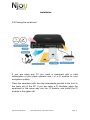
Connect your N7 to the signal source ( Digital Cable / DVB-T or
Satellite Dish depending the type of your N7 ) and network cable into
your internet router. Make sure your router supports DHCP. ( With
DHCP your router sends a IP address to every connected device ).
Your router must also be able to pass through IPTV , TCP and UDP
streaming. ( Multicast and Unicast ). Contact the manufacturer of
your router for more information.
Step 2:
After you connected the antenna source and network cable you can
connect the power adapter and hook it up in a wall outlet.
User manual N7 Series
Njoy Digital BV 2011 All rights reserved
Page 4