1
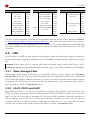
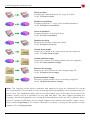
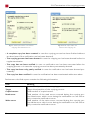
5.6 Selecting the copying mode Drive-to-drive Creates the classical physical 1:1 copy of a drive (6.1.3 Drive-to-drive). Partition-to-partition Creates a physical 1:1 copy of an individual partition (6.1.4 Partition-to-partition). Drive-to-partition Creates a backup of an entire drive (6.1.5 Drive-to-partition). Partition-to-drive Restores the backup of an entire drive (6.1.6 Partition-to-drive). Create drive image Saves the contents of an entire drive into an image file (6.1.7 Create drive image). Create partition image Saves the contents of a single partition into an image file (6.1.8 Create partition image). Restore drive image Restores an entire drive from an existing image file (6.1.9 Restore drive image). Restore partition image Restores a single partition from an existing image file (6.1.10 Restore partition image). Note: The copying modes drive-to-partition and partition-to-drive are designed for mutual use. In general, it is not possible to copy a working hard disk installation onto a partition and to use it there. The installation rather has to be copied back onto a hard drive to be used. The partition serves only as a container for the hard disk data. The same applies generally for copying a functioning partition onto a hard disk. Nevertheless, there are some systems, which know to handle media with just one single partition and without any partition table, sometimes named SuperFloppy. For further information on these copying modes please consult chapter 6.1 Copying modes. 27