1
BL-FLOWSTN-P FlowStation Module
Installation Guide
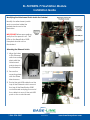
Identifying the Attachment Points inside the Pedestal
Identify the attachment points
and connectors inside the
pedestal as shown in the
illustration.
IMPORTANT! Before proceeding,
verify that the power is off. The
LEDs on the BaseStation 3200
faceplate should not be
illuminated.
Attaching the Ethernet Switch
1. Align the holes
in the Ethernet
switch mounting
plate with the
attachment
points shown in
the illustration.
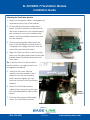
2. Secure the
mounting plate
with the three
black screws.
3. Route the mini USB cable from the
top of the Ethernet switch around
the top of the BaseStation 3200
control board and plug the end of
the cable into one of the mini USB
ports on the control board.
1-866-294-5847
Rev 9.5.2014
www.baselinesystems.com