1
BL-FLOWSTN-P FlowStation Module
Installation Guide
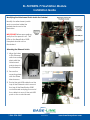
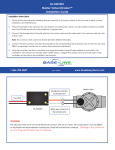
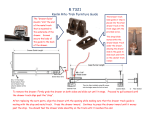
Attaching the FlowStation Module
1. Make sure the power cable is untangled and
routed around the top of the module.
2. On the middle of the three attachment
points for the FlowStation module (directly
above the capacitor on the control board),
put a washer on one of the stainless steel
screws, and then partially thread the screw
into the standoff.
3. On the mounting plate attached to the
back of the FlowStation module, find the
V-shaped notch. Align that notch with the
screw that you inserted in step 2.
4. Align the other two holes on the mounting
plate with the upper attachment points and
partially thread a stainless steel screw into
each hole.
Tip: To put the screws in these hard-toreach locations, you might want to use
a magnetic screwdriver.
5. Verify that the screw with the
washer is securely seated in the Vshaped notch on the mounting
plate, and then tighten the two
screws at the top of the FlowStation
module.
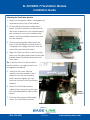
6. Attach the FlowStation power
cable to the connector on the right
side of the BaseStation 3200 control
board.
7. Tuck the extra power cable length
under the FlowStation module.
1-866-294-5847
Rev 9.5.2014
ww.baselinesystems.com