1
Key Functions
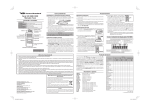
The VX-420E series provides programmable [A], [B], [C], and
[D] function keys, and both the
series and
series provide programmable
and switchs. These
Soft keys functions can be customized (set to other functions),
via programming by your VERTEX STANDARD dealer, to meet
your communications/network requirements. Some features may
require the purchase and installation of optional internal accessories. The possible Soft key programming features are illustrated below, and their functions are explained in the next chapter. For further details, contact your VERTEX STANDARD
dealer.
For future reference, check the box next to each function that
has been assigned to the Soft key on your particular radio, and
keep it handy.
Function
[A]
Soft Key (Press / Press and Hold)
[B]
[C]
[D] Side 1 Side 2
Monitor
/
/
/
/
/
/
Squelch Off
/
/
/
/
/
/
Low Power
/
/
/
/
/
/
Lock
/
/
/
/
/
/
Lamp
/
/
/
/
/
/
Channel Up
/
/
/
/
/
/
Channel Down
/
/
/
/
/
/
Scan
/
/
/
/
/
/
Lock
Speed Dial
Press (or Press and hold) the assigned Soft key to lock the Soft
keys (except Lock key); thus, the [A], [B], [C], and [D] keys can
be disabled to prevent radio settings from being disturbed.
Your Dealer may have pre-programmed Auto-Dial telephone
number memories into your radio.
To dial a number, just press (or Press and hold) the Dealer-assigned Soft key for Speed Dialing. The DTMF tones sent during
the dialing sequence will be heard in the speaker.
Lamp
Press (or Press and hold) the assigned Soft key to illuminate the
LCD for five seconds.
Channel Up
Press (or Press and hold) the assigned Soft key to switch to a
higher operating channel number.
Channel Down
Press (or Press and hold) the assigned Soft key to switch to a
lower operating channel number.
Scan
The Scanning feature is used to monitor multiple channels programmed into the transceiver. While scanning, the radio will
check each channel for the presence of a signal, and will stop on
a channel if a signal is present.
Ì To activate scanning:
Press (or Press and hold) the assigned Soft key.
The scanner will search the channels, looking for active ones;
it will pause each time it finds a channel on which someone
is speaking.
Ì To stop scanning:
Press (or Press and hold) the assigned Soft key.
Operation will revert to the channel to which the CH knob is set.
Follow-Me Scan
/
/
/
/
/
/
Dual Watch
/
/
/
/
/
/
Talkaround
/
/
/
/
/
/
Add/Del
/
/
/
/
/
/
Reset
/
/
/
/
/
/
Speed Dial
/
/
/
/
/
/
Tx Save Off
/
/
/
/
/
/
Call 1
/
/
/
/
/
/
Call 2
/
/
/
/
/
/
Call 3
/
/
/
/
/
/
“Follow-Me” Scan feature checks a User-assigned Priority Channel regularly as you scan the other channels. Thus, if only Channels 1, 3, and 5 (of the 8 available channels) are designated for
“Scanning,” the user may nonetheless assign Channel as the
“User-assigned” Priority Channel via the “Follow-Me” feature.
Press the assigned Soft key to activate “Follow-Me” scanning,
then turn the CH selector knob to the channel which you want to
designate as the “User-Assigned Priority Channel”. When the
scanner stops on an “active” channel, the User-assigned Priority
Channel will automatically be checked every few seconds.
Code Select
/
/
/
/
/
/
Dual Watch
Code Up
/
/
/
/
/
/
Code Down
/
/
/
/
/
/
–/
–/
–/
–/
–/
–/
Group
/
/
/
/
/
/
ACC 1
/
/
/
/
/
/
ACC 2
/
/
/
/
/
/
Play
/
/
/
/
/
/
Record
/
/
/
/
/
/
The Dual Watch feature is similar to the Scan feature, except
that only two channels are monitored: the current operating channel, and the “Priority” channel.
Ì To activate Dual Watch:
Press (or Press and hold) the assigned Soft key.
The scanner will search the two channels; it will pause each
time it finds a channel on which someone is speaking.
Ì To stop Dual Watch:
Press (or Press and hold) the assigned Soft key.
Operation will revert to the channel to which the CH knob is set.
–/
–/
–/
–/
–/
–/
Emergency
Encryption
Lone Worker
Description of Operating Functions
Monitor
Press (or Press and hold) the assigned Soft key momentarily to
disable the Tone squelch.
Squelch Off
Press (or Press and hold) the assigned Soft key to disable the
Noise and Tone squelch. Again press (or Press and hold) the
assigned Soft key to resume normal (quiet) Noise and Tone
squelch action.
Low Power
Press (or Press and hold) the assigned Soft key to set the radio’s
transmitter to the “Low Power” mode, thus extending battery
life. Press (or Press and hold) the assigned Soft key again to
return to “High Power” operation when in difficult terrain.
When the radio’s transmitter is set to “Low Power” mode, the
“Low” icon will be indicated on the display.
Follow-Me Scan
Talk Around
Press (or Press and hold) the assigned Soft key to activate the
Talk Around feature when you are operating on duplex channel
systems (separate receive and transmit frequencies, utilizing a
“repeater” station). The Talk Around feature allows you to bypass the repeater station and talk directly to a station that is nearby.
This feature has no effect when you are operating on “Simplex” channels, where the receive and transmit frequencies are already the same.
When the “TA” function is activated, the “ ” icon will be indicated on the display.
Note that your dealer may have made provision for “Talk Around”
channels by programming “repeater” and “Talk Around” frequencies on two adjacent channels. If so, the key may be used for one
of the other Pre-Programmed Functions.
Add/Del
The Add/Del feature allows the user to arrange a custom Scan.
Press (or Press and hold) the assigned Soft key to delete/restore
the current channel to/from your scanning list.
When you delete a current channel, “-SKIP-” will appear on the
LCD for one second after pressing the Soft key. When you restore a current channel, “-STOP-” will appear on the LCD for
one second after pressing the Soft key.
TX Save Off
Press (or Press and hold) the assigned Soft key to disable the
Transmit Battery Saver, if you are operating in a location where
high power is almost always needed.
The Transmit Battery Saver helps extend battery life by reducing
transmit power when a very strong signal from an apparently
nearby station is being received. Under some circumstances,
though, your hand-held radio may not be heard well at the other
end of the communication path, and high power may be necessary at all times.
Call 1, 2, 3/Reset
When the 2-tone or 5-Tone selective calling unit is installed, press
(or Press and hold) the assigned Soft key to silence the receiver
and reset for another call, when a communication is finished.
Code Select
ARTS (Auto Rande Transpond System : VX-420E only)
This system is designed to inform you when you and another
ARTS-equipped station are within communication range.
During ARTS operation, your radio automatically transmits for
about 1 second every 55 seconds in an attempt to shake hands
with the other station.
If you have out of range for more than two minutes, your radio
senses that no signal has been receives, a ringing beeper will
sound, and “IN RANGE” will appear on the LCD. If you subsequently move back into range, as soon as the other station transmits, your beeper will sound and “OUT RANGE” will appear on
the LCD.
DTMF Paging System (VX-420E only)
This system allows paging and selective calling, using DTMF
tone sequences.
When your radio is paged by a station bearing a tone sequence
which matches yours, your radio’s squelch will open and the
alert will sound. The three-digit code of the station which paged
you will be displayed on your radio’s LCD.
Press (or Press and hold) the assigned Soft key to enable the
changing the 5-Tone Paging code which is recalled by the
“Call 1” key.
Code Up, Down
Press (or Press and hold) the assigned Soft key to switch to a
higher (or lower) paging code number for the 5-Tone Paging
System.
Emergency
The VX-410E/-420E series includes an “Emergency” feature,
which may be useful, if you have someone monitoring on the
same frequency as your transceiver’s channel. For further details
contact your VERTEX STANDARD dealer.
Group
Press (or Press and hold) the assigned Soft key to select a “A” or
“B” group of channels.
Once the desired Group is reached, rotate the CH knob to select
the desired channel within the selected Group.
ACC 1, 2
When the optional unit is installed, these functions are various uses.
For further details, contact your VERTEX STANDARD dealer.
REC/PLAY (Voice Storage: Option)
This function, which requires the optional Voice Storage Unit,
Allows you to record and play back incoming receiver audio.
Recording:
Press (or Press and hold) the assigned Soft key to toggle the
recording feature “on” and “off.” If the incoming signal is being
heard through the speaker when the recording feature is set to
“on,” the received audio will be recorded. The last 2 minutes of
incoming audio will be stored on a first-in, first-out basis.
Playback:
Press (or Press and hold) the assigned Soft key to start playback.
During playback, pressing then “#” key lets you jump forward 8
seconds, while pressing the “” key lets you go back 8 seconds.
To stop playback before the stored message is complete, press
(or Press and hold) the assigned Soft key.
Encryption
When the Voice Scrambler feature is enabled, pressing the assigned Soft key of the “Encryption” toggles the Scrambler “on”
and “off.”
Lone Worker
Press and hold the assigned Soft key to toggle the Lone Worker
feature “on” and “off.”
The Lone Worker feature perform to emit an alarm for 30 seconds at one second interval when the Lone Worker Timer is expired. If the user does not reset the timer by pressing PTT switch,
the radio switchs to the Emergency modo.
List of the practicable area
AUT BEL DNK FIN
FRA DEU GRC ISL
IRL ITA LIE LUX
NLD NOR PRT ESP
SWE CHE GBR
Attention in case of use