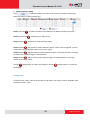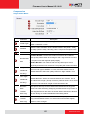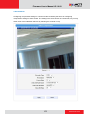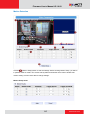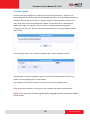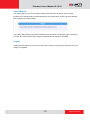
1
Encoder Firmware V4.08.06 User’s Manual Firmware User’s Manual A1D-311-V5.10.02-AC 2013/05/23 1 www.acti.com Firmware User’s Manual V5.10.02 Table of Contents 1. Recommended PC Specification 4 2. Preparation before setup 5 Connect to device and setup IP....................................................... 5 Sample screenshots to setup IP of your PC (Win XP) ................... 7 3. Configuring the IP device 11 Login ................................................................................................ 11 Live view .......................................................................................... 12 Zoom Lens Control Panel .............................................................. 14 Setup Menu ..................................................................................... 16 Host.................................................................................................. 17 Date & Time ..................................................................................... 18 Network Section.............................................................................. 20 IP Address Filtering ...................................................................... 20 Port Mapping................................................................................ 22 ToS ............................................................................................... 24 UPnPTM ........................................................................................ 25 Bonjour......................................................................................... 25 HTTPS ......................................................................................... 26 IEEE 802.1X ................................................................................ 26 SNMP Setting .............................................................................. 27 RTP .............................................................................................. 28 Speed & Duplex ........................................................................... 29 IP Settings ....................................................................................... 30 Connection Type .......................................................................... 30 DNS ............................................................................................. 31 DDNS ........................................................................................... 32 Video & Audio ................................................................................. 33 Stream Mode................................................................................ 33 Camera Options ........................................................................... 36 Compression ................................................................................ 40 2 www.acti.com Firmware User’s Manual V5.10.02 Motion Detection .......................................................................... 44 Image ........................................................................................... 46 Day / Night ................................................................................... 51 Exposure / White balance ............................................................ 52 Audio ............................................................................................ 55 OSD/Privacy Mask ....................................................................... 56 Event ................................................................................................ 58 Event Server ................................................................................ 58 Event Configuration ..................................................................... 62 Event List ..................................................................................... 70 Manual Event ............................................................................... 73 Local Storage Management ........................................................... 74 Status ........................................................................................... 75 Utilities ......................................................................................... 76 Setup............................................................................................ 81 File Management ......................................................................... 82 Event Handler with Local Storage ................................................. 87 System ............................................................................................. 93 User Account................................................................................ 93 System Info .................................................................................. 94 Factory Default............................................................................. 95 Firmware Upload .......................................................................... 96 Save & Reboot ............................................................................. 97 Logout .......................................................................................... 97 3 www.acti.com Firmware User’s Manual V5.10.02 1. Recommended PC Specification CPU Core2Duo 2.13GHz and above Memory 2 GB or above Windows XP with SP2 or above. Windows Vista / Windows Operating System 2003 / Windows 7 / Windows 2008 Internet Explorer 8.0 / Internet Explorer 9.0 (32-bit) Video Resolution SVGA or XGA with 1024x768 resolution 4 www.acti.com Firmware User’s Manual V5.10.02 2. Preparation before setup Connect to device and setup IP Our IP device provides access through Internet Explorer. The IP address for your PC must be within the same subnet as the IP device. You need to match the TCP/IP settings between PC and IP device before you can access it via IE. There are two ways to add devices to the network. With DHCP server / router: DHCP server assigns IP addresses to devices automatically. You can find them on the network with our IP Utility. It is available on NVR CD and our website: http://www.acti.com/IP_Utility Run IP Utility to start auto device search. Click on the underlined IP links to access your IP devices. You do not need to change IP. Without DHCP server / router: Please assign a static IP for each device and add them one by one. Connect to the first device by following steps 1 to 5 below. Before adding more devices into the network, you need to change the current device to a new IP address so no two devices have IP conflict. (Steps 6 to 9). For adding devices without DHCP, please see following steps. 1. Connect the PC to the Network Switch with the CAT5 cable, and change your PC’s IP to 192.168.0.99 / Subnet Mask 255.255.255.0 (101 is just a sample, it may be any number from 1 to 254 except 100.) 2. Connect the device to your Network Switch. If it is a PoE enabled Switch, then the device is powered on. If it is NOT a PoE enabled Switch, please also plug in the Power Adapter. 5 www.acti.com Firmware User’s Manual V5.10.02 3. Open Internet Explorer, and type in Default IP: http://192.168.0.100 4. When you see the login window, please input default user and password: Default Username: Admin Password: 123456 5. After you log in, you will see the video from IP device. To go to the main menu, click the “Setup” button on the top left. 6. Please go to IP settings -> Connection Type. Change the IP mode to Static and the IP address to 192.168.0.101 or any other unused IP (Avoid 192.168.0.100, the IPs of your PCs and other devices already in network.). Click “Apply” then click System -> Save & Reboot. 7. Internet Explorer will close after a few seconds. This is normal. 8. Wait for 30 seconds and open IE again by typing in the new IP. (In this example, 192.168.0.101). For later device you add into the network, please choose an IP that does not is not used by any existing device. 9. If you have more than one device, continue again from step 2. Assign different new IP to each camera (for instance -> 192.168.0.102, 192.168.0.103 …). You do not need to unplug the existing devices from the switch because there is no IP conflict. 6 www.acti.com Firmware User’s Manual V5.10.02 Sample screenshots to setup IP of your PC (Win XP) The procedures below show how to setup your IP on Windows XP. If you use operating system other than Windows XP, please refer to OS manuals for proper setup procedures. STEP1 Start up your PC. STEP2 Click the [Start] and select the "Control Panel" 7 www.acti.com Firmware User’s Manual V5.10.02 STEP3 Double-click the "Network and Internet connections" icon. STEP4 Double-click the "Network connections" icon 8 www.acti.com Firmware User’s Manual V5.10.02 STEP5 Click “Local Area Connections”, and then click “Change settings of this connection” in the Network Task menu. STEP6 Click “Internet Protocol (TCP/IP)”, and then click [Properties] 9 www.acti.com Firmware User’s Manual V5.10.02 STEP7 Click the “Use the following IP address” radio button and enter the IP address and the subnet mask. Please set the settings as below. IP address: 192.168. 0.xxx Subnet mask: 255.255.255. 0 (NOTE: xxx should be a number from 1 to 254 except 100, which is used by the IP device. Please also make sure that no two equipments use the same IP address in the same network.) STEP8 Click the [OK] button and the window dialog box will close. 10 www.acti.com Firmware User’s Manual V5.10.02 3. Configuring the IP device This section describes how to configure the IP device. The administrator has unlimited access to all settings, while the normal user can only view live video. The IP device is configured under a standard browser (Microsoft Internet Explorer 8.0 / 9.0). Login STEP1 Open Internet Explorer 8.0 / 9.0. You may download the latest version from: http://www.microsoft.com/windows/ie/downloads/default.mspx (For Internet Explorer 10.0, please enable "Compatibility View" on the Tools menu in IE browser) STEP2 Enter the IP address of the IP device and press enter to go to Login Page. The default IP address is “192.168.0.100” STEP3 Enter the Account name and the Password (Default Account: Admin / Password: 123456). STEP4 Select the language of the IP device user interface. You can select between English, Traditional Chinese, Japanese, Spanish, Italian, German, Portuguese, Greek, Russia, Turkey, Indonesia and Swedish. This user interface setting will disappear once you log out, if you want to change the default user interface language, please go to [Host] in the ”Host” section under the setup tab. 11 www.acti.com Firmware User’s Manual V5.10.02 STEP5 Click the button to login or click the button to re-enter again. Once you’ve logged in, the “Live page” will be displayed as below. Live view Click the [Live] tab to show [Live page]. Refer to the table below for how to configure each setting. Function List Function Full Screen Description Click the icon to stretch the preview to full screen. You can click “Esc” button on the keyboard to return to previous display. Snapshot Click the icon “ ” to take a snapshot. The snapshot picture will be saved to the default folder “C:\Users\”account name”\Picture”, in the format of YYYYMMDD_HH_mm_ss.jpg. 12 www.acti.com Firmware User’s Manual V5.10.02 Audio out Click the icon to enable the audio out from PC to IP camera or video server. When it is enabled, your voice will be transferred to the audio out of the IP camera or video server. NOTE: you will need to have a microphone connected to your PC to send out audio. If dual stream mode is enabled, click Media to select which stream to display (Media 1 or 2). The default is single stream only. To change to dual stream mode, please refer to “Media 1” section under “Setup” tab Click Encoder Type to select the compression codec used in video encoding. The Encoder type option includes MPEG-4, MJPEG and H.264. Once selected, the video server/IP camera will start to send video in new stream type. Display size Click or to adjust display screen size Audio in Click the speaker icon to toggle mute / audio in. Click and drag to decide volume below. You must first enable audio in setting to change here. PTZ Panel Click on the PTZ button to pop up the Control panel, and enable Mouse PTZ at the same time. For zoom lens camera, Panning and Tilting via PT platform will only be activated by mouse PT command. *Note: This is not available in 4 cropped VGA mode. DO Settings Click to set DO output level to High. Click to set DO output level to Low. If your device has more than one DO available, each DO is controlled separately. Network status Indicates the network state. If the light on the right is green, it means the network is ok. If the light is gray, it means the network is broken. The light on the left is not used Live view from Camera is displayed here. The title bar shows the Live View time and date. If you want to setup this IP camera/video server, please click the [Setup] tab to switch to “Setup Page” 13 www.acti.com Firmware User’s Manual V5.10.02 Zoom Lens Control Panel If you are using Zoom / Auto Focus camera, this screen is available by clicking on PTZ button in the live view screen. You can change the current zoom ratio by clicking on either the continued Zooming buttons, or the Stepped zooming buttons. Step size will determine how much each click on stepped zooming changes the zoom ratio. Speed determines how fast will zoom control operate under continued zoom. There are two Focus Control Modes. 1. Auto Refocus after Zoom means that the camera will readjust focus after every zooming operation. 2. Manual focus control will allow you to manually select the focus distance, so that if the automatically determined focus position is not what you have in mind, you can easily adjust it to your liking. You can press the “Refocus” button to readjust focus. You can configure up to 32 Zoom presets below. Just click Set, enter the name and move the zoom/focus position to what you desire, then click set again. You can instantly ask the camera to go to that zoom and focus position by clicking on the Goto button. Click Delete to remove this zoom preset point from camera memory. 14 www.acti.com Firmware User’s Manual V5.10.02 Preset Tour After you set the Preset Point, the Tour function will be enabled. Preset Tour is a preconfigured PTZ sequence that directs the camera to cycle through multiple preset PTZ views, including where to look and how long to look at each location. You may configure the preset points to go to in the previous Preset section. Make sure you configure PTZ and PTZ Preset sections correctly before setting up Preset Tours Please select the tour you want to use or choose “Disable” to stop Preset Tour Selet the preset point you want to add in the tour. You may setup how long with the PTZ Speed Dome camera stay at each point by settng the [Dwell Time]. Then, click [Add] button to add the preset point in this tour You may rearrange the preset point sequence here. Click the buttons to move to top, move up, move down or move to bottom of list. You can click click [Goto] to go to the preset point and [Remove] to remove this preset point in this modified tour 15 www.acti.com Firmware User’s Manual V5.10.02 Setup Menu In Setup Page, the left side is devoted to the menu. There are many sections in the menu, most of them hidden for ease of navigation. The fully expanded menu is shown here to the right. 16 www.acti.com Firmware User’s Manual V5.10.02 Host Click the [Host] to enter Host settings page. Refer to the table below for how to configure each setting. Parameters Host name Description Enter a host name, and this host name will be shown when you use the IP utility or the SDK to search for the IP device. Select the language of default user-interface. Each user login Language will see the default user-interface first. Camera name The camera name is reserved for customer use. Click the [Apply] button to confirm the settings or click the [Reset] button to re-enter the parameters. Parameters Serial Port Control Description Select the control value of corresponding serial port. Serial Port Baud Rate Select the Baud Rate of serial port. Click the [Apply] button to confirm the settings or click the [Reset] button to re-enter the parameters 17 www.acti.com Firmware User’s Manual V5.10.02 Date & Time Click the [Date & Time] item under Setup to see Date Setting Page. Refer to the table below for how to configure each setting. The default method is to set manually. 18 www.acti.com Firmware User’s Manual V5.10.02 Date Setting Parameters Description Click this to enable IP device’s SNTP/NTP function. This enables this IP device to synchronize its time settings with a SNTP/NTP server. You can use this function to make sure all your IP devices’ time is the same. Additionally, with our embedded digital-time-code in the streaming, you SNTP/NTP can tell the event sequence accurately. server IP address: Enter the IP address of the SNTP/NTP server. Sync time: Select the time interval for this IP device to synchronize its time. Set manually Click this to manually setup the date & time. Date : Select the date Time: Select the time Select the time zone offset for local settings Time zone Select Type 1 month; select Type 2 to specify daylight saving time by date. Day Light Start Time: Select the daylight savings start time. Saving Click the to specify daylight saving time by week number in a End Time: Select the daylight savings end time. [Apply] button to confirm the settings or click the [Reset] button to re-enter the parameters. 19 www.acti.com Firmware User’s Manual V5.10.02 Network Section Click the [Network] item on the “Setup Page”. IP Address Filtering WARNING: Please be very careful when using this function, as you may lose access to your camera if you make mistakes in setup. You may either accidentally deny yourself access, or forgot to include your own IP address in the allowed address list. You will need to perform hard reset to be able to access the device again. Click the [IP Address Filter] item to display the “IP Address Filtering Page”. Refer to the table below for how to configure each setting. 20 www.acti.com Firmware User’s Manual V5.10.02 Parameters IP address filter enable Description Check this box to enable IP Address Filtering. The filter can be set in either “Allow” mode or “Block” mode. 1. “Allow” mode will refuse access to all IP addresses except the ones Filter Method listed below. 2. “Block” mode will accept all incoming access except the IP addresses listed below. Make sure you include the Netmask in your consideration. IP Address The IP address you wish to allow or block. Please note that the actual range is modified by the Netmask. Using Netmask allows you to set filtering for a whole range of IP address at once, without the need to enter all of them individually. If you are not Netmask sure about the function of netmask, then you should use 255.255.255.255, and it will affect only a single IP address per line of entry, or use 255.255.255.0 to use the same setting for all IP addresses starting with the same three numbers. . For each entry, you must check this box for it to be effective. For an entry that you no longer need but does not wish to delete, you can uncheck it, Enable and the system will remember it for future use. If a new entry that has never been used before does not have Enable checked, then it will not be stored in memory. Click this to use the current displayed info to do IP Address filtering. If you setup correctly, it will change into a grayed out “Success” in a few Apply seconds. Reset Click the Click this button to re-enter the parameters. [Apply] button to confirm the settings or click the [Reset] button to re-enter the parameters. 21 www.acti.com Firmware User’s Manual V5.10.02 Port Mapping Click the [Port Mapping] item to display the “Port Mapping Page”. Refer to the table below for how to configure each setting. Parameters HTTP port Search server port1 Search server port2 Video server port Description Select the port assigned for HTTP protocol access Select the first port used by server search applications to detect this IP device. (e.g. IP utlity) Select the first port used by server search applications to detect this IP device. (e.g. IP utlity) Select the port used to support video control function by application programs. (e.g. NVR) 22 www.acti.com Firmware User’s Manual V5.10.02 Streaming server port (TCP Only) Video Multicast Port of media 1 Enable/disable multicast audio streaming RTSP port Select the port assigned for RTSP protocol access RTP Multicast Video Select the port for the multicast video streaming of media1 via Port for Media1 RTP protocol RTP Multicast Audio Select the port for the multicast audio streaming of media1 via Port for Media1 RTP protocol Multicast IP Select the multicast IP. Default settings is 228.5.6.1 Multicast TTL Select the multicast TTL. Default setting is 255. IGMP Click the Select the port used by this IP device for Video Streaming. Select video type connected to the video-in of this IP device. If you use an incorrect video type, some images might be lost. [Apply] button to confirm the settings or click the [Reset] button to re-enter the parameters. 23 www.acti.com Firmware User’s Manual V5.10.02 ToS Click the [ToS] (Type of Service) item to display the “ToS Page”. Refer to the table below for how to configure each setting. Parameters TOS (type of service) Description Select whether to add the TOS tag onto the streaming data. Streaming data with a higher priority TOS tag will be transmitted first when compared with other data. Select the TOS tag’s priority to be added onto the streaming. You can select between TOS priority 1.Minimize-Delay 2.Maximize-throughout 3.Maximize-Reliability 4.Normal-Service Click the [Apply] button to confirm the settings or click the [Reset] button to re-enter the parameters. 24 www.acti.com Firmware User’s Manual V5.10.02 UPnPTM TM TM Click the [UPnP ] item to display the “UPnP Click checkbox Setting Page”. to enable or disable the UPnP TM function. Edit the UPnP Friendly Name in text field. Click the [Apply] button to confirm the settings or click the [Reset] button to re-enter the parameters. Bonjour Bonjour is a protocol developed by Apple.Inc. This protocol allows for easy searching of devices on network. You may enable Bonjour and search for this device via its Friendly Name. 25 www.acti.com Firmware User’s Manual V5.10.02 HTTPS HTTPS is to create a secure channel over an insecure network. There are two methods to create, Certificate Signing Request (CSR) and Self-Signed Certificate. Certificate Signing Request (CSR): User uses a signed certificate issued by trusted Certification Authority (CA). Self-Signed Certificate: User wants to use the certificate created and issued by user himself. Press “Create” or “Create Self-Signed Certificate” button and configure settings in the pop-up screen to install the certificate. Note that the new setting will only take effect after “Save & Reboot”. IEEE 802.1X Please enable IEEE 802.1x and configure settings in the screen below. Note that the new setting will only take effect after “Save & Reboot”. 26 www.acti.com Firmware User’s Manual V5.10.02 SNMP Setting Click the SNMP Setting item to display the SNMP setting Page Click Select to enable SNMP function. to use SNMP V1/V2 or Check the check box to use SNMP V3 to enable traps Enter the Destination IP address in Enter the Trap Community used in Select the Available trap in Click the [Apply] button to confirm the settings or click the [Reset] button to re-enter the parameters. 27 www.acti.com Firmware User’s Manual V5.10.02 RTP Click RTP Item to configure RTP Settings RTSP Authen Check box to enable RTP streaming’s Account/Password Enable authentication. RTP B2 Frame Enable Click the [Apply] button Check box to enable the B2 frame in RTP streaming to confirm the settings or click the [Reset] button to re-enter the parameters. 28 www.acti.com Firmware User’s Manual V5.10.02 Speed & Duplex Click the [Speed & Duplex] item in the network section to display the ”Speed and Duplex” Page. Refer to the table below for how to configure each setting. Parameters Description This item lets you select the network transmission speed. You can select from Network speed 1. Auto detect (default setting) 2. 100Mbps / Full duplex 3. 100Mbps / Half duplex 4. 10Mbps / Full duplex 5. 10Mbps / Half duplex Click the [Apply] button to confirm the settings or click the [Reset] button to re-enter the parameters. 29 www.acti.com Firmware User’s Manual V5.10.02 IP Settings Connection Type Click the [Connection Type] item to display the “Connection Type Page”. Refer to the table below for how to configure each setting. Parameters Description Click this to enable IP device’s DHCP function. Dynamic IP It will acquire its WAN port IP address from a DHCP server within the address same network. (You must have a DHCP server in order to enable this function.) Use host name Enter the host name to display in utility tools, ex IP Utility. Click this to manually enter the IP address. Static IP address IP address: Enter the WAN port IP address. Subnet mask: Enter the subnet mask of WAN port. If IP address is changed, adjust the subnet mask accordingly. ISP gateway: Enter the IP address of the gateway (the router). 30 www.acti.com Firmware User’s Manual V5.10.02 Click this when you connect IP device directly to the xDSL modem. User name: Enter the user name of your xDSL account. PPPoE Password: Enter the password of your xDSL account. Note: You have to click the [Save Reboot] after you click the [Apply button] to let this IP device start xDSL connections. Click the [Apply] button to confirm the settings or click the [Reset] button to re-enter the parameters. DNS Click the [DNS] item to display the “DNS Server Settings Page”. Refer to the table below for how to configure each setting. Parameters Primary DNS server Secondary DNS server Click the Description Defines the IP address of the primary DNS server. This is used for identifying this computer by name instead of IP address. The IP address of the secondary DNS server. It will be used once the primary DNS server fails. [Apply] button to confirm the settings or click the [Reset] button to re-enter the parameters. 31 www.acti.com Firmware User’s Manual V5.10.02 DDNS Click the [DDNS] item to display the “DDNS Server Setting Page”. Refer to the table below for how to configure each setting. Parameters Description Click this to enable IP device’s DDNS function. DDNS type DDNS function enables user to connect to this IP device by domain name even if its IP address is not static. Protocol / Click one of the DDNS service providers. Service You can visit their website to get a DDNS service account for this IP Reference device. Host name Enter the host name of your DDNS service account. (ex: xxxx.dyndns.org) User name Enter the user name to login your DDNS service account. Password Enter the password to login your DDNS service account. Click the [Apply] button to confirm the settings or click the [Reset] button to re-enter the parameters. 32 www.acti.com Firmware User’s Manual V5.10.02 Video & Audio Click the [Video & Audio] item on the “Setup Page”. Please note that some elements may not appear on all models. Stream Mode This section determines how many streams are available from this device. There are three modes: Single, Dual or 4 Stream. “4 Stream” mode is available only to 4 Megapixel models. In single stream mode, resolutions available include 4 Megapixel 2032 x 1920 (for some models), Full HD 1920 x 1080, HD720 1280 x 720 and VGA 640 x 480. In 4 Stream mode, there is a Standard View and a Positioning View. This image below shows the Standard View. This display shows where each crop window located is but does not allow you to change move it. To reposition the crop windows, click “Setup”. 33 www.acti.com Firmware User’s Manual V5.10.02 4 Stream Mode – Standard View In Standard View you can see where the window for each channel is located. To edit cropping location, click “Setup”. 34 www.acti.com Firmware User’s Manual V5.10.02 4 Stream Mode – 4 VGA Window Positioning View In 4 VGA Window Positioning View, you may position each window to where you desire to view. The current view is the 4M view area to allow you the most flexibility in positioning. Click and drag the top bar of each window to activate it and drag to place. The currently active window is highlighted in yellow, while the other windows are shown in red. 35 www.acti.com Firmware User’s Manual V5.10.02 Camera Options This item is available on hemispheric camera only. This section determines how many streams are available from this device. There are six modes: Single, Dual, ePTZ, MD Preset, 6 Stream and Fisheye View. Single Mode In single stream mode, there are two options you can choose depend on your device’s mounting type- Ceiling / Wall. In Single Mode, resolutions available include Full HD 1920 x 1080 and HD720 1280 x 720. In Ceiling Mount, you can see the double panorama view in pre-view windows. You can adjust the viewing angle via typing the rotation degrees. In Wall Mount, you can see the panorama view in pre-view windows. Adjust the “Physical Installation Angle” will do proper dewarping based on the newly defined center of the view. Type Description Physical Installation Angle Not using the 10° Hemispheric Camera Wall Mount 0 degree With 10° Hemispheric Camera Wall Mount 10 degree 36 www.acti.com Firmware User’s Manual V5.10.02 ePTZ Mode ePTZ mode of Hemispheric Camera works in similar way as optical PTZ function in Speed Domes. As the camera receives commands from remote client, it changes the direction of the view or zooms in or out digitally. The stream coming out from the camera represents current viewing direction of the camera, not the panoramic view. The resolutions are available include 4M 2032 x 1920, Full HD 1920 x 1080, HD720 1280 x 720 and 640 x 480. If you are using hemispheric camera in ePTZ mode, this screen is available by clicking on PTZ button in the live view screen. Mouse PTZ is enabled at the same time. You can configure up to 32 Zoom presets below. Just click Set, enter the name and move position to what you desire, then click set again. You can instantly ask the camera to go to that zoom and focus position by clicking on the Goto button. Click Delete to remove this zoom preset point from camera memory. You can use ePTZ in live view by moving the mouse over video and clicking on the video anywhere you like. Wherever you click, that point will become new “center” of the view. This is how you “pan” and “tilt”. You also can rotate the view via PTZ panel if you like. To zoom in or out under ePTZ mode, use the scroll wheel of the mouse Preset Tour After you set the Preset Point, the Tour function will be enabled. Please refer Preset Tour, Note: Home position has to be set again after changing the installation type, the motion detection configurations and PTZ configurations like preset points. 37 www.acti.com Firmware User’s Manual V5.10.02 6 Stream Mode 6 Stream mode is very similar to multi-channel video encoder can act as 6 different VGA cameras, each pointing in different direction One of the benefits of 6 stream mode is to focus only on regions that are important and discard the rest of them. It can help save bandwidth and storage space. Please use the on-video controls (Mouse PTZ) to shift the VGA region to the desired location. You also can rotate the view if you like To setup other stream, please select in “Stream ID” list. MD Preset Mode Using MD preset mode, please set preset points in live view page first. 1. Live View PTZ Preset Please use the live view on-video controls (Mouse PTZ) to shift the region to the desired location for each preset point. 2. Setup Video & Audio Motion Detection Set up the detail setting of motion detection. 38 www.acti.com Firmware User’s Manual V5.10.02 3. Motion Detection Setup Press to edit the settings. There are set six regions on ceiling mounting type and three regions on wall mounting type. STEP1: Click the checkbox to enable motion detection for different preset point region. STEP2: Choose the preset point you want to use. STEP3: Set the sensitivity of motion detection region. STEP4: Set the interval time of motion detection. After a motion event is triggered, no more events will be triggered within this time in the same region STEP5: Set the trigger threshold of motion detection region. The larger this value, the larger the object size needed to trigger motion detection. STEP6: Set the priority of these preset point to trigger the motion detection. The higher number is the higher priority, Click the [Apply] button to confirm the settings or click the [Reset] button to re-enter the parameters. Fisheye View In Fisheye View mode, camera will provide the panorama view image, and the available video resolution is 2032 x 1936. 39 www.acti.com Firmware User’s Manual V5.10.02 Compression Single Stream Mode: Parameters Encoder Type Resolution Frame rate Description Select the encoder’s compression type. MPEG-4 / MJPEG / H.264 Select the video resolution of the camera between 4M (2032 x 1920), 2M 1080p (1920 x 1080), 1M 720p (1280 x 720) and VGA (640 x 480) Select the available frame rate from the drop down menu. Constant Bit Rate: The bit rate remains constant at all conditions, Video Bit Rate Mode Video quality will be better when image is still. Large amount of motion or complex scene will degrade quality slightly. Variable Bit Rate: The video bit rate will vary based upon scene complexity and amount of movement. The quality will remain the same. Quality (Variable Bit Rate Only) GOP Length (Variable Bit Rate Only) When encoder type is MPEG4 or H.264, and video bitrate mode is “Variable Bit Rate” Select the quality value from High / Middle / Low When encoder type is MPEG4 or H.264. and video bitrate mode is “Variable Bit Rate”. Select the Interval between two I-frames. This is also called GOP Length. (Group of Picture). Default value is one I frame per second. The maximum length of GOP is limited to 60. Video Max This puts a hard cap on the maximum bit rate allowed in any given Bitrate second of video streaming. Assigning a limited bit rate may result in a (Constant few dropped frames rate when the stream data overflows the allowed Bitrate only) bit rate. Doing so will also disable Bit Rate setting below. Video Bitrate This is the target bitrate that the camera will attempt to provide when (Constant using Constant Bitrate mode. The actual value will fluctuate slightly Bitrate only) based on scene changes. 40 www.acti.com Firmware User’s Manual V5.10.02 Dual Steam Mode: Parameters Encoder Type Resolution Frame rate Description Select the encoder’s compression type. MPEG-4 / MJPEG / H.264 Select the video resolution of the camera between 4M (2032 x 1920), 2M 1080p (1920 x 1080), 1M 720p (1280 x 720) and VGA (640 x 480) Select the available frame rate from the drop down menu. Constant Bit Rate: The bit rate remains constant at all conditions, Video Bit Rate Mode Video quality will be better when image is still. Large amount of motion or complex scene will degrade quality slightly. Variable Bit Rate: The video bit rate will vary based upon scene complexity and amount of movement. The quality will remain the same. Quality When encoder type is MPEG4 or H.264, and video bitrate mode is “Variable Bit Rate” Select the quality value from High / Middle / Low When encoder type is MPEG4 or H.264. and video bitrate mode is GOP Length “Variable Bit Rate”. Select the Interval between two I-frames. This is also called GOP Length. (Group of Picture) . Default value is one I frame per second. The maximum length of GOP is limited to 60. Frame rate Select the available frame rate from the drop down menu. 41 www.acti.com Firmware User’s Manual V5.10.02 Constant Bit Rate: The bit rate remains constant at all conditions, Video Bit Rate Mode Video quality will be better when image is still. Large amount of motion or complex scene will degrade quality slightly. Variable Bit Rate: The video bit rate will vary based upon scene complexity and amount of movement. The quality will remain the same. This puts a hard cap on the maximum bit rate allowed in any given Video Max second of video streaming. Assigning a limited bit rate may result in a Bitrate few dropped frames rate when the stream data overflows the allowed bit rate. Doing so will also disable Bit Rate setting below. This is the target bitrate that the camera will attempt to provide when Video Bitrate using Constant Bitrate mode. The actual value will fluctuate slightly based on scene changes. Click the [Apply] button to confirm the settings or click the [Reset] button to re-enter the parameters. 42 www.acti.com Firmware User’s Manual V5.10.02 4 Stream Mode: Configuring compression settings in 4 stream mode is basically the same as configuring compression settings in other modes. The setting is the same across all 4 channels, but you may switch view of the individual channels by selecting the channel on top. 43 www.acti.com Firmware User’s Manual V5.10.02 Motion Detection Adjust Column Adjust Square Click the [Motion Setup] button to edit the settings. Before clicking Motion Setup, you will be in passive observer mode. You will see activity status and whether each motion window has motion activity, but will not be able to change settings. Motion Setup mode 44 www.acti.com Firmware User’s Manual V5.10.02 Video Motion Detection: STEP1: Click the Plus sign to expand the Motion Detection settings then Click the Motion Enable checkbox to enable motion detection. STEP2: Click the checkbox to enable motion detection for each individual region. STEP3: Click one region to start to edit its size and location. You can click the “Adjust Column” to drag motion region to your desired location. You can click the “Adjust Square” and drag to adjust motion region size. You can click the upper right button to cancel this motion region. Repeat above procedure to adjust the motion region. STEP4: Set the sensitivity of motion detection region. STEP5: Set the interval time of motion detection. After a motion event is triggered, no more events will be triggered within this time in the same region STEP6: Set the trigger threshold of motion detection region. The larger this value, the larger the object size needed to trigger motion detection. STEP7: In motion activity window, the bar shows the motion activity status. You can also see the trigger threshold (Red line). When the motion activity exceeds the trigger threshold, the bar would become red to indicate that a motion event has been triggered. While viewing the motion activity window, you can adjust the motion sensitivity (the higher, the easier camera considers video change to be an activity) and the threshold (the higher, the larger the activity needed to trigger a motion event). If the default settings are not satisfactory for your scene, you may try our alternative recommendations of: Sensitivity: 80, Threshold: 2~5 (for normal environment) Sensitivity: 80, Threshold: 5~10 (for very noisy environment) 45 www.acti.com Firmware User’s Manual V5.10.02 Image This section concerns the general video settings. KCM-5111/KCM-5211/KCM-5311/KCM-7111/KCM-7211/KCM-3211 Models 1. Video Flipping: Check this box to flip the video up-down 2. Video Mirror: Check this box to mirror the video left-right 3. Brightness: Select the Brightness value. The higher the value, the brighter the image. 4. Contrast: Select the Contrast value. The higher the value, the sharper the contrast. 5. Digital Noise Reduction: Select ON or OFF to enable or disable this function. Enable this for smooth and clear image. Disable this if your scene contains many extreme details that may be smoothed over with DNR. 6. Restore image settings to default: When press this button, it will use the default image settings. Click the [Apply] button to confirm the settings or click the [Reset] button to re-enter the parameters. 46 www.acti.com Firmware User’s Manual V5.10.02 KCM-5211E/KCM-5311E Models 1. Video Flipping: Check this box to flip the video up-down 2. Video Mirror: Check this box to mirror the video left-right 3. Brightness: Select the Brightness value. The higher the value, the brighter the image. 4. Contrast: Select the Contrast value. The higher the value, the sharper the contrast. 5. Saturation: Select the saturation value. The higher the value, the more saturated the image. 6. Digital Noise Reduction: Select the DNR value. The higher the value, the smoother and clearer the image. 7. 3D Noise Reduction: Select ON or OFF to enable or disable this function. Enable this for smooth and clear image. Disable this if your scene contains many extreme details that may be smoothed over with 3DNR. 8. Edge Enhancement: Select the Edge Enhancement value. The higher the value, the sharper the image. 9. ExDR: Select the ExDR value. The higher the value, the great enhancement of the image in the brightest and darkest area. This provides for more evenly illuminated image and brings out greater detail to the eye. 10. Defog Control: Select the Defog Control value. The higher the value, the clearer of image in 47 www.acti.com Firmware User’s Manual V5.10.02 foggy situation. If you want to disable this function, please choose value 0. 11. Restore image settings to default: When press this button, it will use the default image settings. Click the [Apply] button to confirm the settings or click the [Reset] button to re-enter the parameters. 48 www.acti.com Firmware User’s Manual V5.10.02 KCM-3911 Models 1. Brightness: Select the Brightness value. The higher the value, the brighter the image. 2. Contrast: Select the Contrast value. The higher the value, the sharper the contrast. 3. Saturation: Select the saturation value. The higher the value, the more saturated the image. 4. Digital Noise Reduction: Select the DNR value. The higher the value, the smoother and clearer the image. 5. 3D Noise Reduction: Select ON or OFF to enable or disable this function. Enable this for smooth and clear image. Disable this if your scene contains many extreme details that may be smoothed over with 3DNR. 6. Edge Enhancement: Select the Edge Enhancement value. The higher the value, the sharper the image. 7. ExDR: Select the ExDR value. The higher the value, the great enhancement of the image in the brightest and darkest area. This provides for more evenly illuminated image and brings out greater detail to the eye. 8. Defog Control: Select the Defog Control value. The higher the value, the clearer of image in 49 www.acti.com Firmware User’s Manual V5.10.02 foggy situation. If you want to disable this function, please choose value 0. 9. Restore image settings to default: When press this button, it will use the default image settings Click the [Apply] button to confirm the settings or click the [Reset] button to re-enter the parameters. 50 www.acti.com Firmware User’s Manual V5.10.02 Day / Night This section concerns the day and night switch timing for your camera. 1. Day / Night Mode: The camera will change between day and night modes by default. You may command camera to stay in day or night mode here, or allow it to change automatically. 2. Day to Night Threshold: This value controls the level of light where camera switches into night mode. Increasing it will make camera switch to night mode at a darker illumination level. Click the [Apply] button to confirm the settings or click the [Reset] button to re-enter the parameters. 51 www.acti.com Firmware User’s Manual V5.10.02 Exposure / White balance Configure Exposure and White Balance and Digital Noise Reduction for best image quality here. Some options will only appear under certain exposure / White balance modes. We will describe each in detail below. Exposure Mode - Auto In Auto Exposure Mode, you control the image brightness by configuring the AE Reference Target and Slowest Auto Shutter. AE Reference Target means the Auto Exposure reference target, which can be considered as the “Target Brightness on Sensor”. The camera will use several internal parameters to achieve best quality with reference to this. The higher this value, the brighter the overall scene, and the more noise at night. Slowest Auto Shutter means the longest allowed exposure time for each frame. In extreme low light conditions, the exposure time is automatically increased to get more light into one image. If it extends beyond the interval between frames, (i.e. 1/30 second), then the frame rate will be automatically reduced. Longer time in this value gives clearer images at night for slow moving objects, but more motion blur for fast moving objects. White balance weights the proportion of color in scene and recreates the most realistic color. Usually this function is performed seamlessly in the background in auto mode. In some cases you may want to fix the color proortions of your view. Wait until you like the color on screen. You can hold a piece of white paper in front of camera for reference, then wait until you like the current value to click on the “Hold” button to the right. This will lock the current value and enter the manual white balance mode. Before Hold 52 www.acti.com Firmware User’s Manual V5.10.02 Entering Manual mode with Hold White Balance Line Frequency is the power supply frequency. Select the right frequency to avoid image flickering. P-IRIS (For Support P-Iris Lens Model) Enable P-IRIS function using P-Iris Lens. Otherwise, please disable it. Exposure Mode – Shutter Priority In Shutter Priority Mode, the shutter speed is locked at the user defined value. Camera will compensate for different brightness with Iris size or signal enhancements. This is useful when the target moves very fast and has to be viewed with short exposure shutter time. 53 www.acti.com Firmware User’s Manual V5.10.02 Exposure Mode – Iris Priority In Iris Priority Mode, Iris size is fixed to ensure sufficient depth of view. Camera varies exposure time shutter to compensate for brightenss change. Exposure Mode - Manual In Manual Exposure mode, you may configure the shutter speed and exposure image gain yourself for optimum performance. 54 www.acti.com Firmware User’s Manual V5.10.02 Audio Audio In - Enable or disable Audio In via the check box. Audio Out Volume – Control the output volume of Audio Out here. Audio Format – Select the audio’s compression type, PCM / G.711A / G.711U. Click the [Apply] button to confirm the settings or click the [Reset] button to re-enter the parameters. 55 www.acti.com Firmware User’s Manual V5.10.02 OSD/Privacy Mask OSD (On Screen Display) and Privacy masks are configured in this section. There are four regions available. Each may be used either as a Privacy mask or an OSD text. Privacy Mask is not available in Dual Stream mode. Please disable Stream 2 if you wish to use Privacy mask / OSD. 56 www.acti.com Firmware User’s Manual V5.10.02 Parameters Enable Description Check this box to enable each OSD / Privacy mask region OSD / Privacy Each region can be in one of two types. OSD (On Screen Display) or mask Privacy mask Color (Privacy This determines the color of the Privacy Mask Area. You may choose mask) between Black, Green, Red and Blue. Click this checkbox to enable Privacy mask area setup. Click and drag the adjust square at the lower right to change dimensions, click and Setup drag the adjust column at the top to move. (Similar to Motion Detection Region) Color(OSD) This determines the color of the OSD Text. You may choose between Black, Green, Red and Blue. This number determines the level of transparency for this OSD Text. 1 Transparent means that the background between the texts will not be visible, while 100 means the background will show through the OSD text. Position Select the location where the text will appear in the image. This is where you enter the user defined string (%U) as described in the String next section. Total length cannot be more than 63 characters This controls what is shown in the OSD text. You can click the Format Format Notice to the corner for a full list of available parameters. The OSD text is primarily based upon this field. Format Notice Click here to see the syntax list of how to configure the OSD text. Click the [Apply] button to confirm the settings or click the [Reset] button to re-enter the parameters. 57 www.acti.com Firmware User’s Manual V5.10.02 Event This section describes how to setup the Event Handler, which deals with how the IP devices respond to situations. Each IP device can have a maximum of 10 Event Rules. Each rule includes one single trigger, and one or many responses. Several types of responses are available. And there are multiple external servers for the device to interact with. When setting up Event Handler, there are four types of settings. Event Server, Event Configuration, Event Rules and Manual Event Click the [Event] item on the “Setup Page”. Event Server Event servers define whom the device may interact with. They can be other servers or devices on the network, or even the camera itself. Event Configuration sets up a list of what to tell the other party during interaction. Event list lays down the rules and conditions about when to initiate which responses from which triggers. The options available for Event rules are selected from the event servers and event configurations. Event servers are classified as FTP servers, SMTP servers and HTTP servers 58 www.acti.com Firmware User’s Manual V5.10.02 FTP Server FTP servers can receive snapshot or video uploads that are issued as part of the response from event handlers. You may setup one FTP server. To setup FTP servers, make sure to enter the User Name, the network address, Password, the Network (FTP) port, Connection mode (Passive or Active) and Connection time before timeout(in milliseconds). Click [Apply] to use these settings or click [Reset] to clear changes. SMTP Server SMTP servers can send email upon request from the IP device. The email can be a simple subject and text email, or attached with snapshot / video. You may setup two SMTP servers. The device will first attempt to send the message via the Primary email SMTP server. If the first attempt fails(after the Max connecting time), then the device will attempt to send via the secondary SMTP server. If the device sends email successfully via the primary SMTP server, then it will not use the secondary SMTP server. 59 www.acti.com Firmware User’s Manual V5.10.02 To setup SMTP servers, make sure to enable the SMTP account and choose the proper Authentication type. There are many types available. The default is Login. We recommend you to use Auto Detection. Available authentication types include: Auto Detection, None, Login, Plain, Cram MD5, Digest MD5 and PoP Relay. Please also enter Password, the User Name, the email address displayed as sender (can be different than the user name), Network (SMTP server) address, Network (SMTP server) Port number and Connection time before timeout (in seconds). Click Max [Apply] to use these settings or click [Reset] to clear changes. 60 www.acti.com Firmware User’s Manual V5.10.02 HTTP Server HTTP CGI servers are programs that run on web sites or many devices. They can be custom programmed to perform a large variety of actions based upon the input. You can define which CGI server to connect to here, and the user / password required to log into the target server. The actual message / command is setup in the Notification messages / URL commands section. You may define two separate CGI servers. IP devices are also CGI servers. This means that IP devices can now issue commands to each other, which creates endless possibilities for highly coordinated response. The IP device can also give a loopback command to itself, in effect changing almost all possible settings dynamically. For detail on the commands used to control the cameras, please contact your customer representative. An example will help you gain a better sense of how to utilize this unique function. Camera A is a fixed camera that looks at a corridor leading to the main hall. It has a motion detection window located near the point where the corridor arrives at the large hall. Camera B is a PTZ camera located in the hall, which is usually left on auto-tour patrol. When motion activity in the motion detection region triggers MD1 in Camera A, this then in turn activates an event rule in Camera A that gives out a command to Camera B. Camera B would then swivel to the preset point where the corridor leads into the entrance and switch to higher bit rate to temporarily provide clearer image. After the event ends, Camera B will go back to its normal routine in lower bit rate. 61 www.acti.com Firmware User’s Manual V5.10.02 To setup HTTP servers, make sure to the user password, number and enable the HTTP server, Network (HTTP Server) address, enter the user name, Network (HTTP Server) Max connection time before timeout ( in seconds). Click settings or click port [Apply] to use these [Reset] to clear changes. Event Configuration Event configurations are the responses to be performed when an event is triggered. For most types of responses, you can create several different preset responses, then mix and match in event rules. Some responses are not supported in all IP devices (e.g.: DO, PTZ). Event Motion Detection profile is also a triggerable response, but the parameters are defined through the Video Adjust page, not in Event page. The configurable responses are classified as Digital I/O ports, Notification messages, Upload Image / Snapshot, Send URL Commands and go to PTZ Presets. Digital I/O ports Digital I/O ports (selected models only) read and control the voltage difference in the circuit, and respond to it. They are useful in connecting to a wide variety of devices. D/I is a trigger, while D/O is a response. Both are setup here. Both have a low voltage state and a high voltage state, noted as 0 and 1. 62 www.acti.com Firmware User’s Manual V5.10.02 Trigger Interval: How does it work? When a motion is detected or the device receives a DI trigger, usually users want the camera to stay on high alert for a minimum duration of time before returning to normal mode. This duration is controlled by setting the trigger interval value. During this time, the device will NOT respond to a second trigger. The device will stay in the triggered state for as long as the trigger continues to be effective. So the Trigger interval only limits the minimum amount of time the device will spend in the triggered state. Below are sample diagrams on trigger-response mechanism. Minimum interval 60s No minimum interval Trigger: 20s Trigger: 20s Response: 20s Response: 60s Trigger: 80s Response: 80s Trigger: 20s + 20s Response: 60s DI: To setup DI, please define the Active level as 0 or 1. If the active level is set as 1, then camera will consider high voltage difference a trigger, which can be used to initiate other events. The event will end when the DI voltage goes back to 0. Interval determines the minimum delay that must pass before the IP device will accept another trigger from DI ( in seconds). 0 means there is no minimum delay limit. 63 www.acti.com Firmware User’s Manual V5.10.02 DO: To setup DI, please define the Active level as 0 or 1. If the active level is set as 1, then camera will change the output voltage to high when this response is activated by an event rule. The voltage will go back to low when the event ends. Interval determines the minimum duration of each DO response( in seconds). DO will remain at the active level during this time, and if another event triggers DO before the end of the first DO, the second trigger will no take effect. 0 means there is no minimum duration. Notification message *Pre-requisites: SMTP server / HTTP CGI server setup. *Pre-requisites: SMTP server / HTTP CGI server setup. Notification messages may be sent to either an email or a HTTP CGI server. If sent to a CGI server, it works the same as an URL command, but it does not allow a second message at end of event. You may configure up to three preset massages. You can configure a message, but disable it. This will allow you to keep the settings without using it, which will be useful in testing and troubleshooting. 64 www.acti.com Firmware User’s Manual V5.10.02 To setup Notification Messages, make sure to enable the message, then determine what type of message to send (HTTP CGI or email). If you are sending to CGI server, you need to enter the CGI path and an optional message If you are sending email and the body message , the URL command itself , . , please enter the recipient E-Mail address . Click , the email subject [Apply] to use these settings or click , [Reset] to clear changes. 65 www.acti.com Firmware User’s Manual V5.10.02 Upload Video/snapshot *Pre-requisites: SMTP server / FTP server / HTTP CGI server setup. IP devices may send video recording / snapshots to your chosen server upon event. Video will be in .RAW format, while snapshots will be .JPG files. You can define up to three group of settings to upload video/snapshot. Snapshots can be sent to FTP / HTTP CGI and via Email, while video can only be uploaded to FTP or HTTP CGI servers. If Audio in is enabled in device, the uploaded video will include audio. The parameters needed to setup this function are different for each task combination (snapshot / ftp or video / HTTP… etc), and are explained below: UI Enable Upload Media Type Upload Media to Upload Period Image during Upload Period Snapshot Video Email FTP CGI FTP CGI Y Y Y Y Y Y Pre-Buffer Time Y Y Y Y Image File Name Y Y Y Y Y Upload Path * Y Y Y Y CGI Path & Program Y E-Mail Recipients Y Subject Y Video Source Y Y Y Y Y Y Enable Video/snapshot checkbox: this decides if this rule is in effect, or disabled. Sometimes it is useful to keep the settings, but not to enable it for troubleshooting purposes. Upload Media to: these define the task at hand, and change the field that needs to be filled out. 66 www.acti.com Firmware User’s Manual V5.10.02 Upload Period: IP device will provide video/snapshots for the number of seconds here. It will stop uploading video/snapshot at the end of this period. If you have video management software recording from this camera at the same time, the normal recording through NVR will not be affected, and goes on through out the event period and afterwards. But the special upload session will end as the event ends. Image during Upload Period: This is used only by snapshots. This tells the camera how many snapshots it should attempt to capture during the Upload Time. If this value is set to 0, then the IP device will attempt to capture as many snapshots as possible. Depending upon the device loading, the number of snapshots taken may not reach the number you specified. Pre-Buffer Time: This is only used by video. If this is set to more than 0, then the IP device will start to buffer video in its internal memory. The maximum pre buffer is 3 seconds. When an event requires video upload, the IP device will first upload the video taken right before the event then keep uploading until it reaches the upload time. Image File Name/ Upload Path: You will need to specify rule for file names and upload paths (upload path is not needed for Email. Just put a slash “/” in the field). The rules contain flexible parameters. A sample rule and corresponding filename will look like this: Front_Door_%YYYY_%MM_%DD@%hh%mm%ss [email protected] Upload Path folders may also be named dynamically. For the IP device to create folders on FTP and HTTP CGI servers properly, your FTP/CGI account will need to have permission to create folders. For syntax on auto naming, please see online help or the inset box at the end of this section. The symbol “%” cannot be the first character in filename or upload path. Please use either an alphabet or a number as the starting character. For Upload Path, be sure to start and end eith a backslash“\”. An example will be : \Backgate%MM%DD\ CGI path & Program: Some CGI servers may require special info and settings. Please refer to CGI server designer for this section. IP devices do not allow upload of Snapshots / Video into their embedded CGI servers. E-Mail Recipient / Subject: When uploading video/ snapshots via email, these information are required. 67 www.acti.com Firmware User’s Manual V5.10.02 Video Source: Choosing the video source from video 1 or video 2. Auto Naming Rules for Files and Folders: To properly track images and videos, a well thought out naming rule is necessary. There are a number of automatic variables available to design a proper naming system, which may be used both on files and folders. Symbol %YYYY Description Example 4 digits for year 2009 for year 2009 the last 2 digits of 4 digits year 09 for year 2009 %MM two digits for month. 01~12 01 for January %DD two digits for date. 01~31 01 for the 1st day of a month %hh two digits for hour. 00~23 %mm two digits for minute. 00~59 %ss two digits for second. 00~59 %W a space character. ' ' '' %N camera name camera-1 %YY File serial counter. It starts from 1 in every %Y uploading task. The counter will be 1,2,3,4,5,... increased by 1 for next uploading file. Example 1. Entrance-%YYYY-%MM-%DD@%hh%mm%ss for time 2009/06/05 22:50:30. Send URL commands The full name is Entrance-2009-06-05@225030 2. X_%w-%N_TEST%Y for camera is 'my-camera' and three successive uploaded files. *Pre-requisites: HTTPname CGI server setup. The full names of these three files are *Pre-requisites: SMTP server HTTP CGI server setup. X_ -my-camera_TEST1, X_ -my-camera_TEST2, X_ /-my-camera_TEST3 68 www.acti.com Firmware User’s Manual V5.10.02 URL commands can be sent to HTTP CGI servers upon event. This provides the possibility of highly intelligent response upon event. IP devices and many other devices also have embedded CGI servers that may be controlled. When Event Handler sends an URL command, it will send one set of command when the event is trigged, and another as the event becomes inactive. Depending on the CGi design, the URL commands may be able to be stringed together, and multiple commands may be issued in a single line. An example would be when the access control device at the entrance detects an entry, this device provides a DI signal to the PTZ camera, and triggers an event. This event then sends a loopback command to the PTZ Camera itself (by setting its own IP as the HTTP CGI server). The PTZ Camera then moves to a preset location, stays until the event is over, then move back to another location. At the same time it moves to the preset location, it increases the bitrate from 750k to 3M, and the frame rate from 4 fps to 8 fps. The bitrate / fps changes are reverted at the end of event. 69 www.acti.com Firmware User’s Manual V5.10.02 Event List You may define a maximum of 10 Event rules, which will be shown in abbreviated form in the Event List panel. It will display under each Event ID, the days of the week it will be active, the start time and duration of the active period, the type of the source of trigger, and the actions used in the response. If the row is greyed out, this means the rule is currently not enabled and stays inactive. There are several parts to the Event rule: When is it active? You may choose to enable the rule or not . The settings will be kept in internal memory even if the event rule is disabled. Select the days in a weekly cycle in which this rule and schedule is active. Determine the start time and duration of the active period. For example, a rule that lets motion detection trigger snapshot uploads to FTP would only take place after 19:00 each day for 12 hours. Outside of this time the rule will not be active. 70 www.acti.com Firmware User’s Manual V5.10.02 How is it triggered? Events may be triggered by several sources: You may also ask the event to be repeatedly triggered during this scheduled time. The interval is determined in minutes. You may use this with email / FTP upload to take snapshots at regular intervals. DIs: For selected models only, the IP device may be triggered by Digital Input. Motion: You may trigger the event if one or many Motion Detection regions encounter a motion trigger. Trigger from any of them will initiate the event. The duration of event will be the same as the MD trigger length, or the Trigger interval time, defined in the Motion Detection section on Video Adjust page. Video Loss: This is available for video servers only. When the analog video in is lost, the video state will become “lost”, and return to “normal” only until device receives analog video signal. A common scenario is for Video Server to send email to administrator when video is lost, and activate DO signal to alarm that persists until the analog signal is restored. Switch to Night mode: This is available to selected models only. When camera changes between day and night modes, the embedded event handler will notice this change, and may act upon this information. Potential uses include changing the motion detection profile to another set of Event MD parameters. By having two sets of parameters each optimized for day and night, this provide 71 www.acti.com Firmware User’s Manual V5.10.02 better overall accuracy in both day and night conditions. Some night time only MD regions may also be activated this way. The event period will end when the camera returns to day mode, which will then reset the camera to the original settings. Device boots completely: This will trigger the event responses once the device boots up. You can use this to create a notification system that keeps record of when the device has been rebooted via email. Reboot device: This triggers the event response when the device is shut down via web UI “Save and Reboot”. Use this to keep record of when was the device setting edited. Note that this will not take effect when the device is unplugged, as this is not normal shutdown. What responses will occur? Digital Output (selected models only): This is an useful link to other devices. Click to include this in the response for this rule. Send notification Message: Select from the three pre-defined messages which you’ve setup in the Event Configuration section. You may enable multiple messages at the same time. For sending Email, please limit the recipient to one per event rule. If you need to send email to more than one recipient, please use separate event rules triggered by the same trigger. Upload video/snapshots: Select which of the event configurations to include in this response set. If you are sending email via upload video and sending notification message at the same time, the system will automatically merge the two emails into one. The subject and image will be based upon the Upload snapshot Event configuration enabled, but the message in the body text will be based upon the Notification messages. In general, please stick to the “one email per event rule” limit for best performance. Change Motion Detection profile: This will switch the profile of the selected Motion Detection 72 www.acti.com Firmware User’s Manual V5.10.02 region from Runtime profile to Event profile. The profile will return to runtime settings at the end of this event. You may program one motion detection region to be disabled at runtime, but enable it with event handler under some circumstances. Send URL command: Select the URL command to include in the response set. Two different commands will be sent at the time when the event is triggered and untriggered. Change to Night Mode (Selected models only): For some models, you may force the Camera into Night mode. The camera will return to its previous setting (whether auto or forced day/ night) upon the end of the event. Go to a preset point: if the device is a PTZ camera, and the Go to Preset point Event Configuration is setup, then you may include this in the response section of the event rule. The camera will return to the position right before the event starts when the event is untriggered. Be sure to do Save and Reboot after you’ve updated the event settings. Only then will the settings be commited to physical memory. You may lose the settings to power loss or other situations if you do not do this step. Manual Event You may select one event in the Manual Event area below the event list to be triggered via web UI. Once selected, the trigger button on the video display screen will show as clickable. Click to trigger the selected event. This is useful during event rule testing. 73 www.acti.com Firmware User’s Manual V5.10.02 Local Storage Management The KCM-Series devices that come with built-in local storage capability will have the [Local Storage] item shown in the “Setup Page” when the mass storage has been inserted into the storage drive slot of the device. Under [Local Storage] item it is possible to manage the storage itself and the files that are stored there. In order to define the schedule or event rules that initiate or stop the recording process onto local storage, please refer to the chapter “Event Handler with Local Storage” on page 87. Click the [Local Storage] item on the “Setup Page”. There will be the list of 4 items – Status, Utilities, Setup and File Management. As long as the inserted mass storage has not been formatted or mounted yet, the File Management item is grayed out and cannot be accessed. 74 www.acti.com Firmware User’s Manual V5.10.02 Status When the mass storage has not been formatted or mounted yet, the camera would not know the status of the storage, and the output would be as follows: If the mass storage has been formatted or mounted already, the Status page will show the details of the storage: In case of IP cameras with MicroSDHC, the Storage Media Type will show “Micro SD”. In case of video encoder with 2.5” SATA hard disk, the Storage Media Type would show “HDD”. The capacity of the disk is shown in Gigabytes. The file system is Linux based EXT3, which is different from Windows based PC file systems. If you remove the storage from the camera and plug it directly to Windows based PC, it may not be able to read its content. The chapter File Management explains the correct ways of accessing files of the local storage. 75 www.acti.com Firmware User’s Manual V5.10.02 Utilities The “Utilities” are responsible for managing the storage itself rather than the files on the storage. There are three utilities – Mount, Format and Scan. Mount When the Mount storage media button shows “Mount” button then it means that the mass storage has been inserted to the camera, but the connection between camera and the storage has not been established yet. By pressing the “Mount” button, the storage becomes active. It is then possible to check the Status of the disk, write or read data on the disk, remotely access the storage by Web Configurator or FTP client, etc. When pressing the “Mount” button, the mounting process will start. Unmount Once the drive has been mounted, it can later be unmounted by pressing “Unmount” button, if necessary. 76 www.acti.com Firmware User’s Manual V5.10.02 That Unmount function is used when the camera is to be shut down for maintenance or when the mass storage has to be physically removed for some reason. The purpose of unmounting is to protect the currently processed data on mass storage at the moment of removal of the storage. If the local storage is being used by camera and some videos or snapshots are being recorded to the disk, then the sudden shutdown or removal of the disk without unmounting may corrupt the file that currently being used by the camera. The rest of the files are not influenced in any way. Please note that “Save&Reboot” function of the camera also does unmounting automatically for the user. Mount Failure If the inserted disk’s file system is not EXT3, then the Mounting would fail, as follows. 77 www.acti.com Firmware User’s Manual V5.10.02 The common reason is that the disk may have previously been used in other file systems, such as Windows based PC or photo camera. If the disk does not have the right file system, then you will get the error message, such as above. In that case the disk has to be formatted first. ACTi camera provides convenient formatting function within Web Configurator. Format When the disk is inserted to the camera for the first time, it is recommended to format it, to make sure the file system of the disk would be compatible with camera. 78 www.acti.com Firmware User’s Manual V5.10.02 Format Failure If the disk is damaged or it is not within the specifications of the camera, the formatting may fail. When this happens, there is no way to continue using that disk, and it has to be replaced with proper one. Scan To check the “health” of the disk, it is possible to use the “Scan” function. 79 www.acti.com Firmware User’s Manual V5.10.02 Scan Failure The scanning would fail if the disk is not recognized by the camera. Make sure that the disk has been properly formatted and mounted to the camera. 80 www.acti.com Firmware User’s Manual V5.10.02 Setup The “Setup” function provides the option to manage the file writing behavior of the camera. By default, the camera is set to “Remove old recordings when ran out of storage space automatically”. By using this mode, the camera’s recording process will not be interrupted when the disk becomes full – the oldest files will be overwritten by new recordings. Please note that under this mode, there is a risk that important evidence may be deleted automatically over a period of time. Therefore, as long as “recycling” mode is used, the user should download the critical evidence files from the camera before they are erased by the camera. When the “Send a notification when the free storage space is lower than…” option is chosen, then the existing files would not be overwritten by the camera and the recording process would stop when the disk is full. By this option, the possibility of sending notification e-mails automatically has been enabled. The % refers to the remaining size of available storage at which the camera should send a notification e-mail, in case such task has been listed in Event Handler of the camera. To actually make the e-mail notification work, please go to Event Handler (See “Event Handler with Local Storage” on page 87.) of the camera and set up the event rule where the selected trigger type is “disk space is low”. 81 www.acti.com Firmware User’s Manual V5.10.02 File Management The File Management function is available only when the disk has been properly mounted to the camera. At first, the File Management page would be empty, because there are no files to be shown: When clicking on the “?” mark on the upper right corner, the useful help message would appear: In order to let the camera record files either by event or by schedule, please go to Event Handler to set it up (“Event Handler with Local Storage” on page 87.). When the camera starts to record either videos or snapshots, you will be able to manage the files under “File Management” here. 82 www.acti.com Firmware User’s Manual V5.10.02 The largest possible recording file is approximately 30 minutes. You can see the length of each file in the file list. In case of snapshots, the length is not available. Under continuous recording mode, the camera will make sure that the file size would not exceed 30-31 minutes – it would start writing a next file when the first file is full. There is also a way to force the continuous recording files to be with shorter length. It is explained in the Event Handler section on page 87. The file that is currently being saved will show the status “Writing”. Search Recordings by Time If you are looking for the recordings of specific time period, then you may check the “Search recordings by time”, and select the starting time of the searchable range as well as the length of the time period. With search settings above, only those files will be listed which were recorded between 2012.6.22 7:00 and 2012.6.22 8:00. 83 www.acti.com Firmware User’s Manual V5.10.02 Search Recordings by Triggered Events Another convenient way of searching specific recording files is to define the events that were either the triggers of the recordings or occurred during the scheduled recording. Check the “Search recordings by triggered events” and choose one of the 4 event types – Dis, Motion, Schedule or Ready for Service. All these events and can be managed under Event Handler (“Event Handler with Local Storage” on page 87.). Download Recordings You can download the files manually to remote PC by clicking on the File Name. Delete Recordings You can manually delete the files by filling the checkboxes and then pressing the “Remove” button. 84 www.acti.com Firmware User’s Manual V5.10.02 Search Snapshots If the event rule of the Event Handler defines that there should be Snapshots stored on local storage instead of Video, then the snapshots will appear in File Management’s file list. The extension of snapshot file is “jpg”. View and Download Snapshots By clicking on the snapshot file name in file list it is possible to view the snapshot within Web Configurator. To download the snapshot, right click on the picture and save it to the computer. Deleting Snapshots You can manually delete the snapshots by filling the checkboxes and then pressing the “Remove” button. Special Rule! When the event triggered snapshot happens during the video recording process, then the camera will not save the snapshot to the local storage, to avoid redundant information and waste of 85 www.acti.com Firmware User’s Manual V5.10.02 storage space, as the snapshot frame can be later extracted from video file instead. Downloading Files by FTP Client In addition to Web Configurator’s File Management, it is also possible to use any of the FTP Clients to list and download the recordings from the local storage thanks to the built-in FTP Server of the camera. Use the ftp:// followed by camera’s IP and then type the camera’s account and password (default is Admin, 123456). Notice! You may download files via FTP for your convenience, but do not delete any of the files via FTP because it would cause inconsistency between camera’s file database and actual file availability. 86 www.acti.com Firmware User’s Manual V5.10.02 Event Handler with Local Storage In order to save video clips or snapshots on a local storage, there has to be a task created under Event Handler system of the camera that defines what type of files and when are they to be recorded on local storage. Event Handler supports following Recording methods: 1. Event triggered video recording or snapshots (recommended solution) 2. Scheduled video recording (including non-stop recording) or snapshots To set up the event handler rule, you have to configure both “Event Configuration” and “Event List”. Event Triggered Video Recording Under “Event Configuration” you can define the type of media (video, snapshot) and its properties. Select “Upload video/snapshot and Audio” to adjust the parameters of media. 87 www.acti.com Firmware User’s Manual V5.10.02 Check the “Upload Video/Snapshot1”. Please note that later on scheduler page this item will be referred to as “Image 1”. Let’s see the example of video format first – Upload Media Type shall be Video. Upload Media To shall be “Local Storage”. The camera has the capability to buffer up to 3 seconds of video at any time, so that we can include these 3 seconds of video to the file, to capture the moment right before the event occurred. With the settings of Pre-Buffer Time = 3; Upload Period = 57 the length of the video clip will be 1 minute. You can freely decide the name of the file. Whatever name you choose, the camera will automatically append milliseconds in the end. It is recommended to include day code in file name so that later when the files are downloaded to remote computer, it is easier to pick up the right video. For example, you may consider using following file name: video_%YYYY-%MM-%DD-%hh-%mm-%ss where %YYYY displays current year, %MM displays current month, %DD displays current day, %hh displays current hour, %mm displays current minute and %ss displays current second. Notice! Please note that the camera uses its own date and time settings to write the file name, so please make sure the camera’s date and time are correct! Upload Path can be simply “\”, which means that the files will be saved in root folder of the storage. The video source can be either “1” or “2”. If you want to have different video parameters for remote NVR recording and Local Storage recording, then you may consider adjusting camera’s media 1 and media 2 settings accordingly and then choose the right video source in Event Handler page. When done, just press “Apply” and move on to the “Event List”, and pick any of the empty spots in the list of rules to create a new rule. In our example, we pick the rule 3 for setup. 88 www.acti.com Firmware User’s Manual V5.10.02 Make sure to have the rule “Enabled” by filling the checkbox. By the example above, the camera will be 24/7 on guard to watch for motion events. When motion detection region 1 detects intrusion, it will trigger the response of uploading “image 1” according to the parameters defined under “Event Configuration” earlier. In other words, whenever motion occurs, the camera will record 3 seconds of video before the moment of motion detection, and 57 seconds after that. The video file can then be found under “Local Storage” -> “File Management”. 89 www.acti.com Firmware User’s Manual V5.10.02 Scheduled Video Recording Although it is not really recommended to have full-time recording for MicroSDHC due to it is not physically as capable as hard disk, the firmware still allows it to be configured for full-time recording mode. Let’s use the same media parameters as in previous example. Since the time unit of event rule is minute based, we should make sure that the media settings (in seconds) would add up as a round number in minutes. In this case, 3+57 seconds is exactly 1 minute. In the event rule page, choose Trigger by “Scheduler” and choose Once Every 1 Minute. The rest of the items are the same as in previous example. 90 www.acti.com Firmware User’s Manual V5.10.02 As a result, the camera will be continuously recording, having each video file with the length of 1 minute. Event Triggered Snapshots Choose the “Upload video/snapshot” item in the “Event Configuration” page and check the Upload Media Type as “Snapshot” if you want to save images to camera’s local storage. With the settings above, it would create 1 snapshot within 1 second from the moment of triggered event using following file name snapshot_%YYYY-%MM-%DD-%hh-%mm-%ss . The naming rule of the file is similar to the video files. Video Source can be either “1” or “2”, depending on customer’s requirements. If you want VGA snapshots on local storage while NVR is getting megapixel video stream, you can configure Media 2 as VGA, and set Video Source as “2”. The event rule can be exactly the same as in case of video upload: 91 www.acti.com Firmware User’s Manual V5.10.02 Scheduled Snapshots Media configuration: Schedule configuration: As a result, There will be one snapshot from Media 1 stored on local storage once every minute, 24 hours a day. The snapshots can be accessible from “Local Storage” -> “File Management” 92 www.acti.com Firmware User’s Manual V5.10.02 System Click the [System] item on the “Setup Page”. User Account Click the [User Account Setting] item to display the “User Account Setting Page”. Setup the account names and their passwords. There are 1 root 10 common user accounts (administrator) account and Administrator account allows the user to watch the live view and setup everything; but common user account allows user only to watch the live image. Click the [Apply] button to confirm the settings or click the [Reset] button to re-enter the parameters. 93 www.acti.com Firmware User’s Manual V5.10.02 System Info Click the [System Info] item to show details about this IP device including system information, WAN status and system log. Refer to the table below for how to configure each setting. View the information at the 3 textboxes. This information is very useful to understand the IP device status and to resolve any problem that might occur. 94 www.acti.com Firmware User’s Manual V5.10.02 Column System info WAN status Description It shows the firmware version, MAC address, production ID, and factory default type of IP device. It shows the WAN port’s IP address, netmask, gateway, DNS server, DDNS host and connection status. It shows the system event. This column is very useful to as a diagnostic System log tool. At the bottom of this area is the ISP firmware version, which is an useful diagnostic parameter. Click [Parameter List] to see all configurations of the IP device. Click [Server Report] to export related information while reporting to your support channel. Factory Default Click the [Factory Default] item to display the “Factory Default Page”. If you want to keep network settings and restore other settings to factory default, please select the first option. If you select the second one instead, all the settings would be removed during factory default. You will have to use factory default IP setting to connect to this camera. Please refer to previous login section. Click the [Apply] button to show a warning dialog that reminds you again before restoring the device to factory default. 95 www.acti.com Firmware User’s Manual V5.10.02 Firmware Upload Click the [Firmware Upload] item to display the “Firmware Upgrade Page”. Upgrade the IP device’s firmware through this page with the following instructions. You may upgrade firmware for individual cameras with this function. To upgrade camera firmware in batches, please use IP utility, which can be freely downloaded from website. The firmware file you download from website will contain one .upg file, and one .md5 file. Uploading firmware through Web Configurator uses only the .upg file. You will need both files if you are doing multiple upgrades with IP Utility. Click the [Apply] button. The ‘’Firmware Upgrade Page-2” will be displayed as below. Click [Browse] to select the upgrade image file. You can always get the latest version at our website. Click the [Apply] button to start upgrade. The upgrade process window will show a progress bar indicating upgrade status. Once the process is finished, you will get an “OK” message and system will reboot itself. NOTE: If you cancel the firmware upgrade during upgrade process, the browser window will be closed 96 www.acti.com Firmware User’s Manual V5.10.02 Save & Reboot This section tells you how to save all the settings and reboot this IP device. This is critical because some settings might not take effect before save and reboot. Click the [Save & Reboot] item to display the “Reboot Page”. The Action LED indicator will go dark to indicate that the IP device is rebooting. After around 30 seconds, the Action LED will light up again to indicate that the reboot is completed. Logout Clicking this item allows you to log out of the IP device. Be sure to logout this IP device once your setting is completed. 97 www.acti.com