1
Grandstream Networks, Inc.
GXP1610/GXP1620/GXP1625/GXP1628/GXP1630
IP Small Business IP Phone
Administration Guide
GXP1610/GXP1620/GXP1625/GXP1628/GXP1630
Administration Guide
GXP1610/GXP1620/GXP1625/GXP1628/GXP1630 Administration Guide
Index
DOCUMENT PURPOSE............................................................................. 5
GUI INTERFACE EXAMPLES .................................................................... 6
GNU GPL INFORMATION .......................................................................... 7
CHANGE LOG ........................................................................................... 8
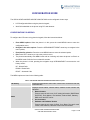
FIRMWARE VERSION 1.0.1.10 ............................................................................................................ 8
FIRMWARE VERSION 1.0.1.14 ............................................................................................................ 8
FIRMWARE VERSION 1.0.2.4 .............................................................................................................. 8
FIRMWARE VERSION 1.0.2.6 .............................................................................................................. 8
WELCOME ................................................................................................. 9
PRODUCT OVERVIEW ............................................................................ 12
FEATURE HIGHTLIGHTS (GXP1610/GXP1620/GXP1625/GXP1628) .............................................. 12
FEATURE HIGHTLIGHTS (GXP1630) ................................................................................................ 12
GXP1610/GXP1620/GXP1625/GXP1628/GXP1630 TECHNICAL SPECIFICATIONS ...................... 13
CONFIGURATION GUIDE........................................................................ 17
CONFIGURATION VIA KEYPAD ......................................................................................................... 17
CONFIGURATION VIA WEB BROWSER ........................................................................................... 21
DEFINITIONS ...................................................................................................................................... 22
STATUS PAGE DEFINATIONS .................................................................................................... 22
ACCOUNT PAGE DEFINATIONS ................................................................................................ 23
SETTINGS PAGE DEFINATIONS ................................................................................................ 29
NETWORK PAGE DEFINITIONS ................................................................................................. 36
MAINTENANCE PAGE DEFINITIONS ......................................................................................... 37
PHONEBOOK PAGE DEFINITIONS ............................................................................................ 40
NAT SETTINGS ................................................................................................................................... 42
WEATHER UPDATE ............................................................................................................................ 42
PUBLIC MODE .................................................................................................................................... 43
EDITING CONTACTS AND CLICK-TO-DIAL ...................................................................................... 43
SAVING THE CONFIGURATION CHANGES...................................................................................... 45
REBOOTING FROM REMOTE LOCATIONS...................................................................................... 45
UPGRADING AND PROVISIONING ........................................................ 46
GXP1610/GXP1620/GXP1625/GXP1628/
GXP1630 Administration Guide
Page 1 of 52
UPGRAGE VIA KEYPAD MENU ......................................................................................................... 46
UPGRAGE VIA WEB GUI .................................................................................................................... 46
NO LOCAL TFTP/HTTP SERVERS .................................................................................................... 47
CONFIGURATION FILE DOWNLOAD ................................................................................................ 47
RESTORE FACTORY DEFAULT SETTINGS ........................................... 49
EXPERIENCING THE GXP1610/GXP1620/GXP1625/GXP1628/GXP1630 ...... 49
GXP1610/GXP1620/GXP1625/GXP1628/
GXP1630 Administration Guide
Page 2 of 52
Table of Tables
GXP1610/GXP1620/GXP1625/GXP1628/GXP1630 Administration Guide
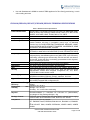
Table 1: GXP1610 Technical Specifications ................................................................................................ 13
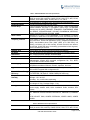
Table 2: GXP1620/GXP1625 Technical Specifications ............................................................................... 14
Table 3: GXP1628 Technical Specifications ................................................................................................ 14
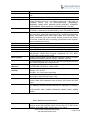
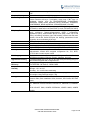
Table 4: GXP1630 Technical Specifications……………………………………………………………...…….. 16
Table 5: GXP1610/GXP1620/GXP1625/GXP1628/1630 Menu Options .................................................... 17
GXP1610/GXP1620/GXP1625/GXP1628/
GXP1630 Administration Guide
Page 3 of 52
Table of Figures
GXP1610/GXP1620/GXP1625/GXP1628/GXP1630 Administration Guide
Figure 1: Keypad MENU Flow .................................................................................................................... 20
Figure 2: Web Service ................................................................................................................................. 42
Figure 3: Web GUI- Phonebook->Contacts ................................................................................................ 44
Figure 4: Click-to-Dial.................................................................................................................................. 45
GXP1610/GXP1620/GXP1625/GXP1628/
GXP1630 Administration Guide
Page 4 of 52
DOCUMENT PURPOSE
This document describes how to configure GXP1610/GXP1620/GXP1625/GXP1628/GXP1630 features via
phone’s LCD menu and Web GUI menu. The intended audiences of this document are phone administrators.
To learn the basic functions of GXP1610/GXP1620/GXP1625/GXP1628/GXP1630, please visit
http://www.grandstream.com/support to download the latest “GXP16XX series User Guide”.
GXP1610/GXP1620/GXP1625/GXP1628/
GXP1630 Administration Guide
Page 5 of 52
GUI INTERFACE EXAMPLES
1. Screenshot of Login Page
2. Screenshots of Status Pages
3. Screenshots of Accounts Pages
4. Screenshots of Settings Pages
5. Screenshots of Network Pages
6. Screenshots of Maintenance Pages
7. Screenshots of Phonebook Pages
GXP1610/GXP1620/GXP1625/GXP1628/
GXP1630 Administration Guide
Page 6 of 52
GNU GPL INFORMATION
GXP1610/GXP1620/GXP1625/GXP1628/GXP1630 firmware contains third-party software licensed under
the GNU General Public License (GPL). Grandstream uses software under the specific terms of the GPL.
Please see the GNU General Public License (GPL) for the exact terms and conditions of the license.
Grandstream GNU GPL related source code can be downloaded from Grandstream web site from:
http://www.grandstream.com/support/faq/gnu-general-public-license/gnu-gpl-information-download.
GXP1610/GXP1620/GXP1625/GXP1628/
GXP1630 Administration Guide
Page 7 of 52
CHANGE LOG
This
section
documents
significant
changes
from
previous
versions
of
user
manuals
for
GXP1610/GXP1620/GXP1625/GXP1628/GXP1630. Only major new features or major document updates
are listed here.
FIRMWARE VERSION 1.0.1.10
This is the initial version.
FIRMWARE VERSION 1.0.1.14
New features:
Backup Outbound Proxy
Enable OPTIONS Keep Alive
OPTIONS Keep Alive Interval
OPTIONS Keep Alive Max Lost
FIRMWARE VERSION 1.0.2.4
New features:
Ignore Alert-Info Header
Validate Certification Chain
Bypass Dial Plan through Call History and Directories
FIRMWARE VERSION 1.0.2.6
New features:
Enabled/Disabled Broadsoft Call Park subscribe
Separate Firmware/Config’s upgrade via, HTTP/HTTPS username, and HTTP/HTTPS password
FIRMWARE VERSION 1.0.2.22
New features:
Added DHCP Option 125 support
GXP1610/GXP1620/GXP1625/GXP1628/
GXP1630 Administration Guide
Page 8 of 52
WELCOME
Thank you for purchasing Grandstream Small Business IP phone GXP1610/GXP1620/GXP1625/
GXP1628/GXP1630. GXP16xx series is a next generation small-to-medium business IP phone: the
GXP1620/GXP1625 features 2 lines with 2 SIP accounts, superior HD wideband audio, 132 x 48 backlit
graphical LCD; the GXP1610 supports 2 lines with 1 SIP account, 132 x 48 graphical LCD; GXP1630
supports 3 lines with 3 SIP accounts, 132x64 backlit graphical LCD.
The GXP1610/GXP1620/
GXP1625/GXP1628/GXP1630 delivers rich features of 3 XML programmable context-sensitive softkeys,
dual network ports with PoE (GXP1625/GXP1628/GXP1630 only), EHS (Electronic Hook-Switch) with
Plantronics headsets, 3-ways conference on GXP1610/GXP1620/ GXP1625/GXP1628 and up to 4-ways
conference on GXP1630, superb full-duplex hands-free speakerphone with advanced acoustic echo
cancellation, advanced security protection for privacy, and compatible with Grandstream UCM Features. It
is a perfect choice for small-to-medium businesses looking for a high quality, feature rich IP phone with
affordable cost.
GXP1610/GXP1620/GXP1625/GXP1628/
GXP1630 Administration Guide
Page 9 of 52
Caution:
Changes or modifications to this product not expressly approved by Grandstream, or operation of this
product in any way other than as detailed by this User Manual, could void your manufacturer warranty.
Warning:
Please do not use a different power adaptor with the GXP1610/GXP1620/GXP1625/GXP1628/GXP1630
as it may cause damage to the products and void the manufacturer warranty.
This document is subject to change without notice. The latest electronic version of this user manual is
available for download here:
http://www.grandstream.com/support
Reproduction or transmittal of the entire or any part, in any form or by any means, electronic or print, for
any purpose without the express written permission of Grandstream Networks, Inc is not permitted.
FCC Caution:
Any Changes or modifications not expressly approved by the party responsible for compliance could void
the user's authority to operate the equipment. This device complies with part 15 of the FCC Rules.
Operation is subject to the following two conditions: (1) This device may not cause harmful interference,
and (2) this device must accept any interference received, including interference that may cause undesired
operation.
Note: This equipment has been tested and found to comply with the limits for a Class B digital device,
pursuant to part 15 of the FCC Rules. These limits are designed to provide reasonable protection against
harmful interference in a residential installation. This equipment generates uses and can radiate radio
frequency energy and, if not installed and used in accordance with the instructions, may cause harmful
interference to radio communications. However, there is no guarantee that interference will not occur in a
particular installation. If this equipment does cause harmful interference to radio or television reception,
which can be determined by turning the equipment off and on, the user is encouraged to try to correct the
interference by one or more of the following measures:
- Reorient or relocate the receiving antenna.
- Increase the separation between the equipment and receiver.
- Connect the equipment into an outlet on a circuit different from that to which the receiver is connected.
- Consult the dealer or an experienced radio/TV technician for help.
GXP1610/GXP1620/GXP1625/GXP1628/
GXP1630 Administration Guide
Page 10 of 52
GXP1610/GXP1620/GXP1625/GXP1628/
GXP1630 Administration Guide
Page 11 of 52
PRODUCT OVERVIEW
FEATURE HIGHTLIGHTS (GXP1610/GXP1620/GXP1625/GXP1628)
132*48 pixel backlit graphical LCD display(GXP1610 doesn’t support backlit)
2 dual-color line keys, 3 XML programmable context-sensitive soft keys, 8 BLF keys (GXP1628
only), 3-way conference, multi-language support
HD wideband audio (GXP1620/GXP1625/GXP1628 only), superb full-duplex hands-free
speakerphone with advanced acoustic echo cancellation and excellent double-talk performance
Large phonebook (up to 500 contacts) and call history (up to 200 records)
Automated personal information service (e.g., local weather, etc.), personalized music ring
tone/ring back tone, flexible customizable screen content & format using XML, and advanced Web
and enterprise applications, local weather service
Dual switched 10/100 Mbps ports on GXP1610/GXP1620/GXP1625, dual switched auto-sensing
10/100/1000 Mbps Ethernet ports on GXP1628, integrated PoE on GXP1625/GXP1628
Automated provisioning using TR-069 or encrypted XML configuration file, SRTP and TLS for
advanced security protection, 802.1x for media access control
Perfectly compatible with Grandstream UCM Features
Innovative UI design (easy and useable multi-language support )
Use with Grandstream’s UCM61xx series IP PBX appliance for Zero-Config provisioning, 1-touch
call recording and more
FEATURE HIGHTLIGHTS (GXP1630)
132*64 pixel backlit graphical LCD display
3 dual-color line keys, 3 XML programmable context-sensitive soft keys, 8 BLF keys, 4-way
conference, multi-language support
HD wideband audio, superb full-duplex hands-free speakerphone with advanced acoustic echo
cancellation and excellent double-talk performance
Large phonebook (up to 500 contacts) and call history (up to 200 records)
Automated personal information service (e.g., local weather, etc.), personalized music ring
tone/ring back tone, flexible customizable screen content & format using XML, and advanced Web
and enterprise applications, local weather service
Dual switched auto-sensing 10/100/1000 Mbps Ethernet ports with integrated PoE
Automated provisioning using TR-069 or encrypted XML configuration file, SRTP and TLS for
advanced security protection, 802.1x for media access control
Perfectly compatible with Grandstream UCM Features
Innovative UI design (easy and useable multi-language support )
GXP1610/GXP1620/GXP1625/GXP1628/
GXP1630 Administration Guide
Page 12 of 52
Use with Grandstream’s UCM61xx series IP PBX appliance for Zero-Config provisioning, 1-touch
call recording and more
GXP1610/GXP1620/GXP1625/GXP1628/GXP1630 TECHNICAL SPECIFICATIONS
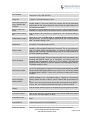
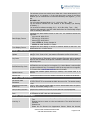
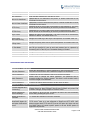
Table 1: GXP1610 Technical Specifications
Protocols/Standards
Network Interfaces
Graphic Display
Feature Keys
Voice Codecs
Telephony Features
Headset Jack
Base Stand
QoS
Security
Multi-language
Upgrade/Provisioning
Power & Green Energy
Efficiency
Temperature
and
Humidity
Physical
Package Content
Compliance
SIP RFC3261, TCP/IP/UDP, RTP/RTCP, HTTP/HTTPS, ARP/RARP, ICMP,
DNS (A record, SRV, NAPTR), DHCP, PPPoE, SSH, TFTP, NTP, STUN,
SIMPLE, LLDP-MED, LDAP, TR-069, 802.1x, TLS, SRTP
Dual switched auto-sensing 10/ 100 Mbps Ethernet ports
132*48 LCD display
2 line keys with dual-color LED and 1 SIP account.3 XML programmable
context sensitive soft keys. 5 (navigation, menu) keys. 13 dedicated
function keys for PAGE/INTERCOM, PHONEBOOK, MESSAGE, HOME,
HOLD, RECORD, MUTE, HEADSET, TRANSFER, CONFERENCE, SEND
and REDIAL, SPEAKERPHONE, VOLUME
Support for G.711µ/a, G.722 (wide-band), G.723(pending),G.726-32,
G.729 A/B, in-band and out-of-band DTMF (In audio, RFC2833, SIP INFO)
Hold, transfer, forward (unconditional/no-answer/busy), 3-way conference,
call park/pickup, downloadable phone book (XML, LDAP, up to 500 items),
call waiting, call history(up to 200 records), off-hook auto dial, auto answer,
click-to-dial, flexible dial plan, hot desking, personalized music ringtones,
server redundancy & fail-over
RJ9 headset jack (allowing EHS with Plantronics headsets)
Yes, allow 2 angle positions available, Wall Mountable
Layer 2 QoS (802.1Q, 802.1P) and Layer 3 (ToS, DiffServ, MPLS) QoS
User and administrator level access control, MD5 and MD5-sess based
authentication, 256-bit AES encrypted configuration file, TLS, SRTP,
HTTPS, 802.1x media access control
English, German, Italian, French, Spanish, Portuguese, Russian, Croatian,
simplified and traditional Chinese, Korean, Japanese, and more
Firmware upgrade via TFTP / HTTP / HTTPS, mass provisioning using TR069 or AES encrypted XML configuration file
Universal Power Supply Input 100-240VAC 50-60Hz; Output +5VDC,
600mA
Operation: 0°C to 40°C
Storage: -10°C to 60°C
Humidity: 10% to 90% Non-condensing
Dimension:209mm(L)x 184.5mm(W)x 76.2mm(H) (with handset)
Unit Weight: 0.74kg Package Weight: 1.1kg
GXP1610 phone, handset with cord, base stand, universal power supply,
network cable, Quick Installation Guide, brochure, GPL license
FCC: Part 15 (CFR 47) Class B
CE : EN55022 Class B, EN55024, EN61000-3-2, EN61000-3-3, EN609501
RCM: AS/ACIF S004; AS/NZS CISPR22/24; AS/NZS 60950; AS/NZS
60950.1
GXP1610/GXP1620/GXP1625/GXP1628/
GXP1630 Administration Guide
Page 13 of 52
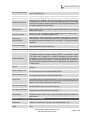
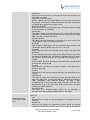
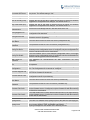
Table 2: GXP1620/GXP1625 Technical Specifications
Protocols/Standards
Network Interfaces
Graphical Display
Feature Keys
Voice Codecs
Telephony Features
Headset Jack
HD Audio
Base Stand
QoS
Security
Multi-language
Upgrade/Provisioning
SIP RFC3261, TCP/IP/UDP, RTP/RTCP, HTTP/HTTPS, ARP/RARP, ICMP,
DNS (A record, SRV, NAPTR), DHCP, PPPoE, SSH, TFTP, NTP, STUN,
SIMPLE, LLDP-MED, LDAP, TR-069, 802.1x, TLS, SRTP
Dual switched 10/ 100 Mbps ports, integrated PoE (GXP1625 only)
132*48 pixel backlit graphical LCD display
2 line keys with dual-color LED and 2 SIP account. 3 XML programmable
context sensitive soft keys. 5 (navigation, menu) keys. 13 dedicated
function keys for MUTE, HEADSET, TRANSFER, CONFERENCE, SEND
and REDIAL, SPEAKERPHONE, VOLUME, PHONEBOOK, MESSAGE,
HOLD, PAGE/INTERCOM, RECORD, HOME
Support for G.711µ/a, G.722 (wide-band), G.723 (pending), G.726-32,
G.729 A/B, in-band and out-of-band DTMF (In audio, RFC2833, SIP INFO)
Hold, transfer, forward (unconditional/no-answer/busy), call park/pickup, 3way conference, shared-call-appearance (SCA) / bridged-line-appearance
(BLA), downloadable phone book (XML, LDAP, up to 500 items), call
waiting, call history (up to 200 records), off-hook auto dial, auto answer,
click-to-dial, flexible dial plan, hot desking, personalized music ringtones,
server redundancy & fail-over.
RJ9 headset jack (allowing EHS with Plantronics headsets)
Yes, HD handset and speakerphone with support for wideband audio
Yes, 2 angle positions available, Wall Mountable
Layer 2 QoS (802.1Q, 802.1P) and Layer 3 (ToS, DiffServ, MPLS) QoS
User and administrator level access control, MD5 and MD5-sess based
authentication, 256-bit AES encrypted configuration file, TLS, SRTP,
HTTPS, 802.1x media access control
English, German, Italian, French, Spanish, Portuguese, Russian, Croatian,
simplified and traditional Chinese, Korean, Japanese, and more
Firmware upgrade via TFTP / HTTP / HTTPS, mass provisioning using TR069 or AES encrypted XML configuration file
Power & Green Energy
Efficiency
Universal Power Supply Input 100-240VAC 50-60Hz; Output +5VDC, 600mA
Temperature
Humidity
Operation: 0°C to 40°C
Storage: -10°C to 60°C
Humidity: 10% to 90% Non-condensing
and
Physical
Package Content
Compliance
PoE IEEE802.3 af Class 2, 3.84W-6.49W (GXP1625 only)
Dimension: 209mm(L)x 184.5mm(W)x 76.2mm(H) (with handset)
Unit Weight: 0.73kg Package Weight: 1.1kg
GXP1620/GXP1625 phone, handset with cord, base stand, universal
power supply, network cable, Quick Installation Guide, brochure, GPL
license
FCC: Part 15 (CFR 47) Class B
CE : EN55022 Class B, EN55024, EN61000-3-2, EN61000-3-3, EN609501
RCM: AS/ACIF S004; AS/NZS CISPR22/24; AS/NZS 60950; AS/NZS
60950.1
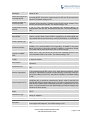
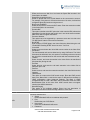
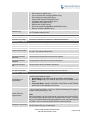
Table 3: GXP1628 Technical Specifications
Protocols/Standards
SIP RFC3261, TCP/IP/UDP, RTP/RTCP, HTTP/HTTPS, ARP/RARP, ICMP,
DNS (A record, SRV, NAPTR), DHCP, PPPoE, SSH, TFTP, NTP, STUN,
GXP1610/GXP1620/GXP1625/GXP1628/
GXP1630 Administration Guide
Page 14 of 52
Network Interfaces
Graphical Display
Feature Keys
Voice Codecs
Telephony Features
Headset Jack
HD Audio
Base Stand
QoS
Security
Multi-language
Upgrade/Provisioning
SIMPLE, LLDP-MED, LDAP, TR-069, 802.1x, TLS, SRTP
Dual switched auto-sensing 10/100/1000 Mbps Ethernet ports, integrated
PoE
132 x 48 backlit graphical LCD display
2 line keys with dual-color LED and 2 SIP account. 3 XML programmable
context sensitive soft keys. 5 (navigation, menu) keys. 8 BLF keys. 13
dedicated function keys for PAGE/INTERCOM, PHONEBOOK,
MESSAGE, HOME, HOLD, RECORD, MUTE, HEADSET, TRANSFER,
CONFERENCE, SEND and REDIAL, SPEAKERPHONE, VOLUME
Support for G.711µ/a, G.722 (wide-band), G.723 (pending), G.726-32,
G.729 A/B, in-band and out-of-band DTMF (In audio, RFC2833, SIP INFO)
Hold, transfer, forward (unconditional/no-answer/busy), call park/pickup, 3way conference, shared-call-appearance (SCA) / bridged-line-appearance
(BLA), downloadable phone book (XML, LDAP, up to 500 items), call
waiting, call history (up to 200 records), off-hook auto dial, auto answer,
click-to-dial, flexible dial plan, hot desking, personalized music ringtones,
server redundancy & fail-over.
RJ9 headset jack (allowing EHS with Plantronics headsets)
Yes, HD handset and speakerphone with support for wideband audio
Yes, 2 angle positions available, Wall Mountable
Layer 2 QoS (802.1Q, 802.1P) and Layer 3 (ToS, DiffServ, MPLS) QoS
User and administrator level access control, MD5 and MD5-sess based
authentication, 256-bit AES encrypted configuration file, TLS, SRTP,
HTTPS, 802.1x media access control
English, German, Italian, French, Spanish, Portuguese, Russian, Croatian,
simplified and traditional Chinese, Korean, Japanese, and more
Firmware upgrade via TFTP / HTTP / HTTPS, mass provisioning using TR069 or AES encrypted XML configuration file
Power & Green Energy
Efficiency
Universal Power Supply Input 100-240VAC 50-60Hz; Output +5VDC, 600mA
Temperature
Humidity
Operation: 0°C to 40°C
Storage: -10°C to 60°C
Humidity: 10% to 90% Non-condensing
Dimension: 220.5mm (L) x 192.5mm (W) x 76.0mm (H) (with handset)
Unit weight: 0.8kg; Package weight: 1.2kg
GXP1628 phone, handset with cord, base stand, universal power supply,
network cable, Quick Installation Guide, brochure, GPL license, BLF label
cards
FCC: Part 15 (CFR 47) Class B
CE : EN55022 Class B, EN55024, EN61000-3-2, EN61000-3-3, EN609501
RCM: AS/ACIF S004; AS/NZS CISPR22/24; AS/NZS 60950; AS/NZS
60950.1
and
Physical
Package Content
Compliance
PoE IEEE802.3 af Class 2, 3.84W-6.49W
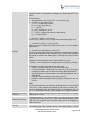
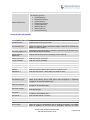
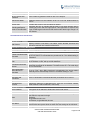
Table 4: GXP1630 Technical Specifications
Protocols/Standards
SIP RFC3261, TCP/IP/UDP, RTP/RTCP, HTTP/HTTPS, ARP/RARP, ICMP,
DNS (A record, SRV, NAPTR), DHCP, PPPoE, SSH, TFTP, NTP, STUN,
SIMPLE, LLDP-MED, LDAP, TR-069, 802.1x, TLS, SRTP
GXP1610/GXP1620/GXP1625/GXP1628/
GXP1630 Administration Guide
Page 15 of 52
Network Interfaces
Graphical Display
Feature Keys
Voice Codecs
Telephony Features
Headset Jack
HD Audio
Base Stand
QoS
Security
Multi-language
Upgrade/Provisioning
Dual switched auto-sensing 10/100/1000 Mbps Ethernet ports, integrated
PoE
132 x 64 backlit graphical LCD display
3 line keys with dual-color LED and 3 SIP account. 3 XML programmable
context sensitive soft keys. 5 (navigation, menu) keys. 8 BLF keys. 13
dedicated function keys for PAGE/INTERCOM, PHONEBOOK,
MESSAGE, HOME, HOLD, RECORD, MUTE, HEADSET, TRANSFER,
CONFERENCE, SEND and REDIAL, SPEAKERPHONE, VOLUME
Support for G.711µ/a, G.722 (wide-band), G.723 (pending), G.726-32,
G.729 A/B, in-band and out-of-band DTMF (In audio, RFC2833, SIP INFO)
Hold, transfer, forward (unconditional/no-answer/busy), call park/pickup, 4ways conference, shared-call-appearance (SCA) / bridged-lineappearance (BLA), downloadable phone book (XML, LDAP, up to 500
items), call waiting, call history (up to 200 records), off-hook auto dial, auto
answer, click-to-dial, flexible dial plan, hot desking, personalized music
ringtones, server redundancy & fail-over.
RJ9 headset jack (allowing EHS with Plantronics headsets)
Yes, HD handset and speakerphone with support for wideband audio
Yes, 2 angle positions available, Wall Mountable
Layer 2 QoS (802.1Q, 802.1P) and Layer 3 (ToS, DiffServ, MPLS) QoS
User and administrator level access control, MD5 and MD5-sess based
authentication, 256-bit AES encrypted configuration file, TLS, SRTP,
HTTPS, 802.1x media access control
English, German, Italian, French, Spanish, Portuguese, Russian, Croatian,
simplified and traditional Chinese, Korean, Japanese, and more
Firmware upgrade via TFTP / HTTP / HTTPS, mass provisioning using TR069 or AES encrypted XML configuration file
Power & Green Energy
Efficiency
Universal Power Supply Input 100-240VAC 50-60Hz; Output +5VDC, 600mA
Temperature
Humidity
Operation: 0°C to 40°C
Storage: -10°C to 60°C
Humidity: 10% to 90% Non-condensing
Dimension: 220.5mm (L) x 192.5mm (W) x 76.0mm (H) (with handset)
Unit weight: 0.8kg; Package weight: 1.2kg
GXP1630 phone, handset with cord, base stand, universal power supply,
network cable, Quick Installation Guide, brochure, GPL license, BLF label
cards
FCC: Part 15 (CFR 47) Class B
CE : EN55022 Class B, EN55024, EN61000-3-2, EN61000-3-3, EN609501
RCM: AS/ACIF S004; AS/NZS CISPR22/24; AS/NZS 60950; AS/NZS
60950.1
Physical
Package Content
Compliance
and
PoE IEEE802.3 af Class 2, 3.84W-6.49W
GXP1610/GXP1620/GXP1625/GXP1628/
GXP1630 Administration Guide
Page 16 of 52
CONFIGURATION GUIDE
The GXP1610/GXP1620/GXP1625/GXP1628/GXP1630 can be configured via two ways:
LCD Configuration Menu using the phone's keypad;
Web GUI embedded on the phone using PC's web browser.
CONFIGURATION VIA KEYPAD
To configure the LCD menu using phone's keypad, follow the instructions below:
Enter MENU options. When the phone is in idle, press the round MENU button to enter the
configuration menu;
Navigate in the menu options. Press the UP/DOWN/LEFT/RIGHT arrow keys to navigate in the
menu options;
Enter/Confirm selection. Press the round MENU button to enter the selected option;
Exit. Press LEFT arrow key to exit to the previous menu;
The phone automatically exits MENU mode with an incoming call, when the phone is off hook or
the MENU mode if left idle for more than 60 seconds.
When the phone is in idle, pressing the navigation keys UP/DOWN/RIGHT can access the call
history entries:
UP - Missed Calls
DOWN - Dialed Calls
RIGHT - Answered Calls
The MENU options are listed in the following table.
Table 5: GXP1610/GXP1620/GXP1625/GXP1628/GXP1630 Menu Options
Call History
Displays answeredcalls, dialed calls, missed calls, transferred calls and
forwarded calls.
Displays account status, network status, software version number and
Hardware
Network status.
Press to enter the sub menu for IP setting information (DHCP/Static
IP/PPPoE), IPv4 address, IPv6 address, Subnet Mask, Gateway,
DNS server and NTP server.
Account status.
Software and Hardware Version
Press to enter the sub menu for Boot, Core, Base, Prog and Locale
version, MAC address, Hardware version and P/N number.
Status
GXP1610/GXP1620/GXP1625/GXP1628/
GXP1630 Administration Guide
Page 17 of 52
Phonebook sub menu includes the following options:
Phonebook
Local Phonebook
Displays phonebook. Users could add, edit, search and delete
contacts, or download phonebook XML to the phone. When doing
phonebook search, user can only search ASCII characters.
Local Group
Displays phonebook group.
Note: Besides 3 embedded groups: Family, Friends and Work, user
can create, edit and delete your own new groups. GXP phone allows
at most 7 customized groups.
Broadsoft Phonebook
LDAP Directory
Configures LDAP directory options, displays LDAP directory by
searching. LDAP search does not support entering Non-ASCII
characters.
Instant Messages
Displays received instant messages.
Direct IP Call
Makes direct IP call.
Preference sub menu includes the following options:
Preference
Do Not Disturb
Enables/disables Do Not Disturb on the phone.
Forward Call
Defines the call forward type and destination number for account 1
or account 2.
Ring Tone
Configures different ring tones for incoming call.
Ring Volume
Adjusts ring volume by pressing left/right arrow key.
LCD Contrast
Adjusts LCD contrast by pressing left/right arrow key.
LCD Brightness(Not applicable to GXP1610)
Adjusts LCD brightness of idle state and active state by pressing
left/right arrow key.
Download SRC XML
Triggers the phone to download the XML idle screen file immediately.
The XML idle screen server path and downloading method need to
be set up correctly from Web GUI first.
Erase Custom SCR
Erases custom XML idle screen previously loaded on the phone.
After erasing it, the phone will show default idle screen.
Display Language
Selects the language to be displayed on the phone's LCD. Users
could select Automatic for local language based on IP location if
available.
GXP1610/GXP1620/GXP1625/GXP1628/
GXP1630 Administration Guide
Page 18 of 52
Date Time
Configures time zone and NTP server on the phone.
Star Key Lock
Turns on/off keypad lock feature and configures keypad lock
password.
Config sub menu includes the following options:
SIP
Configures SIP Proxy, Outbound Proxy, SIP User ID, SIP Auth ID,
SIP Password, SIP Transport and Audio information to register SIP
account on the phone.
Upgrade
Configures firmware server and config server for upgrading and
provisioning the phone.
Factory Reset
Resets the phone to factory default settings.
Layer 2 QoS
Configures802.1Q/VLAN Tag and priority value.
Headset Type
Selects the headset type from normal and Plantronics EHS.
Config
Factory Functions
Factory Functions sub menu includes the following options:
Audio Loopback
Speak to the phone using speaker/handset/headset. If you can hear
your voice, your audio is working fine. Press Menu button to exit
audio loopback mode.
Network
Call Features
Voice Mails
UCM Detect
Reboot
Diagnostic Mode
All LEDs will light up. Press any key (except MENU key) on the
keypad to display the button name in the LCD. Lift and put back the
handset or press Menu button to exit diagnostic mode.
Keyboard Diagnostic
Press all the available keys on the phone. The LCD will display the
name for the keys to be pressed to finish the keyboard diagnostic
mode.
Selects IP mode (DHCP/Static IP/PPPoE);Configures PPPoE account ID
and password; Configures IP address, Netmask, Gateway, DNS Server
1 and DNS Server 2; Configures 802.1X mode.
Configures call forward features for Forward All, Forward Busy, Forward
No Answer and No Answer Timeout.
Displays voicemail message information in the format below:
new messages/all messages (urgent messages/all urgent messages)
UCM Server List
Displays connected UCM server List.
Input Server IP Manually
Specifies Protocol, IP and Port of the target UCM server
Reboots the phone
The following picture shows the keypad MENU configuration flow.
GXP1610/GXP1620/GXP1625/GXP1628/
GXP1630 Administration Guide
Page 19 of 52
MENU
Call History
Status
Phone Book
LDAP
Directory
Instant
Messages
Direct IP Call
Answered Calls
Dialed Calls
Missed Calls
Transferred Calls
Forwarded Calls
Clear All
Broadsoft Call Log
Back
Local Phonebook
Local Group
Broadsoft Phonebook
Search
LDAP Configuration
Back
Do Not Disturb
Forward Call
Ring Tone
Ring Volume
LCD Contrast
LCD Brightness
Download SCR XML
Erase Custom SCR
Display Language
Date Time
Star Key Lock
Preference
Config
Factory
Functions
Network
Call Features
Voice Mails
UCM Detect
Reboot
SIP
Upgrade
Factory Reset
Layer 2 QoS
Headset Type
Back
Audio Loopback
Diagnostic Mode
Keyboard Diagnostic
Back
IP Setting
PPPoE Settings
IP
Netmask
Gateway
DNS Server 1
DNS Server 2
802.1X
Back
Exit
Account X
None
New Entry
Search
Back
Family
Friends
Work
New Group
Back
Server Address
Port
Base
User Name
Password
...
Enable DND
Disable DND
Back
Default Ring
Ring1
Ring2
…
NTP Server
DHCP override NTP
Time Zone
…
Account
SIP Proxy
Outbound Proxy
SIP User ID
SIP Auth ID
…
Firmware Server
Config Server
Upgrade Via
Back
802.1Q/VLAN Tag
Priority value
Reset Vlan Config
Back
Forward All
Forward Busy
Forward No Answer
No Answer Timeout
Figure 1: Keypad MENU Flow
GXP1610/GXP1620/GXP1625/GXP1628/
GXP1630 Administration Guide
Page 20 of 52
CONFIGURATION VIA WEB BROWSER
The GXP1610/GXP1620/GXP1625/GXP1628/GXP1630 embedded Web server responds to HTTP/HTTPS
GET/POST requests. Embedded HTML pages allow a user to configure the IP phone through a Web
browser such as Microsoft’s IE, Mozilla Firefox and Google Chrome.
To access the GXP1610/GXP1620/GXP1625/GXP1628/GXP1630 Web GUI:
1. Connect the computer to the same network as the phone;
2. Make sure the phone is turned on and shows its IP address. You may check the IP address on LCD;
3. Open a Web browser on your computer;
4. Enter the phone’s IP address in the address bar of the browser;
5. Enter the administrator’s login and password to access the Web Configuration Menu.
Note:
The computer has to be connected to the same sub-network as the phone. This can be easily done by
connecting the computer to the same hub or switch as the phone connected to. In absence of a
hub/switch (or free ports on the hub/switch), please connect the computer directly to the PC port on the
back of the phone.
If the phone is properly connected to a working Internet connection, the IP address of the phone will
display in MENU->Status->Network Status. This address has the format: xxx.xxx.xxx.xxx, where xxx
stands for a number from 0-255. Users will need this number to access the Web GUI. For example, if
the phone has IP address 192.168.40.154, please enter "http://192.168.40.154"in the address bar of
the browser.
There are two default passwords for the login page:
User Level
End User Level
User
user
Password
123
Administrator Level
admin
admin
Web Pages Allowed
Only Status page, Basic Settings in
Advanced Settings page and some
settings in maintenance page.
Browse all pages
The password is case sensitive with maximum length of 25 characters.
When changing any settings, always SUBMIT them by pressing the SAVE button on the bottom of the
page. After submitting the changes in all the Web GUI pages, reboot the phone to have the changes
take effect if necessary. All the options under Basic Setting and Account Setting, and most of the options
under Advanced Settings do not require reboot after submitting the changes. Under Advanced Setting,
the parameters on network configuration require reboot after update.
GXP1610/GXP1620/GXP1625/GXP1628/
GXP1630 Administration Guide
Page 21 of 52
DEFINITIONS
This section describes the options in theGXP1610/GXP1620/GXP1625/GXP1628/GXP1630 Web GUI. As
mentioned, you can log in as an administrator or an end user.
Status: Displays the Account status, Network status, and System Info of the phone.
Account: To configure the SIP account.
Advanced Settings: To configure Call features, Time settings, Web services, Programmable keys
and etc.
Maintenance: To configure Network settings, Web/SSH Access, Upgrading and provisioning,
Language, Phonebook and etc.
STATUS PAGE DEFINATIONS
Status -> Account Status
Account x
Account index.
SIP User ID
Displays the configured SIP User ID.
SIP Server
Displays the configured SIP Server address.
SIP Registration
Displays SIP registration status YES/NO.
Status -> Network Status
Global unique ID of device, in HEX format. The MAC address will be used for
MAC Address
provisioning and can be found on the label coming with original box and on
the label located on the back of the device.
IP Setting
DHCP, Static IP or PPPoE.
IPv4 Address
The IPv4 address obtained on the phone.
IPv6 Address
The IPv6 address obtained on the phone.
Subnet Mask
The subnet mask obtained on the phone.
Gateway
The gateway address obtained on the phone.
DNS Server 1
The DNS server address 1.
DNS Server 2
The DNS server address 2.
PPPoE Link Up
PPPoE connection status.
NAT Type
NAT Type
NAT Traversal
Display the NAT traversal status of Account 1 and Account 2.
Status -> System Info
Product Model
Product model of the phone.
Part Number
Product part number.
Software Version
Boot Version;
Core Version;
Base Version;
Program Version. This is the main firmware release number, which is
always used for identifying the software system of the phone;
Locale Version. This is the version of localization language package;
Recovery Version.
GXP1610/GXP1620/GXP1625/GXP1628/
GXP1630 Administration Guide
Page 22 of 52
IP Geographic
Information
System Time
System Status
Core Dump
City. Displays the city name.
Language. Displays current language been used.
Timezone. Displays current time zone.
System up time. Displays system up time since the last reboot.
System time. Displays current system time on the phone system.
GUI and Phone service status.
Core dump file that could be downloaded for troubleshooting purpose.
ACCOUNT PAGE DEFINATIONS
The GXP1610 has one account, GXP1620/GXP1625/GXP1628 has two accounts, and GXP1630 has three
accounts that can be configured to accommodate independent SIP accounts. Every SIP account has an
individual configuration page.
Account x -> General Settings
Account Active
This field indicates whether the account is active. The default setting is "Yes".
Account Name
The name associated with each account to be displayed on the LCD.
The URL or IP address, and port of the SIP server. This is provided by your
SIP Server
VoIP service provider (ITSP).
The URL or IP address, and port of the SIP server. This will be used when
Secondary SIP Server
the primary SIP server fails.
IP address or Domain name of the Primary Outbound Proxy, Media Gateway,
or Session Border Controller. It's used by the phone for Firewall or NAT
Outbound Proxy
penetration in different network environments. If a symmetric NAT is
detected, STUN will not work and ONLY an Outbound Proxy can provide a
solution.
Backup Outbound
Secondary outbound proxy which will be used when the primary proxy
Proxy
cannot be connected.
User account information, provided by your VoIP service provider (ITSP). It’s
SIP User ID
usually in the form of digits similar to phone number or actually a phone
number.
SIP service subscriber’s Authenticate ID used for authentication. It can be
SIP Authentication ID
identical to or different from the SIP User ID.
The account password required for the phone to authenticate with the ITSP
SIP Authentication
(SIP) server before the account can be registered. After it is saved, this will
Password
appear as hidden for security purpose.
The SIP server subscriber’s name (optional) that will be used for Caller ID
Name
display.
This parameter allows you to access voice messages by pressing the
Voice Mail UserID
MESSAGE button on the phone. This ID is usually the VM portal access
number. For example, in Asterisk server, 8500 could be used.
Account x -> Network Settings
This parameter controls how the Search Appliance looks up IP addresses
for hostnames. There are four modes: A Record, SRV, NATPTR/SRV, and
DNS Mode
Use Configured IP. The default setting is “A Record”. If the user wishes to
locate the server by DNS SRV, the user may select “SRV” or
“NATPTR/SRV”. If “Use Configured IP” is selected, please fill in the three
GXP1610/GXP1620/GXP1625/GXP1628/
GXP1630 Administration Guide
Page 23 of 52
fields below:
Primary IP: The primary IP address where the phone sends DNS query
to;
Backup IP 1;
Backup IP 2.
If SIP server is configured as domain name, phone will not send DNS query,
but use “Primary IP” or “Backup IP x” to send SIP message if at least one of
them are not empty. Phone will try to use “Primary IP” first. After 3 tries
without any response, it will switch to “Backup IP x”, and then it will switch
back to “Primary IP” after 3 re-tries.
If SIP server is already an IP address, phone will use it directly even “User
Configured IP” is selected.
This parameter configures whether the NAT traversal mechanism is
activated. Users could select the mechanism from No, STUN, Keep-Alive,
UPnP, Auto or VPN. If set to “STUN” and STUN server is configured, the
phone will route according to the STUN server. If NAT type is Full Cone,
Restricted Cone or Port-Restricted Cone, the phone will try to use public IP
NAT Traversal
addresses and port number in all the SIP&SDP messages. The phone will
send empty SDP packet to the SIP server periodically to keep the NAT port
open if it is configured to be “Keep-Alive”. Configure this to be “No” if an
outbound proxy is used. “STUN” cannot be used if the detected NAT is
symmetric NAT.
A SIP Extension to notify the SIP server that the phone is behind a
Proxy-Require
NAT/Firewall. Do not configure this parameter unless this feature is
supported on the SIP server.
Account x -> SIP Settings -> Basic Settings
If the phone has an assigned PSTN telephone number, this field should be
set to “User=Phone”. Then a “User=Phone” parameter will be attached to
TEL URI
the Request-Line and “TO” header in the SIP request to indicate the E.164
number. If set to “Enable”, “Tel:” will be used instead of “SIP:” in the SIP
request. The default setting is “Disable”.
Selects whether or not the phone will send SIP Register messages to the
SIP Registration
proxy/server. The default setting is “Yes”.
If set to “Yes”, the SIP user’s registration information will be cleared when
Unregister Before New
the phone reboots. The SIP Contact header will contain “*” to notify the
Registration
server to unbind the connection. The default setting is “No”.
Specifies the frequency (in minutes) in which the phone refreshes its
Register Expiration
registration with the specified registrar. The default value is 60 minutes. The
maximum value is 64800 minutes (about 45 days).
Reregister Before
Specifies the time frequency (in seconds) that the phone sends reExpiration
registration request before the Register Expiration. The default value is 0.
Enable OPTIONS
Select whether or not the phone will keep sending a message to check the
Keep Alive
connection with the server.
OPTIONS Keep Alive
Specifies the frequency (in second) in which the phone will send the Keep
Interval
Alive message to the server.
OPTIONS Keep Alive
Specifies the maximum number of allowed lost packet before the phone will
Max Lost
refresh its registration.
Defines the local SIP port used to listen and transmit. The default value is
Local SIP Port
5060 for Account 1, 5062 for Account 2, and 5064 for Account 3.
SIP Registration
Specifies the interval to retry registration if the process is failed. The default
Failure Retry Wait Time value is 20 seconds.
SIP T1 Timeout
SIP T1 Timeout. The default setting is 0.5 seconds.
GXP1610/GXP1620/GXP1625/GXP1628/
GXP1630 Administration Guide
Page 24 of 52
SIP T2 Timeout
SIP Transport
SIP URI Scheme when
using TLS
Use Actual Ephemeral
Port in Contact with
TCP/TLS
Remove OBP from
Route
Support SIP Instance
ID
SUBSCRIBE for MWI
SUBSCRIBE for
Registration
Enable 100rel
Caller ID Display
Use Privacy Header
Use P-PreferredIdentity Header
SIP T2 Timeout. The default setting is 4 seconds.
Determines the network protocol used for the SIP transport. Users can
choose from TCP, UDP and TLS.
Specifies if "sip:" or "sips:" will be used when TLS/TCP is selected for SIP
Transport. The default setting is "sips:".
This option is used to control the port information in the Via header and
Contact header. If set to No, these port numbers will use the permanent
listening port on the phone. Otherwise, they will use the ephemeral port for
the particular connection.
Configures to remove outbound proxy from route. This is used for the SIP
Extension to notify the SIP server that the device is behind a NAT/Firewall.
Defines whether SIP Instance ID is supported or not. The default setting is
"Yes".
When set to "Yes", a SUBSCRIBE for Message Waiting Indication will be
sent periodically. The phone supports synchronized and non-synchronized
MWI. The default setting is "No".
When set to "Yes", a SUBSCRIBE for Registration will be sent out
periodically. The default setting is "No".
The use of the PRACK (Provisional Acknowledgment) method enables
reliability to SIP provisional responses (1xx series). This is very important in
order to support PSTN internetworking. To invoke a reliable provisional
response, the 100rel tag is appended to the value of the required header of
the initial signaling messages.
When set to "Auto", the phone will look for the caller ID in the order of PAsserted Identity Header, Remote-Party-ID Header and From Header in the
incoming SIP INVITE. When set to "Disabled", all incoming calls are
displayed with "Unavailable". When set to "From Header", the phone will
display the caller ID based on the From Header in the incoming SIP INVITE.
The default setting is "Auto".
Controls whether the Privacy Header will present in the SIP INVITE message
or not. The default setting is "default": the Privacy Header will show in INVITE
unless "Huawei IMS" special feature is on. If set to "Yes", the Privacy Header
will always show in INVITE. If set to "No", the Privacy Header will not show
in INVITE.
Controls whether the P-Preferred-Identity Header will present in the SIP
INVITE message or not. The default setting is "default": the P-PreferredIdentity Header will show in INVITE unless "Huawei IMS" special feature is
on.
If set to "Yes", the P-Preferred-Identity Header will always show in INVITE.
If set to "No", the P-Preferred-Identity Header will not show in INVITE.
Ignore Alert-Info
Selects whether default ringtone will be played by ignoring alert-info header.
Header
Account x -> SIP Settings -> Advanced Features
Defines the interval (in seconds) before the line can be sized when Shared
Line-seize Timeout
Line is used. The valid range is 15 to 60.
Configure Eventlist BLF URI to monitor the extensions on Multi-Purpose
Eventlist BLF URI
Keys.
Auto Provision
Select whether or not an empty MPKs will be automatically provisioned to
Eventlist BLFs
monitored extension in the Eventlist BLFs.
Conference URI
Configures the conference URI when using Broadsoft N-way calling feature.
Music On Hold URI
Music On Hold URI to call when a call is on hold if server supports it
GXP1610/GXP1620/GXP1625/GXP1628/
GXP1630 Administration Guide
Page 25 of 52
Configures the prefix prepended to the BLF extension when the phone picks
up a call with BLF key.
PUBLISH for Presence Enables Presence feature on the phone.
Special Feature
Specifies the server type for special requirements.
Default setting is “Disabled”. When set to “Enabled”, a soft key “BSCCenter”
is displayed on LCD. User can access different Broadsoft Call Center agent
Broadsoft Call Center
features via this softkey. Please note that “Feature Key Synchronization” will
be enabled regardless of this setting.
Broadsoft Hoteling event feature. Default setting is “No”. With “Hoteling
Hoteling Event
Event” enabled, user can access the Hoteling feature option by pressing the
“BSCCenter” softkey.
When set to “Yes”, the phone will send SUBSCRIBE to the server to obtain
Call Center Status
call center status. The default setting is “No”.
This feature is used for Broadsoft call feature synchronization. When it’s
Feature Key
enabled, DND, Call Forward features and Call Center Agent status can be
Synchronization
synchronized between Broadsoft server and phone. The default setting is
“Disabled”.
When enabled, phone will send the SUBSCRIBE to Broadsoft server to
Broadsoft Call Park
obtain Broadsoft Call Park notification.
Account x -> SIP Settings -> Session Timer
Enable Session Timer
To enable/disable Session Timer support.
The SIP Session Timer extension that enables SIP sessions to be
periodically “refreshed” via a SIP request (UPDATE, or re-INVITE). If there
is no refresh via an UPDATE or re-INVITE message, the session will be
Session Expiration
terminated once the session interval expires. Session Expiration is the time
(in seconds) where the session is considered timed out, provided no
successful session refresh transaction occurs beforehand. The default value
is 180 seconds.
The minimum session expiration (in seconds). The default value is 90
Min-SE
seconds.
If set to “Yes” and the remote party supports session timers, the phone will
Caller Request Timer
use a session timer when it makes outbound calls.
If set to “Yes” and the remote party supports session timers, the phone will
Callee Request Timer
use a session timer when it receives inbound calls.
If Force Timer is set to “Yes”, the phone will use the session timer even if the
remote party does not support this feature. If Force Timer is set to “No”, the
Force Timer
phone will enable the session timer only when the remote party supports this
feature. To turn off the session timer, select “No”.
As a Caller, select UAC to use the phone as the refresher; or select UAS to
UAC Specify Refresher
use the Callee or proxy server as the refresher.
As a Callee, select UAC to use caller or proxy server as the refresher; or
UAS Specify Refresher
select UAS to use the phone as the refresher.
The Session Timer can be refreshed using the INVITE method or the
Force INVITE
UPDATE method. Select “Yes” to use the INVITE method to refresh the
session timer.
Account x -> SIP Settings -> Security Settings
Check Domain
Choose whether the domain certificates will be checked or not when
Certificates
TLS/TCP is used for SIP Transport. The default setting is “No”.
Validate Certification
Choose whether certification chain will be validated when TLS/TCP mode is
Chain
used.
BLF Call-pickup Prefix
GXP1610/GXP1620/GXP1625/GXP1628/
GXP1630 Administration Guide
Page 26 of 52
Validate Incoming
Messages
Choose whether the incoming messages will be validated or not. The default
setting is "No".
If set to "Yes", SIP User ID will be checked in the Request URI of the
Check SIP User ID for
incoming INVITE. If it doesn't match the phone's SIP User ID, the call will be
incoming INVITE
rejected. The default setting is "No".
When set to "Yes", the SIP address of the Request URL in the incoming SIP
Accept Incoming SIP
message will be checked. If it doesn't match the SIP server address of the
from Proxy Only
account, the call will be rejected. The default setting is "No".
If set to "Yes", the phone will challenge the incoming INVITE for
Authenticate Incoming
authentication with SIP 401 Unauthorized response. The default setting is
INVITE
"No".
Account x ->Audio Settings
Specifies the mechanism to transmit DTMF digits. There are 3 supported
Send DTMF
modes: in audio which means DTMF is combined in the audio signal (not
very reliable with low-bit-rate codecs), via RTP (RFC2833), or via SIP INFO.
Configures the payload type for DTMF using RFC2833. The default value is
DTMF Payload Type
101.
6 different vocoder types are supported on the phone, including G.711 U-law
(PCMU), G.711 A-law (PCMA), G.723.1(pending), G.729A/B, G.722 (wide
Preferred Vocoder
band), and G726-32. Users can configure vocoders in a preference list that
is included with the same preference order in SDP message.
Use First Matching
When set to "Yes", the device will use the first matching vocoder in the
Vocoder in 200OK
received 200OK SDP as the codec. The default setting is "No".
SDP
Disable Multiple m line
If enabled, the phone always responses 1 m line in SDP regardless multiple
in SDP
m lines are offered.
Enables the SRTP mode based on your selection. The default setting is
SRTP Mode
"Disabled".
Defines whether symmetric RTP is supported or not. The default setting is
Symmetric RTP
"No".
Controls the silence suppression/VAD feature of the audio codec except for
G.723 (pending) and G.729. If set to "Yes", when silence is detected, a small
Silence Suppression
quantity of VAD packets (instead of audio packets) will be sent during the
period of no talking. If set to "No", this feature is disabled. The default setting
is "No".
Configures the number of voice frames transmitted per packet. When
configuring this, it should be noted that the "ptime" value for the SDP will
change with different configurations here. This value is related to the codec
Voice Frames Per TX
used and the actual frames transmitted during the in payload call. For end
users, it is recommended to use the default setting, as incorrect settings may
influence the audio quality.
G.726-32 Packing
Selects “ITU” or “IETF” for G.726-32 packing mode. The default setting is
Mode
“IETF”.
Selects either Fixed or Adaptive based on network conditions. The default
Jitter Buffer Type
setting is "Adaptive".
Jitter Buffer Length
Defines jitter buffer length based on network conditions.
Account x -> Call Settings
Selects whether or not to enable early dial. If it's set to "Yes", the SIP proxy
Early Dial
must support 484 response. The default setting is "No".
Dial Plan Prefix
Sets the prefix added to each dialed number.
GXP1610/GXP1620/GXP1625/GXP1628/
GXP1630 Administration Guide
Page 27 of 52
A dial plan establishes the expected number and pattern of digits for a
telephone number. This parameter configures the allowed dial plan for the
phone.
Dial Plan Rules:
1. Accepted Digits: 1,2,3,4,5,6,7,8,9,0 , *, #, A,a,B,b,C,c,D,d;
2. Grammar: x - any digit from 0-9;
a) xx+ - at least 2 digit numbers
b) xx - only 2 digit numbers
c) ^ - exclude
d) [3-5] - any digit of 3, 4, or 5
e) [147] - any digit of 1, 4, or 7
f) <2=011> - replace digit 2 with 011 when dialing
g) | - the OR operand
Example 1: {[369]11 | 1617xxxxxxx}
Allow 311, 611, and 911 or any 11 digit numbers with leading digits 1617;
Example 2: {^1900x+ | <=1617>xxxxxxx}
Block any number of leading digits 1900 or add prefix 1617 for any dialed 7
digitnumbers;
Dial Plan
Example 3: {1xxx[2-9]xxxxxx | <2=011>x+}
Allows any number with leading digit 1 followed by a 3 digit number, followed
by any number between 2 and 9, followed by any 7 digit number OR Allows
any length of numbers with leading digit 2, replacing the 2 with 011 when
dialed.
Example of a simple dial plan used in a Home/Office in the US:
{ ^1900x. | <=1617>[2-9]xxxxxx | 1[2-9]xx[2-9]xxxxxx | 011[2-9]x. | [3469]11 }
Explanation of example rule (reading from left to right):
^1900x. - prevents dialing any number started with 1900;
<=1617>[2-9]xxxxxx - allows dialing to local area code (617) numbers
by dialing7 numbers and 1617 area code will be added automatically;
1[2-9]xx[2-9]xxxxxx |- allows dialing to any US/Canada Number with 11
digits length;
011[2-9]x - allows international calls starting with 011;
[3469]11 - allows dialing special and emergency numbers 311, 411, 611
and 911.
Delayed Call Forward
Wait Time
Enable Call Features
Call Log
Note:
In some cases where the user wishes to dial strings such as *123 to activate
voice mail or other applications provided by their service provider, the *
should be predefined inside the dial plan feature. An example dial plan will
be: { *x+ } which allows the user to dial * followed by any length of numbers.
Defines the timeout (in seconds) before the call is forwarded on no answer.
Valid range is 1 to 120.
The default setting is "Yes". When enabled, call features using star codes
will besupported locally. If set to "No", Call Features and DND options under
LCD menu are supported. And ForwardAll softkey will not be displayed in
LCD for Account 1.
Configures Call Log setting on the phone. You can log all calls, only log
incoming/outgoing calls or disable call log. The default setting is "Log All
GXP1610/GXP1620/GXP1625/GXP1628/
GXP1630 Administration Guide
Page 28 of 52
Account Ring Tone
Match Incoming Caller
ID
Ring Timeout
Send Anonymous
Anonymous Call
Rejection
Auto Answer
Allow Auto Answer by
Call-Info
Custom Call-Info for
Auto Answer
Refer-To Use Target
Contact
Transfer on
Conference Hangup
No Key Entry
Timeout(s)
Use # as Dial Key
DND Call Feature On
DND Call Feature Off
Calls".
Configures ring tone for the account.
Specifies matching rules with number, pattern or Alert Info text. When the
incoming caller ID or Alert Info matches the rule, the phone will ring with
selected distinctive ringtone. Matching rules:
Specific caller ID number. For example, 8321123;
A defined pattern with certain length using x and + to specify, where x
could be any digit from 0 to 9. Samples:
xx+ : at least 2-digit number;
xx : only 2-digit number;
[345]xx: 3-digit number with the leading digit of 3, 4 or 5;
[6-9]xx: 3-digit number with the leading digit from 6 to 9.
Alert Info text
Users could configure the matching rule as certain text (e.g., priority) and
select the custom ring tone mapped to it. The custom ring tone will be
used if the phone receives SIP INVITE with Alert-Info header in the
following format:
Alert-Info: <http://127.0.0.1>; info=priority
Selects the distinctive ring tone for the matching rule. When the incoming
caller ID or Alert Info matches the rule, the phone will ring with the selected
ring.
Defines the timeout (in seconds) for the rings on no answer. The default
setting is 60 seconds.
If set to "Yes", the "From" header in outgoing INVITE messages will be set
to anonymous, essentially blocking the Caller ID to be displayed.
If set to "Yes", anonymous calls will be rejected. The default setting is "No".
If set to "Yes", the phone will automatically turn on the speaker phone to
answer incoming calls after a short reminding beep.
If set to "Yes", the phone will automatically turn on the speaker phone to
answer incoming calls after a short reminding beep, based on the SIP info
header sent from the server/proxy. The default setting is "No".
Used in addition to match the contents of the info parameter in the Call-Info
header for auto answer.
If set to "Yes", the "Refer-To" header uses the transferred target's Contact
header information for attended transfer. The default setting is "No".
Defines whether or not the call is transferred to the other party if the initiator
of the conference hangs up. The default setting is "No".
Defines the timeout (in seconds) for no key entry. If no key is pressed after
the timeout, the digits will be sent out. The default value is 4 seconds.
Allows users to configure the "#" key as the "Send" key. If set to "Yes", the
"#" key will immediately dial out the input digits. In this case, this key is
essentially equivalent to the "Send" key. If set to "No", the "#" key is included
as part of the dialing string.
Defines the feature code to turn on DND.
Defines the feature code to turn off DND.
SETTINGS PAGE DEFINATIONS
GXP1610/GXP1620/GXP1625/GXP1628/
GXP1630 Administration Guide
Page 29 of 52
Settings -> General Settings
This parameter defines the local RTP port used to listen and transmit. It is the
base RTP port for channel 0. When configured, channel 0 will use this port
Local RTP Port
_value for RTP; channel 1 will use port_value+2 for RTP. Local RTP port
ranges from 1024 to 65400 and must be even. The default value is 5004.
When set to "Yes", this parameter will force random generation of both the local
SIP and RTP ports. This is usually necessary when multiple phones are behind
Use Random Port
the same full cone NAT. The default setting is "Yes" (This parameter must be
set to "No" for Direct IP Calling to work).
Specifies how often the phone sends a blank UDP packet to the SIP server in
Keep-alive Interval
order to keep the "ping hole" on the NAT router to open. The default setting is
20 seconds.
The NAT IP address used in SIP/SDP messages. This field is blank at the
Use NAT IP
default settings. It should ONLY be used if it's required by your ITSP.
The IP address or Domain name of the STUN server. STUN resolution results
STUN Server
are displayed in the STATUS page of the Web GUI. Only non-symmetric NAT
routers work with STUN.
Configures to turn on/off public mode for hot desking feature on the phone. If
set to "Yes", users would need fill in the SIP Server address for account 1 as
well. Then reboot the phone. When the phone boots up, users will require
entering SIP User ID and Password on the LCD to login and use the phone.
Public Mode
Note:
When the phone is in public mode login screen, press CONF button will have
the IP address of the phone displayed.
Settings -> Call Features
Off-hook Auto Dial
Off-hook Timeout
Intercom User ID
Bypass Dial Plan
through Call History
and Directories
Disable Call Waiting
Disable Call Waiting
Tone
Disable Direct IP Call
Use Quick IP Call mode
Disable Conference
Disable in-call DTMF
Display
Enable Sending DTMF
via specific MPKs
Configures a User ID/extension to dial automatically when the phone is offhook.
The phone will use the first account to dial out. The default setting is "No".
If configured, when the phone is onhook, it will go offhook after the timeout (in
seconds). The default value is 30 seconds.
Configures the intercom extension number for account 1 to dial out. This User
ID is mapped to the INTERCOM button on the phone.
Enable/disable dial plan check while dialing through the call history and any
phonebook directories.
Disables the call waiting feature. The default setting is "No".
Disables the call waiting tone when call waiting is on. The default setting is "No".
Disables Direct IP Call. The default setting is "No".
When set to "Yes", users can dial an IP address under the same LAN/VPN
segment by entering the last octet in the IP address. To dial quick IP call,
offhook the phone and dial #XXX (X is 0-9 and XXX <=255), phone will make
direct IP call to aaa.bbb.ccc.XXX where aaa.bbb.ccc comes from the local IP
address REGARDLESS of subnet mask. #XX or #X are also valid so leading 0
is not required (but OK). No SIP server is required to make quick IP call. The
default setting is "No".
Disables the Conference function. The default setting is "No".
When it's set to "Yes", the DTMF digits entered during the call will not display.
The default setting is "No".
Allows certain MPKs to send DTMF in-call. This option does not affect Dial
DTMF.
GXP1610/GXP1620/GXP1625/GXP1628/
GXP1630 Administration Guide
Page 30 of 52
Mute Key Functions
While Idle
Disable Transfer
In-call dial number on
pressing transfer key
Auto-Attended Transfer
When set to “DND”, the DND will be enabled for future incoming call if pressing
MUTE key in idle state; If this feature is set to “Idle Mute”, MUTE key will take
effect in idle state and future incoming call will be answered with mute;
Otherwise, MUTE key will not take effect in idle state.
Disables the Transfer function. The default setting is "No".
Configures the number for the phone to dial as DTMF during the call using
TRAN button.
If set to "Yes", the phone will use attended transfer by default. The default
setting is "No".
Specifies whether to replace # by %23or not for some special situations. The
default setting is "No".
Enables Click-To-Dial feature. The default setting is "Disabled".
Do Not Escape #
as %23 in SIP URI
Click-To-Dial Feature
Call History Flash
Defines the interval (in seconds) to save the call history to phone's flash. The
Writing:
default value is 300 seconds.
Write Timeout
Call History Flash
Defines the number of unsaved logs before written to phone's flash. The
Writing:
default value is 200 entries.
Max Unsaved Log
Settings ->Multicast paging
During active call if incoming multicast page’s priority is higher than this value,
Paging Barge
the call will be held and multicast page will be played.
If enabled, during a multicast page if another multicast is received with higher
Paging Priority Active
priority, that one will be played instead.
The codec for sending multicast pages, there are 7 codecs could be used:
Multicast Paging Codec PCMU, PCMA, G.723.1(pending), G.726-32, G.729A/B, G.722(wide band).
The default setting is “PCMU”.
Defines multicast listening addresses and labels. GXP16xx phone can listen to
Multicast Listening
at most 10 multicast addresses with different priorities.
Settings -> Ring Tone
Configures ring or tone frequencies based on parameters from local telecom.
Call Progresses Tones:
The default value is North American standard. Frequencies should be
System Ring Tone
configured with known values to avoid uncomfortable high pitch sounds.
Dial Tone
Second Dial Tone
Syntax: f1=val,f2=val[,c=on1/off1[-on2/off2[-on3/off3]]];
Message Waiting
(Frequencies are in Hz and cadence on and off are in 10ms)
Ring Back Tone
ON is the period of ringing (“On time” in ‘ms’) while OFF is the period of silence.
Call-Waiting Tone
In order to set a continuous ring, OFF should be zero. Otherwise it will ring ON
Busy Tone
ms and a pause of OFF ms and then repeat the pattern. Up to three cadences
Reorder Tone
are supported.
Configures the call waiting tone gain to adjust call waiting tone volume. The
Call Waiting Tone Gain
default setting is "Low".
Settings -> Audio Control
When headset is connected to the phone, users could use the HEADSET
button in "Default Mode" or "Toggle Headset/Speaker".
Headset Key Mode
Default Mode:
When the phone is in idle, press HEADSET button to off hook the
phone and make calls by using headset. Headset icon will display on
the screen in dialing/talking status.
When there is an incoming call, press HEADSET button to pick up the
call using headset.
GXP1610/GXP1620/GXP1625/GXP1628/
GXP1630 Administration Guide
Page 31 of 52
When there is an active call using headset, press HEADSET button to
hang up the call.
When Speaker/Handset is being used in dialing/talking status, press
HEADSET button to switch to headset. Press it again to hang up the
call. Or press speaker/Handset to switch back to the previous mode.
Headset Type
Always Ring Speaker
Headset TX gain
Headset RX gain
Handset TX gain
Settings -> LCD Display
Backlight Brightness:
Active
Backlight Brightness:
Idle
LCD Contrast
Disable Missed Call
Backlight
Toggle Headset/Speaker:
When the phone is in idle, press HEADSET button to switch to Headset
mode. The headset icon will display on the left side of the screen. In
this mode, if pressing Speaker button or Line key to off hook the phone,
headset will be used.
When there is an active call, press HEADSET button to toggle between
Headset and Speaker.
Selects whether the connected headset is normal RJ11 headset, Plantronics
EHS headset.
Configures to enable or disable the speaker to ring when headset is used on
"Toggle Headset/Speaker" mode. If set to "Yes", when the phone is in Headset
"Toggle Headset/Speaker" mode, both headset and speaker will ring on
incoming call. The default setting is "No".
Configures the transmission gain of the headset. The default value is 0dB.
Configures the receiving gain of the headset. The default value is 0dB.
Configures the transmission gain of the handset. The default value is 0dB.
Configures the LCD backlight brightness level (from 0 to 8) for phone's active
status. The default value is 6.
Note:
This option is not applicable to GXP1610.
Configures the LCD backlight brightness level (from 0 to 8) for phone's idle
status. The default value is 2.
Note:
This option is not applicable to GXP1610.
Configures the LCD contrast level (from 0 to 20). The default value is 14.
When it's set to "Yes", the LCD backlight will not be turned on when there is a
new missed call. The default setting is "No".
Note:
This option is not applicable to GXP1610.
Settings -> Date and Time
Defines the URL or IP address of the NTP server. The phone may obtain the
NTP Server
date and time from the server.
Defines whether DHCP Option 42 should override NTP server or not. When
Allow DHCP Option 42
enabled, DHCP Option 42 will override the NTP server if it's set up on the LAN.
Override NTP Server
The default setting is "Yes".
Configures the date/time used on the phone according to the specified time
Time Zone
zone.
This parameter allows the users to define their own time zone.
The syntax is: std offset dst [offset], start [/time], end [/time]
Self-Defined Time Zone
Default is set to: MTZ+6MDT+5,M4.1.0,M11.1.0
GXP1610/GXP1620/GXP1625/GXP1628/
GXP1630 Administration Guide
Page 32 of 52
Date Display Format
Time Display Format
MTZ+6MDT+5
This indicates a time zone with 6 hours offset with 1 hour ahead which is U.S
central time. If it is positive (+) if the local time zone is west of the Prime
Meridian (A.K.A: International or Greenwich Meridian) and negative (-) if it is
east.
M4.1.0,M11.1.0
The 1st number indicates Month: 1,2,3.., 12 (for Jan, Feb, .., Dec)
The 2nd number indicates the nth iteration of the weekday: (1st Sunday,
3rdTuesday…)
The 3rd number indicates weekday: 0,1,2,..,6( for Sun, Mon, Tues,... ,Sat)
Therefore, this example is the DST which starts from the First Sunday of April
to the 1st Sunday of November.
Configures the date display format on the LCD. The following formats are
supported:
yyyy-mm-dd: 2012-07-02
mm-dd-yyyy: 07-02-2012
dd-mm-yyyy: 02-07-2012
dddd, MMMM dd: Friday, October 12
MMMM dd, dddd: October 12, Friday
Configures the time display in 12-hour or 24-hour format on the LCD. The
default setting is in 12-hour format.
Settings -> Web Service
Enable Weather
Configures to enable or disable weather update on the phone. The default
Update
setting is "Yes". If set to "No", the weather information screen will not show.
Configures weather city code for the phone to look up the weather information.
The default setting is "Automatic" and the weather information will be obtained
City Code
based on the IP location of the phone if available. Otherwise, specify the selfdefined city code.
This parameter allows the users to define their own time zone. For example,
USCA0638 is the city code for Los Angeles, CA, United States. It also accepts
Self-Defined City Code
zip code to define the city. For example, 91007 is the zip code for Los Angeles,
CA. Please refer to WEATHER UPDATE section for details.
Specifies the weather update interval (in minutes). The default value is 15
Update Interval
minutes.
Degree Unit
Specifies the degree unit for the weather information to display on the phone.
Settings -> XML Applications
Configures to enable idle screen XML download. Users could select
Idle Screen XML
HTTP/HTTPS/TFTP to download the XML idle screen file. The default setting
Download
is "No".
Download Screen XML
If set to "Yes", the idle screen XML file will be downloaded when the phone
At Boot-up
boots up. The default setting is "No".
User Custom Filename Specifies the custom file for the idle screen XML file to be downloaded.
Idle Screen XML Server Configures the server path to download the idle screen XML file. This field could
Path
be IP address or URL, with up to 256 characters.
Settings -> Programmable Keys
Assigns a function to the corresponding line key. The key mode options are:
Line
Regular line key to open up a line and switch line. The Value field can be
Line Key X
left blank.
Shared Line
Share line for Shared Line Appearance feature. Select the Account
GXP1610/GXP1620/GXP1625/GXP1628/
GXP1630 Administration Guide
Page 33 of 52
registered as Shared line for the line key. The Value field can be left blank.
Speed Dial
Select the Account to dial from. And enter the Speed Dial number in the
Value field to be dialed.
Speed Dial via active account
Similar to Speed Dial but it will dial based on the current active account.
For example, if the phone is off hook and account 2 is active, it will call the
configured Speed Dial number using account 2.
Busy Lamp Field(BLF)
Select the Account to monitor the BLF status. Enter the extension number
in the Value field to be monitored.
Eventlist BLF
This option is similar to the BLF option but in this case the PBX collects the
information from the phones and sends it out in one single notify message.
PBX server has to support this feature.
Presence Watcher
This option has to be supported by a presence server and it is tied to the
"Do Not Disturb" status of the phone's extension.
Dial DTMF
Enter a series of DTMF digits in the Value field to be dialed during the call.
"Enable MPK Sending DTMF" has to be set to "Yes" first.
Voice Mail
Select Account and enter the Voice Mail access number in the Value field.
Call Return
The last answered calls can be dialed out by using Call Return. The Value
field should be left blank. Also, this option is not binding to the account and
the call will be returned based on the account with the last answered call.
Transfer
Select Account, and enter the number in the Value field to be transferred
(blind transfer) during the call.
Call Park
Select Account, and enter the call park extension in the Value field to
park/pick up the call.
Intercom
Select Account, and enter the extension number in the Value field to do the
intercom.
LDAP Search
This option is to narrow the LDAP search scope. Enter the LDAP search
base in the Name field. It could be the same or different from the Base in
LDAP configuration under Advanced Settings. The Base in LDAP
configuration will be used if the Name field is left blank. Enter the LDAP
Name/Number filter in the Value field. LDAP search does not support
entering Non-ASCII characters
Multicast Paging
This option is for multicast sending. Enter Line key description in
Description field and multicast sending address in Value field.
Assigns a function to the corresponding Multi-Purpose Key. The key mode
options are:
Line
Regular line key to open up a line and switch line. The Value field can be
left blank.
Shared Line
Share line for Shared Line Appearance feature. Select the Account
registered as Shared line for the line key. The Value field can be left blank.
Multi-Purpose Keys
(GXP1628/GXP1630
only)
GXP1610/GXP1620/GXP1625/GXP1628/
GXP1630 Administration Guide
Page 34 of 52
Speed Dial
Select the Account to dial from. And enter the Speed Dial number in the
Value field to be dialed.
Speed Dial via active account
Similar to Speed Dial but it will dial based on the current active account.
For example, if the phone is off hook and account 2 is active, it will call the
configured Speed Dial number using account 2.
Busy Lamp Field(BLF)
Select the Account to monitor the BLF status. Enter the extension number
in the Value field to be monitored.
Eventlist BLF
This option is similar to the BLF option but in this case the PBX collects the
information from the phones and sends it out in one single notify message.
PBX server has to support this feature.
Presence Watcher
This option has to be supported by a presence server and it is tied to the
"Do Not Disturb" status of the phone's extension.
Dial DTMF
Enter a series of DTMF digits in the Value field to be dialed during the call.
"Enable MPK Sending DTMF" has to be set to "Yes" first.
Voice Mail
Select Account and enter the Voice Mail access number in the Value field.
Call Return
The last answered calls can be dialed out by using Call Return. The Value
field should be left blank. Also, this option is not binding to the account and
the call will be returned based on the account with the last answered call.
Transfer
Select Account, and enter the number in the Value field to be transferred
(blind transfer) during the call.
Call Park
Select Account, and enter the call park extension in the Value field to
park/pick up the call.
Intercom
Select Account, and enter the extension number in the Value field to do the
intercom.
LDAP Search
This option is to narrow the LDAP search scope. Enter the LDAP search
base in the Name field. It could be the same or different from the Base in
LDAP configuration under Advanced Settings. The Base in LDAP
configuration will be used if the Name field is left blank. Enter the LDAP
Name/Number filter in the Value field. LDAP search does not support
entering Non-ASCII characters
Multicast Paging
This option is for multicast sending. Enter Line key description in
Description field and multicast sending address in Value field.
Settings -> Broadsoft Directories
Configures XSI Directory.
Server
Defines Broadsoft XSI server address with protocol.
Port.
XSI
Defines the port of XSI Server.
User name.
Username for Broadsoft XSI server.
Password.
GXP1610/GXP1620/GXP1625/GXP1628/
GXP1630 Administration Guide
Page 35 of 52
Network Directories
Password for Broadsoft XSI server.
Enable/Disable Broadsoft Network directories and defines the directory name.
The directory types are:
Group Directory
Enterprise Directory
Group Common
Enterprise Common
Personal Directory
Missed Call Log
Placed Call Log
Received Call Log
NETWORK PAGE DEFINITIONS
Network -> Basic Settings
Internet Protocol
Selects Prefer IPv4 or Prefer IPv6.
Allows users to configure the appropriate network settings on the phone to
IPv4 Address Type
obtain IPv4 address. Users could select "DHCP", "Static IP" or "PPPoE". By
default, it is set to "DHCP".
Specifies the name of the client. This field is optional but may be required by
Host name (Option 12)
some Internet Service Providers.
Vendor Class ID
Used by clients and servers to exchange vendor class ID.
(Option 60)
PPPoE Account ID
Enter the PPPoE account ID.
PPPoE Password
Enter the PPPoE Password.
PPPoE Service Name
Enter the PPPoE Service Name.
IPv4 Address
Enter the IP address when static IP is used.
Subnet Mask
Enter the Subnet Mask when static IP is used for IPv4.
Gateway
Enter the Default Gateway when static IP is used for IPv4.
DNS Server 1
Enter the DNS Server 1 when static IP is used for IPv4.
DNS Server 2
Enter the DNS Server 2 when static IP is used for IPv4.
Preferred DNS Server
Enter the Preferred DNS Server for IPv4.
Allows users to configure the appropriate network settings on the phone to
IPv6 Address Type
obtain IPv6 address. Users could select "Auto-configured" or "Statically
configured" for the IPv6 address type.
Enter the static IPv6 address when Full Static is used in "Statically
Static IPv6 Address
configured" IPv6 address type.
Enter the IPv6 prefix length when Full Static is used in "Statically configured"
IPv6 Prefix Length
IPv6 address type.
Enter the IPv6 Prefix (64 bits) when Prefix Static is used in "Statically
IPv6 Prefix
configured" IPv6 address type.
DNS Server 1
Enter the DNS Server 1 for IPv6.
DNS Server 2
Enter the DNS Server 2 for IPv6.
Preferred DNS server
Enter the Preferred DNS Server for IPv6.
Network -> Advanced Settings
Allows the user to enable/disable 802.1X mode on the phone. The default
802.1X mode
value is disabled. It can be set to EAP-MD5, EAP-TLS or EAPGXP1610/GXP1620/GXP1625/GXP1628/
GXP1630 Administration Guide
Page 36 of 52
802.1X Identity
MD5 Password
802.1X CA Certificate
802.1X Client Certificate
HTTP Proxy
HTTPS Proxy
Layer 3 QoS
Layer 2 QoS
802.1Q/VLAN Tag
Layer 2 QoS 802.1p
Priority Value
PC Port Mode
PC Port VLAN Tag
PC Port Priority Value
Enable LLDP
PEAPv0/MSCHAPv2.
Enter the Identity for the 802.1X mode.
Enter the MD5 Password for the 802.1X mode.
Upload 802.1X CA certificate to the phone; or delete existed 802.1X CA
certificate from the phone.
Upload 802.1X Client certificate to the phone; or delete existed 802.1X Client
certificate from the phone.
Specifies the HTTP proxy URL for the phone to send packets to. The proxy
server will act as an intermediary to route the packets to the destination.
Specifies the HTTPS proxy URL for the phone to send packets to. The proxy
server will act as an intermediary to route the packets to the destination.
Defines the Layer 3 QoS parameter. This value is used for IP Precedence,
Diff-Serv or MPLS. The default value is 12.
Assigns the VLAN Tag of the Layer 2 QoS packets. The default value is 0.
Assigns the priority value of the Layer2 QoS packets. The default value is 0.
Configures the PC port mode. When set to "Mirrored", the traffic in the LAN
port will go through PC port as well and packets can be captured by
connecting a PC to the PC port. The default setting is "Enable".
Assigns the VLAN Tag of the PC port.
Assigns the priority value of the PC port.
Control the LLDP (Link Layer Discovery Protocol) service.
MAINTENANCE PAGE DEFINITIONS
Maintenance -> Web Access
Allows the administrator to set the password for user-level web GUI access.
End User Password
This field is case sensitive with a maximum length of 30 characters.
Confirm Password
Confirms the end user password field to be the same as above.
Allows users to change the admin password. The password field is
Admin Password
purposely hidden for security purpose. This field is case sensitive with a
maximum length of 30 characters.
Confirm Password
Confirms the admin password field to be the same as above.
Maintenance ->Upgrade and Provisioning
Specifies how firmware upgrading and provisioning request to be sent:
Firmware Upgrade and
Always Check for New Firmware, Check New Firmware only when F/W
Provisioning
pre/suffix changes, Always Skip the Firmware Check.
Always Authenticate
Only applies to HTTP/HTTPS. If enabled, the phone will send credentials
Before Challenge
before being challenged by the server.
Validate Hostname in
To validate the hostname in the SSL certificate.
Certificate
Default setting is “Yes”. DHCP option 66 originally was only designed for
Allow DHCP Option 43
TFTP server. Later on it was extended to support an HTTP URL. GXP
and Option 66 Override
phones support both TFTP and HTTP server via option 66. Users can also
Server
use DHCP option 43 vendor specific option to do this. DHCP option 43
approach has priorities.
GXP1610/GXP1620/GXP1625/GXP1628/
GXP1630 Administration Guide
Page 37 of 52
Allow DHCP Option 120
to override SIP Server
3CX Auto Provision
Automatic Upgrade
Hour of the Day (0-23)
Day of the Week (0-6)
Disable SIP NOTIFY
Authentication
Config Upgrade Via
Config Server Path
Config HTTP/HTTPS
User Name
Config HTTP/HTTPS
Password
Config File Prefix
Config File Postfix
XML Config File
Password
Authentication Config
File
Download Device
Configuration
Firmware Upgrade Via
Firmware Server Path
Firmware HTTP/HTTPS
User Name
Firmware HTTP/HTTPS
Password
Firmware File Prefix
Firmware File Postfix
Maintenance ->Syslog
Syslog Server
Syslog Level
Enables DHCP Option 120 from local server to override the SIP Server on
the phone. The default setting is "No".
Phone will multicast SUBSCRIBE for provision if this feature is enabled.
Enables automatic upgrade and provisioning. The default setting is "No".
Defines the hour of the day to check the HTTP/TFTP server for firmware
upgrades or configuration files changes. The default value is 1.
Defines the day of the week to check HTTP/TFTP server for firmware
upgrades or configuration files changes. The default value is 1.
Device will not challenge NOTIFY with 401 when set to Yes.
Allows users to choose the provisioning method: TFTP, HTTP or HTTPS for
configuration file download.
Defines the server path for provisioning. It could be different from the
firmware server for upgrading.
The user name for the HTTP/HTTPS server (configuration file).
The password for the HTTP/HTTPS server (configuration file).
This field enables user to store different configuration files in one single
directory on the configuration server. If configured, only the configuration file
with the matching prefix will be downloaded.
This field enables user to store different configuration files in one single
directory on the configuration server. If configured, only the configuration file
with the matching postfix will be downloaded.
The password for encrypt/decrypt the XML configuration file using
OpenSSL.
Enabled/Disabled the option to authenticate the configuration file before
acceptance.
User can press the “Download” button to export the device’s configuration
file. The configuration file is named as “config.txt”.
Allows users to choose the firmware upgrade method: TFTP, HTTP or
HTTPS for firmware file download.
Defines the server path for the firmware server. It could be different from the
configuration server for provisioning.
The user name for the HTTP/HTTPS server (Firmware file).
The password for the HTTP/HTTPS server (Firmware file).
This field enables user to store different firmware files in one single directory
on the firmware server. If configured, only the firmware file with the matching
prefix will be downloaded.
This field enables user to store different firmware files in one single directory
on the firmware server. If configured, only the firmware file with the matching
postfix will be downloaded.
The URL or IP address of the syslog server for the phone to send syslog to.
Selects the level of logging for syslog. The default setting is "None". There
are 4 levels: DEBUG, INFO, WARNING and ERROR.
Syslog messages are sent based on the following events:
GXP1610/GXP1620/GXP1625/GXP1628/
GXP1630 Administration Guide
Page 38 of 52
Send SIP Log
product model/version on boot up (INFO level);
NAT related info (INFO level);
sent or received SIP message (DEBUG level);
SIP message summary (INFO level);
inbound and outbound calls (INFO level);
registration status change (INFO level);
negotiated codec (INFO level);
Ethernet link up (INFO level);
SLIC chip exception (WARNING and ERROR levels);
Memory exception (ERROR level).
Configures whether the SIP log will be included in the syslog messages or
not. The default setting is "No".
Maintenance ->Language
Display Language
Selects display language on the phone.
Language File Postfix
Specifies the language file postfix for downloaded language.
Maintenance ->TR-069
ACS URL
URL for TR-069 Auto Configuration Servers (ACS).
TR-069 Username
ACS username for TR-069.
TR-069 Password
ACS password for TR-069.
Enables periodic inform. If set to "Yes", device will send inform packets to
Periodic Inform Enable
the ACS. The default setting is "No".
Periodic Inform Interval
Sets up the periodic inform interval to send the inform packets to the ACS.
Connection Request
The user name for the ACS to connect to the phone.
Username
Connection Request
The password for the ACS to connect to the phone.
Password
Connection Request
The port for the ACS to connect to the phone.
Port
CPE SSL Certificate
The Cert File for the phone to connect to the ACS via SSL.
CPE SSL Private Key
The Cert Key for the phone to connect to the ACS via SSL.
Maintenance ->Security
Configures the access control for the users to configure from keypad Menu.
There are three different options:
Unrestricted. All the options can be accessed in keypad Menu.
Configuration via
Basic settings only. The CONFIG option will not be available in LCD
Keypad Menu
Menu.
Constraint Mode. CONFIG, FACTORY FUNCTIONS and NETWORK
options will not be available in LCD menu.
If set to "Yes", the keypad can be locked by pressing and holding the STAR
* key for about 4 seconds. A lock icon will show indicating the keypad is
locked. The default setting is "Yes".
Enable STAR key
Keypad locking
Password to lock/unlock
Note:
When the keypad is locked, users would need press and hold the STAR *
key for about 4 seconds and then enter the password to unlock it. If the Star
Key Lock is enabled without specifying password, user can press and hold
the STAR * key for 4 seconds and press OK to unlock the phone.
Configures the password to lock/unlock the keypad. The password field
allows number with up to 32 characters.
GXP1610/GXP1620/GXP1625/GXP1628/
GXP1630 Administration Guide
Page 39 of 52
SIP TLS Certificate
SIPTLS Private Key
SIPTLS Private Key
Password
Web Access Mode
Disable SSH
Web/Keypad/Restrict
mode Lockout Duration
SSL Certificate used for SIP TLS Transport.
SSL Private key used for SIP TLS Transport.
SSL Private key password used for SIP TLS Transport.
Sets the protocol for web interface as HTTP or HTTPS. Default setting is
HTTP.
Disable SSH access. SSH is enabled by default.
Specifies the time in minutes that the web or LCD login interface will be
locked out to user after five login failures. This logout time is used for web
login, STAR keypad unlock and LCD restrict mode admin login. Range is 060 minutes.
PHONEBOOK PAGE DEFINITIONS
Phonebook -> Contacts
Specify Contact’s First Name, Last Name, Phone Number, Accounts and
Groups to add one new contact in phonebook.
Phonebook ->Group Management
Add Group
Adds new groups. User can also edit and delete existing groups on this page.
Phonebook -> Phonebook Management
Configures to enable phonebook XML download. Users could select
Enable Phonebook XML
HTTP/HTTPS/TFTP to download the phonebook file. The default setting is
Download
"Disabled".
Phonebook XML Server Configures the server path to download the phonebook XML. This field could
Path
be IP address or URL, with up to 256 characters.
Configures the phonebook download interval (in minutes). If it's set to 0, the
Phonebook Download
automatic download will be disabled. The default value is 0. The valid range
Interval
is 5 to 720 minutes.
Remove ManuallyIf set to "Yes", when XML phonebook is downloaded, the entries added
edited Entries on
manually will be automatically removed. The default setting is "Yes".
Download
Sort Phonebook by.
Sort the phonebook on the selection of first name or last name.
Download XML
Click on "Download" to download the XML phonebook file to local PC.
Phonebook
Upload XML Phonebook Click on "Upload" to upload local XML phonebook file to the phone.
Phonebook Key
Control the behavior of phonebook key. There are four options: Default,
Function
LDAP Search, Local Phonebook, Local Group.
Phonebook -> LDAP
Server Address
Configures the IP address or DNS name of the LDAP server.
Port
Configures the LDAP server port.
Configures the LDAP search base. This is the location in the directory where
the search is requested to begin.
Base
Example:
dc=grandstream,dc=com
ou=Boston, dc=grandstream,dc=com
Configures the bind "Username" for querying LDAP servers. Some LDAP
User Name
servers allow anonymous binds in which case the setting can be left blank.
Password
Configures the bind "Password" for querying LDAP servers. The field can be
Add Contact
GXP1610/GXP1620/GXP1625/GXP1628/
GXP1630 Administration Guide
Page 40 of 52
LDAP Number Filter
left blank if the LDAP server allows anonymous binds.
Configures the filter used for number lookups.
Examples:
(|(telephoneNumber=%)(Mobile=%) returns all records which has the
"telephoneNumber" or "Mobile" field starting with the entered prefix;
(&(telephoneNumber=%) (cn=*)) returns all the records with the
"telephoneNumber" field starting with the entered prefix and "cn" field set.
Configures the filter used for name lookups.
Examples:
(|(cn=%)(sn=%)) returns all records which has the "cn" or "sn" field starting
with the entered prefix;
LDAP Name Filter
LDAP Version
LDAP Name Attributes
LDAP Number
Attributes
LDAP Display Name
Max. Hits
(!(sn=%)) returns all the records which do not have the "sn" field starting with
the entered prefix;
(&(cn=%) (telephoneNumber=*)) returns all the records with the "cn" field
starting with the entered prefix and "telephoneNumber" field set.
Selects the protocol version for the phone to send the bind requests. The
default setting is "Version 3".
Specify the "name" attributes of each record which are returned in the LDAP
search result. This field allows the users to configure multiple space
separated name attributes.
Example:
gn
cn sn description
Specifies the "number" attributes of each record which are returned in the
LDAP search result. This field allows the users to configure multiple space
separated number attributes.
Example:
telephoneNumber
telephoneNumber Mobile
Configures the entry information to be shown on phone's LCD. Up to 3 fields
can be displayed.
Example:
%cn %sn %telephoneNumber
Specifies the maximum number of results to be returned by the LDAP server.
If set to 0, server will return all search results. The default setting is 50.
Search Timeout
Specifies the interval (in seconds) for the server to process the request and
client waits for server to return. The default setting is 30 seconds.
Sort Results
Specifies whether the searching result is sorted or not. The default setting is
"No".
Configures to enable LDAP number searching when dialing and receiving
calls.
Configures the display name when LDAP looks up the name for incoming
call or outgoing call. This field must be a subset of the LDAP Name Attributes.
Example:
gn
cn sn description
LDAP Lookup
Lookup Display Name
GXP1610/GXP1620/GXP1625/GXP1628/
GXP1630 Administration Guide
Page 41 of 52
NAT SETTINGS
If the devices are kept within a private network behind a firewall, we recommend using STUN Server. The
following settings are useful in the STUN Server scenario:
STUN Server
Under Settings->General Settings, enter a STUN Server IP (or FQDN) that you may have, or look up
a free public STUN Server on the internet and enter it on this field. If using Public IP, keep this field
blank.
Use Random Ports
It is under Settings ->General Settings. This setting depends on your network settings. When set to
"Yes", it will force random generation of both the local SIP and RTP ports. This is usually necessary
when multiple GXPs are behind the same NAT. If using a Public IP address, set this parameter to "No".
NAT Traversal
It is under Accounts X->Network Settings. Default setting is "No". Enable the device to use NAT
traversal when it is behind firewall on a private network. Select Keep-Alive, Auto, STUN (with STUN
server path configured too) or other option according to the network setting.
WEATHER UPDATE
To customize GXP1610/GXP1620/GXP1625/GXP1628/GXP1630 to display weather information for the
preferred city, users could go to Web GUI->Settings->Web Service page and enter the city code in the
following options:
Figure 2: Web Service
GXP1610/GXP1620/GXP1625/GXP1628/
GXP1630 Administration Guide
Page 42 of 52
By default the City Code is set to "Auto", which allows the phone to obtain weather information based on
the IP location detected. To use "Self-Defined City Code" option, please follow the steps below to obtain
the correct city code:
In a web browser, go to www.weather.com;
Enter the city name in the search field. For example, Boston, MA. And click on "SEARCH";
The searching result will show in a new window with URL in the browser's address bar. For example,
http://www.weather.com/weather/right-now/Boston+MA+USMA0046
In the above link, USMA0046 is the city code to be filled in "Self-Defined City Code" option.
Users could then further configure the "Update Interval" and "Degree Unit" for weather information display.
PUBLIC MODE
The GXP1610/GXP1620/GXP1625/GXP1628/GXP1630 supports hot desking using public mode. Under
public mode, users could login the phone with the SIP account User ID and password. Please follow the
steps below to configure the phone for public mode:
Fill up the SIP server address for account 1 first;
Under Web GUI->Settings->General Settings, set "Public Mode" option to "Yes". Click "Save" and
reboot the phone;
When the phone boots up, SIP User ID and Password to register to the configured SIP server in account
1 will be required. Enter the correct account information to log in to the phone. When entering the
account information, press softkey "123/abc" to toggle input method;
In login page, pressing CONF button on the phone will show phone's IP address;
After using the phone, go to LCD MENU->LogOut to log off the public mode.
EDITING CONTACTS AND CLICK-TO-DIAL
From GXP1610/GXP1620/GXP1625/GXP1628/GXP1630 Web GUI, users could view contacts, edit
contacts, or dial out with Click-to-Dial feature
on the top of the Web GUI. In the following figure, the
Contact page shows all the added contacts (manually or downloaded via XML phonebook). Here users
could add new contact, edit selected contact, or dial the contact/number.
Before using the Click-To-Dial feature, make sure the option "Click-To-Dial Feature" under web
GUI->Settings->Call Features is turned on. By default it's disabled and the dialing icon in web GUI is in grey
GXP1610/GXP1620/GXP1625/GXP1628/
GXP1630 Administration Guide
Page 43 of 52
.
When clicking on the
icon on the top menu of the Web GUI, a new dialing window will show for you to
enter the number. Once Dial is clicked, the phone will go off hook and dial out the number from selected
account. Please see Figure 4 and Figure 5 in the following pages for more details.
Additionally, users could directly send the command for the phone to dial out by specifying the following
URL in PC's web browser, or in the field as required in other call modules.
http://ip_address/cgi-bin/api-make_call?phonenumber=1234&account=0&password=admin/123
In the above link, replace the fields with
ip_address:
Phone's IP Address.
phonenumber=1234:
The number for the phone to dial out
account=0:
The account index for the phone to make call. The index is 0 for account 1 and 1 for account 2.
password=admin/123:
The admin login password or user login password of phone's Web GUI.
Click to dial from
available lines.
Add contacts.
Click to call this contact
Edit contact.
from the phone.
Figure 3: Web GUI- Phonebook->Contacts
GXP1610/GXP1620/GXP1625/GXP1628/
GXP1630 Administration Guide
Page 44 of 52
Figure 4: Click-to-Dial
SAVING THE CONFIGURATION CHANGES
After users makes changes to the configuration, press the "Save" button will save but not apply the changes
until the "Apply" button on the top of web GUI page is clicked. Or, users could directly press "Save and
Apply" button. We recommend rebooting or powering cycle the phone after applying all the changes.
REBOOTING FROM REMOTE LOCATIONS
Press the "Reboot" button on the top right corner of the web GUI page to reboot the phone remotely. The
web browser will then display a reboot message. Wait for about 1 minute to log in again.
GXP1610/GXP1620/GXP1625/GXP1628/
GXP1630 Administration Guide
Page 45 of 52
UPGRADING AND PROVISIONING
The GXP1610/GXP1620/GXP1625/GXP1628/GXP1630 can be upgraded via TFTP/HTTP/HTTPS by
configuring the URL/IP Address for the TFTP/HTTP/HTTPS server and selecting a download method.
Configure a valid URL for TFTP or HTTP/HTTPS; the server name can be FQDN or IP address.
Examples of valid URLs:
firmware.grandstream.com
fw.ipvideotalk.com/gs
There are two ways to setup a software upgrade server: The LCD Keypad Menu or the Web Configuration
Interface.
UPGRAGE VIA KEYPAD MENU
Follow the steps below to configure the upgrade server path via phone's keypad menu:
Press MENU button and navigate using Up/Down arrow to select Config;
In the Config options, select Upgrade;
Enter the firmware server path and select upgrade method. The server path could be in IP address
format or FQDN format;
Press the "OK" softkey. A reboot message window will be prompt;
Reboot the phone to have the change take effect.
When upgrading starts, the screen will show upgrading progress. When done you will see the phone restarts
again. Please do not interrupt or power cycle the phone when the upgrading process is on.
UPGRAGE VIA WEB GUI
Open a web browser on PC and enter the IP address of the phone. Then, login with the administrator
username and password. Go to Maintenance->Upgrade and Provisioning page, enter the IP address or the
FQDN for the upgrade server in "Firmware Server Path" field and choose to upgrade via TFTP or
HTTP/HTTPS. Update the change by clicking the "Save and Apply" button. Then "Reboot" or power cycle
the phone to update the new firmware.
When upgrading starts, the screen will show upgrading progress. When done you will see the phone restart
again. Please do not interrupt or power cycle the phone when the upgrading process is on.
GXP1610/GXP1620/GXP1625/GXP1628/
GXP1630 Administration Guide
Page 46 of 52
Firmware upgrading takes around 60 seconds in a controlled LAN or 5-10 minutes over the Internet. We
recommend completing firmware upgrades in a controlled LAN environment whenever possible.
Note:
Please do not interrupt or power cycle the GXP1610/GXP1620/GXP1625/GXP1628/GXP1630 during
upgrading process.
NO LOCAL TFTP/HTTP SERVERS
For users that would like to use remote upgrading without a local TFTP/HTTP server, Grandstream offers
a NAT-friendly HTTP server. This enables users to download the latest software upgrades for their phone
via this server. Please refer to the webpage:
http://www.grandstream.com/support/firmware.
Alternatively, users can download a free TFTP or HTTP server and conduct a local firmware upgrade. A
free windows version TFTP server is available for download from :
http://support.solarwinds.net/updates/New-customerFree.cfm .
http://tftpd32.jounin.net/.
Instructions for local firmware upgrade via TFTP:
1.
Unzip the firmware files and put all of them in the root directory of the TFTP server;
2.
Connect the PC running the TFTP server and the phone to the same LAN segment;
3.
Launch the TFTP server and go to the File menu->Configure->Security to change the TFTP server's
default setting from "Receive Only" to "Transmit Only" for the firmware upgrade;
4.
Start the TFTP server and configure the TFTP server in the phone’s web configuration interface;
5.
Configure the Firmware Server Path to the IP address of the PC;
6.
Update the changes and reboot the phone.
End users can also choose to download a free HTTP server from http://httpd.apache.org/ or use Microsoft
IIS web server.
CONFIGURATION FILE DOWNLOAD
Grandstream SIP Devices can be configured via the Web Interface as well as via a Configuration File
(binary or XML) through TFTP or HTTP/HTTPS. The "Config Server Path" is the TFTP or HTTP/HTTPS
server path for the configuration file. It needs to be set to a valid URL, either in FQDN or IP address format.
The "Config Server Path" can be the same or different from the "Firmware Server Path".
GXP1610/GXP1620/GXP1625/GXP1628/
GXP1630 Administration Guide
Page 47 of 52
A configuration parameter is associated with each particular field in the web configuration page. A
parameter consists of a Capital letter P and 2 to 3 (Could be extended to 4 in the future) digit numeric
numbers. i.e., P2 is associated with the "Admin Password" in the Web GUI->Maintenance->Web/Telnet
Access page. For a detailed parameter list, please refer to the corresponding firmware release configuration
template.
When GXP1610/GXP1620/GXP1625/GXP1628/GXP1630 boots up, it will send TFTP or HTTP/HTTPS
requests
to
download
configuration
files, “cfg000b82xxxxxx”
and“cfg000b82xxxxxx.xml”,
where
“000b82xxxxxx” is the MAC address of the phone. If the download of “cfgxxxxxxxxxxxx.xml” is not
successful, phone will issue request for a generic configuration file “cfg.xml”. Configuration file name should
be in lower case letters.
For more details on XML provisioning, please refer to:
http://www.grandstream.com/sites/default/files/Resources/gs-provisioning_guide_public.pdf
GXP1610/GXP1620/GXP1625/GXP1628/
GXP1630 Administration Guide
Page 48 of 52
RESTORE FACTORY DEFAULT SETTINGS
Warning:
Restoring the Factory Default Settings will delete all configuration information on the phone. Please backup
or print all the settings before you restore to the factory default settings. Grandstream is not responsible for
restoring lost parameters and cannot connect your device to your VoIP service provider.
Please follow the instructions below to reset the phone:
RESTORE TO FACTORY DEFAULT VIA THE LCD MENU
Press MENU button to bring up the keypad configuration menu;
Select "Config" and enter;
Select "Factory Reset";
A warning window will pop out to make sure a reset is requested and confirmed;
Press the "OK" softkey to confirm and the phone will reboot. To cancel the Reset, press "Cancel"
softkey instead.
RESTORE TO FACTORY DEFAULT VIA THE WEB GUI
Login GXP1610/GXP1620/GXP1625/GXP1628/GXP1630 Web GUI;
Direct At the top right corner of the web page, click “Factory Reset” button to reset the device.
GXP1610/GXP1620/GXP1625/GXP1628/
GXP1630 Administration Guide
Page 49 of 52
GXP1610/GXP1620/GXP1625/GXP1628/
GXP1630 Administration Guide
Page 50 of 52
EXPERIENCING THE
GXP1610/GXP1620/GXP1625/GXP1628/GXP1630
Please visit our website: http://www.grandstream.com to receive the most up- to-date updates on firmware
releases, additional features, FAQs, documentation and news on new products.
We encourage you to browse our product related documentation, FAQs and User and Developer Forum
for answers to your general questions. If you have purchased our products through a Grandstream Certified
Partner or Reseller, please contact them directly for immediate support.
Our technical support staff is trained and ready to answer all of your questions. Contact a technical support
member or submit a trouble ticket online to receive in-depth support.
Thank you again for purchasing Grandstream IP phone, it will be sure to bring convenience and color to
both your business and personal life.
GXP1610/GXP1620/GXP1625/GXP1628/
GXP1630 Administration Guide
Page 51 of 52
FCC Notices:
This device complies with part 15 of the FCC Rules. Operation is subject to the following two
conditions: (1) This device may not cause harmful interference, and (2) this device must accept
any interference received, including interference that may cause undesired operation.
Ce dispositif est conforme à la partie 15 des directives FCC. L'utilisation du dispositif doit
répondre aux deux conditions suivantes : (1) Ce dispositif ne doit pas générer d'interférences
dangereuses et (2) ce dispositif doit supporter toutes les interférences reçues, y compris les
interférences susceptibles de provoquer des dysfonctionnements.
Este dispositivo cumple con el apartado 15 de las reglas de la FCC. El funcionamiento queda
sujeto a las siguientes dos condiciones: (1) Este dispositivo no puede causar interferencias
perjudiciales y (2) este dispositivo debe admitir cualquier interferencia que reciba, incluidas
aquellas que pudieran causar un funcionamiento no deseado.
Caution:
Any changes or modifications to this device not explicitly approved by Legrand could
void your authority to operate this equipment.
Mise en garde:
Toute altération ou modification de ce dispositif non approuvée de manière
explicite par Legrand peut invalider votre droit à utiliser cet appareil.
Precaución: Cualquier cambio o modificación que se realice en este dispositivo y que no esté
aprobado/a explícitamente por Legrand podría anular su autoridad para operar este equipo.
GXP1610/GXP1620/GXP1625/GXP1628/
GXP1630 Administration Guide
Page 52 of 52