1
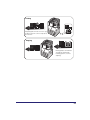
User’s Guide
Read this guide first.
Please read this guide before operating this product.
After you finish reading this guide, store it in a safe place for future reference.
ENG
imageRUNNER 2422L/2420L
User’s Guide
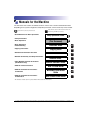
Manuals for the Machine
The manuals for this machine are divided as follows. Please refer to them for detailed information.
Depending on the system configuration and product purchased, some manuals may not be needed.
Guides with this symbol are printed manuals.
• Quick Reference for Basic Operations
• Setup Instructions
• Basic Operations
• Basic Operations
• Troubleshooting
• Copying Instructions
• Remote User Interface Instructions
• Network Connectivity and Setup Instructions
• Color Network ScanGear Instructions
(for Windows only)
• UFRII LT Printer Instructions
• UFRII LT Printer Driver Instructions
for Windows
• UFRII LT Printer Driver Instructions
for Macintosh
CD-ROM
Guides with this symbol are PDF manuals included on the
accompanying CD-ROM. (See footnote.)
Easy Operation Guide
User’s Guide
(This Document)
Reference Guide
CD-ROM
Copying Guide
CD-ROM
Remote UI Guide*
CD-ROM
Network Guide*
CD-ROM
Network ScanGear Guide*
CD-ROM
UFR II Printer Guide
CD-ROM
Windows Printer Driver
Guide
CD-ROM
Mac Printer Driver Guide
CD-ROM
* The manual is needed only if the optional Network Kit is attached to the machine.
To view the manual in PDF format, Adobe Reader/Adobe Acrobat Reader is required. If Adobe Reader/Adobe Acrobat Reader is not installed on your
system, please download it from the Adobe Systems Incorporated website.
User Manual CD-ROM
The User Manual CD-ROM is software that enables you to select and view PDF
Manuals included on the CD-ROM via your computer screen. Follow the
instructions below to use the User Manual CD-ROM.
NOTE
Depending on the system configuration and product purchased, some manuals may not
be needed.
System Requirements
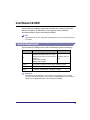
The User Manual CD-ROM can be used in the following system environments.
Windows
Macintosh
OS
Windows 2000 (Service Pack 4 or later)
Windows XP (Service Pack 1a or later)
Windows Vista (Service Pack 2 or later)
Windows 7
Windows Server 2003
Windows Server 2008
Memory
The memory required to run the above operating systems
Computer
A computer that can run the above operating systems
Display
A resolution of 1024 pixels × 768 pixels or higher
Mac OS X 10.4.x or
later
IMPORTANT
Depending on the configuration of your computer, some functions may not operate
correctly. If the PDF manual does not open from the CD-ROM Menu, open the PDF file
directly from the [ENGLISH] folder on the User Manual CD-ROM.
iii
Using the CD-ROM Menu
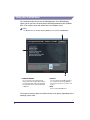
This section describes how to use the CD-ROM Menu. The CD-ROM Menu
appears when you insert the User Manual CD-ROM provided into the CD-ROM
drive. (The sample screen shot shown here is for Windows users.)
NOTE
For Macintosh users, double-click the [START] icon to start the CD-ROM Menu.
a BROWSE MANUAL
You can read any of the listed guides by
clicking on the desired guide. After clicking
on the desired guide, Adobe Reader/Adobe
Acrobat Reader starts, and the PDF manual
is displayed.
b INSTALL
You can install the listed PDF manuals on
your computer. After clicking [INSTALL],
select the location where you want to save
the files.
c EXIT
Click to exit the CD-ROM menu.
The screen shot shown above may differ from the actual display, depending on the
operating system used.
iv
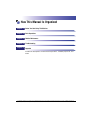
How This Manual Is Organized
Chapter 1
Before You Start Using This Machine
Chapter 2
Basic Operations
Chapter 3
Routine Maintenance
Chapter 4
Troubleshooting
Chapter 5
Appendix
Includes the descriptions of multi-functional operations, available paper stock, and
Index.
Considerable effort has been made to ensure that this manual is free of inaccuracies and omissions. However, as we are constantly improving our
products, if you need an exact specification, please contact Canon.
Contents
User Manual CD-ROM . . . . . . . . . . . . . . . . . . . . . . . . . . . . . . . . . . . . . . . . . . . . . .iii
System Requirements . . . . . . . . . . . . . . . . . . . . . . . . . . . . . . . . . . . . . . . . . . . . iii
Using the CD-ROM Menu . . . . . . . . . . . . . . . . . . . . . . . . . . . . . . . . . . . . . . . . . iv
Preface . . . . . . . . . . . . . . . . . . . . . . . . . . . . . . . . . . . . . . . . . . . . . . . . . . . . . . . . . ix
How to Use This Manual . . . . . . . . . . . . . . . . . . . . . . . . . . . . . . . . . . . . . . . . . . . ix
Symbols Used in This Manual . . . . . . . . . . . . . . . . . . . . . . . . . . . . . . . . . . . . . . ix
Keys and Buttons Used in This Manual . . . . . . . . . . . . . . . . . . . . . . . . . . . . . . . x
Illustrations Used in This Manual . . . . . . . . . . . . . . . . . . . . . . . . . . . . . . . . . . . . x
Abbreviations Used in This Manual . . . . . . . . . . . . . . . . . . . . . . . . . . . . . . . . . . xi
Trademarks . . . . . . . . . . . . . . . . . . . . . . . . . . . . . . . . . . . . . . . . . . . . . . . . . . . . xi
Operations and Terms Used in the Manuals . . . . . . . . . . . . . . . . . . . . . . . . . . . xii
Legal Notices . . . . . . . . . . . . . . . . . . . . . . . . . . . . . . . . . . . . . . . . . . . . . . . . . . . .xiv
Product Name . . . . . . . . . . . . . . . . . . . . . . . . . . . . . . . . . . . . . . . . . . . . . . . . . xiv
Laser Safety . . . . . . . . . . . . . . . . . . . . . . . . . . . . . . . . . . . . . . . . . . . . . . . . . . . xiv
Additional Information . . . . . . . . . . . . . . . . . . . . . . . . . . . . . . . . . . . . . . . . . . . xv
IPv6 Ready Logo . . . . . . . . . . . . . . . . . . . . . . . . . . . . . . . . . . . . . . . . . . . . . . . xvi
Copyright . . . . . . . . . . . . . . . . . . . . . . . . . . . . . . . . . . . . . . . . . . . . . . . . . . . . . xvi
Third Party Software. . . . . . . . . . . . . . . . . . . . . . . . . . . . . . . . . . . . . . . . . . . . .xvii
Disclaimers. . . . . . . . . . . . . . . . . . . . . . . . . . . . . . . . . . . . . . . . . . . . . . . . . . . xviii
Legal Limitations on the Usage of Your Product and the Use of Images . . . . . xix
Important Safety Instructions . . . . . . . . . . . . . . . . . . . . . . . . . . . . . . . . . . . . . . . xx
Installation . . . . . . . . . . . . . . . . . . . . . . . . . . . . . . . . . . . . . . . . . . . . . . . . . . . . xx
Power Supply . . . . . . . . . . . . . . . . . . . . . . . . . . . . . . . . . . . . . . . . . . . . . . . . . . xxi
Handling . . . . . . . . . . . . . . . . . . . . . . . . . . . . . . . . . . . . . . . . . . . . . . . . . . . . . .xxii
Maintenance and Inspections . . . . . . . . . . . . . . . . . . . . . . . . . . . . . . . . . . . . xxv
Consumables . . . . . . . . . . . . . . . . . . . . . . . . . . . . . . . . . . . . . . . . . . . . . . . . .xxvii
Other Warnings . . . . . . . . . . . . . . . . . . . . . . . . . . . . . . . . . . . . . . . . . . . . . . .xxvii
vi
Chapter 1
Before You Start Using This Machine
Installation Location and Handling . . . . . . . . . . . . . . . . . . . . . . . . . . . . . . . . . . 1-2
Installation Precautions . . . . . . . . . . . . . . . . . . . . . . . . . . . . . . . . . . . . . . . . . . 1-2
Avoid Installing the Machine in the Following Locations . . . . . . . . . . . . . . 1-2
Select a Safe Power Supply. . . . . . . . . . . . . . . . . . . . . . . . . . . . . . . . . . . . 1-4
Provide Adequate Installation Space. . . . . . . . . . . . . . . . . . . . . . . . . . . . . 1-5
Moving the Machine. . . . . . . . . . . . . . . . . . . . . . . . . . . . . . . . . . . . . . . . . . 1-6
Handling Precautions. . . . . . . . . . . . . . . . . . . . . . . . . . . . . . . . . . . . . . . . . . . . 1-7
Parts and Their Functions . . . . . . . . . . . . . . . . . . . . . . . . . . . . . . . . . . . . . . . . . 1-9
External View . . . . . . . . . . . . . . . . . . . . . . . . . . . . . . . . . . . . . . . . . . . . . . . . . . 1-9
Internal View . . . . . . . . . . . . . . . . . . . . . . . . . . . . . . . . . . . . . . . . . . . . . . . . . 1-11
Control Panel . . . . . . . . . . . . . . . . . . . . . . . . . . . . . . . . . . . . . . . . . . . . . . . . . 1-12
Optional Equipment . . . . . . . . . . . . . . . . . . . . . . . . . . . . . . . . . . . . . . . . . . . . 1-14
Main Power and Control Panel Power . . . . . . . . . . . . . . . . . . . . . . . . . . . . . . . 1-15
How to Turn ON the Main Power . . . . . . . . . . . . . . . . . . . . . . . . . . . . . . . . . . 1-15
Control Panel Power Switch. . . . . . . . . . . . . . . . . . . . . . . . . . . . . . . . . . . . . . 1-17
Setting Up the Connection . . . . . . . . . . . . . . . . . . . . . . . . . . . . . . . . . . . . . . . . 1-18
Settings Flowchart . . . . . . . . . . . . . . . . . . . . . . . . . . . . . . . . . . . . . . . . . . . . . 1-18
Connecting to a USB Interface . . . . . . . . . . . . . . . . . . . . . . . . . . . . . . . . . . . 1-19
Connecting to a Network . . . . . . . . . . . . . . . . . . . . . . . . . . . . . . . . . . . . . . . . 1-20
Using Ethernet . . . . . . . . . . . . . . . . . . . . . . . . . . . . . . . . . . . . . . . . . . . . . 1-20
Before Using the machine as a printer . . . . . . . . . . . . . . . . . . . . . . . . . . . . . . 1-22
Installing the Printer Driver . . . . . . . . . . . . . . . . . . . . . . . . . . . . . . . . . . . . . . 1-22
System Requirements . . . . . . . . . . . . . . . . . . . . . . . . . . . . . . . . . . . . . . . 1-22
UFRII LT User Software CD-ROM . . . . . . . . . . . . . . . . . . . . . . . . . . . . . . 1-23
Installation . . . . . . . . . . . . . . . . . . . . . . . . . . . . . . . . . . . . . . . . . . . . . . . . 1-23
Setting Up the Printer Configuration . . . . . . . . . . . . . . . . . . . . . . . . . . . . . . . 1-25
For Windows . . . . . . . . . . . . . . . . . . . . . . . . . . . . . . . . . . . . . . . . . . . . . . 1-25
For Macintosh . . . . . . . . . . . . . . . . . . . . . . . . . . . . . . . . . . . . . . . . . . . . . 1-26
Before Using the Remote Scan Function . . . . . . . . . . . . . . . . . . . . . . . . . . . . 1-27
Installing the Scanner Driver . . . . . . . . . . . . . . . . . . . . . . . . . . . . . . . . . . . . . 1-27
System Requirements . . . . . . . . . . . . . . . . . . . . . . . . . . . . . . . . . . . . . . . 1-28
Installation . . . . . . . . . . . . . . . . . . . . . . . . . . . . . . . . . . . . . . . . . . . . . . . . 1-29
Required Settings for Remote Scanning . . . . . . . . . . . . . . . . . . . . . . . . . . . . 1-29
vii
Chapter 2
Basic Operations
What This Machine Can Do. . . . . . . . . . . . . . . . . . . . . . . . . . . . . . . . . . . . . . . . .2-2
Placing Originals . . . . . . . . . . . . . . . . . . . . . . . . . . . . . . . . . . . . . . . . . . . . . . . . .2-6
Orientation . . . . . . . . . . . . . . . . . . . . . . . . . . . . . . . . . . . . . . . . . . . . . . . . . . . .2-6
Platen Glass . . . . . . . . . . . . . . . . . . . . . . . . . . . . . . . . . . . . . . . . . . . . . . . . . . .2-8
Feeder (DADF-P2) (Optional). . . . . . . . . . . . . . . . . . . . . . . . . . . . . . . . . . . . .2-10
Basic Copying . . . . . . . . . . . . . . . . . . . . . . . . . . . . . . . . . . . . . . . . . . . . . . . . . .2-12
Basic Printing. . . . . . . . . . . . . . . . . . . . . . . . . . . . . . . . . . . . . . . . . . . . . . . . . . .2-17
Basic Remote Scanning . . . . . . . . . . . . . . . . . . . . . . . . . . . . . . . . . . . . . . . . . .2-18
Canceling a Job . . . . . . . . . . . . . . . . . . . . . . . . . . . . . . . . . . . . . . . . . . . . . . . . .2-21
Using the Stop Key. . . . . . . . . . . . . . . . . . . . . . . . . . . . . . . . . . . . . . . . . . . . .2-21
Using the System Monitor Screen . . . . . . . . . . . . . . . . . . . . . . . . . . . . . . . . .2-22
Chapter 3
Routine Maintenance
Paper Drawers . . . . . . . . . . . . . . . . . . . . . . . . . . . . . . . . . . . . . . . . . . . . . . . . . . .3-2
Loading Paper . . . . . . . . . . . . . . . . . . . . . . . . . . . . . . . . . . . . . . . . . . . . . . . . .3-2
Adjusting a Paper Drawer to Hold a Different Paper Size . . . . . . . . . . . . . . . .3-6
Replacing the Toner. . . . . . . . . . . . . . . . . . . . . . . . . . . . . . . . . . . . . . . . . . . . . .3-10
Chapter 4
Troubleshooting
Clearing Paper Jams . . . . . . . . . . . . . . . . . . . . . . . . . . . . . . . . . . . . . . . . . . . . . .4-2
Clearing Paper Jams with On-Screen Instructions. . . . . . . . . . . . . . . . . . . . . .4-2
When Paper Jams Occur Frequently . . . . . . . . . . . . . . . . . . . . . . . . . . . . . . . .4-3
List of Error Messages . . . . . . . . . . . . . . . . . . . . . . . . . . . . . . . . . . . . . . . . . . . .4-4
Self-Diagnostic Display . . . . . . . . . . . . . . . . . . . . . . . . . . . . . . . . . . . . . . . . . .4-4
Service Call Message . . . . . . . . . . . . . . . . . . . . . . . . . . . . . . . . . . . . . . . . . . . .4-11
Contacting Your Local Authorized Canon Dealer . . . . . . . . . . . . . . . . . . . . . .4-11
Chapter 5
Appendix
Multifunctional Operations . . . . . . . . . . . . . . . . . . . . . . . . . . . . . . . . . . . . . . . . .5-2
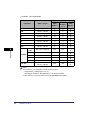
Available Paper Stock . . . . . . . . . . . . . . . . . . . . . . . . . . . . . . . . . . . . . . . . . . . . .5-3
Index . . . . . . . . . . . . . . . . . . . . . . . . . . . . . . . . . . . . . . . . . . . . . . . . . . . . . . . . . . .5-5
viii
Preface
Thank you for purchasing the Canon imageRUNNER 2422L/2420L. Please read this manual
thoroughly before operating the machine to familiarize yourself with its capabilities, and to
make the most of its many functions. After reading this manual, store it in a safe place for
future reference.
How to Use This Manual
Symbols Used in This Manual
The following symbols are used in this manual to explain procedures, restrictions,
handling precautions, and instructions that should be observed for safety.
WARNING
Indicates a warning concerning operations that may lead to death or
injury to persons if not performed correctly. To use the machine safely,
always pay attention to these warnings.
CAUTION
Indicates a caution concerning operations that may lead to injury to
persons if not performed correctly. To use the machine safely, always pay
attention to these cautions.
IMPORTANT Indicates operational requirements and restrictions. Be sure to read
these items carefully to operate the machine correctly, and avoid
damage to the machine or property.
NOTE
Indicates a clarification of an operation, or contains additional
explanations for a procedure. Reading these notes is highly
recommended.
Indicates an operation that must not be performed. Read these items
carefully, and make sure not to perform the described operations.
ix
Keys and Buttons Used in This Manual
The following symbols and key/button names are a few examples of how keys and
buttons to be clicked or pressed are expressed in this manual:
• Control
Panel keys
Control Panel Keys
[Key icon]
[ ]
Key icon + (Key Name)
[Key Name]
• Buttons
Example
(Additional Functions)
[OK]
on Computer Operation Screens
UI Type
Example
[Button Name]
[OK]
[UI Name] + menu, icon, etc.
[Start] menu, [CD-ROM] icon, etc.
Illustrations Used in This Manual
The machine illustrations used in this manual are those of the imageRUNNER
2420L with the following optional equipment attached: the Feeder (DADF-P2),
Finisher-U2, Additional Finisher Tray-C1, Cassette Feeding Module-S1, and
Cassette Feeding Module-T1.
x
Abbreviations Used in This Manual
In this manual, product names are abbreviated as follows:
Microsoft Windows 2000 operating system:
Windows 2000
Microsoft Windows XP operating system:
Windows XP
Microsoft Windows Vista operating system:
Windows Vista
Microsoft Windows 7 operating system:
Windows 7
Microsoft Windows Server 2003 operating system:
Windows Server 2003
Microsoft Windows Server 2008 operating system:
Windows Server 2008
Microsoft Windows operating system:
Windows
Trademarks
Macintosh and Mac OS are trademarks of Apple Inc., registered in the U.S. and
other countries.
Windows, Windows logo, Windows Vista and Windows Vista logo are trademarks
or registered trademarks of Microsoft Corporation in the U.S. and/or other
countries.
Other product and company names herein may be the trademarks of their
respective owners.
xi
Operations and Terms Used in the Manuals
This machine makes effective use of memory to perform print operations efficiently.
For example, as soon as the machine has scanned the original that you want to
copy, it can immediately scan the next person’s original. You can also print from this
machine, using a function other than the Copy function. In this machine, these
operations take place in a complex way, so that not only copies, but also various
kinds of prints may sometimes have to wait their turn before they can be printed.
To avoid confusion when reading the manuals, the terms “scanning,” “printing,” and
“copying,” used throughout the manuals are defined below. When making a copy,
the process of scanning originals and printing copies may be described as separate
functions.
Scanning
Scanning an original to be
copied or sent to a client
computer.
xii
Printing
Outputting documents such as a copy
or data sent from a client computer to
the machine.
Copying
Printing data scanned from
an original, followed by
finishing options, such as
stapling.
xiii
Legal Notices
Product Name
Safety regulations require the product’s name to be registered. In some regions
where this product is sold, the following name(s) in ( ) may be registered instead.
imageRUNNER 2422L/2420L (F191200)
Laser Safety
This product is certificated as a Class 1 laser product under IEC60825-1:2007 and
EN60825-1:2007. This means that the product does not produce hazardous laser
radiation.
Since radiation emitted inside the product is completely confined within protective
housings and external covers, the laser beam cannot escape from the machine
during any phase of user operation. Do not remove protective housings or external
covers, except as directed by the equipment’s manual.
xiv
Additional Information
When servicing or adjusting the optical system of the product, be careful not to
place screwdrivers or other shiny objects in the path of the laser beam. Also,
accessories such as watches and rings should be removed before working on the
product. The reflected beam, whether visible or invisible, can permanently damage
your eyes.
The labels shown below are attached to the laser scanner unit inside the machine
and next to the toner cartridge behind the front cover.
This product has been classified under IEC60825-1:2007 and EN60825-1:2007,
which conform to the following classes:
CLASS 1 LASER PRODUCT
LASER KLASSE 1
APPAREIL Á LASER DE CLASSE 1
APPARECCHIO LASER DI CLASSE 1
PRODUCTO LÁSER DE CLASE 1
APARELHO A LASER DE CLASSE 1
LUOKAN 1 LASER-TUOTE
LASERPRODUKT KLASS 1
CAUTION
Use of controls, adjustments, or performance of procedures other than those
specified in the manuals may result in hazardous radiation exposure.
xv
IPv6 Ready Logo
The protocol stack included in this machine has obtained the IPv6
Ready Logo Phase-1 established by the IPv6 Forum.
Copyright
Copyright 2011 by Canon Inc. All rights reserved.
No part of this publication may be reproduced or transmitted in any form or by any
means, electronic or mechanical, including photocopying and recording, or by any
information storage or retrieval system without the prior written permission of
Canon Inc.
xvi
Third Party Software
Third Party Software
A. This product includes third-party software modules. Use and distribution of this
software modules (the “SOFTWARE”) are subject to conditions (1) through (9)
below.
(1) You agree that you will comply with any applicable export control laws,
restrictions or regulations of the countries involved in the event that this
product including the SOFTWARE is shipped, transferred or exported into
any country.
(2) Rights holders of the SOFTWARE retain in all respects the title, ownership
and intellectual property rights in and to the SOFTWARE. Except as
expressly provided herein, no license or right, expressed or implied, is
hereby conveyed or granted by rights holders of the SOFTWARE to you for
any intellectual property of rights holders of the SOFTWARE.
(3) You may use the SOFTWARE solely for use with the Canon product you
purchased (the “PRODUCT”).
(4) You may not assign, sublicense, market, distribute, or transfer the
SOFTWARE to any third party without prior written consent of rights
holders of the SOFTWARE.
(5) Notwithstanding the foregoing, you may transfer the SOFTWARE only when
(a) you assign all of your rights to the PRODUCT and all rights and
obligations under the conditions to transferee and (b) such transferee
agrees to be bound by all these conditions.
(6) You may not decompile, reverse engineer, disassemble or otherwise reduce
the code of the SOFTWARE to human readable form.
(7) You may not modify, adapt, translate, rent, lease or loan the SOFTWARE or
create derivative works based on the SOFTWARE.
(8) You are not entitled to remove or make separate copies of the SOFTWARE
from the PRODUCT.
(9) The human-readable portion (the source code) of the SOFTWARE is not
licensed to you.
B. Notwithstanding above, in case the other conditions accompany third-party
software modules, these software modules are subject to the other conditions.
The Software Subjected to the Other Conditions
Please refer to <The Software Subjected to the Other Conditions> section for more
detail and corresponding license conditions.
xvii
The Software Subjected to the Other Conditions
This product contains software licensed under the following terms and conditions.
Copyright (C) 1998-2004 WIDE Project. All rights reserved.
Redistribution and use in source and binary forms, with or without modification, are
permitted provided that the following conditions are met:
1. Redistributions of source code must retain the above copyright notice, this list of
conditions and the following disclaimer.
2. Redistributions in binary form must reproduce the above copyright notice, this list
of conditions and the following disclaimer in the documentation and/or other
materials provided with the distribution.
3. Neither the name of the project nor the names of its contributors may be used to
endorse or promote products derived from this software without specific prior
written permission.
THIS SOFTWARE IS PROVIDED BY THE PROJECT AND CONTRIBUTORS ``AS
IS'' AND ANY EXPRESS OR IMPLIED WARRANTIES, INCLUDING, BUT NOT
LIMITED TO, THE IMPLIED WARRANTIES OF MERCHANTABILITY AND
FITNESS FOR A PARTICULAR PURPOSE ARE DISCLAIMED. IN NO EVENT
SHALL THE PROJECT OR CONTRIBUTORS BE LIABLE FOR ANY DIRECT,
INDIRECT, INCIDENTAL, SPECIAL, EXEMPLARY, OR CONSEQUENTIAL
DAMAGES (INCLUDING, BUT NOT LIMITED TO, PROCUREMENT OF
SUBSTITUTE GOODS OR SERVICES; LOSS OF USE, DATA, OR PROFITS; OR
BUSINESS INTERRUPTION) HOWEVER CAUSED AND ON ANY THEORY OF
LIABILITY, WHETHER IN CONTRACT, STRICT LIABILITY, OR TORT
(INCLUDING NEGLIGENCE OR OTHERWISE) ARISING IN ANY WAY OUT OF
THE USE OF THIS SOFTWARE, EVEN IF ADVISED OF THE POSSIBILITY OF
SUCH DAMAGE.
Disclaimers
The information in this document is subject to change without notice.
CANON INC. MAKES NO WARRANTY OF ANY KIND WITH REGARD TO THIS
MATERIAL, EITHER EXPRESS OR IMPLIED, EXCEPT AS PROVIDED HEREIN,
INCLUDING WITHOUT LIMITATION, THEREOF, WARRANTIES AS TO
MARKETABILITY, MERCHANTABILITY, FITNESS FOR A PARTICULAR
PURPOSE OR USE OR NON-INFRINGEMENT. CANON INC. SHALL NOT BE
LIABLE FOR ANY DIRECT, INCIDENTAL, OR CONSEQUENTIAL DAMAGES OF
ANY NATURE, OR LOSSES OR EXPENSES RESULTING FROM THE USE OF
THIS MATERIAL.
xviii
Legal Limitations on the Usage of Your Product and the
Use of Images
Using your product to scan, print or otherwise reproduce certain documents, and
the use of such images as scanned, printed or otherwise reproduced by your
product, may be prohibited by law and may result in criminal and/or civil liability.
A non-exhaustive list of these documents is set forth below. This list is intended to
be a guide only. If you are uncertain about the legality of using your product to scan,
print or otherwise reproduce any particular document, and/or of the use of the
images scanned, printed or otherwise reproduced, you should consult, in advance,
with your legal advisor for guidance.
•
Paper Money
•
Travelers Checks
•
Money Orders
•
Food Stamps
•
Certificates of Deposit
•
Passports
•
Postage Stamps (canceled or
uncanceled)
•
Immigration Papers
•
Identifying Badges or Insignias
•
Internal Revenue Stamps (canceled
or uncanceled)
•
Selective Service or Draft Papers
•
Bonds or Other Certificates of
Indebtedness
•
Checks or Drafts Issued by
Governmental Agencies
•
Stock Certificates
•
Motor Vehicle Licenses and
Certificates of Title
•
Copyrighted Works/Works of Art
without Permission of Copyright
Owner
xix
Important Safety Instructions
Please read these “Important Safety Instructions” thoroughly before operating the
machine. As these instructions are intended to prevent injury to the user or other
persons or destruction of property, always pay attention to these instructions. Also,
since it may result in unexpected accidents or injuries, do not perform any operation
unless otherwise specified in the manuals. Improper operation or use of this
machine could result in personal injury and/or damage requiring extensive repair
that may not be covered under your Limited Warranty.
Installation
WARNING
• Never block the ventilation slots and louvers on the machine. These openings are
provided for proper ventilation of working parts inside the machine. Blocking these
openings can cause the machine to overheat. Never place the machine on a soft
surface, such as a sofa or rug.
• Do not install the machine in the following locations:
- A damp or dusty location
- A location near water faucets or water
- A location exposed to direct sunlight
- A location subject to high temperatures
- A location near open flames
• Do not install the machine near alcohol, paint thinner, or other flammable
substances. If flammable substances come into contact with electrical parts inside
the machine, it may result in a fire or electrical shock.
• Do not place the following items on the machine. If these items come into contact
with a high-voltage area inside the machine, it may result in a fire or electrical shock.
If these items are dropped or spilled inside the machine, immediately turn OFF the
main power switch, and disconnect the power cord from the power outlet. Then,
contact your local authorized Canon dealer.
- Necklaces and other metal objects
- Cups, vases, flowerpots, and other containers filled with water or liquids
xx
CAUTION
Do not install the machine in unstable locations, such as unsteady platforms or
inclined floors, or in locations subject to excessive vibrations, as this may cause the
machine to fall or tip over, resulting in personal injury.
Power Supply
WARNING
• Do not damage or modify the power cord. Also, do not place heavy objects on the
power cord, or pull on or excessively bend it, as this could cause electrical damage
and result in a fire or electrical shock.
• Keep the power cord away from a heat source; failure to do this may cause the power
cord coating to melt, resulting in a fire or electrical shock.
• Do not connect or disconnect the power cord with wet hands, as this may result in
electrical shock.
• Do not connect the power cord to a multiplug power strip, as this may cause a fire or
electrical shock.
• Do not bundle up or tie the power cord in a knot, as this may result in a fire or
electrical shock.
• Insert the power plug completely into the power outlet, as failure to do so may result
in a fire or electrical shock.
• Do not use power cords other than the power cord provided, as this may result in a
fire or electrical shock.
• As a general rule, do not use extension cords. Using an extension cord may result in
a fire or electrical shock. If an extension cord must be used, however, use one rated
for voltages of 220 - 240 V AC and over, untie the cord binding, and insert the power
plug completely into the extension cord outlet to ensure a firm connection between
the power cord and the extension cord.
• Do not use power supplies with voltages other than those specified herein, as this
may result in a fire or electrical shock.
• Always grasp the power plug when disconnecting the power cord. Pulling on the
power cord may expose or snap the core wire, or otherwise damage the power cord. If
the power cord is damaged, this could cause current to leak, resulting in a fire or
electrical shock.
xxi
IMPORTANT
Leave sufficient space around the power plug so that it can be unplugged easily. If
objects are placed around the power plug, you will be unable to unplug it in an
emergency.
Handling
WARNING
• Do not attempt to disassemble or modify the machine. There are high-temperature
and high-voltage components inside the machine which may result in a fire or
electrical shock.
• If the machine makes strange noises, or gives off smoke, heat, or strange smells,
immediately turn OFF the main power switch, and disconnect the power cord from
the power outlet. Then, contact your local authorized Canon dealer. Continued use of
the machine in this condition may result in a fire or electrical shock.
• Do not use highly flammable sprays near the machine. If gas from these sprays
comes into contact with the electrical components inside the machine, it may result
in a fire or electrical shock.
• To avoid damage to the power cord and creating a fire hazard, always turn OFF the
main power switch, and unplug the interface cable when moving the machine.
Otherwise, the power cord or interface cable may be damaged, resulting in a fire or
electrical shock.
• Make sure that the power plug is firmly inserted into the power outlet if the machine
was moved. Do not use the machine while the connection is loose, as doing so may
cause a fire.
• Do not drop paper clips, staples, or other metal objects inside the machine. Also, do
not spill water, liquids, or flammable substances (alcohol, benzene, paint thinner,
etc.) inside the machine. If these items come into contact with a high-voltage area
inside the machine, it may result in a fire or electrical shock. If these items are
dropped or spilled inside the machine, immediately turn OFF the main power switch,
and disconnect the power cord from the power outlet. Then, contact your local
authorized Canon dealer.
CAUTION
• Do not place heavy objects on the machine, as they may tip over and fall resulting in
personal injury.
• Close the feeder/platen cover gently to avoid catching your hands, as this may result
in personal injury.
xxii
• Do not press down hard on the feeder/platen cover when using the platen glass to
make copies of thick books. Doing so may damage the platen glass and result in
personal injury.
• Do not place your hands, hair, clothing, etc., near the exit and feed rollers. Even if the
machine is not in operation, your hands, hair, or clothing may get caught in the
rollers, which may result in personal injury or damage if the machine suddenly starts
printing.
• Paper that has just been output from the machine may be hot. Be careful when
removing or aligning paper from the output tray. Touching paper right after it is
output may result in low-temperature burns.
• Do not touch the finisher while the machine is printing, as this may result in personal
injury.
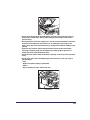
• Do not place your hand in the following parts of the finisher, as this may result in
personal injury:
- Trays
- Stapler unit (where stapling is performed)
- Rollers
- Spaces between the trays and the main unit
Finisher-U2
xxiii
• The laser beam can be harmful to human bodies. Since radiation emitted inside the
product is completely confined within protective housings and external covers, the
laser beam cannot escape from the machine during any phase of user operation.
Read the following remarks and instructions for safety.
- Never open covers other than those instructed in the manuals.
- Do not remove the following caution labels which are attached to the machine. If the
labels have been removed, contact your local authorized Canon dealer.
- If the laser beam escapes from the machine, exposure may cause serious damage
to your eyes.
- Controlling, adjusting, or operating the machine in ways not mentioned in the
manuals for this machine may cause dangerous radiation to escape from the
machine.
IMPORTANT
Turn OFF the control panel power switch for safety when the machine will not be used for
a long period of time, such as overnight. Also, turn OFF the main power switch, and
disconnect the power cord for safety when the machine will not be used for an extended
period of time, such as during consecutive holidays.
xxiv
Maintenance and Inspections
WARNING
• When cleaning the machine, first turn OFF the main power switch, then disconnect
the power cord. Failure to observe these steps may result in a fire or electrical shock.
• Disconnect the power cord from the power outlet regularly, and clean the area around
the base of the power plug’s metal pins and the power outlet with a dry cloth to
ensure that all dust and grime is removed. If the power cord is connected for a long
period of time in a damp, dusty, or smoky location, dust can build up around the
power plug and become damp. This may cause a short circuit and result in a fire.
• Clean the machine using a slightly dampened cloth with a mild detergent mixed with
water. Do not use alcohol, benzene, paint thinner, or other flammable substances.
Check detergent for flammability prior to use. If flammable substances come into
contact with a high-voltage area inside the machine, it may result in a fire or electrical
shock.
• There are some areas inside the machine which are subject to high-voltages. When
removing jammed paper or when inspecting the inside the machine, do not allow
necklaces, bracelets, or other metal objects to touch the inside the machine, as this
may result in burns or electrical shock.
• Do not burn or throw used toner cartridges into open flames, as this may cause the
toner remaining inside the cartridges to ignite, resulting in burns or a fire.
• Make sure that the power plug is firmly inserted into the power outlet after cleaning
the machine. Do not use the machine while the connection is loose, as doing so may
cause a fire.
• Check the power cord and power plug regularly. If the following conditions occur,
contact your local authorized Canon dealer, as the condition may cause a fire:
- There are burn marks on the power plug.
- The blade on the power plug is deformed or broken.
- The power goes OFF and ON when the power cord is bent.
- There are cuts, cracks, or indentations on the power cord.
- A part of the power cord becomes hot.
• Check the power cord and power plug regularly to make sure that they are not
handled in the following manner, as this may result in a fire or electrical shock:
- The connection part of the power plug is loose.
- Stress is being applied to the power cord by a heavy object or by affixing it with
staples.
- The power plug is loose.
- The power cord is tied in a bundle.
- The power cord protrudes into a walkway.
- The power cord is in front of a heater.
xxv
CAUTION
• The fixing unit, the duplex unit, and their surroundings inside the machine may
become hot during use. When removing jammed paper or when inspecting the inside
of the machine, do not touch the fixing unit, the duplex unit, and their surroundings,
as doing so may result in burns or electrical shock.
• When removing jammed paper or when inspecting the inside of the machine, do not
expose yourself to the heat emitted from the fixing unit and its surroundings for a
prolonged period of time. Doing so may result in low temperature burns, even if you
do not touch the fixing unit and its surroundings directly.
• When removing jammed paper or replacing the toner cartridge, take care not to allow
the toner to come into contact with your hands or clothing, as this will dirty your hands
or clothing. If they become dirty, wash immediately with cold water. Washing with warm
water will set the toner, and make it impossible to remove the toner stains.
• When removing paper which has become jammed inside the machine, remove the
jammed paper gently to prevent the toner on the paper from scattering and getting
into your eyes or mouth. If the toner gets into your eyes or mouth, wash immediately
with cold water and immediately consult a physician.
• When loading paper or removing jammed originals or paper, take care not to cut your
hands on the edges of the originals or paper.
• When removing paper which has become jammed inside the machine, take care not
to cut your hands or injure yourself on the inside of the machine. If you cannot
remove the paper, contact your local authorized Canon dealer.
• When removing a used toner cartridge, remove the cartridge carefully to prevent the
toner from scattering and getting into your eyes or mouth. If the toner gets into your
eyes or mouth, wash immediately with cold water and immediately consult a
physician.
• Do not dismantle the toner cartridge, as doing so may cause the toner to fly out and
enter your eyes or mouth. If the toner gets into your eyes or mouth, wash immediately
with cold water and immediately consult a physician.
• If toner escapes from the toner cartridge, make sure not to ingest the toner or allow it
to directly touch your skin. If toner touches your skin, wash it away with soap and
water. If your skin still feels irritated after washing it, or you ingest toner, consult a
doctor immediately.
xxvi
Consumables
WARNING
• Do not burn or throw used toner cartridges into open flames, as this may cause the
toner remaining inside the cartridges to ignite, resulting in burns or a fire.
• Do not store toner cartridges or paper in places exposed to open flames, as this may
cause the toner or paper to ignite, resulting in burns or a fire.
CAUTION
• Keep toner and other consumables out of the reach of small children. If these items
are ingested, consult a physician immediately.
• Do not dismantle the toner cartridge, as doing so may cause the toner to fly out and
enter your eyes or mouth. If toner gets into your eyes or mouth, wash immediately
with cold water and immediately consult a physician.
• If toner escapes from the toner cartridge, make sure not to ingest the toner or allow it
to directly touch your skin. If toner touches your skin, wash it away with soap and
cold water. If your skin still feels irritated after washing it, or you ingest toner, consult
a doctor immediately.
• When discarding used toner cartridges, put the cartridges into a bag to prevent the
toner remaining inside the cartridges from scattering, and dispose of them in a
location away from open flames.
Other Warnings
WARNING
For cardiac pacemaker users:
This product emits low level magnetic flux. If you use a cardiac pacemaker and feel
abnormalities, please move away from the product and consult your doctor.
xxvii
xxviii
Before You Start Using
This Machine
1
CHAPTER
This chapter describes what you should know before using this machine, such as parts and
their functions, and how to turn ON the main power.
Installation Location and Handling . . . . . . . . . . . . . . . . . . . . . . . . . . . . . . . . . . . . . . . . . . 1-2
Installation Precautions . . . . . . . . . . . . . . . . . . . . . . . . . . . . . . . . . . . . . . . . . . . . . . . . . . . . . . . .1-2
Handling Precautions . . . . . . . . . . . . . . . . . . . . . . . . . . . . . . . . . . . . . . . . . . . . . . . . . . . . . . . . . .1-7
Parts and Their Functions. . . . . . . . . . . . . . . . . . . . . . . . . . . . . . . . . . . . . . . . . . . . . . . . . 1-9
External View . . . . . . . . . . . . . . . . . . . . . . . . . . . . . . . . . . . . . . . . . . . . . . . . . . . . . . . . . . . . . . . .1-9
Internal View . . . . . . . . . . . . . . . . . . . . . . . . . . . . . . . . . . . . . . . . . . . . . . . . . . . . . . . . . . . . . . . .1-11
Control Panel . . . . . . . . . . . . . . . . . . . . . . . . . . . . . . . . . . . . . . . . . . . . . . . . . . . . . . . . . . . . . . .1-12
Optional Equipment . . . . . . . . . . . . . . . . . . . . . . . . . . . . . . . . . . . . . . . . . . . . . . . . . . . . . . . . . .1-14
Main Power and Control Panel Power . . . . . . . . . . . . . . . . . . . . . . . . . . . . . . . . . . . . . . 1-15
How to Turn ON the Main Power . . . . . . . . . . . . . . . . . . . . . . . . . . . . . . . . . . . . . . . . . . . . . . . .1-15
Control Panel Power Switch . . . . . . . . . . . . . . . . . . . . . . . . . . . . . . . . . . . . . . . . . . . . . . . . . . . .1-17
Setting Up the Connection . . . . . . . . . . . . . . . . . . . . . . . . . . . . . . . . . . . . . . . . . . . . . . . 1-18
Settings Flowchart . . . . . . . . . . . . . . . . . . . . . . . . . . . . . . . . . . . . . . . . . . . . . . . . . . . . . . . . . . .1-18
Connecting to a USB Interface . . . . . . . . . . . . . . . . . . . . . . . . . . . . . . . . . . . . . . . . . . . . . . . . .1-19
Connecting to a Network . . . . . . . . . . . . . . . . . . . . . . . . . . . . . . . . . . . . . . . . . . . . . . . . . . . . . .1-20
Before Using the machine as a printer . . . . . . . . . . . . . . . . . . . . . . . . . . . . . . . . . . . . . . 1-22
Installing the Printer Driver . . . . . . . . . . . . . . . . . . . . . . . . . . . . . . . . . . . . . . . . . . . . . . . . . . . . .1-22
Setting Up the Printer Configuration. . . . . . . . . . . . . . . . . . . . . . . . . . . . . . . . . . . . . . . . . . . . . .1-25
Before Using the Remote Scan Function . . . . . . . . . . . . . . . . . . . . . . . . . . . . . . . . . . . . 1-27
Installing the Scanner Driver . . . . . . . . . . . . . . . . . . . . . . . . . . . . . . . . . . . . . . . . . . . . . . . . . . .1-27
Required Settings for Remote Scanning . . . . . . . . . . . . . . . . . . . . . . . . . . . . . . . . . . . . . . . . . .1-29
1-1
Installation Location and Handling
This section describes precautions for installation location and handling. Read this
section prior to using the machine.
Before You Start Using This Machine
1
Installation Precautions
Avoid Installing the Machine in the Following Locations
■ Avoid locations subject to temperature
and humidity extremes, whether low or
high.
For example, avoid installing the machine near
water faucets, hot water heaters, humidifiers, air
conditioners, heaters or stoves.
■ Avoid installing the machine in direct
sunlight.
If this is unavoidable, use curtains to shade the
machine. Be sure that curtains do not block the
machine’s ventilation slots or louvers, or interfere
with the electrical cord or power supply.
1-2
Installation Location and Handling
■ Avoid poorly ventilated locations.
■ Avoid locations where ammonia gas is
emitted.
■ Avoid locations that are subject to
vibration.
For example, avoid installing the machine on
unstable floors or stands.
■ Avoid exposing the machine to rapid
changes in temperature.
If the room in which the machine is installed is cold
but rapidly heated, water droplets (condensation)
may form inside the machine. This may result in a
noticeable degradation in the quality of the printed
image, the inability to properly scan an original, or
the outputs having no printed image at all.
Installation Location and Handling
1-3
1
Before You Start Using This Machine
This machine generates a slight amount of ozone
or other odors during normal use. Although
sensitivity to ozone or other odors may vary, this
amount is not harmful. Ozone or other odors may
be more noticeable during extended use or long
production runs, especially in poorly ventilated
rooms. It is recommended that the room be
appropriately ventilated, sufficient to maintain a
comfortable working environment, in areas of
machine operation.
■ Avoid locations where a considerable amount of dust accumulates.
■ Avoid locations near volatile or flammable materials, such as alcohol or
paint thinner.
■ Avoid installing the machine near computers or other precision electronic
equipment.
Electrical interference and vibrations generated by the machine during printing can
adversely affect the operation of such equipment.
1
Before You Start Using This Machine
■ Avoid installing the machine near televisions, radios, or similar electronic
equipment.
The machine may interfere with sound and picture signal reception. Insert the power plug
into a dedicated power outlet, and maintain as much space as possible between the
machine and other electronic equipment.
Select a Safe Power Supply
■ Plug the machine into a standard 220 - 240 V AC, three-wire grounded outlet.
■ Make sure that the power supply for the machine is safe, and has a steady
voltage.
■ Do not connect other electrical equipment to the same power outlet to
which the machine is connected.
■ Do not connect the power cord to a multiplug power strip, as this may
cause a fire or electrical shock.
■ The power cord may become damaged if it
is often stepped on or if heavy objects are
placed on it. Continued use of a damaged
power cord can lead to an accident, such
as a fire or electrical shock.
■ The power cord should not be taut, as this
may lead to a loose connection and cause
overheating, which could result in a fire.
■ If excessive stress is applied to the connection part of the power cord, it
may damage the power cord or the wires inside the machine may
disconnect. This could result in a fire. Avoid the following situations:
- Connecting and disconnecting the power cord frequently
- Tripping over the power cord
- Bending the power cord near the connection part, and applying
continuous stress to the power outlet or the connection part
- Applying excessive force on the power plug
1-4
Installation Location and Handling
Provide Adequate Installation Space
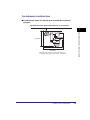
■ Provide enough space on each side of the machine for unrestricted
operation.
The optional Finisher-U2 and Document Tray-J1 are attached.
100 mm or more
Before You Start Using This Machine
1
1,249 mm
1,198 mm
1,247 mm *
* The width is 1,018 mm when no options are attached, or
1,247 mm when the optional Document Tray-J1 is attached.
Installation Location and Handling
1-5
Moving the Machine
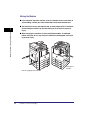
■ If you intend to move the machine, even to a location on the same floor of
your building, contact your local authorized Canon dealer beforehand.
■ The machine is heavy, and requires two or more people to lift it. Therefore,
do not attempt to move it by yourself. Doing so, may result in personal
injury.
Before You Start Using This Machine
1
■ When carrying the machine, be sure to hold the handles, as indicated
below. Failure to do so, may cause the machine to be dropped, and result
in personal injury.
Grasp these
handles.
Pull out and grasp these handles.
1-6
Installation Location and Handling
Handling Precautions
■ Do not attempt to disassemble or modify
the machine.
■ Be careful not to spill liquids or drop any
foreign objects, such as paper clips or
staples inside the machine. If a foreign
object comes into contact with electrical
parts inside the machine, it may cause a
short circuit and result in a fire or
electrical shock.
■ If there is smoke or unusual noise,
immediately turn the main power switch
OFF, disconnect the power cord from the
power outlet, and then contact your local
authorized Canon dealer. Using the
machine in this state may cause a fire or
electrical shock. Also, avoid placing
objects around the power plug so that the
machine can be disconnected whenever
necessary.
■ Do not turn the main power switch OFF or open the covers while the
machine is in operation. This may result in paper jams.
■ Some parts inside the machine are subject to high-voltages and
temperatures. Take adequate precautions when inspecting the inside of the
machine. Do not carry out any inspections not described in the manuals.
Installation Location and Handling
1-7
Before You Start Using This Machine
1
■ Do not use flammable sprays, such as
spray glue near the machine. There is a
danger of ignition.
Before You Start Using This Machine
1
■ For safety reasons, turn OFF the control
panel power switch of the machine when it
will not be used for a long period of time,
such as overnight. As an added safety
measure, turn OFF the main power switch,
and disconnect the power cord when the
machine will not be used for an extended
period of time, such as during
consecutive holidays.
■ This machine generates a slight amount of ozone or other odors during
normal use. Although sensitivity to ozone or other odors may vary, this
amount is not harmful. Ozone or other odors may be more noticeable
during extended use or long production runs, especially in poorly
ventilated rooms. It is recommended that the room be appropriately
ventilated, sufficient to maintain a comfortable working environment, in
areas of machine operation.
■ Use a USB cable shorter than three meters.
1-8
Installation Location and Handling
Parts and Their Functions
External View
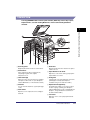
The imageRUNNER 2420L with the
optional Inner 2 Way Tray-E2, Cassette
Feeding Module-S1, and Cassette
Feeding Module-T1 attached.
The imageRUNNER 2420L with the optional
feeder (DADF-P2), Finisher-U2, Additional
Finisher Tray-C1, Cassette Feeding
Module-S1, and Cassette Feeding Module-T1
attached.
Parts and Their Functions
1-9
1
Before You Start Using This Machine
This section provides you with the names and functions of all of the parts on the
outside and inside of the main unit and control panel. Illustrations of the machine
with some optional equipment attached to it are also provided. For more
information on the optional equipment, parts and their functions, see Chapter 5,
“Optional Equipment,” in the Reference Guide.
a Stack Bypass
Use the stack bypass to feed paper manually,
and for loading nonstandard paper stock, such as
envelopes. (See Chapter 2, “Basic Operations,” in
the Reference Guide.)
b Control Panel
Before You Start Using This Machine
1
Includes the keys, LCD display, and indicators
required for operating the machine. (See “Control
Panel,” on p. 1-12.)
c Platen Cover Type J
(Optional for the imageRUNNER 2422L*)
The platen cover secures the originals placed on
the platen glass.
*The availability of this option may vary depending on the
country or region of purchase.
e Main Power Switch
Press to the “I” side to turn ON the machine.
(See “Main Power and Control Panel Power,” on
p. 1-15.)
f Paper Drawer 1
Holds up to 250 sheets of paper (80 g/m2).
g Cassette Feeding Module-S1 (Optional)
Holds up to 250 sheets of paper (80 g/m2).
h Cassette Feeding Module-T1 (Optional)
The Cassette Feeding Module-T1 provides two
additional sources of paper for printing jobs.
Each paper drawer holds up to 250 sheets of
paper (80 g/m2).
d Feeder (DADF-P2) (Optional)
Originals placed in the feeder are automatically
fed sheet by sheet to the scanning area. The
feeder also automatically turns over two-sided
originals to make one- or two-sided copies.
NOTE
For more information on the optional equipment that can be attached to the machine, see
Chapter 5, “Optional Equipment,” in the Reference Guide.
1-10
Parts and Their Functions
Internal View
The imageRUNNER 2420L with the optional feeder (DADF-P2), Inner 2 Way Tray-E2,
Duplex Unit-A1, Cassette Feeding Module-S1, and Cassette Feeding Module-T1
attached.
Before You Start Using This Machine
1
a Scanning Area
Originals placed in the feeder are scanned here.
b Platen Glass
Place originals here when scanning books,
heavyweight originals, thin originals,
transparencies, etc.
c Toner Cartridge
When toner runs out, pull out the toner cartridge,
and replace it with a new one. (See Chapter 6,
“Routine Maintenance,” in the Reference Guide.)
d Counters
You can check the machine’s copy and print page
counts.
e Front Cover
Open this cover to replace the toner cartridge or
drum unit.
f Drum Unit
When the drum unit is full of waste toner, replace
it with a new one.
g Paper Drawer’s Left Cover
Open these covers when clearing a paper jam in
Paper Drawers 2, 3 and 4.
h Fixing Unit
If a paper jam occurs in the fixing unit, remove the
jammed paper carefully. (See Chapter 7,
“Troubleshooting,” in the Reference Guide.)
i Duplex Unit-A1 (Optional)
The duplex unit enables you to use the 2-sided
mode for copying or printing. (See Chapter 2,
“Advanced Operations,” in the Copying Guide and
Chapter 1, “Using the Machine as a Printer,” in
the UFR II Printer Guide.)
j Left Cover
Open this cover to clear a paper jam inside the
main unit.
Parts and Their Functions
1-11
Control Panel
Before You Start Using This Machine
1
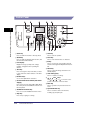
a COPY key
i Start key
Press to switch the machine to the Copy mode.
b SCAN key
Press to enable the Network Scan function. (See
the Network ScanGear Guide.)
Press to start an operation.
j Clear key
Press to clear entered values or characters.
k ID key
c LCD display
Displays messages, prompts, text, settings,
numbers, and graphics when operating the
machine.
Press to log in to/out of the machine when the
machine is managed with Department IDs/User
IDs.
l Reset key
d Tone key
Press to change the entry mode when you want
to enter characters and/or numbers on the LCD
display.
e Numeric keys
Use to enter alphanumeric characters.
f Control Panel Power Switch (Sub Power
Supply)
Press to turn the control panel ON or OFF. When
the control panel is turned OFF, the machine is in
the Sleep mode.
g Additional Functions key
Press to access the Additional Functions menu.
h Stop key
Press to stop copying or scanning.
1-12
Parts and Their Functions
Press to cancel all settings and return to the
Standby display.
m View Settings key
Press to confirm your settings.
n
,
,
and
keys
Use [ ], [ ], [ ], or [ ] to move the cursor
position or decrease or increase values.
o Back key
Press to go back to the previous items in the
menu.
p System Monitor key
Press to check the status of the machine,
including copy and print jobs.
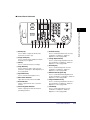
■ Control Panel Continued
q Density key
Press to darken or lighten the density of the
documents you want to copy.
r Image Quality key
Press to select the image quality best suited to
the quality of your originals.
s OK key
Press to confirm and accept your settings.
t Copy Ratio key
Press to enlarge or reduce copies. For more
information, see Chapter 1, “Basic Operations,” in
the Copying Guide.
u Paper Select key
Press to select the desired paper source.
v Main Power Indicator
Lights when the main power is turned ON.
w Error Indicator
Flashes or lights red if an error occurs in the
machine.
x Processing/Data Indicator
Flashes or lights green when the machine is
performing operations.
Before You Start Using This Machine
1
y Frame Erase key
Press to set the Frame Erase mode. For more
information, see Chapter 2, “Advanced
Operations,” in the Copying Guide.
z 2-Page Separation key
Press to set the 2-Page Separation mode. For
more information, see Chapter 2, “Advanced
Operations,” in the Copying Guide.
A Finishing key
Press to set the Finishing mode. For more
information, see Chapter 2, “Advanced
Operations,” in the Copying Guide.
B Different Size Originals key
Press to set the Different Size Originals mode.
For more information, see Chapter 2, “Advanced
Operations,” in the Copying Guide.
C Image Combination key
Press to set the Image Combination mode. For
more information, see Chapter 2, “Advanced
Operations,” in the Copying Guide.
D 2-Sided key
Press to set the 2-Sided mode. For more
information, see Chapter 2, “Advanced
Operations,” in the Copying Guide.
Parts and Their Functions
1-13
Optional Equipment
Before You Start Using This Machine
1
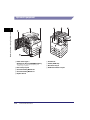
a Platen Cover Type J
(Optional for the imageRUNNER 2422L*)
*The availability of this option may vary depending on the
country or region of purchase.
b Inner 2 Way Tray-E2
c Cassette Feeding Module-S1
d Cassette Feeding Module-T1
e Duplex Unit-A1
1-14
Parts and Their Functions
f Finisher-U2
g Feeder (DADF-P2)
h Document Tray-J1
i Additional Finisher Tray-C1
Main Power and Control Panel Power
The machine is provided with two power switches, a main power switch and a
control panel power switch.
How to Turn ON the Main Power
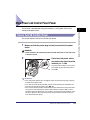
This section explains how to turn ON the main power.
1
Make sure that the power plug is firmly inserted into the power
outlet.
WARNING
Do not connect or disconnect the power cord with wet hands, as this may result
in electrical shock.
2
Press the main power switch
(located on the right side of the
machine) to “I” side.
The main power indicator on the control
panel lights up when the main power is
turned ON.
IMPORTANT
• If the main power indicator does not light up, make sure that the power plug is properly
inserted into the power outlet.
• If you want to turn the main power OFF, turn the control panel power switch OFF, and
then press the main power switch to the “ ” side.
• If the Cassette Heater Unit-30 is attached, the machine will enter the Sleep mode when
you press the control panel power switch to OFF while the machine is ON. For more
information about the Sleep mode, see Chapter 3, “Useful Functions and Settings,” in the
Reference Guide. For more information on the Cassette Heater Unit-30, contact your
local authorized Canon dealer.
Main Power and Control Panel Power
1-15
Before You Start Using This Machine
1
3
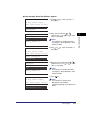
The screen on the left is displayed
until the machine is ready to scan.
1
Before You Start Using This Machine
Start to copy
100% Auto
Density: Auto
ImgQual.: Text
2-Sided: Off
1
The screen on the left is displayed when the
machine is ready to scan.
IMPORTANT
If you turn OFF the main power, wait at
least 10 seconds before turning the main
power back ON.
NOTE
• If the message <Dept. ID/Pass Input> appears, enter your Department ID (and
password). (See Chapter 2, “Entering the Department ID and Password,” in the
Reference Guide.)
• If the message <Enter User ID/Pass> appears, enter your User ID (and password). (See
Chapter 2, “Entering a User ID and Password,” in the Reference Guide.)
• The default copy settings are:
- Copy Ratio: Direct (100%)
- Paper Selection: Auto Paper Selection
- Copy Density: Auto Density Control
- Copy Quantity: 1
- Image Quality: Text
• The default settings for the Copy function of the machine are already set at the factory,
but you can change them to suit your needs. (See Chapter 3, “Customizing Settings,” in
the Copying Guide.)
• You can select which functions to display on the Standby display when turning the main
power ON, according to the Additional Functions menu. (See Chapter 3, “Useful
Functions and Settings,” in the Reference Guide.)
1-16
Main Power and Control Panel Power
Control Panel Power Switch
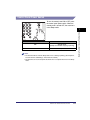
To turn the control panel ON or OFF, press
the control panel power switch. When the
control panel is turned OFF, the machine is
in the Sleep mode.
Control Panel Power Switch
Machine Status
ON
Standby mode
(Ready for immediate copying or printing)
OFF
Sleep mode
NOTE
• The machine will not enter the Sleep mode if it is scanning or printing. (See Chapter 3,
“Useful Functions and Settings,” in the Reference Guide.)
• The machine can receive and print documents from a computer when it is in the Sleep
mode.
Main Power and Control Panel Power
1-17
Before You Start Using This Machine
1
Setting Up the Connection
This section describes how to connect the machine to a computer or network, and
the types of connection and cables available for use.
Before You Start Using This Machine
1
The machine can be connected to a computer with a USB cable, or to a network
with a 10BASE-T/100BASE-TX LAN cable.
IMPORTANT
• External USB devices (i.e. memory, keyboard, mouse, etc.) are not supported.
• A USB cable or a network cable is not included in this package. Please obtain a suitable
cable for your computer or network.
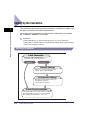
Settings Flowchart
Cable Connection
Connect the cables required for your
environment. (See p. 1-18 through 1-21.)
Using the
USB cable
Connecting to
a network
Network Settings
Enter the necessary network and server
settings. (See the Network Guide.)
Environment Settings
Specify the System Manager settings for
management operations.
(See the Reference Guide.)
Printer Driver Installation
Install a printer driver on personal computers. Install any
utility software that is necessary for your environment.
(See “Installing the Printer Driver,” on p. 1-22.)
1-18
Setting Up the Connection
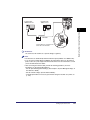
Connecting to a USB Interface
* This depends on the specifications of the operating system of your computer.
UFRII LT User Software CD-ROM
USB Cable
USB Port
The USB port is located on the back
side of the machine.
CAUTION
• Before you connect the USB cable to the machine while the main power switch
is ON, make sure the ground line is connected. If the ground line is not
connected, connecting the USB cable to the machine while the main power
switch is ON may result in electric shock.
• If you connect or disconnect the USB cable while the main power switch is ON,
do not touch the metal parts around the connector, otherwise this may result in
electric shock.
IMPORTANT
• Do not connect or disconnect the USB cable in the following situations (otherwise poor
operation of your computer or machine may result):
- When installing the driver
- When the computer is booting up
- When printing
• If you disconnect the USB cable with the computer or machine’s main power switch ON,
always wait at least 10 seconds before reconnecting the cable. Immediately reconnecting
the cable may result in poor operation of your computer or machine.
Setting Up the Connection
1-19
1
Before You Start Using This Machine
You can connect the machine to a computer with a USB port via a USB cable. The
machine is USB 2.0 high-speed* compatible. The printer driver, USB class driver,
and utilities that match the operating system on your computer must be installed.
For more information on installing the driver through USB connection, see the
Printer Driver Installation Guide or Mac UFR II Printer Driver Installation Guide. For
more information on installing the utility software included on the CD-ROM, see
“UFRII LT User Software CD-ROM,” on p. 1-23.
• If the machine is connected to a computer via the USB cable, you will not be able to use
certain utilities.
• If you connect the machine to a computer via a USB cable, make sure that <Use USB
Device> (in the System Settings screen) is set to ‘On’. (See Chapter 4, “System Manager
Settings,” in the Reference Guide.)
NOTE
• If the machine is connected to a computer with a USB cable, you can print a document
from your computer using the printer driver.
• With a USB connection, you cannot use the Remote UI and the Network Scan function.
• The appropriate USB interface for Windows 2000/XP/Vista/7/Server 2003/Server 2008 is
USB 2.0 Hi-Speed/USB Full-Speed (USB 1.1 equivalent). For Mac OS X 10.3.2 or earlier
is USB Full-Speed (USB 1.1 equivalent) and Mac OS X 10.3.3 or later is USB 2.0
Hi-Speed/USB Full-Speed (USB 1.1 equivalent). For more information, consult your local
authorized Canon dealer.
Before You Start Using This Machine
1
Connecting to a Network
The machine can connect to a TCP/IP network. The machine supports both
10BASE-T and 100BASE-TX connections that can be used in most LANs.
Using Ethernet
Connect the machine’s RJ-45 port to a hub port using the following types of cable
depending on your network environment:
- When connecting to a computer with 100Base-TX connector: a Category 5 (or
higher) twisted pair LAN cable
- When connecting to a computer with 10Base-T connector: a Category 3 (or
higher) twisted pair LAN cable
CAUTION
When connecting the interface cable or network cable, be sure to observe the
following precautions in order to avoid electric shock.
- Turn OFF the main power switch before disconnecting the power cord from the
power outlet. (See Chapter 1, “Before You Start Using This Machine,” in the
Reference Guide.)
- Turn OFF the computer and disconnect the power cord from the power outlet.
1-20
Setting Up the Connection
Computer with
100Base-TX Port
Computer with
10Base-T Port
LAN Cable
Hub
The RJ-45 Port is located on the
back side of the machine.
IMPORTANT
You cannot use the machine as a repeater, bridge, or gateway.
NOTE
• The machine can automatically detect the Ethernet speed (10Base-T or 100Base-TX).
• If you are using a mixed 10Base-T/100Base-TX environment, devices on the network
(hubs, routers, etc.) must support the mixed environment. For more information, consult
your local authorized Canon dealer.
• After connecting the network cable, perform the following operations. (For more
information, see the relevant descriptions.)
- Set the System Management Settings. (See Chapter 4, “System Manager Settings,” in
the Reference Guide.)
- Set the network settings. (See the Network Guide.)
- Install the printer driver if necessary. (See “Before Using the machine as a printer,” on
p. 1-22.)
Setting Up the Connection
1-21
Before You Start Using This Machine
1
Before Using the machine as a printer
Installing the Printer Driver
Before You Start Using This Machine
1
The printer driver is software that is required to print from applications, such as
Microsoft Word/Excel/PowerPoint, etc., on your computer. The printer driver also
enables you to configure settings relating to printing.
System Requirements
The following system environments are necessary in order to use the printer driver.
NOTE
Supported operating systems may differ according to the printer driver version used.
■ Software
• Operating Systems:
- Microsoft Windows 2000
- Microsoft Windows XP
- Microsoft Windows Vista
- Microsoft Windows 7
- Microsoft Windows Server 2003
- Microsoft Windows Server 2008
- Mac OS X 10.4.9 or later
■ Hardware
• Computer:
- Any computer that runs the above systems
• Memory:
- The amount of memory required to run the above systems correctly
1-22
Before Using the machine as a printer
UFRII LT User Software CD-ROM
The printer driver is installed from the UFRII LT User Software CD-ROM.
■ CD-ROM Contents:
For Mac:
UFRII LT Printer Driver
UFRII LT Printer Driver
Color Network ScanGear
Mac UFR II Printer Driver
Installation Guide
1
Printer Driver
Installation Guide
UFRII LT User Software
Network ScanGear
Installation Guide
■ UFRII LT Printer Driver
Using the UFRII LT printer driver, the various data processing tasks conventionally
executed within the printer are appropriately divided between the host PC and the printer
to greatly reduce the overall printing time. The workload can be delegated to match the
output data, thus realizing a significant increase in speed through optimization.
Installation
For details about the installation procedure, see the Printer Driver Installation Guide
or Mac UFR II Printer Driver Installation Guide.
■ CD-ROM Menu (Windows):
NOTE
View the Printer Driver Installation Guide before you start the installation. You cannot view
the Printer Driver Installation Guide while the installation is in progress.
Before Using the machine as a printer
1-23
Before You Start Using This Machine
For Windows:
■ Starting Installation (Macintosh):
Insert the CD-ROM into your Mac CD-ROM drive and double-click the CD icon that
appears on your desktop. You can find the installer and Mac UFR II Printer Driver
Installation Guide in the folder with the printer driver name.
Double-click the installer icon in the installer set folder to start the installation.
Before You Start Using This Machine
1
■ Displaying the Mac UFR II Printer Driver Installation Guide:
In the installation folder, double-click [Documents] ➞ [Guide] ➞ the [index.html] icon.
1-24
Before Using the machine as a printer
NOTE
Depending on the printer model you are using, the installation guide may be a PDF file. If
so, double-click the PDF icon in the [Documents] folder.
Setting Up the Printer Configuration
For Windows
Printer options are set from the [Device Settings] sheet of the printer driver.
The [Device Settings] sheet is displayed by right-clicking the icon of the printer you
are using in the [Printers], [Printers and Faxes], or [Devices and Printers] folder, and
selecting [Properties] or [Printer Properties], and then the [Device Settings] tab.
See the Printer Driver Installation Guide or the help for details about the setup
procedure.
On the [Device Settings] sheet, click [Get Device Status] to obtain information about
options installed and set in the device.
Before Using the machine as a printer
1-25
1
Before You Start Using This Machine
To correctly use the functions of this product, you must set the printer options using
the printer driver.
If you cannot obtain the device status, set up the configuration you want to use
manually by clicking the appropriate check boxes or selecting the appropriate items
from lists.
If you share the printer with other network users, and have installed “Canon Driver
Information Assist Service” in the print server, you can use the [Get Device Status]
function. For details about the “Canon Driver Information Assist Service” installation
procedure, see the Printer Driver Installation Guide.
1
Before You Start Using This Machine
For Macintosh
Printer options are set from the [Installable Options] sheet in the [Printer Info] dialog
box (Mac OS X 10.4) or the [Driver] sheet in the [Print & Fax] dialog box (Mac OS X
10.5 or later) of the printer driver.
■ Mac OS X 10.4.x:
The [Installable Options] sheet is displayed by the following procedure:
Click [Print & Fax] on [System Preferences] ➞ [Printing] ➞ select your printer ➞ click
[Printer Setup] ➞ select [Installable Options].
■ Mac OS X 10.5.x or later:
The [Driver] sheet is displayed by the following procedure:
Click [Print & Fax] on [System Preferences] ➞ select your printer ➞ click [Options &
Supplies] ➞ click [Driver] (Confirm that the printer driver corresponding to your
printer is selected for [Print Using]).
For more information, see Chapter 1, “Using the Machine as a Printer,” in the UFR II
Printer Guide, or see the Mac UFR II Printer Driver Installation Guide.
NOTE
The screen shot shown above is from Mac OS X 10.4.
1-26
Before Using the machine as a printer
Before Using the Remote Scan Function
In order to use this product as a network scanner, you must install the scanner
driver.
IMPORTANT
The Color Network ScanGear is available only for the Windows operating systems.
Installing the Scanner Driver
The scanner driver is a driver for using digital multi-purpose printers on a network
as scanners. Settings relating to scanning are made using the scanner driver.
The scanner driver is installed from the same UFRII LT User Software CD-ROM as
the printer driver. The contents of the CD-ROM are as follows.
For Windows:
UFRII LT Printer Driver
Color Network ScanGear
Printer Driver
Installation Guide
UFRII LT User Software
Network ScanGear
Installation Guide
■ Color Network ScanGear
The Color Network ScanGear driver is called from TWAIN-compliant applications.
Originals are scanned using the driver.
Examples of applications that support TWAIN are as follows:
• Adobe Photoshop
• Adobe Acrobat
• Microsoft Word/Excel/PowerPoint etc. in Office 2000 or later
Before Using the Remote Scan Function
1-27
Before You Start Using This Machine
1
System Requirements
The following system environments are necessary in order to use the scanner
driver.
■ Software:
• Operating Systems:
- Microsoft Windows 2000
- Microsoft Windows XP
- Microsoft Windows Vista
- Microsoft Windows 7
- Microsoft Windows Server 2003
- Microsoft Windows Server 2008
• Application Software:
- TWAIN-compliant applications (such as Adobe Photoshop, Adobe Acrobat, Microsoft
Word/Excel/PowerPoint etc. in Office 2000 or later)
Before You Start Using This Machine
1
■ Hardware:
• Computer
- Any computer that runs the above systems
• Hard disk space
- The amount of disk space required to run the above systems correctly
• Memory
- The amount of memory required to run the above systems correctly
• A display with a resolution of at least 640 × 480 (800 × 600 or more recommended) and
capable of displaying at least 256 colors.
• A network host adapter capable of TCP/IP and UDP/IP communication on an Ethernet
network.
IMPORTANT
If you want to use the machine as a network scanner, it must be connected to a computer
over an IPv4 network.
NOTE
When scanning a large number of images or images containing large amounts of image
data, an insufficient memory error or notable loss of scanning speed may occur. If this
happens, the following procedures should prove useful:
- Increase the amount of hard disk space by deleting or otherwise appropriately
processing unnecessary files on the hard disk etc. to ensure sufficient hard disk space.
- Rescan with reduced resolution.
- Increase the amount of RAM.
- Increase the amount of virtual memory to the highest possible.
- Divide originals into several sets and then scan them separately.
1-28
Before Using the Remote Scan Function
Installation
From the menu screen of the CD-ROM, you can begin installing the scanner driver,
or display the Network ScanGear Installation Guide. For details about the
installation procedure, see the Network ScanGear Installation Guide.
NOTE
View the Network ScanGear Installation Guide before you start the installation. You cannot
view the Network ScanGear Installation Guide while the installation is in progress.
Required Settings for Remote Scanning
Once you have installed the scanner driver, you need to select Color Network
ScanGear as a scanner to be used in order to perform remote scanning.
■ Selecting the Network Scanner You Want to Use
In order to scan using Color Network ScanGear, select the device on the network that you
want to use as a scanner using the ScanGear Tool. Because a scanner is not selected
immediately after installation, this operation must be performed before use.
NOTE
• For details about the procedure, see the Network ScanGear Guide.
• The ScanGear Tool is software that is installed together with Color Network ScanGear.
Before Using the Remote Scan Function
1-29
Before You Start Using This Machine
1
Before You Start Using This Machine
1
1-30
Before Using the Remote Scan Function
Basic Operations
2
CHAPTER
This chapter describes the main features and basic operations of the machine.
What This Machine Can Do . . . . . . . . . . . . . . . . . . . . . . . . . . . . . . . . . . . . . . . . . . . . . . . 2-2
Placing Originals. . . . . . . . . . . . . . . . . . . . . . . . . . . . . . . . . . . . . . . . . . . . . . . . . . . . . . . . 2-6
Orientation . . . . . . . . . . . . . . . . . . . . . . . . . . . . . . . . . . . . . . . . . . . . . . . . . . . . . . . . . . . . . . . . . .2-6
Platen Glass . . . . . . . . . . . . . . . . . . . . . . . . . . . . . . . . . . . . . . . . . . . . . . . . . . . . . . . . . . . . . . . . .2-8
Feeder (DADF-P2) (Optional). . . . . . . . . . . . . . . . . . . . . . . . . . . . . . . . . . . . . . . . . . . . . . . . . . .2-10
Basic Copying. . . . . . . . . . . . . . . . . . . . . . . . . . . . . . . . . . . . . . . . . . . . . . . . . . . . . . . . . 2-12
Basic Printing . . . . . . . . . . . . . . . . . . . . . . . . . . . . . . . . . . . . . . . . . . . . . . . . . . . . . . . . . 2-17
Basic Remote Scanning . . . . . . . . . . . . . . . . . . . . . . . . . . . . . . . . . . . . . . . . . . . . . . . . . 2-18
Canceling a Job . . . . . . . . . . . . . . . . . . . . . . . . . . . . . . . . . . . . . . . . . . . . . . . . . . . . . . . 2-21
Using the Stop Key. . . . . . . . . . . . . . . . . . . . . . . . . . . . . . . . . . . . . . . . . . . . . . . . . . . . . . . . . . .2-21
Using the System Monitor Screen . . . . . . . . . . . . . . . . . . . . . . . . . . . . . . . . . . . . . . . . . . . . . . .2-22
2-1
What This Machine Can Do
All the elements you will ever need in a digital
multitasking machine.
2
Basic Operations
The imageRUNNER 2422L/2420L incorporates a rich array of input and output features that
can greatly enhance your efficiency.
Equipped with features that meet the needs of document work in a digitized office, the
imageRUNNER 2422L/2420L represents the ultimate in digital multitasking machines.
Copying
In addition to normal copying functions,
convenient new functions, such as Image
Combination, which enables you to
automatically reduce two- or four-page originals
to fit on the selected paper size, and Different
Size Originals for copying originals of different
sizes together in one copy operation, are
provided to increase your productivity.
For more information, see the Copying Guide.
2 on 1 Combination
Printing
This machine uses UFRII LT (Ultra Fast
Rendering II LT) Technology, which utilizes a
newly invented printing algorithm to minimize
file processing and achieve maximum
performance.
For instructions on setting up the machine as a
printer, see “Before Using the machine as a
printer,” on p. 1-22.
For instructions on using the printer driver, see
the Windows Printer Driver Guide, Mac Printer
Driver Guide, or the help on the printer driver.
2-2
What This Machine Can Do
Sending data
from a computer
Printing
Network Interface
With the optional Network Kit, the
imageRUNNER 2422L/2420L can be
connected to a network using Ethernet.
Connecting to a network enables you to use the
Remote UI.
Device Information
For instructions on setting up the network
connection, see the Network Guide.
Basic Operations
2
Manage
Using the Remote User Interface
If the network connection is available, you can
control functions, such as confirming the status
of the machine and job operations, all from your
computer’s Web browser.
Once the Ethernet interface port is configured
properly, the imageRUNNER 2422L/2420L can
be controlled and set up through the Remote UI
and network. For instructions on configuring the
Ethernet port, see the Network Guide.
Web
Browser
Network Scanning
If the network connection is available, the
Network Scan function enables you to use the
imageRUNNER 2422L/2420L as a conventional
scanner. You can scan a document using the
machine, and read the data in an application on
your computer. To use this function, the
machine must be connected to an IPv4
network, and the Color Network ScanGear
software* must be installed on your computer.
*The Color Network ScanGear software is
Scanning
image data
Importing data
to a computer
supplied on the accompanying CD-ROM. For
more information on the Network Scan function,
see the Network ScanGear Guide.
What This Machine Can Do
2-3
Versatile Configurations
The Additional Functions menu enables you to
make common settings related to many
functions of the machine, as well as customize
specific functions to suit your needs. (See the
Reference Guide.) You can access the menu by
pressing
(Additional Functions).
2
-Copy Settings: The Copying Guide
Basic Operations
For details on Copy, Printer, and Network
Settings, see the following manuals:
-Network Settings: The Network Guide
-Printer Settings: The UFR II Printer Guide
Energy Conservation
You can conserve power efficiently by setting
the Sleep mode.
You can set the machine to enter the Sleep
mode manually, by pressing the control panel
power switch, or specify to have the machine
enter the Sleep mode at a preset time. To
reactivate the machine, press the control panel
power switch again. For more information on the
Sleep mode, see the Reference Guide.
Security
You can protect the machine from unauthorized
access by setting Department ID Management.
If Department ID Management is enabled, only
the users who enter the correct Department ID
and password can gain access to the machine.
(See the Reference Guide.)
If the network connection is available, you can
enhance the machine’s security by setting User
ID Management. User ID Management enables
you to block unauthorized access to the
machine by registering User IDs and
passwords from the Remote UI. (See the
Remote UI Guide.)
2-4
What This Machine Can Do
System Monitor
The System Monitor screen enables you to
check the status of the machine, and cancel
copy and print jobs.
For instructions on checking the status of copy,
and print jobs, see the Reference Guide.
Job List
Status
100X99
0X 0
0X 0
0X 0
Printing
Waiting
Waiting
Waiting
For instructions on canceling a job, see
“Canceling a Job,” on p. 2-21.
2
Basic Operations
Other Useful Functions
This machine provides other useful functions as
listed below.
-Auto Paper Selection (APS)/Auto Drawer
Switching (ADS)
(See the Reference Guide.)
-Auto Clear (See the Reference Guide.)
-Auto Orientation (See the Copying Guide.)
Auto Orientation
What This Machine Can Do
2-5
Placing Originals
Place your originals on the platen glass or into the feeder, depending on the size
and type of the original, and the copy modes you want to use.
■ Platen Glass
2
Basic Operations
Place your originals on the platen glass when copying bound originals (such as books and
magazines), heavy or lightweight originals, and transparencies.
■ Feeder (DADF-P2) (Optional)
Place your originals into the feeder when you want to copy several originals at a time, and
then press
(Start). The machine automatically feeds the originals to the scanning area
and scans them. If you are copying in the 2-Sided mode, two-sided originals can also be
automatically turned over and scanned as two-sided documents.
Orientation
You can place an original either vertically or horizontally. Always align the top edge
of your original with the back edge of the platen glass (by the arrow in the top left
corner), or with the back edge of the feeder.
Platen Glass (View from Above)
Arrow
Arrow
Place the
original face
down.
Place the original face down.
Vertical Placement
2-6
Placing Originals
Horizontal Placement
Feeder (View from Above)
Place the
original
face up.
Place the
original
face up.
Vertical Placement
Horizontal Placement
NOTE
• If the top edge of the original is not aligned with the back edge of the platen glass (by the
arrow in the top left corner), your original may not be scanned correctly, depending on the
copy mode you have set.
• A4, A5, and B5 originals can be placed either vertically or horizontally. However, the
scanning speed for horizontally placed originals is somewhat slower than for vertically
placed originals. Place originals horizontally when printing with a preset copy ratio, such
as when enlarging an A4 or A5 original onto A3 paper. (See Chapter 1, “Basic
Operations,” in the Copying Guide.)
• Horizontally placed A4, A5, and B5 originals are referred to as A4R, A5R, and B5R.
• A3 and B4 originals must be placed horizontally.
• To achieve the same output orientation using the optional feeder as when the original is
placed on the platen glass, place the original upside down and face up. However, if an
appropriate size of paper is not loaded for the Staple mode, the output is rotated
automatically.
Placing Originals
2-7
Basic Operations
2
Platen Glass
You should use the platen glass when copying bound originals (such as books and
magazines), heavy or lightweight originals, and transparencies. (See Chapter 1,
“Basic Operations,” in the Copying Guide.) When copying ID cards using the ID
Card Copy function, you must use the platen glass. (See Chapter 2, “Advanced
Operations,” in the Copying Guide.)
1
Lift the feeder/platen cover.
2
Place your original face down.
Basic Operations
2
The original that you want to copy must be
placed face down. Align the top edge of
your original with the back edge of the
platen glass (by the arrow in the top left
corner).
Place books and other bound originals on
the platen glass in the same way as
described above.
2-8
Placing Originals
NOTE
When you are enlarging an A4, A5, or B5 original onto A3 or B4 paper, place the original
horizontally on the platen glass, and align it with the A4R, A5R, or B5R marks.
Gently close the feeder/platen
cover.
CAUTION
• Close the feeder/platen cover gently
to avoid catching your hands, as
this may result in personal injury.
• Do not press down hard on the
feeder/platen cover when using the
platen glass. Doing so may damage
the platen glass and result in
personal injury.
NOTE
When scanning is complete, lift the
feeder/platen cover, and remove the
original from the platen glass.
Placing Originals
2-9
2
Basic Operations
3
Feeder (DADF-P2) (Optional)
You should use the feeder when you want to copy several originals at a time. With
the feeder, the machine automatically feeds the originals to the scanning area and
scans them. If you are copying in the 2-Sided mode, two-sided originals can also be
automatically turned over and scanned as two-sided documents.
You can place the following originals into the feeder’s original supply tray:
• Weight:
2
Basic Operations
- 52 g/m2 to 105 g/m2 (37 g/m2 to 52 g/m2 and 106 g/m2 to 128 g/m2 when
scanning a single page document)
• Size:
- A4, A4R, A3, A5, A5R, B4, B5, and B5R
• Tray
capacity:
- A4, A4R, A5, A5R, B5, and B5R: 50 sheets (80 g/m2)
- A3 and B4: 25 sheets (80 g/m2)
IMPORTANT
• Do not place the following types of originals into the feeder:
- Originals with tears or large binding holes
- Severely curled originals or originals with sharp folds
- Clipped or stapled originals
- Carbon backed paper or other originals which may not feed smoothly
- Transparencies and other highly transparent originals
• If the same original is fed through the feeder repeatedly, the original may fold or become
creased, and make feeding impossible. Limit repeated feeding to a maximum of 30 times.
(This number may vary, depending on the type and quality of the original.)
• If the feeder rollers are dirty from scanning originals written in pencil, clean the feeder.
(See Chapter 6, “Routine Maintenance,” in the Reference Guide.)
• Always smooth out any folds in your originals before placing them into the feeder.
• Set the originals one by one if they are very thin (37 g/m2 to 52 g/m2) or very thick
(106 g/m2 to 128 g/m2).
2-10
Placing Originals
1
Adjust the slide guides to fit the
size of your originals.
2
Neatly place your originals with
the side to be copied face up into
the original supply tray.
Place your originals as far into the feeder as
they will go.
Original Output Area
IMPORTANT
• Do not add or remove originals while
they are being scanned.
• When scanning is complete, remove the
originals from the original output area to
avoid paper jams.
NOTE
• When you are enlarging an A4, A5, or B5 original onto A3 or B4 paper, place the original
horizontally.
• The scanned originals are output to the original output area in the order that they are fed
into the feeder.
• You can place different size originals together into the feeder if you set the Different Size
Originals mode. (See Chapter 2, “Advanced Operations,” in the Copying Guide.)
Placing Originals
2-11
Basic Operations
2
Basic Copying
This section describes the flow of basic copy operations.
NOTE
• For instructions on turning ON the machine, see “Main Power and Control Panel Power,”
on p. 1-15.
• For instructions on routine maintenance, see Chapter 6, “Routine Maintenance,” in the
Reference Guide.
• The output quality may deteriorate if the platen glass is dirty. Always keep the platen
glass clean.
• Do not touch the optional feeder or platen cover while copying. Rocking the feeder or
platen cover may distort the image being copied.
Basic Operations
2
1
Press the appropriate keys in accordance with the messages
displayed on the LCD display.
If there are no messages displayed, proceed to step 2.
● If the message <Dept. ID/Pass Input> appears:
Dept. ID/Pass Input
ID Key after Input
When done press ID key
Dept. ID:0000001
Password:
Dept. ID/Pass Input
ID Key after Input
When done press ID key
Dept. ID:0000001
Password:*******
❑ Enter your Department ID (up to seven
digits) using
-
(numeric keys).
❑ Use [ ] or [ ] to select <Password:> ➞
enter the password (up to seven digits)
using
(numeric keys).
❑ Press
(ID).
NOTE
For instructions on using Department ID Management, see Chapter 4, “System
Manager Settings,” in the Reference Guide.
2-12
Basic Copying
● If the message <Enter User ID/Pass> appears:
User ID
User01_
Set
Entry Mode: 12
Enter User ID/Pass
ID Key after Input
When done press ID key
User ID:User01
Password:
Password
123456
Set
Entry Mode: 12
Enter User ID/Pass
ID Key after Input
When done press ID key
User ID:User01
Password:******
❑ Use [ ] or [ ] to select <User ID:> ➞
press [OK].
❑ Enter your User ID using
(numeric keys) ➞ use [ ] or [ ] to select
<Set> ➞ press [OK].
NOTE
For instructions on entering characters,
see Chapter 2, “Basic Operations,” in the
Reference Guide.
❑ Use [ ] or [ ] to select <Password:> ➞
press [OK].
❑ Enter the user password using
(numeric keys) ➞ use [ ] or [ ] to select
<Set> ➞ press [OK].
NOTE
For instructions on entering characters,
see Chapter 2, “Basic Operations,” in the
Reference Guide.
❑ Press
(ID).
NOTE
For instructions on using User ID
Management, see Chapter 3,
“Customizing Settings,” in the Remote UI
Guide.
Basic Copying
2-13
2
Basic Operations
Enter User ID/Pass
ID Key after Input
When done press ID key
User ID:
Password:
2
Press [COPY].
Start to copy
100% Auto
Density: Auto
ImgQual.: Text
2-Sided: Off
Basic Operations
2
3
1
The Standby display appears for the Copy
function.
Place your originals.
NOTE
For help, see “Placing Originals,” on p. 2-6.
4
5
2-14
Start to copy
100% Auto
Density: +1
ImgQual.: Text
2-Sided: Off
Start to copy
100% Auto
Density: +1
ImgQual.: Text
2-Sided: Off
Basic Copying
Specify the desired copy settings.
1
5
NOTE
For more information on specifying copy
settings, see Chapter 1, “Basic
Operations,” and Chapter 2, “Advanced
Operations,” in the Copying Guide.
Enter the desired copy quantity
(from 1 to 99) using
(numeric keys).
Press
(Start).
● If the original is placed in the optional feeder:
Copying starts.
❑ Proceed to step 7.
IMPORTANT
You cannot change copy mode settings, such as the copy quantity, paper size, and
copy ratio, while the machine is copying.
NOTE
• If there is a current job, the machine scans the original and waits to print it. Printing
starts when the current job is complete.
• You can specify copy settings and scan originals while the machine is in the waiting
state, such as when the machine has just been turned ON, after a paper jam is
cleared, or after a cover on the main unit or an optional unit is closed. Copying
automatically begins as soon as the machine is ready.
• If the message <Memory full> appears on the LCD display, divide your originals into
several sets and copy them separately.
● If the original is placed on the platen glass:
Original Size
A4
A4R
A3
A5
Scanning and Printing
Done
Cancel
SheetXCopy: 0X 0/ 5
Copy Ratio: 100%
❑ Use [ ] or [ ] to select the size of the
placed original ➞ press [OK].
Copying starts.
If you want to cancel the job, use [ ] or [ ]
to select <Cancel> ➞ press [OK] ➞ use [ ]
or [ ] to select <Yes> ➞ press [OK].
There are several ways to cancel jobs. For
more information, see “Canceling a Job,” on
p. 2-21.
IMPORTANT
You cannot change copy mode settings, such as the copy quantity, paper size, and copy
ratio, while the machine is copying.
Basic Copying
2-15
2
Basic Operations
6
NOTE
• You will not be asked for the size of the original in the following cases:
- The paper size set for a specific paper source has been selected manually. (See
Chapter 1, “Basic Operations,” in the Copying Guide.)
- The Image Combination function is set. (See Chapter 2, “Advanced Operations,” in the
Copying Guide.)
- Either <Org. Frame Erase> or <Book Frame Erase> is set. (See Chapter 2, “Advanced
Operations,” in the Copying Guide.)
• If there is a current job, the machine scans the original and waits to print it. Printing starts
when the current job is complete.
• You can specify copy settings and scan originals while the machine is in the waiting state,
such as when the machine has just been turned ON, after a paper jam is cleared, or after
a cover on the main unit or an optional unit is closed. Copying automatically begins as
soon as the machine is ready.
• If the message <Memory full> appears on the LCD display, divide your originals into
several sets and copy them separately.
Basic Operations
2
7
If you want to start copying the next original while printing for the
current job is in progress, repeat steps 3 to 6.
IMPORTANT
You cannot reserve a copy job when paper is jammed or loaded in none of the paper
drawers or stack bypass.
NOTE
• You can reserve up to five copy jobs, including the current job.
• You can set different copy modes and paper sources, including the stack bypass, for
each reserved job. For instructions on using the stack bypass, see Chapter 2, “Basic
Operations,” in the Reference Guide.
8
9
When copying is complete, remove your originals.
If Department ID Management or User ID Management is set, press
(ID).
NOTE
• For instructions on using Department ID Management, see Chapter 4, “System Manager
Settings,” in the Reference Guide.
• For instructions on using User ID Management, see Chapter 3, “Customizing Settings,” in
the Remote UI Guide.
2-16
Basic Copying
Basic Printing
This section describes the flow of basic printing operations.
1
2
On the computer desktop, open the document that you want to
print from the application.
Click the [File] menu ➞ select [Print].
The [Print] dialog box appears.
NOTE
The procedure for displaying the [Print] dialog box may vary, depending on the
application used.
3
On the [Print] dialog box, select your printer from [Name] ➞
specify the print settings that suit your preferences.
For help, see the Windows Printer Driver Guide, Mac Printer Driver Guide, or the help
on the printer driver.
4
Click [OK] to start printing.
Printing starts.
Basic Printing
2-17
2
Basic Operations
NOTE
• For instructions on turning ON the machine, see “Main Power and Control Panel Power,”
on p. 1-15.
• To print from a computer, you must set the machine configurations, and install the printer
driver in the computer. For instructions on setting the machine configurations, see
“Setting Up the Connection,” on p. 1-18, and “Before Using the machine as a printer,” on
p. 1-22. For instructions on installing the printer driver, see the Printer Driver Installation
Guide or Mac UFR II Printer Driver Installation Guide.
• The 2-Sided Printing mode is available only when the optional Duplex Unit-A1 is attached.
• To perform 2-Sided Printing from a computer that is connected to the machine with a
USB cable, you must enable the optional Duplex Unit-A1 from the printer driver. For help,
see Chapter 1, “Using the Machine as a Printer,” in the UFR II Printer Guide.
• You can select the default printer settings on the machine from the Additional Functions
menu. For details, see Chapter 1, “Using the Machine as a Printer,” in the UFR II Printer
Guide.
Basic Remote Scanning
Remote Scanning is a scanning method in which scans are loaded to a
TWAIN-compliant application (such as Adobe Photoshop, Adobe Acrobat, and
Microsoft Word/Excel/PowerPoint 2000 or later) on your computer desktop. This
section describes the flow of basic remote scanning operations.
2
Basic Operations
IMPORTANT
• If you want to use the machine as a network scanner, it must be connected to a computer
over an IPv4 network.
• Color Network ScanGear, the application software for remote scanning, is compatible
with the Windows operating systems only. For more information, see the Network
ScanGear Guide.
• A TWAIN-compliant application is required to perform remote scanning.
• Before remotely scanning your originals, you must set the machine configurations, and
install the scanner driver in the computer. For more information, see “Setting Up the
Connection,” on p. 1-18, and “Before Using the Remote Scan Function,” on p. 1-27.
NOTE
• For instructions on turning ON the machine, see “Main Power and Control Panel Power,”
on p. 1-15.
• The quality of scans may deteriorate if the platen glass is dirty. Always keep the platen
glass clean.
• Do not touch the optional feeder or platen cover while scanning. Rocking the feeder or
platen cover may distort the image being scanned.
• For more information on the Remote Scan function, see the Network ScanGear Guide.
1
Press the appropriate keys in accordance with the messages
displayed on the LCD display.
If there are no messages displayed, proceed to step 2.
● If the message <Dept. ID/Pass Input> appears:
❑ Enter the Department ID and password.
For help, see step 1 of “Basic Copying,” on p. 2-12.
● If the message <Enter User ID/Pass> appears:
❑ Enter your User ID and password.
For help, see step 1 of “Basic Copying,” on p. 2-12.
2-18
Basic Remote Scanning
2
Press [SCAN].
3
The Standby display appears for the Scan
function.
2
Basic Operations
Scan
Ready to scan.
(Online)
Place your originals.
NOTE
For help, see “Placing Originals,” on p. 2-6.
4
5
6
If you are scanning for the first time after the driver installation,
select the Color Network ScanGear as the scanner to be used.
Open a TWAIN-compliant application on your computer desktop.
Select the command to start scanning operation (such as [Scan
New] or [Acquire]).
The Color Network ScanGear Main Window appears.
NOTE
For help, see the documentation provided with your application.
7
Specify the scan settings that suit your preferences.
NOTE
For help, see the Network ScanGear Guide.
Basic Remote Scanning
2-19
8
Click [Scan].
Scanning starts.
When scanning is complete, the Color Network ScanGear Main Window closes, and
the scanned image is transferred to the application.
IMPORTANT
• After clicking [Scan], do not perform any operation in the Color Network ScanGear Main
Window until the dialog box showing the scanning progress appears.
• If Color Network ScanGear does not automatically close after scanning, click [×] (Exit) to
close it.
• Be sure to close the Color Network ScanGear Main Window before exiting the
application.
Basic Operations
2
9
10
When scanning is complete, remove your originals.
If Department ID Management or User ID Management is set, press
(ID).
NOTE
• For instructions on using Department ID Management, see Chapter 4, “System Manager
Settings,” in the Reference Guide.
• For instructions on using User ID Management, see Chapter 3, “Customizing Settings,” in
the Remote UI Guide.
2-20
Basic Remote Scanning
Canceling a Job
There are several ways to cancel a job. This section describes how to cancel a job
using the Stop key and using the System Monitor screen.
NOTE
Several copies/prints may be output even after you canceled a job.
Basic Operations
2
Using the Stop Key
You can cancel a copy, print, or remote scan job using the Stop key.
1
Press
(Stop).
● If the machine is handling only one job:
❑ Proceed to step 4.
● If the machine has multiple copy or print jobs:
❑ Proceed to step 2.
2
Status
Copy
Printer
Report
Copy
Paused
Waiting
Waiting
Waiting
Use [ ] or [ ] to select the job
you want to cancel ➞ press [OK].
NOTE
• The current job is listed first on the Status screen.
• The LCD display can display characters in ASCII code. Using other character codes may
cause characters garbled on the LCD display.
• The messages displayed on the Status screen are as follows:
- <Printing> = Current job
- <Paused> = Current job that has been temporarily stopped by pressing
(Stop).
- <Waiting> = Reserved jobs
Canceling a Job
2-21
3
Job Status Details
Cancel
Status: Paused
Dept. ID: 0000001
Type: Copy
4
2
The Cancel screen appears.
Use [ ] or [
press [OK].
Cancel?
Basic Operations
Use [ ] or [ ] to select <Cancel>
➞ press [OK].
] to select <Yes> ➞
The job is canceled.
Yes
No
NOTE
• If you do not want to cancel the job, press [ ] or [ ] to select <No> ➞ press [OK].
• Pressing
(Stop) while the machine is scanning an original placed in the optional
feeder may cause a paper jam. For instructions on clearing paper jams in the optional
feeder, see Chapter 7, “Troubleshooting,” in the Reference Guide.
• You cannot select multiple jobs and cancel them all at once. Select and cancel one job at
a time.
Using the System Monitor Screen
You can cancel a copy or print job from the System Monitor screen during printing
or while it is waiting to be processed.
1
Press [System Monitor].
The System Monitor screen appears on the LCD display.
2
2-22
Check System Status
Device
Copy
Print
Network Information
Canceling a Job
Use [ ] or [ ] to select <Copy>
or <Print> ➞ press [OK].
If you select <Copy>, the Copy Status/Log
screen appears.
If you select <Print>, the Print Status/Log
screen appears.
4
Copy Status/Log
Status
Log
Status
100X99
0X 0
0X 0
0X 0
Printing
Waiting
Waiting
Waiting
Use [ ] or [ ] to select <Status>
➞ press [OK].
The Status screen appears.
Use [ ] or [ ] to select the job
you want to cancel ➞ press [OK].
If there is only one job, just press [OK].
The Job Status Details screen appears.
NOTE
• The current job is listed first on the Status screen.
• The LCD display can display characters in ASCII code. Using other character codes may
cause characters garbled on the LCD display.
• The messages displayed on the Status screen are as follows:
- <Printing> = Current job
- <Paused> = Current job that has been temporarily stopped by pressing
(Stop).
- <Waiting> = Reserved jobs
5
Job Status Details
Cancel
Status: Waiting
Dept. ID: 0000001
User Name:
Use [ ] or [ ] to select <Cancel>
➞ press [OK].
The Cancel screen appears.
Canceling a Job
2-23
2
Basic Operations
3
6
Use [ ] or [
press [OK].
Cancel?
] to select <Yes> ➞
If you do not want to cancel the job, select
<No> to return to the previous display.
Yes
No
The selected job is canceled.
Repeat steps 4 and 6 to cancel another job.
NOTE
• You cannot select multiple jobs and cancel them all at once. Select and cancel one job at
a time.
• The LCD display can display characters in ASCII code. Using other character codes may
cause characters garbled on the LCD display.
Basic Operations
2
7
2-24
Press
Canceling a Job
(Reset) to return to the Standby display.
Routine Maintenance
3
CHAPTER
This chapter describes how to load paper, perform routine cleaning operations, and replace
consumables, such as toner and staple cartridges.
Paper Drawers . . . . . . . . . . . . . . . . . . . . . . . . . . . . . . . . . . . . . . . . . . . . . . . . . . . . . . . . . 3-2
Loading Paper . . . . . . . . . . . . . . . . . . . . . . . . . . . . . . . . . . . . . . . . . . . . . . . . . . . . . . . . . . . . . . .3-2
Adjusting a Paper Drawer to Hold a Different Paper Size . . . . . . . . . . . . . . . . . . . . . . . . . . . . . .3-6
Replacing the Toner . . . . . . . . . . . . . . . . . . . . . . . . . . . . . . . . . . . . . . . . . . . . . . . . . . . . 3-10
3-1
Paper Drawers
This section describes how to load paper into the paper drawers.
NOTE
• The following paper sizes can be loaded in Paper Drawers 1, 2, 3, and 4:
- A4, A4R, A3, A5, B4, B5, and B5R
• Paper Drawer 2 can be added by attaching the optional Cassette Feeding Module-S1 or
-T1.
• Paper Drawer 3 (and 4) can be added by attaching the optional Cassette Feeding
Module-T1.
• For more information on available paper stock which can be loaded in the paper drawers,
see “Available Paper Stock,” on p. 5-3.
Routine Maintenance
3
Loading Paper
A message prompting you to load paper appears on the LCD display, and the error
indicator flashes red when:
• paper
runs out in any of the paper drawers.
•a
paper drawer is not fully inserted into the machine. Make sure that the paper
drawer is properly set in place.
•a
paper drawer is opened even if the paper is loaded.
Load paper
100%
A4
Density: Auto
ImgQual.: Text
2-Sided: Off
CAUTION
Take care not to cut your hands on the
edges of the paper when loading it into
the machine.
IMPORTANT
• Do not load nonstandard paper sizes into the paper drawers.
• Do not load the following types of paper into the paper drawers, as this may cause paper
jams:
- Severely curled or wrinkled paper
- Lightweight straw paper: less than approximately 64 g/m2
- Transparencies
- Envelopes
- Labels
3-2
Paper Drawers
- Paper on which color images have been copied (Do not copy on the reverse side of this
paper either.)
- Paper which has been printed on using a thermal transfer printer (Do not print on the
reverse side of this paper either.)
• Fan the stack of paper well before loading it, and align the edges of the paper stack on a
flat surface.
• Never place paper or any other items in the empty part of the drawer next to the paper
stack. Doing so may cause paper jams.
1
2
Grip the handle of the paper
drawer and pull out the paper
drawer until it stops.
Push down the metal plate to lock
it.
Paper Drawers
3
Routine Maintenance
NOTE
• If a message prompting you to load paper appears during printing, the remaining prints
are automatically made after you load the correct paper. If you select another paper
drawer, the remaining prints are made after you press [OK].
• To cancel printing, press
(Stop).
3-3
3
Open a package of paper, and
take out the paper stack from the
package.
CAUTION
Take care not to cut your hands on
the edges of the paper when loading
it into the machine.
IMPORTANT
Rewrap any remaining paper in its
original package, and store it in a dry
place, away from direct sunlight.
3
Routine Maintenance
NOTE
• For high-quality printouts, use paper
recommended by Canon.
• Before loading paper, always fan the
sheets several times, and align the
edges to facilitate feeding.
4
Load the paper stack into the
paper drawer.
Even out the edges of the paper stack. Load
the paper stack against the end guide of the
paper drawer.
When loading paper into the paper drawer
for the first time, set the size plate and the
paper-size detecting lever for the paper
being loaded. (See “Adjusting a Paper
Drawer to Hold a Different Paper Size,” on
p. 3-6.)
When loading paper into the paper drawer,
make sure that the paper size setting of the
paper drawer matches the size of the paper
that is being loaded. (See “Adjusting a
Paper Drawer to Hold a Different Paper
Size,” on p. 3-6.)
3-4
Paper Drawers
IMPORTANT
• Rolled or curled paper must be straightened out prior to use.
• Make sure that the height of the paper stack does not exceed the loading limit mark (
)
at the back of the paper drawer and the corners are below the paper size guide clips.
• Make sure that the paper-size detecting lever is set correctly. If the lever is set on a wrong
position, paper jams or dirty prints may occur, or the inside of the machine may get dirty.
5
Gently push the paper drawer
back into the machine until it
clicks into space in the closed
position.
CAUTION
When returning the paper drawer to
its original position, be careful not to
get your fingers caught, as this may
result in personal injury.
IMPORTANT
You will not be able to make copies or prints if you load paper that exceeds the loading
limit, or if the paper drawer is not completely pushed into the machine. Always check that
the paper drawers are in place, and that the paper does not exceed the loading limit.
NOTE
If paper runs out during copying or printing, load a new paper stack, and follow the
instructions on the LCD display. The machine automatically restarts, and produces the
remaining copies or prints.
Paper Drawers
3-5
3
Routine Maintenance
NOTE
• Each paper drawer holds about 250 sheets of paper (80 g/m2).
• If there are instructions on the package of paper about which side of the paper to load,
follow those instructions.
• When the paper is loaded into the paper drawer, the side facing up is the one printed on.
• If problems occur, such as poor print quality or paper jams, try turning the paper stack
over, and reload it.
• For more information on the print direction of preprinted paper (paper which has logos or
patterns already printed on it), see Chapter 8, “Appendix,” in the Reference Guide.
Adjusting a Paper Drawer to Hold a Different Paper Size
If you want to change the size of paper in a paper drawer, follow the procedure
described below to adjust the paper drawer guides.
NOTE
Please contact your Canon service representative about the settings for U1, U2, and U3
paper.
1
Pull out the paper drawer, and
remove all the loaded paper.
Routine Maintenance
3
2
Push down the metal plate to lock
it.
3
Detach the end guide and reattach
it to the slots aligned with the
mark indicating the desired paper
size.
End Guide
3-6
Paper Drawers
Detach the end guide by pressing down and
forward. Align the end guide with the mark
indicating the desired paper size. Reattach
the end guide by tilting it forward and
inserting the tabs at both ends into the slots.
Then push the end guide up to return it to its
original vertical, upright position.
NOTE
Attach the end guide while pressing down the point indicated with ‘A’.
4
Lift up the lock lever on the front slide guide, and slide it
backwards or forwards to align it with the groove marked with the
desired paper size.
Routine Maintenance
3
Lock Lever
5
Lower the lock lever to lock the
front slide guide into place.
IMPORTANT
Be sure to set the lock lever correctly. If
the lock lever is positioned incorrectly for
the type of paper loaded in the paper
drawer, the wrong paper type will be
shown on the LCD display. This may also
cause paper jams, dirty prints, or make
the inside of the machine dirty.
6
Load the appropriate size paper
into the paper drawer.
CAUTION
Take care not to cut your hands on
the edges of the paper when loading
it into the machine.
Paper Drawers
3-7
7
Move the paper size detecting lever on the left side of the paper
drawer, so that the arrow points to the paper size being loaded.
A4
A3
A5
A4
B5
B4
LGL
B5
LTR
STMT
U2/16K
11X17 LTR U1/8K U3/16K
Paper Size Marks
Paper Size Slide
Routine Maintenance
3
IMPORTANT
Make sure that the paper size detecting lever is set correctly. If the lever is positioned
incorrectly to the size of paper loaded in the paper drawer, the wrong paper size will be
shown on the LCD display. This may also cause paper jams, dirty prints, or make the
inside of the machine dirty.
NOTE
<A4R> and <B5R> displayed on the LCD display indicate the paper size label or punch
mark of ‘A4 ’ and ‘B5 ’ on the paper drawers.
8
3-8
Paper Drawers
Stick the appropriate paper size
label on the paper size plate.
9
Change the paper size plate to
match the new paper size.
Size Plate
3
Gently push the paper drawer
back into the machine until it
clicks into place in the closed
position.
CAUTION
When returning the paper drawer to
its original position, be careful not to
get your fingers caught, as this may
result in personal injury.
Paper Drawers
3-9
Routine Maintenance
10
Replacing the Toner
When there is only a small amount of toner remaining in the machine, the following
message blinks on the LCD display. You may continue printing, however, it is highly
recommended that you prepare a new toner cartridge before the toner has
completely run out.
Toner low
Prepare new toner
Density: Auto
ImgQual.: Text
2-Sided: Off
Routine Maintenance
3
When prints can no longer be made as toner runs out completely, the following
display appears on the LCD display. Follow the procedure described below to help
you replace the toner cartridge.
NOTE
For detailed information on the displays showing the instructions on replacing the toner
or staples, clearing the paper or staple jams, see Chapter 7, “Troubleshooting,” in the
Reference Guide.
Out of toner
When
is shown
press [ ] to
display steps
WARNING
• Do not burn or throw used toner cartridges into open flames, as this may cause
the toner remaining inside the cartridges to ignite, resulting in burns or a fire.
• Do not store toner cartridges or paper in places exposed to open flames, as this
may cause the toner or paper to ignite, resulting in burns or a fire.
3-10
Replacing the Toner
CAUTION
• Keep toner out of the reach of small children. If toner is ingested, consult a
physician immediately.
• Take care not to allow toner to come into contact with your hands or clothing. If
toner gets onto your hands or clothing, wash it off immediately with cold water.
Washing it off with warm water may set the toner permanently, making the
stains impossible to remove.
• When discarding used toner cartridges, put the cartridges in a bag to prevent
the toner remaining inside the cartridges from scattering, and dispose of them
in a location away from open flames.
IMPORTANT
• Use only toner cartridges intended for use with this machine.
• Do not replace toner cartridges until the message prompting you to do so appears.
• Do not attempt to replace the toner cartridge while the machine is printing.
NOTE
• It is recommended that you replace the toner cartridge soon after the message <Toner
low/Prepare new toner> appears.
• Printing stops if the toner runs out during a print job. The machine will resume printing
the remaining pages automatically after you replace the toner cartridge.
1
Open front cover
Open the front cover.
NOTE
The screen shown left is a capture from
the On-Screen Instruction. For details,
see Chapter 7, “Troubleshooting,” in the
Reference Guide.
Replacing the Toner
3-11
Routine Maintenance
3
2
Keep unlock tab down
While pressing the unlock tab on
the grip, turn the toner cartridge
in the direction of the arrow
(clockwise).
Routine Maintenance
3
Unlock Tab
3
3-12
Remove toner
Replacing the Toner
Pressing the unlock tab, pull out
the toner cartridge.
Shake new toner 5times
Shake the new toner cartridge
back and forth (five or six times)
to distribute the toner evenly
inside the cartridge.
3
WARNING
Do not burn or throw used toner cartridges into open flames, as this may cause
the toner remaining inside the cartridges to ignite, resulting in burns or a fire.
IMPORTANT
If the toner is not distributed evenly inside the cartridge, the outputs may be printed
uneven.
Replacing the Toner
3-13
Routine Maintenance
4
5
Insert new toner
Make sure that the side of the
cartridge with the label is facing
up, and push the new toner
cartridge into the machine as far
as it will go.
Support the new toner cartridge with one
hand from underneath, while pushing it into
the machine with the other hand.
Routine Maintenance
3
6
Remove orange tape
Hold the toner cartridge in place
with one hand, and then remove
the protective seal by pulling it
straight out with the other hand.
IMPORTANT
• Pull out the seal slowly, otherwise the
toner may scatter and soil your clothes
or skin.
• Make sure that you pull out the seal
completely, otherwise print errors may
occur.
• Make sure that you pull the seal straight
out. Pulling the seal upwards or
downwards may break the seal. If the
seal breaks inside the toner cartridge
and cannot be removed completely, the
toner cartridge cannot be used.
• Throw away the seal after removing it
from the toner cartridge.
3-14
Replacing the Toner
7
Turn toner to left
While pushing in the unlock tab,
turn the toner cartridge in the
direction of the arrow
(counterclockwise).
IMPORTANT
Turn the toner cartridge fully until it locks
into place.
Routine Maintenance
3
Unlock Tab
8
Close front cover
Close the front cover.
CAUTION
When closing the front cover, be
careful not to get your fingers
caught, as this may result in personal
injury.
IMPORTANT
Make sure that you clean the fixing unit
every time you replace the toner
cartridge. (See Chapter 6, “Routine
Maintenance,” in the Reference Guide.)
Replacing the Toner
3-15
Routine Maintenance
3
3-16
Replacing the Toner
Troubleshooting
4
CHAPTER
This chapter describes what to do in response to paper jams in the machine, and error
messages.
Clearing Paper Jams . . . . . . . . . . . . . . . . . . . . . . . . . . . . . . . . . . . . . . . . . . . . . . . . . . . . 4-2
Clearing Paper Jams with On-Screen Instructions . . . . . . . . . . . . . . . . . . . . . . . . . . . . . . . . . . .4-2
When Paper Jams Occur Frequently . . . . . . . . . . . . . . . . . . . . . . . . . . . . . . . . . . . . . . . . . . . . . .4-3
List of Error Messages . . . . . . . . . . . . . . . . . . . . . . . . . . . . . . . . . . . . . . . . . . . . . . . . . . . 4-4
Self-Diagnostic Display . . . . . . . . . . . . . . . . . . . . . . . . . . . . . . . . . . . . . . . . . . . . . . . . . . . . . . . .4-4
Service Call Message. . . . . . . . . . . . . . . . . . . . . . . . . . . . . . . . . . . . . . . . . . . . . . . . . . . 4-11
Contacting Your Local Authorized Canon Dealer . . . . . . . . . . . . . . . . . . . . . . . . . . . . . . . . . . .4-11
4-1
Clearing Paper Jams
Clearing Paper Jams with On-Screen Instructions
If a paper jam occurs, the display below appears. It is the first page of the
On-Screen Instructions that help you clear the paper jam. The On-Screen
Instructions show you how to clear the paper jam step by step. You can proceed to
the next step by pressing [ ] or return to the previous step by pressing [ ].
For more information, see Chapter 7, “Troubleshooting,” in the Reference Guide.
4
Troubleshooting
Paper jam
When
is shown
press [ ] to
display steps
WARNING
There are some areas inside the machine which are subject to high-voltages.
When removing jammed paper or when inspecting the inside of the machine, do
not allow necklaces, bracelets, or other metal objects to touch the inside of the
machine, as this may result in burns or electrical shock.
CAUTION
• When removing jammed originals or paper, take care not to cut your hands on
the edges of the original or paper.
• When removing paper which has become jammed inside the machine, take care
not to cut your hands or injure yourself on the parts on the inside of the
machine. If you cannot remove the paper, please contact your local authorized
Canon dealer.
• When removing paper which has become jammed inside the machine, take care
not to allow the toner on the jammed paper to come into contact with your
hands or clothing, as this will dirty your hands or clothing. If they become dirty,
wash them immediately with cold water. Washing with warm water may set the
toner and make it impossible to remove the toner stains.
• When removing paper which has become jammed inside the machine, remove
the jammed paper gently to prevent the toner on the paper from scattering and
getting into your eyes or mouth. If the toner gets into your eyes or mouth, wash
immediately with cold water and immediately consult a physician.
4-2
Clearing Paper Jams
• The fixing unit and its surroundings inside the machine may become hot during
use. When removing jammed paper or when inspecting the inside of the
machine, do not touch the fixing unit and its surroundings, as this may result in
burns or electrical shock.
• After clearing all paper jams, remove your hands from the machine immediately.
Even if the machine is not in operation, your hands, hair, or clothing may get
caught in the feed rollers, which could result in personal injury or damage if the
machine suddenly starts printing.
When Paper Jams Occur Frequently
If paper jams occur frequently, even though there is no apparent problem with the
machine, either one of the following two reasons may be the cause. Follow the
instructions described below to reduce the frequency of paper jams.
■ There are torn pieces of paper left inside the machine.
■ The paper size detecting lever is set incorrectly.
Make sure that the paper size detecting lever located on the left side of a paper drawer
matches the size of the paper loaded in the paper drawer. If the paper size detecting lever
is set incorrectly, paper jams may occur more frequently. See Chapter 6, “Routine
Maintenance,” in the Reference Guide.
Clearing Paper Jams
4-3
Troubleshooting
4
Pulling jammed paper out of the machine by force may leave parts of the paper torn
inside, leading to frequent paper jams. If paper tears while you are trying to remove
jammed paper from the machine, make sure that you remove all of the torn pieces.
List of Error Messages
This section explains the various messages that appear on the LCD display, along
with possible causes and remedies.
Self-Diagnostic Display
If the machine displays a self-diagnostic error message, follow the instructions on
the LCD display.
Self-diagnostic (error) messages appear on the LCD display in the following cases:
4
Troubleshooting
• Scanning
or printing cannot be performed because of an operational error.
• You
need to make a decision or take some action during scanning, copying, or
printing.
• You
need to make a decision or take some action while browsing the network.
Cannot staple/Reduce output pages
Cause
The machine cannot staple the printouts because too many sheets of paper
have been printed out.
Remedy
The printouts are simply collated without stapling. If necessary, reduce the
number of pages in the document and print again.
Cannot use 2-Sided/Change paper size
Cause
When making two-sided copies, one of the following paper sizes has been
selected: A5 or Free Size.
Remedy
Load the paper vertically into the stack bypass to make two-sided copies.
Cannot use 2-Sided/Change paper type
4-4
Cause
When making two-sided copies, one of the following paper types has been
selected: Envelopes, Labels, Heavy Paper 2, Heavy Paper 3, Bond, or
Transparency.
Remedy
Select one of the following paper types to make two-sided copies: Plain, Color,
Recycled, or Heavy Paper 1.
List of Error Messages
Check document
Cause
A paper jam may have occurred in the feeder.
Remedy
Remove the jammed document.
Data error/Repairing data
Cause
The machine may have trouble.
Remedy
Contact your local authorized Canon dealer if the problem persists.
Document too long
Cause
The original that you are trying to copy is too long for the feeder.
Remedy
Scan the original on the platen glass.
Troubleshooting
4
Drawer 2 cover open/Close cover
Cause
The left cover of Paper Drawer 2 is open.
Remedy
Close the paper drawer’s left cover.
Drawer 3 cover open/Close cover
Cause
The left cover of Paper Drawer 3 is open.
Remedy
Close the paper drawer’s left cover.
Drawer 4 cover open/Close cover
Cause
The left cover of Paper Drawer 4 is open.
Remedy
Close the paper drawer’s left cover.
Exxx*
Cause
An error has occurred in the machine.
Remedy
Turn OFF the main power, wait for more than 10 seconds, then turn it ON again.
If this does not solve the problem, disconnect the machine and contact your
local authorized Canon dealer. (See “Service Call Message,” on p. 4-11.)
* xxx stands for a number.
List of Error Messages
4-5
Feeder cover open/Close cover
Cause
The feeder cover is open.
Remedy
Close the feeder cover.
Finisher cover open/Close cover
Cause
The front cover of the finisher is open.
Remedy
Close the front cover of the finisher.
Frnt/Left cover open/Close cover
Troubleshooting
4
Cause
One or more covers are open.
Remedy
Close all of the covers.
Load correct paper
Cause 1
The paper size detected automatically by the paper drawer does not match the
actual paper size.
Remedy 1 Make sure that the paper size loaded in the paper drawer matches the paper
size set for the drawer.
Remedy 2 Set the size for the paper drawer to match the paper you want to load into the
drawer.
Cause 2
The paper size selected for the stack bypass in the Stand. Stack Bypass
(Standard Stack Bypass) menu does not match the paper size loaded in the
stack bypass.
Remedy 1 Load the correct paper size into the stack bypass.
Remedy 2 Set the paper size for the stack bypass to match the paper you want to load into
the stack bypass.
Load paper
Cause
The paper drawer is out of paper, or not inserted correctly.
Remedy 1 Load paper.
Remedy 2 Insert the paper drawer as far as it will go.
4-6
List of Error Messages
Memory full
Cause
The machine’s memory is full of scanned documents.
Remedy
Divide the original into smaller batches and scan them one by one.
No appropriate size
Cause
<Auto> is selected when copying, but paper of the appropriate size is not
loaded in the paper drawer nor in the stack bypass.
Remedy 1 Select the desired paper size.
Remedy 2 Set the copy ratio to match the desired paper size. If you press
(Start) while
this message is displayed, the paper with the smallest margin is selected
automatically, and printing starts.
Cause
The network cable connection has some problem.
Remedy
Make sure that the network cable is properly connected.
Troubleshooting
Not connected/Check cable
Out of staples/Replace staple cart.
Cause
There are only a few staples remaining in the staple cartridge.
Remedy
Replace the staple cartridge. (See Chapter 6, “Routine Maintenance,” in the
Reference Guide.)
Out of toner
Cause
The toner cartridge has run out of toner.
Remedy
Replace the toner cartridge. (See Chapter 6, “Routine Maintenance,” in the
Reference Guide.)
Output tray full/Remove paper
Cause
The output tray is full of paper.
Remedy
Remove the prints from the output trays.
List of Error Messages
4
4-7
Over page limit/Press OK key
Cause
The machine is set to restrict printing, and the set page limit for printing has
been reached.
Remedy
From the Dept. ID Management (Department ID Management) menu in the
System Settings menu, open the Limit Settings menu and change the maximum
number of pages that can be printed.
Paper jam
Troubleshooting
4
Cause 1
An original jam or paper jam has occurred.
Remedy
Remove the jammed paper from the machine. (See “Clearing Paper Jams,” on
p. 4-2.)
Cause 2
A cover has been opened during printing.
Remedy
Open the cover again and check if there is any jammed paper. Clear the
jammed paper, if any, and close the cover. The message disappears, and
printing resumes.
Platen glass dirty/Clean platen glass
Cause
The feeder’s scanning area is dirty.
Remedy
Clean the feeder’s scanning area. (See Chapter 6, “Routine Maintenance,” in
the Reference Guide.)
Restart the machine./If problem persists,/call service rep.
Cause
An error has occurred.
Remedy
Contact your local authorized Canon dealer. (See “Contacting Your Local
Authorized Canon Dealer,” on p. 4-11.)
Set doc. on glass
4-8
Cause
The original has been placed in the feeder and a mode that cannot be used with
the feeder, such as the 2-Page Separation mode, has been selected.
Remedy
Place the original on the platen glass.
List of Error Messages
Staple jam
Cause
A staple jam may have occurred in the Finisher-U2.
Remedy
Check if a staple jam has occurred. (See Chapter 7, “Troubleshooting,” in the
Reference Guide.)
This func. requires Optional equipment.
Cause
The SCAN key has been pressed when the machine is not equipped with the
optional network kit.
Remedy
To make the scanning function available, the optional network kit is required.
This size cannot be stapled
The machine cannot staple the printouts because the selected paper size is
unavailable for stapling.
Remedy
Use the suitable paper size for stapling. (See Chapter 2, “Advanced
Operations,” in the Copying Guide.)
4
Troubleshooting
Cause
This size cannot be offset
Cause
The machine cannot offset the printouts because the selected paper size is
unavailable for offset copying.
Remedy
Use the suitable paper size for offset copying. (See Chapter 2, “Advanced
Operations,” in the Copying Guide.)
Toner low/Prepare new toner
Cause
Toner is running out.
Remedy
Rock the toner cartridge to redistribute the toner evenly inside the cartridge. If
the message persists, install a new cartridge.
Tray A full/Remove paper
Cause
Tray A is full of paper.
Remedy
Remove the prints from Tray A. (See Chapter 5, “Optional Equipment,” in the
Reference Guide.)
List of Error Messages
4-9
Tray B full/Remove paper
Cause
Tray B is full of paper.
Remedy
Remove the prints from Tray B. (See Chapter 5, “Optional Equipment,” in the
Reference Guide.)
Troubleshooting
4
4-10
List of Error Messages
Service Call Message
If the machine malfunctions, a service call message appears on the LCD display.
Examples: E000, E100
Contacting Your Local Authorized Canon Dealer
If a service call message appears on the LCD display, follow the procedure
described below to solve the problem.
Do not connect or disconnect the power cord with wet hands, as this may result
in electrical shock.
CAUTION
Always grasp the power plug portion when disconnecting the power cord.
Pulling on the cord may expose or snap the core wire or otherwise damage the
power cord. If the power cord is damaged, this could cause current to leak,
resulting in a fire or electrical shock.
IMPORTANT
If the main power switch is turned OFF, all jobs waiting in the memory will be erased.
1
Turn the main power switch OFF.
Wait at least 10 seconds before
turning the main power switch
back ON.
Service Call Message
4-11
Troubleshooting
4
WARNING
2
If the machine still does not
operate normally, follow the
procedure below, and contact
your local authorized Canon
dealer.
❑ Turn OFF the main power.
❑ Disconnect the power cord from the wall
outlet.
NOTE
When contacting your local authorized Canon dealer, have the following information
available:
- Model name
- Problem and status of the machine
- Service call message on the LCD display
Troubleshooting
4
4-12
Service Call Message
Appendix
5
CHAPTER
This chapter provides the specifications of the main unit and the optional equipment, and other
useful information.
Multifunctional Operations . . . . . . . . . . . . . . . . . . . . . . . . . . . . . . . . . . . . . . . . . . . . . . . . 5-2
Available Paper Stock . . . . . . . . . . . . . . . . . . . . . . . . . . . . . . . . . . . . . . . . . . . . . . . . . . . . 5-3
Index . . . . . . . . . . . . . . . . . . . . . . . . . . . . . . . . . . . . . . . . . . . . . . . . . . . . . . . . . . . . . . . . . 5-5
5-1
Multifunctional Operations
The imageRUNNER 2422L/2420L offers the user multiple functions, such as
printing, scanning, and copying, which can be used together. The following table
provides you with the details of multifunctional operations.
■ How to read the table
The table below indicates the availability of the operations listed in the horizontal rows
when the operations listed in the vertical columns are already being performed.
Example:
When copying is in progress, you can scan originals for a copy job.
NOTE
The machine’s performance may be affected if image processing, such as compression,
enlargement/reduction, or rotation, are being carried out when the machine receives print
data.
Appendix
5
■ Status Description
Print:
•Copy: A copy job is being printed.
•Print Data: A print or report job is being printed via a network or the USB port.
Scan:
•Copy: A copy job is being scanned.
: Available
N/A: Not Available
Next Jobs
Print
Copy
Print
Data
Copy
N/A
N/A
Print
Print
Data
N/A
N/A
Scan
Copy
N/A
N/A
Current Jobs
5-2
Multifunctional Operations
Scan
Copy
N/A
Available Paper Stock
The paper types that can be used with this machine are shown below. The paper
type loaded in each paper drawer can be displayed if you register that information
in the machine beforehand. (See Chapter 3, “Useful Functions and Settings,” in the
Reference Guide.)
: Available N/A: Not Available
Paper Source
Paper Type
Paper Drawer
(64 g/m2 to 90 g/m2)
Stack Bypass
(64 g/m2 to 128 g/m2)
Plain*1
5
Appendix
Recycled*1
Color*1
Bond*2
Heavy Paper 1*3
Heavy Paper 2*4
N/A
3*5
N/A
Heavy Paper
Transparency*6
N/A
Envelopes
N/A
Labels
N/A
*1 From 64 g/m2 to 80 g/m2.
*2 From 75 g/m2 to 90 g/m2.
*3 From 81 g/m2 to 90 g/m2.
*4 From 91 g/m2 to 105 g/m2.
*5 From 106 g/m2 to 128 g/m2.
*6 Use only A4 transparencies made especially for this machine.
IMPORTANT
When printing on the back side of printed paper, use Special Mode O to prevent paper
jams. (See Chapter 3, “Useful Functions and Settings,” in the Reference Guide.)
Available Paper Stock
5-3
: Available N/A: Not Available
Paper Source
Paper Size
A4
297 mm × 210 mm
A4R
210 mm × 297 mm
A3
297 mm × 420 mm
A5
210 mm × 148 mm
A5R
148 mm × 210 mm
B4
257 mm × 364 mm
B5
257 mm × 182 mm
B5R
182 mm × 257 mm
5
Appendix
Width × Length
Envelope
Paper
Drawer 1
Paper
Drawers
2, 3, 4
N/A
N/A
COM10
(#10)
104.7 mm × 241.3 mm
N/A
N/A
Monarch
98.4 mm × 190.5 mm
N/A
N/A
DL
110 mm × 220 mm
N/A
N/A
ISO-B5
176 mm × 250 mm
N/A
N/A
ISO-C5
162 mm × 229 mm
N/A
N/A
95 mm × 148 mm to
297 mm × 432 mm
N/A
N/A
Free Size
NOTE
• For instructions on loading paper, see the following sections:
- Paper Drawers: “Loading Paper,” on p. 3-2
- Stack Bypass: Chapter 2, “Basic Operations,” in the Reference Guide.
• Paper drawers 2, 3, and 4 are optional for the imageRUNNER 2422L/2420L.
5-4
Available Paper Stock
Stack
Bypass
Index
Numerics
D
2-Page Separation Key, 1-13
2-Sided Key, 1-13
2-Sided Printing, 2-17
Density Key, 1-13
Different Paper Size, 3-6
Different Size Originals Key, 1-13
Document Tray-J1, 1-14
Drum Unit, 1-11
Duplex Unit-A1, 1-11, 1-14, 2-17
Abbreviations Used in This Manual, xi
Additional Finisher Tray-C1, 1-14
Additional Functions Key, 1-12
B
E
5
Envelope, 5-3
Error Indicator, 1-13
Error Messages, 4-4
External View, 1-9
Appendix
A
Back Key, 1-12
Bond Paper, 5-3
F
C
Canceling a Job, 2-21
Cassette Feeding Module-S1, 1-10
Cassette Feeding Module-T1, 1-10
Clear Key, 1-12
Color Paper, 5-3
Connecting to a Network, 1-20
Connecting to a USB Interface, 1-19
Control Panel, 1-10, 1-12
Control Panel Power Switch, 1-12, 1-17
COPY Key, 1-12
Copy Ratio Key, 1-13
Copying, Definition of, xiii
Counters, 1-11
Feeder (DADF-P2), 1-10, 1-14, 2-6
Finisher-U2, 1-14
Finishing Key, 1-13
Fixing Unit, 1-11
Frame Erase Key, 1-13
Front Cover
Main Unit, 1-11
H
Handling Precautions, 1-7
Heavy Paper, 5-3
Index
5-5
I
O
ID Key, 1-12
Illustrations Used in This Manual, x
Image Combination Key, 1-13
Image Quality Key, 1-13
Installation
Installation Space, 1-5
Location and Handling, 1-2
Power Supply, 1-4
Precautions, 1-2
Safety Instructions, xx
Internal View, 1-11
OK Key, 1-13
On-Screen Instruction, 4-2
Optional Equipment
Cassette Feeding Module-S1, 1-14
Cassette Feeding Module-T1, 1-14
Inner 2 Way Tray-E2, 1-14
K
Appendix
5
Keys and Buttons Used in This Manual, x
L
Labels, 5-3
LCD display, 1-12
Left Cover
Main Unit, 1-11
Loading Paper, 3-2
Paper Drawers, 3-2
M
Main Power, 1-15
Main Power Indicator, 1-13
Main Power Switch, 1-10
Moving the Machine, 1-6
Multifunctional Operations, 5-2
Paper Drawer’s Left Cover, 1-11
Paper Drawers, 1-10
Adjusting a Paper Drawer to Hold a Different
Paper Size, 3-6
Loading Paper, 3-2
Paper Jams
On-Screen Instruction, 4-2
Reducing the Frequency of Paper Jams, 4-3
Paper Select Key, 1-13
Paper Stock
Available Paper Stock, 5-3
Paper Size, 5-4
Paper Type, 5-3
Parts and Functions of the Main Unit
External View, 1-9
Internal View, 1-11
Plain Paper, 5-3
Platen Cover Type J, 1-10, 1-14
Platen Glass, 1-11, 2-6, 2-8
Printing, 2-17
Printing, Definition of, xiii
Processing/Data Indicator, 1-13
R
Recycled Paper, 5-3
Remote Scan, 2-18
Reset Key, 1-12
N
Numeric Keys, 1-12
5-6
P
Index
S
Safety Instructions
Consumables, xxvii
Handling, xxii
Installation, xx
Maintenance and Inspections, xxv
Other Warnings, xxvii
Power Supply, xxi
SCAN Key, 1-12
Scanning Area, 1-11
Scanning, Definition of, xii
Service Call Message, 4-11
Setting Up the Connection, 1-18
Settings Flowchart, 1-18
Sleep Mode, 1-17
Slide guides (feeder), 2-11
Stack Bypass, 1-10
Start Key, 1-12
Stop Key, 1-12
Symbols Used in This Manual, ix
System Monitor, 2-22
System Monitor Key, 1-12
Appendix
5
T
Tone Key, 1-12
Toner Cartridge, 1-11, 3-10
Transparency, 5-3
Troubleshooting
Clearing Paper Jams, 4-2
Error Messages, 4-4
Service Call Message, 4-11
TWAIN, 2-18
V
View Settings Key, 1-12
Index
5-7
CANON INC.
30-2, Shimomaruko 3-chome, Ohta-ku, Tokyo 146-8501, Japan
CANON U.S.A., INC.
One Canon Plaza, Lake Success, NY 11042, U.S.A.
CANON CANADA INC.
6390 Dixie Road Mississauga, Ontario L5T 1P7, Canada
CANON EUROPA N.V.
Bovenkerkerweg 59-61 1185 XB Amstelveen, The Netherlands
(See http://www.canon-europe.com/ for details on your regional dealer)
CANON LATIN AMERICA, INC.
703 Waterford Way Suite 400 Miami, Florida 33126 U.S.A.
CANON AUSTRALIA PTY. LTD
1 Thomas Holt Drive, North Ryde, Sydney, N.S.W. 2113, Australia
CANON CHINA CO., LTD
15F Jinbao Building No.89 Jinbao Street, Dongcheng District, Beijing 100005, China
CANON SINGAPORE PTE. LTD.
1 HarbourFront Avenue #04-01 Keppel Bay Tower, Singapore 098632
CANON HONGKONG CO., LTD
19/F., The Metropolis Tower, 10 Metropolis Drive, Hunghom, Kowloon, Hong Kong
FT5-3921 (000)
xxxxxxxxxx
© CANON INC. 2011
PRINTED IN CHINA