1
MITSUBISHI ELECTRIC
MELSEC FX Series
Programmable Logic Controllers
Introduction to
FX Positioning Control Systems
Beginners Manual
Art. no.: 214562
13 08 2012
Version B
MITSUBISHI ELECTRIC
INDUSTRIAL AUTOMATION
Version check
Beginners Manual
Introduction to FX Positioning Control Systems
Art. no: 214562
A
B
Version
Revisions / Additions / Corrections
05/2008 pdp - rw First edition
08/2012 pdp - dk Addition of FX3G main units
About This Manual
The texts, illustration, diagrams and examples in this manual are provided
for information purposes only. They are intended as aids to help explain the
operation, programming and use of programmable controllers of the programmable
logic controllers of the MELSEC FX1S, FX1N, FX2N, FX2NC, FX3G, FX3U and FX3UC series.
If you have any questions about the installation and operation of any of the
products described in this manual please contact your local sales office or distributor (see back cover).
You can find the latest information and answers to frequently asked questions on our website at
www.mitsubishi-automation.com.
MITSUBISHI ELECTRIC EUROPE BV reserves the right to make changes
to this manual or the technical specifications of its products at any time without notice.
©05/2008
Safety Guidelines
General safety information and precautions
For use by qualified staff only
This manual is only intended for use by properly trained and qualified electrical technicians who
are fully acquainted with the relevant automation technology safety standards. All work with the
hardware described, including system design, installation, configuration, maintenance, service
and testing of the equipment, may only be performed by trained electrical technicians with
approved qualifications who are fully acquainted with all the applicable automation technology
safety standards and regulations. Any operations or modifications to the hardware and/or
software of our products not specifically described in this manual may only be performed by
authorised Mitsubishi Electric staff.
Proper use of the products
The programmable logic controllers of the FX1S, FX1N, FX2N, FX2NC, FX3G, FX3U and FX3UC
series are only intended for the specific applications explicitly described in this manual. All
parameters and settings specified in this manual must be observed. The products described
have all been designed, manufactured, tested and documented in strict compliance with the
relevant safety standards. Unqualified modification of the hardware or software or failure to
observe the warnings on the products and in this manual may result in serious personal injury
and/or damage to property. Only peripherals and expansion equipment specifically
recommended and approved by Mitsubishi Electric may be used with the programmable logic
controllers of the FX1S, FX1N, FX2N, FX2NC, FX3G, FX3U and FX3UC series.
All and any other uses or application of the products shall be deemed to be improper.
Relevant safety regulations
All safety and accident prevention regulations relevant to your specific application must be
observed in the system design, installation, configuration, maintenance, servicing and testing of
these products. The regulations listed below are particularly important in this regard. This list
does not claim to be complete, however; you are responsible for being familiar with and
conforming to the regulations applicable to you in your location.
● VDE Standards
– VDE 0100
Regulations for the erection of power installations with rated voltages below 1000 V
– VDE 0105
Operation of power installations
– VDE 0113
Electrical installations with electronic equipment
– VDE 0160
Electronic equipment for use in power installations
– VDE 0550/0551
Regulations for transformers
– VDE 0700
Safety of electrical appliances for household use and similar applications
– VDE 0860
Safety regulations for mains-powered electronic appliances and their accessories for
household use and similar applications.
FX Positioning Control Systems
I
● Fire safety regulations
● Accident prevention regulations
– VBG Nr.4
Electrical systems and equipment
Safety warnings in this manual
In this manual warnings that are relevant for safety are identified as follows:
II
m
DANGER:
b
WARNING:
Failure to observe the safety warnings identified with this symbol can result in health
and injury hazards for the user.
Failure to observe the safety warnings identified with this symbol can result in damage
to the equipment or other property.
MITSUBISHI ELECTRIC
General safety information and precautions
The following safety precautions are intended as a general guideline for using PLC systems
together with other equipment. These precautions must always be observed in the design,
installation and operation of all control systems.
m
DANGER:
● Observe all safety and accident prevention regulations applicable to your specific
application. Always disconnect all power supplies before performing installation
and wiring work or opening any of the assemblies, components and devices.
● Assemblies, components and devices must always be installed in a shockproof
housing fitted with a proper cover and fuses or circuit breakers.
● Devices with a permanent connection to the mains power supply must be integrated
in the building installations with an all-pole disconnection switch and a suitable
fuse.
● Check power cables and lines connected to the equipment regularly for breaks and
insulation damage. If cable damage is found immediately disconnect the equipment
and the cables from the power supply and replace the defective cabling.
● Before using the equipment for the first time check that the power supply rating
matches that of the local mains power.
● Take appropriate steps to ensure that cable damage or core breaks in the signal
lines cannot cause undefined states in the equipment.
● You are responsible for taking the necessary precautions to ensure that programs
interrupted by brownouts and power failures can be restarted properly and safely.
In particular, you must ensure that dangerous conditions cannot occur under any
circumstances, even for brief periods.
● EMERGENCY OFF facilities conforming to EN 60204/IEC 204 and VDE 0113 must
remain fully operative at all times and in all PLC operating modes. The EMERGENCY
OFF facility reset function must be designed so that it cannot ever cause an
uncontrolled or undefined restart.
● You must implement both hardware and software safety precautions to prevent the
possibility of undefined control system states caused by signal line cable or core
breaks.
● When using modules always ensure that all electrical and mechanical specifications
and requirements are observed exactly.
FX Positioning Control Systems
III
IV
MITSUBISHI ELECTRIC
Table of Contents
Table of Contents
Safety Guidelines
1
The Basics of Positioning Control
1.1
What is positioning control? . . . . . . . . . . . . . . . . . . . . . . . . . . . . . . . . . . . . . . . . . . . . 1-1
1.2
Actuators for positioning. . . . . . . . . . . . . . . . . . . . . . . . . . . . . . . . . . . . . . . . . . . . . . . 1-2
1.2.1
1.2.2
1.2.3
1.2.4
1.2.5
1.2.6
1.2.7
1.3
Pneumatic . . . . . . . . . . . . . . . . . . . . . . . . . . . . . . . . . . . . . . . . . . . . . . . . . . . 1-2
Brake motor . . . . . . . . . . . . . . . . . . . . . . . . . . . . . . . . . . . . . . . . . . . . . . . . . 1-2
Clutch brake . . . . . . . . . . . . . . . . . . . . . . . . . . . . . . . . . . . . . . . . . . . . . . . . . 1-3
Stepping motor . . . . . . . . . . . . . . . . . . . . . . . . . . . . . . . . . . . . . . . . . . . . . . . 1-3
DC servo system . . . . . . . . . . . . . . . . . . . . . . . . . . . . . . . . . . . . . . . . . . . . . 1-4
General purpose inverter and general purpose motor . . . . . . . . . . . . . . . . . 1-4
AC servo system. . . . . . . . . . . . . . . . . . . . . . . . . . . . . . . . . . . . . . . . . . . . . . 1-5
Positioning method type. . . . . . . . . . . . . . . . . . . . . . . . . . . . . . . . . . . . . . . . . . . . . . . 1-6
1.3.1
1.3.2
Speed control . . . . . . . . . . . . . . . . . . . . . . . . . . . . . . . . . . . . . . . . . . . . . . . . 1-6
Position control . . . . . . . . . . . . . . . . . . . . . . . . . . . . . . . . . . . . . . . . . . . . . . . 1-9
2
Positioning by AC Servo System
2.1
Advantages for using an AC servo system . . . . . . . . . . . . . . . . . . . . . . . . . . . . . . . . 2-1
2.2
Examples of AC servo systems . . . . . . . . . . . . . . . . . . . . . . . . . . . . . . . . . . . . . . . . . 2-2
2.2.1
2.2.2
2.2.3
2.2.4
2.2.5
2.2.6
2.2.7
Constant feed . . . . . . . . . . . . . . . . . . . . . . . . . . . . . . . . . . . . . . . . . . . . . . . . 2-2
Tapping . . . . . . . . . . . . . . . . . . . . . . . . . . . . . . . . . . . . . . . . . . . . . . . . . . . . . 2-2
Drilling in steel sheet. . . . . . . . . . . . . . . . . . . . . . . . . . . . . . . . . . . . . . . . . . . 2-3
Index table . . . . . . . . . . . . . . . . . . . . . . . . . . . . . . . . . . . . . . . . . . . . . . . . . . 2-3
Lifter moving-up/down . . . . . . . . . . . . . . . . . . . . . . . . . . . . . . . . . . . . . . . . . 2-4
Cart travel control . . . . . . . . . . . . . . . . . . . . . . . . . . . . . . . . . . . . . . . . . . . . . 2-4
Carrier robot . . . . . . . . . . . . . . . . . . . . . . . . . . . . . . . . . . . . . . . . . . . . . . . . . 2-5
3
Components of Positioning Control and their Roles
3.1
Positioning controller . . . . . . . . . . . . . . . . . . . . . . . . . . . . . . . . . . . . . . . . . . . . . . . . . 3-4
3.1.1
3.1.2
3.1.3
3.2
Servo Amplifier and Servo Motor . . . . . . . . . . . . . . . . . . . . . . . . . . . . . . . . . . . . . . . . 3-8
3.2.1
3.2.2
3.2.3
3.2.4
3.2.5
3.3
Command pulse control method . . . . . . . . . . . . . . . . . . . . . . . . . . . . . . . . . . 3-4
Basic parameter settings . . . . . . . . . . . . . . . . . . . . . . . . . . . . . . . . . . . . . . . 3-5
Zero point return function . . . . . . . . . . . . . . . . . . . . . . . . . . . . . . . . . . . . . . . 3-5
Positioning control in accordance with command pulse . . . . . . . . . . . . . . . . 3-8
Deviation counter function . . . . . . . . . . . . . . . . . . . . . . . . . . . . . . . . . . . . . . 3-8
Servo lock function . . . . . . . . . . . . . . . . . . . . . . . . . . . . . . . . . . . . . . . . . . . . 3-9
Regenerative brake function . . . . . . . . . . . . . . . . . . . . . . . . . . . . . . . . . . . . . 3-9
Dynamic brake function . . . . . . . . . . . . . . . . . . . . . . . . . . . . . . . . . . . . . . . 3-10
Drive mechanism . . . . . . . . . . . . . . . . . . . . . . . . . . . . . . . . . . . . . . . . . . . . . . . . . . . 3-11
3.3.1
3.3.2
Concept of drive system movement quantity . . . . . . . . . . . . . . . . . . . . . . . 3-11
Setting the target position . . . . . . . . . . . . . . . . . . . . . . . . . . . . . . . . . . . . . . 3-13
FX Positioning Control Systems
V
Table of Contents
4
Learning to Use the FX Familiy for Positioning Control
4.1
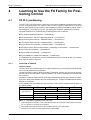
FX PLC positioning . . . . . . . . . . . . . . . . . . . . . . . . . . . . . . . . . . . . . . . . . . . . . . . . . . 4-1
4.1.1
4.1.2
4.1.3
4.2
Inverter Drive Control . . . . . . . . . . . . . . . . . . . . . . . . . . . . . . . . . . . . . . . . . . . . . . . . 4-21
4.2.1
4.2.2
4.2.3
4.3
Overview of control . . . . . . . . . . . . . . . . . . . . . . . . . . . . . . . . . . . . . . . . . . . 4-43
Important buffer memory locations . . . . . . . . . . . . . . . . . . . . . . . . . . . . . . . 4-44
Program example . . . . . . . . . . . . . . . . . . . . . . . . . . . . . . . . . . . . . . . . . . . . 4-45
FX2N-10GM and FX2N-20GM positioning. . . . . . . . . . . . . . . . . . . . . . . . . . . . . . . . 4-51
4.5.1
4.5.2
4.5.3
4.6
Overview of control . . . . . . . . . . . . . . . . . . . . . . . . . . . . . . . . . . . . . . . . . . . 4-36
Important buffer memory locations . . . . . . . . . . . . . . . . . . . . . . . . . . . . . . . 4-37
Program example . . . . . . . . . . . . . . . . . . . . . . . . . . . . . . . . . . . . . . . . . . . . 4-38
FX2N-10PG positioning . . . . . . . . . . . . . . . . . . . . . . . . . . . . . . . . . . . . . . . . . . . . . . 4-43
4.4.1
4.4.2
4.4.3
4.5
Overview of control . . . . . . . . . . . . . . . . . . . . . . . . . . . . . . . . . . . . . . . . . . . 4-21
Using the FX2N(C), FX3U(C) and FREQROL Inverter. . . . . . . . . . . . . . . . 4-22
Program example . . . . . . . . . . . . . . . . . . . . . . . . . . . . . . . . . . . . . . . . . . . . 4-26
FX2N-1PG-E positioning . . . . . . . . . . . . . . . . . . . . . . . . . . . . . . . . . . . . . . . . . . . . . 4-36
4.3.1
4.3.2
4.3.3
4.4
Overview of control . . . . . . . . . . . . . . . . . . . . . . . . . . . . . . . . . . . . . . . . . . . . 4-1
Important memory locations . . . . . . . . . . . . . . . . . . . . . . . . . . . . . . . . . . . . . 4-4
Program Examples . . . . . . . . . . . . . . . . . . . . . . . . . . . . . . . . . . . . . . . . . . . . 4-5
Overview of control . . . . . . . . . . . . . . . . . . . . . . . . . . . . . . . . . . . . . . . . . . . 4-51
Using dedicated software to set positioning for the FX2N-20GM . . . . . . . . 4-52
Testing and monitoring operations . . . . . . . . . . . . . . . . . . . . . . . . . . . . . . . 4-58
FX3U-20SSC-H positioning . . . . . . . . . . . . . . . . . . . . . . . . . . . . . . . . . . . . . . . . . . . 4-60
4.6.1
4.6.2
4.6.3
4.6.4
4.6.5
Overview of control . . . . . . . . . . . . . . . . . . . . . . . . . . . . . . . . . . . . . . . . . . . 4-60
Using dedicated software to set positioning for the FX3U-20SSC-H . . . . . 4-61
Testing and monitoring operations . . . . . . . . . . . . . . . . . . . . . . . . . . . . . . . 4-64
Important buffer memory locations . . . . . . . . . . . . . . . . . . . . . . . . . . . . . . . 4-65
Program example . . . . . . . . . . . . . . . . . . . . . . . . . . . . . . . . . . . . . . . . . . . . 4-66
Index
VI
MITSUBISHI ELECTRIC
What is positioning control?
The Basics of Positioning Control
1
The Basics of Positioning Control
1.1
What is positioning control?
The positioning controller, together with the programmable logic controller, personal computer
and operator interface, is one of the four main units of FA (factory automation).
Among these units, the positioning controller plays an important role and is regarded as the
center of the mechatronics field in which many senior engineers have been playing active roles.
Positioning is all about motion, and motion often involves speed and precision. And since speed
can be directly related to productivity, positioning is an area of much development. When the
speed of a machine increases, a problem with the stop precision is often generated. In order to
solve this problem, diversified grades of positioning controllers have been required and
developed.
Improving machine efficiency generates immeasurable added value, including reduced labor
costs and improved conservation of machine floor space for the same quantity of production. If
there are no problems related to the positioning aspect of a machine, it may mean that the
machine is not running as efficiently as it could be. This is where the science of developing and
retrofitting an optimum positioning control system comes in.
FX Positioning Control Systems
1-1
The Basics of Positioning Control
1.2
Actuators for positioning
Actuators for positioning
The options available for positioning control depend on the type of actuator driving the system.
An actuator is a mechanical device that moves or controls a specific element or a series of
elements within a system.
In a mechanical system, an actuator is often used with a sensor to detect the motion or position
of a workpiece. The following illustrations provide examples of diversified actuators, their
features and their weak points.
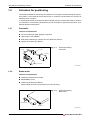
1.2.1
Pneumatic
Features and Drawbacks
● Air source and high grade piping are required.
● High torque is not available.
● Multi-point positioning is complex and very difficult to achieve.
● Change in positioning is difficult.
Fig. 1-1:
Piping
Air cylinder
Schematic drawing
Pneumatic
Workpiece
Compressor
120010da.eps
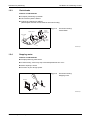
1.2.2
Brake motor
Features and Drawbacks
● Positioning mechanism is simple.
● Repeatability is poor.
● Change in positioning is difficult.
(When optical sensors or limit switches are used for stop)
Fig. 1-2:
Schematic drawing
Brake motor
Motor with brake
Limit switch
120020da.eps
1-2
MITSUBISHI ELECTRIC
Actuators for positioning
1.2.3
The Basics of Positioning Control
Clutch brake
Features and Drawbacks
● Frequent positioning is possible.
● Life of friction plate is limited.
● Change in positioning is difficult.
(When optical sensors or limit switches are used for stop)
Fig. 1-3:
Speed reducer
Costant
quantity
feed hopper
Schematic drawing
Clutch Brake
Clutch brake
unit
Optical
sensor
Motor
120030da.eps
1.2.4
Stepping motor
Features and Drawbacks
● Simple positioning mechanism.
● If load is heavy, motor may step out and displacement can occur.
● Motor capacity is small.
● Precision is poor at high speed.
Fig. 1-4:
Schematic drawing
Stepping motor
Controller
Stepping
motor
120040da.eps
FX Positioning Control Systems
1-3
The Basics of Positioning Control
1.2.5
Actuators for positioning
DC servo system
Features and Drawbacks
● Positioning precision is accurate.
● Maintenance is required for motor brushes.
● It is not suitable for rotation at high speed.
Fig. 1-5:
DC servo amplifier
Schematic drawing
DC servo system
DC servomotor
120050da.eps
1.2.6
General purpose inverter and general purpose motor
Features and Drawbacks
● Multi-speed positioning is available using a high-speed counter.
● High precision positioning is not available.
● Large torque is not available at start.
(Specialized inverter is required)
Lifter
Motor with brake
Fig. 1-6:
Schematic drawing
General purpose inverter and
general purpose motor
General-purpose
inverter
120060da.eps
1-4
MITSUBISHI ELECTRIC
Actuators for positioning
1.2.7
The Basics of Positioning Control
AC servo system
Features and Drawbacks
● Positioning precision is good.
● Maintenance is not required.
● Positioning address can be easily changed.
● It is compact, and offers high power.
Fig. 1-7:
Schematic drawing
AC servo system
Cutter
Sheet material
AC servo
motor
AC servo amplifier
120030da.eps
FX Positioning Control Systems
1-5
The Basics of Positioning Control
1.3
Positioning method type
Positioning method type
In general, there are two methods to control the movement of a workpiece: speed control and
position control. For basic, more rudimentary positioning, speed control can be used with an
inverter and general purpose motor. For systems where precision is a must, servo systems are
required for the advanced handling of pulse commands.
1.3.1
Speed control
Limit switch method
Two limit switches are provided in places where a system’s moving part passes. At the first limit
switch, the motor speed is reduced. At the second limit switch, the motor turns off and the brake
turns on to stop the moving part.
In this method, because position controllers are not required, the system configuration can be
realized at reasonable cost.
– Guideline of stopping precision: Approximately ±1.0 to 5.0 mm
(The stop precision shows a value in a case where the low speed is 10 to 100 mm/s.)
Inductive motor
Brake
B
Moving part
Ball screw
IM
Limit switch for
changeover to
low speed
Inverter
INV
Limit switch for
stop
High speed
0 to 10 V DC
Low speed
Movement distance
120080da.eps
Fig. 1-8: Schematic drawing – Limit switch method
1-6
MITSUBISHI ELECTRIC
Positioning method type
The Basics of Positioning Control
Pulse count method
A position detector (such as a pulse encoder) is set up in a motor or rotation axis. The pulse
number generated from the position detector is counted by a high-speed counter. When the
pulse number reaches the preset value, the moving part stops.
In this method, because limit switches are not used, the stop position can be easily changed.
– Guideline of stopping precision: Approximately ±0.1 to 0.5 mm
(The stop precision shows a value in a case where the low speed is 10 to 100 mm/s.)
Inductive motor
Pulses are fed
back
Moving part
Ball screw
PLG IM
Pulse generator
Inverter
INV
DC 0 to
10 V
High speed
Programmable
controller
PLC
Low speed
High speed
counter unit
Movement distance
120090da.eps
Fig. 1-9: Schematic drawing – Pulse count method
In speed control applications with inverters, stop precision is not very accurate. With the limit
switch method, a system operates without any feedback to the controller to indicate the location
of the workpiece. With the pulse count method, the speed can be changed and the stop
command can be executed at specific distances (at specific timings) according to the feedback
from the pulse generator connected to the motor. Both the limit switch method and the pulse
count method, however, are subject to a loss in stop precision due to the dispersion of distance
that occurs for workpieces at different speeds.
● When automatically stopping a moving part driven by a motor, stop the motor by a position
signal (using a limit switch or pulse count comparison). In general conditions, turn on the
brake at the same time.
FX Positioning Control Systems
1-7
The Basics of Positioning Control
Positioning method type
● The moving part continues by a coasting distance until it completely stops, after the stop
command is given. The coasting distance is not controlled and it is represented as the
shaded part in the figure below.
Fig. 1-10: Positioning pattern
Speed
Coasting
distance
Time
Stop
Stop command
1200b0da.eps
● Dispersion in the stop distance changes as shown below. Dispersion is affected by the speed
of the workpiece when the stop command is given and the speed reduction time delay after
stop.
Fig. 1-11: Positioning pattern
Speed
Speed recuction start
Time delay
Dispersion in
stop
Time
Stop
command
Stop
Stop
1200c0da.eps
● If the required stop precision is not satisfactory when stopping from the normal operation
speed, the most effective method to improve the stop precision is to reduce the operation
speed. However, if the operation speed is simply reduced, the machine efficiency may also
be reduced. Therefore, in actual operation, the motor speed can be reduced from a high
speed to a low speed before the motor is stopped, as shown below.
Speed
High speed
Speed
Time delay
Poor stop
precision
High speed
Low
speed
Improved stop
precision
Time
Stop
command
Stop
Speed reduction
command
Time
Stop
Stop command
1200d0da.eps
Fig. 1-12: Positioning pattern
1-8
MITSUBISHI ELECTRIC
Positioning method type
1.3.2
The Basics of Positioning Control
Position control
Pulse command method
An AC servo motor which rotates in proportion to the input pulse number is used as the drive
motor.
When the pulse number corresponding to the movement distance is input to the servo amplifier
of the AC servo motor, positioning can be performed at high speed in proportion to the pulse
frequency.
– Guideline of stopping precision: Approximately ±0.01 to 0.05 mm
(The stop precision shows a value in a case where the low speed is 10 to 100 mm/s.)
Servo motor
Pulses are fed
back
Moving part
Ball screw
PLG SM
Pulse generator
Servo
amplifier
Programmable
controller
PLC
Position controller
Movement distance
1200a0da.eps
Fig. 1-13: Schematic drawing – Pulse command method
Using the pulse command method with a servo amplifier, the weak points described above for
speed control are improved. A pulse encoder is attached to the servo motor to detect the motor
rotation quantity (workpiece movement distance) and feed the information directly to the servo
amplifier in order to continuously and directly control the high-speed positioning operation to the
target position. This method allows the workpiece to stop with better precision and eliminates
the coasting and dispersion distance at stop. Furthermore, limit switches to stop normal
positioning operations, along with counting methods from the PLC are not needed.
FX Positioning Control Systems
1-9
The Basics of Positioning Control
Positioning method type
1 - 10
MITSUBISHI ELECTRIC
Advantages for using an AC servo system
Positioning by AC Servo System
2
Positioning by AC Servo System
2.1
Advantages for using an AC servo system
With an AC servo system, positioning can be performed by many diversified methods. Typically,
a position controller, servo amplifier and servo motor are required for positioning with an AC
servo system. The representative servo system configuration is shown below.
Servo amplifier
Commercial
power supply
Converter
Smoothing
circuit
AC DC
DC
Command
pulse
Positioning
controller
Deviation
counter
DC AC
Speed
command
SM
PLG
Feedback
current
Encoder
Current
control
The positioning controller
generates a specified quantity
of forward rotation (or reverse rotation)
pulses at a specified frequency.
Servo
motor
Inverter
PWM (pulse width
modulation control
The command pulse number
is subtracted by the feedback pulse
number, and the speed command to
drive the servo motor is made from the
deviation (accumulated pulse number).
When the accumulated pulse number
becomes 0, the servo motor stops.
Feedback
pulse
The servo motor is equipped with a
built-in encoder (pulse generator),
dedicated to high speed response, and
suitable for positioning control.
210010da.eps
Fig. 2-1: Block diagram of an AC servo system
In the latest AC servo systems, conventional weak points have been improved as follows:
● Although the latest systems are completely digital, they are equipped with parameters in
conformance to diversified mechanical specifications and electrical specifications so that
simple set-up is possible.
● As frequent operation is enabled by a low inertia motor, the maximum torque is increased
and the system can be applied to a wide variety of machines.
● The latest systems are equipped with an auto tuning function, with which the servo amplifier
automatically detects the load inertia moment and adjusts the gain. This is possible even if
the load inertia moment is unknown.
● The command communication cycle from the controller to the servo amplifier is improved
for synchronization accuracy and better speed/positioning accuracy.
● The latest systems also allow for long-distance wiring, reduced noise resistance, and
simplified wiring.
The top advantages to using an AC servo system are described below.
Compact and light servo
system
Robust servo system
Easy servo system
Good cost performance
servo system
In the FA workplace, a
downsized AC servo system occupying less space
is beneficial.
In accordance with severe
operation conditions, a
tougher AC servo system is
often required.
AC servo systems are easier to handle than hydraulic
equipment. Easy systems
are also flexible for new
staff.
An AC servo system with
good cost performance
saves a company in overall
engineering costs.
FX Positioning Control Systems
2-1
Positioning by AC Servo System
2.2
Examples of AC servo systems
Examples of AC servo systems
Positioning indicates the operation to move an object, such as a workpiece or tool (drill or cutter),
from one point to another point and to stop it with efficiency and precision.
In other words, the principle of positioning is the control of speed in accordance with the position,
performed to promptly eliminate the remaining distance to the target position. The flexibility to
change the target position electrically and easily is an important requirement.
Several cases of positioning using an AC servo motor are systematically shown below.
2.2.1
Constant feed
Description
In the press/shear process for cutting, punching, etc., the processed material is positioned with
high precision to produce a constant sized product.
Fig. 2-2:
Press main unit
Schematic drawing
Constant feed
Roll feeder
Uncoiler
220010da
2.2.2
Tapping
Description
In order to tap a workpiece,
Quick feed
Cutting feed and
Quick return are performed repeatedly.
Fig. 2-3:
Workpiece
Drill
Schematic drawing
Tapping
M
Slide
Timing
belt
Cutting
feed
Quick
feed
Ball
screw
M
Pulley
2-2
Feed
motor
Quick
return
220020da.eps
MITSUBISHI ELECTRIC
Examples of AC servo systems
2.2.3
Positioning by AC Servo System
Drilling in steel sheet
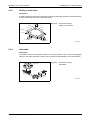
Description
In order to perform processing on a flat face, positioning with high precision is performed by two
motors (X axis feed motor and Y axis feed motor).
Fig. 2-4:
Drilling
Drill unit
X axis
Schematic drawing
Drilling in steel sheet
Y axis
Workpiece
X-Y table
M
M
X axis feed motor
Y axis feed motor
200030da.eps
2.2.4
Index table
Description
The position of the circular table is indexed. The index position is set on the outside (digital
switch) or the inside (program). Shortcut drive is performed depending on the index position.
Fig. 2-5:
Index table
Schematic drawing
Index table
Worm
wheel
Servo
motor
200040da.eps
FX Positioning Control Systems
2-3
Positioning by AC Servo System
2.2.5
Examples of AC servo systems
Lifter moving-up/down
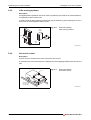
Description
As negative load is applied on the servo motor in positioning of the lifter in the vertical direction,
a regenerative option is also used.
In order to hold the lifter stationary and prevent drop of the lifter by power interruption, a servo
motor with an electromagnetic brake is used.
Fig. 2-6:
Servo
amplifier
Schematic drawing
Lifter moving-up/down
Lifter
Regenerative
option
Servo
motor
200050da.eps
2.2.6
Cart travel control
Description
A servo motor is mounted in the travel cart as the drive source.
A mechanism such as rack and pinion is adopted to prevent slippage between the wheels and
rails.
Fig. 2-7:
Cart
Schematic drawing
Cart travel control
Drive wheel
(on each of left
and right sides)
200060da.eps
2-4
MITSUBISHI ELECTRIC
Examples of AC servo systems
2.2.7
Positioning by AC Servo System
Carrier robot
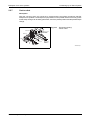
Description
After the conveyor stops, the 2-axis servo system and the arm lifting mechanism transfer
workpieces to a palette. The workpiece input positions on the palette can be set to many points
so that setup change can be easily performed, even if the palette position and the palette shape
change.
Fig. 2-8:
Travel head
Y direction
Schematic drawing
Carrier robot
Servo motor
to drive
slide arm
Slide arm
Pallet
Workpiece
Conveyor
A
Servo motor
to drive
travel head
200070da.eps
FX Positioning Control Systems
2-5
Positioning by AC Servo System
2-6
Examples of AC servo systems
MITSUBISHI ELECTRIC
Components of Positioning Control and their Roles
3
Components of Positioning Control and
their Roles
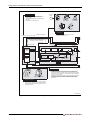
Positioning control requires a number of components such as a positioning controller, servo
amplifier, servo motor and drive mechanism. This section describes the role of each component.
To begin, the following two-page spread illustrates how the seven key elements function
together to perform positioning.
FX Positioning Control Systems
3-1
Components of Positioning Control and their Roles
Postion controller
AC power
supply
Outputs the positioning speed and the
movement quantity in command pulses to the
servo amplifier.
Transfers signals between the programmable
controller.
Controls return to the zero point.
Power factor
improving AG
Breaker
Electromagnetic
contactor
Radio noise
reactor filter
Line noise
filter
Powerboard
Improves the power factor and cuts noise.
Protects the power circuit.
Nearpoint DOG signal
In some types, the limit switch signal
is wired to the position controller
Main circuit
Servo amplifier
Position controller
Converter
Positioning
command
control
AC
Smoothing Regenerative
circuit
brake
DC
DC
Inverter
Dynamic
brake
DC AC
R
Command
pulse
Parameter
Pulse
magnification
Zero point
return
control
Deviation
counter
Speed
command
Current
control
(Electronic gear)
Counter clear
Feedback
current
PWM (pulse width
modulation) control
Feedback pulse
Servo
ready
Zero point signal (PGO)
Servo amplifier
10
0
90
80
70
60
Operation switch
Manual pulse generator
Rectifies the AC power of the main circuit into the DC power in the
converter, and smooths it in the smoothing circuit. When the DC
power is converted into AC power in the inverter, the current supplied
to the servo motor is changed by the PWM (pulse width modulation)
control in the control circuit.
The deviation counter receives and counts the command pulses from
the positioning controller, subtracts the feedback pulses from them,
then drives the servo motor until the accumulated pulse number
becomes 0.
Operation equipment
Gives inputs for manual/automatic mode, start/stop,
zero point return command, manual forward rotation/
reverse rotation and manual pulse generator to the
positioning controller.
300010da.eps
Fig. 3-1: Components of Postioning Control (1)
3-2
MITSUBISHI ELECTRIC
Components of Positioning Control and their Roles
Servo motor
Dedicated to high speed response optimal to positioning control,
has large start torque, large maximum torque and wide variable
speed range 1/1 or more (1/1,000 to 1/5,000).
When a moving element goes beyond a limit switch
(LS), the motor stops.
Servo motor
In the case of large motor
Cooling fan
Limit switch
(LS)
Servo
motor
SM
Nearpoint
dog switch
Moving element
Limit switch
(LS)
Speed
reducer
Ball screw
PLG
When
required
Encoder
(pulse
generator)
Electromagnetic
brake
Auxiliary device such as chuck, drill and cylinder
Sensor, actuator, auxiliary device
Hand help
programmer
Personal
Computer
The actuator (moving part drive
mechanism) is equipped with speed
reducer, timing belt, ball screw and limit
switch.
Diversified auxiliary devices are also
controlled in accordance with positioning.
The PLC or the positioning controller also
controls auxiliary devices.
The auxiliary device operation completed
signal is output to the PLC or the position
controller.
Setting / display unit
Used to write programs to the position
controller, allows setting and display of
the data.
300020da.eps
Fig. 3-1: Components of Postioning Control (2)
FX Positioning Control Systems
3-3
Components of Positioning Control and their Roles
3.1
Positioning controller
Positioning controller
Positioning controllers use programs and parameters to send positioning commands to the
servo amplifier. Contents related to programs and parameters are described below.
3.1.1
Command pulse control method
There are two types of control formats used for outputting command pulses from an FX Series
positioning controller:
● PLS/DIR (Pulse/Direction) method
● FP/RP (Forward Pulse/Reverse Pulse) method
Each method requires two outputs from the controller to control specific signals for direction and
pulse control. A third method, known as the A phase/B phase method, uses overlapping pulse
signals to specify direction.
PLS/DIR method
In the PLS/DIR method, one output sends pulses to the drive unit while the other output specifies
the direction of travel.
Forward rotation
Output # 1Pulse train
H
L
Output # 2Direction
H
L
ON Reverse rotation
Fig. 3-2:
Timing diagram
OFF 311010da.eps
"ON" and "OFF" represent the status of the controller’s output.
"H" and "L" respectively represent the HIGH status and the LOW status of the waveform.
The command pulse pattern in the figure assumes negative logic.
FP/RP method
In the FP/RP method, each output has a different direction and operates individually to send
pulses to the drive unit.
Forward rotation
Output # 1Forward rotation
pulse train (FP)
H
L
Output # 2Reverse rotation
pulse train (RP)
H
L
Reverse rotation
Fig. 3-3:
Timing diagram
OFF OFF 311020da.eps
3-4
"ON" and "OFF" represent the status of the controller’s output.
"H" and "L" respectively represent the HIGH status and the LOW status of the waveform.
The command pulse pattern in the figure assumes negative logic.
MITSUBISHI ELECTRIC
Positioning controller
3.1.2
Components of Positioning Control and their Roles
Basic parameter settings
To send a series of pulses (a pulse train) to a servo amplifier, positioning controllers use a
specified feed quantity, which is proportional to the number of pulses. A feed speed must also
be specified to control the number of pulses output per second.
Feed quantity
The feed quantity determined by the target address tells the servo system how far to move the
workpiece. So, for example, if a servo motor encoder generates 8,192 pulses for one rotation,
the command pulse number "8,192" can be output to rotate the servo motor by 1 rotation.
Feed speed
The feed speed defines the amount of travel per unit of time for the workpiece. When a servo
motor encoder generates 8,192 pulses for one rotation, the command pulse frequency (speed)
"8,192 pulses/s" should be output to rotate the servo motor by 1 rotation per second. Decrease
the pulse frequency to rotate the servo motor at a lower speed. Increase the pulse frequency to
rotate the servo motor at a higher speed.
Acceleration/deceleration time
When the start command is given, acceleration, operation at constant speed, and deceleration
are performed for positioning. Set the acceleration time and the deceleration time in the
controller’s parameters.
Fig. 3-4:
Parameter:
Max. speed
Speed
Positioning pattern of
acceleration/deceleration time
Positioning speed
Actual
acceleration
time
Parameter:
Acceleration
time
Parameter:
Deceleration
time
Actual
deceleration
time
312010da.eps
3.1.3
Zero point return function
Many positioning systems include a "home position" to where a workpiece may need to return
after performing various operations. For this reason, positioning controllers include a built-in
function to return a workpiece to a defined position by using a mechanical DOG switch.
To understand how this works, it is necessary to first understand when the function is needed
according to the parameter setting of the servo amplifier and the type of servo motor encoder.
Incremental type servo motor encoder (pulse count method)
When the servo system uses an incremental or relative type encoder, the current value of the
address stored in the position controller is not "remembered" or maintained when the power is
turned off. This means that the address is set to zero every time the power is cycled, which can
be disadvantageous in an application. Accordingly, every time the system is re-powered, it must
be calibrated to the correct zero-point location by executing the zero point return function.
FX Positioning Control Systems
3-5
Components of Positioning Control and their Roles
Positioning controller
Absolute type servo motor encoder (absolute position detection system)
The absolute position detection system requires an absolute position motor encoder, a backup
battery on the servo amplifier, and a parameter specification setting. It is constructed so that the
current value stored in the positioning controller is always assured, regardless of power outages
or movement while the power is turned off. The advantage to using this method is that after
executing the zero point return function once, zero point return it is not needed again.
NOTE
Example The zero point return function does not actuate movement to a physical zero address.
Instead, the zero point return function causes movement in a specified direction (positive or
negative) in order to define the physical zero address after contact with a DOG switch.
Example of DOG type zero return
In the example in Fig. 3-5, the DOG (which is attached to the workpiece) comes in contact with
the DOG switch to turn the DOG signal ON, which then initiates deceleration to creep speed.
After the backward end of the DOG passes the DOG switch, turning the DOG signal OFF, the
first detected zero point signal stops the motion, turns the CLEAR signal on, and sets the zero
point address.
The zero point address (specified in the controller’s parameters) is typically zero. When the zero
return function finishes, the zero point address is written to the current value register of the
positioning controller to overwrite the current address. Since the zero point address is not always
zero, the zero return function should be thought of as a homing function instead of a
return-to-zero function.
The zero point return direction, zero point address, zero signal count, return speed, deceleration
time and creep speed are all set by parameters in the positioning controller.
Positioning pattern of
DOG type zero return
DOG switch
activated
Creep
speed
Zero point
Initial position
DOG
switch
DOG
Zero point return
direction
DOG
Forward end
Fig. 3-5:
Zero point
return speed
Deceleration time
Backward end
CLEAR signal
313010da.eps
3-6
The location of the DOG switch should be adjusted so that the backward end of the DOG
is released between two consecutive zero point signals (1 pulse per rotation of the motor).
In this example, the DOG length should not be less than the deceleration distance of the
machine.
MITSUBISHI ELECTRIC
Positioning controller
Components of Positioning Control and their Roles
DOG search function
In some PLC models, if the zero point return function is performed while the workpiece is
stopped beyond the DOG switch, the machine moves until the limit switch is actuated, changes
direction, then returns to the zero point again (DOG search function, zero point return retry
function).
DOG
switch
Limit
switch
Initial
position
Fig. 3-6:
Positioning pattern of
DOG search function
Zero point
Escape operation
313020da.eps
FX Positioning Control Systems
3-7
Components of Positioning Control and their Roles
3.2
Servo Amplifier and Servo Motor
Servo Amplifier and Servo Motor
The servo amplifier controls the movement quantity and the speed according to the commands
given by the positioning controller. The servo motor then transmits rotation to the drive
mechanism after receiving signals from the servo amplifier.
3.2.1
Positioning control in accordance with command pulse
In accordance with speed and position command pulses from the positioning controller, PWM
(pulse width modulation) control is performed by the main circuit of the servo amplifier in order
to drive the motor. The rotation speed and the rotation quantity are fed back to the amplifier from
the encoder attached to the servo motor.
3.2.2
Deviation counter function
The difference between the command pulses and the feedback pulses counted by the deviation
counter in the servo amplifier is called accumulated pulses.
While the machine is operating at a constant speed, the accumulated pulse quantity is almost
constant. During acceleration and deceleration, the accumulated pulse quantity changes more
dramatically.
When the accumulated pulse quantity becomes equivalent to or less than a specified quantity
(in-position set value) after command pulses have stopped, the servo amplifier outputs the
positioning complete signal.
The servo motor continues operation even after that. Then, when the accumulated pulse
quantity becomes 0, the servo motor stops.
The time after the servo motor outputs the positioning complete signal until it stops is called the
stop settling time.
Command speed
Speed
Motor speed
The accumulated pulse quantity is 0, and
positioning is completed
Accumulated
pulses
Time
Stop setting time
322010da.eps
Fig. 3-7: Positioning pattern
3-8
MITSUBISHI ELECTRIC
Servo Amplifier and Servo Motor
3.2.3
Components of Positioning Control and their Roles
Servo lock function
The servo motor is controlled so that the accumulated pulse quantity counted in the deviation
counter becomes 0.
For example, if an external force for forward rotation is applied on the servo motor, the servo
motor performs the reverse rotation operation to eliminate the accumulated pulses.
Accumulated pulses in deviation counter
Servo motor
Minus pulses
Reverse rotation operation
Plus pulses
Forward rotation operation
0 (zero)
Stop
Tab. 3-1: Control of servo motor by accumulated pulses
3.2.4
Regenerative brake function
During deceleration, because the servo motor rotates by the load inertia of the drive mechanism,
it functions as a generator and electric power returns to the servo amplifier.
The regenerative resistor absorbs this electric power and functions as a brake (called a
regenerative brake.)
A regenerative brake is required to prevent regenerative over voltage in the servo amplifier
when the load inertia is large and operations are frequently performed.
The regenerative resistor is required when the regenerative power generation quantity during
deceleration exceeds the allowable regenerative electric power of the servo amplifier.
FX Positioning Control Systems
3-9
Components of Positioning Control and their Roles
3.2.5
Servo Amplifier and Servo Motor
Dynamic brake function
When a circuit inside the servo amplifier is disabled by a power interruption in the AC power of
the main circuit or actuation of the protective circuit, the terminals of the servo motor are
short-circuited via resistors, the rotation energy is consumed as heat, then the motor
immediately stops without free run.
When the motor stops by elimination of the rotation energy, the brake is not effective and the
motor runs freely.
Main
circuit
AC power
supply
NFB
Position
controller
R
S
T
Converter
AC to DC
Deviation
counter
Inverter
DC to AC
D/A
conversion
U
V
W
SM
PLG
These contacts of the
dynamic brake turn ON
when the power is
interrupted.
Number of
rotations of motor
Motor stop characteristics when the
dynamic brake is actuated
When the dynamic brake
is not actuated
Time
Power: OFF
Contacts of dynamic brake: ON
325010da.eps
Fig. 3-8: Dynamic brake function
3 - 10
MITSUBISHI ELECTRIC
Drive mechanism
3.3
Components of Positioning Control and their Roles
Drive mechanism
The drive mechanism converts the rotation motion of the servo motor into reciprocating or
vertical motion through a speed reducer, timing belt, ball screw, etc. to move the machine.
3.3.1
Concept of drive system movement quantity
The following diagram is a representative AC servo motor positioning system.
Fig. 3-9:
Encoder
Servo
motor
N0
Speed
reducer
1
n
Moving part
v0
AC servo motor positioning
system
PB
Pf
Servo
amplifier
f0
Position
controller
331010da.eps
욼l:
Transfer distance per pulse (mm/pulse)
v0 :
Moving part speed during quick feed (mm/min)
P B:
Lead of ball screw (mm/rev)
1/n:
Speed reduction ratio
욼S:
Transfer distance per rotation of motor (mm/rev)
N0:
Number of rotations of motor during quick feed (rev/min)
Pf:
Feedback pulse number (pulse/rev)
f0 :
Command pulse frequence during quick feed (pulse/sec)
● The servo motor stops with the precision 욼l, which is within 1 pulse against the command
pulse.
● The movement quantity of the workpiece is:
[Output pulses from position controller] × [욼l]
● The moving part speed is:
[f0] × [욼l]
● Either "mm", "inch", "degree", or "pulse" can be selected for the positioning command unit.
Accordingly, when data such as the movement quantity per pulse, positioning speed, or the
positioning address in accordance with the positioning command unit are set, pulse trains
are output for the target address, and positioning is performed.
FX Positioning Control Systems
3 - 11
Components of Positioning Control and their Roles
Drive mechanism
Useful equations
To define the system illustrated above, 욼l and v0 need to be determined using a series of
equations. The speed of the moving part (v0) is constrained by the mechanical gearing system
between the servo motor and moving part, the pitch of the ball screw, and the specification of the
motor as shown through the following two formulas.
Transfer distance per rotation of motor:
mm
ΔS rev
1
n
= PB
Number of rotations of motor during quick feed:
rev
N0 min
=
Rated number of
rotations of
servo motor
v0
ΔS
If N0 does not exceed the rated speed of the motor, this means that the servo system can be
used for the application. In order to determine if the positioning controller is applicable, the
command pulse frequency during quick feed (f0) should be checked to verify it does not exceed
the maximum allowable frequency setting for the "maximum speed" parameter setting of the
controller.
Transfer distance per pulse:
mm
Δ l PLS
=
ΔS
Pf
(Electronic gear ratio)
Command pulse frequency during quick feed:
f0
PLS
S
=
ΔS
Δl
N0
1
60
During the above process, the Electronic gear ratio (often "CMX/CDV" for Mitsubishi servos)
and Speed reduction ratio can be adjusted to fit the application’s needs.
In each of the absolute and incremental positioning methods, the entire movement distance of
the machine should not exceed the maximum allowable pulse output number from the
positioning controller.
3 - 12
MITSUBISHI ELECTRIC
Drive mechanism
3.3.2
Components of Positioning Control and their Roles
Setting the target position
In positioning control, the target position can be set by the following two methods, specified by
the controller’s parameter settings. (Available command units are "mm," "inch", "degree", or
"pulse".)
Absolute method
In this method, a point (absolute address) is specified for positioning while the zero point is
regarded as the reference. The start point is arbitrary.
Startpoint
Address 100
Address 100
Endpoint
Address 150
Address 300
Address 150
Address 100
Address 150
0
Zero point
100
Point A
150
Point B
300
Point C
332010da.eps
Fig. 3-10: Setting the target position, absolute method
Incremental method
In this method, positioning is performed through specification of the movement direction and the
movement quantity while the current stop position is regarded as the start point.
Movement quantity
-100
Movement quantity
+100
Startpoint
Endpoint
Movement quantity +100
Movement quantity +100
Movement quantity -150
Movement quantity +50
Movement quantity -100
0
Zero point
100
Point A
150
Point B
300
Point C
332020da.eps
Fig. 3-11: Setting the target position, incremental method
FX Positioning Control Systems
3 - 13
Components of Positioning Control and their Roles
3 - 14
Drive mechanism
MITSUBISHI ELECTRIC
FX PLC positioning
Learning to Use the FX Familiy for Positioning Control
4
Learning to Use the FX Familiy for Positioning Control
4.1
FX PLC positioning
The FX1S, FX1N, FX3G and FX3U(C) Series PLC main units include basic positioning instructions
to send command pulses to a stepper motor or servo amplifier. While FX PLCs support
point-to-point positioning, full control is also available for reading the absolute position from a
servo amplifier, performing zero return, and altering the workpiece speed during operation.
Important references for understanding positioning with FX PLCs include:
● FX Series Programming Manual – (JY992D88101)
● FX3G/FX3U/FX3UC Series Programming Manual – (JY997D16601)
● FX3G Series User’s Manual - Hardware Edition – (JY997D31301)
● FX3U Series User’s Manual - Hardware Edition – (JY997D16501)
● FX3UC Series User’s Manual - Hardware Edition – (JY997D28701)
● FX3G/FX3U/FX3UC Series User’s Manual - Positioning Control Edition – (JY997D16801)
● FX2N-1PG User’s Manual – (JY992D65301)
● FX2N-10PG User’s Manual – (JY992D93401)
● FX2N-10GM/FX2N-10GM User’s Manual – (JY992D77801)
It is assumed that you will have read and understood the above manuals or that you will have
them close at hand for reference.
4.1.1
Overview of control
Number of Axes
The FX1S and FX1N transistor type PLCs support positioning on 2 axes with operation speeds
up to 100,000 pulses/second (100 kHz).
The main units FX3G-14MT/ and FX3G-24MT/ (transistor outputs) can control up to two axes
and the main units FX3G-40MT/ and FX3G-60MT/ can control a maximum of three axes with
up to 100 kHz.
The FX3U(C) transistor type PLC main units support positioning speeds up to 100 kHz on 3 axes.
If two FX3U-2HSY-ADP adapters are connected to the FX3U, 4 axes are available with operation
speeds up to 200 kHz.
The PLS/DIR pulse output method is used for all PLC main units to output pulses as shown in
the following table.
1st Axis
2nd Axis
3rd Axis
4th Axis
—
—
FX1S, FX1N, FX3G-14MT/, FX3G-24MT/
Applicable Model
FX3U(C), FX3G-40MT/, FX3G-60MT/
—
FX3U + (2) FX3U-2HSY-ADP Pulse Output
Y0
Y1
Y2
Y3
Direction Output Y4
Y5
Y6
Y7
Tab. 4-1: Overview of applicable PLC main units
Output terminals for direction can be specified arbitrarily when the FX3U-2HSY-ADP is not used.
Y4, Y5, Y6 and Y7 are used as an example.
The FP/RP pulse output method is also available with the FX3U-2HSY-ADP.
The FX3UC can not be connected with the FX3U-2HSY-ADP.
FX Positioning Control Systems
4-1
Learning to Use the FX Familiy for Positioning Control
FX PLC positioning
Limit switches
As with any other positioning system, inputs are needed to detect when the workpiece reaches
the outer boundary limits in order to prevent damage to the machine. For the FX3G and FX3U(C)
programmable logic controller, limits are wired to the controller to be used with the DOG search
zero return function for reversing the motor’s direction of travel in order to hunt for the DOG
switch. These limits are called the forward rotation limit (LSF) and the reverse rotation limit
(LSR). Hardware limits are used on the servo amplifier side to stop the motor in worst case
scenarios.
Reverse rotation limit 2
(Servo amplifier side)
Reverse rotation limit 1
(Programmable
controller side)
LSR
Forward rotation limit 1
(Programmable
controller side)
LSF
Forward rotation limit 2
(Servo amplifier side)
Servo motor
Reverse rotation
Forward rotation
141010da.eps
Fig. 4-1: Example of limit switches for the FX3U(C) PLC
Sink vs. Source outputs
In general, MELSERVO Series amplifiers are configured with sink type inputs. To communicate
appropriately with sink type inputs, sink type outputs are used on the PLC side. Therefore, when
using a Mitsubishi servo control system, a transistor sink output type PLC is used.
Options for positioning
Before choosing a PLC for a positioning system, it is important to understand the instructions
available for each PLC. The FX1S and FX1N include the same set of positioning instructions. The
only disadvantage to choosing an FX1S PLC for positioning is that it does not include as many
I/O and that it cannot be expanded with special function blocks for analog or communication
control.
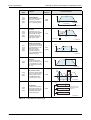
The FX3U, combined with high speed positioning adapters, can operate with higher pulse output
frequencies and includes 3 additional positioning instructions. The available instructions for FX
PLCs are described in the chart below.
Applicable
Model
Description
Positioning
instruction
Instruction Illustration
JOG speed
Speed
FX1S
FX1N
FX3G
FX3U
FX3UC
JOG operation
The motor moves in a specified direction depending on
the logic and timing of the
drive input signal.
(There is no target position.)
DRVI
Start
Stop
JOG
command
Start
Stop
411020da.eps
Tab. 4-2: Instructions for FX PLCs (1)
4-2
MITSUBISHI ELECTRIC
FX PLC positioning
Learning to Use the FX Familiy for Positioning Control
Applicable
Model
Description
Positioning
instruction
Instruction Illustration
Operation speed
Speed
FX1S
FX1N
FX3G
FX3U
FX3UC
1-speed positioning
A start command accelerates
the motor to a constant
speed and moves the workpiece to a specified distance.
DRVI
DRVA
Start
Target position
Travel distance
411030da.eps
Zero point return
Speed
FX1S
FX1N
FX3G
FX3U
FX3UC
Zero return
The machine moves at a
specified speed until the DOG
input turns ON. The workpiece then slows to creep
speed and stops before the
CLEAR signal is output.
Creep speed
ZRN
Zero point
DOG input ON
Start
CLEAR signal
411040da.eps
FX1S
FX1N
FX3G
FX3U
FX3UC
FX3U
FX3UC
FX3G
FX3U
FX3UC
Variable speed operation
After starting with a specified
speed, the motor can change
its speed depending on commands from the PLC.
(For the FX1S and FX1N,
acceleration to different
speeds is approximated with
the RAMP instruction.)
Speed
PLSV
(RAMP)
Interrupt 1-speed
positioning
When an interrupt signal
turns ON, the workpiece travels a specific distance at the
same speed before decelerating to stop.
DOG search zero return
The machine operates similar
to the zero return instruction
except for features to hunt
for the DOG switch and to
use the zero-phase signal.
Start
Speed change
Speed change
411050da.eps
Travel distance
Speed
DVIT
Start
Interrupt input
411060da.eps
DOG
Limit
(LSR)
Origin
DSZR
Start
411070da.eps
Input
FX3G
FX3U
FX3UC
Table operation
For programming simplicity,
position and speed data can
be organized in table format
for the DRVI, DRVA, DVIT
and PLSV instructions.
DTBL
Y0
K1
DTBL
Y0
K2
DTBL
Y0
K3
Axis
Table No.
Input
DTBL
Y000 is postioned by
the operation in table
number 1-3.
Input
411080da.eps
Tab. 4-2: Instructions for FX PLCs (2)
FX Positioning Control Systems
4-3
Learning to Use the FX Familiy for Positioning Control
4.1.2
FX PLC positioning
Important memory locations
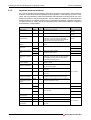
For FX PLC programs using positioning instructions, there are several built-in special devices
to define control parameters and facilitate system operation. These devices consist of 1-bit,
16-bit, and 32-bit address locations and are briefly outlined below according to their use in the
example programs in the following section. Use this table as a reference to understand the
example programs. For details on other memory addresses (for example, operation information
for control on Y001 or Y002), refer to the FX3G/FX3U/FX3UC Series User’s Manual - Positioning
Control Edition (JY997D16801).
Function name
Device
Length
Description
Applicable PLC
RUN monitor
M8000
1-bit
ON when PLC is in RUN.
FX1S, FX1N, FX3G,
FX3U(C)
Initial pulse
M8002
1-bit
ON for the first scan only.
FX1S, FX1N, FX3G,
FX3U(C)
Instruction execution
complete flag
M8029
1-bit
Programmed immediately after a positioning
instruction. Turns ON when the preceding
instruction finishes its operation and stays ON
until the instruction stops being driven.
FX1S, FX1N, FX3G,
FX3U(C)
CLEAR signal output
enable
M8140
1-bit
Enables a CLEAR signal to be output to the
servo.
FX1S, FX1N
Pulse output stop
command
M8145
1-bit
Stop outputting Y000 pulses. (Immediate stop)
FX1S, FX1N, FX3G
Pulse output monitor
flag
M8147
Instruction execution
abnormally complete
flag
M8329
CLEAR signal output
function enable
M8349
FX3G, FX3U(C)
1-bit
OFF when Y000 is READY
ON when Y000 is BUSY
FX1S, FX1N, FX3G
1-bit
Programmed immediately after a positioning
instruction. Turns ON when an instruction fails
to complete correctly and stays ON until the
instruction stops being driven.
FX3G, FX3U(C)
M8341
1-bit
Enables an output to be used for the CLEAR
signal for Y000.
(Y000) Zero return
direction specification
M8342
1-bit
OFF Reverse rotation
ON Forward rotation
Forward rotation limit
M8343
1-bit
Forward pulses on Y000 stop when this relay
turns ON.
Reverse rotation limit
M8344
1-bit
Reverse pulses on Y000 stop when this relay
turns ON.
(Y000) Positioning
instruction activation
M8348
1-bit
OFF when a positioning instruction is not active.
ON when a positioning instruction is active.
CLEAR signal device
specification function
enable
M8464
1-bit
Enables the output terminal for the CLEAR signal to be changed for Y000.
Bias speed [Hz]
D8145
16-bit
Sets the bias speed for Y000.
M8340
FX3G, FX3U(C)
FX1S, FX1N
D8342
Maximum speed [Hz]
D8146
FX3G, FX3U(C)
FX3G, FX3U(C)
32-bit
Sets the maximum speed for positioning instruc- FX1S, FX1N
tions on Y000.
FX3G, FX3U(C)
Acceleration/decelera- D8148
tion time [ms]
16-bit
Sets the acceleration and deceleration time.
Acceleration time [ms] D8348
16-bit
Sets the acceleration time for Y000.
Deceleration time [ms] D8349
16-bit
Sets the deceleration time for Y000.
CLEAR signal device
specification
16-bit
Sets the output terminal for the CLEAR signal
for Y000.
D8343
D8464
FX1S, FX1N
FX3G, FX3U(C)
Tab. 4-3: Buffer memory addresses of FX1S, FX1N, FX3G and FX3U(C)
4-4
MITSUBISHI ELECTRIC
FX PLC positioning
4.1.3
Learning to Use the FX Familiy for Positioning Control
Program Examples
Two positioning examples are included as a reference to get started with PLC programming.
Hybrid programming example for FX1S, FX1N, FX3G and FX3U(C) PLCs
The first example below illustrates zero return and absolute positioning control on 1 axis with an
FX1S, FX1N or FX3U(C) PLC. Since the special devices for utilizing positioning instructions are
different depending on the PLC, please note that the following program is a hybrid program and
that device addresses must be changed according to the type of PLC.
A general understanding of step ladder and ladder logic is necessary to use the program.
500,000
Forward
positioning 100
Output pulse frequency:
100,000 Hz
500 Hz
Origin after
zero return Reverse rotation limit 2
(Servo amplifier side)
Bias speed
500 Hz
Forward rotation limit 2
(Servo amplifier side)
Servo motor
Reverse
positioning Reverse
rotation
Forward
rotation
Acceleration/deceleration time:
100 ms
413010da.eps
Fig. 4-2: Configuration for the program example
See marker in program fig. 4-3 (3).
See marker in program fig. 4-3 (3).
See marker in program fig. 4-3 (4).
Inputs
Outputs
X000
Immediate stop
Y000
Pulse train output
X001
Zero return command
Y002
CLEAR signal
X002
Forward rotation positioning command
Y004
Rotation direction signal
X003
Reverse rotation positioning command
Y010
CLEAR signal
X004
Stop command
—
—
X005
Near-point signal (DOG)
—
—
X006
Servo ready
—
—
Tab. 4-4: Used inputs and outputs
FX Positioning Control Systems
4-5
Learning to Use the FX Familiy for Positioning Control
X000
FX PLC positioning
Use this for FX3G and FX3U(C) PLCs
M8349
M8145
RST
M10
RST
M11
RST
M12
H0010
D8464
Immediate stop
X006
Use this for FX1S and FX1N PLCs
Servo ready
Use this for FX3G and FX3U(C) PLCs
M8000
FNC 12
MOVP
RUN monitor
M8464
M8341
Use this for FX1S and FX1N PLCs
M8140
413020da.eps
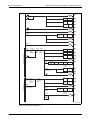
Fig. 4-3: Program example (1)
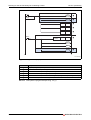
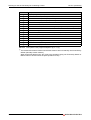
Number
Description
Stops outputting Y000 pulses. (Immediate stop)
Resets "zero return completion" flag.
Resets "forward rotation positioning completion" flag.
Resets "reverse rotation positioning completion" flag.
Enables the zero return operation with CLEAR signal outputting function (CLEAR signal: Y010)
Return to the zero point with CLEAR signal output Y002
Tab. 4-5: Description of progam example in fig. 4-3 (1)
4-6
MITSUBISHI ELECTRIC
FX PLC positioning
Learning to Use the FX Familiy for Positioning Control
Use this for FX3G and FX3U(C) PLCs
S0
Return to
zero point
S20
Positioning
in forward
rotation
S21
M8349
Positioning
in reverse
rotation
M5
M5
Y000
output stop
Use this for FX1S and FX1N PLCs
S0
Return to
zero point
S20
Positioning
in forward
rotation
S21
M8145
Positioning
in reverse
rotation
Y000
output stop
Use this for FX3G and FX3U(C) PLCs
M8002
Initial pulse
FNC 12
DMOV
K100000
D8343
FNC 12
MOV
K500
D8342
FNC 12
MOV
K100
D8348
FNC 12
MOV
K100
D8349
FNC 12
DMOV
K100000
D8146
FNC 12
MOV
K500
D8145
FNC 12
MOV
K100
D8148
RST
M10
RST
M11
RST
M12
SET
S0
RST
M11
RST
M12
SET
S20
RST
M11
RST
M12
SET
S21
Use this for FX1S and FX1N PLCs
X001
M5
Return to
zero point
Operation
stopped
X002
Positioning
in forward
rotation
X003
Positioning
in reverse
rotation
M5
Operation
stopped
M5
Operation
stopped
M10
"Zero return
completion" flag
M10
"Zero return
completion" flag
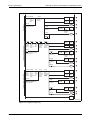
413030da.eps
Fig. 4-3: Program example (2)
FX Positioning Control Systems
4-7
Learning to Use the FX Familiy for Positioning Control
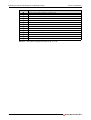
Number
FX PLC positioning
Description
Operation is stopped.
Sets the maximum speed to 100,000 Hz. (100,000 in D8344, D8343)
Sets the bias speed to 500 Hz. (500 in D8342)
Sets the acceleration time to 100 ms. (100 in D8348)
Sets the deceleration time to 100 ms. (100 in D8349)
Sets the maximum speed to 100,000 Hz. (100,000 in D8147, D8146 )
Sets the bias speed to 500 Hz. (500 in D8145)
Sets the acceleration/deceleration time to 100 ms. (100 in D8148)
Resets "zero return completion" flag.
Resets "forward rotation positioning completion" flag.
Resets "reverse rotation positioning completion" flag.
Enters the zero point return state (S0).
Enters the foward rotation positioning state (S20).
Enters the reverse rotation positioning state (S21).
Tab. 4-5: Description of program example in fig. 4-3 (2)
4-8
MITSUBISHI ELECTRIC
FX PLC positioning
Learning to Use the FX Familiy for Positioning Control
STL
S0
X005
Y000
M50
Waiting for
1 scan time
X004
FNC 156
DZRN
Stop
command
K50000
Zero return
start speed
K1000
Creep
speed
M8029
Zero return
"Execution completion" flag
Near-point
signal
Pulse
output
destination
number
SET
M10
RST
S0
RST
S0
Use this for FX3G and FX3U(C) PLCs
M8340
Y000
Outputting
M50
Waiting for
1 scan time
Use this for FX1S and FX1N PLCs
M8147
Y000
Outputting
M50
Waiting for
1 scan time
M8000
M50
STL
S20
Y000
Y004
RUN monitor
M51
Positioning in forward rotation direction
Waiting for
1 scan time
X004
Stop
command
M8029
"Execution completion" flag
FNC 159
DDRVA
K500000 K100000
Designation
of absolute
position
Output
Pulse
Rotation
pulse
output
direction
frequency destination
signal
number
SET
M11
RST
S20
RST
S20
Use this for FX3G and FX3U(C) PLCs
M8340
Y000
Outputting
M51
Waiting for
1 scan time
Use this for FX1S and FX1N PLCs
M8147
M51
Y000
Outputting
Waiting for
1 scan time
M8000
M51
RUN monitor
413040da.eps
Fig. 4-3: Program example (3)
To stop the positioning operation, be sure to insert the stop contact before the positioning
instruction so that STL instruction cannot be turned off (reset) until "pulse output monitor"
flag (M8340 or M8147 (for Y000)) is turned off.
To prevent simultaneous activation of positioning instructions, the instruction activation timing should be delayed by 1 scan time.
FX Positioning Control Systems
4-9
Learning to Use the FX Familiy for Positioning Control
FX PLC positioning
Number
Description
Zero return
Zero return instruction (CLEAR signal: Y010 (FX3G, FX3U(C)), Y002 (FX1S, FX1N))
"Zero return completion" flag
End of zero return (Self-reset)
Waiting for 1 scan time
Positioning in forward rotation direction
Moves to absolute position 500,000 using the drive to absolute instruction. (Y004=ON)
"Forward rotation positioning completion" flag
Ends the positioning operation in the forward rotation derection. (Self-reset)
Tab. 4-5: Description of progam example in fig. 4-3 (3)
4 - 10
MITSUBISHI ELECTRIC
FX PLC positioning
Learning to Use the FX Familiy for Positioning Control
STL
S21
Y000
Y004
X004
Positioning in reverse rotation direction
M52
Waiting for
1 scan time
Stop
command
FNC 159
DDRVA
K100
K100000
Designation Output
Pulse
Rotation
of absolute
pulse
output
direction
position frequency destination
signal
number
M8029
SET
M12
RST
S21
RST
S21
"Execution completion" flag
Use this for FX3G and FX3U(C) PLCs
M8340
Y000
Outputting
M52
Waiting for
1 scan time
Use this for FX1S and FX1N PLCs
M8147
Y000
Outputting
M52
Waiting for
1 scan time
M8000
M52
RUN monitor
RET
END
413050da.eps
Fig. 4-3: Program example (4)
To stop the positioning operation, be sure to insert the stop contact before the positioning
instruction so that STL instruction cannot be turned off (reset) until "pulse output monitor"
flag (M8340 or M8147 (for Y000)) is turned off.
To prevent simultaneous activation of positioning instructions, the instruction activation timing should be delayed by 1 scan time.
Number
Description
Positioning in reverse rotation direction
Moves to absolute position 100 using the drive to Absolute instruction. (Y004=OFF)
"Reverse rotation positioning completion" flag
Ends the positioning operation in the reverse rotation direction. (Self-reset)
Waiting for 1 scan time
Tab. 4-5: Description of progam example in fig. 4-3 (4)
FX Positioning Control Systems
4 - 11
Learning to Use the FX Familiy for Positioning Control
FX PLC positioning
Programming example for a FX3G or FX3U(C) PLC
The following program is similar to the previous one except that it is programmed only in ladder
logic and does not follow a specific sequence of step ladder states. Additionally, it includes
control for relative positioning with JOG(+) and JOG(-) commands, a DOG search zero return
function, and utilization of the DTBL instruction.
When using an FX3G or FX3U(C) PLC, the DOG search zero return function can be programmed
with limit switches wired to the PLC as follows
Reverse rotation limit 2
(Servo amplifier side)
Reverse rotation limit 1
(Programmable
controller side)
LSR
Forward rotation limit 1
(Programmable
controller side)
LSF
Forward rotation limit 2
(Servo amplifier side)
Servo motor
Forward rotation
Reverse rotation
413060da.eps
Fig. 4-4: Configuration example for FX3U(C) PLC
The DTBL instruction helps to simplify the programming and is set up beforehand (along with
positioning parameters such as the bias speed, acceleration/deceleration, etc.) with
GX Developer, GX IEC Developer or GX Works2.
In this example, positioning may be performed arbitrarily along the path in fig. 4-5.
Using the JOG command, the workpiece is moved to any relative position. This is not illustrated
in the figure below.
Fig. 4-5:
Forward
positioning
Positioning pattern
500,000
Output pulse frequency:
100,000 Hz
100
Bias speed
500 Hz
500 Hz
Origin after
zero return
Reverse
positioning
Acceleration/deceleration time:
100 ms
413070da.eps
Required hardware and software are as follows:
● FX3G PLC version 1.00 or later
or
● FX3U(C) PLC version 2.20 or later
● GX Developer 8.23Z or later
or
● GX IEC Developer
or
● GX Works2
4 - 12
MITSUBISHI ELECTRIC
FX PLC positioning
Learning to Use the FX Familiy for Positioning Control
Parameters for the DTBL instruction are set for example in GX Developer as shown below.
Double-click Parameter and then PLC parameter from the project tree on the left side of
the screen.
If the project tree is not displayed on the screen, click View on the menu bar, and then click
Project Data List.
413080da.epse
Fig. 4-6: Project window
Click on the Memory capacity tab and then enter a check in the Positioning Instruction
Settings check box.
Take note that 9,000 steps are needed to set the positioning data. Therefore, it is necessary
to specify a Memory capacity of 16,000 steps or more.
413090da.eps
Fig. 4-7: "Memory capacity" window
FX Positioning Control Systems
4 - 13
Learning to Use the FX Familiy for Positioning Control
FX PLC positioning
Click on the Positioning tab and then set Y000 (pulse output destination) as follows.
4130a0da.eps
Fig. 4-8: "Positioning" window
Setting item
Bias speed [Hz]
Setting value
Maximum speed [Hz]
Creep speed [Hz]
500
100,000
1000
Zero return speed [Hz]
50,000
Acceleration time [ms]
100
Deceleration time [ms]
100
Interrupt input for DVIT instruction X000
Tab. 4-6:Settings for Y000
4 - 14
The "Bias speed" corresponds to the minimum speed.
Can only be set for a FX3U or FX3UC main unit.
MITSUBISHI ELECTRIC
FX PLC positioning
Learning to Use the FX Familiy for Positioning Control
Click the Individual setting button. The Positioning instruction settings window will
appear. In this window, click on the Y0 tab to display the positioning table for Y000 (pulse
output destination). Set the data in the positioning table as follows:
4130b0da.eps
Fig. 4-9: "Positioning instruction settings" window
Be sure to change the [Rotation direction signal] to "Y004".
Setting item
Setting value
Rotation direction signal
Y004
First device
R0
Positioning type
No. 1
No. 2
No. 3
No. 4
DDRVI (Drive to increment)
Number of pulses (PLS)
999,999
Frequency [Hz]
30,000
Positioning type
DDRVI (Drive to increment)
Number of pulses (PLS)
-999,9990
Frequency [Hz]
30,000
Positioning type
DDRVA (Drive to absolute)
Number of pulses (PLS)
500,000
Frequency [Hz]
100,000
Positioning type
DDRVA (Drive to absolute)
Number of pulses (PLS)
Frequency [Hz]
100
100,000
Tab. 4-7:Settings for positioning instruction
Click the OK button and then the End button to close the parameters.
Create the ladder program as shown in fig. 4-9.
FX Positioning Control Systems
4 - 15
Learning to Use the FX Familiy for Positioning Control
FX PLC positioning
Once the ladder program is complete, click on Online from the top menu bar in GX Developer
and select Write to PLC. The following window will appear.
4130c0da.eps
Fig. 4-10: "Write to PLC" window
Click the Param + Prog button and then click the Execute button. The parameters and the
created program will be transferred to the PLC. To enable the transferred parameters, stop
the PLC and then restart it.
Inputs
Outputs
X004
Zero-point signal
Y000
Pulse train output
X010
Near-point signal (DOG)
Y004
Rotation direction signal
X014
Servo ready
Y020
X020
Immediate stop
X021
Zero return command
—
—
X022
JOG(+) command
—
—
X023
JOG(-) command
—
—
X024
Forward rotation positioning command
—
—
—
CLEAR signal
—
X025
Reverse rotation positioning command
—
—
X026
Forward rotation limit (LSF)
—
—
X027
Reverse rotation limit (LSR)
—
—
X030
Stop command
—
—
Tab. 4-8:Used inputs and outputs
4 - 16
MITSUBISHI ELECTRIC
FX PLC positioning
Learning to Use the FX Familiy for Positioning Control
X020
M8349
RST
M10
RST
M12
RST
M13
M8343
M8344
Immediate stop
X014
Servo ready
X026
Forward rotation limit �
X027
Reverse rotation limit �
M8000
FNC 12
MOVP
RUN monitor
H0020
D8464
M8464
M8341
M8000
M8342
RST
M10
RST
M12
RST
M13
M100
Y004
DOG search zero return
RUN monitor
X021
M8348
M101
M102
Zero
return
Positioning
being
performed
(Y000)
Normal
end of
zero
return
Abnormal
end of
zero
return
M100
Zero return
being performed
X030
FNC 150
DSZR
Stop
command
X010
X004
Near-point Zero-point
signal
signal
M8029
Y000
Pulse
Rotation
output direction
destination signal
number
M10
M101
M102
RST
M12
RST
M13
M103
K1
SET
"Execution
completion" flag
M8329
Abnormal
end
X022 M8348
JOG (+) operation
JOG
(+)
Positioning
being
performed
(Y000)
M104
Completes
the JOG (+)
operation.
M103
JOG (+) operation is
being performed.
X030
Stop
command
X022
FNC 152
DTBL
Y000
Pulse
Table
output
number
destination
number
M104
JOG(+)
M8329
Abnormal
end
4130d0da.eps
Fig. 4-11: Program example (1)
FX Positioning Control Systems
4 - 17
Learning to Use the FX Familiy for Positioning Control
Number
FX PLC positioning
Description
Stops outputting Y000 pulses. (Immediate stop)
Resets "zero return completion" flag.
Resets "forward rotation positioning completion" flag.
Resets "reverse rotation positioning completion" flag.
Normal rotation limit (Y000)
Reverse rotation limit (Y000)
Enables the zero return operation with CLEAR signal outputting function. (CLEAR signal: Y020)
Performs zero return in the forward rotation direction.
Zero return is being performed.
Zero return instruction with DOG search function (CLEAR signal: Y020)
"Zero return completion" flag
Normal end of zero return
Abnormal end of zero return
JOG(+) operation is being performed.
Executes No. 1 of the positioning table of Y000 (pulse output destination).
Completes the JOG(+) operation.
Tab. 4-9: Description of the progam example in fig. 4-11 (1)
4 - 18
The forward and reverse rotation limit switches must be wired so that they are turned ON by
default (Normally closed contacts).
When these limit switches turn OFF (due to the workpiece going out-of-bounds), M8343 or
M8344 will turn ON and cause the pulse operation to stop.
MITSUBISHI ELECTRIC
FX PLC positioning
Learning to Use the FX Familiy for Positioning Control
M106
X023 M8348
JOG
(-)
Positioning
being
performed
(Y00)
Completes
the JOG (-)
operation.
RST
M12
RST
M13
M105
JOG(-) operation
M105
JOG (-) operation
is being performed.
X030
FNC 152
DTBL
Stop
command
Y000
Pulse
output
destination
number
X023
K2
Table
number
M106
RST
M12
RST
M13
M107
Y000
K3
Pulse
output
destination
number
Table
number
JOG(-)
M8329
Abnormal
end
Positioning in forward rotation direction
X024 M8348
Positioning in
forward
rotation
direction
Positioning
operation
being
performed
(Y00)
M10
"Zero
return
completion"
flag
M108
Normal
end of
positioning
in forward
rotation
direction
M109
Abnormal
end of
positioning
in forward
rotation
direction
M107
X030
Positioning operation
being performed in forward
rotation direction
Stop
command
FNC 152
DTBL
M8029
M12
M108
M109
RST
M12
RST
M13
SET
"Execution
completion"
flag
M8329
Abnormal end
Positioning in reverse rotation direction
X025 M8348
Positioning in
forward
rotation
direction
Positioning
operation
being
performed
(Y00)
M10
M111
"Zero
return
completion"
flag
Normal
end of
positioning
in forward
rotation
direction
M112
Abnormal
end of
positioning
in forward
rotation
direction
M110
Y000
K4
SET
M13
M111
M112
M110
X030
Positioning operation being
performed in reverse
rotation direction
Stop
command
M8029
"Execution
completion"
flag
M8329
FNC 152
DTBL
Abnormal end
END
4130e0da.eps
Fig. 4-11: Program example (2)
FX Positioning Control Systems
4 - 19
Learning to Use the FX Familiy for Positioning Control
Number
FX PLC positioning
Description
Resets "forward rotation positioning completion" flag.
JOG(-) operation is being performed.
Executes No. 2 of the positioning table of Y000 (pulse output destination).
Completes the JOG(-) operation.
"Forward rotation positioning completion" flag
"Reverse rotation positioning completion" flag
Positioning operation being performed in forward rotation direction
Executes No. 3 of the positioning table of Y000 (pulse output destination).
"Forward rotation positioning normal end" flag
"Forward rotation positioning abnormal end" flag
Positioning operation being performed in reverse rotation direction
Executes No. 4 of the positioning table of Y000 (pulse output destination).
"Reverse rotation positioning normal end" flag
"Reverse rotation positioning abnormal end" flag
Tab. 4-9: Description of progam example in fig. 4-11 (2)
4 - 20
MITSUBISHI ELECTRIC
Inverter Drive Control
4.2
Learning to Use the FX Familiy for Positioning Control
Inverter Drive Control
A frequency inverter, or inverter for short, is installed between the mains supply and the motor.
An inverter converts a fixed voltage and frequency into a variable voltage with a variable
frequency.Thus the speed of a asynchronous electric motor can be adjusted continuously.
In factory automation, inverters (sometimes known as variable frequency drives) are used to
efficiently control large current loads through voltage regulation to drive large fans, pumps or AC
motors. Drive control with inverters can lead to great reductions in energy consumption for a
factory.
With a Mitsubishi general-purpose inverter connected to an FX2N(C), FX3G or FX3U(C) PLC, a
motor can be controlled to move at a specific speed. Through monitoring feedback or by using
limit switches, a basic positioning functionality is achieved. However, as described in section
1.3, the disadvantage to using an inverter to move a workpiece to a specific location is a loss in
the stop precision. Therefore, inverters should not be thought of as positioning controllers.
Important references for understanding inverter drive control for this section include:
● FX Series User’s Manual - Data Communication Edition – (JY997D16901)
● Inverter Instruction Manuals
It is assumed that you will have read and understood the above manuals or that you will have
them close at hand for reference.
4.2.1
Overview of control
Programmable logic controllers and inverters communicate with each other through passing
parameter data and control operation data back and forth. Inverters, when used for variable
frequency drive, require a frequency command and a start command to operate.
Mitsubishi’s FREQROL Series inverters communicate with FX2N(C), FX3G and FX3U(C) PLCs via
the Mitsubishi inverter computer link protocol to asynchronously control operations.
FX Positioning Control Systems
4 - 21
Learning to Use the FX Familiy for Positioning Control
4.2.2
Inverter Drive Control
Using the FX2N(C), FX3U(C) and FREQROL Inverter
In order to enable RS485 serial communication to a MELCO inverter(s), a special BD board or
adapter (ADP) is connected to the main unit FX2N(C), FX3G or FX3U(C). The following table
describes connection options for using one channel of communication.
FX Series
Communication equipment (option)
FX2N
FX2N-485-BD
(Terminal board)
Total
extension
distance
50 m
422020da.eps
FX 2N-ROM-E1
(Function extension
memory casette
or
FX2N-CNV-BD FX2NC-485ADP
(Terminal block)
500 m
FX2N-CNV-BD FX0N-485ADP
(Terminal block)
422030da.eps
422010da.eps
1
MITSUBISHI
X0
X1
X2
X3
X4
X5
Y0
Y1
Y2
Y3
Y4
Y5
X6
Y6
X7
Y7
or
FX2NC
500 m
FX2NC-485ADP
(Terminal block)
FX0N-485ADP
(Terminal block)
FX 2NC-ROM-CE1
(Function extension
memory board
422040da.eps
422050da.eps
Tab. 4-9: Applicable communication interface boards and adapters for data exchange with
frequency inverters
4 - 22
MITSUBISHI ELECTRIC
Inverter Drive Control
Learning to Use the FX Familiy for Positioning Control
FX Series
Total
extension
distance
Communication equipment (option)
50 m
FX3G-485-BD
(Terminal block)
FX3G-485-BD_front.eps
FX3G
(14 or 24 I/O)
500 m
FX3G-CNV-ADP
FX3U-485ADP(-MB)
(Terminal block)
FX3G_24_front.eps
RS485_FX3G.eps
CH 1
50 m
FX3G-485-BD
(Terminal block)
FX3G-485-BD_front.eps
CH 1
FX3G-CNV-ADP
500 m
FX3U-485ADP(-MB)
(Terminal block)
RS485_FX3G.eps
FX3G
(40 or 60 I/O)
CH 2
50 m
FX3G-485-BD
(Terminal block)
FX3G-485-BD_front.eps
CH 1
CH 2
500 m
FX3G-CNV-ADP
FX3G_24_front.eps
FX3U-232ADP(-MB)
or
FX3U-485ADP(-MB)
FX3U-485ADP(-MB)
(Terminal block)
RS485_FX3G_ch2.eps
Tab. 4-9: Applicable communication interface boards and adapters for data exchange with
frequency inverters
FX Positioning Control Systems
4 - 23
Learning to Use the FX Familiy for Positioning Control
FX Series
Inverter Drive Control
Total
extension
distance
Communication equipment (option)
CH 1
RD A
RD
RD B
SD A
SD
SD B
SG
50 m
FX3U-485-BD
(Terminal block)
422070dab.eps
CH 1
500 m
FX3U-CNV-BD
FX3U-485ADP(-MB)
(Terminal block)
422080dab.eps
RUN
CH 1
STOP
CH 2
FX3U
500 m
FX3U--BD FX3U-485ADP(-MB)
(Terminal block)
RS485_FX3U_ch2_1.eps.
CH 1
CH 2
500 m
FX3U-ADP FX3U-CNV-BD
FX3U-485ADP(-MB)
(Terminal block)
422060da.eps
RS485_FX3U_ch2_2.eps
CH 1
500 m
FX3U-485ADP(-MB)
(Terminal block)
4220a0dab.eps
CH 1
CH 2
FX3UC
500 m
FX3U-ADP FX3U-485ADP(-MB)
(Terminal block)
422090da.eps
RS485_FX3UC_D_DS_ch2
Tab. 4-9: Applicable communication interface boards and adapters for data exchange with
frequency inverters
4 - 24
FX3U-232-BD, FX3U-422-BD, FX3U-485-BD or FX3U-USB-BD
FX3U-232ADP(-MB) or FX3U-485ADP(-MB)
MITSUBISHI ELECTRIC
Inverter Drive Control
Learning to Use the FX Familiy for Positioning Control
To use the special inverter communication instructions from the PLC, inverter and PLC
communication parameters must be set. The FX2N(C), FX3G and FX3U(C) PLCs include the
following special instructions to communicate with one or more inverters.
FX2N(C)
EXTR
FX3G, FX3U(C)
Function/Description
K10
IVCK
Monitors operations of an inverter.
K11
IVDR
Controls operations of an inverter.
K12
IVRD
Reads a parameter from an inverter.
K13
IVWR
—
IVBWR
Writes a parameter to an inverter.
Writes a block of parameters to an inverter.
Tab. 4-10: Instructions to communicate with inverters
This instruction is only available for FX3U(C) PLCs.
The programmable controller special relays and inverter instruction codes listed in the table
below are used in Section 4.2.3. For information on memory addresses that contain error codes
and inverter communication operation statuses, refer to the FX Series User’s Manual - Data
Communication Edition (JY997D16901).
Function name
Device
Length
Description
RUN monitor
M8000
1-bit
ON when PLC is in RUN.
Applicable PLC
Initial pulse
M8002
1-bit
Instruction execution
M8029
complete flag
1-bit
ON for the first scan only.
Programmed immediately after an inverter com- FX2N(C), FX3G,
munication instruction. Turns ON when the pre- FX3U(C)
ceding instruction finishes its operation and
stays ON until the instruction stops being driven.
Tab. 4-11: Programmable controller special relays
Function name
Instruction
Code
No. of Data
Digits
Description
Inverter reset
H0FD
4-digits
Resets the inverter and does not request a
response. Inverter reset takes about 2.2 seconds to complete.
Operation mode
H0FB
4-digits
Sets the communication operation for the
inverter.
Running frequency
H0ED
write
4-digits
Changes the drive frequency by writing directly
to the inverter RAM.
Run command
H0FA
2-digits
Sets forward rotation (STF) or reverse rotation
(STR).
Inverter status
monitor
H07A
2-digits
Monitors operation bits of the inverter.
Output frequency
[speed]
H06F
4-digits
Monitors the frequency of the inverter.
Applicable
Inverter
Tab. 4-12: Inverter instruction codes
Applicable for all Mitsubishi FREQROL inverters.
FX Positioning Control Systems
4 - 25
Learning to Use the FX Familiy for Positioning Control
4.2.3
Inverter Drive Control
Program example
The following programming example is a hybrid program for FX2N(C), FX 3G and FX 3U(C)
controllers to be used with an E500 Series inverter. For the communication between PLC and
inverter, CH 1 is used.
The travel path and operation pattern are shown below.
In the program below, the section "Controlling the inverter to move in the forward or reverse
rotation direction" drives the inverter in the forward or reverse direction. When the forward
rotation limit (X001) or reverse rotation limit (X000) is reached, the operation stops. For details
on connecting the hardware for testing, refer to the appropriate product manual.
General purpose
motor
Reverse rotation
limit (X000)
Forward rotation
limit (X001)
Reverse rotation
(H0FA bit2 is ON)
Forward rotation
(H0FA bit1 is ON)
Acceleration
time (Pr.7)
Deceleration
time (Pr.8)
1s
1s
Speed
(Hz)
Accel/Decel reference
(Pr.20) frequency (Default: 60Hz)
Running frequency
(H0ED 40 Hz)
Time
(s)
423010da.eps
Fig. 4-12: Configuration and positioning pattern for the E500 Series inverter
Before programming, there are several parameter settings that must be set to the inverter and
PLC.
Setting communication parameters for the E500 Series inverter
While all operations are stopped (i.e. - the RUN indicator on the E500 is OFF), use the MODE
key MODE , UP/DOWN keys
following parameters:
and the SET key
SET
to change and/or confirm the
Parameter
No.
Parameter item
Set value
Setting contents
Pr.79
Operation mode selection
0
External operation mode is selected when power
is turned ON.
Pr.117
Communication station number
00 to 31
Up to eight inverters can be connected.
Pr.118
Communication speed
96
9600 bps (default)
Pr.119
Stop bit / Data length
10
Data length: 7-bit
Stop bit: 1-bit
Pr.120
Parity check presence/absence
selection
2
Even parity present
Pr.122
Communication check time interval
9999
Communication check suspension
Pr.123
Waiting time setting
9999
Set with communication data
Pr.124
CRLF presence/absence selection
1
With CR, without LF
Tab. 4-13: Communication parameters
4 - 26
MITSUBISHI ELECTRIC
Inverter Drive Control
Learning to Use the FX Familiy for Positioning Control
Setting communication parameters for the FX2N(C)/FX3G/FX3U(C) PLC
For example, parameters are set in GX Developer as shown below.
Double-click Parameter and then PLC parameter from the project tree on the left side of
the screen.
If the project tree is not displayed on the screen, click View on the menu bar, and then click
Project Data List.
423060da.eps
Fig. 4-13: Project window
Click on the PLC system(2) tab in the "FX parameter" window and set the parameters as
shown below:
!
"
423070da.eps
Fig. 4-14: FX parameter window
Set CH1 as the channel to be used.
Put a checkmark in the Operate communication setting checkbox to activate the communication
settings.
Set [Protocol] to "Non-procedural", [Data length] to "7bit", [Parity] to "Even", and [Stop bit] to "1bit".
Set [Transmission speed] to "9600" to match the speed setting in the inverter.
Ignore these items.
Click the [End] button.
FX Positioning Control Systems
4 - 27
Learning to Use the FX Familiy for Positioning Control
Inverter Drive Control
Create the ladder program as shown below.
Once the ladder program is complete, click on Online from the top menu bar in GX Developer
and select Write to PLC. The "Write to PLC" window will appear.
Click the Param+Prog button and then click the Execute button. The parameters and the
created program will be transferred to the PLC. To enable the transferred parameters, stop
the PLC and then restart it.
423080da.e
Fig. 4-15: Write to PLC window
Inputs
Outputs
X000
Reverse rotation limit
Y000
Inverter running (RUN)
X001
Forward rotation limit
Y001
Forward rotation
X002
Forward rotation command input
Y002
Reverse rotation
X003
Reverse rotation command input
Y003
Up to frequency (SU)
—
—
Y004
Overload is applied (OL)
—
—
Y006
Frequency detection (FU)
—
—
Y007
Alarm occurrence
Tab. 4-14: Used inputs and outputs
4 - 28
MITSUBISHI ELECTRIC
Inverter Drive Control
Learning to Use the FX Familiy for Positioning Control
M8002
SET
M10
Initial Pulse
Use this for FX3G or FX3U(C) PLCs
M10
FNC271
IVDR
Driving of
write
instruction
K0
H0FD
H9696
K1
Inverter
instruction
code
Write
value
CH 1
H0FB
H2
K1
Inverter
station
number
Inverter
instruction
code
Write
value
CH 1
K11
K0
H0FD
H9696
Function
number
(Control)
Inverter
station
number
Inverter
instruction
code
Write
value
K11
K0
H0FB
H2
Function
number
(Control)
Inverter
station
number
Inverter
instruction
code
Write
value
Inverter
station
number
FNC271
IVDR
K0
Use this for FX2N(C) PLCs
FNC180
EXTR
FNC180
EXTR
423090da.eps
Fig. 4-16: Program example (1)
Function
Writing parameters to the
inverter while
the PLC is in
RUN mode.
Number
Description
The write instruction is driven
The inverter is reset [H9696 "H0FD"]
Computer link operation is specified [H2 "H0FB"]
Tab. 4-15: Description of program example in fig. 4-16 (1)
FX Positioning Control Systems
4 - 29
Learning to Use the FX Familiy for Positioning Control
Inverter Drive Control
Use this for FX3G or FX3U(C) PLCs
D200
D201
D202
D203
D204
D205
D206
D207
D200
K1
Write 4
D200 to
parameters D207
CH 1
FNC 12
MOVP
K1
Pr.1
FNC 12
MOVP
K12000
120 Hz
FNC 12
MOVP
K2
Pr.2
FNC 12
MOVP
K500
5 Hz
FNC 12
MOVP
K7
Pr.7
FNC 12
MOVP
K10
1s
FNC 12
MOVP
K8
Pr.8
FNC 12
MOVP
K10
1s
FNC 274
IVBWR
K0
Inverter
station
number
K4
Use this for FX2N(C) PLCs
FNC 180
EXTR
FNC 180
EXTR
FNC 180
EXTR
K13
K0
K1
K12000
Function
Number
(Write)
Inverter
station
number
Pr.1
120 Hz
K13
K0
K2
K500
Function
Number
(Write)
Inverter
station
number
Pr.2
5 Hz
K13
K0
K7
K10
Function
Number
(Write)
FNC 180
EXTR
Inverter
station
number
Pr.7
1s
K13
K0
K8
K10
Function
Number
(Write)
Inverter
station
number
Pr.8
1s
M8029
RST
M10
"Execution
completion" flag
4230a0da.eps
Fig. 4-16: Program example (2)
4 - 30
MITSUBISHI ELECTRIC
Inverter Drive Control
Function
Learning to Use the FX Familiy for Positioning Control
Number
Writing
parameters to
the inverter
while the PLC
is in RUN
mode.
Description
The maximum frequency (Pr. 1) is specified
The maximum frequency (Pr. 1) is set to "120 Hz"
The minimum frequency (Pr. 2) is specified
The minimum frequency (Pr. 2) is set to "5 Hz"
The acceleration time (Pr. 7) is specified
The acceleration time (Pr. 7) is set to "1 sec"
The deceleration time (Pr. 8) is specified
The deceleration time (Pr. 8) is set to "1 sec"
The parameters are written at one time
[Contents of D200–D207 Pr. 1, Pr. 2, Pr. 7 and Pr. 8]
The maximum frequency (Pr. 1) is set to "120 Hz" [K12000 Pr. 1]
The minimum frequency (Pr. 2) is set to "5 Hz" [K500 Pr. 2]
The acceleration time (Pr. 7) is set to "1 sec" [K10 Pr. 7]
The deceleration time (Pr. 8) is set to "1 sec" [K10 Pr. 8]
Reset driving of write instruction
Tab. 4-15: Description of program example in fig. 4-16 (2)
FX Positioning Control Systems
4 - 31
Learning to Use the FX Familiy for Positioning Control
Inverter Drive Control
M8002
M11
K4000
D10
40 Hz
Operation
speed
SET
Initial Pulse
M11
FNC 12
MOVP
Driving of
write
instruction
Use this for FX3G or FX3U(C) PLCs
FNC271
IVDR
K0
H0ED
D10
K1
Inverter Inverter Operation
station instruction Speed
number
code
CH 1
Use this for FX2N(C) PLCs
FNC180
EXTR
K11
K0
H0ED
D10
Function Inverter Inverter Operation
number station instruction Speed
(Control) number
code
M8029
RST
M11
SET
M15
RST
M15
M21
M22
"Execution
completion" flag
X000
Reverse
rotation
limit �
X001
Forward
rotation
limit �
X002
X000
X001
Forward
rotation
command
input
Reverse
rotation
limit �
Forward
rotation
limit �
X003
Reverse rotation
command input
M15
Operation
stop
M8002
X002
X003
Forward
rotation
command
input
Reverse
rotation
command
input
X003
X002
Reverse
rotation
command
input
Forward
rotation
command
input
Initial Pulse
FNC 12
K2M20
MOV
D81
Operation
command is
withdrawn
FNC228
K2M20
LD<>
D81
Operation
command is
withdrawn
SET
M12
The write
instruction
is driven
4230b0da.eps
Fig. 4-16: Program example (3)
4 - 32
The forward and reverse rotation limit switches must be wired so that they are turned ON by
default (Normally closed contacts).
When either of these limit switches turns OFF (due to the workpiece going out-of-bounds),
the inverter operation will be stopped.
MITSUBISHI ELECTRIC
Inverter Drive Control
Function
Setting the
operation speed
of the inverter to
40 Hz while the
PLC is in RUN
mode.
Controlling the
inverter to move
in the forward or
reverse rotation
direction.
Learning to Use the FX Familiy for Positioning Control
Number
Description
The write instruction is driven
The operation speed is set as "40 Hz"
The preset frequency is written to the inverter [Contents of D10 "H0ED"]
Reset driving of write instruction
Operation stop "H0FA" is set to "00H"
Operation is driven by input X002 or X003
Forward rotation command b1 of "H0FA" is set to ON
Reverse rotation command b2 of "H0FA" is set to ON
Changes in the operation commands (M20 to M27) are detected
Tab. 4-15: Description of program example in fig. 4-16 (3)
FX Positioning Control Systems
4 - 33
Learning to Use the FX Familiy for Positioning Control
Inverter Drive Control
Use this for FX3G or FX3U(C) PLCs
M12
FNC271
IVDR
Driving of
write
instruction
K0
H0FA
Inverter Inverter
station instruction
number
code
K2M20
K1
Write
value
ch.1
Use this for FX2N(C) PLCs
FNC180
EXTR
K11
K0
H0FA K2M20
Function Inverter Inverter
number station instruction
(Control) number
code
M8029
Write
value
RST
M12
N0
M70
H07A K2M100
K1
Inverter Inverter
Read
station instruction destinanumber
code
tion
CH1
"Execution
completion" flag
M10
M11
M12
MC
Driving of Driving of Driving of
write
write
write
instruction instruction instruction
N0
M70
Use this for FX3G or FX3U(C) PLCs
M8000
FNC270
IVCK
RUN
monitor
K0
Use this for FX2N(C) PLCs
FNC180
EXTR
K10
K0
H07A
K2M100
Function Inverter Inverter
Read
number station instruction destina(Monitor) number
code
tion
M100
Inverter
running
M101
Forward
rotation
M102
Reverse
rotation
M103
Up to
frequency
M104
Overload
is applied
M106
Frequency
is detected
M107
Alarm
occurrence
Y000
Indicator
lamp, etc.
Y001
Indicator
lamp, etc.
Y002
Indicator
lamp, etc.
Y003
Indicator
lamp, etc.
Y004
Indicator
lamp, etc.
Y006
Indicator
lamp, etc.
Y007
Indicator
lamp, etc.
4230c0da.eps
Fig. 4-16: Program example (4)
4 - 34
MC denotes the start of a master control block.
In this example, the master control block "N0" is only executed when data is not being written to the inverter.
MITSUBISHI ELECTRIC
Inverter Drive Control
Learning to Use the FX Familiy for Positioning Control
Function
Number
Controlling the
inverter to move
in the forward or
reverse rotation
direction.
Monitoring
operations of
the inverter.
Description
Operation commands are written [M20-M27 "H0FA"]
Reset driving of write instruction
While data is not being written to the inverter, data is monitored.
Inverter status is read ["H07A" M100-M107]
Contents of status (according to necessity)
Tab. 4-15: Description of program example in fig. 4-16 (4)
Use this for FX3G or FX3U(C) PLCs
FNC270
IVCK
K0
H06F
D50
K1
Inverter
station
number
Inverter
instruction
code
Read
destination
CH 1
K0
H06F
D50
Inverter
station
number
Inverter
instruction
code
Read
destination
Use this for FX2N(C) PLCs
FNC180
EXTR
K10
Function
number
(Monitor)
N0
MCR
END
4230d0da.eps
Fig. 4-16: Program example (5)
MCR denotes the end of a master control block.
In this example, the master control block "N0" is only executed when data is not being written to the inverter.
Number
Monitoring
operations of
the inverter.
Description
Monitor frequency value with D50 ["H06F" D50]
Tab. 4-15: Description of program example in fig. 4-16 (5)
FX Positioning Control Systems
4 - 35
Learning to Use the FX Familiy for Positioning Control
4.3
FX2N-1PG-E positioning
FX2N-1PG-E positioning
The FX2N(C) and FX3U(C) PLCs support connection with the FX2N-1PG-E special function block.
Special function blocks are separate pieces of hardware that can be connected to PLCs to
enhance control. Since special function blocks process information separately from the PLC,
the scan time of the PLC is not adversely affected during operations controlled by special
function blocks. This provides an advantage for programming. Additionally, special function
blocks such as the FX2N-1PG-E offer separate, more advanced control through the use of their
own inputs and outputs.
An important reference for understanding positioning with the FX2N-1PG-E is:
● FX2N-1PG/FX-1PG User’s Manual – (JY992D65301)
It is assumed that you will have read the above manual or that you will have it nearby for
reference.
4.3.1
Overview of control
The FX2N-1PG-E is a popular unit for performing general point-to-point positioning operations
on 1 axis up to 100,000 pulses/second (100 kHz). A stepper motor or servo motor can be used
with the FX2N-1PG-E to perform positioning operations.
Some of the main advantages to using the FX2N-1PG-E for positioning as opposed to the FX1S,
FX1N or FX3U(C) include:
● The flexible use of the zero point signal PG0
● Two speed positioning operations with or without interrupt
● The option to choose the FP/RP pulse output method.
4 - 36
MITSUBISHI ELECTRIC
FX2N-1PG-E positioning
4.3.2
Learning to Use the FX Familiy for Positioning Control
Important buffer memory locations
The FX2N-1PG-E contains 32 buffer memory (BFM) addresses, which are 16-bit (1 word) areas
of memory that contain information relevant to the control of positioning operations. The FX2N(C)
or FX3U(C) PLC that is connected to the FX2N-1PG-E can send and receive data to the buffer
memory addresses to change and/or update information. This exchange of information takes
place through dedicated PLC instructions known as the FROM/TO instructions. (For FX3U(C)
PLCs, the MOV instruction can also be used to transfer data to/from special function blocks.)
The following buffer memory addresses are used in the ladder program example below. For
details on other BFM addresses, refer to the FX-1PG/FX 2 N -1PG User’s Manual
(JY992D65301).
BFM #
Item
Set value
Note
#0
Pulse rate
4,000
PLS/rev
#2, #1
#3
#5, #4
Feed rate
1,000
µm/rev
Parameters
—
—
Bit 1,
Bit 0
System of units
Bit 1: 1, Bit 0: 0
Combined system
Bit 5,
Bit 4
Multiplication factor �
Bit 5: 1, Bit 4: 1
103
40,000
Hz
Maximum speed
#6
Bias speed
0
Hz
#15
Acceleration/Deceleration time
100
ms
#18, #17
Target address 1
100
mm
#20, #19
Operating speed 1
40,000
Hz
#22, #21
Target address 2
150
mm
#24, #23
Operating speed 2
10,000
Hz
Operation command
—
—
Bit 0
Error reset
M0
X000
#25
Bit 1
STOP command
M1
X001
Bit 2
Forward rotation limit
M2
X002
Bit 3
Reverse rotation limit
M3
X003
Bit 7
Relative/Absolute positioning
M7 (Bit 7 = 0)
Absolute positioning
Bit 10
Two speed positioning START command
M10
X007
#27, #26
Current address
D11, D10
mm
#28
Status information
M20–M31
—
#29
Error code
D20
—
Tab. 4-16: Buffer memory addresses of FX2N-1PG-E
Using a multiplication factor of 103 changes the units from µm to mm.
FX Positioning Control Systems
4 - 37
Learning to Use the FX Familiy for Positioning Control
4.3.3
FX2N-1PG-E positioning
Program example
In the example that follows, a two speed positioning instruction is used to move a drill 100 mm
toward a block of wood with a high speed pulse frequency of 40 kHz. When the drill reaches the
wood, the speed decreases to 10 kHz. The drill is then driven for 50 mm into the wood before
decelerating to stop.
Drill
Wood
M
1PG
High
speed
Low
speed
433010da.eps
Fig. 4-17: Configuration
The two speed positioning operation is illustrated in the following graph. Neither the zero point
return nor the JOG instructions are used in the ladder program.
Frequency
(Hz)
40,000
Operation speed 2
BFM #24, #23
Operation speed 1
20,000
BFM #20, #19
0
100
Target address 1
BFM #18, #17
50
Target
address 2
BFM #22, 21
0
50
100
150
200
433020da.eps
Fig. 4-18: Positioning pattern
4 - 38
MITSUBISHI ELECTRIC
FX2N-1PG-E positioning
Learning to Use the FX Familiy for Positioning Control
Although the following ladder program is not very complicated, it is important to establish good
programming practice by paying attention to the order with which the PLC writes and reads to
the buffer memory of the FX 2N -1PG-E. Before writing the Operation command (START
command) to the module’s BFM from the PLC, several settings must be established such as
Target addresses 1 & 2, Operation speeds 1 & 2, and various settings such as the bias speed,
maximum speed, and the acceleration/deceleration time.
The most critical part of the program is the section where the operation commands are enabled
by writing bits M0 to M15 to BFM#25. When the positioning START command turns ON, the
operation begins with the specified settings.
The ladder program example on the following page can be programmed with an FX2N(C) or
FX3U(C) PLC and does not require an actuator (i.e., servo system) for testing. The following
inputs are used in the program:
Inputs
X000
Error reset
X001
STOP command
X002
Forward rotation limit
X003
Reverse rotation limit
X007
2-speed positioning START command
Tab. 4-17: Used inputs
FX Positioning Control Systems
4 - 39
Learning to Use the FX Familiy for Positioning Control
M8002
Initial pulse
FX2N-1PG-E positioning
FNC79
TO
FNC79
DTO
FNC79
TO
FNC79
DTO
FNC79
TO
FNC79
TO
M8000
RUN
monitor
M27
Error flag
FNC78
FROM
FNC78
FROM
K0
K0
K4000
Unit No.
BFM #
Pulse
rate
K1
No. of
transfer
points
K0
K1
K1000
Unit No.
BFM #
Feed
rate
No. of
transfer
points
K1
K0
K3
H32
K1
Unit No.
BFM #
K0
K4
Unit No.
BFM #
K0
K6
K0
Unit No.
BFM #
Bias
speed
No. of
transfer
points
K0
K15
K100
K1
Unit No.
BFM #
Parameter No. of
setting
transfer
points
K40000
K1
Maximum No. of
speed
transfer
points
Accel/
Decel
time
K3M20
K1
No. of
transfer
points
K0
K28
Unit No.
BFM #
K0
K29
D20
K1
Unit No.
BFM #
Error
code
No. of
transfer
points
K1
Status
No. of
info.
transfer
M20-M31 points
X000
M0
M1
M2
M3
M7
Error reset
X001
STOP
X002
Forward
rotation
limit �
X003
Reverse
rotation
limit �
M8000
RUN
monitor
433030da.eps
Fig. 4-19: Program example (1)
4 - 40
The forward and reverse rotation limit switches must be wired so that they are turned ON by
default (Normally closed contacts). When these limit switches turn OFF (due the workpiece
going out-of-bounds), M2 or M3 will turn ON and cause the pulse operation to stop.
MITSUBISHI ELECTRIC
FX2N-1PG-E positioning
Number
Learning to Use the FX Familiy for Positioning Control
Description
Set the pulse rate (PLS/rev) [K4000 #0]
Set the feed rate (µm/rev) [K1000 #2,#1]
Set the units to µm × 103 mm; combined system [H32 #3]
Set the maximum speed (Hz) [K40000 #5,#4]
Set the bias speed (Hz) [K0 #6]
Set the acceleration/deceleration time (ms) [K100 #15]
Read status information [K3M20 #28]
Read error code [D20 #29]
Reset error
STOP operation
Forward rotation limit
Reverse rotation limit
Use absolute positioning
Tab. 4-18: Description of program example in fig. 4-19 (1)
FX Positioning Control Systems
4 - 41
Learning to Use the FX Familiy for Positioning Control
X007
FX2N-1PG-E positioning
FNC 79
DTO
START
K0
K17
K100
Unit No.
BFM #
Target
address 1
K0
K19
K40000
Unit No.
BFM #
Operation
speed 1
K0
K21
K150
Unit No.
BFM #
Target
address 2
K0
K23
K10000
Unit No.
BFM #
Operation
speed 2
FNC 79
DTO
FNC 79
DTO
FNC 79
DTO
M8000
RUN
monitor
FNC 79
TO
K0
K25
K4M0
Unit No.
BFM #
Operation
commands
M0-M15
K0
K26
D10
FNC 78
DFROM
Unit No.
BFM #
Current
address
K1
No. of
transfer
points
K1
No. of
transfer
points
K1
No. of
transfer
points
K1
No. of
transfer
points
M10
K1
No. of
transfer
points
K1
No. of
transfer
points
END
433040da.eps
Fig. 4-19: Program example (2)
Number
Description
Set the Target address 1 [K100 #18,#17]
Set the Operation speed 1 [K40000 #20,#19]
Set the Target address 2 [K150 #22,#21]
Set the Operation speed 2 [K10000 #24,#23]
Set the START command for Two-speed positioning
Write operation commands to the FX2N-1PG [K4M0 #25]
Monitor the current address (mm) [D11, D10 #27,#26]
Tab. 4-18: Description of program example in fig. 4-19 (2)
4 - 42
MITSUBISHI ELECTRIC
FX2N-10PG positioning
4.4
Learning to Use the FX Familiy for Positioning Control
FX2N-10PG positioning
The FX2N(C) and FX3U(C) PLCs support connection with the FX2N-10PG special function block.
As described in section 4.3, special function blocks are separate pieces of hardware that can be
connected to a PLC to enhance control. Due to the separate processing sequence that takes
place in special function blocks through the use of buffer memory data, special function blocks
provide a distinct advantage to PLC programming through individualized control that expands
and improves PLC operations. Additionally, special function blocks such as the FX2N-10PG
include extra input points and output points.
An important reference for understanding positioning with the FX2N-10PG is:
● FX2N-10PG User’s Manual – (JY992D93401)
It is assumed that you will have read the above manual or that you will have it nearby for
reference.
4.4.1
Overview of control
The FX 2N -10PG is used to perform point-to-point positioning operations on 1 axis up to
1,000,000 pulses/second (1 MHz). With the FX2N-10PG differential line driver type outputs that
provide improved stability and better noise immunity, a stepper motor or servo motor can be
controlled to perform a variety of positioning operations including multi-speed positioning and
interrupt stop positioning. The controller also supports the connection of a manual pulse
generator dial to control individual pulses from a position dial. Another advantage to using the
FX2N-10PG is the ability to use a defined set of positioning operations in table format with up to
200 predefined table operations.
FX Positioning Control Systems
4 - 43
Learning to Use the FX Familiy for Positioning Control
4.4.2
FX2N-10PG positioning
Important buffer memory locations
The FX2N-10PG contains 1,300 buffer memory (BFM) addresses, which are 16-bit (1 word)
areas of memory that contain information relevant to the control of positioning operations. Most
of these addresses are reserved for data to be used in table operations. The FX2N(C) or FX3U(C)
PLC that is connected to the FX2N-10PG can send and receive data to the buffer memory
addresses to change and/or update information. This exchange of information takes place
through dedicated PLC instructions known as the FROM/TO instructions. (For FX3U(C) PLCs,
the MOV instruction can also be used to transfer data to/from special function blocks.)
The following buffer memory addresses are used in the ladder program example below. For
details on other BFM addresses, refer to the FX2N-10PG User’s Manual (JY992D93401).
BFM #
Item
Set value
Note
#1, #0
Maximum speed
50,000
Hz
#2
Bias speed
0
Hz
#11
Acceleration time
100
ms
#12
Deceleration time
100
ms
#14, #13
Target address 1
50
mm
#16, #15
Operation speed 1
50,000
Hz
#25, #24
Current address
D11, D10
mm
Operation command
—
—
Bit 0
Error reset
M0
X000
Bit 1
STOP
M1
X001
Bit 2
Forward rotation limit
M2
X002
#26
#27
#28
Bit 3
Reverse rotation limit
M3
X003
Bit 8
Relative/Absolute positioning
M8 (Bit 8 =1 )
Relative positioning
Bit 9
START command
M9
X007
Operation pattern
—
—
b0
—
—
1-speed positioning operation
Status information
M20 – M31
#33, #32
Pulse rate
4,000
PLS/rev
#35, #34
Feed rate
1,000
µm/rev
Parameters
—
—
Bit 1,
Bit 0
System of units
Bit 1: 1, Bit 0: 0
Combined system
Bit 5,
Bit 4
Multiplication factor �
Bit 5: 1, Bit 4: 1
103
D20
—
#36
#37
Error code
Tab. 4-19: Buffer memory addresses of FX2N-10PG
4 - 44
Using a multiplication factor of 103 changes the units from µm to mm.
MITSUBISHI ELECTRIC
FX2N-10PG positioning
4.4.3
Learning to Use the FX Familiy for Positioning Control
Program example
In the program example that follows, a series of three individual 1-speed positioning operations
are controlled from the FX2N-10PG with an output signal from the PLC that turns ON between
each operation. An event timing chart is included on the next page to help understand the logic
flow of the program.
This example uses a conveyor system to carry boxes from one location to another. Each
intermittent positioning operation positions a box in front of a scanner to scan it for 2 seconds.
During each 2-second scan, Y000 from the PLC turns ON to illuminate an indicator light. The
number of boxes to be scanned can be varied by changing the value of the counter, C100, in the
program.
Barcode
scanner
M
Conveyor belt
10PG
443010da.eps
Fig. 4-20: Configuration
The positioning pattern is shown in the following figure. Neither the zero point return nor the JOG
instructions are used in the ladder program example.
Frequency
(Hz)
Operation speed 1
BFM #16, #15
50,000
25,000
0
Target address 1
BFM #14, #13
0
50
100
Distance (mm)
150
200
Y000 turns ON for 2 sec.
443020da.eps
Fig. 4-21: Positioning pattern
In order for the program to function correctly for the specified number of repetition cycles, the
START command input (X007) must not be turned ON again during the positioning operation.
If the START command is turned ON again, the counter C100 is reset, which clears the number
of repetitions.
FX Positioning Control Systems
4 - 45
Learning to Use the FX Familiy for Positioning Control
FX2N-10PG positioning
The following program can be used with an FX2N(C) or FX3U(C) PLC and does not require an
actuator (i.e., servo system) for testing. The input and output points include:
Inputs
Outputs
X000
Error reset
X001
STOP command
X002
Forward rotation limit
Y000
Indicator lamp
(ON for 2 sec. intervals)
—
—
X003
Reverse rotation limit
—
—
X007
START command
—
—
Tab. 4-20: Used inputs and outputs
The following figure is an event timing chart for part of the operation in the program below.
X007
(START)
M9
(START
command)
C100
T0
M26
(Positioning
Complete Flag)
1
0
�
Positioning
complete
Y000
2 sec.
One
operation
cycle
443030da.eps
Fig. 4-22: Timing chart
4 - 46
The positioning complete flag will only be ON at the very beginning of the program when it
is not the first time to operate the equipment and the power has not been recycled.
MITSUBISHI ELECTRIC
FX2N-10PG positioning
Learning to Use the FX Familiy for Positioning Control
M8002
Initial pulse
FNC 79
DTO
FNC 79
DTO
FNC 79
TO
FNC 79
DTO
FNC 79
TO
FNC 79
TO
FNC 79
TO
M8000
RUN
monitor
M25
Error flag
X000
FNC 78
FROM
FNC 78
FROM
K0
K32
K4000
K1
Unit No.
BFM #
Pulse
rate
No. of
transfer
points
K0
K34
K1000
K1
Unit No.
BFM #
Feed
rate
No. of
transfer
points
H32
K1
K0
K36
Unit No.
BFM #
K0
K0
Unit No.
BFM #
K0
K2
K0
Unit No.
BFM #
Bias
speed
Parameter No. of
setting
transfer
points
K50000
K1
Maximum No. of
speed
transfer
points
K1
No. of
transfer
points
K0
K11
K100
K1
Unit No.
BFM #
Accel
time
No. of
transfer
points
K0
K12
K100
K1
Unit No.
BFM #
Decel
time
K0
K28
K3M20
Unit No.
BFM #
K0
K37
D20
K1
Unit No.
BFM #
Error
code
No. of
transfer
points
No. of
transfer
points
K1
Status
No. of
info.
transfer
M20-M31 points
M0
M1
M2
M3
Error reset
X001
STOP
X002
Forward
rotation
limit �
X003
Reverse
rotation
limit �
443040da.eps
Fig. 4-23: Program example (1)
The forward and reverse rotation limit switches must be wired so that they are turned ON by
default (Normally closed contacts).
When these limit switches turn OFF (due to the workpiece going out-of-bounds), M2 or M3
will turn ON and cause the pulse operation to stop.
FX Positioning Control Systems
4 - 47
Learning to Use the FX Familiy for Positioning Control
Number
FX2N-10PG positioning
Description
Set the pulse rate (PLS/rev) [K4000 #1, #0]
Set the feed rate ( µm/rev) [K1000 #35, #34]
Set the units to µm × 103 mm; combined system [H32 #36]
Set the maximum speed (Hz) [K50000 #1, #0]
Set the bias speed (Hz) [K0 #2]
Set the acceleration/deceleration time (ms) [K100 #11]
Set the acceleration/deceleration time (ms) [K100 #12]
Read status information [#28 K3M20]
Read error code [#37 D20]
Reset error
STOP operation
Forward rotation limit
Reverse rotation limit
Tab. 4-21: Description of program example in fig. 4-23 (1)
4 - 48
MITSUBISHI ELECTRIC
FX2N-10PG positioning
Learning to Use the FX Familiy for Positioning Control
M8000
M8
M9
RUN
monitor
X007
START
T0
2-sec.
timer
M8002
FNC 79
TO
Initial pulse
K0
K27
H1
K1
BFM #
1-speed
positioning
No. of
transfer
points
K13
K50
K1
BFM #
Target
address 1
No. of
transfer
points
K0
K15
K50000
K1
Unit No.
BFM #
Operation
speed 1
No. of
transfer
points
Unit No.
FNC 79
DTO
K0
Unit No.
FNC 79
DTO
T0
X001
M25
2-sec.
timer
STOP
Error
flag
M26
C100
Positioning
complete
flag
K2
C100
Y000
Counter
K20
T0
RST
C100
X007
START
M8000
RUN
monitor
FNC 79
TO
FNC 78
DFROM
K0
K26
K4M0
K1
Unit No.
BFM #
Operation
commands
M0-M15
No. of
transfer
points
K0
K24
D10
K1
Unit No.
BFM #
Current
address
No. of
transfer
points
END
443050da.eps
Fig. 4-23: Program example (2)
FX Positioning Control Systems
4 - 49
Learning to Use the FX Familiy for Positioning Control
Number
FX2N-10PG positioning
Description
Use relative positioning
START positioning
Set 1-speed positioning [H1 #27]
Set the Target address 1 [K50 #14, #13]
Set the Operation speed 1 [K50000 #16, #15]
Counter to repeat operation 2 times
Y000 indicator light
2 second timer
Reset C100
Write operation commands to the FX2N-10PG [#26 K4M0]
Monitor the current address (mm) [# 24, #25 D11, D10]
Tab. 4-21: Description of program example in fig. 4-23 (2)
4 - 50
MITSUBISHI ELECTRIC
FX2N-10GM and FX2N-20GM positioning
4.5
Learning to Use the FX Familiy for Positioning Control
FX2N-10GM and FX2N-20GM positioning
The FX2N-10GM and FX2N-20GM controllers (also referred to as the 10GM and 20GM) are
unique in that they can operate as individual stand-alone units with their own programming
language, power supplies and separate sets of inputs and outputs. This means that the 10GM
and 20GM can be used with or without a PLC to control logic instructions and standard
positioning operations.
Important references for understanding positioning with the FX2N-10GM and FX2N-20GM are:
● FX2N-10GM/FX2N-20GM Hardware/Programming Manual – (JY992D77801)
● FX-PCS-VPS/WIN-E Software Manual – (JY992D86801)
It is assumed that you will have read and understood the above manuals or that you will have
them nearby for reference.
4.5.1
Overview of control
Along with the capability to be used for independent control, the FX2N-10GM (1 axis of control)
and FX2N-20GM (2 axes of control) can be used as special function blocks in conjunction with
an FX 2N(C) or FX 3U(C) PLC to transfer data back and forth via dedicated buffer memory
addresses. These addresses overlap with and replace the special M and special D registers in
the 10GM and 20GM. One particular advantage to using a PLC with the FX2N-10GM is the ability
to use the table method where up to 100 positioning operations can be defined and saved for
consecutive execution.
The FX2N-10GM and FX2N-20GM output pulse trains to control a stepper/servo motor with a
maximum output frequency of 200,000 pulses/second (200 kHz). This offers the same speed as
the FX3U high speed positioning adapters, except that the GM controllers use open collector
type outputs instead of differential line driver type.
Combined with standard positioning operations such as 1-speed and 2-speed positioning, the
10GM and 20GM include an electrical zero return function to return the motor(s) to a specific
user-defined address without the use of a hardware DOG switch. This feature is unique since
it is not available with any of the other FX Series controllers.
The main differences between the FX2N-10GM and FX2N-20GM are listed in the following table.
FX2N-10GM
FX2N-20GM
Inputs/Outputs
4 inputs, 6 outputs
8 inputs, 8 outputs
Expandable I/O
No
Yes
(48 additional I/O)
Memory type
EEPROM
Built-in RAM
(RAM has battery backup)
(EEPROM cassette optional)
Memory size
3.8K steps
7.8K steps
Table method
Yes
No
Connectors
CON1: Control + I/O
CON2: Axis1
CON1: I/O
CON2: Control
CON3: Axis1
CON4: Axis2
Tab. 4-22: FX2N-10GM compared with FX2N-20GM
FX Positioning Control Systems
4 - 51
Learning to Use the FX Familiy for Positioning Control
4.5.2
FX2N-10GM and FX2N-20GM positioning
Using dedicated software to set positioning for the FX2N-20GM
In the example that follows, an FX2N-20GM is used with the FX-PCS-VPS/WIN-E software to
perform positioning on two axes. The FX-PCS-VPS/WIN-E software (also referred to as VPS)
is beneficial for defining positioning parameters and setting positioning operations. Operations
can be visually organized in a flow chart format and a monitoring window can be configured with
user-defined objects.
To test operations with an FX2N-20GM, an actuator (i.e., servo system) and PLC are not
required. For information on the cables necessary to connect an FX2N-20GM to a personal
computer for programming, refer to the FX2N-10GM/FX2N-20GM Hardware/Programming
Manual (JY992D77801).
Operation objective
The objective of this example is to use the FX2N-20GM to trace a path using 1-speed, linear
interpolation, and circular interpolation operations.
Fig. 4-24: Path of travel
270
D
E
Start point
A
G
F
C
H
END point
B
270
0
452010da.eps
Point
Coordinate
Description
A
(X, Y)
This point can be anywhere.
B
(0, 0)
Move to zero point, wait for 2 seconds
C
(80, 100)
Output Y0 turns ON, wait for 2 seconds
D
(110, 200)
—
E
(200, 200)
—
F
(200, 100)
—
G
(150, 100)
Output Y0 turns OFF, wait for 2 seconds
H
(150, 70)
End point
Tab. 4-23: Operation details
4 - 52
MITSUBISHI ELECTRIC
FX2N-10GM and FX2N-20GM positioning
Learning to Use the FX Familiy for Positioning Control
The output Y0 is used to imitate a pen, or other end effector.
Each point-to-point operation is described as follows:
● (A to B) – Return to Electrical Zero
● (B to C) – High speed positioning
● (C to D) – Linear interpolation
● (D to E) – High speed positioning
● (E to F) – Clockwise circular interpolation
● (F to G) – High speed positioning
● (G to H) – High speed positioning
Getting started with FX-PCS-VPS/WIN-E
Open a new file with VPS and choose [FX(2N)/E-20GM with simultaneous 2 axis]. This setting
allows for linear and circular interpolation operations to be placed on a flow chart for positioning.
Take a minute to familiarize yourself with the layout and menu items of the software. The panel
on the left side of the screen is required for selecting the Flow, Code, and Func components to
place into the Flow Chart window. To place an item into the Flow Chart window, click on the item
once and then click anywhere within the Flow Chart window. Once an item has been placed in
the Flow Chart window, it can be dragged to any position. Items are connected by using the wire
tool
to drag a wire between each item.
Creating a Flow Chart
The flow chart on the next page demonstrates basic positioning using the FX2N-20GM. Since
this program is designed to be used without a mechanical plotter, an electrical zero point is used
for reference.
Re-create the diagram on the next page by using the Code and Func buttons on the left panel
of the VPS software to select and place each function block.
FX Positioning Control Systems
4 - 53
Learning to Use the FX Familiy for Positioning Control
FX2N-10GM and FX2N-20GM positioning
Many programs can be stored in a GM controller at one time.
This example uses program number 0.
A to B
The "DRV Ret" command is used to move from the start point to
the electrical zero point.
Wait
2 seconds
Here, the program waits for 2 seconds, using a 10ms timer.
B to C
This command indicates a high speed positioning command to
position C.
Turn Y0 ON
Here, Y0 is turned ON to mimic the use of an end effector tool.
Wait
2 seconds
This timer allows for a tool to be activated, or for an operation to
be executed.
C to D
This command is the start of a continuous steady path using
linear interpolation to position D.
D to E
Only the X-axis is used in this 1-speed positioning instruction to
move to position E.
E to F
For a smooth arc to position F, circular interpolation is used.
This example shows the start and end positions as well as the
radius (r) and speed (f).
F to G
Only the X-axis is used in this 1-speed positioning instruction to
move to position G.
Turn Y0 OFF
Here, Y0 is turned OFF to mimic the end of use for an end effector.
Wait
2 seconds
A timer is used to ensure the end effector operation has finished
completely.
G to H
This command rapidly moves the Y-axis for a short distance so
that it can reach position H.
This denotes the end of the program, where the controller waits
for the next start command.
452020da.eps
Fig. 4-25: Flow chart of path of travel on page 4-52
4 - 54
MITSUBISHI ELECTRIC
FX2N-10GM and FX2N-20GM positioning
Learning to Use the FX Familiy for Positioning Control
Creating a Monitor Window
Along with the flow chart, create a monitoring window similar to the one shown below.
All of the items on the monitoring window can be found using the Insert menu at the top of the
screen.
452030da.eps
Fig. 4-26: Monitoring window
Item
Description
Current Position
This displays (monitors) the current address during positioning.
Plotting
Double click on the plot area to change the scale.
Device Status
Select Y0, 1 point.
Rectangle
Create a rectangle around Y000 by selecting the rectangle button from the drawing
toolbar at the top of the screen. While the rectangle is selected, the background color
can be changed by pressing the [B] Brush Color button.
Manual Operation
FX-GM Status
X-axis
Y-axis
Start
Start
Stop
Stop
+ Jog
+ Jog
- Jog
- Jog
This is a lamp that automatically monitors positioning operations.
Tab. 4-24: Used items from the Insert menu
Setting parameters
In addition to the preparation of a positioning program, diversified parameters should be set in
the FX2N-20GM. In this example, only a few parameters need to be set. (When working with
various equipment such as a mechanical plotter that uses an X-Y plotting table, the parameters
should be set in accordance with the mechanism being used. These settings depend on the
specific plotter type and should be located in the documentation provided with the plotter.)
FX Positioning Control Systems
4 - 55
Learning to Use the FX Familiy for Positioning Control
FX2N-10GM and FX2N-20GM positioning
Below are the four positioning parameter windows from VPS. The settings on these windows
should be copied for BOTH the X- and Y- axes before performing positioning.
Open the "Parameter Units" window by selecting Parameters
the main menu bar at the top of the screen.
Positioning
Units from
Specify the same settings
for the Y-axis
452040da.eps
Fig. 4-27: Parameter Units window
Open the Parameter Speed window by selecting Parameters
from the menu bar at the top of the screen.
Positioning
Speed
Specify the same settings
for the Y-axis
452050da.eps
Fig. 4-28: Parameter Speed window
The Max speed is set very low in order for the VPS software to trace the path during
operation through the Monitoring window. In turn, both the JOG speed and interpolation
value must be reduced. (In practice, it is impossible to have the JOG speed set to a value
higher than the Max speed setting.)
4 - 56
MITSUBISHI ELECTRIC
FX2N-10GM and FX2N-20GM positioning
Learning to Use the FX Familiy for Positioning Control
Open the Parameter Machine Zero window by selecting Parameters
Machine Zero from the menu bar at the top of the screen.
Positioning
Specify the same settings
for the Y-axis
452060da.eps
Fig. 4-29: Parameter Machine Zero window
Since mechanical hardware will not be connected to the FX2N-20GM for this example, it is not
necessary to configure the limit switch and DOG switch settings in the parameters. It is,
however, necessary to reduce the Creep speed and the Zero return speed.
For the last parameter screen, open the Parameter Settings window by selecting
Parameters
Positioning
Settings from the menu bar at the top of the screen.
NO CHANGES
452070da.eps
Fig. 4-30: Parameter Settings window
None of the parameters in the Parameter Settings window need to be changed. When using
a mechanical plotter, however, these settings become more important.
FX Positioning Control Systems
4 - 57
Learning to Use the FX Familiy for Positioning Control
4.5.3
FX2N-10GM and FX2N-20GM positioning
Testing and monitoring operations
After setting the parameters and defining the positioning travel paths described in the previous
section, testing can be performed as follows.
Check the communication between the FX2N-20GM and the personal computer by selecting
FX-GM
Com Port and then the Test button. Make sure the GM unit is in ‘MANU’ mode by
checking the hardware switch on the unit.
Download the project by selecting FX-GM
Write to FX-GM from the menu bar at the top of
the screen and select the Write after saving file button. The program will be downloaded to the
20GM.
In VPS, start the Monitor mode by clicking the Monitor icon on the tool bar as shown below.
Fig. 4-31: VPS icon bar
Monitor icon
453010da.eps
The monitor mode window will appear with three windows:
Monitoring window
X-axis and Y-axis – Monitor Mode Sub-Task – Monitor Mode
This is the window that has already
been created where the unit will be
controlled and monitored from.
At first, this window will be empty,
but as soon as the program is
started, the flow chart will appear.
Each positioning operation will be
highlighted in RED as it is performed.
This window is not needed since
there are not any sub-routines
being used. This window can be
minimized to create more space on
the screen.
After minimizing the Sub-Task – Monitor Mode window, resize the Monitoring Window
and X-axis and Y-axis – Monitor Mode windows.
453020da.eps
Fig. 4-32: X-axis and Y-axis – Monitor mode windows
Before starting the operation, it is necessary to set the start point. This can be done by using
the X JOG+ and Y JOG- buttons or by double clicking on the current position [X: 0 Y: 0]
display.
4 - 58
MITSUBISHI ELECTRIC
FX2N-10GM and FX2N-20GM positioning
Learning to Use the FX Familiy for Positioning Control
Double click the current position display in the Monitoring window to set the start point.
After editing the current address to X: 50 and Y: 125, click
on the Write to FX-GM button for each axis.
As the address information is changed, red lines will
appear on the plotter. This shows the current position.
To clear these red lines before positioning, double click
on the plotting area, and then click on the Clear button.
453030da.eps
Fig. 4-33: Monitoring Window
The next step is to switch the FX2N-20GM to ‘AUTO’ mode by moving the switch on the unit
to ‘AUTO’.
Finally, on the Monitoring Window screen, click on either the X START or Y START buttons.
The positioning operation will be performed and the plot result should look identical to the
one shown in the following picture.
453040da.eps
Fig. 4-34: Resulting path of travel and flow chart
To run the program again, set a new start position (or let it start from where it is), clean the
plot area, and press the X START or Y START button again.
If the plot does not look like the one above, check the flow chart program against the program
listed in section 4.5.2 (Creating a Flow Chart).
FX Positioning Control Systems
4 - 59
Learning to Use the FX Familiy for Positioning Control
4.6
FX3U-20SSC-H positioning
FX3U-20SSC-H positioning
The FX3U(C) PLC supports connection with the FX3U-20SSC-H special function block, which is
an advanced module to perform positioning operations on two axes using Mitsubishi’s fiber optic
communication servo network known as SSCNET III (Servo System Controller Network).
Important references for understanding positioning with the FX3U-20SSC-H include:
● FX3U-20SSC-H User’s Manual – (JY997D21301)
● FX Configurator-FP Operation Manual – (JY997D21801)
It is assumed that you will have read the above manuals or that you will have them nearby for
reference.
4.6.1
Overview of control
Using an FX3U PLC with the FX3U-20SSC-H (20SSC-H) module and two Mitsubishi MR-J3-B
servo amplifier systems, high speed positioning with pulse output frequencies up to 50,000,000
pulses/second (50 MHz) is possible on two axes. However, since motors compatible with the
MR-J3-B servo amplifier system have a maximum rated speed of 6,000 RPM, the maximum
controllable speed from the 20SSC-H becomes:
6,000
rev
min
262,144
PLS
rev
PLS
1
= 26,214,400
60
sec
The FX3U-20SSC-H provides several advantages compared to other controllers in the FX
family:
FX3U-20SSC-H
Feature
Advantage
Bidirectional
communication
With SSCNET III, the PLC can communicate with the servo amplifier to monitor torque,
servo status flags, servo parameters and absolute position data.
Easy to use wiring.
Wiring
High immunity to noise from external devices.
Long distance wiring (50m).
Software
Easy setup of parameters and table data (up to 300 table operations per axis).
Convenient use of monitoring and testing functions.
Tab. 4-25: Features and advantages of FX3U-20SSC-H
With the use of a built-in Flash ROM, the FX3U-20SSC-H can store data permanently via
non-volatile storage. Since the flash memory transfers all of its data to the buffer memory of the
20SSC-H each time the power is turned ON, the flash memory provides extra benefit for
applications requiring a default set of data to be automatically loaded. This eliminates the need
to use a PLC program for setting parameters and table data, which can greatly simplify the
length and complexity of a ladder program.
The FX3U-20SSC-H includes an input connector to connect manual pulse generator dials and
various switches such as the START, DOG, and interrupt switches. These inputs assist in
controlling positioning operations and are necessary to operate instructions such as the
interrupt 1-speed constant quantity feed instruction and the DOG type mechanical zero return
command.
4 - 60
MITSUBISHI ELECTRIC
FX3U-20SSC-H positioning
4.6.2
Learning to Use the FX Familiy for Positioning Control
Using dedicated software to set positioning for the FX3U-20SSC-H
In the example that follows, an FX3U-20SSC-H is used with FX Configurator-FP to perform
positioning on two axes with an XY-axis table operation. FX Configurator-FP is convenient for
defining servo parameters, positioning parameters and table information. It is also
recommended to be used whenever possible since the use of a sequence program for setting
parameters and table data requires many steps and devices, resulting in a complex program
and increased PLC scan time.
Different from other FX positioning controllers, the FX3U-20SSC-H requires connection to a
servo system to perform positioning. For details on connecting an MR-J3-B servo system, refer
to the appropriate servo manual.
Setting parameters
Prior to setting positioning parameters and servo parameters, check to verify the connection
between the PLC and the personal computer is valid. Since ladder logic in the PLC is not used
in this example, set the RUN/STOP switch on the PLC to STOP.
Open a new file in FX Configurator-FP by clicking on the Make new file
button.
Expand the tree of folders in the File data list panel on the left-hand side of the screen by
double clicking on Unset file / FX3U-20SSC-H, Edit, and then Monitor.
Go to Online Connection setup Comm. Test
Verify that the devices are communicating properly.
Double click on Positioning parameters in the File data list panel on the left-hand side of
the screen to modify the positioning parameters.
Set items in the Item column for both the X- and Y- axes as shown:
462020da/462030da/462040da.eps
Next, double click on Servo parameters in the File data list panel on the left-hand side of
the screen to modify the servo parameters.
Set items from the Kind column for both the X- and Y- axes as shown:
462050da/462060da.eps
FX Positioning Control Systems
4 - 61
Learning to Use the FX Familiy for Positioning Control
FX3U-20SSC-H positioning
Creating XY-axis table operation data
Double click on XY-axis Table information in the File data list panel on the left-hand side of
the screen to open the XY table. Maximize the window to enter the following data:
Address
x:[PLS]
y:[PLS]
Speed
fx:[Hz]
fy:[Hz]
Arc center
i:[PLS]
j:[PLS]
—
—
—
—
—
—
20,000,000
10,000,000
—
—
—
—
—
—
—
20,000,000
10,000,000
5,000,000
2,000,000
—
-5,000,000
2,000,000
—
0
15,000,000
5,000,000
0
—
5,000,000
—
—
—
—
—
—
10,000,000
10,000,000
—
-10,000,000
10,000,000
—
-10,000,000
10,000,000
—
10,000,000
10,000,000
—
—
—
—
—
—
—
10,000,000
10,000,000
—
-10,000,000
10,000,000
—
-10,000,000
10,000,000
—
10,000,000
10,000,000
—
—
—
—
—
—
—
0
7,000,000
5,000,000
0
—
5,000,000
—
—
—
—
—
—
XY-axis positioning at 2-step
speed
10,000,000
15,000,000
—
5,000,000
7,500,000
—
15
XY-axis positioning at 2-step
speed
-5,000,000
7,500,000
—
-10,000,000
15,000,000
—
16
Dwell
—
—
—
—
—
—
17
Linear interpolation
20,000,000
26,214,400
—
-20,000,000
—
—
18
Dwell
—
—
—
—
—
—
19
Jump
—
—
—
—
—
—
20
End
—
—
—
No.
Command Code
0
Incremental address
specification
1
X-axis positioning at 1-step
speed
2
Y-axis positioning at 1-step speed
3
XY-axis positioning at 1-step
speed
4
Circular interpolation (CNT,CW)
5
Dwell
6
XY-axis positioning at 2-step
speed
7
XY-axis positioning at 2-step
speed
8
Dwell
9
XY-axis positioning at 2-step
speed
10
XY-axis positioning at 2-step
speed
11
Dwell
12
Circular interpolation (CNT,CCW)
13
Dwell
14
Time
[10ms]
Jump
No.
m
code
—
—
-1
—
—
-1
—
—
-1
—
—
-1
—
—
-1
30
—
-1
—
—
-1
—
—
—
30
—
-1
—
—
-1
—
—
—
30
—
-1
—
—
-1
30
—
-1
—
—
-1
—
—
—
30
—
-1
—
—
-1
150
—
-1
—
0
—
—
—
—
Tab. 4-26: XY-axis table operation data
4 - 62
MITSUBISHI ELECTRIC
FX3U-20SSC-H positioning
Learning to Use the FX Familiy for Positioning Control
Writing data to the FX3U-20SSC-H
Write the servo parameters, positioning parameters and table information to the FX3U-20SSC-H
BFM and Flash ROM by pressing the Write to module
button and placing check marks in
the following boxes. Change the range of table data to be written to 0–25.
462080da.eps
Fig. 4-35: Write to module window
Next, reset the module by pressing the System reset
the servo parameters.
FX Positioning Control Systems
button. This is necessary to refresh
4 - 63
Learning to Use the FX Familiy for Positioning Control
4.6.3
FX3U-20SSC-H positioning
Testing and monitoring operations
With the parameters and table information saved to the FX3U-20SSC-H module from section
4.6.3 and the PLC in STOP mode, testing is performed by using TEST MODE in FX
Configurator-FP.
Enter TEST MODE by pressing the Test On/Off
button.
After entering TEST MODE, click on the Operation Test X-axis
X-axis Operation test window.
button to display the
Next, select the XY-axis table operation from the X-axis/Pattern combination box and click
on the Start button to begin positioning. Note that because the table operation includes a
"Jump" command, the operation will continuously loop from row 0 to row 20.
463030da.eps
Fig. 4-36: X-axis operation test window
To stop positioning, click on the All axis stop or Stop button.
After stopping the table operation, a variety of other positioning operations can be tested
from the X-axis/Pattern combination box such as 1-speed positioning, 2-speed positioning,
and linear interpolation.
For additional control in TEST MODE, the other tabs at the top of the X-axis Operation test
window can be used according to the following information:
4 - 64
Position start
Feed present value Speed CHG
CHG
Positioning operations can be executed from this window. Target address
and operation speed
data is defined here.
The value of the current address can be
changed using this
window.
Two operations for
changing the speed
of the motor are
available from this
window.
OPR
JOG/MPG
By clicking on the
[REQ. OPR] button,
zero return is executed.
JOG operation and
manual pulsar operation testing can be
performed from this
window.
MITSUBISHI ELECTRIC
FX3U-20SSC-H positioning
4.6.4
Learning to Use the FX Familiy for Positioning Control
Important buffer memory locations
The FX3U-20SSC-H buffer memory includes five separate data areas for: Monitor data, Control
data, Table data, Positioning parameter data, and Servo parameter data. With "read only" or
"read/write" access, buffer memory addresses use bit and word information to control
positioning operations. Similar to the FX2N-10PG, a large percentage of the BFM is dedicated
to the control of table positioning operations.
Monitor data
Control data
Table information
Used to monitor the Used to control
Used to store predecurrent position,
positioning opera- fined table data.
statuses, etc.
tions.
Positioning parameters Servo parameters
Used to store parameters Used to store paramesuch as the max. speed ters relevant to the
and accel/decel times.
servo(s).
The following buffer memory addresses are used in the ladder program example below. For
details on other BFM addresses, refer to the FX3U-20SSC-H User’s Manual (JY997D21301).
BFM Area
Monitor data
BFM #
Item
Set value
Note
#1, #0
X-axis current address
D1, D0
PLS
#101, #100
Y-axis current address
D101, D100
PLS
#28
X-axis status information
D10
—
#128
Y-axis status information
D110
—
#501, #500
X-axis Target address 1
10,000,000
PLS
#503, #502
X-axis Operation speed 1
2,000,000
Hz (PLS/sec)
X-axis Operation command 1
M0–M15
—
Bit 0
Error reset
M0
X007
Bit 1
STOP
M1
X006
#518
Control data
#618
#519
Bit 2
Forward rotation limit
M2
X000
Bit 3
Reverse rotation limit
M3
X010
Bit 4
Forward rotation JOG(+)
M4
X001
Bit 5
Reverse rotation JOG(-)
M5
X002
Bit 6
Zero-return
M6
X003
Bit 8
Relative/Absolute positioning
M8 (Bit 8 = 1)
Relative
positioning
Bit 9
START command
M9
X004, X005
Y-axis Operation command 1
M100–M115
—
Bit 0
Error reset
M100
X007
Bit 6
Zero-return
M106
X003
X-axis Operation command 2
M20–M35
—
Bit 4
M24
X001, X002
—
—
Positioning parameter enable command
X-axis Operation pattern selection
#520
Positioning
parameter data
Bit 0
1-speed positioning
H1
X004
Bit 10
Table operation (simultaneous)
H400
X005
#521
Table operation start number
0
Table row #0
#14013,
#14012
X-axis JOG speed
1,000,000
Hz (PLS/sec)
Tab. 4-27: Buffer memory addresses of FX3U-20SSC-H
FX Positioning Control Systems
4 - 65
Learning to Use the FX Familiy for Positioning Control
4.6.5
FX3U-20SSC-H positioning
Program example
The following program uses buffer memory communication to perform JOG positioning, 1-speed
positioning, and table operation control. The XY-table created in the previous section can be
used in this example. For this example, FX Configurator-FP should be used to specify the servos,
change the maximum speed, and to set the zero return mode as described in section 4.6.2.
The ladder program is to be used with an FX3U(C) PLC and MR-J3-B servo system. Without
these components, the program cannot be tested. Input points from the PLC include:
Inputs
X000
X-axis Forward rotation limit
X005
X001
X-axis Forward rotation JOG(+)
X006
START command (XY-axis table operation)
STOP command
X002
X-axis Reverse rotation JOG(-)
X007
Error reset
X003
X- and Y-axis Zero return
X010
X-axis Reverse rotation limit
X004
START command (X-axis 1-speed operation)
—
—
Tab. 4-28: Used inputs
4 - 66
MITSUBISHI ELECTRIC
FX3U-20SSC-H positioning
Learning to Use the FX Familiy for Positioning Control
M8000
RUN
monitor
U0\
G0
FNC 12
DMOV
BFM #
FNC 12
DMOV
U0\
G100
BFM #
FNC 12
MOV
U0\
G28
BFM #
FNC 12
MOV
U0\
G128
BFM #
D0
X-axis
current
address
D100
Y-axis
current
address
D10
X-axis
status
information
D110
Y-axis
status
information
X000
M2
M3
U0\
G14012
Forward
rotation limit �
X010
Reverse
rotation limit �
X001
X-axis
JOG(+)
FNC 12
DMOVP
K100000
X-axis
JOG speed
BFM #
X002
PLS
X-axis
JOG(-)
M24
Positioning
parameter
enable
command
465010da.eps
Fig. 4-37: Program example (1)
The forward and reverse rotation limit switches must be wired so that they are turned ON by
default (Normally closed contacts).
When these limit switches turn OFF (due to the workpiece going out-of-bounds), M2 or M3
will turn ON and cause the pulse operation to stop.
Number
Description
Monitor X-axis current address [#1, #0 D1, D0]
Monitor Y-axis current address [#101, #100 D101, D100]
Monitor X-axis status info. [#28 D10]
Monitor Y-axis status info. [#128 D110]
X-axis Forward rotation limit
X-axis Reverse rotation limit
Set the X-axis JOG speed (Hz) [K100000 #14013, #14012]
Enable the X-axis JOG speed
Tab. 4-29: Description of program example in fig. 4-37 (1)
FX Positioning Control Systems
4 - 67
Learning to Use the FX Familiy for Positioning Control
M8000
FX3U-20SSC-H positioning
FNC 12
MOV
RUN
monitor
K4M20
X-operation
command 2
M20-M35
X001
X002
X-axis
JOG(+)
X-axis
JOG(-)
X002
X001
X-axis
JOG(-)
X-axis
JOG(+)
U0\
G519
BFM #
M4
M5
PLS
M6
PLS
M106
H1
U0\
G520
X003
Zero return
X004
X005
X-axis
1-speed
operation
XY-axis
Table
operation
FNC 12
MOVP
X-axis
1-speed
positioning
FNC 12
DMOVP
K10000000
X-axis Target
address 1
FNC 12
DMOVP
K2000000
X-axis
Operation
speed 1
X005
X004
XY-axis
Table
operation
X-axis
1-speed
operation
FNC 12
MOVP
H400
BFM #
U0\
G500
BFM #
U0\
G502
BFM #
M8
U0\
G520
XY-Table
BFM #
operation
(simultaneous)
FNC 12
MOVP
K0
U0\
G521
XY-Table
row #0
BFM #
PLS
M9
X004
X-axis
1-speed
operation
X005
XY-axis
Table
operation
465020da.eps
Fig. 4-37: Program example (2)
4 - 68
MITSUBISHI ELECTRIC
FX3U-20SSC-H positioning
Number
Learning to Use the FX Familiy for Positioning Control
Description
Write X-axis Operation command 2 [K4M20 #519]
X-axis JOG(+) operation is being performed
X-axis JOG(-) operation is being performed
X-axis zero return
Y-axis zero return
Set X-axis 1-speed positioning [H1 #520]
Set X-axis Target address 1 [K10000000 #501, #500]
Set X-axis Operation speed 1 [K2000000 #503, #502]
Use relative positioning
Set XY-axis simultaneous Table operation [H400 #520]
Set starting row No. for XY-Table operation [K0 #521]
START positioning
Tab. 4-29: Description of program example in fig. 4-37 (2)
X006
M1
PLS
M0
PLS
M100
K4M0
U0\
G518
X-axis
STOP
X007
Error reset
M8000
RUN
monitor
FNC 12
MOV
X-operation BFM #
command 1
M0-M15
FNC 12
MOV
K4M100
U0\
G618
Y-operation BFM #
command 1
M100-M115
END
465030da.eps
Fig. 4-37: Program example (3)
Number
Description
STOP operation
Reset X-axis error
Reset Y-axis error
Write X-axis Operation command 1 [K4M0 #518]
Write Y-axis Operation command 1 [K4M100 #618]
Tab. 4-29: Description of program example in fig. 4-37 (3)
FX Positioning Control Systems
4 - 69
Learning to Use the FX Familiy for Positioning Control
4 - 70
FX3U-20SSC-H positioning
MITSUBISHI ELECTRIC
Index
Index
A
AC servo system
E
Encoder
Advantages . . . . . . . . . . . . . . . . . . . . . . . . 2-1
Absolute type . . . . . . . . . . . . . . . . . . . . . . . 3-6
Block diagram . . . . . . . . . . . . . . . . . . . . . . 2-1
Incremental type . . . . . . . . . . . . . . . . . . . . . 3-5
Accelaration time . . . . . . . . . . . . . . . . . . . . . . . 3-5
Relative type . . . . . . . . . . . . . . . . . . . . . . . . 3-5
Actuator type
Equation
AC servo system . . . . . . . . . . . . . . . . . . . . 1-5
Command pulse frequency . . . . . . . . . . . . 3-12
Brake motor . . . . . . . . . . . . . . . . . . . . . . . . 1-2
Moving speed . . . . . . . . . . . . . . . . . . . . . . 3-11
Clutch brake . . . . . . . . . . . . . . . . . . . . . . . . 1-3
Number of rotations . . . . . . . . . . . . . . . . . 3-12
DC servo system . . . . . . . . . . . . . . . . . . . . 1-4
Transfer distance per pulse . . . . . . . . . . . 3-12
General purpose inverter . . . . . . . . . . . . . . 1-4
Transfer distance per rotation . . . . . . . . . . 3-12
General purpose motor . . . . . . . . . . . . . . . 1-4
F
Pneumatic . . . . . . . . . . . . . . . . . . . . . . . . . 1-2
Stepping motor . . . . . . . . . . . . . . . . . . . . . . 1-3
B
Feed quantity . . . . . . . . . . . . . . . . . . . . . . . . . . 3-5
Feed speed . . . . . . . . . . . . . . . . . . . . . . . . . . . . 3-5
Flow chart . . . . . . . . . . . . . . . . . . . . . . . . . . . . 4-53
FREQROL Inverter . . . . . . . . . . . . . . . . . . . . . 4-22
Brake
Dynamic brake . . . . . . . . . . . . . . . . . . . . . 3-10
G
Regenerative brake . . . . . . . . . . . . . . . . . . 3-9
GX . . . . . . . . . . . . . . . . . . . . . . . . . . . . . . . . . . 4-13
C
GX Developer . . . . . . . . . . . . . . . . . . . . . . . . . 4-12
GX IEC Developer . . . . . . . . . . . . . . . . . . . . . 4-12
Command pulse control
FP/RP method . . . . . . . . . . . . . . . . . . . . . . 3-4
GX Works2 . . . . . . . . . . . . . . . . . . . . . . . . . . . 4-12
PLS/DIR method . . . . . . . . . . . . . . . . . . . . 3-4
H
Command pulses . . . . . . . . . . . . . . . . . . . . . . . 3-8
Home position . . . . . . . . . . . . . . . . . . . . . . . . . . 3-5
Control method
Limit switch . . . . . . . . . . . . . . . . . . . . . . . . 1-6
J
Pulse command . . . . . . . . . . . . . . . . . . . . . 1-9
Pulse count . . . . . . . . . . . . . . . . . . . . . . . . 1-7
JOG Command . . . . . . . . . . . . . . . . . . . . . . . . 4-12
L
D
DDRVA . . . . . . . . . . . . . . . . . . . . . . . . . . . . . . 4-15
Ladder program . . . . . . . . . . . . . . . . . . . . . . . 4-15
DDRVI . . . . . . . . . . . . . . . . . . . . . . . . . . . . . . 4-15
Limit switch . . . . . . . . . . . . . . . . . . . . . . . . . . . . 4-2
Deceleration time . . . . . . . . . . . . . . . . . . . . . . . 3-5
M
Deviation counter . . . . . . . . . . . . . . . . . . . . . . . 3-8
DOG search function . . . . . . . . . . . . . . . . . . . . 3-7
Memory addresses
DOG type zero return . . . . . . . . . . . . . . . . . . . . 3-6
FX1S, FX1N, FX3G, FX3U(C) PLCs . . . . . . . 4-4
DTBL instruction . . . . . . . . . . . . . . . . . . . . . . . 4-12
FX2N-10PG . . . . . . . . . . . . . . . . . . . . . . . . 4-44
FX2N-1PG-E . . . . . . . . . . . . . . . . . . . . . . . 4-37
FX3U-20SSC-H . . . . . . . . . . . . . . . . . . . . . 4-65
FX Positioning Control Systems
I
Index
P
S
Position control . . . . . . . . . . . . . . . . . . . . . . . . 1-9
Servo lock . . . . . . . . . . . . . . . . . . . . . . . . . . . . . 3-9
Positioning example
Setting of target position
Carrier robot . . . . . . . . . . . . . . . . . . . . . . . . 2-5
Absolute method . . . . . . . . . . . . . . . . . . . . 3-13
Cart travel . . . . . . . . . . . . . . . . . . . . . . . . . 2-4
Incremental method . . . . . . . . . . . . . . . . . 3-13
Constant feed . . . . . . . . . . . . . . . . . . . . . . 2-2
Sink type input . . . . . . . . . . . . . . . . . . . . . . . . . 4-2
Drilling in steel sheet . . . . . . . . . . . . . . . . . 2-3
Sink type output . . . . . . . . . . . . . . . . . . . . . . . . 4-2
Index table . . . . . . . . . . . . . . . . . . . . . . . . . 2-3
Special function block
Lifter . . . . . . . . . . . . . . . . . . . . . . . . . . . . . . 2-4
FX2N-10PG . . . . . . . . . . . . . . . . . . . . . . . . 4-43
Tapping . . . . . . . . . . . . . . . . . . . . . . . . . . . 2-2
FX2N-1PG-E . . . . . . . . . . . . . . . . . . . . . . . 4-36
Programming example
E500 Series . . . . . . . . . . . . . . . . . . . . . . . 4-26
FX3U-20SSC-H . . . . . . . . . . . . . . . . . . . . . 4-60
Speed control . . . . . . . . . . . . . . . . . . . . . . . . . . 1-6
FX1N PLC . . . . . . . . . . . . . . . . . . . . . . . . . 4-5
FX1S PLC . . . . . . . . . . . . . . . . . . . . . . . . . . 4-5
FX2N-10PG . . . . . . . . . . . . . . . . . . . . . . . 4-45
X
XY-axis table operation . . . . . . . . . . . . . . . . . . 4-62
FX2N-1PG-E . . . . . . . . . . . . . . . . . . . . . . 4-38
FX2N-20GM . . . . . . . . . . . . . . . . . . . . . . . 4-52
FX3G/FX3U(C) PLC . . . . . . . . . . . . . . . . . 4-12
FX3U-20SSC-H . . . . . . . . . . . . . . . . . . . . 4-61
FX Positioning Control Systems
II
MITSUBISHI ELECTRIC
HEADQUARTERS
EUROPEAN REPRESENTATIVES
EUROPEAN REPRESENTATIVES
MITSUBISHI ELECTRIC EUROPE B.V.
EUROPE
German Branch
Gothaer Straße 8
D-40880 Ratingen
Phone: +49 (0)2102 / 486-0
Fax: +49 (0)2102 / 486-1120
MITSUBISHIELECTRICEUROPEB.V.-org.sl. CZECH REP.
Czech Branch
Avenir Business Park, Radlická 714/113a
CZ-158 00 Praha 5
Phone: +420 - 251 551 470
Fax: +420 - 251-551-471
MITSUBISHI ELECTRIC EUROPE B.V.
FRANCE
French Branch
25, Boulevard des Bouvets
F-92741 Nanterre Cedex
Phone: +33 (0)1 / 55 68 55 68
Fax: +33 (0)1 / 55 68 57 57
MITSUBISHI ELECTRIC EUROPE B.V.
IRELAND
Irish Branch
Westgate Business Park, Ballymount
IRL-Dublin 24
Phone: +353 (0)1 4198800
Fax: +353 (0)1 4198890
MITSUBISHI ELECTRIC EUROPE B.V.
ITALY
Italian Branch
Viale Colleoni 7
I-20041 Agrate Brianza (MB)
Phone: +39 039 / 60 53 1
Fax: +39 039 / 60 53 312
MITSUBISHI ELECTRIC EUROPE B.V.
POLAND
Poland Branch
Krakowska 50
PL-32-083 Balice
Phone: +48 (0)12 / 630 47 00
Fax: +48 (0)12 / 630 47 01
MITSUBISHI ELECTRIC EUROPE B.V.
RUSSIA
52, bld. 3 Kosmodamianskaya nab 8 floor
RU-115054 Мoscow
Phone: +7 495 721-2070
Fax: +7 495 721-2071
MITSUBISHI ELECTRIC EUROPE B.V.
SPAIN
Spanish Branch
Carretera de Rubí 76-80
E-08190 Sant Cugat del Vallés (Barcelona)
Phone: 902 131121 // +34 935653131
Fax: +34 935891579
MITSUBISHI ELECTRIC EUROPE B.V.
UK
UK Branch
Travellers Lane
UK-Hatfield, Herts. AL10 8XB
Phone: +44 (0)1707 / 27 61 00
Fax: +44 (0)1707 / 27 86 95
MITSUBISHI ELECTRIC CORPORATION
JAPAN
Office Tower “Z” 14 F
8-12,1 chome, Harumi Chuo-Ku
Tokyo 104-6212
Phone: +81 3 622 160 60
Fax: +81 3 622 160 75
MITSUBISHI ELECTRIC AUTOMATION, Inc.
USA
500 Corporate Woods Parkway
Vernon Hills, IL 60061
Phone: +1 847 478 21 00
Fax: +1 847 478 22 53
GEVA
AUSTRIA
Wiener Straße 89
AT-2500 Baden
Phone: +43 (0)2252 / 85 55 20
Fax: +43 (0)2252 / 488 60
TECHNIKON
BELARUS
Oktyabrskaya 19, Off. 705
BY-220030 Minsk
Phone: +375 (0)17 / 210 46 26
Fax: +375 (0)17 / 210 46 26
ESCO DRIVES & AUTOMATION
BELGIUM
Culliganlaan 3
BE-1831 Diegem
Phone: +32 (0)2 / 717 64 30
Fax: +32 (0)2 / 717 64 31
Koning & Hartman b.v.
BELGIUM
Woluwelaan 31
BE-1800 Vilvoorde
Phone: +32 (0)2 / 257 02 40
Fax: +32 (0)2 / 257 02 49
INEA RBT d.o.o.
BOSNIA AND HERZEGOVINA
Aleja Lipa 56
BA-71000 Sarajevo
Phone: +387 (0)33 / 921 164
Fax: +387 (0)33/ 524 539
AKHNATON
BULGARIA
4, Andrei Ljapchev Blvd., PO Box 21
BG-1756 Sofia
Phone: +359 (0)2 / 817 6000
Fax: +359 (0)2 / 97 44 06 1
INEA RBT d.o.o.
CROATIA
Losinjska 4 a
HR-10000 Zagreb
Phone: +385 (0)1 / 36 940 - 01/ -02/ -03
Fax: +385 (0)1 / 36 940 - 03
AutoCont C.S. s.r.o.
CZECH REPUBLIC
Technologická 374/6
CZ-708 00 Ostrava-Pustkovec
Phone: +420 595 691 150
Fax: +420 595 691 199
Beijer Electronics A/S
DENMARK
Lykkegårdsvej 17
DK-4000 Roskilde
Phone: +45 (0)46/ 75 76 66
Fax: +45 (0)46 / 75 56 26
Beijer Electronics Eesti OÜ
ESTONIA
Pärnu mnt.160i
EE-11317 Tallinn
Phone: +372 (0)6 / 51 81 40
Fax: +372 (0)6 / 51 81 49
Beijer Electronics OY
FINLAND
Peltoie 37
FIN-28400 Ulvila
Phone: +358 (0)207 / 463 540
Fax: +358 (0)207 / 463 541
UTECO
GREECE
5, Mavrogenous Str.
GR-18542 Piraeus
Phone: +30 211 / 1206 900
Fax: +30 211 / 1206 999
MELTRADE Kft.
HUNGARY
Fertő utca 14.
HU-1107 Budapest
Phone: +36 (0)1 / 431-9726
Fax: +36 (0)1 / 431-9727
Beijer Electronics SIA
LATVIA
Ritausmas iela 23
LV-1058 Riga
Phone: +371 (0)784 / 2280
Fax: +371 (0)784 / 2281
Beijer Electronics UAB
LITHUANIA
Savanoriu Pr. 187
LT-02300 Vilnius
Phone: +370 (0)5 / 232 3101
Fax: +370 (0)5 / 232 2980
ALFATRADE Ltd.
MALTA
99, Paola Hill
Malta- Paola PLA 1702
Phone: +356 (0)21 / 697 816
Fax: +356 (0)21 / 697 817
INTEHSIS srl
MOLDOVA
bld. Traian 23/1
MD-2060 Kishinev
Phone: +373 (0)22 / 66 4242
Fax: +373 (0)22 / 66 4280
HIFLEX AUTOM.TECHNIEK B.V.
NETHERLANDS
Wolweverstraat 22
NL-2984 CD Ridderkerk
Phone: +31 (0)180 – 46 60 04
Fax: +31 (0)180 – 44 23 55
Koning & Hartman b.v.
NETHERLANDS
Haarlerbergweg 21-23
NL-1101 CH Amsterdam
Phone: +31 (0)20 / 587 76 00
Fax: +31 (0)20 / 587 76 05
Beijer Electronics AS
NORWAY
Postboks 487
NO-3002 Drammen
Phone: +47 (0)32 / 24 30 00
Fax: +47 (0)32 / 84 85 77
Fonseca S.A.
PORTUGAL
R. João Francisco do Casal 87/89
PT - 3801-997 Aveiro, Esgueira
Phone: +351 (0)234 / 303 900
Fax: +351 (0)234 / 303 910
Sirius Trading & Services srl
ROMANIA
Aleea Lacul Morii Nr. 3
RO-060841 Bucuresti, Sector 6
Phone: +40 (0)21 / 430 40 06
Fax: +40 (0)21 / 430 40 02
INEA RBT d.o.o.
SERBIA
Izletnicka 10
SER-113000 Smederevo
Phone: +381 (0)26 / 615 401
Fax: +381 (0)26 / 615 401
SIMAP s.r.o.
SLOVAKIA
Jána Derku 1671
SK-911 01 Trencín
Phone: +421 (0)32 743 04 72
Fax: +421 (0)32 743 75 20
PROCONT, spol. s r.o. Prešov
SLOVAKIA
Kúpelná 1/A
SK-080 01 Prešov
Phone: +421 (0)51 7580 611
Fax: +421 (0)51 7580 650
INEA RBT d.o.o.
SLOVENIA
Stegne 11
SI-1000 Ljubljana
Phone: +386 (0)1 / 513 8116
Fax: +386 (0)1 / 513 8170
Beijer Electronics AB
SWEDEN
Box 426
SE-20124 Malmö
Phone: +46 (0)40 / 35 86 00
Fax: +46 (0)40 / 93 23 01
Omni Ray AG
SWITZERLAND
Im Schörli 5
CH-8600 Dübendorf
Phone: +41 (0)44 / 802 28 80
Fax: +41 (0)44 / 802 28 28
GTS
TURKEY
Bayraktar Bulvari Nutuk Sok. No:5
TR-34775 Yukarı Dudullu-Ümraniye-İSTANBUL
Phone: +90 (0)216 526 39 90
Fax: +90 (0)216 526 3995
CSC Automation Ltd.
UKRAINE
4-B, M. Raskovoyi St.
UA-02660 Kiev
Phone: +380 (0)44 / 494 33 55
Fax: +380 (0)44 / 494-33-66
Systemgroup
UKRAINE
2 M. Krivonosa St.
UA-03680 Kiev
Phone: +380 (0)44 / 490 92 29
Fax: +380 (0)44 / 248 88 68
EURASIAN REPRESENTATIVES
TOO Kazpromavtomatika
Ul. Zhambyla 28
KAZ-100017 Karaganda
Phone: +7 7212 / 50 10 00
Fax: +7 7212 / 50 11 50
KAZAKHSTAN
MIDDLE EAST REPRESENTATIVES
I.C. SYSTEMS LTD.
EGYPT
23 Al-Saad-Al-Alee St.
EG-Sarayat, Maadi, Cairo
Phone: +20 (0) 2 / 235 98 548
Fax: +20 (0) 2 / 235 96 625
ILAN & GAVISH Ltd.
ISRAEL
24 Shenkar St., Kiryat Arie
IL-49001 Petah-Tiqva
Phone: +972 (0)3 / 922 18 24
Fax: +972 (0)3 / 924 0761
GIRIT CELADON LTD
ISRAEL
12 H'aomanut Street
IL-42505 Netanya
Phone: +972 (0)9 / 863 39 80
Fax: +972 (0)9 / 885 24 30
CEG INTERNATIONAL
LEBANON
Cebaco Center/Block A Autostrade DORA
Lebanon - Beirut
Phone: +961 (0)1 / 240 430
Fax: +961 (0)1 / 240 438
AFRICAN REPRESENTATIVE
CBI Ltd.
Private Bag 2016
ZA-1600 Isando
Phone: + 27 (0)11 / 977 0770
Fax: + 27 (0)11 / 977 0761
SOUTH AFRICA
Mitsubishi Electric Europe B.V. /// FA - European Business Group /// Gothaer Straße 8 /// D-40880 Ratingen /// Germany
Tel.: +49(0)2102-4860 /// Fax: +49(0)2102-4861120 /// [email protected] /// www.mitsubishi-automation.com