1
HP OpenVMS DCL Dictionary:
A–M
Order Number: BA555–90001
July 2006
This manual provides detailed reference information and examples for
HP OpenVMS DCL commands and lexical functions.
Revision/Update Information:
This manual supersedes the HP
OpenVMS DCL Dictionary: A–M,
Version 8.2.
Software Version:
OpenVMS I64 Version 8.3
OpenVMS Alpha Version 8.3
Hewlett-Packard Company
Palo Alto, California
© Copyright 2006 Hewlett-Packard Development Company, L.P.
Confidential computer software. Valid license from HP required for possession, use or copying.
Consistent with FAR 12.211 and 12.212, Commercial Computer Software, Computer Software
Documentation, and Technical Data for Commercial Items are licensed to the U.S. Government
under vendor’s standard commercial license.
The information contained herein is subject to change without notice. The only warranties for HP
products and services are set forth in the express warranty statements accompanying such products
and services. Nothing herein should be construed as constituting an additional warranty. HP shall
not be liable for technical or editorial errors or omissions contained herein.
Java is a US trademark of Sun Microsystems, Inc.
Microsoft is a US registered trademark of Microsoft Corporation.
Motif is a trademark of The Open Group in the US and other countries.
PostScript is a registered trademark of Adobe Systems Incorporated.
UNIX is a registered trademark of The Open Group.
Windows, Windows NT, and MS Windows are US registered trademarks of Microsoft Corporation.
Intel and Itanium are registered trademarks of Intel Corporation or its subsidiaries in the United
States and other countries.
ZK6199
The HP OpenVMS documentation set is available on CD-ROM.
This document was prepared using DECdocument, Version 3.3-1b.
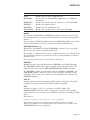
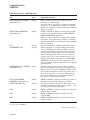
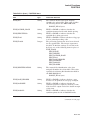
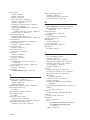
Contents
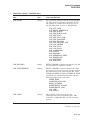
Preface . . . . . . . . . . . . . . . . . . . . . . . . . . . . . . . . . . . . . . . . . . . . . . . . . . . . . . . . . . . .
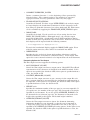
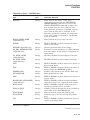
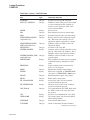
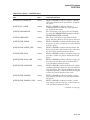
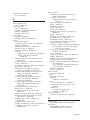
! (Comment Delimiter) . . . . . . . . . . . . . . . . . . .
= (Assignment Statement) . . . . . . . . . . . . . . . .
:= (String Assignment) . . . . . . . . . . . . . . . . . . .
@ (Execute Procedure) . . . . . . . . . . . . . . . . . . .
ACCOUNTING . . . . . . . . . . . . . . . . . . . . . . . .
ALLOCATE . . . . . . . . . . . . . . . . . . . . . . . . . . .
ANALYZE/AUDIT . . . . . . . . . . . . . . . . . . . . . .
ANALYZE/CRASH_DUMP . . . . . . . . . . . . . . . .
ANALYZE/DISK_STRUCTURE . . . . . . . . . . . .
ANALYZE/ERROR_LOG/ELV (Alpha/I64 Only)
ANALYZE/IMAGE . . . . . . . . . . . . . . . . . . . . . .
ANALYZE/MEDIA . . . . . . . . . . . . . . . . . . . . . .
ANALYZE/OBJECT . . . . . . . . . . . . . . . . . . . . .
ANALYZE/PROCESS_DUMP . . . . . . . . . . . . . .
ANALYZE/RMS_FILE . . . . . . . . . . . . . . . . . . .
ANALYZE/SSLOG (Alpha/I64 Only) . . . . . . . . .
ANALYZE/SYSTEM . . . . . . . . . . . . . . . . . . . . .
APPEND . . . . . . . . . . . . . . . . . . . . . . . . . . . . .
ASSIGN . . . . . . . . . . . . . . . . . . . . . . . . . . . . . .
ASSIGN/MERGE . . . . . . . . . . . . . . . . . . . . . . .
ASSIGN/QUEUE . . . . . . . . . . . . . . . . . . . . . . .
ATTACH . . . . . . . . . . . . . . . . . . . . . . . . . . . . .
BACKUP . . . . . . . . . . . . . . . . . . . . . . . . . . . . .
CALL . . . . . . . . . . . . . . . . . . . . . . . . . . . . . . . .
CANCEL . . . . . . . . . . . . . . . . . . . . . . . . . . . . .
CHECKSUM . . . . . . . . . . . . . . . . . . . . . . . . . .
CLOSE . . . . . . . . . . . . . . . . . . . . . . . . . . . . . . .
CONNECT . . . . . . . . . . . . . . . . . . . . . . . . . . . .
CONTINUE . . . . . . . . . . . . . . . . . . . . . . . . . . .
CONVERT . . . . . . . . . . . . . . . . . . . . . . . . . . . .
CONVERT/DOCUMENT . . . . . . . . . . . . . . . . .
CONVERT/RECLAIM . . . . . . . . . . . . . . . . . . .
COPY . . . . . . . . . . . . . . . . . . . . . . . . . . . . . . . .
COPY/FTP . . . . . . . . . . . . . . . . . . . . . . . . . . . .
COPY/RCP . . . . . . . . . . . . . . . . . . . . . . . . . . . .
CREATE . . . . . . . . . . . . . . . . . . . . . . . . . . . . .
CREATE/DIRECTORY . . . . . . . . . . . . . . . . . . .
.
.
.
.
.
.
.
.
.
.
.
.
.
.
.
.
.
.
.
.
.
.
.
.
.
.
.
.
.
.
.
.
.
.
.
.
.
.
.
.
.
.
.
.
.
.
.
.
.
.
.
.
.
.
.
.
.
.
.
.
.
.
.
.
.
.
.
.
.
.
.
.
.
.
.
.
.
.
.
.
.
.
.
.
.
.
.
.
.
.
.
.
.
.
.
.
.
.
.
.
.
.
.
.
.
.
.
.
.
.
.
.
.
.
.
.
.
.
.
.
.
.
.
.
.
.
.
.
.
.
.
.
.
.
.
.
.
.
.
.
.
.
.
.
.
.
.
.
.
.
.
.
.
.
.
.
.
.
.
.
.
.
.
.
.
.
.
.
.
.
.
.
.
.
.
.
.
.
.
.
.
.
.
.
.
.
.
.
.
.
.
.
.
.
.
.
.
.
.
.
.
.
.
.
.
.
.
.
.
.
.
.
.
.
.
.
.
.
.
.
.
.
.
.
.
.
.
.
.
.
.
.
.
.
.
.
.
.
.
.
.
.
.
.
.
.
.
.
.
.
.
.
.
.
.
.
.
.
.
.
.
.
.
.
.
.
.
.
.
.
.
.
.
.
.
.
.
.
.
.
.
.
.
.
.
.
.
.
.
.
.
.
.
.
.
.
.
.
.
.
.
.
.
.
.
.
.
.
.
.
.
.
.
.
.
.
.
.
.
.
.
.
.
.
.
.
.
.
.
.
.
.
.
.
.
.
.
.
.
.
.
.
.
.
.
.
.
.
.
.
.
.
.
.
.
.
.
.
.
.
.
.
.
.
.
.
.
.
.
.
.
.
.
.
.
.
.
.
.
.
.
.
.
.
.
.
.
.
.
.
.
.
.
.
.
.
.
.
.
.
.
.
.
.
.
.
.
.
.
.
.
.
.
.
.
.
.
.
.
.
.
.
.
.
.
.
.
.
.
.
.
.
.
.
.
.
.
.
.
.
.
.
.
.
.
.
.
.
.
.
.
.
.
.
.
.
.
.
.
.
.
.
.
.
.
.
.
.
.
.
.
.
.
.
.
.
.
.
.
.
.
.
.
.
.
.
.
.
.
.
.
.
.
.
.
.
.
.
.
.
.
.
.
.
.
.
.
.
.
.
.
.
.
.
.
.
.
.
.
.
.
.
.
.
.
.
.
.
.
.
.
.
.
.
.
.
.
.
.
.
.
.
.
.
.
.
.
.
.
.
.
.
.
.
.
.
.
.
.
.
.
.
.
.
.
.
.
.
.
.
.
.
.
.
.
.
.
.
.
.
.
.
.
.
.
.
.
.
.
.
.
.
.
.
.
.
.
.
.
.
.
.
.
.
.
.
.
.
.
.
.
.
.
.
.
.
.
.
.
.
.
.
.
.
.
.
.
.
.
.
.
.
.
.
.
.
.
.
.
.
.
.
.
.
.
.
.
.
.
.
.
.
.
.
.
.
.
.
.
.
.
.
.
.
.
.
.
.
.
.
.
.
.
.
.
.
.
.
.
.
.
.
.
.
.
.
.
.
.
.
.
.
.
.
.
.
.
.
.
.
.
.
.
.
.
.
.
.
.
.
.
.
.
.
.
.
.
.
.
.
.
.
.
.
.
.
.
.
.
.
.
.
.
.
.
.
.
.
.
.
.
.
.
.
.
.
.
.
.
.
.
.
.
.
.
.
.
.
.
.
.
.
.
.
.
.
.
.
.
.
.
.
.
.
.
.
.
vii
DCLI–1
DCLI–2
DCLI–6
DCLI–10
DCLI–15
DCLI–16
DCLI–20
DCLI–21
DCLI–22
DCLI–23
DCLI–24
DCLI–35
DCLI–36
DCLI–46
DCLI–52
DCLI–53
DCLI–54
DCLI–55
DCLI–60
DCLI–67
DCLI–68
DCLI–70
DCLI–72
DCLI–73
DCLI–77
DCLI–79
DCLI–84
DCLI–86
DCLI–89
DCLI–90
DCLI–91
DCLI–103
DCLI–104
DCLI–114
DCLI–116
DCLI–118
DCLI–122
iii
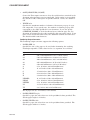
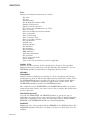
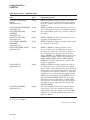
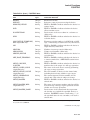
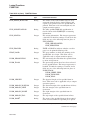
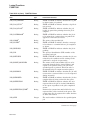
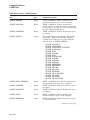
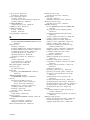
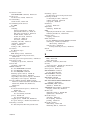
CREATE/FDL . . . . . . . . . . . . . . . . . .
CREATE/MAILBOX (Alpha/I64 Only)
CREATE/NAME_TABLE . . . . . . . . . .
CREATE/TERMINAL . . . . . . . . . . . . .
DEALLOCATE . . . . . . . . . . . . . . . . . .
DEASSIGN . . . . . . . . . . . . . . . . . . . .
DEASSIGN/QUEUE . . . . . . . . . . . . .
DEBUG . . . . . . . . . . . . . . . . . . . . . . .
DECK . . . . . . . . . . . . . . . . . . . . . . . . .
DECRYPT . . . . . . . . . . . . . . . . . . . . .
DEFINE . . . . . . . . . . . . . . . . . . . . . . .
DEFINE/CHARACTERISTIC . . . . . . .
DEFINE/FORM . . . . . . . . . . . . . . . . .
DEFINE/KEY . . . . . . . . . . . . . . . . . . .
DELETE . . . . . . . . . . . . . . . . . . . . . .
DELETE/BITMAP (Alpha/I64 Only) .
DELETE/CHARACTERISTIC . . . . . .
DELETE/ENTRY . . . . . . . . . . . . . . . .
DELETE/FORM . . . . . . . . . . . . . . . . .
DELETE/INTRUSION_RECORD . . . .
DELETE/KEY . . . . . . . . . . . . . . . . . .
DELETE/MAILBOX (Alpha/I64 Only)
DELETE/QUEUE . . . . . . . . . . . . . . .
DELETE/QUEUE/MANAGER . . . . . .
DELETE/SYMBOL . . . . . . . . . . . . . .
DEPOSIT . . . . . . . . . . . . . . . . . . . . . .
DIFFERENCES . . . . . . . . . . . . . . . . .
DIRECTORY . . . . . . . . . . . . . . . . . . .
DISABLE AUTOSTART . . . . . . . . . . .
DISCONNECT . . . . . . . . . . . . . . . . . .
DISMOUNT . . . . . . . . . . . . . . . . . . . .
DUMP . . . . . . . . . . . . . . . . . . . . . . . .
EDIT/ACL . . . . . . . . . . . . . . . . . . . . .
EDIT/EDT . . . . . . . . . . . . . . . . . . . . .
EDIT/FDL . . . . . . . . . . . . . . . . . . . . .
EDIT/SUM . . . . . . . . . . . . . . . . . . . . .
EDIT/TECO . . . . . . . . . . . . . . . . . . . .
EDIT/TPU . . . . . . . . . . . . . . . . . . . . .
ENABLE AUTOSTART . . . . . . . . . . .
ENCRYPT . . . . . . . . . . . . . . . . . . . . .
ENCRYPT /AUTHENTICATE . . . . . .
ENCRYPT /CREATE_KEY . . . . . . . . .
ENCRYPT /REMOVE_KEY . . . . . . . .
ENDSUBROUTINE . . . . . . . . . . . . . .
EOD . . . . . . . . . . . . . . . . . . . . . . . . . .
EOJ . . . . . . . . . . . . . . . . . . . . . . . . . .
EXAMINE . . . . . . . . . . . . . . . . . . . . .
iv
.
.
.
.
.
.
.
.
.
.
.
.
.
.
.
.
.
.
.
.
.
.
.
.
.
.
.
.
.
.
.
.
.
.
.
.
.
.
.
.
.
.
.
.
.
.
.
.
.
.
.
.
.
.
.
.
.
.
.
.
.
.
.
.
.
.
.
.
.
.
.
.
.
.
.
.
.
.
.
.
.
.
.
.
.
.
.
.
.
.
.
.
.
.
.
.
.
.
.
.
.
.
.
.
.
.
.
.
.
.
.
.
.
.
.
.
.
.
.
.
.
.
.
.
.
.
.
.
.
.
.
.
.
.
.
.
.
.
.
.
.
.
.
.
.
.
.
.
.
.
.
.
.
.
.
.
.
.
.
.
.
.
.
.
.
.
.
.
.
.
.
.
.
.
.
.
.
.
.
.
.
.
.
.
.
.
.
.
.
.
.
.
.
.
.
.
.
.
.
.
.
.
.
.
.
.
.
.
.
.
.
.
.
.
.
.
.
.
.
.
.
.
.
.
.
.
.
.
.
.
.
.
.
.
.
.
.
.
.
.
.
.
.
.
.
.
.
.
.
.
.
.
.
.
.
.
.
.
.
.
.
.
.
.
.
.
.
.
.
.
.
.
.
.
.
.
.
.
.
.
.
.
.
.
.
.
.
.
.
.
.
.
.
.
.
.
.
.
.
.
.
.
.
.
.
.
.
.
.
.
.
.
.
.
.
.
.
.
.
.
.
.
.
.
.
.
.
.
.
.
.
.
.
.
.
.
.
.
.
.
.
.
.
.
.
.
.
.
.
.
.
.
.
.
.
.
.
.
.
.
.
.
.
.
.
.
.
.
.
.
.
.
.
.
.
.
.
.
.
.
.
.
.
.
.
.
.
.
.
.
.
.
.
.
.
.
.
.
.
.
.
.
.
.
.
.
.
.
.
.
.
.
.
.
.
.
.
.
.
.
.
.
.
.
.
.
.
.
.
.
.
.
.
.
.
.
.
.
.
.
.
.
.
.
.
.
.
.
.
.
.
.
.
.
.
.
.
.
.
.
.
.
.
.
.
.
.
.
.
.
.
.
.
.
.
.
.
.
.
.
.
.
.
.
.
.
.
.
.
.
.
.
.
.
.
.
.
.
.
.
.
.
.
.
.
.
.
.
.
.
.
.
.
.
.
.
.
.
.
.
.
.
.
.
.
.
.
.
.
.
.
.
.
.
.
.
.
.
.
.
.
.
.
.
.
.
.
.
.
.
.
.
.
.
.
.
.
.
.
.
.
.
.
.
.
.
.
.
.
.
.
.
.
.
.
.
.
.
.
.
.
.
.
.
.
.
.
.
.
.
.
.
.
.
.
.
.
.
.
.
.
.
.
.
.
.
.
.
.
.
.
.
.
.
.
.
.
.
.
.
.
.
.
.
.
.
.
.
.
.
.
.
.
.
.
.
.
.
.
.
.
.
.
.
.
.
.
.
.
.
.
.
.
.
.
.
.
.
.
.
.
.
.
.
.
.
.
.
.
.
.
.
.
.
.
.
.
.
.
.
.
.
.
.
.
.
.
.
.
.
.
.
.
.
.
.
.
.
.
.
.
.
.
.
.
.
.
.
.
.
.
.
.
.
.
.
.
.
.
.
.
.
.
.
.
.
.
.
.
.
.
.
.
.
.
.
.
.
.
.
.
.
.
.
.
.
.
.
.
.
.
.
.
.
.
.
.
.
.
.
.
.
.
.
.
.
.
.
.
.
.
.
.
.
.
.
.
.
.
.
.
.
.
.
.
.
.
.
.
.
.
.
.
.
.
.
.
.
.
.
.
.
.
.
.
.
.
.
.
.
.
.
.
.
.
.
.
.
.
.
.
.
.
.
.
.
.
.
.
.
.
.
.
.
.
.
.
.
.
.
.
.
.
.
.
.
.
.
.
.
.
.
.
.
.
.
.
.
.
.
.
.
.
.
.
.
.
.
.
.
.
.
.
.
.
.
.
.
.
.
.
.
.
.
.
.
.
.
.
.
.
.
.
.
.
.
.
.
.
.
.
.
.
.
.
.
.
.
.
.
.
.
.
.
.
.
.
.
.
.
.
.
.
.
.
.
.
.
.
.
.
.
.
.
.
.
.
.
.
.
.
.
.
.
.
.
.
.
.
.
.
.
.
.
.
.
.
.
.
.
.
.
.
.
.
.
.
.
.
.
.
.
.
.
.
.
.
.
.
.
.
.
.
.
.
.
.
.
.
.
.
.
.
.
.
.
.
.
.
.
.
.
.
.
.
.
.
.
.
.
.
.
.
.
.
.
.
.
.
.
.
.
.
.
.
.
.
.
.
.
.
.
.
.
.
.
.
.
.
.
.
.
.
.
.
.
.
.
.
.
.
.
.
.
.
.
.
.
.
.
.
.
.
.
.
.
.
.
.
.
.
.
.
.
.
.
.
.
.
.
.
.
.
.
.
.
.
.
.
.
.
.
.
.
.
.
.
.
.
.
.
.
.
.
.
.
.
.
.
.
.
.
.
.
.
.
.
.
.
.
.
.
.
.
.
.
.
.
.
.
.
.
.
.
.
.
.
.
.
.
.
.
.
.
.
.
.
.
.
.
.
.
.
.
.
.
.
.
.
.
.
.
.
.
.
.
.
.
.
.
.
.
.
.
.
.
.
.
.
.
.
.
.
.
.
.
.
.
.
.
.
.
.
.
.
.
.
.
.
.
.
.
.
.
.
.
.
.
.
.
.
.
.
.
.
.
.
.
.
.
.
.
.
.
.
.
.
.
.
.
.
.
.
.
.
.
.
.
.
.
.
.
.
.
.
.
.
.
.
.
.
.
.
.
.
.
.
.
.
.
.
.
.
.
.
.
.
.
.
.
.
.
.
.
.
.
.
.
.
.
.
.
.
.
.
.
.
.
.
.
.
.
.
.
.
.
.
.
.
.
.
.
.
.
.
.
.
.
.
.
.
.
.
.
.
.
DCLI–125
DCLI–126
DCLI–128
DCLI–132
DCLI–138
DCLI–139
DCLI–144
DCLI–145
DCLI–150
DCLI–153
DCLI–156
DCLI–163
DCLI–165
DCLI–169
DCLI–173
DCLI–178
DCLI–179
DCLI–180
DCLI–183
DCLI–184
DCLI–186
DCLI–188
DCLI–189
DCLI–191
DCLI–192
DCLI–194
DCLI–198
DCLI–208
DCLI–222
DCLI–224
DCLI–226
DCLI–231
DCLI–240
DCLI–241
DCLI–245
DCLI–246
DCLI–247
DCLI–250
DCLI–251
DCLI–254
DCLI–258
DCLI–261
DCLI–264
DCLI–265
DCLI–266
DCLI–268
DCLI–269
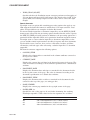
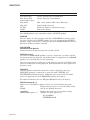
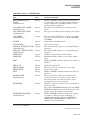
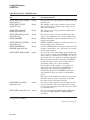
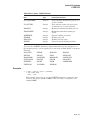
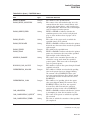
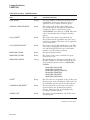
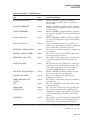
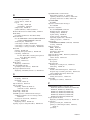
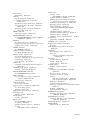
EXCHANGE . . . . . . . . . . . . . . . . . . . . .
EXCHANGE/NETWORK . . . . . . . . . . . .
EXIT . . . . . . . . . . . . . . . . . . . . . . . . . . .
FONT . . . . . . . . . . . . . . . . . . . . . . . . . . .
GOSUB . . . . . . . . . . . . . . . . . . . . . . . . .
GOTO . . . . . . . . . . . . . . . . . . . . . . . . . .
HELP . . . . . . . . . . . . . . . . . . . . . . . . . . .
HELP/MESSAGE . . . . . . . . . . . . . . . . . .
IF . . . . . . . . . . . . . . . . . . . . . . . . . . . . . .
INITIALIZE . . . . . . . . . . . . . . . . . . . . . .
INITIALIZE/QUEUE . . . . . . . . . . . . . . .
INQUIRE . . . . . . . . . . . . . . . . . . . . . . . .
INSTALL . . . . . . . . . . . . . . . . . . . . . . . .
JAVA . . . . . . . . . . . . . . . . . . . . . . . . . . .
JOB . . . . . . . . . . . . . . . . . . . . . . . . . . . .
Lexical Functions . . . . . . . . . . . . . . . . . .
F$CONTEXT . . . . . . . . . . . . . . . . . .
F$CSID . . . . . . . . . . . . . . . . . . . . . .
F$CUNITS . . . . . . . . . . . . . . . . . . . .
F$CVSI . . . . . . . . . . . . . . . . . . . . . .
F$CVTIME . . . . . . . . . . . . . . . . . . .
F$CVUI . . . . . . . . . . . . . . . . . . . . . .
F$DELTA_TIME . . . . . . . . . . . . . . .
F$DEVICE . . . . . . . . . . . . . . . . . . . .
F$DIRECTORY . . . . . . . . . . . . . . . .
F$EDIT . . . . . . . . . . . . . . . . . . . . . .
F$ELEMENT . . . . . . . . . . . . . . . . . .
F$ENVIRONMENT . . . . . . . . . . . . .
F$EXTRACT . . . . . . . . . . . . . . . . . .
F$FAO . . . . . . . . . . . . . . . . . . . . . . .
F$FID_TO_NAME (Alpha/I64 Only)
F$FILE_ATTRIBUTES . . . . . . . . . .
F$GETDVI . . . . . . . . . . . . . . . . . . . .
F$GETENV (Alpha Only) . . . . . . . .
F$GETJPI . . . . . . . . . . . . . . . . . . . .
F$GETQUI . . . . . . . . . . . . . . . . . . . .
F$GETSYI . . . . . . . . . . . . . . . . . . . .
F$IDENTIFIER . . . . . . . . . . . . . . . .
F$INTEGER . . . . . . . . . . . . . . . . . .
F$LENGTH . . . . . . . . . . . . . . . . . . .
F$LICENSE (Alpha/I64 Only) . . . . .
F$LOCATE . . . . . . . . . . . . . . . . . . .
F$MATCH_WILD . . . . . . . . . . . . . . .
F$MESSAGE . . . . . . . . . . . . . . . . . .
F$MODE . . . . . . . . . . . . . . . . . . . . .
F$MULTIPATH (Alpha/I64 Only) . . .
F$PARSE . . . . . . . . . . . . . . . . . . . . .
.
.
.
.
.
.
.
.
.
.
.
.
.
.
.
.
.
.
.
.
.
.
.
.
.
.
.
.
.
.
.
.
.
.
.
.
.
.
.
.
.
.
.
.
.
.
.
.
.
.
.
.
.
.
.
.
.
.
.
.
.
.
.
.
.
.
.
.
.
.
.
.
.
.
.
.
.
.
.
.
.
.
.
.
.
.
.
.
.
.
.
.
.
.
.
.
.
.
.
.
.
.
.
.
.
.
.
.
.
.
.
.
.
.
.
.
.
.
.
.
.
.
.
.
.
.
.
.
.
.
.
.
.
.
.
.
.
.
.
.
.
.
.
.
.
.
.
.
.
.
.
.
.
.
.
.
.
.
.
.
.
.
.
.
.
.
.
.
.
.
.
.
.
.
.
.
.
.
.
.
.
.
.
.
.
.
.
.
.
.
.
.
.
.
.
.
.
.
.
.
.
.
.
.
.
.
.
.
.
.
.
.
.
.
.
.
.
.
.
.
.
.
.
.
.
.
.
.
.
.
.
.
.
.
.
.
.
.
.
.
.
.
.
.
.
.
.
.
.
.
.
.
.
.
.
.
.
.
.
.
.
.
.
.
.
.
.
.
.
.
.
.
.
.
.
.
.
.
.
.
.
.
.
.
.
.
.
.
.
.
.
.
.
.
.
.
.
.
.
.
.
.
.
.
.
.
.
.
.
.
.
.
.
.
.
.
.
.
.
.
.
.
.
.
.
.
.
.
.
.
.
.
.
.
.
.
.
.
.
.
.
.
.
.
.
.
.
.
.
.
.
.
.
.
.
.
.
.
.
.
.
.
.
.
.
.
.
.
.
.
.
.
.
.
.
.
.
.
.
.
.
.
.
.
.
.
.
.
.
.
.
.
.
.
.
.
.
.
.
.
.
.
.
.
.
.
.
.
.
.
.
.
.
.
.
.
.
.
.
.
.
.
.
.
.
.
.
.
.
.
.
.
.
.
.
.
.
.
.
.
.
.
.
.
.
.
.
.
.
.
.
.
.
.
.
.
.
.
.
.
.
.
.
.
.
.
.
.
.
.
.
.
.
.
.
.
.
.
.
.
.
.
.
.
.
.
.
.
.
.
.
.
.
.
.
.
.
.
.
.
.
.
.
.
.
.
.
.
.
.
.
.
.
.
.
.
.
.
.
.
.
.
.
.
.
.
.
.
.
.
.
.
.
.
.
.
.
.
.
.
.
.
.
.
.
.
.
.
.
.
.
.
.
.
.
.
.
.
.
.
.
.
.
.
.
.
.
.
.
.
.
.
.
.
.
.
.
.
.
.
.
.
.
.
.
.
.
.
.
.
.
.
.
.
.
.
.
.
.
.
.
.
.
.
.
.
.
.
.
.
.
.
.
.
.
.
.
.
.
.
.
.
.
.
.
.
.
.
.
.
.
.
.
.
.
.
.
.
.
.
.
.
.
.
.
.
.
.
.
.
.
.
.
.
.
.
.
.
.
.
.
.
.
.
.
.
.
.
.
.
.
.
.
.
.
.
.
.
.
.
.
.
.
.
.
.
.
.
.
.
.
.
.
.
.
.
.
.
.
.
.
.
.
.
.
.
.
.
.
.
.
.
.
.
.
.
.
.
.
.
.
.
.
.
.
.
.
.
.
.
.
.
.
.
.
.
.
.
.
.
.
.
.
.
.
.
.
.
.
.
.
.
.
.
.
.
.
.
.
.
.
.
.
.
.
.
.
.
.
.
.
.
.
.
.
.
.
.
.
.
.
.
.
.
.
.
.
.
.
.
.
.
.
.
.
.
.
.
.
.
.
.
.
.
.
.
.
.
.
.
.
.
.
.
.
.
.
.
.
.
.
.
.
.
.
.
.
.
.
.
.
.
.
.
.
.
.
.
.
.
.
.
.
.
.
.
.
.
.
.
.
.
.
.
.
.
.
.
.
.
.
.
.
.
.
.
.
.
.
.
.
.
.
.
.
.
.
.
.
.
.
.
.
.
.
.
.
.
.
.
.
.
.
.
.
.
.
.
.
.
.
.
.
.
.
.
.
.
.
.
.
.
.
.
.
.
.
.
.
.
.
.
.
.
.
.
.
.
.
.
.
.
.
.
.
.
.
.
.
.
.
.
.
.
.
.
.
.
.
.
.
.
.
.
.
.
.
.
.
.
.
.
.
.
.
.
.
.
.
.
.
.
.
.
.
.
.
.
.
.
.
.
.
.
.
.
.
.
.
.
.
.
.
.
.
.
.
.
.
.
.
.
.
.
.
.
.
.
.
.
.
.
.
.
.
.
.
.
.
.
.
.
.
.
.
.
.
.
.
.
.
.
.
.
.
.
.
.
.
.
.
.
.
.
.
.
.
.
.
.
.
.
.
.
.
.
.
.
.
.
.
.
.
.
.
.
.
.
.
.
.
.
.
.
.
.
.
.
.
.
.
.
.
.
.
.
.
.
.
.
.
.
.
.
.
.
.
.
.
.
.
.
.
.
.
.
.
.
.
.
.
.
.
.
.
.
.
.
.
.
.
.
.
.
.
.
.
.
.
.
.
.
.
.
.
.
.
.
.
.
.
.
.
.
.
.
.
.
.
.
.
.
.
.
.
.
.
.
.
.
.
.
.
.
.
.
.
.
.
.
.
.
.
.
.
.
.
.
.
.
.
.
.
.
.
.
.
.
.
.
.
.
.
.
.
.
.
.
.
.
.
.
.
.
.
.
.
.
.
.
.
.
.
.
.
.
.
.
.
.
.
.
DCLI–272
DCLI–273
DCLI–283
DCLI–287
DCLI–288
DCLI–290
DCLI–292
DCLI–300
DCLI–306
DCLI–309
DCLI–325
DCLI–341
DCLI–344
DCLI–345
DCLI–346
DCLI–352
DCLI–356
DCLI–362
DCLI–364
DCLI–365
DCLI–367
DCLI–370
DCLI–371
DCLI–372
DCLI–374
DCLI–375
DCLI–377
DCLI–379
DCLI–382
DCLI–384
DCLI–391
DCLI–392
DCLI–396
DCLI–413
DCLI–414
DCLI–423
DCLI–447
DCLI–458
DCLI–460
DCLI–461
DCLI–462
DCLI–463
DCLI–465
DCLI–466
DCLI–468
DCLI–470
DCLI–472
v
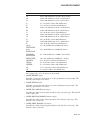
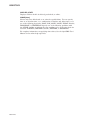
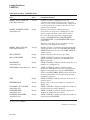
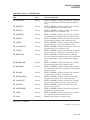
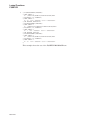
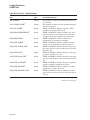
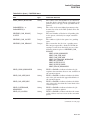
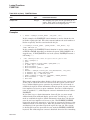
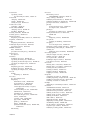
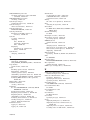
F$PID . . . . . . . . . . . . . . . . . .
F$PRIVILEGE . . . . . . . . . . . .
F$PROCESS . . . . . . . . . . . . .
F$SEARCH . . . . . . . . . . . . . .
F$SETPRV . . . . . . . . . . . . . . .
F$STRING . . . . . . . . . . . . . . .
F$TIME . . . . . . . . . . . . . . . . .
F$TRNLNM . . . . . . . . . . . . . .
F$TYPE . . . . . . . . . . . . . . . . .
F$UNIQUE (Alpha/I64 Only) .
F$USER . . . . . . . . . . . . . . . . .
F$VERIFY . . . . . . . . . . . . . . .
LIBRARY . . . . . . . . . . . . . . . . . . .
LICENSE . . . . . . . . . . . . . . . . . . .
LINK . . . . . . . . . . . . . . . . . . . . . .
LOGIN Procedure . . . . . . . . . . . .
LOGOUT . . . . . . . . . . . . . . . . . . .
MACRO . . . . . . . . . . . . . . . . . . . .
MAIL . . . . . . . . . . . . . . . . . . . . . .
MERGE . . . . . . . . . . . . . . . . . . . .
MESSAGE . . . . . . . . . . . . . . . . . .
MONITOR . . . . . . . . . . . . . . . . . .
MOUNT . . . . . . . . . . . . . . . . . . . .
.
.
.
.
.
.
.
.
.
.
.
.
.
.
.
.
.
.
.
.
.
.
.
.
.
.
.
.
.
.
.
.
.
.
.
.
.
.
.
.
.
.
.
.
.
.
.
.
.
.
.
.
.
.
.
.
.
.
.
.
.
.
.
.
.
.
.
.
.
.
.
.
.
.
.
.
.
.
.
.
.
.
.
.
.
.
.
.
.
.
.
.
.
.
.
.
.
.
.
.
.
.
.
.
.
.
.
.
.
.
.
.
.
.
.
.
.
.
.
.
.
.
.
.
.
.
.
.
.
.
.
.
.
.
.
.
.
.
.
.
.
.
.
.
.
.
.
.
.
.
.
.
.
.
.
.
.
.
.
.
.
.
.
.
.
.
.
.
.
.
.
.
.
.
.
.
.
.
.
.
.
.
.
.
.
.
.
.
.
.
.
.
.
.
.
.
.
.
.
.
.
.
.
.
.
.
.
.
.
.
.
.
.
.
.
.
.
.
.
.
.
.
.
.
.
.
.
.
.
.
.
.
.
.
.
.
.
.
.
.
.
.
.
.
.
.
.
.
.
.
.
.
.
.
.
.
.
.
.
.
.
.
.
.
.
.
.
.
.
.
.
.
.
.
.
.
.
.
.
.
.
.
.
.
.
.
.
.
.
.
.
.
.
.
.
.
.
.
.
.
.
.
.
.
.
.
.
.
.
.
.
.
.
.
.
.
.
.
.
.
.
.
.
.
.
.
.
.
.
.
.
.
.
.
.
.
.
.
.
.
.
.
.
.
.
.
.
.
.
.
.
.
.
.
.
.
.
.
.
.
.
.
.
.
.
.
.
.
.
.
.
.
.
.
.
.
.
.
.
.
.
.
.
.
.
.
.
.
.
.
.
.
.
.
.
.
.
.
.
.
.
.
.
.
.
.
.
.
.
.
.
.
.
.
.
.
.
.
.
.
.
.
.
.
.
.
.
.
.
.
.
.
.
.
.
.
.
.
.
.
.
.
.
.
.
.
.
.
.
.
.
.
.
.
.
.
.
.
.
.
.
.
.
.
.
.
.
.
.
.
.
.
.
.
.
.
.
.
.
.
.
.
.
.
.
.
.
.
.
.
.
.
.
.
.
.
.
.
.
.
.
.
.
.
.
.
.
.
.
.
.
.
.
.
.
.
.
.
.
.
.
.
.
.
.
.
.
.
.
.
.
.
.
.
.
.
.
.
.
.
.
.
.
.
.
.
.
.
.
.
.
.
.
.
.
.
.
.
.
.
.
.
.
.
.
.
.
.
.
.
.
.
.
.
.
.
.
.
.
.
.
.
.
.
.
.
.
.
.
.
.
.
.
.
.
.
.
.
.
.
.
.
.
.
.
.
.
.
.
.
.
.
.
.
.
.
.
.
.
.
.
.
.
.
.
.
.
.
.
.
.
.
.
.
.
.
.
.
.
.
.
.
.
.
.
.
.
.
.
.
.
.
.
.
.
.
.
.
.
.
.
.
.
.
.
.
.
.
.
.
.
.
.
.
.
.
.
.
.
.
.
.
.
.
.
.
.
.
.
.
.
.
.
.
.
.
.
.
.
.
.
.
.
.
.
.
.
.
.
.
.
.
.
DCLI–475
DCLI–477
DCLI–478
DCLI–479
DCLI–482
DCLI–486
DCLI–487
DCLI–488
DCLI–493
DCLI–495
DCLI–496
DCLI–497
DCLI–499
DCLI–500
DCLI–501
DCLI–502
DCLI–506
DCLI–507
DCLI–508
DCLI–509
DCLI–510
DCLI–511
DCLI–512
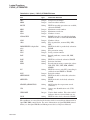
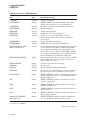
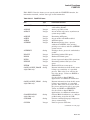
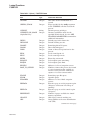
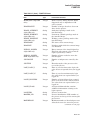
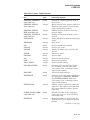
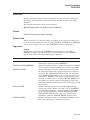
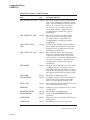
CPU Time Limit Specifications and Actions . . . . .
Working Set Default, Extent, and Quota Decision
Summary of Lexical Functions . . . . . . . . . . . . . . .
Summary of FAO Directives . . . . . . . . . . . . . . . . .
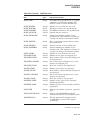
F$FILE_ATTRIBUTES Items . . . . . . . . . . . . . . .
F$GETDVI Items . . . . . . . . . . . . . . . . . . . . . . . . .
F$GETJPI Items . . . . . . . . . . . . . . . . . . . . . . . . .
F$GETQUI Keywords . . . . . . . . . . . . . . . . . . . . .
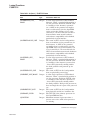
F$GETQUI Items . . . . . . . . . . . . . . . . . . . . . . . . .
F$GETSYI Items . . . . . . . . . . . . . . . . . . . . . . . . .
F$MESSAGE Keywords . . . . . . . . . . . . . . . . . . . .
Context Symbol Types . . . . . . . . . . . . . . . . . . . . .
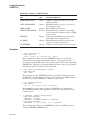
Keywords for Tapes . . . . . . . . . . . . . . . . . . . . . . .
.
.
.
.
.
.
.
.
.
.
.
.
.
.
.
.
.
.
.
.
.
.
.
.
.
.
.
.
.
.
.
.
.
.
.
.
.
.
.
.
.
.
.
.
.
.
.
.
.
.
.
.
.
.
.
.
.
.
.
.
.
.
.
.
.
.
.
.
.
.
.
.
.
.
.
.
.
.
.
.
.
.
.
.
.
.
.
.
.
.
.
.
.
.
.
.
.
.
.
.
.
.
.
.
.
.
.
.
.
.
.
.
.
.
.
.
.
.
.
.
.
.
.
.
.
.
.
.
.
.
.
.
.
.
.
.
.
.
.
.
.
.
.
.
.
.
.
.
.
.
.
.
.
.
.
.
.
.
.
.
.
.
.
.
.
.
.
.
.
.
.
.
.
.
.
.
.
.
.
.
.
.
.
.
.
.
.
.
.
.
.
.
.
.
.
.
.
.
.
.
.
.
.
.
.
.
.
.
DCLI–331
DCLI–338
DCLI–352
DCLI–386
DCLI–392
DCLI–397
DCLI–415
DCLI–425
DCLI–427
DCLI–448
DCLI–466
DCLI–493
DCLI–525
Index
Tables
DCLI–1
DCLI–2
DCLI–3
DCLI–4
DCLI–5
DCLI–6
DCLI–7
DCLI–8
DCLI–9
DCLI–10
DCLI–11
DCLI–12
DCLI–13
vi
Preface
Intended Audience
This manual is intended for all users of the HP OpenVMS operating system. It
includes descriptions of all DIGITAL Command Language (DCL) commands and
lexical functions. If a command has any restrictions or requires special privileges,
they are noted in reference information for that command.
Readers of this manual should be familiar with the material covered in the
OpenVMS User’s Manual.
Document Structure
This manual contains detailed descriptions of each command and lexical function.
The commands are listed in alphabetical order, with the command name
appearing at the top of every page. The lexical functions are grouped under the
heading Lexical Functions (after the JOB command description) and are listed
alphabetically within that grouping; the lexical function name appears at the top
of each page.
The hardcopy version of the HP OpenVMS DCL Dictionary is a two-part manual.
The first volume contains commands beginning with the letters A to M (including
the lexical functions); the second volume contains commands beginning with the
letters N to Z.
Appendix A of this manual (in the second volume of the hardcopy manual) lists
the obsolete DCL commands and the current services that replace them.
The commands that invoke language compilers and other OpenVMS optional
software products are not included in this manual; they are included in the
documentation provided with those products.
Related Documents
For an introduction to the OpenVMS operating system and for information
on using DCL, see the OpenVMS User’s Manual. This manual is especially
recommended for novice users or users lacking experience with interactive
computer systems.
The OpenVMS User’s Manual provides an overview of DCL command language
concepts and defines and illustrates good practices in constructing command
procedures with DCL commands and lexical functions.
See to the various utilities reference manuals for detailed information about
utilities. These manuals describe the DCL commands that invoke the various
utilities, describe any commands that you can enter while running a utility, and
provide reference information. The HP OpenVMS DCL Dictionary provides only a
brief description and format information for each utility.
For message descriptions, use the online Help Message utility.
vii
For additional information about HP OpenVMS products and services, visit the
following World Wide Web address:
http://www.hp.com/go/openvms
Reader’s Comments
HP welcomes your comments on this manual. Please send comments to either of
the following addresses:
Internet
[email protected]
Postal Mail
Hewlett-Packard Company
OSSG Documentation Group, ZKO3-4/U08
110 Spit Brook Rd.
Nashua, NH 03062-2698
How to Order Additional Documentation
For information about how to order additional documentation, visit the following
World Wide Web address:
http://www.hp.com/go/openvms/doc/order
Conventions
The following conventions may be used in this manual:
Ctrl/x
A sequence such as Ctrl/x indicates that you must hold down
the key labeled Ctrl while you press another key or a pointing
device button.
PF1 x
A sequence such as PF1 x indicates that you must first press
and release the key labeled PF1 and then press and release
another key or a pointing device button.
Return
In examples, a key name enclosed in a box indicates that
you press a key on the keyboard. (In text, a key name is not
enclosed in a box.)
In the HTML version of this document, this convention appears
as brackets, rather than a box.
...
viii
A horizontal ellipsis in examples indicates one of the following
possibilities:
•
Additional optional arguments in a statement have been
omitted.
•
The preceding item or items can be repeated one or more
times.
•
Additional parameters, values, or other information can be
entered.
.
.
.
A vertical ellipsis indicates the omission of items from a code
example or command format; the items are omitted because
they are not important to the topic being discussed.
()
In command format descriptions, parentheses indicate that you
must enclose choices in parentheses if you specify more than
one.
[]
In command format descriptions, brackets indicate optional
choices. You can choose one or more items or no items.
Do not type the brackets on the command line. However,
you must include the brackets in the syntax for OpenVMS
directory specifications and for a substring specification in an
assignment statement.
|
In command format descriptions, vertical bars separate choices
within brackets or braces. Within brackets, the choices are
optional; within braces, at least one choice is required. Do not
type the vertical bars on the command line.
{}
In command format descriptions, braces indicate required
choices; you must choose at least one of the items listed. Do
not type the braces on the command line.
bold type
Bold type represents the introduction of a new term. It also
represents the name of an argument, an attribute, or a reason.
italic type
Italic type indicates important information, complete titles
of manuals, or variables. Variables include information that
varies in system output (Internal error number), in command
lines (/PRODUCER=name), and in command parameters in
text (where dd represents the predefined code for the device
type).
Example
This typeface indicates code examples, command examples, and
interactive screen displays. In text, this type also identifies
URLs, UNIX commands and pathnames, PC-based commands
and folders, and certain elements of the C programming
language.
UPPERCASE TYPE
Uppercase type indicates a command, the name of a routine,
the name of a file, or the abbreviation for a system privilege.
-
A hyphen at the end of a command format description,
command line, or code line indicates that the command or
statement continues on the following line.
numbers
All numbers in text are assumed to be decimal unless
otherwise noted. Nondecimal radixes—binary, octal, or
hexadecimal—are explicitly indicated.
ix
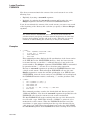
! (Comment Delimiter)
! (Comment Delimiter)
Indicates that everything that follows it on a command line is a comment and
should not be processed as part of a command.
Format
! comment-text
Description
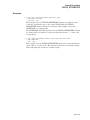
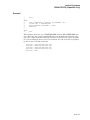
Example
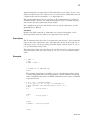
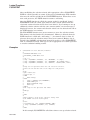
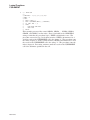
$ !
$ WRITE SYS$OUTPUT "hello"
hello
$ FOO = " "
$ FOO WRITE SYS$OUTPUT "hello"
hello
$ FOO = "!"
$ FOO WRITE SYS$OUTPUT "hello"
$ ! WRITE SYS$OUTPUT "hello"
! This command should output "hello".
! This command defines FOO as a blank.
! This command should output "hello".
! This command defines FOO as a !.
! This command should be ignored.
! This command should be ignored too.
DCLI–1
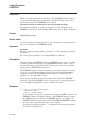
= (Assignment Statement)
= (Assignment Statement)
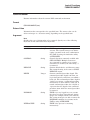
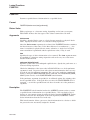
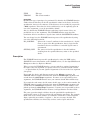
Defines a symbolic name for a character string or integer value.
Format
symbol-name =[=] expression
symbol-name[bit-position,size] =[=] replacement-expression
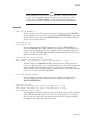
Note
HP advises against assigning a symbolic name that is already a DCL
command name. HP especially discourages the assignment of symbols
such as IF, THEN, ELSE, and GOTO, which can affect the interpretation
of command procedures.
Parameters
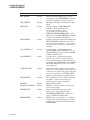
symbol-name
Specifies a string of 1 to 255 characters for the symbol name. The name can
contain any alphanumeric characters from the DEC Multinational character set,
the underscore ( _ ), and the dollar sign ( $ ). However, the name must begin only
with an alphabetic character (uppercase and lowercase characters are equivalent),
an underscore, or a dollar sign. Using one equal sign ( = ) places the symbol name
in the local symbol table for the current command level. Using two equal signs
(= =) places the symbol name in the global symbol table.
expression
Names the value on the right-hand side of an assignment statement. This
parameter can consist of a character string, an integer, a symbol name, a lexical
function, or a combination of these entities. The components of the expression are
evaluated, and the result is assigned to the symbol. All literal character strings
must be enclosed in quotation marks ( ‘‘ ’’ ). If the expression contains a symbol,
the expression is evaluated using the symbol’s value.
The result of expression evaluation is either a character string or a signed integer
value. If the expression is evaluated as a string, the symbol is assigned a string
value. If the expression is evaluated as an integer, the symbol is assigned an
integer value. If the integer value exceeds the capacity of the 4-byte buffer that
holds it, no error message is issued.
For a summary of operators used in expressions, details on how to specify
expressions, and details on how expressions are evaluated, see the OpenVMS
User’s Manual.
DCL uses a buffer that is 1024 bytes long to hold an assignment statement and
to evaluate the expression. The length of the symbol name, the expression, and
the expression’s calculations cannot exceed 1024 bytes.
[bit-position,size]
States that a binary overlay is to be inserted in the current 32-bit value of a
symbol name. The current value of the symbol name is evaluated. Then, the
specified number of bits is replaced by the result of the replacement expression.
The bit position is the location relative to bit 0 at which the overlay is to occur.
DCLI–2
= (Assignment Statement)
If the symbol you are overlaying is an integer, then the bit position must be less
than 32. The sum of the bit position and the size must be less than or equal to
32.
If the symbol you are overlaying is a string, then the bit position must be less
than 6152. Because each character is represented using 8 bits, you can begin
an overlay at any character through the 768th character. (The 768th character
starts in bit position 6144.) The sum of the bit position and the size must be less
than or equal to 6152.
The size is the number of bits to be overlaid. If you specify a size that is greater
than 32, DCL reduces the size to 32.
The brackets are required notation; no spaces are allowed between the symbol
name and the left bracket. Specify values for the bit position and size as integers.
replacement-expression
Specifies the value that is used to overlay the symbol you are modifying. Specify
the replacement expression as an integer.
If the symbol you are modifying is an integer, the replacement expression defines
a bit pattern that is overlaid on the value assigned to the symbol. If the symbol
you are modifying is a character string, the result of the replacement expression
defines a bit pattern that is overlaid on the specified bits of the character string.
If the symbol you are modifying is undefined, the result of the replacement
expression is overlaid on a null string.
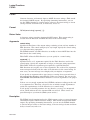
Description
Symbols defined using assignment statements allow you to extend the command
language. At the interactive command level, you can use symbols to define
synonyms for commands or command lines. In command procedure files, you can
use symbols to provide for conditional execution and substitution of variables.
The maximum number of symbols that can be defined at any time depends on the
following:
•
The amount of space available to the command interpreter to contain symbol
tables and labels for the current process. The amount of space is determined
for each process by the system parameter CLISYMTBL.
•
The size of the symbol names and their values. The command interpreter
allocates space for a symbol name and its value. In addition, a few bytes of
overhead are allocated for each symbol.
1.
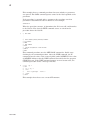
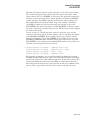
$ LIST == "DIRECTORY"
Examples
The assignment statement in this example assigns the user-defined synonym
LIST as a global symbol definition for the DCL command DIRECTORY.
DCLI–3
= (Assignment Statement)
2.
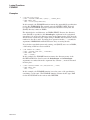
$ COUNT = 0
$ LOOP:
$
COUNT = COUNT + 1
$
IF P’COUNT’ .EQS. "" THEN EXIT
$
APPEND/NEW &P’COUNT’ SAVE.ALL
$
DELETE &P’COUNT’;*
$
IF COUNT .LT. 8 THEN GOTO LOOP
$ EXIT
This command procedure, COPYDEL.COM, appends files (specified as
parameters) to a file called SAVE.ALL. After a file has been appended, the
command procedure deletes the file. Up to eight file names can be passed to
the command procedure. The file names are assigned to the symbols P1, P2,
and so on.
The command procedure uses a counter to refer to parameters that are passed
to it. Each time through the loop, the procedure uses an IF command to check
whether the value of the current parameter is a null string. When the IF
command is scanned, the current value of the symbol COUNT is concatenated
with the letter P. The first time through the loop, the IF command tests P1;
the second time through the loop it tests P2, and so on. After the expression
P‘COUNT’ is evaluated, the substitution of the file names that correspond to
P1, P2, and so on is automatic within the context of the IF command.
The APPEND and DELETE commands do not perform any substitution
automatically, because they expect and require file specifications as input
parameters. The ampersand (&) precedes the P‘COUNT’ expression for
these commands to force the appropriate symbol substitution. When these
commands are initially scanned each time through the loop, COUNT is
substituted with its current value. Then, when the commands execute,
the ampersand causes another substitution: the first file specification is
substituted for P1, the second file specification is substituted for P2, and so
on.
To invoke this procedure, use the following command:
$ @COPYDEL ALAMO.TXT BEST.DOC
The files ALAMO.TXT and BEST.DOC are each appended to the file
SAVE.ALL and are then deleted.
3.
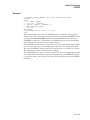
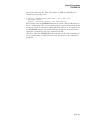
$ A = 25
$ CODE = 4 + F$INTEGER("6") - A
$ SHOW SYMBOL CODE
CODE = -15 HEX = FFFFFFF1 Octal = 1777761
This example contains two assignment statements. The first assignment
statement assigns the value 25 to the symbol A. The second assignment
statement evaluates an expression containing an integer (4), a lexical function
(F$INTEGER(‘‘6’’)), and the symbol A. The result of the expression, –15, is
assigned to the symbol CODE.
4.
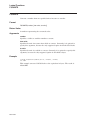
$
$
$
$
FILENAME = "JOBSEARCH" - "JOB"
FILETYPE = ".OBJ"
FILESPEC = FILENAME + FILETYPE
TYPE ’FILESPEC’
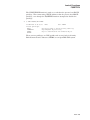
The first command in this example assigns the symbol FILENAME the value
‘‘SEARCH’’. Notice that the string ‘‘SEARCH’’ is the result of the string
reduction operation performed by the expression. The second command
assigns the symbol FILETYPE the character string ‘‘.OBJ’’.
DCLI–4
= (Assignment Statement)
The symbols FILENAME and FILETYPE are then added together in an
expression assigned to the symbol FILESPEC. Because the values of the
symbols FILENAME and FILETYPE are concatenated, the resultant value
assigned to FILESPEC is the character string ‘‘SEARCH.OBJ’’. The symbol
FILESPEC is then used as a parameter for the TYPE command. The single
quotation marks ( ‘ ’ ) request the command interpreter to replace the symbol
FILESPEC with its value SEARCH.OBJ. Thus, the TYPE command types the
file named SEARCH.OBJ.
5.
$ BELL[0,32] = %X07
$ SHOW SYMBOL BELL
BELL = ""
In this example, the symbol BELL is created with an arithmetic overlay
assignment statement. Because the symbol BELL is previously undefined,
the hexadecimal value 7 is inserted over a null character string and is
interpreted as the ASCII code for the bell character on a terminal. When you
issue the command SHOW SYMBOL BELL, the terminal beeps.
If the symbol BELL had been previously defined with an integer value, the
result of displaying BELL would have been to show its new integer value.
6.
$ $=34
%DCL-W-NOCOMD, no command on line - reenter with alphabetic first
character
$ $$=34
$ SHOW SYMBOL $$
%DCL-W-UNDSYM, undefined symbol - check validity and spelling
$ SHOW SYMBOL $
$ = 34 Hex = 00000022 Octal = 00000000042
If you begin a symbol name with the dollar sign ( $ ), use two dollar signs ( $$ )
because DCL discards the first instance of the dollar sign.
DCLI–5
:= (String Assignment)
:= (String Assignment)
Defines a symbolic name for a character string value.
Format
symbol-name :=[=] string
symbol-name[offset,size] :=[=] replacement-string
Note
HP advises against assigning a symbolic name that is already a DCL
command name. HP especially discourages the assignment of symbols
such as IF, THEN, ELSE, and GOTO, which can affect the interpretation
of command procedures.
Parameters
symbol-name
Specifies a string of 1 to 255 characters for the symbol name. The name can
contain any alphanumeric characters from the DEC Multinational character
set, the underscore ( _ ), and the dollar sign ( $ ). However, the name must begin
only with an alphabetic character, an underscore, or a dollar sign. Using one
equal sign (:=) places the symbol name in the local symbol table for the current
command level. Using two equal signs (:= =) places the symbol name in the global
symbol table.
string
Names the character string value to be equated to the symbol. The string can
contain any alphanumeric or special characters. DCL uses a buffer that is 1024
bytes long to hold a string assignment statement. Therefore, the length of the
symbol name, the string, and any symbol substitution within the string cannot
exceed 1024 characters.
With the string assignment statement ( := ), you do not need to enclose a string
literal in quotation marks ( ‘‘ ’’ ). String values are converted to uppercase
automatically. Also, any leading and trailing spaces and tabs are removed, and
multiple spaces and tabs between characters are compressed to a single space.
To prohibit uppercase conversion and to retain required space and tab characters
in a string, place quotation marks around the string. To use quotation marks in
a string, enclose the entire string within quotation marks and use a double set of
quotation marks within the string. For example:
$ TEST := "this
is a ""test"" string"
$ SHOW SYMBOL TEST
TEST = "this
is a "test" string"
In this example, the spaces, lowercase letters, and quotation marks are preserved
in the symbol definition.
To continue a symbol assignment on more than one line, use the hyphen ( - ) as a
continuation character. For example:
DCLI–6
:= (String Assignment)
$ LONG_STRING := THIS_SYMBOL_ASSIGNMENT_IS_A_VERY_LONG_$ _SYMBOL_STRING
To assign a null string to a symbol by using the string assignment statement, do
not specify a string. For example:
$ NULL :=
Specify the string as a string literal, or as a symbol or lexical function that
evaluates to a string literal. If you use symbols or lexical functions, place single
quotation marks ( ‘ ’ ) around them to request symbol substitution. See the
OpenVMS User’s Manual for more information on symbol substitution.
You can also use the string assignment statement to define a foreign command.
See the OpenVMS User’s Manual for more information about foreign commands.
[offset,size]
Specifies that a portion of a symbol value is to be overlaid with a replacement
string. This form of the string assignment statement evaluates the value assigned
to a symbol and then replaces the portion of the value (defined by the offset and
size) with the replacement string. The brackets are required notation, and no
spaces are allowed between the symbol name and the left bracket.
The offset specifies the character position relative to the beginning of the symbol
name’s string value at which replacement is to begin. Offset values start at 0.
If the offset is greater than the offset of the last character in the string you are
modifying, spaces are inserted between the end of the string and the offset where
the replacement string is added. The maximum offset value you can specify is
768.
The size specifies the number of characters to replace. Size values start at 1.
Specify the offset and size as integer expressions. See the OpenVMS User’s
Manual for more information on integer expressions. The value of the size plus
the offset must not exceed 769.
replacement-string
Specifies the string that is used to overwrite the string you are modifying. If the
replacement string is shorter than the size argument, the replacement string
is filled with blanks on the right until it equals the specified size. Then the
replacement string overwrites the string assigned to the symbol name. If the
replacement string is longer than the size argument, then the replacement string
is truncated on the right to the specified size.
You can specify the replacement string as a string literal, or as a symbol or lexical
function that evaluates to a string literal. If you use symbols or lexical functions,
place single quotation marks ( ‘ ’ ) around them to request symbol substitution.
For more information on symbol substitution, see the OpenVMS User’s Manual.
Examples
1.
$ TIME := SHOW TIME
$ TIME
24-DEC-2001 11:55:44
In this example, the symbol TIME is equated to the command string SHOW
TIME. Because the symbol name appears as the first word in a command
string, the command interpreter automatically substitutes it with its string
value and executes the command SHOW TIME.
DCLI–7
:= (String Assignment)
2.
$ STAT := $DKA1:[TEDESCO]STAT
$ STAT
This example shows how to define STAT as a foreign command. The symbol
STAT is equated to a string that begins with a dollar sign followed by a file
specification. The command interpreter assumes that the file specification is
that of an executable image, that is, a file with a file type of .EXE.
When you subsequently enter STAT, the command interpreter executes the
image.
3.
$ A = "this is a big
space."
$ SHOW SYMBOL A
A = "this is a big
space."
$ B := ’A’
$ SHOW SYMBOL B
B = "THIS IS A BIG SPACE."
This example compares the assignment and the string assignment
statements. The symbol A is defined using the assignment statement, so
lowercase letters and multiple spaces are retained. The symbol B is defined
using the string assignment statement. Note that the single quotation marks
( ‘ ’ ) are required; otherwise, the symbol name B would have been equated to
the literal string A. However, when symbol A’s value is assigned to symbol B,
the letters are converted to uppercase and multiple spaces are compressed.
4.
$ FILE_NAME := MYFILE
$ FILE_NAME[0,2]:= OL
$ SHOW SYMBOL FILE_NAME
FILE_NAME = "OLFILE"
In this example, the substring expression in the assignment statement
overlays the first 2 characters of the string assigned to the symbol FILE_
NAME with the letters OL. The offset of 0 requests that the overlay begin
with the first character in the string, and the size specification of 2 indicates
the number of characters to overlay.
DCLI–8
:= (String Assignment)
5.
$
$
$
$
FILE_NAME := MYFILE
FILE_TYPE := .TST
FILE_NAME[F$LENGTH(FILE_NAME),4] := ’FILE_TYPE’
SHOW SYMBOL FILE_NAME
FILE_NAME = "MYFILE.TST"
In this example, the symbol name FILE_NAME is equated to the string
MYFILE and the symbol name FILE_TYPE is equated to the string .TST. The
third assignment statement uses the lexical function F$LENGTH to define
the offset value where the overlay is to begin. The symbol name FILE_TYPE
is used to refer to the replacement string (.TST). Note that you must use
single quotation marks ( ‘ ’ ) to request symbol substitution.
The F$LENGTH lexical function returns the length of the string equated to
the symbol FILE_NAME; this length is used as the offset. The expression
requests that 4 characters of the string currently equated to the symbol
FILE_TYPE be placed at the end of the string currently equated to FILE_
NAME. The resultant value of the symbol FILE_NAME is MYFILE.TST.
DCLI–9
@ (Execute Procedure)
@ (Execute Procedure)
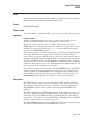
Executes a command procedure or requests the command interpreter to read
subsequent command input from a specific file or device.
Format
@ filespec [parameter[,...]]
Parameters
filespec
Specifies either the input device or the file for the preceding command, or the
command procedure to be executed. The default file type is .COM. The asterisk
( * ) and the percent sign (%) wildcard characters are not allowed in the file
specification.
parameter[,...]
Specifies from one to eight optional parameters to pass to the command
procedure. The symbols (P1, P2, . . . P8) are assigned character string values
in the order of entry. The symbols are local to the specified command procedure.
Separate each parameter with one or more blanks. Use two consecutive quotation
marks ( "" ) to specify a null parameter. You can specify a parameter with a
character string value containing alphanumeric or special characters, with the
following restrictions:
•
The command interpreter converts alphabetic characters to uppercase and
uses blanks to delimit each parameter. To pass a parameter that contains
embedded blanks or literal lowercase letters, place the parameter in quotation
marks.
•
If the first parameter begins with a slash ( / ), you must enclose the parameter
in quotation marks ( ‘‘ ’’ ).
•
To pass a parameter that contains literal quotation marks and spaces, enclose
the entire string in quotation marks and use two consecutive quotation marks
within the string. For example, the command procedure TEST.COM contains
the following line:
$ WRITE SYS$OUTPUT P1
Enter the following at the DCL prompt ( $ ):
$ @TEST "Never say ""quit"""
When the procedure TEST.COM executes, the parameter P1 is equated to the
following string:
Never say "quit"
If a string contains quotation marks and does not contain spaces, the
quotation marks are preserved in the string and the letters within the
quotation marks remain in lowercase. For example, enter the following at the
DCL prompt:
$ @TEST abc"def"ghi
DCLI–10
@ (Execute Procedure)
When the procedure TEST.COM executes, the parameter P1 is equated to the
following string:
ABC"def"GHI
To use a symbol as a parameter, enclose the symbol in single quotation marks
( ‘ ’ ) to force symbol substitution. For example:
$ NAME = "JOHNSON"
$ @INFO ’NAME’
The single quotation marks cause the value ‘‘JOHNSON’’ to be substituted for
the symbol NAME. Therefore, the parameter ‘‘JOHNSON’’ is passed as P1 to
INFO.COM.
Description
Use the @ command to execute a command procedure that contains the following:
•
DCL command lines or data, or both
•
Qualifiers or parameters, or both, for a specific command line
To execute a command procedure containing commands or data, or both, place the
@ command at the beginning of a command line and then specify the name of the
command procedure file. The command procedure can contain DCL commands
and input data for a command or program that is currently executing. All DCL
commands in a command procedure must begin with a dollar sign ( $ ). If a
command is continued with a hyphen ( - ), the subsequent lines must not begin
with a dollar sign.
Any line in a command procedure that does not contain a dollar sign in the first
character position (and is not a continuation line) is treated as input data for the
command or program that is currently executing. The DECK command allows
you to specify that data contains dollar signs in record position one.
A command procedure can also contain the @ command to execute another
command procedure. The maximum command level you can achieve by
nesting command procedures is 16, including the top-level command procedure.
Command procedures can also be queued for processing as batch jobs, either
by using the SUBMIT command or by placing a deck of cards containing the
command procedure in the system card reader.
To execute a command procedure that contains qualifiers or parameters, or
both, for a specific command line, place the @ command where the qualifiers or
parameters normally would be in the command line. Then specify the name of
the command procedure file containing the qualifiers or parameters.
If the command procedure file begins with parameters for the command, the @
command must be preceded by a space. For example:
$ CREATE TEST.COM
TIME
Ctrl/Z
$ SHOW @TEST
14-SEP-2001 17:20:26
DCLI–11
@ (Execute Procedure)
If the file begins with qualifiers for the command, do not precede the @ command
with a space. For example:
$ CREATE TEST_2.COM
/SIZE
Ctrl/Z
$ DIR@TEST_2
Directory WORK$:[SCHEDULE]
JANUARY.TXT;8
FEBRUARY.TXT;7
MARCH.TXT;6
.
.
.
Total of 11 files.
14-DEC-2001 15:47:45.57
14-DEC-2001 15:43:16.20
14-DEC-2001 11:11:45.74
If the file contains parameters or qualifiers, or both, do not begin the lines in
the file with dollar signs. Any additional data on the command line following
@filespec is treated as parameters for the procedure.
Qualifier
/OUTPUT=filespec
Specifies the name of the file to which the command procedure output is written.
By default, the output is written to the current SYS$OUTPUT device. The
default output file type is .LIS. The asterisk ( * ) and the percent sign ( % )
wildcard characters are not allowed in the output file specification. System
responses and error messages are written to SYS$COMMAND as well as to
the specified file. The /OUTPUT qualifier must immediately follow the file
specification of the command procedure; otherwise, the qualifier is interpreted as
a parameter to pass to the command procedure.
You can also redefine SYS$OUTPUT to redirect the output from a command
procedure. If you place the following command as the first line in a command
procedure, output will be directed to the file you specify:
$ DEFINE SYS$OUTPUT filespec
When the procedure exits, SYS$OUTPUT will be restored to its original
equivalence string. This produces the same result as using the /OUTPUT
qualifier when you execute the command procedure.
Examples
1.
$
$
$
$
$
$
$
CREATE DOFOR.COM
ON WARNING THEN EXIT
IF P1.EQS."" THEN INQUIRE P1 FILE
FORTRAN/LIST ’P1’
LINK ’P1’
RUN ’P1’
PRINT ’P1’
Ctrl/Z
$ @DOFOR AVERAGE
This example shows a command procedure, named DOFOR.COM, that
executes the FORTRAN, LINK, and RUN commands to compile, link, and
execute a program. The ON command requests that the procedure not
continue if any of the commands result in warnings or errors.
DCLI–12
@ (Execute Procedure)
When you execute DOFOR.COM, you can pass the file specification of the
FORTRAN program as the parameter P1. If you do not specify a value for P1
when you execute the procedure, the INQUIRE command issues a prompting
message to the terminal and equates what you enter with the symbol P1. In
this example, the file name AVERAGE is assigned to P1. The file type is not
included because the commands FORTRAN, LINK, RUN, and PRINT provide
default file types.
2.
$ @MASTER/OUTPUT=MASTER.LOG
This command executes a procedure named MASTER.COM; all output is
written to the file MASTER.LOG.
3.
$ CREATE FILES.COM
*.FOR, *.OBJ
Ctrl/Z
$ DIRECTORY @FILES
This example shows a command procedure, FILES.COM, that contains
parameters for a DCL command line. The entire file is treated by DCL as
command input. You can execute this procedure after the DIRECTORY
command to get a listing of all FORTRAN source and object files in your
current default directory.
4.
$ CREATE QUALIFIERS.COM
/DEBUG/SYMBOL_TABLE/MAP/FULL/CROSS_REFERENCE
Ctrl/Z
$ LINK SYNAPSE@QUALIFIERS
This example shows a command procedure, QUALIFIERS.COM, that contains
qualifiers for the LINK command. When you enter the LINK command,
specify the command procedure immediately after the file specification of the
file you are linking. Do not type a space between the file specification and the
@ command.
5.
$ CREATE SUBPROCES.COM
$ RUN ’P1’ /BUFFER_LIMIT=1024 /FILE_LIMIT=4 /PAGE_FILES=256 /QUEUE_LIMIT=2 /SUBPROCESS_LIMIT=2 ’P2’ ’P3’ ’P4’ ’P5’ ’P6’ ’P7’ ’P8’
Ctrl/Z
$ @SUBPROCES LIBRA /PROCESS_NAME=LIBRA
This example shows a command procedure named SUBPROCES.COM. This
procedure issues the RUN command to create a subprocess to execute an
image and also contains qualifiers defining quotas for subprocess creation.
The name of the image to be run is passed as the parameter P1. Parameters
P2 to P8 can be used to specify additional qualifiers.
In this example, the file name LIBRA is equated to P1; it is the name of an
image to execute in the subprocess. The qualifier /PROCESS_NAME=LIBRA
is equated to P2; it is an additional qualifier for the RUN command.
DCLI–13
@ (Execute Procedure)
6.
$ CREATE EDOC.COM
$ ASSIGN SYS$COMMAND: SYS$INPUT
$ NEXT:
$
INQUIRE NAME "File name"
$
IF NAME.EQS."" THEN EXIT
$
EDIT/TPU ’NAME’.DOC
$
GOTO NEXT
Ctrl/Z
$ @EDOC
This procedure, named EDOC.COM, invokes the EVE editor. When an edit
session is terminated, the procedure loops to the label NEXT. Each time
through the loop, the procedure requests another file name for the editor and
supplies the default file type .DOC. When a null line is entered in response to
the INQUIRE command, the procedure terminates with the EXIT command.
The ASSIGN command changes the equivalence name of SYS$INPUT for the
duration of the procedure. This change allows the EVE editor to read input
data from the terminal, rather than from the command procedure file (the
default input data stream if SYS$INPUT had not been changed). When the
command procedure exits, SYS$INPUT is reassigned to its original value.
7.
! PEOPLE.DAT
! A set of data with embedded key qualifiers for the SORT command.
!
! Usage: [email protected]
!
/KEY=(POS:10,SIZE:10) sys$input people.out
Fred
Flintstone
555-1234
Barney Rubble
555-2244
Wilma
Flintstone
555-1234
Betty
Rubble
555-2244
George Slate
555-8911
Dino
Dinosaur
555-1234
$!
$ purge people.out
$ type people.out
Creates a sorted list of people in file PEOPLE.OUT and displays it. This
demonstrates when using "@" in the middle of a DCL command, DCL
redirects the entire file as command input.
DCLI–14
ACCOUNTING
ACCOUNTING
Runs the Accounting utility, which produces reports of resource use.
For more information about the Accounting utility, see the HP OpenVMS System
Management Utilities Reference Manual or online help.
Format
ACCOUNTING [filespec[,...]]
DCLI–15
ALLOCATE
ALLOCATE
Provides your process with exclusive access to a device until you deallocate the
device or terminate your process. Optionally associates a logical name with the
device.
Requires read (R), write (W), or control access.
Format
ALLOCATE device-name[:][,...] [logical-name[:]]
Parameters
device-name[:][,...]
Specifies the name of a physical device or a logical name that translates to the
name of a physical device. The device name can be generic: if no controller or
unit number is specified, any device that satisfies the specified part of the name
is allocated. If more than one device is specified, the first available device is
allocated.
logical-name[:]
Specifies a string of 1 to 255 alphanumeric characters. Enclose the string in
single quotation marks ( ‘ ’ ) if it contains blanks. Trailing colons ( : ) are not
used. The name becomes a process logical name with the device name as the
equivalence name. The logical name remains defined until it is explicitly deleted
or your process terminates.
Qualifiers
/GENERIC
/NOGENERIC (default)
Indicates that the first parameter is a device type rather than a device name.
Example device types are: RX50, RD52, TK50, RC25, RCF25, and RL02. The
first free, nonallocated device of the specified name and type is allocated.
The /[NO]GENERIC qualifier is placed before the device-name parameter in the
ALLOCATE command line. For example, you can allocate an RK07 device by
entering the following command at the DCL prompt ($):
$ ALLOCATE/GENERIC RK07 DISK
The following table shows some device types that you can specify with the
/GENERIC qualifier. To see what devices are available, see your SPD for the
OpenVMS version they are currently using.
Devices by Classification
Disk Devices
EF51
ESE20
EZ31
EZ33L
DCLI–16
EF52
ESE25
EZ31L
EZ34
EF53
ESE52
EZ32
EZ35
EF54
ESE56
EZ32L
EZ51
EF58
ESE58
EZ33
EZ52
ALLOCATE
Devices by Classification
Disk Devices
EZ53
HSZ15
RA70
RA81
RB02
RD31
RD53
RF32
RF71
RFF31
RFH73
RM03
RP06
RX04
RX33
RZ13
RZ18
RZ24L
RZ26L
RZ28
RZ31
RZ36L
RZ56
RZ58
RZ74
EZ54
HSZ20
RA71
RA82
RB80
RD32
RD54
RF35
RF72
RFH31
RK06
RM05
RP07
RX18
RX33S
RZ14
RZ22
RZ25
RZ26M
RZ28B
RZ34L
RZ37
RZ56L
RZ59
RZ74B
EZ56R
HSZ40
RA72
RA90
RC25
RD33
RF30
RF36
RF73
RFH32
RK07
RM80
RP07HT
RX23
RX35
RZ15
RZ23
RZ25L
RZ27
RZ28L
RZ35
RZ38
RZ57
RZ72
RZ75
EZ58
ML11
RA73
RA92
RCF25
RD51
RF31
RF37
RF74
RFH35
RL01
RP04
RX01
RX23S
RX50
RZ16
RZ23L
RZ26
RZ27B
RZ29
RZ35L
RZ55
RZ57I
RZ73
RZ75B
HSZ10
RA60
RA80
RAH72
RD26
RD52
RF31F
RF70
RF75
RFH72
RL02
RP05
RX02
RX26
RZ01
RZ17
RZ24
RZ26B
RZ27L
RZ29B
RZ36
RZ55L
RZ57L
RZ73B
RZF01
RRD43
RV80
RWZ01
RWZ53
RRD44
RW504
RWZ21
RWZ54
Compact Disk Devices
RRD40
RRD50
RW510
RWZ31
RRD40S
RV20
RW514
RWZ51
RRD42
RV60
RW516
RWZ52
DCLI–17
ALLOCATE
Devices by Classification
Tape Devices
TA78
TA87
TAPE9
TF70
TK60
TL810
TLZ6
TSZ07
TU77
TZ30S
TZ867
TZ885
TZK10
TA79
TA90
TD34
TF85
TK70
TL820
TLZ7
TSZ08
TU78
TZ85
TZ87
TZ887
TZK11
TA81
TA90E
TD44
TF86
TK70L
TLZ04
TM32
TU45
TU80
TZ857
TZ875
TZ89
TZX0
TA85
TA91
TE16
TK50
TKZ09
TLZ06
TS11
TU56
TU81
TZ86
TZ877
TZ895
TA86
TAD85
TF30
TK50S
TKZ60
TLZ07
TSZ05
TU58
TZ30
TZ865
TZ88
TZ897
/LOG (default)
/NOLOG
Displays a message indicating the name of the device allocated. If the operation
specifies a logical name that is currently assigned to another device, then the
superseded value is displayed.
Examples
1.
$ ALLOCATE DMB2:
%DCL-I-ALLOC, _DMB2: allocated
The ALLOCATE command in this example requests the allocation of a specific
RK06/RK07 disk drive, that is, unit 2 on controller B. The system response
indicates that the device was allocated successfully.
2.
$ ALLOCATE MT,MF: TAPE:
%DCL-I-ALLOC, _MTB2: allocated
.
.
.
$ SHOW LOGICAL TAPE:
TAPE: = _MTB2:
(process)
$ DEALLOCATE TAPE:
$ DEASSIGN TAPE:
The ALLOCATE command in this example requests the allocation of a tape
device whose name begins with MT or MF and assigns it the logical name
TAPE. The ALLOCATE command locates an available tape device whose
name begins with MT, and responds with the name of the device allocated. (If
no tape device beginning with MT had been found, the ALLOCATE command
would have searched for a device beginning with MF.) Subsequent references
to the device TAPE in user programs or command strings are translated to
the device name MTB2.
DCLI–18
ALLOCATE
When the tape device is no longer needed, the DEALLOCATE command
deallocates it and the DEASSIGN command deletes the logical name. Note
that the logical name TAPE was specified with a colon on the ALLOCATE
command, but that the logical name table entry does not have a colon.
3.
$ ALLOCATE/GENERIC RL02 WORK
%DCL-I-ALLOC, _DLA1: allocated
%DCL-I-SUPERSEDE, previous value of WORK has been superseded
The ALLOCATE command in this example requests the allocation of any
RL02 disk device and assigns the logical name WORK to the device. The
completion message identifies the allocated device and indicates that the
assignment of the logical name WORK supersedes a previous assignment of
that name.
4.
$ ALLOCATE $TAPE1
%DCL-I-ALLOC, _MUA0: allocated
The ALLOCATE command in this example allocates the tape device MUA0,
which is associated with the logical name $TAPE1.
5.
$ ALLOCATE /GENERIC RX50 ACCOUNTS
The ALLOCATE command in this example allocates the first free diskette
drive and makes its name equivalent to the process logical name ACCOUNTS.
DCLI–19
ANALYZE/AUDIT
ANALYZE/AUDIT
Invokes the Audit Analysis utility, which selectively extracts and displays
information from security audit log files or security archive files.
For more information about the Audit Analysis utility, see the HP OpenVMS
System Management Utilities Reference Manual or online help.
Format
ANALYZE/AUDIT [filespec]
DCLI–20
ANALYZE/CRASH_DUMP
ANALYZE/CRASH_DUMP
Invokes the System Dump Analyzer utility, which analyzes a system dump file.
The /CRASH_DUMP qualifier is required.
For more information about the System Dump Analyzer utility on Alpha, refer
to the HP OpenVMS System Analysis Tools Manual or online help. For more
information about the System Dump Analyzer utility on VAX, see the OpenVMS
VAX System Dump Analyzer Utility Manual1
Format
ANALYZE/CRASH_DUMP filespec
Description
Invokes the System Dump Analyzer utility, which analyzes a system dump file.
The /CRASH_DUMP qualifier is required.
For OpenVMS Alpha Systems
You can also use the ANALYZE/CRASH_DUMP command with process dumps.
However, the preferred command is ANALYZE/PROCESS, which provides
complete access to the information in the dump.
1
This manual has been archived. It is no longer maintained and is not part
of the OpenVMS documentation set. However, you can view it online at
http://www.hp.com/go/openvms/doc or online help.
DCLI–21
ANALYZE/DISK_STRUCTURE
ANALYZE/DISK_STRUCTURE
Invokes the Analyze/Disk_Structure utility, which does the following:
•
Checks the readability and validity of Files-11 On-Disk Structure Level 1, 2,
and 5 disk volumes
•
Reports errors and inconsistencies
The /DISK_STRUCTURE qualifier is required.
For more information about the Analyze/Disk_Structure utility, see the HP
OpenVMS System Management Utilities Reference Manual or online help.
Format
ANALYZE/DISK_STRUCTURE device-name:[/qualifier]
DCLI–22
ANALYZE/ERROR_LOG/ELV (Alpha/I64 Only)
ANALYZE/ERROR_LOG/ELV (Alpha/I64 Only)
Invokes the Error Log Viewer (ELV) to selectively report the contents of one or
more error log files. This utility is most useful with error logs written on systems
running OpenVMS Version 7.3 and later. For more information about the Error
Log Viewer, see the HP OpenVMS System Management Utilities Reference Manual
or online help.
For error logs written on OpenVMS Version 7.2* systems, you must use the
DIAGNOSE command, which invokes the DECevent utility. DECevent is no
longer supported, but those who need it can download the software and related
documentation from the Freeware Web site:
http://h71000.www7.hp.com/openvms/freeware/
For error logs written on OpenVMS versions prior to 7.2, use the
ANALYZE/ERROR_LOG command, which invokes the Error Log Report
Formatter (ERF). Documentation for ERF is posted on the Freeware Web site:
http://h71000.www7.hp.com/openvms/freeware/
Format
ANALYZE/ERROR_LOG/ELV [command]
DCLI–23
ANALYZE/IMAGE
ANALYZE/IMAGE
Analyzes the contents of an executable image file or a shareable image file on
OpenVMS VAX and Alpha systems, and an Executable and Linkable Format
(ELF) image file or sharable image file on OpenVMS I64 systems, identifying
obvious errors in the file. This analysis includes translated images on I64 and
Alpha systems. The /IMAGE qualifier is required.
For general information about image files, see the description of the linker in the
HP OpenVMS Linker Utility Manual. (Use the ANALYZE/OBJECT command to
analyze the contents of an object file.)
Format
ANALYZE/IMAGE filespec[,...]
Parameter
filespec[,...]
Specifies the name of one or more image files that you want analyzed. You must
specify at least one file name. If you specify more than one file, separate the file
specifications with either commas ( , ) or plus signs ( + ). The default file type is
.EXE.
The asterisk ( * ) and percent sign (%) wildcard characters are allowed in the file
specification.
Description
The ANALYZE/IMAGE command provides a description of the components of
an executable image file or shareable image file on OpenVMS VAX and Alpha
systems, and of an Executable and Linkable Format (ELF) image file or sharable
image file on OpenVMS I64 systems. It also verifies that the structure of
the major parts of the image file is correct. However, the ANALYZE/IMAGE
command cannot ensure that program execution is error free.
On OpenVMS I64 systems, the ANALYZE/IMAGE command automatically
distinguishes between I64, Alpha, and VAX images by examining the header
information.
If errors are found, the first error of the worst severity is returned. For example,
if a warning (A) and two errors (B and C) are found, the first error (B) is returned
as the image exit status. The image exit status is placed in the DCL symbol
$STATUS at image exit.
Notes
For I64 images and objects, the Analyze utility determines whether
the file it analyzes is an image file or object file. Although Analyze
allows you to specify ANALYZE/OJBECT on an ELF image file, use
ANALYZE/IMAGE for ELF image files and ANALYZE/OJBECT for ELF
object files.
When parsing output from ANALYZE/IMAGE, be aware that the output
for ELF images may change.
DCLI–24
ANALYZE/IMAGE
When using ANALYZE without a qualifier, the default is /OBJECT. Therefore,
when using this default to analyze an image in the output file, the utility correctly
identifies itself as "Analyze Object File".
The OpenVMS VAX and Alpha versions of ANALYZE/IMAGE do not have the
capability of analyzing all non-platform images. For example, ANALYZE/IMAGE
cannot analyze I64 images on VAX or Alpha images on older versions of VAX.
When you analyze I64 images on I64 platforms, ANALYZE/IMAGE accepts
VAX-only or Alpha-only qualifiers, but ignores any effect of these qualifiers.
Depending on the platform, the ANALYZE/IMAGE command distinguishes I64
images from VAX and ALpha images by examining the meta information (for
example, ELF, EIHD, or IHD).
The ANALYZE/IMAGE command provides the following information for image
files:
•
Image architecture and type — The OpenVMS platform and whether the
image is executable or shareable.
•
Image name — The name of the image or shareable image.
•
Image identification — The identification given in a link operation.
•
Creating linker identification — The linker that generated the image.
•
Link date and time — The date and time of the link operation.
•
Image transfer addresses — The addresses to which control is passed at
image execution time.
•
Image version — The revision level (major ID and minor ID) of the image.
•
Location and size of the image’s symbol vector (Alpha and I64 only).
•
List of required sharable images — The dependencies on sharable images.
•
Location of the debugger symbol table (DST) — The location of the DST in the
image file. DST information is present only in executable images that have
been linked with the /DEBUG or the /TRACEBACK command qualifier. (VAX
and Alpha only.)
•
Location and interpretation of the debug and traceback information — The
sections that contain the information and formats the data (DWARF) (I64
only).
•
Location of the global symbol table (GST)— The location of the GST in the
image file. GST information is present only in shareable image files. (VAX
and Alpha only.)
•
Location of the global symbol table (.symtab) — The location of the GST in
the image file. GST information is present only in shareable image files (I64
only.)
•
Patch information — Indicates whether the image has been patched (changed
without having been recompiled or reassembled and relinked). If a patch is
present, the actual patch code can be displayed. (VAX and Alpha only.)
•
Image section descriptors (ISD) — Identify portions of the image binary
contents that are grouped in OpenVMS Cluster systems according to their
attributes. An ISD contains information that the image activator needs
when it initializes the address space for an image. For example, an ISD tells
whether the ISD is shareable, whether it is readable or writable, whether it
DCLI–25
ANALYZE/IMAGE
is based or position independent, and how much memory should be allocated.
(VAX only.)
•
Summary of internal tables — Lists the program segments and sections of
which the image consists. (I64 only.)
•
Fixup vectors — Contain information that the image activator needs to ensure
the position independence of shareable image references. (VAX and Alpha
only.)
•
Fixup information — Information that the image activator needs to ensure
the position independence of shareable image references. (I64 only.)
•
System version categories — For an image that is linked against the executive
(the system shareable image on I64 and Alpha or the system symbol table on
VAX), displays both the values of the system version categories for which the
image was linked originally and the values for the system that is currently
running. You can use these values to identify changes in the system since the
image was linked last.
The ANALYZE/IMAGE command has command qualifiers and positional
qualifiers. For VAX and Alpha images, by default, if you do not specify any
positional qualifiers (for example, /GST or /HEADER), the entire image is
analyzed. If you do specify a positional qualifier, the analysis excludes all other
positional qualifiers except the /HEADER qualifier (which is always enabled) and
any qualifier that you request explicitly.
The default behavior for analyzing ELF images differs from the behavior for
analyzing Alpha or VAX images. For ELF images, a summary of the major ELF
tables is displayed. With this information, you can select specific segments and/or
sections for analysis. To locate errors, analyze the entire image by selecting all
sections and segments.
Qualifiers
/FIXUP_SECTION (VAX and Alpha only)
Positional qualifier.
Specifies that the analysis should include all information in the fixup section of
the image.
If you specify the /FIXUP_SECTION qualifier after the ANALYZE/IMAGE
command, the fixup section of each image file in the parameter list is analyzed.
If you specify the /FIXUP_SECTION qualifier after a file specification, only the
information in the fixup section of that image file is analyzed.
/FLAGVALUES=(keyword[,...]) (I64 only)
Several fields in an ELF module represent bit flags. Where possible, these bit-flag
values are examined and displayed individually. By default, only the flag values
that are set to 1 (ON) are displayed.
The keywords are as follows:
DCLI–26
Keyword
Description
ON
OFF
The keyword ON displays all flags whose value is 1.
The keyword OFF displays all flags whose value is 0.
ANALYZE/IMAGE
Keyword
Description
ALL
The keyword ALL displays all flag values. The keywords ON
and OFF, in contrast, indicate the value of each specific flag bit.
/GST (VAX and Alpha only)
Positional qualifier.
Specifies that the analysis should include all global symbol table records. This
qualifier is valid only for shareable images.
If you specify the /GST qualifier after the ANALYZE/IMAGE command, the global
symbol table records of each image file in the parameter list are analyzed.
If you specify the /GST qualifier after a file specification, only the global symbol
table records of that file are analyzed.
/HEADER (VAX and Alpha only)
Positional qualifier.
Specifies that the analysis should include all header items and image section
descriptions. The image header items are always analyzed.
/INTERACTIVE
/NOINTERACTIVE (default)
Specifies whether the analysis is interactive. In interactive mode, as each item is
analyzed, the results are displayed on the screen and you are asked whether you
want to continue.
/MODULE [=(module_name[,...]) ] (I64 only)
Selectively formats debug or traceback information for the named module or
list of modules. You must request debug or traceback information by using
the /SECTIONS qualifier with keywords ALL, DEBUG or TRACE. If debug
or traceback information is selectively formatted, then the module name is a
subselection.
If you do not specify a module name, only debug or traceback meta information
about the available modules is printed. In this case, any other debug or traceback
selection is deactivated.
Note
This qualifier is only valid for ANALYZE/IMAGE. Although
ANALYZE/OBJECT can be used to format I64 images, Analyze rejects the
/MODULE qualifier.
/OUTPUT=filespec
Identifies the output file for storing the results of the image analysis. The
asterisk (*) and the percent sign (%) wildcard characters are not allowed in the
file specification. If you specify a file type and omit the file name, the default file
name ANALYZE is used. The default file type is .ANL. If you omit the qualifier,
the results are output to the current SYS$OUTPUT device.
DCLI–27
ANALYZE/IMAGE
/PAGE_BREAK=keyword (I64 only)
Specifies if and where page breaks (form feeds) are inserted in the report file.
This qualifier is only useful if /OUTPUT is used to write a report file. It is
ignored if /INTERACTIVE is used to specify an interactive analysis.
The keywords are as follows:
Keyword
Description
NONE
PRINTABLE_
REPORT
Creates a report without any page break.
Creates a printable report with page breaks as in listing files.
The number of lines per page is the default number of lines
on a printer page. This is the default behavior for ANALYZE_
IMAGE when no qualifier is specified.
Inserts a page break between different section information.
SEPARATE_
INFORMATION
/PATCH_TEXT (VAX only)
Positional qualifier.
Specifies that the analysis include all patch text records. If you specify the
/PATCH_TEXT qualifier after the ANALYZE/IMAGE command, the patch text
records of each image file in the parameter list are analyzed.
If you specify the /PATCH_TEXT qualifier after a file specification, only the patch
text records of that file are analyzed.
/SECTIONS [=(keyword[,...])] (I64 only)
Selects individual program sections or section types to display.
Note
This qualifier and its keywords can only be used to form an inclusion list
of sections to be displayed. This qualifier is not negatable and cannot
be used to form an exclusion list. If no values are specified, the default
keyword is HEADERS.
The keywords are as follows:
Keyword
Description
ALL
Displays a detailed analysis of every section in the
module. Note that this keyword can generate a large
amount of output.
Displays all of all sections of type SHT_PROGBITS
where the executable flag is set (SHDR$M_SHF_
EXECINSTR in the section header). The section data
will be displayed as machine instructions.
CODE
DCLI–28
ANALYZE/IMAGE
Keyword
Description
DEBUG
[=(suffix[,...])]
Analyzes and displays sections consisting of debug
information.
In addition, you can use a list of debug section name
suffixes to selectively format DEBUG information. The
debug section names, which appear as ".debug_suffix",
can be viewed in the summary table. The suffix can be
specified as follows:
EXTENSIONS
GROUP
HEADERS
LINKAGES
NOBITS
NOTE
NULL
NUMBERS=
(number [,...])
•
ABBREV—Format DEBUG abbreviations
•
ARANGES—Formats DEBUG address lookup tables
•
FRAME—Formats DEBUG frame descriptors for
unwinding
•
INFO—Formats DEBUG symbols
•
LINE—Formats DEBUG source line info
•
PUBNAMES—Formats DEBUG name lookup tables
•
PUBTYPES—Formats DEBUG type lookup tables
Analyzes and displays sections of type SHT_IA64_EXT.
The data is displayed in hexadecimal format.
Analyzes and displays sections of type SHT_GROUP.
Sections of this type consist of a list of the section
numbers of sections belonging to that group.
The default keyword. Displays the ELF header and the
section header details.
Analyzes and displays sections of type SHT_VMS_
LINKAGES.The data is displayed as a list of linkage
descriptors.
Analyzes and displays sections of type SHT_NOBITS.
There is no module data associated with sections of this
type.
Analyzes and displays sections of type SHT_NOTE. The
data for this section is displayed as a list of formatted
OpenVMS note entries.
Displays all sections of type PT_NULL. No data will be
displayed for segments of this type.
Displays individual sections, as follows:
•
The selected sections will have a detailed display of
their header and their contents. An informational
message is displayed for section numbers that do not
exist in the module.
•
One or more numeric values may be specified.
•
Section numbers may be specified in decimal, octal
(using the %O prefix), or hexadecimal (using the %X
prefix).
DCLI–29
ANALYZE/IMAGE
Keyword
Description
STRTAB
Analyzes and displays sections of type SHT_STRTAB.
The data for this section is displayed as a string table.
Displays sections of type SHT_SYMTAB. The data for
this section is displayed as a symbol table.
Sections of this type will only appear in sharable image
files. If present, they point to the same data as the
dynamic segment DT_VMS_SYMVEC tags.
Analyzes and displays sections consisting of traceback
information.
In addition, you can use a list of trace section name
suffixes to selectively format TRACE information. The
trace section names, which appear as ".trace_suffix",
can be viewed in the summary table. The suffix can be
specified as shown below. In addition, because there is
one common debug and traceback section, ".debug_line",
the suffix "line" can be specified as shown below as well:
SYMTAB
SYMBOL_VECTOR
TRACE
[=(suffix[,...])]
UNWIND
•
ABBREV—Formats TRACE abbreviations
•
ARANGES—Formats TRACE address lookup tables
•
INFO—Formats TRACE symbols
•
LINE—Formats TRACE source line info
Analyzes and displays sections of type SHT_IA64_
UNWIND. Each section of this type has an associated
Unwind Information section of type SHT_PROGBITS.
This associated section is also displayed.
/SEGMENTS [=(keyword[,...])] (I64 only)
Selects individual program segments or program segments of a specified type to
be displayed.
Note
This qualifier and its keywords can only be used to form an inclusion list
of segments to be displayed. This qualifier is not negatable and cannot
be used to form an exclusion list. If no values are specified, the default
keyword is HEADERS.
The keywords are as follows:
Keyword
Description
ALL
Analyzes and displays information for every program segment.
Note that this can generate a large amount of output.
Analyzes and displays all executable segments
(PHDR$M_PF_X bit set in the segment header). Segment
data is displayed as machine instructions.
CODE
DCLI–30
ANALYZE/IMAGE
Keyword
Description
DYNAMIC
EXTENSIONS
HEADERS
Analyzes and displays the segment of type PT_DYNAMIC.
Analyzes and displays segments of type IA_64_ARCHEXT.
The default keyword. Analyzes and displays the ELF header
and segment header details.
Analyzes and displays segments of type PT_LOAD. If the
segment header indicates this is an executable segment
(PHDR$M_PF_X bit set in the segment header), the contents
will be formatted as machine instructions, otherwise the
contents are formatted as hexadecimal data.
Analyzes and displays segments of type PT_NULL. No a data
will be displayed for segments of this type.
Analyzes and displays individual segments, as follows:
LOAD
NULL
NUMBERS=
(number [,...])
•
The selected segments have a detailed display of header
and content information. For section numbers that do not
exist in the module, an informational message is displayed.
•
One or more numeric values may be specified.
•
Segment numbers may be specified in decimal, octal (using
the %O prefix), or hexadecimal (using the %X prefix).
/SELECT=(keyword[,...])
Allows for the collection of specific image file information and displays the
selected keyword items in the order specified.
Analyze creates DCL symbols for all selectable information with the /SELECT
qualifier. The symbol names consist of the prefix ANALYZE$ and a descriptive
name of the information they hold. The symbol value is the selected information,
usually printed to SYS$OUTPUT. Effectively, all of the printed information is
duplicated in the symbols. For unselected information, the corresponding symbols
will contain the null string.
The keywords are as follows:
Keyword
Description
ARCHITECTURE
Writes the architecture information into the DCL
symbol ANALYZE$ARCHITECTURE. Returns
"OpenVMS IA64" if the file is an OpenVMS I64
image file. Returns "OpenVMS Alpha" if the file is
an OpenVMS Alpha image file. Returns "OpenVMS
VAX" if the file is an OpenVMS VAX image file.
Writes build identification information into the DCL
symbol ANALYZE$BUILD_IDENTIFICATION. For
OpenVMS I64 and Alpha image files, returns the image
build identification stored in the image file, enclosed in
quotation marks. For OpenVMS VAX image files, the
null string that is represented by adjacent quotation
marks is returned.
BUILD_
IDENTIFICATION
DCLI–31
ANALYZE/IMAGE
Keyword
Description
FILE_TYPE
Writes file type information into the DCL symbol
ANALYZE$FILE_TYPE. Returns "Image" if the file is
an OpenVMS I64, Alpha, or VAX image file.
The possible keywords are as follows:
IDENTIFICATION
[=keyword]
IMAGE_TYPE
LINK_TIME
NAME
VERSION_NUMBERS
(Alpha/I64 only)
•
IMAGE (default) — Writes the image
identification information into the DCL symbol
ANALYZE$IDENTIFICATION. Returns the image
identification that is stored in the image file,
enclosed in quotation marks. Otherwise, returns
"Unknown".
•
LINKER — Writes the linker identification
information into the DCL symbol
ANALYZE$LINKER_IDENTIFICATION. Returns
the identification of the linker used to link the
image.
Writes image type information into the DCL symbol
ANALYZE$IMAGE_TYPE. Returns "Shareable" if the
file is a shareable image file. Returns "Executable" if
the file is either an OpenVMS I64, Alpha, or OpenVMS
VAX executable (nonshareable) image file.
Writes link time information into the DCL symbol
ANALYZE$LINK_TIME. Returns the image link time
that is stored in the image file, enclosed in quotation
marks.
Writes the image name into the DCL symbol
ANALYZE$NAME. For image files, returns the image
name that is stored in the image header, enclosed in
quotation marks.
If an image depends on the system base image and
system components, ANALYZE writes the version
numbers from the image into DCL symbols. The
symbols are named after the components. The symbol
values contain the minor and major version numbers.
When the image is for the same platform on which
ANALYZE is running, the version numbers from the
running system are also written and compared.
Note
The Analyze utility can work on several files. Because there is only one
set of DCL symbols, the symbols only contain information from the last
analyzed file. When an error occurs, symbol values are undefined. Check
for Analyze errors first, then use the symbols.
DCLI–32
ANALYZE/IMAGE
Examples
1.
$ ANALYZE/IMAGE LINEDT
The ANALYZE/IMAGE command in this example produces a description and
an error analysis of the image LINEDT.EXE. Output is sent to the current
SYS$OUTPUT device.
2.
$ ANALYZE/IMAGE/OUTPUT=LIALPHEX/FIXUP_SECTION/PATCH_TEXT
LINEDT, ALPRIN (VAX and Alpha only)
The ANALYZE/IMAGE command in this example produces a description
and an error analysis of the fixup sections and patch text records of
LINEDT.EXE and ALPRIN.EXE in file LIALPHEX.ANL. Output is sent
to the file LIALPHEX.ANL.
3.
$ ANALYZE/IMAGE/SELECT=(ARCH,FILE,NAME,IDENT,BUILD,LINK) *.EXE
DISK:[DIRECTORY]ALPHA.EXE;1
OpenVMS ALPHA
Image
"Test image ALPHA"
"A11-27"
"X5SC-SSB-0000"
14-JUN-2004 07:16:19.24
DISK:[DIRECTORY]VAX.EXE;1
OpenVMS VAX
Image
"Test image VAX"
"V11-27"
""
15-JUN-2004 13:18:40:70
On an Alpha system, this example displays the information requested about
the executable files ALPHA.EXE and VAX.EXE.
4.
$ ANALYZE/IMAGE/SELECT=(ARCHITECTURE,IDENT,NAME) HELLO !
USER:[JOE]HELLO.EXE;1
OpenVMS IA64
"V1.0"
"HELLO"
$
$ SHOW SYMBOL ANALYZE$*
ANALYZE$ARCHITECTURE = "OpenVMS IA64"
ANALYZE$BUILD_IDENTIFICATION = ""
ANALYZE$FILE_TYPE = ""
ANALYZE$IDENTIFICATION = ""V1.0""
ANALYZE$IMAGE_TYPE = ""
ANALYZE$LINKER_IDENTIFICATION = ""
ANALYZE$LINK_TIME = ""
ANALYZE$NAME = ""HELLO""
$
$ ANALYZE/IMAGE/SELECT=(IDENT=(IMAGE,LINKER),IMAGE,LINK) HELLO "
USER:[JOE]HELLO.EXE;1
"V1.0"
"Linker I01-54"
Executable
7-JUN-2004 11:47:08.10
$
$ SHOW SYMBOL ANALYZE$*
ANALYZE$ARCHITECTURE = ""
ANALYZE$BUILD_IDENTIFICATION = ""
ANALYZE$FILE_TYPE = ""
DCLI–33
ANALYZE/IMAGE
ANALYZE$IDENTIFICATION = ""V1.0""
ANALYZE$IMAGE_TYPE = "Executable"
ANALYZE$LINKER_IDENTIFICATION = ""Linker I01-54""
ANALYZE$LINK_TIME = " 7-JUN-2004 11:47:08.10"
ANALYZE$NAME = ""
$
$ ANALYZE/IMAGE/SELECT=FILE HELLO.* #
USER:[JOE]HELLO.C;1
%ANALYZE-E-ILLFIL, Illegal file format encountered
USER:[JOE]HELLO.EXE;1
Image
USER:[JOE]HELLO.MAP;1
%ANALYZE-E-ILLFIL, Illegal file format encountered
USER:[JOE]HELLO.OBJ;1
Object
$
$ SHOW SYMBOL ANALYZE$*
ANALYZE$ARCHITECTURE = ""
ANALYZE$BUILD_IDENTIFICATION = ""
ANALYZE$FILE_TYPE = "Object"
ANALYZE$IDENTIFICATION = ""
ANALYZE$IMAGE_TYPE = ""
ANALYZE$LINKER_IDENTIFICATION = ""
ANALYZE$LINK_TIME = ""
ANALYZE$NAME =
$
This I64 example displays the information requested for the executable file,
HELLO.EXE. The following text is keyed to the callout numbers at the ends
of each ANALYZE/IMAGE command line in the example:
! Only the selected information can be found in the DCL symbols.
The information in the symbols is identical to what is printed to
SYS$OUTPUT, that is, if quoted strings are printed, there are quoted
strings in the symbol.
" If the new linker identification is selected, it is necessary to use IDENT
with a keyword list.
# When using wildcards, errors in the analyzed file (for example, illegal file
format errors) do not terminate Analyze. Only the information from the
last analyzed file can be found in the DCL symbols.
DCLI–34
ANALYZE/MEDIA
ANALYZE/MEDIA
Invokes the Bad Block Locator utility, which analyzes block-addressable devices
and records the location of blocks that cannot store data reliably.
For more information about the Bad Block Locator utility, see the OpenVMS
Bad Block Locator Utility Manual (available on the Documentation CD-ROM) or
online help.
Format
ANALYZE/MEDIA device
DCLI–35
ANALYZE/OBJECT
ANALYZE/OBJECT
Analyzes the contents of an object file on OpenVMS VAX and Alpha systems, and
an Executable and Linkable Format (ELF) object file on OpenVMS I64 systems,
and identifies obvious errors. The /OBJECT qualifier is required.
For general information about object files, see the description of the linker in the
HP OpenVMS Linker Utility Manual. (Use the ANALYZE/IMAGE command to
analyze the contents of an image file.)
Format
ANALYZE/OBJECT filespec[,...]
Parameter
filespec[,...]
Specifies the object files or object module libraries you want analyzed (the default
file type is .OBJ). Use commas ( , ) or plus signs ( + ) to separate file specifications.
The asterisk (*) and the percent sign (%) wildcard characters are allowed in the
file specification.
Description
The ANALYZE/OBJECT command describes the contents of one or more object
modules contained in one or more files. It also performs a partial error analysis.
This analysis determines whether all records in an object module conform in
content, format, and sequence to the specifications of the I64, Alpha, or VAX
Object Language.
On OpenVMS I64 systems, the ANALYZE/OBJECT command automatically
distinguishes I64, Alpha, and VAX objects by examining the format of the object
modules header.
ANALYZE/OBJECT is intended primarily for programmers of compilers,
debuggers, or other software involving the operating system’s object modules.
It checks that the ELF object format (I64) or the object language records (VAX
and Alpha) generated by the object modules are acceptable to the Linker utility,
and it identifies certain errors in the file. It also provides a description of the
records in the object file or object module library. For more information on the
linker and on the Alpha and VAX object languages, see the HP OpenVMS Linker
Utility Manual. Information on the I64 object format will be available in a future
release.
Notes
For I64 images and objects, the Analyze utility determines whether the
file it analyzes is an image file or object file. Although Analyze allows you
to specify ANALYZE/IMAGE on an ELF object file, use ANALYZE/IMAGE
for ELF image files and ANALYZE/OJBECT for ELF object files.
The OpenVMS VAX and OpenVMS Alpha versions of ANALYZE/OBJECT
are not fully capable of analyzing non-platform objects (for example I64
objects on VAX or Alpha).
The output format of ANALYZE/OBJECT for ELF objects may change.
Further, the default behavior for analyzing ELF objects differs from the
behavior for analyzing Alpha or VAX objects. For ELF objects, a summary
DCLI–36
ANALYZE/OBJECT
of the major ELF tables is displayed. With this information, you can
select specific sections for further analysis. To locate errors, the entire
object should be analyzed by selecting all sections.
When you analyze I64 objects on I64 platforms, ANALYZE/OBJECT
accepts either VAX- or Alpha-only qualifiers, but ignores any effect of
these qualifiers.
The ANALYZE/OBJECT command analyzes the object modules in order, record
by record, from the first to the last record in the object module. Fields in each
record are analyzed in order from the first to the last field in the record. After
the object module is analyzed, you should compare the content and format of each
type of record to the required content and format of that record as described by
the OpenVMS I64, Alpha, or OpenVMS VAX Object Language. This comparison
is particularly important if the analysis output contains a diagnostic message.
ANALYZE/OBJECT displays the following information for object modules:
•
Module architecture and type
•
Module name
•
Module version
•
Module creation date and time
•
Language processor creator
Linking an object module differs from analyzing an object module. The object’s
contents are not interpreted; rather, only the meta information is checked for
consistency. As a result, even if the analysis is error free, the linking operation
may not be. In particular, the analysis does not check the following for VAX and
Alpha objects:
•
That data arguments in TIR commands are in the correct format
•
That ‘‘Store Data’’ TIR commands are storing within legal address limits
Therefore, as a final check, you should still link an object module whose analysis
is error free.
If an error is found, however, the first error of the worst severity that is
discovered is returned. For example, if a warning (A) and two errors (B and
C) are signaled, then the first error (B) is returned as the image exit status,
which is placed in the DCL symbol $STATUS at image exit.
ANALYZE/OBJECT uses positional qualifiers; that is, qualifiers whose function
depends on their position in the command line. When a positional qualifier
precedes all of the input files in a command line, it affects all input files. For
example, the following command line requests that the analysis include the global
symbol directory records in files A, B, and C:
$ ANALYZE/OBJECT/GSD A,B,C
Conversely, when a positional qualifier is associated with only one file in the
parameter list, only that file is affected. For example, the following command line
requests that the analysis include the global symbol directory records in file B
only:
$ ANALYZE/OBJECT A,B/GSD,C
DCLI–37
ANALYZE/OBJECT
For VAX and Alpha objects, typically all records in an object module are analyzed.
However, when the /DBG, /EOM, /GSD, /LNK, /MHD, /TBT, or /TIR qualifier is
specified, only the record types indicated by the qualifiers are analyzed. All other
record types are ignored.
By default, the analysis includes all record types unless you explicitly request a
limited analysis using appropriate qualifiers.
Note
For VAX and Alpha objects, End-of-Module (EOM) records and module
header (MHD) records are always analyzed, no matter which qualifiers
you specify.
For I64 objects, the Elf header, the section header table and the note
section are always analyzed, no matter which qualifiers you specify.
Qualifiers
/DISASSEMBLE (I64 only)
Positional qualifier.
Displays all sections of type SHT_PROGBITS where the executable flag is set
(SHDR$M_SHF_EXECINSTR in the section header). The section data will be
displayed as machine instructions with symbolization of labels, branch targets,
and so on. All local and global symbols from the symbol table are used for
symbolization. The output is similar to compiler generated machine code listings.
Note
This qualifier is accepted only for objects. I64 images contain only global
symbols, if any at all. In addition, output produced with this qualifier
differs from output produced by ANALYZE/OBJECT/SECTIONS=CODE,
which provides machine code output for the same sections, although
without symbolization.
/DBG (VAX and Alpha only)
Positional qualifier.
Specifies that the analysis should include all debugger information records. If you
want the analysis to include debugger information for all files in the parameter
list, insert the /DBG qualifier immediately following the /OBJECT qualifier. If
you want the analysis to include debugger information selectively, insert the
/DBG qualifier immediately following each of the selected file specifications.
/EOM (VAX and Alpha only)
Positional qualifier.
Specifies that the analysis should be limited to MHD records, EOM records,
and records explicitly specified by the command. If you want this to apply to all
files in the parameter list, insert the /EOM qualifier immediately following the
/OBJECT qualifier.
DCLI–38
ANALYZE/OBJECT
To make the /EOM qualifier applicable selectively, insert it immediately following
each of the selected file specifications.
Note
End-of-module records can be EOM or EOMW records. See the HP
OpenVMS Linker Utility Manual for more information.
/FLAGVALUES=(keyword[,...]) (I64 only)
Several fields in an ELF module represent bit flags. Where possible, these bit-flag
values are examined and displayed individually. By default, only the flag values
that are set to 1 (ON) are displayed.
The keywords are as follows:
Keyword
Description
ON
OFF
ALL
Displays all flags whose value is 1.
Displays all flags whose value is 0.
Displays all flag values. The keywords ON and OFF, in contrast,
indicate the value of each specific flag bit.
/GSD (VAX and Alpha only)
Positional qualifier.
Specifies that the analysis should include all global symbol directory (GSD)
records.
If you want the analysis to include GSD records for each file in the parameter
list, specify the /GSD qualifier immediately following the /OBJECT qualifier.
If you want the analysis to include GSD records selectively, insert the /GSD
qualifier immediately following each of the selected file specifications.
/INCLUDE [=(module[,...])]
When the specified file is an object module library, use this qualifier to list
selected object modules within the library for analysis. If you omit the list or
specify an asterisk ( * ), all modules are analyzed. If you specify only one module,
you can omit the parentheses.
/INTERACTIVE
/NOINTERACTIVE (default)
Controls whether the analysis occurs interactively. In interactive mode, as each
record is analyzed, the results are displayed on the screen, and you are asked
whether you want to continue.
/LNK (VAX and Alpha only)
Positional qualifier.
Specifies that the analysis should include all link option specification (LNK)
records.
If you want the analysis to include LNK records for each file in the parameter
list, specify the /LNK qualifier immediately following the /OBJECT qualifier.
If you want the analysis to include LNK records selectively, insert the /LNK
qualifier immediately following each of the selected file specifications.
DCLI–39
ANALYZE/OBJECT
/MHD (VAX and Alpha only)
Positional qualifier.
Specifies that the analysis should be limited to MHD records, EOM records, and
records explicitly specified by the command. If you want this analysis to apply
to all files in the parameter list, insert the /MHD qualifier immediately following
the /OBJECT qualifier.
To make the /MHD qualifier applicable selectively, insert immediately following
each of the selected file specifications.
/OUTPUT [=filespec]
Directs the output of the object analysis (the default is SYS$OUTPUT). If you
specify a file type and omit the file name, the default file name ANALYZE is used.
The default file type is .ANL.
The asterisk (*) and the percent sign (%) wildcard characters are not allowed in
the file specification.
/PAGE_BREAK=keyword (I64 only)
Specifies if and where page breaks (form feeds) are inserted in the report file.
This qualifier is only useful if /OUTPUT is used to write a report file. It is
ignored if /INTERACTIVE is used to specify an interactive analysis.
The keywords are as follows:
Keyword
Description
NONE
PRINTABLE_
REPORT
Creates a report without any page break.
Creates a printable report with page breaks as in listing files.
The number of lines per page is the default number of lines
on a printer page. This is the default behavior for ANALYZE_
OBJECT when no qualifier is not specified.
Inserts a page break between different section information.
SEPARATE_
INFORMATION
/SECTIONS [=(keyword[,...])] (I64 only)
Selects individual program sections or section types to display.
Note
This qualifier and its keywords can only be used to form an inclusion list
of sections to be displayed. This qualifier is not negatable and cannot
be used to form an exclusion list. If no values are specified, the default
keyword is HEADERS.
The keywords are as follows:
DCLI–40
Keyword
Description
ALL
Displays a detailed analysis of every section in
the module. Note that this keyword can generate
a large amount of output.
ANALYZE/OBJECT
Keyword
Description
CODE
Displays all sections of type SHT_PROGBITS
where the executable flag is set (SHDR$M_SHF_
EXECINSTR in the section header). The section
data will be displayed as machine instructions.
Analyzes and displays sections consisting of
debug formatted debug information.
In addition, you can use a list of debug section
name suffixes to selectively format DEBUG
information. The debug section names, which
appear as ".debug_suffix", can be viewed in the
summary table. The suffix can be specified as
follows:
DEBUG
[=(suffix[,...])]
EXTENSIONS
GROUP
HEADERS
LINKAGES
NOBITS
NOTE
NULL
•
ABBREV—Formats DEBUG abbreviations
•
ARANGES—Formats DEBUG address
lookup tables
•
FRAME—Formats DEBUG frame descriptors
for unwinding
•
INFO—Formats DEBUG symbols
•
LINE—Formats DEBUG source line info
•
PUBNAMES—Formats DEBUG name lookup
tables
•
PUBTYPES—Formats DEBUG type lookup
tables
Analyzes and displays sections of type SHT_
IA64_EXT. The data is displayed in hexadecimal
format.
Analyzes and displays sections of type SHT_
GROUP. Sections of this type consist of a list of
the section numbers of sections belonging to that
group.
The default keyword. Displays the ELF header
and the section header details.
Analyzes and displays sections of type SHT_
VMS_LINKAGES.The data is displayed as a list
of linkage descriptors.
Analyzes and displays sections of type SHT_
NOBITS. There is no module data associated
with sections of this type.
Analyzes and displays sections of type SHT_
NOTE. The data for this section is displayed as a
list of formatted OpenVMS note entries.
Displays all sections of type PT_NULL. No data
will be displayed for segments of this type.
DCLI–41
ANALYZE/OBJECT
Keyword
Description
NUMBERS= (number [,...])
Displays individual sections, as follows:
PROGBITS
RELOCATIONS
STRTAB
SYMTAB
DCLI–42
•
The selected sections will have a detailed
display of their header and their contents.
An informational message is displayed for
section numbers that do not exist in the
module.
•
One or more numeric values may be specified.
•
Section numbers may be specified in decimal,
octal (using the %O prefix), or hexadecimal
(using the %X prefix).
Displays all sections of type SHT_PROGBITS,
except unwind sections.
Formatting for the sections of type SHT_
PROGBITS depends on the EXECINSTR flag
(SHDR$M_SHF_EXECINSTR) in its section
header. If this bit is set, the section data will be
displayed as machine instructions. Otherwise, it
will be displayed as hexadecimal data.
Unwind sections will be displayed if
/SECTIONS=UNWIND is specified.
Analyzes and displays sections of type SHT_
RELA. The data for this section is displayed as
table of relocation entries.
Analyzes and displays sections of type SHT_
STRTAB. The data for this section is displayed
as a string table.
Displays sections of type SHT_SYMTAB. The
data for this section is displayed as a symbol
table.
ANALYZE/OBJECT
Keyword
Description
TRACE
[=(suffix[,...])]
Analyzes and displays sections consisting of
traceback information.
In addition, you can use a list of trace section
name suffixes to selectively format TRACE
information. The trace section names, which
appear as ".trace_suffix", can be viewed in the
summary table. The suffix can be specified as
shown below. In addition, because there is one
common debug and traceback section, ".debug_
line", the suffix "line" can be specified as shown
below as well:
UNWIND
•
ABBREV—Formats TRACE abbreviations
•
ARANGES—Formats TRACE address lookup
tables
•
INFO—Formats TRACE symbols
•
LINE—Formats TRACE source line info
Analyzes and displays sections of type SHT_
IA64_UNWIND. Each section of this type has an
associated Unwind Information section of type
SHT_PROGBITS. This associated section is also
displayed.
/SELECT=(keyword[,...])
Allows for the collection of specific object file information and displays the selected
keyword items in the order specified.
Note
The /SELECT qualifier can be used on object and image files. The same
keywords are valid selections. However, some information can not be in
an object, such as the link date and time. Therefore, for some keywords
the Analyze utility returns "Unknown". In the following table, only the
keywords (which are useful for object files) and their return values are
listed.
Analyze creates DCL symbols for all selectable information with the /SELECT
qualifier. The symbol names consist of the prefix ANALYZE$ and a descriptive
name of the information they hold. The symbol value is the selected information,
usually printed to SYS$OUTPUT. Effectively, all of the printed information is
duplicated in the symbols. For unselected information, the corresponding symbols
will contain the null string.
The keywords are as follows:
DCLI–43
ANALYZE/OBJECT
Keyword
Description
ARCHITECTURE
Writes the architecture information into the DCL
symbol ANALYZE$ARCHITECTURE. Returns
"OpenVMS IA64" if the file is an OpenVMS I64
object file. Returns "OpenVMS Alpha" if the file is
an OpenVMS Alpha object file. Returns "OpenVMS
VAX" if the file is an OpenVMS VAX object file.
Writes file type information into the DCL symbol
ANALYZE$FILE_TYPE. Returns "Object" if the file is
an OpenVMS I64, Alpha, or VAX object file.
FILE_TYPE
/TBT (VAX and Alpha only)
Positional qualifier.
Specifies that the analysis should include all module traceback (TBT) records.
If you want the analysis to include TBT records for each file in the parameter list,
specify the /TBT qualifier immediately following the /OBJECT qualifier.
If you want the analysis to include TBT records selectively, insert the /TBT
qualifier immediately following each of the selected file specifications.
/TIR (VAX and Alpha only)
Positional qualifier.
Specifies that the analysis should include all text information and relocation
(TIR) records.
If you want the analysis to include TIR records for each file in the parameter list,
specify the /TIR qualifier immediately following the /OBJECT qualifier.
If you want the analysis to include TIR records selectively, insert the /TIR
qualifier immediately following the selected file specifications.
Examples
1.
$ ANALYZE/OBJECT/INTERACTIVE LINEDT
In this example, the ANALYZE/OBJECT command produces a description
and a partial error analysis of the object file LINEDT.OBJ. Output is to the
terminal, because the /INTERACTIVE qualifier has been used. As each item
is analyzed, the utility displays the results on the screen and asks if you want
to continue.
2.
$ ANALYZE/OBJECT/OUTPUT=LIOBJ/DBG LINEDT (VAX and Alpha only)
In this example, the ANALYZE/OBJECT command analyzes only the
debugger information records of the file LINEDT.OBJ. Output is to the
file LIOBJ.ANL.
DCLI–44
ANALYZE/OBJECT
3.
$ ANALYZE/OBJECT/SELECT=(ARCH,FILE) *.OBJ
DISK:[DIRECTORY]ALPHA.OBJ;1
OpenVMS ALPHA
Object
DISK:[DIRECTORY]VAX.OBJ;1
OpenVMS VAX
Object
This example displays the information requested about the object files
ALPHA.OBJ and VAX.OBJ.
DCLI–45
ANALYZE/PROCESS_DUMP
ANALYZE/PROCESS_DUMP
Invokes the OpenVMS Debugger to analyze a process dump file that was created
when an image failed during execution. (Use the /DUMP qualifier with the RUN
or the SET PROCESS command to generate a dump file.)
Note that on Alpha systems, you can also force a process to dump by using the
DUMP/PROCESS command.
The ANALYZE/PROCESS_DUMP command invokes the OpenVMS debugger to
display a process dump file for either an Alpha or a VAX image. For a complete
description of the debugger, including information about the DEBUG command,
see the HP OpenVMS Debugger Manual.
Requires read (R) access to the dump file.
Format
ANALYZE/PROCESS_DUMP dump-file
Parameter
dump-file
Specifies the dump file to be analyzed with the debugger.
Description
The ANALYZE/PROCESS_DUMP command examines the dump file of an image
that failed during execution. The OpenVMS Debugger is invoked automatically.
To cause a dump file to be created for a process, you must use the /DUMP
qualifier with the RUN command when invoking the image, or you must use the
SET PROCESS/DUMP command before invoking the image. On Alpha systems,
you can use the DUMP/PROCESS command.
For OpenVMS VAX Systems
This section also applies to Alpha systems running Version 7.2 or before.
Note
HP strongly recommends that you analyze a process dump on the system
where the dump was generated. It is highly unlikely that you can analyze
a dump successfully if you move the dump file to a different system.
Different configurations can cause the process executing the
ANALYZE/PROCESS_DUMP command to fail to load the dumped image
successfully. For example, if the systems have different versions of the
operating system, the analysis might work, but it is not guaranteed.
Other restrictions include the configuration of the control regions in P1 space,
the process running at the time of the dump, and the process performing the
ANALYZE/PROCESS_DUMP command. The location of the base of the user
stack for each process, which depends on the size of allocated space, determines
whether the processes are compatible. The size of allocated space for the process
analyzing the dump must be less than the size of allocated space for the process
that created the dump. If you are analyzing the dump on a different system,
but with the same version of the operating system, you can decrease the size of
DCLI–46
ANALYZE/PROCESS_DUMP
allocated space by modifying one or more of the system parameters that affect the
size of allocated space.
You can modify the system parameter IMGIOCNT dynamically. Other parameters
to adjust allocated space require a reboot of the system.
On Alpha systems, the system parameter IMGREG_PAGES is likely to cause
a problem with allocated size. When a dump comes from a system without
DECwindows and is examined on a system with DECwindows, a P1 message is
displayed. DECwindows requires IMGREG_PAGES to be at least 2000 pages,
which means that the value is too large by 1200 to 1400 pages.
Also on Alpha systems, in some cases, the OpenVMS Debugger is incapable
of analyzing the dumped image. For example, when the dumped image’s PC
is set to an invalid address or when the dumped image’s stack is corrupted
by a bad process descriptor, you must use the Delta Debugger (DELTA) to
analyze the dump. To use DELTA as the debugger, you must install the
SYS$LIBRARY:DELTA image by invoking the Install utility. For complete
information on the Install utility, see the HP OpenVMS System Management
Utilities Reference Manual.
For OpenVMS Alpha Systems
This section applies to OpenVMS Alpha systems running Version 7.3 or greater.
You can now analyze a dump file on a system other than where the dump was
generated. However, if the base image link date and time are not the same,
you will need to also copy the file, SYS$BASE_IMAGE.EXE from the generating
system, and point to it using the logical, SDA$READ_DIR. For example:
$ COPY other_node::SYS$LOADABLE_IMAGES:SYS$BASE_IMAGE.EXE my_disk$:[my_dir]
$ DEFINE/USER SDA$READ_DIR my_disk$:[my_dir],SYS$SYSROOT:[SYS$LDR],SYS$SYSROOT:[SYSLIB]
$ ANALYZE/PROCESS_DUMP mycrash.dmp
If you are analyzing a threaded process dump on a system other than the
system on which it was generated, you may also need to copy and point to
PTHREAD$RTL and PTHREAD$DBGSHR (DECthread debug assistant) on the
generating system. For example:
$
$
$
$
$
$
$
COPY other_node::SYS$LOADABLE_IMAGES:SYS$BASE_IMAGE.EXE my_disk$:[my_dir]
COPY other_node::SYS$SHARE:PTHREAD$RTL.EXE my_disk$:[my_dir]
COPY other_node::SYS$SHARE:PTHREAD$DBGSHR.EXE my_disk$:[my_dir]
DEFINE/USER SDA$READ_DIR my_disk$:[my_dir],SYS$SYSROOT:[SYS$LDR],SYS$SYSROOT:[SYSLIB]
DEFINE/USER PTHREAD$RTL my_disk$:[my_dir]PTHREAD$RTL.EXE
DEFINE/USER PTHREAD$DBGSHR my_disk$:[my_dir]PTHREAD$DBGSHR.EXE
ANALYZE/PROCESS_DUMP mycrash.dmp
If you are unable to analyze a process dump with the debugger, then you
should attempt to use the System Dump Analyzer (SDA) utility. See the
ANALYZE/CRASH command in online help for more information. For example:
$ ANALYZE/CRASH mycrash.dmp
OpenVMS (TM) Alpha system dump analyzer
...analyzing a compressed process dump...
Dump taken on 19-OCT-1999 12:03:40.95
SDA> ..
.
.
DCLI–47
ANALYZE/PROCESS_DUMP
Qualifiers
/FULL
On VAX and Alpha systems, shows the information that is displayed by the
following debugger commands: SHOW IMAGE, SHOW THREAD/ALL, and
SHOW CALL.
/IMAGE=dump-file
On VAX systems, specifies the image to be activated to set up the process context
for the analysis. If you use the /NOIMAGE qualifier, the DELTA debugger will be
used for the analysis.
By default, symbols are taken from the image with the same name as the image
that was running at the time of the dump.
/IMAGE_PATH[=directory-spec] dump-file
/NOIMAGE_PATH
On Alpha systems, specifies the search path the debugger is to use to find the
debugger symbol table (DST) file. As in prior debuggers, the debugger builds an
image list from the saved process image list. When you set an image (the main
image is automatically set), the debugger attempts to open that image in order to
find the DST file.
If you include the /IMAGE_PATH=directory-spec qualifier, the debugger
searches for the DST file in the specified directory. The debugger first tries
to translate directory-spec as the logical name of a directory search list. If
that fails, the debugger interprets directory-spec as a directory specification,
and searches that directory for matching .DSF or .EXE files. A .DSF file takes
precedence over an .EXE file. The name of the .DSF or .EXE file must match the
image.
If you do not include the /IMAGE_PATH=directory-spec qualifier, the debugger
looks for the DST file first in the directory that contains the dump file. If
that fails, the debugger searches directory SYS$SHARE and then directory
SYS$MESSAGE. If the debugger fails to find a DST file for an image, the
symbolic information available to the debugger is limited to global and universal
symbol names.
Version 7.3 and later debuggers check for dumpfile image specification and DST
file link date-time mismatches and issue a warning if one is discovered.
The dump-file parameter is the name of the process dump file to be analyzed.
Note that the process dump file file type must be .DMP and the DST file type
must be either .DSF or .EXE.
Restrictions
You cannot use a logical to redirect the search for an image and use the
/IMAGE_PATH qualifier at the same time. If you use the /IMAGE_PATH
qualifier, then all images that are not in their original locations must be
found through that path. Individual image logicals (for example, the "SH"
in "DEFINE SH SYS$LOGIN:SH.EXE") are not processed.
Additionally, you cannot input a directory search path directly to the
/IMAGE_PATH qualifier, as it does not process a directory list separated
by commas; however, you can specify a logical that translates into a
directory search path.
DCLI–48
ANALYZE/PROCESS_DUMP
/INTERACTIVE
/NOINTERACTIVE (default)
On VAX systems, causes the display of information to pause when your terminal
screen is filled. Press Return to display additional information. By default, the
display is continuous.
/MISCELLANEOUS
On VAX systems, displays process information and registers at the time of the
dump. See the $GETJPI system service for further explanation of the process
information displayed.
/RELOCATION
On VAX systems, displays the addresses to which data structures saved in the
dump are mapped in P0 space. (Examples of such data structures are the stacks.)
The data structures in the dump must be mapped into P0 space so that the
debugger can use those data structures in P1 space.
Examples
1.
$ ANALYZE/PROCESS/FULL ZIPLIST
R0 = 00018292 R1 = 8013DE20 R2 = 7FFE6A40 R3 = 7FFE6A98
R4 = 8013DE20 R5 = 00000000 R6 = 7FFE7B9A R7 = 0000F000
R8 = 00000000 R9 = 00000000 R10 = 00000000 R11 = 00000000
SP = 7FFAEF44 AP = 7FFAEF48 FP = 7FFAEF84
FREE_P0_VA 00001600
FREE_P1_VA 7FFAC600
Active ASTs 00
Enabled ASTs 0F
Current Privileges FFFFFF80 1010C100
Event Flags 00000000 E0000000
Buffered I/O count/limit 6/6
Direct I/O count/limit 6/6
File count/limit
27/30
Process count/limit
0/0
Timer queue count/limit 10/10
AST count/limit
6/6
Enqueue count/limit
30/30
Buffered I/O total 7
Direct I/O total 18
Link Date 27-DEC-2001 15:02:00.48 Patch Date 17-NOV-2001 00:01:53.71
ECO Level 0030008C 00540040 00000000 34303230
Kernel stack 00000000 pages at 00000000 moved to 00000000
Exec stack 00000000 pages at 00000000 moved to 00000000
Vector page 00000001 page at 7FFEFE00 moved to 00001600
PIO (RMS) area 00000005 pages at 7FFE1200 moved to 00001800
Image activator context 00000001 page at 7FFE3400 moved to 00002200
User writable context 0000000A pages at 7FFE1C00 moved to 00002400
Creating a subprocess
VAX DEBUG Version 5.4
DBG>
This example shows the output of the ANALYZE/PROCESS command when used
with the /FULL qualifier on a VAX system. The file specified, ZIPLIST, contains
the dump of a process that encountered a fatal error. The DBG> prompt indicates
that the debugger is ready to accept commands.
DCLI–49
ANALYZE/PROCESS_DUMP
2.
$ ANALYZE/PROCESS/FULL WECRASH.DMP
OpenVMS Alpha Debug64 Version X7.3-010
%SYSTEM-F-IMGDMP, dynamic image dump signal at PC=001D0F8CB280099C, PS=001D0028
break on unhandled exception preceding WECRASH\th_run\%LINE 26412 in THREAD 8
%DEBUG-W-UNAOPNSRC, unable to open source file DSKD$:[IMGDMP]WECRASH.C;11
-RMS-F-DEV, error in device name or inappropriate device type for operation
26412: Source line not available
image name
CMA$TIS_SHR
CODE0
DATA1
DATA2
DATA3
DATA4
DATA5
DECC$SHR
CODE0
DATA1
DATA2
DATA3
DATA4
DATA5
DATA6
DATA7
DPML$SHR
CODE0
DATA1
DATA2
DATA3
DATA4
DATA5
DATA6
LIBOTS
DATA1
DATA2
DATA3
LIBRTL
CODE0
DATA1
DATA2
DATA3
DATA4
DATA5
DATA6
PTHREAD$RTL
DATA0
DATA1
DATA2
DATA3
DATA4
DATA5
DATA6
*WECRASH
total images: 7
DCLI–50
set
no
no
no
no
no
no
yes
base address
000000007B8CA000
FFFFFFFF80500000
000000007B8CA000
000000007B8CC000
000000007B8D2000
000000007B8D4000
000000007B8D6000
000000007BE7A000
FFFFFFFF8055C000
000000007BE7A000
000000007BEBA000
000000007BECA000
000000007BEDA000
000000007BEEA000
000000007BEFA000
000000007BF0A000
000000007BB92000
FFFFFFFF80504000
000000007BB92000
000000007BBAE000
000000007BBBE000
000000007BBC0000
000000007BBCE000
000000007BBD0000
000000007B5AA000
000000007B5AA000
000000007B5AE000
000000007B5B0000
000000007B558000
FFFFFFFF8041C000
000000007B558000
000000007B568000
000000007B578000
000000007B588000
000000007B598000
000000007B5A8000
000000007BBD2000
000000007BBD2000
000000007BBDC000
000000007BBE0000
000000007BBE4000
000000007BC20000
000000007BC22000
000000007BC26000
0000000000010000
end address
000000007B8D7FFF
FFFFFFFF805033FF
000000007B8CB3FF
000000007B8D13FF
000000007B8D21FF
000000007B8D41FF
000000007B8D63FF
000000007BF0DFFF
FFFFFFFF806C9DFF
000000007BEACFFF
000000007BEC2DFF
000000007BED77FF
000000007BEDA9FF
000000007BEEA1FF
000000007BEFE7FF
000000007BF0D1FF
000000007BBD1FFF
FFFFFFFF8055B5FF
000000007BBAC1FF
000000007BBBDBFF
000000007BBBE1FF
000000007BBCC9FF
000000007BBCE3FF
000000007BBD07FF
000000007B5B1FFF
000000007B5AC5FF
000000007B5AFBFF
000000007B5B01FF
000000007B5A9FFF
FFFFFFFF804BD7FF
000000007B5669FF
000000007B5697FF
000000007B5845FF
000000007B5881FF
000000007B59A5FF
000000007B5A99FF
000000007BC27FFF
000000007BBDA1FF
000000007BBDF3FF
000000007BBE2FFF
000000007BC1E1FF
000000007BC20BFF
000000007BC247FF
000000007BC275FF
00000000000403FF
ANALYZE/PROCESS_DUMP
Thread
-----1
2
3
4
5
6
7
8
9
10
11
Name
------------------------default thread
thread 0: counting
thread 1: dumping
thread 2
thread 3
thread 4
thread 5: counting
thread 6: dumping
thread 7
thread 8
thread 9
module name
routine name
*WECRASH
th_run
SHARE$PTHREAD$RTL_DATA0
SHARE$PTHREAD$RTL_DATA0
State
--------------blocked
ready VP 0
ready VP 0
blocked
blocked
blocked
ready VP 0
running
blocked
blocked
blocked
line
26411
Substate
Policy
----------- -----------join
2 SCHED_OTHER
SCHED_OTHER
SCHED_OTHER
delay
SCHED_OTHER
delay
SCHED_OTHER
delay
SCHED_OTHER
SCHED_OTHER
SCHED_OTHER
delay
SCHED_OTHER
delay
SCHED_OTHER
delay
SCHED_OTHER
rel PC
0000000000000244
000000000001F15C
000000000000F494
0000000000000000
----- the above looks like a null frame in the same scope as
SHARE$PTHREAD$RTL_DATA0
?
Pri
--11
11
11
11
11
11
11
11
11
11
11
abs PC
0000000000030244
000000007BC0315C
000000007BBF3494
0000000000000000
the frame below
?
DBG>
DBG> set source/latest sys$disk:[]
DBG> examine/source .pc-4
module WECRASH
26411:
lib$signal(SS$_IMGDMP);
DBG>
This example shows the output of the ANALYZE/PROCESS command on a
multithreaded process dump, using the /FULL qualifier on an Alpha system.
DCLI–51
ANALYZE/RMS_FILE
ANALYZE/RMS_FILE
Invokes the Analyze/RMS_File utility, which is used to inspect and analyze
the internal structure of an OpenVMS RMS file. The /RMS_FILE qualifier is
required.
For more information about the Analyze/RMS_File utility, see the OpenVMS
Record Management Utilities Reference Manual or online help.
Format
ANALYZE/RMS_FILE filespec[,...]
DCLI–52
ANALYZE/SSLOG (Alpha/I64 Only)
ANALYZE/SSLOG (Alpha/I64 Only)
Analyzes the SSLOG.DAT file, which contains system service logging data. The
/SSLOG qualifier is required.
For more information, see the online help for ANALYZE/SSLOG or read the
chapter about system service logging in the HP OpenVMS System Analysis Tools
Manual.
Format
ANALYZE/SSLOG [qualifiers] [filespec]
DCLI–53
ANALYZE/SYSTEM
ANALYZE/SYSTEM
Invokes the System Dump Analyzer utility, which analyzes a running system.
The /SYSTEM qualifier is required.
For more information about the System Dump Analyzer utility on Alpha and I64
systems, see the HP OpenVMS System Analysis Tools Manual or online help.
For more information about the System Dump Analyzer utility on VAX, see the
OpenVMS VAX System Dump Analyzer Utility Manual1
Format
ANALYZE/SYSTEM
1
DCLI–54
This manual has been archived. It is no longer maintained and is not part
of the OpenVMS documentation set. However, you can view it online at
http://www.hp.com/go/openvms/doc or online help.
APPEND
APPEND
Adds the contents of one or more specified input files to the end of the specified
output file.
Format
APPEND input-filespec[,...] output-filespec
Parameters
input-filespec[,...]
Specifies the names of one or more input files to be appended. Multiple input files
are appended to the output file in the order specified. If you specify more than
one input file, separate each file specification with either a comma ( , ) or a plus
sign ( + ).
The asterisk (*) and the percent sign (%) wildcard characters are allowed in the
input file specifications.
output-filespec
Specifies the name of the file to which the input files will be appended.
You must specify at least one field in the output file specification. If you do not
specify a device or directory, the APPEND command uses the current default
device and directory. Other unspecified fields default to the corresponding fields
of the first input file specification.
If you use the asterisk ( * ) wildcard character in any fields of the output file
specification, the APPEND command uses the corresponding field of the input
file specification. If you are appending more than one input file, the APPEND
command uses the corresponding fields from the first input file.
Description
The APPEND command is similar in syntax and function to the COPY command.
Normally, the APPEND command adds the contents of one or more files to the
end of an existing file without incrementing the version number. The /NEW_
VERSION qualifier causes the APPEND command to create a new output file if
no file with that name exists.
Note that there are special considerations for using the APPEND command with
DECwindows compound documents. For more information, see the Guide to
OpenVMS File Applications.
Qualifiers
/ALLOCATION=number-of-blocks
Forces the initial allocation of the output file to the specified number of 512-byte
blocks. If you do not specify the /ALLOCATION qualifier, or if you specify it
without the number-of-blocks parameter, the initial allocation of the output file is
determined by the size of the input file.
The allocation size is applied only if a new file is actually created by using the
/NEW_VERSION qualifier.
DCLI–55
APPEND
/BACKUP
Modifies the time value specified with the /BEFORE or the /SINCE qualifier.
The /BACKUP qualifier selects files according to the dates of their most recent
backups. This qualifier is incompatible with the /CREATED, /EXPIRED, and
/MODIFIED qualifiers, which also allow you to select files according to time
attributes. If you specify none of these four time qualifiers, the default is the
/CREATED qualifier.
/BEFORE[=time]
Selects only those files dated prior to the specified time. You can specify time
as absolute time, as a combination of absolute and delta times, or as one of
the following keywords: BOOT, LOGIN, TODAY (default), TOMORROW, or
YESTERDAY. Specify one of the following qualifiers with the /BEFORE qualifier
to indicate the time attribute to be used as the basis for selection: /BACKUP,
/CREATED (default), /EXPIRED, or /MODIFIED.
For complete information on specifying time values, see the OpenVMS User’s
Manual or the online help topic Date.
/BLOCK_SIZE=n
Overrides the default block size (124) used by COPY. You can specify a value in
the range of 1 through 127.
/BY_OWNER[=uic]
Selects only those files whose owner user identification code (UIC) matches the
specified owner UIC. The default UIC is that of the current process.
Specify the UIC by using standard UIC format as described in the OpenVMS
User’s Manual.
/CONFIRM
/NOCONFIRM (default)
Controls whether a request is issued before each append operation to confirm that
the operation should be performed on that file. The following responses are valid:
YES
TRUE
1
NO
FALSE
0
QUIT
Ctrl/Z
ALL
Return
You can use any combination of uppercase and lowercase letters for word
responses. Word responses can be abbreviated to one or more letters (for example,
T, TR, or TRU for TRUE), but these abbreviations must be unique. Affirmative
answers are YES, TRUE, and 1. Negative answers include: NO, FALSE, 0, and
pressing Return. Entering QUIT or pressing Ctrl/Z indicates that you want to
stop processing the command at that point. When you respond by entering ALL,
the command continues to process, but no further prompts are given. If you type
a response other than one of those in the list, DCL issues an error message and
redisplays the prompt.
/CONTIGUOUS
/NOCONTIGUOUS
Specifies that the output file must occupy physically contiguous disk blocks. By
default, the APPEND command creates an output file in the same format as the
corresponding input file and does not report an error if not enough space exists for
DCLI–56
APPEND
a contiguous allocation. This qualifier is relevant only with the /NEW_VERSION
qualifier.
If an input file is contiguous, the APPEND command attempts to create a
contiguous output file, but does not report an error if there is not enough space.
If you append multiple input files of different formats, the output file may or may
not be contiguous. Use the /CONTIGUOUS qualifier to ensure that the output
file is contiguous.
/CREATED (default)
Modifies the time value specified with the /BEFORE or the /SINCE qualifier. The
/CREATED qualifier selects files based on their dates of creation. This qualifier is
incompatible with the /BACKUP, /EXPIRED, and /MODIFIED qualifiers, which
also allow you to select files according to time attributes. If you specify none of
these four time qualifiers, the default is the /CREATED qualifier.
/EXCLUDE=(filespec[,...])
Excludes the specified files from the append operation. You can include a
directory but not a device in the file specification. Wildcard characters (* and
%) are allowed in the file specification. However, you cannot use relative version
numbers to exclude a specific version. If you specify only one file, you can omit
the parentheses.
/EXPIRED
Modifies the time value specified with the /BEFORE or the /SINCE qualifier.
The /EXPIRED qualifier selects files according to their expiration dates. (The
expiration date is set with the SET FILE/EXPIRATION_DATE command.)
The /EXPIRED qualifier is incompatible with the /BACKUP, /CREATED, and
/MODIFIED qualifiers, which also allow you to select files according to time
attributes. If you specify none of these four time qualifiers, the default is the
/CREATED qualifier.
/EXTENSION=number-of-blocks
Specifies the number of blocks to be added to the output file each time the file
is extended. When you specify the /EXTENSION qualifier, the /NEW_VERSION
qualifier is assumed and need not be typed on the command line. This qualifier is
relevant only with the /NEW_VERSION qualifier.
The extension value is applied only if a new file is actually created.
/LOG
/NOLOG (default)
Controls whether the APPEND command displays the file specifications of each
file appended. If the /LOG qualifier is specified, the command displays the file
specifications of the input and output files as well as the number of blocks or
records appended after each append operation.
/MODIFIED
Modifies the time value specified with the /BEFORE or the /SINCE qualifier.
The /MODIFIED qualifier selects files according to the dates on which they were
last modified. This qualifier is incompatible with the /BACKUP, /CREATED,
and /EXPIRED qualifiers, which also allow you to select files according to time
attributes. If you specify none of these four time modifiers, the default is the
/CREATED qualifier.
DCLI–57
APPEND
/NEW_VERSION
/NONEW_VERSION (default)
Controls whether the APPEND command creates a new output file if the specified
output file does not exist. (By default, the specified output file already exists.) If
the specified output file does not already exist, use the /NEW_VERSION qualifier
to create a new output file. If the output file does exist, the /NEW_VERSION
qualifier is ignored and the input file is appended to the output file.
/PROTECTION=(ownership[:access][,...])
Specifies protection for the output file.
•
Specify the ownership parameter as system ( S ), owner ( O ), group ( G ), or
world ( W ).
•
Specify the access parameter as read ( R ), write ( W ), execute ( E ), or delete
( D ).
The default protection, including any protection attributes not specified, is that
of the existing output file. If no output file exists, the current default protection
applies. This qualifier is relevant only with the /NEW_VERSION qualifier.
For more information on specifying protection codes, see the HP OpenVMS Guide
to System Security.
/READ_CHECK
/NOREAD_CHECK (default)
Reads each record in the input files twice to verify that it has been read correctly.
/SINCE[=time]
Selects only those files dated on or after the specified time. You can specify
time as absolute time, as a combination of absolute and delta times, or as one
of the following keywords: BOOT, JOB_LOGIN, LOGIN, TODAY (default),
TOMORROW, or YESTERDAY. Specify one of the following qualifiers with
the /SINCE qualifier to indicate the time attribute to be used as the basis for
selection: /BACKUP, /CREATED (default), /EXPIRED, or /MODIFIED.
For complete information on specifying time values, see the OpenVMS User’s
Manual or the online help topic Date.
/WRITE_CHECK
/NOWRITE_CHECK (default)
Reads each record in the output file after the record is written to verify that it
was appended successfully and that the output file can subsequently be read
without error.
Examples
1.
$ APPEND TEST3.DAT TESTALL.DAT
The APPEND command appends the contents of the file TEST3.DAT from the
default disk and directory to the file TESTALL.DAT, also located on the default
disk and directory.
DCLI–58
APPEND
2.
$ APPEND/NEW_VERSION/LOG *.TXT MEM.SUM
%APPEND-I-CREATED, USE$:[MAL]MEM.SUM;1 created
%APPEND-S-COPIED, USE$:[MAL]A.TXT;2 copied to USE$:[MAL]MEM.SUM;1 (1 block)
%APPEND-S-APPENDED, USE$:[MAL]B.TXT;3 appended to USE$:[MAL]MEM.SUM;1 (3 records)
%APPEND-S-APPENDED, USE$:[MAL]G.TXT;7 appended to USE$:[MAL]MEM.SUM;1 (51 records)
The APPEND command appends all files with file types of .TXT to a file named
MEM.SUM. The /LOG qualifier requests a display of the specifications of each
input file appended. If the file MEM.SUM does not exist, the APPEND command
creates it, as the output shows. The number of blocks or records shown in the
output refers to the source file and not to the target file total.
3.
$ APPEND/LOG A.DAT, B.MEM C.*
%APPEND-S-APPENDED, USE$:[MAL]A.DAT;4 appended to USE$:[MAL]C.DAT;4 (2 records)
%APPEND-S-APPENDED, USE$:[MAL]B.MEM;5 appended to USE$:[MAL]C.DAT;4 (29 records)
The APPEND command appends the files A.DAT and B.MEM to the file C.DAT,
which must already exist.
4.
$ APPEND/LOG A.* B.*
%APPEND-S-APPENDED, USE$:[MAL]A.DAT;5 appended to USE$:[MAL]B.DAT;1 (5 records)
%APPEND-S-APPENDED, USE$:[MAL]A.DOC;2 appended to USE$:[MAL]B.DAT;1 (1 record)
Both the input and output file specifications contain wildcard characters in the
file type field. The APPEND command appends each file with a file name of A to
an existing file with B as its file name. The file type of the first input file located
determines the output file type.
5.
$ APPEND BOSTON"BILL_BESTON YANKEE"::DEMO1.DAT, DEMO2.DAT
$ _To: DALLAS::DISK1:[MODEL.TEST]TEST.DAT
This APPEND command adds the contents of the files DEMO1.DAT and
DEMO2.DAT at remote node BOSTON to the end of the file TEST.DAT at
remote node DALLAS.
DCLI–59
ASSIGN
ASSIGN
Creates a logical name and assigns an equivalence string, or a list of strings,
to the specified logical name. If you specify an existing logical name, the new
equivalence name replaces the existing equivalence name.
Format
ASSIGN equivalence-name[,...] logical-name[:]
Parameters
equivalence-name[,...]
Specifies a character string of 1 to 255 characters. Defines the equivalence name,
usually a file specification, device name, or other logical name, to be associated
with the logical name in the specified logical name table. If the string contains
other than uppercase alphanumeric, dollar sign ( $ ), or underscore ( _ ) characters,
enclose it in quotation marks ( ‘‘ ’’ ). Use two sets of quotation marks ( ‘‘‘‘ ’’’’ ) to
denote an actual quotation mark within the string. Specifying more than one
equivalence name for a logical name creates a search list. A logical name can
have a maximum of 128 equivalence names.
When you specify an equivalence name that will be used as a file specification,
you must include the punctuation marks (colons ( : ), brackets ( [ ] ), and periods
( . )) that would be required if the equivalence name were used directly as a file
specification. Therefore, if you specify a device name as an equivalence name,
terminate the device name with a colon.
The ASSIGN command allows you to assign the same logical name to more than
one equivalence name. When you specify more than one equivalence name for a
logical name, you create a search list. For more information on search lists, see
the OpenVMS User’s Manual.
logical-name[:]
Specifies the logical name string, which is a character string containing up to 255
characters. You choose a logical name to represent the equivalence name in the
specified logical name table.
If the string contains other than uppercase alphanumeric, dollar sign, or
underscore characters, enclose it in quotation marks. Use two sets of quotation
marks to denote an actual quotation mark. If you terminate the logicalname parameter with a colon, the system removes the colon before placing
the name in a logical name table. (This differs from the DEFINE command,
which saves the colon.) If the logical name is to be entered into the process
directory (LNM$PROCESS_DIRECTORY) or system directory (LNM$SYSTEM_
DIRECTORY) logical name tables, the name can have only 1 to 31 alphanumeric
characters (including the dollar sign and underscore). If the logical name being
entered into the process or system directory translates to a logical name table
name, any alphabetic characters in the name should all be uppercase. By default,
the logical name is placed in the process logical name table.
If the logical name contains any characters other than alphanumeric characters,
the dollar sign, or the underscore, enclose the name in quotation marks. If the
logical name contains quotation marks, enclose the name in quotation marks and
use two sets of quotation marks in the places where you want one set of quotation
DCLI–60
ASSIGN
marks to occur. Note that if you enclose a name in quotation marks, the case of
alphabetic characters is preserved.
Description
The ASSIGN command creates an entry in a logical name table by defining a
logical name to stand for one or more equivalence names. An equivalence name
can be a device name, another logical name, a file specification, or any other
string.
To specify the logical name table where you want to enter a logical name, use the
/PROCESS, /JOB, /GROUP, /SYSTEM, or /TABLE qualifier. If you enter more
than one of these qualifiers, only the last one entered is accepted. If you do not
specify a table, the default is /TABLE=LNM$PROCESS (or /PROCESS).
To specify the access mode of the logical name you are creating, use the /USER_
MODE, /SUPERVISOR_MODE, or /EXECUTIVE_MODE qualifier. If you enter
more than one of these qualifiers, only the last one entered is accepted. If you
do not specify an access mode, then a supervisor-mode name is created. You can
create a logical name in the same mode as the table in which you are placing the
name or in an outer mode. (User mode is the outermost mode; executive mode is
the innermost mode.)
You can enter more than one logical name with the same name in the same logical
name table, as long as each name has a different access mode. (However, if an
existing logical name within a table has the NO_ALIAS attribute, you cannot use
the same name to create a logical name in an outer mode in this table.)
If you create a logical name with the same name, in the same table, and in the
same mode as an existing name, the new logical name assignment replaces the
existing assignment.
You can also use the DEFINE command to create logical names. To delete a
logical name from a table, use the DEASSIGN command.
Note
Avoid assigning a logical name that matches the file name of an
executable image in SYS$SYSTEM:. Such an assignment will prohibit
you from invoking that image.
For additional information on creating and using logical names, see the OpenVMS
User’s Manual.
Qualifiers
/CLUSTER_SYSTEM
You must be signed in to the SYSTEM account or have SYSNAM (system
logical name) or SYSPRV (system) privilege to use this qualifier.
Assigns a clusterwide logical name in the LNM$SYSCLUSTER table.
/EXECUTIVE_MODE
Requires SYSNAM (system logical name) privilege.
DCLI–61
ASSIGN
Creates an executive-mode logical name. If you specify executive mode, but do
not have SYSNAM privilege, a supervisor-mode logical name is created. The
mode of the logical name must be the same as or external to (less privileged than)
the mode of the table in which you are placing the name.
/GROUP
Requires SYSPRV (system privilege) or GRPNAM (group logical name)
privilege.
Places the logical name in the group logical name table. Other users who
have the same group number in their user identification codes (UICs) can
access the logical name. The /GROUP qualifier is synonymous with the
/TABLE=LNM$GROUP qualifier.
/JOB
Places the logical name in the jobwide logical name table. All processes within
the same job tree as the process creating the logical name can access the logical
name. The /JOB qualifier is synonymous with the /TABLE=LNM$JOB qualifier.
/LOG (default)
/NOLOG
Displays a message when a new logical name supersedes an existing name.
/NAME_ATTRIBUTES[=(keyword[,...])]
Specifies the attributes for a logical name. By default, no attributes are set. You
can specify the following keywords for attributes:
CONFINE
NO_ALIAS
Does not copy the logical name into a spawned subprocess; this
keyword is relevant only for logical names in a private table.
Prohibits creation of logical names with the same name in an
outer (less privileged) access mode within the specified table. If
another logical name with the same name and an outer access
mode already exists in this table, the name is deleted.
If you specify only one keyword, you can omit the parentheses. Only the
attributes you specify are set.
/PROCESS (default)
Places the logical name in the process logical name table. The /PROCESS
qualifier is synonymous with the /TABLE=LNM$PROCESS qualifier.
/SUPERVISOR_MODE (default)
Creates a supervisor-mode logical name in the specified table.
/SYSTEM
Requires SYSNAM (system logical name) or SYSPRV (system privilege)
privilege.
Places the logical name in the system logical name table. All system users
can access the logical name. The /SYSTEM qualifier is synonymous with the
/TABLE=LNM$SYSTEM qualifier.
DCLI–62
ASSIGN
/TABLE=name
Requires write (W) access to the table if the table is shareable.
Specifies the logical name table in which the logical name is to be entered. You
can use the /TABLE qualifier to specify a user-defined logical name table (created
with the CREATE/NAME_TABLE command); to specify the process, job, group,
or system logical name tables; or to specify the process or system logical name
directory tables.
If you specify the table name using a logical name that has more than one
translation, the logical name is placed in the first table found. For example, if
you specify ASSIGN/TABLE=LNM$FILE_DEV and LNM$FILE_DEV is equated
to LNM$PROCESS, LNM$JOB, LNM$GROUP, and LNM$SYSTEM, then the
logical name is placed in LNM$PROCESS.
If you do not explicitly specify the /TABLE qualifier, the default is the
/TABLE=LNM$PROCESS qualifier.
/TRANSLATION_ATTRIBUTES[=(keyword[,...])]
Equivalence-name qualifier.
Specifies attributes of the equivalence-name parameter. Possible keywords are as
follows:
CONCEALED
TERMINAL
Indicates that the equivalence string is the name of a concealed
device.
When a concealed device name is defined, the system displays
the logical name, rather than the equivalence string, in
messages that refer to the device. If you specified the
CONCEALED attribute, then the equivalence string must
be a physical device name.
Indicates that the equivalence string should not be translated
iteratively; logical name translation should terminate with the
current equivalence string.
If you specify only one keyword, you can omit the parentheses. Only the
attributes you specify are set.
Note that different equivalence strings of the same logical name can have
different translation attributes specified.
/USER_MODE
Creates a user-mode logical name in the specified table.
If you specify a user-mode logical name in the process logical name table, that
logical name is used for the execution of a single image only; user-mode entries
are deleted from the logical name table when any image executing in the process
exits; that is, after any DCL command that executes an image or user program
completes execution. Also, user-mode logical names are automatically deleted
when invoking and exiting a command procedure.
Examples
1.
$ ASSIGN $DISK1:[CREMERS.MEMOS] MEMOSD
The ASSIGN command in this example equates the partial file specification
$DISK1:[CREMERS.MEMOS] to the logical name MEMOSD.
DCLI–63
ASSIGN
2.
$ ASSIGN/USER_MODE $DISK1:[FODDY.MEMOS]WATER.TXT TM1
The ASSIGN command in this example equates the logical name TM1 to a
file specification. After the next image runs, the logical name is deassigned
automatically.
3.
$ ASSIGN XXX1:[HEROLD] ED
$ PRINT ED:TEST.DAT
Job 274 entered on queue SYS$PRINT
The ASSIGN command in this example associates the logical name ED with
the directory name [HEROLD] on the disk XXX1. Subsequent references to
the logical name ED result in the correspondence between the logical name
ED and the disk and directory specified. The PRINT command queues a copy
of the file XXX1:[HEROLD]TEST.DAT to the system printer.
4.
$ ASSIGN YYY2: TEMP:
$ SHOW LOGICAL TEMP
"TEMP" = "YYY2:" (LNM$PROCESS_TABLE)
$ DEASSIGN TEMP
The ASSIGN command in this example equates the logical name TEMP
to the device YYY2. TEMP is created in supervisor mode and placed in
the process logical name table. The SHOW LOGICAL command verifies
that the logical name assignment was made. Note that the logical name
TEMP was terminated with a colon in the ASSIGN command, but that the
command interpreter deleted the colon before placing the name in the logical
name table. Thus, you can specify TEMP without a colon in the subsequent
DEASSIGN command. You should omit the colon in the SHOW LOGICAL
command (for example, SHOW LOGICAL TEMP).
5.
$ MOUNT TTT1: MASTER TAPE
$ ASSIGN TAPE:NAMES.DAT PAYROLL
$ RUN PAYROLL
.
.
.
The MOUNT command in this example establishes the logical name TAPE
for the device TTT1, which has the volume labeled MASTER mounted on
it. The ASSIGN command equates the logical name PAYROLL with the file
named NAMES.DAT on the logical device TAPE. Thus, an OPEN request in a
program referring to the logical name PAYROLL results in the correspondence
between the logical name PAYROLL and the file NAMES.DAT on the tape
whose volume label is MASTER.
6.
$ CREATE/NAME_TABLE TABLE1
$ ASSIGN/TABLE=LNM$PROCESS_DIRECTORY TABLE1,_$ LNM$PROCESS,LNM$JOB,LNM$GROUP,LNM$SYSTEM LNM$FILE_DEV
$ ASSIGN/TABLE=TABLE1 _$ /TRANSLATION_ATTRIBUTES=CONCEALED DKA1: WORK_DISK
The CREATE/NAME_TABLE command in this example creates the process
private logical name table TABLE1.
The first ASSIGN command ensures that TABLE1 is searched first in any
logical name translation of a file specification or device name (because
TABLE1 is the first item in the equivalence string for the logical name
LNM$FILE_DEV, which determines the default search sequence of logical
name tables whenever a device or file specification is translated).
DCLI–64
ASSIGN
The second ASSIGN command assigns the logical name WORK_DISK to the
physical device DKA1, and places the name in TABLE1. The logical name
has the concealed attribute. Therefore, the logical name WORK_DISK will be
displayed in system messages.
7.
$ ASSIGN/TABLE=LNM$PROCESS/TABLE=LNM$GROUP DKA0: SYSFILES
$ SHOW LOGICAL SYSFILES
"SYSFILES" = "DKA0:" (LNM$GROUP_000240)
The ASSIGN command in this example contains conflicting qualifiers. When
you specify conflicting qualifiers, the ASSIGN command uses the last qualifier
specified. The response from the SHOW LOGICAL command indicates that
the name was placed in the group logical name table.
8.
$ ASSIGN/TABLE=LNM$GROUP ’F$TRNLNM("SYS$COMMAND")’ TERMINAL
%DCL-I-SUPERSEDE, previous value of TERMINAL has been superseded
The ASSIGN command in this example uses the lexical function F$TRNLNM
to translate the logical name SYS$COMMAND and use the result as the
equivalence name for the logical name TERMINAL. The message from the
ASSIGN command indicates that an entry for the logical name TERMINAL
already existed in the group logical name table, and that the new entry has
replaced the previous one.
If this command is used in a LOGIN.COM file, the entry for TERMINAL will
be redefined at the beginning of each terminal session. The current process
and any subprocesses it creates can execute images that use the logical name
TERMINAL to write messages to the current terminal device.
9.
$ ASSIGN DALLAS::DMA1: DATA
The ASSIGN command in this example associates the logical name DATA
with the device specification DMA1 on remote node DALLAS. Subsequent
references to the logical name DATA result in references to the disk on the
remote node.
10.
$ CREATE AVERAGE.COM
$ ASSIGN/USER_MODE SYS$COMMAND: SYS$INPUT
$ EDIT/EDT AVERAGE.FOR
$ FORTRAN AVERAGE
$ LINK AVERAGE
$ RUN AVERAGE
87
80
90
9999
$ EXIT
Ctrl/Z
$ @AVERAGE.COM
The CREATE command in this example creates the command procedure
AVERAGE.COM. Then the command procedure is executed.
The command procedure uses the ASSIGN command with the /USER_MODE
qualifier to change temporarily the value of SYS$INPUT. When the EDT
editor is invoked, it accepts input from the terminal. This allows you to
create or modify the program AVERAGE.FOR interactively.
DCLI–65
ASSIGN
When you exit from EDT, SYS$INPUT is reassigned to its original value
(the input stream provided by the command procedure). Thus, when the
program AVERAGE.FOR is ready to accept input, it looks for that input in
the command procedure.
DCLI–66
ASSIGN/MERGE
ASSIGN/MERGE
Removes all jobs from one queue and merges them into another existing queue.
This command does not affect jobs that are executing.
Requires manage (M) access to both queues.
Format
ASSIGN/MERGE target-queue[:] source-queue[:]
Parameters
target-queue[:]
Specifies the name of the queue into which the jobs are being merged.
source-queue[:]
Specifies the name of the queue from which the jobs are being removed.
Description
The ASSIGN/MERGE command removes the pending jobs in one queue and
places them in another queue. This command does not affect any executing
jobs in either the target queue or the source queue. Jobs currently running in
the source queue complete in that queue. This command is generally used with
printer queues, although it can be used with batch queues.
The ASSIGN/MERGE command is particularly useful when a line printer
malfunctions. By entering the ASSIGN/MERGE command, you can reroute
existing jobs to a different printing device. To perform the merge operation
without losing or disrupting any jobs, stop the source queue with the
STOP/QUEUE/NEXT command. Then enter the STOP/QUEUE/REQUEUE
command to ensure that the current job on the source queue is requeued for
processing on the target queue. (If the STOP/QUEUE/REQUEUE command fails
to requeue the job, use the STOP/QUEUE/RESET command to regain control of
the queue.) Once you enter the STOP commands, enter the ASSIGN/MERGE
command.
Example
$ STOP/QUEUE/NEXT LPB0
$ STOP/QUEUE/REQUEUE=LPA0 LPB0
$ ASSIGN/MERGE LPA0 LPB0
In this example, the STOP/QUEUE/NEXT command prevents another job from
executing on queue LPB0. The STOP/QUEUE/REQUEUE command requeues the
current job running on LPB0 to the target queue LPA0. The ASSIGN/MERGE
command removes the remaining jobs from the LPB0 printer queue and places
them in the LPA0 printer queue.
DCLI–67
ASSIGN/QUEUE
ASSIGN/QUEUE
Assigns, or redirects, a logical queue to a single execution queue. The
ASSIGN/QUEUE command can be used only with printer or terminal queues.
Requires manage (M) access to both queues.
Format
ASSIGN/QUEUE queue-name[:] logical-queue-name[:]
Parameters
queue-name[:]
Specifies the name of the execution queue. The queue cannot be a logical queue,
a generic queue, or a batch queue.
logical-queue-name[:]
Specifies the name of the logical queue.
Description
The ASSIGN/QUEUE command sets up a one-to-one correspondence between a
logical queue and an execution queue. Jobs submitted to the logical queue are
always queued to the specified execution queue for eventual printing.
When you enter the ASSIGN/QUEUE command, the logical queue cannot be
running.
Once you initialize a logical queue, use the ASSIGN/QUEUE command to
associate the logical queue with an existing execution queue. You must perform
the following tasks to set up a logical queue:
1. Initialize the logical queue with the INITIALIZE/QUEUE command. (Do not
use the /START qualifier.)
2. Assign the logical queue name to an existing execution queue.
3. Start the logical queue with the START/QUEUE command.
After you enter the START/QUEUE command for the logical queue, jobs can be
sent to the logical queue for processing.
Examples
1.
$
$
$
$
INITIALIZE/QUEUE/DEFAULT=FLAG=ONE/START LPA0
INITIALIZE/QUEUE TEST_QUEUE
ASSIGN/QUEUE LPA0 TEST_QUEUE
START/QUEUE TEST_QUEUE
This example first initializes and starts the printer queue LPA0. The
LPA0 queue is set to have a flag page precede each job. The second
INITIALIZE/QUEUE command creates the logical queue TEST_QUEUE.
The ASSIGN/QUEUE command assigns the logical queue TEST_QUEUE to
the printer queue LPA0. The START/QUEUE command starts the logical
queue.
DCLI–68
ASSIGN/QUEUE
2.
$ INITIALIZE/QUEUE/START LPB0
The ASSIGN/QUEUE command is not needed in this example because
a logical queue is not being initialized. A printer queue is being
initialized; LPB0 is the name of a line printer. After you enter the
INITIALIZE/QUEUE/START command, jobs can be queued to LPB0 for
printing.
DCLI–69
ATTACH
ATTACH
Transfers control from your current process (which then hibernates) to the
specified process.
The ATTACH and SPAWN commands cannot be used if your terminal has
an associated mailbox.
Format
ATTACH [process-name]
Parameter
process-name
Specifies the name of a parent process or spawned subprocess to which control
passes. The process must already exist, be part of your current job, and share the
same input stream as your current process. However, the process cannot be your
current process or a subprocess created with the /NOWAIT qualifier.
Process names can contain from 1 to 15 alphanumeric characters. If a connection
to the specified process cannot be made, an error message is displayed.
The process-name parameter is incompatible with the /IDENTIFICATION
qualifier.
Description
The ATTACH command allows you to connect your input stream to another
process. You can use the ATTACH command to change control from one
subprocess to another subprocess or to the parent process.
When you enter the ATTACH command, the parent or ‘‘source’’ process is put
into hibernation, and your input stream is connected to the specified destination
process. You can use the ATTACH command to connect to a subprocess that is
part of a current job left hibernating as a result of the SPAWN/WAIT command or
another ATTACH command as long as the connection is valid. (No connection can
be made to the current process, to a process that is not part of the current job,
or to a process that does not exist. If any of these connections are attempted, an
error message is displayed.)
You can also use the ATTACH command in conjunction with the SPAWN/WAIT
command to return to a parent process without terminating the created
subprocess. See the description of the SPAWN command for more details.
Qualifier
/IDENTIFICATION=pid
Specifies the process identification (PID) of the process to which terminal control
will be transferred. Leading zeros can be omitted. The /IDENTIFICATION
qualifier is incompatible with the process-name parameter.
If you omit the /IDENTIFICATION qualifier, you must specify a process name.
DCLI–70
ATTACH
Examples
1.
$ ATTACH JONES_2
The ATTACH command transfers the terminal’s control to the subprocess
JONES_2.
2.
$ ATTACH/IDENTIFICATION=30019
The ATTACH command switches control from the current process to a process
having the PID 30019. Notice that because the /IDENTIFICATION qualifier
is specified, the process-name parameter is omitted.
DCLI–71
BACKUP
BACKUP
Invokes the Backup utility (BACKUP) to perform one of the following backup
operations:
•
Make copies of disk files.
•
Save disk files as data in a file created by BACKUP on disk or magnetic tape.
(Files created by BACKUP are called save sets.)
•
Restore disk files from a BACKUP save set.
•
Compare disk files or files in a BACKUP save set with other disk files.
•
List information about files in a BACKUP save set to an output device or file.
You cannot invoke BACKUP to back up a system disk; a system disk must be
bootstrapped to run.
For more information about BACKUP and backing up the system disk, see the HP
OpenVMS System Manager’s Manual and the HP OpenVMS System Management
Utilities Reference Manual or online help.
Format
BACKUP input-specifier output-specifier
DCLI–72
CALL
CALL
Transfers control to a labeled subroutine within a command procedure.
Format
CALL label [parameter [...]]
Parameters
label
Specifies a label of 1 to 255 alphanumeric characters that appears as the first
item on a command line. A label cannot contain embedded blanks. When
the CALL command is executed, control passes to the command following the
specified label.
The label can precede or follow the CALL statement in the current command
procedure. A label in a command procedure must be terminated with a colon ( : ).
Labels for subroutines must be unique.
Labels declared in inner procedure levels are inaccessible from outer levels, as in
the following example:
$CALL B
$A: SUBROUTINE
$ B: SUBROUTINE
$ ENDSUBROUTINE
$ENDSUBROUTINE
In this example, the label B in subroutine A is inaccessible from the outer
procedure level.
parameter [...]
Specifies from one to eight optional parameters to pass to the command
procedure. Use quotation marks ( ‘‘ ’’ ) to specify a null parameter. The
parameters assign character string values to the symbols named P1, P2, and
so on in the order of entry, to a maximum of eight. The symbols are local to the
specified command procedure. Separate each parameter with one or more spaces.
You can specify a parameter with a character string value containing
alphanumeric or special characters, with the following restrictions:
•
The command interpreter converts alphabetic characters to uppercase and
uses blanks to delimit each parameter. To pass a parameter that contains
embedded blanks or lowercase letters, enclose the parameter in quotation
marks ( ‘‘ ’’ ).
•
If the first parameter begins with a slash ( / ), you must enclose the parameter
in quotation marks.
•
To pass a parameter that contains quotation marks and spaces, enclose the
entire string in quotation marks and use two sets of quotation marks within
the string. For example:
$ CALL SUB1 "Never say ""quit"""
When control transfers to SUB1, the parameter P1 is equated to the following
string:
Never say "quit"
DCLI–73
CALL
If a string contains quotation marks and does not contain spaces, the
quotation marks are preserved in the string and the letters within the
quotation marks remain in lowercase. For example:
$ CALL SUB2 abc"def"ghi
When control transfers to SUB2, the parameter P1 is equated to the string:
ABCdefGHI
To use a symbol as a parameter, enclose the symbol in single quotation marks
( ‘ ’ ) to force symbol substitution. For example:
$ NAME = "JOHNSON"
$ CALL INFO ’NAME’
The single quotation marks cause the value ‘‘JOHNSON’’ to be substituted for
the symbol ‘NAME’. Therefore, the parameter ‘‘JOHNSON’’ is passed as P1 to the
subroutine INFO.
Description
The CALL command transfers control to a labeled subroutine within a command
procedure. The CALL command is similar to the @ (execute procedure) command
in that it creates a new procedure level. The advantage of the CALL command
is that it does not require files to be opened and closed to process the procedure.
Using the CALL command also makes managing a set of procedures easier
because they can all exist in one file rather than in several files.
When you use the CALL command to transfer control to a subroutine, a new
procedure level is created and the symbols P1 to P8 are assigned the values of
the supplied arguments. Execution then proceeds until an EXIT command is
encountered. At this point, control is transferred to the command line following
the CALL command.
Procedures can be nested to a maximum of 32 levels, which includes any
combination of command procedure and subroutine calls. Local symbols and
labels defined within a nested subroutine structure are treated the same way as
if the routines had been invoked with the @ command; that is, labels are valid
only for the subroutine level in which they are defined.
Local symbols defined in an outer subroutine level are available to any subroutine
levels at an inner nesting level; that is, the local symbols can be read, but
they cannot be written to. If you assign a value to a symbol that is local to an
outer subroutine level, a new symbol is created at the current subroutine level.
However, the symbol in the outer procedure level is not modified.
The SUBROUTINE and ENDSUBROUTINE commands define the beginning and
end of a subroutine. The label defining the entry point to the subroutine must
appear either immediately before the SUBROUTINE command or on the same
command line.
A subroutine can have only one entry point. The subroutine must begin with the
SUBROUTINE command as the first executable statement. If an EXIT command
is not specified in the procedure, the ENDSUBROUTINE command functions as
an EXIT command.
DCLI–74
CALL
The SUBROUTINE command performs two different functions depending
on the context in which it is executed. If executed as the result of a CALL
command, it initiates a new procedure level, defines the parameters P1 to P8 as
specified in the CALL statement, and begins execution of the subroutine. If the
SUBROUTINE verb is encountered in the execution flow of the procedure
without having been invoked by a CALL command, all the commands
following the SUBROUTINE command are skipped until the corresponding
ENDSUBROUTINE command is encountered.
Note
The SUBROUTINE and ENDSUBROUTINE commands cannot be
abbreviated to fewer than 4 characters.
Qualifier
/OUTPUT=filespec
Writes all output to the file or device specified. By default, the output is written
to the current SYS$OUTPUT device and the output file type is .LIS. System
responses and error messages are written to SYS$COMMAND as well as to the
specified file. If you specify /OUTPUT, the qualifier must immediately follow the
CALL command. The asterisk (*) and the percent sign (%) wildcard characters
are not allowed in the output file specification.
You can also redefine SYS$OUTPUT to redirect the output from a command
procedure. If you place the following command as the first line in a command
procedure, output will be directed to the file you specify:
$ DEFINE SYS$OUTPUT filespec
When the procedure exits, SYS$OUTPUT is restored to its original equivalence
string. This produces the same result as using the /OUTPUT qualifier when you
execute the command procedure.
DCLI–75
CALL
Example
$
$! CALL.COM
$
$! Define subroutine SUB1
$!
$ SUB1: SUBROUTINE
.
.
.
$ CALL SUB2 !Invoke SUB2 from within SUB1
.
.
.
$ @FILE !Invoke another procedure command file
.
.
.
$ EXIT
$ ENDSUBROUTINE !End of SUB1 definition
$!
$! Define subroutine SUB2
$!
$ SUB2: SUBROUTINE
.
.
.
$ EXIT
$ ENDSUBROUTINE !End of SUB2 definition
$!
$! Start of main routine. At this point, both SUB1 and SUB2
$! have been defined but none of the previous commands have
$! been executed.
$!
$ START:
$ CALL/OUTPUT=NAMES.LOG SUB1 "THIS IS P1"
.
.
.
$ CALL SUB2 "THIS IS P1" "THIS IS P2"
.
.
.
$ EXIT !Exit this command procedure file
The command procedure in this example shows how to use the CALL command
to transfer control to labeled subroutines. The example also shows that you can
call a subroutine or another command file from within a subroutine.
The CALL command invokes the subroutine SUB1, directing output to the
file NAMES.LOG and allowing other users write (W) access to the file. The
subroutine SUB2 is called from within SUB1. The procedure executes SUB2 and
then uses the @ (execute procedure) command to invoke the command procedure
FILE.COM.
When all the commands in SUB1 have executed, the CALL command in the main
procedure calls SUB2 a second time. The procedure continues until SUB2 has
executed.
DCLI–76
CANCEL
CANCEL
Cancels wakeup requests for a specified process, including wakeup requests
scheduled with either the RUN command or the $SCHDWK system service.
Requires one of the following:
•
Ownership of the process
•
GROUP privilege to cancel scheduled wakeup requests for processes
in the same group but not owned by you
•
WORLD privilege to cancel scheduled wakeup requests for any
process in the system
Format
CANCEL [[node-name::]process-name]
Parameters
node-name::
The name of the node on which the specified process is running.
You cannot specify a node name on a different OpenVMS Cluster system from the
current process.
process-name
The name of the process for which wakeup requests are to be canceled. The
process name can have up to 15 alphanumeric characters.
The specified process must be in the same group as the current process.
Description
The CANCEL command cancels scheduled wakeup requests for the specified
process.
The CANCEL command does not delete the specified process. If the process is
executing an image when the CANCEL command is issued for it, the process
hibernates instead of exiting after the image completes execution.
To delete a hibernating process for which wakeup requests have been canceled,
use the STOP command. You can determine whether a subprocess has been
deleted by entering the SHOW PROCESS command with the /SUBPROCESSES
qualifier.
A local process name can look like a remote process name. Therefore,
if you specify ATHENS::SMITH, the system checks for a process named
ATHENS::SMITH on the local node before checking node ATHENS for a process
named SMITH.
You also can use the /IDENTIFICATION=pid qualifier to specify a process name.
If you use the /IDENTIFICATION qualifier and the process-name parameter
together, the qualifier overrides the parameter. If you do not specify either
the process-name parameter or the /IDENTIFICATION qualifier, the CANCEL
command cancels scheduled wakeup requests for the current (that is, the issuing)
process.
DCLI–77
CANCEL
Qualifier
/IDENTIFICATION=pid
Identifies the process by its process identification (PID). You can omit leading
zeros when you specify the PID.
Examples
1.
$ CANCEL CALENDAR
The CANCEL command in this example cancels a wakeup request for a
process named CALENDAR (which continues to hibernate until it is deleted
with the STOP command).
2.
$ RUN/SCHEDULE=14:00 STATUS
%RUN-S-PROC_ID, identification of created process is 0013012A
.
.
.
$ CANCEL/IDENTIFICATION=13012A
The RUN command in this example creates a process to execute the image
STATUS. The process hibernates and is scheduled to be awakened at 14:00.
Before the process is awakened, the CANCEL command cancels the wakeup
request.
3.
$ RUN/PROCESS_NAME=LIBRA/INTERVAL=1:00
LIBRA
%RUN-S-PROC_ID, identification of created process is 00130027
.
.
.
$ CANCEL LIBRA
$ STOP LIBRA
The RUN command in this example creates a subprocess named LIBRA to
execute the image LIBRA.EXE at hourly intervals.
Subsequently, the CANCEL command cancels the wakeup request. The
process continues to exist, but in a state of hibernation, until the STOP
command deletes it.
DCLI–78
CHECKSUM
CHECKSUM
The CHECKSUM command invokes a utility to calculate one or more checksums
for OpenVMS files. The result, or checksum, is available in the DCL symbol
CHECKSUM$CHECKSUM.
Format
CHECKSUM filespec
Parameter
filespec
Specifies the name of an existing file to be checksummed. The asterisk ( * ) and
percent sign (%) wildcard characters are allowed in the file specification.
Description
The CHECKSUM utility calculates file, image, or object checksums for an
OpenVMS file. For a file checksum the algorithm used determines if the internal
record structure of the file is followed or not. For an image or object checksum,
the utility always follows the image or object structure.
The /FILE, /IMAGE, and /OBJECT qualifiers determine which kind of checksum
is calculated. They imply a default file type (.DAT, .EXE or .OBJ) and determine
the amount of information displayed. The default, /FILE, results in an XOR file
checksum, according to the file’s record structure. It implies a default file type
.DAT and determines that no information is output to SYS$OUTPUT.
For file checksums, you can specify which algorithm CHECKSUM will use
to perform calculations. By default, the Alpha and VAX XOR record-based
algorithm is used. Optionally, you can select either the CRC algorithm or
the MD5 algorithm, each using the whole content of the file to calculate the
checksum. The CRC algorithm is the same as the algorithm used for ELF-64 files
and is used by popular compression tools like PKZIP. (That is, a file checksum in
a ZIP file can be compared with the file checksum obtained by the CHECKSUM
utility.) The MD5 algorithm is the MD5 digest, which can be obtained using
public domain tools such as MD5.EXE and md5sum.
Image checksums differ between the Alpha/VAX platforms and the I64
platform. Object checksums are only available for the I64 platform. With the
platform qualifiers, /ALPHA, /I64 or /VAX non-native images or objects can be
checksummed.
For all ELF-64 image and object checksums, CHECKSUM uses a CRC-32
algorithm. The CRC, known as AUTODIN II, Ethernet, or FDDI CRC, is
documented as part of the VAX CRC instructions. The image or object checksum
follows the ELF-64 data structures that are used for OpenVMS I64 object
and image files. For these checksums, only the invariant data is used for the
calculation. Variant data, such as timestamps and versions, are excluded from
the checksum calculation in order to compare results from different compile and
link operations.
DCLI–79
CHECKSUM
For Alpha and VAX images, CHECKSUM uses an XOR algorithm. The image
checksum follows the Alpha and VAX image structure and only uses invariant
data for the calculation. Variant data, such as timestamps are excluded in order
to compare results from different link operations. Note that on Alpha and VAX
systems, object files cannot be checksummed based on object invariant data.
Qualifiers
/ALGORITHM=option
/ALGORITHM=XOR (default)
Selects the algorithm used for file checksums. The default is the XOR algorithm
for data within records, as used by the previous Checksum utilities on OpenVMS
Alpha and VAX systems. Options include:
•
CRC — A CRC-32 algorithm for all bytes within the file (possible record
structures are ignored); this algorithm is also known as AUTODIN II,
Ethernet, or FDDI CRC.
•
MD5 — The MD5 digest, as published by Ronald L. Rivest (RFC 1321), for all
bytes within the file (possible record structures are ignored).
•
XOR — An XOR algorithm for all data, according to the record structure of
the file.
/ALPHA
Calculates an Alpha-type checksum and is only useful with the /IMAGE qualifier
on I64 systems (that is, it checksums Alpha images on I64 systems). It is set by
default on Alpha platforms and invalid on VAX platforms.
/FILE (default)
Calculates a file checksum.
By default, the XOR algorithm (/ALGORITHM=XOR) is used for the checksum.
The /FILE qualifier also implies a default file type of .DAT. By default, unsigned
decimal checksum value is saved in the DCL symbol CHECKSUM$CHECKSUM
and not output to the screen. By specifying /SHOW=DATA, the full filename of
the specified input file is output in addition to the file checksum, an unsigned
decimal value.
The /ALPHA, /I64, or /VAX platform qualifiers do not influence the file checksum
result. However, /ALPHA and /VAX prohibit the /SHOW qualifier because these
qualifiers were not available on the original Checksum utility for Alpha and VAX
systems.
/I64
Calculates an I64-type checksum and is only useful on Alpha systems with
/IMAGE or /OBJECT (that is, it checksums I64 images or objects on Alpha
systems). The /I64 qualifier is set by default on I64 platforms and invalid on VAX
platforms.
/IMAGE
Calculates a checksum of all image bytes. The image structure is followed to
include only the image bytes into the checksum. Invariant data, such as the
linker version and the link date, are omitted.
For I64 images (that is, I64 formatted files), a CRC checksum is calculated and
additional information is output to SYS$OUTPUT, including the following:
•
DCLI–80
The resulting full filename and checksums for the image segments
CHECKSUM
•
The header checksums and the overall image checksum
The output values are shown in hexadecimal notation. The DCL symbol,
CHECKSUM$CHECKSUM, shows the result in hexadecimal notation.
For Alpha and VAX images, an XOR checksum is calculated and additional
information is output to SYS$OUTPUT:
•
The resulting full filename and checksums for the image sections
•
The header checksum and the overall image checksum
The output checksum values are in hexadecimal notation. However, the result in
the DCL symbol CHECKSUM$CHECKSUM is in unsigned decimal notation.
Note
For Alpha and VAX images, the unsigned decimal notation of the
checksum value in the DCL symbol CHECKSUM$CHECKSUM retains
compatiblity with the previous checksum tool.
The /IMAGE qualifier implies the default file type of .EXE. For I64 images, this
qualifier also implies the default keyword values HEADERS and SEGMENTS for
the /SHOW qualifier.
/OBJECT
Calculates a CRC checksum of all I64 object bytes.
The /OBJECT qualifier follows the ELF-64 object structure to include only the
object bytes into the checksum. Invariant data, as the language processor version
and the generation date, are omitted.
Additional information is output to SYS$OUTPUT, including the following:
•
The resulting full filename of the specified input file
•
The checksums for the object sections, headers, and the overall object
checksum
The output checksum values are in hexadecimal notation. The result provided in
the DCL symbol, CHECKSUM$CHECKSUM, is in hexadecimal notation.
The /OBJECT qualifier implies the default file type of .OBJ. This qualifier also
implies the default keyword values HEADERS and SECTIONS for the /SHOW
qualifier.
This qualifier is invalid on the VAX platform. On Alpha platforms, it it is only
applicable with the /I64 qualifier.
/OUTPUT[=filespec]
/NOOUTPUT
The /OUTPUT qualifier controls where the output of the command is sent. The
/NOOUTPUT qualifier supresses output.
If you specify /OUTPUT and a file specification (/OUTPUT=filespec), the output is
sent to the specified file, rather than to the current output device, SYS$OUTPUT.
If you do not enter the qualifier, or if you enter the /OUTPUT qualifier without a
file specification, the output is sent to SYS$OUTPUT.
Using the /OUTPUT qualifier does not affect the result (that is, the DCL symbol
CHECKSUM$CHECKSUM).
DCLI–81
CHECKSUM
/SHOW=(option[,...])
Controls which checksum and additional information is output to the device.
Options for this qualifier are as follows:
•
ALL — Sets all of the applicable options, with the following restrictions:
–
For file checksums, only the DATA keyword is allowed.
–
For image checksums, all keywords are allowed.
–
For object checksums, the SEGMENT keyword is not allowed.
•
DATA — Outputs the full file name and the file checksum. For compatibility,
this option is available for /FILE.
•
EXCLUDED — Formats the data excluded from the image or object
checksums.
•
HEADERS — Output checksums of all I64 headers. This option is set by
default for /IMAGE and /OBJECT.
•
SECTIONS — Output checksums of all ELF-64 sections. This option is set by
default for /OBJECT.
•
SEGMENTS — Output checksums of all ELF-64 program segments. This
option is set by default for /IMAGE.
The /SHOW qualifier is invalid on the VAX platform.
/VAX
Calculates a VAX-type checksum and is only useful on I64 or Alpha systmes with
/IMAGE to checksum VAX images on non-VAX systems. This qualifier is invalid
on VAX platforms.
Examples
The CHECKSUM/IMAGE command results in different output for I64 and Alpha
platforms. Because there are different image structures, the names for the
checksums differ:
•
The checksum for Alpha outputs the section number as BLISS constant:
%D’1’ whereas the I64 checksum outputs decimal numbers.
•
The checksum for Alpha outputs the checksums as BLISS constant:
%X’6C5404CB’ whereas the I64 checksum outputs DCL-style hexadecimal
numbers.
•
The DCL symbol on Alpha is an unsigned decimal value, whereas the DCL
symbol for I64 is a hexadecimal value.
On Alpha systems:
$ CHECKSUM/IMAGE HELLO.EXE
file DISK$USER:[JOE]HELLO.EXE;10
image section %D’1’ checksum is %X’6C5404CB’
image section %D’2’ checksum is %X’E29D6A3A’
image section %D’3’ checksum is %X’114B0786’
image header checksum is %X’00000204’
checksum of all image sections is %X’9F826977’
DCLI–82
CHECKSUM
$ SHOW SYMBOL CHECKSUM$CHECKSUM
CHECKSUM$CHECKSUM = "2676124023"
On I64 systems:
$ CHECKSUM/IMAGE FOOBAR.EXE
File DISK$USER:[JOE]FOOBAR.EXE;3
Checksum program segment 0: %X18E293D7
Checksum program segment 1: %XEFBCE000
Checksum program segment 2: %XA6D02DD5
Checksum program segment 3: %X30130E3E
Checksum dynamic segment %X0F704080
Elf header checksum: %X7A6AC80F
Elf program header checksum: %XBF6B41D8
Elf section header checksum: %X6C770CF6
Elf (object/image) checksum: %X2EEE7726
$ SHOW SYMBOL CHECKSUM$CHECKSUM
CHECKSUM$CHECKSUM = "2EEE7726"
DCLI–83
CLOSE
CLOSE
Closes a file opened with the OPEN command and deassigns the associated
logical name.
Format
CLOSE logical-name[:]
Parameter
logical-name[:]
Specifies the logical name assigned to the file when it was opened with the OPEN
command.
Description
Files that are opened for reading or writing at the command level remain open
until closed with the CLOSE command, or until the process terminates. If a
command procedure that opens a file terminates without closing the open file, the
file remains open; the command interpreter does not automatically close it.
Qualifiers
/DISPOSITION=option
Specifies what action to take when the file is closed. The options are:
DELETE
KEEP (default)
PRINT
SUBMIT
Delete the file.
Keep the file.
Print the file.
Submit the file.
/ERROR=label
Specifies a label in the command procedure to receive control if the close operation
results in an error. Overrides any ON condition action specified. If an error
occurs and the target label is successfully given control, the global symbol
$STATUS retains the code for the error that caused the error path to be taken.
/LOG (default)
/NOLOG
Generates a warning message when you attempt to close a file that was not
opened by DCL. If you specify the /ERROR qualifier, the /LOG qualifier has no
effect. If the file has not been opened by DCL, the error branch is taken and no
message is displayed.
Examples
1.
DCLI–84
$ OPEN/READ INPUT_FILE TEST.DAT
$ READ_LOOP:
$ READ/END_OF_FILE=NO_MORE INPUT_FILE DATA_LINE
.
.
.
$ GOTO READ_LOOP
$ NO_MORE:
$ CLOSE INPUT_FILE
CLOSE
The OPEN command in this example opens the file TEST.DAT and assigns it
the logical name of INPUT_FILE. The /END_OF_FILE qualifier on the READ
command requests that, when the end-of-file (EOF) is reached, the command
interpreter should transfer control to the line at the label NO_MORE. The
CLOSE command closes the input file.
2.
$ @READFILE
Ctrl/Y
$ STOP
$ SHOW LOGICAL/PROCESS
.
.
.
"INFILE" = "_DB1"
"OUTFILE" = "_DB1"
$ CLOSE INFILE
$ CLOSE OUTFILE
In this example, pressing Ctrl/Y interrupts the execution of the command
procedure READFILE.COM. Then, the STOP command stops the procedure.
The SHOW LOGICAL/PROCESS command displays the names that currently
exist in the process logical name table. Among the names listed are the
logical names INFILE and OUTFILE, assigned by OPEN commands in the
procedure READFILE.COM.
The CLOSE commands close these files and deassign the logical names.
DCLI–85
CONNECT
CONNECT
Connects your physical terminal to a virtual terminal that is connected to another
process.
You must connect to a virtual terminal that is connected to a process
with your user identification code (UIC). No other physical terminals
may be connected to the virtual terminal.
Format
CONNECT virtual-terminal-name
Parameter
virtual-terminal-name
Specifies the name of the virtual terminal to which you are connecting. A virtual
terminal name always begins with the letters VTA. To determine the name of
the virtual terminal that is connected to a process, enter the SHOW USERS
command.
Description
The CONNECT command connects you to a separate process, as opposed to the
SPAWN and ATTACH commands, which create and attach subprocesses.
The CONNECT command is useful when you are logged in to the system using
telecommunications lines. If there is noise over the line and you lose the carrier
signal, your process does not terminate. After you log in again, you can reconnect
to the original process and log out of your second process.
To use the CONNECT command, the virtual terminal feature must be enabled
for your system with the System Manager utility (SYSMAN) on OpenVMS Alpha
systems and the System Generation utility (SYSGEN) on OpenVMS VAX systems.
If virtual terminals are allowed on your system, use the SET
TERMINAL/DISCONNECT/PERMANENT command to enable the virtual
terminal characteristic for a particular physical terminal. When you enable this
characteristic, a virtual terminal is created when a user logs in to the physical
terminal. The physical terminal is connected to the virtual terminal, which is in
turn connected to the process.
For new virtual terminals, you must first set the TT2$V_DISCONNECT bit in
the TTY_DEFCHAR2 system parameter and reboot the system. This is done by
creating the virtual device VTA0: using the ttdriver. For example, on Alpha:
$ RUN SYS$SYSTEM:SYSMAN
SYSMAN> IO CONNECT/NOADAPTER/DRIVER=SYS$LOADABLE_IMAGES:SYS$TTDRIVER VTA0:
On VAX:
$ RUN SYS$SYSTEM:SYSGEN
SYSGEN> CONNECT /NOADAPTER/DRIVER=TTDRIVER VTA0:
When the connection between the physical terminal and the virtual terminal
is broken, you are logged out of your current process (and any images that the
process is executing stop running) unless you have specified the /NOLOGOUT
qualifier.
DCLI–86
CONNECT
If you have specified the /NOLOGOUT qualifier, the process remains connected
to the virtual terminal. If the process is executing an image, it continues until
the process needs terminal input or attempts to write to the terminal. At that
point, the process waits until the physical terminal is reconnected to the virtual
terminal.
You can connect to a virtual terminal even if you are not currently using a virtual
terminal; however, to log out of your current process you must use the CONNECT
command with the /LOGOUT qualifier. If you connect to a virtual terminal
from another virtual terminal, you can save your current process by using the
/NOLOGOUT qualifier.
Qualifiers
/CONTINUE
/NOCONTINUE (default)
Controls whether the CONTINUE command is executed in the current process
just before connecting to another process. This qualifier allows an interrupted
image to continue processing after you connect to another process.
The /CONTINUE qualifier is incompatible with the /LOGOUT qualifier.
/LOGOUT (default)
/NOLOGOUT
Logs out your current process when you connect to another process using a
virtual terminal.
When you enter the CONNECT command from a process that is not connected
to a virtual terminal, you must specify the /LOGOUT qualifier; otherwise, DCL
displays an error message.
The /LOGOUT qualifier is incompatible with the /CONTINUE qualifier.
Examples
1.
$ RUN AVERAGE
Ctrl/Y
$ CONNECT/CONTINUE VTA72
In this example, you use the RUN command to execute the image
AVERAGE.EXE. You enter this command from a terminal that is connected to
a virtual terminal. Next, you press Ctrl/Y to interrupt the image. After you
interrupt the image, enter the CONNECT command with the /CONTINUE
qualifier. This operation issues the CONTINUE command, so the image
continues to run and connects you to another virtual terminal. You can
reconnect to the process later.
DCLI–87
CONNECT
2.
$ SHOW USERS/FULL
VAX/VMS User Processes at 22-DEC-2001 14:11:56.91
Total number of users = 51, number of processes = 158
Username
KIDDER
KIDDER
KIDDER
KIDDER
KIDDER
KIDDER
KIDDER
KIDDER
SMITH
SMITH
SMITH
SMITH
SMITH
SMITH
SMITH
.
.
.
Node
BUKETT
BUKETT
RACEY1
RACEY1
RACEY1
RACEY1
RACEY1
RACEY1
BUKETT
BUKETT
BUKETT
HAMLET
HAMLET
HAMLET
HAMLET
Process Name
KIDDER
_FTA4:
KIDDER
DECW$MWM
DECW$SESSION
VUE$KIDDER_2
VUE$KIDDER_3
VUE$KIDDER_4
SMITH
SMITH_1
SMITH_2
SMITH
DECW$BANNER
DECW$MWM
DECW$SESSION
PID
29A0015E
29A0015F
05800062
0580005D
05800059
0580005E
0580005F
05800060
29A002C1
29A006C2
29A00244
24800126
24800155
2480011F
2480011D
Terminal
FTA3:
FTA4:
FTA5:
MBA44: Disconnected
(subprocess of 05800059)
MBA51: Disconnected
MBA53: Disconnected
FTA7:
(subprocess of 29A002C1)
(subprocess of 29A002C1)
FTA6:
(subprocess of 24800126)
MBA170: Disconnected
FTA5:
$ CONNECT VTA273
SMITH
logged out at 22-DEC-2001 14:12:04.53
$
This example shows how to reconnect to your original process after you have
lost the carrier signal. First, you must log in again and create a new process.
After you log in, enter the SHOW USERS/FULL command to determine the
virtual terminal name for your initial process. Then enter the CONNECT
command to connect to the virtual terminal associated with your original
process. The process from which you enter the CONNECT command is logged
out because you have not specified any qualifiers.
When you reconnect to the original process, you continue running the image
that you were running when you lost the carrier signal. In this example, the
user SMITH was at interactive level when the connection was broken.
DCLI–88
CONTINUE
CONTINUE
Resumes execution of a DCL command, a program, or a command procedure that
was interrupted by pressing Ctrl/Y or Ctrl/C. You cannot resume execution of the
image if you have entered a command that executes another image or if you have
invoked a command procedure.
Format
CONTINUE
Parameters
None.
Description
The CONTINUE command enables you to resume processing an image or a
command procedure that was interrupted by pressing Ctrl/Y or Ctrl/C. You
cannot resume execution of the image if you have entered a command that
executes another image or if you have invoked a command procedure; however,
you can use CONTINUE after commands that do not execute separate images.
For a list of these commands, see the OpenVMS User’s Manual.
You can abbreviate the CONTINUE command to a single letter, C.
The CONTINUE command serves as the target command of an IF or ON
command in a command procedure. The CONTINUE command is also a target
command when it follows a label that is the target of a GOTO command. In
addition, you can use the CONTINUE command to resume processing of a
program that has executed either a VAX Fortran PAUSE statement or a VAX
COBOL-74 STOP literal statement.
Examples
1.
$ RUN MYPROGRAM_A
Ctrl/Y
$ SHOW TIME
14-DEC-2001 13:40:12
$ CONTINUE
In this example, the RUN command executes the program MYPROGRAM_A.
While the program is running, pressing Ctrl/Y interrupts the image. The
SHOW TIME command requests a display of the current date and time. The
CONTINUE command resumes the image.
2.
$ ON SEVERE_ERROR THEN CONTINUE
In this example, the command procedure statement requests the command
interpreter to continue executing the procedure if any warning, error, or
severe error status value is returned from the execution of a command or
program. This ON statement overrides the default action, which is to exit
from a procedure following errors or severe errors.
DCLI–89
CONVERT
CONVERT
Invokes the Convert utility, which copies records from one file to another and
changes the organization and format of the input file to those of the output file.
For more information about the Convert utility, see the OpenVMS Record
Management Utilities Reference Manual or online help.
Format
CONVERT input-filespec[,...] output-filespec
DCLI–90
CONVERT/DOCUMENT
CONVERT/DOCUMENT
Converts a CDA supported revisable input file to another revisable or final form
output file.
Note
You can use this command only if DECwindows Motif for OpenVMS is
installed on your system.
Format
CONVERT/DOCUMENT input-filespec output-filespec
Parameters
input-filespec
Specifies the name of the input file to be converted. The default file type is .DDIF.
output-filespec
Specifies the name of the output file. The default file type is .DDIF.
Description
The CONVERT/DOCUMENT command lets you convert documents from one
format to another. You specify the name and format of the input file (a file whose
format is incompatible with the application that needs to read the file) and the
output file (the file to be created in a new format).
You can convert a file from one format to another if an input converter exists
for the input file format and an output converter exists for the output file
format. The default input and output file format is DDIF (DIGITAL Document
Interchange Format). DDIF is a standard format for the storage and interchange
of compound documents, which can include text, graphics, and images.
DDIF input and output converters, in addition to several other converters, are
installed with the CDA Base Services for DECwindows Motif for OpenVMS.
Some of the converters support processing options, which ensure minimal
changes when your input file is converted to a different output file format.
Create an options file with the processing options you need before specifying the
CONVERT/DOCUMENT command with the /OPTIONS qualifier.
Every converter supports a message log option, which is a file name you specify
and to which informational and error messages are logged during the conversion.
Qualifiers
/FORMAT=format-name
Specifies the encoding format of the input or output file. The default input and
output format is DDIF.
Input converters bundled with the CDA Base Services for DECwindows Motif
for OpenVMS and the default file type for the file formats they support are as
follows:
DCLI–91
CONVERT/DOCUMENT
Input Format
File Type
DDIF
DTIF
TEXT
.DDIF
.DTIF
.TXT
Output converters bundled with the CDA Base Services for DECwindows Motif
for OpenVMS and the default file types for the file formats they support are as
follows:
Output Format
File Type
DDIF
DTIF
TEXT
PS
ANALYSIS
.DDIF
.DTIF
.TXT
.PS
.CDA$ANALYSIS
The CDA Converter Library is a layered product that offers several other
document, graphics, image, and data table input and output converters.
Independent software vendors also write CDA conforming applications and
converters for the operating system. Contact your system manager for a complete
list of converters available on your system.
Analysis Output Converter
The Analysis output converter produces an analysis of the intermediate
representation of the input file. The analysis output file shows the named objects
and values stored in the input file. Application programmers use an analysis
output file for debugging purposes.
Application end users use an analysis output file to determine whether an input
file contains references or links to multiple subfiles. Each subfile must be copied
separately across a network because subfiles are not automatically included when
an input file is transferred across the network.
You can search the analysis output file for all occurrences of the string ‘‘ERF_’’.
The following example shows that the image file ‘‘griffin.img’’ is linked to the
DDIF compound document that is the input file:
ERF_LABEL ISO LATIN1 "griffin.img" ! Char. string.
ERF_LABEL TYPE RMS_LABEL TYPE "$RMS:
ERF_CONTROL COPY_REFERENCE ! Integer = 1
Note that an analysis output file is intended as a programmer’s tool. The coded
information in the file is not intended for modification but rather to examine the
content of a file. The previous example shows how you can search analysis output
for references to linked files.
DDIF Input Converter
The DDIF input converter converts a DDIF input file to an intermediate
representation that is subsequently converted to the specified output file format.
The following list summarizes the data mapping, conversion restrictions, external
file references, and document syntax errors relevant to the DDIF input converter:
DCLI–92
CONVERT/DOCUMENT
•
Data mapping
The information in the DDIF input file maps directly to an intermediate
representation.
•
Conversion restrictions
The DDIF input file does not lose any information when converted to the
intermediate representation.
However, if the DDIF input file is a newer version of the DDIF grammar than
that understood by the DDIF input converter, data represented by the new
grammar elements is lost.
•
External file references
Any external file references within the DDIF input file are converted to the
intermediate representation.
The DDIF input converter makes no attempt to resolve external references,
although the converter kernel can if requested by the output converter.
•
Document syntax errors
A document syntax error in the DDIF input file causes a fatal input
processing error. If the DDIF input converter encounters a document syntax
error, the conversion stops and no further input processing occurs.
DDIF Output Converter
The DDIF output converter creates a DDIF output file from the intermediate
representation of the input file. The following list summarizes the data mapping
and conversion restrictions relevant to the DDIF output converter.
•
Data mapping
The information in the intermediate representation of the input file maps
directly to the DDIF output file.
•
Conversion restrictions
The intermediate representation of the input file does not lose any
information when converted to the DDIF output file.
DTIF Input Converter
The DTIF input converter converts a DTIF input file to an intermediate
representation that is subsequently converted to the specified output file format.
The following list summarizes the data mapping, conversion restrictions, external
file references, and document syntax errors relevant to the DTIF input converter:
•
Data mapping
The information in the DTIF input file maps directly to an intermediate
representation.
•
Conversion restrictions
The DTIF input file does not lose any information when converted to the
intermediate representation.
However, if the DTIF input file is a newer version of the DTIF grammar than
that understood by the DTIF front end, data represented by the new grammar
elements is lost.
•
External file references
Any external file references within the DTIF input file are converted to the
intermediate representation.
DCLI–93
CONVERT/DOCUMENT
The DTIF input converter makes no attempt to resolve external references.
•
Document syntax errors
A document syntax error in the DTIF input file causes a fatal input processing
error. If the DTIF input converter encounters a document syntax error, the
conversion stops and no further input processing occurs.
DTIF Output Converter
The DTIF output converter converts the intermediate representation of the input
file to a DTIF output file. The following list summarizes the data mapping,
conversion restrictions, and external file references relevant to the DTIF output
converter:
•
Data mapping
The information in the intermediate representation of the input file maps
directly to the DTIF output file.
•
Conversion restrictions
The intermediate representation of the input file does not lose any
information when converted to the DTIF output file.
•
External file references
The DTIF output converter converts external file references stored in the
intermediate representation of the input file but makes no attempt to resolve
external references.
Text Input Converter
The Text input converter converts a Text (ISO Latin1) input file to an
intermediate representation that is subsequently converted to the specified
output file format. The following list summarizes the data mapping, conversion
restrictions, external file references, and document syntax errors relevant to the
Text input converter:
•
Data mapping
The information in the text input file maps directly to an intermediate
representation. Line breaks and form feeds are mapped to DDIF directives.
One or more contiguous blank lines are interpreted as end-of-paragraph
markers.
If the text input file was entered as a DEC Multinational character set file
on a character-cell terminal or terminal emulator, the following conversions
occur:
•
Original Character
Converted Character
Concurrency sign
Capital OE ligature
Capital Y with diaeresis
Small oe ligature
Small y with diaeresis
Diaeresis
Multiplication sign
Capital Y with acute accent
Division sign
Y with acute accent
Conversion restrictions
The text input file does not lose any information when converted to the
intermediate representation because no structure information is contained in
a text file.
DCLI–94
CONVERT/DOCUMENT
All nonprinting characters are converted to space characters. For example,
characters introducing ANSI escape characters are converted to space
characters. There is no attempt to interpret ANSI escape sequences.
•
External file references
Text files do not contain external file references.
•
Document syntax errors
Text files do not contain syntax, so syntax errors are not reported by the Text
input converter.
Text Output Converter
The Text output converter converts the intermediate representation of the input
file to a Text output file. The following list summarizes the data mapping and
conversion restrictions relevant to the Text output converter:
•
Data mapping
All Latin1 text in the intermediate representation of the input file is
converted to the text output file.
When converting an input file to a text output file, you should be aware
that text output files can contain only textual content and minimal formatting
such as line feeds, page breaks, and tabs. The Text output converter preserves
formatting information to the extent possible. Page coordinates convert to the
nearest character cell (line,column) position.
•
Conversion restrictions
All graphics, images, and text attributes in the intermediate representation of
the input file are lost when converted to the text output file.
Because a monospace font is used, it is possible that some text may be lost
due to overwriting to preserve the layout. It is also possible that lines can be
truncated if the specified page width is smaller than the page width specified
in the document’s format information. Neither of these cases occur when you
use the OVERRIDE_FORMAT processing option because, in that case, the
document’s format information is ignored.
PostScript Output Converter
The PostScript output converter converts the intermediate representation of the
input file to a PostScript output file. The following list summarizes the data
mapping and conversion restrictions relevant to the PostScript output converter.
•
Data mapping
The information in the intermediate representation of the input file maps
directly to the PostScript output file.
•
Conversion restrictions
The intermediate representation of the input file does not lose any
information when converted to the PostScript output file.
/MESSAGE_FILE=filespec
/NOMESSAGE_FILE (default)
Turns on message logging for document conversion. Messages output by the
input and output converters are directed to the file specified with filespec. If
filespec is not specified, messages are output to SYS$ERROR. The default is
/NOMESSAGE_FILE.
DCLI–95
CONVERT/DOCUMENT
/OPTIONS=options-filename
Specifies a text file that contains processing options applied to the input file and
the output file during the conversion. The default file type for an options file is
.CDA$OPTIONS.
Creating the Options File
You can create an options file prior to specifying the CONVERT/DOCUMENT
command with the /OPTIONS qualifier. An options file is a text file with a
default file type of .CDA$OPTIONS on the operating system.
The options file contains all the processing options for your input file format and
your output file format. Processing options help ensure minimal changes when
your input file is converted to a different output file format.
An options file is not required. Default processing options are applied
automatically when you convert a file. However, you may require an options
file if you need to use other than the default settings.
Use the following guidelines to create an options file:
•
Begin each line of the options file with the keyword for the input or output
format, followed by one or more spaces or tabs, or by a slash ( / ).
For some file formats, such as DDIF and DTIF, there is an input converter
and an output converter. You can restrict a processing option to only the
input format or the output format by following the format keyword with
_INPUT or _OUTPUT.
•
Specify only one processing option on each line when there are several options
for the same input or output format.
•
Use uppercase and lowercase alphabetic characters, digits (0-9), dollar signs
( $ ), and underscores ( _ ) to specify the processing options.
•
Use one or more spaces or tabs to precede values specified for a processing
option.
The following example is a typical entry in an options file:
PS PAPER_HEIGHT 10
In this example, the extension _OUTPUT is not required for the format keyword
because PostScript is available only as an output format. The value specified for
PAPER_HEIGHT is in inches by default.
If the options file includes options that do not apply to the converters for a
particular conversion, those options are ignored.
If you specify an invalid option for an input or output format or an invalid value
for an option, you receive an error message. The processing options described in
the following sections document any restrictions.
Processing Options for Analysis Output
The Analysis output converter supports the following options:
•
COMMENT DEFAULT_VALUES
Inserts a comment character ( ! ) at the beginning of lines generated by default
values. (The comment prefix is also included on associated aggregate brackets
and array parentheses where they may apply.)
DCLI–96
CONVERT/DOCUMENT
•
COMMENT INHERITED_VALUES
Inserts a comment character ( ! ) at the beginning of lines generated by
inherited values. (The comment prefix is also included on associated
aggregate brackets and array parentheses where they may apply.)
•
TRANSLATE_BYTE_STRINGS
Overrides the default. For data of type BYTE STRING, the analysis output
no longer displays the hexadecimal translation if all the characters in the
byte string are printable characters (hex values 20 through 7E). This feature
can be overridden by supplying the TRANSLATE_BYTE_STRINGS option.
•
IMAGE_DATA
Overrides the default. For the special case of byte string data for item
DDIF$_IDU_PLANE_DATA (a bitmapped image), the analysis output
previously included both a hexadecimal and an ASCII translation display,
neither of which were of particular value to most users. With the new version,
both displays will be replaced with the following comment:
! *** Bit-mapped data not displayed here ***
To retain the hexadecimal display, supply the IMAGE_DATA option. Even
with this option turned on, there will be no translation into ASCII.
•
INHERITANCE
Specifies that the analysis is shown with attribute inheritance enabled.
Inherited attributes are marked as ‘‘[Inherited value.]’’ in the output. This
option also causes external references to be imported into the main document.
Processing Options for Text Output
The Text output converter supports the following options:
•
ASCII_FALLBACK [ON,OFF]
Causes the Text output converter to output text in 7-bit ASCII. The fallback
representation of the characters is described in the ASCII standard. If this
option is not specified, the default is OFF; if this option is specified without a
value, the default is ON.
•
CONTENT_MESSAGES [ON,OFF]
Causes the Text output converter to put a message in the output file each
time a nontext element is encountered in the intermediate representation of
the input file. If this option is not specified, the default is OFF; if this option
is specified without a value, the default is ON.
•
HEIGHT value
Specifies the maximum number of lines per page in your text output file. If
you specify zero, the number of lines per page will correspond to the height
specified in your document. If you also specify OVERRIDE_FORMAT, or if
the document has no inherent page size, the document is formatted to the
height value specified by this option. The default height is 66 lines.
•
OVERRIDE_FORMAT [ON,OFF]
Causes the Text output converter to ignore the document formatting
information included in your document, so that the text is formatted in
a single large galley per page that corresponds to the size of the page as
specified by the HEIGHT and WIDTH processing options. If this option is not
specified, the default is OFF; if this option is specified without a value, the
default is ON.
DCLI–97
CONVERT/DOCUMENT
•
SOFT_DIRECTIVES [ON,OFF]
Causes the Text output converter to obey the soft directives contained in the
document when creating your text output file. If this option is not specified,
the default is OFF; if this option is specified without a value, the default is
ON.
•
WIDTH value
Specifies the maximum number of columns of characters per page in your
text output file. If you specify zero, the number of columns per page will
correspond to the width specified in your document. If you also specify
OVERRIDE_FORMAT, or if the document has no inherent page size, the
document is formatted to the value specified by this processing option. If any
lines of text exceed this width value, the additional columns are truncated.
The default width is 80 characters.
PostScript Output Converter
The PostScript output converter supports the following options:
•
PAPER_SIZE size
Specifies the size of the paper to be used when formatting the resulting
PostScript output file. Valid values for the size argument are as follows:
Keyword
Size
A0
A1
A2
A3
A4
A
B
C
D
E
LEDGER
LEGAL
LETTER
LP
VT
841 x 1189 millimeters (33.13 x 46.85 inches)
594 x 841 millimeters (23.40 x 33.13 inches)
420 x 594 millimeters (16.55 x 23.40 inches)
297 x 420 millimeters (11.70 x 16.55 inches)
210 x 297 millimeters (8.27 x 11.70 inches)
8.5 x 11 inches (216 x 279 millimeters)
11 x 17 inches (279 x 432 millimeters)
17 x 22 inches (432 x 559 millimeters)
22 x 34 inches (559 x 864 millimeters)
34 x 44 inches (864 x 1118 millimeters)
11 x 17 inches (279 x 432 millimeters)
8.5 x 14 inches (216 x 356 millimeters)
8.5 x 11 inches (216 x 279 millimeters)
13.7 x 11 inches (348 x 279 millimeters)
8 x 5 inches (203 x 127 millimeters)
The A paper size (8.5 x 11 inches) is the default.
•
PAPER_HEIGHT height
Specifies a paper size other than one of the predefined values provided. The
default paper height is 11 inches.
•
PAPER_WIDTH width
Specifies a paper size other than one of the predefined sizes provided. The
default paper width is 8.5 inches.
DCLI–98
CONVERT/DOCUMENT
•
PAPER_TOP_MARGIN top-margin
Specifies the width of the margin provided at the top of the page. The default
value is 0.25 inch.
•
PAPER_BOTTOM_MARGIN bottom-margin
Specifies the width of the margin provided at the bottom of the page. The
default value is 0.25 inch.
•
PAPER_LEFT_MARGIN left-margin
Specifies the width of the margin provided on the left-hand side of the page.
The default value is 0.25 inch.
•
PAPER_RIGHT_MARGIN right-margin
Specifies the width of the margin provided on the right-hand side of the page.
The default value is 0.25 inch.
•
PAPER_ORIENTATION orientation
Specifies the paper orientation to be used in the output PostScript file. The
valid values for the orientation argument are as follows:
Keyword
Meaning
PORTRAIT
The page is oriented so that the larger dimension
is parallel to the vertical axis.
The page is oriented so that the larger dimension
is parallel to the horizontal axis.
LANDSCAPE
The default is PORTRAIT.
•
EIGHT_BIT_OUTPUT [ON,OFF]
Specifies whether the PostScript output converter should use 8-bit output.
The default value is ON.
•
LAYOUT [ON,OFF]
Specifies whether the PostScript output converter processes the layout
specified in the DDIF document. The default value is ON.
•
OUTPUT_BUFFER_SIZE output-buffer-size
Specifies the size of the output buffer. The value you specify must be within
the range 64 to 256. The default value is 132.
•
PAGE_WRAP [ON,OFF]
Specifies whether the PostScript output converter performs page wrapping of
any text that would exceed the bottom margin. The default value is ON.
•
SOFT_DIRECTIVES [ON,OFF]
Specifies whether the PostScript output converter processes soft directives
in the DDIF file in order to format output. (Soft directives specify such
formatting commands as new line, new page, and tab.) If the PostScript
output converter processes soft directives, the output file will look more like
you intended. The default value is ON.
DCLI–99
CONVERT/DOCUMENT
•
WORD_WRAP [ON,OFF]
Specifies whether the PostScript output converter performs word wrapping of
any text that would exceed the right margin. The default value is ON. If you
specify OFF, the PostScript output converter allows text to exceed the right
margin.
Domain Converter
You might create an options file containing processing options that apply to any
CDA supported tabular file format for which there is an input converter. Data
tables and spreadsheets are examples of tabular file formats.
To convert tabular input files to document output files, use the DTIF_TO_DDIF
format name, followed by the processing options described in this section. Specify
the DTIF_TO_DDIF processing options in addition to the processing options for a
particular tabular input file format and a particular document output file format.
You might want to convert tabular input files to document output files so that
you can include textual representations of tables in reports and other documents.
You should be aware, however, that you lose cell borders, headers, grid lines,
all formulas, and font types when converting a tabular input file to a document
output file.
The domain converter supports the following options:
•
COLUMN_TITLE
Displays the column titles as contained in the column attributes centered at
the top of the column.
•
CURRENT_DATE
Displays the current date and time in the bottom left corner of the page. The
value is formatted according to the document’s specification for a default date
and time.
•
DOCUMENT_DATE
Displays the document date and time as contained in the document header
in the top left corner of the page. The value is formatted according to the
document’s specification for a default date and time.
•
DOCUMENT_TITLE
Displays the document title or titles as contained in the document header
centered at the top of the page, one string per line.
•
PAGE_NUMBER
Displays the current page number in the top right corner of the page.
•
PAPER_SIZE size
Specifies the size of the paper to be used when formatting the resulting
PostScript output file. Valid values for the size argument are as follows:
DCLI–100
Keyword
Size
A0
A1
A2
841 x 1189 millimeters (33.13 x 46.85 inches)
594 x 841 millimeters (23.40 x 33.13 inches)
420 x 594 millimeters (16.55 x 23.40 inches)
CONVERT/DOCUMENT
Keyword
Size
A3
A4
A5
A
B
B4
B5
C
C4
C5
D
DL
E
10x13_
ENVELOPE
9x12_
ENVELOPE
BUSINESS_
ENVELOPE
EXECUTIVE
LEDGER
LEGAL
LETTER
LP
VT
297 x 420 millimeters (11.70 x 16.55 inches)
210 x 297 millimeters (8.27 x 11.70 inches)
148 x 210 millimeters (5.83 x 8.27 inches)
8.5 x 11 inches (216 x 279 millimeters)
11 x 17 inches (279 x 432 millimeters)
250 x 353 millimeters (9.84 x 13.90 inches)
176 x 250 millimeters (6.93 x 9.84 inches)
17 x 22 inches (432 x 559 millimeters)
229 x 324 millimeters (9.01 x 12.76 inches)
162 x 229 millimeters (6.38 x 9.02 inches)
22 x 34 inches (559 x 864 millimeters)
110 x 220 millimeters (4.33 x 8.66 inches)
34 x 44 inches (864 x 1118 millimeters)
13 x 254 millimeters (15600 x 10 inches)
12 x 229 millimeters (14400 x 9 inches)
9.5 x 10⁵ millimeters (11400 x 4.13 inches)
10 x 191 millimeters (12000 x 7.5 inches)
11 x 17 inches (279 x 432 millimeters)
8.5 x 14 inches (216 x 356 millimeters)
8.5 x 11 inches (216 x 279 millimeters)
13.7 x 11 inches (348 x 279 millimeters)
8 x 5 inches (203 x 127 millimeters)
The A paper size (8.5 x 11 inches) is the default.
•
PAPER_HEIGHT height
Specifies a paper size other than one of the predefined values provided. The
default paper height is 11 inches.
•
PAPER_WIDTH width
Specifies a paper size other than one of the predefined sizes provided. The
default paper width is 8.5 inches.
•
PAPER_TOP_MARGIN top-margin
Specifies the width of the margin provided at the top of the page. The default
value is 0.25 inch.
•
PAPER_BOTTOM_MARGIN bottom-margin
Specifies the width of the margin provided at the bottom of the page. The
default value is 0.25 inch.
•
PAPER_LEFT_MARGIN left-margin
Specifies the width of the margin provided on the left side of the page. The
default value is 0.25 inch.
DCLI–101
CONVERT/DOCUMENT
•
PAPER_RIGHT_MARGIN right-margin
Specifies the width of the margin provided on the right side of the page. The
default value is 0.25 inch.
•
PAPER_ORIENTATION orientation
Specifies the paper orientation to be used in the output file. The valid values
for the orientation argument are as follows:
Keyword
Meaning
PORTRAIT
The page is oriented so that the larger dimension
is parallel to the vertical axis.
The page is oriented so that the larger dimension
is parallel to the horizontal axis.
LANDSCAPE
The default is PORTRAIT.
Example
$ CONVERT/DOCUMENT/OPTIONS=MY_OPTIONS.CDA$OPTIONS _$MY_INPUT.DTIF/FORMAT=DTIF MY_OUTPUT.DDIF/FORMAT=DDIF
This command converts an input file named MY_INPUT.DTIF, which has the
DTIF format, to an output file named MY_OUTPUT.DDIF, which has the DDIF
format. The specified options file is named MY_OPTIONS.CDA$OPTIONS.
DCLI–102
CONVERT/RECLAIM
CONVERT/RECLAIM
Invokes the Convert/Reclaim utility, which makes empty buckets in Prolog
3 indexed files available so that new records can be written in them. The
/RECLAIM qualifier is required.
For more information about the Convert/Reclaim utility, see the OpenVMS Record
Management Utilities Reference Manual or online help.
Format
CONVERT/RECLAIM filespec
DCLI–103
COPY
COPY
Creates a new file from one or more existing files. The COPY command can do
the following:
•
Copy an input file to an output file.
•
Concatenate two or more input files into a single output file.
•
Copy a group of input files to a group of output files.
Format
COPY input-filespec[,...] output-filespec
Parameters
input-filespec[,...]
Specifies the name of an existing file to be copied. The asterisk ( * ) and the
percent sign ( % ) wildcard characters are allowed. If you do not specify the device
or directory, the COPY command uses your current default device and directory.
If you specify more than one file, separate the file specifications with either
commas ( , ) or plus signs ( + ).
output-filespec
Specifies the name of the output file into which the input is copied.
You must specify at least one field in the output file specification. If you do not
specify the device or directory, the COPY command uses your current default
device and directory. The COPY command replaces any other missing fields
(file name, file type, version number) with the corresponding field of the input
file specification. If you specify more than one input file, the COPY command
generally uses the fields from the first input file to determine any missing fields
in the output file.
You can use the asterisk ( * ) wildcard character in place of any two of the
following: the file name, the file type, or the version number. The COPY
command uses the corresponding field in the related input file to name the
output file.
Description
The COPY command creates a new file from one or more existing files. If you do
not specify the device or directory, the COPY command uses your current default
device and directory. The COPY command can do the following:
•
Copy an input file to an output file.
•
Concatenate two or more input files into a single output file.
•
Copy a group of input files to a group of output files.
The COPY command, by default, creates a single output file. When you specify
more than one input file, the first input file is copied to the output file, and each
subsequent input file is appended to the end of the output file. If a field of the
output file specification is missing or contains an asterisk ( * ) wildcard character,
the COPY command uses the corresponding field from the first, or only, input file
to name the output file.
DCLI–104
COPY
If you specify multiple input files with maximum record lengths, the COPY
command gives the output file the maximum record length of the first input file.
If the COPY command encounters a record in a subsequent input file that is
longer than the maximum record length of the output file, it issues a message
noting the incompatible file attributes and begins copying the next file.
To create multiple output files, specify multiple input files and use at least one of
the following:
•
An asterisk ( * ) wildcard character in the output directory specification, file
name, file type, or version number field
•
Only a node name, a device name, or a directory specification as the output
file specification
•
The /NOCONCATENATE qualifier
When the COPY command creates multiple output files, it uses the corresponding
field from each input file in the output file name. You also can use the asterisk
( * ) wildcard character in the output file specification to have COPY create more
than one output file. For example:
$ COPY A.A;1, B.B;1 *.C
This COPY command creates the files A.C;1 and B.C;1 in the current default
directory. When you specify multiple input and output files you can use the /LOG
qualifier to verify that the files were copied as you intended.
Note that there are special considerations for using the COPY command with
DECwindows compound documents. For more information, see the Guide to
OpenVMS File Applications.
Version Numbers
If you do not specify version numbers for input and output files, the COPY
command (by default) assigns a version number to the output files that is either
of the following:
•
The version number of the input file
•
A version number one greater than the highest version number of an existing
file with the same file name and file type
When you specify the output file version number by an asterisk ( * ) wildcard
character, the COPY command uses the version numbers of the associated input
files as the version numbers of the output files.
If you specify the output file version number by an explicit version number,
the COPY command uses that number for the output file specification. If a
higher version of the output file exists, the COPY command issues a warning
message and copies the file. If an equal version of the output file exists, the
COPY command issues a message and does not copy the input file.
File Protection and Creation/Revision Dates
The COPY command considers an output file to be new when you specify any
portion of the output file name explicitly. The COPY command sets the creation
date for a new file to the current time and date.
If you specify the output file by one or more asterisk ( * ) and percent sign ( % )
wildcard characters, the COPY command uses the creation date of the input file.
DCLI–105
COPY
The COPY command always sets the revision date of the output file to the current
time and date; it sets the backup date to zero. The file system assigns the output
file a new expiration date. (The file system sets expiration dates if retention is
enabled; otherwise, it sets expiration dates to zero.)
The protection and access control list (ACL) of the output file is determined by
the following parameters, in the following order:
•
Protection of previously existing versions of the output file
•
Default Protection and ACL of the output directory
•
Process default file protection
(Note that the BACKUP command takes the creation and revision dates as well
as the file protection from the input file.)
Use the /PROTECTION qualifier to change the output file protection.
Normally, the owner of the output file will be the same as the creator of the
output file; however, if a user with extended privileges creates the output file, the
owner will be the owner of the parent directory or of a previous version of the
output file if one exists.
Extended privileges include any of the following:
•
SYSPRV (system privilege) or BYPASS
•
System user identification code (UIC)
•
GRPPRV (group privilege) if the owner of the parent directory (or previous
version of the output file) is in the same group as the creator of the new
output file
•
An identifier (with the resource attribute) representing the owner of the
parent directory (or the previous version of the output file)
Copying Directory Files
If you copy a file that is a directory, the COPY command creates a new empty
directory of the named directory. The COPY command does not copy any files
from the named directory to the new directory. See the examples section for
examples of copying directory files.
Qualifiers
/ALLOCATION=number-of-blocks
Forces the initial allocation of the output file to the specified number of 512-byte
blocks. If you do not specify the /ALLOCATION qualifier, or if you specify it
without the number-of-blocks parameter, the initial allocation of the output file is
determined by the size of the input file being copied.
/BACKUP
Modifies the time value specified with the /BEFORE or the /SINCE qualifier.
The /BACKUP qualifier selects files according to the dates of their most recent
backups. This qualifier is incompatible with the /CREATED, /EXPIRED, and
/MODIFIED qualifiers, which also allow you to select files according to time
attributes. If you specify none of these four time qualifiers, the default is the
/CREATED qualifier.
DCLI–106
COPY
/BEFORE[=time]
Selects only those files dated prior to the specified time. You can specify time
as absolute time, as a combination of absolute and delta times, or as one of
the following keywords: BOOT, LOGIN, TODAY (default), TOMORROW, or
YESTERDAY. Specify one of the following qualifiers with the /BEFORE qualifier
to indicate the time attribute to be used as the basis for selection: /BACKUP,
/CREATED (default), /EXPIRED, or /MODIFIED.
For complete information on specifying time values, see the OpenVMS User’s
Manual or the online help topic Date.
/BLOCK_SIZE=n
Overrides the default block size (124) used by COPY. You can specify a value in
the range of 1 through 2**31-1.
/BY_OWNER[=uic]
Selects only those files whose owner user identification code (UIC) matches the
specified owner UIC. The default UIC is that of the current process.
Specify the UIC by using standard UIC format as described in the HP OpenVMS
Guide to System Security.
/CONCATENATE (default)
/NOCONCATENATE
Creates one output file from multiple input files when you do not use the asterisk
( * ) or percent sign ( % ) wildcard characters in the output file specification.
The /NOCONCATENATE qualifier generates multiple output files. A wildcard
character in an input file specification results in a single output file consisting of
the concatenation of all input files matching the file specification.
Files from Files-11 On-Disk Structure Level 2 and 5 disks are concatenated in
alphanumeric order. If you specify an asterisk ( * ) or percent sign ( % ) wildcard
character in the file version field, files are copied in descending order by version
number. Files from Files-11 On-Disk Structure Level 1 disks are concatenated in
random order.
/CONFIRM
/NOCONFIRM (default)
Controls whether a request is issued before each copy operation to confirm that
the operation should be performed on that file. The following responses are valid:
YES
TRUE
1
NO
FALSE
0
QUIT
Ctrl/Z
ALL
Return
You can use any combination of uppercase and lowercase letters for word
responses. You can abbreviate word responses to one or more letters (for example,
T, TR, or TRU for TRUE), but these abbreviations must be unique. Affirmative
answers are YES, TRUE, and 1. Negative answers include: NO, FALSE, 0, and
pressing Return. Entering QUIT or pressing Ctrl/Z indicates that you want to
stop processing the command at that point. When you respond by entering ALL,
the command continues to process but no further prompts are given. If you type
a response other than one of those in the list, DCL issues an error message and
redisplays the prompt.
DCLI–107
COPY
/CONTIGUOUS
/NOCONTIGUOUS
Specifies that the output file must occupy contiguous physical disk blocks.
By default, the COPY command creates an output file in the same format as
the corresponding input file. Also, by default, if not enough space exists for
a contiguous allocation, the COPY command does not report an error. If you
copy multiple input files of different formats, the output file may or may not be
contiguous. You can use the /CONTIGUOUS qualifier to ensure that files are
copied contiguously.
The /CONTIGUOUS qualifier has no effect when you copy files to or from tapes
because the size of the file on tape cannot be determined until after it is copied to
the disk. If you copy a file from a tape and want the file to be contiguous, use the
COPY command twice: once to copy the file from the tape, and a second time to
create a contiguous file.
/CREATED (default)
Modifies the time value specified with the /BEFORE or the /SINCE qualifier. The
/CREATED qualifier selects files based on their dates of creation. This qualifier is
incompatible with the /BACKUP, /EXPIRED, and /MODIFIED qualifiers, which
also allow you to select files according to time attributes. If you specify none of
these four time qualifiers, the default is the /CREATED qualifier.
/EXCLUDE=(filespec[,...])
Excludes the specified files from the copy operation. You can include a directory
but not a device in the file specification. The asterisk ( * ) and the percent sign
( % ) wildcard characters are allowed in the file specification; however, you cannot
use relative version numbers to exclude a specific version. If you specify only one
file, you can omit the parentheses.
/EXPIRED
Modifies the time value specified with the /BEFORE or the /SINCE qualifier.
The /EXPIRED qualifier selects files according to their expiration dates. (The
expiration date is set with the SET FILE/EXPIRATION_DATE command.)
The /EXPIRED qualifier is incompatible with the /BACKUP, /CREATED, and
/MODIFIED qualifiers, which also allow you to select files according to time
attributes. If you specify none of these four time qualifiers, the default is the
/CREATED qualifier.
/EXTENSION=n
Specifies the number of blocks to be added to the output file each time the file is
extended. If you do not specify the /EXTENSION qualifier, the extension attribute
of the corresponding input file determines the default extension attribute of the
output file.
/LOG
/NOLOG (default)
Controls whether the COPY command displays the file specifications of each file
copied.
When you use the /LOG qualifier, the COPY command displays the following for
each copy operation:
DCLI–108
•
The file specifications of the input and output files
•
The number of blocks or the number of records copied (depending on whether
the file is copied on a block-by-block or record-by-record basis)
COPY
•
The total number of new files created
/MODIFIED
Modifies the time value specified with the /BEFORE or the /SINCE qualifier.
The /MODIFIED qualifier selects files according to the dates on which they were
last modified. This qualifier is incompatible with the /BACKUP, /CREATED,
and /EXPIRED qualifiers, which also allow you to select files according to time
attributes. If you specify none of these four time modifiers, the default is the
/CREATED qualifier.
/OVERLAY
/NOOVERLAY (default)
Requests that data in the input file be copied into the existing specified file,
overlaying the existing data, rather than allocating new space for the file. The
physical location of the file on disk does not change; however, for RMS indexed
and relative files, if the output file has fewer blocks allocated than the input file,
the copy fails giving an RMS-E-EOF error.
The /OVERLAY qualifier is ignored if the output file is written to a non-filestructured device.
/PROTECTION=(ownership[:access][,...])
Specifies protection for the output file.
•
Specify the ownership parameter as system ( S ), owner ( O ), group ( G ), or
world ( W ).
•
Specify the access parameter as read ( R ), write ( W ), execute ( E ), or delete
( D ).
The default protection, including any protection attributes not specified, is that
of the existing output file. If no output file exists, the current default protection
applies.
For more information on specifying protection codes, see the HP OpenVMS Guide
to System Security.
/READ_CHECK
/NOREAD_CHECK (default)
Reads each record in the input files twice to verify that it has been read correctly.
/REPLACE
/NOREPLACE (default)
Requests that, if a file exists with the same file specification as that entered for
the output file, the existing file is to be deleted. The COPY command allocates
new space for the output file. In general, when you use the /REPLACE qualifier,
include version numbers with the file specifications. By default, the COPY
command creates a new version of a file if a file with that specification exists,
incrementing the version number. The /NOREPLACE qualifier signals an error
when a conflict in version numbers occurs.
/SINCE[=time]
Selects only those files dated on or after the specified time. You can specify
time as absolute time, as combination of absolute and delta times, or as one
of the following keywords: BOOT, JOB_LOGIN, LOGIN, TODAY (default),
TOMORROW, or YESTERDAY. Specify one of the following qualifiers with
the /SINCE qualifier to indicate the time attribute to be used as the basis for
selection: /BACKUP, /CREATED (default), /EXPIRED, or /MODIFIED.
DCLI–109
COPY
For complete information about specifying time values, see the OpenVMS User’s
Manual or the online help topic Date.
/STYLE=keyword
Specifies the file name format for display purposes.
The valid keywords for this qualifier are CONDENSED and EXPANDED.
Descriptions are as follows:
Keyword
Explanation
CONDENSED
(default)
Displays the file name representation of what is generated
to fit into a 255-length character string. This file name may
contain a DID or FID abbreviation in the file specification.
Displays the file name representation of what is stored
on disk. This file name does not contain any DID or FID
abbreviations.
EXPANDED
The keywords CONDENSED and EXPANDED are mutually exclusive. This
qualifier specifies which file name format is displayed in the output message,
along with the confirmation if requested.
File errors are displayed with the CONDENSED file specification unless the
EXPANDED keyword is specified.
See the OpenVMS User’s Manual for more information.
/SYMLINK
/NOSYMLINK (default)
If an input file is a symbolic link, the file to which the symbolic link refers is the
file that is copied.
The /SYMLINK qualifier indicates that any input symbolic link is copied.
/TRUNCATE (default)
/NOTRUNCATE
Controls whether the COPY command truncates an output file at the end-of-file
(EOF) when copying it. This operation can only be used with sequential files.
By default, the actual size of the input file determines the size of the output file.
If you select /NOTRUNCATE, the allocation of the input file determines the size
of the output file.
/VOLUME=n
Places the output file on the specified relative volume number of a multivolume
set. By default, the COPY command places the output file arbitrarily in a
multivolume set.
/WRITE_CHECK
/NOWRITE_CHECK (default)
Reads each record in the output file after it is written to verify that the record
copied successfully and that the file can be read subsequently without error.
DCLI–110
COPY
Note
Some hardware devices, such as TK50 tape drives, verify data integrity
as part of their hardware function. For devices such as these, you do
not need to use /WRITE_CHECK. For information about which devices
provide automatic write checking, consult your hardware documentation.
Examples
1.
$ COPY TEST.DAT NEWTEST.DAT
In this example, the COPY command copies the contents of the file TEST.DAT
from the default disk and directory to a file named NEWTEST.DAT on the same
disk and directory. If a file named NEWTEST.DAT exists, the COPY command
creates a new version of the file.
2.
$ COPY ALPHA.TXT TMP
$ COPY ALPHA.TXT .TMP
In this example, the first COPY command copies the file ALPHA.TXT into a
file named TMP.TXT. The COPY command uses the file type of the input file to
complete the file specification for the output file. The second COPY command
creates a file named ALPHA.TMP. The COPY command uses the file name of the
input file to name the output file.
3.
$ COPY/LOG TEST.DAT NEW.DAT;1/REPLACE
%COPY-I-REPLACED, DKA0:[MAL]NEW.DAT;1 being replaced
%COPY-S-COPIED, DKA0:[MAL]TEST.DAT;1 copied to DKA0:[MAL]NEW.DAT;1 (1 block)
In this example, the /REPLACE qualifier requests that the COPY command
replace an existing version of the output file with the new file. The first message
from the COPY command indicates that it is replacing an existing file. The
version number in the output file must be explicit; otherwise, the COPY command
creates a new version of the file NEW.DAT.
4.
$ COPY *.COM [MALCOLM.TESTFILES]
In this example, the COPY command copies the highest versions of files in
the current default directory with the file type .COM to the subdirectory
MALCOLM.TESTFILES.
5.
$ COPY/LOG *.TXT *.OLD
%COPY-S-COPIED, DKA0:[MAL]A.TXT;2 copied to DKA0:[MAL]A.OLD;2 (1 block)
%COPY-S-COPIED, DKA0:[MAL]B.TXT;2 copied to DKA0:[MAL]B.OLD;2 (1 block)
%COPY-S-COPIED, DKA0:[MAL]G.TXT;2 copied to DKA0:[MAL]G.OLD;2 (4 blocks)
%COPY-S-NEWFILES, 3 files created
In this example, the COPY command copies the highest versions of files with file
types .TXT into new files. Each new file has the same file name as an existing
file, but a file type .OLD. The last message from the COPY command indicates
the number of new files that have been created.
DCLI–111
COPY
6.
$ COPY/LOG A.DAT,B.MEM C.*
%COPY-S-COPIED, DKA0:[MAL]A.DAT;5 copied to DKA0:[MAL]C.DAT;11 (1 block)
%COPY-S-COPIED, DKA0:[MAL]B.MEM;2 copied to DKA0:[MAL]C.MEM;24 (58 records)
%COPY-S-NEWFILES, 2 files created
In this example, the two input file specifications are separated with a comma.
The asterisk ( * ) wildcard character in the output file specification indicates that
two output files are to be created. For each copy operation, the COPY command
uses the file type of the input file to name the output file.
7.
$ COPY/LOG *.TXT TXT.SAV
%COPY-S-COPIED, DKA0:[MAL]A.TXT;2 copied to DKA0:[MAL]TXT.SAV;1 (1 block)
%COPY-S-APPENDED, DKA0:[MAL]B.TXT;2 appended to DKA0:[MAL]TXT.SAV;1 (3 records)
%COPY-S-APPENDED, DKA0:[MAL]G.TXT;2 appended to DKA0:[MAL]TXT.SAV;1 (51 records)
%COPY-S-NEWFILES, 1 file created
In this example, the COPY command copies the highest versions of all files with
the file type TXT to a single output file named TXT.SAV. After the first input file
is copied, the messages from the COPY command indicate that subsequent files
are being appended to the output file.
Note that, if you use the /NOCONCATENATE qualifier in this example, the
COPY command creates one TXT.SAV file for each input file. Each TXT.SAV file
has a different version number.
8.
$ COPY MASTER.DOC DKA1:[BACKUP]
In this example, the COPY command copies the highest version of the file
MASTER.DOC to the device DKA1. If no file named MASTER.DOC exists in
the directory [BACKUP], the COPY command assigns the version number of
the input file to the output file. You must have write (W) access to the directory
[BACKUP] on device DKA1 for the command to work.
9.
$ COPY SAMPLE.EXE DALLAS::DISK2:[000,000]SAMPLE.EXE/CONTIGUOUS
In this example, the COPY command copies the file SAMPLE.EXE on the local
node to a file with the same name at remote node DALLAS. The /CONTIGUOUS
qualifier indicates that the output file is to occupy consecutive physical disk
blocks. You must have write (W) access to the device DISK2 on remote node
DALLAS for the command to work.
10.
$ COPY *.* PRTLND::*.*
In this example, the COPY command copies all files within the user directory at
the local node to the remote node PRTLND. The new files have the same names
as the input file. You must have write (W) access to the default directory on
remote node PRTLND for the command to work.
11.
$ COPY BOSTON::DISK2:TEST.DAT;5
_To: DALLAS"SAM SECReturn"::DISK0:[MODEL.TEST]TEST.DAT/ALLOCATION=50
In this example, the COPY command copies the file TEST.DAT;5 on the device
DISK2 at node BOSTON to a new file named TEST.DAT at remote node
DALLAS. The /ALLOCATION qualifier initially allocates 50 blocks for the
new file TEST.DAT at node DALLAS. The access control string SAM SECReturn
is used to access the remote directory.
DCLI–112
COPY
12.
$ MOUNT TAPED1: VOL025
$ COPY TAPE:*.* *
TAPE:
In this example, the MOUNT command requests that the volume labeled VOL025
be mounted on the magnetic tape device TAPED1 and assigns the logical name
TAPE to the device.
The COPY command uses the logical name TAPE as the input file specification,
requesting that all files on the magnetic tape be copied to the current default disk
and directory. All the files copied retain their file names and file types.
13.
$ ALLOCATE CR:
_CR1: ALLOCATED
$ COPY CR1: CARDS.DAT
$ DEALLOCATE CR1:
In this example, the ALLOCATE command allocates a card reader for exclusive
use by the process. The response from the ALLOCATE command indicates the
device name of the card reader, CR1.
After the card reader is allocated, you can place a deck of cards in the reader and
enter the COPY command, specifying the card reader as the input file. The COPY
command reads the cards into the file CARDS.DAT. The end-of-file (EOF) in the
card deck must be indicated with an EOF card (12-11-0-1-6-7-8-9 overpunch).
The DEALLOCATE command relinquishes use of the card reader.
14.
$ COPY [SMITH]MONKEY.DIR [JONES]
$ COPY [SMITH.MONKEY]*.* [JONES.MONKEY]*.*
In this example, the COPY command creates the new empty directory
[JONES.MONKEY] that is registered in the [JONES]MONKEY.DIR directory file.
After the COPY command creates the new [JONES]MONKEY.DIR directory file,
you can copy or create files in the [JONES.MONKEY] directory.
The second COPY command in this example copies files from the
[SMITH.MONKEY] directory to the [JONES.MONKEY] directory.
15.
$ COPY [SMITH]CATS.DIR [SMITH]DOGS.DIR
In this example, the COPY command creates the new empty directory file, called
[SMITH]DOGS.DIR. Use this copy command to create a directory file that has
the same attributes as the [SMITH]CATS.DIR file. This command example has
the same effect as entering the command:
$ CREATE/DIRECTORY [SMITH.DOGS]
16.
$
$
$
$
$
COPY [SMITH]TIGER.DIR [SMITH.ANIMALS]
COPY [SMITH.TIGER]*.* [SMITH.ANIMALS.TIGER]*.*
DELETE [SMITH.TIGER]*.*;*
SET SECURITY/PROTECTION=(WORLD:DELETE) TIGER.DIR
DELETE TIGER.DIR;
In this example, the COPY command creates the new empty directory file
called [SMITH.ANIMALS]TIGER.DIR. The subsequent commands in this
example then copy the files from the [SMITH.TIGER] directory to the
[SMITH.ANIMALS.TIGER] directory, then delete the original TIGER.DIR
directory file. Because TIGER.DIR is a directory file, you must specify a
protection code of DELETE before you can delete the directory.
DCLI–113
COPY/FTP
COPY/FTP
Transfers files between hosts with possibly dissimilar file systems over a TCP/IP
connection by invoking the FTP utility.
Format
COPY/FTP input-filespec output-filespec
Parameters
input-filespec
Specifies the name of an existing file (the source file) to be copied.
output-filespec
Specifies the name of the output file (the destination file) into which the input file
is copied.
Description
The COPY/FTP command copies files to and from remote nodes using the File
Transfer Protocol (FTP). The services provided by this command are a subset
of the architected features of FTP (see vendor documentation for usage of their
supplied FTP program).
For OpenVMS to OpenVMS Transfers
If both machines support OpenVMS structured transfers, the /BINARY,
/ASCII, and /FDL qualifiers will be ignored. The cooperating OpenVMS
FTP client and server will automatically transfer the file with proper
OpenVMS attributes.
COPY/FTP commonly supports the asterisk wildcard character ( * ) in remote file
specifications.
Qualifiers
/ANONYMOUS
Causes an anonymous access to the remote node or nodes. /ANONYMOUS is the
default remote access. The password passed to the remote node should be in the
form of "user@fullyqualifiednodename".
/ASCII
Used to identify an ASCII file (text file). /ASCII is the default.
/BINARY
Required to identify binary files.
/FDL
This qualifier is optional. Causes interaction with an FDL (file definition
language) file. If the file is being copied to the local OpenVMS system, a remote
FDL file is sought and interpreted for the operation. If the file is being copied
outside the local OpenVMS system, an FDL file is generated and copied in
addition to the requested file. If the /FDL qualifier is specified and the vendor
application does not support it, a warning message may be issued.
DCLI–114
COPY/FTP
/LOG
Displays a message at SYS$OUTPUT when a file is transferred.
/NOSTRUVMS
Used to explicitly disable the negotiation of STRU OpenVMS transfers.
Otherwise, some servers will immediately abort when negotiating the feature.
/PASSIVE=option
Controls whether the FTP client or server initiates the data connection. If you
do not specify this qualifier, the Internet Protocol appropriate value is used. The
values are: OFF for IPv4, ON for IPv6.
The following table describes the /PASSIVE options:
Option
Description
OFF
ON (default)
The FTP server initiates the data connection.
The FTP client initiates the data connection.
This is often used where a firewall between the FTP client
and server prevents the server from making an outbound
connection.
ON is the default value only if /PASSIVE is specified.
The underlying TCP/IP Networking product must recognize this qualifier and
must support FTP passive in order for this qualifier to have an effect.
Note that the /PASSIVE qualifier is equivalent to the FTP PASV command.
/VERBOSE
/NOVERBOSE
Specifies whether all messages (including banner messages) are to be displayed
on the terminal. By default, disables the display of the messages.
Examples
1.
$ COPY/FTP/FDL/ANON rms_indexed_file.idx remotehst5::"/public/rms.idx.file"
This example transfers the OpenVMS RMS file rms_indexed_file.idx to the
remote file public/rms.idx.file on remotehst5 over a TCP/IP connection.
Access to the remote host is anonymous and an FDL file is generated and
copied along with rms_indexed_file.idx.
2.
$ COPY/FTP/VERBOSE sys$login:login.com xdelta.zko.dec.com"username password"::sys$login:login.tmp
This example transfers the OpenVMS RMS file sys$login:login.com to the
remote file sys$login:login.tmp over a TCP/IP connection while specifying the
user name and password on the remote system.
3.
$ COPY/FTP/LOG RESULTS.LOG _To: grad.uq.edu.au"JONES BYRONBAY"::DKA200$:[JONES.DATA]
In this example, the COPY/FTP command copies the file RESULTS.LOG
to the file DKA200$:[JONES.DATA]RESULTS.LOG using the user account
JONES, with password BYRONBAY on node grad, that is located in the
uq.edu.au internet domain.
DCLI–115
COPY/RCP
COPY/RCP
Copies files from host to host over a TCP/IP connection by invoking the RCP
utility.
Format
COPY/RCP input-filespec output-filespec
Parameters
input-filespec
Specifies the name of an existing file (the source file) to be copied.
output-filespec
Specifies the name of the output file (the destination file) into which the input file
is copied.
Description
The COPY/RCP command copies one or more files (or directory trees) to or from a
remote host using the RCP utility.
The OpenVMS DCL commands for TCP/IP support the same remote file
specification format as the DCL commands for DECnet network connections.
Some implementations of the file transaction applications support file transfers in
which both the source file and the destination file are remote file specifications.
The full format for a remote file specification is as follows:
node"username password account"::filename.ext
If a file resides on a system other than OpenVMS, enclose the name of the file in
quotation marks. For example, to access a file named /usr/users/user/Orders on
a Tru64 UNIX node named U32, you would use the following format for the file
specification:
U32"user password"::"/usr/users/user/Orders"
Note that UNIX® systems support case sensitive file specifications.
Qualifiers
/AUTHENTICATE
Specifies that Kerberos authentication should be used for acquiring access to the
remote node.
/LOG
Displays a message in SYS$OUTPUT when a file is transferred.
/PRESERVE
Preserves the file protection codes.
/RECURSIVE
Requests a subdirectory copy operation.
/TRUNCATE=USERNAME
Truncates the user name to 8 characters.
DCLI–116
COPY/RCP
/USERNAME=username
Optional qualifier that specifies the remote user name. The standard operation is
to log in to a remote system using the same user name as at the local terminal.
The command supports quoted parameters in the /USERNAME value.
Example
$ COPY/RCP local_file.c remotehst4"Smith smpw"::rem_file.c
This example copies local_file.c to rem_file.c on the remote host remotehst4 over a
TCP/IP connection.
DCLI–117
CREATE
CREATE
Creates a sequential disk file or files.
Format
CREATE filespec[,...]
Parameter
filespec[,...]
Specifies the name of one or more input files to be created. Wildcard characters
are not allowed. If you omit either the file name or the file type, the CREATE
command does not supply any defaults. The file name or file type is null. If the
specified file already exists, a new version is created.
Description
The CREATE command creates a new sequential disk file. In interactive mode,
each separate line that you enter after you enter the command line becomes a
record in the newly created file. To terminate the file input, press Ctrl/Z.
When you enter the CREATE command from a command procedure file, the
system reads all subsequent records in the command procedure file into the
new file until it encounters a dollar sign ( $ ) in the first position in a record.
Terminate the file input with a line with a dollar sign in column 1 (or with the
end of the command procedure).
If you use an existing file specification with the CREATE command, the newly
created file has a higher version number than any existing files with the same
specification.
If you use the CREATE command to create a file in a logical name search list,
the file will only be created in the first directory produced by the logical name
translation.
Normally, the owner of the output file will be the same as the creator of the
output file. However, if a user with extended privileges creates the output file,
the owner will be the owner of the parent directory or any previous versions of
the output file.
Extended privileges include any of the following:
DCLI–118
•
SYSPRV (system privilege) or BYPASS
•
System user identification codes (UICs)
•
GRPPRV (group privilege) if the owner of the parent directory (or previous
version of the output file) is in the same group as the creator of the new
output file
•
An identifier (with the resource attribute) representing the owner of the
parent directory (or previous version of the output file)
CREATE
Qualifiers
/LOG
/NOLOG (default)
Displays the file specification of each new file created as the command executes.
/OWNER_UIC=uic
Requires SYSPRV (system privilege) privilege to specify a user
identification code (UIC) other than your own.
Specifies the UIC to be associated with the file being created. Specify the UIC by
using standard UIC format as described in the OpenVMS User’s Manual.
/PROTECTION=(ownership[:access][,...])
Specifies protection for the file.
•
Specify the ownership parameter as system ( S ), owner ( O ), group ( G ), or
world ( W ).
•
Specify the access parameter as read ( R ), write ( W ), execute ( E ), or delete
( D ).
If you do not specify a value for each access category, or if you omit the
/PROTECTION qualifier, the CREATE command applies the following protection
for each unspecified category:
File Already
Exists?
Protection Applied
Yes
No
Protection of the existing file
Current default protection
Note
If you attempt to create a file with no access, the file is created with the
system default RMS protection values. To create a file with no access, use
the SET SECURITY/PROTECTION command.
For more information on specifying protection codes, see the HP OpenVMS Guide
to System Security.
/SYMLINK="text"
Creates a symbolic link containing the specified text without the enclosing
quotation marks. If the created symbolic link is subsequently encountered during
any file-name processing, the contents of the symbolic link are read and treated
as a POSIX pathname specification. No previous version of the symbolic link can
exist.
/VOLUME=n
Places the file on the specified relative volume of a multivolume set. By default,
the file is placed arbitrarily in a multivolume set.
DCLI–119
CREATE
Examples
1.
$ CREATE MEET.TXT
John, Residents in the apartment complex will hold their annual
meeting this evening. We hope to see you there, Regards, Elwood
Ctrl/Z
The CREATE command in this example creates a text file named MEET.TXT
in your default directory. The text file MEET.TXT contains the lines that
follow until the Ctrl/Z.
2.
$ CREATE A.DAT, B.DAT
Input line one for A.DAT...
Input line two for A.DAT...
.
.
.
Ctrl/Z
Input line one for B.DAT...
Input line two for B.DAT...
.
.
.
Ctrl/Z
$
After you enter the CREATE command from the terminal, the system reads
input lines into the sequential file A.DAT until Ctrl/Z terminates the first
input. The next set of input data is placed in the second file, B.DAT. Again,
Ctrl/Z terminates the input.
3.
$ FILE = F$SEARCH("MEET.TXT")
$ IF FILE .EQS. ""
$ THEN CREATE MEET.TXT
John, Residents in the apartment complex will hold their annual
meeting this evening. We hope to see you there, Regards, Elwood
$ ELSE TYPE MEET.TXT
$ ENDIF
$ EXIT
In this example, the command procedure searches the default disk and
directory for the file MEET.TXT. If the command procedure determines that
the file does not exist, it creates a file named MEET.TXT using the CREATE
command.
4.
$ SET DEFAULT DKA500:[TEST]
$ SET PROCESS /CASE=CASE_LOOKUP=SENSITIVE /PARSE_STYLE=EXTENDED
$ CREATE COEfile.txt
Ctrl/Z
$ CREATE COEFILE.TXT
Ctrl/Z
$ CREATE CoEfIlE.txt
Ctrl/Z
$ DIRECTORY
Directory DKA500:[TEST]
CoEfIlE.txt;1
COEFILE.TXT;1
COEfile.txt;1
DCLI–120
CREATE
In this example, DKA500 is an ODS-5 disk. If your process is set to CASE_
LOOKUP=SENSITIVE and you create more than one file with the same name
differing only in case, DCL treats subsequent files as new files and lists them
as such.
DCLI–121
CREATE/DIRECTORY
CREATE/DIRECTORY
Creates one or more new directories or subdirectories. The /DIRECTORY qualifier
is required.
Requires write (W) access to the master file directory (MFD) to create
a first-level directory. On a system volume, generally only users with a
system user identification code (UIC) or the SYSPRV (system privilege)
or BYPASS user privileges have write (W) access to the MFD to create a
first-level directory.
Requires write (W) access to the lowest level directory that currently
exists to create a subdirectory.
Format
CREATE/DIRECTORY directory-spec[,...]
Parameter
directory-spec[,...]
Specifies the name of one or more directories or subdirectories to be created. The
directory specification optionally can be preceded by a device name (and colon [:]).
The default is the current default directory. Wildcard characters are not allowed.
When you create a subdirectory, separate the names of the directory levels with
periods ( . ).
Note that it is possible to create a series of nested subdirectories with a single
CREATE/DIRECTORY command. For example, [a.b.c] can be created, even
though neither [a.b] nor [a] exists at the time the command is entered. Each
subdirectory will be created, starting with the highest level and proceeding
downward.
Description
The CREATE/DIRECTORY command creates new directories as well as
subdirectories. Special privileges are needed to create new first-level directories.
(See the restrictions noted above.) Generally, users have sufficient privileges to
create subdirectories in their own directories. Use the SET DEFAULT command
to move from one directory to another.
Qualifiers
/ALLOCATION=n
Specifies the initial number of blocks to be allocated to each of the specified
directories. The default allocation is 1 block.
This qualifier is useful for creating large directories, for example MAIL.DIR;1. It
can improve performance by avoiding the need for later dynamic expansion of the
directory.
This qualifier does not apply to Files-11 ODS-1, ODS-3, or ODS-4 volumes.
/LOG
/NOLOG (default)
Controls whether the CREATE/DIRECTORY command displays the directory
specification of each directory after creating it.
DCLI–122
CREATE/DIRECTORY
/OWNER_UIC=option
Requires SYSPRV (system privilege) privilege for a user identification
code (UIC) other than your own.
Specifies the owner UIC for the directory. The default is your UIC. You can
specify the keyword PARENT in place of a UIC to mean the UIC of the parent
(next-higher-level) directory. If a user with privileges creates a subdirectory, by
default, the owner of the subdirectory will be the owner of the parent directory
(or the owner of the MFD, if creating a main level directory). If you do not
specifiy the /OWNER_UIC qualifier when creating a directory, the command
assigns ownership as follows: ( 1 ) if you specify the directory name in either
alphanumeric or subdirectory format, the default is your UIC (unless you are
privileged, in which case the UIC defaults to the parent directory); ( 2 ) if you
specify the directory in UIC format, the default is the specified UIC.
Specify the UIC by using standard UIC format as described in the OpenVMS
User’s Manual.
/PROTECTION=(ownership[:access][,...])
Specifies protection for the directory.
•
Specify the ownership parameter as system ( S ), owner ( O ), group ( G ), or
world ( W ).
•
Specify the access parameter as read ( R ), write ( W ), execute ( E ), or delete
( D ).
The default protection is the protection of the parent directory (the next-higher
level directory, or the master directory for top-level directories) minus any delete
(D) access.
If you are creating a first-level directory, then the next-higher-level directory
is the MFD. (The protection of the MFD is established by the INITIALIZE
command.)
For more information on specifying protection code, see the HP OpenVMS Guide
to System Security.
/VERSION_LIMIT=n
Specifies the number of versions of any one file that can exist in the directory.
If you exceed the limit, the system deletes the lowest numbered version. A
specification of 0 means no limit. The maximum number of versions allowed is
32,767. The default is the limit for the parent (next-higher-level) directory.
When you change the version limit setting, the new limit applies only to files
created after the setting was changed. New versions of files created before the
change are subject to the previous version limit.
/VOLUME=n
Requests that the directory file be placed on the specified relative volume of a
multivolume set. By default, the file is placed arbitrarily within the multivolume
set.
DCLI–123
CREATE/DIRECTORY
Examples
1.
$ CREATE/DIRECTORY/VERSION_LIMIT=2 $DISK1:[ACCOUNTS.MEMOS]
In this example, the CREATE/DIRECTORY command creates a subdirectory
named MEMOS in the ACCOUNTS directory on $DISK1. No more than two
versions of each file can exist in the directory.
2.
$ CREATE/DIRECTORY/PROTECTION=(SYSTEM:RWED,OWNER:RWED,GROUP,WORLD) _$[KONSTANZ.SUB.HLP]
In this example, the CREATE/DIRECTORY command creates a subdirectory
named [KONSTANZ.SUB.HLP]. The protection on the subdirectory allows
read (R), write (W), execute (E), and delete (D) access for the system and
owner categories, but prohibits all access for the group or world categories.
3.
$ CREATE/DIRECTORY DISK2:[GOLDSTEIN]
In this example, the CREATE/DIRECTORY command creates a directory
named [GOLDSTEIN] on the device DISK2. Special privileges are required to
create a first-level directory.
4.
$ CREATE/DIRECTORY [HOFFMAN.SUB]
$ SET DEFAULT [HOFFMAN.SUB]
In this example, the CREATE/DIRECTORY command creates a subdirectory
named [HOFFMAN.SUB]. This directory file is placed in the directory named
[HOFFMAN]. The command SET DEFAULT [HOFFMAN.SUB] changes the
current default directory to this subdirectory. All files subsequently created
are cataloged in [HOFFMAN.SUB].
5.
$ CREATE/DIRECTORY [BOAEN.SUB1.SUB2.SUB3]
In this example, the CREATE/DIRECTORY command creates a toplevel directory ([BOAEN]) and three subdirectories ([BOAEN.SUB1],
[BOAEN.SUB1.SUB2], and [BOAEN.SUB1.SUB2.SUB3]).
DCLI–124
CREATE/FDL
CREATE/FDL
Invokes the Create/FDL utility, which uses the specifications in a File Definition
Language (FDL) file to create a new, empty data file. The /FDL qualifier is
required.
For more information about the Create/FDL utility, see the OpenVMS Record
Management Utilities Reference Manual or online help.
Format
CREATE/FDL=fdl-filespec [filespec]
DCLI–125
CREATE/MAILBOX (Alpha/I64 Only)
CREATE/MAILBOX (Alpha/I64 Only)
Creates a virtual mailbox named MBAn and assigns an I/O channel number to it.
The /MAILBOX qualifier is required.
Note
The following privileges are required:
•
TMPMBX (temporary mailbox) to create a temporary mailbox (which
is the default)
•
CMEXEC (change mode to executive) to create a temporary mailbox
(which is the default). Note: This requirement is temporary and will
be removed in a future release.
•
PRMMBX (permanent mailbox) to create a permanent mailbox (using
the /PERMANENT qualifier)
•
SYSNAM (system logical name) to place a logical name for a mailbox
in the system logical name table
•
GRPNAM (group logical name) to place a logical name for a mailbox
in the group logical name table
To delete a mailbox, use the DELETE/MAILBOX command.
Format
CREATE/MAILBOX logical-name
Parameter
logical-name
Specifies a logical name for the new mailbox. The system creates the mailbox and
sets the logical name to point to it.
Description
The CREATE/MAILBOX command creates a virtual mailbox.
Qualifiers
/BUFFER_SIZE=n
Specifies the number of bytes of system dynamic memory that can be used
to buffer messages sent to the mailbox. If you do not specify /BUFFER_SIZE
or specify it as 0, the operating system provides a default value from the
DEFMBXBUFQUO system parameter.
/LOG
/NOLOG (default)
Displays the name of the new mailbox when it is created.
/MESSAGE_SIZE=n
Specifies the maximum size (in bytes) of a message that can be sent to the
mailbox. The maximum value is 65535. If you do not specify /MESSAGE_SIZE
DCLI–126
CREATE/MAILBOX (Alpha/I64 Only)
or specify the value as 0, the operating system provides a default value from the
DEFMBXMXMSG system parameter.
/PERMANENT
Specifies that the mailbox is to be permanent. By default, mailboxes are
temporary.
/PROTECTION=(ownership[:access][,...])
Specifies protection for the mailbox.
•
Specify the ownership parameter as system ( S ), owner ( O ), group ( G ), or
world ( W ).
•
Specify the access parameter as read ( R ), write ( W ), logical I/O ( L ), or
physical I/O ( P ).
If no protection is specified, the mailbox template is used.
For more information about specifying protection codes, see the HP OpenVMS
Guide to System Security.
/TEMPORARY (default)
Specifies that the mailbox is temporary. By default, mailboxes are temporary
unless you specify /PERMANENT.
Example
$CREATE/MAILBOX/PERMANENT/MESSAGE_SIZE=512/LOG MY_MAILBOX
%CREATE-I-CREATED, MBA38: created
$SHOW DEVICE MBA38/FULL
Device MBA38:, device type local memory mailbox, is online,
record-oriented device, shareable, mailbox device.
Error count
0 Operations completed
0
Owner process
"" Owner UIC
[SYSTEM]
Owner process ID 00000000 Dev Prot S:RWPL,O:RWPL,G:RWPL,W:RWPL
Reference count
0 Default buffer size
512
In this example, a permanent mailbox is created with the logical name MY_
MAILBOX. The SHOW DEVICE command displays the full characteristics of the
mailbox.
DCLI–127
CREATE/NAME_TABLE
CREATE/NAME_TABLE
Creates a new logical name table. The /NAME_TABLE qualifier is required.
Format
CREATE/NAME_TABLE table-name
Parameter
table-name
Specifies a string of 1 to 31 characters that identifies the logical name table you
are creating. The string can include alphanumeric characters, the dollar sign ( $ ),
and the underscore ( _ ). Table names must be in uppercase letters; if you specify
a name using lowercase letters, it will be converted to all uppercase. The table
name is entered as a logical name in either the process directory logical name
table (LNM$PROCESS_DIRECTORY) or the system directory logical name table
(LNM$SYSTEM_DIRECTORY).
Description
The CREATE/NAME_TABLE command creates a new logical name table.
The name of the table is contained within the LNM$PROCESS_DIRECTORY
directory table if the table is process-private, and within the LNM$SYSTEM_
DIRECTORY directory table if the table is shareable.
Every new table has a parent table, which determines whether the new table is
process-private or shareable. To create a process-private table, use the /PARENT_
TABLE qualifier to specify the name of a process-private table (the process
directory table). To create a shareable table, specify the parent as a shareable
table.
If you do not explicitly provide a parent table, the CREATE/NAME_TABLE
command creates a process-private table whose parent is LNM$PROCESS_
DIRECTORY; that is, the name of the table is entered in the process directory.
Every table has a size quota. The quota may either constrain the potential
growth of the table or indicate that the table’s size can be virtually unlimited.
The description of the /QUOTA qualifier explains how to specify a quota.
To specify an access mode for the table you are creating, use the /USER_MODE,
the /SUPERVISOR_MODE, or the /EXECUTIVE_MODE qualifier. If you specify
more than one of these qualifiers, only the last one entered is accepted. If you do
not specify an access mode, then a supervisor-mode table is created.
To delete a logical name table, use the DEASSIGN command, specify the name of
the table you want to delete, and use the /TABLE qualifier to specify the directory
table where the name of the table was entered.
For more information about logical name tables, see the HP OpenVMS System
Manager’s Manual.
Qualifiers
/ATTRIBUTES[=(keyword[,...])]
Specifies attributes for the logical name table. If you specify only one keyword,
you can omit the parentheses. If you do not specify the /ATTRIBUTES qualifier,
no attributes are set.
DCLI–128
CREATE/NAME_TABLE
You can specify the following keywords for attributes:
CONFINE
NO_ALIAS
SUPERSEDE
Specifies that the table name and the logical names contained
in the table are not copied into a spawned subprocess. This
keyword can be used only when creating a private logical name
table. If a table is created with the CONFINE attribute, all
names subsequently entered into the table are also confined.
Specifies that no identical names (either logical names or
names of logical name tables) can be created in an outer (less
privileged) mode in the current directory. Unless you specify the
NO_ALIAS attribute, the table can be ‘‘aliased’’ by an identical
name created in an outer access mode. This attribute deletes
any previously created identical table names in an outer access
mode in the same logical name table directory.
Creates a new table that supersedes any previous (existing)
table that contains the name, access mode, and directory
table that you specify. The new table is created regardless
of whether the previous table exists. (If you do not specify
the SUPERSEDE attribute, the new table is not created if the
previous table exists.) This attribute applies to all types of
logical name tables except clusterwide logical name tables.
Whether or not you specify SUPERSEDE, the following
conditions apply:
•
You cannot create a new clusterwide logical name table with
the same name and access mode as an existing clusterwide
logical name table until you delete the existing table.
•
If you specify a new clusterwide logical name table with
the same name and access mode as an existing local
logical name table, the new clusterwide logical name table
is created, and the local table and its logical names are
deleted.
If you specify or accept the default for the qualifier /LOG, you
receive a message indicating the result.
/EXECUTIVE_MODE
Requires SYSNAM (system logical name) privilege.
Creates an executive-mode logical name table. If you specify executive mode, but
do not have SYSNAM privilege, a supervisor-mode logical name table is created.
/LOG (default)
/NOLOG
Controls whether an informational message is generated when the SUPERSEDE
attribute is specified, or when the table already exists but the SUPERSEDE
attribute is not specified. The default is the /LOG qualifier; that is, the
informational message is displayed.
/PARENT_TABLE=table
Requires either create (C) access to the parent table and write (W) access
to the system directory or the SYSPRV privilege.
DCLI–129
CREATE/NAME_TABLE
Specifies the name of the parent table. The parent table determines whether a
table is private or shareable; it also determines the size quota of the table. If you
do not specify a parent table, the default table is LNM$PROCESS_DIRECTORY.
A shareable table has LNM$SYSTEM_DIRECTORY as its parent table. The
parent table must have the same access mode or a higher level access mode than
the one you are creating.
/PROTECTION=(ownership[:access][,...])
Applies the specified protection to shareable name tables.
•
Specify the ownership parameter as system ( S ), owner ( O ), group ( G ), or
world ( W ).
•
Specify the access parameter as read ( R ), write ( W ), create ( C ), or delete
( D ).
For more information on specifying protection codes, see the HP OpenVMS Guide
to System Security.
The /PROTECTION qualifier affects only shareable logical name tables; it does
not affect process-private logical name tables.
/QUOTA=number-of-bytes
Specifies the size limit of the logical name table. The size of each logical name
entered in the new table is deducted from this size limit. The new table’s
quota is statically subtracted from the parent table’s quota holder. The parent
table’s quota holder is the first logical name table encountered when working
upward in the table hierarchy that has an explicit quota and is therefore its own
quota holder. If the /QUOTA qualifier is not specified or the size limit is 0, the
parent table’s quota holder becomes the new table’s quota holder and space is
dynamically withdrawn from it whenever a logical name is entered in this new
table. If the table has no quota holder and you specify /QUOTA=0, the table has
unlimited quota.
/SUPERVISOR_MODE (default)
Creates a supervisor-mode logical name table. If you do not specify a mode, a
supervisor-mode logical name table is created.
/USER_MODE
Creates a user-mode logical name table. If you do not explicitly specify a mode, a
supervisor-mode logical name table is created.
Note
User-mode logical names are automatically deleted when invoking and
exiting a command procedure.
Examples
1.
$ CREATE/NAME_TABLE TEST_TAB
$ SHOW LOGICAL TEST_TAB
%SHOW-S-NOTRAN, no translation for logical name TEST_TAB
$ SHOW LOGICAL/TABLE=LNM$PROCESS_DIRECTORY TEST_TAB
In this example, the CREATE/NAME_TABLE command creates a new table
called TEST_TAB. By default, the name of the table is entered in the process
directory. The first SHOW LOGICAL command does not find the name
DCLI–130
CREATE/NAME_TABLE
TEST_TAB because it does not, by default, search the process directory table.
You must use the /TABLE qualifier to request that the process directory be
searched.
2.
$ CREATE/NAME_TABLE/ATTRIBUTES=CONFINE EXTRA
$ DEFINE/TABLE=EXTRA MYDISK DISK4:
$ DEFINE/TABLE=LNM$PROCESS_DIRECTORY LNM$FILE_DEV _$ EXTRA, LNM$PROCESS, LNM$JOB, LNM$GROUP, LNM$SYSTEM
$ TYPE MYDISK:[COHEN]EXAMPLE1.LIS
This example creates a new logical name table called EXTRA that is created
with the CONFINE attribute. Therefore, the EXTRA table and the names it
contains will not be copied to subprocesses.
Next, the logical name MYDISK is placed into the table EXTRA. To use
the name MYDISK in file specifications, you must make sure that the table
EXTRA is searched when RMS parses file specifications. To do this, you
can define a process-private version of the logical name LNM$FILE_DEV
to include the name EXTRA as one of its equivalence strings. (The system
uses LNM$FILE_DEV to determine the tables to search during logical name
translation for device or file specifications, and will use the process-private
version of the logical name before using the default system version.) After
you define LNM$FILE_DEV, the system searches the following tables during
logical name translation: EXTRA, your process table, your job table, your
group table, and the system table. Now, you can use the name MYDISK in a
file specification and the equivalence string DISK4 will be substituted.
DCLI–131
CREATE/TERMINAL
CREATE/TERMINAL
Creates a window that emulates another terminal type.
Note
At present, only DECterm windows are available with this command.
Format
CREATE/TERMINAL [command-string]
Parameter
command-string
Specifies a command string that is to be executed in the context of the created
subprocess. You cannot specify this parameter with the /DETACH or the
/NOPROCESS qualifier. The CREATE/TERMINAL command is used in much the
same way as the SPAWN command.
Description
The CREATE/TERMINAL command creates a subprocess of your current process.
When the subprocess is created, the process-permanent open files and any image
or procedure context are not copied from the parent process. The subprocess is
set to command level 0 (DCL level with the current prompt).
If you do not specify the /PROCESS qualifier, the name of this subprocess is
composed of the same base name as the parent process and a unique number.
For example, if the parent process name is SMITH, the subprocess name can be
SMITH_1, SMITH_2, and so on.
The LOGIN.COM file of the parent process is not executed for the subprocess,
because the context is copied separately, allowing quicker initialization of the
subprocess. When the /WAIT qualifier is in effect, the parent process remains in
hibernation until the subprocess terminates and returns control to the parent by
using the ATTACH command.
You should use the LOGOUT command to terminate the subprocess and return
to the parent process. You can also use the ATTACH command to transfer control
of the terminal to another process in the subprocess tree, including the parent
process. (The SHOW PROCESS/SUBPROCESS command displays the process in
the subprocess tree and points to the current process.)
DCLI–132
CREATE/TERMINAL
Note
Because a tree of subprocesses can be established using the
CREATE/TERMINAL command, you must be careful when terminating
any process in the tree. When a process is terminated, all the
subprocesses below that point in the tree are automatically terminated.
For example, the SPAWN/NOWAIT CREATE/TERMINAL command
creates a subprocess that exits as soon as the DECterm window is
created. Once this process exits, the DECterm window disappears.
Instead, use the SPAWN/NOWAIT CREATE/TERMINAL/WAIT command
to allow the process to continue.
Qualifiers with the CREATE/TERMINAL command must directly follow the
command verb. The command-string parameter begins after the last qualifier
and continues to the end of the command line.
Qualifiers
/APPLICATION_KEYPAD
Sets the APPLICATION_KEYPAD terminal characteristic in the created terminal
window. If the /APPLICATION_KEYPAD or the /NUMERIC_KEYPAD qualifier
is not specified, the default is to inherit the characteristic from the parent. (See
also /NUMERIC_KEYPAD.)
/BIG_FONT
Specifies that the big font (as specified in resource files) be selected when the
created terminal window is initialized. It is an error to specify the /BIG_FONT
qualifier in combination with the /LITTLE_FONT qualifier. If you do not specify
either the /BIG_FONT or the /LITTLE_FONT qualifier, the initial font is the big
font.
/BROADCAST
/NOBROADCAST
Determines whether the terminal window is created with broadcast messages
enabled. If neither qualifier is specified, the created terminal window inherits the
broadcast characteristic of the parent.
/CARRIAGE_CONTROL
/NOCARRIAGE_CONTROL
Determines whether carriage-return and line-feed characters are prefixed to
the subprocess’s prompt string. By default, the CREATE/TERMINAL command
copies the current setting of the parent process. The CARRIAGE_CONTROL
qualifier is used only with the /NODETACH qualifier.
/CLI=cli-filespec
/NOCLI
Specifies the name of a command language interpreter (CLI) to be used by the
subprocess. The default CLI is the same as that of the parent process (defined in
SYSUAF). If you specify the /CLI qualifier, the attributes of the parent process are
copied to the subprocess. The CLI you specify must be located in SYS$SYSTEM
and have the file type .EXE. This qualifier is used only with the /NODETACH
qualifier.
DCLI–133
CREATE/TERMINAL
/CONTROLLER=filespec
Specifies the name of the terminal window controller image. This name allows
the CREATE/TERMINAL command to create a window on a variant controller,
such as for a language not supported by the base product. For a DECterm
window, the default is SYS$SYSTEM:DECW$TERMINAL.EXE. The device and
directory default to SYS$SYSTEM and the file type defaults to .EXE.
Note
The ‘‘name’’ field of the file name as returned by $PARSE is
used to form the mailbox logical name. For example, if the file
‘‘name’’ is DECW$TERMINAL, the mailbox logical name will be
DECW$TERMINAL_MAILBOX_node::0.0. For backward compatibility,
the controller also defines a logical name DECW$DECTERM_MAILBOX_
host::0.0 to point to the same mailbox.
/DEFINE_LOGICAL=({logname, TABLE=tablename} [,...])
Specifies one or more logical names that are set to the name of the created
pseudo terminal device. Each element in the list is either a logical name or
TABLE= followed by the name of a logical name table in which all subsequent
logical names will be entered. The default is the process logical name table.
/DETACH
/NODETACH (default)
Determines whether the created terminal process is detached or a subprocess of
the current process. The /DETACH qualifier cannot be used with the commandstring parameter.
/DISPLAY=display-name
Specifies the name of the display on which to create the terminal window. If this
parameter is omitted, the DECW$DISPLAY logical name is used.
/ESCAPE
/NOESCAPE
Sets or clears the ESCAPE characteristic of the created terminal window. The
default is to inherit the characteristic of the parent.
/FALLBACK
/NOFALLBACK
Sets or clears the FALLBACK characteristic of the created terminal window. The
default is to inherit the characteristic of the parent.
/HOSTSYNC (default)
/NOHOSTSYNC
Sets or clears the HOSTSYNC characteristic of the created terminal window. The
default is to inherit the characteristic of the parent.
/INPUT=filespec
Specifies an alternate input file or device to use as SYS$INPUT for the new
process. The default is to use the created terminal window for input. This
qualifier can be used with or without the /DETACH qualifier.
DCLI–134
CREATE/TERMINAL
/INSERT
Creates the terminal window with insert mode as the default for line editing.
If the /INSERT or the /OVERSTRIKE qualifier is not specified, the default is to
inherit the characteristic from the parent. (See also /OVERSTRIKE.)
/KEYPAD (default)
/NOKEYPAD
Determines whether keypad definitions and the current keypad state are copied
from the parent process. This qualifier is used only with the /NODETACH
qualifier.
/LINE_EDITING
/NOLINE_EDITING
Determines whether the terminal window is created with line editing enabled.
If neither qualifier is specified, the created terminal window inherits the line
editing characteristic of the parent.
/LITTLE_FONT
Specifies that the little font (as specified in resource files) be selected when the
created terminal window is initialized. It is an error to specify the /LITTLE_
FONT qualifier in combination with the /BIG_FONT qualifier. If you do not
specify either the /BIG_FONT or the /LITTLE_FONT qualifier, the initial font is
the big font.
/LOGGED_IN (default)
/NOLOGGED_IN
Determines whether a prompt for a user name and password are supplied
(/NOLOGGED_IN) or the created terminal window is logged in automatically
(/LOGGED_IN). This qualifier is used only with the /DETACH qualifier.
/LOGICAL_NAMES (default)
/NOLOGICAL_NAMES
Determines whether the created terminal window inherits the parent’s logical
names. This qualifier is used only with the /NODETACH qualifier.
/NOTIFY
/NONOTIFY (default)
Determines whether a notification message is broadcast to the parent when the
created terminal window exits. This qualifier is used only with the /NODETACH
qualifier.
/NUMERIC_KEYPAD
Sets the NUMERIC_KEYPAD terminal characteristic in the created terminal
window. If the /NUMERIC_KEYPAD or the /APPLICATION_KEYPAD qualifier
is not specified, the default is to inherit the characteristic from the parent. (See
also /APPLICATION_KEYPAD.)
/OVERSTRIKE
Creates the terminal window with overstrike mode as the default for line editing.
If the /OVERSTRIKE or the /INSERT qualifier is not specified, the default is to
inherit the characteristic from the parent. (See also /INSERT.)
/PASTHRU
/NOPASTHRU
Sets or clears the PASTHRU characteristic in the created terminal window. The
default is to inherit the characteristic of the parent.
DCLI–135
CREATE/TERMINAL
/PROCESS (default)
/PROCESS=process-name
/NOPROCESS
Specifies the name of the process or subprocess to be created. The /NOPROCESS
qualifier causes a window to be created without a process. You can log in from
this window.
If you specify the /PROCESS qualifier without a process name, a unique process
name is assigned with the same base name as the parent process and a unique
number. The default process name format is username_n. If you specify a process
name that already exists, an error message is displayed. This qualifier is used
with either the /DETACH or the /NODETACH qualifier.
/PROMPT=prompt
Specifies the prompt string of the created terminal window. This qualifier is used
only with the /NODETACH qualifier.
/READSYNC
/NOREADSYNC
Sets or clears the READSYNC terminal characteristic in the created terminal
window. The default is to inherit the characteristic from the parent.
/RESOURCE_FILE=filespec
Specifies that the created terminal window use the resource file ‘‘filespec’’ instead
of the default resource file, DECW$USER_DEFAULTS:DECW$TERMINAL_
DEFAULT.DAT.
/SYMBOLS (default)
/NOSYMBOLS
Determines whether the subprocess inherits the parent’s DCL symbols. This
qualifier is used only with the /NODETACH qualifier.
/TABLE=command-table
Specifies the name of an alternate command table to be used by the subprocess.
This qualifier is used only with the /NODETACH qualifier.
/TTSYNC
/NOTTSYNC
Sets or clears the TTSYNC terminal characteristic in the created terminal
window; the default is to inherit the characteristic of the parent.
/TYPE_AHEAD
/NOTYPE_AHEAD
Sets or clears the TYPE_AHEAD terminal characteristic in the created terminal
window. The default is to inherit the characteristic of the parent.
/WAIT
/NOWAIT (default)
Requires that you wait for the subprocess to terminate before you enter another
DCL command. The /NOWAIT qualifier allows you to enter new commands while
the subprocess is running. This qualifier is used only with the /NODETACH
qualifier.
DCLI–136
CREATE/TERMINAL
/WINDOW_ATTRIBUTES=(parameter [,...])
Specifies initial attributes for the created terminal window to override the
defaults read from the resource file. These parameters include:
Parameter
Description
BACKGROUND
FOREGROUND
WIDTH
HEIGHT
X_POSITION
Y_POSITION
ROWS
The background color.
The foreground color.
The width, in pixels.
The height, in pixels.
The x-position, in pixels.
The y-position, in pixels.
The number of rows in the window, in character cells. If
the Auto Resize Window option is enabled, the ROWS and
COLUMNS parameters override the size specified by the
WIDTH and HEIGHT parameters.
The number of columns in the window, in character cells. If
the Auto Resize Window option is enabled, the ROWS and
COLUMNS parameters override the size specified by the
WIDTH and HEIGHT parameters.
The initial state of the window, either ICON or WINDOW.
A character string specifying the window title.
A character string specifying the window icon name.
The name of the font to be used in the window. If you specify
the /LITTLE_FONT qualifier, or omit both the /LITTLE_
FONT and /BIG_FONT qualifiers, this overrides the name
of the little font that is set in the resource files; otherwise it
overrides the name of the big font. The font name can be a
logical name, and it can be (but does not have to be) the base
font in a complete font set.
COLUMNS
INITIAL_STATE
TITLE
ICON_NAME
FONT
Examples
1.
$ CREATE/TERMINAL=DECTERM/DETACH _$ /DISPLAY=MYNODE::0 _$ /WINDOW_ATTRIBUTES=( _$ ROWS=36, _$ COLUMNS=80, _$ TITLE="REMOTE TERMINAL", _$ ICON_NAME="REMOTE TERMINAL" )
In this example, the command creates a detached process in a DECterm
window on node MYNODE:: that is 36 rows by 80 columns and has its title
and icon name set to ‘‘Remote terminal’’.
2.
$ CREATE/TERMINAL=DECTERM $_ /NOPROCESS $_ /DEFINE_LOGICAL=(TABLE=LNM$GROUP,DBG$INPUT,DBG$OUTPUT)
In this example, the command creates a DECterm with no associated process.
The command defines DBG$INPUT and DBG$OUTPUT in the group table as
the new terminal for the purposes of debugging a problem with a detached
process that is subsequently created.
DCLI–137
DEALLOCATE
DEALLOCATE
Makes an allocated device available to other processes (but does not deassign
any logical name associated with the device). DEALLOCATE does not deallocate
devices that are in use.
Format
DEALLOCATE device-name[:]
Parameter
device-name[:]
Name of the device to be deallocated. The device name can be a physical device
name or a logical name that is not in use. On a physical device name, the
controller defaults to A and the unit to 0. This parameter is incompatible with
the /ALL qualifier.
Qualifier
/ALL
Deallocates all devices currently allocated by your process that are not in use.
This qualifier is incompatible with the device-name parameter.
Examples
1.
$ DEALLOCATE DMB1:
In this example, the DEALLOCATE command deallocates unit 1 of the
RK06/RK07 devices on controller B.
2.
$ ALLOCATE MT: TAPE
%DCL-I-ALLOC, _MTB1: allocated
.
.
.
$ DEALLOCATE TAPE:
In this example, the ALLOCATE command requests that any magnetic tape
drive be allocated and assigns the logical name TAPE to the device. The
response to the ALLOCATE command indicates the successful allocation of
the device MTB1. The DEALLOCATE command specifies the logical name
TAPE to release the tape drive.
3.
$ DEALLOCATE/ALL
In this example, the DEALLOCATE command deallocates all devices that are
currently allocated.
DCLI–138
DEASSIGN
DEASSIGN
Cancels a logical name assignment that was made with one of the following
commands: ALLOCATE, ASSIGN, DEFINE, or MOUNT. The DEASSIGN
command also deletes a logical name table that was created with the
CREATE/NAME_TABLE command.
Format
DEASSIGN [logical-name[:]]
Parameter
logical-name[:]
Specifies the logical name to be deassigned. Logical names can have from
1 to 255 characters. If the logical name contains any characters other than
alphanumerics, dollar signs ( $ ), or underscores ( _ ), enclose it in quotation marks
( ‘‘ ’’ ). The logical-name parameter is required unless you use the /ALL qualifier.
If the logical-name parameter ends with a colon ( : ), the command interpreter
ignores the colon. (Note that the ASSIGN and ALLOCATE commands remove
a trailing colon, if present, from a logical name before placing the name in a
logical name table.) If the logical name contains one or more trailing colons, you
must append one additional colon to the DEASSIGN logical-name parameter (for
example, type DEASSIGN FILE:: to deassign the logical name FILE:).
To delete a logical name table, specify the table name as the logical-name
parameter. You must also use the /TABLE qualifier to indicate the logical name
directory table where the table name is entered.
Description
The DEASSIGN command cancels a logical name assignment that was made with
one of the following commands: ALLOCATE, ASSIGN, DEFINE, or MOUNT.
The DEASSIGN command also deletes a logical name table that was created
with the CREATE/NAME_TABLE command. You can use the /ALL qualifier with
DEASSIGN to cancel all logical names in a specified table. If you use the /ALL
qualifier and do not specify a table, then all names in the process table (except
names created by the command interpreter) are deassigned; that is, all names
entered at the indicated access mode or an outer access mode are deassigned.
To specify the logical name table from which you want to deassign a logical
name, use the /PROCESS, /JOB, /GROUP, /SYSTEM, or /TABLE qualifier. If you
enter more than one of these qualifiers, only the last one entered is accepted.
If entries exist for the specified logical name in more than one logical name
table, the name is deleted from only the last logical name table specified on
the command line. If you do not specify a logical name table, the default is the
/TABLE=LNM$PROCESS qualifier.
To delete a shareable logical name, you need write (W) access to the logical name
table. To delete a shareable logical name table, you need write (W) access to the
parent table and delete (D) access to the target logical name table.
DCLI–139
DEASSIGN
To specify the access mode of the logical name you want to deassign, use the
/USER_MODE, /SUPERVISOR_MODE, or /EXECUTIVE_MODE qualifier. If you
enter more than one of these qualifiers, only the last one is accepted. If you do
not specify a mode, the DEASSIGN command deletes a supervisor-mode name.
When you deassign a logical name, any identical names created with outer access
modes in the same logical name table are also deleted.
You must have SYSNAM (system logical name) privilege to deassign an executivemode logical name.
If you specify the /EXECUTIVE_MODE qualifier and you do not have SYSNAM
privilege, then the DEASSIGN command ignores the qualifier and attempts to
deassign a supervisor-mode logical name.
All process-private logical names and logical name tables are deleted when you
log out of the system. User-mode entries within the process logical name table
are deassigned when any image exits. The logical names in the job table, and the
job table itself, are deleted when you log off the system.
Names in all other shareable logical name tables remain there until they are
explicitly deassigned, regardless of whether they are user-, supervisor-, or
executive-mode names. You must have write (W) access to a shareable logical
name table to delete any name in that table.
If you delete a logical name table, all the logical names in the table are also
deleted. Also, any descendant tables are deleted. To delete a shareable logical
name table, you must have delete (D) access to the table.
Qualifiers
/ALL
Deletes all logical names in the same or an outer (less privileged) access
mode. If no logical name table is specified, the default is the process table,
LNM$PROCESS. If you specify the /ALL qualifier, you cannot enter a logicalname parameter.
/CLUSTER_SYSTEM
You must be signed in to the SYSTEM account or have SYSNAM (system
logical name) or SYSPRV (system) privilege to deassign a clusterwide
logical name.
Deassigns a logical name from the LNM$SYSCLUSTER table.
/EXECUTIVE_MODE
Requires SYSNAM (system logical name) privilege to deassign executivemode logical names.
Deletes only entries that were created in the specified mode or an outer (less
privileged) mode. If you do not have SYSNAM privilege for executive mode, a
supervisor-mode operation is assumed.
/GROUP
Requires GRPNAM (group logical name) or SYSPRV privilege to delete
entries from the group logical name table.
Indicates that the specified logical name is in the group logical name table. The
/GROUP qualifier is synonymous with the /TABLE=LNM$GROUP qualifier.
DCLI–140
DEASSIGN
/JOB
Indicates that the specified logical name is in the jobwide logical name table. The
/JOB qualifier is synonymous with the /TABLE=LNM$JOB qualifier. If you do
not explicitly specify a logical name table, the default is the /PROCESS qualifier.
You should not deassign jobwide logical name entries that were made by the
system at login time, for example, SYS$LOGIN, SYS$LOGIN_DEVICE, and
SYS$SCRATCH. However, if you assign new equivalence names for these logical
names (that is, create new logical names in outer access modes), you can deassign
the names you explicitly created.
/LOG (default)
/NOLOG
/NOLOG overrides the default /LOG to suppress output of a fatal error that
would be returned if the specified logical name were not found. When you specify
/NOLOG, $STATUS is set to Success instead of to Fatal and no error message is
output.
/PROCESS (default)
Indicates that the specified logical name is in the process logical name table. The
/PROCESS qualifier is synonymous with the /TABLE=LNM$PROCESS qualifier.
You cannot deassign logical name table entries that were made by the command
interpreter, for example, SYS$INPUT, SYS$OUTPUT, and SYS$ERROR.
However, if you assign new equivalence names for these logical names (that
is, create new logical names in outer access modes), you can deassign the names
you explicitly created.
/SUPERVISOR_MODE (default)
Deletes entries in the specified logical name table that were created in supervisor
mode. If you specify the /SUPERVISOR_MODE qualifier, the DEASSIGN
command also deassigns user-mode entries with the same name.
/SYSTEM
Indicates that the specified logical name is in the system logical name table. The
/SYSTEM qualifier is synonymous with the /TABLE=LNM$SYSTEM qualifier.
/TABLE=name
Specifies the table from which the logical name is to be deleted. Defaults to
LNM$PROCESS. The table can be the process, group, job, or system table, one
of the directory tables, or the name of a user-created table. (The process, job,
group, and system logical name tables should be referred to by the logical names
LNM$PROCESS, LNM$JOB, LNM$GROUP, and LNM$SYSTEM, respectively.)
The /TABLE qualifier also can be used to delete a logical name table. To delete a
process-private table, enter the following command:
$ DEASSIGN/TABLE=LNM$PROCESS_DIRECTORY table-name
To delete a shareable table, enter the following command:
$ DEASSIGN/TABLE=LNM$SYSTEM_DIRECTORY table-name
To delete a shareable logical name table, you must have delete (D) access to the
table or write (W) access to the directory table in which the name of the shareable
table is cataloged.
If you do not explicitly specify the /TABLE qualifier, the default is the
/TABLE=LNM$PROCESS qualifier.
DCLI–141
DEASSIGN
/USER_MODE
Deletes entries in the process logical name table that were created in user mode.
If you specify the /USER_MODE qualifier, the DEASSIGN command can deassign
only user-mode entries. Also, user-mode logical names are automatically deleted
when invoking and exiting a command procedure.
Examples
1.
$ DEASSIGN MEMO
The DEASSIGN command in this example deassigns the process logical name
MEMO.
2.
$ DEASSIGN/ALL
The DEASSIGN command in this example deassigns all process logical names
that were created in user and supervisor mode. This command does not,
however, delete the names that were placed in the process logical name table
in executive mode by the command interpreter (for example, SYS$INPUT,
SYS$OUTPUT, SYS$ERROR, SYS$DISK, and SYS$COMMAND).
3.
$ DEASSIGN/TABLE=LNM$PROCESS_DIRECTORY TAX
The DEASSIGN command in this example deletes the logical name table
TAX, and any descendant tables. When you delete a logical name table,
you must specify either the /TABLE=LNM$PROCESS_DIRECTORY or the
/TABLE=LNM$SYSTEM_DIRECTORY qualifier, because the names of all
tables are contained in these directories.
4.
$ ASSIGN USER_DISK: COPY
$ SHOW LOGICAL COPY
"COPY" = "USER_DISK:" (LNM$PROCESS_TABLE)
$ DEASSIGN COPY
The ASSIGN command in this example equates the logical name COPY with
the device USER_DISK and places the names in the process logical name
table. The DEASSIGN command deletes the logical name.
5.
$ DEFINE SWITCH: TEMP
$ DEASSIGN SWITCH::
The DEFINE command in this example places the logical name SWITCH: in
the process logical name table. The trailing colon is retained as part of the
logical name. Two colons are required on the DEASSIGN command to delete
this logical name because the DEASSIGN command removes one trailing
colon, and the other colon is needed to match the characters in the logical
name.
6.
$ ASSIGN/TABLE=LNM$GROUP DKA1: GROUP_DISK
$ DEASSIGN/PROCESS/GROUP GROUP_DISK
The ASSIGN command in this example places the logical name GROUP_
DISK in the group logical name table. The DEASSIGN command specifies
conflicting qualifiers; because the /GROUP qualifier is last, the name is
successfully deassigned.
DCLI–142
DEASSIGN
7.
$ ASSIGN DALLAS::USER_DISK:
.
.
.
$ DEASSIGN DATA
DATA
The ASSIGN command in this example associates the logical name DATA
with the device specification USER_DISK on remote node DALLAS.
Subsequent references to the logical name DATA result in references to
the disk on the remote node. The DEASSIGN command cancels the logical
name assignment.
DCLI–143
DEASSIGN/QUEUE
DEASSIGN/QUEUE
Deassigns a logical queue from a printer or terminal queue and stops the logical
queue. The DEASSIGN/QUEUE command cannot be used with batch queues.
Requires manage (M) access to the queue.
Format
DEASSIGN/QUEUE logical-queue-name[:]
Parameter
logical-queue-name[:]
Specifies the name of the logical queue that you want to deassign from a specific
printer or terminal queue.
Description
Once you enter the DEASSIGN/QUEUE command, the jobs in the logical queue
remain pending until the queue is reassigned to another printer queue or device
with the ASSIGN/QUEUE command.
Example
$ ASSIGN/QUEUE LPA0 ASTER
.
.
.
$ DEASSIGN/QUEUE ASTER
$ ASSIGN/MERGE LPB0 ASTER
The ASSIGN/QUEUE command in this example associates the logical queue
ASTER with the print queue LPA0. Later, you deassign the logical queue with
the DEASSIGN/QUEUE command. The ASSIGN/MERGE command reassigns
the jobs from ASTER to the print queue LPB0.
DCLI–144
DEBUG
DEBUG
Invokes the OpenVMS Debugger.
For a complete description of the OpenVMS Debugger, see the HP OpenVMS
Debugger Manual.
To get help on debugger commands from DCL level, type the following command:
$ HELP/LIBRARY=SYS$HELP:DBG$HELP DEBUG
Format
DEBUG
Heap Analyzer
The Heap Analyzer provides a graphical representation of memory use in real
time. This allows you to quickly identify inefficient memory usage in your
application such as allocations that are made too often, memory blocks that are
too large, fragmentation, or memory leaks.
For details on running the Heap Analyzer from within the debugger, see the HP
OpenVMS Debugger Manual.
On OpenVMS I64, the standalone Heap Analyzer is started within the kept
debugger using the START HEAP_ANALYZER command (see example).
On OpenVMS Alpha, the standalone Heap Analyzer is started within the kept
debugger using the RUN/HEAP command.
On OpenVMS VAX, the standalone Heap Analyzer is started by entering the
following commands:
$ DEFINE/USER/NAME=CONFINE LIBRTL SYS$LIBRARY:LIBRTL_INSTRUMENTED
$ RUN/NODEBUG program
Qualifiers
/CLIENT
Invokes the DEBUG client Motif interface. From the client, use the network
binding string displayed by the server at startup to establish the connection. The
first client to connect to the server is the primary client, and controls the number
of secondary clients allowed to connect to the server.
/KEEP
Invokes the kept debugger. The kept debugger includes a Run/Rerun capability
that allows you to debug an image multiple times or debug a series of distinct
images without exiting the debugger.
Issuing the DEBUG/KEEP command is the only way to invoke the kept debugger.
/RESUME (default)
Reinvokes the non-kept debugger after a Ctrl/Y key sequence has interrupted the
execution of a program you are debugging. (The interrupted program must not
have been linked with a /NOTRACEBACK qualifier on the LINK command.)
DCLI–145
DEBUG
If you issue the DEBUG/RESUME command without a previous Ctrl/Y key
sequence, no action occurs.
/SERVER [=( [BINDING_INFO=filespec] [,PROTOCOLS=(protocol[,...])] )]
Invokes the DEBUG server. The DEBUG server allows up to 30 simultaneous
connections from clients on the same or remote OpenVMS nodes, or from PC
nodes running a supported Microsoft® Windows® platform.
(Optional) If specified, the BINDING_INFO keyword specifies that the server
binding identification strings are to be written to filespec. If not specified, no file
is created.
(Optional) If specified, the PROTOCOLS keyword specifies which network
protocols should be enabled for connection to the DEBUG server. Only the
specified protocols are enabled. If not specified, all protocols are enabled. The
protocol argument can be one or more of the following keywords:
ALL
[NO]DECNET
[NO]TCP_IP
[NO]UDP
The first client to connect to the server is the primary client. A client that
connects to the server after the primary client establishes the connection is a
secondary client. The primary client controls the number of secondary clients
allowed to connect to the server.
The server displays a series of RPC binding strings that identify the port numbers
through which the client can connect to the server. The port number appears in
square brackets ([ ]) at the end of the identification strings.
When connecting from the client, the simplest port identification string consists
of the node name of the server followed by the port number in square brackets.
The following are all valid binding identification strings:
NODNAM[1234]
NCACN_IP_TCP:16.32.16.25[1112]
16.32.16.25[1112]
NCACN_DNET_NSP:63.1004[RPC20A020DD0001]
Note
You must hold the DBG$ENABLE_SERVER identifier in the rights
database to be able to run the debug server. Exercise care when using the
debug server. Once a debug server is running, anyone on the network has
the ability to connect to the debug server.
Before granting the DBG$ENABLE_SERVER identifier, the system manager
must create it by entering the command DEBUG/SERVER from an account
with write access to the rights database. The system manager needs to do this
only once. The system manager can then run the Authorize utility to grant the
DBG$ENABLE_SERVER identifier to the user’s account in the rights database.
DCLI–146
DEBUG
Examples
1.
$ FORTRAN/DEBUG/NOOPTIMIZE WIDGET
$ LINK/DEBUG WIDGET
$ RUN WIDGET
[ Debugger Banner and Version ]
%DEBUG-I-INITIAL, language is FORTRAN, module set to WIDGET
DBG>
The FORTRAN and LINK commands both specify the /DEBUG qualifier to
compile the program WIDGET.FOR with debugger symbol table information.
Because the program has been compiled and linked with debug information,
the debugger is automatically invoked by the image activator upon starting
the program with the RUN command. No program code has yet been executed
when the debugger is invoked.
2.
$ FORTRAN/DEBUG/NOOPTIMIZE WIDGET
$ LINK/DEBUG WIDGET
$ RUN/NODEBUG WIDGET
NAME:
NAME:
NAME:
^Y
$ DEBUG/RESUME
[ Debugger Banner and Version ]
%DEBUG-I-INITIAL, language is FORTRAN, module set to WIDGET
DBG>
The FORTRAN and LINK commands both specify the /DEBUG qualifier to
compile the program WIDGET.FOR with debugger symbol table information.
The RUN command begins execution of the image WIDGET.EXE, which loops
uncontrollably. Ctrl/Y interrupts the program, and the DEBUG/RESUME
command gives control to the debugger.
3.
$
$
$
$
CC/DEBUG/NOOPTIMIZE ECHOARGS
LINK/DEBUG ECHOARGS
ECHO == "$ sys$disk:[]echoargs.exe"
DEBUG/KEEP
[ Debugger Banner and Version ]
DBG> RUN/COMMAND="ECHO"/ARGUMENTS="fa sol la mi"
%DEBUG-I-INITIAL, language is C, module set to ECHOARGS
%DEBUG-I-NOTATMAIN, type GO to get to start of main program
DBG>
.
.
.
DBG> RERUN/ARGUMENTS="fee fii foo fum"
%DEBUG-I-INITIAL, language is C, module set to ECHOARGS
%DEBUG-I-NOTATMAIN, type GO to get to start of main program
DBG>
.
.
.
DBG> RUN/ARGUMENTS="a b c" ECHOARGS
%DEBUG-I-INITIAL, language is C, module set to ECHOARGS
%DEBUG-I-NOTATMAIN, type GO to get to start of main program
DBG>
DCLI–147
DEBUG
The CC and LINK commands both specify the /DEBUG qualifier to compile
the program ECHOARGS.C with debugger symbol table information.
The symbol definition command defines a foreign command for use during the
debugging session.
The DEBUG/KEEP command invokes the kept debugger.
The first RUN command uses the /COMMAND qualifier to specify a foreign
command to invoke the image file and the /ARGUMENTS qualifier to specify
a string of arguments.
The RERUN command reinvokes the same image file and uses the
/ARGUMENTS qualifier to specify a new string of arguments.
The second RUN command specifies a new image file and a new string of
arguments.
On I64 systems, start the Heap Analyzer within the kept debugger:
4.
$ debug/keep
DBG> run/heap 8queens
or, alternately:
5.
$ debug/keep
DBG> run 8queens
.
.
.
DBG> deactivate break/all
DBG> deactivate watch/all
DBG> deactivate trace/all
DBG> start heap_analyzer
DBG> activate break/all
DBG> activate watch/all
DBG> activate trace/all
Using this method, you must first deactivate all watchpoints, breakpoints,
and tracepoints before starting the heap analzyer with the START HEAP_
ANALYZER command. This procedure prevents a potential race condition
from occurring. After starting the heap analyzer, re-activate the breakpoints,
watchpoints, and trace points.
On Alpha systems, start the Heap Analyzer within the kept debugger:
6.
$ debug/keep
DBG> run/heap 8queens
On VAX systems, start the heap analyzer as in the following PASCAL
example:
DCLI–148
DEBUG
7.
$
$
$
$
PASCAL/DEBUG/NOOPTIMIZE 8QUEENS
LINK/DEBUG 8QUEENS
DEFINE/USER/NAME=CONFINE LIBRTL SYS$LIBRARY:LIBRTL_INSTRUMENTED
RUN/NODEBUG 8QUEENS
The PASCAL and LINK commands both specify the /DEBUG qualifier to
compile the program 8QUEENS.PAS with debugger symbol table information.
The DEFINE command causes the Heap Analyzer to access a version of
LIBRTL designed to collect memory allocation and deallocation information.
The RUN/NODEBUG command invokes the Heap Analyzer but not the
Debugger.
8.
$ DEBUG/SERVER=(PROTOCOLS=(TCP_IP,DECNET))
%DEBUG-I-SPEAK:
%DEBUG-I-WATCH:
%DEBUG-I-WATCH:
%DEBUG-I-AWAIT:
TCP/IP: YES, DECnet: YES, UDP: NO
Network Binding: ncacn_ip_tcp:16.32.16.25[1112]
Network Binding: ncacn_dnet_nsp:63.1004[RPC20A020DD0001]
Ready for client connection...
The DEBUG/SERVER command establishes a connection to the debug server,
requesting network protocols TCP/IP and DECnet. Note that the binding
strings are saved in file TEMP.TMP. You can use the TYPE command to
display the contents of TEMP.TMP.
DCLI–149
DECK
DECK
Marks the beginning of an input stream for a command or program.
Format
DECK
Description
The DECK command marks the data that follows it as input for a command or
program. The DECK command can be used only after a request to execute a
command or program that requires input data.
In command procedures, this command is required when the first nonblank
character in any data record in the input stream is a dollar sign. Also in
command procedures, the DECK command must be preceded by a dollar sign; the
dollar sign must be in the first character position (column 1) of the input record.
The DECK command defines an end-of-file (EOF) indicator only for a single data
stream. Using the DECK command enables you to place data records beginning
with dollar signs in the input stream. You can place one or more sets of data in
the input stream following a DECK command, if each is terminated by an EOF
indicator.
After an EOF indicator specified with the /DOLLARS qualifier is encountered,
the EOF indicator is reset to the default, that is, to any record beginning with
a dollar sign. The default is also reset if an actual EOF indicator occurs for the
current command level.
Qualifier
/DOLLARS[=string]
Sets the EOF indicator to the specified string of 1 to 15 characters. Specify a
string if the input data contains one or more records beginning with the string
$EOD. Enclose the string in quotation marks ( ‘‘ ’’ ) if it contains literal lowercase
letters, multiple blanks, or tabs. If you do not specify /DOLLARS or if you specify
/DOLLARS without specifying a string, you must use the EOD command to signal
the end-of-file (EOF).
DCLI–150
DECK
Examples
1.
Input Stream
for
Program A
$ EOJ
$ PRINT SUMMARY.DAT
$ EOD
$ 99.50
$ 86.42
$ DECK
$ RUN A
$ LINK A
$ FORTRAN A
ZK−0783−GE
In this example, the Fortran and LINK commands compile and link program
A. When the program is run, any data the program reads from the logical
device SYS$INPUT is read from the command stream. The DECK command
indicates that the input stream can contain dollar signs in column 1 of the
record. The EOD command signals end-of-file (EOF) for the data.
DCLI–151
DECK
2.
$ EOJ
$ @TEST
1
2
%
$ PRINT RUNTEST.OUT
$ EOD
$ 99.50
$ DECK
$ RUN READFILE
$ ASSIGN RUNTEST.OUT
OUTFILE
$ ASSIGN SYS$INPUT
INFILE
$ DECK/DOLLARS="%"
$ CREATE TEST.COM
$ JOB HIGGINS
1
Input stream for CREATE command.
2
Input stream for program READFILE.
ZK−0784−GE
The CREATE command in this example creates the command procedure file
TEST.COM from lines entered into the input stream. The DECK/DOLLARS
command indicates that the percent sign ( % ) is the EOF indicator for the
CREATE command. This allows the string $EOD to be read as an input
record, signaling the end of the input for the RUN command.
DCLI–152
DECRYPT
DECRYPT
Decrypts files previously encrypted with the ENCRYPT command. DES is the
default algorithm unless otherwise specified with the /KEY_ALGORITHM
qualifier. The key specified must match the algorithm (DES or AES), and the
same key is used to decript as was used to encrypt; a symettric key alogithm.
Format
DECRYPT input-file key-name [qualifiers]
Parameters
input-file
File names of the files to decrypt. If you use wildcard characters, do not include
directory files or files with bad blocks.
key-name
Key name that was previously stored in the key storage table by the ENCRYPT
/CREATE_KEY command.
Qualifiers
/BACKUP[=time]
Selects files according to the dates of their most recent backup.
This qualifier is relevant only when used with the /BEFORE or the /SINCE
qualifier. In addition, do not use /BACKUP with /EXPIRED or /MODIFIED.
If you omit time, TODAY is used. For more information on time specifications,
see the OpenVMS User’s Manual.
/BEFORE[=time]
Selects files that have a creation time before the time you specify.
If you omit time, TODAY is used. For more information on time specifications,
see the OpenVMS User’s Manual.
/BY_OWNER[=uic]
/NOBY_OWNER
Selects files with the owner UIC you specify.
If you omit uic, the UIC of the current process is used. For more information on
specifying UIC format, see the OpenVMS User’s Manual.
/CONFIRM
/NOCONFIRM
Controls whether or not a confirmation request is displayed before each
decryption, as follows:
Response
Meaning
YES
NO or Return
QUIT or Ctrl/Z
Decrypts the file
Does not decrypt the file (default)
Does not decrypt the file or any subsequent files
DCLI–153
DECRYPT
Response
Meaning
ALL
Decrypts the file plus all subsequent files
/DELETE
/NODELETE
Default: /NODELETE.
Controls whether or not the input files are deleted after the decryption operation
is complete and the output file is written and closed.
/ERASE
/NOERASE
Controls whether or not the input files are erased with the data security pattern
before being deleted. By default, the location in which the data was stored is not
overwritten with the data security pattern. The /ERASE qualifier must be used
with /DELETE.
/EXCLUDE=file-spec
/NOEXCLUDE
Excludes the specified files from the decryption operation. You can use wildcard
characters. You do not need to enter an entire file specification. Any field that
you omit defaults to the input file specification.
Because directory files are never encrypted, you need not specify them.
/EXPIRED[=time]
Selects files according to the dates on which they expire.
This qualifier is relevant only when used with the /BEFORE or the /SINCE
qualifier. In addition, do not use /EXPIRED with /BACKUP or /MODIFIED.
If you omit time, TODAY is used. For more information on time specifications,
see the OpenVMS User’s Manual.
n
o
DESCBC (default)
AESmmmkkk
Where mmm is the mode CBC, ECB, CFB, or OFB; and kkk is 128, 192, or
256 bits. Cipher Block Chaining (CBC) and Electronic Code Book (ECB) are
16-byte block modes, meaning blocks are padded to 16 bytes if necessary during
encryption. The padding is removed during decryption. Cipher Feedback (CFB)
and Output Feedback (OFB) are 8-bit character stream mode emulation, useful
in data communications and where no padding is required. Note that /KEY_
ALGORITHM=AES is a shortcut for specifying AESCBC128.
/KEY_ALGORITHM=
The algorithm by which the random key and the initialization vector are protected
within the encrypted file. Specify the same algorithm (AES or DES) that you used
to encrypt the file and create the key, if not, the default is DESCBC.
/MODIFIED[=time]
Selects files according to the dates on which they were last modified.
This qualifier is relevant only when used with the /BEFORE or the /SINCE
qualifier. In addition, do not use /MODIFIED with /BACKUP or /EXPIRED.
If you omit time, TODAY is used. For more information on time specifications,
see the OpenVMS User’s Manual.
DCLI–154
DECRYPT
/OUTPUT=file-spec
Alternate output file name for the decryption operation.
By default, each input file decrypted is written to a separate output file that
is one version higher than that of the input file. When using the /OUTPUT
qualifier, specify the parts of the file specification different from the defaults. You
do not need to provide an entire file specification. Any field that you omit defaults
to the input file specification.
/SHOW=(keyword-list)
Controls whether or not the following information about the decryption operation
is displayed on SYS$COMMAND:
Keyword
Meaning
FILES
Displays input and output file names on
SYS$COMMAND
Displays the encryption stream statistics:
STATISTICS
•
Bytes processed
•
Internal records processed
•
CPU time consumed within the encryption algorithm
/SINCE[=time]
Selects files that have a creation date before the time you specify.
If you omit time, TODAY is used. For more information on time specifications,
see the OpenVMS User’s Manual.
/STATISTICS
Similar to /SHOW, except that /STATISTICS lists both files and statistics,
whereas /SHOW can be customized to list only one or the other.
Examples
1.
$ DECRYPT BOSTON MYKEY
Decrypts the file name BOSTON using the DES key, MYKEY, and the DESCBC
algorithm.
2.
$ DECRYPT CHIGAGO.ENC KEY2 /KEY=AESECB256 /OUT=CHICAGO.DEC
Decrypts the file named CHICAGO.ENC using the AES key, KEY2, and the
AESECB256 algorithm, renaming the decrypted output file to CHICAGO.DEC,
the original plaintext file.
DCLI–155
DEFINE
DEFINE
Associates an equivalence name with a logical name.
Format
DEFINE logical-name equivalence-name[,...]
Parameters
logical-name
Specifies the logical name string, which is a character string containing from 1 to
255 characters. The following rules apply:
•
If the logical name is to be entered into the process or system directory logical
name tables (LNM$PROCESS_DIRECTORY, LNM$SYSTEM_DIRECTORY),
then the name can only have from 1 to 31 alphanumeric characters, including
the dollar sign ( $ ) and underscore ( _ ). If the logical name translates to a
logical name table name, any alphabetic characters in the name should all be
uppercase.
•
If you specify a colon ( : ) at the end of a logical name, the DEFINE command
saves the colon as part of the logical name. (This is in contrast to the ASSIGN
command, which removes the colon before placing the name in a logical name
table.) By default, the logical name is placed in the process logical name
table.
•
If the string contains any characters other than uppercase alphanumerics, the
dollar sign, or the underscore character, enclose the string in quotation marks
( ‘‘ ’’ ). Use two sets of quotation marks ( ‘‘‘‘ ’’’’ ) to denote actual quotation
marks. When you enclose a name in quotation marks, the case of alphabetic
characters is preserved.
equivalence-name[,...]
Specifies a character string containing from 1 to 255 characters. The following
rules apply:
•
If the string contains any characters other than uppercase alphanumerics,
the dollar sign, or the underscore character, enclose the string in quotation
marks. Use two sets of quotation marks to denote an actual quotation mark.
Specifying more than one equivalence name for a logical name creates a
search list. A logical name can have a maximum of 128 equivalence names.
•
When you specify an equivalence name that will be used as a file specification,
you must include the punctuation marks (colons, brackets, periods) that would
be required if the equivalence name were used directly as a file specification.
Therefore, if you specify a device name as an equivalence name, you must
terminate the equivalence name with a colon.
The DEFINE command allows you to assign multiple equivalence names to a
single logical name. For example, you can use the same logical name to access
different directories on different disks or to access different files in different
directories.
DCLI–156
DEFINE
Description
The DEFINE command creates a logical name that represents one or more
equivalence names. An equivalence name can be a device name, another logical
name, a file specification, or any other string.
You can limit the use of a logical name to a process, a job, a group, an entire
system, or an entire OpenVMS Cluster system. How you use a logical name
depends on the table you created in it. You can specify a table with one of the
following qualifiers: /PROCESS, /JOB, /GROUP, /SYSTEM, or /TABLE.
The first four qualifiers represent the process, job, group, or system logical name
tables, respectively, whereas the /TABLE qualifier is used to specify any type of
table. Furthermore, the /TABLE qualifier is the only one to use when specifying
a clusterwide logical name table.
If you enter more than one of the qualifiers, only the last one entered is accepted.
If you do not specify a table with one of the qualifiers, the logical name is added
to your process logical name table.
To specify the access mode of the logical name you are creating, use the /USER_
MODE, the /SUPERVISOR_MODE, or the /EXECUTIVE_MODE qualifier. If you
enter more than one of these qualifiers, only the last one entered is accepted. If
you do not specify an access mode, a supervisor-mode name is created. You can
create a logical name in the same mode as the table in which you are placing the
name, or in an outer mode. (User mode is the outermost mode; executive mode is
the innermost mode.)
You can enter more than one logical name with the same name in the same table,
as long as each name has a different access mode. (However, if an existing logical
name within a table has the NO_ALIAS attribute, you cannot use the same name
to create a logical name in an outer mode in this table.)
If you create a logical name with the same name, in the same table, and in the
same mode as an existing name, the new logical name assignment replaces the
existing assignment.
You can also use the ASSIGN command to create logical names. To delete a
logical name from a table, use the DEASSIGN command.
Note
Avoid assigning a logical name that matches the file name of an
executable image in SYS$SYSTEM:. Such an assignment prohibits
you from invoking that image.
To create a logical name with no equivalence name (and therefore no indices), use
the $CRELNM system service.
If you want to specify an ODS-5 file name as an equivalence name, see the HP
OpenVMS System Manager’s Manual, Volume 1: Essentials.
For a complete description of logical names and logical name tables, except
for their use in applications, see the OpenVMS User’s Manual. For the use of
logical names in applications, see the HP OpenVMS Programming Concepts
Manual. For managing clusterwide logical names, see the HP OpenVMS Cluster
Systems manual. In this manual, see also the description of the lexical function
F$TRNLNM, which is used to translate logical names.
DCLI–157
DEFINE
Qualifiers
/CLUSTER_SYSTEM
You must be signed in to the SYSTEM account or have SYSNAM (system
logical name) or SYSPRV (system) privilege to use this qualifier.
Defines a clusterwide logical name in the LNM$SYSCLUSTER table.
/EXECUTIVE_MODE
Requires SYSNAM (system logical name) privilege to create an executivemode logical name.
Creates an executive-mode logical name in the specified table.
If you specify the /EXECUTIVE_MODE qualifier and you do not have SYSNAM
privilege, the DEFINE command ignores the qualifier and creates a supervisormode logical name. The mode of the logical name must be the same or less
privileged than the mode of the table in which you are placing the name.
/GROUP
Requires GRPNAM (group logical name) or SYSNAM (system logical
name) privilege to place a name in the group logical name table.
Places the logical name in the group logical name table. Other users who
have the same group number in their user identification codes (UICs) can
access the logical name. The /GROUP qualifier is synonymous with the
/TABLE=LNM$GROUP qualifier.
/JOB
Places the logical name in the jobwide logical name table. All processes in the
same job tree as the process that created the logical name can access the logical
name. The /JOB qualifier is synonymous with the /TABLE=LNM$JOB qualifier.
/LOG (default)
/NOLOG
Displays a message when a new logical name supersedes an existing name.
/NAME_ATTRIBUTES[=(keyword[,...])]
Specifies attributes for a logical name. By default, no attributes are set. Possible
keywords are as follows:
CONFINE
NO_ALIAS
The logical name is not copied into a spawned subprocess. This
qualifier is relevant only for logical names in a private table.
The logical name inherits the CONFINE attribute from the
logical name table where it is entered; if the logical name table
is ‘‘confined,’’ then all names in the table are ‘‘confined.’’
A logical name cannot be duplicated in the specified table in
a less privileged access mode; any previously created identical
names in an outer (less privileged) access mode within the
specified table are deleted.
If you specify only one keyword, you can omit the parentheses. Only the
attributes you specify are set.
/PROCESS (default)
Places the logical name in the process logical name table. The /PROCESS
qualifier is synonymous with the /TABLE=LNM$PROCESS qualifier.
DCLI–158
DEFINE
/SUPERVISOR_MODE (default)
Creates a supervisor-mode logical name in the specified table. The mode of the
logical name must be the same as or less privileged than the mode of the table in
which you are placing the name.
/SYSTEM
Requires write (W) access or SYSNAM (system logical name) privilege to
place a name in the system logical name table.
Places the logical name in the system logical name table. All system users
can access the logical name. The /SYSTEM qualifier is synonymous with the
/TABLE=LNM$SYSTEM qualifier.
/TABLE=name
Requires write (W) access to the table to specify the name of a shareable
logical name table.
Specifies the name of the logical name table in which the logical name is to
be entered. You can use the /TABLE qualifier to specify a user-defined logical
name table (created with the CREATE/NAME_TABLE command); to specify the
process, job, group, system, or clusterwide logical name tables; or to specify the
process or system logical name directory tables.
If you specify the table name using a logical name that has more than one
translation, the logical name is placed in the first table found. For example, if
you specify DEFINE/TABLE=LNM$FILE_DEV and LNM$FILE_DEV is equated
to LNM$PROCESS, LNM$JOB, LNM$GROUP, and LNM$SYSTEM, then the
logical name is placed in LNM$PROCESS.
The default is the /TABLE=LNM$PROCESS qualifier.
/TRANSLATION_ATTRIBUTES[=(keyword[,...])]
Equivalence-name qualifier.
Specifies one or more attributes that modify an equivalence string of the logical
name. Possible keywords are as follows:
CONCEALED
TERMINAL
Indicates that the equivalence string is the name of a concealed
device. When a concealed device name is defined, the system
displays the logical name, rather than the equivalence string, in
messages that refer to the device.
Logical name translation should terminate with the current
equivalence string; indicates that the equivalence string should
not be translated iteratively.
If you specify only one keyword, you can omit the parentheses. Only the
attributes you specify are set.
Note that different equivalence strings of a logical name can have different
translation attributes.
/USER_MODE
Creates a user-mode logical name in the specified table.
User-mode logical names created within the process logical name tables are used
for the execution of a single image; for example, you can create a user-mode
logical name to allow an image executing in a command procedure to redefine
SYS$INPUT. User-mode entries are deleted from the process logical name table
when any image executing in the process exits (that is, after a DCL command
DCLI–159
DEFINE
or user program that executes an image completes execution). Also, user-mode
logical names are automatically deleted when invoking and exiting a command
procedure.
Examples
1.
$ DEFINE/USER_MODE TM1 $DISK1:[ACCOUNTS.MEMOS]WATER.TXT
In this example, the DEFINE command defines TM1 as equivalent to
a file specification. After the next image runs, the logical name TM1 is
automatically deassigned.
2.
$ DEFINE CHARLIE XXX1:[CHARLES]
$ PRINT CHARLIE:TEST.DAT
Job 274 entered on queue SYS$PRINT
In this example, the DEFINE command associates the logical name CHARLIE
with the directory name [CHARLES] on the disk XXX1. The PRINT command
queues a copy of the file XXX1:[CHARLES]TEST.DAT to the system printer.
3.
$ DEFINE PROCESS_NAME LIBRA
$ RUN WAKE
In this example, the DEFINE command places the logical name PROCESS_
NAME in the process logical name table with an equivalence name of
LIBRA. The logical name is created in supervisor mode. The program WAKE
translates the logical name PROCESS_NAME to perform some special action
on the process named LIBRA.
4.
$ DEFINE TEMP: XXX1:
.
.
.
$ DEASSIGN TEMP::
In this example, the DEFINE command creates an equivalence name for the
logical name TEMP: and places the name in the process logical name table.
The colon is retained as part of the logical name. The DEASSIGN command
deletes the logical name. Note that two colons are required on the logical
name in the DEASSIGN command. One colon is deleted by the DEASSIGN
command. The other colon is kept as part of the logical name.
5.
$ DEFINE PORTLAND PRTLND::YYY0:[DECNET.DEMO.COM]
In this example, the DEFINE command places the logical name
PORTLAND in the process logical name table with an equivalence name
of PRTLND::YYY0:[DECNET.DEMO.COM]. Subsequent references to the
logical name PORTLAND result in the correspondence between the logical
name PORTLAND and the node, disk, and subdirectory specified.
6.
$ DEFINE LOCAL "BOSTON""JAY_SABLE JKS""::"
In this example, the DEFINE command places the logical name LOCAL
in the process logical name table with a remote node equivalence name of
BOSTON"JAY_SABLE JKS"::. To satisfy conventions for local DCL command
string processing, you must use three sets of quotation marks. The quotation
marks ensure that access control information is enclosed in one set of
quotation marks in the equivalence name.
DCLI–160
DEFINE
7.
$ DEFINE MYDISK XXX0:[MYDIR], YYY0:[TESTDIR]
In this example, the DEFINE command places the logical name MYDISK in
the process logical name table with two equivalence names: XXX0:[MYDIR]
and YYY0:[TESTDIR].
8.
$ DEFINE/TABLE=LNM$CLUSTER_TABLE FIRENZE FIRENZE::FIESOLE:[ETRUSCAN]
In this example, the DEFINE command equates FIRENZE to the
directory specification FIRENZE::FIESOLE:[ETRUSCAN] and places
both the new logical name (FIRENZE) and its equivalence string
(FIRENZE::FIESOLE:[ETRUSCAN]) in the default clusterwide table. The
new logical name is automatically propagated to all nodes in the cluster.
9.
$
$
_$
$
_$
CREATE/NAME_TABLE TABLE1
DEFINE/TABLE=LNM$PROCESS_DIRECTORY LNM$FILE_DEV TABLE1,LNM$PROCESS,LNM$JOB,LNM$GROUP,LNM$SYSTEM
DEFINE/TABLE=TABLE1 /TRANSLATION_ATTRIBUTES=CONCEALED WORK_DISK DKA1:
In this example, the CREATE/NAME_TABLE command creates the process
private logical name table TABLE1.
The first DEFINE command ensures that TABLE1 is searched first in any
logical name translation of a device or file specification (because TABLE1 is
the first item in the equivalence string for the logical name LNM$FILE_DEV,
which determines the default search sequence of logical name tables whenever
a device or file specification is translated).
The second DEFINE command assigns the logical name WORK_DISK to the
physical device DKA1 and places the name in TABLE1. The logical name
has the concealed attribute. Therefore, the logical name WORK_DISK is
displayed in system messages.
10.
$ CREATE/NAME_TABLE SPECIAL
$ DEFINE/TABLE=LNM$PROCESS_DIRECTORY LNM$FILE_DEV _$ SPECIAL,LNM$PROCESS,LNM$JOB,LNM$GROUP,LNM$SYSTEM
$ DEFINE/TABLE=LNM$PROCESS_DIRECTORY TAB SPECIAL
$ DEFINE/TABLE=TAB REPORT [CHELSEA]STORES
$ SHOW LOGICAL/TABLE=SPECIAL REPORT
"REPORT" = "[CHELSEA]STORES" (SPECIAL)
In this example, the CREATE/NAME_TABLE command is used to create a
new logical name table called SPECIAL. This table is defined in the process
directory, LNM$PROCESS_DIRECTORY.
The first DEFINE command ensures that SPECIAL is searched first in any
logical name translation of a device or file specification (because SPECIAL is
the first item in the equivalence string for the logical name LNM$FILE_DEV,
which determines the default search sequence of logical name tables whenever
a device or file specification is translated). The logical name LNM$FILE_DEV
is placed in the process directory, LNM$PROCESS_DIRECTORY.
With the next DEFINE command, a new logical name, TAB, is defined. TAB
translates to the string SPECIAL, which identifies a logical name table. You
must define TAB in the process directory because it translates iteratively to a
logical name table.
DCLI–161
DEFINE
Next, the logical name REPORT is placed into the logical name table TAB.
Because TAB translates to the table SPECIAL, the name REPORT is entered
into SPECIAL table. The SHOW LOGICAL command verifies that the name
REPORT has been entered into the table SPECIAL.
Note that you can redefine TAB so it translates to a different table. Therefore,
if you run different programs that use the name TAB as a table name, you
can change the actual tables where the names are entered or referenced.
DCLI–162
DEFINE/CHARACTERISTIC
DEFINE/CHARACTERISTIC
Assigns a numeric value to a queue characteristic. The /CHARACTERISTIC
qualifier is required. If a value has been assigned to the characteristic, you must
delete and redefine the characteristic to alter the assignment of the existing
characteristic.
Requires OPER (operator) privilege.
Note
You cannot define more than one characteristic name to a number.
Format
DEFINE/CHARACTERISTIC characteristic-name characteristic-number
Parameters
characteristic-name
Assigns a name to the characteristic being defined. The characteristic name can
be the name of an existing characteristic or a string of 1 to 31 characters that
defines a new characteristic. The character string can include any uppercase and
lowercase letters, digits, the dollar sign ( $ ), and the underscore ( _ ), and must
include at least one alphabetic character. Only one characteristic name can be
defined to each number.
characteristic-number
Assigns a number in the range 0 to 127 to the characteristic being defined.
Description
The system manager or operator uses the DEFINE/CHARACTERISTIC command
to assign a name and number to a particular characteristic for queues in the
system. Characteristics can refer to any attribute of a print or batch job that is
meaningful for your environment. The name and number of a characteristic are
arbitrary, but they must be unique for that characteristic.
Note
Prior to OpenVMS Version 6.0, the DEFINE/CHARACTERISTIC
command allowed you to define more than one characteristic name to
a number, although this capability was unsupported.
The DEFINE/CHARACTERISTIC command no longer allows you to define
more than one characteristic name to a number; however, if your queue
configuration requires you to have more than one characteristic name for
a single number, you can define logical names to achieve the same result.
For example, you might enter the following commands:
$ DEFINE/CHARACTERISTIC SECOND_FLOOR 2
$ DEFINE/SYSTEM/EXECUTIVE_MODE SALES_FLOOR SECOND_FLOOR
$ DEFINE/SYSTEM/EXECUTIVE_MODE SALES_DEPT SECOND_FLOOR
DCLI–163
DEFINE/CHARACTERISTIC
In this example, the characteristic name SECOND_FLOOR is assigned
to the characteristic number 2. The logical names SALES_FLOOR and
SALES_DEPT are then defined as equivalent to the characteristic
name SECOND_FLOOR. As a result, the logical names SALES_
FLOOR and SALES_DEPT are each equivalent to the characteristic
name SECOND_FLOOR and the characteristic number 2. These
logical names can be specified as the characteristic-name value for
any /CHARACTERISTIC=characteristic-name qualifier.
In an OpenVMS Cluster environment, you must define the logical names
on every node that requires them.
After characteristics have been defined, they can be associated with print or batch
jobs and execution queues. For information on specifying characteristics with
jobs, see the description of the /CHARACTERISTICS qualifier of the PRINT and
SUBMIT commands.
To find out what characteristics are currently defined for the system, use the
SHOW QUEUE/CHARACTERISTICS command. To find out which characteristics
have been specified for a particular queue, use the SHOW QUEUE/FULL
command. For information on associating characteristics with queues, see the
descriptions of the /CHARACTERISTICS qualifier of the INITIALIZE/QUEUE,
SET QUEUE, and START/QUEUE commands.
The DELETE/CHARACTERISTIC command deletes a previously defined
characteristic.
For more information on specifying queue characteristics, see the HP OpenVMS
System Manager’s Manual.
Example
$ DEFINE/CHARACTERISTIC REDINK 3
The DEFINE/CHARACTERISTIC command in this example defines the
characteristic REDINK with the number 3. When a user enters the command
PRINT/CHARACTERISTICS=REDINK (or PRINT /CHARACTERISTICS=3), the
job is printed only if the printer queue has been established with the REDINK or
3 characteristic.
DCLI–164
DEFINE/FORM
DEFINE/FORM
Assigns a numeric value and attributes to a print form name. The /FORM
qualifier is required. To modify a form’s name or number, you must delete and
redefine the form. Values for any DEFINE/FORM qualifier can be modified by
reentering the DEFINE/FORM command with different values, as long as the
form name and number remain the same.
Requires OPER (operator) privilege.
Format
DEFINE/FORM form-name form-number
Parameters
form-name
Assigns a name to the form being defined. The form name can be the name of an
existing form type or a string of 1 to 31 characters that defines a new form type.
The character string can include any uppercase and lowercase letters, digits, the
dollar sign ( $ ), and the underscore ( _ ), and must include at least one alphabetic
character.
form-number
Assigns a number in the range 0 to 9999 to the form being defined. The
DEFAULT form, which is defined automatically when the system is bootstrapped,
is assigned number zero.
Description
The system manager or operator uses the DEFINE/FORM command to assign a
name and number to a type of paper stock and printing area for use with printer
or terminal queues. When a new queue file is created, the system defines a form
named DEFAULT with a form number of zero and all the default attributes.
Some DEFINE/FORM qualifiers specify the area for printing. The LEFT and
RIGHT options of the /MARGIN qualifier and the /WIDTH qualifier determine
the number of characters per line. Using the RIGHT option of the MARGIN
qualifier and the /WIDTH qualifier, you can affect the point at which lines of text
wrap. (You cannot use the LEFT and RIGHT options of the /MARGIN qualifier
and the /WIDTH qualifier for filling or formatting the text, however.)
You also can use the DEFINE/FORM command to specify different types of paper
stock. The /DESCRIPTION qualifier enables you to describe more fully the form
name.
After forms have been defined, they can be associated with print jobs and
output execution queues. For information on specifying forms with jobs, see the
description of the PRINT/FORM command.
To find out what forms have been defined for the system, use the SHOW
QUEUE/FORM command. To find out which form is mounted currently on a
particular queue and which form is specified as that queue’s default form, use
the SHOW QUEUE/FULL command. For information on associating forms with
queues, see the descriptions of the /DEFAULT and /FORM_MOUNTED qualifiers
of the INITIALIZE/QUEUE, SET QUEUE, and START/QUEUE commands.
DCLI–165
DEFINE/FORM
For more information on how to use forms to control print jobs, see the HP
OpenVMS System Manager’s Manual.
Qualifiers
/DESCRIPTION=string
A string of up to 255 characters used to provide operator information about the
form. The default string is the specified form name.
The string can be used to define the form type more specifically. For example,
if you have form names such as LETTER1, LETTER2, and LETTER3, the
/DESCRIPTION qualifier could be used to let the users and operators know that
LETTER1 refers to the standard corporate letterhead paper (8.5 inches x 11
inches), LETTER2 refers to the smaller corporate letterhead paper (6 inches x 9
inches), and LETTER3 refers to the president’s personalized letterhead paper.
Enclose strings containing lowercase letters, blanks, or other nonalphanumeric
characters (including spaces) in quotation marks ( ‘‘ ’’ ).
/LENGTH=n
Specifies the physical length of a form page in lines. The default page length is
66 lines, which assumes a standard page length of 11 inches with 6 lines of print
per inch. The parameter n must be a positive integer greater than zero and not
more than 255.
The print symbiont sets the page length of the device equal to the form length.
This enables the driver to compute the number of line feeds for devices lacking
mechanical form feed.
/MARGIN=(option[,...])
Specifies one or more of the four margin options: BOTTOM, LEFT, RIGHT, and
TOP.
BOTTOM=n
LEFT=n
RIGHT=n
TOP=n
DCLI–166
Specifies the number of blank lines between the end of the print
image area and the end of the physical page; the value of n
must be between 0 and the value of the /LENGTH qualifier.
The default value is 6, which generally means a 1-inch bottom
margin.
Specifies the number of blank columns between the leftmost
printing position and the print image area; the value of n
must be between 0 and the value of the /WIDTH qualifier. The
default is 0, which means that the print image area starts as far
to the left of the paper as the printer can go.
Specifies the number of blank columns between the /WIDTH
qualifier and the image area; the value of n must be between
0 and the value of the /WIDTH qualifier. When determining
the value of the RIGHT option, start at the /WIDTH value and
count to the left. The default value is 0, which means that the
print image extends as far to the right as the /WIDTH value.
Specifies the number of blank lines between the top of the
physical page and the top of the print image; the value of n
must be between 0 and the value of the /LENGTH qualifier.
The default value is 0, which generally means that there is no
top margin.
DEFINE/FORM
/PAGE_SETUP=(module[,...])
/NOPAGE_SETUP (default)
Specifies one or more modules that set up the device at the start of each page.
The modules are located in the device control library. While the form is mounted,
the system extracts the specified module and copies it to the printer before each
page is printed.
/SETUP=(module[,...])
Specifies one or more modules that set up the device at the start of each file. The
modules are located in the device control library. While the form is mounted, the
system extracts the specified module and copies it to the printer before each file
is printed.
For more information on device control modules, see the chapter on Batch and
Print Operations in the HP OpenVMS System Manager’s Manual.
/SHEET_FEED
/NOSHEET_FEED (default)
Specifies that print jobs pause at the end of every physical page so that a new
sheet of paper can be inserted.
/STOCK=string
Specifies the type of paper stock to be associated with the form. The string
parameter can be a string of 1 to 31 characters, including the dollar sign,
underscore, and all alphanumeric characters. If you specify the /STOCK qualifier,
you must specify the name of the stock to be associated with the form. If you do
not specify the /STOCK qualifier, the name of the stock will be the same as the
name of the form.
You can create any string that you want; however, when you are creating forms
with the same stock, be sure that the /STOCK string is identical in all the
DEFINE/FORM commands that refer to the same type of paper.
If you are defining a number of forms to provide different formatting options,
specify the same stock type for each form. Jobs that request any of these forms
will print on the same queue. If you want to modify the stock string associated
with a form, you can do this only if the form is not referenced by any job or queue.
/TRUNCATE (default)
/NOTRUNCATE
Discards any characters that exceed the current line length (specified by the
/WIDTH and /MARGIN=RIGHT qualifiers). The /TRUNCATE qualifier is
incompatible with the /WRAP qualifier. If you specify both the /NOTRUNCATE
and /NOWRAP qualifiers, the printer prints as many characters on a line as
possible. This combination of qualifiers is useful for some types of graphics
output.
/WIDTH=n
Specifies the physical width of the paper in terms of columns or character
positions. The parameter n must be an integer from 0 to 65,535; the default
value is 132.
Any lines exceeding this value wrap if the /WRAP qualifier is in effect or are
truncated if the /TRUNCATE qualifier is in effect. (If both the /NOTRUNCATE
and /NOWRAP qualifiers are in effect, lines print as far as possible.)
The /MARGIN=RIGHT qualifier overrides the /WIDTH qualifier when
determining when to wrap lines of text.
DCLI–167
DEFINE/FORM
/WRAP
/NOWRAP (default)
Causes lines that exceed the current line length (specified by the /WIDTH and
/MARGIN=RIGHT qualifiers) to wrap onto the next line. The /WRAP qualifier is
incompatible with the /TRUNCATE qualifier. If you specify both the /NOWRAP
and /NOTRUNCATE qualifiers, the printer prints as many characters on a line
as possible. This combination of qualifiers is useful for some types of graphics
output.
Example
$ DEFINE/FORM /MARGIN=(TOP=6,LEFT=10) CENTER 3
The DEFINE/FORM command in this example defines the form CENTER to have
a top margin of 6 and a left margin of 10. The defaults remain in effect for both
bottom margin (6) and right margin (0). The form is assigned the number 3.
DCLI–168
DEFINE/KEY
DEFINE/KEY
Associates an equivalence string and a set of attributes with a key on the
terminal keyboard.
Format
DEFINE/KEY key-name equivalence-string
Parameters
key-name
Specifies the name of the key that you are defining. All definable keys on VT52
terminals are located on the numeric keypad. On VT100-series terminals, you
can define the left and right arrow keys as well as all the keys on the numeric
keypad. On terminals with LK201 keyboards, the following three types of keys
can be defined:
•
Keys on the numeric keypad
•
Keys on the editing keypad (except the up and down arrow keys)
•
Keys on the function key row across the top of the keyboard (except keys F1
to F5)
The following table lists the key names in column one. The remaining three
columns indicate the key designations on the keyboards of the three different
types of terminals that allow key definitions.
Key Name
LK201
VT100-Series
VT52
PF1
PF2
PF3
PF4
KP0, KP1, ..., KP9
Period
Comma
Minus
Enter
Left
Right
Find (E1)
Insert Here (E2)
Remove (E3)
Select (E4)
Prev Screen (E5)
PF1
PF2
PF3
PF4
0, 1, ..., 9
.
,
Enter
PF1
PF2
PF3
PF4
0, 1, ..., 9
.
,
ENTER
[blue]
[red]
[gray]
-0, 1, ..., 9
.
n/a
n/a
ENTER
!
!
!
Find
Insert Here
Remove
Select
Prev Screen
—
—
—
—
—
—
—
—
—
—
DCLI–169
DEFINE/KEY
Key Name
LK201
VT100-Series
VT52
Next Screen (E6)
Help
Do
F6, F7, ..., F20
Next Screen
Help
Do
F6, F7, ..., F20
—
—
—
—
—
—
—
—
Some definable keys are enabled for definition all the time. Others, including
KP0 to KP9, Period, Comma, and Minus, must be enabled for definition
purposes. You must enter either the SET TERMINAL/APPLICATION or the
SET TERMINAL/NONUMERIC command before using these keys.
On LK201 keyboards, you cannot define the up and down arrow keys or function
keys F1 to F5. The left and right arrow keys and the F6 to F14 keys are reserved
for command line editing. You must enter the SET TERMINAL/NOLINE_
EDITING command before defining these keys. You can also press Ctrl/V to
enable keys F7 to F14. Note that Ctrl/V will not enable the F6 key.
equivalence-string
Specifies the character string to be processed when you press the key. Enclose the
string in quotation marks ( ‘‘ ’’ ) to preserve spaces and lowercase characters.
Description
The DEFINE/KEY command enables you to assign definitions to the peripheral
keys on certain terminals. The terminals include VT52s, the VT100 series, and
terminals with LK201 keyboards.
To define keys on the numeric keypads of these terminals, you must first enter the
SET TERMINAL/APPLICATION or SET TERMINAL/NONUMERIC command.
When your terminal has this setting, the system interprets the keystrokes from
keypad keys differently. For example, with SET TERMINAL/NONUMERIC in
effect, pressing the 1 key on the keypad does not send the character ‘‘1’’ to the
system.
The equivalence string definition can contain different types of information.
Definitions often consist of DCL commands. For example, you can assign SHOW
TIME to the zero key. When you press 0, the system displays the current date
and time. Other definitions can consist of text strings to be appended to command
lines. When you define a key to insert a text string, use the /NOTERMINATE
qualifier so that you can continue typing more data after the string has been
inserted.
In most instances you will want to use the echo feature. The default setting is
/ECHO. With /ECHO set, the key definition is displayed on the screen each time
you press the key.
You can use the /STATE qualifier to increase the number of key definitions
available on your terminal. The same key can be assigned any number of
definitions, as long as each definition is associated with a different state. State
names can contain any alphanumeric characters, dollar signs, and underscores.
Be sure to create a state name that is easy to remember and type and, if possible,
one that might remind you of the types of definitions you created for that state.
For example, you can create a state called SETSHOW. The key definitions for this
state might all refer to various DCL SET and SHOW commands. If you are used
to the EDT Editor, you might define a state as GOLD. Then, using the /IF_STATE
DCLI–170
DEFINE/KEY
qualifier, you can assign different definitions to keys used in combination with a
key defined as GOLD.
The SET KEY command changes the keypad state. Use the SHOW KEY
command to display key definitions and states.
Qualifiers
/ECHO (default)
/NOECHO
Displays the equivalence string on your screen after the key has been pressed.
You cannot use the /NOECHO qualifier with the /NOTERMINATE qualifier.
/ERASE
/NOERASE (default)
Determines whether the current line is erased before the key translation is
inserted.
/IF_STATE=(state-name,...)
/NOIF_STATE
Specifies a list of one or more states, one of which must be in effect for the key
definition to work. The /NOIF_STATE qualifier has the same meaning as /IF_
STATE=current_state. The state name is an alphanumeric string. States are
established with the /SET_STATE qualifier or the SET KEY command. If you
specify only one state name, you can omit the parentheses. By including several
state names, you can define a key to have the same function in all the specified
states.
/LOCK_STATE
/NOLOCK_STATE (default)
Specifies that the state set by the /SET_STATE qualifier remain in effect until
explicitly changed. (By default, the /SET_STATE qualifier is in effect only for
the next definable key you press or the next read-terminating character that you
type.) This qualifier can be specified only with the /SET_STATE qualifier.
/LOG (default)
/NOLOG
Displays a message indicating that the key definition has been successfully
created.
/SET_STATE=state-name
/NOSET_STATE (default)
Causes the specified state-name to be set when the key is pressed. (By default,
the current locked state is reset when the key is pressed.) If you have not
included this qualifier with a key definition, you can use the SET KEY command
to change the current state. The state name can be any alphanumeric string;
specify the state as a character string enclosed in quotation marks.
/TERMINATE
/NOTERMINATE (default)
Specifies whether the current equivalence string is to be processed immediately
when the key is pressed (equivalent to entering the string and pressing Return).
By default, you can press other keys before the definition is processed. This
allows you to create key definitions that insert text into command lines, after
prompts, or into other text that you are entering.
DCLI–171
DEFINE/KEY
Examples
1.
$ DEFINE/KEY PF3 "SHOW TIME" /TERMINATE
%DCL-I-DEFKEY, DEFAULT key PF3 has been defined
$ PF3
$ SHOW TIME
14-DEC-2001 14:43:59
In this example, the DEFINE/KEY command defines the PF3 key on the
keypad to perform the SHOW TIME command. DEFAULT refers to the
default state.
2.
$ DEFINE/KEY PF1 "SHOW " /SET_STATE=GOLD/NOTERMINATE/ECHO
%DCL-I-DEFKEY, DEFAULT key PF1 has been defined
$ DEFINE/KEY PF1 " DEFAULT" /TERMINATE/IF_STATE=GOLD/ECHO
%DCL-I-DEFKEY, GOLD key PF1 has been defined
$ PF1
$ PF1
$ SHOW DEFAULT
DISK1:[JOHN.TEST]
In this example, the first DEFINE/KEY command defines the PF1 key to
be the string SHOW. The state is set to GOLD for the subsequent key. The
/NOTERMINATE qualifier instructs the system not to process the string
when the key is pressed. The second DEFINE/KEY command defines the use
of the PF1 key when the keypad is in the GOLD state. When the keypad is in
the GOLD state, pressing PF1 causes the current read to be terminated.
If you press the PF1 key twice, the system displays and processes the SHOW
DEFAULT command.
The word DEFAULT in the second line of the example indicates that the PF1
key has been defined in the default state. Note the space before the word
DEFAULT in the second DEFINE/KEY command. If the space is omitted, the
system fails to recognize DEFAULT as the keyword for the SHOW command.
3.
$ SET KEY/STATE=ONE
%DCL-I-SETKEY, keypad state has been set to ONE
$ DEFINE/KEY PF1 "ONE"
%DCL-I-DEFKEY, ONE key PF1 has been defined
$ DEFINE/KEY/IF_STATE=ONE PF1 "ONE"
%DCL-I-DEFKEY, ONE key PF1 has been defined
This example shows two ways to define the PF1 key to be ‘‘ONE’’ for state
ONE.
The second DEFINE/KEY command shows the preferred method for defining
keys. This method eliminates the possibility of error by specifying the state
in the same command as the key definition.
DCLI–172
DELETE
DELETE
Deletes one or more files from a mass storage disk volume.
Requires delete (D) access to the file and write (W) access to the parent
directory. If the target file is itself a directory, the directory must be
empty.
Format
DELETE filespec[,...]
Parameter
filespec[,...]
Specifies the names of one or more files to be deleted from a mass storage disk
volume. The first file specification must contain an explicit or default directory
specification plus an explicit file name, file type, and version number. Subsequent
file specifications need contain only a version number; the defaults will come from
the preceding specification. The asterisk ( * ) and the percent sign ( % ) wildcard
characters can be used in any of the file specification fields.
If you omit the directory specification or device name, the current default device
and directory are assumed.
If the file specification contains a null version number (a semicolon ( ; ) followed
by no file version number), a version number of 0, or one or more spaces in the
version number, the latest version of the file is deleted.
If an input-file specification parameter is a symbolic link, the symbolic link itself
is deleted.
To delete more than one file, separate the file specifications with either commas
( , ) or plus signs ( + ).
Description
The DELETE command deletes one or more files from a mass storage disk
volume. This command requires delete (D) access to the file and write (W) access
to the parent directory. If the target file is itself a directory, the directory must be
empty.
Qualifiers
/BACKUP
Modifies the time value specified with the /BEFORE or the /SINCE qualifier.
The /BACKUP qualifier selects files according to the dates of their most recent
backups. This qualifier is incompatible with the /CREATED, /EXPIRED, and
/MODIFIED qualifiers, which also allow you to select files according to time
attributes. If you specify none of these four time qualifiers, the default is the
/CREATED qualifier.
/BEFORE[=time]
Selects only those files dated prior to the specified time. You can specify time
as absolute time, as a combination of absolute and delta times, or as one of
the following keywords: BOOT, LOGIN, TODAY (default), TOMORROW, or
YESTERDAY. Specify one of the following qualifiers with the /BEFORE qualifier
DCLI–173
DELETE
to indicate the time attribute to be used as the basis for selection: /BACKUP,
/CREATED (default), /EXPIRED, or /MODIFIED.
For complete information on specifying time values, see the OpenVMS User’s
Manual or the online help topic Date.
/BY_OWNER[=uic]
Selects only those files whose owner user identification code (UIC) matches the
specified owner UIC. The default UIC is that of the current process.
Specify the UIC by using standard UIC format as described in the HP OpenVMS
Guide to System Security.
/CONFIRM
/NOCONFIRM (default)
Controls whether a request is issued before each delete operation to confirm that
the operation should be performed on that file. The following responses are valid:
YES
TRUE
1
NO
FALSE
0
QUIT
Ctrl/Z
ALL
Return
You can use any combination of uppercase and lowercase letters for word
responses. Word responses can be abbreviated to one or more letters (for example,
T, TR, or TRU for TRUE), but these abbreviations must be unique. Affirmative
answers are YES, TRUE, and 1. Negative answers include: NO, FALSE, 0, and
pressing Return. Entering QUIT or pressing Ctrl/Z indicates that you want to
stop processing the command at that point. When you respond by entering ALL,
the command continues to process, but no further prompts are given. If you type
a response other than one of those in the list, DCL issues an error message and
redisplays the prompt.
/CREATED (default)
Modifies the time value specified with the /BEFORE or the /SINCE qualifier. The
/CREATED qualifier selects files based on their dates of creation. This qualifier is
incompatible with the /BACKUP, /EXPIRED, and /MODIFIED qualifiers, which
also allow you to select files according to time attributes. If you specify none of
these four time qualifiers, the default is the /CREATED qualifier.
/ERASE
/NOERASE (default)
When you delete a file, the area in which the file was stored is returned to the
system for future use. The data that was stored in that location still exists in the
system until new data is written over it. When you specify the /ERASE qualifier,
the storage location is overwritten with a system specified pattern so that the
data no longer exists.
/EXCLUDE=(filespec[,...])
Excludes the specified files from the delete operation. You can include a directory
but not a device in the file specification. The asterisk ( * ) and the percent sign
( % ) wildcard characters are allowed in the file specification. However, you cannot
use relative version numbers to exclude a specific version. If you specify only one
file, you can omit the parentheses.
DCLI–174
DELETE
/EXPIRED
Modifies the time value specified with the /BEFORE or the /SINCE qualifier.
The /EXPIRED qualifier selects files according to their expiration dates. (The
expiration date is set with the SET FILE/EXPIRATION_DATE command.)
The /EXPIRED qualifier is incompatible with the /BACKUP, /CREATED, and
/MODIFIED qualifiers, which also allow you to select files according to time
attributes. If you specify none of these four time qualifiers, the default is the
/CREATED qualifier.
/GRAND_TOTAL (Alpha/I64 only)
Displays the total number of files and blocks or bytes deleted. The display is
shown as blocks or bytes depending on the current default setting. You can
use SHOW PROCESS/UNITS to display the current default. To change the
default, execute the DCL command SET PROCESS/UNITS=BYTES or SET
PROCESS/UNITS=BLOCKS.
/IGNORE=INTERLOCK (Alpha/I64 only)
Allows you to mark a write-accessed file for deletion. This removes the file name
entry, and the file is deleted when it is closed by the final user.
/LOG
/NOLOG (default)
Controls whether the DELETE command displays the file specification of each file
after its deletion.
/MODIFIED
Modifies the time value specified with the /BEFORE or the /SINCE qualifier.
The /MODIFIED qualifier selects files according to the dates on which they were
last modified. This qualifier is incompatible with the /BACKUP, /CREATED,
and /EXPIRED qualifiers, which also allow you to select files according to time
attributes. If you specify none of these four time modifiers, the default is the
/CREATED qualifier.
/SINCE[=time]
Selects only those files dated on or after the specified time. You can specify
time as absolute time, as a combination of absolute and delta times, or as one
of the following keywords: BOOT, JOB_LOGIN, LOGIN, TODAY (default),
TOMORROW, or YESTERDAY. Specify one of the following qualifiers with
the /SINCE qualifier to indicate the time attribute to be used as the basis for
selection: /BACKUP, /CREATED (default), /EXPIRED, or /MODIFIED.
For complete information about specifying time values, see the OpenVMS User’s
Manual or the online help topic Date.
/STYLE=keyword
Specifies the file name format for display purposes while deleting files.
The valid keywords for this qualifier are CONDENSED and EXPANDED.
Descriptions are as follows:
Keyword
Explanation
CONDENSED
(default)
Displays the file name representation of what is generated
to fit into a 255-length character string. This file name may
contain a DID or a FID in the file specification.
DCLI–175
DELETE
Keyword
Explanation
EXPANDED
Displays the file name representation of what is stored
on disk. This file name does not contain any DID or FID
abbreviations.
The keywords CONDENSED and EXPANDED are mutually exclusive. This
qualifier specifies which file name format is displayed in the output message,
along with the confirmation if requested.
File errors are displayed with the CONDENSED file specification unless the
EXPANDED keyword is specified.
See the OpenVMS User’s Manual for more information.
Examples
1.
$ DELETE COMMON.SUM;2
The DELETE command deletes the file COMMON.SUM;2 from the current
default disk and directory.
2.
$ DELETE *.OLD;*
The DELETE command deletes all versions of files with file type .OLD from
the default disk directory.
3.
$ DELETE ALPHA.TXT;*, BETA;*, GAMMA;*
The DELETE command deletes all versions of the files ALPHA.TXT,
BETA.TXT, and GAMMA.TXT. The command uses the file type of the first
input file as a temporary default. Note, however, that some form of version
number (here specified as the asterisk ( * ) wildcards) must be included in
each file specification.
4.
$ DELETE /BEFORE=15-APR/LOG *.DAT;*
%DELETE-I-FILDEL, DISK2:[MAIN]ASSIGN.DAT;1 deleted (5 block)
%DELETE-I-FILDEL, DISK2:[MAIN]BATCHAVE.DAT;3 deleted (4 blocks)
%DELETE-I-FILDEL, DISK2:[MAIN]BATCHAVE.DAT;2 deleted (4 blocks)
%DELETE-I-FILDEL, DISK2:[MAIN]BATCHAVE.DAT;1 deleted (4 blocks)
%DELETE-I-FILDEL, DISK2:[MAIN]CANCEL.DAT;1 deleted (2 blocks)
%DELETE-I-FILDEL, DISK2:[MAIN]DEFINE.DAT;1 deleted (3 blocks)
%DELETE-I-FILDEL, DISK2:[MAIN]EXIT.DAT;1 deleted (1 block)
%DELETE-I-TOTAL, 7 files deleted (23 blocks)
The DELETE command deletes all versions of all files with file type .DAT
that were either created or updated before April 15 of this year. The /LOG
qualifier not only displays the name of each file deleted, but also the total
number of files deleted.
5.
$ DELETE A.B;
The DELETE command deletes the file A.B with the highest version number.
DCLI–176
DELETE
6.
$ DELETE/CONFIRM/SINCE=TODAY [MEIER.TESTFILES]*.OBJ;*
DISK0:[MEIER.TESTFILES]AVERAG.OBJ;1, delete? [N]:Y
DISK0:[MEIER.TESTFILES]SCANLINE.OBJ;4, delete? [N]:N
DISK0:[MEIER.TESTFILES]SCANLINE.OBJ;3, delete? [N]:N
DISK0:[MEIER.TESTFILES]SCANLINE.OBJ;2, delete? [N]:N
DISK0:[MEIER.TESTFILES]WEATHER.OBJ;3, delete? [N]:Y
The DELETE command examines all versions of files with file type .OBJ in
the subdirectory [MEIER.TESTFILES], and locates those that were created or
modified today. Before deleting each file, it requests confirmation that the file
should be deleted. The default response—N—is given in brackets.
7.
$ DIRECTORY [.SUBTEST]
%DIRECT-W-NOFILES, no files found
$ SET SECURITY/PROTECTION=(OWNER:DELETE) SUBTEST.DIR
$ DELETE SUBTEST.DIR;1
Before the directory file SUBTEST.DIR is deleted, the DIRECTORY command
is used to verify that there are no files cataloged in the directory. The SET
SECURITY/PROTECTION command redefines the protection for the directory
file so that it can be deleted; then the DELETE command deletes it.
8.
$ DELETE DALLAS"THOMAS SECRET"::DISK0:[000,000]DECODE.LIS;1
This DELETE command deletes the file DECODE.LIS;1 from the directory
[000,000] on device DISK0 at remote node DALLAS. The user name and
password follow the remote node name.
9.
$ DELETE NODE12::"DISK1:DEAL.BIG"
$ DELETE NODE12::DISK1:DEAL.BIG;
Either of these DELETE commands can be used to delete the file DEAL.BIG
on device ZZZ1 at remote node NODE12. Note that the DELETE command
requires an explicit version number in a file specification, but the file to be
deleted is on a remote node whose file syntax does not recognize version
numbers. (NODE12 is an RT-11 node.) Therefore, the file specification must
either be enclosed in quotation marks ( ‘‘ ’’ ) or entered with a null version
number (that is, a trailing semicolon [;]).
10.
$ DELETE/GRAND_TOTAL *.txt;*
%DELETE-I-TOTAL, 61 files deleted (274KB)
The output display in this example shows that 61 files were deleted for a total
of 274KB. The process is currently set to display file sizes in bytes. To change
future displays to show blocks, use the SET PROCESS/UNITS=BLOCKS
command.
DCLI–177
DELETE/BITMAP (Alpha/I64 Only)
DELETE/BITMAP (Alpha/I64 Only)
Enables the system manager to delete one or more active bitmaps to make
memory resources available. If a minicopy bitmap is deleted, then former virtual
unit members can be added only with a full copy operation. For more information
about bitmaps, see the HP Volume Shadowing for OpenVMS.
Requires ownership of the device or VOLPRO (volume protection)
privilege.
Format
DELETE/BITMAP n[,n,...]
Parameter
n[,n,...]
Specifies the bitmap ID for one or more bitmaps to delete.
Qualifier
/LOG
/NOLOG (default)
Specifies whether to list each bitmap when it is deleted.
Example
$ SHOW DEVICE /BITMAP DSA12
Device BitMap
Size
Percent
Type of Master Active
Name
ID
(Bytes) Populated Bitmap
Node
DSA12: 00020007
8364
0%
Minimerge NODE1
Yes
00040008
8364
0%
Minimerge NODE2
Yes
$ DELETE/BITMAP 00020007
In this example, the SHOW DEVICE command output lists two bitmaps. The
DELETE command deletes the bitmap with an ID of 00020007.
DCLI–178
DELETE/CHARACTERISTIC
DELETE/CHARACTERISTIC
Deletes the definition of a queue characteristic previously established with the
DEFINE/CHARACTERISTIC command. The /CHARACTERISTIC qualifier is
required.
Requires OPER (operator) privilege.
Format
DELETE/CHARACTERISTIC characteristic-name
Parameter
characteristic-name
Specifies the name of the characteristic to be deleted.
Description
The DELETE/CHARACTERISTIC command deletes a characteristic from the
system characteristic table.
To modify a characteristic’s name or number, you must delete and redefine the
characteristic.
Qualifier
/LOG
/NOLOG (default)
Controls whether the DELETE/CHARACTERISTIC command displays the name
of each characteristic after its deletion.
Example
$ DEFINE/CHARACTERISTIC BLUE 7
.
.
.
$ DELETE/CHARACTERISTIC BLUE
$ DEFINE/CHARACTERISTIC BLUE_INK 7
The DEFINE/CHARACTERISTIC command in this example establishes the
characteristic BLUE, with number 7, to mean blue ink ribbons for printers. To
change the name of the characteristic, enter the DELETE/CHARACTERISTIC
command. Then enter another DEFINE/CHARACTERISTIC command to rename
the characteristic to BLUE_INK, using the characteristic number 7.
DCLI–179
DELETE/ENTRY
DELETE/ENTRY
Deletes one or more print or batch jobs. The jobs can be in progress or waiting in
the queue. The /ENTRY qualifier is required.
Requires manage (M) access to the queue, or delete (D) access to the
specified jobs.
Format
DELETE/ENTRY=(entry-number[,...]) [queue-name[:]]
Parameters
entry-number[,...]
Specifies the entry number (or a list of entry numbers) of jobs to be deleted. If
you specify only one entry number, you can omit the parentheses. If you do not
specify a queue name, you can delete entries from multiple queues.
The system assigns a unique entry number to each queued print or batch job in
the system. By default, the PRINT and SUBMIT commands display the entry
number when they successfully queue a job for processing. These commands also
create or update the local symbol $ENTRY to reflect the entry number of the
most recently queued job. To find a job’s entry number, enter the SHOW ENTRY
or SHOW QUEUE command.
queue-name[:]
Specifies the name of the queue where the jobs are located. The queue name can
refer either to the queue to which the job was submitted or to the queue where
the job is executing. The queue-name parameter is optional syntax; however,
when you specify a queue name, the operating system uses it to verify an entry in
the specific queue before deleting the entry.
Description
The DELETE/ENTRY command deletes one or more jobs from a queue. If you
specify a queue name and more than one entry number with a DELETE/ENTRY
command, all the jobs must be located in the same queue.
You can delete jobs that are currently executing, as well as jobs that are in other
states. For example, DELETE/ENTRY can delete a job that is currently in a
holding or a pending state.
Qualifier
/LOG
/NOLOG (default)
Controls whether the DELETE/ENTRY command displays the entry number of
each batch or print job that it deletes.
DCLI–180
DELETE/ENTRY
Examples
1.
$ PRINT/HOLD ALPHA.TXT
Job ALPHA (queue SYS$PRINT, entry 110) holding
.
.
.
$ DELETE/ENTRY=110 SYS$PRINT
The PRINT command in this example queues a copy of the file ALPHA.TXT
in a HOLD status, to defer its printing until a SET ENTRY/RELEASE
command is entered. The system displays the job name, the entry number,
the name of the queue in which the job was entered, and the status. Later,
the DELETE/ENTRY command requests that the entry be deleted from the
queue SYS$PRINT.
2.
$ SUBMIT/AFTER=18:00 WEATHER
Job WEATHER (queue SYS$BATCH, entry 203) holding until 14-DEC-2001
18:00
$ SUBMIT/HOLD/PARAMETERS=SCANLINE DOFOR
Job DOFOR (queue SYS$BATCH, entry 210) holding
.
.
.
$ DELETE/ENTRY=(203,210)/LOG
%DELETE-W-SEARCHFAIL, error searching for 203
-JBC-E-NOSUCHENT, no such entry
%DELETE-I-DELETED, entry 210 aborting or deleted
The SUBMIT commands in this example queue the command procedures
WEATHER.COM and DOFOR.COM for processing as batch jobs.
WEATHER.COM is queued for execution after 6:00 P.M. DOFOR.COM
is queued in a HOLD status and cannot execute until you enter a SET
ENTRY/RELEASE command. Later, the DELETE/ENTRY/LOG command
requests that the system delete both these entries from the queue and display
a message indicating that the entries have been deleted.
The job WEATHER (entry 203) has completed by the time the
DELETE/ENTRY/LOG command is entered; therefore, entry 203 no
longer exists. Note that a message indicates that there is no entry 203
in the queue. The job DOFOR (entry 210) is in a HOLD status when the
DELETE/ENTRY/LOG command is entered. Thus, the system deletes entry
210 from the queue and displays a message to that effect.
3.
$ PRINT CHAPTER8.MEM
Job CHAPTER8 (queue SYS$PRINT, entry 25) pending on queue SYS$PRINT
.
.
.
$ SHOW QUEUE SYS$PRINT
Printer queue SYS$PRINT, on PARROT::PARROT$LPA0, mounted form DEFAULT
Entry Jobname
Username
----- -------------24 CHAPTER7
SMITH
25 CHAPTER8
SMITH
$ DELETE/ENTRY=25 SYS$PRINT
Status
-----Pending
Pending
DCLI–181
DELETE/ENTRY
The PRINT command in this example submits the file CHAPTER8.MEM to
the printer queue SYS$PRINT. Later, user SMITH needs to edit the file again
before printing it. Using the SHOW QUEUE command, SMITH verifies that
the job is still pending and that the entry number for the job is 25. SMITH
then enters the DELETE/ENTRY command to delete the job from the queue.
DCLI–182
DELETE/FORM
DELETE/FORM
Deletes a form (for printer or terminal queues) previously established with the
DEFINE/FORM command. The /FORM qualifier is required.
Requires OPER (operator) privilege.
Format
DELETE/FORM form-name
Parameter
form-name
Specifies the name of the form to be deleted.
Description
The DELETE/FORM command deletes a form definition from the system forms
table. When you delete a form, there can be no outstanding references to the form
either in queues that have been mounted with the form or by jobs requesting
that form. To locate all references to the form, use the SHOW QUEUE/FULL
command.
To modify a form’s name or number, you must delete and redefine the form.
Values for any DEFINE/FORM qualifier can be modified by reentering the
DEFINE/FORM command with different values, as long as the form name and
number remain the same.
Qualifier
/LOG
/NOLOG (default)
Controls whether the DELETE/FORM command displays the name of each form
after its deletion.
Examples
1.
$ DELETE/FORM CENTER
The DELETE/FORM command in this example deletes the form named
CENTER.
2.
$ DEFINE/FORM _$ /DESCRIPTION="letter size continuous form paper" CFLET 7
.
.
.
$ DELETE/FORM CFLET
$ DEFINE/FORM _$ /DESCRIPTION="letter size continuous form paper" LETTER_CONT 7
The DEFINE/FORM command in this example establishes the form CFLET
with number 7 to mean continuous-form paper 8.5 inches by 11 inches. To
change the name of the form, delete the form named CFLET and define a new
one named LETTER_CONT.
DCLI–183
DELETE/INTRUSION_RECORD
DELETE/INTRUSION_RECORD
Removes an entry from the break-in database.
Requires CMKRNL (change mode to kernel) and SECURITY privileges.
Format
DELETE/INTRUSION_RECORD source
Parameter
source
Specifies the name of the device or the remote system where the user is
attempting to log in. The source name can be presented in the syntax of another
operating system domain, for example, one that is case sensitive or conflicts
with DCL syntax rules. In such cases, you must enclose the source parameter in
quotation marks.
Description
Use the DELETE/INTRUSION_RECORD command to remove an entry from
the break-in database. For example, if the user Hammer repeatedly attempted
to log in to terminal TTA24 with an expired password, the SHOW INTRUSION
command would display the following entry:
Intrusion Type
TERM_USER
INTRUDER
Count
9
Expiration
10:29:39.16
Source
TTA24:HAMMER
The terminal is locked out of the system because the login failure limit has
been reached. When Hammer approaches you and you identify the problem as
an expired password, you can then use the DELETE/INTRUSION command to
remove the record from the break-in database.
Qualifiers
/NODE=(node-name[,...])
Deletes the node information relating to the specified nodes. If the specified
nodes are the only nodes in the node information list, the intrusion record is also
deleted.
Examples
1.
$ DELETE/INTRUSION_RECORD TTC2:
In this example, the DELETE/INTRUSION_RECORD command removes all
intrusion records generated by break-in attempts on TTC2. No user name is
specified because none of the login failures occurred for valid users.
2.
$ DELETE/INTRUSION_RECORD "AV34C2/LC-2-10":FORGETFUL
In this example, the source of the break-in is a local terminal that is
connected to a terminal server. To delete the record from the break-in
database, you must enclose the terminal port name within quotation marks
so that the operating system interprets the slash as a foreign character and
not as a qualifier.
DCLI–184
DELETE/INTRUSION_RECORD
3.
$ DELETE/INTRUSION_RECORD NODE1::HAMMER
This command removes all intrusion entries generated from node NODE1 for
user HAMMER.
4.
$ DELETE/INTRUSION_RECORD/NODE=(CAPPY,INDI)
$ SHOW INTRUSION
NETWORK
SUSPECT
2 26-JUL-2001 08:51:25.66 BARNEY::HAMMER
Node: TSAVO
Count: 2
This command removes intrusion entries for the nodes CAPPY and INDI.
5.
$ DELETE/INTRUSION_RECORD/NODE=FOOBAR
$ SHOW INTRUSION
NETWORK
SUSPECT
2 26-JUL-2001 08:51:25.66 BARNEY::HAMMER
Node: TSAVO
Count: 2
This command removes intrusion entries for the node FOOBAR.
6.
$ DELETE/INTRUSION_RECORD/NODE=TSAVO
$ SHOW INTRUSION
%SHOW-F-NOINTRUDERS, no intrusion records match specification
This command attempts to remove intrusion entries for node TSAVO, however
there were no intrusion records for this node.
DCLI–185
DELETE/KEY
DELETE/KEY
Deletes key definitions that have been established by the DEFINE/KEY
command. The /KEY qualifier is required.
Format
DELETE/KEY
[key-name]
Parameter
key-name
Specifies the name of the key to be deleted. This parameter is incompatible with
the /ALL qualifier.
Qualifiers
/ALL
Deletes all key definitions in the specified state; the default is the current state.
If you use the /ALL qualifier, do not specify a key name. Use the /STATE qualifier
to specify one or more states.
/LOG (default)
/NOLOG
Controls whether messages are displayed indicating that the specified key
definitions have been deleted.
/STATE=(state-name[,...])
/NOSTATE (default)
Specifies the name of the state for which the specified key definition is to be
deleted. The default state is the current state. If you specify only one state name,
you can omit the parentheses. State names can be any alphanumeric string.
Examples
1.
$ DELETE/KEY/ALL
%DCL-I-DELKEY, DEFAULT
%DCL-I-DELKEY, DEFAULT
%DCL-I-DELKEY, DEFAULT
%DCL-I-DELKEY, DEFAULT
$
key
key
key
key
PF1
PF2
PF3
PF4
has
has
has
has
been
been
been
been
deleted
deleted
deleted
deleted
In this example, the user has defined keys PF1 to PF4 in the default state.
The DELETE/KEY command deletes all key definitions in the current state,
which is the default state.
2.
DCLI–186
$ DEFINE/KEY PF3 "SHOW TIME" /TERMINATE
%DCL-I-DEFKEY, DEFAULT key PF3 has been defined
$ PF3
$ SHOW TIME
14-DEC-2001 14:43:59
.
.
.
$ DELETE/KEY PF3
%DCL-I-DELKEY, DEFAULT key PF3 has been deleted
$ PF3
$
DELETE/KEY
In this example, the DEFINE/KEY command defines the PF3 key on the
keypad as SHOW TIME. To delete the definition for the PF3 key, use the
DELETE/KEY command. When the user presses PF3, only the system
prompt is displayed.
DCLI–187
DELETE/MAILBOX (Alpha/I64 Only)
DELETE/MAILBOX (Alpha/I64 Only)
Deletes the specified mailbox.
Requires PRMMBX (permanent mailbox) privilege.
Format
DELETE/MAILBOX name
Parameter
name
Specifies the name of the mailbox device (MBAn) or the logical name pointing to
the mailbox to be deleted
Qualifier
/LOG
/NOLOG (default)
Displays a notice when the mailbox is marked for deletion.)
Example
$SHOW LOGICAL MY_MBX
"MY_MBX" = "MBA37:" (LNM$SYSTEM_TABLE)
$SHOW DEVICE MBA37
Device
Device
Error
Name
Status
Count
MBA37:
Online
0
$DELETE/MAILBOX/LOG MBA37
%DELETE-I-MBXDEL, Mailbox MBA37 has been marked for deletion
$SHOW DEV MBA37
%SYSTEM-W-NOSUCHDEV, no such device available
This example shows the status of mailbox MBA37, which is pointed to by logical
name MY_MBX, before and after it is deleted.
DCLI–188
DELETE/QUEUE
DELETE/QUEUE
Deletes a print or batch queue created by the INITIALIZE/QUEUE command,
and deletes all the jobs in the queue. The /QUEUE qualifier is required.
Requires manage (M) access to the queue.
Format
DELETE/QUEUE queue-name[:]
Parameter
queue-name[:]
Specifies the name of the queue to be deleted.
Description
To delete a queue, use the following procedure:
1. Stop the specified queue by using the STOP/QUEUE/NEXT command.
The STOP/QUEUE/NEXT command stops the specified queue after all
executing jobs have completed processing. Wait for any executing jobs to
complete processing.
2. Make sure that there are no outstanding references to the specified queue.
If a generic queue refers to the specified queue as a target execution queue,
you must remove the specified queue from the list of target execution queues.
If a logical queue refers to the specified queue, you must deassign the logical
queue.
If the specified queue is a generic queue, jobs that were entered initially
on the generic queue and still exist on any of its target queues count as
references to the specified queue. Before you can delete the specified queue,
you must delete any jobs that were submitted originally to the specified queue
and are executing on its target queues, or you must wait until these jobs have
completed processing.
3. To move jobs from the specified queue to another queue, use the SET
ENTRY/REQUEUE or ASSIGN/MERGE commands. Any jobs that remain in
the specified queue are deleted when the queue is deleted.
4. Enter the DELETE/QUEUE command.
Qualifier
/LOG
/NOLOG (default)
Controls whether the DELETE/QUEUE command displays the name of each
queue after it is deleted.
DCLI–189
DELETE/QUEUE
Example
$ INITIALIZE/QUEUE/DEFAULT=FLAG/START/ON=LPA0 LPA0_QUEUE
.
.
.
$ STOP/QUEUE/NEXT LPA0_QUEUE
$ DELETE/QUEUE LPA0_QUEUE
In this example, the first command initializes and starts the printer queue
LPA0_QUEUE. The STOP/QUEUE/NEXT command stops the queue. The
DELETE/QUEUE command deletes the queue.
DCLI–190
DELETE/QUEUE/MANAGER
DELETE/QUEUE/MANAGER
Deletes a queue manager on a node or OpenVMS Cluster system. All queues and
jobs managed by the specified queue manager are also deleted. You must first
stop the queue manager. The /NAME_OF_MANAGER qualifier is required.
Requires OPER (operator) and SYSNAM (system logical name)
privileges.
Format
DELETE/QUEUE/MANAGER/NAME_OF_MANAGER=name
Parameter
None.
Description
To delete a queue manager, use the following procedure:
1. Stop the specified queue manager by using the
STOP/QUEUE/MANAGER/CLUSTER/NAME_OF_MANAGER=name
command.
2. Enter the DELETE/QUEUE/MANAGER/NAME_OF_MANAGER command,
specifying the queue manager name.
Qualifier
/NAME_OF_MANAGER=string
Identifies the name of the queue manager to be deleted. The /NAME_OF_
MANAGER qualifier is required. The required name value can be up to 31
characters long and can be a logical name.
Example
$ DELETE/QUEUE/MANAGER/NAME_OF_MANAGER=BATCH_MANAGER
The DELETE/QUEUE/MANAGER/NAME_OF_MANAGER command in this
example deletes the queue manager named BATCH_MANAGER. The command
removes all references to the specified queue manager from the shared master file
of the queue database and deletes the queue and journal files associated with the
BATCH_MANAGER’s database.
DCLI–191
DELETE/SYMBOL
DELETE/SYMBOL
Deletes one or all symbol definitions from a local or global symbol table. The
/SYMBOL qualifier is required.
Format
DELETE/SYMBOL [symbol-name]
Parameter
symbol-name
Specifies the name of the symbol to be deleted. A name is required unless the
/ALL qualifier is specified. The symbol-name parameter is incompatible with the
/ALL qualifier. Symbol names can have from 1 to 255 characters. By default,
the DELETE/SYMBOL command assumes that the symbol is in the local symbol
table for the current command procedure.
Description
The DELETE/SYMBOL command deletes a symbol definition from a symbol
table. If you do not specify either the global or local symbol table, the symbol
is deleted from the local table. If you specify both the /GLOBAL and /LOCAL
qualifiers, only the last specified qualifier is accepted. The /SYMBOL qualifier
must always immediately follow the DELETE command name.
Qualifiers
/ALL
Deletes all symbols from the specified table. If you do not specify either the
/LOCAL or the /GLOBAL qualifier, all symbols defined at the current command
level are deleted. The /ALL qualifier is incompatible with the symbol-name
parameter.
/GLOBAL
Deletes the symbol from the global symbol table of the current process.
/LOCAL (default)
Deletes the symbol from the local symbol table of the current process.
/LOG
/NOLOG (default)
Controls whether an informational message listing each symbol being deleted is
displayed.
Examples
1.
$ DELETE/SYMBOL/ALL
In this example, the DELETE/SYMBOL command deletes all symbol
definitions at the current command level.
DCLI–192
DELETE/SYMBOL
2.
$ DELETE/SYMBOL/LOG KUDOS
%DCL-I-DELSYM, LOCAL symbol KUDOS has been deleted
In this example, the DELETE/SYMBOL command deletes the symbol KUDOS
from the local symbol table for the current process. In addition, the /LOG
qualifier causes an informational message, listing the symbol being deleted,
to be displayed.
3.
$ DELETE/SYMBOL/GLOBAL PDEL
In this example, the DELETE/SYMBOL command deletes the symbol named
PDEL from the global symbol table for the current process.
DCLI–193
DEPOSIT
DEPOSIT
Replaces the contents of the specified locations in virtual memory and displays
the new contents.
The DEPOSIT command, together with the EXAMINE command, aids in
debugging programs interactively. The DCL command DEPOSIT is similar to
the DEPOSIT command of the OpenVMS Debugger.
Requires user-mode read (R) and write (W) access to the virtual memory
location whose contents you wish to change.
Format
DEPOSIT location=data[,...]
Parameters
location
Specifies the starting virtual address or range of virtual addresses (where the
second address is larger than the first) whose contents are to be changed. A
location can be any valid integer expression containing an integer value, a symbol
name, a lexical function, or a combination of these entities. Radix qualifiers
determine the radix in which the address is interpreted; hexadecimal is the
initial default radix. Symbol names are always interpreted in the radix in which
they were defined. The radix operators %X, %D, or %O can precede the location.
A hexadecimal value must begin with a number (or be preceded by %X).
The specified location must be within the virtual address space of the image
currently running in the process.
The DEPOSIT and EXAMINE commands maintain a pointer to a current memory
location. The DEPOSIT command sets this pointer to the byte following the last
byte modified; you can refer to this pointer by using a period ( . ) in subsequent
EXAMINE and DEPOSIT commands. If the DEPOSIT command cannot deposit
the specified data, the pointer does not change. The EXAMINE command does
not change the value of the pointer.
data[,...]
Specifies the data to be deposited into the specified locations. By default, the data
is assumed to be in hexadecimal format; it is then converted to binary format and
is written into the specified location.
If you specify more than one item, separate the items with commas ( , ). The
DEPOSIT command writes the data in consecutive locations, beginning with the
address specified.
When non-ASCII data is deposited, you can specify each item of data using any
valid integer expression.
When ASCII data is deposited, only one item of data is allowed. All characters
to the right of the equal sign are considered to be part of a single string. The
characters are converted to uppercase, and all spaces are compressed.
DCLI–194
DEPOSIT
Description
When the DEPOSIT command completes, it displays both the virtual memory
address into which data is deposited and the new contents of the location, as
follows:
address: contents
If the specified address can be read from but not written to by the current access
mode, the DEPOSIT command displays the original contents of the location.
If the specified address can be neither read from nor written to, the DEPOSIT
command displays asterisks ( * ) in the data field. The DEPOSIT command
maintains a pointer at that location (at the byte following the last byte modified).
If you specify a list of numeric values, some but not all of the values may be
successfully deposited before an access violation occurs. If an access violation
occurs while ASCII data is being deposited, nothing is deposited.
Radix Qualifiers: The radix default for a DEPOSIT or EXAMINE command
determines how the command interpreter interprets numeric literals. The
initial default radix is hexadecimal; all numeric literals in the command line are
assumed to be hexadecimal values. If a radix qualifier modifies the command,
that radix becomes the default for subsequent EXAMINE and DEPOSIT
commands, until another qualifier overrides it. For example:
$ DEPOSIT/DECIMAL 900=256
00000384: 256
The DEPOSIT command interprets both the location 900 and the value 256
as decimal. All subsequent DEPOSIT and EXAMINE commands assume that
numbers you enter for addresses and data are decimal. Note that the DEPOSIT
command always displays the address location in hexadecimal.
Symbol values defined by = (assignment statement) commands are always
interpreted in the radix in which they were defined.
Note that hexadecimal values entered as deposit locations or as data to be
deposited must begin with a numeric character (0 to 9); otherwise, the command
interpreter assumes that you have entered a symbol name and attempts symbol
substitution.
You can use the radix operators %X, %D, or %O to override the current default
when you enter the DEPOSIT command. For example:
$ DEPOSIT/DECIMAL %X900=10
This command deposits the decimal value 10 in the location specified as
hexadecimal 900.
Length Qualifiers: The initial default length unit for the DEPOSIT command
is a longword. If a list of data values is specified, the data is deposited into
consecutive longwords beginning at the specified location. If a length qualifier
modifies the command, that length becomes the default for subsequent EXAMINE
and DEPOSIT commands, until another qualifier overrides it. If you specify data
values that are longer than the specified length, an error occurs.
Length qualifiers are ignored when ASCII values are deposited.
Restriction on Placement of Qualifiers: The DEPOSIT command analyzes
expressions arithmetically. Therefore, qualifiers, which must be preceded by a
slash ( / ), must appear immediately after the command name to be interpreted
correctly.
DCLI–195
DEPOSIT
Qualifiers
/ASCII
Indicates that the specified data is ASCII.
Only one data item is allowed; all characters to the right of the equal sign ( = )
are considered to be part of a single string. Unless they are enclosed within
quotation marks ( ‘‘ ’’ ), characters are converted to uppercase and multiple spaces
are compressed to a single space before the data is written in memory.
The DEPOSIT command converts the data to its binary equivalent before placing
it in virtual memory. When you specify /ASCII, or when ASCII mode is the
default, the location you specify is assumed to be hexadecimal.
/BYTE
Requests that data be deposited 1 byte at a time.
/DECIMAL
Indicates that the data is decimal. The DEPOSIT command converts the data to
its binary equivalent before placing it in virtual memory.
/HEXADECIMAL
Indicates that the data is hexadecimal. The DEPOSIT command converts the
data to its binary equivalent before placing it in virtual memory.
/LONGWORD
Requests that data be deposited a longword at a time.
/OCTAL
Indicates that the data is octal. The DEPOSIT command converts the data to its
binary equivalent before placing it in virtual memory.
/WORD
Requests that the data be deposited one word at a time.
Examples
1.
$ RUN MYPROG
.
.
.
Ctrl/Y
$ EXAMINE %D2145876444
7FE779DC: 0000000000
$ DEPOSIT .=17
7FE779DC: 0000000017
$ CONTINUE
The RUN command executes the image MYPROG.EXE; subsequently,
Ctrl/Y interrupts the program. Assuming that the initial defaults of the
/HEXADECIMAL and /LONGWORD qualifiers are in effect, the DEPOSIT
command places a longword value 17 (23 decimal) in virtual memory location
2145876444.
Because the EXAMINE command sets up a pointer to the current memory
location, which in this case is virtual address 2145876444, you can refer to
this location with a period ( . ) in the DEPOSIT command.
The CONTINUE command resumes execution of the image.
DCLI–196
DEPOSIT
2.
$ DEPOSIT/ASCII 2C00=FILE: NAME: TYPE:
00002C00: FILE: NAME: TYPE:...
In this example, the DEPOSIT command deposits character data at
hexadecimal location 2C00 and displays the contents of the location after
modifying it. Because the current default length is a longword, the response
from the DEPOSIT command displays full longwords. The ellipsis ( . . . )
indicates that the remainder of the last longword of data contains information
that was not modified by the DEPOSIT command.
3.
$ EXAMINE 9C0
!
000009C0: 8C037DB3
$ DEPOSIT .=0
!
000009C0: 00000000
$ DEPOSIT/BYTE .=1
!
000009C4: 01
$ DEPOSIT .+2=55
!
000009C7: 55
$ DEPOSIT/LONG .=0C,0D,0E !
000009C8: 0000000C 0000000D
Look at Hex location 9C0
Deposit longword of 0
Put 1 byte at next location
Deposit 55 next
Deposit longwords
0000000E
The sequence of DEPOSIT commands in the above example illustrates how
the DEPOSIT command changes the current position pointer. Note that after
you specify the /BYTE qualifier, all data is deposited and displayed in bytes,
until the /LONGWORD qualifier restores the system default.
4.
$ BASE=%X200
! Define a base address
$ LIST=BASE+%X40
! Define offset from base
$ DEPOSIT/DECIMAL LIST=1,22,333,4444
00000240: 00000001 00000022 00000333 00004444
$ EXAMINE/HEX LIST:LIST+0C ! Display results in hex
00000240: 00000001 00000016 0000014D 0000115C
The assignment statements define a base address in hexadecimal and a label
at a hexadecimal offset from the base address. The DEPOSIT command reads
the list of values and deposits each value into a longword, beginning at the
specified location. The EXAMINE command requests a hexadecimal display
of these values.
DCLI–197
DIFFERENCES
DIFFERENCES
Compares the contents of two disk files and displays a listing of the records that
do not match.
Format
DIFFERENCES input1-filespec [input2-filespec]
Parameters
input1-filespec
Specifies the first file to be compared. The file specification must include a
file name and a file type. The asterisk ( * ) and the percent sign ( % ) wildcard
characters are not allowed.
input2-filespec
Specifies the second file to be compared. Unspecified fields default to the
corresponding fields in the input1-filespec parameter. The asterisk ( * ) and
the percent sign ( % ) wildcard characters are not allowed.
If you do not specify a secondary input file, the DIFFERENCES command uses
the next lower version of the primary input file.
Description
Use the DIFFERENCES command to determine whether two files are identical
and, if not, how they differ. The DIFFERENCES command compares the two
specified files on a record-by-record basis and produces an output file that lists
the DIFFERENCES, if any.
The qualifiers for the DIFFERENCES command can be categorized according to
their functions, as follows:
•
Qualifiers that request the DIFFERENCES command to ignore data in each
record:
/COMMENT_DELIMITERS
/IGNORE
These qualifiers allow you to define characters that denote comments or to
designate characters or classes of characters to ignore when comparing files.
For example, you can have the DIFFERENCES command ignore extra blank
lines or extra spaces within lines.
By default, the DIFFERENCES command compares every character in each
record.
•
Qualifiers that control the format of the information contained in the list of
differences:
/CHANGE_BAR
/IGNORE
/MERGED
/MODE
/PARALLEL
/SEPARATED
/SLP
/WIDTH
DCLI–198
DIFFERENCES
By default, the DIFFERENCES command merges the differences it finds in
the files being compared. It lists each record in the file that has no match in
the other input file and then lists the next record that it finds that does have
a match.
By default, the DIFFERENCES command also supplies a line number
with each listed record, and it lists the records with all designated ignore
characters deleted.
You can specify combinations of qualifiers to request an output listing that
includes the comparison in more than one format. Note that SLP output is
incompatible with all other types of output; parallel output can be generated
only in ASCII mode.
•
Qualifiers that control the extent of the comparison:
/MATCH
/MAXIMUM_DIFFERENCES
/WINDOW
By default, the DIFFERENCES command reads every record in the master
input file and looks for a matching record in the revision input file. A search
for a match between the two input files continues until either a match is
found or the ends of the two files are reached. Sections of the two files are
considered a match only if three sequential records are found to be identical
in each file.
By default, DIFFERENCES command output is written to the current
SYS$OUTPUT device. Use the /OUTPUT qualifier to request that the
DIFFERENCES command write the output to an alternate file or device.
The DIFFERENCES command terminates with an exit status. The following
severity levels indicate the result of the comparison:
SUCCESS
INFORMATIONAL
WARNING
ERROR
Files are identical.
Files are different.
User-specified maximum number of DIFFERENCES has
been exceeded.
Insufficient virtual memory to complete comparison.
All severity levels other than SUCCESS indicate that the two input files are
different.
Qualifiers
/CHANGE_BAR[=([change-char][,[NO]NUMBER])]
Marks differences using the specified character. The /CHANGE_BAR qualifier
displays output that depends on where the qualifier is placed. The following
examples describe the result of /CHANGE_BAR qualifier placement.
The following placement displays the latest version of input.file with the pound
sign ( # ) preceding any lines that differ from the preceding version of input.file:
$ DIFFERENCES input.file/CHANGE_BAR=#
The following placement displays input.file;2 with the pound sign ( # ) preceding
any lines that differ from input.file;1:
$ DIFFERENCES input.file;1 input.file;2 /CHANGE_BAR=#
DCLI–199
DIFFERENCES
The following placement displays input.file;1 with the pound sign ( # ) preceding
any lines that differ from input.file;2:
$ DIFFERENCES input.file;1/CHANGE_BAR=# input.file;2
The following placement displays input.file;1 with the percent sign ( % ) preceding
any lines that differ from input.file;2, and also displays input.file;2 with the pound
sign ( # ) preceding any lines that differ from input.file;1:
$ DIFFERENCES input.file;1/CHANGE_BAR=% input.file;2/CHANGE_BAR=#
•
If you do not specify a change bar character, the default is an exclamation
point ( ! ) for ASCII output.
•
If you specify hexadecimal or octal output (see the description of the /MODE
qualifier), the change bar character is ignored and differences are marked by
a ‘‘***CHANGE***’’ string in the record header. The keyword NONUMBER
suppresses line numbers in the listing.
•
If neither the NUMBER nor the NONUMBER keyword is specified, the
default is controlled by the /[NO]NUMBER command qualifier.
•
If you specify only one option, you can omit the parentheses.
•
If you use an exclamation point ( ! ) as the specified character, you
must enclose it in quotation marks ( ‘‘ ’’ ); for example, /CHANGE_
BAR=(‘‘!’’,NUMBER).
/COMMENT_DELIMITER[=(character[,...])]
Ignores characters on a line to the right of (and including) a specified comment
character.
If you specify just one character, you can omit the parentheses. Lowercase
characters are automatically converted to uppercase unless they are enclosed in
quotation marks. Nonalphanumeric characters (such as ! and ,) must be enclosed
in quotation marks. Multicharacter comment characters are not allowed. You can
specify up to 32 comment characters by typing the character itself or one of the
following keywords. (Keywords can be abbreviated provided that the resultant
keyword is not ambiguous and has at least 2 characters; single letters are treated
as delimiters.)
Keyword
Character
COLON
COMMA
EXCLAMATION
FORM_FEED
LEFT
RIGHT
SEMI_COLON
SLASH
SPACE
TAB
Colon ( : )
Comma ( , )
Exclamation point ( ! )
Form feed
Left bracket ( [ )
Right bracket ( ] )
Semicolon ( ; )
Slash ( / )
Space
Tab
If you specify the /COMMENT_DELIMITER qualifier, the
/IGNORE=COMMENTS qualifier is implicitly also included.
DCLI–200
DIFFERENCES
If both the uppercase and lowercase forms of a letter are to be used as comment
characters, the letter must be specified twice, once in uppercase and once in
lowercase. If you do not include either a comment character or a keyword with
the /COMMENT_DELIMITER qualifier, the DIFFERENCES command assumes
a default comment character based on the file type. For some file types (.COB
and .FOR), the default comment characters are considered valid delimiters only if
they appear in the first column of a line.
The following characters are the default comment delimiters for files with the
specified file types:
File Type
Default Comment Character
.B2S, .B32, .BAS, .BLI
.CBL, .CMD
.COB
.COM, .COR
.FOR
.HLP
.MAC, .MAR
.R32, .REQ
!
! and ;
* or / in the first column
!
! anywhere and C, D, c, d in the first column
!
;
!
/EXACT
Use with the /PAGE=SAVE and /SEARCH qualifiers to specify a search string
that must match the search string exactly and must be enclosed with quotation
marks ( ‘‘ ’’ ).
If you specify the /EXACT qualifier without the /SEARCH qualifier, exact search
mode is enabled when you set the search string with the Find (E1) key.
/HIGHLIGHT[=keyword]
Use with the /PAGE=SAVE and /SEARCH qualifiers to specify the type of
highlighting you want when a search string is found. When a string is found, the
entire line is highlighted. You can use the following keywords: BOLD, BLINK,
REVERSE, and UNDERLINE. BOLD is the default highlighting.
/IGNORE=(keyword[,...])
Inhibits the comparison of the specified characters, strings, or records; also
controls whether the comparison records are output to the listing file as edited
records or exactly as they appeared in the input file. If you specify only one
keyword, you can omit the parentheses. The keyword parameter refers to either
a character or a keyword. The first set of keywords determines what, if anything,
is ignored during file comparison; the second set of keywords determines whether
or not ignored characters are included in the output. The following keywords are
valid options for the /IGNORE qualifier:
Keyword
Item Ignored
BLANK_LINES
CASE
Blank lines between data lines.
Case of the text being compared.
DCLI–201
DIFFERENCES
Keyword
Item Ignored
COMMENTS
SPACING
TRAILING_SPACES
WHITE_SPACE
Data following a comment character. (Use the
/COMMENT_DELIMITER qualifier to designate one
or more nondefault comment delimiters.)
Form feed character.
Defines n records of the file as header records,
beginning with a record whose first character is a
form feed. The first record is not ignored if the only
character it contains is a form feed. (n indicates the
header size and defaults to 2. A record containing
only a single form feed is not counted in n.)
Extra spaces or tabs within data lines.
Space and tab characters at the end of a data line.
All spaces and tab characters.
Keyword
Status of Ignored Items in Output
EDITED
EXACT
PRETTY
Omits ignored characters from the output records.
Includes ignored characters in the output records.
Formats output records.
FORM_FEEDS
HEADER[=n]
Each data line is checked for COMMENTS, FORM_FEEDS, HEADER, and
SPACING before it is tested for TRAILING_SPACES and then BLANK_LINES.
Therefore, if you direct the DIFFERENCES command to ignore COMMENTS,
TRAILING_SPACES, and BLANK_LINES, it ignores a record that contains
several spaces or blank lines followed by a comment.
By default, the DIFFERENCES command compares every character in each file
and reports all differences. Also, by default, the DIFFERENCES command lists
records in the output file with all ignored characters deleted.
If you specify the /PARALLEL qualifier, output records are always formatted. The
following table shows the corresponding output for the various characters that
are being translated:
Character
Formatted Output
Tab (Ctrl/I)
Return (Ctrl/M)
Line feed (Ctrl/J)
Vertical tab (Ctrl/K)
Form feed (Ctrl/L)
Other nonprinting characters
1–8 spaces
<CR>
<LF>
<VT>
<FF>
. (period)
/MATCH=size
Specifies the number of records that should indicate matching data after a
difference is found. By default, after the DIFFERENCES command finds
unmatched records, it assumes that the files once again match after it finds
three sequential records that match. Use the /MATCH qualifier to override the
default match size of 3.
DCLI–202
DIFFERENCES
You can increase the /MATCH qualifier value if you feel that the DIFFERENCES
command is incorrectly matching sections of the master and revision input files
after it has detected a difference.
/MAXIMUM_DIFFERENCES=n
Terminates the DIFFERENCES command after the specified number of
unmatched records (specified with the n parameter) is found.
The number of unmatched records is determined by finding the maximum number
of difference records for each difference section and adding them together.
If the DIFFERENCES command reaches the maximum number of differences
that you specify, it will output only those records that were detected before the
maximum was reached. Also, it will output, at most, one listing format and
return a warning message.
By default, there is no maximum number of differences. All records in the
specified input files are compared.
/MERGED[=n]
Specifies that the output file contain a merged list of differences with the specified
number of matched records listed after each group of unmatched records. The
value of the parameter n must be less than or equal to the number specified
in the /MATCH qualifier. By default, the DIFFERENCES command produces a
merged listing with one matched record listed after each set of unmatched records
(that is, /MERGED=1). If the /MERGED, /SEPARATED, or /PARALLEL qualifier
is not specified, the resulting output is merged, with one matched record following
each unmatched record.
Use the /MERGED qualifier to override the default value of the parameter n, or
to include a merged listing with other types of output.
/MODE=(radix[,...])
Specifies the format of the output. You can request that the output be formatted
in one or more radix modes by specifying the following keywords, which may be
abbreviated: ASCII (default), HEXADECIMAL, or OCTAL. If you specify only one
radix, you can omit the parentheses.
By default, the DIFFERENCES command writes the output file in ASCII. If you
specify more than one radix, the output listing contains the file comparison in
each specified radix. When you specify two or more radix modes, separate them
with commas.
If you specify the /PARALLEL or the /SLP qualifier, the /MODE qualifier is
ignored for that listing form.
/NUMBER (default)
/NONUMBER
Includes line numbers in the listing of DIFFERENCES.
/OUTPUT[=filespec]
Specifies an output file to receive the list of differences. By default, the output
is written to the current SYS$OUTPUT device. If the filespec parameter is not
specified, the output is directed to the first input file with a file type .DIF. The
asterisk (*) and the percent sign (%) wildcard characters are not allowed.
When you specify the /OUTPUT qualifier, you can control the defaults applied to
the output file specification as described in the OpenVMS User’s Manual. The
default output file type is .DIF.
DCLI–203
DIFFERENCES
/PAGE[=keyword]
/NOPAGE (default)
Controls the display of difference information on the screen.
You can use the following keywords with the /PAGE qualifier:
CLEAR_SCREEN
SCROLL
SAVE[=n]
Clears the screen before each page is displayed.
Displays information one line at a time.
Enables screen navigation of information, where n is the
number of pages to store.
The /PAGE=SAVE qualifier allows you to navigate through screens of information.
The /PAGE=SAVE qualifier stores up to 5 screens of up to 255 columns of
information. When you use the /PAGE=SAVE qualifier, you can use the following
keys to navigate through the information:
Key Sequence
Description
Up arrow key, Ctrl/B
Down arrow key
Left arrow key
Right arrow key
Find (E1)
Scroll up one line.
Scroll down one line.
Scroll left one column.
Scroll right one column.
Specify a string to find when the information is
displayed.
Scroll right one half screen.
Scroll left one half screen.
Toggle 80/132 column mode.
Get the previous page of information.
Get the next page of information.
Insert Here (E2)
Remove (E3)
Select (E4)
Prev Screen (E5)
Next Screen (E6),
Return, Enter, Space
F10, Ctrl/Z
Help (F15)
Do (F16)
Ctrl/W
Exit. (Some utilities define these differently.)
Display utility help text.
Toggle the display to oldest/newest page.
Refresh the display.
The /PAGE qualifier is not compatible with the /OUTPUT qualifier.
/PARALLEL[=n]
Lists the records with differences side by side. The value of the parameter n
specifies the number of matched records to merge after each unmatched record;
it must be a non-negative decimal number less than or equal to the number
specified in the /MATCH qualifier.
By default, the DIFFERENCES command does not list records after each list of
unmatched records. Also by default, the DIFFERENCES command creates only a
list of merged differences.
/SEARCH="string"
Use with the /PAGE=SAVE qualifier to specify a string that you want to find in
the information being displayed. Quotation marks are required for the /SEARCH
qualifier, if you include spaces in the text string.
DCLI–204
DIFFERENCES
You can also dynamically change the search string by pressing the Find key (E1)
while the information is being displayed. Quotation marks are not required for a
dynamic search.
/SEPARATED[=MASTER, REVISION]
Lists sequentially only the records from the specified file that contain differences.
Use the MASTER keyword to list the differences in the first input file specified;
use the REVISION keyword to list the differences in the second input file
specified.
By default, the DIFFERENCES command creates only a merged list of
differences.
/SLP
Requests that the DIFFERENCES command produce an output file suitable for
input to the SLP editor. If you use the /SLP qualifier, you cannot specify any of
the following output file qualifiers: /MERGED, /PARALLEL, /SEPARATED, or
/CHANGE_BAR.
Use the output file produced by the SLP qualifier as input to SLP to update the
master input file, that is, to make the master input file match the revision input
file.
When you specify the /SLP qualifier and you do not specify the /OUTPUT
qualifier, the DIFFERENCES command writes the output file to a file with the
same file name as the master input file with the file type DIF.
/WIDTH=n
Specifies the width of the lines in the output file. The default is 132 characters.
If output is written to the terminal, the /WIDTH qualifier is ignored and the
terminal line width is used.
Use the SET TERMINAL command to change the terminal line width.
/WINDOW=size
Searches the number of records specified by the size parameter, before a record
is declared as unmatched. By default, the DIFFERENCES command searches to
the ends of both input files before listing a record as unmatched.
The window size is the minimum size of a differences section that will cause the
DIFFERENCES command to lose synchronization between the two input files.
/WRAP
/NOWRAP (default)
Use with the /PAGE=SAVE qualifier to limit the number of columns to the width
of the screen and to wrap lines that extend beyond the width of the screen to the
next line.
The /NOWRAP qualifier extends lines beyond the width of the screen and can
be seen when you use the scrolling (left and right) features provided by the
/PAGE=SAVE qualifier.
DCLI–205
DIFFERENCES
Examples
1.
$ DIFFERENCES EXAMPLE.TXT
************
File DISK1:[CHRIS.TEXT]EXAMPLE.TXT;2
1 DEMONSTRATION
2 OF V7.3 DIFFERENCES
3 UTILITY
******
File DISK1:[CHRIS.TEXT]EXAMPLE.TXT;1
1 DEMONSTRETION
2 OF VMS DIFFERENCES
3 UTILITY
************
Number of difference sections found: 1
Number of difference records found: 2
DIFFERENCES/ IGNORE=()/MERGED=1DISK1:[CHRIS.TEXT]EXAMPLE.TXT;2DISK1:[CHRIS.TEXT]EXAMPLE.TXT;1
In this example, the DIFFERENCES command compares the contents of the two
most recent versions of the file EXAMPLE.TXT in the current default directory.
The DIFFERENCES command compares every character in every record and
displays the results at the terminal.
2.
$ DIFFERENCES/PARALLEL/WIDTH=80/COMMENT_DELIMITER="V" EXAMPLE.TXT
------------------------------------------------------------------------------File DISK1:[CHRIS.TEXT]EXAMPLE.TXT;2 | File DISK1:[CHRIS.TEXT]EXAMPLE.TXT;1
------------------- 1 ------------------------------------- 1 ----------------DEMONSTRATION
| DEMONSTRETION
------------------------------------------------------------------------------Number of difference sections found: 1
Number of difference records found: 1
DIFFERENCES/IGNORE=(COMMENTS)/COMMENT_DELIMITER=("V")/WIDTH=80/PARALLELDISK1:[CHRIS.TEXT]EXAMPLE.TXT;2DISK1:[CHRIS.TEXT]EXAMPLE.TXT;1
The DIFFERENCES command compares the same files as in Example 1, but
ignores all characters following the first ‘‘V’’ on any line. The command also
specifies that an 80-column parallel list of differences be displayed.
DCLI–206
DIFFERENCES
3.
$ DIFFERENCES/WIDTH=80/MODE=(HEX,ASCII) EXAMPLE.TXT/CHANGE_BAR
************
File DISK1:[CHRIS.TEXT]EXAMPLE.TXT;2
1 ! DEMONSTRATION
2 ! OF V7.3 DIFFERENCES
3 UTILITY
************
************
File DISK1:[CHRIS.TEXT]EXAMPLE.TXT;2
RECORD NUMBER 1 (00000001) LENGTH 14 (0000000E) ***CHANGE***
204E 4F495441 5254534E 4F4D4544 DEMONSTRATION .. 000000
RECORD NUMBER 2 (00000002) LENGTH 19 (00000013) ***CHANGE***
4E455245 46464944 20302E33 5620464F OF V7.3 DIFFEREN 000000
534543 CES............. 000010
RECORD NUMBER 3 (00000003) LENGTH 7 (00000007)
595449 4C495455 UTILITY......... 000000
************
Number of difference sections found: 1
Number of difference records found: 2
DIFFERENCES /WIDTH=80/MODE=(HEX,ASCII)
DISK1:[CHRIS.TEXT]EXAMPLE.TXT;2/CHANGE_BARDISK1:[CHRIS.TEXT]EXAMPLE.TXT;1
The DIFFERENCES command compares the same files as in Example 1, but
lists the differences in both hexadecimal and ASCII formats. The command also
specifies that default change bars be used in the output. The default change bar
notation for the hexadecimal output is ***CHANGE***. For the ASCII output,
the default change bar character is the exclamation point.
4.
$ DIFFERENCES/OUTPUT BOSTON::DISK2:TEST.DAT OMAHA::DISK1:[PGM]TEST.DAT
The DIFFERENCES command compares two remote files and displays any
differences found. The first file is TEST.DAT on remote node BOSTON.
The second file is also named TEST.DAT on remote node OMAHA. The
DIFFERENCES output is located in the file DISK1:[PGM]TEST.DIF.
DCLI–207
DIRECTORY
DIRECTORY
Provides a list of files or information about a file or group of files.
Requires execute (E) access to look up files you know the names of, read
(R) access to read or list a file or to use a file name with the asterisk ( * )
and the percent sign ( % ) wildcard characters to look up files.
Format
DIRECTORY [filespec[,...]]
DIRECTORY/FTP
directory-spec
Parameter
filespec[,...]
Specifies one or more files to be listed. The syntax of a file specification
determines which files will be listed, as follows:
•
If you do not enter a file specification, the DIRECTORY command lists all
versions of the files in the current default directory.
•
If you specify only a device name, the DIRECTORY command uses your
default directory specification.
•
Whenever the file specification does not include a file name, a file type, and a
version number, all versions of all files in the specified directory are listed.
•
If a file specification contains a file name or a file type, or both, and no version
number, the DIRECTORY command lists all versions.
•
If a file specification contains only a file name, the DIRECTORY command
lists all files in the current default directory with that file name, regardless of
file type and version number.
•
If a file specification contains only a file type, the DIRECTORY command lists
all files in the current default directory with that file type, regardless of file
name and version number.
The asterisk ( * ) and the percent sign ( % ) wildcard characters can be used in
the directory specification, file name, file type, or version number fields of a file
specification to list all files that satisfy the components you specify. If you specify
more than one file, separate the file specifications with either commas ( , ) or plus
signs ( + ).
directory-spec
Specifies the standard DECnet remote file specification. Use a quoted file string
to preserve the case (for case sensitive systems such as UNIX) and to identify a
foreign device/directory specification. See the /FTP qualifier for more information.
Description
The DIRECTORY command lists the files contained in a directory. When you use
certain qualifiers with the command, additional information is displayed, along
with the names of the files.
DCLI–208
DIRECTORY
The output of the DIRECTORY command depends on certain formatting qualifiers
and their defaults. These qualifiers are as follows: /COLUMNS, /DATE, /FULL,
/OWNER, /PROTECTION, and /SIZE. However, the files are always listed in
alphabetical order, with the highest numbered versions listed first.
In studying the qualifiers and the capabilities they offer, watch for qualifiers that
work together and for qualifiers that override other qualifiers. For example, if
you specify the /FULL qualifier, the system cannot display all the information
in more than one column. Thus, if you specify both the /COLUMNS and /FULL
qualifiers, the number of columns you request is ignored.
You can also select other languages and formats that have been defined on your
systems with international date and time formatting routines available in the
run-time library. See the HP OpenVMS RTL Library (LIB$) Manual.
Qualifiers
/ACL
Controls whether the access control list (ACL) is displayed for each file. By
default, the DIRECTORY command does not display the ACL for each file. Access
control entries (ACEs) that were created with the hidden option are displayed
only if the SECURITY privilege is turned on. The /ACL qualifier overrides the
/COLUMNS qualifier.
For further information, see the HP OpenVMS Guide to System Security.
/BACKUP
Modifies the time value specified with the /BEFORE or the /SINCE qualifier.
The /BACKUP qualifier selects files according to the dates of their most recent
backups. This qualifier is incompatible with the /CREATED, /EXPIRED, and
/MODIFIED qualifiers, which also allow you to select files according to time
attributes. If you specify none of these four time qualifiers, the default is the
/CREATED qualifier.
/BEFORE[=time]
Selects only those files dated prior to the specified time. You can specify time
as an absolute time, as a combination of absolute and delta times, or as one
of the following keywords: BOOT, LOGIN, TODAY (default), TOMORROW, or
YESTERDAY. Specify one of the following qualifiers with the /BEFORE qualifier
to indicate the time attribute to be used as the basis for selection: /BACKUP,
/CREATED (default), /EXPIRED, or /MODIFIED.
For complete information on specifying time values, see the OpenVMS User’s
Manual or the online help topic Date.
/BRIEF (default)
Displays only a file’s name, type, and version number. The brief format lists the
files in alphabetical order from left to right on each line, in descending version
number order. You can use the /ACL, /DATE, /FILE_ID, /FULL, /NOHEADING,
/OWNER, /PROTECTION, /SECURITY, and /SIZE qualifiers to expand a brief
display.
/BY_OWNER[=uic]
Selects only those files whose owner user identification code (UIC) matches the
specified owner UIC. The default UIC is that of the current process.
Specify the UIC by using standard UIC format as described in the OpenVMS
User’s Manual.
DCLI–209
DIRECTORY
For further information, see the HP OpenVMS Guide to System Security.
/CACHING_ATTRIBUTE
Displays the caching attributes of the selected files.
/COLUMNS=n
Specifies the number of columns in a brief display. The default is four; however,
you can request as many columns as you like, restricted by the value of the
/WIDTH qualifier. The /COLUMNS qualifier is incompatible with the /ACL,
/FULL, and /SECURITY qualifiers.
The number of columns actually displayed depends on the amount of information
requested for each column and the display value of the /WIDTH qualifier. The
system displays only as many columns as can fit within the default or specified
display width, regardless of how many columns you specify with the /COLUMNS
qualifier.
The DIRECTORY command truncates long file names only when you specify
more than one column and you have asked for additional information to be
included in each column. The default file name size is 19 characters. Use the
/WIDTH qualifier to change the default. When a file name is truncated, the
system displays one less character than the file name field size and inserts a
vertical bar in the last position. For example, if the file name is SHOW_QUEUE_
CHARACTERISTICS, and if you requested DIRECTORY to display both file
name and size in each column, the display for that file would be SHOW_QUEUE_
CHARACT | 120.
/CREATED (default)
Modifies the time value specified with the /BEFORE or the /SINCE qualifier. The
/CREATED qualifier selects files based on their dates of creation. This qualifier is
incompatible with the /BACKUP, /EXPIRED, and /MODIFIED qualifiers, which
also allow you to select files according to time attributes. If you specify none of
these four time qualifiers, the default is the /CREATED qualifier.
/DATE[=option]
/NODATE (default)
Includes the creation, last modification, expiration, backup, effective, or recording
date for each specified file; the default is the /NODATE qualifier. If you use the
/DATE qualifier without an option, the creation date is provided. Possible options
are as follows:
Option
Description
ACCESSED
Specifies the last access date.
See the Guide to OpenVMS File Applications for additional
information.
Specifies all optional dates in the following order: creation, last
modification, expiration, backup, effective, and recording.
Specifies the last attribute modification date.
See the Guide to OpenVMS File Applications for additional
information.
Specifies the last backup date.
Specifies the creation date.
ALL
ATTRIBUTES
BACKUP
CREATED
DCLI–210
DIRECTORY
Option
Description
DATA_
MODIFIED
Specifies the last data modification date.
See the Guide to OpenVMS File Applications for additional
information.
Specifies the effective date the contents are valid (ISO 9660).
Specifies the expiration date.
Specifies the last modification date.
Specifies the recording date on the media (ISO 9660).
EFFECTIVE
EXPIRED
MODIFIED
RECORDING
/EXACT
Use with the /PAGE=SAVE and /SEARCH qualifiers to specify a search string
that must match the search string exactly and must be enclosed with quotation
marks ( ‘‘ ’’ ).
If you specify the /EXACT qualifier without the /SEARCH qualifier, exact search
mode is enabled when you set the search string with the Find (E1) key.
/EXCLUDE=(filespec[,...])
Excludes the specified files from the DIRECTORY command. You can include a
directory but not a device in the file specification.
The asterisk ( * ) and the percent sign ( % ) wildcard characters are allowed in the
file specification; however, you cannot use relative version numbers to exclude a
specific version.
If you specify only one file, you can omit the parentheses.
/EXPIRED
Modifies the time value specified with the /BEFORE or the /SINCE qualifier.
The /EXPIRED qualifier selects files according to their expiration dates. (The
expiration date is set with the SET FILE/EXPIRATION_DATE command.)
The /EXPIRED qualifier is incompatible with the /BACKUP, /CREATED, and
/MODIFIED qualifiers, which also allow you to select files according to time
attributes. If you specify none of these four time qualifiers, the default is the
/CREATED qualifier.
/FILE_ID
Controls whether the file identification (FID) number is displayed. By default,
the FID is not displayed unless the /FULL qualifier is specified.
/FTP
Invokes the directory (dir or ls) operation of the FTP utility. The
DIRECTORY/FTP command writes a listing of the contents of the specified
remote directory to the local host over a TCP/IP connection by invoking the FTP
utility.
The format is:
$ DIR/FTP nodename"username password"::directory_pathname
If the directory path name is omitted, the contents of the user’s home
directory are displayed. If only the node name is entered, the contents of the
ANONYMOUS directory are displayed.
DCLI–211
DIRECTORY
/FULL
Displays the following information for each file:
File name
File type
Version number
File identification number (FID)
Number of blocks used
Number of blocks allocated
File owner’s user identification code (UIC)
Date of creation
Date last modified and revision number
Date of expiration
Date of last backup
Date of effective usage
Date of recording on media
File organization
Shelved state
Caching attribute
File attributes
Record format
Record attributes
RMS attributes
Journaling information
File protection
Access control list (ACL)
Client attribute
Value of the stored semantics tag (where applicable)
/GRAND_TOTAL
Displays only the totals for all files and directories that have been specified.
Suppresses both the per-directory total and individual file information. (See the
/TRAILING qualifier for information on displaying directory totals.)
/HEADING
/NOHEADING
Controls whether heading lines consisting of a device description and directory
specification are printed. The default output format provides this heading. When
the /NOHEADING qualifier is specified, the display is in single-column format
and the device and directory information appears with each file name. The
/NOHEADING qualifier overrides the /COLUMNS qualifier.
The combination of the /NOHEADING and /NOTRAILING qualifiers is useful in
command procedures where you want to create a list of complete file specifications
for later operations.
/HIGHLIGHT[=keyword]
Use with the /PAGE=SAVE and /SEARCH qualifiers to specify the type of
highlighting you want when a search string is found. When a string is found, the
entire line is highlighted. You can use the following keywords: BOLD, BLINK,
REVERSE, and UNDERLINE. BOLD is the default highlighting.
/MODIFIED
Modifies the time value specified with the /BEFORE or the /SINCE qualifier. The
/MODIFIED qualifier selects files according to the dates on which they were last
modified.
DCLI–212
DIRECTORY
This qualifier is incompatible with the /BACKUP, /CREATED, and /EXPIRED
qualifiers, which also allow you to select files according to time attributes. If you
specify none of these four time modifiers, the default is the /CREATED qualifier.
/OUTPUT[=filespec]
/NOOUTPUT
Controls where the output of the command is sent. By default, the display is
written to the current SYS$OUTPUT device. The asterisk ( * ) and the percent
sign ( % ) wildcard characters are not allowed.
If you enter the /OUTPUT qualifier with a partial file specification (for example,
/OUTPUT=[KIER]), DIRECTORY is the default file name and .LIS the default file
type. If you enter the /NOOUTPUT qualifier, output is suppressed.
If the output will be written to a file in the same directory, the output file name
will appear in the directory listing.
/OWNER
/NOOWNER (default)
Controls whether the file owner’s user identification code (UIC) is listed.
The default size of the owner field is 20 characters. If the file owner’s UIC
exceeds the length of the owner field, the information will be truncated. The size
of this field can be altered by specifying /WIDTH=OWNER, along with a value
for the owner field. For more information, see the description of the /WIDTH
qualifier.
/PAGE[=keyword]
/NOPAGE (default)
Controls the display of directory information on the screen.
You can use the following keywords with the /PAGE qualifier:
CLEAR_SCREEN
SCROLL
SAVE[=n]
Clears the screen before each page is displayed.
Displays information one line at a time.
Enables screen navigation of information, where n is the
number of pages to store.
The /PAGE=SAVE qualifier allows you to navigate through screens of information.
The /PAGE=SAVE qualifier stores up to 5 screens of up to 255 columns of
information. When you use the /PAGE=SAVE qualifier, you can use the following
keys to navigate through the information:
Key Sequence
Description
Up arrow key, Ctrl/B
Down arrow key
Left arrow key
Right arrow key
Find (E1)
Scroll up one line.
Scroll down one line.
Scroll left one column.
Scroll right one column.
Specify a string to find when the information is
displayed.
Scroll right one half screen.
Scroll left one half screen.
Toggle 80/132 column mode.
Insert Here (E2)
Remove (E3)
Select (E4)
DCLI–213
DIRECTORY
Key Sequence
Description
Prev Screen (E5)
Next Screen (E6),
Return, Enter, Space
F10, Ctrl/Z
Help (F15)
Do (F16)
Ctrl/W
Get the previous page of information.
Get the next page of information.
Exit. (Some utilities define these differently.)
Display utility help text.
Toggle the display to oldest/newest page.
Refresh the display.
The /PAGE qualifier is not compatible with the /OUTPUT qualifier.
/PRINTER
Puts the display in a file and queues the file to SYS$PRINT for printing under
the name given by the /OUTPUT qualifier. If you do not specify the /OUTPUT
qualifier, output is directed to a temporary file named DIRECTORY.LIS, which is
queued for printing and then is deleted.
/PROTECTION
/NOPROTECTION (default)
Controls whether the file protection for each file is listed.
/SEARCH="string"
Use with the /PAGE=SAVE qualifier to specify a string that you want to find in
the information being displayed. Quotation marks are required for the /SEARCH
qualifier, if you include spaces in the text string.
You can also dynamically change the search string by pressing the Find key (E1)
while the information is being displayed. Quotation marks are not required for a
dynamic search.
/SECURITY
Controls whether information about file security is displayed; using the
/SECURITY qualifier is equivalent to using the /ACL, /OWNER, and
/PROTECTION qualifiers together. ACEs that were created with the hidden
option are displayed only if the SECURITY privilege is turned on.
For further information, See the HP OpenVMS Guide to System Security.
/SELECT=(keyword[,...])
Allows you to select files for display. Choose one of the following keywords:
ACL
NOACL
CACHING_
ATTRIBUTE=(option[,...])
Displays files that have an associated ACL or files
that do not (NOACL keyword).
Displays files that have the specified caching
attribute. Possible options are:
NO_CACHING
WRITETHROUGH
DCLI–214
DIRECTORY
FILE=(option[,...])
Displays portions of the file specification. The
/SELECT=FILE qualifier is used to turn off specific
portions by explicit or implicit specification of the
options. Possible options are:
[NO]NODE
[NO]DEVICE
[NO]DIRECTORY
[NO]NAME
[NO]TYPE
[NO]VERSION
ONLINE
NOONLINE
PRESHELVED
NOPRESHELVED
SHELVABLE
NOSHELVABLE
SIZE=(option[,...])
/SELECT=FILE qualifier cannot be used with the
/FULL qualifier.
Displays files that are online or shelved.
Displays files that are preshelved or not preshelved.
Displays files that are shelvable or not shelvable.
Displays files according to their size. Possible
options are:
Option
Description
MAXIMUM=n
Displays files that have fewer
blocks than the value of n, which
defaults to 1,073,741,823. Use
with MINIMUM=n to specify a
size range for files to be displayed.
Displays files that have blocks
equal to or greater than the value
of n. Use with MAXIMUM=n to
specify a size range for files to be
displayed.
Displays files whose block
size falls within the specified
MINIMUM and MAXIMUM range.
Displays a file only if the
difference between the used
portion of a file and the allocated
size of a file exceeds the disk’s
cluster size. If a value is specified,
any file with unused space
exceeding that value is displayed.
MINIMUM=n
(MINIMUM=n,
MAXIMUM=n)
UNUSED[=n]
VERSION=(option[,option]) Displays all files with version numbers that fall
(Alpha/I64 Only)
within the range specified by one or both of the
following options:
MINIMUM=number
MAXIMUM=number
DCLI–215
DIRECTORY
/SHELVED_STATE
Displays whether the file is shelved, preshelved, or online.
/SINCE[=time]
Selects only those files dated on or after the specified time. You can specify
time as an absolute time, as a combination of absolute and delta times, or as
one of the following keywords: BOOT, JOB_LOGIN, LOGIN, TODAY (default),
TOMORROW, or YESTERDAY. Specify one of the following qualifiers with
the /SINCE qualifier to indicate the time attribute to be used as the basis for
selection: /BACKUP, /CREATED (default), /EXPIRED, or /MODIFIED.
For complete information on specifying time values, See the OpenVMS User’s
Manual or the online help topic Date.
DCLI–216
DIRECTORY
/SIZE[=option]
/NOSIZE (default)
Displays the size in blocks of each file. If you omit the option parameter, the
default lists the file size in blocks used (USED). Specify one of the following
options:
ALL
ALLOCATION
UNITS[=option]
USED
Lists the file size both in blocks allocated and blocks used.
Lists the file size in blocks allocated.
Allows you to override the current default specified by SET
PROCESS/UNITS so that you can display file size in your
choice of blocks or bytes.
The following keywords are valid options with the UNITS
keyword: BLOCKS, BYTES.
If you specify UNITS with no option, the default value is not
changed.
Lists the file size in blocks used.
The size of this field can be altered by supplying the size value of the /WIDTH
qualifier.
/STYLE=keyword[,keyword]
Specifies the file name format for display purposes while displaying directory
contents.
The valid keywords for this qualifier are CONDENSED and EXPANDED.
Descriptions are as follows:
Keyword
Explanation
CONDENSED
(default)
Displays the file name representation of what is generated
to fit into a 255-length character string. This file name may
contain a DID or FID abbreviation in the file specification.
Displays the file name representation of what is stored
on disk. This file name does not contain any DID or FID
abbreviations.
EXPANDED
If both CONDENSED and EXPANDED keywords are specified, then the file
specifications are displayed in two columns. The column size is dependent on the
display width, and the file names wrap within their respective columns.
File errors are displayed with the CONDENSED file specification unless the
EXPANDED keyword is specified.
See the HP OpenVMS System Manager’s Manual, Volume 1: Essentials for more
information.
/SYMLINK (default)
/NOSYMLINK
If an input-file specification parameter is a symbolic link, the displayed file
attributes are those of the symbolic link itself. If any file attribute is requested,
then the contents of the symbolic link are also displayed, with an arrow appearing
beween the file name and the contents (for example, LINK.TXT -> FILE.TXT).
The /NOSYMLINK qualifier indicates that if an input file specification is a
symbolic link, then the file attributes of the file to which the symbolic link refers
are displayed; the displayed name is still the name of the symbolic link itself.
DCLI–217
DIRECTORY
/TIME[=option]
/NOTIME (default)
The same as the /DATE qualifier: includes the backup, creation, expiration, or
modification time for each specified file; the default is the /NOTIME qualifier.
If you use the /TIME qualifier without an option, the creation time is provided.
Possible options are as follows:
Option
Description
ALL
Specifies
times.
Specifies
Specifies
Specifies
Specifies
Specifies
Specifies
BACKUP
CREATED
EFFECTIVE
EXPIRED
MODIFIED
RECORDING
creation, expiration, backup, and last modification
the
the
the
the
the
the
last backup time.
creation time.
effective time the contents are valid.
expiration time.
last modification time.
recording time on the media.
/TOTAL
Displays only the directory name and total number of files.
By default, the output format is determined by the /BRIEF qualifier, which gives
this total but also lists all the file names, file types, and their version numbers.
/TRAILING
/NOTRAILING
Controls whether trailing lines that provide the following summary information
are displayed:
•
Number of files listed
•
Total number of blocks used per directory
•
Total number of blocks allocated
•
Total number of directories and total blocks used or allocated in all directories
(only if more than one directory is listed)
By default, the output format includes most of this summary information. The
/SIZE and /FULL qualifiers determine more precisely what summary information
is included.
When used alone, the /TRAILING qualifier lists the number of files in the
directory. When used with the /SIZE qualifier, the /TRAILING qualifier lists the
number of files and the number of blocks (displayed according to the option of the
/SIZE qualifier, FULL or ALLOCATION). When used with the /FULL qualifier,
the /TRAILING qualifier lists the number of files as well as the number of blocks
used and allocated. If more than one directory is listed, the summary includes
the total number of directories, the total number of blocks used, and the total
number of blocks allocated.
/VERSIONS=n
Specifies the number of versions of a file to be listed. The default is all versions
of each file. A value less than 1 is not allowed.
DCLI–218
DIRECTORY
/WIDTH=(keyword[,...])
Formats the width of the display. If you specify only one keyword, you can omit
the parentheses. Possible keywords are as follows:
DISPLAY=n
FILENAME=n
OWNER=n
SIZE=n
Specifies the total width of the display as an integer in the
range 1 to 256 and defaults to zero (setting the display
width to the terminal width). If the total width of the
display exceeds the terminal width, the information will
be truncated.
Specifies the width of the file name field; defaults to 19
characters. If you request another piece of information to be
displayed along with the file name in each column, file names
that exceed the n parameter cause the line to wrap after the
file name field. (See the /COLUMNS qualifier.)
Specifies the width of the owner field; defaults to 20
characters. If the owner’s user identification code (UIC)
exceeds the length of the owner field, the information will be
truncated.
Specifies the width of the size field; defaults to 6 characters
on systems prior to OpenVMS Version 6.0; the default is 7
characters on OpenVMS Version 6.0 systems or higher. If the
file size exceeds the length of the size field, the field is filled
with asterisks.
/WRAP
/NOWRAP (default)
Use with the /PAGE=SAVE qualifier to limit the number of columns to the width
of the screen and to wrap lines that extend beyond the width of the screen to the
next line.
The /NOWRAP qualifier extends lines beyond the width of the screen and can
be seen when you use the scrolling (left and right) features provided by the
/PAGE=SAVE qualifier.
Examples
1.
$ DIRECTORY AVERAGE.*
Directory DISK$DOCUMENT:[SOUDER]
AVERAGE.EXE;6
AVERAGE.FOR;6
AVERAGE.LIS;4
AVERAGE.OBJ;12
Total of 4 files.
In this example, the DIRECTORY command lists all files with the file name
AVERAGE and any file type.
2.
$ DIRECTORY/SIZE=USED/DATE=CREATED/VERSIONS=1/PROTECTION AVERAGE
Directory DISK$DOCUMENT:[SLOUGH]
AVERAGE.EXE;6
AVERAGE.FOR;6
AVERAGE.LIS;4
AVERAGE.OBJ;6
6
2
5
2
19-DEC-2001
19-DEC-2001
19-DEC-2001
19-DEC-2001
15:43:02.10
10:29:53.37
16:27:27.19
16:27:44.23
(RE,RE,RWED,RE)
(RE,RE,RWED,RE)
(RE,RE,RWED,RE)
(RE,RE,RWED,RE)
Total of 4 files, 15 blocks.
DCLI–219
DIRECTORY
In this example, the DIRECTORY command lists the number of blocks used,
the creation date, and the file protection code for the highest version number
of all files named AVERAGE in the current directory.
3.
$ DIRECTORY/FULL DISK$GRIPS_2:[VMS.TV]DEMO.EXE
Directory DISK$GRIPS_2:[VMS.TV]
DEMO.EXE;1
File ID: (36,11,0)
Size:
390/390
Owner:
[0,0]
Created: 12-NOV-2001 11:45:19.00
Revised: 14-DEC-2001 15:45:19.00 (34)
Expires: <None specified>
Backup: 28-NOV-2001 04:00:12.22
Effective: <None specified>
Recording: <None specified>
File organization: Sequential
Shelved state:
Online
Caching attribute: Writethrough
File attributes:
Allocation: 390, Extend: 0, Global buffer count: 0,
Version limit: 0, Backups disabled, Not shelvable
Record format:
Fixed length 512 byte records
Record attributes: None
RMS attributes:
None
Journaling enabled: None
File protection:
System:RE, Owner:RE, Group:RE, World:RE
Access Cntrl List: None
Client attributes: None
Total of 1 file, 390/390 blocks.
The example illustrates the DIRECTORY/FULL command.
4.
$ DIRECTORY/VERSIONS=1/COLUMNS=1 AVERAGE.*
The DIRECTORY command in this example lists only the highest version of
each file named AVERAGE in the current default directory. The format is
brief and restricted to one column. Heading and trailing lines are provided.
5.
$ DIRECTORY BLOCK%%%
The DIRECTORY command in this example locates all versions and types of
files in the default device and directory whose names begin with the letters
BLOCK and end with any three additional characters. The default output
format is brief, four columns, with heading and trailing lines.
6.
$ DIRECTORY/EXCLUDE=(AVER.DAT;*,AVER.EXE;*) [*...]AVER
The DIRECTORY command in this example lists and totals all versions and
types of files named AVER in all directories and subdirectories on the default
disk, except any files named AVER.DAT and AVER.EXE.
7.
$ DIRECTORY/SIZE=ALL FRESNO::DISK1:[TAMBA]*.COM
The DIRECTORY command in this example lists all versions of all files with
the file type COM in the directory TAMBA on node FRESNO and device
DISK1. The listing includes the file size both in blocks used and in blocks
allocated for each file.
DCLI–220
DIRECTORY
8.
$ DIRECTORY_$ /MODIFIED/SINCE=14-DEC-2001:01:30/SIZE=ALL/OWNER_$ /PROTECTION/OUTPUT=UPDATE/PRINTER [A*]
The DIRECTORY command in this example locates all files that have been
modified since 1:30 a.m. on December 14, 2001, and that reside on the default
disk in all directories whose names begin with the letter A. It formats the
output to include all versions, the size used and size allocated, the date last
modified, the owner, and the protection codes. The output is directed to a file
named UPDATE.LIS, which is queued automatically to the default printer
queue and then is deleted.
9.
$ DIRECTORY/SHELVED_STATE
Directory MYDISK:[THOMPSON]
MYFILE.TXT;2
NOT_SHELVED.TXT;1
SHELVED.TXT
Online
Online
Shelved
Total of 3 files.
The DIRECTORY command in this example lists all the files in a directory
and shows whether a file is shelved, preshelved, online, or remote.
10.
$ DIRECTORY *.PS
Directory MYDISK:[TEST]
REPORT.PS;1
1197
Total of 1 file, 1197 blocks.
$ DIRECTORY/SIZE=UNITS=BYTES *.PS
Directory $1$DKC600:[TEST]
REPORT.PS;1
598KB
Total of 1 file, 598KB
By default, the first DIRECTORY command displays the file size in blocks.
The second DIRECTORY command specifies that the file size be displayed in
bytes.
DCLI–221
DISABLE AUTOSTART
DISABLE AUTOSTART
Disables the autostart feature on a node for all autostart queues managed by the
specific queue manager. By default, this command uses the /QUEUES qualifier.
Requires OPER (operator) privileges.
For more information on autostart queues, see the chapter on batch and print
queues in the HP OpenVMS System Manager’s Manual.
Format
DISABLE AUTOSTART[/QUEUES]
Parameters
None.
Description
The DISABLE AUTOSTART/QUEUES command notifies the queue manager to
perform the following tasks on the affected node:
•
Mark all of the queue manager’s autostart queues as ‘‘stop pending’’ in
preparation for a planned shutdown.
•
Prevent any of the queue manager’s autostart queues from failing over to the
node.
•
Upon completion of any jobs currently executing on any of that queue
manager’s autostart queues, force the queue to fail over to the next available
node in the queue’s failover list (if any) on which autostart is enabled. (For
information on failover lists for autostart queues, see the /AUTOSTART_ON
qualifier for the INITIALIZE/QUEUE command.)
Autostart queues on the node that do not have a failover list, or for which no
failover node is enabled for autostart, are stopped upon completion of any current
jobs. These stopped queues remain activated for autostart. The queue manager
will restart these stopped autostart queues when the ENABLE AUTOSTART
command is entered for the affected node or a node to which the queue can fail
over.
By default the command affects the node on which it is entered. Specify the
/ON_NODE qualifier to disable autostart on a different node.
The DISABLE AUTOSTART/QUEUES command is included in the node
shutdown command procedure SHUTDOWN.COM. If you shutdown a node
without using SHUTDOWN.COM, and the node is running autostart queues, you
might want to enter the DISABLE AUTOSTART/QUEUES command first.
The DISABLE AUTOSTART/QUEUES command only affects autostart queues.
Qualifiers
/NAME_OF_MANAGER=name
Specifies the name of the queue manager controlling the autostart queues you
want to disable. The qualifier allows the autostart feature to be used differently
for different sets of queues.
DCLI–222
DISABLE AUTOSTART
If the /NAME_OF_MANAGER qualifier is omitted, the default queue manager
name SYS$QUEUE_MANAGER is used. For more information on multiple queue
managers, see the HP OpenVMS System Manager’s Manual.
/ON_NODE=nodename
Specifies a node in an OpenVMS Cluster system. Use this qualifier to disable
autostart on a node other than the one from which you enter the command.
/QUEUES
Specifies that autostart is to be disabled for queues. (This qualifier is used by
default.)
Examples
1.
$ INITIALIZE/QUEUE/BATCH/START/AUTOSTART_ON=SATURN:: BATCH_1
$ ENABLE AUTOSTART/QUEUES
.
.
.
$ DISABLE AUTOSTART/QUEUES
In this example, the INITIALIZE/QUEUE command creates an
autostart queue BATCH_1, capable of executing on node SATURN.
The /START qualifier activates the queue for autostart. The ENABLE
AUTOSTART/QUEUES command (executed on node SATURN) enables
autostart on the node, causing the queue (and any other active autostart
queues on the node) to begin executing jobs.
The DISABLE AUTOSTART command (executed on node SATURN) stops
autostart queues on the node, and prevents any queues from failing over to
the node.
This command only affects queues managed by the default queue manager
SYS$QUEUE_MANAGER because the /NAME_OF_MANAGER qualifier is
not specified.
Because BATCH_1 is set up to run only on one node, the queue cannot fail
over to another node and therefore is stopped; however, the queue remains
active for autostart and will be started when the ENABLE AUTOSTART
command is entered for node SATURN. No START/QUEUE command is
needed to restart BATCH_1 unless autostart of the queue is deactivated with
the STOP/QUEUE/NEXT or STOP/QUEUE/RESET command.
2.
$ DISABLE AUTOSTART/QUEUES/ON_NODE=JADE
The DISABLE AUTOSTART/QUEUES command in this example disables
autostart on the OpenVMS Cluster node JADE. This command can be entered
from any node in the cluster.
DCLI–223
DISCONNECT
DISCONNECT
Breaks the connection between a physical terminal and a virtual terminal. After
the physical terminal is disconnected, both the virtual terminal and the process
using it remain on the system.
Requires that your physical terminal is connected to a virtual terminal.
Format
DISCONNECT
Parameters
None.
Description
Use the DISCONNECT command to disconnect a physical terminal from a virtual
terminal and its associated process. The virtual terminal and the process remain
on the system, so you can use the CONNECT command to reconnect to the
process later. (For more information about virtual terminals and how to connect
to them, see the description of the CONNECT command.) To terminate a process
connected to a virtual terminal, use the LOGOUT command.
After you are disconnected from a virtual terminal, you can use the physical
terminal to log in again.
You can use the DISCONNECT command only if your physical terminal is
connected to a virtual terminal.
Qualifier
/CONTINUE
/NOCONTINUE (default)
Controls whether the CONTINUE command is executed in the current process
just before connecting to another process. This procedure permits an interrupted
image to continue processing after the disconnection until the process needs
terminal input or attempts to write to the terminal. At that point, the process
waits until the physical terminal is reconnected to the virtual terminal.
Examples
1.
$ DISCONNECT
This command disconnects a physical terminal from a virtual terminal, but
does not log the process out. Now you can use the physical terminal to log in
again.
2.
$ RUN PAYROLL
Ctrl/Y
$ DISCONNECT/CONTINUE
DCLI–224
DISCONNECT
In this example, the RUN command is entered from a physical terminal
that is connected to a virtual terminal. After the image PAYROLL.EXE is
interrupted, the DISCONNECT command disconnects the physical and the
virtual terminals without logging out the process. The /CONTINUE qualifier
allows the image PAYROLL.EXE to continue to execute until the process
needs terminal input or attempts to write to the terminal. At that point,
the process waits until the physical terminal is reconnected to the virtual
terminal; however, you can use the physical terminal to log in again and
perform other work.
DCLI–225
DISMOUNT
DISMOUNT
Closes a mounted disk or tape volume for further processing and deletes the
logical name associated with the device.
Requires the GRPNAM (group logical name) and SYSNAM (system logical
name) privileges to dismount group and system volumes.
Format
DISMOUNT device-name[:]
Parameter
device-name[:]
Name of the device containing the volume—either a logical name or a physical
name. If a physical name is specified, the controller defaults to A and the unit
defaults to 0.
If the volume currently mounted on the device is a member of a disk or tape
volume set, all volumes in the set are dismounted, unless the /UNIT qualifier is
specified.
Description
The DISMOUNT command (which invokes the $DISMOU system service) checks
for conditions that prevent a Files-11 volume from dismounting. The conditions
fall into the following categories:
•
Installed swap and page files
•
Installed images
•
Devices spooled to the volume
•
Open user files (any files not falling into one of the first three categories)
If the DISMOUNT command does not find any of these conditions, it performs the
following operations:
•
Removes the volume from the user’s list of mounted volumes, deletes the
logical name (if any) associated with the volume, and decrements the mount
count.
•
If the mount count equals zero after being decremented, the DISMOUNT
command marks the volume for dismounting.
As soon as the volume is idle, that is, after the DISMOUNT command has
determined that no user has any open files on the volume, the DISMOUNT
command marks a Files-11 volume for dismounting, and dismounts the
volume soon.
•
DCLI–226
If the mount count does not equal zero after being decremented, the
DISMOUNT command does not mark the volume for dismount (because
the volume must have been mounted shared). In this case, the total effect for
the issuing process is that the process is denied access to the volume and the
logical name is deleted.
DISMOUNT
•
After a volume is dismounted, nonpaged pool is returned to the system.
Paged pool is also returned if the volume was mounted using the /GROUP or
/SYSTEM qualifiers.
If the DISMOUNT command does find open files or any other condition that
prevents the volume from dismounting, it does not mark the volume for
dismounting. Instead, the DISMOUNT command displays a message indicating
that the volume cannot be dismounted, followed by messages indicating the
conditions that exist and the number of instances of each condition.
The /OVERRIDE=CHECKS qualifier allows a volume to be marked for
dismounting despite open files or other conditions. For example, marking a
volume for dismounting prevents any new files from being opened. Also, when a
volume is marked for dismounting, file-system caches are flushed. This activity is
especially important when the system is shutting down and the file-system caches
must be written to the disk.
If a volume is part of a Files-11 volume set and the /UNIT qualifier is not
specified, the entire volume set will be dismounted.
If the volume was mounted with the /SHARE qualifier, it is not actually
dismounted until all users who mounted it dismount it or log out; however,
the DISMOUNT command deletes the logical name associated with the device.
If the device was allocated with an ALLOCATE command, it remains allocated
after the volume is dismounted with the DISMOUNT command. If the device
was implicitly allocated by the MOUNT command, the DISMOUNT command
deallocates it.
If the volume was mounted with the /GROUP or the /SYSTEM qualifier, it is
dismounted even if other users are currently accessing it. The GRPNAM and
SYSNAM user privileges are required to dismount group and system volumes,
respectively.
Qualifiers
/ABORT
Requires volume ownership or the user privilege VOLPRO (volume
protection) to use this qualifier with a volume that was mounted with
neither the /GROUP nor the /SYSTEM qualifier. Additionally requires the
user privilege SHARE if the volume is mounted privately by a process
other than the process issuing the DISMOUNT command.
Specifies that the volume is to be dismounted, regardless of who mounted it. The
primary purpose of the /ABORT qualifier is to terminate mount verification. The
DISMOUNT/ABORT command also cancels any outstanding I/O requests. If the
volume was mounted with the /SHARE qualifier, the /ABORT qualifier causes the
volume to be dismounted for all of the users who mounted it.
/CLUSTER
Dismounts a volume throughout a mixed-architecture OpenVMS Cluster system.
If you specify DISMOUNT/CLUSTER, the DISMOUNT command checks for open
files or other conditions that will prevent a Files-11 volume on the local node from
dismounting. If the DISMOUNT command does not find any open files or other
conditions, it checks for conditions on all other nodes in the OpenVMS Cluster. If
the DISMOUNT command finds one of the conditions on any node, it displays an
error message identifying the device and the nodes on which the error occurred,
DCLI–227
DISMOUNT
followed by an error message indicating open files or other conditions on the
volume.
After the DISMOUNT command successfully dismounts the volume on the local
node, it dismounts the volume on every other node in the existing OpenVMS
Cluster environment. If the system is not a member of a cluster, the /CLUSTER
qualifier has no effect.
/FORCE_REMOVAL ddcu:
Expels a named shadow set member from the shadow set.
If connectivity to a device has been lost and the shadow set is in mount
verification, you can use the /FORCE_REMOVAL ddcu: to immediately expel a
named shadow set member (ddcu:) from the shadow set. If you omit this
qualifier, the device is not dismounted until mount verification completes.
Note that you cannot use this qualifier in conjunction with the
/POLICY=MINICOPY (=OPTIONAL) qualifier.
The device specified must be a member of a shadow set that is mounted on the
node where the command is issued.
/OVERRIDE=CHECKS
Marks a Files-11 volume for dismounting even if files are open on the volume.
If you specify DISMOUNT/OVERRIDE=CHECKS, the DISMOUNT command
displays messages indicating any open files or other conditions that prevent
dismounting, immediately followed by a message indicating that the volume has
been marked for dismounting.
This command does not close open files on the device. A device cannot be properly
dismounted until either all processes with open files have properly closed them,
or the processes have been rundown completely.
A substantial amount of time can pass between the time you enter the
DISMOUNT/OVERRIDE=CHECKS command and the completion of the dismount
operation. Always wait for the dismount to complete before you remove the
volume. (To verify that the dismount has completed, enter the SHOW DEVICES
command.) Note that the final phase of volume dismounting occurs in the
file system, and all open files on the volume must be closed before the actual
dismount can be done. Note also that the file system cannot dismount a volume
while any known file lists associated with it contain entries.
By using this command, the device is marked for dismount. This prevents
additional processes from opening files on the device while existing open files are
closed.
/POLICY=[NO]MINICOPY[=(OPTIONAL)] (Alpha/I64 only)
Controls the setup and use of the shadowing minicopy function.
Requires LOG_IO (logical I/O) privilege to create bitmaps.
The exact meaning of the MINICOPY keyword depends on the context of the
DISMOUNT command, as follows:
1. If this is a dismount of a single member from a multi-member shadow set,
a write bitmap is created to track all writes to the shadow set. This write
bitmap may be used at a later time to return the removed member to the
shadow set with a minicopy.
DCLI–228
DISMOUNT
If the write bitmap cannot be initiated and the keyword OPTIONAL is not
specified, the dismount will fail and the member will not be removed.
If you omit the /POLICY qualifier or if you specify /POLICY=NOMINICOPY,
no bitmap will be created.
2. If this is the final dismount of the shadow set in the cluster, the shadow set is
verified to be capable of a future minicopy operation.
If the shadow set has only one member or is in a merge state, and if
OPTIONAL was not specified, the dismount will fail.
Specifying neither NOMINICOPY nor MINICOPY is the same as
MINICOPY=OPTIONAL, as the set will be dismounted regardless of the
prior checks.
For additional information, see the HP Volume Shadowing for OpenVMS.
/UNIT
Dismounts only one volume of a volume set on the specified device. By default,
all volumes in a set are dismounted.
Note
Avoid dismounting the root volume of a volume set, because it contains
the master file directory (MFD). It may be impossible to access files on a
volume set if the MFD is not accessible.
/UNLOAD
/NOUNLOAD
Determines whether the device on which the volume is mounted is physically
unloaded. If you specify the DISMOUNT command without the /UNLOAD or
the /NOUNLOAD qualifier, the qualifier that you specified with the MOUNT
command (either /UNLOAD or /NOUNLOAD) determines whether the volume is
unloaded physically.
Examples
1.
$ MOUNT MTA0: PAYVOL TAPE
.
.
.
$ DISMOUNT TAPE
The MOUNT command in this example mounts the tape whose volume
identification is PAYVOL on the device MTA0: and assigns the logical
name TAPE to the device. By default, the volume is not shareable. The
DISMOUNT command releases access to the volume, deallocates the device,
and deletes the logical name TAPE.
2.
$ MOUNT/SHARE DKA3: DOC_FILES
.
.
.
$ DISMOUNT DKA3:
The MOUNT command in this example mounts the volume labeled DOC_
FILES on the device DKA3. Other users can enter MOUNT commands
to access the device. The DISMOUNT command shown in this example
DCLI–229
DISMOUNT
deaccesses the device for the process issuing the command. If other users still
have access to the volume, the volume remains mounted for their process or
processes.
3.
$ DISMOUNT/NOUNLOAD DMA2:
The DISMOUNT command in this example dismounts the volume; the
/NOUNLOAD qualifier requests that the volume remain in a ready state.
4.
$ MOUNT/BIND=PAYROLL DMA1:,DMA2: PAYROLL01,PAYROLL02
.
.
.
$ DISMOUNT/UNIT DMA2:
The MOUNT command in this example mounts PAYROLL, a two-volume set.
The DISMOUNT command dismounts only PAYROLL02, leaving PAYROLL01
accessible. Note that because the master file directory (MFD) for the volume
set is on the root volume, you should not dismount the root volume (in this
case, PAYROLL01) of the volume set.
5.
$ DISMOUNT $10$DJA100
%DISM-W-CANNOTDMT, $10$DJA100: cannot be dismounted
%DISM-W-INSWPGFIL, 4 swap or page files installed on volume
%DISM-W-SPOOLEDEV, 3 devices spooled to volume
%DISM-W-INSTIMAGE, 7 images installed on volume
%DISM-W-USERFILES, 6 user files open on volume
The DISMOUNT command in this example displays the open files and other
conditions that prevent device $10$DJA100 from dismounting.
6.
$ DISMOUNT/CLUSTER $10$DJA100
%DISM-W-RMTDMTFAIL, $10$DJA100: failed to dismount on node SALT
%DISM-W-FILESOPEN, volume has files open on remote node
%DISM-W-RMTDMTFAIL, $10$DJA100: failed to dismount on node PEPPER
%DISM-W-FILESOPEN, volume has files open on remote node
%DISM-W-CANNOTDMT, $10$DJA100: cannot be dismounted
The DISMOUNT command in this example displays messages identifying
device $10$DJA100 and nodes SALT and PEPPER on which errors occurred
followed by messages indicating open files on the volume.
DCLI–230
DUMP
DUMP
Displays the contents of a file, a directory, a disk volume, a magnetic tape volume,
or a CD-ROM volume in decimal, hexadecimal, octal format, ASCII, or formatted
data structures. This command can be used to generate process dumps.
Format
DUMP filespec [,...]
Parameter
filespec [,...]
Specifies the file or name of the device being dumped.
If the specified device is not a disk, a tape, or a network device, or if the device
is mounted with the /FOREIGN qualifier, the file specification must contain only
the device name.
If the specified device is a network device, a disk device, or a tape device that is
mounted without the /FOREIGN qualifier, the file specification can contain the
asterisk ( * ) and the percent sign (%) wildcard characters.
Files-11 C/D format standards have been implemented on mounted and foreign
mounted volumes.
Description
By default, the DUMP command formats the output both in ASCII characters
and in hexadecimal longwords. You can specify another format for the dump by
using a radix qualifier (/OCTAL, /DECIMAL, or /HEXADECIMAL) or a length
qualifier (/BYTE, /WORD, or /LONGWORD).
Dumping Files
If the input medium is a network device, a disk device, or a tape device that is
mounted without the /FOREIGN qualifier, the DUMP command operates on files.
You can dump files by either records or blocks. The asterisk ( * ) and the percent
sign (%) wildcard character specifications can be used to select a group of files for
processing.
Dumping Volumes
If the input medium is not a disk or a tape device, or if it is mounted with the
/FOREIGN qualifier, the DUMP command operates on the input device as a
non-file-structured (NFS) medium. Disk devices are dumped by 512-byte logical
blocks. Other devices are dumped by physical blocks. No repositioning of the
input medium occurs; therefore, consecutive blocks on a tape can be dumped by a
single DUMP command.
If you have LOG_IO (logical I/O) privilege, you can dump random blocks on a
Files-11 volume. For example, by using the /BLOCKS qualifier, you could dump
block 100 on the system disk.
Dumping Processes
If you use the /PROCESS qualifier, the DUMP command attempts to generate a
process dump file.
DCLI–231
DUMP
Reading Dumps
The ASCII representation is read left to right. The hexadecimal, decimal, and
octal representations are read right to left.
Specifying Numeric Qualifier Values
The numeric values for the /BLOCKS, /RECORDS, and /NUMBER qualifiers
can be specified either as decimal numbers or with a leading %X, %O, or %D to
signify hexadecimal, octal, or decimal numbers respectively. For example, the
following are all valid ways to specify decimal value 24:
24
%X18
%O30
%D24
Qualifiers
/ALLOCATED
Includes in the dump all blocks allocated to the file. (By default, the dump does
not include blocks following the end-of-file [EOF].)
You can specify the /ALLOCATED qualifier if the input is a disk that is mounted
without the /FOREIGN qualifier. The /ALLOCATED and /RECORDS qualifiers
are mutually exclusive.
/BLOCKS[=(option[,...])]
Dumps the specified blocks one block at a time, which is the default method for
all devices except network devices.
Block numbers are specified as integers relative to the beginning of the file.
Typically, blocks are numbered beginning with 1. If a disk device is mounted
using the /FOREIGN qualifier, blocks are numbered beginning with zero. Select a
range of blocks to be dumped by specifying one of the following options:
START:n
END:n
COUNT:n
Specifies the number of the first block to be dumped; the default
is the first block.
Specifies the number of the last block to be dumped; the default
is the last block or the end-of-file (EOF) block, depending on
whether you have specified the /ALLOCATED qualifier.
Specifies the number of blocks to be dumped. The COUNT
option provides an alternative to the END option; you cannot
specify both.
If you specify only one option, you can omit the parentheses.
The /BLOCKS and /RECORDS qualifiers are mutually exclusive.
Use the /BLOCKS qualifier to dump random blocks from Files-11 volumes. This
procedure requires LOG-IO (logical I/O) privilege.
/BYTE
Formats the dump in bytes. The /BYTE, /LONGWORD, and /WORD qualifiers
are mutually exclusive. The default format is composed of longwords.
/DECIMAL
Dumps the file in decimal radix. The /DECIMAL, /HEXADECIMAL (default), and
/OCTAL qualifiers are mutually exclusive.
DCLI–232
DUMP
/DESCRIPTOR[=(option[,...])]
Dumps the specified ISO 9660 volume descriptors in a formatted manner. If
/NOFORMATTED is specified, block mode format is used.
The descriptor options that you can specify are as follows:
BOOT:n
PVD:n
SVD:n
VPD:n
VDST:n
Searches for the nth occurrence of a Boot Record.
Searches for the nth occurrence of a Primary Volume Descriptor.
Searches for the nth occurrence of a Supplementary Volume
Descriptor.
Searches for the nth occurrence of a Volume Partition
Descriptor.
Searches for the nth occurrence of a Volume Descriptor Set
Terminator.
If you specify only one option, you can omit the parentheses.
ISO 9660 descriptors are specified by their ordinal position from the start of
the volume, defaulting to 1 if they are not specified. The ISO 9660 volume is
sequentially searched from the beginning of the volume descriptor set sequence to
the end to find the specified descriptor and output it in a formatted manner.
/DIRECTORY
Dumps data blocks of the specified file as formatted on-disk structures for Files11 On-Disk Structure Level 1, 2, or 5 directory records, ISO 9660, or High Sierra
directory records.
/EXACT
Use with the /PAGE=SAVE and /SEARCH qualifiers to specify a search string
that must match the search string exactly and must be enclosed with quotation
marks ( ‘‘ ’’ ).
If you specify the /EXACT qualifier without the /SEARCH qualifier, exact search
mode is enabled when you set the search string with the Find (E1) key.
/FILE_HEADER
Dumps each data block that is a valid Files-11 header in Files-11 header format
rather than in the selected radix and length formats.
/FORMATTED (default)
/NOFORMATTED
Dumps the file header in Files-11 format; the /NOFORMATTED qualifier dumps
the file header in octal format. This qualifier is useful only when the /HEADER
qualifier is specified.
/HEADER
Dumps the file header and access control list (ACL). To dump only the file header,
and not the file contents, also specify /BLOCK=(COUNT:0). The /HEADER
qualifier is invalid for devices mounted using the /FOREIGN qualifier.
Use the /FORMATTED qualifier to control the format of the display.
You can use the /FILE_HEADER qualifier with the /HEADER qualifier to have
Files-11 file headers printed in an interpreted representation.
By default, the file header is not displayed.
DCLI–233
DUMP
/HEXADECIMAL (default)
Dumps the file in hexadecimal radix. The /DECIMAL, /HEXADECIMAL (default),
and /OCTAL qualifiers are mutually exclusive.
/HIGHLIGHT[=keyword]
Use with the /PAGE=SAVE and /SEARCH qualifiers to specify the type of
highlighting you want when a search string is found. When a string is found, the
entire line is highlighted. You can use the following keywords: BOLD, BLINK,
REVERSE, and UNDERLINE. BOLD is the default highlighting.
/IDENTIFIER=file-id
Dumps the file selected by the file identification (FID) number from the specified
volume. For further information, see the /FILE_ID qualifier from the DCL
command, DIRECTORY.
/LONGWORD (default)
Formats the dump in longwords. The /BYTE, /LONGWORD, and /WORD
qualifiers are mutually exclusive.
/MEDIA_FORMAT=keyword
Specifies the format in which a data structure is to be dumped. If you specify this
qualifier, you must use one of the following keywords:
CDROM
CDROM_HS
Specifies ISO 9660 media format. This format is the
default if you do not specify the /MEDIA_FORMAT
qualifier.
Specifies High Sierra media format.
/NUMBER[=n]
Specifies how byte offsets are assigned to the lines of output. If you specify the
/NUMBER qualifier, the byte offsets increase continuously through the dump,
beginning with n; if you omit the /NUMBER qualifier, the first byte offset is zero.
By default, the byte offset is reset to zero at the beginning of each block or record.
/OCTAL
Dumps the file in octal radix. The /DECIMAL, /HEXADECIMAL (default), and
/OCTAL qualifiers are mutually exclusive.
/OUTPUT[=filespec]
Specifies the output file for the dump. If you do not specify a file specification,
the default is the file name of the file being dumped and the file type .DMP. If
the /OUTPUT qualifier is not specified, the dump goes to SYS$OUTPUT. The
/OUTPUT and /PRINTER qualifiers are mutually exclusive.
/PAGE[=keyword]
/NOPAGE (default)
Controls the display of dump information on the screen.
You can use the following keywords with the /PAGE qualifier:
CLEAR_SCREEN
SCROLL
SAVE[=n]
DCLI–234
Clears the screen before each page is displayed.
Displays information one line at a time.
Enables screen navigation of information, where n is the
number of pages to store.
DUMP
The /PAGE=SAVE qualifier allows you to navigate through screens of information.
The /PAGE=SAVE qualifier stores up to 5 screens of up to 255 columns of
information. When you use the /PAGE=SAVE qualifier, you can use the following
keys to navigate through the information:
Key Sequence
Description
Up arrow key, Ctrl/B
Down arrow key
Left arrow key
Right arrow key
Find (E1)
Scroll up one line.
Scroll down one line.
Scroll left one column.
Scroll right one column.
Specify a string to find when the information is
displayed.
Scroll right one half screen.
Scroll left one half screen.
Toggle 80/132 column mode.
Get the previous page of information.
Get the next page of information.
Insert Here (E2)
Remove (E3)
Select (E4)
Prev Screen (E5)
Next Screen (E6),
Return, Enter, Space
F10, Ctrl/Z
Help (F15)
Do (F16)
Ctrl/W
Exit. (Some utilities define these differently.)
Display utility help text.
Toggle the display to oldest/newest page.
Refresh the display.
The /PAGE qualifier is not compatible with the /OUTPUT qualifier.
/PATH_TABLE
Dumps data blocks in ISO 9660 Path Table format.
/PRINTER
Queues the dump to SYS$PRINT in a file named with the file name of the file
being dumped and the file type .DMP. If the /PRINTER qualifier is not specified,
the dump goes to SYS$OUTPUT. The asterisk ( * ) and the percent sign (%)
wildcard characters are not allowed. The /OUTPUT and /PRINTER qualifiers are
mutually exclusive.
/PROCESS [/ID=pid] [process-name]
Attempts to generate a process dump. The default process is the current process.
To generate a target process dump, specify either the process ID or the process
name.
/RECORDS[=(option[,...])]
Dumps the file a record at a time rather than a block at a time. (By default,
input is dumped one block at a time for all devices except network devices.)
Records are numbered beginning with 1.
Select a range of records to be dumped by specifying one of the following options:
START:n
Specifies the number of the first record to be dumped; the
default is the first record.
DCLI–235
DUMP
END:n
COUNT:n
Specifies the number of the last record to be dumped; the default
is the last record of the file.
Specifies the number of records to be dumped. The COUNT
option provides an alternative to the END option; you cannot
specify both.
If you specify only one option, you can omit the parentheses.
If you specify the /RECORDS qualifier, you cannot specify the /ALLOCATED or
the /BLOCKS qualifier.
/SEARCH="string"
Use with the /PAGE=SAVE qualifier to specify a string that you want to find in
the information being displayed. Quotation marks are required for the /SEARCH
qualifier, if you include spaces in the text string.
You can also dynamically change the search string by pressing the Find key (E1)
while the information is being displayed. Quotation marks are not required for a
dynamic search.
/STYLE=keyword
Specifies the file name format for display purposes while performing a file dump.
The valid keywords for this qualifier are CONDENSED and EXPANDED.
Descriptions are as follows:
Keyword
Explanation
CONDENSED
(default)
Displays the file name representation of what is generated
to fit into a 255-length character string. This file name may
contain a DID or FID abbreviation in the file specification.
Displays the file name representation of what is stored
on disk. This file name does not contain any DID or FID
abbreviations.
EXPANDED
The keywords CONDENSED and EXPANDED are mutually exclusive. This
qualifier specifies which file name format is displayed in the output header.
File errors are displayed with the CONDENSED file specification unless the
EXPANDED keyword is specified.
See the OpenVMS User’s Manual for more information.
/SYMLINK
/NOSYMLINK (default)
If an input file is a symbolic link, the file referred to by the symbolic link is the
file that is dumped.
The /SYMLINK qualifier indicates that any input symbolic link is dumped.
/VALIDATE_HEADER
Verifies /DIRECTORY records for Files-11.
/WIDTH=n
Formats the dump output into 80 or 132 columns by specifying n as either 80 or
132.
DCLI–236
DUMP
/WORD
Formats the dump in words. The /BYTE, /LONGWORD, and /WORD qualifiers
are mutually exclusive.
/WRAP
/NOWRAP (default)
Use with the /PAGE=SAVE qualifier to limit the number of columns to the width
of the screen and to wrap lines that extend beyond the width of the screen to the
next line.
The /NOWRAP qualifier extends lines beyond the width of the screen and can
be seen when you use the scrolling (left and right) features provided by the
/PAGE=SAVE qualifier.
Examples
1.
$ DUMP TEST.DAT
Dump of file DISK0:[MOORE]TEST.DAT;1 on 14-DEC-2001 15:43:26.08
File ID (3134,818,2) End of file block 1 / Allocated 3
Virtual block number 1 (00000001), 512 (0200) bytes
706D6173 20612073 69207369 68540033 3.This is a samp 000000
73752065 62206F74 20656C69 6620656C le file to be us 000010
61786520 504D5544 2061206E 69206465 ed in a DUMP exa 000020
00000000 00000000 0000002E 656C706D mple............ 000030
00000000 00000000 00000000 00000000 ................ 000040
00000000 00000000 00000000 00000000 ................ 000050
00000000 00000000 00000000 00000000 ................ 000060
.
.
.
00000000 00000000 00000000 00000000 ................ 0001E0
00000000 00000000 00000000 00000000 ................ 0001F0
The DUMP command displays the contents of TEST.DAT both in hexadecimal
longword format and in ASCII beginning with the first block in the file.
2.
$ DUMP TEST.DAT/OCTAL/BYTE
Dump of file DISK0:[SCHELL]TEST.DAT;1 on 14-DEC-2001 15:45:33.58
File ID (74931,2,1) End of file block 1 / Allocated 3
Virtual block number 1 (00000001), 512 (0200) bytes
151 040 163 151 150 124 000 063 3.This i 000000
160 155 141 163 040 141 040 163 s a samp 000010
040 145 154 151 146 040 145 154 le file 000020
163 165 040 145 142 040 157 164 to be us 000030
040 141 040 156 151 040 144 145 ed in a 000040
141 170 145 040 120 115 125 104 DUMP exa 000050
377 377 000 056 145 154 160 155 mple.... 000060
000 000 000 000 000 000 000 000 ........ 000070
000 000 000 000 000 000 000 000 ........ 000100
000 000 000 000 000 000 000 000 ........ 000110
.
.
.
000 000 000 000 000 000 000 000 ........ 000760
000 000 000 000 000 000 000 000 ........ 000770
The DUMP command displays the image of the file TEST.DAT, formatted both
in octal bytes and in ASCII characters beginning with the first block.
DCLI–237
DUMP
3.
$ DUMP NODE3::DISK2:[STATISTICS]RUN1.DAT
This command line dumps the file RUN1.DAT that is located at remote node
NODE3. The default DUMP format will be used.
4.
$ DUMP/HEADER/BLOCK=COUNT=0 SYS$SYSTEM:DATASHARE.EXE
Dump of file SYS$SYSTEM:DATASHARE.EXE on 12-NOV-2001 16:06:46.75
File ID (16706,59,0) End of file block 410 / Allocated 411
File Header
Header area
Identification area offset:
Map area offset:
Access control area offset:
Reserved area offset:
Extension segment number:
Structure level and version:
File identification:
Extension file identification:
VAX RMS attributes
Record type:
File organization:
Record attributes:
Record size:
Highest block:
End of file block:
End of file byte:
Bucket size:
Fixed control area size:
Maximum record size:
Default extension size:
Global buffer count:
Directory version limit:
File characteristics:
Caching attribute:
Map area words in use:
Access mode:
File owner UIC:
File protection:
Back link file identification:
Journal control flags:
Active recovery units:
Highest block written:
Client attributes:
Identification area
File name:
Revision number:
Creation date:
Revision date:
Expiration date:
Backup date:
Map area
Retrieval pointers
Count:
411
Checksum:
40
100
255
255
0
2, 1
(16706,59,0)
(0,0,0)
Fixed
Sequential
<none specified>
512
411
410
414
0
0
512
0
0
0
Contiguous best try
Writethrough
3
0
[1,4]
S:RWED, O:RWED, G:RE, W:
(7149,80,0)
<none specified>
None
411
None
DATASHARE.EXE
1
12-AUG-2001 14:06:49.84
12-AUG-2001 14:06:53.20
<none specified>
<none specified>
LBN:
1297155
30710
In this example, the DUMP command dumps the file header of the specified
file. Because this file is recorded on Files-11 ODS-2 9660 media, the file
header is displayed in a Files-11 File Header format. Imbedded on the
Files-11 Header is a VAX RMS attributes block.
DCLI–238
DUMP
5.
$ DUMP/HEADER/BLOCK=COUNT=0 DISK$GRIPS_2:[000000]AAREADME.TXT;
Dump of file DISK$GRIPS_2:[000000]AAREADME.TXT;1 on 15-DEC-2001
10:07:29.70
File ID (4,6,0)
End of file block 29 / Allocated 29
ISO 9660 File Header
Length of Directory Record:
48
Extended Attribute Length:
1
Location of Extent (LSB/MSB):
312/312
Data Length of File Section (LSB/MSB): 14640/14640
Recording Date and Time
10-DEC-2001 16:22:30 GMT(0)
File Flags
RECORD, PROTECTION
Interleave File Unit size:
0
Interleave Gap size:
0
Volume Sequence # of extent (LSB/MSB): 1/1
File Identifier Field Length:
14
File Identifier:
AAREADME.TXT;1
System Use
5458542E 454D4441 45524141 0E010000 01000018 001E1610 100B5930 39000000
...90Y..............AAREADME.TXT 000000
00313B
;1.............................. 000020
Extended Attribute record
Owner Identification (LSB/MSB):
Group Identification (LSB/MSB):
Access permission for classes of users
File Creation Date/Time:
File Modification Date/Time:
File Expiration Date/Time:
File Effective Date/Time:
Record Format
Record Attributes
Record Length (LSB/MSB):
System Identifier:
System Use
Extended Attribute Version:
Escape Sequence record length:
Application Use Length (LSB/MSB):
Application Use
VAX RMS attributes
Record type:
File organization:
Record attributes:
Record size:
Highest block:
End of file block:
End of file byte:
Bucket size:
Fixed control area size:
Maximum record size:
Default extension size:
Global buffer count:
Directory version limit:
7/7
246/246
S:R, O:R, G:RE, W:RE
5-OCT-2001 14:17:49.29
6-NOV-2001 16:22:30.96
00-00-0000 00:00:00.00
00-00-0000 00:00:00.00
Fixed
CRLF
80/80
GMT(0)
GMT(0)
GMT(0)
GMT(0)
1
0
0/0
Fixed
Sequential
Implied carriage control
80
29
29
304
0
0
80
0
0
0
The DUMP/HEADER command dumps the file header of the specified file.
Because this file is recorded on ISO 9660 media, the file header is displayed in
the format of an ISO 9660 File Header and, since this file contains an optional
ISO 9660 Extended Attribute Record (XAR), it is also displayed. Finally, as
with all DUMP/HEADER requests, VAX RMS attributes are displayed.
DCLI–239
EDIT/ACL
EDIT/ACL
Invokes the access control list (ACL) editor, which creates or modifies an access
control list for a specified object. The /ACL qualifier is required.
For more information about the ACL Editor, see the HP OpenVMS System
Management Utilities Reference Manual or the HP OpenVMS Guide to System
Security or online help.
Format
EDIT/ACL object-spec
DCLI–240
EDIT/EDT
EDIT/EDT
Invokes EDT, an interactive text editor. The /EDT qualifier is required.
Information on EDT commands is available from within EDT by pressing Ctrl/Z
and typing HELP at the EDT Command prompt. In addition to command help,
you can also press PF2 for keypad help. For a description of EDT, including
information about EDT commands and qualifiers, see the OpenVMS User’s
Manual.
Format
EDIT/EDT filespec
Parameter
filespec
Specifies the file to be created or edited using EDT. If the file does not exist, it is
created by EDT.
EDT does not provide a default file type when creating files; if you do not include
a file type, it is null. The file must be a disk file on a Files-11 formatted volume.
The asterisk (*) and the percent sign (%) wildcard characters are not allowed in
the file specification.
Description
EDT creates or edits text files. You can use EDT to enter or edit text in three
modes: keypad, line, or nokeypad. Keypad editing, which is screen-oriented, is
available on VT300-series, VT200-series, VT100, and VT52 terminals. A screenoriented editor allows you to see several lines of text at once and move the cursor
throughout the text in any direction. Line editing operates on all terminals. In
fact, if you have a terminal other than a VT300-series, VT200-series, VT100,
or VT52, line editing is the only way you can use EDT. You might prefer line
editing if you are accustomed to editing by numbered lines. Nokeypad mode is a
command-oriented screen editor available on VT300-series, VT200-series, VT100,
and VT52 terminals. You can use line mode and nokeypad mode to redefine keys
for use in keypad mode.
When you invoke EDT, you are in line mode by default. If you are editing an
existing file, EDT displays the line number and text for the first line of the file. If
you are creating a new file, EDT displays the following message:
Input file does not exist
[EOB]
In either case, EDT then displays the line mode prompt, which is the asterisk
( * ).
For complete details on the EDT editor, see the OpenVMS EDT Reference Manual
(available on the Documentation CD-ROM).
DCLI–241
EDIT/EDT
Qualifiers
/COMMAND[=filespec]
/NOCOMMAND
Determines whether or not EDT uses a startup command file. The /COMMAND
file qualifier should be followed by an equal sign ( = ) and the specification of
the command file. The default file type for command files is .EDT. The asterisk
(*) and the percent sign (%) wildcard characters are not allowed in the file
specification.
The following command line invokes EDT to edit a file named MEMO.DAT and
specifies that EDT use a startup command file named XEDTINI.EDT:
$ EDIT/COMMAND=XEDTINI.EDT MEMO.DAT
If you do not include the /COMMAND=command file qualifier, EDT looks for the
EDTSYS logical name assignment. If EDTSYS is not defined, EDT processes the
systemwide startup command file SYS$LIBRARY:EDTSYS.EDT. If this file does
not exist, EDT looks for the EDTINI logical name assignment. If EDTINI is not
defined, EDT looks for the file named EDTINI.EDT in your default directory. If
none of these files exists, EDT begins your editing session in the default state.
To prevent EDT from processing either the systemwide startup command file or
the EDTINI.EDT file in your default directory, use the /NOCOMMAND qualifier
as follows:
$ EDIT/EDT/NOCOMMAND MEMO.DAT
/CREATE (default)
/NOCREATE
Controls whether EDT creates a new file when the specified input file is not
found.
Normally, EDT creates a new file to match the input file specification if it
cannot find the requested file name in the specified directory. When you use the
/NOCREATE qualifier in the EDT command line and type a specification for a
file that does not exist, EDT displays an error message and returns to the DCL
command level as follows:
$ EDIT/EDT/NOCREATE NEWFILE.DAT
Input file does not exist
$
/JOURNAL[=journal-file]
/NOJOURNAL
Determines whether EDT keeps a journal during your editing session. A journal
contains a record of the keystrokes you enter during an editing session. The
default file name for the journal is the same as the input file name. The default
file type is .JOU. The /JOURNAL qualifier enables you to use a different file
specification for the journal.
The following command line invokes EDT to edit a file named MEMO.DAT and
specifies the name SAVE.JOU for the journal:
$ EDIT/EDT/JOURNAL=SAVE MEMO.DAT
If you are editing a file from another directory and want the journal to be located
in that directory, you must use the /JOURNAL qualifier with a file specification
that includes the directory name; otherwise, EDT creates the journal in the
default directory.
DCLI–242
EDIT/EDT
The directory that is to contain the journal should not be write-protected.
To prevent EDT from keeping a record of your editing session, use the
/NOJOURNAL qualifier in the EDT command line as follows:
$ EDIT/EDT/NOJOURNAL MEMO.DAT
Once you have created a journal, enter the EDT/RECOVER command to execute
the commands in the journal. The asterisk (*) and the percent sign (%) wildcard
characters are not allowed in the file specification.
/OUTPUT=output-file
/NOOUTPUT
Determines whether EDT creates an output file at the end of your editing session.
The default file specification for both the input file and the output file is the same.
Use the /OUTPUT qualifier to give the output file a different file specification
from the input file.
The following command line invokes EDT to edit a file named MEMO.DAT and
gives the resulting output file the name OUTMEM.DAT:
$ EDIT/EDT/OUTPUT=OUTMEM.DAT MEMO.DAT
You can include directory information as part of your output file specification to
send output to another directory as follows:
$ EDIT/EDT/OUTPUT=[BARRETT.MAIL]MEMO.DAT MEMO.DAT
The /NOOUTPUT qualifier suppresses the creation of an output file, but not the
creation of a journal. If you decide that you do not want an output file, you can
use the /NOOUTPUT qualifier as follows:
$ EDIT/EDT/NOOUTPUT MEMO.DAT
A system interruption does not prevent you from recreating your editing session
because a journal is still being maintained. To save your editing session, even
when you specify /NOOUTPUT, use the line mode command WRITE to put the
text in an external file before you end the session.
The asterisk (*) and the percent sign (%) wildcard characters are not allowed in
the file specification.
/READ_ONLY
/NOREAD_ONLY (default)
Determines whether EDT keeps a journal and creates an output file. With
the /NOREAD_ONLY qualifier, EDT maintains the journal and creates an
output file when it processes the line mode command EXIT. Using the /READ_
ONLY qualifier has the same effect as specifying both the /NOJOURNAL and
/NOOUTPUT qualifiers.
The following command line invokes EDT to edit a file named CALENDAR.DAT,
but does not create a journal or an output file:
$ EDIT/EDT/READ_ONLY CALENDAR.DAT
Use the /READ_ONLY qualifier when you are searching a file and do not intend
to make any changes to it. To modify the file, use the line mode command WRITE
to save your changes. Remember, however, that you have no journal.
DCLI–243
EDIT/EDT
/RECOVER
/NORECOVER (default)
Determines whether EDT reads a journal at the start of the editing session.
When you use the /RECOVER qualifier, EDT reads the appropriate journal and
processes whatever commands it contains. The appropriate syntax is as follows:
$ EDIT/EDT/RECOVER MEMO.DAT
If the journal file type is not .JOU or the file name is not the same as the input
file name, you must include both the /JOURNAL qualifier and the /RECOVER
qualifier as follows:
$ EDIT/EDT/RECOVER/JOURNAL=SAVE.XXX MEMO.DAT
Because the /NORECOVER qualifier is the default for EDT, you do not need to
specify it in a command line.
Examples
1.
$ EDIT/EDT/OUTPUT=NEWFILE.TXT OLDFILE.TXT
1
This is the first line of the file OLDFILE.TXT.
*
This command invokes EDT to edit the file OLDFILE.TXT. EDT looks for the
EDTSYS logical name assignment. If EDTSYS is not defined, EDT processes
the systemwide startup command file SYS$LIBRARY:EDTSYS.EDT. If this
file does not exist, EDT looks for the EDTINI logical name assignment. If
EDTINI is not defined, EDT looks for the file named EDTINI.EDT in your
default directory. If none of these files exists, EDT begins your editing session
in the default state. When the session ends, the edited file has the name
NEWFILE.TXT.
2.
$ EDIT/EDT/RECOVER OLDFILE.TXT
This command invokes EDT to recover from an abnormal exit during a
previous editing session. EDT opens the file OLDFILE.TXT, and then
processes the journal OLDFILE.JOU. Once the journal has been processed,
the user can resume interactive editing.
DCLI–244
EDIT/FDL
EDIT/FDL
Invokes the Edit/FDL (File Definition Language) utility, which creates and
modifies FDL files. The /FDL qualifier is required.
For more information about the File Definition Language utility, see the
OpenVMS Record Management Utilities Reference Manual or online help.
Format
EDIT/FDL filespec
DCLI–245
EDIT/SUM
EDIT/SUM
Invokes the SUMSLP utility, a batch-oriented editor, to update a single input file
with multiple files of edit commands.
For more information about the SUMSLP utility, see the OpenVMS SUMSLP
Utility Manual (available on the Documentation CD-ROM) or online help.
Format
EDIT/SUM input-file
DCLI–246
EDIT/TECO
EDIT/TECO
Invokes the TECO interactive text editor.
Format
EDIT/TECO [filespec]
EDIT/TECO/EXECUTE=command-file [argument]
Parameter
filespec
Specifies the file to be created or edited using the TECO editor. If the file does
not exist, it is created by TECO, unless you specify the /NOCREATE qualifier.
The asterisk (*) and the percent sign (%) wildcard characters are not allowed in
the file specification.
If you specify the /MEMORY qualifier (default) without a file specification, TECO
edits the file identified by the logical name TEC$MEMORY. If TEC$MEMORY
has no equivalence string, or if the /NOMEMORY qualifier is specified, TECO
starts in command mode and does not edit an existing file.
If you specify the /MEMORY qualifier and a file specification, the file specification
is equated to the logical name TEC$MEMORY.
argument
See the /EXECUTE qualifier.
Description
The TECO editor creates or edits text files. For detailed information on the use
of TECO, see the Standard TECO Text Editor and Corrector for the VAX, PDP-11,
PDP-10, and PDP-8 manual (available on the Documentation CD-ROM).
Qualifiers
/COMMAND[=filespec]
/NOCOMMAND
Controls whether a startup command file is used. The /COMMAND file qualifier
may be followed by an equal sign ( = ) and the specification of the command file.
The default file type for command files is .TEC.
The following command line invokes TECO to edit a file named MEMO.DAT and
specifies that TECO use a startup command file named XTECOINI.TEC:
$ EDIT/TECO/COMMAND=XTECOINI.TEC MEMO.DAT
If you do not include the /COMMAND qualifier, or if you enter /COMMAND
without specifying a command file, TECO looks for the TEC$INIT logical name
assignment. If TEC$INIT is not defined, no startup commands are executed.
The logical name TEC$INIT can equate either to a string of TECO commands or
to a dollar sign ( $ ) followed by a file specification. If TEC$INIT translates to a
string of TECO commands, the string is executed; if it translates to a dollar sign
followed by a file specification, the contents of the file are executed as a TECO
command string. For further information, see the Standard TECO Text Editor
DCLI–247
EDIT/TECO
and Corrector for the VAX, PDP-11, PDP-10, and PDP-8 manual (available on the
Documentation CD-ROM).
To prevent TECO from using any startup command file, use the /NOCOMMAND
qualifier as follows:
$ EDIT/TECO/NOCOMMAND MEMO.DAT
The asterisk (*) and the percent sign (%) wildcard characters are not allowed in
the file specification.
/CREATE (default)
/NOCREATE
Creates a new file when the specified input file cannot be found. If the /MEMORY
qualifier is specified and no input file is specified, the file created is the one
specified by the logical name TEC$MEMORY. Normally, TECO creates a new file
to match the input file specification if it cannot find the requested file name in
the specified directory. When you use the /NOCREATE qualifier in the TECO
command line and type a specification for a file that does not exist, TECO
displays an error message and returns you to the DCL command level. The
/CREATE and /NOCREATE qualifiers are incompatible with the /EXECUTE
qualifier.
/EXECUTE=command-file [argument]
Invokes TECO and executes the TECO macro found in the command file. The
argument, if specified, appears in the text buffer when macro execution starts.
Blanks or special characters must be enclosed in quotation marks ( ‘‘ ’’ ). For
detailed information on the use of TECO macros, see the Standard TECO Text
Editor and Corrector for the VAX, PDP-11, PDP-10, and PDP-8 manual (available
on the Documentation CD-ROM).
The /EXECUTE qualifier is incompatible with the /CREATE and /MEMORY
qualifiers.
/MEMORY (default)
/NOMEMORY
Specifies that the last file you edited with TECO, identified by the logical name
TEC$MEMORY, will be the file edited if you omit the file specification to the
EDIT/TECO command.
/OUTPUT=output-file
/NOOUTPUT (default)
Controls how the output file is named at the end of your editing session. By
default, the output file has the same name as the input file but is given the next
higher available version number. Use the /OUTPUT qualifier to give the output
file a file specification different from the input file.
The following command line invokes TECO to edit a file named MEMO.DAT and
gives the resulting output file the name OUTMEM.DAT:
$ EDIT/TECO/OUTPUT=OUTMEM.DAT MEMO.DAT
You can include directory information as part of your output file specification to
send output to another directory as follows:
$ EDIT/TECO/OUTPUT=[BARRRET.MAIL]MEMO.DAT MEMO.DAT
The asterisk (*) and the percent sign (%) wildcard characters are not allowed in
the file specification.
DCLI–248
EDIT/TECO
/READ_ONLY
/NOREAD_ONLY (default)
Controls whether an output file is created. By default, an output file is created;
the /READ_ONLY qualifier suppresses the creation of the output file.
Examples
1.
$ EDIT/TECO/OUTPUT=NEWFILE.TXT OLDFILE.TXT
This EDIT command invokes the TECO editor to edit the file OLDFILE.TXT.
TECO looks for the TEC$INIT logical name assignment. If TEC$INIT is
not defined, TECO begins the editing session without using a command file.
When the session ends, the edited file has the name NEWFILE.TXT.
2.
$ EDIT/TECO/EXECUTE=FIND_DUPS "TEMP, ARGS, BLANK"
In this example, the /EXECUTE qualifier causes the TECO macro contained
in the file FIND_DUPS.TEC to be executed, with the argument string ‘‘TEMP,
ARGS, BLANK’’ located in the text buffer.
DCLI–249
EDIT/TPU
EDIT/TPU
Invokes the DEC Text Processing utility (DECTPU). By default, this runs the
Extensible Versatile Editor (EVE). DECTPU provides a structured programming
language and other components for creating text editors and other applications.
EVE is a general-purpose text editor that is the OpenVMS default editor.
For more information about editing with EVE, see the OpenVMS User’s Manual
or online help.
Format
EDIT[/TPU] [input-file]
DCLI–250
ENABLE AUTOSTART
ENABLE AUTOSTART
Enables the autostart feature on a node for all autostart queues managed by the
specified queue manager. By default, this command uses the /QUEUES qualifier.
Requires OPER (operator) privileges.
For more information on autostart queues, see the chapter on batch and print
queues in the HP OpenVMS System Manager’s Manual.
Format
ENABLE AUTOSTART[/QUEUES]
Parameters
None.
Description
Enabling autostart for queues notifies the queue manager to automatically start
all of its stopped active autostart queues on a node. It also notifies the queue
manager to automatically start any of its autostart queues that fail over to the
node. By default, the ENABLE AUTOSTART command affects the node from
which it is entered. Specify the /ON_NODE qualifier to enable autostart on a
different node.
By default, the command affects autostart queues managed by the default
queue manager, SYS$QUEUE_MANAGER. Specify the /NAME_OF_MANAGER
qualifier to disable autostart of a different queue manager’s autostart queues on
the node.
An autostart queue is active if it has been activated by the /START qualifier
with the INITIALIZE/QUEUE command or by the START/QUEUE command
and has not been stopped by the STOP/QUEUE/NEXT or STOP/QUEUE/RESET
command.
When a node boots, autostart is disabled until you enter the ENABLE
AUTOSTART command. Typically, you would add this command to your sitespecific startup command procedure or your queue startup command procedure to
start a node’s autostart queues each time the node boots.
Qualifiers
/NAME_OF_MANAGER=name
Specifies the name of the queue manager controlling the autostart queues you
want to enable. The qualifier allows the autostart feature to be used differently
for different sets of queues.
If the /NAME_OF_MANAGER qualifier is omitted, the default queue manager
name SYS$QUEUE_MANAGER is used.
For more information on multiple queue managers, see the chapter on the queue
manager in the HP OpenVMS System Manager’s Manual.
/ON_NODE=nodename
Specifies a node in an OpenVMS Cluster system. Use this qualifier to enable
autostart on a node other than the one from which you enter the command.
DCLI–251
ENABLE AUTOSTART
/QUEUES
Specifies that autostart is to be enabled for queues. (This qualifier is used by
default.)
Examples
1.
$ INITIALIZE/QUEUE/BATCH/START_$ /AUTOSTART_ON=SATURN:: BATCH_1
$ ENABLE AUTOSTART/QUEUES
.
.
.
$ DISABLE AUTOSTART/QUEUES
In this example, the INITIALIZE/QUEUE command creates an autostart
queue BATCH_1, capable of running on node SATURN. The /START qualifier
activates the queue for autostart. The ENABLE/AUTOSTART/QUEUES
command (executed on node SATURN) enables autostart on the node, causing
the queue (and any other active autostart queues on the node) to begin
executing jobs.
The DISABLE AUTOSTART command (executed on node SATURN) stops
autostart queues on the node and prevents any queues from failing over to
the node.
These commands only affect queues managed by the default queue manager
SYS$QUEUE_MANAGER because the /NAME_OF_MANAGER qualifier is
not specified.
Because BATCH_1 is set up to run only on one node, the queue cannot fail
over to another node and therefore is stopped; however, the queue remains
active for autostart and will be started when the ENABLE AUTOSTART
command is entered for node SATURN. No START/QUEUE command is
needed to restart BATCH_1 unless autostart of the queue is deactivated with
the STOP/QUEUE/NEXT or STOP/QUEUE/RESET command.
2.
$ INITIALIZE/QUEUE/BATCH/START_$ /AUTOSTART_ON=(NEPTUN::,SATURN::) BATCH_1
$ ENABLE AUTOSTART/QUEUES/ON_NODE=NEPTUN
$ ENABLE AUTOSTART/QUEUES/ON_NODE=SATURN
.
.
.
$ STOP/QUEUES/ON_NODE=NEPTUN
In this example, the INITIALIZE/QUEUE command creates an autostart
queue BATCH_1. The /START qualifier activates the queue for autostart.
The first ENABLE AUTOSTART/QUEUES command causes the
queue to begin executing on node NEPTUN. The second ENABLE
AUTOSTART/QUEUES command enables autostart on node SATURN to
start all stopped active autostart queues on that node and to start any
autostart queues that might fail over to that node.
DCLI–252
ENABLE AUTOSTART
Later, suppose node NEPTUN must be removed from the OpenVMS Cluster
system. The STOP/QUEUES/ON_NODE command stops all queues on node
NEPTUN, and causes the autostart queue BATCH_1 to fail over to node
SATURN. Because the queue is active for autostart, and because autostart
has been enabled on node SATURN, the queue is automatically started on
that node.
This command only affects queues managed by the default queue manager
SYS$QUEUE_MANAGER because the /NAME_OF_MANAGER qualifier is
not specified.
DCLI–253
ENCRYPT
ENCRYPT
Encrypts files by default with the Data Encryption Standard (DES) algorithm
in Cipher Block Chaining (CBC) mode unless otherwise specified with the
/KEY_ALGORITHM and /DATA ALGORITHM qualifiers. Before you enter this
command, create a key with the ENCRYPT /CREATE_KEY command. The key
specified must match the algorithm (DES or AES).
Format
ENCRYPT input-file key-name [qualifiers]
Parameters
input-file
File names of the files to encrypt. If you use wildcard characters, do not include
directory files or files with bad blocks.
key-name
Key name previously stored in the key storage table with the ENCRYPT
/CREATE_KEY command.
Qualifiers
/BACKUP[=time]
Selects files according to the dates of their most recent backup.
This qualifier is relevant only when used with the /BEFORE or the /SINCE
qualifier. In addition, do not use /BACKUP with /EXPIRED or /MODIFIED.
If you omit time, TODAY is used. For more information on time specifications,
see the OpenVMS User’s Manual.
/BEFORE[=time]
Selects files that have a creation time before the time you specify.
If you omit time, TODAY is used. For more information on time specifications,
see the OpenVMS User’s Manual.
/BY_OWNER[=uic]
/NOBY_OWNER
Selects files with the owner UIC you specify.
If you omit uic, the UIC of the current process is used. For more information on
specifying UIC format, see the OpenVMS User’s Manual.
/COMPRESS
/NOCOMPRESS
Optional. Default: /NOCOMPRESS.
Controls whether or not data compression occurs before a file is encrypted.
/CONFIRM
/NOCONFIRM
Controls whether or not a confirmation request is displayed before each
encryption, as follows:
DCLI–254
ENCRYPT
Response
Meaning
YES
NO or Return
QUIT or Ctrl/Z
ALL
Encrypts the file
Does not encrypt the file (default)
Does not encrypt the file or any subsequent files
Encrypts the file plus all subsequent files
n
o
DESCBC (default)
AESmmmkkk
Where mmm is the mode CBC, ECB, CFB, or OFB; and kkk is 128, 192, or
256 bits. Cipher Block Chaining (CBC) and Electronic Code Book (ECB) are
16-byte block modes, meaning blocks are padded to 16 bytes if necessary during
encryption. The padding is removed during decruption. Cipher Feedback (CFB)
and Output Feedback (OFB) are 8-bit character stream mode emulation, useful in
data communications and where no padding is required.
/DATA_ALGORITHM=
Note that /DATA_ALGORITM=AES is a shortcut for specifying AESCBC128.
The data algorithm is used with the randomly generated key to perform
encryption of the file’s data. When specifying an AES algorithm, specify both
/KEY and /DATA=AESmmmkkk qualifiers and use an AES created key.
/DELETE
/NODELETE
Controls whether or not the input files are deleted after the encryption operation
is complete and the output file is written and closed. By default, the input file is
not deleted.
/ERASE
/NOERASE
Controls whether or not the input files are erased with the data security pattern
before being deleted. By default, the location in which the data was stored is not
overwritten with the data security pattern. The /ERASE qualifier must be used
with /DELETE.
/EXCLUDE=file-spec
/NOEXCLUDE
Excludes the specified files from the encryption operation. You can use wildcard
characters. You do not need to enter an entire file specification. Any field that
you omit defaults to the input file specification.
Beacuse directory files are never encrypted, you need not specify them.
/EXPIRED[=time]
Selects files according to the dates on which they expire.
This qualifier is relevant only when used with the /BEFORE or the /SINCE
qualifier. In addition, do not use /EXPIRED with /BACKUP or /MODIFIED.
If you omit time, TODAY is used. For more information on time specifications,
see the OpenVMS User’s Manual.
n
o
DESCBC (default)
AESmmmkkk
Where mmm is the mode CBC, ECB, CFB, or OFB; and kkk is 128, 192, or
256 bits. Note that /KEY_ALGORITHM=AES is a shortcut for specifying
AESCBC128.
/KEY_ALGORITHM=
DCLI–255
ENCRYPT
The command uses this key algorithm with the key you supply to encrypt the
randomly generated data encryption key and the initialization vector stored
within the file.
When specifying an AES algorithm, specify both /KEY and /DATA qualifiers and
use an AES created key.
/MODIFIED[=time]
Selects files according to the dates on which they were last modified.
This qualifier is relevant only when used with the /BEFORE or the /SINCE
qualifier. In addition, do not use /MODIFIED with /BACKUP or /EXPIRED.
If you omit time, TODAY is used. For more information on time specifications,
see the OpenVMS User’s Manual.
/OUTPUT=file-spec
Alternate output file name for the encryption operation. By default, each input
file encrypted is written to a separate output file that is one version higher than
the highest version of the input file. When using the /OUTPUT qualifier, specify
the parts of the file specification different from the defaults. You do not need to
provide an entire file specification. Any field that you omit defaults to the input
file specification.
/SHOW=keyword-list
Controls whether or not the following information about the encryption operation
is displayed on SYS$COMMAND:
Keyword
Meaning
FILES
Displays input and output file names on
SYS$COMMAND
Displays the encryption stream statistics:
STATISTICS
•
Bytes processed
•
Internal records processed
•
CPU time consumed within the encryption algorithm
/SINCE[=time]
Selects files that have a creation date before the time you specify.
If you omit time, TODAY is used. For more information on time specifications,
see the OpenVMS User’s Manual.
/STATISTICS
Similar to /SHOW, except that /STATISTICS lists both files and statistics,
whereas /SHOW can be customized to list only one or the other.
/VERSION
Displays the version number of the Encryption for OpenVMS software running on
your system.
DCLI–256
ENCRYPT
Examples
1.
$ ENCRYPT TROY MYKEY
Encrypts the file TROY using the key MYKEY.
2.
$ ENCRYPT NEWFILE.TXT MONET/KEY_ALGORITHM=AESCBC128/DATA_ALGORITHM=AESCBC128
Encrypts the file NEWFILE.TXT with the AES key, MONET, using the algorithm
AESCBC128. A new version, NEWFILE.TXT;n+1, of the original file (now
encrypted) is created. Use the /OUTPUT=filename qualifier to preserve the
original file name, renaming the encrypted output file.
DCLI–257
ENCRYPT /AUTHENTICATE
ENCRYPT /AUTHENTICATE
Associates a DES algorithm Message Authenticate Code (MAC) value with one or
more files and checks for any modification of either plain text or cipher text files.
Use the additional /UPDATE qualifier to store each file’s MAC in the databases.
Use only the /AUTHENTICATE qualifier to subsequently test the integrity of the
file’s data and security attributes. You must create a DES key prior to updating
or checking an existing MAC. The AES algorithm is not supported for file MAC
operations.
Format
ENCRYPT /AUTHENTICATE file-spec key-name [qualifiers]
Parameters
file-spec
File names of the files to authenticate. Behavior can be modified with the
/MULTIPLE_FILES qualifier.
key-name
Key name previously stored in the key storage table with the ENCRYPT
/CREATE_KEY command.
Qualifiers
/BACKUP[=time]
Selects files according to the dates of their most recent backup.
This qualifier is relevant only when used with the /BEFORE or the /SINCE
qualifier. In addition, do not use /BACKUP with /EXPIRED or /MODIFIED.
If you omit time, TODAY is used. For more information on time specifications,
see the OpenVMS User’s Manual.
/BEFORE=time
Selects files that have a creation time before the time you specify.
If you omit time, TODAY is used. For more information on time specifications,
see the OpenVMS User’s Manual.
/BY_OWNER[=uic]
/NOBY_OWNER
Selects files with the owner UIC you specify.
If you omit uic, the UIC of the current process is used. For more information on
specifying UIC format, see the OpenVMS User’s Manual.
/CONFIRM
/NOCONFIRM
Controls whether or not a confirmation request is displayed before each
authentication, as follows:
DCLI–258
ENCRYPT /AUTHENTICATE
Response
Meaning
YES
NO or Return
QUIT or Ctrl/Z
Authenticates the file
Does not authenticate the file (default)
Does not authenticate the file or any subsequent
files
Encrypts the file plus all subsequent files
ALL
/DATABASE=file-spec
/NODATABASE
File name of the file in which to store binary MAC values.
Generates a MAC using the file contents. If you do not specify a file name, the
file name SYS$LOGIN:ENCRYPT$MAC.DAT is used.
/EXCLUDE=file-spec
/NOEXCLUDE
Excludes the specified files from the authentication operation. You can use
wildcard characters. You do not need to enter an entire file specification. Any
field that you omit defaults to the input file specification.
Because directory files are never encrypted, you need not specify them.
/EXPIRED[=time]
Selects files according to the dates on which they expire.
This qualifier is relevant only when used with the /BEFORE or the /SINCE
qualifier. In addition, do not use /EXPIRED with /BACKUP or /MODIFIED.
If you omit a time value, TODAY is used. For more information on time
specifications, see the OpenVMS User’s Manual.
/LOG
Displays the results of the authentication operation.
/MODIFIED[=time]
Selects files according to the dates on which they were last modified.
This qualifier is relevant only when used with the /BEFORE or the /SINCE
qualifier. In addition, do not use /MODIFIED with /BACKUP or /EXPIRED.
If you omit a time value, TODAY is used. For more information on time
specifications, see the OpenVMS User’s Manual.
/MULTIPLE_FILES
Indicates that the file-spec parameter contains a list of file names to be checked.
The file-spec file is opened and each record is read and treated as a file-spec.
/OUTPUT=file-spec
/NOOUTPUT
File name of the file in which to store readable MAC values. These MAC values
represent both the file contents as well as the security settings. If you do not
specify a file name, the default file name SYS$LOGIN:ENCRYPT$MAC.LIS is
used.
DCLI–259
ENCRYPT /AUTHENTICATE
/SECURITY=file-spec
/NOSECURITY
File name of the file in which to store binary MAC values. If you do not specify a
file name, the default file name ENCRYPT$SEC.DAT is used.
Generates a MAC using the file’s security settings: owner, protection settings,
and optional ACL.
/SINCE[=time]
Selects files that have a creation time before the time you specify.
If you omit time, TODAY is used. For more information on time specifications,
see the OpenVMS User’s Manual.
/UPDATE
/NOUPDATE
Associates new MAC values with one or more files.
Example
$ ENCRYPT /AUTHENTICATE NEWFILE HAMLET/CONFIRM
Associates a MAC with the file NEWFILE using the key HAMLET. This command
also displays a confirmation request before each authentication.
$ ENCRYPT/AUTHENTICATE/UPDATE *.* MYKEY
%ENCRYPT-NEWDB, new authentication code database has been created
%ENCRYPT-NEWSECDB, new authentication security settings database has been created
%ENCRYPT-I-SUMMARY1, Summary: Files successfully authenticated: 0
%ENCRYPT-I-SUMMARY2,
Files failing authentication: 0
%ENCRYPT-I-SUMMARY3,
Files not in database: 73
%ENCRYPT-I-SECSUMM1, Summary: Security settings authenticated: 0
%ENCRYPT-I-SECSUMM2,
Security settings failing authentication: 0
%ENCRYPT-I-SECSUMM3,
Security settings not in database: 73
This example reates a MAC for each file in the current directory
using the key named MYKEY, storing them in the two databases:
SYS$LOGIN:ENCRYPT$MAC.DAT and ENCRYPT$SEC_MAC.DAT.
$ ENCRYPT /AUTHENTICATE *.* MYKEY
%ENCRYPT-I-NOUPDATE, database will not be updated with new authentication codes
%ENCRYPT-I-SUMMARY1, Summary: Files successfully authenticated: 73
%ENCRYPT-I-SUMMARY2,
Files failing authentication: 0
%ENCRYPT-I-SUMMARY3,
Files not in database: 0
%ENCRYPT-I-SECSUMM1, Summary: Security settings authenticated: 73
%ENCRYPT-I-SECSUMM2,
Secruity settings failing authentication: 0
%ENCRYPT-I-SECSUMM3,
Security settings not in database: 0
This example authenticates the same files as in Example 3 by creating a new
MAC and comparing that with those in each database, testing file data integrity
and security attributes as indicated in the summary.
DCLI–260
ENCRYPT /CREATE_KEY
ENCRYPT /CREATE_KEY
Creates a key definition name and value to be used for encrypting and decrypting
files. The key is a string that represents the name under which its value is
encrypted and stored in the key storage table; a logical name table. A DES key is
created in the PROCESS logical name table by default unless the /AES qualifier
is specified. Note that AES requires longer key-length values than the 8-byte
DES keys. AES requires a minimum of 16, 24, or 32 bytes depending on the
algorithm/key size specified for encryption or decryption.
Format
ENCRYPT /CREATE_KEY key-name key-value [qualifiers]
Parameters
key-name
Name under which the encryption key will be stored in the key storage table.
Specify a character string according to the following conventions:
•
1 to 243 alphanumeric characters
•
Dollar signs and underscores are valid.
•
Not case sensitive
Use a name that has meaning to you, to help you remember it.
Note
Key names beginning with ENCRYPT$ are reserved for HP.
key-value
String representing the value of the encryption key. Specify either ASCII text or
a hexadecimal constant, as follows:
•
ASCII text string (default)
Minimum length: 8 (DES) 16, 24, or 32 (AES—128, 192, and 256 bits
respectively).
Maximum length: approximately 240 characters.
The string is not case sensitive for DES keys.
If you use characters other than alphanumeric characters, for example,
blank spaces, enclose the string in quotation marks ( " " ).
•
Hexadecimal constant
Use the /HEXADECIMAL qualifier.
Valid characters: 0 to 9, A to F (ASCII coded HEX nibbles).
Minimum length: 16 characters—DES—32, 48, or 64 (AES—128, 192,
and 256 bits respectively).
Do not enclose the value in quotation marks.
DCLI–261
ENCRYPT /CREATE_KEY
Qualifiers
/AES
Designates that an AES key is to be created, which is encrypted with the
AESBC128 encryption routine.
/GROUP
Enters the key definition in the group key storage table.
/HEXADECIMAL
/NOHEXADECIMAL
Specifies that the value for the key is a hexadecimal number. Default: key values
are interpreted as ASCII text characters (see the description of the key-value
parameter).
/JOB
Enters the key definition in the job key storage table.
/LOG
Verifies successful creation of the key.
/PROCESS
Enters the key definition in the process key storage table.
/SYSTEM
Enters the key definition in the system key storage table.
Examples
1.
$ ENCRYPT /CREATE_KEY HAMLET
_ Key value: "And you yourself shall keep the key of it"
This example defines a DES key named HAMLET with the character string value
"And you yourself shall keep the key of it".
2.
$ ENCRYPT /CREATE_KEY /HEXADECIMAL ARCANE 2F4A98F46BBC11DC
This example defines a DES key named ARCANE with hexadecimal value of
2F4A98F46BBC11DC.)
3.
$ ENCRYPT /CREATE_KEY MYKEY "The 16 char. key" /LOG/AES
This example defines an AES key named MYKEY with the minimum 16character string value "The 16 char. key" that is required for AESxxx128, logging
its successful creation. The key is encrypted with AES prior to storage in the
PROCESS (default) logical name table.
DCLI–262
ENCRYPT /CREATE_KEY
4.
$ SHOW LOGICAL ENC* /TABLE=ENCRYPT$KEY_STORE
LNM$PROCESS_TABLE
"ENCRYPT$KEY$MYKEY" = "ê¢É.à-0S%M.....ÕSBò¼¶í.}â0ÓL.ñ.Z"
= "AES"
LNM$JOB_8210B400
LNM$GROUP_000001
ENCRYPT$SYSTEM
This example shows that key names are prepended with ENCRYPT$KEY$, as in
the named key ENCRYPT$KEY$MYKEY.
DCLI–263
ENCRYPT /REMOVE_KEY
ENCRYPT /REMOVE_KEY
Deletes a key definition from a key storage table. The PROCESS logical name
table is the default unless otherwise specified.
Format
ENCRYPT /REMOVE_KEY key-name [qualifiers]
Parameters
key-name
Key name previously stored in the key storage table with the ENCRYPT
/CREATE_KEY command.
Qualifiers
/AES
Designates that an AES key is to be deleted. Specifying a unique key name
and table is sufficient for deletion, making the /AES qualifier unnecessary but
included for clarification.
/GROUP
Deletes the key definition from the group key storage table.
/JOB
Deletes the key definition from the job key storage table.
/PROCESS
Deletes the key definition from the process key storage table.
/SYSTEM
Deletes the key definition from the system key storage table.
Example
$ ENCRYPT /REMOVE_KEY MYKey /AES
This command removes or deletes the AES key, MYKEY.
DCLI–264
ENDSUBROUTINE
ENDSUBROUTINE
Defines the end of a subroutine in a command procedure.
For more information about the ENDSUBROUTINE command, see the
description of the CALL command or online help.
Format
ENDSUBROUTINE
DCLI–265
EOD
EOD
Signals the end of a data stream when a command or program is reading data
from an input device other than an interactive terminal.
Format
$ EOD
Parameters
None.
Description
The EOD (end of deck) command in a command procedure or in a batch job does
the following:
•
Terminates input data lines that begin with dollar signs ( $ ). The DECK
command indicates that the following lines begin with dollar signs and should
be interpreted as data, not as commands; the EOD command indicates the
end of the data lines.
•
Terminates an input file if multiple input files are contained in the command
stream without intervening commands. The program or command reading
the data receives an end-of-file (EOF) condition when the EOD command is
read.
The EOD command must be preceded by a dollar sign; the dollar sign must be in
the first character position (column 1) of the input record.
Examples
1.
$
$
$
$
$
$
$
CREATE WEATHER.COM
DECK
FORTRAN WEATHER
LINK WEATHER
RUN WEATHER
EOD
@WEATHER
In this example, the command procedure creates a command procedure called
WEATHER.COM. The lines delimited by the DECK and EOD commands are
written to the file WEATHER.COM. Then the command procedure executes
WEATHER.COM.
DCLI–266
EOD
2.
$ EOJ
$ PRINT TESTDATA.OUT
...Second Input Data File...
$ EOD
...First Input Data File...
$ RUN MYPROG
$ PASSWORD HENRY
$ JOB HIGGINS
ZK−0785−GE
The program MYPROG requires two input files; these are read from the
logical device SYS$INPUT. The EOD command signals the end of the first
data file and the beginning of the second. The next line that begins with a
dollar sign (a PRINT command in this example) signals the end of the second
data file.
DCLI–267
EOJ
EOJ
Marks the end of a batch job submitted through a card reader.
Format
$ EOJ
Parameters
None.
Description
The EOJ (end of job) command marks the end of a batch job submitted through a
card reader. An EOJ card is not required; however, if present, the first nonblank
character in the command line must be a dollar sign ( $ ). If issued in any other
context, the EOJ command logs the process out. The EOJ command cannot be
abbreviated.
The EOF card is equivalent to the EOJ card.
Example
$ EOJ
...Command Input Stream...
$ PASSWORD HENRY
$ JOB HIGGINS
ZK−0786−GE
The JOB and PASSWORD commands mark the beginning of a batch job
submitted through the card reader; the EOJ command marks the end of the
job.
DCLI–268
EXAMINE
EXAMINE
Displays the contents of virtual memory.
Requires user-mode read ( R ) access to the virtual memory location
whose contents you want to examine.
Format
EXAMINE location[:location]
Parameter
location[:location]
Specifies a virtual address or a range of virtual addresses (where the second
address is larger than the first) whose contents you want to examine. If you
specify a range of addresses, separate the beginning and ending addresses with a
colon ( : ).
A location can be any valid arithmetic expression containing arithmetic or logical
operators or previously assigned symbols. Radix qualifiers determine the radix in
which the address is interpreted; hexadecimal is the initial default radix. Symbol
names are always interpreted in the radix in which they were defined. The radix
operators %X, %D, or %O can precede the location. A hexadecimal value must
begin with a number (or be preceded by %X).
The DEPOSIT and EXAMINE commands maintain a pointer to the current
memory location. The EXAMINE command sets this pointer to the last location
examined when you specify an EXAMINE command. You can refer to this
location using the period ( . ) in a subsequent EXAMINE command or DEPOSIT
command.
Description
The EXAMINE command displays the contents of virtual memory. The address
is displayed in hexadecimal format and the contents are displayed in the radix
requested, as follows:
address: contents
If the address specified is not accessible to user mode, four asterisks ( * ) are
displayed in the contents field.
Radix Qualifiers: The radix default for a DEPOSIT command or an EXAMINE
command determines how the command interprets numeric literals. The initial
default radix is hexadecimal; all numeric literals in the command line are
assumed to be hexadecimal values. If a radix qualifier modifies an EXAMINE
command, that radix becomes the default for subsequent EXAMINE and
DEPOSIT commands, until another qualifier overrides it. For example:
$ EXAMINE/DECIMAL 900
00000384: 0554389621
The EXAMINE command interprets the location 900 as a decimal number and
displays the contents of that location in decimal. All subsequent DEPOSIT and
EXAMINE commands assume that numbers you enter for addresses and data are
decimal. Note that the EXAMINE command always displays the address location
in hexadecimal format.
DCLI–269
EXAMINE
Symbol names defined by = (assignment statement) commands are always
interpreted in the radix in which they were defined.
Note that hexadecimal values entered as examine locations or as data to be
deposited must begin with a numeric character (0 to 9); otherwise, the command
interpreter assumes that you have entered a symbol name, and attempts symbol
substitution.
You can use the radix operators %X, %D, or %O to override the current default
when you enter the EXAMINE command. For example:
$ EXAMINE/DECIMAL %X900
00000900: 321446536
This command requests a decimal display of the data in the location specified as
hexadecimal 900.
Length Qualifiers: The initial default length unit for the EXAMINE command
is a longword. The EXAMINE command displays data, one longword at a time,
with blanks between longwords. If a length qualifier modifies the command, that
length becomes the default length of a memory location for subsequent EXAMINE
and DEPOSIT commands, until another qualifier overrides it.
Restriction on Placement of Qualifiers: The EXAMINE command analyzes
expressions arithmetically. Therefore, qualifiers are interpreted correctly only
when they appear immediately after the command name.
Qualifiers
/ASCII
Displays the data at the specified location in ASCII format.
Binary values that do not have ASCII equivalents are displayed as periods ( . ).
When you specify the /ASCII qualifier, or when ASCII mode is the default,
hexadecimal is used as the default radix for numeric literals that are specified on
the command line.
/BYTE
Displays data at the specified location, one byte at a time.
/DECIMAL
Displays the contents of the specified location in decimal format.
/HEXADECIMAL
Displays the contents of the specified location in hexadecimal format.
/LONGWORD
Displays data at the specified location, one longword at a time.
/OCTAL
Displays the contents of the specified location in octal format.
/WORD
Displays data at the specified location, one word at a time.
DCLI–270
EXAMINE
Examples
1.
$ RUN
MYPROG
Ctrl/Y
$ EXAMINE 2678
0002678: 1F4C5026
$ CONTINUE
In this example, the RUN command begins execution of the image
MYPROG.EXE. While MYPROG is running, pressing Ctrl/Y interrupts
its execution, and the EXAMINE command displays the contents of virtual
memory location 2678 (hexadecimal).
2.
$
$
$
$
BASE = %X1C00
READBUF = BASE + %X50
ENDBUF = BASE + %XA0
RUN TEST
Ctrl/Y
$ EXAMINE/ASCII READBUF:ENDBUF
00001C50: BEGINNING OF FILE MAPPED TO GLOBAL SECTION
.
.
.
In this example, before executing the program TEST.EXE, symbolic names
are defined for the program’s base address and for labels READBUF and
ENDBUF; all are expressed in hexadecimal format using the radix operator
%X. READBUF and ENDBUF define offsets from the program base.
While the program is executing, pressing Ctrl/Y interrupts it, and the
EXAMINE command displays in ASCII format all data between the specified
memory locations.
DCLI–271
EXCHANGE
EXCHANGE
Invokes the Exchange utility (EXCHANGE), which manipulates mass storage
volumes that are written in formats other than those normally recognized by the
operating system.
EXCHANGE allows you to perform any of the following tasks:
•
Create foreign volumes.
•
Transfer files to and from the volume.
•
List directories of the volume.
For block-addressable devices, such as RT-11 disks, EXCHANGE performs
additional operations such as renaming and deleting files. EXCHANGE can
also manipulate Files-11 files that are images of foreign volumes; these files are
called virtual devices.
For more information about EXCHANGE, see the OpenVMS Exchange Utility
Manual (available on the Documentation CD-ROM) or online help.
Format
EXCHANGE [subcommand] [filespec] [filespec]
DCLI–272
EXCHANGE/NETWORK
EXCHANGE/NETWORK
Enables the operating system to transfer files to or from operating systems
that do not support OpenVMS file organizations. The transfer occurs over a
DECnet network communications link that connects OpenVMS systems and non
OpenVMS operating system nodes.
Using DECnet services, the EXCHANGE/NETWORK command can perform any
of the following tasks:
•
Transfer files between an OpenVMS node and a non OpenVMS system node.
•
Transfer a group of input files to a group of output files.
•
Transfer files between two non OpenVMS nodes, provided those nodes
share DECnet connections with the OpenVMS node that issues the
EXCHANGE/NETWORK command.
Format
EXCHANGE/NETWORK input-filespec[,...] output-filespec
Parameters
input-filespec[,...]
Specifies the name of an existing file to be transferred. The asterisk ( * ) and the
percent sign ( % ) wildcard characters are allowed. If you specify more than one
file, separate the file specifications with commas ( , ).
output-filespec
Specifies the name of the output file into which the input is transferred.
You must specify at least one field in the output file specification. If you omit
the device or directory, your current default device and directory are used. The
EXCHANGE/NETWORK command replaces any other missing fields (file name,
file type, and version number) with the corresponding field of the input file
specification.
The EXCHANGE/NETWORK command creates a new output file for every input
file that you specify.
You can use the asterisk ( * ) wildcard character in place of the file name, the file
type, or the version number. The EXCHANGE/NETWORK command uses the
corresponding field in the related input file to name the output file. You can also
use the asterisk ( * ) wildcard character in the output file specification to direct
EXCHANGE/NETWORK to create more than one output file. For example:
$ EXCHANGE/NETWORK A.A,B.B MYPC::*.C
This EXCHANGE/NETWORK command creates the files A.C and B.C at the non
OpenVMS target node MYPC.
A more complete explanation of the asterisk ( * ) and the percent sign ( % )
wildcard characters and version numbers follows in the Description section.
DCLI–273
EXCHANGE/NETWORK
Description
The EXCHANGE/NETWORK command imposes the following restrictions:
•
Transfers of files can occur only between disk devices. (If a disk device is not
the desired permanent residence for the file, you must either move the file to
a disk before issuing the command or retrieve the file from a disk after the
command completes.)
•
The remote system must have a block size of 512 bytes, where a byte is 8 bits
long.
•
The nodes transferring files must support the DECnet Data Access Protocol
(DAP).
The OpenVMS Record Management Services (RMS) facility provides the operating
system access to records in OpenVMS RMS files. To transfer OpenVMS RMS files
between two nodes where both nodes are OpenVMS nodes, use one of the other
DCL commands (such as COPY, APPEND, or CONVERT), as appropriate. These
commands recognize RMS file organizations and are designed to ensure that RMS
record structures are preserved as your files are moved.
Use the EXCHANGE/NETWORK command to transfer files between OpenVMS
nodes and non OpenVMS nodes when the differences in the file organizations
would otherwise prevent the transfer or could lead to undesirable results. While
using the COPY command ensures that both the contents and the attributes of
a replicated file are preserved, the EXCHANGE/NETWORK command has more
advantages. The EXCHANGE/NETWORK command offers you explicit control of
your record attributes during file transfers, with the opportunity to make a file
usable on several different operating systems.
The EXCHANGE/NETWORK command transfers files between OpenVMS
nodes and non OpenVMS nodes connected to the same DECnet network. If
the non OpenVMS system does not support OpenVMS file organizations,
the EXCHANGE/NETWORK command can modify or discard file and record
attributes during the transfer. However, if the target system is an OpenVMS
node, you have the option of applying new file and record attributes to the output
file by supplying a File Definition Language (FDL) file, as described later in this
section. The EXCHANGE/NETWORK command provides a number of defaults to
handle the majority of transfers properly; however, in some situations you need to
know your file or record format requirements at both nodes.
OpenVMS File and Record Attributes
All RMS files in the OpenVMS environment include stored information, known
as the file and record attributes, to describe the file and record characteristics.
File attributes consist of items such as file organization, file protection, and
file allocation information. Record attributes consist of items such as the
record format, record size, key definitions for indexed files, and carriage control
information. These attributes define the data format and access methods for the
OpenVMS RMS facility.
Non OpenVMS operating systems that do not support OpenVMS file organizations
have no means of storing file and record attributes with their files. Transferring
an OpenVMS file to a non OpenVMS system that is unable to store and handle
file and record attributes can result in most of this information being discarded.
Removing these attributes from a file can render it useless if it must be returned
to the OpenVMS system.
DCLI–274
EXCHANGE/NETWORK
Transferring Files to OpenVMS Nodes
When you transfer files to an OpenVMS system from a non OpenVMS system, the
files typically assume default file and record attributes; however, you can specify
the attributes that you want the file to acquire in a File Definition Language
(FDL) file. Alternatively, if transferring a CDA document, enter the following
command after the EXCHANGE/NETWORK command:
$ SET FILE/SEMANTICS=[ddif,dtif] document-name.doc
If you specify an FDL file with the /FDL qualifier, the FDL file determines the
characteristics of the output file. This feature is useful in establishing compatible
file and record attributes when you transfer a file from a non OpenVMS system
to an OpenVMS system; however, when you use an FDL file, you also assume
responsibility for determining the required characteristics.
For more information on FDL files, see the OpenVMS Record Management
Utilities Reference Manual.
Transferring Files to Non OpenVMS Nodes
The EXCHANGE/NETWORK command discards file and record attributes
associated with an OpenVMS file during a transfer to a non OpenVMS system
that does not support OpenVMS file organizations. Be aware that the loss of file
and record attributes in the transfer can render the output file useless for many
applications.
Selecting Transfer Modes
The EXCHANGE/NETWORK command has four transfer mode options:
AUTOMATIC, BLOCK, RECORD, and CONVERT. For most file transfers,
AUTOMATIC is sufficient. The AUTOMATIC transfer mode option allows the
EXCHANGE/NETWORK command to transfer files using either block or record
I/O. The selection is based on the input file organization and the operating
systems involved.
Selecting the BLOCK transfer mode option forces the EXCHANGE/NETWORK
command to open both the input and output files for block I/O access. The input
file is then transferred to the output file block by block. Use this transfer mode
when you transfer executable images. It is also useful when you must preserve
a file’s content exactly, which is a common requirement when you store files
temporarily on another system or when cooperating applications exist on the
systems.
Selecting the RECORD transfer mode option forces the EXCHANGE/NETWORK
command to open both the input file and output file for record I/O access. The
input file is then transferred to the output file record by record. This transfer
mode is primarily used for transferring text files.
Selecting the CONVERT transfer mode option forces the EXCHANGE/NETWORK
command to open the input file for RECORD access and the output file for
BLOCK access. Records are then read in from the input file, packed into blocks,
and are written to the output file. This transfer mode is primarily used for
transferring files with no implied carriage control. For example, to transfer a
file created with DIGITAL Standard Runoff (DSR) to a DECnet DOS system, you
must use the CONVERT transfer mode option. To transfer the resultant output
file back to an OpenVMS node, use the AUTOMATIC transfer mode option.
DCLI–275
EXCHANGE/NETWORK
Wildcard Characters
The asterisk ( * ) and the percent sign ( % ) wildcard characters are permitted in
the file specifications and follow the behavior typical of other OpenVMS system
commands with respect to the OpenVMS node.
When more than one input file is specified, but the asterisk ( * ) or the percent
sign ( % ) wildcard characters are not specified in the output file specification,
the first input file is copied to the output file, and each subsequent input file is
transferred and given a higher version number of the same output file name.
Note that the files are not concatenated into a single output file. Also note that
when you transfer files to foreign systems that do not support version numbers,
only one output file results, and it is the last input file.
To create multiple output files, specify multiple input files and use at least one of
the following:
•
An asterisk ( * ) wildcard character in the output file name, file type, or
version number field
•
Only a node name, a device name, or a directory specification as the output
file specification
When you create multiple output files, the EXCHANGE/NETWORK command
uses the corresponding field from each input file in the output file name.
Use the /LOG qualifier when you specify multiple input and output files to verify
that the files were copied as you intended.
Version Numbers
The following guidelines apply when the target node file formats accept version
numbers.
If no version numbers are specified for input and output files, the
EXCHANGE/NETWORK command (by default) assigns a version number to
the output files that is either of the following:
•
The version number of the input file
•
A version number one greater than the highest version number of an existing
file with the same file name and file type
When the output file version number is specified by an asterisk ( * ) wildcard
character, the EXCHANGE/NETWORK command uses the version numbers of
the associated input files as the version numbers of the output files.
If the output file specification has an explicit version number, the
EXCHANGE/NETWORK command normally uses that number for the output
file specification. However, if an equal or higher version of the output file already
exists, no warning message is issued, the file is copied, and the version number is
set to a value one greater than the highest version number already existing.
File Protection and Creation/Revision Dates
The EXCHANGE/NETWORK command treats an output file as a new file when
any portion of the output file name is specified explicitly. When the output node
is an OpenVMS system, the creation date for a new file is set to the current time
and date. However, if the output file specification consists only of the asterisk ( * )
and the percent sign ( % ) wildcard characters, the output file no longer qualifies
as a new file, and, therefore, the creation date of the input file is used. That is, if
the output file specification is one of the following, the creation date becomes that
of the input file: *, *.*, or *.*;*.
DCLI–276
EXCHANGE/NETWORK
The revision date of the output file is always set to the current time and date;
the backup date is set to zero. The output file is assigned a new expiration date.
(Expiration dates are set by the file system if retention is enabled; otherwise, they
are set to zero.)
When the target node is an OpenVMS node, the protection and access control
list (ACL) of the output file is determined by the following parameters, in the
following order:
1. Protection of previously existing versions of the output file
2. Default protection and ACL of the output directory
3. Process default file protection
For an introduction to ACLs, see the HP OpenVMS Guide to System Security.
On OpenVMS systems, the owner of the output file usually is the same as the
creator of the output file. However, if a user with extended privileges creates the
output file, the owner is either the owner of the parent directory or the owner of
a previous version of the output file, if one exists.
Extended privileges include any of the following:
•
SYSPRV (system privilege) or BYPASS
•
System user identification code (UIC)
•
GRPPRV (group privilege) if the owner of the parent directory (or previous
version of the output file) is in the same group as the creator of the new
output file
•
An identifier (with the resource attribute) representing the owner of the
parent directory (or previous version of the output file)
Qualifiers
/BACKUP
Modifies the time value specified with the /BEFORE or the /SINCE qualifier.
The /BACKUP qualifier selects files according to the dates of their most recent
backups. This qualifier is incompatible with the /CREATED, /EXPIRED, and
/MODIFIED qualifiers, which also allow you to select files according to time
attributes. If you do not specify any of these four time qualifiers, the default is
the /CREATED qualifier.
/BEFORE[=time]
Selects only those files dated prior to the specified time. You can specify time
as absolute time, as a combination of absolute and delta times, or as one of
the following keywords: BOOT, LOGIN, TODAY (default), TOMORROW, or
YESTERDAY. Specify one of the following qualifiers with the /BEFORE qualifier
to indicate the time attribute to be used as the basis for selection: /BACKUP,
/CREATED (default), /EXPIRED, or /MODIFIED.
For complete information about specifying time values, see the OpenVMS User’s
Manual or the online help topic Date.
/BY_OWNER[=uic]
Selects only those files whose owner user identification code (UIC) matches the
specified owner UIC. The default UIC is that of the current process.
Specify the UIC by using standard UIC format as described in the HP OpenVMS
Guide to System Security.
DCLI–277
EXCHANGE/NETWORK
/CONFIRM
/NOCONFIRM (default)
Controls whether a request is issued before each file transfer operation to confirm
that the operation should be performed on that file. The following responses are
valid:
YES
TRUE
1
NO
FALSE
0
QUIT
Ctrl/Z
ALL
Return
You can use any combination of uppercase and lowercase letters for word
responses. Word responses can be abbreviated to one or more letters (for example,
T, TR, or TRU for TRUE), but these abbreviations must be unique. Affirmative
answers are YES, TRUE, and 1. Negative answers include: NO, FALSE, 0, and
pressing Return. Entering QUIT or pressing Ctrl/Z indicates that you want to
stop processing the command at that point. When you respond by entering ALL,
the command continues to process, but no further prompts are given. If you type
a response other than one of those in the list, DCL issues an error message and
redisplays the prompt.
/CREATED (default)
Modifies the time value specified with the /BEFORE or the /SINCE qualifier. The
/CREATED qualifier selects files based on their dates of creation. This qualifier is
incompatible with the /BACKUP, /EXPIRED, and /MODIFIED qualifiers, which
also allow you to select files according to time attributes. If you do not specify
any of these four time qualifiers, the default is the /CREATED qualifier.
/EXCLUDE=(filespec[,...])
Excludes the specified files from the file transfer operation. You can include
a directory but not a device in the file specification. The asterisk ( * ) and
the percent sign ( % ) wildcard characters are allowed in the file specification;
however, you cannot use relative version numbers to exclude a specific version. If
you specify only one file, you can omit the parentheses.
/EXPIRED
Modifies the time value specified with the /BEFORE or the /SINCE qualifier.
The /EXPIRED qualifier selects files according to their expiration dates. (The
expiration date is set with the SET FILE/EXPIRATION_DATE command.)
The /EXPIRED qualifier is incompatible with the /BACKUP, /CREATED, and
/MODIFIED qualifiers, which also allow you to select files according to time
attributes. If you do not specify any of these four time qualifiers, the default is
the /CREATED qualifier.
/FDL=fdl-filespec
Specifies that the output file characteristics are described in the File Definition
Language (FDL) file. Use this qualifier when you require special output file
characteristics. For more information about FDL files, see the OpenVMS Record
Management Utilities Reference Manual.
Use of the /FDL qualifier implies that the transfer mode is block by block;
however, the transfer mode you specify with the /TRANSFER_MODE qualifier
prevails.
DCLI–278
EXCHANGE/NETWORK
/LOG
/NOLOG (default)
Controls whether the EXCHANGE/NETWORK command displays the file
specifications of each file copied.
When you use the /LOG qualifier, the EXCHANGE/NETWORK command displays
the following for each copy operation:
•
The file specifications of the input and output files
•
The number of blocks or the number of records copied (depending on whether
the file is copied on a block-by-block or record-by-record basis)
/MODIFIED
Modifies the time value specified with the /BEFORE or the /SINCE qualifier. The
/MODIFIED qualifier selects files according to the date on which they were last
modified. This time qualifier is incompatible with the /BACKUP, /CREATED,
and /EXPIRED qualifiers, which also allow you to select files according to time
attributes. If you do not specify any of these four time qualifiers, the default is
the /CREATED qualifier.
/SINCE[=time]
Selects only those files dated on or after the specified time. You can specify
time as absolute time, as a combination of absolute and delta times, or as one
of the following keywords: BOOT, JOB_LOGIN, LOGIN, TODAY (default),
TOMORROW, or YESTERDAY. Specify one of the following time qualifiers with
the /SINCE qualifier to indicate the time attribute to be used as the basis for
selection: /BACKUP, /CREATED (default), /EXPIRED, or /MODIFIED.
For complete information about specifying time values, see the OpenVMS User’s
Manual or the online help topic Date.
/STYLE=keyword
Specifies the file name format for display purposes.
The valid keywords for this qualifier are CONDENSED and EXPANDED.
Descriptions are as follows:
Keyword
Explanation
CONDENSED
(default)
Displays the file name representation of what is generated
to fit into a 255-length character string. This file name may
contain a DID or FID abbreviation in the file specification.
Displays the file name representation of what is stored
on disk. This file name does not contain any DID or FID
abbreviations.
EXPANDED
The keywords CONDENSED and EXPANDED are mutually exclusive. This
qualifier specifies which file name format is displayed in the output message,
along with the confirmation if requested.
File errors are displayed with the CONDENSED file specification unless the
EXPANDED keyword is specified.
See the HP OpenVMS System Manager’s Manual, Volume 1: Essentials for more
information.
DCLI–279
EXCHANGE/NETWORK
/TRANSFER_MODE=option
Specifies the I/O method to be used in the transfer. This qualifier is useful for all
file formats. You can specify any one of the following options:
Option
Function
AUTOMATIC
Allows the EXCHANGE/NETWORK
command to determine the appropriate
transfer mode. This is the default transfer
mode.
Opens both the input and output files for
block I/O and transfers the files block by
block.
Reads records from the input file, packs
them into blocks, and writes them to the
output file in block mode. The options
listed in the following table determine what
additional information is inserted during the
transfer.
Opens both the input and output files for
record I/O and transfers the files record by
record. The target system must support
record operations, and the input file must be
record oriented.
BLOCK
CONVERT[=option[,...]]
RECORD
The following four options are available with the CONVERT transfer mode to
control the insertion of special characters in the records:
Option
Function
CARRIAGE_CONTROL
Any carriage control information in the
input file is interpreted, expanded into
actual characters, and included with each
record.
The length of each record, in bytes, is
included at the beginning of the record.
The length includes all FIXED_CONTROL,
CARRIAGE_CONTROL, and RECORD_
SEPARATOR information in each record.
All variable length with fixed control record
(VFC) information is written to the output
file as part of the data. This information
follows the record length information, if the
COUNTED option was specified.
COUNTED
FIXED_CONTROL
DCLI–280
EXCHANGE/NETWORK
Option
Function
RECORD_SEPARATOR=
separator
A 1- or 2-byte record separator is inserted
between each record. Record separator
characters are the last characters in the
record. The three choices for separator
characters are as follows:
•
CR: Specifies carriage return only.
•
LF: Specifies line feed only.
•
CRLF: Specifies carriage return and line
feed.
Examples
1.
$ EXCHANGE/NETWORK VMS_FILE.DAT KUDOS::FOREIGN_SYS.DAT
In this example, the EXCHANGE/NETWORK command transfers the
file VMS_FILE.DAT located in the current default device and directory
to the file FOREIGN_SYS.DAT on the non OpenVMS node KUDOS.
Because the /TRANSFER_MODE qualifier was not explicitly specified,
the EXCHANGE/NETWORK command automatically determines whether the
transfer method should be block or record I/O.
2.
$ EXCHANGE/NETWORK/TRANSFER_MODE=BLOCK _$ KUDOS::FOREIGN_SYS.DAT VMS_FILE.DAT
In this example, the EXCHANGE/NETWORK command transfers the file
FOREIGN_SYS.DAT from the non OpenVMS node KUDOS to the file VMS_
FILE.DAT in the current default device and directory. Block I/O is specified
for the transfer mode.
3.
$ EXCHANGE/NETWORK/FDL=VMS_FILE_DEFINITION.FDL _$ KUDOS::REMOTE_FILE.TXT VMS_FILE.DAT
In this example, the EXCHANGE/NETWORK command transfers the file
REMOTE_FILE.TXT on node KUDOS to the file VMS_FILE.DAT. The
file attributes for the output file VMS_FILE.DAT are obtained from the
File Definition Language (FDL) source file VMS_FILE_DEFINITION.FDL.
Because the qualifier /FDL is specified and the /TRANSFER_MODE qualifier
is omitted, the transfer mode uses block I/O, by default.
For more information about creating FDL files, see the OpenVMS Record
Management Utilities Reference Manual.
4.
$ EXCHANGE/NETWORK _$ /TRANSFER_MODE=CONVERT=(CARRIAGE_CONTROL,COUNTED, _$ RECORD_SEPARATOR=CRLF,FIXED_CONTROL) _$ PRINT_FILE.TXT KUDOS::*
In this example, the EXCHANGE/NETWORK command transfers the file
PRINT_FILE.TXT from the current default device and directory to the
file PRINT_FILE.TXT on the non OpenVMS node KUDOS. The use of the
CONVERT option with the /TRANSFER_MODE qualifier forces the input file
to be read in record by record, modified as specified by the CONVERT options
DCLI–281
EXCHANGE/NETWORK
that follow, and written to the output file block by block. As many records as
will fit are packed into the output blocks.
The CONVERT option CARRIAGE_CONTROL specifies that carriage control
information is converted to ASCII characters and inserted before the data
or appended to the record, depending on whether prefix control or postfix
control, or both, are used.
The CONVERT option FIXED_CONTROL specifies that any fixed control
information be translated to ASCII characters and inserted at the beginning
of the record.
The CONVERT option RECORD_SEPARATOR=CRLF appends the two
specified characters, carriage return and line feed, to the end of the record.
The CONVERT option COUNTED specifies that the total length of the record
must be counted (once the impact of all the previous convert options have
been added), and the result is to be inserted at the beginning of the record, in
the first 2 bytes.
DCLI–282
EXIT
EXIT
Terminates processing of a command procedure or subroutine and returns
control to the calling command level—either an invoking command procedure
or interactive DCL. The EXIT command also terminates an image normally after
a user enters Ctrl/Y (executing another image has the same effect).
Format
EXIT
[status-code]
Parameter
status-code
Defines a numeric value for the reserved global symbol $STATUS. You can specify
the status-code parameter as an integer or an expression equivalent to an integer
value. The value can be tested by the next outer command level. The low-order 3
bits of the value determine the value of the global symbol $SEVERITY.
If you specify a status code, DCL interprets the code as a condition code. Note
that even numeric values produce warning, error, and fatal error messages, and
that odd numeric values produce either no message or a success or informational
message.
If you do not specify a status code, the current value of $STATUS is saved. When
control returns to the outer command level, $STATUS contains the status of the
most recently executed command or program.
Description
The EXIT and STOP commands both provide a way to terminate the execution of
a procedure. The EXIT command terminates execution of the current command
procedure and returns control to the calling command level. If you enter the
EXIT command from a noninteractive process (such as a batch job), at command
level 0, then the process terminates.
The STOP command returns control to command level 0, regardless of the current
command level. If you execute the STOP command from a command procedure or
from a noninteractive process (such as a batch job), the process terminates.
When a DCL command, user program, or command procedure completes
execution, the command interpreter saves the condition code value in the
global symbol $STATUS. If an EXIT command does not explicitly set a value
for $STATUS, the command interpreter uses the current value of $STATUS to
determine the error status.
The low-order 3 bits of the status value contained in $STATUS represent the
severity of the condition. The reserved global symbol $SEVERITY contains this
portion of the condition code. Severity values range from 0 to 4, as follows:
DCLI–283
EXIT
Value
Severity
0
1
2
3
4
Warning
Success
Error
Information
Severe (fatal) error
Note that the success and information codes have odd numeric values, and that
warning and error codes have even numeric values.
When any command procedure exits and returns control to another level, the
command interpreter tests the current value of $STATUS. If $STATUS contains
an even numeric value and if its high-order bit is 0, the command interpreter
displays the system message associated with that status code, if one exists. (If no
message exists, the message NOMSG will be displayed.) If the high-order bit is 1,
the message is not displayed.
When a command procedure exits following a warning or error condition that has
already been displayed by a DCL command, the command interpreter sets the
high-order bit of $STATUS to 1, leaving the remainder of the value intact. This
ensures that error messages are not displayed by both the command that caused
the error, and by the command procedure.
The EXIT command, when used after you interrupt an image with Ctrl/Y, causes
a normal termination of the image that is currently executing. If the image
declared any exit-handling routines, they are given control. This is in contrast
to the STOP command, which does not execute exit-handling routines. For this
reason, the EXIT command is generally preferable to the STOP command.
Examples
1.
$ EXIT 1
The EXIT command in this example exits to the next higher command level,
giving $STATUS and $SEVERITY a value of 1.
2.
$
$
$
$
ON WARNING THEN EXIT
FORTRAN ’P1’
LINK ’P1’
RUN ’P1’
The EXIT command in this example is used as the target of an ON command;
this statement ensures that the command procedure terminates whenever
any warnings or errors are issued by any command in the procedure.
The procedure exits with the status value of the command or program that
caused the termination.
DCLI–284
EXIT
3.
$ START:
$
IF (P1 .EQS. "TAPE") .OR. (P1 .EQS. "DISK") THEN GOTO ’P1’
$
INQUIRE P1 "Enter device (TAPE or DISK)"
$
GOTO START
$ TAPE: ! Process tape files
.
.
.
$
EXIT
$ DISK: ! Process disk files
.
.
.
$
EXIT
The command procedure in this example shows how to use the EXIT
command to terminate different command paths within the procedure. To
execute the procedure, you must enter either TAPE or DISK as a parameter.
The IF command uses a logical OR to test whether either of these strings
was entered. If the result is true, the GOTO command branches to the
corresponding label. If P1 was neither TAPE nor DISK, the INQUIRE
command prompts for a correct parameter.
The commands following each of the labels TAPE and DISK provide different
paths through the procedure. The EXIT command before the label DISK
ensures that the commands after the label DISK are executed only if the
procedure explicitly branches to DISK.
Note that the EXIT command at the end of the procedure is not required
because the end of the procedure causes an implicit EXIT command. Use of
the EXIT command, however, is recommended.
4.
$ IF P1. EQS. "" THEN INQUIRE P1 "Enter filespec (null to exit)"
$ IF P1 .EQS. "" THEN EXIT
$ PRINT ’P1’/AFTER=20:00/COPIES=50/FORMS=6
The command procedure in this example tests whether a parameter was
passed to it; if the parameter was not passed, the procedure prompts
for the required parameter. Then it retests the parameter P1. If a null
string, indicated by a carriage return for a line with no data, is entered, the
procedure exits; otherwise, it executes the PRINT command with the current
value of P1 as the input parameter.
5.
$ IF P1 .EQS. "" THEN INQUIRE P1 "Code"
$ CODE = %X’P1’
$ EXIT CODE
The command procedure in this example, E.COM, illustrates how to
determine the system message, if any, associated with a hexadecimal system
status code. The procedure requires a parameter and prompts if none is
entered. Then it prefixes the value with the radix operator %X and assigns
this string to the symbol CODE. Finally, it issues the EXIT command with
the hexadecimal value. The following example uses the procedure E.COM:
$ @E 1C
%SYSTEM-F-EXQUOTA, exceeded quota
When the procedure exits, the value of $STATUS is %X1C, which equates to
the EXQUOTA message. Note that you can also use the F$MESSAGE lexical
function to determine the message that corresponds to a status code.
DCLI–285
EXIT
6.
$ RUN MYPROG
Ctrl/Y
$ EXIT
In this interactive example, the RUN command initiates execution of the
image MYPROG.EXE. Then pressing Ctrl/Y interrupts the execution. The
EXIT command that follows calls any exit handlers declared by the image
before terminating MYPROG.EXE.
DCLI–286
FONT
FONT
Converts an ASCII bitmap distribution format (BDF) into binary portable
compiled format (PCF) on Alpha systems and into binary server natural form
(SNF) on VAX systems. The DECwindows server uses a PCF or SNF file to
display a font. In addition to converting the BDF file to binary form, the font
compiler provides statistical information about the font and the compilation
process.
For more information about using the font compiler, see the the OpenVMS
DECwindows programming documentation or online help.
Format
FONT filespec
DCLI–287
GOSUB
GOSUB
Transfers control to a labeled subroutine in a command procedure without
creating a new procedure level.
Format
GOSUB label
Parameter
label
Specifies a label of 1 to 255 alphanumeric characters that appears as the first
item on a command line. A label may not contain embedded blanks. When the
GOSUB command is executed, control passes to the command following the
specified label.
The label can precede or follow the GOSUB statement in the current command
procedure. When you use a label in a command procedure, it must be terminated
with a colon ( : ). If you use duplicate labels, control is always given to the label
most recently read by DCL.
Description
Use the GOSUB command in command procedures to transfer control to a
subroutine specified by the label. If the command stream is not being read from a
random-access device (that is, a disk device), the GOSUB command performs no
operation.
The RETURN command terminates the GOSUB subroutine procedure, returning
control to the command following the calling GOSUB statement. The RETURN
command accepts an optional status value.
The GOSUB command does not cause the creation of a new procedure level.
Therefore, it is referred to as a ‘‘local’’ subroutine call. Any labels and local
symbols defined in the current command procedure level are available to a
subroutine invoked with a GOSUB command. The GOSUB command can be
nested up to a maximum of 16 levels per procedure level.
When the command interpreter encounters a label, it enters the label in a label
table. This table is allocated from space available in the local symbol table. If the
command interpreter encounters a label that already exists in the table, the new
definition replaces the existing one. Therefore, if you use duplicate labels, control
is always given to the label most recently read by DCL. The following rules apply:
•
If duplicate labels precede and follow the GOSUB command, control is given
to the label preceding the command.
•
If duplicate labels all precede the GOSUB command, control is given to the
most recent label, that is, the one nearest the GOSUB command.
•
If duplicate labels all follow the GOSUB command, control is given to the one
nearest the GOSUB command.
If a label does not exist in the current command procedure, the procedure cannot
continue and is forced to exit.
DCLI–288
GOSUB
Note that the amount of space available for labels is limited. If a command
procedure uses many symbols and contains many labels, the command interpreter
may run out of table space and issue an error message.
Example
$!
$! GOSUB.COM
$!
$ SHOW TIME
$ GOSUB TEST1
$ WRITE SYS$OUTPUT "success completion"
$ EXIT
$!
$! TEST1 GOSUB definition
$!
$ TEST1:
$
WRITE SYS$OUTPUT "This is GOSUB level 1."
$
GOSUB TEST2
$
RETURN %X1
$!
$! TEST2 GOSUB definition
$!
$ TEST2:
$
WRITE SYS$OUTPUT "This is GOSUB level 2."
$
GOSUB TEST3
$
RETURN
$!
$! TEST3 GOSUB definition
$!
$ TEST3:
$
WRITE SYS$OUTPUT "This is GOSUB level 3."
$
RETURN
This sample command procedure shows how to use the GOSUB command to
transfer control to labeled subroutines. The GOSUB command transfers control
to the subroutine labeled TEST1. The procedure executes the commands in
subroutine TEST1, branching to the subroutine labeled TEST2. The procedure
then executes the commands in subroutine TEST2, branching to the subroutine
labeled TEST3. Each subroutine is terminated by the RETURN command. After
TEST3 is executed, the RETURN command returns control back to the command
line following each calling GOSUB statement. At this point, the procedure has
been successfully executed.
DCLI–289
GOTO
GOTO
Transfers control to a labeled statement in a command procedure.
Format
GOTO label
Parameter
label
Specifies a label of 1 to 255 alphanumeric characters that appears as the first
item on a command line. A label cannot contain embedded blanks. When the
GOTO command is executed, control passes to the command following the
specified label.
When you use a label in a command procedure, it must be terminated with a
colon ( : ). If you use duplicate labels, control is always given to the label most
recently read by DCL.
Description
Use the GOTO command in command procedures to transfer control to a line
that is not the next line in the procedure. The label can precede or follow the
GOTO statement in the current command procedure. If the command stream is
not being read from a random-access device (that is, a disk device), the GOTO
command performs no operation.
If the target label of a GOTO command is inside a separate IF-THEN-ELSE
construct, an error message (DCL-W-USGOTO) is returned.
When the command interpreter encounters a label, it enters the label in a label
table. This table is allocated from space available in the local symbol table. If the
command interpreter encounters a label that already exists in the table, the new
definition replaces the existing one. Therefore, if you use duplicate labels, control
is always given to the label most recently read by DCL. In general:
•
If duplicate labels precede and follow the GOTO command, control is given to
the label preceding the command.
•
If duplicate labels all precede the GOTO command, control is given to the
most recent label, that is, the one nearest the GOTO command.
•
If duplicate labels all follow the GOTO command, control is given to the one
nearest the GOTO command.
If a label does not exist in the current command procedure, the procedure cannot
continue and is forced to exit.
Note that the amount of space available for labels is limited. If a command
procedure uses many symbols and contains many labels, the command interpreter
may run out of table space and issue an error message.
DCLI–290
GOTO
Examples
1.
$ IF P1 .EQS. "HELP" THEN GOTO TELL
$ IF P1 .EQS. "" THEN GOTO TELL
.
.
.
$ EXIT
$ TELL:
$ TYPE SYS$INPUT
To use this procedure, you must enter a value for P1.
.
.
.
$ EXIT
In this example, the IF command checks the first parameter passed to the
command procedure; if this parameter is the string HELP or if the parameter
is not specified, the GOTO command is executed and control is passed to
the line labeled TELL; otherwise, the procedure continues executing until
the EXIT command is encountered. At the label TELL, a TYPE command
displays data in the input stream that documents how to use the procedure.
2.
$ ON ERROR THEN GOTO CHECK
.
.
.
$ EXIT
$ CHECK: ! Error handling routine
.
.
.
$ END:
$ EXIT
The ON command establishes an error-handling routine. If any command or
procedure subsequently executed in the command procedure returns an error
or severe error, the GOTO command transfers control to the label CHECK.
DCLI–291
HELP
HELP
The HELP command invokes the Help facility to display information about use
of the system, including formats and explanations of commands, parameters,
qualifiers, and system messages. In response to the Topic? prompt, you can:
•
Type the name of the command or topic for which you need help.
•
Type INSTRUCTIONS for more detailed instructions on how to use HELP.
•
Type HINTS if you are not sure of the name of the command or topic for
which you need help.
•
Type /MESSAGE for help with the HELP/MESSAGE utility.
•
Type a question mark (?) to redisplay the most recently requested text.
•
Press RETURN one or more times to exit from HELP.
You can abbreviate any topic name, although ambiguous abbreviations result in
all matches being displayed.
Format
HELP [topic[subtopic...]]
Parameter
topic[subtopic...]
Specifies the topics or topic and subtopics on which you want information from a
help library.
Description
Information within help libraries is arranged in a hierarchical manner. The levels
are as follows:
1. None—If you do not specify a keyword, the Help facility describes the HELP
command and lists the topics that are documented in the root library. Each
item in the list is a keyword in the first level of the hierarchy.
2. Topic-name—If you specify a keyword by naming a topic, the Help facility
describes the topic as it is documented in either the root library or in one
of the other enabled default libraries. Keywords for additional information
available on this topic are listed.
3. Topic-name subtopic—If you specify a subtopic following a topic, the Help
facility provides a description of the specified subtopic.
4. @filespec followed by any of the previous levels—If you specify a help library
to replace the current root library, the Help facility searches that library for
a description of the topic or subtopic specified. The file specification must
take the same form as the file specification included with the /LIBRARY
command qualifier. However, if the specified library is an enabled userdefined default library, the file specification can be abbreviated to any unique
leading substring of that default library’s logical name translation.
DCLI–292
HELP
To use the Help facility on OpenVMS in its simplest form, enter the HELP
command from your terminal. The Help facility displays a list of topics at your
terminal and the prompt Topic?. To see information on one of the topics, type the
topic name after the prompt. The system displays information on that topic.
If the topic has subtopics, the HELP command lists the subtopics and displays
the Subtopic? prompt. To get information on one of the subtopics, type the name
after the prompt. To see information on another topic, press Return. You can now
ask for information on another topic when the Help facility displays the Topic?
prompt. Press Return to exit the Help facility and return to DCL command level.
If you use an asterisk ( * ) in place of any keyword, the HELP command displays
all information available at the level that the asterisk replaces. For example,
HELP COPY * displays all the subtopics under the topic COPY.
If you use an ellipsis ( . . . ) immediately after any primary keyword, the Help
facility displays all the information on the specified topic and all subtopics of that
topic. For example, HELP COPY . . . displays information on the COPY topic as
well as information on all the subtopics under COPY. The ellipsis can only be
used from the topic level; it cannot be used from the subtopic level.
The asterisk (*) and the percent sign (%) wildcard characters are allowed in the
keyword.
Qualifiers
/EXACT
Use with the /PAGE=SAVE and /SEARCH qualifiers to specify a search string
that must match the search string exactly and must be enclosed with quotation
marks ( ‘‘ ’’ ).
If you specify the /EXACT qualifier without the /SEARCH qualifier, exact search
mode is enabled when you set the search string with the Find (E1) key.
/HIGHLIGHT[=keyword]
Use with the /PAGE=SAVE and /SEARCH qualifiers to specify the type of
highlighting you want when a search string is found. When a string is found, the
entire line is highlighted. You can use the following keywords: BOLD, BLINK,
REVERSE, and UNDERLINE. BOLD is the default highlighting.
/INSTRUCTIONS (default)
/NOINSTRUCTIONS
Displays an explanation of the HELP command along with the list of topics (if no
topic is specified). By default, the HELP command display includes a description
of the facility and the format, along with the list of topics. If you specify the
/NOINSTRUCTIONS qualifier, only the list of topics is displayed.
/LIBLIST (default)
/NOLIBLIST
Displays any auxiliary help libraries.
/LIBRARY=filespec
/NOLIBRARY
Uses an alternate help library instead of the default system library,
SYS$HELP:HELPLIB.HLB. The specified library is used as the main (root)
help library, and is searched for Help facility information before any user-defined
default help libraries are checked.
DCLI–293
HELP
If you omit the device and directory specification, the default is SYS$HELP, the
logical name of the location of the system help libraries. The default file type is
.HLB.
The /NOLIBRARY qualifier excludes the default help library from the library
search order.
/MESSAGE
Displays descriptions of system messages. See the HELP/MESSAGE command in
this manual.
/OUTPUT[=filespec]
/NOOUTPUT
Controls where the output of the command is sent. By default, the output is sent
to SYS$OUTPUT, the current process default output stream or device.
If you enter the /OUTPUT qualifier with a partial file specification (for example,
/OUTPUT=[JONES]), HELP is the default file name and .LIS is the default file
type. The asterisk ( * ) and the percent sign ( % ) wildcard characters are not
allowed.
If you enter the /NOOUTPUT qualifier, output is suppressed.
/PAGE[=keyword]
/NOPAGE (default)
Controls the display of information on the screen.
You can use the following keywords with the /PAGE qualifier:
CLEAR_SCREEN
SCROLL
SAVE[=n]
Clears the screen before each page is displayed.
Displays information one line at a time.
Enables screen navigation of information, where n is the
number of pages to store.
The /PAGE=SAVE qualifier allows you to navigate through screens of information.
The /PAGE=SAVE qualifier stores up to 5 screens of up to 255 columns of
information. When you use the /PAGE=SAVE qualifier, you can use the following
keys to navigate through the information:
Key Sequence
Description
Up arrow key, Ctrl/B
Down arrow key
Left arrow key
Right arrow key
Find (E1)
Scroll up one line.
Scroll down one line.
Scroll left one column.
Scroll right one column.
Specify a string to find when the information is
displayed.
Scroll right one half screen.
Scroll left one half screen.
Toggle 80/132 column mode.
Get the previous page of information.
Get the next page of information.
Insert Here (E2)
Remove (E3)
Select (E4)
Prev Screen (E5)
Next Screen (E6),
Return, Enter, Space
DCLI–294
HELP
Key Sequence
Description
F10, Ctrl/Z
Help (F15)
Do (F16)
Ctrl/W
Exit. (Some utilities define these differently.)
Display utility help text.
Toggle the display to oldest/newest page.
Refresh the display.
The /PAGE qualifier is not compatible with the /OUTPUT qualifier.
/PROMPT (default)
/NOPROMPT
Permits you to solicit further information interactively. If you specify the
/NOPROMPT qualifier, the Help facility returns you to DCL command level after
it displays the requested information.
If the /PROMPT qualifier is in effect, one of four different prompts is displayed,
requesting you to specify a particular help topic or subtopic. Each prompt
represents a different level in the hierarchy of help information. The four prompt
levels are as follows:
1. Topic?—The root library is the main library and you are not currently
examining the Help facility information for a particular topic.
2. [library-spec] Topic?—The root library is a library other than the main library
and you are not currently examining the Help facility information for a
particular topic.
3. [keyword] Subtopic?—The root library is the main library and you are
currently examining the Help facility information for a particular topic (or
subtopic).
4. A combination of 2 and 3.
When you encounter one of these prompts, you can enter any one of the responses
described in the following table:
Response
Current
Prompt
Environment
keyword[...]
1,2
3,4
@filespec
keyword[...]
1,2
3,4
Return
1
Action
Searches all enabled libraries for the keyword.
Searches additional help libraries for the current
topic (or subtopic) for the keyword.
Same as above, except that the library specified
by @filespec is now the root library. If the
specified library does not exist, the Help facility
treats @filespec as a normal keyword.
Displays a list of topics available in the root
library.
Same as above; treats @filespec as a normal
keyword.
Displays the list of subtopics of the current topic
(or subtopics) for which help exists.
Exits from the Help facility.
DCLI–295
HELP
Response
Current
Prompt
Environment
2
3,4
Ctrl/Z
1,2,3,4
Action
Changes root library to main library.
Prompts for a topic or subtopic at the next higher
level.
Exits from the Help facility.
/SEARCH="string"
Use with the /PAGE=SAVE qualifier to specify a string that you want to find in
the information being displayed. Quotation marks are required for the /SEARCH
qualifier, if you include spaces in the text string.
You can also dynamically change the search string by pressing the Find key (E1)
while the information is being displayed. Quotation marks are not required for a
dynamic search.
/USERLIBRARY=(level[,...])
/NOUSERLIBRARY
Names the levels of search for information in auxiliary libraries. The levels are
as follows:
PROCESS
GROUP
SYSTEM
ALL
NONE
Libraries defined at process level
Libraries defined at group level
Libraries defined at system level
All libraries (default)
No libraries (same as the /NOUSERLIBRARY qualifier)
Auxiliary help libraries are libraries defined with the logical names
HLP$LIBRARY, HLP$LIBRARY_1, HLP$LIBRARY_2, and so on. Libraries
are searched for information in this order: root (current) library, main library (if
not current), libraries defined at process level, libraries defined at group level,
libraries defined at system level, and the root library. If the search fails, the root
library is searched a second time so that the context is returned to the root library
from which the search was initiated. The default is the /USERLIBRARY=ALL
qualifier. If you specify only one level for the Help facility to search, you can omit
the parentheses.
/WRAP
/NOWRAP (default)
Use with the /PAGE=SAVE qualifier to limit the number of columns to the width
of the screen and to wrap lines that extend beyond the width of the screen to the
next line.
The /NOWRAP qualifier extends lines beyond the width of the screen and can
be seen when you use the scrolling (left and right) features provided by the
/PAGE=SAVE qualifier.
DCLI–296
HELP
Examples
1.
$ HELP
HELP
.
. (HELP message text and list of topics)
.
Topic?
In this example, the HELP command is entered without any qualifiers or
parameters. This example produces a display of the help topics available from
the root help library, SYS$HELP:HELPLIB.HLB.
If you enter one of the listed topics in response to the Topic? prompt, the Help
facility displays information about that topic and a list of subtopics (if there
are any). If one or more subtopics exist, the Help facility prompts you for a
subtopic, as follows:
Topic? ASSIGN
ASSIGN
.
. (HELP message text and subtopics)
.
ASSIGN Subtopic?
If you type a subtopic name, the Help facility displays information about that
subtopic, as follows:
ASSIGN Subtopic? Name
ASSIGN
Name
.
. (HELP message text and subtopics, if any)
.
ASSIGN Subtopic?
If one or more sub-subtopics exist, the Help facility prompts you for a subsubtopic; otherwise, as in the previous example, the facility prompts you for
another subtopic of the topic you are currently inspecting.
Entering a question mark ( ? ) redisplays the Help facility message and
options at your current level. Pressing Return does either of the following:
•
Moves you back to the previous help level if you are in a subtopic level.
•
Terminates the Help facility if you are at the first level.
Pressing Ctrl/Z terminates the Help facility at any level.
2.
$ HELP COPY...
The HELP command in this example displays a description of the COPY
command and of the command’s parameters and qualifiers. Note that the
ellipsis can be used only from the topic level; it cannot be used from the
subtopic level.
DCLI–297
HELP
3.
$ HELP/NOPROMPT ASSIGN/GROUP
.
. (ASSIGN/GROUP HELP message)
.
$
$ HELP/NOPROMPT/PAGE EDIT *
.
. (HELP messages on all first-level EDIT subtopics)
.
$
The two HELP commands request help on specific topics. In each case, the
HELP command displays the help message you request and then returns you
to DCL command level and the dollar sign prompt ( $ ).
The first command requests help on the /GROUP qualifier of the ASSIGN
command. The asterisk ( * ) in the second example is a wildcard character.
It signals the Help facility to display information about all EDIT subtopics,
which are then displayed in alphabetical order. The /NOPROMPT qualifier
suppresses prompting in both sample commands. The /PAGE qualifier on the
second HELP command causes output to the screen to stop after each screen
of information is displayed.
4.
$ HELP FILL
Sorry, no documentation on FILL
Additional information available:
.
. (list of first-level topics )
.
Topic? @EDTHELP FILL
FILL
.
. (FILL HELP message)
.
@EDTHELP Topic?
When you enter a request for help on a topic that is not in the default help
library, you can instruct the Help facility to search another help library for
the topic. In this example, entering the command @EDTHELP FILL instructs
the Help facility to search the help library SYS$HELP:EDTHELP.HLB for
information on FILL, an EDT editor command. The Help facility displays the
message and prompts you for another EDT editor topic.
5.
$
$
$
$
$
$
SET DEFAULT SYS$HELP
DEFINE HLP$LIBRARY EDTHELP
DEFINE HLP$LIBRARY_1 MAILHELP
DEFINE HLP$LIBRARY_2 BASIC
DEFINE HLP$LIBRARY_3 DISK2:[MALCOLM]FLIP
HELP REM
You can use logical names to define libraries for the Help facility to search
automatically if it does not find the specified topic in the OpenVMS root
help library. This sequence of commands instructs the Help facility to search
libraries in addition to the default root library, SYS$HELP:HELPLIB.HLB.
The four DEFINE statements create logical names for the four user-defined
help libraries that the Help facility is to search after it has searched the
root library. The first three entries are help libraries in the current default
directory. By default, the Help facility searches for user-defined help libraries
in the directory defined by the logical name SYS$HELP. The fourth entry is
the help library FLIP.HLB in the directory DISK2:[MALCOLM]. Note that the
DCLI–298
HELP
logical names that you use to define these help libraries must be numbered
consecutively; that is, you cannot skip any numbers.
The Help facility first searches the root library for REM. It then searches
the libraries HLP$LIBRARY, HLP$LIBRARY_1, HLP$LIBRARY_2, and
so on, until it finds REM or exhausts the libraries it knows it can search.
When it finds REM in the BASIC.HLB library, the Help facility displays the
appropriate help information and prompts you for a subtopic in that library.
If you request information on a topic not in the BASIC.HLB library, the Help
facility once again searches the help libraries you have defined.
DCLI–299
HELP/MESSAGE
HELP/MESSAGE
Displays descriptions of system messages.
Format
HELP/MESSAGE [/qualifier [...]] [search-string]
Parameter
search-string
Specifies a message identifier or one or more words from a message’s text. By
default, HELP/MESSAGE displays a description of the message produced by the
last executed command (that is, the message corresponding to the value currently
stored in the CLI symbol $STATUS).
The Help Message utility (MSGHLP) operates on the search string using the
following conventions:
•
Words containing fewer than three alphanumeric characters are ignored.
•
Words can be specified in any order.
You can minimize search time by specifying the most unusual word first.
•
Nonalphanumeric characters are ignored in the search. Exceptions are the
percent sign ( % ) and hyphen ( - ) when they prefix a message; therefore, you
can paste a full message into the search string, provided you include these
special characters and delete any variables (such as file names) that were
inserted into the message.
If Help Message fails to find a pasted message in the database, submit the
command again and omit the leading special character, facility, and severity.
Some common messages are documented as "shared" messages rather than
facility-specific messages.
•
Help Message matches all words that begin with the characters specified in
the search string. Use /WORD_MATCH=WHOLE_WORD to specify that only
whole words be matched.
Description
The Help Message utility accesses message descriptions in a text file. This
text file is derived from the latest OpenVMS system messages documentation
and, optionally, from other source files, including user-supplied message
documentation. By default, Help Message provides information on how the
last executed command completed.
You can extract all messages produced by one or more specified facilities. By
directing this output to a file, you can create and print your own customized
message documentation.
For full details about adding comments or messages to the Help Message
database, see the OpenVMS System Messages: Companion Guide for Help
Message Users.
DCLI–300
HELP/MESSAGE
Qualifiers
/BRIEF
Outputs the message text only.
/DELETE=filename.MSGHLP
Deletes all messages contained in the specified .MSGHLP file from whichever of
the following files is found first:
•
A .MSGHLP$DATA file specified with the /LIBRARY qualifier
•
The first .MSGHLP$DATA file in a search path specified by the /LIBRARY
qualifier
•
The first .MSGHLP$DATA file in the default search path (defined by logical
name MSGHLP$LIBRARY)
•
SYS$HELP:MSGHLP$LIBRARY.MSGHLP$DATA (the default
.MSGHLP$DATA file)
You must have write access to .MSGHLP$DATA files supplied by HP to delete
messages from the database supplied by HP.
Note
If you create a .MSGHLP file by specifying a search string, check
the output .MSGHLP file to be sure the search did not pick up any
unexpected messages that you do not want to delete from the database.
Edit any such messages out of the .MSGHLP file before you perform the
delete operation.
/EXTRACT=filename.MSGHLP
Extracts messages from the database and generates a .MSGHLP file that can
be edited, if desired, and used as input for /INSERT and /DELETE operations.
/EXTRACT retrieves data from a .MSGHLP$DATA file or logical search path
specified by /LIBRARY or, by default, from files in the search path defined
by logical name MSGHLP$LIBRARY. When /EXTRACT is not specified, Help
Message produces output in standard text format by default (see /OUTPUT).
/FACILITY=?
/FACILITY=(facility-name [,...])
/FACILITY=ALL
Specifies which facilities in the database are to be searched for a match.
Enter /FACILITY=? to output a list of all facilities in the default database or in a
database specified by /LIBRARY.
To narrow your search, specify one or more facility names with /FACILITY.
(Multiple facilities must be enclosed in parentheses and be separated by commas.)
Help Message then outputs only matching messages produced by the specified
facility or facilities.
Specify /FACILITY=ALL to output messages for all facilities in the database.
/FACILITY=ALL is the default unless another facility is implied; for example,
specifying /STATUS or defaulting to the value of the CLI symbol $STATUS
automatically identifies a specific facility. Similarly, cutting and pasting a
message that includes a facility name invalidates use of the /FACILITY qualifier.
DCLI–301
HELP/MESSAGE
See the OpenVMS System Messages: Companion Guide for Help Message Users
for more details about using the /FACILITY qualifier.
/FULL (default)
Outputs the complete message description, including message text, facility name,
explanation, user action, and user-supplied comment, if any.
/INSERT=filename.MSGHLP
/INSERT=TT:
Updates the first of the following files to be found with new or changed
information from the specified .MSGHLP file, or, if TT: is specified, with the
data entered immediately at the terminal:
•
A .MSGHLP$DATA file specified with the /LIBRARY qualifier
•
The first .MSGHLP$DATA file in a search path specified by the /LIBRARY
qualifier
•
The first .MSGHLP$DATA file in the default search path (defined by logical
logical name MSGHLP$LIBRARY)
•
SYS$HELP:MSGHLP$LIBRARY.MSGHLP$DATA (the default
.MSGHLP$DATA file)
You must have write access for the .MSGHLP$DATA files supplied by HP to
insert data into these files. User-supplied data is identified by change bars in
Help Message output.
/LIBRARY=disk:[directory]filename.MSGHLP$DATA
/LIBRARY=disk:[directory]
/LIBRARY=logical-name
Defines the messages database for the current command to be a particular
.MSGHLP$DATA file, all the .MSGHLP$DATA files in a specified directory, or all
the files in a search path defined by a logical name.
For most operations, the default database is either
SYS$HELP:MSGHLP$LIBRARY.MSGHLP$DATA or a search path of
.MSGHLP$DATA files defined by the logical name MSGHLP$LIBRARY.
For /DELETE and /INSERT operations, the default database is either
SYS$HELP:MSGHLP$LIBRARY.MSGHLP$DATA or the first file in a search
path defined by the logical name MSGHLP$LIBRARY.
/OUTPUT=filespec
Writes output to the specified file. By default, Help Message writes output to
SYS$OUTPUT, which is normally the terminal. (Use of /OUTPUT=filespec is
incompatible with /PAGE.)
/PAGE (default for screen display)
/NOPAGE
Displays terminal output one screen at a time. The page length is automatically
set to one line less than the value specified by SET TERMINAL/PAGE. (Use of
/PAGE is incompatible with /OUTPUT=filespec.)
/SECTION_FILE=*
/SECTION_FILE=file-spec
Identifies the specified message section file to the system so that Help Message
can interpret the $STATUS values for the messages in that file. The default
file specification is SYS$MESSAGE:.EXE. Specifying /SECTION_FILE=*
DCLI–302
HELP/MESSAGE
automatically includes all message section files supplied by OpenVMS. For
more information, see the OpenVMS System Messages: Companion Guide for
Help Message Users.
Note
The results of using this qualifier are entirely independent from those
created by the SET MESSAGE command. The Help Message utility and
Message utility do not interact. You must separately code each utility to
obtain the results you want.
/SORT
/NOSORT (default)
Sorts output in alphabetical order. If a sort fails, retry the operation using the
/WORK_FILES qualifier.
/STATUS=status-code
/STATUS=’symbol’
/STATUS=’$STATUS’ (default)
Outputs the message corresponding to the specified status code. You can specify
the status code with a decimal or hexadecimal number or a symbol enclosed in
apostrophes. You can omit leading zeros, but you must prefix any hexadecimal
number with "%X".
If a HELP/MESSAGE command does not include a search string, Help Message
by default outputs the message corresponding to the CLI symbol $STATUS;
that is, Help Message displays information on how the last executed command
completed.
You cannot specify a search string or /FACILITY with /STATUS. /FACILITY is
also illegal if you omit the search string and default to /STATUS=’$STATUS’.
/WORD_MATCH=INITIAL_SUBSTRING (default)
/WORD_MATCH=WHOLE_WORD
/WORD_MATCH=INITIAL_SUBSTRING matches all words that begin with a
word specified in the search string. The search string can contain multiple words
to be matched. Only messages that match every word in the search string (in any
order) are output.
/WORD_MATCH=WHOLE_WORD matches whole words only and refines your
search to the exact words specified. For example, an exact search on ACC screens
out dozens of other messages containing words that begin with the letters ACC.
/WORK_FILES=nn
/WORK_FILES=0 (default if qualifier is omitted)
/WORK_FILES=2 (default if qualifier is entered with no value)
Specifies that work files are to be used if the /SORT qualifier is specified. You can
specify a value from 0 to 10 for nn. This qualifier has no effect if /SORT is not
specified.
DCLI–303
HELP/MESSAGE
Examples
1.
$ SHOW DEVICE KUDOS
%SYSTEM-W-NOSUCHDEV, no such device available
$ HELP/MESSAGE
The first command creates an error. The default HELP/MESSAGE command
(with no qualifiers) displays a description of the SYSTEM facility message
NOSUCHDEV.
2.
$
$
$
$
$
$
HELP/MESSAGE ACCVIO
HELP/MESSAGE/BRIEF ACCVIO
HELP/MESSAGE/FACILITY=SYSTEM ACCVIO
HELP/MESSAGE VIRTUAL ACCESS
HELP/MESSAGE/STATUS=12
HELP/MESSAGE/STATUS=%XC
These commands demonstrate how you can use various qualifiers to access
and display the ACCVIO message (sometimes several!) in different formats.
3.
$ HELP/MESSAGE/BRIEF ACC
$ HELP/MESSAGE/BRIEF/WORD_MATCH=WHOLE_WORD ACC
In the first command, Help Message by default matches dozens of words
beginning with the string ‘‘ACC.’’ The /WORD_MATCH=WHOLE_WORD
qualifier dramatically refines the search to match the exact word only.
4.
$ HELP/MESSAGE/FACILITY=(BACKUP,SHARED)/SORT/OUTPUT=MESSAGES.TXT
This command selects all messages issued by the BACKUP facility and those
messages documented as ‘‘Shared by several facilities,’’ alphabetizes them,
and outputs them to a printable file called MESSAGES.TXT.
By selecting the messages you want and directing them to a file, you can
create and print your own customized messages documentation.
5.
$ HELP/MESSAGE/EXTRACT=BADMESSAGE.MSGHLP BADMESSAGE
$ HELP/MESSAGE/DELETE=BADMESSAGE.MSGHLP_$ /LIBRARY=SYS$LOGIN:MYMESSAGES.MSGHLP$DATA
$ CONVERT SYS$LOGIN:MYMESSAGES.MSGHLP$DATA_$ SYS$LOGIN:MYMESSAGES.MSGHLP$DATA
$ PURGE SYS$LOGIN:MYMESSAGES.MSGHLP$DATA
$ HELP/MESSAGE/INSERT=BADMESSAGE.MSGHLP
The first command in this sequence extracts the hypothetical message
BADMESSAGE from the default database and outputs it to file
BADMESSAGE.MSGHLP.
The second command uses the BADMESSAGE.MSGHLP file to delete the
BADMESSAGE description from the MYMESSAGES.MSGHLP$DATA file
specified by the /LIBRARY qualifier.
The next two commands compress the MYMESSAGES.MSGHLP$DATA file
to save disk space after the deletion.
The last command uses the BADMESSAGE.MSGHLP file (possibly an edited
version at a later time) to insert the BADMESSAGE message into the default
.MSGHLP$DATA file.
DCLI–304
HELP/MESSAGE
6.
$ HELP/MESSAGE/EXTRACT=NOSNO.MSGHLP NOSNO
$ EDIT/EDT NOSNO.MSGHLP
1NOSNO, can’t ski; no snow
2XCSKI, XCSKI Program
3Your attempt to ski failed because there is no snow.
4Wait until there is snow and attempt the operation again.
5If you don’t want to wait, go to a location where there is
5snow and ski there.
5
5Or, try ice skating instead!
[EXIT]
$ HELP/MESSAGE/INSERT=NOSNO.MSGHLP
This command sequence shows how users with write access to
.MSGHLP$DATA files supplied by HP can add a comment to a message.
The first command extracts hypothetical message NOSNO to file
NOSNO.MSGHLP. The second command edits the .MSGHLP file to add
a comment at the end of the message. Each comment line, even blank
lines, includes a ‘‘5’’ prefix. The next command updates the database by
using NOSNO.MSGHLP to insert the updated message into the default
.MSGHLP$DATA file.
DCLI–305
IF
IF
Tests the value of an expression and, depending on the syntax specified, executes
the following:
•
One command following the THEN keyword if the expression is true
•
Multiple commands following the $THEN command if the expression is true
•
One or more commands following the $ELSE command if the expression is
false
Format
$ IF expression THEN [$] command
or
$ IF expression
$ THEN [command]
command
.
.
.
$ [ELSE] [command]
command
.
.
.
$ ENDIF
Note
HP advises against assigning a symbolic name that is already a DCL
command name. HP especially discourages the assignment of symbols
such as IF, THEN, ELSE, and GOTO, which can affect the interpretation
of command procedures.
Parameters
expression
Defines the test to be performed. The expression can consist of one or more
numeric constants, string literals, symbolic names, or lexical functions separated
by logical, arithmetic, or string operators.
Expressions in IF commands are automatically evaluated during the execution of
the command. Character strings beginning with alphabetic characters that are
not enclosed in quotation marks ( ‘‘ ’’ ) are assumed to be symbol names or lexical
functions. The command language interpreter (CLI) replaces these strings with
their current values.
DCLI–306
IF
Symbol substitution in expressions in IF commands is not iterative; that is, each
symbol is replaced only once. However, if you want iterative substitution, precede
a symbol name with an apostrophe ( ’ ) or ampersand ( & ).
The command interpreter does not execute an IF command when it contains an
undefined symbol. Instead, the command interpreter issues a warning message
and executes the next command in the procedure.
For a summary of operators and details on how to specify expressions, see the
OpenVMS User’s Manual.
command
Specifies the DCL command or commands to be executed, depending on the
syntax specified, when the result of the expression is true or false.
Description
The IF command tests the value of an expression and executes a given command
if the result of the expression is true. The expression is true if the result has an
odd integer value, a character string value that begins with the letters Y, y, T, or
t, or an odd numeric string value.
The expression is false if the result has an even integer value, a character string
value that begins with any letter except Y, y, T, or t, or an even numeric string
value.
Examples
1.
$ COUNT = 0
$ LOOP:
$ COUNT = COUNT + 1
.
.
.
$ IF COUNT .LE. 10 THEN GOTO LOOP
$ EXIT
This example shows how to establish a loop in a command procedure, using
a symbol named COUNT and an IF statement. The IF statement checks the
value of COUNT and performs an EXIT command when the value of COUNT
is greater than 10.
2.
$ IF P1 .EQS. "" THEN GOTO DEFAULT
$ IF (P1 .EQS. "A") .OR. (P1 .EQS. "B") THEN GOTO ’P1’
$ WRITE SYS$OUTPUT "Unrecognized parameter option ’’P1’ "
$ EXIT
$ A:
! Process option a
.
.
.
$ EXIT
$ B:
! Process option b
.
.
.
$ EXIT
$ DEFAULT: ! Default processing
.
.
.
$ EXIT
DCLI–307
IF
This example shows a command procedure that tests whether a parameter
was passed. The GOTO command passes control to the label specified as the
parameter.
If the procedure is executed with a parameter, the procedure uses that
parameter to determine the label to branch to. For example:
@TESTCOM A
When the procedure executes, it determines that P1 is not null, and branches
to the label A. Note that the EXIT command causes an exit from the
procedure before the label B.
3.
$ SET NOON
.
.
.
$ LINK CYGNUS,DRACO,SERVICE/LIBRARY
$ IF $STATUS
$ THEN
$ RUN CYGNUS
$ ELSE
$ WRITE SYS$OUTPUT "LINK FAILED"
$ ENDIF
$ EXIT
This command procedure uses the SET NOON command to disable error
checking by the command procedure. After the LINK command, the IF
command tests the value of the reserved global symbol $STATUS. If the value
of $STATUS indicates that the LINK command succeeded, then the program
CYGNUS is run. If the LINK command returns an error status value, the
command procedure issues a message and exits.
4.
$ if 1 .eq. 1
$ then
$ if 2 .eq. 2
$ then
$
write sys$output "Hello!"
$ endif
$ endif
This example shows how to use a nested IF structure.
DCLI–308
INITIALIZE
INITIALIZE
Formats a disk or magnetic tape volume, writes a label on the volume, and leaves
the disk empty except for the system files containing the structure information.
All former contents of the disk are lost.
Requires VOLPRO (volume protection) privilege for most INITIALIZE
command operations.
Format
INITIALIZE device-name[:] volume-label
Parameters
device-name[:]
Specifies the name of the device on which the volume to be initialized is physically
mounted.
The device does not have to be allocated currently; however, allocating the device
before initializing it is the recommended practice.
volume-label
Specifies the identification to be encoded on the volume. For a disk volume, you
can specify a maximum of 12 ANSI characters; for a magnetic tape volume, you
can specify a maximum of 6 alphanumeric characters. Letters are automatically
changed to uppercase. HP strongly recommends that a disk volume label should
only consist of alphanumeric characters, dollar signs ($), underscores (_), and
hyphens (-).
To use ANSI ‘‘a’’ characters on the volume label on magnetic tape, you must
enclose the volume name in quotation marks ( ‘‘ ’’ ). For an explanation of ANSI
‘‘a’’ characters, see the description of the /LABEL qualifier.
Description
The default format for disk volumes in the OpenVMS operating system is called
the Files-11 On-Disk Structure Level 2. The default for magnetic tape volumes is
based on Level 3 of the ANSI standard for magnetic tape labels and file structure
for informational interchange (ANSI X3.27-1978).
The INITIALIZE command can also initialize disk volumes in the Files-11
On-Disk Structure Level 1 format.
You must have VOLPRO privilege to initialize a volume, except in the following
cases:
•
A blank disk or magnetic tape volume; that is, a volume that has never been
written
•
A disk volume that is owned by your current user identification code (UIC) or
by the UIC [0,0]
•
A magnetic tape volume that allows write ( W ) access to your current UIC
that was not protected when it was initialized
DCLI–309
INITIALIZE
After the volume is initialized and mounted, the SET SECURITY command may
be used to modify the security profile. When you initialize a disk volume, the
caching attribute of its root directory (000000.DIR;1) is set to write-through. This
means that by default, all the files and directories that you create in the volume
will inherit a caching attribute of write-through. To change the caching attribute,
use the SET FILE command with the /CACHING_ATTRIBUTE qualifier.
When the INITIALIZE command initializes a magnetic tape volume, it always
attempts to read the volume. A blank magnetic tape can sometimes cause
unrecoverable errors, such as the following:
•
An invalid volume number error message:
%INIT-F-VOLINV, volume is invalid
•
A runaway magnetic tape (this frequently occurs with new magnetic tapes
that have never been written or that have been run through verifying
machines). You can stop a runaway magnetic tape only by setting the
magnetic tape drive off line and by then putting it back on line.
If this type of unrecoverable error occurs, you can initialize a magnetic tape
successfully by repeating the INITIALIZE command from an account that has
VOLPRO (volume protection) privilege and by specifying the following qualifier in
the command:
/OVERRIDE=(ACCESSIBILITY,EXPIRATION)
This qualifier ensures that the INITIALIZE command does not attempt to verify
any labels on the magnetic tape.
If you have VOLPRO privilege, the INITIALIZE command initializes a disk
without reading the ownership information. If you do not have VOLPRO
privilege, the INITIALIZE command checks the ownership of the volume before
initializing the disk. A blank disk or a disk with an incorrect format can
sometimes cause a fatal drive error. If a blank disk or a disk with an incorrect
format causes this type of error, you can initialize a disk successfully by repeating
the INITIALIZE command with the /DENSITY qualifier from an account that has
VOLPRO privilege.
Many of the INITIALIZE command qualifiers allow you to specify parameters
that can maximize input/output (I/O) efficiency.
Qualifiers
/ACCESSED=number-of-directories
Affects Files-11 On-Disk Structure Level 1 (ODS-1) disks only.
Specifies that, for disk volumes, the number of directories allowed in system
space must be a value from 0 to 255. The default value is 3.
/BADBLOCKS=(area[,...])
Specifies, for disk volumes, faulty areas on the volume. The INITIALIZE
command marks the areas as allocated so that no data is written in them.
Possible formats for area are as follows:
lbn[:count]
DCLI–310
Logical block number (LBN) of the first block and
optionally a block count beginning with the first
block, to be marked as allocated
INITIALIZE
sec.trk.cyl[:cnt]
Sector, track, and cylinder of the first block, and
optionally a block count beginning with the first
block, to be marked as allocated
All media supplied by HP and supported on the OpenVMS operating system,
except diskettes and TU58 cartridges, are factory formatted and contain bad
block data. The Bad Block Locator utility (BAD) or the diagnostic formatter
EVRAC can be used to refresh the bad block data or to construct it for the media
exceptions above. The /BADBLOCKS qualifier is necessary only to enter bad
blocks that are not identified in the volume’s bad block data.
DIGITAL Storage Architecture (DSA) disks (for example, disks attached to
UDA-50 and HSC50 controllers) have bad blocks handled by the controller, and
appear logically perfect to the file system.
For information on how to run BAD, see the OpenVMS Bad Block Locator Utility
Manual (available on the Documentation CD-ROM).
/CLUSTER_SIZE=number-of-blocks
Defines, for disk volumes, the minimum allocation unit in blocks. The maximum
size you can specify for a volume is 16380 blocks, or 1/50th the volume size,
whichever is smaller.
For Files-11 On-Disk Structure Level 5 (ODS-5) disks, the default cluster size is
16. In this case the minimum value allowed by the following equation is applied:
(disk size in number of blocks)/(65535 * 4096)
Any fractional values must be rounded up to the nearest integer
Any fractional values must be rounded up to the nearest integer and, by default,
are rounded up to the next multiple of 16.
For Files-11 On-Disk Structure Level 2 (ODS-2) disks, the default cluster size
depends on the disk capacity; disks with less than 50,000 have a default of 1.
Disks that are larger than 50,000 have a default of either 16 or the result of the
following formula, whichever is greater:
(disk size in number of blocks)/(255 * 4096)
Any fractional values must be rounded up to the nearest integer and, by default,
are rounded up to the next multiple of 16.
Note
For Version 7.2 and later, you can specify a cluster size for ODS-2 volumes
smaller than allowed by the ODS-2 formula; however, if you try to mount
this volume on a system running a version prior to 7.2, the mount fails
with the following error:
%MOUNT-F-FILESTRUCT, unsupported file structure level
If you choose the default during the initialization of an ODS-2 disk, your
disk can be mounted on prior versions of OpenVMS.
DCLI–311
INITIALIZE
For ODS-1 disks, the cluster size must always be 1.
Note
If you specify /LIMIT and do not specify a value for /CLUSTER_SIZE, a
value of /CLUSTER_SIZE=16 is used.
/DATA_CHECK[=(option[,...])]
Checks all read and write operations on the disk. By default, no data checks are
made. Specify one or both of the following options:
READ
WRITE
Checks all read operations.
Checks all write operations; default if only the /DATA_CHECK
qualifier is specified.
To override the checking you specify at initialization for disks, enter a MOUNT
command to mount the volume.
/DENSITY=density-value
Allows you to specify the format density value for certain tapes and disks.
For magnetic tape volumes, specifies the density in bits per inch (bpi) at which
the magnetic tape is to be written. The density value specified can be 800 bpi,
1600 bpi, or 6250 bpi, as long as the density is supported by the magnetic tape
drive.
If you do not specify a density value for a blank magnetic tape, the system uses a
default density of the highest value allowed by the tape drive. If the drive allows
6250-, 1600-, and 800-bpi operation, the default density is 6250 bpi.
If you do not specify a density value for a magnetic tape that has been previously
written, the system uses the density of the first record on the volume. If the
record is unusually short, the density value will not default.
The /DENSITY qualifier does not apply to any TF tape device.
Valid tape density values are:
DCLI–312
Keyword
Meaning
DEFAULT
800
1600
6250
3480
3490E
833
TK50
TK70
6250
Default density
NRZI 800 bits per inch (BPI)
PE 1600 BPI
GRC 6250 BPI
IBM 3480 HPC 39872 BPI
IBM 3480 compressed
DLT TK50: 833 BPI
DLT TK50: 833 BPI
DLT TK70: 1250 BPI
RV80 6250 BPI EQUIVALENT
INITIALIZE
Keyword
Meaning
NOTE: Only the keywords above are understood by TMSCP/TUDRIVER code
prior to OpenVMS Version 7.2. The remaining keywords in this table are
supported only on Alpha systems.
TK85
DLT Tx85: 10625 BPI - Cmpt III - Alpha/I64 only
TK86
DLT Tx86: 10626 BPI - Cmpt III - Alpha/I64 only
TK87
DLT Tx87: 62500 BPI - Cmpt III - Alpha/I64 only
TK88
DLT Tx88: (Quantum 4000) - Cmpt IV - Alpha/I64 only
TK89
DLT Tx89: (Quantum 7000) - Cmpt IV - Alpha/I64 only
QIC
All QIC drives are drive-settable only - Alpha/I64 only
8200
Exa-Byte 8200 - Alpha/I64 only
8500
Exa-Byte 8500 - Alpha/I64 only
DDS1
Digital Data Storage 1 - 2G - Alpha/I64 only
DDS2
Digital Data Storage 2 - 4G - Alpha/I64 only
DDS3
Digital Data Storage 3 - 8-10G - Alpha/I64 only
DDS4
Digital Data Storage 4 - Alpha/I64 only
AIT1
Sony Advanced Intelligent Tape 1 - Alpha/I64 only
AIT2
Sony Advanced Intelligent Tape 2 - Alpha/I64 only
AIT3
Sony Advanced Intelligent Tape 3 - Alpha/I64 only
AIT4
Sony Advanced Intelligent Tape 4 - Alpha/I64 only
DLT8000
DLT 8000 - Alpha/I64 only
8900
Exabyte 8900 - Alpha/I64 only
SDLT
SuperDLT1 - Alpha/I64 only
SDLT320
SuperDLT320 - Alpha/I64 only
Note that tape density keywords cannot be abbreviated.
To format a diskette on RXnn diskette drives, use the INITIALIZE/DENSITY
command. Specify the density at which the diskette is to be formatted as follows:
Keyword
Meaning
single
double
dd
hd
ed
RX01 - 8 inch
RX02 - 8 inch
double density: 720K - 3 1/2 inch
high density: 1.44MB - 3 1/2 inch
extended density: 2.88MB - 3 1/2 inch
If you do not specify a density value for a diskette being initialized on a drive, the
system leaves the volume at the density to which the volume was last formatted.
DCLI–313
INITIALIZE
Note
Diskettes formatted in double density cannot be read or written by the
console block storage device (an RX01 drive) of a VAX-11/780 until they
have been reformatted in single density.
RX33 diskettes cannot be read from or written to by RX50 disk drives.
RX50 diskettes can be read from and written to by RX33 disk drives; they
cannot be formatted by RX33 disk drives.
/DIRECTORIES=number-of-entries
The effect of this qualifier depends on the disk structure:
•
For ODS-1, /DIRECTORIES allows space for the specified number of directory
entries to be reserved in 000000.DIR (the MFD).
•
For ODS-2 and ODS-5, /DIRECTORIES allows the initial size of the MFD
to be set. The specified number is divided by 16, to produce the number of
blocks to preallocate. This number is then rounded up to a whole number of
clusters.
The number-of-entries value must be an integer between 16 and 16000. The
default value is 16.
/ERASE[=keyword]
/NOERASE (default)
Specifies whether to perform a data security erase (DSE) and, on disk volumes
only, whether to set the volume characteristic to ERASE_ON_DELETE.
The /ERASE qualifier applies to Files-11 On-Disk Structure Level 2 (ODS-2) and
Level 5 (ODS-5) disks and ANSI magnetic tape volumes, and is valid for magnetic
tape devices that support the hardware erase function, such as TU78 and MSCP
magnetic tapes.
For tape volumes, /ERASE physically destroys deleted data by writing over it.
For disk volumes, when /ERASE is specified with no keywords, this command
is functionally equivalent to SET VOLUME/ERASE_ON_DELETE and does the
following:
•
Performs a data security erase (DSE) by writing the system-specified erase
pattern into every block on the volume before initializing it. The amount of
time taken by the DSE operation depends on the volume size.
•
Sets the volume characteristic to ERASE_ON_DELETE so that each file on
the volume will be erased by a DSE when it is deleted.
For disk volumes, two optional keywords allow you to independently specify just
one of the actions noted above.
•
/ERASE=INIT
Performs a data security erase (DSE) operation on the volume before
initializing it, but does not set the volume characteristic to ERASE_ON_
DELETE. This operation takes longer than specifying /ERASE=DELETE and
is equivalent to performing SET VOLUME/NOERASE_ON_DELETE.
•
/ERASE=DELETE
Sets the ERASE_ON_DELETE volume characteristic, but does not perform a
DSE operation on the disk.
DCLI–314
INITIALIZE
If neither (or both) keywords are specified, both actions are performed. That is,
/ERASE is equivalent to /ERASE=(INIT,DELETE).
/EXTENSION=number-of-blocks
Specifies, for disk volumes, the number of blocks to use as a default extension size
for all files on the volume. The extension default is used when a file increases to
a size greater than its initial default allocation during an update. For Files-11
On-Disk Structure Level 2 and Level 5 disks, the value for the number-of-blocks
parameter can range from 0 to 65,535. The default value is 5. For Files-11
On-Disk Structure Level 1 disks, the value can range from 0 to 255.
The OpenVMS operating system uses the default volume extension only if no
different extension has been set for the file and no default extension has been set
for the process by using the SET RMS_DEFAULT command.
/FILE_PROTECTION=code
Affects Files-11 On-Disk Structure Level 1 (ODS-1) disks only.
Defines for disk volumes the default protection to be applied to all files on the
volume.
Specify the code according to the standard syntax rules described in the HP
OpenVMS Guide to System Security. Any attributes not specified are taken from
the current default protection.
Note that this attribute is not used when the volume is being used on an
OpenVMS system, but is provided to control the process’s use of the volume on
RSX-11M systems. OpenVMS systems always use the default file protection. Use
the SET PROTECTION/DEFAULT command to change the default file
protection.
/GPT (default for I64)
/NOGPT (default for Alpha)
Applies to Files-11 On-Disk Structure Level 2 (ODS-2) and Level 5 (ODS-5)
disks only.
Note
If you specify /GPT, the disk might not mount on some systems running
older versions of OpenVMS.
When /GPT is specified, the system file [000000]GPT.SYS is created. GPT.SYS
contains partition/boot information needed by the IA64 console software. (GPT is
an abbreviation for GUID Partition Table, where GUID stands for Global Unique
Identifier.)
The BACKUP utility recognizes GPT.SYS and maintains its contents in a
save/restore operation.
If /NOGPT is specified, the pre-Version 8.2 VBN layout of [000000]INDEXF.SYS
is used. The VBN layout is described in the Guide to OpenVMS File Applications
and in VMS File System Internals by Kirby McCoy (ISBN 1-55558-056-4, 1990).
/GROUP
Used in conjunction with the /NOSHARE qualifier to create a group volume. The
group volume allows access by system ( S ), owner ( O ), and group ( G ) accessors.
The protection is (S:RWCD,O:RWCD,G:RWCD,W).
DCLI–315
INITIALIZE
The owner user identification code (UIC) of the volume defaults to your group
number and a member number of 0.
/HEADERS=number-of-headers
Specifies, for disk volumes, the number of file headers to be allocated for the
index file. The minimum and default value is 16. The maximum is the value set
with the /MAXIMUM_FILES qualifier. However, if /LIMIT is specified and no
value is specified for /HEADERS or /MAXIMUM_FILES, the following defaults
apply:
•
/MAXIMUM_FILES: 16711679 files
•
/HEADERS: 0.5 percent of the size of the current device MAXBLOCK (an
F$GETDVI item code)
For example, for a 33GB disk, the default number of preallocated header
blocks would be approximately 355000.
/HEADERS is useful when you want to create a number of files and want to
streamline the process of allocating space for that number of file headers. If you
do not specify this qualifier, the file system dynamically allocates space as it is
needed for new headers on the volume.
Note
The default value for the /HEADERS qualifier is generally insufficient for
ODS-2 and ODS-5 disks. To improve performance and avoid SYSTEMF-HEADERFULL errors, HP recommends that you set this value to be
approximately the number of files that you anticipate having on your
disk; however, grossly overestimating this value will result in wasted disk
space.
The /HEADERS qualifier controls how much space is initially allocated to
INDEXF.SYS for headers. Each file on a disk requires at least one file header and
each header occupies one block within INDEXF.SYS. Files that have many Access
Control Entries (ACE) or are very fragmented may use more than one header.
The default value of 16 leaves room for less than 10 files to be created before
INDEXF.SYS must extend; therefore, try to estimate the total number of files
that will be created on the disk and specify it here. This will improve disk access
performance. Overestimating the value may lead to wasted disk space. This
value cannot be changed without reinitializing the volume.
INDEXF.SYS is limited as to how many times it may extend. When the map area
in its header (where the retrieval pointers are stored) becomes full, file creation
fails with the message "SYSTEM-W-HEADERFULL."
/HIGHWATER (default)
/NOHIGHWATER
Applies to Files-11 On-Disk Structure Level 2 (ODS-2) and Level 5 (ODS-5)
disks only.
Sets the file high-water mark (FHM) volume attribute, which guarantees that
users cannot read data that they have not written. You cannot specify the
/NOHIGHWATER qualifier for magnetic tape.
The /NOHIGHWATER qualifier disables FHM for a disk volume.
DCLI–316
INITIALIZE
/HOMEBLOCKS=option
Applies to Files-11 On-Disk Structure Level 2 (ODS-2) and Level 5 (ODS-5)
disks only.
Specifies where the volume’s homeblock and spare copy of the homeblock are
placed on disk. The value of option can be one of the following:
•
GEOMETRY
Causes the homeblocks to be placed at separate locations on disk, to protect
against failure of a disk block. Placement depends on the reported geometry
of the disk.
•
FIXED (default)
Causes the homeblocks to be placed at separate fixed locations on the disk.
Placement is independent of the reported geometry of the disk. This caters
to disks that report different geometries according to which type of controller
they are attached to.
•
CONTIGUOUS
Causes the homeblocks to be placed contiguously at the start of the disk.
When used with the /INDEX=BEGINNING qualifier, this setting allows
container file systems to maximize the amount of contiguous space on the
disk, for example, to hold one large file, such as a database.
/INDEX=position
Specifies the location of the index file for the volume’s directory structure.
Possible positions are as follows:
BEGINNING
MIDDLE
END
BLOCK:n
Beginning of the volume
Middle of the volume (default)
End of the volume
Beginning of the logical block specified by n
/INTERCHANGE
Specifies that the magnetic tape will be used for interchange in a heterogeneous
vendor environment. The /INTERCHANGE qualifier omits the ANSI VOL2
labels. Under OpenVMS, the ANSI VOL2 labels contain OpenVMS specific
security attributes.
For more information on the /INTERCHANGE qualifier and on magnetic tape
labeling and tape interchange, see the HP OpenVMS System Manager’s Manual,
Volume 1: Essentials.
/LABEL=option
Defines characteristics for the magnetic tape volume label, as directed by the
included option. The available options are as follows:
•
OWNER_IDENTIFIER:‘‘(14 ANSI characters)’’
Allows you to specify the Owner Identifier field in the volume label. The field
specified can accept up to 14 ANSI characters.
•
VOLUME_ACCESSIBILITY:‘‘character’’
Specifies the character to be written in the volume accessibility field of
the OpenVMS ANSI volume label VOL1 on an ANSI magnetic tape. The
character may be any valid ANSI ‘‘a’’ character. This set of characters
DCLI–317
INITIALIZE
includes numeric characters, uppercase letters, and any one of the following
nonalphanumeric characters:
! " % ’ ( ) * + , - . / : ; < = > ?
By default, the OpenVMS operating system provides a routine that checks
this field in the following manner:
•
If the magnetic tape was created on a version of the OpenVMS operating
system that conforms to Version 3 of ANSI, then this option must be used
to override any character other than an ASCII space.
•
If a protection is specified and the magnetic tape conforms to an ANSI
standard that is later than Version 3, then this option must be used to
override any character other than an ASCII 1.
If you specify any character other than the default, you must specify the
/OVERRIDE=ACCESSIBILITY qualifier on the INITIALIZE and MOUNT
commands in order to access the magnetic tape.
/LIMIT[=n]
Applies to Files-11 On-Disk Structure Level 2 (ODS-2) and Level 5 (ODS-5)
disks only.
Specifies that the volume should be initialized with volume expansion. n defines
the maximum growth potential of the volume in blocks. If no value is specified,
the maximum expansion potential is set up.
The maximum value depends on the value specified for /CLUSTER_SIZE:
/CLUSTER_SIZE 8
/CLUSTER_SIZE < 8
1TB of expansion is set up.
Expansion limit is set to
65535*4096*Cluster_value because the maximum
size of the bitmap is 65535 blocks.
For more information about volume expansion, see the HP Volume Shadowing for
OpenVMS manual.
The minimum allowed value is the largest of the following values:
•
The value supplied with /LIMIT
•
The physical disk size
•
The size resulting from a 256-block BITMAP.SYS file (that is, 256 * 4096
bits/block * Disk Cluster Value)
If a value less than the minimum is supplied, the value is increased to the
minimum. This value is displayed (in blocks) as the "Expansion Size Limit" in
the output from a SHOW DEVICE/FULL command.
Note
If you specify /LIMIT and do not explicitly set a value for the following
parameters, the defaults for these parameters are set as follows:
DCLI–318
•
/CLUSTER_SIZE: 16
•
/MAXIMUM_FILES: 16711679 files
INITIALIZE
•
/HEADERS: 0.5 percent of the size of the current device MAXBLOCK
(an F$GETDVI item code)
For example, for a 33GB disk, the default number of preallocated
header blocks would be approximately 355000.
/MAXIMUM_FILES=n
Restricts the maximum number of files that the volume can contain. The
/MAXIMUM_FILES qualifier overrides the default value, which is calculated as
follows:
(volume size in blocks)/((cluster factor + 1) * 2)
Note
If /LIMIT is specified and no value is set for /MAXIMUM_FILES, the
default is 16711679 files.
The maximum size you can specify for any volume is as follows:
(volume size in blocks)/(cluster factor + 1)
The minimum value is 0. Note that the maximum can be increased only by
reinitializing the volume.
Note
The /MAXIMUM_FILES qualifier does not reserve or create space for new
file headers on a volume. The file system dynamically allocates space as
it is needed for new headers.
/MEDIA_FORMAT=[NO]COMPACTION
Controls whether data records are automatically compacted and blocked together
on any device that supports data compaction. Data compaction and record
blocking increase the amount of data that can be stored on a single tape cartridge.
Note that once data compaction or noncompaction has been selected for a given
cartridge, that same status applies to the entire cartridge.
VAX Restriction
For SCSI tapes, compaction works only when the tape is connected using
a local SCSI bus; compaction does not work if the VAX is a TMSCP client
or if the tape resides in an HSJ controller.
/OVERRIDE=(option[,...])
Requests the INITIALIZE command to ignore data on a magnetic tape volume
that protects it from being overwritten. You can specify one or more of the
following options:
DCLI–319
INITIALIZE
ACCESSIBILITY
EXPIRATION
OWNER_IDENTIFIER
(For magnetic tapes only.) If the installation allows,
this option overrides any character in the Accessibility
field of the volume. The necessity of this option is
defined by the installation. That is, each installation
has the option of specifying a routine that the magnetic
tape file system will use to process this field. By
default, OpenVMS provides a routine that checks this
field in the following manner. If the magnetic tape
was created on a version of OpenVMS that conforms
to Version 3 of ANSI, this option must be used to
override any character other than an ASCII space. If a
protection is specified and the magnetic tape conforms
to an ANSI standard that is higher than Version 3, this
option must be used to override any character other
than an ASCII 1. To use the ACCESSIBILITY option,
you must have the user privilege VOLPRO or be the
owner of the volume.
(For magnetic tapes only.) Allows you to write to a tape
that has not yet reached its expiration date. You may
need to do this for magnetic tapes that were created
before VAX/VMS Version 4.0 on Digital operating
systems using the D% format in the volume Owner
Identifier field. You must have the user privilege
VOLPRO to override volume protection, or your UIC
must match the UIC written on the volume.
Allows you to override the processing of the Owner
Identifier field of the volume label.
If you specify only one option, you can omit the parentheses.
To initialize a volume that was initialized previously with the /PROTECTION
qualifier, your UIC must match the UIC written on the volume or you must have
VOLPRO privilege.
You can initialize a volume previously initialized with /PROTECTION if you have
control access.
/OWNER_UIC=uic
Specifies an owner user identification code (UIC) for the volume. The default is
your default UIC. Specify the UIC using standard UIC format as described in the
HP OpenVMS Guide to System Security.
For magnetic tapes, no UIC is written unless protection on the magnetic tape is
specified. If protection is specified, but no owner UIC is specified, your current
UIC is assigned ownership of the volume.
/PROTECTION=(ownership[:access][,...])
Applies the specified protection to the volume:
•
Specify the ownership parameter as system ( S ), owner ( O ), group ( G ), or
world ( W ).
•
Specify the access parameter as read ( R ), write ( W ), create ( C ), or delete
( D ).
The default is your default protection. Note that the /GROUP, /SHARE, and
/SYSTEM qualifiers can also be used to define protection for disk volumes.
DCLI–320
INITIALIZE
For magnetic tape, the protection code is written to an OpenVMS specific volume
label. The system applies only read ( R ) and write ( W ) access restrictions; create
and delete ( D ) access are meaningless. Moreover, the system and the owner are
always given both read ( R ) and write ( W ) access to magnetic tapes, regardless of
the protection code you specify.
For more information on specifying protection code, see the HP OpenVMS Guide
to System Security. Any attributes not specified are taken from the current
default protection.
When you specify a protection code for an entire disk volume, the access type E
(execute) indicates create access.
/SHADOW=(device_name_1, device_name_2, device_name_3) label (Alpha/I64
only)
Initializes multiple members of a future shadow set. Initializing multiple
members in this way eliminates the requirement of a full copy when you later
create a shadow set.
When both the /SHADOW and /ERASE qualifiers are specified, the INITIALIZE
command performs the following operations:
•
Formats up to six devices with one command, so that any three can be
subsequently mounted together as members of a new host-based shadow set
•
Writes a label on each volume
•
Deletes all information from the devices except for the system files and leaves
each device with identical file structure information. All former contents of
the disks are lost.
HP strongly recommends that you use the /ERASE qualifier. When /ERASE is
specified, a merge operation is substantially reduced. However, using /ERASE
has two side effects that are important considerations for volume shadowing:
the setting of the ERASE volume attribute and the time it takes to initialize a
volume using /ERASE.
If /ERASE is specified with /SHADOW, the disks are erased sequentially, which
effectively doubles or triples the time it takes for the command to complete. If the
disks are large, consider performing multiple, simultaneous INITIALIZE/ERASE
commands (without /SHADOW) to erase the disks. Once all of those commands
have completed, then execute an INITIALIZE/SHADOW command (without
/ERASE).
Once you have initialized your devices using /ERASE and /SHADOW, you can
then mount up to three of these devices as members of a new host-based shadow
set.
Note that the INITIALIZE/SHADOW command should not be used to initialize a
disk to be added to an existing shadow set, as no benefit is gained.
For more information about volume shadowing, see the HP Volume Shadowing
for OpenVMS manual.
/SHARE (default)
/NOSHARE
Permits all categories of access by all categories of ownership. The /NOSHARE
qualifier denies access to group (unless the /GROUP qualifier is also specified)
and world processes.
DCLI–321
INITIALIZE
/SIZE=n
When /SIZE=n is specified for a magnetic disk, n specifies the size (in blocks) of
the logical volume (the space available for the file system). This allows you to
INITIALIZE a disk with a file system size that is less than the physical volume
size, which can be useful if you plan to create a shadow set using this disk and a
smaller physical disk. The value of n is displayed (in blocks) as "Logical Volume
Size" in the output from a SHOW DEVICE/FULL command.
For DECram disks, /SIZE specifies the size (in blocks) of the disk (device type
DT$_RAM_DISK) to be allocated from available memory. The size of the device is
created at disk initialization time.
To deallocate space, specify /SIZE=0. All resources specifically allocated to the
DECram disk are returned to the system.
Note that n cannot exceed 524,280 blocks either on a VAX system or on versions
of DECram prior to Version 2.3. DECram Version 2.3 running on an Alpha
system supports up to 67,108,864 blocks, equivalent to 32GB.
/STRUCTURE=level
Specifies whether the volume should be formatted in Files-11 On-Disk Structure
Level 1, 2 (the default), or 5.
Structure Level 1 is incompatible with the /DATA_CHECK and /CLUSTER_SIZE
qualifiers. The default protection for a Structure Level 1 disk is full access to
system, owner, and group, and read (R) access to all other users.
Note that Alpha does not support ODS-1 disks, and specifying 1 on Alpha results
in an error. VAX does not support ODS-5 disks, and specifying 5 on VAX results
in an error.
See the HP OpenVMS System Manager’s Manual, Volume 1: Essentials for more
information about ODS-5 disks.
/SYSTEM
Requires a system UIC or SYSPRV (system privilege) privilege.
Defines a system volume. The owner UIC defaults to [1,1]. Protection defaults
to complete access by all ownership categories, except that only system processes
can create top-level directories.
/USER_NAME=name
Specifies a user name to be associated with the volume. The name must be 1 to
12 alphanumeric characters. The default is your user name.
/VERIFIED
/NOVERIFIED
Indicates whether the disk has bad block data on it. Use the /NOVERIFIED
qualifier to ignore bad block data on the disk. The default is the /VERIFIED
qualifier for disks with 4096 blocks or more and the /NOVERIFIED qualifier for
disks with less than 4096 blocks.
/VOLUME_CHARACTERISTICS=([[NO]HARDLINKS,] [[NO]ACCESS_
DATES[=delta-time]])
Applies to Files-11 On-Disk Structure Level 5 (ODS-5) disks only.
Enables or disables hardlinks and automatic updates of access dates on ODS-5
volumes.
DCLI–322
INITIALIZE
The default value for delta-time is 1 second, chosen to comply with the "seconds
since EPOCH" time interface required by POSIX st_atime. A site can choose a
larger delta time to reduce overhead if 1-second granularity is not required.
Note that the NOACCESS_DATES option affects only the node on which the
command is issued. Other nodes are not affected by the change until the next
time the volume is mounted.
See the Guide to OpenVMS File Applications for additional information.
/WINDOWS=n
Specifies the number of mapping pointers (used to access data in the file) to be
allocated for file windows. The value can be an integer in the range of 7 to 80.
The default is 7.
Examples
1.
$ INITIALIZE/USER_NAME=CPA $FLOPPY1 ACCOUNTS
Initializes the volume on $FLOPPY1, labels the volume ACCOUNTS, and gives
the volume a user name of CPA.
2.
$ ALLOCATE DMA2: TEMP
_DMA2: ALLOCATED
$ INITIALIZE TEMP: BACK_UP_FILE
$ MOUNT TEMP: BACK_UP_FILE
%MOUNT-I-MOUNTED, BACK_UP_FILE mounted on _DMA2:
$ CREATE/DIRECTORY TEMP:[GOLDSTEIN]
This sequence of commands shows how to initialize an RK06/RK07 volume.
First, the device is allocated, to ensure that no one else can access it. Then,
when the volume is physically mounted on the device, the INITIALIZE command
initializes it. When the volume is initialized, the MOUNT command makes the
file structure available. Before you can place any files on the volume, you must
create a directory, as shown by the CREATE/DIRECTORY command.
3.
$ ALLOCATE MT:
_MTB1: ALLOCATED
$ INITIALIZE MTB1: SOURCE
$ MOUNT MTB1: SOURCE
%MOUNT-I-MOUNTED, SOURCE mounted on _MTB1:
$ COPY *.FOR MTB1:
$ DIRECTORY MTB1:
.
.
.
$ DISMOUNT MTB1:
These commands show the procedure necessary to initialize a magnetic tape.
After allocating a drive, the magnetic tape is loaded on the device, and the
INITIALIZE command writes the label SOURCE on it. Then, the MOUNT
command mounts the magnetic tape so that files can be written on it.
4.
$ BACKUP filespec MUA0: ... /MEDIA_FORMAT=NOCOMPACTION_$/REWIND
This example creates a BACKUP tape with compaction and record blocking
disabled.
DCLI–323
INITIALIZE
5.
$ INITIALIZE/ERASE/SHADOW=($4$DKA1300, $4$DKA1301) NONVOLATILE
$MOUN/SYS DSA42 /SHAD=( $4$DKA1300 , $4$DKA1301 ) NONVOLATILE
%MOUNT-I-MOUNTED, NONVOLATILE MOUNTED ON _DSA42:
%MOUNT-I-SHDWMEMSUCC, _$4$DKA1300: (WILD3) IS NOW A VALID MEMBER OF THE SHADOW SET
%MOUNT-I-SHDWMEMSUCC, _$4$DKA1301: (WILD4) IS NOW A VALID MEMBER OF THE SHADOW SET
$SHO DEV DSA42:
DEVICE
DEVICE
ERROR
VOLUME
FREE TRANS MNT
NAME
STATUS
COUNT
LABEL
BLOCKS COUNT CNT
DSA42:
MOUNTED
0 NONVOLATILE
5799600
1 1
$4$DKA1300: (WILD3) SHADOWSETMEMBER
0 (MEMBER OF DSA42:)
$4$DKA1301: (WILD4) SHADOWSETMEMBER
0 (MEMBER OF DSA42:)
This example shows correct use of the INITIALIZE/ERASE/SHADOW command.
Note that the command specifies multiple devices on the same line.
DCLI–324
INITIALIZE/QUEUE
INITIALIZE/QUEUE
Creates or initializes queues. You use this command to create queues and to
assign them names and options. The /BATCH qualifier is required to create a
batch queue.
Requires OPER (operator) privilege to create queues and manage (M)
access to modify queues.
Format
INITIALIZE/QUEUE queue-name[:]
Parameter
queue-name[:]
Specifies the name of an execution queue or a generic queue. The queue name
may be a string of 1 to 31 characters. The character string can include any
uppercase and lowercase letters, digits, the dollar sign ( $ ), and the underscore
( _ ), and must include at least one alphabetic character.
Description
Use the INITIALIZE/QUEUE command to create a queue or to change the
options of an existing queue that is stopped.
Normally you create output and batch queues by entering the necessary
INITIALIZE/QUEUE commands when you set up your system or OpenVMS
Cluster. Later, you can use the INITIALIZE/QUEUE command to create
additional queues as they are needed. When you create a queue with the
INITIALIZE/QUEUE command, information about the queue is stored in the
queue database.
To create and start the queue at the same time, you can use the
INITIALIZE/QUEUE/START command. If you want to create the queue only and
start it at another time, you can enter only the INITIALIZE/QUEUE command.
Later you can enter the START/QUEUE command to begin queue operations.
You can use the INITIALIZE/QUEUE, START/QUEUE, and SET QUEUE
commands to change queue options; as you change queue options, information
about the queue in the queue database is updated.
You can use the INITIALIZE and START commands only on stopped queues. To
change options on a running queue, use the SET QUEUE command. To change
queue options that cannot be altered with the SET QUEUE command, use the
following procedure:
1. Stop the queue with the STOP/QUEUE/NEXT command.
2. Restart the queue with the START/QUEUE or the
INITIALIZE/QUEUE/START command, specifying the appropriate qualifiers
for the options you desire.
Any qualifiers that you do not specify remain as they were when the queue
was previously initialized, started, or set.
DCLI–325
INITIALIZE/QUEUE
Note that initializing an existing queue does not delete any current jobs in that
queue. Any new queue settings established by the new INITIALIZE/QUEUE
command affect all jobs waiting in the queue or subsequently entering the queue.
Any jobs that are executing in the queue when it is stopped complete their
execution under the old settings.
The following qualifiers apply to generic and execution queues:
/OWNER_UIC
/PROTECTION
/[NO]RETAIN
/[NO]START
/NAME_OF_MANAGER
The following qualifiers apply to all types of execution queues:
/AUTOSTART_ON
/BASE_PRIORITY
/[NO]CHARACTERISTICS
/[NO]ENABLE_GENERIC
/[NO]NO_INITIAL_FF
/ON
/WSDEFAULT
/WSEXTENT
/WSQUOTA
The following qualifiers apply only to batch execution queues:
/CPUDEFAULT
/CPUMAXIMUM
/[NO]DISABLE_SWAPPING
/JOB_LIMIT
The following qualifiers apply only to printer, terminal, or server execution
queues:
/[NO]BLOCK_LIMIT
/[NO]DEFAULT
/FORM_MOUNTED
/[NO]LIBRARY
/[NO]PROCESSOR
/[NO]RECORD_BLOCKING
/[NO]SEPARATE
Types of Queues
There are several different types of queues. In general, queues can be divided
into two major classes: generic and execution. When a job is sent to an execution
queue, it is executed in that queue. No processing takes place in generic queues.
Generic queues hold jobs that will execute on an execution queue.
DCLI–326
INITIALIZE/QUEUE
Generic Queues The following are several types of generic queues:
•
Generic batch queue—Holds batch jobs for execution on batch execution
queues.
•
Generic output queue—Holds jobs for execution on output queues. There are
three types of generic output queues:
Generic printer queue—Holds print jobs for printing on output execution
queues.
Generic server queue—Holds jobs for processing on output execution
queues.
Generic terminal queue—Holds print jobs for printing on output execution
queues.
The /GENERIC qualifier designates a queue as a generic queue. You specify the
execution queues to which a generic queue feeds jobs in one of two ways:
•
You can explicitly name execution queues assigned to the generic queue by
including a list of queues with the /GENERIC qualifier.
•
You can specify the execution queues that may receive jobs from any
generic queue that does not specify an explicit target list by specifying the
/ENABLE=GENERIC qualifier when you create the execution queue.
Generic queues, unlike execution queues, are not automatically stopped when the
system is shut down or the queue manager is stopped; therefore, generic queues
do not normally need to be restarted each time the system reboots.
Logical Queues Another type of queue is the logical queue. A logical queue
is a special type of generic queue that can place work only into the execution
queue specified in the ASSIGN/QUEUE command. The logical queue’s relation
to an execution queue remains in effect until you enter a DEASSIGN/QUEUE
command to negate the assignment.
Execution Queues The following are several types of execution queues:
•
Batch execution queue—Executes batch jobs.
•
Output execution queue—Processes print output jobs. There are three types
of output execution queues:
Printer execution queue—Invokes a symbiont to process print jobs for a
printer.
Server execution queue—Invokes a customer-written symbiont to process
jobs.
Terminal execution queue—Invokes a symbiont to process print jobs for a
terminal printer.
Batch execution queues execute batch jobs. Batch jobs request the execution of
one or more command procedures in a batch process.
Output execution queues process print jobs. A print job requests the processing of
one or more files by a symbiont executing in a symbiont process. The default
system symbiont is designed to print files on hardcopy devices (printers or
terminals). Customer-written symbionts can be designed for this or any other
file processing activity. Server queues process jobs using the server symbiont
specified with the /PROCESSOR qualifier. Server queue symbionts are written by
the customer.
DCLI–327
INITIALIZE/QUEUE
Either the /AUTOSTART_ON qualifier or the /ON qualifier designates a queue as
an execution queue, and specifies where the queue is to run.
By using the /ON qualifier, you can specify one node (for batch queues) or node
and device (for output queues) on which the queue can be started. A queue
initialized with the /ON qualifier needs to be started by a command explicitly
naming the queue.
You can specify one or more nodes (or nodes and devices) on which the queue can
be started by using the /AUTOSTART_ON qualifier. A queue initialized with the
/AUTOSTART_ON qualifier is automatically started by the queue manager when
any of the queue’s nodes have been enabled for autostart by that queue manager.
Autostart Queues An execution queue (either batch or output) can be designated
as an autostart queue. Because all of a queue manager’s autostart queues on a
node can be started with a single command, autostart queues eliminate the need
for lengthy queue startup procedures.
In an OpenVMS Cluster, autostart queues can be set up to run on one of several
nodes. If a queue is set up this way, and the node on which the queue is running
leaves the cluster, the queue can fail over to another node and remain available
to the cluster.
The /AUTOSTART_ON qualifier designates an execution queue as an autostart
queue.
Qualifiers
/AUTOSTART_ON=(node::[device][,...])
Designates the queue as an autostart execution queue and specifies the node, or
node and device, on which the queue can be located. For batch queues, only node
is applicable.
In a cluster, you can specify more than one node (or node and device) on which
a queue can run, in the preferred order in which nodes should claim the queue.
This allows the queue to fail over to another node if the node on which the queue
is running leaves the cluster.
When you enter the INITIALIZE/QUEUE command with the /AUTOSTART_ON
qualifier, you must initially activate the queue for autostart, either by specifying
the /START qualifier with the INITIALIZE/QUEUE command or by entering a
START/QUEUE command. However, the queue will not begin processing jobs
until the ENABLE AUTOSTART/QUEUES command is entered for a node on
which the queue can run.
This qualifier cannot be used in conjunction with the /ON or /GENERIC
qualifier. However, if you are reinitializing an existing queue, you can specify
the /AUTOSTART_ON qualifier for a queue previously created or started with
the /ON qualifier. Doing so overrides the /ON qualifier and makes the queue an
autostart queue.
For more information about autostart queues, see the chapter about queues in
HP OpenVMS System Manager’s Manual, Volume 1: Essentials.
/BASE_PRIORITY=n
Specifies the base process priority at which jobs are initiated from a batch
execution queue. By default, if you omit the qualifier, jobs are initiated at the
DCLI–328
INITIALIZE/QUEUE
same priority as the base priority established by DEFPRI at system generation
(usually 4). The base priority specifier can be any decimal value from 0 to 15.
You also can specify this qualifier for an output execution queue. In this context
the /BASE_PRIORITY qualifier establishes the base priority of the symbiont
process when the symbiont process is created.
/BATCH
/NOBATCH (default)
Specifies that you are initializing a batch queue. If you are reinitializing an
existing queue, you can use the /BATCH qualifier only if the queue was created
as a batch queue.
A batch queue is classified as either an execution queue or a generic queue. By
default, the /BATCH qualifier initializes an execution queue. To specify a generic
batch queue, use the /GENERIC qualifier together with the /BATCH qualifier.
The /BATCH and /DEVICE qualifiers are mutually exclusive; the /NOBATCH and
/NODEVICE qualifiers cannot be used together.
/BLOCK_LIMIT=([lowlim,]uplim)
/NOBLOCK_LIMIT (default)
Limits the size of print jobs that can be processed on an output execution queue.
The /BLOCK_LIMIT qualifier allows you to reserve certain printers for certain
size jobs. You must specify at least one of the parameters.
The lowlim parameter is a decimal number referring to the minimum number
of blocks accepted by the queue for a print job. If a print job is submitted that
contains fewer blocks than the lowlim value, the job remains pending until
the block limit for the queue is changed. After the block limit for the queue is
decreased sufficiently, the job is processed.
The uplim parameter is a decimal number referring to the maximum number
of blocks that the queue accepts for a print job. If a print job is submitted that
exceeds this value, the job remains pending until the block limit for the queue is
changed. After the block limit for the queue is increased sufficiently, the job is
processed.
If you specify only an upper limit for jobs, you can omit the parentheses. For
example, /BLOCK_LIMIT=1000 means that only jobs with 1000 blocks or less
are processed in the queue. To specify only a lower job limit, you must use a null
string ( "" ) to indicate the upper specifier. For example, /BLOCK_LIMIT=(500,"")
means any job with 500 or more blocks is processed in the queue. You can specify
both a lower and upper limit. For example, /BLOCK_LIMIT=(200,2000) means
that jobs with less than 200 blocks or more than 2000 blocks are not processed in
the queue.
The /NOBLOCK_LIMIT qualifier cancels the previous setting established by the
/BLOCK_LIMIT qualifier for that queue.
/CHARACTERISTICS=(characteristic[,...])
/NOCHARACTERISTICS (default)
Specifies one or more characteristics for processing jobs on an execution queue.
If you specify only one characteristic, you can omit the parentheses. If a queue
does not have all the characteristics that have been specified for a job, the job
remains pending. Each time you specify the /CHARACTERISTICS qualifier, all
previously set characteristics are cancelled. Only the characteristics specified
with the qualifier are established for the queue.
DCLI–329
INITIALIZE/QUEUE
Queue characteristics are installation specific. The characteristic parameter can
be either a value from 0 to 127 or a characteristic name that has been defined by
the DEFINE/CHARACTERISTIC command.
The /NOCHARACTERISTICS qualifier cancels any settings previously
established by the /CHARACTERISTICS qualifier for that queue.
/CLOSE
Prevents jobs from being entered in the queue through PRINT or SUBMIT
commands or as a result of requeue operations. To allow jobs to be entered,
use the /OPEN qualifier. Whether a queue accepts or rejects new job entries is
independent of the queue’s state (such as paused, stopped, or stalled). When a
queue is marked closed, jobs executing continue to execute. Jobs pending in the
queue continue to be candidates for execution.
/CPUDEFAULT=time
Defines the default CPU time limit for all jobs in this batch execution queue. You
can specify time as delta time, 0, INFINITE, or NONE (default). You can specify
up to 497 days of delta time.
If the queue does not have a specified CPUMAXIMUM time limit and the
value established in the user authorization file (UAF) has a specified CPU time
limit of NONE, either the value 0 or the keyword INFINITE allows unlimited
CPU time. If you specify NONE, the CPU time value defaults to the value
specified either in the UAF or by the SUBMIT command (if included). CPU time
values must be greater than or equal to the number specified by the system
parameter PQL_MCPULM. The time cannot exceed the CPU time limit set by
the /CPUMAXIMUM qualifier. For information on specifying delta time, see the
OpenVMS User’s Manual or the online help topic Date. For more information on
specifying CPU time limits, see Table DCLI–1.
/CPUMAXIMUM=time
Defines the maximum CPU time limit for all jobs in a batch execution queue. You
can specify time as delta time, 0, INFINITE, or NONE (default). You can specify
up to 497 days of delta time.
The /CPUMAXIMUM qualifier overrides the time limit specified in the user
authorization file (UAF) for any user submitting a job to the queue. Either the
value 0 or the keyword INFINITE allows unlimited CPU time. If you specify
NONE, the CPU time value defaults to the value specified either in the UAF or
by the SUBMIT command (if included). CPU time values must be greater than or
equal to the number specified by the system parameter PQL_MCPULM.
For information on specifying delta times, see the OpenVMS User’s Manual or
the online help topic Date. For more information on specifying CPU time limits,
see Table DCLI–1.
A CPU time limit for processes is specified by each user record in the system
UAF. You also can specify the following: a default CPU time limit or a maximum
CPU time limit for all jobs in a given queue, or a default CPU time limit for
individual jobs in the queue. Table DCLI–1 shows the action taken for each value
specified and possible combinations of specifications.
DCLI–330
INITIALIZE/QUEUE
Table DCLI–1 CPU Time Limit Specifications and Actions
CPU Time Limit
Specified by the
SUBMIT Command?
Default CPU Time
Limit Specified for
the Queue?
Maximum CPU Time
Limit Specified for the
Queue?
No
Yes
No
No
No
No
Yes
Yes
No
Yes
No
Yes
Yes
Yes
Yes
No
Yes
Yes
No
No
No
Yes
Yes
No
Action Taken
Use the UAF value.
Use the smaller of SUBMIT
command and UAF values.
Use the smaller of SUBMIT
command and UAF values.
Use the smaller of SUBMIT
command and queue’s
maximum values.
Use the smaller of SUBMIT
command and queue’s
maximum values.
Use the smaller of queue’s
default and maximum values.
Use the maximum value.
Use the smaller of UAF and
queue’s default values.
/DEFAULT=(option[,...])
/NODEFAULT
Establishes defaults for certain options of the PRINT command. Defaults are
specified by the list of options. If you specify only one option, you can omit the
parentheses. After you set an option for the queue with the /DEFAULT qualifier,
you do not have to specify that option in your PRINT command. If you do specify
these options in your PRINT command, the values specified with the PRINT
command override the values established for the queue with the /DEFAULT
qualifier.
You cannot use the /DEFAULT qualifier with the /GENERIC qualifier.
Possible options are as follows:
[NO]BURST[=keyword]
[NO]FEED
[NO]FLAG[=keyword]
Controls whether two file flag pages with
a burst bar between them are printed
preceding output. If you specify the value
ALL (default), these flag pages are printed
before each file in the job. If you specify the
value ONE, these flag pages are printed once
before the first file in the job.
Controls whether a form feed is inserted
automatically at the end of a page.
Controls whether a file flag page is printed
preceding output. If you specify the value
ALL (default), a file flag page is printed
before each file in the job. If you specify the
value ONE, a file flag page is printed once
before the first file in the job.
DCLI–331
INITIALIZE/QUEUE
FORM=type
[NO]TRAILER[=keyword]
Specifies the default form for an output
execution queue. If a job is submitted
without an explicit form definition, this form
is used to process the job. If no form type is
explicitly specified with the FORM keyword,
the system assigns the form DEFAULT to
the queue. See also the description of the
/FORM_MOUNTED=type qualifier.
Controls whether a file trailer page is
printed following output. If you specify
the value ALL (default), a file trailer page
is printed after each file in the job. If you
specify the value ONE, a trailer page is
printed once after the last file in the job.
When you specify the BURST option for a file, the [NO]FLAG option does not add
or subtract a flag page from the two flag pages that are printed preceding the file.
For information on establishing mandatory queue options, see the description
of the /SEPARATE qualifier. For more information on specifying default queue
options, see the chapter on queues in the HP OpenVMS System Manager’s
Manual.
/DESCRIPTION=string
/NODESCRIPTION (default)
Specifies a string of up to 255 characters used to provide operator-supplied
information about the queue.
Enclose strings containing lowercase letters, blanks, or other nonalphanumeric
characters (including spaces) in quotation marks ( ‘‘ ’’ ).
The /NODESCRIPTION qualifier removes any descriptive text that may be
associated with the queue.
/DEVICE[=option]
/NODEVICE
Specifies that you are initializing an output queue of a particular type. If you are
reinitializing an existing queue, you can use the /DEVICE qualifier only if the
queue was created as an output queue. Possible options are as follows:
PRINTER
SERVER
TERMINAL
Indicates a printer queue.
Indicates a server queue. A server queue is controlled by
the user-modified or user-written symbiont specified with the
/PROCESSOR qualifier.
Indicates a terminal queue.
If you specify the /DEVICE qualifier without a queue type, the
/DEVICE=PRINTER qualifier is used by default.
An output queue is classified as either an execution or generic queue. By default,
the /DEVICE qualifier initializes an execution queue of the designated type. To
specify a generic printer, server, or terminal queue, use the /GENERIC qualifier
with the /DEVICE qualifier.
DCLI–332
INITIALIZE/QUEUE
You specify the queue type with the /DEVICE qualifier for informational purposes.
When an output execution queue is started, the symbiont associated with the
queue determines the actual queue type. The standard symbiont examines device
characteristics to establish whether the queue should be marked as printer or
terminal. By convention, user-modified and user-written symbionts mark the
queue as a server queue. The device type of a generic queue need not match the
device type of its execution queues.
The /DEVICE and /BATCH qualifiers are mutually exclusive; the /NODEVICE
and /NOBATCH qualifiers cannot be used together.
/DISABLE_SWAPPING
/NODISABLE_SWAPPING (default)
Controls whether batch jobs executed from a queue can be swapped in and out of
memory.
/ENABLE_GENERIC (default)
/NOENABLE_GENERIC
Specifies whether files queued to a generic queue that does not specify explicit
queue names with the /GENERIC qualifier can be placed in this execution queue
for processing. For more information, see the description of the /GENERIC
qualifier.
/FORM_MOUNTED=type
Specifies the mounted form for an output execution queue.
If no form type is explicitly specified, the system assigns the form DEFAULT to
the queue.
If the stock of the mounted form does not match the stock of the default form,
as indicated by the /DEFAULT=FORM qualifier, all jobs submitted to this queue
without an explicit form definition enter a pending state and remains pending
until the stock of the mounted form of the queue is identical to the stock of the
form associated with the job.
If a job is submitted with an explicit form and the stock of the explicit form is
not identical to the stock of the mounted form, the job enters a pending state and
remains pending until the stock of the mounted form of the queue is identical to
the stock of the form associated with the job.
To specify the form type, use either a numeric value or a form name that has been
defined by the DEFINE/FORM command. Form types are installation-specific.
You cannot use the /FORM_MOUNTED qualifier with the /GENERIC qualifier.
/GENERIC[=(queue-name[,...])]
/NOGENERIC (default)
Specifies a generic queue. Also specifies that jobs placed in this queue can
be moved for processing to compatible execution queues. The /GENERIC
qualifier optionally accepts a list of target execution queues that have been
previously defined. For a generic batch queue, these target queues must be
batch execution queues. For a generic output queue, these target queues must
be output execution queues, but can be of any type (printer, server, or terminal).
For example, a generic printer queue can feed a mixture of printer and terminal
execution queues.
DCLI–333
INITIALIZE/QUEUE
If you do not specify any target execution queues with the /GENERIC qualifier,
jobs can be moved to any execution queue that ( 1 ) is initialized with the
/ENABLE_GENERIC qualifier, and ( 2 ) is the same type (batch or output) as the
generic queue.
To define the queue as a generic batch or output queue, you use the /GENERIC
qualifier with either the /BATCH or the /DEVICE qualifier. If you specify neither
/BATCH nor /DEVICE on creation of a generic queue, the queue becomes a
generic printer queue by default.
You cannot use the /SEPARATE qualifier with the /GENERIC qualifier.
/JOB_LIMIT=n
Indicates the number of batch jobs that can be executed concurrently from the
queue. Specify a number in the range 1 to 65535. The job limit default value for
n is 1.
/LIBRARY=filename
/NOLIBRARY
Specifies the file name for the device control library. When you initialize
an output execution queue, you can use the /LIBRARY qualifier to
specify an alternate device control library. The default library is
SYS$LIBRARY:SYSDEVCTL.TLB. You can use only a file name as the parameter
of the /LIBRARY qualifier. The system always assumes that the file is located in
SYS$LIBRARY and that the file type is .TLB.
/NAME_OF_MANAGER=name
Identifies the name of the queue manager to control the queue. Once the queue
is created, the queue manager assignment may not be altered.
If the /NAME_OF_MANAGER qualifier is omitted, then the default name
SYS$QUEUE_MANAGER is used.
If the INITIALIZE/QUEUE command is used to modify a queue, and that queue
is not controlled by the default queue manager, then the name of the controlling
queue manager should be specified with the /NAME_OF_MANAGER qualifier.
Alternately, the logical name SYS$QUEUE_MANAGER can be defined to be the
correct queue manager, making that queue manager the default for the current
process.
/NO_INITIAL_FF
/NONO_INITIAL_FF (default)
Allows user to specify whether a form feed should be sent to a printer device
when a queue starts. To suppress the initial form feed, use the /NO_INITIAL_FF
qualifier.
The /NONO_INITIAL_FF qualifier sends a form feed to the output device to
ensure the paper is at the top of a page before printing begins.
/ON=[node::]device[:] (printer, terminal, server queue)
/ON=node:: (batch queue)
Specifies the node or device, or both, on which this execution queue is located.
For batch execution queues, you can specify only the node name. For output
execution queues, you can include both the node name and the device name. By
default, a queue executes on the same node from which you start the queue. The
default device parameter is the same as the queue name.
DCLI–334
INITIALIZE/QUEUE
You can specify an IP address and port number, in quotation marks, for the
device. For more information about specifying IP addresses, see the TCP/IP
Services for OpenVMS documentation.
The node name is used in OpenVMS Cluster systems; it must match the node
name specified by the system parameter SCSNODE for the OpenVMS computer
on which the queue executes.
You cannot use the /ON qualifier with the /AUTOSTART_ON or /GENERIC
qualifier; however, if you are reinitializing an existing queue, you can specify the
/ON qualifier for a queue previously created or started with the /AUTOSTART_
ON qualifier. Doing so overrides the /AUTOSTART_ON option and makes the
queue a nonautostart queue.
/OPEN (default)
Allows jobs to be entered in the queue through PRINT or SUBMIT commands
or as the result of requeue operations. To prevent jobs from being entered in the
queue, use the /CLOSE qualifier. Whether a queue accepts or rejects new job
entries is independent of the queue’s state (such as paused, stopped, or stalled).
/OWNER_UIC=uic
Enables you to change the user identification code (UIC) of the queue. Specify
the UIC by using standard UIC format as described in the HP OpenVMS Guide
to System Security. The default UIC is [1,4].
/PROCESSOR=filename
/NOPROCESSOR
Allows you to specify your own print symbiont for an output execution queue. You
can use any valid file name as a parameter of the /PROCESSOR qualifier. The
system supplies the device and directory name SYS$SYSTEM and the file type
.EXE. If you use this qualifier for an output queue, it specifies that the symbiont
image to be executed is SYS$SYSTEM:filename.EXE.
By default, SYS$SYSTEM:PRTSMB.EXE is the symbiont image associated with
an output execution queue.
The /NOPROCESSOR qualifier cancels any previous setting established with the
/PROCESSOR qualifier and causes SYS$SYSTEM:PRTSMB.EXE to be used.
/PROTECTION=(ownership[:access],...)
Specifies the protection of the queue:
•
Specify the ownership parameter as system ( S ), owner ( O ), group ( G ), or
world ( W ).
•
Specify the access parameter as read ( R ), submit ( S ), manage ( M ), or delete
( D ).
A null access specification means no access. The default protection is
(SYSTEM:M, OWNER:D, GROUP:R, WORLD:S). If you include only one
protection code, you can omit the parentheses. For more information on specifying
protection codes, see the HP OpenVMS Guide to System Security. For more
information on controlling queue operations through UIC-based protection, see
the chapter on queues in the HP OpenVMS System Manager’s Manual.
/RAD=n (Alpha/I64 only)
Specifies the RAD number on which to run batch jobs assigned to the queue. The
RAD value is validated as a positive integer between 0 and the value returned by
the $GETSYI item code, SYI$_RAD_MAX_RADS.
DCLI–335
INITIALIZE/QUEUE
Supported only on AlphaServer GS series systems.
/RECORD_BLOCKING (default)
/NORECORD_BLOCKING
Determines whether the symbiont can concatenate (or block together) output
records for transmission to the output device. If you specify the /NORECORD_
BLOCKING qualifier, the symbiont sends each formatted record in a separate I/O
request to the output device. For the standard OpenVMS print symbiont, record
blocking can have a significant performance advantage over single-record mode.
/RETAIN[=option]
/NORETAIN (default)
Holds jobs in the queue in a retained state after they have executed. The
/NORETAIN qualifier enables you to reset the queue to the default. Possible
options are as follows:
ALL (default)
ERROR
Holds all jobs in the queue after execution.
Holds in the queue only jobs that complete
unsuccessfully.
A user can request a job retention option for a job by specifying the /RETAIN
qualifier with the PRINT, SUBMIT, or SET ENTRY command; however, the
job retention option you specify for a queue overrides any job retention option
requested by a user for a job in that queue.
/SCHEDULE=SIZE (default)
/SCHEDULE=NOSIZE
Specifies whether pending jobs in an output execution queue are scheduled
for printing based on the size of the job. When the default qualifier
/SCHEDULE=SIZE is in effect, shorter jobs print before longer ones.
When the /SCHEDULE=NOSIZE qualifier is in effect, jobs are not scheduled
according to size.
If you enter this command while there are pending jobs in any queue, its effect on
future jobs is unpredictable.
/SEPARATE=(option[,...])
/NOSEPARATE (default)
Specifies the mandatory queue options, or job separation options, for an output
execution queue. Job separation options cannot be overridden by the PRINT
command.
You cannot use the /SEPARATE qualifier with the /GENERIC qualifier.
The job separation options are as follows:
[NO]BURST
[NO]FLAG
[NO]TRAILER
DCLI–336
Specifies whether two job flag pages with
a burst bar between them are printed at
the beginning of each job.
Specifies whether a job flag page is
printed at the beginning of each job.
Specifies whether a job trailer page is
printed at the end of each job.
INITIALIZE/QUEUE
[NO]RESET=(module[,...])
Specifies one or more device control
library modules that contain the job
reset sequence for the queue. The
specified modules from the queue’s
device control library (by default
SYS$LIBRARY:SYSDEVCTL) are used
to reset the device at the end of each job.
The RESET sequence occurs after any file
trailer and before any job trailer. Thus,
all job separation pages are printed when
the device is in its RESET state.
When you specify the /SEPARATE=BURST qualifier, the [NO]FLAG separation
option does not add or subtract a flag page from the two flag pages that are
printed preceding the job.
For information on establishing queue options that can be overridden, see the
description of the /DEFAULT qualifier.
For more information on specifying mandatory queue options, see the chapter on
queues in the HP OpenVMS System Manager’s Manual.
/START
/NOSTART (default)
Starts the queue being initialized by the current INITIALIZE/QUEUE command.
For autostart queues, this qualifier activates the queue for autostart. The
queue begins processing jobs when autostart is enabled with the ENABLE
AUTOSTART/QUEUES command on any node on which the queue can run.
/WSDEFAULT=n
Defines for a batch job a working set default, the default number of physical
pages that the job can use.
The value set by this qualifier overrides the value defined in the user
authorization file (UAF) of any user submitting a job to the queue.
Specify the value of n as a number of 512-byte pagelets on Alpha systems or
512-byte pages on VAX. Note that OpenVMS rounds this value up to the nearest
CPU-specific page so that the actual amount of physical memory allowed may be
larger than the specified amount on Alpha. For further information, see the HP
OpenVMS System Manager’s Manual.
If you specify 0 or NONE, the working set default value defaults to the value
specified in the UAF or by the SUBMIT command (if it includes a WSDEFAULT
value).
You also can specify this qualifier for an output execution queue. Used in this
context, the /WSDEFAULT qualifier establishes the working set default of the
symbiont process for an output execution queue when the symbiont process is
created.
For more information about the way a working set default affects batch jobs, see
Table DCLI–2.
/WSEXTENT=n
Defines for the batch job a working set extent, the maximum amount of physical
memory that the job can use. The job only uses the maximum amount of physical
memory when the system has excess free pages. The value set by this qualifier
DCLI–337
INITIALIZE/QUEUE
overrides the value defined in the user authorization file (UAF) of any user
submitting a job to the queue.
Specify the value of n as a number of 512-byte pagelets on Alpha or and 512-byte
pages on VAX. Note that OpenVMS rounds this value up to the nearest CPUspecific page so that the actual amount of physical memory allowed may be larger
than the specified amount on Alpha.
If you specify 0 or NONE, the working set extent value defaults to the value
specified in the UAF or by the SUBMIT command (if it includes a WSEXTENT
value).
You also can specify this qualifier for an output execution queue. Used in this
context, the /WSEXTENT qualifier establishes the working set extent of the
symbiont process for an output execution queue when the symbiont process is
created.
For more information about the way a working set extent affects batch jobs, see
Table DCLI–2.
/WSQUOTA=n
Defines for a batch job a working set quota, the amount of physical memory that
is guaranteed to the job.
The value set by this qualifier overrides the value defined in the user
authorization file (UAF) of any user submitting a job to the queue.
Specify the value of n as a number of 512-byte pagelets on OpenVMS Alpha or
512-byte pages on OpenVMS VAX. OpenVMS rounds this value up to the nearest
CPU-specific page so that the actual amount of physical memory allowed may be
larger than the specified amount on OpenVMS Alpha. For further information,
see the HP OpenVMS System Manager’s Manual.
If you specify 0 or NONE, the working set quota value defaults to the value
specified in the UAF or by the SUBMIT command (if it includes a WSQUOTA
value).
You also can specify this qualifier for an output execution queue. Used in this
context, the /WSQUOTA qualifier establishes the working set quota of the
symbiont process for an output execution queue when the symbiont process is
created.
Working set default, working set quota, and working set extent values are
included in each user record in the system UAF. You can specify working set
values for individual jobs or for all jobs in a given queue. The decision table
(Table DCLI–2) shows the action taken for different combinations of specifications
that involve working set values.
Table DCLI–2 Working Set Default, Extent, and Quota Decision
Is the SUBMIT command
value specified?
Is the queue value
specified?
Action taken
No
No
No
Yes
Use the UAF value.
Use value for the queue.
(continued on next page)
DCLI–338
INITIALIZE/QUEUE
Table DCLI–2 (Cont.) Working Set Default, Extent, and Quota Decision
Is the SUBMIT command
value specified?
Is the queue value
specified?
Yes
Yes
Yes
No
Action taken
Use smaller of the two
values.
Compare specified value
with UAF value; use the
smaller.
Examples
1.
$ INITIALIZE/QUEUE/PROCESSOR=TELNETSYM _$ /ON="192.168.1.101:9100" SYS$PRINT
This example initializes the SYS$PRINT print queue, specifying the
TELNETSYM print symbiont, for the printer with the IP address
192.168.1.101 at TCP port 9100. For more information about TELNETSYM,
see the TCP/IP Services for OpenVMS Management Guide.
2.
$ INITIALIZE/QUEUE/BATCH/START _$ /AUTOSTART_ON=(DATA::, WARF::, DEANNA::) BATCH_1
The INITIALIZE/QUEUE command in this example creates the batch queue
BATCH_1, and designates it as an autostart queue capable of executing on
node DATA, WARF, or DEANNA. The /START qualifier activates the queue
for autostart. The queue will begin executing on the first node (in the list of
nodes specified) for which the ENABLE AUTOSTART/QUEUES command is
entered.
If the node on which BATCH_1 is executing is taken out of the OpenVMS
Cluster, the queue will be stopped on that node and will fail over to the first
available node in the node list on which autostart is enabled for a queue
manager SYS$QUEUE_MANAGER.
As long as autostart is enabled on one of the nodes in the list, this queue
will be started and available to execute batch jobs. If all three nodes in the
example are shut down or if autostart is disabled, the queue will remain
stopped until one of the three nodes in the node list joins the cluster and
executes the ENABLE AUTOSTART/QUEUES command.
The ENABLE AUTOSTART/QUEUES and INITIALIZE/QUEUE commands
affect only the queues managed by the default queue manager SYS$QUEUE_
MANAGER because the /NAME_OF_MANAGER qualifier is not specified.
3.
$ INITIALIZE/QUEUE/START/BATCH/JOB_LIMIT=3 SYS$BATCH
$ INITIALIZE/QUEUE/START/BATCH/JOB_LIMIT=1/WSEXTENT=2000 BIG_BATCH
In this example, the first INITIALIZE/QUEUE command creates a batch
queue called SYS$BATCH that can be used for any batch job. The
/JOB_LIMIT qualifier allows three jobs to execute concurrently. The
second INITIALIZE/QUEUE command creates a second batch queue called
BIG_BATCH that is designed for large jobs. Only one job can execute at a
time. The working set extent can be as high as 125 pages on OpenVMS Alpha
(on a system with 8KB pages) or 2000 pages on OpenVMS VAX.
DCLI–339
INITIALIZE/QUEUE
4.
$ INITIALIZE/QUEUE/START/DEFAULT=(FLAG,TRAILER=ONE)_$ /ON=LPA0: LPA0_PRINT
$ INITIALIZE/QUEUE/START/DEFAULT=(FLAG,TRAILER=ONE)_$ /BLOCK_LIMIT=(1000,"")/ON=LPB0: LPB0_PRINT
$ INITIALIZE/QUEUE/START/GENERIC=(LPA0_PRINT,LPB0_PRINT) SYS$PRINT
$ INITIALIZE/QUEUE/START/FORM_MOUNTED=LETTER_$ /BLOCK_LIMIT=50/ON=TXA5: LQP
In this example, the first three INITIALIZE/QUEUE commands set up
printer queues. Both queue LPA0_PRINT and LPB0_PRINT are set up to
put a flag page before each file within a job and a trailer page after only the
last page in a job. In addition, LPB0_PRINT has a minimum block size of
1000; therefore, only print jobs larger than 1000 blocks can execute on that
queue. SYS$PRINT is established as a generic queue that can direct jobs
to either LPA0_PRINT or LPB0_PRINT. Jobs that are too small to run on
LPB0_PRINT will be queued from SYS$PRINT to LPA0_PRINT.
The last INITIALIZE/QUEUE command sets up a terminal queue on TXA5.
A job queued with a form that has a stock type other than the stock type
of form LETTER remains pending in the queue until a form with the same
stock type is mounted on the queue, or until the entry is deleted from the
queue or moved to another queue. LETTER has been established at this site
to indicate special letterhead paper. The block size limit is 50, indicating that
this queue is reserved for jobs smaller than 51 blocks.
5.
$ INITIALIZE/QUEUE/ON=QUEBID::/BATCH/RAD=0
BATCHQ1
$ SHOW QUEUE/FULL BATCHQ1
Batch queue BATCHQ1, stopped, QUEBID::
/BASE_PRIORITY=4 /JOB_LIMIT=1 /OWNER=[SYSTEM]
/PROTECTION=(S:M,O:D,G:R,W:S) /RAD=0
This example creates or reinitializes the batch queue BATCHQ1 to run on
node QUEBID. All jobs assigned to this queue will run on RAD 0.
DCLI–340
INQUIRE
INQUIRE
Reads a value from SYS$COMMAND (usually the terminal in interactive mode
or the next line in the main command procedure) and assigns it to a symbol.
Format
INQUIRE symbol-name [prompt-string]
Parameters
symbol-name
Specifies a symbol consisting of 1 to 255 alphanumeric characters.
prompt-string
Specifies the prompt to be displayed at the terminal when the INQUIRE
command is executed. String values are automatically converted to uppercase.
Also, any leading and trailing spaces and tabs are removed, and multiple spaces
and tabs between characters are compressed to a single space.
Enclose the prompt in quotation marks ( ‘‘ ’’ ) if it contains lowercase characters,
punctuation, multiple blanks or tabs, or an at sign (@). To denote an actual
quotation mark in a prompt-string, enclose the entire string in quotation marks
and use quotation marks ( ‘‘ ’’ ) within the string.
When the system displays the prompt string at the terminal, it generally places
a colon ( : ) and a space at the end of the string. (See the /PUNCTUATION
qualifier.)
If you do not specify a prompt string, the command interpreter uses the symbol
name to prompt for a value.
Description
The INQUIRE command displays the prompting message to and reads the
response from the input stream established when your process was created.
This means that when the INQUIRE command is executed in a command
procedure executed interactively, the prompting message is always displayed on
the terminal, regardless of the level of nesting of command procedures. Note that
input to the INQUIRE command in command procedures will be placed in the
RECALL buffer.
When you enter a response to the prompt string, the value is assigned as a
character string to the specified symbol. Lowercase characters are automatically
converted to uppercase, leading and trailing spaces and tabs are removed, and
multiple spaces and tabs between characters are compressed to a single space.
To prohibit conversion to uppercase and retain space and tab characters, place
quotation marks around the string.
To use symbols or lexical functions when you enter a response to the prompt
string, use single quotation marks ( ‘ ’ ) to request symbol substitution.
Note that you can also use the READ command to obtain data interactively
from the terminal. The READ command accepts data exactly as the user types
it; characters are not automatically converted to uppercase and spaces are not
compressed. However, symbols and lexical functions will not be translated even if
you use apostrophes to request symbol substitution.
DCLI–341
INQUIRE
When an INQUIRE command is entered in a batch job, the command reads
the response from the next line in the command procedure; if procedures are
nested, it reads the response from the first level command procedure. If the
next line in the batch job command procedure begins with a dollar sign ( $ ), the
line is interpreted as a command, not as a response to the INQUIRE command.
The INQUIRE command then assigns a null string to the specified symbol, and
the batch job continues processing with the command on the line following the
INQUIRE command.
Qualifiers
/GLOBAL
Specifies that the symbol be placed in the global symbol table. If you do not
specify the /GLOBAL qualifier, the symbol is placed in the local symbol table.
/LOCAL (default)
Specifies that the symbol be placed in the local symbol table for the current
command procedure.
/PUNCTUATION (default)
/NOPUNCTUATION
Inserts a colon and a space after the prompt when it is displayed on the terminal.
To suppress the colon and space, specify the /NOPUNCTUATION qualifier.
Examples
1.
$ INQUIRE CHECK "Enter Y[ES] to continue"
$ IF .NOT. CHECK THEN EXIT
The INQUIRE command displays the following prompting message at the
terminal:
Enter Y[ES] to continue:
The INQUIRE command prompts for a value, which is assigned to the symbol
CHECK. The IF command tests the value assigned to the symbol CHECK.
If the value assigned to CHECK is true (that is, an odd numeric value, a
character string that begins with a T, t, Y, or y, or an odd numeric character
string), the procedure continues executing.
If the value assigned to CHECK is false (that is, an even numeric value, a
character string that begins with any letter except T, t, Y, or y, or an even
numeric character string), the procedure exits.
2.
$ INQUIRE COUNT
$ IF COUNT .GT. 10 THEN GOTO SKIP
.
.
.
$ SKIP:
The INQUIRE command prompts for a count with the following message:
COUNT:
Then the command procedure uses the value of the symbol COUNT to
determine whether to execute the next sequence of commands or to transfer
control to the line labeled SKIP.
DCLI–342
INQUIRE
3.
$ IF P1 .EQS. "" THEN INQUIRE P1 "FILE NAME"
$ FORTRAN ’P1’
The IF command checks whether a parameter was passed to the command
procedure by checking if the symbol P1 is null; if it is, it means that no
parameter was specified, and the INQUIRE command is issued to prompt for
the parameter. If P1 was specified, the INQUIRE command is not executed,
and the Fortran command compiles the name of the file specified as a
parameter.
DCLI–343
INSTALL
INSTALL
Invokes the Install utility, which enhances the performance of selected executable
and shareable images by making them ‘‘known’’ to the system and assigning them
appropriate attributes.
For more information about the Install utility, see the HP OpenVMS System
Management Utilities Reference Manual or online help.
Format
INSTALL [subcommand] [filespec]
DCLI–344
JAVA
JAVA
The JAVA command launches a Java™ application. It executes Java classfiles
created by a Java compiler such as JAVAC.
The JAVA command is available only if the Java Software Development Kit (SDK)
or Run-Time Environment (RTE) is installed on your OpenVMS system.
You can find the Java SDK installation kit on the OpenVMS e-Business
Infrastructure CD-ROM in the OpenVMS media kit or you can download it
from the web:
http://www.hp.com/software/java/alpha
Once the Java SDK or RTE is installed, you can access online help by entering
this command:
$ JAVA -help
If the SDK documentation is installed on your OpenVMS system, you can use
your browser to view documentation for the SDK tools (commands) and other
reference material. For example, for the Java SDK v 1.4.0, point your browser to
the following location:
SYS$COMMON:[JAVA$140.DOCS]INDEX.HTML
DCLI–345
JOB
JOB
Identifies the beginning of a batch job submitted through a card reader. Each
batch job submitted through the system card reader must be preceded by a JOB
card.
JOB cannot be abbreviated.
Format
JOB user-name
Parameter
user-name
Identifies the user name under which the job is to be run. Specify the user name
as you would during the login procedure.
Description
The JOB card identifies the user submitting the job and is followed by a
PASSWORD card giving the password. (Although the PASSWORD card is
required, you do not have to use a password on the card if the account has a null
password.)
The user name and password are validated by the system authorization file in
the same manner as they are validated in the login procedure. The process that
executes the batch job is assigned the disk and directory defaults and privileges
associated with the user account. If a LOGIN.COM file exists for the specified
user name, it is executed at the start of the job.
The end of a batch job is signaled by the EOJ command, by an EOF card
(12-11-0-1-6-7-8-9 overpunch), or by another JOB card.
Qualifiers
/AFTER=time
Holds the job until the specified time. If the specified time has already passed,
the job is queued for immediate processing.
The time can be specified as either absolute time or a combination of absolute
and delta times. For complete information on specifying time values, see the
OpenVMS User’s Manual or the online help topic Date.
/CHARACTERISTICS=(characteristic[,...])
Specifies one or more characteristics required for processing the job. If you specify
only one characteristic, you can omit the parentheses. Codes for characteristics
are installation-defined. Use the SHOW QUEUE/CHARACTERISTICS command
to see which characteristics are available on your system.
All the characteristics specified for the job must also be specified for the
queue that will execute the job. If not, the job remains pending in the queue
until the queue characteristics are changed or the entry is deleted with the
DELETE/ENTRY command. Users need not specify every characteristic of a
queue with the JOB command as long as the ones they specify are a subset of
the characteristics set for that queue. The job also runs if no characteristics are
specified.
DCLI–346
JOB
/CLI=filename
Specifies a different command language interpreter (CLI) with which
to process the job. The filename parameter specifies that the CLI be
SYS$SYSTEM:filename.EXE. The default CLI is that defined in the user
authorization file (UAF).
/CPUTIME=n
Specifies a CPU time limit for the batch job. Time can be specified as delta time,
0, NONE, or INFINITE. (For information on specifying time values, see the
OpenVMS User’s Manual or the online help topic Date.
When you need less CPU time than authorized, use the /CPUTIME qualifier to
override the base queue value established by the system manager or the value
authorized in your UAF. Specify 0 or INFINITE to request an infinite amount of
time. Specify NONE when you want the CPU time to default to your UAF value
or the limit specified on the queue. Note that you cannot request more time than
permitted by the base queue limits or your UAF.
/DELETE (default)
/NODELETE
Controls whether the batch input file is deleted after the job is processed. If you
specify the /NODELETE qualifier, the file is saved in the user’s default directory
under the default name INPBATCH.COM. If you specify the /NAME qualifier, the
file name of the batch input file is the same as the job name you supply with the
/NAME qualifier.
/HOLD
/NOHOLD (default)
Controls whether or not the job is to be made available for immediate processing.
If you specify the /HOLD qualifier, the job is not released for processing until you
specifically release it with the /NOHOLD or the /RELEASE qualifier of the SET
QUEUE/ENTRY command.
/KEEP
/NOKEEP (default)
Controls whether the log file is deleted after it is printed. The /NOKEEP qualifier
is the default unless you specify the /NOPRINTER qualifier.
/LOG_FILE=filespec
/NOLOG_FILE
Controls whether a log file with the specified name is created for the job or
whether a log file is created.
When you use the /LOG_FILE qualifier, the system writes the log file to the file
you specify. If you use the /NOLOG_FILE qualifier, no log file is created. If you
specify neither form of the qualifier, the log file is written to a file in your default
directory that has the same file name as the first command file in the job and a
file type of .LOG. Using neither the /LOG_FILE nor the /NOLOG_FILE qualifier
is the default.
You can use the /LOG_FILE qualifier to specify that the log file be written to a
different device. Logical names that occur in the file specification are translated
at the time the job is submitted. The process executing the batch job must have
access to the device on which the log file will reside.
DCLI–347
JOB
If you omit the /LOG_FILE qualifier and specify the /NAME qualifier, the log
file is written to a file having the same file name as that specified by the /NAME
qualifier and the file type .LOG.
/NAME=job-name
Specifies a string to be used as the job name and as the file name for both
the batch job log file and the command file. The job name must be 1 to 39
alphanumeric characters and must be a valid file name. The default log file name
is INPBATCH.LOG; the default command file name is INPBATCH.COM.
/NOTIFY
/NONOTIFY (default)
Controls whether a message is broadcast to any terminal at which you are logged
in, notifying you when your job completes or aborts.
/PARAMETERS=(parameter[,...])
Specifies 1 to 8 optional parameters that can be passed to the command
procedure. The parameters define values to be equated to the symbols P1 to P8
in the batch job. The symbols are local to the specified command procedure.
If you specify only one parameter, you can omit the parentheses.
The commas ( , ) delimit individual parameters. If the parameter contains any
spaces, special characters or delimiters, or lowercase characters, enclose it in
quotation marks ( ‘‘ ’’ ). Individual parameters cannot exceed 255 characters.
/PRINTER=queue-name
/NOPRINTER
Controls whether the job log file is queued to the specified queue for printing
when the job is complete. The default print queue for the log file is SYS$PRINT.
If you specify the /NOPRINTER qualifier, the /KEEP qualifier is assumed.
/PRIORITY=n
Requires OPER (operator) or ALTPRI (alter priority) privilege to raise
the priority above the value of the system parameter MAXQUEPRI.
Specifies the job scheduling priority for the specified job. The value of n is an
integer from 0 to 255, where 0 is the lowest priority and 255 is the highest.
The default value for the /PRIORITY qualifier is the value of the system
parameter DEFQUEPRI. No privilege is needed to set the priority lower than the
MAXQUEPRI value.
The /PRIORITY qualifier has no effect on the process priority. The queue
establishes the process priority.
/QUEUE=queue-name[:]
Specifies the name of the batch queue in which the job is to be entered. If you do
not specify the /QUEUE qualifier, the job is placed in the default system batch job
queue, SYS$BATCH.
/RESTART
/NORESTART (default)
Specifies whether the job restarts after a system failure or a
STOP/QUEUE/REQUEUE command.
DCLI–348
JOB
/TRAILING_BLANKS (default)
/NOTRAILING_BLANKS
Controls whether input cards in the card deck are read in card image form
or input records are truncated at the last nonblank character. By default, the
system does not remove trailing blanks from records read through the card
reader. Use the /NOTRAILING_BLANKS qualifier to request that input records
be truncated.
/WSDEFAULT=n
Defines a working set default for the batch job; the /WSDEFAULT qualifier
overrides the working set size specified in the user authorization file (UAF).
Specify the value of n as a number of 512-byte pagelets on Alpha or 512-byte
pages on VAX. Note that OpenVMS rounds this value up to the nearest CPUspecific page so that the actual amount of physical memory allowed may be larger
than the specified amount on Alpha. The value n can be any integer from 1 to
65,535, 0, or the keyword NONE. For further information, see the HP OpenVMS
System Manager’s Manual.
Use this qualifier to impose a value lower than the base queue value established
by the system manager or lower than the value authorized in your UAF. A value
of 0 or the keyword NONE sets the default value to the value specified either
in your UAF or by the working set quota established for the queue. You cannot
request a value higher than your default.
/WSEXTENT=n
Defines a working set extent for the batch job; the /WSEXTENT qualifier
overrides the working set extent in the UAF.
Specify the value of n as a number of 512-byte pagelets on Alpha or 512-byte
pages on VAX. Note that OpenVMS rounds this value up to the nearest CPUspecific page so that the actual amount of physical memory allowed may be larger
than the specified amount on Alpha. The value n can be any integer from 1 to
65,535, 0, or the keyword NONE. For further information, see the HP OpenVMS
System Manager’s Manual.
To impose a lower value, use this qualifier to override the base queue value
established by the system manager rather than the value authorized in your
UAF. A value of 0 or the keyword NONE sets the default value either to the value
specified in the UAF or working set extent established for the queue. You cannot
request a value higher than your default.
/WSQUOTA=n
Defines the maximum working set size (working set quota) for the batch job; the
/WSQUOTA qualifier overrides the value in the UAF.
Specify the value of n as a number of 512-byte pagelets on Alpha or 512-byte
pages on VAX. Note that OpenVMS rounds this value up to the nearest CPUspecific page so that the actual amount of physical memory allowed may be larger
than the specified amount on Alpha. The value n can be any integer from 1 to
65,535, 0, or the keyword NONE. For further information, see the HP OpenVMS
System Manager’s Manual.
Use this qualifier to impose a value lower than the base queue value established
by the system manager or lower than the value authorized in your UAF. Specify
0 or NONE if you want the working set quota defaulted to either your UAF value
or the working set quota specified on the queue. You cannot request a value
higher than your default.
DCLI–349
JOB
Examples
1.
$ EOJ
$ PRINT AVERAGE
...Input Data...
$ RUN AVERAGE
$ LINK AVERAGE
...Source Statements...
$ FORTRAN SYS$INPUT:AVERAGE
$ ON WARNING THEN EXIT
$ PASSWORD HENRY
$ JOB HIGGINS
ZK−0787−GE
The JOB and PASSWORD cards identify and authorize the user HIGGINS to
enter batch jobs. The command stream consists of a Fortran command and
Fortran source statements to be compiled. The file name AVERAGE following
the device name SYS$INPUT provides the compiler with a file name for the
object and listing files. The output files are cataloged in user HIGGINS’s
default directory.
If the compilation is successful, the LINK command creates an executable
image and the RUN command executes it. Input for the program follows the
RUN command in the command stream. The last command in the job prints
the program listing. The last card in the deck contains the EOJ (end of job)
command.
DCLI–350
JOB
2.
$ EOJ
...Command Input...
$ PASSWORD HENRY
/PARAMETERS = (A, TEST)
$ JOB HIGGINS/NAME = BATCH1−
ZK−0788−GE
The /NAME qualifier on the JOB card specifies a name for the batch job.
When the job completes, the printed log file is identified as BATCH1.LOG.
The JOB command is continued onto a second card with the continuation
character ( - ). The /PARAMETERS qualifier defines P1 as A and P2 as TEST.
The last card in the deck contains the EOJ (end of job) command.
DCLI–351
Lexical Functions
Lexical Functions
A set of functions that return information about character strings and attributes
of the current process.
Description
The command language includes constructs, called lexical functions, that
return information about the current process and about arithmetic and string
expressions. The functions are called lexical functions because the command
interpreter evaluates them during the command input scanning (or lexical
processing) phase of command processing.
You can use lexical functions in any context in which you normally use symbols
or expressions. In command procedures, you can use lexical functions to translate
logical names, to perform character string manipulations, and to determine the
current processing mode of the procedure.
The general format of a lexical function is as follows:
F$function-name([args,...])
where:
F$
function-name
()
args,...
Indicates that what follows is a lexical function.
A keyword specifying the function to be evaluated.
Function names can be truncated to any unique
abbreviation.
Enclose function arguments, if any. The parentheses are
required for all functions, including functions that do not
accept any arguments.
Specify arguments for the function, if any, using integer
or character string expressions.
For more information on specifying expressions, see the OpenVMS User’s Manual.
Table DCLI–3 lists each lexical function and briefly describes the information
that each function returns. A detailed description of each function, including
examples, is given in the following pages.
Table DCLI–3 Summary of Lexical Functions
Function
Description
F$CONTEXT
Specifies selection criteria for use with the F$PID
function.
Returns an OpenVMS Cluster identification
number and updates the context symbol to point
to the current position in the system’s cluster
node list.
Converts a number from one specified unit of
measure to another.
F$CSID
F$CUNITS
(continued on next page)
DCLI–352
Lexical Functions
Table DCLI–3 (Cont.) Summary of Lexical Functions
Function
Description
F$CVSI
Extracts bit fields from character string data
and converts the result, as a signed value, to an
integer.
Retrieves information about an absolute,
combination, or delta time string.
Extracts bit fields from character string data and
converts the result, as an unsigned value, to an
integer.
Returns the time difference between a given start
and end time.
Returns device names of all devices on a system
that meet the specified selection criteria.
Returns the current default directory name
string.
Edits a character string based on the edits
specified.
Extracts an element from a string in which the
elements are separated by a specified delimiter.
Obtains information about the DCL command
environment.
Extracts a substring from a character string
expression.
Invokes the $FAO system service to convert the
specified control string to a formatted ASCII
output string.
Translates a file identification to a file
specification.
Returns attribute information for a specified file.
Invokes the $GETDVI system service to return
a specified item of information for a specified
device.
Invokes the $GETENV system service to return
the value of the specified console environment
variable.
Invokes the $GETJPI system service to return
accounting, status, and identification information
for a process.
F$CVTIME
F$CVUI
F$DELTA_TIME
F$DEVICE
F$DIRECTORY
F$EDIT
F$ELEMENT
F$ENVIRONMENT
F$EXTRACT
F$FAO
F$FID_TO_NAME
(Alpha/I64 only)
F$FILE_ATTRIBUTES
F$GETDVI
F$GETENV
(Alpha only)
F$GETJPI
(continued on next page)
DCLI–353
Lexical Functions
Table DCLI–3 (Cont.) Summary of Lexical Functions
Function
Description
F$GETQUI
Invokes the $GETQUI system service to return
information about queues, batch and print jobs
currently in those queues, form definitions,
and characteristic definitions kept in the queue
database.
†On VAX, also returns information about a queue
manager.
Invokes the $GETSYI system service to return
status and identification information about the
local system, or about a node in the local cluster,
if your system is part of a cluster.
Converts an identifier in named format to its
integer equivalent, or vice versa.
Returns the integer equivalent of the result of
the specified expression.
Returns the length of a specified string.
Checks whether the specified license is loaded on
the system.
Locates a character or character substring within
a string and returns its offset within the string.
Performs a wildcard matching between a
candidate and a pattern string.
Returns the message text associated with a
specified system status code value.
Shows the mode in which a process is executing.
Returns a specified item of information for a
specific multipath-capable device.
Invokes the $PARSE RMS service to parse a file
specification and return either the expanded file
specification or the particular file specification
field that you request.
For each invocation, returns the next process
identification number in sequence.
Returns a value of TRUE or FALSE depending
on whether your current process privileges match
the privileges listed in the argument.
Returns the current process name string.
Invokes the $SEARCH RMS service to search
a directory file, and returns the full file
specification for a file you name.
Sets the specified privileges and returns a list of
keywords indicating the previous state of these
privileges for the current process.
F$GETSYI
F$IDENTIFIER
F$INTEGER
F$LENGTH
F$LICENSE
(Alpha/I64 only)
F$LOCATE
F$MATCH_WILD
F$MESSAGE
F$MODE
F$MULTIPATH
(Alpha/I64 only)
F$PARSE
F$PID
F$PRIVILEGE
F$PROCESS
F$SEARCH
F$SETPRV
†VAX specific
(continued on next page)
DCLI–354
Table DCLI–3 (Cont.) Summary of Lexical Functions
Function
Description
F$STRING
Returns the string equivalent of the result of the
specified expression.
Returns the current date and time of day, in the
format dd-mmm-yyyy hh:mm:ss.cc.
Translates a logical name and returns the
equivalence name string or the requested
attributes of the logical name.
Determines the data type of a symbol.
Generates a string that is suitable to be a file
name and is guaranteed to be unique across the
cluster.
Returns the current user identification code
(UIC).
Returns the integer 1 if command procedure
verification is set on; returns the integer 0 if
command procedure verification is set off. The
F$VERIFY function also can set new verification
states.
F$TIME
F$TRNLNM
F$TYPE
F$UNIQUE
(Alpha/I64 only)
F$USER
F$VERIFY
DCLI–355
Lexical Functions
F$CONTEXT
F$CONTEXT
Specifies selection criteria for use with the F$PID function. The F$CONTEXT
function enables the F$PID function to obtain information about processes from
any node in an OpenVMS Cluster system.
Format
F$CONTEXT(context-type, context-symbol, selection-item, selection-value,
value-qualifier)
Return Value
A null string ( "" ).
Arguments
context-type
Specifies the type of context to be built.
At present, the only context type available is PROCESS, which is used in
constructing selection criteria for F$PID. Privileges are not required to see
processes for the same UIC. To see processes for another UIC in the same UIC
group, you need the GROUP privilege, and to see processes systemwide, you need
the WORLD privilege.
context-symbol
Specifies a symbol that DCL uses to refer to the context memory being
constructed by the F$CONTEXT function. The function F$PID uses this context
symbol to process the appropriate list of process identification (PID) numbers.
Specify the context symbol by using a symbol. The first time you use the
F$CONTEXT function in a command procedure, use a symbol that is either
undefined or equated to the null string. The symbol created will be a local
symbol of type ‘‘PROCESS_CONTEXT’’. When the context is no longer valid—
that is, when all PIDs have been retrieved by calls to the F$PID function or
an error occurs during one of these calls—the symbol no longer has a type of
‘‘PROCESS_CONTEXT’’. Then you can use the F$TYPE function in the command
procedure to find out if it is necessary to cancel the context.
After setting up the selection criteria, use this context symbol when calling
F$PID.
selection-item
Specifies a keyword that tells F$CONTEXT which selection criterion to use. Use
only one selection-item keyword per call to F$CONTEXT.
Note
Do not use the NEQ selection value on a list of items because it causes
the condition to always be true.
For example:
$ EXAMPLE=f$context("PROCESS",CTX,"USERNAME","A*,B*","NEQ")
This equation is parsed as ‘‘if the user name is not equal to A* or the
user name is not equal to B*, then return the process of the users that
meet the criteria.’’ Because the operand is a logical or, the conditions
DCLI–356
Lexical Functions
F$CONTEXT
will always be true (any name will be found to be not equal to A* or B*;
ALFRED will not be equal to B*; BOB will not be equal to A*).
The following table shows valid selection-item keywords for the PROCESS context
type:
Selection Item
Selection
Value
Value
Qualifiers
ACCOUNT
String
EQL, NEQ
AUTHPRI
Integer
GEQ, GTR,
LEQ, LSS,
EQL, NEQ
CURPRIV
Keyword
ALL, ANY,
EQL, NEQ
GRP
Integer
HW_MODEL
HW_NAME
Integer
String
GEQ, GTR,
LEQ, LSS,
EQL, NEQ
EQL, NEQ
EQL, NEQ
JOBPRCCNT
Integer
JOBTYPE
Keyword
MASTER_PID
MEM
String
Integer
MODE
Keyword
EQL, NEQ
GEQ, GTR,
LEQ, LSS,
EQL, NEQ
EQL, NEQ
NODE_CSID
Integer
EQL, NEQ
CANCEL
GEQ, GTR,
LEQ, LSS,
EQL, NEQ
EQL, NEQ
Comments
Valid account name or list of
names. The asterisk (*) and
the percent sign (%) wildcard
characters are allowed.
On Alpha, valid authorized base
priority (0–63). On VAX, valid
authorized base priority (0–31).
Cancels the selection criteria for
this context.
Valid privilege name keyword
or list of keywords. For more
information, see the HP OpenVMS
Guide to System Security.
UIC group number.
Valid hardware model number.
Valid hardware name or a list of
keywords. The asterisk ( * ) and
the percent sign ( % ) wildcard
characters are allowed.
Subprocess count for entire job.
Valid job-type keyword. Valid
keywords are DETACHED,
NETWORK, BATCH, LOCAL,
DIALUP, and REMOTE. For more
information, see the OpenVMS
User’s Manual.
PID of master process.
UIC member number.
Valid process mode keyword. Valid
keywords are OTHER, NETWORK,
BATCH, and INTERACTIVE.
For more information, see the
OpenVMS User’s Manual.
Node’s cluster ID number.
DCLI–357
Lexical Functions
F$CONTEXT
Selection Item
Selection
Value
Value
Qualifiers
NODENAME
String
EQL, NEQ
OWNER
PRCCNT
String
Integer
PRCNAM
String
EQL, NEQ
GEQ, GTR,
LEQ, LSS,
EQL, NEQ
EQL, NEQ
PRI
Integer
PRIB
Integer
STATE
Keyword
GEQ, GTR,
LEQ, LSS,
EQL, NEQ
GEQ, GTR,
LEQ, LSS,
EQL, NEQ
EQL, NEQ
STS
Keyword
EQL, NEQ
TERMINAL
String
EQL, NEQ
UIC
String
EQL, NEQ
USERNAME
String
EQL, NEQ
Comments
Node name or list of node names.
The asterisk ( * ) and the percent
sign ( % ) wildcard characters are
allowed. The default is your local
node. To request all nodes, use the
value ‘‘*’’.
PID of immediate parent process.
Subprocess count of process.
Process name or list of process
names. The asterisk ( * ) and
the percent sign ( % ) wildcard
characters are allowed.
Process priority level number
(0–63, on Alpha), (0–31, on VAX).
Base process priority level number
(0–63, on Alpha), (0–31, on VAX).
Valid process state keyword.
For more information, see the
description of the $GETJPI service
in the HP OpenVMS System
Services Reference Manual.
Valid process status keyword.
For more information, see the
description of the $GETJPI service
in the HP OpenVMS System
Services Reference Manual.
Terminal name or list of names.
The asterisk ( * ) and the percent
sign ( % ) wildcard characters are
allowed.
User identification code (UIC)
identifier (that is, of the form
‘‘[group,member]’’).
User name or list of user names.
The asterisk (*) and the percent
sign (%) wildcard characters are
allowed.
selection-value
Specifies the value of the selection criteria. For example, to process all the
processes running on node MYVAX, specify ‘‘MYVAX’’ with the ‘‘NODENAME’’
keyword. For example:
$ X = F$CONTEXT("PROCESS", ctx, "NODENAME", "MYVAX", "EQL")
DCLI–358
Lexical Functions
F$CONTEXT
Values that are lists are valid with some selection items. If you specify more than
one item, separate them with commas ( , ). The following example specifies a list
of the nodes MYVAX, HERVAX, and HISVAX:
$ X=F$CONTEXT("PROCESS",ctx,"NODENAME","MYVAX,HERVAX,HISVAX","EQL")
You can use the asterisk (*) and the percent sign (%) wildcard characters for some
values. Using wildcard characters for selection items is similar to using wildcard
characters for file names.
value-qualifier
Specifies qualifiers for selection values. You must qualify selection values.
You can qualify a number, for example, by requesting that the selection be based
on one of the following process values:
•
LSS — less than the value specified in the call to F$PID
•
LEQ — less than or equal to the value specified in the call to F$PID
•
GTR — greater than the value specified in the call to F$PID
•
GEQ — greater than or equal to the value specified in the call to F$PID
•
EQL — equal to the value specified in the call to F$PID
•
NEQ — not equal to the value specified in the call to F$PID
You can qualify some lists with the ALL, ANY, EQL, or NEQ keywords. Such
lists are usually masks such as the process privilege mask, which consists of the
set of enabled privileges.
•
ALL — requires that all items in the list be true for a process
•
ANY — requests that any item in the list be part of the attributes of a process
•
EQL — requires the values to match exactly (that is, values not specified
must not be true of the process)
•
NEQ — requires that the value must not match
When using multiple selection values with a particular selection qualifier, a
match on any one of the selection criteria is considered valid (as if an OR operand
was in place); the selection values are not cumulative criteria (as if an AND
operand was in place).
The difference between ALL and EQL is that the values specified with ALL
must exist, but other unspecified values can exist also. EQL requires that all
values specified must exist, and all others may not. For example, to request those
processes whose current privileges include TMPMBX (temporary mailbox) and
OPER (operator), but may include other privileges, specify the ALL keyword.
To request those processes whose current privileges are TMPMBX and OPER
exclusively, specify the EQL keyword.
Description
Use the F$CONTEXT function to set up selection criteria for the F$PID function.
The F$CONTEXT function is called as many times as necessary to produce the
criteria needed; however, each call can specify only one selection item. Lists of
item values are allowed, where appropriate, and more than one context can be
operated upon at a time.
DCLI–359
Lexical Functions
F$CONTEXT
After establishing the selection criteria with appropriate calls to F$CONTEXT,
F$PID is called repeatedly to return all the process identification (PID) numbers
that meet the criteria specified in the F$CONTEXT function. When there are no
more such processes, the F$PID function returns a null string.
After the F$PID function is called, the context symbol is considered ‘‘frozen’’;
F$CONTEXT cannot be called again with the same context symbol until the
associated context selection criteria have been deleted. If you attempt to set up
additional selection criteria with the same context symbol, an error message is
displayed; however, the context and selection criteria are not affected and calls to
the F$PID function can continue.
The F$CONTEXT function uses process memory to store the selection criteria.
This memory is deleted under two circumstances. Memory is deleted when the
F$PID function is called and a null string ( "" ) is returned—that is, when all
processes that meet the selection criteria have been returned. Memory also is
deleted if the CANCEL selection-item keyword is used in a call to F$CONTEXT
with an established context. This type of call is appropriate for a Ctrl/Y operation
or another condition handling routine.
Examples
1.
$!Establish an error and Ctrl/Y handler
$!
$ ON ERROR THEN GOTO error
$ ON CONTROL_Y THEN GOTO error
$!
$ ctx = ""
$ temp = F$CONTEXT ("PROCESS", ctx, "NODENAME", "*","EQL")
$ temp = F$CONTEXT ("PROCESS", ctx, "USERNAME", "M*,SYSTEM","EQL")
$ temp = F$CONTEXT ("PROCESS", ctx, "CURPRIV", "SYSPRV,OPER", "ALL")
$!
$!Loop over all processes that meet the selection criteria.
$!Print the PID and the name of the image for each process.
$!
$loop:
$ pid = F$PID(ctx)
$ IF pid .EQS. ""
$ THEN
$
GOTO endloop
$ ELSE
$
image = F$GETJPI(pid,"IMAGNAME")
$
SHOW SYMBOL pid
$
WRITE SYS$OUTPUT image
$
GOTO loop
$ ENDIF
$!The loop over the processes has ended.
$!
$endloop:
$!
$ EXIT
$!
$!Error handler. Clean up the context’s memory with
$!the CANCEL selection item keyword.
$!
$error:
$ IF F$TYPE(ctx) .eqs. "PROCESS_CONTEXT" THEN _$ temp = F$CONTEXT ("PROCESS", ctx, "CANCEL")
$!
$ EXIT
In this example, F$CONTEXT is called three times to set up selection criteria.
DCLI–360
Lexical Functions
F$CONTEXT
The first call requests that the search take place on all nodes in the cluster.
The second call requests that only the processes whose user name either
starts with an ‘‘M’’ or is ‘‘SYSTEM’’ be processed. The third call restricts the
selection to those processes whose current privileges include both SYSPRV
(system privilege) and OPER (operator) and can have other privileges set.
The command lines between the labels ‘‘loop’’ and ‘‘endloop’’ continually
call F$PID to obtain the processes that meet the criteria set up in the
F$CONTEXT calls. After retrieving each PID, F$GETJPI is called to return
the name of the image running in the process. Finally, the procedure displays
the name of the image.
In case of error or a Ctrl/Y operation, control is passed to error and the
context is closed if necessary. In this example, note the check for the symbol
type PROCESS_CONTEXT. If the symbol has this type, selection criteria
must be canceled by a call to F$CONTEXT. If the symbol is not of the type
PROCESS_CONTEXT, either selection criteria have not been set up yet in
F$CONTEXT, or the symbol was used with F$PID until an error occurred or
until the end of the process list was reached.
2.
f$context("process",ctx,"prcnam ","symbiont*,mcote*","eql")
f$context("process",ctx,"prcnam ","symbiont*,mcote* ","neq")
f$context("process",ctx,"prcnam ","mcote* ","neq")
f$context("process",ctx,"prcnam ","symbiont*","neq")
This example shows three sets of lexicals showing the difference between
the EQL and the NEQ selection values. The first lexical function (with EQL)
passes back all processes with symbiont and mcote in the process name. The
second and third lexical functions (with NEQ) are equivalent in that they
both will pass back all processes (processes that do not have symbiont in the
process name, or processes that do not have mcote in the process name.)
DCLI–361
Lexical Functions
F$CSID
F$CSID
Returns an identification number from an OpenVMS Cluster system and updates
the context symbol to point to the current position in the system’s cluster node
list.
Format
F$CSID(context-symbol)
Return Value
A character string containing the system cluster identification number in the
system’s list of clustered nodes. If the current system is not a member of a
cluster, the first return value is null. After the last system cluster identification
number is returned, the F$CSID function returns a null string ( "" ).
Arguments
context-symbol
Specifies a symbol that DCL uses to store a pointer into the system’s list of
clustered nodes. The F$CSID function uses this pointer to return a cluster
identification number.
Specify the context-symbol argument by using a symbol. The first time you use
the F$CSID function, use a symbol that is either undefined or equated to the null
string.
If the context-symbol argument is undefined or equated to a null string, the
F$CSID function returns the cluster identification number of the first system
in the system’s cluster node list. Subsequent calls to the F$CSID function will
return the cluster identification number of the rest of the nodes in the cluster.
Description
The F$CSID function returns a cluster identification number, and updates the
context symbol to point to the current position in the system’s cluster node list.
If the current system is not a member of a cluster, the first return value is null.
You can use the F$CSID function to obtain all of the cluster identification
numbers on the system. For each cluster identification returned, the F$GETSYI
function can be used to obtain information about the particular system.
Once the context-symbol argument is initialized by the first call, each
subsequent F$CSID function call returns the cluster identification number of
another node in the cluster. (Note that the cluster identification numbers are
returned in random order.) After the cluster identification number of the last
system in the list is returned, the F$CSID function returns a null string.
DCLI–362
Lexical Functions
F$CSID
Example
$ IF F$GETSYI("CLUSTER_MEMBER") .EQS. "FALSE" THEN GOTO NOT_CLUSTER
$ CONTEXT = ""
$START:
$ id = F$CSID (CONTEXT)
$ IF id .EQS. "" THEN EXIT
$ nodename = F$GETSYI ("NODENAME",,id)
$ WRITE SYS$OUTPUT nodename
$ GOTO start
$NOT_CLUSTER:
$ WRITE SYS$OUTPUT "Not a member of a cluster."
$ EXIT
This command procedure uses the F$CSID function to display a list of cluster
system names. The assignment statement declares the symbol CONTEXT, which
is used as the context-symbol argument for the F$CSID function. Because
CONTEXT is equated to a null string, the F$CSID function will return the first
cluster identification number in the cluster node list.
If the F$CSID function returns a null value, then the command procedure either
is at the end of the list, or is attempting this operation on a nonclustered node.
The call to F$GETSYI checks whether the current node is a member of a cluster.
The command procedure will exit on this condition.
If the F$CSID function does not return a null value, then the command procedure
uses the identification number as the third argument to the F$GETSYI function
to obtain the name of the system. The name is then displayed using the WRITE
command.
DCLI–363
Lexical Functions
F$CUNITS
F$CUNITS
Converts a number from one specified unit of measure to another.
Format
F$CUNITS(number [,fron-units, to-units])
Return Value
A number representing the converted value.
Arguments
number
Specifies a 32-bit (or smaller) number to convert.
from-units
Specifies the unit of measure from which to convert. Currently, it is optional to
specify this argument, because the only supported option for this field is blocks.
to-units
Specifies the unit of to which to convert. Currently, it is optional to specify this
argument, because the only supported option for this field is bytes.
Example
$ WRITE SYS$OUTPUT F$CUNITS(554778, "BLOCKS", "BYTES")
270.88MB
This example converts 554778 blocks to the equivalent in bytes. The result is
270.88 MB.
DCLI–364
Lexical Functions
F$CVSI
F$CVSI
Converts the specified bits in the specified character string to a signed number.
Format
F$CVSI(start-bit,number-of-bits,string)
Return Value
The integer equivalent of the extracted bit field, converted as a signed value.
Arguments
start-bit
Specifies the offset of the first bit to be extracted. The low-order (rightmost) bit of
a string is position number 0 for determining the offset. Specify the offset as an
integer expression.
If you specify an expression with a negative value, or with a value that exceeds
the number of bits in the string, then DCL displays the INVRANGE error
message.
number-of-bits
Specifies the length of the bit string to be extracted, which must be less than or
equal to the number of bits in the string.
If you specify an expression with a negative value, or with a value that is invalid
when added to the bit position offset, then DCL displays the INVRANGE error
message.
string
Specifies the string from which the bits are taken. Specify the string as a
character string expression.
Examples
1.
$ A[0,32] = %X2B
$ SHOW SYMBOL A
A = "+..."
$ X = F$CVSI(0,4,A)
$ SHOW SYMBOL X
X = -5 Hex = FFFFFFFB Octal = 37777777773
This example uses an arithmetic overlay to assign the hexadecimal value 2B
to all 32 bits of the symbol A. For more information on arithmetic overlays,
see the description of the assignment statement ( = ).
The symbol A has a string value after the overlay because it was previously
undefined. (If a symbol is undefined, it has a string value as a result of an
arithmetic overlay. If a symbol was previously defined, it retains the same
data type after the overlay.) The hexadecimal value 2B corresponds to the
ASCII value of the plus sign ( + ).
Next, the F$CVSI function extracts the low-order 4 bits from the symbol A;
the low-order 4 bits contain the binary representation of the hexadecimal
value B. These bits are converted, as a signed value, to an integer. The
converted value, –5, is assigned to the symbol X.
DCLI–365
Lexical Functions
F$CVSI
2.
$ SYM[0,32] = %X2A
$ SHOW SYMBOL SYM
SYM = "*..."
$ Y = F$CVSI(0,33,SYM)
%DCL-W-INVRANGE, field specification is out of bounds - check sign and size
$ SHOW SYMBOL Y
%DCL-W-UNDSYM, undefined symbol - check spelling
In this example, the width argument specified with the F$CVSI function is
too large. Therefore, DCL issues an error message and the symbol Y is not
assigned a value.
DCLI–366
Lexical Functions
F$CVTIME
F$CVTIME
Converts an absolute or a combination time string to a string of the form
yyyy-mm-dd hh:mm:ss.cc. The F$CVTIME function can also return information
about an absolute, combination, or delta time string.
Format
F$CVTIME([input_time] [,output_time_format] [,output_field])
Return Value
A character string containing the requested information.
Arguments
input_time
Specifies a string containing absolute, a delta, or a combination time, or TODAY,
TOMORROW, or YESTERDAY. Specify the input time string as a character string
expression.
If the input_time argument is omitted or is specified as a null string (""), the
current system date and time, in absolute format, is used. If parts of the date
field are omitted, the missing values default to the current date. If parts of the
time field are omitted, the missing values default to zero.
For more information on specifying time values, see the OpenVMS User’s Manual
or the online help topic Date.
If the input_time argument is a delta time, you must specify the
output_time_format argument as DELTA.
output_time_format
Specifies the time format for the information you want returned. Specify
the output_time_format argument as one of the following character string
expressions:
ABSOLUTE
COMPARISON
(default)
DELTA
The requested information should be returned in absolute
time format, which is dd-mmm-yyyy hh:mm:ss.cc. Singledigit days are returned with no leading space or zero.
The requested information should be returned in the form
yyyy-mm-dd hh:mm:ss.cc (used for comparing two times).
The requested information should be returned in delta
format, which is dddd-hh:mm:ss.cc. If you specify DELTA
as the output_time_format argument, then you must
also provide a delta time specification for the input_time
argument.
output_field
Specifies a character string expression containing one of the following (do
not abbreviate): DATE, MONTH, DATETIME (default), SECOND, DAY,
TIME, HOUR, WEEKDAY, HUNDREDTH, YEAR, MINUTE, DAYOFYEAR,
HOUROFYEAR, MINUTEOFYEAR, SECONDOFYEAR.
The information is returned in the time format specified by the output_time_
format argument.
DCLI–367
Lexical Functions
F$CVTIME
If the input_time argument is a delta time and the output_time_format
argument is DELTA, you cannot specify MONTH, WEEKDAY, YEAR,
DAYOFYEAR, HOUROFYEAR, MINUTEOFYEAR, or SECONDOFYEAR.
When the weekday is returned, the first letter is in uppercase, and the following
letters are in lowercase.
Description
When using the F$CVTIME function, you can omit optional arguments that can
be used to the right of the last argument you specify; however, you must include
commas ( , ) as placeholders if you omit optional arguments to the left of the last
argument you specify.
When specifying the input time argument in either absolute or combination time
format, you can specify ABSOLUTE or COMPARISON as the output_time_
format argument; you cannot specify DELTA.
When specifying the input_time argument in delta time format, you must specify
DELTA as the output_time_format argument.
Examples
1.
$ TIME = F$TIME()
$ SHOW SYMBOL TIME
TIME = "14-DEC-2002 10:56:23.10"
$ TIME = F$CVTIME(TIME)
$ SHOW SYMBOL TIME
TIME = "2002-12-14 10:56:23.10"
This example uses the F$TIME function to return the system time as a
character string and to assign the time to the symbol TIME. Then the
F$CVTIME function is used to convert the system time to an alternate time
format. Note that you do not need to place quotation marks ( ‘‘ ’’ ) around the
argument TIME because it is a symbol. Symbols are automatically evaluated
when they are used as arguments for lexical functions.
You can use the resultant string to compare two dates (using .LTS. and .GTS.
operators). For example, you can use F$CVTIME to convert two time strings
and store the results in the symbols TIME_1 and TIME_2. You can compare
the two values, and branch to a label, based on the following results:
$ IF TIME_1 .LTS. TIME_2 THEN GOTO FIRST
2.
$ NEXT = F$CVTIME("TOMORROW",,"WEEKDAY")
$ SHOW SYMBOL NEXT
NEXT = "Tuesday"
In this example, F$CVTIME returns the weekday that corresponds to the
absolute time keyword ‘‘TOMORROW’’. You must enclose the arguments
‘‘TOMORROW’’ and ‘‘WEEKDAY’’ in quotation marks because they are
character string expressions. Also, you must include a comma as a
placeholder for the output_time_format argument that is omitted.
DCLI–368
Lexical Functions
F$CVTIME
3.
$ SHOW TIME
27-MAR-2002 09:50:31
$ WRITE SYS$OUTPUT F$CVTIME(,,"DAYOFYEAR")
86
$ WRITE SYS$OUTPUT F$CVTIME(,,"HOUROFYEAR")
2049
$ WRITE SYS$OUTPUT F$CVTIME(,,"MINUTEOFYEAR")
122991
$ WRITE SYS$OUTPUT F$CVTIME(,,"SECONDOFYEAR")
7379476
In this example, F$CVTIME returns the values for the following keywords:
DAYOFYEAR, HOUROFYEAR, MINUTEOFYEAR, and SECONDOFYEAR.
DCLI–369
Lexical Functions
F$CVUI
F$CVUI
Extracts bit fields from character string data and converts the result to an
unsigned number.
Format
F$CVUI(start-bit,number-of-bits,string)
Return Value
The integer equivalent of the extracted bit field, converted as an unsigned value.
Arguments
start-bit
Specifies the offset of the first bit to be extracted. The low-order (rightmost) bit of
a string is position number 0 for determining the offset. Specify the offset as an
integer expression.
If you specify an expression with a negative value, or with a value that exceeds
the number of bits in the string, DCL displays the INVRANGE error message.
number-of-bits
Specifies the length of the bit string to be extracted, which must be less than or
equal to the number of bits in the string argument.
If you specify an expression with a negative value, or with a value that is
invalid when added to the bit position offset, DCL displays the INVRANGE error
message.
string
Specifies the character string to be edited.
Example
$ A[0,32] = %X2B
$ SHOW SYMBOL A
A = "+..."
$ X = F$CVUI(0,4,A)
$ SHOW SYMBOL X
X = 11 Hex = 0000000B Octal = 00000000013
This example uses an arithmetic overlay to assign the hexadecimal value 2B to
all 32 bits of the symbol A. The symbol A has a string value after the overlay
because it was previously undefined. (If a symbol is undefined, it has a string
value as a result of an arithmetic overlay. If a symbol was previously defined,
it retains the same data type after the overlay.) The hexadecimal value 2B
corresponds to the ASCII character ‘‘+’’.
Next, the F$CVUI function extracts the low-order 4 bits from the symbol A; the
low-order 4 bits contain the binary representation of the hexadecimal value B.
These bits are converted, as a signed value, to an integer. The converted value,
11, is assigned to the symbol X.
DCLI–370
Lexical Functions
F$DELTA_TIME
F$DELTA_TIME
Returns the time difference between a given start and end time. The end time
must be the same as or later than the start time.
Format
F$DELTA_TIME(start-time,end-time)
Return Value
A character string containing the difference between the start and end times.
The returned string has the following fixed format:
dddd hh:mm:ss.cc
Argument
start-time
Absolute time expression of the start time in the following format:
dd-mmm-yyyy hh:mm:ss.cc
end-time
Absolute time expression of the end time in the following format:
dd-mmm-yyyy hh:mm:ss.cc
Example
$ START=F$TIME()
$ END=F$TIME()
$ SHOW SYMBOL START
START = "15-JUL-2003 16:26:35.77"
$ SHOW SYMBOL END
END = "15-JUL-2003 16:26:41.39"
$ WRITE SYS$OUTPUT F$DELTA_TIME(START,END)
0 00:00:05.62
This example uses the F$TIME( ) lexical function to define a symbol for the start
time and end time. It then uses F$DELTA_TIME to display the time difference
between the start and end times.
DCLI–371
Lexical Functions
F$DEVICE
F$DEVICE
Returns the device names of all devices on a system that meet the specified
selection criteria.
Note that the device names are returned in random order.
Format
F$DEVICE([search_devnam],[devclass],[devtype], [stream-id])
Return Value
A character string containing the name of a device in the system’s list of devices.
After the last device name in the system’s device list is returned, the F$DEVICE
function returns a null string ( "" ).
Arguments
search_devnam
Specifies the name of the device for which F$DEVICE is to search. The asterisk
( * ) and the percent sign ( % ) wildcard characters are allowed in the search_
devnam argument.
Specify the search_devnam argument as a character string expression.
devclass
Specifies the device class for which F$DEVICE is to search. Specify the devclass
argument as a character string expression that corresponds to a valid device class
name.
See the DVI$_DEVCLASS item in the $GETDVI system service for additional
information.
devtype
Specifies the device type for which F$DEVICE is to search. Specify the devtype
argument as a character string expression that corresponds to a valid type name.
See the DVI$_DEVTYPE item in the $GETDVI system service for additional
information.
Note
Specifying a device type without specifying a device class will result in an
error.
stream-id
A positive integer representing the search stream identification number.
The search stream identification number is used to maintain separate search
contexts when you use the F$DEVICE function more than once and when you
supply different search criteria. If you use the F$DEVICE function more than
once in a command procedure and if you also use different search criteria, specify
stream-id arguments to identify each search separately.
If the search criteria are changed in a call before the device name list is
exhausted, the context will be reinitialized and the search will restart.
DCLI–372
Lexical Functions
F$DEVICE
If you omit the stream-id argument, the F$DEVICE function assumes an
implicit single search stream. That is, the F$DEVICE function starts searching
at the beginning each time you specify different search criteria.
Description
The F$DEVICE function allows you to search for devices that meet certain search
criteria by using the $DEVICE_SCAN system service.
The F$DEVICE function allows asterisk ( * ) and percent sign ( % ) wildcard
character searches based only on the device name; you must specify a valid
character string expression for the device class or device type.
You can use the F$DEVICE function in a loop in a command procedure to
return device names that match the specified selection criteria. Each time the
F$DEVICE function is executed, it returns the next device on the system that
matches the selection criteria. Note that devices are returned in no particular
order. After the last device name is returned, the next F$DEVICE function
returns a null string.
Note that you must maintain the context of the search string explicitly (by
specifying the stream-id argument) or implicitly (by omitting the stream-id
argument). In either case, you must specify the same selection criteria each time
you execute the F$DEVICE system service with the same (explicit or implicit)
stream.
Example
$ START:
$
DEVICE_NAME = F$DEVICE("*0:","DISK","RA60")
$
IF DEVICE_NAME .EQS. "" THEN EXIT
$
SHOW SYMBOL DEVICE_NAME
$
GOTO START
This command procedure displays the device names of all the RA60s on a unit
numbered 0.
Because no stream-id argument is specified, F$DEVICE uses an implicit search
stream. Each subsequent use of the F$DEVICE function uses the same search
criteria to return the next device name. After the last device name is displayed,
the F$DEVICE function returns a null string and the procedure exits.
DCLI–373
Lexical Functions
F$DIRECTORY
F$DIRECTORY
Returns the current default directory name string. The F$DIRECTORY function
has no arguments, but must be followed by parentheses.
Format
F$DIRECTORY( )
Return Value
A character string for the current default directory name, including brackets ( [ ] ).
If you use the SET DEFAULT command and specify angle brackets (<>) in a
directory specification, the F$DIRECTORY function returns angle brackets in the
directory string.
Arguments
None.
Description
You can use the F$DIRECTORY function to save the name of the current default
directory in a command procedure, to change the default to another directory to
do work, and to later restore the original setting.
Example
$ SAVE_DIR = F$DIRECTORY()
$ SET DEFAULT [CARLEN.TESTFILES]
.
.
.
$ SET DEFAULT ’SAVE_DIR’
This example shows an excerpt from a command procedure that uses the
F$DIRECTORY function to save the current default directory setting. The
assignment statement equates the symbol SAVE_DIR to the current directory.
Then the SET DEFAULT command establishes a new default directory. Later,
the symbol SAVE_DIR is used in the SET DEFAULT command that restores the
original default directory.
Note that you can use the F$ENVIRONMENT function with the DEFAULT
keyword to return the default disk and directory. You should use the
F$ENVIRONMENT function rather than the F$DIRECTORY function in
situations involving more than one disk.
DCLI–374
Lexical Functions
F$EDIT
F$EDIT
Edits the character string based on the edits specified in the edit-list argument.
Format
F$EDIT(string, edit-list)
Return Value
A character string containing the specified edits.
Arguments
string
Specifies a character string to be edited. Quoted sections of the string are not
edited.
edit-list
Specifies a character string containing one or more of the following keywords that
specify the types of edits to be made to the string:
Edit
Action
COLLAPSE
COMPRESS
LOWERCASE
TRIM
UNCOMMENT
UPCASE
Removes all spaces or tabs.
Replaces multiple spaces or tabs with a single space.
Changes all uppercase characters to lowercase.
Removes leading and trailing spaces or tabs.
Removes comments.
Changes all lowercase characters to uppercase.
If you specify more than one keyword, separate them with commas ( , ). Do not
abbreviate these keywords.
Edits are not applied to quoted sections of strings; therefore, if a string contains
quotation marks ( ‘‘ ’’ ), the characters within the quotation marks are not affected
by the edits specified in the edit list.
Note
When UPCASE is specified with LOWERCASE in an edit-list, UPCASE
takes precedence.
Examples
1.
$ LINE = " THIS LINE CONTAINS A "" QUOTED "" WORD"
$ SHOW SYMBOL LINE
LINE = "
THIS
LINE
CONTAINS A " QUOTED " WORD"
$ NEW_LINE = F$EDIT(LINE, "COMPRESS, TRIM")
$ SHOW SYMBOL NEW_LINE
NEW_LINE = "THIS LINE CONTAINS A " QUOTED " WORD"
This example uses the F$EDIT function to compress and trim a string by
replacing multiple blanks with a single blank, and by removing leading and
trailing blanks. The string LINE contains quotation marks around the word
DCLI–375
Lexical Functions
F$EDIT
QUOTED. (To enter quotation marks into a character string, use double
quotation marks in the assignment statement.)
Note that the F$EDIT function does not compress the spaces in the quoted
section of the string; therefore, the spaces are retained around the word
QUOTED.
2.
$ LOOP:
$
READ/END_OF_FILE = DONE INPUT_FILE RECORD
$
RECORD = F$EDIT(RECORD, "TRIM, UPCASE")
$
WRITE OUTPUT_FILE RECORD
$
GOTO LOOP
.
.
.
This example sets up a loop to read records from a file, to edit them, and to
write them to an output file. The edited records have leading and trailing
blanks removed, and are converted to uppercase.
3.
$ UNCOMMENT_LINE = F$EDIT("$ DIR ! THIS IS THE COMMENT", "UNCOMMENT")
$ SHOW SYMBOL UNCOMMENT_LINE
$ UNCOMMENT_LINE = "$ DIR"
This example uses the F$EDIT function to remove comments.
DCLI–376
Lexical Functions
F$ELEMENT
F$ELEMENT
Extracts one element from a string of elements.
Format
F$ELEMENT(element-number, delimiter, string)
Return Value
A character string containing the specified element.
Arguments
element-number
Specifies the number of the element to extract (numbering begins with zero).
Specify the element-number argument as an integer expression. If the
element-number argument exceeds the number of elements in the string,
F$ELEMENT returns the delimiter.
delimiter
Specifies a character used to separate the elements in the string. Specify the
delimiter as a character string expression.
string
Specifies a string containing a delimited list of elements. Specify the string as a
character string expression.
Examples
1.
$
$
$
$
$
$
$
$
$
$
$
DAY_LIST = "MON/TUE/WED/THU/FRI/SAT/SUN"
INQUIRE DAY "ENTER DAY (MON TUE WED THU FRI SAT SUN)"
NUM = 0
LOOP:
LABEL = F$ELEMENT(NUM,"/",DAY_LIST)
IF LABEL .EQS. "/" THEN GOTO END
IF DAY .EQS. LABEL THEN GOTO ’LABEL’
NUM = NUM +1
GOTO LOOP
MON:
.
.
.
This example sets up a loop to test an input value against the elements in a
list of values. If the value for DAY matches one of the elements in DAY_LIST,
control is passed to the corresponding label. If the value returned by the
F$ELEMENT function matches the delimiter, the value DAY was not present
in the DAY_LIST, and control is passed to the label END.
DCLI–377
Lexical Functions
F$ELEMENT
2.
$
$
$
$
$
$
$
$
$
$
$
$
! INDEX.COM
!
CHAPTERS = "0,1,2,3,4,5,6,A,B,C"
NEXT = 0
LOOP:
NEXT = NEXT + 1
NUM = F$ELEMENT(NEXT,",",CHAPTERS)
IF (NUM .NES. ",")
THEN
RUN INDEX CHAP’NUM’
GOTO LOOP
ENDIF
This example processes files named CHAP1, CHAP2, ... CHAP6, CHAPA,
CHAPB, and CHAPC, in that order. (Zero is included in the CHAPTERS
string to initialize the procedure logic.) NEXT is initialized to zero. The
procedure enters the loop. In the first iteration, NEXT is incremented to 1
and the result of the F$ELEMENT call is the string ‘‘1’’. The procedure runs
the index, chapter 1. In the second iteration, NEXT is incremented to 2 and
the result of the F$ELEMENT call is the string ‘‘1’’. The procedure runs the
index, chapter 2. Processing continues until the result of the F$ELEMENT
call is the delimiter specified in the call.
DCLI–378
Lexical Functions
F$ENVIRONMENT
F$ENVIRONMENT
Returns information about the current DCL command environment.
Format
F$ENVIRONMENT(item)
Return Value
Information that corresponds to the specified item. The return value can be
either an integer or a character string, depending on the specified item.
Argument
item
Specifies the type of information to be returned. Specify one of the following
keywords (do not abbreviate these keywords):
Item
Data Type
Information Returned
CAPTIVE
String
CONTROL
String
DEFAULT
String
DEPTH
Integer
DISIMAGE
String
INTERACTIVE
String
TRUE if you are logged in to a captive
account. The system manager can define
captive accounts in the user authorization
file (UAF) by using the Authorize utility
(AUTHORIZE).
Control characters currently enabled with
SET CONTROL. Multiple characters
are separated by commas; if no control
characters are enabled, the null string ("")
is returned.
Current default device and directory name.
The returned string is the same as SHOW
DEFAULT output.
Current command procedure depth. The
command procedure depth is 0 when you
log in interactively and when you submit a
batch job. The command procedure depth is
1 when you execute a command procedure
interactively or from within a batch job. A
nested command procedure has a depth of
1 greater than the depth of the command
procedure from which the nested procedure
is executed.
TRUE if you are logged in to an account
that does not allow you to directly invoke
images (for example, RUN is not allowed).
The system manager can add or remove the
DISIMAGE attribute for accounts in the
UAF by using AUTHORIZE.
TRUE if the process is executing
interactively.
DCLI–379
Lexical Functions
F$ENVIRONMENT
DCLI–380
Item
Data Type
Information Returned
KEY_STATE
String
MAX_DEPTH
Integer
MESSAGE
String
NOCONTROL
String
ON_CONTROL_Y
String
ON_SEVERITY
String
OUTPUT_RATE
String
PROCEDURE
String
PROMPT
PROMPT_CONTROL
String
String
PROTECTION
String
RESTRICTED
String
Current locked keypad state. See the
description of the DEFINE/KEY command
for more information on keypad states.
Maximum allowable command procedure
depth.
Current setting of SET MESSAGE
qualifiers. Each qualifier in the
string is prefaced by a slash
( / ); therefore, the output from
F$ENVIRONMENT(‘‘MESSAGE’’) can be
appended to the SET MESSAGE command
to form a valid DCL command line.
Control characters currently disabled with
SET NOCONTROL. Multiple characters
are separated by commas ( , ); if no control
characters are disabled, the null string is
returned.
If issued from a command procedure,
returns TRUE if ON_CONTROL_Y is set.
ON_CONTROL_Y always returns FALSE
at DCL command level.
If issued from a command procedure,
returns the severity level at which the
action specified with the ON command is
performed. ON_SEVERITY returns NONE
when SET NOON is in effect or at DCL
command level.
Delta time string containing the default
output rate, which indicates how often data
is written to the batch job log file while the
batch job is executing. OUTPUT_RATE
returns a null string if used interactively.
File specification of the current command
procedure. If used interactively, the
terminal device name is returned.
Current DCL prompt.
TRUE if a carriage return and line feed
precede the prompt.
Current default file protection. The
string can be used with the SET
PROTECTION/DEFAULT command to
form a valid DCL command line.
TRUE if you are logged in to a restricted
account. The system manager can define
restricted accounts in the UAF by using
AUTHORIZE.
Lexical Functions
F$ENVIRONMENT
Item
Data Type
Information Returned
SYMBOL_SCOPE
String
VERB_SCOPE
String
VERIFY_IMAGE
String
VERIFY_PREFIX
String
VERIFY_
PROCEDURE
String
[NO]LOCAL, [NO]GLOBAL to indicate the
current symbol scoping state.
[NO]LOCAL, [NO]GLOBAL to indicate the
current symbol scoping state for verbs. (For
more information, see the description of the
SET SYMBOL command.)
TRUE if image verification (SET
VERIFY=IMAGE) is in effect. If image
verification is in effect, then the command
procedure echoes input data read by
images.
Returns the prefix control string set by
means of the SET PREFIX command.
TRUE if procedure verification
SET VERIFY=PROCEDURE is in effect. If
command verification is in effect, then the
command procedure echoes DCL command
lines.
Examples
1.
$ SAVE_MESSAGE = F$ENVIRONMENT("MESSAGE")
$ SET MESSAGE/NOFACILITY/NOIDENTIFICATION
.
.
.
$ SET MESSAGE’SAVE_MESSAGE’
This example uses the F$ENVIRONMENT function to save the current
message setting before changing the setting. At the end of the command
procedure, the original message setting is restored. The single quotation
marks ( ‘ ’ ) surrounding the symbol SAVE_MESSAGE indicate that the value
for the symbol should be substituted.
2.
$ MAX = F$ENVIRONMENT("MAX_DEPTH")
$ SHOW SYMBOL MAX
MAX = 32 Hex = 00000020 Octal = 00000000040
This example uses the F$ENVIRONMENT function to determine the
maximum depth allowable within command procedures.
3.
$ SAVE_PROT = F$ENVIRONMENT("PROTECTION")
$ SET PROTECTION = (SYSTEM:RWED, OWNER:RWED, GROUP, WORLD)/DEFAULT
.
.
.
$ SET PROTECTION = (’SAVE_PROT’)/DEFAULT
This example uses the F$ENVIRONMENT function to save the current
default protection before changing the protection. At the end of the command
procedure, the original protection is restored. You must place single quotation
marks around the symbol SAVE_PROT to request symbol substitution.
DCLI–381
Lexical Functions
F$EXTRACT
F$EXTRACT
Extracts the specified characters from the specified string.
Format
F$EXTRACT(start,length,string)
Return Value
A character string containing the characters delimited by the start and length
arguments.
Arguments
start
Specifies the offset of the starting character of the string you want to extract.
Specify the start argument as an integer expression that is greater than or equal
to zero.
The offset is the relative position of a character or a substring with respect to
the beginning of the string. Offset positions begin with zero. The string always
begins with the leftmost character.
If you specify an offset that is greater than or equal to the length of the string,
F$EXTRACT returns a null string ("").
length
Specifies the number of characters you want to extract; must be less than or
equal to the size of the string. Specify the length as an integer expression that is
greater than or equal to zero.
If you specify a length that exceeds the number of characters from the offset to
the end of the string, the F$EXTRACT function returns the characters from the
offset through the end of the string.
string
Specifies the character string to be edited. Specify the string as a character string
expression.
Examples
1.
$ NAME = "PAOLO TESTA"
$ FIRST = F$EXTRACT(0,5,NAME)
$ SHOW SYMBOL FIRST
FIRST = "PAOLO"
This portion of a command procedure uses the F$EXTRACT function to
extract the first 5 characters from the character string assigned to the
symbol NAME. The offset and length arguments are integers, and the string
argument is a symbol. You do not need to use quotation marks ( ‘‘ ’’ ) around
integers or symbols when they are used as arguments for lexical functions.
DCLI–382
Lexical Functions
F$EXTRACT
2.
$ P1 = "MYFILE.DAT"
$ FILENAME = F$EXTRACT(0,F$LOCATE(".",P1),P1)
This portion of a command procedure shows how to locate a character within
a string, and how to extract a substring ending at that location.
The lexical function F$LOCATE gives the numeric value representing the
offset position of a period in the character string value of P1. (The offset
position of the period is equal to the length of the substring before the
period.)
This F$LOCATE function is used as an argument in the F$EXTRACT
function to specify the number of characters to extract from the string. If
a procedure is invoked with the parameter MYFILE.DAT, these statements
result in the symbol FILENAME being given the value MYFILE.
Note that the F$LOCATE function in the above example assumes that the
file specification does not contain a node name or a directory specification
containing a subdirectory name. To obtain the file name from a full file
specification, use the F$PARSE function.
3.
$
$
$
$
$
$
$
IF F$EXTRACT(12,2,F$TIME()) .GES. "12" THEN GOTO AFTERNOON
MORNING:
WRITE SYS$OUTPUT "Good morning!"
EXIT
AFTERNOON:
WRITE SYS$OUTPUT "Good afternoon!"
EXIT
This example shows a procedure that displays a different message, depending
on whether the current time is morning or afternoon. It first obtains the
current time of day by using the F$TIME function. The F$TIME function
returns a character string, which is the string argument for the F$EXTRACT
function. The F$TIME function is automatically evaluated when it is used as
an argument, so you do not need to use quotation marks.
Next, the F$EXTRACT function extracts the hours from the date and time
string returned by F$TIME. The string returned by F$TIME always contains
the hours field beginning at an offset of 12 characters from the start of the
string.
The F$EXTRACT function extracts 2 characters from the string, beginning
at this offset, and compares the string value extracted with the string value
12. If the comparison is true, then the procedure writes ‘‘Good afternoon!’’.
Otherwise, it writes ‘‘Good morning!’’.
Note that you can also use the F$CVTIME function to extract the hour field
from a time specification. This method is easier than the one shown in the
above example.
DCLI–383
Lexical Functions
F$FAO
F$FAO
Converts character and numeric input to ASCII character strings. (FAO stands
for formatted ASCII output.) By specifying formatting instructions, you can
use the F$FAO function to convert integer values to character strings, to insert
carriage returns and form feeds, to insert text, and so on.
Format
F$FAO(control-string[,argument[,...]])
Return Value
A character string containing formatted ASCII output. This output string is
created from the fixed text and FAO directives in the control string.
Arguments
control-string
Specifies the fixed text of the output string, consisting of text and any number of
FAO directives. The control string may be any length. Specify the control string
as a character string expression.
The F$FAO function uses FAO directives to modify or insert ASCII data into the
fixed text in the control string.
Table DCLI–4 lists the FAO directives you can specify in a control string.
argument[,...]
Specifies from 1 to 15 arguments required by the FAO directives used in the
control string. Specify the arguments as integer or character string expressions.
Table DCLI–4 lists the argument types required by each FAO directive.
FAO directives may require one or more arguments. The order of the arguments
must correspond exactly with the order of the directives in the control string. In
most cases, an error message is not displayed if you misplace an argument.
If you specify an argument whose type (integer or string) does not match that of
the corresponding directive, unpredictable results are returned. You can use the
F$INTEGER and F$STRING lexical functions to convert arguments to the proper
type.
If there are not enough arguments listed, F$FAO continues reading past the end
of an argument list. Therefore, always be sure to include enough arguments to
satisfy the requirements of all the directives in a control string.
If you specify an invalid parameter for any directive, you may see unexpected
errors, which indicate that the command did not succeed. (These errors are
passed through to you from the $FAO system service.)
Description
The F$FAO lexical function invokes the $FAO system service to convert character
and numeric input to ASCII character strings. (FAO stands for formatted ASCII
output.) By specifying formatting instructions, you can use the F$FAO function
to convert integer values to character strings, to insert carriage returns and form
feeds, to insert text, and so on.
DCLI–384
Lexical Functions
F$FAO
Specify an FAO directive using any one of the following formats:
Format
Function
!DD
!n(DD)
!lengthDD
One directive
A directive repeated a specified number of times
A directive that places its output in a field of a specified
length
A directive that is repeated a specified number of times
and generates output fields of a specified length
!n(lengthDD)
The exclamation point ( ! ) indicates that the following character or characters
are to be interpreted as an FAO directive. DD represents a 1- or 2-character
uppercase code indicating the action that F$FAO is to perform. When specifying
repeat counts, n is a decimal value specifying the number of times the directive
is to be repeated. The length value is a decimal number that instructs F$FAO to
generate an output field of ‘‘length’’ characters.
Repeat counts and output lengths may also be specified by using a number sign
( # ) in place of absolute numeric value. If you use a number sign, you must
specify the numeric value as an integer expression in the corresponding place in
the argument list.
When a variable output field is specified with a repeat count, only one length
parameter is required, because each output string has the specified length.
The FAO directives are grouped in the following categories:
•
Character string insertion
•
Zero-filled numeric conversion
•
Blank-filled numeric conversion
•
Special formatting
•
Parameter interpretation
Table DCLI–4 summarizes the FAO directives and shows the required argument
types. In addition, the following sections describe output strings from directives
that perform character string insertion, zero-filled numeric conversion, and
blank-filled numeric conversion.
Note
Two types of directives that are supported by the $FAO system service are
not supported by the DCL F$FAO lexical function. These types are:
•
Quadword numeric directives (Q, H, and J), which are not supported
in DCL because all DCL numeric values are stored and manipulated
as longwords.
•
String directives other than the !AS directive, which are not supported
in DCL because all DCL strings are stored and manipulated by
descriptor.
For further information on the $FAO system service directive, see the HP
OpenVMS System Services Reference Manual.
DCLI–385
Lexical Functions
F$FAO
Table DCLI–4 Summary of FAO Directives
Directive
Argument Type
Character string insertion:
!AS
String
Zero-filled numeric conversion:
!OB
Integer
!OW
Integer
!OL
Integer
!XB
Integer
!XW
Integer
!XL
Integer
!ZB
Integer
!ZW
Integer
!ZL
Integer
Blank-filled numeric conversion:
!UB
Integer
!UW
Integer
!UL
Integer
!SB
Integer
!SW
Integer
!SL
Integer
Special formatting:
!/
None
!_
None
!^
None
!!
None
!%I
Integer
Description
Inserts a character string as is.
Converts
Converts
Converts
Converts
Converts
notation.
Converts
notation.
Converts
Converts
Converts
a byte to octal notation.
a word to octal notation.
a longword to octal notation.
a byte to hexadecimal notation.
a word to hexadecimal
a longword to hexadecimal
a byte to decimal notation.
a word to decimal notation.
a longword to decimal notation.
Converts a byte to decimal notation
without adjusting for negative numbers.
Converts a word to decimal notation
without adjusting for negative numbers.
Converts a longword to decimal notation
without adjusting for negative numbers.
Converts a byte to decimal notation
with negative numbers converted
properly.
Converts a word to decimal notation
with negative numbers converted
properly.
Converts a longword to decimal notation
with negative numbers converted
properly.
Inserts a carriage return and a line feed.
Inserts a tab.
Inserts a form feed.
Inserts an exclamation point ( ! ).
Converts a longword integer to a named
UIC in the format
[group-identifier,member-identifier].
(continued on next page)
DCLI–386
Lexical Functions
F$FAO
Table DCLI–4 (Cont.) Summary of FAO Directives
Directive
Argument Type
Description
!%S
None
!%U
Integer
!n<...!>
None
!n*c
None
!n%C
String
!%E
String
Inserts an ‘‘s’’ if the most recently
converted number is not 1. (Not
recommended for use with multilingual
products.)
Converts a longword integer to a
numeric UIC in the format [g,m], where
g is the group number and m is the
member number.
The directive inserts the brackets and
the comma.
Left-justifies and blank-fills all data
represented by the instructions . . . in
fields n characters wide.
Repeats the character represented
by c for n times.
Inserts a character string when the most
recently evaluated argument has the
value n. (Recommended for use with
multilingual products.)
Inserts a character string when the
value of the most recently evaluated
argument does not match any preceding
!n%C directives. (Recommended for use
with multilingual products.)
Marks the end of a plurals statement.
Inserts the current time.
Inserts the current date/time.
!%F
None
!%T
Integer equal to 0
!%D
Integer equal to 0
Argument interpretation:
!None
!+
None
Reuses the last argument.
Skips the next argument.
Output Strings from Character String Insertion
The !AS directive inserts a character string (specified as an argument for the
directive) into the control string. The field length of the character string when it
is inserted into the control string defaults to the length of the character string.
If the default length is shorter than an explicitly stated field length, the string
is left-justified and blank-filled. If the default length is longer than an explicitly
stated field length, the string is truncated on the right.
Output Strings from Zero-Filled Numeric Conversion
Directives for zero-filled numeric conversion convert an integer (specified as an
argument for the directive) to decimal, octal, or hexadecimal notation. The ASCII
representation of the integer is inserted into the control string. Default output
field lengths for the converted argument are determined as follows:
•
Directives that convert arguments to octal notation return 3 digits for
byte conversion, 6 digits for word conversion, and 11 digits for longword
DCLI–387
Lexical Functions
F$FAO
conversion. Numbers are right-justified and zero-filled on the left. Explicitlength fields longer than the default are blank-filled on the left. Explicitlength fields shorter than the default are truncated on the left.
•
Directives that convert arguments to hexadecimal notation return 2 digits
for byte conversion, 4 digits for word conversion, and 8 digits for longword
conversion. Numbers are right-justified and zero-filled on the left. Explicitlength fields longer than the default are blank-filled on the left. Explicitlength fields shorter than the default are truncated on the left.
•
Directives that convert arguments to decimal notation return the required
number of characters for the decimal number. Explicit-length fields longer
than the default are zero-filled on the left. If an explicit-length field is shorter
than the number of characters required for the decimal number, the output
field is completely filled with asterisks ( * ).
For byte conversion, only the low-order 8 bits of the binary representation of the
argument are used. For word conversion, only the low-order 16 bits of the binary
representation of the argument are used. For longword conversion, the entire
32-bit binary representation of the argument is used.
Output Strings from Blank-Filled Numeric Conversion
Directives for blank-filled numeric conversion convert an integer (specified as an
argument for the directive) to decimal notation. These directives can convert the
integer as a signed or unsigned number. The ASCII representation of the integer
is inserted into the control string.
Output field lengths for the converted argument default to the required number
of characters. Values shorter than explicit-length fields are right-justified and
blank-filled; values longer than explicit-length fields cause the field to be filled
with asterisks.
For byte conversion, only the low-order 8 bits of the binary representation of the
argument are used. For word conversion, only the low-order 16 bits of the binary
representation of the argument are used. For longword conversion, the entire
32-bit binary representation of the argument is used.
Output Strings from Special Formatting Directives
The !n%C and !%E directives insert an ASCII string (based on the value of the
most recently evaluated argument) into the output string. These directives are
useful for inserting irregular plural nouns and verbs.
If the most recently evaluated argument equals n, the text between one directive
and the next is inserted into the output string. If the most recently evaluated
argument does not equal n, the next !n%C directive is processed.
If n must be a negative number, you must specify it as an argument and use the
number sign ( # ).
You can specify the !n%C and !%E directives with repeat counts. If you specify
repeat counts, the text between one directive and the next is copied to the output
string the specified number of times.
The %F directive marks the end of a plurals statement.
DCLI–388
Lexical Functions
F$FAO
Examples
1.
$ COUNT = 57
$ REPORT = F$FAO("NUMBER OF FORMS = !SL",COUNT)
$ SHOW SYMBOL REPORT
REPORT = "NUMBER OF FORMS = 57"
In this command procedure, the FAO directive !SL is used in a control string to
convert the number equated to the symbol COUNT to a character string. The
converted string is inserted into the control string.
Note that COUNT is assigned an integer value of 57. The F$FAO function
returns the ASCII string, ‘‘NUMBER OF FORMS = 57’’, and assigns the string to
the symbol REPORT.
2.
$
$
$
$
$
$
$
A = "ERR"
B = "IS"
C = "HUM"
D = "AN"
PHRASE = F$FAO("TO !3(AS)",A,B,C+D)
SHOW SYMBOL PHRASE
PHRASE = "TO ERRISHUMAN"
In this command procedure, the !AS directive is used to insert the values assigned
to the symbols A, B, C, and D into the control string.
Because the specified repeat count for the !AS directive is 3, F$FAO looks for
three arguments. The arguments in this example include the symbol A (‘‘ERR’’),
the symbol B (‘‘IS’’), and the expression C+D (‘‘HUMAN’’). Note that the values of
these string arguments are concatenated to form the string ‘‘ERRISHUMAN’’.
3.
$
$
$
$
$
$
A = "ERR"
B = "IS"
C = "HUMAN"
PHRASE = F$FAO("TO !#(#AS)",3,6,A,B,C)
SHOW SYMBOL PHRASE
PHRASE = "TO ERR IS
HUMAN "
In this command procedure, the F$FAO function is used with the !AS directive
to format a character string. The first number sign ( # ) represents the repeat
count given by the first argument, 3. The second number sign represents the field
size given by the second argument, 6. The next three arguments (A,B,C) provide
the strings that are placed into the control string each time the !AS directive is
repeated.
Each argument string is output to a field having a length of 6 characters. Because
each string is less than 6 characters, each field is left-justified and padded with
blank spaces. The resulting string is assigned to the symbol PHRASE.
4.
$ OFFSPRING = 1
$ REPORT = F$FAO("There !0UL!1%Cis!%Eare!%F !-!UL !-!0UL!1%Cchild!%Echildren!%F here",OFFSPRING)
$ SHOW SYMBOL REPORT
$ REPORT ="There is 1 child here"
In this command procedure, the !0UL directive evaluates the argument
OFFSPRING but does not insert the value in the output string. The !n%C
directive inserts the character string ‘‘is’’ into the output string because its value
and the value of the argument OFFSPRING match. The directives !-!UL evaluate
the argument a second time so that the correct character string can be inserted
in the proper place in the output string. The !%F directive marks the end of each
DCLI–389
Lexical Functions
F$FAO
plurals statement. The F$FAO function returns the ASCII string ‘‘There is 1
child here’’ and assigns the string to the symbol REPORT.
DCLI–390
Lexical Functions
F$FID_TO_NAME (Alpha/I64 Only)
F$FID_TO_NAME (Alpha/I64 Only)
Translates a file identification to a file specification.
Format
F$FID_TO_NAME(device-name,file-id)
Return Value
A character string containing the file specification.
Arguments
device-name
Specifies the device on which the file resides. You can specify a logical name for
the device.
file-id
Specifies the file identification that is to be translated into the correlating file
specification.
Example
$ WRITE SYS$OUTPUT F$FID_TO_NAME("SYS$SYSDEVICE","(2901,33,0)")
DISK$NODE1:[VMS$COMMON.SYSEXE]SHOW.EXE;1
This example demonstrates that the file with identifier "2901,33,0" on the system
disk is file SHOW.EXE. Note: You can omit the parentheses around the file
identifier, provided it is enclosed by double quotation marks.
DCLI–391
Lexical Functions
F$FILE_ATTRIBUTES
F$FILE_ATTRIBUTES
Returns attribute information for a specified file.
Format
F$FILE_ATTRIBUTES(filespec,item)
Return Value
Either an integer or a character string, depending on the item you request.
Table DCLI–5 shows the data types of the values returned for each item.
Arguments
filespec
Specifies the name of the file about which you are requesting information. You
must specify the file name as a character string expression.
You can specify only one file name. Wildcard characters are not allowed.
item
Indicates which attribute of the file is to be returned. The item argument must
be specified as a character string expression, and can be any one of the OpenVMS
RMS field names listed in Table DCLI–5.
Description
Use the F$FILE_ATTRIBUTES lexical function in DCL assignment statements
and expressions to return file attribute information. Table DCLI–5 lists the
items you can specify with the F$FILE_ATTRIBUTES function, the information
returned, and the data type of this information.
Table DCLI–5 F$FILE_ATTRIBUTES Items
Item
Return
Type
AI
String
ALQ
BDT
BI
Integer
String
String
BKS
BLS
CBT
Integer
Integer
String
CDT
CTG
DEQ
String
String
Integer
Information Returned
TRUE if after-image (AI) journaling is
enabled; FALSE if disabled.
Allocation quantity.
Backup date/time.
TRUE if before-image (BI) journaling is
enabled; FALSE if disabled.
Bucket size.
Block size.
TRUE if contiguous-best-try; otherwise
FALSE.
Creation date/time.
TRUE if contiguous; otherwise FALSE.
Default extension quantity.
(continued on next page)
DCLI–392
Lexical Functions
F$FILE_ATTRIBUTES
Table DCLI–5 (Cont.) F$FILE_ATTRIBUTES Items
Item
Return
Type
DID
DIRECTORY
String
String
DVI
EDT
EOF
ERASE
String
String
Integer
String
FFB
FID
FILE_LENGTH_HINT
Integer
String
String
FSZ
GBC
GBC32
Integer
Integer
Integer
GBCFLAGS
String
GRP
JOURNAL_FILE
Integer
String
KNOWN
String
LOCKED
String
Information Returned
Directory ID string.
Returns TRUE or FALSE. Returns
TRUE if it is a directory.
Device name string.
Expiration date/time.
Number of blocks used.
TRUE if a file’s contents are erased
before a file is deleted; otherwise FALSE.
First free byte.
File ID string.
Record count and data byte count in
the form (n,m), where n is the record
count and m is the data byte count. An
invalidated count is specified by a -1 for
n or m.
Fixed control area size.
Global buffer count.
Enhanced longword version of global
buffer count with a per-file maximum
size of about 2.1 billion for indexed files.
Per-file management flags for sizing
of global buffer cache. Returns
PERCENT if global buffer count is
expresses as a percent, DEFAULT if
global buffer size is determined at
runtime by an algorithm using two
global buffer SYSGEN parameters
(GB_CACHEALLMAX and GB_
DEFPERCENT); or NONE if no perfile management flags are enabled for
the file.
Owner group number.
TRUE if the file is a journal; otherwise
FALSE.
Known file; returns TRUE or FALSE to
indicate whether file is installed with
the Install utility (INSTALL). However,
returns NOSUCHFILE if a file does
not exist (for example, the file has been
installed but subsequently deleted).
TRUE if a file is deaccessed-locked;
otherwise FALSE.
(continued on next page)
DCLI–393
Lexical Functions
F$FILE_ATTRIBUTES
Table DCLI–5 (Cont.) F$FILE_ATTRIBUTES Items
Item
Return
Type
LRL
MBM
MOVE
Integer
Integer
String
MRN
MRS
NOA
NOBACKUP
Integer
Integer
Integer
String
NOK
ORG
Integer
String
PRESHELVED (Alpha/I64
only)
PRO
PVN
RAT
String
String
Integer
String
RCK
RDT
RFM
String
String
String
RU
String
RVN
SHELVABLE
Integer
String
SHELVED
String
STORED_SEMANTICS
String
UIC
String
VERLIMIT
Integer
WCK
String
Information Returned
Longest record length.
Owner member number.
TRUE if movefile operations are enabled;
otherwise FALSE.
Maximum record number.
Maximum record size.
Number of areas.
FALSE if the file is marked for backup;
TRUE if the file is marked NOBACKUP.
Number of keys.
File organization; returns SEQ, REL,
IDX.
TRUE if the file is preshelved; otherwise
FALSE.
File protection string.
Prolog version number.
Record attributes; returns CR, PRN,
FTN, "".
TRUE if read check; otherwise FALSE.
Revision date/time.
Record format string; returns the values
VAR, FIX, VFC, UDF, STM, STMLF,
STMCR.
TRUE if recovery unit (RU) journaling is
enabled; returns TRUE or FALSE.
Revision number.
TRUE if the file is shelvable; otherwise
FALSE.
TRUE if the file is shelved; otherwise
FALSE.
ASCII string that represents stored
semantics.
Owner user identification code (UIC)
string.
Version limit number. The value 32767
indicates that no version limit was set.
TRUE if write check; otherwise FALSE.
File attributes are stored in the file header, which is created from information in
OpenVMS RMS control blocks. For more information on OpenVMS RMS control
blocks, see the OpenVMS Record Management Services Reference Manual.
DCLI–394
Lexical Functions
F$FILE_ATTRIBUTES
Examples
1.
$ FILE_ORG = F$FILE_ATTRIBUTES("QUEST.DAT","ORG")
$ SHOW SYMBOL FILE_ORG
FILE_ORG = "SEQ"
This example uses the F$FILE_ATTRIBUTES function to assign the value
of the file organization type to the symbol FILE_ORG. The F$FILE_
ATTRIBUTES function returns the character string SEQ to show that
QUEST.DAT is a sequential file.
The QUEST.DAT and ORG arguments for the F$FILE_ATTRIBUTES function
are string literals and must be enclosed in quotation marks ( ‘‘ ’’ ) when used
in expressions.
2.
$ RFM = F$FILE_ATTRIBUTES("KANSAS::USE$:[CARS]SALES.CMD","RFM")
$ SHOW SYMBOL RFM
RFM = "VAR"
This example uses the F$FILE_ATTRIBUTES function to return information
about a file on a remote node. The function returns the record format string
VAR, indicating that records are variable length.
DCLI–395
Lexical Functions
F$GETDVI
F$GETDVI
Returns a specified item of information for a specified device.
Format
F$GETDVI(device-name,item[,pathname])
Return Value
Either an integer or a character string, depending on the item you request.
Table DCLI–6 shows the data types of the values returned for each item.
Arguments
device-name
Specifies a physical device name or a logical name equated to a physical device
name. Specify the device name as a character string expression.
After the device-name argument is evaluated, the F$GETDVI function examines
the first character of the name. If the first character is an underscore ( _ ), the
name is considered a physical device name; otherwise, a single level of logical
name translation is performed and the equivalence name, if any, is used.
item
Specifies the type of device information to be returned. The item argument must
be specified as a character string expression and can be any one of the items
listed in Table DCLI–6.
pathname (Alpha/I64 only)
Specifies a path name for a multipath-capable device. Specify the path name as a
character string expression.
Check the definitions of the item codes in Table DCLI–6 to see if the pathname
argument is used. In general, item codes that return information that can vary
by path do use the pathname argument. You can see the paths for a multipath
device by using the SHOW DEVICE /FULL command, the SYS$DEVICE_PATH_
SCAN system service, or the F$MULTIPATH lexical function.
If the pathname argument is specified, it is validated against the existing paths
for the specified device. If the path does not exist, the NOSUCHPATH error is
returned — even if the specified item code does not make use of the pathname
argument.
Description
The F$GETDVI lexical function invokes the $GETDVI system service to return
a specified item of information for a specified device. You can obtain a list of
devices on your current system by using the lexical function F$DEVICE. Unless
otherwise stated in the description of the item argument, F$GETDVI returns
device information about the local node only.
This lexical function allows a process to obtain information for a device to which
the process has not necessarily assigned a channel.
DCLI–396
Lexical Functions
F$GETDVI
The F$GETDVI function returns information on all items that can be specified
with the $GETDVI system service. In addition to the items that the $GETDVI
system service allows, the F$GETDVI function allows you to specify the item
EXISTS.
Table DCLI–6 lists the items you can specify with the F$GETDVI function, the
type of information returned, and the data types of the return values. In addition
to the return information listed in Table DCLI–6, the F$GETDVI lexical function
returns any error messages generated by the $GETDVI system service.
For more information on the $GETDVI system service and the items you can
specify, see the HP OpenVMS System Services Reference Manual.
Table DCLI–6 F$GETDVI Items
Item
ACCESSTIMES_RECORDED
(Alpha/I64 only)
ACPPID
ACPTYPE
Return
Type
String
String
String
ALL
String
ALLDEVNAM
ALLOCLASS
ALT_HOST_AVAIL
String
Longword
integer
between 0
and 255
String
ALT_HOST_NAME
ALT_HOST_TYPE
String
String
AVAILABLE_PATH_COUNT
(Alpha/I64 only)
AVL
Integer
CCL
String
String
Information Returned1
TRUE or FALSE to indicate whether the volume
supports the recording of access times.
Ancillary control process (ACP) identification.
ACP type code, as one of the following strings:
F11V1, F11V2, F11V3, F11V4, F11V5, F64, HBS,
JNL, MTA, NET, REM, UCX, or ILLEGAL.
The ACPTYPE item returns ILLEGAL if:
•
The device is not mounted or is mounted using
the /FOREIGN qualifier.
•
The ACPTYPE is not currently defined.
TRUE or FALSE to indicate whether the device is
allocated.
Allocation class device name.
Allocation class of the host.
TRUE or FALSE to indicate whether the host
serving the alternate path is available.
Name of the host serving the alternate path.
Hardware type of the host serving the alternate
path.
Number of available, working paths for a
multipath-capable device.
TRUE or FALSE to indicate whether the device is
available for use.
TRUE or FALSE to indicate whether the device is a
carriage control device.
1 In
addition to the return information listed, the F$GETDVI lexical function returns any error messages generated by
the system service $GETDVI.
(continued on next page)
DCLI–397
Lexical Functions
F$GETDVI
Table DCLI–6 (Cont.) F$GETDVI Items
Item
Return
Type
CLUSTER
CONCEALED
Integer
String
CYLINDERS
DEVBUFSIZ
DEVCHAR
DEVCHAR2
DEVCLASS
Integer
Integer
Integer
Integer
Integer
DEVDEPEND
DEVDEPEND2
DEVICE_MAX_IO_SIZE
(Alpha and I64 only)
Integer
Integer
Integer
DEVICE_TYPE_NAME
String
DEVLOCKNAM
DEVNAM
DEVSTS
DEVTYPE
String
String
Integer
Integer
DFS_ACCESS
String
DIR
String
DMT
String
DUA
String
ELG
String
ERASE_ON_DELETE
(Alpha/I64 only)
String
Information Returned1
Volume cluster size.
TRUE or FALSE to indicate whether the logical
device name translates to a concealed device.
Number of cylinders on the volume (disks only).
Device buffer size.
Device characteristics.
Additional device characteristics.
Device class. See the Examples section to
determine the device class values returned on
your system.
Device-dependent information.
Additional device-dependent information.
The maximum unsegmented transfer size supported
by the device’s device driver. Although this value
is the absolute maximum size supported by the
device driver, other software layers (RMS and XFC,
for example) might impose lower maximum values,
thereby limiting the maximum transfer size.
Device type name. Note that if the device is a SCSI
tape or disk, the device type name is retrieved
directly from the device.
A unique lock name for the device.
Device name.
Device-dependent status information.
Device type. See the Examples section to determine
the device type values returned on your system.
TRUE or FALSE to indicate whether the device is a
virtual disk connected to a remote Distributed File
System (DFS) server.
TRUE or FALSE to indicate whether the device is
directory structured.
TRUE or FALSE to indicate whether the device is
marked for dismount.
TRUE or FALSE to indicate whether the device is a
generic device.
TRUE or FALSE to indicate whether the device has
error logging enabled.
TRUE or FALSE to indicate whether disk blocks
are zeroed upon file deletion on the volume.
1 In
addition to the return information listed, the F$GETDVI lexical function returns any error messages generated by
the system service $GETDVI.
(continued on next page)
DCLI–398
Lexical Functions
F$GETDVI
Table DCLI–6 (Cont.) F$GETDVI Items
Item
Return
Type
ERRCNT
Integer
ERROR_RESET_TIME
(Alpha/I64 only)
EXISTS
String
String
Information Returned1
Error count of the device. If the error
count has been reset with the SET DEVICE
/RESET=ERRCNT command, you can use the
SHOW DEVICE/FULL command to display the
date and time that the error count was reset.
If the pathname parameter is specified, only the
error count for that path is returned. If the
pathname parameter is omitted, the summation
of the error counts for all paths in a multipath
device is returned.
Time at which the error count was reset.
EXPSIZE (Alpha/I64 only)
FC_HBA_FIRMWARE_REV
(Alpha/I64 only)
Integer
String
FC_NODE_NAME
(Alpha/I64 only)
FC_PORT_NAME
(Alpha/I64 only)
FOD
String
TRUE or FALSE to indicate whether the device
exists on the system.
Current expansion limit on the volume.
Firmware revision information of a Fibre Channel
host bus adapter. A null string is returned for all
other devices.
The Fibre Channel host bus adapter node name.
String
The Fibre Channel host bus adapter port name.
String
FOR
String
FREEBLOCKS
FULLDEVNAM
GEN
Integer
String
String
HARDLINKS_SUPPORTED
(Alpha/I64 only)
HOST_AVAIL
String
String
HOST_COUNT
Integer
HOST_NAME
HOST_TYPE
String
String
IDV
String
TRUE or FALSE to indicate whether the device is a
files-oriented device.
TRUE or FALSE to indicate whether the device is
mounted using the /FOREIGN qualifier.
Number of free blocks on the volume (disks only).
Fully qualified device name.
TRUE or FALSE to indicate whether the device is a
generic device.
TRUE or FALSE to indicate whether hardlinks,
rather than aliases, are supported on the volume.
TRUE or FALSE to indicate whether the host
serving the primary path is available.
Number of hosts that make the device available to
other nodes in the OpenVMS Cluster.
Name of the host serving the primary path.
Hardware type of the host serving the primary
path.
TRUE or FALSE to indicate whether the device is
capable of providing input.
1 In
addition to the return information listed, the F$GETDVI lexical function returns any error messages generated by
the system service $GETDVI.
(continued on next page)
DCLI–399
Lexical Functions
F$GETDVI
Table DCLI–6 (Cont.) F$GETDVI Items
Item
Return
Type
LAN_ALL_MULTICAST_
MODE
(Alpha/I64 only)
String
LAN_AUTONEG_ENABLED
(Alpha/I64 only)
LAN_DEFAULT_MAC_
ADDRESS
(Alpha/I64 only)
LAN_FULL_DUPLEX
(Alpha/I64 only)
LAN_JUMBO_FRAMES_
ENABLED
(Alpha/I64 only)
LAN_LINK_STATE_VALID
(Alpha/I64 only)
String
LAN_LINK_UP
(Alpha/I64 only)
String
LAN_MAC_ADDRESS
(Alpha/I64 only)
String
String
String
String
String
Information Returned1
TRUE or FALSE to indicate whether the device
is enabled to receive all multicast packets rather
than only packets addressed to enabled multicast
addresses.
TRUE or FALSE to indicate whether the device is
set to autonegotiate the speed and duplex settings.
The default MAC (media access control) address of
the device.
TRUE or FALSE to indicate whether the device is
operating in full-duplex mode.
TRUE or FALSE to indicate whether jumbo frames
are enabled on the device.
TRUE or FALSE to indicate whether or not
the device driver for the LAN device correctly
maintains the link status. The device drivers for
the following devices do not maintain the link
status: DEMNA, any TURBOchannel adapter, any
PCMPIA Ring adapter, Galaxy shared memory,
TGEC, DE205, DE422, DE425, DE434, DE435,
DE500 (the -XA and -AA variants; only the -BA
variant is supported.)
TRUE or FALSE to indicate whether the link is
up. This item code is valid only for the template
device (that is, unit number 0); this item returns 0
if used with a non-template LAN device. This item
is supported only on newer adapters; to determine
whether or not a particular device supports LAN_
LINK_UP, you must first use F$GETDVI with the
item LAN_LINK_STATE_VALID. See that item
description for more information. If LAN_LINK_
UP is used on an adapter that does not maintain
the link status, the returned status will be SS$_
UNSUPPORTED.
The current MAC (media access control) address
of the device. For more information about the
distinction between the default and current MAC
addresses, see the HP OpenVMS System Services
Reference Manual.
1 In
addition to the return information listed, the F$GETDVI lexical function returns any error messages generated by
the system service $GETDVI.
(continued on next page)
DCLI–400
Lexical Functions
F$GETDVI
Table DCLI–6 (Cont.) F$GETDVI Items
Item
Return
Type
LAN_PROMISCUOUS_
MODE
(Alpha/I64 only)
String
LAN_PROTOCOL_NAME
(Alpha/I64 only)
LAN_PROTOCOL_TYPE
(Alpha/I64 only)
LAN_SPEED
(Alpha/I64 only)
String
LOCKID
LOGVOLNAM
MAILBOX_BUFFER_QUOTA
(Alpha/I64 only)
MAILBOX_INITIAL_QUOTA
(Alpha/I64 only)
MAXBLOCK
MAXFILES
Integer
String
Integer
Integer
Integer
MBX
String
MEDIA_ID
MEDIA_NAME
MEDIA_TYPE
MNT
Integer
String
String
String
MOUNT_TIME
(Alpha/I64 only)
String
MOUNTCNT
Integer
MOUNTVER_ELIGIBLE
(Alpha/I64 only)
String
String
Integer
Integer
Information Returned1
TRUE or FALSE to indicate whether the device
is enabled to receive all packets, rather than only
packets addressed to the MAC addresses and to
enabled multicast addresses.
The name of the LAN protocol running on the
device.
The type of the LAN protocol running on the device.
The speed of the LAN device, in units of megabits
per second. Valid values are 4, 10, 16, 100, 1000,
and 10000.
Clusterwide lock identification.
Logical volume name.
The current mailbox quota as an unsigned integer
longword.
The initial mailbox quota as an unsigned integer
longword.
Number of logical blocks on the volume.
Maximum number of files on the volume (disks
only).
TRUE or FALSE to indicate whether the device is a
mailbox.
Nondecoded media ID.
Either the name of the disk or the tape type.
Device name prefix.
TRUE or FALSE to indicate whether the device is
mounted.
Time at which the volume was mounted. For
volumes mounted in a cluster, only the time of
the initial mount is recorded; the time of any
subsequent mount is not recorded.
Number of times the volume has been mounted on
the local system.
The value of MOUNTCNT displayed by the SHOW
DEVICE command is the total of all mounts of the
volume across all members of the cluster.
TRUE or FALSE to indicate whether the volume
is eligible to undergo mount verification. A
volume mounted with either the /FOREIGN or
/NOMOUNT_VERIFICATION qualifier is not
subject to mount verification.
1 In
addition to the return information listed, the F$GETDVI lexical function returns any error messages generated by
the system service $GETDVI.
(continued on next page)
DCLI–401
Lexical Functions
F$GETDVI
Table DCLI–6 (Cont.) F$GETDVI Items
Item
Return
Type
MPDEV_AUTO_PATH_SW_
CNT (Alpha/I64 only)
Integer
MPDEV_CURRENT_PATH
(Alpha/I64 only)
String
MPDEV_MAN_PATH_SW_
CNT (Alpha/I64 only)
Integer
MT3_DENSITY
MT3_SUPPORTED
String
String
MULTIPATH
(Alpha/I64 only)
MVSUPMSG (Alpha/I64 only)
String
NET
String
NEXTDEVNAM
String
NOCACHE_ON_VOLUME
(Alpha/I64 only)
NOHIGHWATER
(Alpha/I64 only)
NOSHARE_MOUNTED
(Alpha/I64 only)
String
String
String
String
Information Returned1
Number of times a multipath device has
automatically switched paths because of an I/O
error or as the result of automatically "failing back"
to a local path from a remote path once the local
path became available.
Current path name for multipath devices.
If the device is not part of a multipath set, this
lexical returns the name of the device path if
the class driver for this device supports path
names. SYS$DKDRIVER, SYS$DUDRIVER,
SYS$MKDRIVER, and SYS$GKDRIVER support
path names.
Returns a null string if the class driver for the
device does not support path names.
Number of times a multipath device has manually
switched paths because of a SET DEVICE /PATH
/SWITCH command or use of the $SET_DEVICE
system service.
Current density of the device (tapes only.)
TRUE or FALSE to indicate whether the device
supports densities defined in the MT3DEF (for
Alpha tapes only.)
TRUE or FALSE to indicate whether the device is a
member of a multipath set.
TRUE or FALSE to indicate whether mount
verification OPCOM messages are currently being
supressed on this device. See the MVSUPMSG_
INTVL and MVSUPMSG_NUM system parameters
for more information on the supression of mount
verification messages.
TRUE or FALSE to indicate whether the device is a
network device.
Device name of the next volume in a volume set
(disks only).
TRUE or FALSE to indicate whether the volume is
mounted with all caching disabled.
TRUE or FALSE to indicate whether high-water
marking is disabled on the volume.
TRUE or FALSE to indicate whether the volume is
mounted with /NOSHARE.
1 In
addition to the return information listed, the F$GETDVI lexical function returns any error messages generated by
the system service $GETDVI.
(continued on next page)
DCLI–402
Lexical Functions
F$GETDVI
Table DCLI–6 (Cont.) F$GETDVI Items
Item
Return
Type
ODS2_SUBSET0
(Alpha/I64 only)
String
ODS5 (Alpha/I64 only)
String
ODV
String
OPCNT
Integer
OPR
String
OWNUIC
PATH_AVAILABLE
(Alpha/I64 only)
String
String
PATH_NOT_RESPONDING
(Alpha/I64 only)
String
PATH_POLL_ENABLED
(Alpha/I64 only)
String
PATH_SWITCH_FROM_
TIME (Alpha/I64 only)
String
Information Returned1
TRUE or FALSE to indicate whether the volume
mounted supports only a subset of the ODS-2 file
structure.
TRUE or FALSE to indicate whether the volume is
mounted ODS-5.
TRUE or FALSE to indicate whether the device is
capable of providing output.
Operation count of the device. Note that the
operation count may have been reset with the
SET DEVICE/RESET=OPCNT command.
If the pathname parameter is specified, only the
operation count for that path is returned. If the
pathname parameter is omitted, the summation of
the operation counts for all paths in a multipath
device is returned.
TRUE or FALSE to indicate whether the device is
an operator.
User identification code (UIC) of the device owner.
TRUE or FALSE to indicate whether the specified
path is available.
This item code is typically used with the pathname
parameter. If the pathname parameter is omitted,
information about the current path of the multipath
device is returned.
TRUE or FALSE to indicate whether the specified
path is marked as not responding.
This item code is typically used with the pathname
parameter. If the pathname parameter is omitted,
information about the current path of the multipath
device is returned.
TRUE or FALSE to indicate whether the specified
path is enabled for multipath polling.
This item code is typically used with the pathname
parameter. If the pathname parameter is omitted,
information about the current path of the multipath
device is returned.
Time from which this path was switched, either
manually or automatically.
This item code is typically used with the pathname
parameter. If the pathname parameter is omitted,
information about the current path of the multipath
device is returned.
1 In
addition to the return information listed, the F$GETDVI lexical function returns any error messages generated by
the system service $GETDVI.
(continued on next page)
DCLI–403
Lexical Functions
F$GETDVI
Table DCLI–6 (Cont.) F$GETDVI Items
Item
Return
Type
PATH_SWITCH_TO_TIME
(Alpha/I64 only)
String
PATH_USER_DISABLED
(Alpha/I64 only)
String
PID
PREFERRED_CPU
String
Integer
PREFERRED_CPU_BITMAP
(Alpha/I64 only)
String
PROT_SUBSYSTEM_
ENABLED (Alpha/I64 only)
QLEN (Alpha/I64 only)
String
Integer
RCK
String
RCT
String
REC
String
Information Returned1
Time to which this path was switched, either
manually or automatically.
This item code is typically used with the pathname
parameter. If the pathname parameter is omitted,
information about the current path of the multipath
device is returned.
TRUE or FALSE to indicate whether the specified
path has been disabled using the SET DEVICE
/PATH /NOENABLE command.
This item code is typically used with the pathname
parameter. If the pathname parameter is omitted,
information about the current path of the multipath
device is returned.
Process identification number of the device owner.
Return argument is a 32-bit CPU bit mask with
a bit set indicating the preferred CPU. A return
argument containing a bit mask of zero indicates
that no preferred CPU exists, either because Fast
Path is disabled or the device is not a Fast Path
capable device. The return argument serves as a
CPU bit mask input argument to the $PROCESS_
AFFINITY system service. The argument can be
used to assign an application process to the optimal
preferred CPU.
A bitmap string of zeros and, at most, a single 1.
The 1 in the bitmask represents the number of the
CPU to which the device is affinitized. The length
of the string determines by how many CPUs are on
the system. If there is no 1 in the bitmap string,
then either Fast Path is disabled systemwide, or
the device is not Fast Path-capable.
TRUE or FALSE to indicate whether the volume is
mounted with protected subsystems enabled.
The queue length for the device. This value is the
number of I/O requests already in the driver — not
the depth of the I/O pending queue.
TRUE or FALSE to indicate whether the device has
read checking enabled.
TRUE or FALSE to indicate whether the disk
contains RCT.
TRUE or FALSE to indicate whether the device is
record oriented.
1 In
addition to the return information listed, the F$GETDVI lexical function returns any error messages generated by
the system service $GETDVI.
(continued on next page)
DCLI–404
Lexical Functions
F$GETDVI
Table DCLI–6 (Cont.) F$GETDVI Items
Item
Return
Type
RECSIZ
REFCNT
REMOTE_DEVICE
Integer
Integer
String
RND
String
ROOTDEVNAM
String
RTM
String
SCSI_DEVICE_FIRMWARE_
REV (Alpha/I64 only)
SDI
String
SECTORS
SERIALNUM
SERVED_DEVICE
Integer
Integer
String
SET_HOST_TERMINAL
String
SHDW_CATCHUP_
COPYING
SHDW_COPIER_NODE
(Alpha/I64 only)
SHDW_DEVICE_COUNT
(Alpha/I64 only)
SHDW_GENERATION
(Alpha/I64 only)
SHDW_MASTER
String
SHDW_MASTER_MBR
(Alpha/I64 only)
String
SHDW_MASTER_NAME
String
String
String
Integer
String
String
Information Returned1
Blocked record size.
Reference count of processes using the device.
TRUE or FALSE to indicate whether the device is a
remote device.
TRUE or FALSE to indicate whether the device
allows random access.
Device name of the root volume in a volume set
(disks only).
TRUE or FALSE to indicate whether the device is a
real-time device.
Firmware revision number of a SCSI disk or SCSI
tape. A null string is returned for any other device.
TRUE or FALSE to indicate whether the device is
single-directory structured.
Number of sectors per track (disks only).
Volume serial number (disks only).
TRUE or FALSE to indicate whether the device is a
served device.
TRUE or FALSE to indicate whether the device is
a remote terminal for a SET HOST session from a
remote node.
TRUE or FALSE to indicate whether the device is a
member that is the target of a full copy operation.
The name of the node that is actively performing
the copy or merge operation.
The total number of devices in the virtual unit,
including devices being added as copy targets.
The current internal revision number for the
virtual unit. This value is subject to change.
TRUE or FALSE to indicate whether the device is a
virtual unit.
The name of the master member unit that will be
used for merge and copy repair operations and for
shadow set recovery operations.
Device name of the virtual unit that represents
the shadow set of which the specified device is a
member. F$GETDVI returns a null string ( "" ) if
the specified device is not a member, or is itself a
virtual unit.
1 In
addition to the return information listed, the F$GETDVI lexical function returns any error messages generated by
the system service $GETDVI.
(continued on next page)
DCLI–405
Lexical Functions
F$GETDVI
Table DCLI–6 (Cont.) F$GETDVI Items
Item
Return
Type
SHDW_MBR_COPY_DONE
(Alpha/I64 only)
SHDW_MBR_COUNT
(Alpha/I64 only)
String
SHDW_MBR_MERGE_
DONE (Alpha/I64 only)
SHDW_MBR_READ_COST
(Alpha/I64 only)
SHDW_MEMBER
String
String
String
String
SHDW_MERGE_COPYING
(Alpha/I64 only)
SHDW_MINIMERGE_
ENABLE (Alpha/I64 only)
String
SHDW_NEXT_MBR_NAME
String
SHDW_READ_SOURCE
(Alpha/I64 only)
String
SHDW_SITE (Alpha/I64 only)
Integer
String
Information Returned1
The percent of the copy operation completed on this
member unit.
The number of full source members in the virtual
unit. Devices being added as copy targets are not
full source members.
The percent of the merge operation completed on
this member unit.
The current value set for the member unit. This
value can be modified to use a user-specified value.
TRUE or FALSE to indicate whether the device is a
shadow set member.
TRUE or FALSE to indicate whether the device is a
merge member of the shadow set.
A value of TRUE indicates that the virtual unit will
undergo a mini-merge, not a full merge, if a system
in the cluster crashes.
Device name of the next member in the shadow set.
If you specify a virtual unit, F$GETDVI returns the
device name of a member of the shadow set. If you
specify the name of a shadow set member unit with
the device name and item arguments, F$GETDVI
returns the name of the ‘‘next’’ member unit or a
null string if there are no more members.
To determine all the members of a shadow set,
first specify the virtual unit to F$GETDVI; on
subsequent calls, specify the member name
returned by the previous F$GETDVI call until
it has finished, when it returns a null member
name.
The device name includes the allocation class if the
allocation class is not zero; otherwise it includes
the device name of the disk controller.
The name of the member unit that will be used for
reads at this time. The unit with the lowest sum
total of its queue length and read cost is used. This
is a dynamic value.
The site value for the specified device. This value
is set by the SET DEVICE or SET SHADOW
command.
1 In
addition to the return information listed, the F$GETDVI lexical function returns any error messages generated by
the system service $GETDVI.
(continued on next page)
DCLI–406
Lexical Functions
F$GETDVI
Table DCLI–6 (Cont.) F$GETDVI Items
Item
Return
Type
SHDW_TIMEOUT
(Alpha/I64 only)
Integer
SHR
String
SPL
String
SPLDEVNAM
SQD
String
String
STS
SWL
Integer
String
TOTAL_PATH_COUNT
(Alpha/I64 only)
TRACKS
TRANSCNT
TRM
Integer
Integer
Integer
String
TT_ACCPORNAM
TT_ALTYPEAHD
String
String
TT_ANSICRT
String
TT_APP_KEYPAD
String
TT_AUTOBAUD
String
TT_AVO
String
TT_BLOCK
String
TT_BRDCSTMBX
String
TT_CHARSET
Integer
Information Returned1
The user-specified timeout value set for the
device. If the user has not set a value by using
the SETSHOSHADOW utility, the value of the
SYSGEN parameter SHADOW_MBR_TMO is used
for member units and the value of MVTIMEOUT is
used for virtual units.
TRUE or FALSE to indicate whether the device is
shareable.
TRUE or FALSE to indicate whether the device is
being spooled.
Name of the device being spooled.
TRUE or FALSE to indicate whether the device is
sequential block-oriented (that is, magnetic tape).
Status information.
TRUE or FALSE to indicate whether the device is
software write-locked.
Number of paths for a multipath-capable device.
Number of tracks per cylinder (disks only).
Volume transaction count.
TRUE or FALSE to indicate whether the device is a
terminal.
The terminal server name and port name.
TRUE or FALSE to indicate whether the terminal
has an alternate type-ahead buffer (terminals only).
TRUE or FALSE to indicate whether the terminal
is an ANSI CRT terminal (terminals only).
TRUE or FALSE to indicate whether the keypad is
in applications mode (terminals only).
TRUE or FALSE to indicate whether the terminal
has automatic baud rate detection (terminals only).
TRUE or FALSE to indicate whether the terminal
has a VT100-family terminal display (terminals
only).
TRUE or FALSE to indicate whether the terminal
has block mode capability (terminals only).
TRUE or FALSE to indicate whether the terminal
uses mailbox broadcast messages (terminals only).
A bitmap indicating the coded character set
supported by the terminal.
1 In
addition to the return information listed, the F$GETDVI lexical function returns any error messages generated by
the system service $GETDVI.
(continued on next page)
DCLI–407
Lexical Functions
F$GETDVI
Table DCLI–6 (Cont.) F$GETDVI Items
Item
Return
Type
TT_CRFILL
String
TT_CS_HANGUL
String
TT_CS_HANYU
String
TT_CS_HANZI
String
TT_CS_KANA
String
TT_CS_KANJI
String
TT_CS_THAI
String
TT_DECCRT
String
TT_DECCRT2
String
TT_DECCRT3
String
TT_DECCRT4
String
TT_DIALUP
String
TT_DISCONNECT
String
TT_DMA
String
TT_DRCS
String
TT_EDIT
String
TT_EDITING
String
TT_EIGHTBIT
String
TT_ESCAPE
String
Information Returned1
TRUE or FALSE to indicate whether the terminal
requires fill after a carriage return (terminals only).
TRUE or FALSE to indicate whether the terminal
supports the DEC Korean coded character set.
TRUE or FALSE to indicate whether the terminal
supports the DEC Hanyu coded character set.
TRUE or FALSE to indicate whether the terminal
supports the DEC Hanzi coded character set.
TRUE or FALSE to indicate whether the terminal
supports the DEC Kana coded character set.
TRUE or FALSE to indicate whether the terminal
supports the DEC Kanji coded character set.
TRUE or FALSE to indicate whether the terminal
supports the DEC Thai coded character set.
TRUE or FALSE to indicate whether the terminal
is a DIGITAL CRT terminal (terminals only).
TRUE or FALSE to indicate whether the terminal
is a DIGITAL CRT2 terminal (terminals only).
TRUE or FALSE to indicate whether the terminal
is a DIGITAL CRT3 terminal (terminals only).
TRUE or FALSE to indicate whether the terminal
is a DIGITAL CRT4 terminal (terminals only).
TRUE or FALSE to indicate whether the terminal
is connected to dialup (terminals only).
TRUE or FALSE to indicate whether the terminal
can be disconnected (terminals only).
TRUE or FALSE to indicate whether the terminal
has direct memory access (DMA) mode (terminals
only).
TRUE or FALSE to indicate whether the terminal
supports loadable character fonts (terminals only).
TRUE or FALSE to indicate whether the edit
characteristic is set.
TRUE or FALSE to indicate whether advanced
editing is enabled (terminals only).
TRUE or FALSE to indicate whether the terminal
uses the 8-bit ASCII character set (terminals only).
TRUE or FALSE to indicate whether the terminal
generates escape sequences (terminals only).
1 In
addition to the return information listed, the F$GETDVI lexical function returns any error messages generated by
the system service $GETDVI.
(continued on next page)
DCLI–408
Lexical Functions
F$GETDVI
Table DCLI–6 (Cont.) F$GETDVI Items
Item
Return
Type
TT_FALLBACK
String
TT_HALFDUP
String
TT_HANGUP
String
TT_HOSTSYNC
String
TT_INSERT
String
TT_LFFILL
String
TT_LOCALECHO
String
TT_LOWER
String
TT_MBXDSABL
String
TT_MECHFORM
String
TT_MECHTAB
String
TT_MODEM
String
TT_MODHANGUP
String
TT_NOBRDCST
String
TT_NOECHO
String
TT_NOTYPEAHD
String
TT_OPER
String
TT_PAGE
Integer
Information Returned1
TRUE or FALSE to indicate whether the terminal
uses the multinational fallback option (terminals
only).
TRUE or FALSE to indicate whether the terminal
is in half-duplex mode (terminals only).
TRUE or FALSE to indicate whether the hangup
characteristic is set (terminals only).
TRUE or FALSE to indicate whether the terminal
has host/terminal communication (terminals only).
TRUE or FALSE to indicate whether insert mode is
the default line editing mode (terminals only).
TRUE or FALSE to indicate whether the terminal
requires fill after a line feed (terminals only).
TRUE or FALSE to indicate whether the local echo
characteristic is set (terminals only).
TRUE or FALSE to indicate whether the terminal
has the lowercase characters set (terminals only).
TRUE or FALSE to indicate whether mailboxes
associated with the terminal will receive unsolicited
input notification or input notification (terminals
only).
TRUE or FALSE to indicate whether the terminal
has mechanical form feed (terminals only).
TRUE or FALSE to indicate whether the terminal
has mechanical tabs and is capable of tab expansion
(terminals only).
TRUE or FALSE to indicate whether the terminal
is connected to a modem (terminals only).
TRUE or FALSE to indicate whether the modify
hangup characteristic is set (terminals only).
TRUE or FALSE to indicate whether the terminal
will receive broadcast messages (terminals only).
TRUE or FALSE to indicate whether the input
characters are echoed.
TRUE or FALSE to indicate whether data must be
solicited by a read operation.
TRUE or FALSE to indicate whether the terminal
is an operator terminal (terminals only).
Terminal page length (terminals only).
1 In
addition to the return information listed, the F$GETDVI lexical function returns any error messages generated by
the system service $GETDVI.
(continued on next page)
DCLI–409
Lexical Functions
F$GETDVI
Table DCLI–6 (Cont.) F$GETDVI Items
Item
Return
Type
TT_PASTHRU
String
TT_PHYDEVNAM
String
TT_PRINTER
String
TT_READSYNC
String
TT_REGIS
String
TT_REMOTE
String
TT_SCOPE
String
TT_SECURE
String
TT_SETSPEED
String
TT_SIXEL
String
TT_SYSPWD
String
TT_TTSYNC
String
TT_WRAP
String
UNIT
VOLCHAR (Alpha/I64 only)
Integer
String
VOLCOUNT
VOLNAM
VOLNUMBER
Integer
String
Integer
VOLSETMEM
String
VOLSIZE (Alpha/I64 only)
Integer
Information Returned1
TRUE or FALSE to indicate whether PASSALL
mode with flow control is available (terminals only).
Physical device name associated with a channel
number or virtual terminal.
TRUE or FALSE to indicate whether there is a
printer port available (terminals only).
TRUE or FALSE to indicate whether the terminal
has read synchronization (terminals only).
TRUE or FALSE to indicate whether the terminal
has ReGIS graphics (terminals only).
TRUE or FALSE to indicate whether the terminal
has established modem control (terminals only).
TRUE or FALSE to indicate whether the terminal
is a video screen display (terminals only).
TRUE or FALSE to indicate whether the terminal
can recognize the secure server (terminals only).
TRUE or FALSE to indicate whether you cannot set
the speed on the terminal line (terminals only).
TRUE or FALSE to indicate whether the sixel is
supported (terminals only).
TRUE or FALSE to indicate whether the system
password is enabled for a particular terminal.
TRUE or FALSE to indicate whether there is
terminal/host synchronization (terminals only).
TRUE or FALSE to indicate whether a new line
should be inserted if the cursor moves beyond the
right margin.
The unit number.
128-bit string (16 bytes) that represents the volume
characteristics or capabilities of the mounted
device. If a bit is set, the volume is capable of
performing the function.
The count of volumes in a volume set (disks only).
The volume name.
Number of the current volume in a volume set
(disks only).
TRUE or FALSE to indicate whether the device is a
volume set (disks only).
The volume’s current logical volume size.
1 In
addition to the return information listed, the F$GETDVI lexical function returns any error messages generated by
the system service $GETDVI.
(continued on next page)
DCLI–410
Lexical Functions
F$GETDVI
Table DCLI–6 (Cont.) F$GETDVI Items
Item
VOLUME_EXTEND_
QUANTITY (Alpha/I64 only)
VOLUME_MOUNT_GROUP
(Alpha/I64 only)
VOLUME_MOUNT_SYS
(Alpha/I64 only)
VOLUME_PENDING_
WRITE_ERR
(Alpha/I64 only)
VOLUME_RETAIN_MAX
(Alpha/I64 only)
Return
Type
Integer
String
String
Integer
Number of blocks to be used as the default
extension size for all files on the volume.
TRUE or FALSE to indicate whether the volume is
mounted /GROUP.
TRUE or FALSE to indicate whether the volume is
mounted /SYSTEM.
The number of pending write errors on the volume.
VOLUME_RETAIN_MIN
(Alpha/I64 only)
String
VOLUME_SPOOLED_DEV_
CNT
(Alpha/I64 only)
VOLUME_WINDOW
(Alpha/I64 only)
VPROT
WCK
Integer
The maximum retention time for the volume,
as specified with the DCL command SET
VOLUME/RETENTION.
The minimum retention time for the volume,
as specified with the DCL command SET
VOLUME/RETENTION.
The number of devices spooled to the volume.
Integer
The default window size for the volume.
String
String
The volume protection mask.
TRUE or FALSE to indicate whether the device has
write checking enabled.
TRUE or FALSE to indicate whether the volume is
mounted with write through caching enabled.
Worldwide identifier for a Fibre Channel device.
WRITETHRU_CACHE_
ENABLED (Alpha/I64 only)
WWID (Alpha/I64 only)
String
Information Returned1
String
String
1 In
addition to the return information listed, the F$GETDVI lexical function returns any error messages generated by
the system service $GETDVI.
DCLI–411
Lexical Functions
F$GETDVI
Examples
1.
$ ERR = F$GETDVI("_DQA0","ERRCNT")
$ SHOW SYMBOL ERR
ERR = 0 Hex = 00000000 Octal = 000000
This example shows how to use the F$GETDVI function to return an error
count for the device DQA0. You must place quotation marks ( ‘‘ ’’ ) around the
device name DQA0 and the item ERRCNT because they are string literals.
2.
$ LIBRARY/EXTRACT=$DCDEF/OUTPUT=$DCDEF.TXT SYS$LIBRARY:STARLET.MLB
This example shows how to create a file, $DCDEF.TXT, containing a list of
values for device types and device classes from the STARLET library. The
device classes begin with ’DC$’, and device types begin with ’DT$’.
Note that most modern SCSI disks and tapes return the generic DEVTYPE
code (DT$_GENERIC_DK or DT$_GENERIC_MK), therefore you should use
the DEVICE_TYPE_NAME item:
$ X=F$GETDVI("XDELTA$DKA0:","DEVICE_TYPE_NAME")
$ SHOW SYMBOL X
X = "RZ29B"
3.
$ WRITE SYS$OUTPUT F$GETDVI ( "$1$DGA30", PATH_SWITCH_TO_TIME",
_$ "PGA0.5000-1FE1-0001=5782" )
19-MAY-2006 14:47:41.77
This example shows the use of the optional path name parameter for
F$GETDVI. If a path is not specified, information for the multipath current
path is returned. To determine the paths for a multipath device, use the
F$MULTIPATH lexical function.
DCLI–412
Lexical Functions
F$GETENV (Alpha Only)
F$GETENV (Alpha Only)
Returns the value of the specified console environment variable.
Format
F$GETENV(itmlst)
Return Value
Returns the value of the specified console environment variable. You can modify
the console environment variables when the system is in console mode. This
lexical function allows you to read the contents of these variables when the
system is running.
Arguments
itmlst
The defined console environment variable names are:
Auto_action, Boot_dev, Bootdef_dev, Booted_dev, Boot_file, Booted_file, Boot_
osflags, Booted_osflags, Boot_reset, Dump_dev, Enable_audit, License, Char_set,
Language, Tty_dev
Description
Returns the value(s) of the specified console environment variable(s).
Example
$ dump_device = f$getenv("dump_dev")
$ write sys$output "The dump device for this system is ", dump_device
This function writes out the dump device for the system.
DCLI–413
Lexical Functions
F$GETJPI
F$GETJPI
Returns information about the specified process.
Requires GROUP privilege to obtain information on other processes in
the same group. Requires WORLD privilege to obtain information on any
other processes in the system.
Format
F$GETJPI(pid,item)
Return Value
Either an integer or a character string, depending on the item you request.
Table DCLI–7 shows the data types of the values returned for each item.
Arguments
pid
Specifies the process identification (PID) number of the process for which
information is being reported. Specify the pid argument as a character string
expression. You can omit the leading zeros.
If you specify a null string ( "" ), the current PID number is used.
You cannot use an asterisk ( * ) or percent sign ( % ) wildcard character to specify
the pid argument in the F$GETJPI function, as you can with the $GETJPI
system service. To get a list of process identification numbers, use the F$PID
function.
item
Indicates the type of process information to be returned. Specify the item
argument as a character string expression. You can specify any one of the items
listed in Table DCLI–7.
Description
The F$GETJPI lexical function invokes the $GETJPI system service to return
information about the specified process. The function returns information on
all items that can be specified with the $GETJPI system service. For more
information on the $GETJPI system service, see the HP OpenVMS System
Services Reference Manual.
The F$GETJPI lexical function returns a zero or a null string if the target
process is in a suspended or MWAIT (resource wait) state and the item requested
is stored in the virtual address space of the process.
You can use the F$GETJPI lexical function to find out whether a process
automatically unshelves files.
When you specify the STS2 item code, F$GETJPI returns a 32–bit numeric value.
When you convert this numeric value to binary format, the digit at symbolic bit
position PCB$V_NOUNSHELVE shows you the process unshelving default. If the
bit is 1, automatic unshelving is turned off; if 0, automatic unshelving is turned
on.
DCLI–414
Lexical Functions
F$GETJPI
Table DCLI–7 lists the items you can specify with the F$GETJPI function, the
information returned, and the data type of this information.
Table DCLI–7 F$GETJPI Items
Item
Return
Type
ACCOUNT
String
APTCNT
ASTACT
Integer
Integer
ASTCNT
ASTEN
ASTLM
AUTHPRI
Integer
Integer
Integer
Integer
AUTHPRIV
String
BIOCNT
BIOLM
BUFIO
BYTCNT
Integer
Integer
Integer
Integer
BYTLM
CASE_LOOKUP_IMAGE
(Alpha/I64 only)
Integer
String
CASE_LOOKUP_PERM
(Alpha/I64 only)
String
CLASSIFICATION
(Alpha/I64 only)
CLINAME
String
CPULIM
Integer
String
Information Returned
Account name string (8 characters filled
with trailing blanks).
Active page table count.
Access modes with active asynchronous
system traps (ASTs).
Remaining AST quota.
Access modes with ASTs enabled.
AST limit quota.
Maximum priority that a process
without the ALTPRI (alter priority)
privilege can achieve with the $SETPRI
system service.
Privileges that a process is authorized to
enable.
Remaining buffered I/O quota.
Buffered I/O limit quota.
Count of process buffered I/O operations.
Remaining buffered I/O byte count
quota.
Buffered I/O byte count quota.
Returns information about the file name
lookup case sensitivity of a specified
process. This value is set only for the
life of the image. Values are BLIND or
SENSITIVE.
See the Guide to OpenVMS File
Applications for additional information.
Returns information about the file name
lookup case sensitivity of a specified
process. This value is set for the life of
the process unless the style is set again.
Values are BLIND or SENSITIVE.
See the Guide to OpenVMS File
Applications for additional information.
Current MAC classification, as a 20-byte
padded string, stored in the PSB.
Current command language interpreter;
always returns DCL.
Limit on process CPU time.
(continued on next page)
DCLI–415
Lexical Functions
F$GETJPI
Table DCLI–7 (Cont.) F$GETJPI Items
Item
Return
Type
CPUTIM
Integer
CREPRC_FLAGS
Integer
CURPRIV
CURRENT_CAP_MASK
(Alpha/I64 only)
String
Integer
DFPFC
DFWSCNT
DIOCNT
DIOLM
DIRIO
Integer
Integer
Integer
Integer
Integer
EFCS
EFCU
EFWM
ENQCNT
ENQLM
EXCVEC
FAST_VP_SWITCH
Integer
Integer
Integer
Integer
Integer
Integer
Integer
FILCNT
FILLM
FINALEXC
Integer
Integer
Integer
FREP0VA
Integer
FREP1VA
Integer
FREPTECNT
Integer
GPGCNT
GRP
Integer
Integer
Information Returned
CPU time used in hundredths of a
second.
Flags specified by the stsflg argument
in the $CREPRC call that created the
process.
Current process privileges.
Current capabilities mask for the
specified kernel thread. See the SET
PROCESS/CAPABILITIES command for
additional information.
Default page fault cluster size.
Default working set size.
Remaining direct I/O quota.
Direct I/O limit quota.
Count of direct I/O operations for the
process.
Local event flags 0–31.
Local event flags 32–63.
Event flag wait mask.
Lock request quota remaining.
Lock request quota limit.
Address of a list of exception vectors.
Number of times this process has issued
a vector instruction that enabled an
inactive vector processor without the
expense of a vector context switch.
Remaining open file quota.
Open file quota.
Address of a list of final exception
vectors.
First free page at end of program region
(P0 space) (irrelevant if no image is
running).
First free page at end of control region
(P1 space).
Number of pages available for virtual
memory expansion.
Global page count in working set.
Group number of the user identification
code (UIC).
(continued on next page)
DCLI–416
Lexical Functions
F$GETJPI
Table DCLI–7 (Cont.) F$GETJPI Items
Item
Return
Type
HOME_RAD (Alpha/I64
Only)
Integer
IMAGECOUNT
Integer
IMAGE_AUTHPRIV
(Alpha/I64 only)
IMAGE_PERMPRIV
(Alpha/I64 only)
IMAGE_WORKPRIV
(Alpha/I64 only)
IMAGNAME
IMAGPRIV
String
String
String
String
String
INSTALL_RIGHTS
(Alpha/I64 only)
Integer
INSTALL_RIGHTS_
SIZE (Alpha/I64 only)
JOBPRCCNT
Integer
Integer
JOBTYPE
Integer
LAST_LOGIN_I
String
LAST_LOGIN_N
String
LOGIN_FAILURES
Integer
LOGIN_FLAGS
Integer
LOGINTIM
MASTER_PID
String
String
MAXDETACH
Integer
Information Returned
Home resource affinity domain (RAD).
Supported only on AlphaServer GS
series systems.
Number of images that have been run
down for the process.
Authorized privilege mask of the
installed image.
Permanent (default) privilege mask of
the installed image.
Working (active) privilege mask of the
installed image.
File name of the current image.
Privileges with which the current image
was installed.
Binary content of the install rights list.
This item code returns a list of install
rights separated by commas.
Number of bytes needed to store the
install rights.
Number of subprocesses owned by the
job.
Execution mode of the process at the
root of the job tree.
Time of your last interactive login (the
value that was reported when you logged
in).
Time of your last noninteractive login
(the value that was reported when you
logged in).
Number of login failures that occurred
prior to the start of the current session
(the value that was reported when you
logged in).
A longword bitmask that contains
additional information relating to the
login sequence.
Process creation time.
Process identification (PID) number of
the process at the top of the current job’s
process tree.
Maximum number of detached processes
allowed the user who owns the process.
(continued on next page)
DCLI–417
Lexical Functions
F$GETJPI
Table DCLI–7 (Cont.) F$GETJPI Items
Item
Return
Type
MAXJOBS
Integer
MEM
MODE
Integer
String
MSGMASK
Integer
MULTITHREAD
Integer
NODENAME
String
NODE_CSID
Integer
NODE_VERSION
String
OWNER
String
PAGEFLTS
PAGFILCNT
PAGFILLOC
PARSE_STYLE_PERM
(Alpha/I64 only)
PARSE_STYLE_IMAGE
(Alpha/I64 only)
PERMANENT_CAP_
MASK (Alpha/I64 only)
Integer
Integer
Integer
String
PERSONA_AUTHPRIV
(Alpha/I64 only)
PERSONA_ID
(Alpha/I64 only)
String
String
Integer
Integer
Information Returned
Maximum number of active processes
allowed for the user who owns the
process.
Member number of the UIC.
Current process mode (BATCH,
INTERACTIVE, NETWORK, or
OTHER).
Current message mask as established
by the SET MESSAGE command.
If no mask is specified, the default
system message mask is described
in the $GETMSG system service.
For additional information, see the
$PUTMSG system service (for message
mask bits), and the F$ENVIRONMENT
lexical MESSAGE item.
Current setting for the process (limited
by the system setting).
The name of the OpenVMS Cluster node
on which the process is running.
Cluster ID of the OpenVMS Cluster
node on which the process is running.
Operating system version number of the
OpenVMS Cluster node on which the
process is running.
Process identification number of process
owner.
Count of page faults.
Remaining paging file quota.
Location of the paging file.
Values that were set by $SET_
PROCESS_PROPERTIESW.
Values that were set by $SET_
PROCESS_PROPERTIESW.
Permanent capabilities mask for the
specified kernel thread. See the SET
PROCESS/CAPABILITIES command for
additional information.
Authorized privilege mask of the
persona.
The ID of the persona as a longword
integer.
(continued on next page)
DCLI–418
Lexical Functions
F$GETJPI
Table DCLI–7 (Cont.) F$GETJPI Items
Item
Return
Type
PERSONA_PERMPRIV
(Alpha/I64 only)
PERSONA_RIGHTS
(Alpha/I64 only)
String
PERSONA_RIGHTS_
SIZE (Alpha/I64 only)
PERSONA_WORKPRIV
(Alpha/I64 only)
PGFLQUOTA
Integer
Integer
PHDFLAGS
PID
PPGCNT
PRCCNT
Integer
String
Integer
Integer
PRCLM
PRCNAM
PRI
PRIB
PROC_INDEX
PROCESS_RIGHTS
Integer
String
Integer
Integer
Integer
String
PROCPRIV
RIGHTSLIST
String
String
RIGHTS_SIZE
Integer
SCHED_CLASS_NAME
(Alpha/I64 only)
String
SHRFILLM
Integer
Integer
String
Information Returned
Permanent (default) privilege mask of
the persona.
Binary content of the persona rights list.
This item code returns a list of persona
rights separated by commas.
Number of bytes needed to store the
persona rights.
Privilege mask of the working (active)
persona.
Paging file quota (maximum virtual page
count).
Flags word.
Process identification number.
Process page count.
Number of subprocesses owned by the
process.
Subprocess quota.
Process name.
Process’s current priority.
Process’s base priority.
Process’s index number.
Contents of the process’s local rights
list, including your UIC. This item
code returns a list of identifier names
separated by commas.
Process’s default privileges.
Contents of all of the process rights lists;
the equivalent of PROCESS_RIGHTS
plus SYSTEM_RIGHTS. This item
code returns a list of identifier names
separated by commas.
Number of bytes required to buffer the
rights list. The rights list includes both
the system rights list and the process
rights list.
Returns the name of the scheduling
class if the process is class scheduled,
null string if not.
Maximum number of open shared files
allowed for the job to which the process
belongs.
(continued on next page)
DCLI–419
Lexical Functions
F$GETJPI
Table DCLI–7 (Cont.) F$GETJPI Items
Item
Return
Type
SITESPEC
SLOW_VP_SWITCH
Integer
Integer
STATE
STS
STS2
SUBSYSTEM_RIGHTS
(Alpha/I64 only)
String
Integer
Integer
Integer
SUBSYSTEM_RIGHTS_
SIZE (Alpha/I64 only)
SWPFILLOC
SYSTEM_RIGHTS
Integer
Integer
String
SYSTEM_RIGHTS_SIZE
(Alpha/I64 only)
TABLENAME
Integer
TERMINAL
String
TMBU
TOKEN
Integer
String
TQCNT
TQLM
TT_ACCPORNAM
Integer
Integer
String
TT_PHYDEVNAM
String
UAF_FLAGS
Integer
UIC
USERNAME
String
String
VIRTPEAK
VOLUMES
Integer
Integer
String
Information Returned
Per-process site-specific longword.
Number of times this process has issued
a vector instruction that enabled an
inactive vector processor with a full
vector context switch.
Process state.
First longword of process status flags.
Second longword of process status flags.
Binary content of the subsystem rights
list. This item code returns a list of
subsystem rights separated by commas.
Number of bytes needed to store the
subsystem rights.
Location of the swap file.
Contents of the system rights list for the
process. This item code returns a list of
identifier names separated by commas.
Number of bytes needed to store the
system rights.
File specification of the process’s current
command language interpreter (CLI)
table.
Login terminal name for interactive
users (1–7 characters).
Termination mailbox unit number.
Token size, specified as TRADITIONAL
(255 bytes) or EXPANDED (4000 bytes).
Remaining timer queue entry quota.
Timer queue entry quota.
Access port name for the terminal
associated with the process.
Physical device name of the terminal
associated with the process.
User authorization file (UAF) flags from
the UAF record of the user who owns
the process.
Process’s user identification code (UIC).
User name string (12 characters filled
with trailing blanks).
Peak virtual address size.
Count of currently mounted volumes.
(continued on next page)
DCLI–420
Lexical Functions
F$GETJPI
Table DCLI–7 (Cont.) F$GETJPI Items
Item
Return
Type
VP_CONSUMER
Boolean
VP_CPUTIM
Integer
WSAUTH
WSAUTHEXT
Integer
Integer
WSEXTENT
WSPEAK
WSQUOTA
WSSIZE
Integer
Integer
Integer
Integer
Information Returned
Flag indicating whether the process is a
vector consumer.
Total amount of time the process has
accumulated as a vector customer.
Maximum authorized working set size.
Maximum authorized working set
extent.
Current working set extent.
Working set peak.
Working set size quota.
Process’s current working set limit.
If you use the $GETJPI function to request information on the null process or
the swapper process, you can specify any of the items in Table DCLI–7 except the
following:
ACCOUNT
EXCVEC
IMAGNAME
PGFLQUOTA
SITESPEC
VIRTPEAK
BYTLM
FILCNT
LOGINTIM
PRCCNT
TQCNT
VOLUMES
ENQCNT
FILM
MSGMASK
PRCLM
TQLM
WSPEAK
ENQLM
FINALEXC
PAGFILCNT
PROCPRIV
USERNAME
Examples
1.
$ NAME = F$GETJPI("3B0018","USERNAME")
$ SHOW SYMBOL NAME
NAME = "JANE
"
This example shows how to use the F$GETJPI function to return the user
name for the process number 3B0018. The user name is assigned to the
symbol NAME.
DCLI–421
Lexical Functions
F$GETJPI
2.
$ X=F$ENVIRONMENT("MESSAGE")
$ SHOW SYMBOL X
X = "/FACILITY/SEVERITY/IDENTIFICATION/TEXT"
$ X=F$GETJPI("0","MSGMASK")
$ SHOW SYMBOL X
X = 15 Hex = 0000000F Octal = 00000000017
$ SET MESSAGE /NOFACILITY
$ X=F$ENVIRONMENT("MESSAGE")
$ SHOW SYMBOL X
X = "/NOFACILITY/SEVERITY/IDENTIFICATION/TEXT"
$ X=F$GETJPI("0","MSGMASK")
$ SHOW SYMBOL X
X = 7 Hex = 00000007 Octal = 00000000007
$ SET MESSAGE /FACILITY
$ X=F$ENVIRONMENT("MESSAGE")
$ SHOW SYMBOL X
X = "/FACILITY/SEVERITY/IDENTIFICATION/TEXT"
$ X=F$GETJPI("0","MSGMASK")
$ SHOW SYMBOL X
X = 15 Hex = 0000000F Octal = 00000000017
$
This example shows the use of the F$GETJPI MSGMASK item.
DCLI–422
Lexical Functions
F$GETQUI
F$GETQUI
Returns information about queues, including batch and print jobs currently in
the queues, form definitions, and characteristic definitions kept in the queue
database.
Also returns information about queue managers.
For most operations, read (R) access is required.
Format
F$GETQUI(function,[item],[object-id],[flags])
Return Value
Either an integer or a character string, depending on the item you request. For
items that return a Boolean value, the string is TRUE or FALSE. If the $GETQUI
system service returns an error code, F$GETQUI returns a null string ( "" ).
Arguments
function
Specifies the action that the F$GETQUI lexical function is to perform.
F$GETQUI supports all functions that can be specified with the $GETQUI
system service. The following table lists these functions:
Function
Description
CANCEL_OPERATION
Terminates any wildcard operation that may have been
initiated by a previous call to F$GETQUI.
Returns information about a specific characteristic definition
or the next characteristic definition in a wildcard operation.
Returns information about a specific job entry or the next
job entry that matches the selection criteria in a wildcard
operation. The DISPLAY_ENTRY function code is similar
to the DISPLAY_JOB function code in that both return job
information. DISPLAY_JOB, however, requires that a call
be made to establish queue context; DISPLAY_ENTRY does
not require that queue context be established. Only those
entries that match the user-name of the current process will
be processed.
Returns information about the next file defined for the
current job context. Before you make a call to F$GETQUI
to request file information, you must make a call to display
queue and job information (with the DISPLAY_QUEUE
and DISPLAY_JOB function codes) or to display entry
information (with the DISPLAY_ENTRY function code).
Returns information about a specific form definition or the
next form definition in a wildcard operation.
DISPLAY_CHARACTERISTIC
DISPLAY_ENTRY
DISPLAY_FILE
DISPLAY_FORM
DCLI–423
Lexical Functions
F$GETQUI
Function
Description
DISPLAY_JOB
Returns information about the next job defined for
the current queue context. Before you make a call to
F$GETQUI to request job information, you must make
a call to display queue information (with the DISPLAY_
QUEUE function code). The DISPLAY_JOB function code is
similar to the DISPLAY_ENTRY function code in that both
return job information. DISPLAY_JOB, however, requires
that a call be made to establish queue context; DISPLAY_
ENTRY does not require that queue context be established.
Returns information about a specific queue manager or the
next queue manager in a wildcard operation.
Returns information about a specific queue definition or the
next queue definition in a wildcard operation.
Translates a logical name for a queue to the equivalence
name for the queue.
DISPLAY_MANAGER
DISPLAY_QUEUE
TRANSLATE_QUEUE
Some function arguments cannot be specified with the item-code, the object-id,
or the flags argument. The following table lists each function argument and
corresponding format line to show whether the item-code, object-id, and flags
arguments are required, optional, or not applicable for that specific function.
In the following format lines, brackets ( [ ] ) denote an optional argument. An
omitted argument means the argument is not applicable for that function. Note
that two commas ( ,, ) must be used as placeholders to denote an omitted (whether
optional or not applicable) argument.
Function
Format Line
CANCEL_OPERATION
DISPLAY_
CHARACTERISTIC
DISPLAY_ENTRY
DISPLAY_FILE
DISPLAY_FORM
DISPLAY_JOB
DISPLAY_MANAGER
DISPLAY_QUEUE
TRANSLATE_QUEUE
F$GETQUI(‘‘CANCEL_OPERATION’’) or F$GETQUI( ‘‘ ’’ )
F$GETQUI(‘‘DISPLAY_CHARACTERISTIC’’, [item],objectid,[flags])
F$GETQUI(‘‘DISPLAY_ENTRY’’,[item], [object-id],[flags])
F$GETQUI(‘‘DISPLAY_FILE’’,[item],,[flags])
F$GETQUI(‘‘DISPLAY_FORM’’,[item], object-id,[flags])
F$GETQUI(‘‘DISPLAY_JOB’’,[item],,[flags])
F$GETQUI("DISPLAY_MANAGER",[item],object-id,[flags])
F$GETQUI(‘‘DISPLAY_QUEUE’’,[item],object-id,[flags])
F$GETQUI(‘‘TRANSLATE_QUEUE’’,[item],object-id)
item
Corresponds to a $GETQUI system service output item code. The item argument
specifies the kind of information you want returned about a particular queue,
job, file, form, or characteristic. On VAX, queue manager information is also
available. Table DCLI–9 lists each item code and the data type of the value
returned for each item code.
object-id
Corresponds to the $GETQUI system service QUI$SEARCH_NAME, QUI$_
SEARCH_NUMBER, and QUI$_SEARCH_JOB_NAME input item codes.
The object-id argument specifies either the name or the number of an object
(for example, a specific queue name, job name, or form number) about which
DCLI–424
Lexical Functions
F$GETQUI
F$GETQUI is to return information. The asterisk (*) and the percent sign (%)
wildcard characters are allowed for the following functions:
DISPLAY_CHARACTERISTIC
DISPLAY_ENTRY
DISPLAY_FORM
DISPLAY_MANAGER
DISPLAY_QUEUE
By specifying an asterisk ( * ) or percent sign ( % ) wildcard character as the
object-id argument on successive calls, you can get status information about
one or more jobs in a specific queue or about files within jobs in a specific queue.
When a name is used with wildcard characters, each call returns information for
the next object (queue, form, and so on) in the list. A null string ( "" ) is returned
when the end of the list is reached. A wildcard can represent only object names,
not object numbers.
flags
Specifies a list of keywords, separated by commas, that corresponds to the flags
defined for the $GETQUI system service QUI$_SEARCH_FLAGS input item
code. (These flags are used to define the scope of the object search specified in the
call to the $GETQUI system service.) Note that keywords in Table DCLI–8 can
be used only with certain function codes.
Table DCLI–8 F$GETQUI Keywords
Keyword
Valid Function Code
Description
ALL_JOBS
DISPLAY_JOB
BATCH
DISPLAY_QUEUE
DISPLAY_ENTRY
DISPLAY_ENTRY DISPLAY_
JOB
DISPLAY_
CHARACTERISTIC
DISPLAY_ENTRY
DISPLAY_FILE
DISPLAY_FORM
DISPLAY_JOB
DISPLAY_MANAGER
DISPLAY_QUEUE
DISPLAY_ENTRY DISPLAY_
QUEUE
DISPLAY_ENTRY DISPLAY_
JOB
Requests that F$GETQUI search
all jobs included in the established
queue context. If you do not specify
this flag, F$GETQUI returns
information only about jobs that
have the same user name as the
caller.
Selects batch queues.
EXECUTING_JOBS
FREEZE_CONTEXT
GENERIC
HOLDING_JOBS
Selects executing jobs.
When in wildcard mode, prevents
advance of wildcard context to the
next object. If you do not specify
this flag, the context is advanced to
the next object.
Selects generic queues for
searching.
Selects jobs on unconditional hold.
(continued on next page)
DCLI–425
Lexical Functions
F$GETQUI
Table DCLI–8 (Cont.) F$GETQUI Keywords
Keyword
Valid Function Code
Description
PENDING_JOBS
DISPLAY_ENTRY DISPLAY_
JOB
DISPLAY_QUEUE
DISPLAY_ENTRY
DISPLAY_ENTRY DISPLAY_
JOB
DISPLAY_QUEUE
DISPLAY_ENTRY
DISPLAY_QUEUE
DISPLAY_ENTRY
Selects pending jobs.
PRINTER
RETAINED_JOBS
SERVER
SYMBIONT
TERMINAL
DISPLAY_QUEUE
DISPLAY_ENTRY
DISPLAY_ENTRY DISPLAY_
FILE DISPLAY_JOB
DISPLAY_QUEUE
THIS_JOB
TIMED_RELEASE_JOBS
WILDCARD
DISPLAY_ENTRY DISPLAY_
JOB
DISPLAY_
CHARACTERISTIC
DISPLAY_ENTRY
DISPLAY_FORM
DISPLAY_MANAGER
DISPLAY_QUEUE
Selects printer queues.
Selects jobs being retained.
Selects server queues.
Selects all output queues.
Equivalent to specifying
‘‘PRINTER,SERVER,TERMINAL’’.
Selects terminal queues.
Selects all job file information
about the calling batch job (entry),
the command file being executed,
or the queue associated with the
calling batch job.
Selects jobs on hold until a
specified time.
Establishes and saves a context.
Because the context is saved, the
next operation can be performed
based on that context.
Description
The F$GETQUI lexical function invokes the $GETQUI system service to return
information about queues, batch and print jobs currently in those queues, form
definitions, and characteristic definitions kept in the system job queue file.
The F$GETQUI lexical function provides all the features of the $GETQUI system
service, including wildcard and nested wildcard operations. For example, in
nested wildcard operations, $GETQUI returns information about objects defined
within another object. Specifically, this mode allows you to query jobs contained
in a selected queue or files contained in a selected job in a sequence of calls. After
each call, the system saves the GQC (internal GETQUI context block) so that the
GQC can provide the queue or job context necessary for subsequent calls.
Restriction
The GQC that is saved for wildcarded F$GETQUI calls is destroyed if you
run any DCL queue-related command, such as SHOW QUEUE or SHOW
ENTRY. To avoid this problem, use the SPAWN command to create a new
process in which to run the DCL commands.
DCLI–426
Lexical Functions
F$GETQUI
For more information, see the description of the $GETQUI system service in the
HP OpenVMS System Services Reference Manual.
The F$GETQUI function returns information on all items that can be specified
with the $GETQUI system service. Table DCLI–9 lists the items you can specify
with the F$GETQUI function, the information returned, and the data type of this
information.
Table DCLI–9 F$GETQUI Items
Item
Return
Type
ACCOUNT_NAME1
String
AFTER_TIME
String
ASSIGNED_QUEUE_NAME1
String
AUTOSTART_ON
String
BASE_PRIORITY
Integer
CHARACTERISTICS1
String
CHARACTERISTIC_NAME
CHARACTERISTIC_NUMBER
CHECKPOINT_DATA1
String
Integer
String
CLI1
String
COMPLETED_BLOCKS
Integer
CONDITION_VECTOR1
Integer
CPU_DEFAULT
String
1 Requires
Information Returned
The account name of the owner of the specified
job.
The system time at or after which the specified
job can execute.
The name of the execution queue to which the
logical queue specified in the call to F$GETQUI
is assigned.
A list of nodes or node device pairs indicating
where the queue can start.
The priority at which batch jobs are initiated
from a batch execution queue or the priority of a
symbiont process that controls output execution
queues.
The characteristics associated with the specified
queue or job.
The name of the specified characteristic.
The number of the specified characteristic.
The value of the DCL symbol BATCH$RESTART
when the specified batch job is restarted.
The name of the command language interpreter
(CLI) used to execute the specified batch job.
The file specification returned assumes the
device name SYS$SYSTEM and the file type
EXE.
The number of blocks that the symbiont has
processed for the specified print job. This item
code is applicable only to print jobs.
The vector of three longwords. The first
longword gives the completion status of the
specified job. The second and third longwords
give additional status about the print job.
The default CPU time limit specified for the
queue in delta time. This item code is applicable
only to batch execution queues.
Read (R) access if used with one of the function codes: DISPLAY_ENTRY, DISPLAY_JOB, or DISPLAY_FILE.
(continued on next page)
DCLI–427
Lexical Functions
F$GETQUI
Table DCLI–9 (Cont.) F$GETQUI Items
Item
Return
Type
CPU_LIMIT1
String
DEFAULT_FORM_NAME
String
DEFAULT_FORM_STOCK
String
DEVICE_NAME
String
ENTRY_NUMBER
EXECUTING_JOB_COUNT
Integer
Integer
FILE_BURST
String
FILE_CHECKPOINTED1
String
FILE_COPIES1
Integer
FILE_COPIES_DONE1
Integer
FILE_COUNT
FILE_DELETE
Integer
String
FILE_DEVICE1
String
Information Returned
The maximum CPU time limit specified for the
specified job or queue in delta time. This item
code is applicable only to batch jobs and batch
execution queues.
The name of the default form associated with
the specified output queue.
The name of the paper stock on which the
specified default form is to be printed.
The node and device (or both) on which the
specified execution queue is located. For output
execution queues, only the device name is
returned. The node name is used only in mixedarchitecture OpenVMS Cluster systems. The
node name is specified by the system parameter
SCSNODE for the processor on which the queue
executes.
For batch execution queues, a null string ( "" ) is
returned. To get the name of the node on which
a batch queue is executing, use the SCSNODE_
NAME item.
The queue entry number of the specified job.
The number of jobs in the queue that are
currently executing.
TRUE or FALSE to indicate whether burst and
flag pages are to be printed preceding a file.
TRUE or FALSE to indicate whether the
specified file is checkpointed.
The number of times the specified file is to be
processed. This item code is applicable only to
output execution queues.
The number of times the specified file has been
processed. This item code is applicable only to
output execution queues.
The number of files in a specified job.
TRUE or FALSE to indicate whether the
specified file is to be deleted after execution
of request.
The internal file-device value that uniquely
identifies the selected file. This value specifies
the following field in the RMS NAM block:
NAM$T_DVI (16 bytes)
1 Requires
Read (R) access if used with one of the function codes: DISPLAY_ENTRY, DISPLAY_JOB, or DISPLAY_FILE.
(continued on next page)
DCLI–428
Lexical Functions
F$GETQUI
Table DCLI–9 (Cont.) F$GETQUI Items
Item
Return
Type
FILE_DID1
String
Information Returned
The internal file-did value that uniquely
identifies the selected file. This value specifies
the following field in the RMS NAM block:
NAM$W_DID (6 bytes)
FILE_DOUBLE_SPACE
String
FILE_EXECUTING1
String
FILE_FLAG
String
FILE_FLAGS1
Integer
TRUE or FALSE to indicate whether the
symbiont formats the file with double spacing.
TRUE or FALSE to indicate whether the
specified file is being processed.
TRUE or FALSE to indicate whether a flag page
is to be printed preceding a file.
The processing options that have been selected
for the specified file. The integer represents a
bit field. To find the settings of each bit in the
field, use one of the following items in place of
FILE_FLAGS:
FILE_BURST
FILE_DELETE
FILE_DOUBLE_SPACE
FILE_FLAG
FILE_PAGE_HEADER
FILE_PAGINATE
FILE_PASSALL
FILE_TRAILER
FILE_IDENTIFICATION1
String
The internal file-identification value that
uniquely identifies the selected file. This value
specifies the following file-identification field in
the RMS NAM block:
NAM$W_FID (6 bytes)
FILE_PAGE_HEADER
String
FILE_PAGINATE
String
FILE_PASSALL
String
1 Requires
TRUE or FALSE to indicate whether a page
header is to be printed on each page of output.
TRUE or FALSE to indicate whether the
symbiont paginates output by inserting a form
feed whenever output reaches the bottom margin
of the form.
TRUE or FALSE to indicate whether the
symbiont prints the file in PASSALL mode.
Read (R) access if used with one of the function codes: DISPLAY_ENTRY, DISPLAY_JOB, or DISPLAY_FILE.
(continued on next page)
DCLI–429
Lexical Functions
F$GETQUI
Table DCLI–9 (Cont.) F$GETQUI Items
Item
Return
Type
FILE_SETUP_MODULES1
String
FILE_SPECIFICATION1
String
FILE_STATUS1
Integer
Information Returned
The names of the text modules that are to be
extracted from the device control library and
copied to the printer before the specified file is
printed. This item code is meaningful only for
output execution queues.
The fully qualified RMS file specification of
the file about which F$GETQUI is returning
information.
File status information. The integer represents
a bit field. To find the settings of each bit in the
field, use one of the following items in place of
FILE_STATUS:
FILE_CHECKPOINTED
FILE_EXECUTING
FILE_TRAILER
String
FIRST_PAGE1
Integer
FORM_DESCRIPTION
String
FORM_FLAGS
Integer
TRUE or FALSE to indicate whether a trailer
page is to be printed following a file.
The page number at which the printing of the
specified file is to begin. This item code is
applicable only to output execution queues.
The text string that describes the specified form
to users and operators.
The processing options that have been selected
for the specified form. The integer represents a
bit field. To find the settings of each bit in the
field, use one of the following items in place of
FORM_FLAGS:
FORM_SHEET_FEED
FORM_TRUNCATE
FORM_WRAP
FORM_LENGTH
Integer
FORM_MARGIN_BOTTOM
FORM_MARGIN_LEFT
Integer
Integer
FORM_MARGIN_RIGHT
Integer
FORM_MARGIN_TOP
FORM_NAME1
Integer
String
1 Requires
The physical length of the specified form in
lines. This item code is applicable only to output
execution queues.
The bottom margin of the specified form in lines.
The left margin of the specified form in
characters.
The right margin of the specified form in
characters.
The top margin of the specified form in lines.
The name of the specified form or the mounted
form associated with the specified job or queue.
Read (R) access if used with one of the function codes: DISPLAY_ENTRY, DISPLAY_JOB, or DISPLAY_FILE.
(continued on next page)
DCLI–430
Lexical Functions
F$GETQUI
Table DCLI–9 (Cont.) F$GETQUI Items
Item
Return
Type
FORM_NUMBER
FORM_SETUP_MODULES
Integer
String
FORM_SHEET_FEED
String
FORM_STOCK1
String
FORM_TRUNCATE
String
FORM_WIDTH
FORM_WRAP
Integer
String
GENERIC_TARGET
String
HOLDING_JOB_COUNT
Integer
INTERVENING_BLOCKS
Integer
INTERVENING_JOBS
Integer
JOB_ABORTING
String
JOB_COMPLETION_QUEUE1
String
JOB_COMPLETION_TIME1
String
1 Requires
Information Returned
The number of the specified form.
The names of the text modules that are to be
extracted from the device control library and
copied to the printer before a file is printed on
the specified form. This item code is meaningful
only for output execution queues.
TRUE or FALSE to indicate whether the
symbiont pauses at the end of each physical
page so that another sheet of paper can be
inserted.
The name of the paper stock on which the
specified form is to be printed.
TRUE or FALSE to indicate whether the printer
discards any characters that exceed the specified
right margin.
The width of the specified form.
TRUE or FALSE to indicate whether the printer
prints any characters that exceed the specified
right margin on the following line.
The names of the execution queues that are
enabled to accept work from the specified
generic queue. This item code is meaningful
only for generic queues.
The number of jobs in the queue being held until
explicitly released.
The number of blocks associated with pending
jobs in the queue that were skipped during
the current call to F$GETQUI. These jobs
were not reported because they did not match
the selection criterion in effect for the call to
F$GETQUI.
The number of of pending jobs in the queue
that were skipped during the current call to
F$GETQUI. These jobs were not reported
because they did not match the selection
criterion in effect for the call to F$GETQUI.
TRUE or FALSE to indicate whether the system
is attempting to abort the execution of a job.
The name of the queue on which the specified
job executed.
The time at which the execution of the specified
job completed.
Read (R) access if used with one of the function codes: DISPLAY_ENTRY, DISPLAY_JOB, or DISPLAY_FILE.
(continued on next page)
DCLI–431
Lexical Functions
F$GETQUI
Table DCLI–9 (Cont.) F$GETQUI Items
Item
Return
Type
JOB_COPIES1
Integer
JOB_COPIES_DONE1
Integer
JOB_CPU_LIMIT1
String
JOB_ERROR_RETENTION1
String
JOB_EXECUTING
String
JOB_FILE_BURST1
String
JOB_FILE_BURST_ONE1
String
JOB_FILE_FLAG1
String
JOB_FILE_FLAG_ONE1
String
JOB_FILE_PAGINATE1
String
JOB_FILE_TRAILER1
String
JOB_FILE_TRAILER_ONE1
String
1 Requires
Information Returned
The number of times the specified print job is to
be repeated.
The number of times that the specified print job
has been repeated.
TRUE or FALSE to indicate whether a CPU
time limit is specified for the job.
TRUE or FALSE to indicate whether the user
requested that the specified job be retained in
the queue if the job completes unsuccessfully.
TRUE or FALSE to indicate whether the
specified job is executing or printing.
TRUE or FALSE to indicate whether a burst
page option is explicitly specified for the job.
TRUE or FALSE to indicate whether burst and
flag pages precede only the first copy of the first
file in the job.
TRUE or FALSE to indicate whether a flag page
precedes each file in the job.
TRUE or FALSE to indicate whether a flag page
precedes only the first copy of the first file in the
job.
TRUE or FALSE to indicate whether a paginate
option is explicitly specified for the job.
TRUE or FALSE to indicate whether a trailer
page follows each file in the job.
TRUE or FALSE to indicate whether a trailer
page follows only the last copy of the last file in
the job.
Read (R) access if used with one of the function codes: DISPLAY_ENTRY, DISPLAY_JOB, or DISPLAY_FILE.
(continued on next page)
DCLI–432
Lexical Functions
F$GETQUI
Table DCLI–9 (Cont.) F$GETQUI Items
Item
Return
Type
JOB_FLAGS1
Integer
Information Returned
The processing options selected for the specified
job. The integer represents a bit field. To find
the settings of each bit in the field, use one of
the following items in place of JOB_FLAGS:
JOB_CPU_LIMIT
JOB_ERROR_RETENTION
JOB_FILE_BURST
JOB_FILE_BURST_ONE
JOB_FILE_FLAG
JOB_FILE_FLAG_ONE
JOB_FILE_PAGINATE
JOB_FILE_TRAILER
JOB_FILE_TRAILER_ONE
JOB_LOG_DELETE
JOB_LOG_NULL
JOB_LOG_SPOOL
JOB_LOWERCASE
JOB_NOTIFY
JOB_RESTART
JOB_RETENTION_TIME
JOB_WSDEFAULT
JOB_WSEXTENT
JOB_WSQUOTA
JOB_HOLDING
String
JOB_INACCESSIBLE
String
TRUE or FALSE to indicate whether the job will
be held until it is explicitly released.
TRUE or FALSE to indicate whether the caller
does not have read access to the specific job and
file information in the system queue file. When
FALSE, the DISPLAY_JOB and DISPLAY_FILE
operations can return information for only the
following output value item codes:
AFTER_TIME
COMPLETED_BLOCKS
ENTRY_NUMBER
INTERVENING_BLOCKS
INTERVENING_JOBS
JOB_SIZE
JOB_STATUS
JOB_LIMIT
1 Requires
Integer
The number of jobs that can execute
simultaneously on the specified queue. This
item code is applicable only to batch execution
queues.
Read (R) access if used with one of the function codes: DISPLAY_ENTRY, DISPLAY_JOB, or DISPLAY_FILE.
(continued on next page)
DCLI–433
Lexical Functions
F$GETQUI
Table DCLI–9 (Cont.) F$GETQUI Items
Item
Return
Type
JOB_LOG_DELETE1
String
JOB_LOG_NULL1
String
JOB_LOG_SPOOL1
String
JOB_LOWERCASE1
String
JOB_NAME1
JOB_NOTIFY1
String
String
JOB_PENDING
String
JOB_PID
String
JOB_REFUSED
String
JOB_RESET_MODULES
String
JOB_RESTART1
String
JOB_RETAINED
String
JOB_RETENTION
String
JOB_RETENTION_TIME1
String
JOB_SIZE
Integer
1 Requires
Information Returned
TRUE or FALSE to indicate whether the log file
is deleted after it is printed.
TRUE or FALSE to indicate whether a log file is
not created.
TRUE or FALSE to indicate whether the job
log file is queued for printing when the job is
complete.
TRUE or FALSE to indicate whether the job is
to be printed on a printer that can print both
uppercase and lowercase letters.
The name of the specified job.
TRUE or FALSE to indicate whether a message
is broadcast to a terminal when a job completes
or aborts.
TRUE or FALSE to indicate whether the job is
pending.
The process identification (PID) number of the
executing batch job.
TRUE or FALSE to indicate whether the job was
refused by the symbiont and is waiting for the
symbiont to accept it for processing.
The names of the text modules that are to be
extracted from the device control library and
copied to the printer before each job in the
specified queue is printed. This item code is
meaningful only for output execution queues.
TRUE or FALSE to indicate whether the job will
restart after a system failure or can be requeued
during execution.
TRUE or FALSE to indicate whether the job has
completed but is being retained in the queue.
TRUE or FALSE to indicate whether the user
requested that the job be retained indefinitely
in the queue regardless of the job’s completion
status.
Returns the system time until which the user
requested the job be retained in the queue. The
system time may be expressed in either absolute
or delta time format.
The total number of blocks in the specified print
job.
Read (R) access if used with one of the function codes: DISPLAY_ENTRY, DISPLAY_JOB, or DISPLAY_FILE.
(continued on next page)
DCLI–434
Lexical Functions
F$GETQUI
Table DCLI–9 (Cont.) F$GETQUI Items
Item
Return
Type
JOB_SIZE_MAXIMUM
Integer
JOB_SIZE_MINIMUM
Integer
JOB_STALLED
String
JOB_STARTING
String
JOB_STATUS
Integer
Information Returned
The maximum number of blocks that a print job
initiated from the specified queue can contain.
This item code is applicable only to output
execution queues.
The minimum number of blocks that a print job
initiated from the specified queue can contain.
This item code is applicable only to output
execution queues.
TRUE or FALSE to indicate whether the
specified job is stalled because the physical
device on which the job is printing is stalled.
TRUE or FALSE to indicate whether the job
controller is starting to process the job and has
begun communicating with an output symbiont
or a job controller on another node.
The specified job’s status flags. The integer
represents a bit field. To find the settings of
each bit in the field, use one of the following
items in place of JOB_STATUS:
JOB_ABORTING
JOB_EXECUTING
JOB_HOLDING
JOB_INACCESSIBLE
JOB_REFUSED
JOB_REQUEUE
JOB_RESTART
JOB_RETAINED
JOB_STARTING
JOB_TIMED_RELEASE
JOB_SUSPENDED
JOB_PENDING
JOB_SUSPENDED
String
JOB_TIMED_RELEASE
String
JOB_WSDEFAULT1
String
JOB_WSEXTENT1
String
JOB_WSQUOTA1
String
1 Requires
TRUE or FALSE to indicate whether the job is
suspended.
TRUE or FALSE to indicate whether the job is
waiting for a specified time to execute.
TRUE or FALSE to indicate whether a default
working set size is specified for the job.
TRUE or FALSE to indicate whether a working
set extent is specified for the job.
TRUE or FALSE to indicate whether a working
set quota is specified for the job.
Read (R) access if used with one of the function codes: DISPLAY_ENTRY, DISPLAY_JOB, or DISPLAY_FILE.
(continued on next page)
DCLI–435
Lexical Functions
F$GETQUI
Table DCLI–9 (Cont.) F$GETQUI Items
Item
Return
Type
LAST_PAGE1
Integer
LIBRARY_SPECIFICATION
String
LOG_QUEUE1
String
LOG_SPECIFICATION1
String
MANAGER_NAME
MANAGER_NODES
String
String
MANAGER_STATUS
Integer
Information Returned
The page number at which the printing of the
specified file should end. This item code is
applicable only to output execution queues.
The name of the device control library for
the specified queue. The library specification
assumes the device and directory name
SYS$LIBRARY and a file type of .TLB. This item
code is meaningful only for output execution
queues.
The name of the queue into which the log
file produced for the specified batch job is to be
entered for printing. This item code is applicable
only to batch jobs.
The name of the log file specified for a job. This
item code is meaningful only for batch jobs. Use
the JOB_LOG_NULL item code to determine
whether a log file will be produced.
The queue manager name.
The names of the nodes on which the queue
manager may run.
The specified queue manager’s status flags. To
find the settings of each bit in the field, use one
of the following items in place of MANAGER_
STATUS:
MANAGER_FAILOVER
MANAGER_RUNNING
MANAGER_START_PENDING
MANAGER_STARTING
MANAGER_STOPPED
MANAGER_STOPPING
NOTE1
String
OPERATOR_REQUEST1
String
OWNER_UIC1
String
1 Requires
The note that is to be printed on the job flag and
file flag pages of the specified job. This item code
is meaningful only for output execution queues.
The message that is to be sent to the queue
operator before the specified job begins to
execute. This item code is meaningful only
for output execution queues.
The owner user identification code (UIC) of the
specified queue.
Read (R) access if used with one of the function codes: DISPLAY_ENTRY, DISPLAY_JOB, or DISPLAY_FILE.
(continued on next page)
DCLI–436
Lexical Functions
F$GETQUI
Table DCLI–9 (Cont.) F$GETQUI Items
Item
Return
Type
PAGE_SETUP_MODULES
String
PARAMETER_1 to
PARAMETER_81
String
PENDING_JOB_BLOCK_
COUNT
Integer
PENDING_JOB_COUNT
Integer
PENDING_JOB_REASON
Integer
Information Returned
The names of the text modules to be extracted
from the device control library and copied to the
printer before each page of the specified form is
printed.
The value of the user-defined parameters that
become the value of the DCL symbols P1 to P8
respectively.
The total number of blocks for all pending jobs
in the queue (valid only for output execution
queues).
The number of jobs in the queue in a pending
state.
The reason that the job is in a pending state.
The integer represents a bit field. To find the
settings of each bit in the field, use one of the
following items in place of PENDING_JOB_
REASON:
PEND_CHAR_MISMATCH
PEND_JOB_SIZE_MAX
PEND_JOB_SIZE_MIN
PEND_LOWERCASE_MISMATCH
PEND_NO_ACCESS
PEND_QUEUE_BUSY
PEND_QUEUE_STATE
PEND_STOCK_MISMATCH
PEND_CHAR_MISMATCH
String
PEND_JOB_SIZE_MAX
String
PEND_JOB_SIZE_MIN
String
PEND_LOWERCASE_
MISMATCH
PEND_NO_ACCESS
String
1 Requires
String
TRUE or FALSE to indicate whether the job
requires characteristics that are not available on
the execution queue.
TRUE or FALSE to indicate whether the block
size of the job exceeds the upper block limit of
the execution queue.
TRUE or FALSE to indicate whether the block
size of the job is less than the lower limit of the
execution queue.
TRUE or FALSE to indicate whether the job
requires a lowercase printer.
TRUE or FALSE to indicate whether the owner
of the job does not have access to the execution
queue.
Read (R) access if used with one of the function codes: DISPLAY_ENTRY, DISPLAY_JOB, or DISPLAY_FILE.
(continued on next page)
DCLI–437
Lexical Functions
F$GETQUI
Table DCLI–9 (Cont.) F$GETQUI Items
Item
Return
Type
PEND_QUEUE_BUSY
String
PEND_QUEUE_STATE
String
PEND_STOCK_MISMATCH
String
PRIORITY1
PROCESSOR
Integer
String
PROTECTION1
QUEUE_ACL_SPECIFIED
String
String
QUEUE_ALIGNING
String
QUEUE_AUTOSTART
String
QUEUE_AUTOSTART_
INACTIVE
String
QUEUE_AVAILABLE
String
QUEUE_BATCH
String
QUEUE_BUSY
String
QUEUE_CLOSED
String
1 Requires
Information Returned
TRUE or FALSE to indicate whether the job is
pending because the number of jobs currently
executing on the queue equals the job limit for
the queue.
TRUE or FALSE to indicate whether the job is
pending because the execution queue is not in a
running open state.
TRUE or FALSE to indicate whether the stock
type required by the job’s form does not match
the stock type of the form mounted on the
execution queue.
The scheduling priority of the specified job.
The name of the symbiont image that executes
print jobs initiated from the specified queue.
The specified queue’s protection mask.
TRUE or FALSE to indicate whether an access
control list has been specified for the queue.
TRUE or FALSE to indicate whether the queue
is currently printing alignment pages. A queue
prints alignment pages when it is restarted
from a paused state by using the command
START/QUEUE/ALIGN.
TRUE or FALSE if the specified queue has been
designated as an AUTOSTART queue.
TRUE or FALSE if the queue is an autostart
queue that will not be automatically
started. If TRUE, a START/QUEUE or
INIT/QUEUE/START command must be issued
to restart the queue.
TRUE or FALSE if the queue is processing one
or more jobs but is capable of processing one or
more additional jobs.
TRUE or FALSE to indicate whether the queue
is a batch queue or a generic batch queue.
TRUE or FALSE if the number of jobs currently
executing on the queue equals the job limit for
the queue.
TRUE or FALSE to indicate whether the queue
is closed and will not accept new jobs until the
queue is put in an open state.
Read (R) access if used with one of the function codes: DISPLAY_ENTRY, DISPLAY_JOB, or DISPLAY_FILE.
(continued on next page)
DCLI–438
Lexical Functions
F$GETQUI
Table DCLI–9 (Cont.) F$GETQUI Items
Item
Return
Type
QUEUE_CPU_DEFAULT
String
QUEUE_CPU_LIMIT
String
QUEUE_DESCRIPTION
String
QUEUE_DIRECTORY
String
QUEUE_FILE_BURST
String
QUEUE_FILE_BURST_ONE
String
QUEUE_FILE_FLAG
String
QUEUE_FILE_FLAG_ONE
String
QUEUE_FILE_PAGINATE
String
QUEUE_FILE_TRAILER
String
QUEUE_FILE_TRAILER_ONE
String
Information Returned
TRUE or FALSE to indicate whether a default
CPU time limit has been specified for all jobs in
the queue.
TRUE or FALSE to indicate whether a
maximum CPU time limit has been specified
for all jobs in the queue.
The description of the queue that was defined
by using the /DESCRIPTION qualifier with the
INITIALIZE/QUEUE command.
The device and directory specification of the
queue database directory for the queue manager.
TRUE or FALSE to indicate whether burst and
flag pages precede each file in each job initiated
from the queue.
TRUE or FALSE to indicate whether burst and
flag pages precede only the first copy of the first
file in each job initiated from the queue.
TRUE or FALSE to indicate whether a flag page
precedes each file in each job initiated from the
queue.
TRUE or FALSE to indicate whether a flag page
precedes only the first copy of the first file in
each job initiated from the queue.
TRUE or FALSE to indicate whether the output
symbiont paginates output for each job initiated
from this queue. The output symbiont paginates
output by inserting a form feed whenever output
reaches the bottom margin of the form.
TRUE or FALSE to indicate whether a trailer
page follows each file in each job initiated from
the queue.
TRUE or FALSE to indicate whether a trailer
page follows only the last copy of the last file in
each job initiated from the queue.
(continued on next page)
DCLI–439
Lexical Functions
F$GETQUI
Table DCLI–9 (Cont.) F$GETQUI Items
Item
Return
Type
QUEUE_FLAGS
Integer
Information Returned
The processing options that have been selected
for the specified queue. The integer represents
a bit field. To find the settings of each bit in the
field, use one of the following items in place of
QUEUE_FLAGS:
QUEUE_ACL_SPECIFIED
QUEUE_AUTOSTART
QUEUE_BATCH
QUEUE_CPU_DEFAULT
QUEUE_CPU_LIMIT
QUEUE_FILE_BURST
QUEUE_FILE_BURST_ONE
QUEUE_FILE_FLAG
QUEUE_FILE_FLAG_ONE
QUEUE_FILE_PAGINATE
QUEUE_FILE_TRAILER
QUEUE_FILE_TRAILER_ONE
QUEUE_GENERIC
QUEUE_GENERIC_SELECTION
QUEUE_JOB_BURST
QUEUE_JOB_FLAG
QUEUE_JOB_SIZE_SCHED
QUEUE_JOB_TRAILER
QUEUE_NO_INITIAL_FF
QUEUE_PRINTER
QUEUE_RECORD_BLOCKING
QUEUE_RETAIN_ALL
QUEUE_RETAIN_ERROR
QUEUE_SWAP
QUEUE_TERMINAL
QUEUE_WSDEFAULT
QUEUE_WSEXTENT
QUEUE_WSQUOTA
QUEUE_GENERIC
String
QUEUE_GENERIC_
SELECTION
String
QUEUE_IDLE
String
QUEUE_JOB_BURST
String
TRUE or FALSE to indicate whether the queue
is a generic queue.
TRUE or FALSE to indicate whether the queue
is an execution queue that can accept work from
a generic queue.
TRUE or FALSE to indicate whether the queue
is not processing any jobs and is capable of
doing so or whether the generic queue is capable
of feeding executor queues.
TRUE or FALSE to indicate whether burst and
flag pages precede each job initiated from the
queue.
(continued on next page)
DCLI–440
Lexical Functions
F$GETQUI
Table DCLI–9 (Cont.) F$GETQUI Items
Item
Return
Type
QUEUE_JOB_FLAG
String
QUEUE_JOB_SIZE_SCHED
String
QUEUE_JOB_TRAILER
String
QUEUE_LOWERCASE
String
QUEUE_NAME1
String
QUEUE_PAUSED
String
QUEUE_PAUSING
String
QUEUE_PRINTER
String
QUEUE_RECORD_BLOCKING
String
QUEUE_REMOTE
String
QUEUE_RESETTING
String
QUEUE_RESUMING
String
QUEUE_RETAIN_ALL
String
QUEUE_RETAIN_ERROR
String
1 Requires
Information Returned
TRUE or FALSE to indicate whether a flag page
precedes each job initiated from the queue.
TRUE or FALSE to indicate whether jobs
initiated from the queue are scheduled according
to size with the smallest job of a given priority
processed first. (Meaningful only for output
queues.)
TRUE or FALSE to indicate whether a trailer
page follows each job initiated from the queue.
TRUE or FALSE to indicate whether queue is
associated with a printer that can print both
uppercase and lowercase characters.
The name of the specified queue or the name of
the queue that contains the specified job.
TRUE or FALSE to indicate whether execution
of all current jobs in the queue is temporarily
halted.
TRUE or FALSE to indicate whether the queue
is temporarily halting execution. Currently
executing jobs are completing; temporarily, no
new jobs can begin executing.
TRUE or FALSE to indicate whether the queue
is a printer queue.
TRUE or FALSE to indicate whether the
symbiont is permitted to concatenate, or block
together, the output records it sends to the
output device.
TRUE or FALSE to indicate whether the queue
is assigned to a physical device that is not
connected to the local node.
TRUE or FALSE to indicate whether the queue
is resetting and stopping.
TRUE or FALSE to indicate whether the queue
is restarting after pausing.
TRUE or FALSE to indicate whether all jobs
initiated from the queue remain in the queue
after they finish executing. Completed jobs are
marked with a completion status.
TRUE or FALSE to indicate whether only jobs
that do not complete successfully are retained in
the queue.
Read (R) access if used with one of the function codes: DISPLAY_ENTRY, DISPLAY_JOB, or DISPLAY_FILE.
(continued on next page)
DCLI–441
Lexical Functions
F$GETQUI
Table DCLI–9 (Cont.) F$GETQUI Items
Item
Return
Type
QUEUE_SERVER
String
QUEUE_STALLED
String
QUEUE_STARTING
String
QUEUE_STATUS
Integer
Information Returned
TRUE or FALSE to indicate whether queue
processing is directed to a server symbiont.
TRUE or FALSE to indicate whether the
physical device to which the queue is assigned is
stalled; that is, the device has not completed the
last I/O request submitted to it.
TRUE or FALSE to indicate whether the queue
is starting.
The specified queue’s status flags. The integer
represents a bit field. To find the settings of
each bit in the field, use one of the following
items in place of QUEUE_STATUS:
QUEUE_ALIGNING
QUEUE_AUTOSTART
QUEUE_AUTOSTART_INACTIVE
QUEUE_AVAILABLE
QUEUE_BUSY
QUEUE_CLOSED
QUEUE_IDLE
QUEUE_LOWERCASE
QUEUE_PAUSED
QUEUE_PAUSING
QUEUE_REMOTE
QUEUE_RESETTING
QUEUE_RESUMING
QUEUE_SERVER
QUEUE_STALLED
QUEUE_STARTING
QUEUE_STOP_PENDING
QUEUE_STOPPED
QUEUE_STOPPING
QUEUE_UNAVAILABLE
QUEUE_STOP_PENDING
String
QUEUE_STOPPED
String
QUEUE_STOPPING
String
QUEUE_SWAP
String
QUEUE_TERMINAL
String
TRUE or FALSE if queue will be stopped when
jobs currently in progress have completed.
TRUE or FALSE to indicate whether the queue
is stopped.
TRUE or FALSE to indicate whether the queue
is stopping.
TRUE or FALSE to indicate whether jobs
initiated from the queue can be swapped.
TRUE or FALSE to indicate whether the queue
is a terminal queue.
(continued on next page)
DCLI–442
Lexical Functions
F$GETQUI
Table DCLI–9 (Cont.) F$GETQUI Items
Item
Return
Type
QUEUE_UNAVAILABLE
String
QUEUE_WSDEFAULT
String
QUEUE_WSEXTENT
String
QUEUE_WSQUOTA
String
RAD (Alpha/I64 only)
Integer
REQUEUE_QUEUE_NAME1
String
RESTART_QUEUE_NAME1
String
RETAINED_JOB_COUNT
Integer
SCSNODE_NAME
String
SECURITY_INACCESSIBLE
String
SUBMISSION_TIME1
String
TIMED_RELEASE_JOB_
COUNT
UIC1
Integer
USERNAME1
WSDEFAULT1
String
Integer
WSEXTENT1
Integer
1 Requires
String
Information Returned
TRUE or FALSE to indicate whether the
physical device to which queue is assigned is
not available.
TRUE or FALSE to indicate whether a default
working set size is specified for each job initiated
from the queue.
TRUE or FALSE to indicate whether a working
set extent is specified for each job initiated from
the queue.
TRUE or FALSE to indicate whether a working
set quota is specified for each job initiated from
the queue.
Value of the RAD. A value of "-1" indicates no
RAD value is attributed to the queue. Supported
only on AlphaServer GS series systems.
The name of the queue to which the specified job
is reassigned.
The name of the queue in which the job will be
placed if the job is restarted.
The number of jobs in the queue retained after
successful completion plus those retained on
error.
The 6-byte name of the VAX node on which jobs
initiated from the specified queue execute. The
node name matches the value of the system
parameter SCSNODE for the target node.
TRUE or FALSE to indicate whether the user
has read access to the specified queue.
The time at which the specified job was
submitted to the queue.
The number of jobs in the queue on hold until a
specified time.
The user identification code (UIC) of the owner
of the specified job.
The user name of the owner of the specified job.
The default working set size specified for the
specified job or queue. This value is meaningful
only for batch jobs and execution and output
queues.
The working set extent specified for the specified
job or queue. This value is meaningful only for
batch jobs and execution and output queues.
Read (R) access if used with one of the function codes: DISPLAY_ENTRY, DISPLAY_JOB, or DISPLAY_FILE.
(continued on next page)
DCLI–443
Lexical Functions
F$GETQUI
Table DCLI–9 (Cont.) F$GETQUI Items
Item
Return
Type
WSQUOTA1
Integer
1 Requires
Information Returned
The working set quota for the specified job or
queue. This value is meaningful only for batch
jobs and execution and output queues.
Read (R) access if used with one of the function codes: DISPLAY_ENTRY, DISPLAY_JOB, or DISPLAY_FILE.
Examples
1.
$ BLOCKS = F$GETQUI("DISPLAY_ENTRY" ,"JOB_SIZE", 1347)
In this example, the F$GETQUI lexical function is used to obtain the size
in blocks of print job 1347. The value returned reflects the total number of
blocks occupied by the files associated with the job.
2.
$ IF F$GETQUI("DISPLAY_QUEUE", "QUEUE_STOPPED", "VAX1_BATCH") .EQS.
"TRUE" THEN GOTO 500
In this example, the F$GETQUI lexical function is used to return a value
of TRUE or FALSE depending on whether the queue VAX1_BATCH is in a
stopped state. If VAX1_BATCH is not in the system, F$GETQUI returns a
null string ( "" ).
3.
!
$
$
$
$
$
$
$
$
$
$
$
$
$
This command procedure shows all queues and the jobs in them.
TEMP = F$GETQUI("")
QLOOP:
QNAME = F$GETQUI("DISPLAY_QUEUE","QUEUE_NAME","*")
IF QNAME .EQS. "" THEN EXIT
WRITE SYS$OUTPUT ""
WRITE SYS$OUTPUT "QUEUE: ", QNAME
JLOOP:
NOACCESS = F$GETQUI("DISPLAY_JOB","JOB_INACCESSIBLE",,"ALL_JOBS")
IF NOACCESS .EQS. "TRUE" THEN GOTO JLOOP
IF NOACCESS .EQS. "" THEN GOTO QLOOP
JNAME = F$GETQUI("DISPLAY_JOB","JOB_NAME",,"FREEZE_CONTEXT")
WRITE SYS$OUTPUT "
JOB: ", JNAME
GOTO JLOOP
This sample command procedure displays all the queues in the system and
all the jobs to which the user has read access in the system. In the outer
loop a wildcard display queue operation is performed. No call is made to
establish the right to obtain information about the queue, because all users
have implicit read access to queue attributes. Because a wildcard queue
name is specified (‘‘*’’), wildcard queue context is maintained across calls to
F$GETQUI.
In the inner loop, to obtain information about all jobs, we enter nested
wildcard mode from wildcard display queue mode. In this loop, a call is
made to establish the right to obtain information about these jobs because
users do not have implicit read access to jobs. The FREEZE_CONTEXT
keyword is used in the request for a job name to prevent the advance of the
wildcard context to the next object. After the job name has been retrieved
and displayed, the procedure loops back up for the next job. The context
is advanced because the procedure has not used the FREEZE_CONTEXT
keyword. The wildcard queue context is dissolved when the list of matching
DCLI–444
Lexical Functions
F$GETQUI
queues is exhausted. Finally, F$GETQUI returns a null string ( "" ) to denote
that no more objects match the specified search criteria.
4.
$ THIS_NODE = F$EDIT(F$GETSYI("SCSNODE"),"COLLAPSE")
$ TEMP = F$GETQUI("CANCEL_OPERATION")
$ SET NOON
$LOOP:
$ QUEUE = F$GETQUI("DISPLAY_QUEUE","QUEUE_NAME","*","WILDCARD")
$ IF QUEUE .EQS. "" THEN GOTO ENDLOOP
$ IF THIS_NODE .EQS.F$GETQUI("DISPLAY_QUEUE","SCSNODE_NAME","*","WILDCARD,FREEZE_CONTEXT")
$ THEN
$
IF .NOT.F$GETQUI("DISPLAY_QUEUE","QUEUE_AUTOSTART","*","WILDCARD,FREEZE_CONTEXT")THEN START/QUEUE ’QUEUE’
$ ENDIF
$ GOTO LOOP
$ENDLOOP:
$ SET ON
This command procedure looks at all queues associated with the local cluster
node and starts any queue that is not marked as autostart.
The procedure starts by obtaining the nodename of the local system and
clearing the F$GETQUI context. In addition, error handling is turned off for
the loop so that, if a queue had been started previously, the resulting error
from the START QUEUE command does not abort the command procedure.
Inside the loop, the F$GETQUI function gets the next queue name in the
queue list. If the result is empty, then it has reached the end of the list and it
exits the loop.
The next IF statement checks to see if the queue runs on the local node. If
it does, then the next statement checks to see if the queue is marked as an
autostart queue. If that is false, then the queue is started with the start
command. The loop is then repeated.
The final command of the procedure restores DCL error handling to the
previous setting.
5.
$ IF p1.EQS."" THEN INQUIRE p1 "Queue name"
$ TEMP = F$GETQUI("")
$ QLOOP:
$ QNAME = F$GETQUI("DISPLAY_QUEUE","QUEUE_NAME",p1,"WILDCARD")
$ IF QNAME .EQS. "" THEN EXIT
$ WRITE SYS$OUTPUT ""
$ WRITE SYS$OUTPUT "QUEUE: ", QNAME
$ JLOOP:
$
RETAINED = F$GETQUI("DISPLAY_JOB","JOB_RETAINED",,"ALL_JOBS")
$
IF RETAINED .EQS. "" THEN GOTO QLOOP
$
Entry = F$GETQUI("DISPLAY_JOB","ENTRY_NUMBER",,"FREEZE_CONTEXT,ALL_JOBS")
$
WRITE SYS$OUTPUT "
Entry: ’’Entry’ Retained: ’’RETAINED’"
$
IF RETAINED.EQS."TRUE" THEN DELETE/ENTRY=’Entry’
$ GOTO JLOOP
This command procedure deletes all retained entries from a nominated queue
or queues. Wildcards are allowed.
DCLI–445
Lexical Functions
F$GETQUI
6.
$ WRITE SYS$OUTPUT F$GETQUI("DISPLAY_QUEUE","RAD","BATCHQ1")
-1
This example returns the value of the RAD. A value of "-1" indicates no RAD
value is attributed to the queue.
DCLI–446
Lexical Functions
F$GETSYI
F$GETSYI
Returns status and identification information about the local system (or about a
node in the local mixed-architecture OpenVMS Cluster system, if your system is
part of an OpenVMS Cluster).
Format
F$GETSYI(item [,node-name] [,cluster-id])
Return Value
Either an integer or a character string, depending on the item you request.
Arguments
item
Indicates the type of information to be reported about the local node (or about
another node in your OpenVMS Cluster, if your system is part of an OpenVMS
Cluster). Specify the item as a character string expression.
You can also specify any of the system parameters listed in the HP OpenVMS
System Management Utilities Reference Manual.
node-name
Specifies the node in your OpenVMS Cluster system for which information is
to be returned. Specify the node as a character string expression. You cannot
use the asterisk ( * ) and the percent sign ( % ) wildcard characters to specify the
node-name argument.
cluster-id
Specifies the cluster node identification number for which the information is to be
returned.
To get information for all the nodes in a cluster, use the F$CSID lexical function
to obtain each cluster system identification number, and use the cluster-id
argument of F$GETSYI to gather information about each node.
Description
The F$GETSYI lexical function invokes the $GETSYI system service to return
status and identification information about the local system (or about a node in
the local OpenVMS Cluster, if your system is part of a cluster). The F$GETSYI
function returns information on the items that can be specified with the $GETSYI
system service. For more information about the $GETSYI system service, see the
HP OpenVMS System Services Reference Manual.
You can specify the node for which you want information by supplying either the
node-name or the cluster-id argument, but not both.
Table DCLI–10 lists the items you can specify with the F$GETSYI lexical
function.
DCLI–447
Lexical Functions
F$GETSYI
Table DCLI–10 F$GETSYI Items
Item
Return
Type
‡ACTIVE_CPU_MASK
Integer
ACTIVECPU_CNT
Integer
ARCHFLAG
ARCH_NAME
Integer
String
ARCH_TYPE
Integer
‡AVAIL_CPU_MASK
Integer
AVAILCPU_CNT
Integer
BOOT_DEVICE
(Alpha/I64 only)
String
BOOTTIME
CHARACTER_
EMULATED
String
String
CLUSTER_EVOTES
CLUSTER_FSYSID
Integer
String
CLUSTER_FTIME
String
CLUSTER_MEMBER
String
CLUSTER_NODES
Integer
Information Returned
A value that represents a CPU-indexed
bitvector. When a particular bit position
is set, the processor with that CPU ID
value is a member of the instance’s active
set - those currently participating in the
OpenVMS SMP scheduling activities.
The count of CPUs actively participating
in the current boot of a symmetric
multiprocessing (SMP) system.
Architecture flags for the system.
Name of CPU architecture: Alpha for
OpenVMS Alpha, VAX for OpenVMS VAX.
Type of CPU architecture; 1 for VAX, 2 for
Alpha.
A value that represents a CPU-indexed
bitvector. When a particular bit position is
set, the processor with that CPU ID value
is a member of the instance’s configure set those owned by the partition and controlled
by the issuing instance.
The count of CPUs recognized in the
system.
The name of the device fronm which the
system was booted. For a system with a
shadowed system disk, BOOT_DEVICE
returns the name of the member device
from which the shadow set was formed.
The time the system was booted.
TRUE or FALSE to indicate whether the
character string instructions are emulated
on the CPU.
Total number of votes in the cluster.
System identification number for first node
to boot in the cluster (the founding node).
This number is returned as a character
string containing a hexadecimal number.
The time when the first node in the cluster
was booted.
TRUE or FALSE if the node is a member of
the local cluster.
Total number of nodes in the cluster, as an
integer.
‡Alpha and I64 only
(continued on next page)
DCLI–448
Lexical Functions
F$GETSYI
Table DCLI–10 (Cont.) F$GETSYI Items
Item
Return
Type
CLUSTER_QUORUM
CLUSTER_VOTES
‡CONSOLE_VERSION
CONTIG_GBLPAGES
Integer
Integer
String
Integer
‡COMMUNITY_ID
†CPU
‡CPU_AUTOSTART
‡CPU_FAILOVER
‡CPUCAP_MASK
‡CPUTYPE
CWLOGICALS
Information Returned
Total quorum for the cluster.
Total number of votes in the cluster.
Console firmware version.
Total number of free, contiguous global
pages.
Integer The hardware community ID for the
issuing instance within the hard partition.
Supported only on AlphaServer systems
that support partitioning.
Integer On VAX, the processor type, as represented
in the processor’s system identification
(SID) register. For example, the integer 1
represents a VAX-11/780 and the integer
6 represents a VAX 8530, VAX 8550, VAX
8700, or VAX 8800.
Integer A list of zeroes and ones, separated by
commands and indexed by CPU ID. Any
entry with a value of one indicates that
specific CPU will be brought into the
OpenVMS active set if it transitions into
the current instance from outside, or is
powered up while already owned.
Integer List of numeric partition IDs, separated
by commas and indexed by CPU ID, that
define the destination of the processor if the
current instance should crash. Supported
only on AlphaServer systems that support
partitioning.
String
List of hexadecimal values, separated by
commas and indexed by CPU ID. Each
individual value represents a bitvector;
when set, the corresponding user capability
is enabled for that CPU.
Integer On Alpha, the processor type, as stored
in the hardware restart parameter block
(HWRPB). The value of 2 represents a
DECchip 21064 processor.
Boolean Flag indicating that the clusterwide logical
name database has been initialized on the
CPU.
†VAX only
‡Alpha and I64 only
(continued on next page)
DCLI–449
Lexical Functions
F$GETSYI
Table DCLI–10 (Cont.) F$GETSYI Items
Item
Return
Type
DECIMAL_EMULATED
String
DECNET_FULLNAME
String
DECNET_VERSION
String
D_FLOAT_EMULATED
String
ERLBUFFERPAGES
Integer
‡ERLBUFFERPAG_S2
Integer
‡ERRORLOGBUFF_S2
ERRORLOGBUFFERS
F_FLOAT_EMULATED
Integer
Integer
String
FREE_GBLPAGES
FREE_GBLSECTS
Integer
Integer
FREE_PAGES
Integer
Information Returned
TRUE or FALSE to indicate whether the
decimal string instructions are emulated on
the CPU.
The node name of a DECnet Phase IV
system or the node full name of a DECnetPlus system.
The information on the particular version
and ECO level of the DECnet package
installed on the local system. This item
returns a string containing a hexidecimal
number, using the following format:
•
Byte 0 = Customer ECO
•
Byte 1 = DECnet ECO
•
Byte 2 = DECnet phase (4 for Phase IV,
5 for DECnet-Plus for OpenVMS)
•
Byte 3 = Reserved
To distinguish Phase IV from DECnet-Plus
for OpenVMS, use the byte containing the
DECnet version (byte 2).
For additional information on interpreting
byte 0 and byte 1, see the current HP
DECnet-Plus for OpenVMS Release Notes
documentation.
TRUE or FALSE to indicate whether the
D_floating instructions are emulated on the
CPU.
Number of system pages (on VAX) or
pagelets (on Alpha and I64) used for each
S0 errorlog buffer.
Number of system pagelets (on Alpha and
I64) used for each S2 errorlog buffer.
Number of S2 errorlog buffers.
Number of S0 errorlog buffers.
TRUE or FALSE to indicate whether the
F_floating instructions are emulated on the
CPU.
Current count of free global pages.
Current count of free global section table
entries.
Total number of free pages.
‡Alpha and I64 only
(continued on next page)
DCLI–450
Lexical Functions
F$GETSYI
Table DCLI–10 (Cont.) F$GETSYI Items
Item
Return
Type
G_FLOAT_EMULATED
String
‡GALAXY_ID
Integer
‡GALAXY_MEMBER
Integer
‡GALAXY_PLATFORM
Integer
‡GALAXY_SHMEMSIZE
Integer
‡GH_RSRVPGCNT
Integer
‡GLX_FORMATION
String
‡GLX_MAX_MEMBERS
Integer
‡GLX_MBR_MEMBER
Integer
‡GLX_MBR_NAME
String
‡GLX_TERMINATION
String
Information Returned
TRUE or FALSE to indicate whether the
G_floating instructions are emulated on the
CPU.
The 128-bit Galaxy ID. Supported only on
AlphaServer GS series systems.
1 if member of a Galaxy sharing
community, 0 if not. Supported only on
AlphaServer GS series systems.
1 if running on a Galaxy platform, 0 if not.
Supported only on AlphaServer GS series
systems.
The number of shared memory pages. If
the current instance is not a member of
a Galaxy, no shared memory is reported.
Supported only on AlphaServer GS series
systems.
On Alpha, number of pages covered by
granularity hints to reserve for use by the
INSTALL utility after system startup has
completed.
A time-stamp string when the Galaxy
configuration, of which this instance is a
member, was created. Supported only on
AlphaServer GS series systems.
The maximum count of instances that
may join the current Galaxy configuration.
Supported only on AlphaServer GS series
systems.
A 64-byte integer. Each 8 bytes represents
a Galaxy member number, listed from 7 to
0. The value is 1 if the instance is currently
a member, 0 if not a member. Supported
only on AlphaServer GS series systems.
A string indicating the names which
are known in the Galaxy membership.
Supported only on AlphaServer GS series
systems.
A time-stamp string when the Galaxy
configuration, of which this instance last
was a member, was terminated. Supported
only on AlphaServer GS series systems.
‡Alpha and I64 only
(continued on next page)
DCLI–451
Lexical Functions
F$GETSYI
Table DCLI–10 (Cont.) F$GETSYI Items
Item
Return
Type
‡HP_ACTIVE_CPU_CNT
Integer
‡HP_ACTIVE_SP_CNT
Integer
‡HP_CONFIG_SBB_
CNT
Integer
‡HP_CONFIG_SP_CNT
Integer
HW_MODEL
Integer
HW_NAME
‡ITB_ENTRIES
String
Integer
‡MAX_CPUS
Integer
MEMSIZE
Integer
MODIFIED_PAGES
MULTITHREAD
Integer
Integer
NODENAME
String
NODE_AREA
Integer
Information Returned
The count of CPUs in the hard partition
that are not currently in firmware console
mode. For OpenVMS, this implies that the
CPU is in, or in the process of joining,
the active set in one of the instances
in the hard partition. Supported only
on AlphaServer systems that support
partitioning.
The count of active operating system
instances currently executing within
the hard partition. Supported only
on AlphaServer systems that support
partitioning.
A count of the existing system building
blocks within the current hard partition.
Supported only on AlphaServer systems
that support partitioning.
The maximum count of soft partitions
within the current hard partition. This
count does not imply that an operating
system instance is currently running within
any given soft partition. Supported only
on AlphaServer systems that support
partitioning.
An integer that identifies the node’s Alpha
or VAX model type. An integer greater
than 1023 represents the Alpha operating
system and an integer less than or equal to
1023 represents the VAX operating system.
The Alpha or VAX model name.
On Alpha, number of I-stream translation
buffer entries that support granularity
hints to be allocated for resident code.
The maximum number of CPUs that could
be recognized by this instance.
Number of pages of memory in the system
configuration.
Total number of modified pages.
Value of the MULTITHREAD system
parameter.
Node name (does not include the following
double colon).
The DECnet area for the target node.
‡Alpha and I64 only
(continued on next page)
DCLI–452
Lexical Functions
F$GETSYI
Table DCLI–10 (Cont.) F$GETSYI Items
Item
Return
Type
NODE_CSID
String
NODE_EVOTES
NODE_HWVERS
NODE_NUMBER
NODE_QUORUM
NODE_SWINCARN
Integer
String
Integer
Integer
String
NODE_SWTYPE
String
NODE_SWVERS
NODE_SYSTEMID
String
String
NODE_VOTES
‡NPAGED_FREE
‡NPAGED_INUSE
Integer
Integer
Integer
‡NPAGED_LARGEST
Integer
‡NPAGED_TOTAL
‡PAGED_FREE
‡PAGED_INUSE
Integer
Integer
Integer
‡PAGED_LARGEST
Integer
‡PAGED_TOTAL
PAGEFILE_FREE
Integer
Integer
PAGEFILE_PAGE
Integer
PAGE_SIZE
Integer
‡PALCODE_VERSION
String
‡PARTITION_ID
Integer
Information Returned
The CSID of the specified node, as a string
containing a hexadecimal number. The
CSID is a form of system identification.
Number of votes allotted to the node.
Hardware version of the specified node.
The DECnet number for the specified node.
Quorum that the node has.
Software incarnation number for the
specified node. This number is returned as
a string containing a hexadecimal number.
Type of operating system software used by
the specified node.
Software version of the specified node.
System identification number for the
specified node. This number is returned as
a string containing a hexadecimal number.
Number of votes allotted to the node.
Number of free bytes in nonpaged pool.
Total number of bytes currently being used
in nonpaged pool.
Size of the largest contiguous area of free
memory in nonpaged pool.
Total size (in bytes) of nonpaged pool.
Number of free bytes in paged pool.
Total number of bytes currently being used
in paged pool.
Size of the largest contiguous area of free
memory in paged pool.
Total size (in bytes) of paged pool.
Number of free pages in the currently
installed paging files.
Number of pages in the currently installed
paging files.
Indicates the number of bytes in a physical
page.
Version of the PALCODE (privileged
architectural library) on your Alpha system.
The soft partition ID. Supported only
on AlphaServer systems that support
partitioning.
‡Alpha and I64 only
(continued on next page)
DCLI–453
Lexical Functions
F$GETSYI
Table DCLI–10 (Cont.) F$GETSYI Items
Item
Return
Type
‡POTENTIAL_CPU_
MASK
Integer
‡POTENTIALCPU_CNT
Integer
‡POWERED_CPU_
MASK
Integer
‡POWEREDCPU_CNT
Integer
‡PRESENT_CPU_MASK
Integer
‡PRESENTCPU_CNT
Integer
‡PRIMARY_CPUID
Integer
QUANTUM
Integer
Information Returned
A value that represents a CPU-indexed
bitvector. When a particular bit position is
set, the processor with that CPU ID value
is a member of the instance’s potential
set. A CPU in the potential set implies
that it could actively join the OpenVMS
active set for this instance if it is ever
owned by it. To meet this rule the CPU’s
characteristics must match hardware
and software compatibility rules defined
particularly for that instance.
The count of CPUs in the hard partition
that are members of the potential set for
this instance. A CPU in the potential
set implies that it could actively join the
OpenVMS active set for this instance if it
is ever owned by it. To meet this rule the
CPU’s characteristics must match hardware
and software compatibility rules defined
particularly for that instance.
A value that represents a CPU-indexed
bitvector. When a particular bit position is
set, the processor with that CPU ID value
is a member of the instance’s powered set
- those CPUs physically existing within
the hard partition and powered up for
operation.
The count of CPUs in the hard partition
that are physically powered up.
A value that represents a CPU-indexed
bitvector. When a particular bit position is
set, the processor with that CPU ID value
is a member of the instance’s present set
- those CPUs physically existing within
the hard partition. Being in the present set
does not imply that it is part of the powered
set.
The count of CPUs in the hard partition
that physically reside in a hardware slot.
The CPU ID of the primary processor for
this OpenVMS instance.
Maximum amount of processor time a
process can receive while other processes
are waiting.
‡Alpha and I64 only
(continued on next page)
DCLI–454
Lexical Functions
F$GETSYI
Table DCLI–10 (Cont.) F$GETSYI Items
Item
Return
Type
‡RAD_CPUS
Integer
‡RAD_MAX_RADS
Integer
‡RAD_MEMSIZE
Integer
‡RAD_SHMEMSIZE
Integer
‡REAL_CPUTYPE
Integer
SCS_EXISTS
String
‡SCSNODE
String
SID
Integer
SWAPFILE_FREE
Integer
SWAPFILE_PAGE
Integer
SYSTEM_RIGHTS
String
§SYSTEM_UUID
Integer
‡SYSTYPE
Integer
TOTAL_PAGES
Integer
Information Returned
List of RAD,CPU pairs, separated by
commas. Supported only on AlphaServer
GS series systems.
The maximum number of RADS possible
on this platform. Supported only on
AlphaServer GS series systems.
List of RAD,PAGES pairs, separated by
commas. Supported only on AlphaServer
GS series systems.
List of RAD,PAGES pairs, separated by
commas. Supported only on AlphaServer
GS series systems.
The actual CPU type of the primary CPU
of the system extracted from the hardware
restart parameter block (HWRPB).
TRUE or FALSE to indicate whether the
system communication subsystem (SCS) is
currently loaded on a VAX node.
The Galaxy instance name. Supported
only on AlphaServer systems that support
partitioning.
System identification register. On Alpha,
returns a value where all fields are zero
except the CPU type field, which always
contains the value of 256.
Number of free pages in the currently
installed swapping files.
Number of pages in the currently installed
swapping files.
The contents of the system rights list on
the local system. If you specify a remote
system, a null string ( "" ) is returned. This
item returns a list of identifier names
separated by commas ( , ).
The 128-bit Universal Unique Identifier
(UUID) for the system.
On Alpha, the family or system hardware
platform. For example, the integer 2
represents a DEC 4000, the integer 3
represents a DEC 7000 or DEC 10000, and
the integer 4 represents a DEC 3000.
Total number of physical memory pages.
§I64 only
‡Alpha and I64 only
(continued on next page)
DCLI–455
Lexical Functions
F$GETSYI
Table DCLI–10 (Cont.) F$GETSYI Items
Item
Return
Type
USED_GBLPAGCNT
Integer
USED_GBLPAGMAX
USED_PAGES
VECTOR_EMULATOR
VERSION
VP_MASK
VP_NUMBER
Information Returned
Number of pages currently in use in the
global page table.
Integer Maximum number of pages ever in use in
the global page table.
Integer Total number of used pages.
Boolean Flag indicating the presence of the VAX
vector instruction emulator facility (VVIEF)
in the system.
String
Version of OpenVMS in use (8-character
string filled with trailing blanks).
Integer Mask indicating which processors in the
system have vector coprocessors.
Integer Number of vector processors in the system.
Examples
1.
$ SYSID = F$GETSYI("SID")
$ SHOW SYMBOL SYSID
SYSID = 19923201 Hex = 01300101 Octal = 000401
This example shows how to use the F$GETSYI function to return the
information in the system identification register. Use quotation marks ( ‘‘ ’’ )
around the argument SID because it is a string literal. The value returned by
F$GETSYI is assigned to the symbol SYSID. Because a node is not specified,
information about your current node is returned.
2.
$ MEM = F$GETSYI("CLUSTER_MEMBER", "LONDON")
$ SHOW SYMBOL MEM
MEM = "TRUE"
This example uses the F$GETSYI function to determine whether the node
LONDON is a member of the local cluster. The return value TRUE indicates
that the remote node LONDON is a member of the cluster.
3.
$ LIM = F$GETSYI("IJOBLIM")
$ SHOW SYMBOL LIM
LIM = 16 Hex = 00000010 Octal = 00000000020
This example uses the system parameter IJOBLIM as an argument for
the F$GETSYI function. This argument returns the batch job limit for the
current system.
4.
$ DECNETVERS = F$GETSYI("DECNET_VERSION")
$ SHOW SYMBOL DECNETVERS
DECNETVERS = "00050D01"
$ DECNETPHASE = F$INTEGER(F$EXTRACT(2,2,DECNETVERS))
$ SHOW SYMBOL DECNETPHASE
DECNETPHASE = 5 Hex = 00000005 Octal = 00000000005
This example shows how to use F$GETSYI to return the DECnet version,
using the DECNET_VERSION item.
DCLI–456
Lexical Functions
F$GETSYI
5.
$ RADCPU = F$GETSYI("RAD_CPUS")
$ SHOW SYMBOL RADCPU
0,0,0,1,1,4,1,5
This example uses the system parameter RAD_CPUS as an argument for
the F$GETSYI function. This argument returns a list of RAD,CPU pairs,
separated by commas. In this example, the first RAD,CPU pair is 0,0, the
second pair is 0,1, and so forth.
Supported only on AlphaServer GS series systems.
DCLI–457
Lexical Functions
F$IDENTIFIER
F$IDENTIFIER
Converts an alphanumeric identifier to its integer equivalent, or converts an
integer identifier to its alphanumeric equivalent. An identifier is a name
or number that identifies a category of users. The system uses identifiers to
determine a user’s access to a resource.
Format
F$IDENTIFIER(identifier,conversion-type)
Return Value
An integer value if you are converting an identifier from a name to an integer.
The F$IDENTIFIER function returns a string if you are converting an identifier
from an integer to a name. If you specify an identifier that is not valid, the
F$IDENTIFIER function returns a null string ( "" ) (if you are converting from
number to name) or a zero (if you are converting from name to number).
Arguments
identifier
Specifies the identifier to be converted. Specify the identifier as an integer
expression if you are converting an integer to a name. Specify the identifier as a
character string expression if you are converting a name to an integer.
Any identifier holding the Name Hidden attribute will cause the F$IDENTIFIER
to return an error when you do not hold the identifier in question or do not have
access to the rights database. For further information on the attribute, see the
HP OpenVMS Guide to System Security.
conversion-type
Indicates the type of conversion to be performed. If the identifier argument
is alphanumeric, specify the conversion-type argument as a character string
containing ‘‘NAME_TO_NUMBER’’. If the identifier argument is numeric,
specify the conversion-type argument as a character string containing
‘‘NUMBER_TO_NAME’’.
Examples
1.
$ UIC_INT= F$IDENTIFIER("SLOANE","NAME_TO_NUMBER")
$ SHOW SYMBOL UIC_INT
UIC_INT = 15728665 Hex = 00F00019 Octal = 00074000031
$ UIC = F$FAO("!%U",UIC_INT)
$ SHOW SYMBOL UIC
UIC = [360,031]
This example uses the F$IDENTIFIER to convert the member identifier
from the UIC [MANAGERS,SLOANE] to an integer. The F$IDENTIFIER
function shows that the member identifier SLOANE is equivalent to the
integer 15728665. Note that you must specify the identifier SLOANE using
uppercase letters.
To convert this octal number to a standard numeric user identification
code (UIC), use the F$FAO function with the !%U directive. (This directive
converts a longword to a UIC in named format.) In this example, the member
identifier SLOANE is equivalent to the numeric UIC [360,031].
DCLI–458
Lexical Functions
F$IDENTIFIER
2.
$ UIC_INT = (%O31 + (%X10000 * %O360))
$ UIC_NAME = F$IDENTIFIER(UIC_INT,"NUMBER_TO_NAME")
$ SHOW SYMBOL UIC_NAME
UIC_NAME = "ODONNELL"
This example obtains the alphanumeric identifier associated with the numeric
UIC [360,031]. First, you must obtain the longword integer that corresponds
to the UIC [360,031]. To do this, place the member number into the loworder word. Place the group number into the high-order word. Next, use the
F$IDENTIFIER function to return the named identifier associated with the
integer.
DCLI–459
Lexical Functions
F$INTEGER
F$INTEGER
Returns the integer equivalent of the result of the specified expression.
Format
F$INTEGER(expression)
Return Value
An integer value that is equivalent to the specified expression.
Argument
expression
Specifies the expression to be evaluated. Specify either an integer or a character
string expression.
If you specify an integer expression, the F$INTEGER function evaluates the
expression and returns the result. If you specify a string expression, the
F$INTEGER function evaluates the expression, converts the resulting string
to an integer, and returns the result.
After evaluating a string expression, the F$INTEGER function converts the result
to an integer in the following way. If the resulting string contains characters that
form a valid integer, the F$INTEGER function returns the integer value. If the
string contains characters that do not form a valid integer, the F$INTEGER
function returns the integer 1 if the string begins with T, t, Y, or y. The function
returns the integer 0 if the string begins with any other character.
Example
$ A = "23"
$ B = F$INTEGER("-9" + A)
$ SHOW SYMBOL B
B = -923 Hex=FFFFFC65 Octal=176145
This example shows how to use the F$INTEGER function to equate a symbol
to the integer value returned by the function. In the example, the F$INTEGER
function returns the integer equivalent of the string expression (‘‘–9’’ + A). First,
the F$INTEGER function evaluates the string expression by concatenating the
string literal ‘‘–9’’ with the string literal ‘‘23’’. Note that the value of the symbol A
is substituted automatically in a string expression. Also note that the plus sign
(+) is a string concatenation operator because both arguments are string literals.
After the string expression is evaluated, the F$INTEGER function converts the
resulting character string (‘‘–923’’) to an integer, and returns the value –923. This
integer value is assigned to the symbol B.
DCLI–460
Lexical Functions
F$LENGTH
F$LENGTH
Returns the length of the specified character string.
Format
F$LENGTH(string)
Return Value
An integer value for the length of the string.
Argument
string
Specifies the character string whose length is being determined. Specify the
string argument as a character string expression.
Example
$ MESSAGE = F$MESSAGE(%X1C)
$ SHOW SYMBOL MESSAGE
MESSAGE = "%SYSTEM-F-EXQUOTA, exceeded quota"
$ STRING_LENGTH = F$LENGTH(MESSAGE)
$ SHOW SYMBOL STRING_LENGTH
STRING_LENGTH = 33 Hex = 00000021 Octal = 000041
The first assignment statement uses the F$MESSAGE function to return the
message that corresponds to the hexadecimal value 1C. The message is returned
as a character string and is assigned to the symbol MESSAGE.
The F$LENGTH function is then used to return the length of the character
string assigned to the symbol MESSAGE. You do not need to use quotation marks
( ‘‘ ’’ ) when you use the symbol MESSAGE as an argument for the F$LENGTH
function. (Quotation marks are not used around symbols in character string
expressions.)
The F$LENGTH function returns the length of the character string and assigns
it to the symbol STRING_LENGTH. At the end of the example, the symbol
STRING_LENGTH has a value equal to the number of characters in the value of
the symbol named MESSAGE, that is, 33.
DCLI–461
Lexical Functions
F$LICENSE (Alpha/I64 Only)
F$LICENSE (Alpha/I64 Only)
Checks whether the specified license is loaded on the system.
Format
F$LICENSE(license-name[,producer-name])
Return Value
A character string stating TRUE or FALSE.
Arguments
license-name
Specifies the name of the license for which you want to check the status.
producer-name
Specifies the name of the company that produced the license. By default, DEC
is assumed to be the producer on Alpha systems and HP is assumed to be the
producer on I64 systems. To find an exception, specify a different producer name.
Examples
1.
$ SHOW LICENSE VMSCLUSTER*
Active licenses on node NODE1:
------- Product ID
Product
VMSCLUSTER
VMSCLUSTER-CLIENT
-------- ---- Rating ----- -- Version -Producer Units Avail Activ Version Release Termination
DEC
0 0
100
0.0 (none)
14-MAY-2005
DEC
0 0
100
0.0 (none)
14-MAY-2005
$ WRITE SYS$OUTPUT F$LICENSE("VMSCLUSTER")
TRUE
$ WRITE SYS$OUTPUT F$LICENSE("NONEXISTENT_PAK")
FALSE
In this example, the F$LICENSE function returns TRUE, which verifies that
the VMSCLUSTER license is loaded on the system. In contrast, the status of
hypothetical license NONEXISTENT_PAK is shown to be FALSE, indicating that
it is not loaded on the system.
2.
$ WRITE SYS$OUTPUT F$LICENSE("ABC")
FALSE
$ WRITE SYS$OUTPUT F$LICENSE("ABC","XYZ")
TRUE
In the first instance, no license for product ABC is found from the default
producer (DEC or HP). In the second instance, an ABC PAK is found for producer
XYZ.
DCLI–462
Lexical Functions
F$LOCATE
F$LOCATE
Locates a specified portion of a character string and returns as an integer the
offset of the first character. (An offset is the position of a character or a substring
relative to the begining of the string. The first character in a string is always
offset position 0 from the beginning of the string.)
If the substring is not found, F$LOCATE returns the length (the offset of the last
character in the character string plus one) of the searched string.
Format
F$LOCATE(substring,string)
Return Value
An integer value representing the offset of the substring argument. An offset is
the position of a character or a substring relative to the beginning of the string.
The first character in a string is always offset position 0 from the beginning of
the string (which always begins at the leftmost character).
If the substring is not found, the F$LOCATE function returns an offset of the last
character in the character string plus 1. (This equals the length of the string.)
Arguments
substring
Specifies the character string that you want to locate within the string specified
in the string argument.
string
Specifies the character string to be edited by F$LOCATE.
Examples
1.
$ FILE_SPEC = "MYFILE.DAT;1"
$ NAME_LENGTH = F$LOCATE(".",FILE_SPEC)
The F$LOCATE function in this example returns the position of the period
( . ) in the string with respect to the beginning of the string. The period is in
offset position 6, so the value 6 is assigned to the symbol NAME_LENGTH.
Note that NAME_LENGTH also equals the length of the file name portion of
the file specification MYFILE.DAT, that is, 6.
The substring argument, the period, is specified as a string literal and is
therefore enclosed in quotation marks ( ‘‘ ’’ ). The string argument FILE_
SPEC is a symbol, so it should not be placed within quotation marks. It
is automatically replaced by its current value during the processing of the
function.
2.
$ INQUIRE TIME "Enter time"
$ IF F$LOCATE(":",TIME) .EQ. F$LENGTH(TIME) THEN GOTO NO_COLON
This section of a command procedure compares the results of the F$LOCATE
and F$LENGTH functions to see if they are equal. This technique is
commonly used to determine whether a character or substring is contained in
a string.
DCLI–463
Lexical Functions
F$LOCATE
In the example, the INQUIRE command prompts for a time value and assigns
the user-supplied time to the symbol TIME. The IF command checks for the
presence of a colon ( : ) in the string entered in response to the prompt. If
the value returned by the F$LOCATE function equals the value returned by
the F$LENGTH function, the colon is not present. You use the .EQ. operator
(rather than .EQS.) because the F$LOCATE and F$LENGTH functions return
integer values.
Note that quotation marks are used around the substring argument, the
colon, because it is a string literal; however, the symbol TIME does not
require quotation marks because it is automatically evaluated as a string
expression.
DCLI–464
Lexical Functions
F$MATCH_WILD
F$MATCH_WILD
Performs a wildcard matching between a candidate and a pattern string. TRUE
is returned if the strings match.
Format
F$MATCH_WILD(candidate, pattern)
Arguments
candidate
A string to which the pattern string is compared.
pattern
A string on which a wildcard match is performed comparing the pattern to the
candidate string.
Example
$ write sys$output f$match_wild ("This is a candidate","*c%%d*")
TRUE
$
This command performs a wildcard match between the candidate candidate and
pattern *c%%d* and found that the strings match.
$ write sys$output f$match_wild ("This is a candidate text", "*candi*)
TRUE
$
This command checks to see if the pattern candi appears in the candidate.
DCLI–465
Lexical Functions
F$MESSAGE
F$MESSAGE
Returns as a character string the facility, severity, identification, and text
associated with the specified system status code.
Format
F$MESSAGE(status-code[,message-component-list])
Return Value
A character string containing the system message that corresponds to the
argument you specify.
Note that, although each message in the system message file has a numeric value
or range of values associated with it, there are many possible numeric values
that do not have corresponding messages. If you specify an argument that has
no corresponding message, the F$MESSAGE function returns a string containing
the NOMSG error message.
For more information on system error messages, see the OpenVMS System
Messages: Companion Guide for Help Message Users.
Arguments
status-code
Specifies the status code for which you are requesting error message text. You
must specify the status code as an integer expression.
message-component-list
Specifies the system message component for which information is to be returned.
If this parameter is null or unspecified, then all system message components are
returned.
Table DCLI–11 describes the valid system message component keywords:
Table DCLI–11 F$MESSAGE Keywords
Component Keyword
Information Returned
FACILITY
SEVERITY
IDENT
TEXT
Facility name
Severity level indicator
Abbreviation of message text
Explanation of message
Note that when the FACILITY, SEVERITY, and IDENT code keywords are
specified (individually or in combination), the resulting message code is prefaced
with the percent ( % ) character. The individual parts of the message code are
separated by hyphens when multiple code keywords are specified.
When only the TEXT keyword is specified, the resulting text is not prefaced
with any character. When the TEXT keyword is specified with the FACILITY,
SEVERITY, or IDENT code keyword, the message code is separated from the text
by a combination of a comma and a blank ( , ).
DCLI–466
Lexical Functions
F$MESSAGE
Example
$ ERROR_TEXT = F$MESSAGE(%X1C)
$ SHOW SYMBOL ERROR_TEXT
ERROR_TEXT = "%SYSTEM-F-EXQUOTA, exceeded quota"
This example shows how to use the F$MESSAGE function to determine the
message associated with the status code %X1C. The F$MESSAGE function
returns the message string, which is assigned to the symbol ERROR_TEXT.
$ SUBMIT IMPORTANT.COM
$ SYNCHRONIZE /entry=’$ENTRY’
$ IF $STATUS THEN EXIT
$!
$ JOB_STATUS = $STATUS
$!
$ IF "%JOBDELETE" .EQS. F$MESSAGE (JOB_STATUS, "IDENT")
$ THEN
.
.
.
$ ELSE
$
IF "%JOBABORT" .EQS. F$MESSAGE (JOB_STATUS, "IDENT")
$
THEN
.
.
.
$
ELSE
$
.
.
.
$
ENDIF
$ ENDIF
.
.
.
This command procedure submits a batch job and waits for it to complete. Upon
successful completion, the procedure exits. If the job completes unsuccessfully,
more processing is done based on the termination status of the batch job.
The first command submits the command procedure IMPORTANT.COM. In the
second command, the SYNCHRONIZE command tells the procedure to wait for
the job to finish. The third command determines if the job completed successfully
and, if so, the procedure exits. The next command saves the status in a symbol.
The first IF statement uses F$MESSAGE to determine whether the job was
deleted before execution. If so, it does some processing, possibly to resubmit the
job or to inform a user via MAIL.
The next IF statement uses F$MESSAGE to determine whether the job was
deleted during execution. As a result, some cleanup or human intervention may
be required, which would be done in the THEN block.
If neither IF statement was true, then some other unsuccessful status was
returned. Other processing, which would be done in the block following the ELSE
statement, might be required.
DCLI–467
Lexical Functions
F$MODE
F$MODE
Returns a character string showing the mode in which a process is executing.
The F$MODE function has no arguments, but must be followed by parentheses.
Format
F$MODE( )
Return Value
The character string INTERACTIVE for interactive processes. If the process is
noninteractive, the character string BATCH, NETWORK, or OTHER is returned.
Note that the return string always contains uppercase letters.
Arguments
None.
Description
The lexical function F$MODE returns a character string showing the mode in
which a process is executing. The F$MODE function has no arguments, but must
be followed by parentheses.
The F$MODE function is useful in command procedures that must operate
differently when executed interactively and noninteractively. You should include
either the F$MODE function or the F$ENVIRONMENT function in your login
command file to execute different commands for interactive terminal sessions and
noninteractive sessions.
If you do not include the F$MODE function to test whether your login command
file is being executed from an interactive process, and the login command file is
executed from a noninteractive process (such as a batch job), the process may
terminate if the login command file contains commands that are appropriate only
for interactive processing.
A command procedure can use the F$MODE function to test whether the
procedure is being executed during an interactive terminal session. It can direct
the flow of execution according to the results of this test.
Example
$ IF F$MODE() .NES. "INTERACTIVE" THEN GOTO NON_INT_DEF
$ INTDEF:
! Commands for interactive terminal sessions
.
.
.
$ EXIT
$ NON_INT_DEF:
!Commands for noninteractive processes
.
.
.
DCLI–468
Lexical Functions
F$MODE
This example shows the beginning of a login.com file that has two sets of
initialization commands: one for interactive mode and one for noninteractive
mode (including batch and network jobs). The IF command compares the
character string returned by F$MODE with the character string INTERACTIVE;
if they are not equal, control branches to the label NON_INT_DEF. If the
character strings are equal, the statements following the label INTDEF are
executed and the procedure exits before the statements at NON_INT_DEF.
DCLI–469
Lexical Functions
F$MULTIPATH (Alpha/I64 Only)
F$MULTIPATH (Alpha/I64 Only)
Returns a specified item of information for a specific multipath-capable device.
Format
F$MULTIPATH(device-name,item,context-symbol)
Return Value
A character string containing the requested information.
Arguments
device-name
Specifies a physical device name or a logical name equated to a physical device
name. Specify the device name as a character string expression.
After the device-name argument is evaluated, the F$MULTIPATH function
examines the first character of the name. If the first character is an underscore
(_), the name is considered a physical device name; otherwise, a single level of
logical name translation is performed and the equivalence name, if any, is used.
item
Specifies the type of device information to be returned. The item argument must
be specified as a character string expression. Currently, the only valid item is
MP_PATHNAME, which returns a string with the path name for the specified
multipath-capable device.
context-symbol
Prior to the first use of F$MULTIPATH with MP_PATHNAME, the context
symbol must be initialized to a value of 0. The F$MULTIPATH function is
responsible for maintaining the value of the context symbol.
Caution
Do not modify the context symbol value after it has been initialized to 0;
doing so could result in unpredictable behavior of F$MULTIPATH.
Description
Invokes the $DEVICE_PATH_SCAN system service to return a specified item of
information for a specific multipath-capable device.
The F$MULTIPATH lexical function also returns any error messages generated
by the $DEVICE_PATH_SCAN system service.
For more information about the $DEVICE_PATH_SCAN system service, see the
HP OpenVMS System Services Reference Manual.
DCLI–470
Lexical Functions
F$MULTIPATH (Alpha/I64 Only)
Example
$
$
$LOOP:
$
$
$
$
$
$EXIT:
$
XYZ = 0
PATH = F$MULTIPATH( "$1$DGA12", "MP_PATHNAME", XYZ )
IF PATH .EQS. "" THEN GOTO EXIT
WRITE SYS$OUTPUT "PATH NAME = ’’PATH’"
GOTO LOOP
EXIT
This example shows the use of F$MULTIPATH with the MP_PATHNAME item
code. Note that the context symbol XYZ has been initialized to 0 outside of the
loop. The output from this command procedure is shown below. When all paths
for a given multipath device have been returned, the end of the list is signalled
by the return of a blank path name.
path
path
path
path
path
name
name
name
name
name
=
=
=
=
=
PGA0.5000-1FE1-0001-5782
PGA0.5000-1FE1-0001-5783
PGA0.5000-1FE1-0001-5781
PGA0.5000-1FE1-0001-5784
MSCP
DCLI–471
Lexical Functions
F$PARSE
F$PARSE
Parses a file specification and returns either the expanded file specification or the
particular file specification field that you request.
Format
F$PARSE(filespec [,default-spec] [,related-spec] [,field] [,parse-type])
Return Value
A character string containing the expanded file specification or the field you
specify. If you do not provide a complete file specification for the filespec
argument, the F$PARSE function supplies defaults in the return string. For more
information, see the Description section for this lexical function.
In most cases, the F$PARSE function returns a null string ( "" ) if an error is
detected during the parse. For example, a null string is returned if the file
specification has incorrect syntax or if a disk or directory does not exist, making
the file specification logically incorrect. However, when you specify a field name
or the SYNTAX_ONLY parse type, F$PARSE returns the appropriate information.
Arguments
filespec
Specifies a character string containing the file specification to be parsed.
The file specification can contain the asterisk ( * ) and the percent sign (%)
wildcard characters. If you use a wildcard character, the file specification
returned by the F$PARSE function contains the wildcard.
default-spec
Specifies a character string containing the default file specification.
The fields in the default file specification are substituted in the output string
if a particular field in the filespec argument is missing. You can make further
substitutions in the filespec argument by using the related-spec argument.
related-spec
Specifies a character string containing the related file specification.
The fields in the related file specification are substituted in the output string if a
particular field is missing from both the filespec and default-spec arguments.
field
Specifies a character string containing the name of a field in a file specification.
Specifying the field argument causes the F$PARSE function to return a specific
portion of a file specification.
Specify one of the following field names (do not abbreviate):
NODE
DEVICE
DIRECTORY
NAME
DCLI–472
Node name
Device name
Directory name
File name
Lexical Functions
F$PARSE
TYPE
VERSION
File type
File version number
parse-type
Specifies the type of parsing to be performed. By default, the F$PARSE function
verifies that the directory in the file specification exists on the device in the file
specification; however, the existence of the directory is not verified if you provide
a field argument. Note that the device and directory can be explicitly given in
one of the arguments, or can be provided by default.
Also, by default the F$PARSE function translates logical names if they are
provided in any of the arguments. The F$PARSE function stops iterative
translation when it encounters a logical name with the CONCEALED attribute.
You can change how the F$PARSE function parses a file specification by using
one of the following keywords:
NO_CONCEAL
SYNTAX_ONLY
Ignores the ‘‘conceal’’ attribute in the translation of a logical
name as part of the file specification; that is, logical name
translation does not end when a concealed logical name is
encountered.
The syntax of the file specification is checked without
verifying that the specified directory exists on the specified
device.
Description
The F$PARSE function parses file specifications by using the RMS service
$PARSE. For more information on the $PARSE service, see the OpenVMS Record
Management Services Reference Manual.
When you use the F$PARSE function, you can omit those optional arguments to
the right of the last argument you specify. However, you must include commas
( , ) as placeholders if you omit optional arguments to the left of the last argument
you specify.
If you omit the device and directory names in the filespec argument, the
F$PARSE function supplies defaults, first from the default-spec argument and
second from the related-spec argument. If names are not provided by these
arguments, the F$PARSE function uses your current default disk and directory.
If you omit the node name, the file name, the file type, or the version number, the
F$PARSE function supplies defaults, first from the default-spec argument and
second from the related-spec argument. (Note that the version number is not
picked up from the related-spec argument.) If names are not provided by these
arguments, the F$PARSE function returns a null specification for these fields.
The parse operation simply validates that the provided file specification is
syntactically correct; it does not enforce file specification semantics. For example,
fields such as the version number are verified to contain five or fewer numeric
digits, optionally preceded by a hyphen (-), but are not range checked. File
specification semantics are enforced by services such as Open and Create.
DCLI–473
Lexical Functions
F$PARSE
Examples
1.
$ SET DEF DISK2:[FIRST]
$ SPEC = F$PARSE("JAMES.MAR","[ROOT]",,,"SYNTAX_ONLY")
$ SHOW SYMBOL SPEC
SPEC = "DISK2:[ROOT]JAMES.MAR;"
In this example, the F$PARSE function returns the expanded file specification
for the file JAMES.MAR. The example uses the SYNTAX_ONLY keyword
to request that F$PARSE check the syntax, but should not verify that the
[ROOT] directory exists on DISK2.
The default device and directory are DISK2:[FIRST]. Because the directory
name [ROOT] is specified as the default-spec argument in the assignment
statement, it is used as the directory name in the output string. Note that the
default device returned in the output string is DISK2, and the default version
number for the file is null. You must place quotation marks ( ‘‘ ’’ ) around the
arguments JAMES.MAR and ROOT because they are string literals.
If you had not specified syntax-only parsing, and [ROOT] were not on DISK2,
a null string would have been returned.
2.
$ SET DEFAULT DB1:[VARGO]
$ SPEC = F$PARSE("INFO.COM",,,"DIRECTORY")
$ SHOW SYMBOL SPEC
SPEC = "[VARGO]"
In this example the F$PARSE function returns the directory name of the
file INFO.COM. Note that because the default-spec and related-spec
arguments are omitted from the argument list, commas ( , ) must be inserted
in their place.
3.
$ SPEC= F$PARSE("DENVER::DB1:[PROD]RUN.DAT",,,"TYPE")
$ SHOW SYMBOL SPEC
SPEC = ".DAT"
In this example, the F$PARSE function is used to parse a file specification
containing a node name. The F$PARSE function returns the file type .DAT
for the file RUN.DAT at the remote node DENVER.
DCLI–474
Lexical Functions
F$PID
F$PID
Returns a process identification (PID) number and updates the context symbol to
point to the current position in the system’s process list.
Format
F$PID(context-symbol)
Return Value
A character string containing the PID of a process in the system’s list of processes.
Argument
context-symbol
Specifies a symbol that DCL uses to store a pointer into the system’s list of
processes. The F$PID function uses this pointer to return a PID.
Specify the context symbol by using a symbol. The first time you use the
F$PID function in a command procedure, you should use a symbol that is either
undefined or equated to the null string ("") or a context symbol that has been
created by the F$CONTEXT function.
If the context symbol is undefined or equated to a null string, the F$PID function
returns the first PID in the system’s process list that it has the privilege to
access. That is, if you have GROUP privilege and if the context symbol is null or
undefined, the F$PID function returns the PID of the first process in your group.
If you have WORLD privilege, the F$PID function returns the PID of the first
process in the list. If you have neither GROUP nor WORLD privilege, the F$PID
returns the first process that you own. Subsequent calls to F$PID return the rest
of the processes on the system you are accessing.
If the context symbol has been created by the F$CONTEXT function, the F$PID
function returns the first process name in the system’s process list that fits the
criteria specified in the F$CONTEXT calls. Subsequent calls to F$PID return
only the PIDs of those processes that meet the selection criteria set up by the
F$CONTEXT function and that are accessible to your current privileges.
Description
The F$PID function returns a process identification (PID) number and updates
the context symbol to point to the current position in the system’s process list.
You can step through all the processes on a system, or use the lexical function
F$CONTEXT to specify selection criteria. The function F$CONTEXT is not
required.
The PIDs returned by the F$PID function depend on the privilege of your process.
If you have GROUP privilege, the F$PID function returns PIDs of processes in
your group. If you have WORLD privilege, the F$PID function returns PIDs of
all processes on the system. If you lack GROUP or WORLD privilege, the F$PID
function returns only those processes that you own.
The F$CONTEXT function enables the F$PID function to retrieve processes from
any node in a mixed-architecture OpenVMS Cluster system.
DCLI–475
Lexical Functions
F$PID
The first time you use the F$PID function, use a symbol that is either undefined
or equated to the null string or to a context symbol that has been created by the
F$CONTEXT function. This causes the F$PID function to return the first PID in
the system’s process list that you have the privilege to access. It also causes the
F$PID function to initialize the context-symbol argument.
Once the context-symbol argument is initialized, each subsequent F$PID
returns the next PID in sequence, using the selection criteria set up by the
F$CONTEXT function, if any, and updates the context symbol. After the last PID
in the process list is returned, the F$PID function returns a null string.
Example
$ CONTEXT = ""
$ START:
$
PID = F$PID(CONTEXT)
$
IF PID .EQS. "" THEN EXIT
$
SHOW SYMBOL PID
$
GOTO START
This command procedure uses the F$PID function to display a list of PIDs.
The assignment statement declares the symbol CONTEXT, which is used as
the context-symbol argument for the F$PID function. Because CONTEXT is
equated to a null string, the F$PID function returns the first PID in the process
list that it has the privilege to access.
The PIDs displayed by this command procedure depend on the privilege of your
process. When run with GROUP privilege, the PIDs of users in your group are
displayed. When run with WORLD privilege, the PIDs of all users on the system
are displayed. Without GROUP or WORLD privilege, only those processes that
you own are displayed.
DCLI–476
Lexical Functions
F$PRIVILEGE
F$PRIVILEGE
Returns a string value of either TRUE or FALSE, depending on whether your
current process privileges match those specified in the argument. You can specify
either the positive or negative version of a privilege.
Format
F$PRIVILEGE(priv-states)
Return Value
A character string containing the value TRUE or FALSE. The F$PRIVILEGE
function returns the string FALSE if any one of the privileges in the priv-states
argument list is false.
Arguments
priv-states
Specifies a character string containing a privilege, or a list of privileges separated
by commas ( , ). For a list of process privileges, see the HP OpenVMS Guide to
System Security. Specify any one of the process privileges except [NO]ALL.
Description
Use the F$PRIVILEGE function to identify your current process privileges.
If ‘‘NO’’ precedes the privilege, the privilege must be disabled in order for the
function to return a value of TRUE. The F$PRIVILEGE function checks each of
the keywords in the specified list, and if the result for any one is false, the string
FALSE is returned.
Example
$ PROCPRIV = F$PRIVILEGE("OPER,GROUP,TMPMBX,NONETMBX")
$ SHOW SYMBOL PROCPRIV
PROCPRIV = "FALSE"
The F$PRIVILEGE function is used to test whether the process has OPER,
GROUP, and TMPMBX privileges and if you do not have NETMBX privileges.
The process in this example has OPER (operator), GROUP, TMPMBX (temporary
mailbox), and NETMBX (network mailbox) privileges. Therefore, a value of
FALSE is returned because the process has NETMBX privilege, but NONETMBX
was specified in the priv-states list. Although the Boolean result for the other
three keywords is true, the entire expression is declared false because the result
for NONETMBX was false.
DCLI–477
Lexical Functions
F$PROCESS
F$PROCESS
Obtains the current process name string. The F$PROCESS function has no
arguments, but must be followed by parentheses.
Format
F$PROCESS( )
Return Value
A character string containing the current process name.
Arguments
None.
Example
$ NAME = F$PROCESS()
$ SHOW SYMBOL NAME
NAME = "MARTIN"
In this example, the F$PROCESS function returns the current process name and
assigns it to the symbol NAME.
DCLI–478
Lexical Functions
F$SEARCH
F$SEARCH
Searches a directory file and returns the full file specification for a file you specify.
Format
F$SEARCH(filespec[,stream-id])
Return Value
A character string containing the expanded file specification for the filespec
argument. If the F$SEARCH function does not find the file in the directory, the
function returns a null string ("").
Arguments
filespec
Specifies a character string containing the file specification to be searched for. If
the device or directory names are omitted, the defaults from your current default
disk and directory are used. The F$SEARCH function does not supply defaults
for a file name or type. If the version is omitted, the specification for the file with
the highest version number is returned. If the filespec argument contains the
asterisk ( * ) or the percent sign ( % ) wildcard characters, each time F$SEARCH
is called, the next file specification that agrees with the filespec argument is
returned. A null string is returned after the last file specification that agrees
with the filespec argument.
stream-id
Specifies a positive integer representing the search stream identification number.
The search stream identification number is used to maintain separate search
contexts when you use the F$SEARCH function more than once and when
you supply different filespec arguments. If you use the F$SEARCH function
more than once in a command procedure and if you also use different filespec
arguments, specify stream-id arguments to identify each search separately.
If you omit the stream-id argument, the F$SEARCH function starts searching
at the beginning of the directory file each time you specify a different filespec
argument.
Description
The lexical function F$SEARCH invokes the RMS service $SEARCH to search
a directory file and return the full file specification for a file you specify. The
F$SEARCH function allows you to search for files in a directory by using the
RMS service $SEARCH. For more information on the $SEARCH routine, see the
OpenVMS Record Management Services Reference Manual.
You can use the F$SEARCH function in a loop in a command procedure to return
file specifications for all files that match a filespec argument containing an
asterisk ( * ) or a percent sign ( % ) wildcard character. Each time the F$SEARCH
function is executed, it returns the next file specification that matches the file
specification that contains a wildcard character. After the last file specification
is returned, the next F$SEARCH call returns a null string. When you use
the F$SEARCH function in a loop, you must include an asterisk ( * ) or the
percent sign ( % ) wildcard characters in the filespec argument; otherwise, the
F$SEARCH always returns the same file specification.
DCLI–479
Lexical Functions
F$SEARCH
Note that you must maintain the context of the search stream in one of the
following ways:
•
Explicitly, by stating a stream-id argument
•
Implicitly, by omitting the stream-id argument and by using the same
filespec argument each time you execute the F$SEARCH function
If you do not maintain the context of the search stream, you start a new search
at the beginning of the directory file each time you specify a different filespec
argument.
Note
The lexical function F$SEARCH can return any file that matches the
selection criteria you specify, and that exists in the directory at some time
between the beginning and the end of the search. Files that are created,
renamed, or deleted during the search may or may not be returned.
Examples
1.
$ START:
$
FILE = F$SEARCH("SYS$SYSTEM:*.EXE")
$
IF FILE .EQS. "" THEN EXIT
$
SHOW SYMBOL FILE
$
GOTO START
This command procedure displays the file specifications of the latest version
of all .EXE files in the SYS$SYSTEM directory. (Only the latest version
is returned because an asterisk ( * ) wildcard character is not used as the
version number.) The filespec argument SYS$SYSTEM:*.EXE is surrounded
by quotation marks ( ‘‘ ’’ ) because it is a character string expression.
Because no stream-id argument is specified, the F$SEARCH function uses
a single search stream. Each subsequent F$SEARCH call uses the same
filespec argument to return the next file specification of an .EXE file from
SYS$SYSTEM:. After the latest version of each .EXE file has been displayed,
the F$SEARCH function returns a null string ( "" ) and the procedure exits.
2.
$ START:
$
COM = F$SEARCH ("*.COM;*",1)
$
DAT = F$SEARCH ("*.DAT;*",2)
$
SHOW SYMBOL COM
$
SHOW SYMBOL DAT
$
IF (COM.EQS. "") .AND. (DAT.EQS. "") THEN EXIT
$
GOTO START
This command procedure searches the default disk and directory for both
.COM and .DAT files. Note that the stream-id argument is specified for each
F$SEARCH call so that the context for each search is maintained.
The first F$SEARCH call starts searching from the top of the directory file
for a file with a type .COM. When it finds a .COM file, a pointer is set to
maintain the search context. When the F$SEARCH function is used the
second time, it again starts searching from the top of the directory file for
a file with a type .DAT. When the procedure loops back to the label START,
the stream-id argument allows F$SEARCH to start searching in the correct
DCLI–480
Lexical Functions
F$SEARCH
place in the directory file. After all versions of .COM and .DAT files are
returned, the procedure exits.
3.
$ FILESPEC = F$SEARCH("TRNTO""SMITH SALLY""::DKA1:[PROD]*.DAT")
$ SHOW SYMBOL FILESPEC
FILESPEC = "TRNTO"smith password"::DKA1:[PROD]CARS.DAT"
This example uses the F$SEARCH function to return a file specification for a
file at a remote node. The access control string is enclosed in quotation marks
because it is part of a character string expression when it is an argument for
the F$SEARCH function. To include quotation marks in a character string
expression, you must use two sets of quotation marks.
Note that, when the F$SEARCH function returns a node name containing an
access control string, it substitutes the word ‘‘password’’ for the actual user
password.
DCLI–481
Lexical Functions
F$SETPRV
F$SETPRV
Enables or disables specified user privileges. The F$SETPRV function returns
a list of keywords indicating user privileges; this list shows the status of the
specified privileges before F$SETPRV was executed.
Your process must be authorized to set the specified privilege.
For detailed information on privilege restrictions, see the description of the
$SETPRV system service in the HP OpenVMS System Services Reference Manual.
Format
F$SETPRV(priv-states)
Return Value
A character string containing keywords for the current process privileges before
they were changed by the F$SETPRV function.
Argument
priv-states
Specifies a character string defining a privilege, or a list of privileges separated
by commas ( , ).
For a list of process privileges, see the OpenVMS User’s Manual.
Description
The lexical function F$SETPRV invokes the $SETPRV system service to enable
or disable specified user privileges. The F$SETPRV function returns a list of
keywords indicating user privileges; this list shows the status of the specified
privileges before F$SETPRV was executed.
The F$SETPRV function returns keywords for your current privileges, whether
or not you are authorized to change the privileges listed in the priv-states
argument; however, the F$SETPRV function enables or disables only the
privileges you are authorized to change.
When you run programs or execute procedures that include the F$SETPRV
function, be sure that F$SETPRV restores your process to its proper privileged
state. For additional information, see the examples that follow.
Examples
1.
$ OLDPRIV = F$SETPRV("OPER,NOTMPMBX")
$ SHOW SYMBOL OLDPRIV
OLDPRIV = "NOOPER,TMPMBX"
In this example, the process is authorized to change the OPER (operator) and
TMPMBX (temporary mailbox) privileges. The F$SETPRV function enables
the OPER privilege and disables the TMPMBX privilege. In addition, the
F$SETPRV function returns the keywords NOOPER and TMPMBX, showing
the state of these privileges before they were changed.
You must place quotation marks ( ‘‘ ’’ ) around the list of privilege keywords
because it is a string literal.
DCLI–482
Lexical Functions
F$SETPRV
2.
$ SHOW PROCESS/PRIVILEGE
05-JUN-2001 15:55:09.60
RTA1:
User: HELRIEGEL
Process privileges:
Process rights identifiers:
INTERACTIVE
LOCAL
$ NEWPRIVS = F$SETPRV("ALL, NOOPER")
$ SHOW SYMBOL NEWPRIVS
NEWPRIVS = "NOCMKRNL,NOCMEXEC,NOSYSNAM,NOGRPNAM,NOALLSPOOL,
NOIMPERSONATE,NODIAGNOSE,NOLOG_IO,NOGROUP,NOACNT,NOPRMCEB,
NOPRMMBX,NOPSWAPM,NOALTPRI,NOSETPRV,NOTMPMBX,NOWORLD,NOMOUNT,
NOOPER,NOEXQUOTA,NONETMBX,NOVOLPRO,NOPHY_IO,NOBUGCHK,NOPRMGBL,
NOSYSGBL,NOPFNMAP,NOSHMEM,NOSYSPRV,NOBYPASS,NOSYSLCK,NOSHARE,
NOUPGRADE,NODOWNGRADE,NOGRPPRV,NOREADALL,NOSECURITY,OPER"
$ SHOW PROCESS/PRIVILEGE
05-JUN-2001 10:21:18.32
User: INAZU
Node: TOKNOW
Authorized privileges:
NETMBX
SETPRV
SYSPRV
Process privileges:
ACNT
ALLSPOOL
ALTPRI
AUDIT
BUGCHK
BYPASS
CMEXEC
CMKRNL
DIAGNOSE
DOWNGRADE
EXQUOTA
GROUP
GRPNAM
GRPPRV
IMPERSONATE
IMPORT
LOG_IO
MOUNT
NETMBX
OPER
PFNMAP
PHY_IO
PRMCEB
PRMGBL
PRMMBX
PSWAPM
READALL
SECURITY
SETPRV
SHARE
SHMEM
SYSGBL
SYSLCK
SYSNAM
SYSPRV
TMPMBX
UPGRADE
VOLPRO
WORLD
may
may
may
may
may
may
may
may
may
may
may
may
may
may
may
may
may
may
may
may
may
may
may
may
may
may
may
may
may
may
may
may
may
may
may
may
may
may
may
Process ID: 00000F24
Process name: "_FTA23:"
TMPMBX
suppress accounting messages
allocate spooled device
set any priority value
direct audit to system security audit log
make bug check log entries
bypass all object access controls
change mode to exec
change mode to kernel
diagnose devices
downgrade object secrecy
exceed disk quota
affect other processes in same group
insert in group logical name table
access group objects via system protection
impersonate another user
set classification for unlabeled object
do logical i/o
execute mount acp function
create network device
perform operator functions
map to specific physical pages
do physical i/o
create permanent common event clusters
create permanent global sections
create permanent mailbox
change process swap mode
read anything as the owner
perform security administration functions
set any privilege bit
assign channels to non-shared devices
create/delete objects in shared memory
create system wide global sections
lock system wide resources
insert in system logical name table
access objects via system protection
create temporary mailbox
upgrade object integrity
override volume protection
affect other processes in the world
DCLI–483
Lexical Functions
F$SETPRV
Process rights:
INTERACTIVE
LOCAL
System rights:
SYS$NODE_TOKNOW
$ NEWPRIVS = F$SETPRV(NEWPRIVS)
$ SHOW PROCESS/PRIVILEGE
05-JUN-2001 16:05:07.23
Process privileges:
OPER
RTA1:
User: JERROM
operator privilege
Process rights identifiers:
INTERACTIVE
LOCAL
In this example, the DCL command SHOW PROCESS/PRIVILEGE is used
to determine the current process privileges. Note that the process has no
privileges enabled.
The F$SETPRV function is then used to process the ALL keyword and enable
all privileges recording the previous state of each privilege in the symbol
NEWPRIVS. Next, F$SETPRV processes the NOOPER keyword and disables
the OPER (operator) privilege, recording the previous state of OPER in
NEWPRIVS. Note that the OPER privilege appears in the returned string
twice: first as NOOPER and then as OPER.
Entering the command SHOW PROCESS/PRIVILEGE now shows that the
current process has all privileges enabled except OPER.
If the returned string is used as the parameter to F$SETPRV, the process
has the OPER privilege enabled. This occurs because the OPER command
was present twice in the symbol NEWPRIVS. As a result, F$SETPRV looked
at the first keyword NOOPER and disabled the privilege. Finally, after
processing several other keywords in the NEWPRIVS string, the OPER
keyword is presented, allowing F$SETPRV to enable the OPER privilege.
If you are using the ALL or NOALL keywords to save your current privilege
environment, HP recommends that you perform the following procedure to
modify the process for a command procedure:
$ CURRENT_PRIVS = F$SETPRV("ALL")
$ TEMP = F$SETPRV("NOOPER")
If you use this procedure, you can then specify the following command
statement at the end of your command procedure so that the original privilege
environment is restored:
$ TEMP = F$SETPRV(CURRENT_PRIVS)
3.
$ SAVPRIV = F$SETPRV("NOGROUP")
$ SHOW SYMBOL SAVPRIV
SAVPRIV = "GROUP"
$ TEST = F$PRIVILEGE("GROUP")
$ SHOW SYMBOL TEST
TEST = "TRUE"
In this example, the process is not authorized to change the GROUP privilege;
however, the F$SETPRV function still returns the current setting for the
GROUP privilege.
DCLI–484
Lexical Functions
F$SETPRV
The F$PRIVILEGE function is used to see whether the process has GROUP
privilege. The return string, TRUE, indicates that the process has GROUP
privilege, even though the F$SETPRV function attempted to disable the
privilege.
4.
$ SHOW PROCESS/PRIVILEGE
05-JUN-2001 15:55:09.60
Process privileges:
AUDIT
DOWNGRADE
IMPORT
UPDATE
RTA1:
User: KASER
may direct audit to system security audit log
may downgrade object secrecy
may set classification for unlabeled object
These process privileges are VAX specific and are used only in Security
Enhancement Service Software (SEVMS) on an OpenVMS VAX system.
DCLI–485
Lexical Functions
F$STRING
F$STRING
Returns the string that is equivalent to the specified expression.
Format
F$STRING(expression)
Return Value
A character string equivalent to the specified expression.
Argument
expression
The integer or string expression to be evaluated.
If you specify an integer expression, the F$STRING function evaluates the
expression, converts the resulting integer to a string, and returns the result. If
you specify a string expression, the F$STRING function evaluates the expression
and returns the result.
When converting an integer to a string, the F$STRING function uses decimal
representation and omits leading zeros. When converting a negative integer, the
F$STRING function places a minus sign at the beginning string representation of
the integer.
Example
$ A = 5
$ B = F$STRING(-2 + A)
$ SHOW SYMBOL B
B = "3"
The F$STRING function in this example converts the result of the integer
expression (–2 + A) to the numeric string, ‘‘3’’. First, the F$STRING function
evaluates the expression (–2 + A). Note that 5, the value of symbol A, is
automatically substituted when the integer expression is evaluated.
After the integer expression is evaluated, the F$STRING function converts the
resulting integer, 3, to the string ‘‘3’’. This string is assigned to the symbol B.
DCLI–486
Lexical Functions
F$TIME
F$TIME
Returns the current date and time in absolute time format.
The F$TIME function has no arguments, but must be followed by parentheses.
Format
F$TIME( )
Return Value
A character string containing the current date and time. The returned string has
the following fixed, 23-character format:
dd-mmm-yyyy hh:mm:ss.cc
When the current day of the month is any of the values 1 to 9, the first character
in the returned string is a blank character. The time portion of the string is
always in character position 13, at an offset of 12 characters from the beginning
of the string.
Note that you must use the assignment operator ( = ) to preserve the blank
character in the returned string. If you use the string assignment operator ( := ),
the leading blank is dropped.
Arguments
None.
Example
$ OPEN/WRITE OUTFILE DATA.DAT
$ TIME_STAMP = F$TIME()
$ WRITE OUTFILE TIME_STAMP
This example shows how to use the F$TIME function to time-stamp a file that
you create from a command procedure. OUTFILE is the logical name for the
file DATA.DAT, which is opened for writing. The F$TIME function returns the
current date and time string, and assigns this string to the symbol TIME_STAMP.
The WRITE command writes the date and time string to OUTFILE.
DCLI–487
Lexical Functions
F$TRNLNM
F$TRNLNM
Translates a logical name and returns the equivalence name string or the
requested attributes of the logical name specified.
Format
F$TRNLNM(logical-name [,table] [,index] [,mode] [,case] [,item])
Return Value
The equivalence name or attribute of the specified logical name. The return
value can be a character string or an integer, depending on the arguments you
specify with the F$TRNLNM function. If no match is found, a null string ( "" ) is
returned.
Arguments
logical-name
Specifies a character string containing the logical name to be translated.
table
Specifies a character string containing the logical name table or tables that the
F$TRNLNM function should search to translate the logical name. The table
argument must be a logical name that translates to a logical name table or to a
list of table names.
A logical name for a logical name table must be defined in one of the following
logical name tables:
•
LNM$SYSTEM_DIRECTORY
•
LNM$PROCESS_DIRECTORY
Note
If you subsequently create a table using the CREATE/NAME_TABLE
command and want to make your private table accessible for F$TRNLNM,
you must redefine one of the table logical names to include your private
table. To see all the tables that are normally searched by F$TRNLNM,
issue the following command:
$ SHOW LOGICAL/STRUCTURE LNM$DCL_LOGICAL
For more information, see the CREATE/NAME_TABLE amd SHOW
LOGICAL commands.
If you do not specify a table, the default value is LNM$DCL_LOGICAL. That
is, the F$TRNLNM function searches the tables whose names are equated to
the logical name LNM$DCL_LOGICAL. Unless LNM$DCL_LOGICAL has been
redefined for your process, the F$TRNLNM function searches the process, job,
group, and system logical name tables, in that order, and returns the equivalence
name for the first match found.
DCLI–488
Lexical Functions
F$TRNLNM
index
Specifies the number of the equivalence name to be returned if the logical name
has more than one translation. The index refers to the equivalence strings in the
order the names were listed when the logical name was defined.
The index begins with zero; that is, the first name in a list of equivalence names
is referenced by the index zero.
If you do not specify the index argument, the default is zero.
mode
Specifies a character string containing one of the following access modes for the
translation: USER (default), SUPERVISOR, EXECUTIVE, or KERNEL.
The F$TRNLNM function starts by searching for a logical name created with
the access mode specified in the mode argument. If it does not find a match,
the F$TRNLNM function searches for the name created with each inner access
mode and returns the first match found. For example, two logical names can
have the same name, but one name can be created with user access mode and
the other name with executive access mode. If the mode argument is USER, the
F$TRNLNM function returns the equivalence string for the user-mode, not the
executive-mode, logical name.
case
Specifies the type of translation to be performed. The case argument controls
both the case of the translation and whether the translation is to be interlocked
or noninterlocked.
You can specify the case argument as any combination of CASE_BLIND (default),
CASE_SENSITIVE, NONINTERLOCKED (default), and INTERLOCKED.
If the translation is case blind, the F$TRNLNM searches the logical name table
for the first occurrence of the logical name, regardless of the case, and returns
the translation. If no match is found for either case, the function returns a null
string ("").
If the translation is case sensitive, the F$TRNLNM function searches only for a
logical name with characters of the same case as the logical-name argument. If
no exact match is found, the F$TRNLNM function returns a null string ( "" ).
If the translation is interlocked, the F$TRNLNM function does not take effect
until all clusterwide logical name modifications in progress complete. Then, if a
match is found, the result of the translation is returned. If no match is found, the
F$TRNLNM function returns a null string ("").
If the translation is noninterlocked, the F$TRNLNM function takes effect
immediately. If a match is found, the result of the translation is returned. If no
match is found, the F$TRNLNM function returns a null string ("").
item
Specifies a character string containing the type of information that F$TRNLNM
should return about the specified logical name. Specify one of the following items:
DCLI–489
Lexical Functions
F$TRNLNM
DCLI–490
Item
Return Type
Information Returned
ACCESS_MODE
String
CLUSTERWIDE
String
CONCEALED
String
CONFINE
String
CRELOG
String
LENGTH
Integer
MAX_INDEX
Integer
NO_ALIAS
String
TABLE
String
TABLE_NAME
String
One of the following access modes
associated with the logical name: USER,
SUPERVISOR, EXECUTIVE, KERNEL.
TRUE or FALSE to indicate whether the
logical name is in a clusterwide name table.
TRUE or FALSE to indicate whether the
CONCEALED attribute was specified with
the /TRANSLATION_ATTRIBUTES qualifier
when the logical name was created. The
CONCEALED attribute is used to create a
concealed logical name.
TRUE or FALSE to indicate whether the
logical name is confined. If the logical name
is confined (TRUE), then the name is not
copied to subprocesses. If the logical name
is not confined (FALSE), then the name is
copied to subprocesses.
TRUE or FALSE to indicate whether the
logical name was created with the $CRELOG
system service or with the $CRELNM system
service, using the CRELOG attribute.
If the logical name was created with the
$CRELOG system service or with the
$CRELNM system service, using the
CRELOG attribute, then TRUE is returned.
Otherwise, FALSE is returned.
Length of the equivalence name associated
with the specified logical name. If the logical
name has more than one equivalence name,
the F$TRNLNM function returns the length
of the name specified by the index argument.
The largest index defined for the logical
name. The index shows how many
equivalence names are associated with a
logical name. The index is zero based; that
is, the index zero refers to the first name in a
list of equivalence names.
TRUE or FALSE to indicate whether the
logical name has the NO_ALIAS attribute.
The NO_ALIAS attribute means that a
logical name must be unique within outer
access mode.
TRUE or FALSE to indicate whether the
logical name is the name of a logical name
table.
Name of the table where the logical name
was found.
Lexical Functions
F$TRNLNM
Item
Return Type
Information Returned
TERMINAL
String
VALUE
String
TRUE or FALSE to indicate whether the
TERMINAL attribute was specified with the
/TRANSLATION_ATTRIBUTES qualifier
when the logical name was created. The
TERMINAL attribute indicates that the
logical name is not a candidate for iterative
translation.
Default. The equivalence name associated
with the specified logical name. If the logical
name has more than one equivalence name,
the F$TRNLNM function returns the name
specified by the index argument.
Description
The lexical function F$TRNLNM uses the $TRNLNM system service to translate
a logical name and return the equivalence name string, or the requested
attributes of the logical name specified. The translation is not iterative; the
equivalence string is not checked to determine whether it is a logical name.
When you use the F$TRNLNM function, you can omit optional arguments that
can be used to the right of the last argument you specify. However, you must
include commas ( , ) as placeholders if you omit optional arguments to the left of
the last argument that you specify.
You can use the F$TRNLNM function in command procedures to save the current
equivalence of a logical name and later restore it. You can also use it to test
whether logical names have been assigned.
Examples
1.
$ SAVE_DIR = F$TRNLNM("SYS$DISK")+F$DIRECTORY()
.
.
.
$ SET DEFAULT ’SAVE_DIR’
The assignment statement concatenates the values returned by the
F$DIRECTORY and F$TRNLNM functions, and assigns the resulting string
to the symbol SAVE_DIR. The symbol SAVE_DIR consists of a full device and
directory name string.
The argument SYS$DISK is enclosed in quotation marks ( ‘‘’’ ) because it
is a character string. (The command interpreter treats all arguments that
begin with alphabetic characters as symbols or lexical functions, unless the
arguments are enclosed in quotation marks.) None of the optional arguments
is specified, so the F$TRNLNM function uses the defaults.
At the end of the command procedure, the original default directory is reset.
When you reset the directory, you must place single quotation marks ( ‘ ’ )
around the symbol SAVE_DIR to force symbol substitution.
DCLI–491
Lexical Functions
F$TRNLNM
2.
$ DEFINE/TABLE=LNM$GROUP TERMINAL ’F$TRNLNM("SYS$OUTPUT")’
This example shows a line from a command procedure that ( 1 ) uses the
F$TRNLNM function to determine the name of the current output device and
( 2 ) creates a group logical name table entry based on the equivalence string.
You must enclose the argument SYS$OUTPUT in quotation marks because it
is a character string.
Also, in this example you must enclose the F$TRNLNM function in single
quotation marks to force the lexical function to be evaluated; otherwise, the
DEFINE command does not automatically evaluate the lexical function.
3.
$ RESULT= _$ F$TRNLNM("INFILE","LNM$PROCESS",0,"SUPERVISOR",,"NO_ALIAS")
$ SHOW SYMBOL RESULT
RESULT = "FALSE"
In this example, the F$TRNLNM function searches the process logical name
table for the logical name INFILE. The function starts the search by looking
for the logical name INFILE created in supervisor mode. If no match is found,
the function looks for INFILE created in executive mode.
When a match is found, the F$TRNLNM function determines whether the
name INFILE was created with the NO_ALIAS attribute. In this case, the
NO_ALIAS attribute is not specified.
4.
$ foo=f$trnlnm("FOO","LNM$SYSCLUSTER",,,"INTERLOCKED",)
In this example, logical name FOO is translated in the LNM$SYSCLUSTER
table in an interlocked manner; that is, all clusterwide logical name
modifications in progress on this and other nodes are completed before
the translation occurs. This ensures that the translation is based on the most
recent definition of FOO.
Because the case translation is not specified, the translation is by default
CASE_BLIND.
5.
$ foo=f$trnlnm("FOO","LNM$SYSCLUSTER",,,"INTERLOCKED,CASE_SENSITIVE",)
This example specifies both case sensitive and interlocked translation.
DCLI–492
Lexical Functions
F$TYPE
F$TYPE
Returns the data type of a symbol. The string INTEGER is returned if the symbol
is equated to an integer, or if the symbol is equated to a string whose characters
form a valid integer.
The string STRING is returned if the symbol is equated to a character string
whose characters do not form a valid integer.
If the symbol is undefined, a null string ( "" ) is returned.
Format
F$TYPE(symbol-name)
Return Value
The string INTEGER is returned if the symbol is equated to an integer, or if the
symbol is equated to a string whose characters form a valid integer.
If the symbol has been produced by a call to the F$CONTEXT function with a
context type of PROCESS or by a call to the F$PID function, the string returned
is PROCESS_CONTEXT. A symbol retains this type until F$CONTEXT is called
with the symbol and the CANCEL keyword, or until a null string ( "" ) is returned
by a call to F$PID.
Similarly, the return value is the string CLUSTER_SYSTEM_CONTEXT for
symbols created by the F$CSID function.
If the symbol is a context symbol, then the return value will be one of the types
shown in Table DCLI–12.
Table DCLI–12 Context Symbol Types
Symbol Type
Lexical Creating Symbol
PROCESS_CONTEXT
F$PID or F$CONTEXT (with PROCESS
context type)
F$CSID
CLUSTER_SYSTEM_CONTEXT
The string STRING is returned if the symbol is equated to a character string
whose characters do not form a valid integer or whose type is not a context.
If the symbol is undefined, a null string is returned.
Argument
symbol-name
Specifies the name of the symbol to be evaluated.
DCLI–493
Lexical Functions
F$TYPE
Examples
1.
$ NUM = "52"
$ TYPE = F$TYPE(NUM)
$ SHOW SYMBOL TYPE
TYPE = "INTEGER"
This example uses the F$TYPE function to determine the data type of the
symbol NUM. NUM is equated to the character string ‘‘52’’. Because the
characters in the string form a valid integer, the F$TYPE function returns
the string INTEGER.
2.
$ NUM = 52
$ TYPE = F$TYPE(NUM)
$ SHOW SYMBOL TYPE
TYPE = "INTEGER"
In this example, the symbol NUM is equated to the integer 52. The F$TYPE
function shows that the symbol has an integer data type.
3.
$ CHAR = "FIVE"
$ TYPE = F$TYPE(CHAR)
$ SHOW SYMBOL TYPE
TYPE = "STRING"
In this example, the symbol CHAR is equated to the character string FIVE.
Because the characters in this string do not form a valid integer, the F$TYPE
function shows that the symbol has a string value.
4.
$ x = F$CONTEXT("PROCESS",CTX,"USERNAME","SMITH")
$ TYPE = F$TYPE(CTX)
$ SHOW SYMBOL TYPE
TYPE = "PROCESS_CONTEXT"
$ x = F$CONTEXT("PROCESS",CTX,"CANCEL")
$ TYPE = F$TYPE(CTX)
$ SHOW SYMBOL TYPE
TYPE = ""
In this example, the F$TYPE function returns the string PROCESS_
CONTEXT because the symbol has been produced by a call to the
F$CONTEXT function with a context type of PROCESS. The symbol returns
this type until F$CONTEXT is called with the symbol and the selection-item
argument value CANCEL.
DCLI–494
Lexical Functions
F$UNIQUE (Alpha/I64 Only)
F$UNIQUE (Alpha/I64 Only)
Generates a string that is suitable to be a file name and is guaranteed to
be unique across the cluster. Unique file names can be useful when creating
temporary files. (See CLOSE/DISPOSITION for an example.)
The F$UNIQUE function has no arguments, but must be followed by a blank pair
of parentheses.
Format
F$UNIQUE( )
Return Value
A character string containing the unique string.
Arguments
None.
Examples
1.
$ WRITE SYS$OUTPUT F$UNIQUE()
414853555241159711D7DF797CCF573F
$
$ WRITE SYS$OUTPUT F$UNIQUE()
414853555241509811D7DF797E3F2777
$
This example shows how a unique string is returned on subsequent WRITE
commands.
2.
$ OPEN/WRITE TEMP_FILE ’F$UNIQUE()
$ DIRECTORY
Directory WORK1:[TEST]
594B53554C421C9C11D75463D61F58B7.DAT;1
Total of 1 file.
$
$ CLOSE/DISPOSITION=DELETE TEMP_FILE
$ DIRECTORY
%DIRECT-W-NOFILES, no files found
$
The first command creates a temporary file and gives it a unique name, which
is displayed by the subsequent DIRECTORY command. After the file is later
closed and deleted, it no longer shows up in the directory.
DCLI–495
Lexical Functions
F$USER
F$USER
Returns the current user identification code (UIC) in named format as a character
string. The F$USER function has no arguments, but must be followed by
parentheses.
Format
F$USER( )
Return Value
A character string containing the current UIC, including brackets ( [ ] ). The UIC
is returned in the format [group-identifier, member-identifier].
Arguments
None.
Example
$ UIC = F$USER()
$ SHOW SYMBOL UIC
UIC = "[GROUP6,JENNIFER]"
In this example, the F$USER function returns the current user identification
code and assigns it to the symbol UIC.
DCLI–496
Lexical Functions
F$VERIFY
F$VERIFY
Returns an integer value indicating whether the procedure verification setting
is currently on or off. If used with arguments, the F$VERIFY function can turn
the procedure and image verification settings on or off. You must include the
parentheses after the F$VERIFY function whether or not you specify arguments.
Format
F$VERIFY([procedure-value] [,image-value])
Return Value
The integer 0 if the procedure verification setting is off, or the integer 1 if the
procedure verification setting is on.
Arguments
procedure-value
Specifies an integer expression with a value of 1 to turn procedure verification on,
or a value of 0 to turn procedure verification off.
When procedure verification is on, each DCL command line in the command
procedure is displayed on the output device. Procedure verification allows you to
verify that each command is executing correctly.
If you use the procedure-value argument, the function first returns the current
procedure verification setting. Then the command interpreter turns the procedure
verification on or off, as specified by the argument.
image-value
Specifies an integer expression with a value of 1 to turn image verification on, or
a value of 0 to turn image verification off.
When image verification is on, data lines in the command procedure are displayed
on the output device.
Description
The lexical function F$VERIFY returns an integer value indicating whether the
procedure verification setting is currently on or off. If used with arguments, the
F$VERIFY function can turn the procedure and image verification settings on or
off. You must include the parentheses after the F$VERIFY function whether or
not you specify arguments.
Using the F$VERIFY function in command procedures allows you to test the
current procedure verification setting. For example, a command procedure can
save the current procedure verification setting before changing it and then later
restore the setting. In addition, you can construct a procedure that does not
display (or print) commands, regardless of the initial state of verification.
When you use the F$VERIFY function, you can specify zero, one, or two
arguments. If you do not specify any arguments, neither of the verification
settings is changed. If you specify only the procedure-value argument, both
procedure and image verification are turned on (if the value is 1) or off (if the
value is 0).
DCLI–497
Lexical Functions
F$VERIFY
If you specify both arguments, procedure and image verification are turned on or
off independently. If you specify the image-value argument alone, only image
verification is turned on or off. If you specify the image-value argument alone,
you must precede the argument with a comma ( , ).
You can also use the F$ENVIRONMENT function with VERIFY_PROCEDURE
or VERIFY_IMAGE as the argument. With the F$ENVIRONMENT function, you
can determine either the procedure or image verification setting; the F$VERIFY
function determines only the procedure verification setting.
DCL performs the F$VERIFY function even if it appears after a comment
character, if it is enclosed in single quotation marks ( ‘ ’ ). This is the only
processing that DCL performs within a comment.
Examples
1.
$ SAVE_PROC_VERIFY = F$ENVIRONMENT("VERIFY_PROCEDURE")
$ SAVE_IMAGE_VERIFY = F$ENVIRONMENT("VERIFY_IMAGE")
$ SET NOVERIFY
.
.
.
$ TEMP = F$VERIFY(SAVE_PROC_VERIFY, SAVE_IMAGE_VERIFY)
This example shows an excerpt from a command procedure. The first
assignment statement assigns the current procedure verification setting to
the symbol SAVE_PROC_VERIFY. The second assignment statement assigns
the current image verification setting to the symbol SAVE_IMAGE_VERIFY.
Then, the SET NOVERIFY command disables procedure and image
verification. Later, the F$VERIFY function resets the verification settings,
using the original values (equated to the symbols SAVE_PROC_VERIFY
and SAVE_IMAGE_VERIFY). The symbol TEMP contains the procedure
verification before it is changed with the F$VERIFY function. (In this
example, the value of TEMP is not used.)
2.
$ VERIFY = F$VERIFY(0)
.
.
.
$ IF VERIFY .EQ. 1 THEN SET VERIFY
This example shows an excerpt from a command procedure that uses the
F$VERIFY function to save the current procedure verification setting and to
turn both procedure and image verification off. At the end of the command
procedure, if procedure verification was originally on, both the procedure and
image verification are turned on.
DCLI–498
LIBRARY
LIBRARY
Invokes the Librarian utility, which creates, modifies, or describes an object,
macro, help, text, or shareable image library.
For more information about the Librarian utility, see the HP OpenVMS Command
Definition, Librarian, and Message Utilities Manual or online help.
Format
LIBRARY library-filespec [input-filespec[,...]]
DCLI–499
LICENSE
LICENSE
Invokes the License Management utility, which manages software licenses on the
OpenVMS operating system.
For more information about the License Management utility, see the HP
OpenVMS License Management Utility Manual or online help.
Format
LICENSE subcommand parameter
DCLI–500
LINK
LINK
Invokes the OpenVMS Linker, which links one or more object modules into a
program image and defines execution characteristics of the image.
For more information about the linker, including more information about the
LINK command, see the HP OpenVMS Linker Utility Manual or online help.
Format
LINK filespec[,...]
DCLI–501
LOGIN Procedure
LOGIN Procedure
Initiates an interactive terminal session.
Format
Ctrl/C
Ctrl/Y
Return
Description
There is no LOGIN command. You signal your intention to access the system by
pressing Return, Ctrl/C, or Ctrl/Y, on a terminal not currently in use. The system
prompts for your user name and your password (and your secondary password, if
you have one) and then validates them.
Specify the optional qualifiers immediately after you type your user name; then
press Return to get the password prompts.
The login procedure performs the following functions:
•
Validates your right to access the system by checking your user name and
passwords against the entries in the system’s user authorization file (UAF)
•
Establishes the default characteristics of your terminal session based on your
user name entry in the UAF
•
Executes the command procedure file SYS$SYLOGIN.COM if one exists
•
Executes either the command procedure file named LOGIN.COM if one exists
in your default directory, or the command file defined in the UAF, if any
Some systems are set up with a retry facility for users who are accessing the
system from remote or dialup locations. With these systems, when you make a
mistake typing your user name or password, the system allows you to reenter
the information. To reenter your login information, press Return. The system
displays the user name prompt again. Now retype your user name and press
Return to send the information to the system. The system displays the password
prompt. (There is both a limit to the number of times you can retry to enter your
login information and a time limit between tries.)
Qualifiers
/CLI=command-language-interpreter
Specifies the name of an alternate command language interpreter (CLI) to
override the default CLI listed in the UAF. The CLI you specify must be located
in SYS$SYSTEM and have the file type .EXE.
If you do not specify a command interpreter by using the /CLI qualifier and you
do not have a default CLI listed in the UAF, the system supplies the qualifier
/CLI=DCL by default.
DCLI–502
LOGIN Procedure
/COMMAND[=filespec] (default)
/NOCOMMAND
Controls whether to execute your default login command procedure when you
log in. Use the /COMMAND qualifier to specify the name of an alternate login
command procedure. If you specify a file name without a file type, the default
file type .COM is used. If you specify the /COMMAND qualifier and omit the file
specification, your default login command procedure is executed.
Use the /NOCOMMAND qualifier if you do not want your default login command
procedure to be executed.
/CONNECT (default)
/NOCONNECT
Specifies whether or not to reconnect to a virtual terminal.
/DISK=device-name[:]
Specifies the name of a disk device to be associated with the logical device
SYS$DISK for the terminal session. This specification overrides the default
SYS$DISK device established in the UAF.
/LOCAL_PASSWORD
Requests OpenVMS authentication using the user name and password
information that is stored in the SYSUAF.DAT file. This qualifer is used to
override external authentication if external authentication is unavailable.
/NEW_PASSWORD
Requires that you change the account password before logging in (as if the
password had expired). Use this qualifier as a shortcut if you had intended to
change your password after login, or if you suspect that your password has been
detected.
/TABLES=(command-table[,...])
/TABLES=DCLTABLES (default)
Specifies the name of an alternate CLI table to override the default listed in the
UAF. This table name is considered a file specification. The default device and
directory is SYS$SHARE and the default file type is .EXE.
If a logical name is used, the table name specification must be defined in the
system logical name table.
If the /CLI qualifier is set to DCL, the /TABLES qualifier defaults to the correct
value. If the /TABLES qualifier is specified without the /CLI qualifier, the CLI
specified in the user’s UAF will be used.
Examples
1.
Ctrl/Y
Username: HOFFMAN
Password: <PASSWORD>
In this example, pressing Ctrl/Y allows you to access the operating system,
which immediately prompts for a user name. After validating the user name,
the system prompts for the password but does not echo it.
DCLI–503
LOGIN Procedure
2.
Return
Username: HIGGINS/DISK=USER$
Password: <PASSWORD>
Welcome to OpenVMS Alpha (TM) Operating System, Version 7.3 on node LSR
Last interactive login on Tuesday, 18-DEC-2001 08:41
Last non-interactive login on Monday, 19-DEC-2001 15:43
$ SHOW DEFAULT
USER$:[HIGGINS]
In this Alpha example, the /DISK qualifier requests that the default disk for
the terminal session be USER$. The SHOW DEFAULT command shows that
USER$ is the default disk.
3.
Return
Username: HIGGINS/DISK=USER$
Password: <PASSWORD>
Welcome to OpenVMS VAX Version 7.3 on node CELEST
Last interactive login on Tuesday, 15-DEC-2001 09:16:47.08
Last non-interactive login on Monday, 14-DEC-2001 17:32:34.27
$ SHOW DEFAULT
USER$:[HIGGINS]
In this VAX example, the /DISK qualifier requests that the default disk for
the terminal session be USER$. The SHOW DEFAULT command shows that
USER$ is the default disk.
4.
Ctrl/C
Username: LIZA/CLI=DCL/COMMAND=ALTLOGIN.COM
Password: <PASSWORD>
Welcome to OpenVMS VAX Version 7.3 on node CELEST
Last interactive login on Tuesday, 15-DEC-2001 09:16:47.08
Last non-interactive login on Monday, 14-DEC-2001 17:32:34.27
$
In this example, the /CLI qualifier requests the DCL command interpreter.
The /COMMAND qualifier indicates that the login command file
ALTLOGIN.COM is to be executed instead of the default login command
file.
5.
Return
Username: XENAKIS
Password: <PASSWORD>
Password: <PASSWORD>
Welcome to OpenVMS VAX Version 7.3 on node CELEST
Last interactive login on Tuesday, 15-DEC-2001 09:16:47.08
Last non-interactive login on Monday, 14-DEC-2001 17:32:34.27
$
In this example, the second password prompt indicates that the user has a
secondary password, which must be entered to access the system.
6.
Return
Username: JONES
Password: <PASSWORD>
User authorization failure
Return
Username: JONES
Password: <PASSWORD>
Welcome to OpenVMS Alpha (TM) Operating System, Version 7.3 on node LSR
Last interactive login on Tuesday, 15-DEC-2001 09:16:47.08
Last non-interactive login on Monday, 14-DEC-2001 17:32:34.27
1 failure since last successful login.
$
DCLI–504
LOGIN Procedure
This example shows the ‘‘User authorization failure’’ message, which indicates
that the password has been entered incorrectly. After you successfully log
in, a message is displayed showing the number of login failures since your
last successful login. This message is displayed only if login failures have
occurred.
7.
Return
Username: JOYCE
Password: <PASSWORD>
Welcome to OpenVMS Alpha (TM) Operating System, Version 7.3 on node LSR
Last interactive login on Tuesday, 15-DEC-2001 09:16:47.08
Last non-interactive login on Monday, 14-DEC-2001 17:32:34.27
WARNING - Primary password has expired; update immediately.
$
This example shows the WARNING message, which indicates that your
primary password has expired. You must use the SET PASSWORD command
to change your password before logging out, or you will be unable to log in
again.
For more information on changing your password, see the description of the
SET PASSWORD command in this manual.
8.
Return
Username: MIHALY/NEW_PASSWORD
Password: <PASSWORD>
Password: <PASSWORD>
Welcome to OpenVMS VAX Version 7.3 on node CELEST
Last interactive login on Tuesday, 15-DEC-2001 09:16:47.08
Last non-interactive login on Monday, 14-DEC-2001 17:32:34.27
Your password has expired; you must set a new password to log in.
Old password: <PASSWORD>
New password: <PASSWORD>
Verification: <PASSWORD>
In this example, the user enters the /NEW_PASSWORD qualifer after the
user name MIHALY. The system then forces the user to set a new password
immediately after login. The prompts are the same as those provided when
you enter the DCL command SET PASSWORD from the command line.
DCLI–505
LOGOUT
LOGOUT
Terminates an interactive terminal session.
Format
LOGOUT
Description
You must use the LOGOUT command to end a terminal session. Under most
circumstances, if you turn the power off at your terminal or hang up your
telephone connection without using the LOGOUT command, you remain logged
in.
When you use the SET HOST command to log in to a remote processor, you
generally need to use the LOGOUT command to end the remote session.
Qualifiers
/BRIEF
Prints a brief logout message (process name, date, and time) or a full logout
message (a brief message plus accounting statistics).
/FULL
Requests the long form of the logout message. When you specify the /FULL
qualifier, the command interpreter displays a summary of accounting information
for the terminal session. The default qualifier for a batch job is /FULL.
/HANGUP
/NOHANGUP
Determines, for dialup terminals, whether the phone hangs up whenever you
log out. By default, the setting of the /HANGUP qualifier for your terminal port
determines whether the line is disconnected. Your system manager determines
whether you are permitted to use this qualifier.
Examples
1.
$ LOGOUT
GILLINGS
logged out at 05-JUN-2001 17:48:56.73
In this example, the LOGOUT command uses the default brief message form.
No accounting information is displayed.
2.
$ LOGOUT/FULL
GUZMAN
logged out at 05-JUN-2001 14:23:45.30
Accounting information:
Buffered I/O count:
22
Peak working set size:
90
Direct I/O count:
10
Peak virtual size:
69
Page faults:
68
Mounted volumes:
0
Charged CPU time: 0 00:01:30.50 Elapsed time:
0 04:59:02.63
Charged vector CPU time: 0 00:00:21.62
In this example, the LOGOUT command with the /FULL qualifier displays a
summary of accounting statistics for the terminal session.
DCLI–506
MACRO
MACRO
By default on OpenVMS VAX, invokes the VAX MACRO assembler to assemble
one or more assembly language source files. By default on OpenVMS Alpha and
OpenVMS I64, invokes the MACRO compiler for OpenVMS Systems to compile
VAX assembly language source files into native OpenVMS Alpha or OpenVMS I64
object code.
The /ALPHA qualifier causes the MACRO command to invoke the MACRO-64
assembler if it is installed on Alpha.
The /MIGRATION qualifier is the default on Alpha and I64. On those platforms,
specifying MACRO is the same as specifying MACRO/MIGRATION.
For a complete description of the MACRO compiler for OpenVMS Systems, see
the HP OpenVMS MACRO Compiler Porting and User’s Guide.
Format
MACRO filespec[,...]
DCLI–507
MAIL
MAIL
Invokes the Mail utility, which is used to send messages to other users of the
system.
For more information about the Mail utility, see the OpenVMS User’s Manual or
online help.
Format
MAIL [filespec] [recipient-name]
DCLI–508
MERGE
MERGE
Invokes the Sort/Merge utility, which combines 2 to 10 similarly sorted input files
and creates a single output file. Note that input files to be merged must be in
sorted order.
For more information about the Sort/Merge utility, see the OpenVMS User’s
Manual or online help.
Format
MERGE input-filespec1,input-filespec2[,...] output-filespec
DCLI–509
MESSAGE
MESSAGE
Invokes the Message utility, which compiles one or more files of message
definitions.
For more information about the Message utility, see the HP OpenVMS Command
Definition, Librarian, and Message Utilities Manual or online help.
Format
MESSAGE filespec[,...]
DCLI–510
MONITOR
MONITOR
Invokes the Monitor utility, which monitors classes of systemwide performance
data at a specified interval.
For more information about the Monitor utility, see the HP OpenVMS System
Management Utilities Reference Manual or online help.
Format
MONITOR [/qualifier[,...]] classname[,...] [/qualifier[,...]]
DCLI–511
MOUNT
MOUNT
The Mount command (MOUNT) is used to make a disk or magnetic tape available
for processing.
Format
MOUNT device-name[:][,...] [volume-label[,...]] [logical-name[:]]
Parameters
device-name[:][,...]
Specifies the physical device name or logical name of the device on which the
volume is to be mounted. On a system where volumes are not connected to HSCs
(hierarchical storage controllers), use the following format:
ddcu:
The dd describes the device type of the physical devices used. For example, an
RA60 disk drive is device type DJ, and an RA80 or RA81 disk drive is device type
DU. The c identifies the controller, and the u identifies the unit number of the
device.
On a system with HSCs, use one of the following formats:
node$ddcu:
allocation-class$ddcu:
If your devices are dual ported to HSCs, use the allocation-class format. For
example, $125$DUA23 represents an RA80 or RA81 disk with unit number 23.
The disk’s allocation class is $125$. The c part of the format is always A for HSC
disks. TROLL$DJA12 represents an RA60 disk with unit number 12. The device
is connected to an HSC named TROLL. See the HP OpenVMS Cluster Systems
for more information about naming conventions.
Device names can be generic so that if no controller or unit number is specified,
the system attempts to mount the first available device that satisfies those
specified components of the device names. If no volume is physically mounted on
the specified device, MOUNT displays a message requesting that you place the
volume in the device; after you place the volume in the named drive, MOUNT
then completes the operation.
If you specify more than one device name for a disk or magnetic tape volume set,
separate the device names with either commas or plus signs. For a magnetic tape
volume set, you can specify more volume labels than device names or more device
names than volumes.
volume-label[,...]
Specifies the label on the volume.
The number of characters allowed in a label depends on the type of device, as
follows:
DCLI–512
MOUNT
Device Type
Number of Characters
in Label
Magnetic tape
Files-11 disk
ISO 9660 disk
0-6
1-12
1-32
OpenVMS requires disk volume labels to be unique in the first 12 characters
within a given domain. For example, disks mounted by different members of the
same group using the /GROUP qualifier must be unique. However, disks mounted
in different domains, such as one mounted using the /GROUP qualifier and one
mounted privately, can use the same volume label.
If you mount an ISO 9660 volume using the /SYSTEM or /CLUSTER qualifier,
and the volume label is not unique within the first 12 characters, you must supply
an alternate volume label using the qualifier /OVERRIDE=IDENTIFICATION. If
you choose this option, then Mount verification is disabled for the device.
In addition, if a volume is part of a volume set and the first 12 characters of the
volume-set name are the same as the first 12 characters of the volume label, a
lock manager deadlock will occur. To avoid this problem, you must override either
the volume label (by using the /OVERRIDE qualifier) or the volume-set name (by
using the /BIND qualifier).
If you specify more than one volume label, separate the labels with either commas
or plus signs. The volumes must be in the same volume set and the labels must
be specified in ascending order according to relative volume number.
When you mount a magnetic tape volume set, the number of volume labels need
not equal the number of device names specified. When a magnetic tape reaches
the end-of-tape (EOT) mark, the system requests the operator to mount the next
volume on one of the devices. The user is not informed of this request; only the
operator is informed.
When you mount a disk volume set, each volume label specified in the list must
correspond to a device name in the same position in the device name list.
The volume-label parameter is not required when you mount a volume
with the /FOREIGN or /NOLABEL qualifier or when you specify
/OVERRIDE=IDENTIFICATION. To specify a logical name when you enter
either of these qualifiers, type any alphanumeric characters in the volume-label
parameter position.
logical-name[:]
Defines a 1- to 255-alphanumeric character string logical name to be associated
with the volume.
If you do not specify a logical name, the MOUNT command assigns the default
logical name DISK$volume-label to individual disk drives; it assigns the default
logical name DISK$volume-set-name to the device on which the root volume of a
disk volume set is mounted. Note that if you specify a logical name in the mount
request that is different from DISK$volume-label or DISK$volume-set-name, then
two logical names are associated with the device.
If you do not specify a logical name for a magnetic tape drive, the MOUNT
command assigns only one logical name, TAPE$volume-label, to the first magnetic
tape device in the list. No default logical volume-set name is assigned in this
case.
DCLI–513
MOUNT
The MOUNT command places the name in the process logical name table, unless
you specify /GROUP or /SYSTEM. In the latter cases, it places the logical names
in the group or system logical name table.
If you specify the /CLUSTER qualifier, the logical name is established on each
node in the cluster.
Note
Avoid assigning a logical name that matches the file name of an
executable image in SYS$SYSTEM. Such an assignment prohibits
you from invoking that image.
Do not use the logical name assigned to a volume as a distributed file system
(DFS) access point. If you attempt to add a DFS access point using the same
name as the logical name, DFS fails as in the following example:
$ SHOW LOG DISK$*
(LNM$SYSTEM_TABLE)
"DISK$TIVOLI_SYS" = "TIVOLI$DUA0:"
$ RUN SYS$SYSTEM:DFS$CONTROL
DFS> ADD ACCESS DISK$TIVOLI_SYS TIVOLI$DUA0:[000000]
%DNS-W-NONSNAME, Unknown namespace name specified
If the logical name of a volume is in a process-private table, then the name is not
deleted when the volume is dismounted.
Description
The Mount command (MOUNT) is used to make a disk or magnetic tape available
for processing. MOUNT allows you to ensure that the device has not been
allocated to another user, that a volume is physically loaded on the device
specified, and that the label on the volume matches the label specified. For
magnetic tape volumes, MOUNT also checks the volume accessibility field of the
VOL1 label.
Normally, MOUNT allocates the device to the user who enters the command.
However, mounting volumes with the /SHARE, /GROUP, or /SYSTEM qualifier
deallocates the device, because the purpose of these qualifiers is to make the
volume shareable.
Note
To mount a volume on a device, you must have read (R) or control (C)
access to that device.
Any subprocess in the process tree can mount or dismount a volume for the job.
When a subprocess mounts a volume (for the job) as private, the master process
of the job becomes the owner of this device. This provision is necessary because
the subprocess may be deleted and the volume should remain privately mounted
for this job. However, when a subprocess explicitly allocates a device and then
mounts a private volume on this device, the subprocess retains device ownership.
In this situation, only subprocesses with SHARE privilege have access to the
device.
DCLI–514
MOUNT
Upon successful completion of the operation, MOUNT notifies you with a message
sent to SYS$OUTPUT. If the operation fails for any reason, MOUNT notifies you
with an error message.
Certain file utilities such as MOUNT allocate virtual memory to hold copies of the
index file and storage bitmaps. Beginning with larger bitmaps in OpenVMS
Version 7.2, the virtual memory requirements of these utilities increase
correspondingly. To use MOUNT on volumes with large bitmaps, you might
need to increase your page file quota. On OpenVMS VAX systems, you might also
need to increase the system parameter VIRTUALPAGECNT. The virtual memory
size is shown as VAX pages (or Alpha 512-byte pagelets) per block of bitmap.
Note that the size of the index file bitmap in blocks is the maximum number of
files divided by 4096. The virtual memory requirements for MOUNT is equal to
the sum of the sizes of all index file bitmaps and storage bitmaps on the volume
set. This requirement applies to MOUNT only if you rebuild a volume.
If you have a disk volume that you do not want the file system to cache, such as
a database volume, use the /NOCACHE qualifier. This disables caching for the
volume:
•
It stops the following metadata caches from caching any metadata for the
volume on the local node:
The Extent Cache
The File Identifier Cache
The Quota Cache
•
It stops the local Extended File Cache or Virtual I/O Cache from caching any
files in the volume.
MOUNT Usage Summary
The Mount command (MOUNT) makes a disk or magnetic tape volume available
for processing.
To invoke MOUNT, enter the DCL command MOUNT, followed by the device
name, volume label, and logical name. You must include a device name and
a volume label (unless you specify /OVERRIDE=IDENTIFICATION or use the
/FOREIGN or /NOLABEL qualifier); the logical name is optional.
MOUNT returns you to the DCL level after it either successfully completes the
operation or fails, generating an error message. If you press Ctrl/Y or Ctrl/C,
MOUNT aborts the operation and returns you to the DCL prompt.
You can direct output from MOUNT operations with the /COMMENT and
/MESSAGE qualifiers. When the mount operation requires operator assistance,
use /COMMENT to specify additional information to be included with the operator
request. The /COMMENT text string is sent to the operator log file and to
SYS$OUTPUT. The string must contain no more than 78 characters.
Use the /MESSAGE qualifier (this is the default) to send mount request messages
to your current SYS$OUTPUT device. If you specify /NOMESSAGE during an
operator-assisted mount, messages are not sent to SYS$OUTPUT; the operator
sees them, however, if an operator terminal is enabled to receive messages.
Many MOUNT qualifiers require special privileges. Some qualifiers require
different privileges according to which qualifier keyword you specify. See the
individual qualifiers for details. The following table lists MOUNT qualifiers that
require special privileges:
DCLI–515
MOUNT
Qualifier
/ACCESSED
/CACHE=
/FOREIGN
/GROUP
/MULTI_VOLUME
/OVERRIDE=
/OWNER_UIC=
/PROCESSOR=
/PROTECTION=
/QUOTA
/SYSTEM
/WINDOWS=
1 Or
Keywords
[NO]EXTENT[=n]
[NO]FILE_ID[=n]
[NO]QUOTA[=n]
ACCESSIBILITY
EXPIRATION
LOCK
SHADOW
uic
UNIQUE
SAME:device
file-spec
code
n
Required Privilege
OPER
OPER
OPER
OPER
VOLPRO1
GRPNAM
VOLPRO
VOLPRO1
VOLPRO1
VOLPRO1
VOLPRO1
VOLPRO1
OPER
OPER
OPER and CMKRNL
VOLPRO1
VOLPRO1
SYSNAM
OPER
your UIC must match the volume UIC.
Qualifiers
/ACCESSED=n
Specifies, for ODS-1 disk volumes, the approximate number of directories that will
be in use concurrently on the volume. (The /ACCESSED qualifier is meaningless
for ODS-2 volumes.)
Specify a value from 0 to 255 to override the default that was specified when the
volume was initialized.
You need the user privilege OPER to use /ACCESSED.
Example
The following command requests the volume labeled WORK to be mounted on
DKA1, specifying 150 as the number of active directories on the volume:
$ MOUNT/ACCESSED=150 DKA1 WORK
/ASSIST (default)
/NOASSIST
Directs the mount operation to allow operator or user intervention if the mount
request fails.
When you specify the /ASSIST qualifier, MOUNT notifies the user and certain
classes of operator if a failure occurs during the mount operation. If a failure
occurs, the operator or user can either abort the operation or correct the error
condition to allow the operation to continue.
DCLI–516
MOUNT
The operator-assist messages are sent to all operator terminals that are enabled
to receive messages; magnetic tape mount requests go to TAPE and DEVICE
operators, and disk mount requests go to DISK and DEVICE operators. Thus, if
you need operator assistance while mounting a disk device, a message is sent to
DISK operators. See the description of the REPLY command for more information
about enabling and disabling operator terminals.
Any operator reply to a mount request is written to SYS$OUTPUT to be displayed
on the user’s terminal or written in a batch job log.
If no operator terminal is enabled to receive and respond to a mount assist
request, a message is displayed informing the user of the situation. If a volume is
placed in the requested drive, no additional operator response is necessary. If the
mount request originates from a batch job and no operator terminal is enabled
to receive messages, the mount is aborted. See the OpenVMS System Messages:
Companion Guide for Help Message Users for a description of the error messages
and their suggested user actions.
The default is /ASSIST and can be overridden by /NOASSIST.
Example
The following command mounts an HSG80 Fibre Channel disk volume labeled
DOC and assigns the logical name WORK. The /NOASSIST qualifier signals
MOUNT that no operator intervention is necessary.
$ MOUNT/NOASSIST $1$DGA0: DOC WORK
%MOUNT-I-MOUNTED, DOC
mounted on _$1$DGA0: (NODE)
/AUTOMATIC (default)
/NOAUTOMATIC
Determines whether MOUNT enables or disables automatic volume switching
and labeling for magnetic tape or ISO 9660 CD-ROM.
Magnetic Tape
If you have multiple magnetic tape drives allocated to a volume set, the
magnetic tape ancillary control process (MTACP) performs the volume switch
by sequentially selecting the next available drive allocated to the volume set. The
MTACP expects the next reel of the volume set to be loaded on that drive.
If the MTACP is writing to the volume set, it creates a label and initializes
the magnetic tape with that label and the protections established for the first
magnetic tape of the volume set. If it is reading from the volume set, the MTACP
generates the label and attempts to mount the next magnetic tape with that
label. If the drive has the wrong magnetic tape (or no magnetic tape) loaded,
the MTACP sends a message to the operator’s console to prompt for the correct
magnetic tape.
The label generated by the MTACP fills the 6-character volume identifier field.
The first four characters of the field contain the first four characters of the label
specified in the MOUNT command, padded with underscores when the label is
not at least four characters. The fifth and sixth characters contain the relative
volume number for this reel in the volume set.
If you specify /NOAUTOMATIC, the MTACP requires operator intervention to
switch to the next drive during end-of-tape processing, and requires that the
operator specify a label for each new reel added to a volume set.
DCLI–517
MOUNT
ISO 9660 CD-ROM
Under ISO 9660, not all volume-set members must be mounted to perform I/O
operations against that volume set. By default, if I/O operations attempt to access
an unmounted volume-set member, an operator message is sent to all DISK
CLASS operators for system-mounted volume sets, or the owning process for
privately mounted volume sets. The message specifies the volume-set member to
mount to complete the I/O operation requested. If /NOAUTOMATIC is specified,
then an I/O operation to a nonmounted volume set member completes with an
error message SS$_DEVNOTMOUNT.
Example
The following command instructs MOUNT not to generate its own label for
the second volume, but to use the ones supplied with the MOUNT command
instead. If the second volume is not already labeled, then the operator must use
REPLY/INIT and supply the second label.
$ MOUNT/NOAUTOMATIC MTA0: ABCD,EFGH
/BIND=volume-set-name
Creates a volume set of one or more disk volumes or adds one or more volumes to
an existing volume set.
The parameter, volume-set-name, specifies a 1- to 12-alphanumeric-character
name identifying the volume set.
An ISO 9660 volume-set name can be from 1 to 128 characters in length.
OpenVMS requires volume-set names to be unique in the first 12 characters. In
addition, if the first 12 characters of volume-set name are the same as the first 12
characters of any volume label, a lock manager deadlock will occur. To avoid this
problem, you must override either the volume label (by using the /OVERRIDE
qualifier) or the volume-set name (by using the /BIND qualifier).
You must specify the /BIND qualifier when you first create the volume set or
each time you add a volume to the set. To dismount an individual volume
of the volume set, you must use the DISMOUNT qualifier /UNIT; otherwise,
dismounting an individual volume dismounts the entire volume set.
When you create a volume set, the volumes specified in the volume-label list are
assigned relative volume numbers based on their positions in the label list. The
first volume specified becomes the root volume of the set.
When you add a volume or volumes to a volume set, the first volume label
specified must be that of the root volume, or the root volume must already be on
line.
Note that if you attempt to create a volume set from two or more volumes that
already contain files and data, the file system does not issue an error message
when you issue the MOUNT/BIND command. However, the volumes are unusable
as a volume set because the directory structures are not properly bound.
If you mount an ISO 9660 volume using the /SYSTEM or /CLUSTER qualifier,
and the volume label is not unique within the first 12 characters, you must
supply an alternate 12-character volume label using the qualifier /BIND=volumeset-name. If you choose this option, then Mount verification is disabled for the
device.
DCLI–518
MOUNT
Note
Once a volume is bound into a volume set, it cannot easily be unbound.
To unbind a bound volume set (BVS):
1. Do an image backup of the BVS.
2. Initialize all volumes of the BVS.
3. Do an image restore to a single volume with the /NOINITIALIZE
qualifier, or do a nonimage restore to a single volume.
Examples
The following command creates a volume set named LIBRARY. This volume set
consists of the volumes labeled BOOK1, BOOK2, and BOOK3, which are mounted
physically on devices DMA0, DMA1, and DMA2, respectively.
$ MOUNT/BIND=LIBRARY DMA0:,DMA1:,DMA2: BOOK1,BOOK2,BOOK3
The following command creates a volume set with the logical name TEST3. The
volume set TEST3 is not shadowed, however each element of the volume set
(TEST3011 and TEST3012) is a shadowset, providing redundancy for the volume
set as a whole.
$ MOUNT/BIND=TEST3 DSA3011/SHADOW=($1$DUA402:,$1$DUA403:),
DSA3012/SHADOW=($1$DUA404:,$1$DUA405:) TEST3011,TEST3012 TEST3
/BLOCKSIZE=n
Specifies the default block size for magnetic tape volumes.
The parameter, n, specifies the default block size value for magnetic tape volumes.
Valid values are in the range 20 to 65,532 for OpenVMS RMS operations, and 18
to 65,534 for non OpenVMS RMS operations. By default, records are written to
magnetic tape volumes in 2048-byte blocks. For foreign or unlabeled magnetic
tapes, the default is 512 bytes.
You must specify /BLOCKSIZE in two situations:
•
When mounting magnetic tapes that do not have HDR2 labels. For these
magnetic tapes, you must specify the block size. For example, you must
specify /BLOCKSIZE=512 to mount an RT-11 magnetic tape.
•
When mounting magnetic tapes that contain blocks whose sizes exceed the
default block size (2048 bytes). In this case, specify the size of the largest
block for the block size.
Example
In the following example, the /BLOCKSIZE qualifier specifies a block size of 1000
bytes; the default for a magnetic tape mounted with the /FOREIGN qualifier is
512.
$ MOUNT/FOREIGN/BLOCKSIZE=1000 MTA1:
/CACHE=(keyword[,...])
/NOCACHE
For disks, controls whether caching limits established at system generation time
are disabled or overridden. With the TAPE_DATA option, enables write caching
for the tape controller specified (if the tape controller supports write caching).
DCLI–519
MOUNT
The following table lists the keywords for this qualifier:
Keyword
Description
EXTENT[=n] and
NOEXTENT
Enable or disable extent caching. To enable extent caching, you must
have the operator user privilege (OPER) and you must specify n,
the number of entries in the extent cache. Note that NOEXTENT is
equivalent to EXTENT=0; both disable extent caching.
Enable or disable file identification caching. To enable file identification
caching, you must have the operator user privilege (OPER) and you must
specify n, the number of entries, as a value greater than 1. Note that
NOFILE_ID is equivalent to FILE_ID=1; both disable file identification
caching.
Specifies the maximum amount of free space in the extent cache in
one-thousandths of the currently available free space on the disk.
Enable or disable quota caching. To enable quota caching, you must have
the operator user privilege (OPER) and you must specify n, the number
of entries in the quota cache. Normally n is set to the maximum number
of active users expected for a disk with quotas enabled. Both NOQUOTA
and QUOTA=0 disable quota file caching.
Enables write caching for a magnetic tape device if the tape controller
supports write caching. The /CACHE qualifier is the default for mounting
tape devices. You must specify TAPE_DATA to enable write caching.
If the tape controller does not support write caching, the keyword is
ignored.
The write buffer stays enabled even after you dismount the magnetic
tape. To disable the write buffer, mount a tape with the /NOCACHE
qualifier.
If a tape supports compaction, then the default is compaction, and
caching is enabled. For tape storage devices that support compaction,
the following command is valid:
FILE_ID[=n] and
NOFILE_ID
LIMIT=n
QUOTA[=n] and
NOQUOTA
TAPE_DATA
WRITETHROUGH
$ MOUNT TAPE_DATA/FOREIGN/MEDIA=NOCOMPACTION/NOCACHE
Disables the deferred write feature for file headers. By default, this
feature is enabled, which improves the performance of applications, such
as PATHWORKS, that use it. The deferred write feature is not available
on Files-11 ODS-1 volumes.
Used with the disk options, the /CACHE qualifier overrides one or more of the
present disk caching limits established at system generation time. Used with
the TAPE_DATA option, the /CACHE qualifier enables write caching for the tape
controller specified.
If you do not specify the /CACHE qualifier and it is not implied by the use of the
qualifier /MEDIA_FORMAT=COMPACTION, caching is enabled by default.
If you specify more than one option, separate them by commas and enclose
the list in parentheses. The options [NO]EXTENT, [NO]FILE_ID, LIMIT, and
[NO]QUOTA apply only to a disk device. The option TAPE_DATA applies only to
a tape device.
The /NOCACHE qualifier is effective only if compaction is not enabled. If
compaction is enabled (with the /MEDIA_FORMAT=COMPACTION), caching
is enabled by default.
DCLI–520
MOUNT
If you specify /NOCACHE for a disk device, all caching is disabled
for this volume. Note that the /NOCACHE qualifier is equivalent to
/CACHE=(NOEXTENT,NOFILE_ID,NOQUOTA,WRITETHROUGH).
If you specify /NOCACHE for a magnetic tape device, the tape controller’s write
cache is disabled for this volume.
Examples
The following command mounts an HSG80 Fibre Channel disk device labeled
FILES and assigns the logical name WORK. The /CACHE qualifier enables an
extent cache of 60 entries, a file identification cache of 60 entries, and a quota
cache of 20; it disables writeback caching of file headers.
$ MOUNT/CACHE=(EXTENT=60,FILE_ID=60,QUOTA=20,WRITETHROUGH) _$ $1$DGA0: FILES WORK
%MOUNT-I-MOUNTED, FILES
mounted on _$1$DGA0: (NODE)
The following command mounts the volume TAPE on device MUA0 and instructs
MOUNT to enable the tape controller’s write cache for MUA0:
$ MOUNT/CACHE=TAPE_DATA MUA0: TAPE
%MOUNT-I-MOUNTED, TAPE mounted on _NODE$MUA0:
/CLUSTER
Specifies that after the volume is successfully mounted on the local node, or if
it is already mounted /SYSTEM on the local node, it is to be mounted on every
other node in the existing OpenVMS Cluster (that is, the volume is mounted
clusterwide).
Only system or group volumes can be mounted clusterwide. If you specify the
/CLUSTER qualifier with neither the /SYSTEM nor the /GROUP qualifier, the
default is /SYSTEM. Note that you must use a cluster device-naming convention.
Use either node$device-name or allocation-class$device-name as required by your
configuration.
You need the user privileges GRPNAM and SYSNAM, respectively, to mount
group and system volumes clusterwide.
If the system is not a member of an OpenVMS Cluster, the /CLUSTER qualifier
has no effect.
Example
The following MOUNT/CLUSTER command mounts the volume SNOWWHITE
on DOPEY$DMA1, then proceeds to mount the volume clusterwide. The SHOW
DEVICE/FULL command displays information about the volume, including the
other nodes on which it is mounted.
DCLI–521
MOUNT
$ MOUNT/CLUSTER DOPEY$DMA1: SNOWWHITE DWARFDISK
%MOUNT-I-MOUNTED, SNOWWHITE
mounted on _DOPEY$DMA1:
$ SHOW DEVICE/FULL DWARFDISK:
Disk $2$DMA1: (DOPEY), device type RK07, is online, mounted,
file-oriented device, shareable, served to cluster via MSCP
Server, error logging is enabled.
Error count
Owner process
Owner process ID
Reference count
Total blocks
Total cylinders
Allocation class
0
""
00000000
1
53790
815
2
Operations completed
159
Owner UIC
[928,49]
Dev Prot
S:RWED,O:RWED,G:RW,W:R
Default buffer size
512
Sectors per track
22
Tracks per cylinder
3
Volume label
"SNOWWHITE"
Cluster size
3
Free blocks
51720
Extend quantity
5
Mount status
System
Extent cache size
64
File ID cache siz
64
Quota cache size
25
Relative volume number
0
Transaction count
1
Maximum files allowed
6723
Mount count
7
Cache name
"_$255$DWARF1:XQPCACHE"
Maximum blocks in extent cache
5172
Blocks currently in extent cache
0
Maximum buffers in FCP cache
349
Volume status: ODS-2, subject to mount verification,
file high-water marking, write-through caching enabled.
Volume is also mounted on DOC, HAPPY, GRUMPY, SLEEPY, SNEEZY, BASHFUL.
/COMMENT=string
Specifies additional information to be included with the operator request when
the mount operation requires operator assistance.
The parameter, string, specifies a text string that is output to the operator log file
and the current SYS$OUTPUT device. The string must contain no more than 78
characters.
Examples
The following command requests the operator to mount the disk volume
TESTSYS on the device DYA1. Notice that the /COMMENT qualifier is used
to inform the operator of the location of the volume. After the operator places the
volume in DYA1, MOUNT retries the operation. After the operation completes,
the operator request is canceled.
$ MOUNT DYA1: TESTSYS/COMMENT="Volume in cabinet 6."
%MOUNT-I-OPRQST, Please mount volume TESTSYS in device _DYA1:
Volume in cabinet 6.
%MOUNT-I-MOUNTED TESTSYS
mounted on _DYA1:
%MOUNT-I-OPRQSTDON, operator request canceled - mount
completed successfully
The following command is the same as in the previous example. However, in this
example, because the requested device is in use, the operator aborts the mount.
$ MOUNT DYA1: TESTSYS/COMMENT="Volume in cabinet 6."
%MOUNT-I-OPRQST, Please mount volume TESTSYS in device _DYA1:
Volume in cabinet 6.
%MOUNT-I-OPREPLY, This is a ’/pending’ response from the operator.
31-DEC-1990 10:27:38.15, request 2 pending by operator TTB6
%MOUNT-I-OPREPLY, This is a ’/abort’ response from the operator.
31-DEC-1990 10:29:59.34, request 2 aborted by operator TTB6
%MOUNT-F-OPRABORT, mount aborted by operator
DCLI–522
MOUNT
The following command requests the operator to mount the volume TESTSYS on
the device DYA0. In this example, the operator notices that the requested device
is in use and redirects the mount to device DYA1.
$ MOUNT DYA0: TESTSYS/COMMENT="Volume in cabinet 6,
once again with feeling."
%MOUNT-I-OPRQST, Please mount volume TESTSYS in device _DYA0:
Volume in cabinet 6, once again with feeling.
%MOUNT-I-OPREPLY, Substitute DYA1:
31-DEC-1990 10:43:42.30, request 3 completed by operator TTB6
%MOUNT-I-MOUNTED, TESTSYS
mounted on _DYA1:
/CONFIRM virtual-unit-name[:] /SHADOW=(physical-dev-name[:][,...])
/NOCONFIRM virtual-unit-name[:] /SHADOW=(physical-dev-name[:][,...])
Causes MOUNT to pause and request confirmation before performing a copy
operation on the specified disk device. This qualifier is applicable only if you have
the volume shadowing option. See the HP Volume Shadowing for OpenVMS for
additional information.
This qualifier controls whether MOUNT issues a request to confirm a full
copy operation when mounting a shadow set. The /SHADOW qualifier must
be used with the /CONFIRM qualifier. Use /CONFIRM to display the volume
label and volume owner for any specified physical device that is a target for a
copy operation. MOUNT stops before any copy operations occur and issues the
following prompt:
Allow FULL shadow copy on the above member(s)? [N]:
If you respond Y or YES, the mount operation continues automatically with copy
operations allowed. If you respond N, NO, <RETURN>, or <Ctrl/Z>, the command
quits without mounting any of the specified volumes (including volumes that did
not require copy operations). If you type a response other than those listed above,
MOUNT reissues the prompt.
The /CONFIRM qualifier is similar to /NOCOPY. Use /CONFIRM to mount
shadow sets interactively; use /NOCOPY in the site-specific startup command
procedure SYS$MANAGER:SYSTARTUP_VMS.COM.
Example
The following example shows how to use the /CONFIRM qualifier to check the
status of potential shadow set members before any data is erased. The command
instructs MOUNT to build a shadow set with the specified devices, and prompts
for permission to perform a copy operation. The response of YES instructs
MOUNT to mount the shadow set.
$MOUNT/CONFIRM DSA0:/SHADOW=($200$DKA200:,$200$DKA300:,$200$DKA400:) X5OZCOPY
%MOUNT-F-SHDWCOPYREQ, shadow copy required
Virtual Unit - DSA0
Volume Label - X5OZCOPY
Member
Volume Label Owner UIC
$200$DKA200: (VIPER1)
X5OZCOPY
[SYSTEM]
$200$DKA400: (VIPER1)
X5OZCOPY
[SYSTEM]
Allow FULL shadow copy on the above member(s)? [N]:) Y
%MOUNT-I-MOUNTED, X5OZCOPY mounted on _DSA0:
%MOUNT-I-SHDWMEMSUCC, _$200$DKA300: (VIPER1) is now a valid member of
the shadow set
%MOUNT-I-SHDWMEMCOPY, _$200$DKA200: (VIPER1) added to the shadow set
with a copy operation
%MOUNT-I-SHDWMEMCOPY, _$200$DKA400: (VIPER1) added to the shadow set
with a copy operation
DCLI–523
MOUNT
/COPY virtual-unit-name[:] /SHADOW=(physical-dev-name[:][,...]) (default)
/NOCOPY virtual-unit-name[:] /SHADOW=(physical-dev-name[:][,...])
Enables or disables copy operations on physical devices specified when you mount
a shadow set. This qualifier is applicable only if you have the volume shadowing
option. See the HP Volume Shadowing for OpenVMS for additional information.
The /COPY qualifier instructs MOUNT to perform copy operations on shadow set
members. You can mount shadow sets with /NOCOPY to test if proposed shadow
set members are targets of copy operations. If any of the specified volumes is
a target of a copy operation, the command quits without mounting any of the
specified volumes (including those that did not require a copy operation).
The /NOCOPY qualifier is similar to /CONFIRM. Use /NOCOPY to
mount shadow sets in the site-specific startup command procedure
SYS$MANAGER:SYSTARTUP_VMS.COM; use /CONFIRM for interactive
mounting.
Example
The following example shows how to use the /NOCOPY qualifier to check the
status of potential shadow set members before any data is erased. The command
instructs MOUNT to build a shadow set with the specified devices only if a copy
operation is not required. Because the device DUA7 required a copy operation
to become a member of the shadow set, the mount failed. You could reissue the
command specifying /COPY to instruct MOUNT to build the shadow set providing
the necessary copy operation.
$ MOUNT/NOCOPY DSA2: /SHADOW=($1$DUA4:,$1$DUA6:,$1$DUA7:) _$ SHADOWVOL DISK$SHADOWVOL
%MOUNT-F-SHDWCOPYREQ, shadow copy required
%MOUNT-I-SHDWMEMFAIL, DUA7: failed as a member of the shadow set
%MOUNT-F-SHDWCOPYREQ, shadow copy required
/DATA_CHECK[=(keyword[,...])]
Overrides the read-check or write-check option (or both) specified for a volume
when it was initialized.
The keyword, READ, performs checks following all read operations, and the
keyword, WRITE, performs checks following all write operations.
You can specify either or both of the keywords. If you specify more than one
keyword, separate them by commas and enclose the list in parentheses.
If you specify the /DATA_CHECK qualifier without specifying a keyword, MOUNT
defaults to /DATA_CHECK=WRITE.
Example
The following command mounts a volume labeled SAM on CLEMENS$DKA2 and
assigns the logical name BOOK. The /DATA_CHECK=READ qualifier overrides
a previous INITIALIZE/DATA_CHECK=WRITE specification, so that subsequent
read operations on BOOK are subject to data-checking operations.
$ MOUNT/DATA_CHECK=READ CLEMENS$DKA2: SAM BOOK
/DENSITY=keyword
Specifies the density at which a magnetic tape is to be written. This qualifier is
valid only if you mount a tape specifying the /FOREIGN qualifier. If you change
the density on a tape, the first operation on the tape must be a write operation.
DCLI–524
MOUNT
The densities supported for tapes are shown in the following table:
Table DCLI–13 Keywords for Tapes
Keyword
Meaning
DEFAULT
Default density
800
NRZI 800 bits per inch (BPI)
1600
PE 1600 BPI
6250
GRC 6250 BPI
3480
IBM 3480 HPC 39872 BPI
3490E
IBM 3480 compressed
833
DLT TK50: 833 BPI
TK50
DLT TK50: 833 BPI
TK70
DLT TK70: 1250 BPI
6250
RV80 6250 BPI EQUIVALENT
NOTE: Only the symbols listed above are understood by TMSCP/TUDRIVER
code prior to OpenVMS Version 7.2. The remaining symbols in this
table are supported only on OpenVMS Alpha and I64 systems.
TK85
TK86
TK87
TK88
TK89
QIC
DLT Tx85: 10625 BPI—Cmpt III - Alpha/I64 only
DLT Tx86: 10626 BPI—Cmpt III - Alpha/I64 only
DLT Tx87: 62500 BPI—Cmpt III - Alpha/I64 only
DLT Tx88: (Quantum 4000)—Cmpt IV - Alpha/I64 only
DLT Tx89: (Quantum 7000)—Cmpt IV - Alpha/I64 only
All QIC drives are drive-settable only - Alpha/I64 only
TK85
TK86
TK87
TK88
TK89
QIC
8200
8500
DDS1
DDS2
DDS3
DDS4
AIT1
AIT2
AIT3
AIT4
DLT Tx85: 10625 BPI—Cmpt III - Alpha/I64 only
DLT Tx86: 10626 BPI—Cmpt III - Alpha/I64 only
DLT Tx87: 62500 BPI—Cmpt III - Alpha/I64 only
DLT Tx88: (Quantum 4000)—Cmpt IV - Alpha/I64 only
DLT Tx89: (Quantum 7000)—Cmpt IV - Alpha/I64 only
All QIC drives are drive-settable only - Alpha/I64 only
Exa-Byte 8200 - Alpha/I64 only
Exa-Byte 8500 - Alpha/I64 only
Digital Data Storage 1—2G - Alpha/I64 only
Digital Data Storage 2—4G - Alpha/I64 only
Digital Data Storage 3—8-10G - Alpha/I64 only
Digital Data Storage 4 - Alpha/I64 only
Sony Advanced Intelligent Tape 1 - Alpha/I64 only
Sony Advanced Intelligent Tape 2 - Alpha/I64 only
Sony Advanced Intelligent Tape 3 - Alpha/I64 only
Sony Advanced Intelligent Tape 4 - Alpha/I64 only
(continued on next page)
DCLI–525
MOUNT
Table DCLI–13 (Cont.) Keywords for Tapes
Keyword
Meaning
DLT8000
8900
SDLT
SDLT320
DLT 8000 - Alpha/I64 only
Exabyte 8900 - Alpha/I64 only
SuperDLT1 - Alpha/I64 only
SuperDLT320 - Alpha/I64 only
Note that tape density keywords cannot be abbreviated.
When you initialize a tape with the INITIALIZE command and do not specify a
density, the tape is initialized at the default density for the media and drive you
are using (usually the highest density available).
The density of a tape can only be changed if the tape is at beginning-of-tape
(BOT). To change the density of a tape that has previously been recorded, the
first operation must be a write operation. If the first operation on the tape is a
read operation, the magnetic tape is set to the density at which the first record
on the tape was recorded, no matter what density is specified with the /DENSITY
qualifier.
Example
The following command mounts a tape on the MFA0: drive /FOREIGN and
assigns it the logical name TAPE. The /DENSITY qualifier specifies that the tape
is to be written at TK87.
$ MOUNT/FOREIGN/DENSITY=TK87 MFA0: TAPE
/EXTENSION=n
Specifies the number of blocks by which disk files are to be extended on the
volume unless otherwise specified by an individual command or program request.
The parameter, n, specifies a value from 0 to 65,535 to override the value specified
when the volume was initialized.
Example
The following command mounts a volume labeled DOC on DKA0, assigns the
logical name WORK, and specifies a default block extent of 64 for the files on
WORK:
$ MOUNT/EXTENSION=64 DKA0: DOC WORK
/FOREIGN
Indicates that the volume is not in the standard format used by the OpenVMS
operating system.
Use the /FOREIGN qualifier when a magnetic tape volume is not in the standard
ANSI format, or when a disk volume is not in Files-11 format.
If you mount a volume with the /FOREIGN qualifier, the program you use to
read the volume must be able to process the labels on the volume, if any. The
OpenVMS operating system does not provide an ancillary control process (ACP)
to process the volume.
You must mount DOS-1 and RT-11 volumes with the /FOREIGN qualifier and
process them with the Exchange utility (EXCHANGE). See the OpenVMS
Exchange Utility Manual (available on the Documentation CD-ROM).
DCLI–526
MOUNT
The default protection applied to foreign volumes is RWLP (Read, Write, Logical
I/O, Physical I/O) for the system and owner and no access for the group and
world. If you also specify /GROUP, group members are also given RWLP access.
If you specify /SYSTEM or /SHARE, the group and world are both given RWLP
access. Note that the /GROUP, /SYSTEM, and /SHARE qualifiers do not alter the
default protection.
If you mount a volume currently in Files-11 format with the /FOREIGN qualifier,
you must have the user privilege VOLPRO, or your UIC must match the UIC on
the volume.
The /FOREIGN qualifier is incompatible with the following qualifiers:
/ACCESSED, /AUTOMATIC, /BIND, /CACHE, /[NO]CONFIRM, [NO]COPY,
/EXTENSION, /HDR3, /INITIALIZE, /LABEL, /PROCESSOR, /QUOTA,
/REBUILD, /SHADOW, /OVERRIDE=EXPIRATION, and /WINDOWS.
Examples
The following command mounts a foreign magnetic tape on drive MTA1:
$ MOUNT/FOREIGN MTA1: ABCD TAPE
The following command mounts an RK07 device as a foreign volume on DMA2
and assigns the default logical name as DISK$SAVEDISK. As a volume that is
not file structured, SAVEDISK can be used for sequential-disk BACKUP save
operations.
$ MOUNT/FOREIGN DMA2: SAVEDISK
/GROUP
Makes the volume available to other users with the same group number in their
UICs as the user entering the MOUNT command.
The logical name for the volume is placed in the group logical name table. You
must have the user privilege GRPNAM to use the /GROUP qualifier.
Note that if the volume is owned by a group other than yours, access may be
denied because of the volume protection.
The /GROUP qualifier is not valid for ISO 9660 volume sets.
The /GROUP qualifier is incompatible with the /OVERRIDE=IDENTIFICATION,
/SHARE, and /SYSTEM qualifiers.
Examples
The following command mounts and makes available on a group basis the volume
set consisting of volumes labeled PAYVOL1, PAYVOL2, and PAYVOL3. The
logical name PAY is assigned to the set; anyone wanting to access files on these
volumes can refer to the set as PAY.
$ MOUNT/GROUP DB1:, DB2:, DB3: PAYVOL1,PAYVOL2,PAYVOL3 PAY
The following command adds the volume labeled PAYVOL4 to the existing volume
set MASTER_PAY. The root volume for the volume set must be on line when you
enter this command.
$ MOUNT/GROUP/BIND=MASTER_PAY DB4: PAYVOL4
/HDR3 (default)
/NOHDR3
Controls whether ANSI standard header label 3 is written on a magnetic tape
volume.
DCLI–527
MOUNT
By default, header label 3 is written. You can specify the /NOHDR3 qualifier to
write magnetic tapes that are to be used on other systems that do not process
HDR3 labels correctly.
Example
In the following example, the INITIALIZE and MOUNT commands prepare an
ANSI-formatted magnetic tape for processing. The /NOHDR3 qualifier specifies
that no HDR3 labels are to be written, thus creating a magnetic tape that can
be transported to systems that do not process implementation-dependent labels
correctly.
$ INITIALIZE MTA0: ABCD
$ MOUNT/NOHDR3 MTA0: ABCD
/INCLUDE virtual-unit-name[:] /SHADOW=(physical-device-name[:][,...])
/NOINCLUDE virtual-unit-name[:] /SHADOW=(physical-device-name[:][,...])
(default)
Automatically reconstructs a former shadow set to the way it was before the
shadow set was dissolved. This qualifier is applicable only if you have the volume
shadowing option. See the HP Volume Shadowing for OpenVMS for additional
information.
The /INCLUDE qualifier automatically mounts and restores a shadow set to the
way it was before a system failure. Supply the exact virtual-unit name that was
used when the shadow set was originally mounted. Use the virtual-unit naming
format DSAnnnn:.
You must also include the /SHADOW qualifier and specify at least one of the disk
devices from the original shadow set. Use the standard device-naming format
$allocation-class$ddcu[:]. Omit the parentheses if you name only one device.
The /INCLUDE qualifier is position independent; it can appear anywhere on the
command line.
The default qualifier is /NOINCLUDE.
Example
The following example shows how to create a shadow set wherein the software
determines automatically the shadow set members that should be mounted. The
/SHADOW qualifier ensures the correct copy operation for the two shadow set
members. In this case, $1$DUA10 is the more current volume and becomes the
source of the copy operation to $1$DUA11.
If the shadow set was properly dismounted and no write I/O requests remain
outstanding, the shadow set devices are consistent and are added back without
the need for a copy or merge operation. Otherwise, Volume Shadowing for
OpenVMS automatically performs a copy or merge operation.
$ MOUNT/INCLUDE DSA0: /SHADOW=$1$DUA10: SHADOWVOL
%MOUNT-I-MOUNTED, SHADOWVOL mounted on DSA0:
%MOUNT-I-SHDWMEMSUCC, _$1$DUA10: (MEMBER1) is now a valid member of
the shadow set
%MOUNT-I-SHDWMEMCOPY, _$1$DUA11: (MEMBER2) added to the shadow set
with a copy operation
/INITIALIZE=CONTINUATION
Specifies that any volume added to the magnetic tape volume set is initialized
before you can write to the volume.
DCLI–528
MOUNT
Example
The /INITIALIZE=CONTINUATION qualifier instructs the MOUNT command
to assign its own continuation label. In this case, the operator can enter the
command REPLY/BLANK=n, and the system assigns a label derived from the
original. It uses the label specified in the MOUNT command and adds the
appropriate number (ABCD02, ABCD03, and so forth).
$ MOUNT/INITIALIZE=CONTINUATION MTA0: ABCD
/LABEL (default)
/NOLABEL
Indicates that the volume is in the standard format used by the OpenVMS
operating system; that is, a magnetic tape volume is in the standard ANSI
format, or a disk volume is in Files-11 format.
The default is /LABEL.
Note that /NOLABEL is equivalent to /FOREIGN; they both set the FOREIGN
flag.
Example
The following command mounts an ANSI-labeled magnetic tape on MFA1 and
assigns the default logical name as TAPE$TAPE.
$ MOUNT/LABEL MFA1: TAPE
/MEDIA_FORMAT=CDROM
Mounts a volume assuming the media to be ISO 9660 (or High Sierra) formatted.
The /MEDIA_FORMAT=CDROM qualifier instructs the mount subsystem to
attempt to mount a volume assuming the media to be ISO 9660 (or High Sierra)
formatted.
Note
This qualifier specifies a CD-ROM mount (ISO 9660 or High Sierra).
Specify this qualifier when a volume is known to be in either ISO 9660 or
High Sierra CD-ROM format.
The Mount command attempts to read a CD-ROM in Files-11 ODS-2
format by default. This qualifier prevents the Mount command from
attempting a Files-11 ODS-2 mount sequence.
Because it is possible to record parts of a CD-ROM in Files-11 ODS-2 and
other parts in ISO 9660 format, this qualifier can be used to specify a
CD-ROM mount (ISO 9660 or High Sierra).
/MEDIA_FORMAT=[NO]COMPACTION
Enables and controls data compaction and data record blocking on tape drives
that support data compaction.
The /MEDIA_FORMAT qualifier allows you to mount a tape and enable data
compaction and record blocking on a tape drive that supports data compaction.
Data compaction and record blocking increase the amount of data that can be
stored on a single tape.
DCLI–529
MOUNT
Records can either be compacted and blocked, or they can be recorded in the same
way that they would be recorded on a noncompacting tape drive. Note that for
compacting tape drives, once data compaction or noncompaction has been selected
for a given tape, that status applies to the entire tape.
The /MEDIA_FORMAT=[NO]COMPACTION qualifier is incompatible with the
/DENSITY qualifier.
For Files-11 tapes, when you enable data compaction, caching is automatically
enabled.
Note
The /MEDIA_FORMAT=[NO]COMPACTION qualifier is meaningful only
for foreign mounts.
The /MEDIA_FORMAT=[NO]COMPACTION qualifier has no effect on a
Files-11 tape. The compaction state of a Files-11 tape is determined by
the state established when the tape is initialized.
Examples
The following command performs a foreign mount of a tape with data compaction
and record blocking enabled and assigns the logical name BOOKS to the tape:
$ MOUNT/FOREIGN/MEDIA_FORMAT=COMPACTION MUA0: BOOKS
The following MOUNT command attempts a Files-11 mount of a tape labeled
BOOKS with data compaction and record blocking enabled. Because the tape
was initialized with compaction disabled, the MOUNT qualifier /MEDIA_
FORMAT=COMPACTION has no effect.
$ INIT/MEDIA_FORMAT=NOCOMPACTION MUA0: BOOKS
$ MOUNT/MEDIA_FORMAT=COMPACTION MUA0: BOOKS
/MESSAGE (default)
/NOMESSAGE
Causes mount request messages to be sent to your current SYS$OUTPUT device.
If you specify /NOMESSAGE during an operator-assisted mount, messages are
not output to SYS$OUTPUT; the operator sees them, however, provided an
operator terminal is enabled.
Example
In this example, an RL02 device labeled SLIP is mounted on drive DLA0 and
is assigned the logical name DISC. The /NOMESSAGE qualifier disables the
broadcast of mount request messages to the user terminal.
$ MOUNT/NOMESSAGE DLA0: SLIP DISC
/MOUNT_VERIFICATION (default)
/NOMOUNT_VERIFICATION
Specifies that the device is a candidate for mount verification.
The /MOUNT_VERIFICATION qualifier affects the following media:
DCLI–530
•
Files-11 Structure Level 2 or 5 disks (mount verification is not supported for
foreign-mounted disks)
•
ISO 9660 and High Sierra CD-ROMs
MOUNT
•
Foreign and ANSI-labeled magnetic tape volumes
Example
The following command mounts an HSG80 Fibre Channel disk device labeled
FILES and assigns the logical name WORK. The /CACHE qualifier disables
extent caching, file identification caching, quota caching, and writeback caching;
the /NOMOUNT_VERIFICATION qualifier disables mount verification.
$ MOUNT/CACHE=(NOEXTENT,NOFILE_ID,NOQUOTA,WRITETHROUGH) _$ /NOMOUNT_VERIFICATION $1$DGA0: FILES WORK
%MOUNT-I-MOUNTED, FILES
mounted on _$1$DGA0: (NODE)
/MULTI_VOLUME
/NOMULTI_VOLUME (default)
For foreign or unlabeled magnetic tape volumes, determines whether you override
MOUNT volume-access checks.
Use /MULTI_VOLUME to override access checks on volumes that do not contain
labels that MOUNT can interpret. If you have software produced before
OpenVMS Version 5.0 that processes multiple-volume, foreign-mounted tape
volumes without specifically mounting and dismounting each reel, you may now
need to mount the first volume with the /MULTI_VOLUME qualifier.
Use this qualifier when a utility that supports multiple-volume, foreign-mounted
magnetic tape sets needs to process subsequent volumes, and these volumes do
not contain labels that the OpenVMS Mount command can interpret.
By default, all tape volumes are subject to the complete access checks of the
OpenVMS Mount command (MOUNT). Some user-written and vendor-supplied
utilities used prior to OpenVMS Version 5.0 may mount only the first tape in a
foreign tape set. To make these utilities compatible with more recent versions of
OpenVMS, alter them to perform explicit calls to the $MOUNT and $DISMOU
system services for each reel in the set. As an alternative, you can now mount
the magnetic tape sets to be used by these utilities with the /MULTI_VOLUME
qualifier.
You must specify the /FOREIGN qualifier with the /MULTI_VOLUME qualifier
and you must have the user privilege VOLPRO. The default is /NOMULTI_
VOLUME.
Note
The OpenVMS Backup utility (BACKUP) explicitly calls the $MOUNT
and $DISMOU system services on each reel of a foreign-mounted
magnetic tape set. For additional information, see the section on
multivolume save sets and BACKUP in the HP OpenVMS System
Management Utilities Reference Manual: A–L.
Example
The following command mounts a tape volume set. MOUNT performs an access
check on the first volume in the set and proceeds without checks to subsequent
reels as they are needed for processing.
$ MOUNT/FOREIGN/MULTI_VOLUME MUA0:
/OVERRIDE=(keyword[,...])
Inhibits one or more protection checks that the MOUNT command performs.
DCLI–531
MOUNT
You need the user privileges OPER and VOLPRO to specify
/OVERRIDE=(ACCESSIBILITY, EXPIRATION) along with the /FOREIGN
qualifier; otherwise, the magnetic tape is not read.
If you specify more than one keyword, separate them with commas and enclose
the list in parentheses.
The following table lists the keywords for this qualifier:
Keyword
Description
ACCESSIBILITY
For magnetic tapes only. If the installation allows, this keyword
overrides any character in the Accessibility Field of the volume.
The necessity of this keyword is defined by the installation. That
is, each installation has the option of specifying a routine that the
magnetic tape file system will use to process this field. By default, the
OpenVMS operating system provides a routine that checks this field in
the following manner:
EXPIRATION
IDENTIFICATION
LIMITED_SEARCH
LOCK
DCLI–532
•
If the magnetic tape was created on a version of OpenVMS that
conforms to Version 3 of ANSI, then you must use this keyword to
override any character other than an ASCII space.
•
If an OpenVMS protection is specified and the magnetic tape
conforms to an ANSI standard that is higher than Version 3, then
you must use this keyword to override any character other than an
ASCII 1.
To use the ACCESSIBILITY keyword, you must have the user privilege
VOLPRO or own the volume.
For magnetic tapes only. Allows you to override the expiration dates of
a volume and its files. Use this keyword when the expiration date in
the first file header label of any file that you want to overwrite has not
been reached. You must have the user privilege VOLPRO or your UIC
must match the UIC written on the volume.
Overrides processing of the volume identifier in the volume label. Use
this keyword to mount a volume for which you do not know the label, or
(on VAX systems) for an ISO 9660 volume whose label is not unique in
the first 12 characters. Only the volume identifier field is overridden.
Volume protection, if any, is preserved. The volume must be mounted
/NOSHARE (either explicitly or by default).
The /OVERRIDE=IDENTIFICATION qualifier is incompatible with the
/GROUP and /SYSTEM qualifiers.
Allows the Mount command to search an entire device for a home block,
if a home block is not found at the expected location. By default, the
search for a home block is limited to avoid excessive search times if no
valid home block is present.
Directs MOUNT not to write-lock the volume as a consequence of
certain errors encountered while mounting it. Use this keyword
when you are mounting a damaged volume to be repaired using the
ANALYZE/DISK_STRUCTURE command. You must have VOLPRO
privilege or own the volume to use the LOCK keyword.
MOUNT
Keyword
Description
NO_FORCED_
ERROR
Directs the Mount command to proceed with shadowing, even though
the device or controller does not support forced error handling. Using
unsupported SCSI disks can cause members to be removed from a
shadow set if certain error conditions arise that cannot be corrected,
because some SCSI disks do not implement READL and WRITEL
commands that support disk bad block repair.
For magnetic tapes only. Overrides the processing of the owner
identifier field. Use this keyword to interchange protected magnetic
tapes between OpenVMS and other HP operating systems.
Allows you to continue mounting a volume if an error is returned
because the volume has an invalid SECURITY.SYS file. You must have
the user privilege VOLPRO or own the volume to use this keyword.
For magnetic tapes only. Prevents MOUNT from checking the file-set
identifier in the first file header label of the first file on a continuation
volume. Use this keyword only for ANSI-labeled volumes on which
the file-set identifier of the first file on a continuation volume differs
from the file-set identifier of the first file of the first volume that was
mounted.
Allows you to override the write protection of former shadow set
members. Applicable only if you have the volume shadowing option.
See the HP Volume Shadowing for OpenVMS.
When you mount a volume with this qualifier, the volume shadowing
generation number is erased. If you attempt to remount the volume in a
shadow set, the volume is considered an unrelated volume and receives
a full copy operation from a current shadow set member.
OWNER_
IDENTIFIER
SECURITY
SETID
SHADOW_
MEMBERSHIP
The following command overrides the volume identification field, thus mounting a
magnetic tape on MFA0 without a label specification:
$ MOUNT/OVERRIDE=IDENTIFICATION MFA0:
/OWNER_UIC=uic
Requests that the specified UIC be assigned ownership of the volume while it is
mounted, overriding the ownership recorded on the volume. If you are mounting
a volume using the /FOREIGN qualifier, requests an owner UIC other than your
current UIC.
The parameter, uic, specifies the user identification code (UIC) in the following
format:
[group,member]
You must use brackets in the UIC specification. The group number is an octal
number in the range 0 to 37776; the member number is an octal number in the
range 0 to 177776.
To use the /OWNER_UIC qualifier for a Files-11 volume, you must have the user
privilege VOLPRO, or your UIC must match the UIC written on the volume.
DCLI–533
MOUNT
Example
The following command mounts a disk device labeled WORK on DRA3 and
assigns an owner UIC of [016,360]:
$ MOUNT/OWNER_UIC=[016,360] DRA3: WORK
/POLICY=[NO]MINICOPY[=(OPTIONAL)], REQUIRE_MEMBERS, [NO]VERIFY_
LABEL
Controls the setup and use of shadow sets. For more information about volume
shadowing, see the HP Volume Shadowing for OpenVMS.
The following table lists the keywords for this qualifier:
Keyword
Description
[NO]MINICOPY
[=OPTIONAL]
(Alpha/I64 only)
Controls the setup and use of the shadowing minicopy function.
Requires LOG_IO (logical I/O) privilege to create bitmaps.
The meaning of the keyword [NO]MINICOPY[=OPTIONAL] for the
MOUNT/POLICY qualifier depends on the status of the shadow set, as
follows:
1. If the shadow set is not mounted, either on a standalone system or
on any cluster member, and MINICOPY=OPTIONAL is specified,
the shadow set is mounted and a write bitmap is created. The write
bitmap enables a shadowing minicopy operation. You must specify
/MOUNT/POLICY=MINICOPY[=OPTIONAL] on the initial mount
of a shadow set, either on a standalone system or in a cluster, to
enable the shadowing minicopy operation.
The OPTIONAL keyword allows the mount to continue, even if the
system was unable to start the write bitmap. Likely reasons for the
bitmap to fail to start properly include an improperly dismounted
shadow set, a shadow set that requires a merge operation, and
various resource problems. If the OPTIONAL keyword is omitted
and the system is unable to start the write bitmap, the shadow set
will not be mounted.
If you specify the /POLICY=MINICOPY=OPTIONAL qualifier and
the shadow set was already mounted on another node in the cluster
without the /POLICY=MINICOPY[=OPTIONAL], the MOUNT
command succeeds but a write bitmap is not created.
If NOMINICOPY is specified, the shadow set is mounted but a write
bitmap is not created.
2. If a former member of the shadow set is returned to the shadow set,
which has minicopy enabled, then a minicopy is started instead of a
full copy. This is the default behavior and will occur even if you omit
/POLICY=MINICOPY[=OPTIONAL]. If a minicopy is successfully
started and then fails for some reasons, a full copy is performed.
If a minicopy cannot be started and the keyword OPTIONAL was
omitted, the mount will fail.
If NOMINICOPY is specified, then no minicopy is performed, even if
one is possible.
DCLI–534
MOUNT
Keyword
Description
REQUIRE_
MEMBERS
Controls whether every physical device specified with the /SHADOW
qualifier must be accessible when the MOUNT command is issued in
order for the MOUNT command to take effect. The proposed members
are either specified in the command line or found on the disk by means
of the /INCLUDE qualifier.
The behavior, without this qualifier, is that if one or more members is
not accessible for any reason (such as a connectivity failure), then the
virtual unit will be created with the members that are accessible.
This option is especially useful in the recovery of disaster-tolerant
clusters because it ensures that the correct membership is selected after
an event.
Require that any member that is going to be added to the shadow set
must have a volume label of ’SCRATCH_DISK’.
This will help insure that the wrong disk is not added to a shadow set
by mistake. If VERIFY_LABEL is going to be used, then the disk that
is going to be added to the set must be either initialized with the label
’SCRATCH_DISK’ or a SET VOLUME/LABEL must be performed.
The default behavior is NOVERIFY_LABEL, which indicates that the
volume label of the copy targets will not be checked.
[NO]VERIFY_LABEL
/PROCESSOR=keyword
For magnetic tapes and Files-11 Structure Level 1 disks, requests that the
MOUNT command associate an ancillary control process (ACP) to process the
volume. The /PROCESSOR qualifier causes MOUNT to override the default
manner in which ACPs are associated with devices.
For Files-11 Structure Levels 2 and 5 disks, controls block cache allocation.
The following table lists the keywords for this qualifier:
Keyword
Description
UNIQUE
Creates a new process to execute the default ancillary control process
(ACP) image supporting the magnetic tape, Files-11 ODS-1, ISO 9660, or
High Sierra formatted media being mounted.
For Files-11 Structure Levels 2 and 5 disks, allocates a separate block
cache.
Uses an existing process that is executing the same ACP image
supporting the magnetic tape, Files-11 ODS-1, ISO 9660, or High Sierra
formatted media being mounted.
For Files-11 Structure Levels 2 and 5 disks, takes the block cache
allocation from the specified device.
Creates a new process to execute the ACP image specified by the file
specification (for example, a modified or a user-written ACP). You
cannot use wildcard characters, or node and directory names in the
file specification.
To use this keyword, you need CMKRNL and OPER privileges.
You must have the operator user privilege OPER to use the /PROCESSOR
qualifier.
SAME:device
file-spec
DCLI–535
MOUNT
Example
The following command directs MOUNT to mount a magnetic tape on MFA0
using the same ACP process currently associated with MTA1:
$ MOUNT/PROCESSOR=SAME:MTA1: MFA0:
/PROTECTION=keyword
Specifies the protection code to be assigned to the volume.
The following table describes the keywords for this qualifier:
Keyword
Description
protection code
Specifies the protection code according to the standard syntax rules for
specifying user protection (that is, system/owner/group/world). If you
omit a protection category, that category of user is denied all access.
If you do not specify a protection code, the default is the protection that
was assigned to the volume when it was initialized.
Enables enforcement of the extended record attribute (XAR) access
controls. For more information about XAR, see the OpenVMS Record
Management Services Reference Manual.
Enables XAR permissions Owner and Group for XARs containing Digital
System Identifiers (DSI). For more information, see the OpenVMS Record
Management Services Reference Manual.
XAR
DSI
If you specify the /PROTECTION qualifier when you mount a volume with the
/SYSTEM or /GROUP qualifier, the specified protection code overrides any access
rights implied by the other qualifiers.
If you specify the /FOREIGN qualifier, the execute (E) or create (C) and delete
(D) access codes are synonyms for logical I/O (L) and physical I/O (P). You can,
however, specify the access codes physical I/O (P) or logical I/O (L), or both, to
restrict the nature of input/output operations that different user categories can
perform.
To use the /PROTECTION qualifier on a Files-11 volume, you must have the user
privilege VOLPRO or your UIC must match the UIC written on the volume.
Example
The following command mounts a device labeled WORKDISK on DKA1 and
assigns a protection code. Access to the volume will be read, write, and create for
system users; read, write, create, and delete for owner; read and create for group
users; and read-only for users in the world category.
$ MOUNT/PROTECTION=(SYSTEM:RWE,O:RWED,G:RE,W:R) DKA1: WORKDISK
/QUOTA (default)
/NOQUOTA
Controls whether quotas are to be enforced on the specified disk volume.
The default is /QUOTA, which enforces the quotas for each user. The /NOQUOTA
qualifier inhibits this checking. To specify the /QUOTA qualifier, you must have
the user privilege VOLPRO or your UIC must match the UIC written on the
volume.
DCLI–536
MOUNT
Example
The following command specifies that the disk volume labeled WORK on DRA3
has an owner UIC of [016,360] and no quotas enforced:
$ MOUNT/OWNER_UIC=[016,360]/NOQUOTA DRA3: WORK
/REBUILD (default)
/NOREBUILD
Controls whether or not MOUNT performs a rebuild operation on a disk volume.
If a disk volume is improperly dismounted (such as during a system failure), you
must rebuild it to recover any caching limits that were enabled on the volume
at the time of the dismount. By default, MOUNT attempts the rebuild. For a
successful rebuild operation that includes reclaiming all of the available free
space, you must mount all of the volume set members.
The rebuild may consume a considerable amount of time, depending on the
number of files on the volume and, if quotas are in use, on the number of different
file owners.
The following caches may have been in effect on the volume before it was
dismounted:
•
Preallocated free space (EXTENT cache)
•
Preallocated file numbers (FILE_ID cache)
•
Disk quota usage caching (QUOTA cache)
If caching was in effect for preallocated free space or file numbers, the rebuild
time is directly proportional to the greatest number of files that ever existed
on the volume at one time. If disk quota caching was in effect, you can expect
additional time that is proportional to the square of the number of entries in the
disk quota file.
If none of these items were in effect, the rebuild is not necessary and does not
occur.
If you use the /NOREBUILD qualifier, devices can be returned to active use
immediately. You can then perform the rebuild later with the DCL command SET
VOLUME/REBUILD.
For information about how to rebuild the system disk, see the HP OpenVMS
System Manager’s Manual.
Examples
In this example, the volume WORKDISK is mounted on NODE$DKA2. Because
the volume is found to have been improperly dismounted and the /REBUILD
qualifier is in effect, MOUNT displays a message and proceeds to rebuild the
volume.
$ MOUNT/REBUILD NODE$DKA2: WORKDISK
%MOUNT-I-MOUNTED, WORKDISK
mounted on _NODE$DKA2:
%MOUNT-I-REBUILD, volume was improperly dismounted; rebuild in
progress
In this example, the volume WORKDISK is found to have been improperly
dismounted, but because the /NOREBUILD qualifier is specified, a rebuild is not
performed. Instead, MOUNT displays a message to inform you that the rebuild
is needed, and proceeds to make WORKDISK available for use as is. You can
rebuild the volume later with the DCL command SET VOLUME/REBUILD.
DCLI–537
MOUNT
$ MOUNT/NOREBUILD NODE$DKA2: WORKDISK
%MOUNT-I-MOUNTED, WORKDISK
mounted on _NODE$DKA2:
%MOUNT-I-REBLDREQD, rebuild not performed; some free space
unavailable; diskquota usage stale
/RECORDSIZE=n
Specifies the number of characters in each record of a magnetic tape volume.
The parameter, n, specifies the block size in the range 20 to 65,532 bytes if you
are using OpenVMS RMS, or 18 to 65,534 bytes if you are not using OpenVMS
RMS.
You typically use this qualifier with the /FOREIGN and /BLOCKSIZE qualifiers
to read or write fixed-length records on a block-structured device. In this case,
the record size must be less than or equal to the block size specified or used by
default.
Use the /RECORDSIZE qualifier when mounting magnetic tapes without HDR2
labels (such as RT-11 magnetic tapes) to provide OpenVMS RMS with default
values for the maximum record size.
Example
In the following example, the magnetic tape is mounted on MTA0 with a default
block size and record size of 512 characters:
$ MOUNT/FOREIGN/BLOCKSIZE=512/RECORDSIZE=512 MTA0:
/SHADOW
Binds up to three physical devices into a shadow set represented by the virtual
unit named in the command. This qualifier is applicable only if you have the
volume shadowing option. See the HP Volume Shadowing for OpenVMS for
additional information.
The format of this qualifier is:
(virtual-unit-name[:] /SHADOW=(physical-device-name[:][,...]))
This qualifier indicates that you are mounting a shadow set including the physical
devices and the virtual unit that represents them to the system. This qualifier
instructs MOUNT to expect a virtual unit name as the device-name parameter.
Place the /SHADOW qualifier after the virtual-unit-name parameter.
Use the virtual unit naming format DSAn, where n is a unique number from 0
to 9999. For the physical-device-name, use the standard device-naming format
$allocation-class$ddcu[:].
Examples
The following example shows how to create a shadow set wherein the software
determines automatically the correct copy operation for the two shadow set
members. In this case, $1$DUA10 is the more current volume and becomes the
source of the copy operation to $1$DUA11.
$ MOUNT DSA0: /SHADOW=($1$DUA10:,$1$DUA11:) SHADOWVOL
%MOUNT-I-MOUNTED, SHADOWVOL mounted on DSA0:
%MOUNT-I-SHDWMEMSUCC, _$1$DUA10: (MEMBER1) is now a valid member of
the shadow set
%MOUNT-I-SHDWMEMCOPY, _$1$DUA11: (MEMBER2) added to the shadow set
with a copy operation
DCLI–538
MOUNT
The following command creates a volume set with the logical name TEST3013.
The volume set TEST3013 is not shadowed. However, each element of the volume
set (TEST3011 and TEST3012) is a shadowset, providing redundancy for the
volume set as a whole.
$ MOUNT/BIND=TEST3013 DSA3011/SHADOW=($1$DUA402:,$1$DUA403:),
DSA3012/SHADOW=($1$DUA404:,$1$DUA405:) TEST3011,TEST3012 TEST3013
/SHARE
/NOSHARE
Specifies, for a disk volume, that the volume is shareable.
If another user has already mounted the volume shareable, and you request it to
be mounted with the /SHARE qualifier, any other qualifiers you enter are ignored.
By default, a volume is not shareable, and the MOUNT command allocates the
device on which it is mounted.
If you previously allocated the device and specify the /SHARE qualifier, the
MOUNT command deallocates the device so that other users can access it.
The /SHARE qualifier is incompatible with the /GROUP and /SYSTEM
qualifiers.
Example
The following command mounts the device labeled SLIP on DLA0, disables
broadcasting of MOUNT messages, specifies that the volume is shareable, and
assigns the logical name DISC:
$ MOUNT/NOMESSAGE/SHARE DLA0: SLIP DISC
/SUBSYSTEM
/NOSUBSYSTEM
Enables protected subsystems and the processing of subsystem ACEs. Requires
the SECURITY privilege.
By default, the disk from which you boot has /SUBSYSTEM enabled but other
disks do not. For further details on subsystems, see the HP OpenVMS Guide to
System Security.
Example
The following command mounts the volume labeled SLIP on DUA1 with mount
messages disabled. Subsystems on the volume are accessible. MOUNT also
assigns the logical name SACH.
$ MOUNT/NOMESSAGE/SUBSYSTEM DUA1: SLIP SACH
/SYSTEM
Makes the volume public; that is, available to all users of the system, as long as
the UIC-based volume protection allows them access.
The logical name for the device is placed in the system logical name table. You
must have the user privilege SYSNAM to use the /SYSTEM qualifier.
When you mount a volume with the /SYSTEM qualifier in a VMScluster system,
you must use a volume label that is unique clusterwide, even if the specified
volume is not mounted clusterwide.
The /SYSTEM qualifier is incompatible with the /GROUP,
/OVERRIDE=IDENTIFICATION, and /SHARE qualifiers.
DCLI–539
MOUNT
Examples
The following command mounts the volume labeled SLIP on DUA1 with mount
messages disabled. The volume is made available systemwide. MOUNT also
assigns the logical name SACH.
$ MOUNT/NOMESSAGE/SYSTEM DUA1: SLIP SACH
The following command creates the volume set named MASTER_PAY consisting
of the initialized volumes labeled PAYVOL1, PAYVOL2, and PAYVOL3. These
volumes are mounted physically on the devices named DB1, DB2, and DB3,
respectively. The volume PAYVOL1 is the root volume of the set.
The volumes are mounted as system volumes to make them available to all users.
$ MOUNT/SYSTEM/BIND=MASTER_PAY _$ DB1:,DB2:,DB3:
PAYVOL1,PAYVOL2,PAYVOL3
/UCS_SEQUENCE=escape_sequence
Supplies the escape sequence to select the coded graphic character set, a
requirement when mounting an ISO 9660 volume for one of the Supplementary
Volume Descriptors (SVDs).
The parameter, escape_sequence, is a character sequence defined by the vendor
who mastered the CD-ROM and is unique to the vendor’s character set conversion
tables.
Use the /UCS_SEQUENCE qualifier when mounting an ISO 9660 CD-ROM that
contains non-ASCII character sets on OpenVMS.
An ISO 9660 volume may contain an SVD that specifies a graphic character set.
This graphic character, when selected at mount time, is used as default character
set when displaying a volume’s directories and file names.
The /UCS_SEQUENCE qualifer defines the escape sequence to select the coded
graphic character set.
All ISO 9660 volumes contain a Primary Volume Descriptor (PVD) that uses
ASCII (ISO 646-IRV) as the character set. Both ISO 9660 and OpenVMS file
naming conventions use the same subset of ASCII characters when displaying a
volume’s directories and file names.
/UNDEFINED_FAT=record-format:[record-attributes:][record-size]
Establishes default file attributes to be used for records on ISO 9660 media for
which no record format has been specified.
The following table describes the parameters:
Parameter
Description
record-format
Specifies the format for all records in a file: FIXED, VARIABLE,
STREAM, STREAM_LF, STREAM_CR, LSB_VARIABLE, or MSB_
VARIABLE. For a description of these record formats, see the discussion
of the RMS field FAB$B_RFM in the OpenVMS Record Management
Services Reference Manual.
Specifies the attributes for all records in a file: NONE, CR, FTN, PRN,
NOBKS. Applies only to non-STREAM record formats. For a description
of these record attributes, see the discussion of the RMS field FAB$B_
RAT in the OpenVMS Record Management Services Reference Manual.
record-attributes
DCLI–540
MOUNT
Parameter
Description
record-size
Specifies the maximum record size for all records in a file: 0 to 32767.
Applies only to FIXED or STREAM record formats. For a description of
possible RMS record sizes, see the discussion of the RMS field FAB$W_
MRS in the OpenVMS Record Management Services Reference Manual.
ISO 9660 media can be mastered from platforms that do not support semantics
of files containing predefined record formats. The /UNDEFINED_FAT qualifier
establishes default file attributes to be used for records on ISO 9660 media for
which no record format has been specified.
The /UNDEFINED_FAT qualifier is valid only in conjunction with the /MEDIA_
FORMAT=CDROM qualifier.
This qualifier temporarily overrides all undefined file types, replacing them with
selectable record formats having selectable record attributes and selectable record
sizes as shown in the following illustration:
record formats
8 FIXED:record-attributes[, . . . ]:record-size
>
>
>
>
> VARIABLE:record-attributes[, . . . ]
<
9
>
>
>
>
>
=
STREAM_LF:record-size
>
>
>
>
>
: STREAM_CR:record-size
>
>
>
>
>
;
STREAM:record-size
LSB_VARIABLE:record-attributes[, . . . ]
8 NONE - None
>
>
>
< CR - Carriage_return
record_attributes
FTN - Fortran
>
>
>
: PRN - Print
NOBKS - No-Block-Span
record_size
9
>
>
>
=
>
>
>
;
f 1 to 32767 g
Example
In the following example, the volume labeled OFFENS is mounted on DKA1 and
all files on the volume are defined to be fixed length, carriage return, and 80 bytes
in length. MOUNT also assigns the logical name STRAT.
$ MOUNT/MEDIA_FORMAT=CDROM/UNDEFINED_FAT=(FIXED:CR:80) DKA1: OFFENS STRAT
/UNLOAD (default)
/NOUNLOAD
Controls whether or not the disk or magnetic tape volume or volumes specified in
the MOUNT command are unloaded when they are dismounted.
Example
In the following example, the volume labeled OFFENS is mounted on DKA1 with
the /NOUNLOAD qualifier so that it can be dismounted without being physically
unloaded. MOUNT also assigns the logical name STRAT.
$ MOUNT/NOUNLOAD DKA1: OFFENS STRAT
/WINDOWS=n
Specifies the number of mapping pointers to be allocated for file windows.
The parameter, n, specifies a value from 7 to 80 that overrides the default value
specified when the volume was initialized.
DCLI–541
MOUNT
When a file is opened, the file system uses the mapping pointers to access data
in the file. Use MOUNT/WINDOWS to override the default value specified when
the volume was initialized. If no value was specified at volume initialization, the
default number of mapping pointers is 7.
You must have the operator user privilege (OPER) to use the /WINDOWS
qualifier.
Example
The following command makes the volume labeled GONWITH on DKA2
available systemwide and assigns the logical name THE_WINDOW. You override
the default number of mapping pointers by specifying a value of 25 for the
/WINDOWS qualifier.
$ MOUNT/SYSTEM/WINDOWS=25 DKA2: GONWITH THE_WINDOW
/WRITE (default)
/NOWRITE
Controls whether the volume can be written.
By default, a volume is considered read/write when it is mounted. You can specify
/NOWRITE to provide read-only access to protect files. This is equivalent to
write-locking the device.
For host-based volume shadowing devices, there are other considerations. See the
HP Volume Shadowing for OpenVMS manual for more information.
Example
The following command mounts a volume labeled BOOKS on NODE$DKA1 and
then proceeds to mount it on each node in the existing OpenVMS Cluster. The
/NOWRITE qualifier makes the volume available for read-only access.
$ MOUNT/CLUSTER/NOWRITE NODE$DKA1: BOOKS
Examples
For examples 1 and 2, operator assistance is not required, assuming the
volumes are in the drives. Examples 3 to 6 describe operator-assisted
mounts. Examples 7 and 8 describe mounting ISO 9660 CD-ROM volume
sets, example 9 makes subsystems on a volume accessible, and example 10
demonstrates mounting a shadow set.
1.
$ MOUNT MTA0: MATH06 STAT_TAPE
%MOUNT-I-MOUNTED, MATH06 mounted on _MTA0:
$ COPY ST061178.DAT STAT_TAPE:
This MOUNT command requests the magnetic tape whose volume label is
MATH06 to be mounted on the device MTA0 and assigns the logical name
STAT_TAPE to the volume.
Subsequently, the COPY command copies the disk file ST061178.DAT to the
magnetic tape.
DCLI–542
MOUNT
2.
$ ALLOCATE DM:
%DCL-I-ALLOC, _DMB2: allocated
$ MOUNT DMB2: TEST_FILES
%MOUNT-I-MOUNTED, TEST_FILES mounted on _DMB2:
This ALLOCATE command requests an available RK06/RK07 device. After
the response from the ALLOCATE command, the physical volume can be
placed on the allocated device. Then, the MOUNT command mounts the
volume.
3.
$ MOUNT DM: TEST_FILES
%MOUNT-I-OPRQST, Please mount volume TEST_FILES in device _DMB2:
%MOUNT-I-MOUNTED, TEST_FILES mounted on _DMB2:
This example achieves the same result as the series of commands in the
preceding example. The MOUNT command requests an available RK06/RK07
device for the volume labeled TEST_FILES. After the volume is physically
mounted in the device named in the response from MOUNT, the system
completes the operation. Note that the device is automatically allocated by
MOUNT.
4.
$ MOUNT DYA1: TESTSYS
%MOUNT-I-OPRQST, Please mount volume TESTSYS in device DYA1:
Ctrl/Y
$ EXIT
%MOUNT-I-OPRQSTCAN, operator request canceled
This MOUNT command requests the operator to mount the volume TESTSYS
on the device DYA1. In this example, the user cancels the mount by pressing
Ctrl/Y. Notice that the image must exit before the mount request is actually
canceled. Here, the EXIT command causes the image to exit. However, any
command that is not performed within the command interpreter causes the
current image to exit.
5.
$ MOUNT DYA1: TESTSYS
%MOUNT-I-OPRQST, Device _DYA1: is not available for mounting.
%MOUNT-I-OPRQSTCAN, operator request canceled
%MOUNT-I-OPRQST, Please mount volume TESTSYS in device _DYA1:
%MOUNT-I-MOUNTED, TESTSYS
mounted on _DYA1:
%MOUNT-I-OPRQSTDON, operator request canceled - mount
completed successfully
This MOUNT command requests the operator to mount the volume TESTSYS
on the device DYA1. Because DYA1 is allocated to another user, the device
cannot be mounted. In this case, the user can wait for the device to become
available, redirect the mount to another device, or abort the mount. Here, the
user remains in operator-assisted mount waiting for the process that is using
the device to deallocate it.
At this point, because the device is available but no volume is mounted, the
original mount request is canceled, and a new request to mount TESTSYS is
issued. Finally, the operator places the volume in the drive and lets MOUNT
retry the mount. When the mount completes, the request is canceled.
DCLI–543
MOUNT
6.
$ MOUNT DYA1: TESTSYS/COMMENT="Is there an operator around?"
%MOUNT-I-OPRQST, Please mount volume TESTSYS in device _DYA1:
Is there an operator around?
%MOUNT-I-NOOPR, no operator available to service request
.
.
.
%MOUNT-I-MOUNTED, TESTSYS
mounted on _DYA1:
%MOUNT-I-OPRQSTDON, operator request canceled - mount
completed successfully
This MOUNT command requests the operator to mount the volume TESTSYS
on the device DYA1. In this example, no operator is available to service
the request. At this point, the user can abort the mount by pressing Ctrl/Y,
or wait for an operator. Here, the user waited, and an operator eventually
became available to service the request.
7.
$ MOUNT/SYSTEM/MEDIA=CDROM $1$DKA1 USER
%MOUNT-I-CDROM_ISO, USER:VMS_ONLINE_DOCUMENTATION (1 of 4) ,
mounted on _$1$DKA1: (CDROM)
$ MOUNT/SYSTEM/MEDIA=CDROM $1$DKA2 PROGRAMMING_1
%MOUNT-I-CDROM_ISO, PROGRAMMING_1:VMS_ONLINE_DOCUMENTATION (2 of 4) ,
mounted on _$1$DKA2: (CDROM)
$ MOUNT/SYSTEM/MEDIA=CDROM $1$DKA3 PROGRAMMING_2
%MOUNT-I-CDROM_ISO, PROGRAMMING_2:VMS_ONLINE_DOCUMENTATION (3 of 4) ,
mounted on _$1$DKA3: (CDROM)
MOUNT/SYSTEM/MEDIA=CDROM $1$DKA4 MANAGEMENT
%MOUNT-I-CDROM_ISO, MANAGEMENT:VMS_ONLINE_DOCUMENTATION (4 of 4) ,
mounted on _$1$DKA4: (CDROM)
These commands mount each member of a four-member ISO 9660 volume set
whose volume-set name is VMS_ONLINE_DOCUMENTATION.
8.
$ MOUNT/SYSTEM/MEDIA=CDROM $1$DKA1,$1$DKA2,$1$DKA3,$1$DKA4
USER,PROGRAMMING_1,PROGRAMMING_2,MANAGEMENT
%MOUNT-I-CDROM_ISO, USER:VMS_ONLINE_DOCUMENTATION (1 of 4)
_$1$DKA1: (CDROM)
%MOUNT-I-CDROM_ISO, PROGRAMMING_1:VMS_ONLINE_DOCUMENTATION
mounted on _$1$DKA2: (CDROM)
%MOUNT-I-CDROM_ISO, PROGRAMMING_2:VMS_ONLINE_DOCUMENTATION
mounted on _$1$DKA3: (CDROM)
%MOUNT-I-CDROM_ISO, MANAGEMENT:VMS_ONLINE_DOCUMENTATION (4
mounted on _$1$DKA4: (CDROM)
, mounted on
(2 of 4) ,
(3 of 4) ,
of 4) ,
This command mounts four members of an ISO 9660 volume set whose
volume set name is VMS_ONLINE_DOCUMENTATION.
9.
$ MOUNT/SYSTEM/SUBSYSTEM $8$DKA300: ATLANTIS_WORK1
%MOUNT-I-MOUNTED, ATLANTIS_WORK1 mounted on _$8$DKA300: (ATLANTIS)
$ SHOW DEVICE/FULL $8$DKA300:
Disk $8$DKA300: (ATLANTIS), device type RZ24, is online, mounted,
file-oriented device, shareable, served to cluster via MSCP Server,
error logging is enabled.
DCLI–544
MOUNT
Error count
Owner process
Owner process ID
Reference count
Total blocks
Total cylinders
Allocation class
0 Operations completed
385
"" Owner UIC
[SYSTEM]
00000000 Dev Prot
S:RWPL,O:RWPL,G:R,W
1 Default buffer size
512
409792 Sectors per track
38
1348 Tracks per cylinder
8
8
Volume label "ATLANTIS_WORK1"
Cluster size
3
Free blocks
396798
Extend quantity
5
Mount status
System
Extent cache size
64
File ID cache size
64
Quota cache size
50
Volume owner UIC
[VMS,PLATO]
Relative volume number
0
Transaction count
1
Maximum files allowed
51224
Mount count
1
Cache name
"_$8$DKA700:XQPCACHE"
Maximum blocks in extent cache
39679
Blocks currently in extent cache
0
Maximum buffers in FCP cache
295
Vol Prot
S:RWCD,O:RWCD,G:RWCD,W:RWCD
Volume status: ODS-2, subject to mount verification, protected
subsystems enabled, file high-water marking, write-through caching enabled.
The MOUNT command mounts a volume labeled ATLANTIS_WORK1, which
is available systemwide. Subsystems on the volume are accessible.
10.
$ MOUNT DSA0: /SHADOW=($200$DKA200:,$200$DKA300:,$200$DKA400:) X5OZCOPY
%MOUNT-I-MOUNTED, X5OZCOPY mounted on _DSA0:
%MOUNT-I-SHDWMEMSUCC, _$200$DKA200: (VIPER1) is now a valid member of
the shadow set
%MOUNT-I-SHDWMEMSUCC, _$200$DKA300: (VIPER1) is now a valid member of
the shadow set
%MOUNT-I-SHDWMEMSUCC, _$200$DKA400: (VIPER1) is now a valid member of
the shadow set
$ DISMOUNT DSA0:
$ MOUNT/INCLUDE DSA0: /SHADOW=$200$DKA200: X5OXCOPY
%MOUNT-I-MOUNTED, X5OZCOPY mounted on _DSA0:
%MOUNT-I-SHDWMEMSUCC, _$200$DKA200: (VIPER1) is now a valid member of
the shadow set
%MOUNT-I-AUTOMEMSUCC, _$200$DKA300: (VIPER1) automatically added to the
shadow set
%MOUNT-I-AUTOMEMSUCC, _$200$DKA400: (VIPER1) automatically added to the
shadow set
In this example, an existing shadow set is mounted in two ways. The
first MOUNT command specifies each member of the shadow set with the
/SHADOW qualifier. Then, after DSA0: is dismounted, the second MOUNT
command uses the /INCLUDE qualifier to automatically mount all members
of the shadow set.
DCLI–545
Index
A
Access control list editor
See ACL editor
Access dates
DIRECTORY/DATE command, DCLI–210
DUMP/HEADER command, DCLI–233
SET VOLUME command, DCLI–322,
DCLII–323
Accounting
of detached processes, DCLII–79
of terminal session, DCLII–429
ACCOUNTING command
See also SET ACCOUNTING command
ACL editor, DCLI–240, DCLII–270
ACP (ancillary control process)
volume mount, DCLI–535
Activating an autostart queue, DCLI–251,
DCLI–328, DCLII–506
ALLOCATE command
See also DEASSIGN command
See also DISMOUNT command
Allocating devices, DCLI–16
ANALYZE/CRASH_DUMP command, DCLI–21
Analyze/Disk_Structure utility, DCLI–22
Analyzing
dump files, DCLI–46
flag values, DCLI–39
global symbol tables, DCLI–27
image file, DCLI–24
image file fixup section, DCLI–26
image file patch text records, DCLI–28
image files
specifying page breaks, DCLI–28
object files, DCLI–36
debugger information records, DCLI–38
/DISASSEMBLE qualifier, DCLI–38
end-of-module records, DCLI–38
global symbol directory records, DCLI–39
link option specification records, DCLI–39
module header records, DCLI–39
module traceback records, DCLI–40
relocation records, DCLI–44
specifying page breaks, DCLI–40
text, DCLI–44
object module, DCLI–36
output converter, DCLI–92
Analyzing
output converter (cont’d)
processing options, DCLI–96
patch text record, DCLI–28
restrictions, DCLI–46
shareable image file, DCLI–24
APPEND command
See also COPY command
using with DECwindows compound documents,
DCLI–55
Applications
running locally, DCLII–151
running remotely, DCLII–151
ASSIGN/QUEUE command
See also DEASSIGN/QUEUE command
ASSIGN command
See also DEASSIGN command
Assigning
logical queue to an execution queue, DCLI–68
queue name, DCLI–325
queue options, DCLI–325, DCLII–506
symbols interactively, DCLI–341
ASTs (asynchronous system traps)
specifying quota, DCLII–79
Asynchronous system traps
See ASTs
Authentication
ENCRYPT/AUTHENTICATE command
syntax, DCLI–258
Automatic unshelving
controlling, DCLII–238
determining, DCLI–414, DCLI–420,
DCLII–432
Autostart queues, DCLI–328
activating, DCLI–251, DCLII–506
deactivating, DCLII–536, DCLII–540
designating, DCLII–507
disabling, DCLI–222, DCLII–542
enabling on a node, DCLI–251
failover, DCLI–222, DCLI–251
preparing for a shutdown, DCLII–543
preventing failover, DCLI–222
restarting after deactivating, DCLII–536,
DCLII–540
starting, DCLII–506
stopping before shutdown, DCLI–222
Index–1
Availability
of queues, DCLI–328, DCLII–507
B
Bad block data
on disks, DCLI–322
Base priority
establishing for batch jobs, DCLI–328,
DCLII–250
Batch jobs
defining default working sets, DCLI–337,
DCLI–349, DCLII–255, DCLII–515,
DCLII–555
defining maximum CPU time limit, DCLI–347
defining working set extent, DCLI–337,
DCLI–349, DCLII–256, DCLII–515,
DCLII–555
defining working set quotas, DCLI–349,
DCLII–256, DCLII–516, DCLII–556
deleting files
after processing, DCLII–549
deleting log files, DCLI–347, DCLII–550
end of job on cards, DCLI–268
flushing output buffers, DCLII–224
holding, DCLI–347, DCLII–550
keeping log files, DCLII–550
limiting CPU time of, DCLI–347, DCLII–549
log files, DCLII–546
on remote network node, DCLII–552
passing parameters to, DCLII–551
password, DCLII–10
priority, DCLII–552
saving log file, DCLI–347
stopping, DCLII–523
submitting through cards, DCLI–346
synchronizing with process, DCLII–559
working set
defining default, DCLI–337, DCLI–349,
DCLII–255, DCLII–515, DCLII–555
defining extent for, DCLI–337, DCLI–349,
DCLII–256, DCLII–515, DCLII–555
defining quotas for, DCLI–349, DCLII–256,
DCLII–516, DCLII–556
Batch-oriented editor, DCLI–246
Batch queues
See Queues
Block size options
for files, DCLI–217
specifying cluster size on disk, DCLI–311
Byte dumps, DCLI–232
Index–2
C
Caching attribute
default value, DCLI–310
defined, DCLII–177
setting, DCLII–177
showing, DCLI–210
write-through, DCLI–310, DCLII–177,
DCLII–324, DCLII–358
Canceling
logical name assignments, DCLI–139
of detached process wakeup request, DCLII–78
of subprocess wakeup requests, DCLII–78
Card readers
end of batch job, DCLI–268
Cards
submitting batch job on, DCLI–346
Case sensitivity
CREATE command, DCLI–120
F$GETJPI lexical, DCLI–415
RENAME command, DCLII–59
SET PROCESS command, DCLII–239
CDU (Command Definition Utility)
invoking, DCLII–125
Central processing units
See CPUs
Changing queue options, DCLII–506
Character strings
finding in files, DCLII–88
specifying case for search, DCLII–88
symbol assignment, DCLI–6
Checksum utility
Algorithm for file and data checksums,
DCLI–80
Cipher block chaining (CBC), DCLI–154,
DCLI–254
Cipher feedback (CFB), DCLI–153, DCLI–254
Cluster-aware DCL commands
ALLOCATE, DCLI–16
ANALYZE/AUDIT, DCLI–20
ASSIGN, DCLI–60
ASSIGN/MERGE, DCLI–67
ASSIGN/QUEUE, DCLI–68
CREATE/NAME_TABLE, DCLI–128
DEALLOCATE, DCLI–138
DEASSIGN, DCLI–139
DEASSIGN/QUEUE, DCLI–144
DEFINE, DCLI–156
DEFINE/CHARACTERISTIC, DCLI–163
DELETE/CHARACTERISTIC, DCLI–179
DELETE/ENTRY, DCLI–180
DELETE/INTRUSION_RECORD, DCLI–184
DELETE/QUEUE, DCLI–189
DELETE/QUEUE/MANAGER, DCLI–191
DISABLE AUTOSTART, DCLI–222
DISMOUNT, DCLI–226
ENABLE AUTOSTART, DCLI–251
Cluster-aware DCL commands (cont’d)
INITIALIZE, DCLI–309
INITIALIZE/QUEUE, DCLI–325
MOUNT, DCLI–512
PRINT, DCLII–29
REPLY, DCLII–61
REQUEST, DCLII–70
RUN (Process), DCLII–76
SET AUDIT, DCLII–104
SET DEVICE, DCLII–139
SET ENTRY, DCLII–164
SET PREFERRED_PATH, DCLII–229
SET PROCESS, DCLII–237
SET QUEUE, DCLII–250
SET SECURITY, DCLII–270
SET SERVER ACME_SERVER, DCLII–278
SET SERVER REGISTRY_SERVER,
DCLII–284
SET SERVER SECURITY_SERVER,
DCLII–286
SET VOLUME, DCLII–320
SHOW AUDIT, DCLII–333
SHOW CLUSTER, DCLII–339
SHOW DEVICES, DCLII–351
SHOW ENTRY, DCLII–372
SHOW INTRUSION, DCLII–384
SHOW LOGICAL, DCLII–397
SHOW PROCESS, DCLII–428
SHOW QUEUE, DCLII–438
SHOW SECURITY, DCLII–454
SHOW SERVER ACME_SERVER, DCLII–458
SHOW SERVER REGISTRY_SERVER,
DCLII–460
SHOW SYSTEM, DCLII–472
SHOW USERS, DCLII–487
START/QUEUE, DCLII–506
START/QUEUE/MANAGER, DCLII–518
STOP (PROCESS), DCLII–523
STOP/QUEUE, DCLII–530
SUBMIT, DCLII–546
Cluster-aware lexicals
F$CONTEXT, DCLI–356
F$CSID, DCLI–362
F$DEVICE, DCLI–372
F$GETDVI, DCLI–396
F$GETJPI, DCLI–414
F$GETQUI, DCLI–423
F$GETSYI, DCLI–447
F$PID, DCLI–475
F$TRNLNM, DCLI–488
Command Definition Utility (CDU)
See CDU
Command interpreters
controlling error checking of, DCLII–223
specifying alternate, DCLI–502
Command procedures
continuing execution of, DCLI–89
controlling error checking in, DCLII–223
delaying process of, DCLII–571
displaying command lines of, DCLII–317
displaying prompts of, DCLI–341
executing, DCLI–10
labels, DCLI–73, DCLI–288, DCLI–290
parameters for, DCLI–10
passing symbols to interactively, DCLI–341
resuming execution of, DCLI–89
stopping and returning to command level 0,
DCLII–523
submitting as batch jobs, DCLII–546
terminating, DCLI–283
testing expressions, DCLI–306
transferring control within, DCLI–73,
DCLI–288, DCLI–290
Command sequences
See also PIPE command
creating with PIPE command, DCLII–19
Command verification
using SET PREFIX, DCLII–231
Comment characters, DCLI–200
See also DIFFERENCES command
Comment delimiters, DCLI–200
See also DIFFERENCES command
Comparing
characters in records, DCLI–198
files, DCLI–198
Concatenating files, DCLI–55, DCLI–104
Continuation
of interrupted command procedures, DCLI–89
of interrupted DCL commands, DCLI–89
of interrupted programs, DCLI–89
CONVERT/DOCUMENT command
creating an options file, DCLI–96
COPY command
overlaying files, DCLI–109
using with DECwindows compound documents,
DCLI–105
Copying directories, DCLI–106
CPUs (central processing units)
defining maximum time limit for batch
jobs, DCLI–330, DCLI–347, DCLII–251,
DCLII–509
displaying error count for, DCLII–377
limiting time for batch jobs, DCLI–330,
DCLII–166, DCLII–251, DCLII–509,
DCLII–549
modifying capabilities of, DCLII–130
time used by current process, DCLII–469
Creating
queues, DCLI–325
Ctrl/C key sequence
enabling or disabling, DCLII–128
Index–3
Ctrl/O key sequence, DCLII–561
Ctrl/Q key sequence, DCLII–561
Ctrl/S key sequence, DCLII–561
Ctrl/T key sequence
enabling or disabling, DCLII–128
Ctrl/Y key sequence
enabling or disabling, DCLII–128
D
Data checks
changing default, DCLII–320
Data compaction
volume mount, DCLI–529
Data record compaction, DCLI–319
TA90E support, DCLII–216
Data streams
marking beginning of, DCLI–150
marking end of, DCLI–266
Days
setting primary, DCLII–135
setting secondary, DCLII–135
DCL commands
continuing execution of, DCLI–89
marking beginning of input stream, DCLI–150
marking end of input stream, DCLI–266
problems and restrictions
SET PROCESS/SUSPEND=KERNEL/ID,
DCLII–243
resuming execution of, DCLI–89
DDIF input converter, DCLI–92
DDIF output converter, DCLI–93
DEALLOCATE command
See also ALLOCATE command
Deallocating devices, DCLI–138
DEASSIGN command
See also DEFINE command
Debugger
analyzing in object files, DCLI–38
information record analysis, DCLI–38
invoking, DCLI–46, DCLI–145
kept debugger, DCLI–145
RUN command, DCLII–74
using with DEPOSIT command, DCLI–194
Decimal dump, DCLI–232
DECK command
See also EOD command
DECnet for OpenVMS, DCLII–185
running DECwindows applications across,
DCLII–159
DECRYPT command
syntax, DCLI–153
Decryption
prerequisite, DCLI–264
DECterm window
setting application keypad, DCLI–133
Index–4
DEC Text Processing Utility
See DECTPU
DECTPU
invoking, DCLI–250
DECW$DISPLAY logical name, DCLII–151,
DCLII–368
DECW$SETDISPLAY_DEFAULT_TRANSPORT
logical name, DCLII–152
Default characteristics
modifying terminal, DCLII–301, DCLII–314
setting for magnetic tape devices, DCLII–214
Default devices
displaying, DCLII–349
Default directories
displaying, DCLII–349
Default error checking
controlling, DCLII–223
Default printer
displaying characteristics of, DCLII–425
Default protection
establishing, DCLII–249
Default working set
for batch jobs, DCLI–349, DCLII–255,
DCLII–515, DCLII–555
modifying size, DCLII–326
DEFINE command
See also DEASSIGN command
Delaying command processing, DCLII–571
See also Wait states
Deleting
batch job file after processing, DCLII–549
logical names, DCLI–139
logical name tables, DCLI–139
multiple files, DCLI–173
wakeup request, DCLII–78
DEPOSIT command
See also EXAMINE command
length qualifiers, DCLI–195
radix qualifiers, DCLI–195
Descriptor dump, DCLI–233
Detached processes
See also Processes
creating, DCLII–85
image hibernation, DCLII–78
specifying working set, DCLII–85
Device driver images
patching, DCLII–12
Device names
assigning logical names to, DCLI–60,
DCLI–156
Devices
accessing, DCLI–16
allocating, DCLI–16
assigning logical queue name to, DCLI–68
creating, DCLII–151
deallocating, DCLI–138
dismounting, DCLI–226
Devices (cont’d)
displaying
default, DCLII–349
error count for, DCLII–377
information on, DCLII–328
mounted volumes, DCLII–353
queue entries, DCLII–372, DCLII–438
status of, DCLII–351
establishing as spooled, DCLII–139
establishing operational status for, DCLII–139
logical name assignment, DCLI–16
magnetic tapes
setting default characteristic