1
Attendant station (OS) features
1
Other
1.1
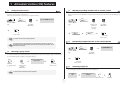
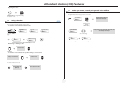
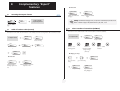
Setting restricted service
1.3
pers.
Main
This feature sets the system to restricted service.
All incoming calls are directed to a general ring or a programmed number:
10:30
Main
PERS.
Night
5
access the 'Main'
page
bc
3d
jkl
6
2a
ef
o
mn
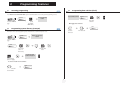
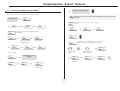
Manually forwarding attendant calls to another number
During a period of absence, the attendant can forward all calls received (incoming calls and internals calls dialling 9) to another
number:
AttDiv
display and tone indicate service
active
5
attendant password
(by default
HELP1954 )
reach the 'Menu'
page
OR
key icon indicates
service active
Redial list
bc
3d
jkl
6
2a
ef
bc
3d
jkl
6
2a
o
mn
5
enter the
number of the
terminal to
receive the
message
ef
o
mn
attendant password
(by default
HELP1954 )
Pers SpdDial
OR
key icon indicates
service active
To restore normal service, repeat operation.
1.4
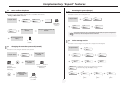
Broadcasting background music on the external speaker
If an outside number has been entered by the installation technician, selection of
restricted service will automatically forward calls received by the attendant to the
defined outside number.
Music
5
1.2
reach the 'Menu'
page
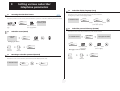
Reserving a group of lines
bc
3d
jkl
6
2a
ef
mn
display and tone indicate
service active;
o
attendant password
(by default
HELP1954 )
For maximum availability of the attendant station, thus assuring optimum reception of incoming calls, a group of outside lines can
be reserved which will only be available to the attendant station(s):
display and tone indicate
service active
“Reserved TGp”
programmed key
attendant
password (by
default
HELP1954 )
key icon indicates
service active
key icon indicates
service active
1.5
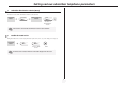
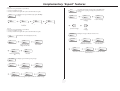
answering a night call
An incoming night call is indicated in the same way as an ordinary call:
To cancel the line reservation, repeat operation.
your telephone
rings
the night call name or n° is
displayed
OR
lift the receiver
5
handsfree