1
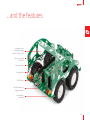
Power supply
Battery charger
Screw teminals
ON/OFF switch
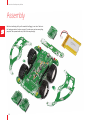
The Buggy runs on a 3.7V 2000mA battery.
Once you install the battery, there’s no need to
take it out; charge it through the Buggy’s USB
port. A miniature single-cell, fully integrated LiIon, Li-Polymer charge management controller.
MCP73832 enables that. A red power indication
LED will signalize when the battery is charging.
Once charged, it’ll turn off.
The Buggy’s expandability is not limited to
mikroBUS™ sockets and click™ boards. You can
attach a variety of sensors and antennas to its
top bar. A pair of screw terminals will allow you
to connect those additional components to the
main power supply. Both 3.3V and 5V outputs
are available. There’s an additional pair of screw
terminals that are analog inputs.
The ON/OFF switch on the rear of the Buggy,
between the USB port and the left rear lights,
controls the main power supply. A clicker 2 board
also has its own ON/OFF switch, which should
be kept in the ON position in order for the main
power supply switch to work. A green LED will
indicate the presence of a power supply. When
removing the clicker 2, keep both switches OFF.
21