1
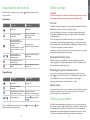
To navigate menus:
1. Press the
2. Use the
3. Press the
4. Use the
key to enter the menu.
or
keys to scroll through the menu options.
key to enter the option’s submenu.
or
keys to scroll through the submenu options.
5. Press the
key to confirm a selection and return to the previous menu.
6. Press the
key to return to the main operation screen.
NOTE: When you select an option and press the
automatically.
key, the option will be enabled
Locator menu options
•
OPT F: Run SideStepauto™ to auto-select a locate frequency for the connected
utility.
•
BATT: Set battery type: ALK, NiMH or Li-ION and enable / disable Eco mode.
•
MAX P: Set the transmitter to output its maximum wattage.
•
MODEL: Match the transmitter setting to the model of your locator.
•
MAX V: Set the output voltage to maximum (90V).
•
BT: Enable, disable or pair Bluetooth connections (Bluetooth models only).
Examples of using the menu, selecting options and
making changes:
Locator mains power frequency
To select the correct frequency (50 or 60Hz) for your country or region’s power supply:
1. Press the
key to enter the menu.
•
VOL: Adjust the speaker volume from 0 (mute) to 3 (loudest).
2. Scroll to the POWER menu using the
•
DATA: Delete, send or review saved SurveyCERT measurements and enable or
disable the Bluetooth communication channel.
3. Press the
4. Use the
•
BT: Enable, disable, reset or pair Bluetooth connections. Also defines the protocol
used when connecting to a PC or PDA.
5. Press the
screen.
•
GPS: Enable or disable the internal GPS module and enable/disable SBAS GPS
augmentation (GPS models only) – or select an external GPS source.
Batteries
•
CDR: Perform a Current Direction (CD) Reset. (Alternatively press and hold the
key when in CD mode).
It is important to set the system to match the currently installed battery type to ensure
optimal performance and correct battery level indication.
•
UNITS: Select metric or imperial units.
To set your battery type:
•
INFO: Run a Self-Test, display the date of the most recent service recalibration
(M CAL) or the most recent eCert calibration.
1. Press the
2. Scroll to the BATT menu using the
•
LANG: Select menu language.
3. Press the
•
POWER: Select local power network frequency: 50 or 60Hz.
•
ANT: Enable or disable any antenna mode with the exception of Peak.
4. Scroll up or down to select the correct battery type (Alkaline, Nickel-metal Hydride or
Lithium-Ion).
•
FREQ: Enable or disable individual frequencies.
•
ALERT: Enable or disable StrikeAlert .
•
BATT: Set battery type: Alkaline, NiMH or Li-ION.
Transmitter Eco Mode
•
COMP: Enable or disable display of the Compass feature.
Transmitter menu options
When using alkaline batteries, Eco mode can be selected to maximize run time. When
Eco mode is selected the transmitter automatically reduces its maximum power output as
battery levels run low. Eco mode is switched off by default. To Enable Eco Mode:
•
VOL: Adjust the speaker volume from 0 (mute) to 3 (loudest).
1. Press the
•
FREQ: Enable or disable individual frequencies.
2. Scroll to the BATT menu using the
•
BOOST: Boost transmitter output for a specified period of time (in minutes).
3. Press the
•
LANG: Select menus language.
™
12
5. Press the
screen.
keys.
or
key to enter the POWER menu.
or
keys to select the correct mains frequency.
key twice to accept your selection and return to the main operation
key to enter the menu.
key (locator) or the
or
arrows.
key (transmitter) to enter the BATT menu.
key twice to accept your selection and return to the main operation
key to enter the menu.
or
key to enter the BATT menu.
13
arrows.
ENGLISH
Note that when browsing the locator menu, the
and
keys act as left and right arrows.
When browsing the transmitter menu, the
and
keys act as left and right arrows.