1
POWER & CHARGING
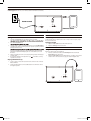
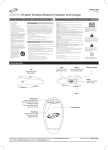
Plug the AC/DC power adapter (included) into the AC Power Input on the unit, and a standard power outlet. The unit can be used to charge mobile devices through a
USB Charging Port in the rear, as seen below (additional USB cable not included).
Power to unit
USB CHARGER
LINE IN
AC IN~
Power to device
BLUETOOTH
RADIO
Pairing a Bluetooth Device for the First Time
Radio Reception
1.
Adjust the Source/Pair knob to the Bluetooth/Line in setting.
2.
of the unit.
Press the Source/Pair knob.
3.
Using the native controls on your Bluetooth device, select the ISB313CW in
your Bluetooth settings to pair. If your device requests a password, enter the
default password 0 0 0 0 .
and connecting Bluetooth devices. After initial pairing, the unit will stay
paired unless unpaired manually by the user or erased due to a reset of
the device.
4.
5.
When successfully paired and connected, the pairing indicator will display a
solid blue light.
it is unable to connect,
If your device should become unpaired or you
repeat the above steps.
An AM and FM antenna is built into the radio. To improve radio reception, adjust
the position of the unit.
Playing the Radio
1.
2.
Adjust the Source/Pair knob to AM or FM radio mode.
Adjust the Tuning dial to tune the radio.
LINE IN
Using the Audio Input
Requires a 3.5mm audio cable (included).
1. Connect a 3.5mm audio cable to the Line In Input on the unit and the
audio output on an audio device.
2. Adjust the Source/Pair knob to the Bluetooth/Line in setting. Use the native
controls on the connected device to play your audio through the unit.
Playing Audio Wirelessly
1.
2.
To play or pause a selected track, use the native controls on the connected
Bluetooth Device.
Audio played through the connected Bluetooth device will now be heard
through the speaker.
USB CHARGER
LINE IN
AC IN~
RETRO-100 2
11/19/2014 11:35:45 AM