1
PHANTOM 2 VISION+
User Manual
Phantom 2 Vision+ User Manual V1.1.1
April 04, 2014
Congratulations on purchasing your new DJI product. Please read this manual carefully before using this product.
We recommend checking the Phantom 2 Vision+ page at
www.dji.com for news and updates on everything
from product specs to manual updates. Due to ongoing development, information contained in this manual may
change without notice.
If you have any questions or concerns about your product, please contact your DJI authorized dealer or DJI
Customer Service.
©2014 DJI. All Rights Reserved.
Using this manual
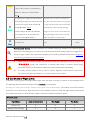
Key
Warning
Important
Hints and Tips
References or Definitions
Important
Except when specifically stated, all descriptions in this manual are for Phantom mode, not Naza-M mode.
Before Flight
The following tutorials and manuals have been produced to ensure you to make full use of your Phantom 2 Vision+.
(1)
Disclaimer
(2)
Phantom 2 Vision+ Quick Start Guide
(3)
Phantom 2 Vision+ User Manual
(4)
Phantom Pilot Training Guide
Watching all the tutorial videos and reading the Disclaimer before flight is recommended. Afterwards, prepare your
first flight using the Phantom 2 Vision+ Quick Start Guide. Improve your flying skills in subsequent flights using the
Phantom Pilot Training Guide. Refer to this manual for more comprehensive information. Experienced users,
particularly those with DJI Phantom 2 Vision experience should skip to the Phantom 2 Vision+ Quick Start Guide to
begin preparing for flight.
Tutorials
Watch the quick start tutorial videos below to ensure a safe first flight.
Web link.
http://www.dji.com/phantom2visionplus/training
QR code.
Preparing for flight.
Downloading the DJI VISION App
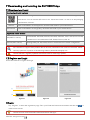
Download and install the DJI VISION App before use. Choose from one of the download methods below.
Download from the App
iOS
Search “DJI VISION” on the App Store then follow instructions.
Store or Google Play.
Android
Search “DJI VISION” on Google Play then follow instructions.
Scan QR code.
©2014 DJI. All Rights Reserved.
Scan QR code then follow instructions.
Contents
USING THIS MANUAL .......................................................................................................................................................................... 3
KEY ........................................................................................................................................................................................................................ 3
IMPORTANT .......................................................................................................................................................................................................... 3
BEFORE FLIGHT .................................................................................................................................................................................................. 3
TUTORIALS ........................................................................................................................................................................................................... 3
DOWNLOADING THE DJI VISION APP ......................................................................................................................................................... 3
CONTENTS............................................................................................................................................................................................. 4
OVERVIEW .............................................................................................................................................................................................. 7
1 IN THE BOX .......................................................................................................................................................................................... 7
2 INTRODUCTION ................................................................................................................................................................................9
ASSEMBLY AND USE.......................................................................................................................................................................... 10
1 REMOVING GIMBAL CLAMP........................................................................................................................................................ 10
2 PREPARING THE BATTERY .......................................................................................................................................................... 10
2.1 DJI SMART FLIGHT BATTERY ................................................................................................................................................................... 10
2.2 USAGES.......................................................................................................................................................................................................... 11
Powering on/off .......................................................................................................................................................................................... 11
Checking the battery level...................................................................................................................................................................... 11
Battery life.................................................................................................................................................................................................... 12
2.3 CHARGING THE FLIGHT BATTERY ........................................................................................................................................................... 13
2.4 BATTERY INSTALLATION ........................................................................................................................................................................... 13
2.5 CORRECT BATTERY USAGE NOTES ........................................................................................................................................................14
3 PREPARING THE PHANTOM 2 VISION+................................................................................................................................... 15
3.1 INTRODUCTION ............................................................................................................................................................................................ 15
3.2 BUILT-IN FLIGHT CONTROL SYSTEM ...................................................................................................................................................... 15
FC Assistant Port ...................................................................................................................................................................................... 16
3.3 LED FLIGHT INDICATOR DESCRIPTIONS ............................................................................................................................................... 16
3.4 3-AXIAL STABILIZED GIMBAL ................................................................................................................................................................... 17
Anti-drop Kit................................................................................................................................................................................................ 17
Micro-SD Slot .............................................................................................................................................................................................. 18
Gimbal Error Warning ............................................................................................................................................................................. 18
3.5 CAMERA ....................................................................................................................................................................................................... 19
Lens cap removal....................................................................................................................................................................................... 19
Camera Function Buttons .................................................................................................................................................................... 20
Camera Data Port ................................................................................................................................................................................... 20
Camera LED Indicator ........................................................................................................................................................................... 20
4 ATTACHING THE PROPELLERS ................................................................................................................................................. 21
4.1 INTRODUCTION ............................................................................................................................................................................................ 21
4.2 ASSEMBLY .................................................................................................................................................................................................... 21
4.3 REMOVING THE PROPELLERS .................................................................................................................................................................. 21
4.4 NOTES ......................................................................................................................................................................................................... 22
5 PREPARING THE REMOTE CONTROLLER ............................................................................................................................ 23
5.1 THE REMOTE CONTROLLER ..................................................................................................................................................................... 23
5.2 POWER ON THE REMOTE CONTROLLER .............................................................................................................................................. 23
5.3 REMOTE CONTROLLER POWER LED STATUS INFORMATION .........................................................................................................24
5.4 ANTENNA ORIENTATION .........................................................................................................................................................................24
5.5 REMOTE CONTROLLER OPERATION ..................................................................................................................................................... 25
5.6 LINKING THE REMOTE CONTROLLER AND RECEIVER ........................................................................................................................ 26
Linking Procedures .................................................................................................................................................................................. 27
Link Indicator ............................................................................................................................................................................................. 27
5.7 COMPLIANCE VERSION CONFIGURATION ........................................................................................................................................... 27
6 PREPARING THE RANGE EXTENDER ...................................................................................................................................... 29
6.1 INTRODUCTION ........................................................................................................................................................................................... 29
SYSTEM Indicator .................................................................................................................................................................................... 29
©2014 DJI. All Rights Reserved.
POWER Indicator..................................................................................................................................................................................... 29
Binding Reset Button .............................................................................................................................................................................. 29
6.2 USE .............................................................................................................................................................................................................. 30
Charging the Range Extender............................................................................................................................................................ 30
Powering on the Range Extender ..................................................................................................................................................... 30
Checking the Battery Level ................................................................................................................................................................. 30
6.3 RENAMING THE RANGE EXTENDER SSID ............................................................................................................................................ 30
6.4 BINDING THE PHANTOM 2 VISION+ AND RANGE EXTENDER ............................................................................................................ 31
7 DOWNLOADING AND INSTALLING THE DJI VISION APP ............................................................................................... 33
7.1 DOWNLOAD AND INSTALL ........................................................................................................................................................................ 33
7.2 REGISTER AND LOGIN............................................................................................................................................................................... 33
[1] Register .................................................................................................................................................................................................. 33
[2] Login.......................................................................................................................................................................................................34
[3] Usage tips .............................................................................................................................................................................................34
8 CONNECTING THE CAMERA .................................................................................................................................................... 35
8.1 CONNECTING PROCEDURES.................................................................................................................................................................... 35
Wi-Fi Connection Indicator Description ..........................................................................................................................................36
FLIGHT ................................................................................................................................................................................................... 37
Flight Environment Requirements ..................................................................................................................................................... 37
Preflight Checklist ................................................................................................................................................................................... 37
1 CALIBRATING THE COMPASS.................................................................................................................................................... 38
1.1 CALIBRATION PROCEDURES .....................................................................................................................................................................38
1.2 WHEN TO RECALIBRATE ...........................................................................................................................................................................38
2 STARTING/STOPPING THE MOTORS ..................................................................................................................................... 39
2.1 STARTING MOTORS....................................................................................................................................................................................39
2.2 STOPPING MOTORS ..................................................................................................................................................................................39
3 FLIGHT TEST .................................................................................................................................................................................... 40
3.1 TAKE OFF/LANDING PROCEDURES ....................................................................................................................................................... 40
3.2 VIDEO SUGGESTIONS AND TIPS ............................................................................................................................................................ 40
4 FAILSAFE FUNCTION .................................................................................................................................................................... 41
4.1 WHEN WILL FAILSAFE ACTIVATE?...........................................................................................................................................................41
4.2 FAILSAFE PROCEDURE ..............................................................................................................................................................................41
Failsafe on the DJI VISION App .........................................................................................................................................................42
4.3 REGAINING CONTROL DURING FAILSAFE PROCEDURES..................................................................................................................42
5 LOW BATTERY LEVEL WARNING FUNCTION ..................................................................................................................... 43
Low Battery Level Warning on the DJI VISION App .................................................................................................................43
6 FLIGHT LIMITS................................................................................................................................................................................. 44
6.1 MAX HEIGHT & RADIUS LIMITS............................................................................................................................................................... 44
6.2 FLIGHT LIMITS OF SPECIAL AREAS ........................................................................................................................................................45
6.3 CONDITIONS OF FLIGHT LIMITS ............................................................................................................................................................ 46
6.4 DISCLAIMER................................................................................................................................................................................................47
DJI VISION APP USAGE ................................................................................................................................................................... 48
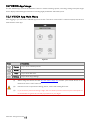
1 DJI VISION APP MAIN MENU ...................................................................................................................................................... 48
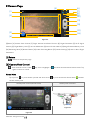
2 CAMERA PAGE................................................................................................................................................................................ 49
[1] RETURN ........................................................................................................................................................................................................ 49
[2] CAMERA PITCH CONTROL...................................................................................................................................................................... 49
Normal Mode ............................................................................................................................................................................................ 49
Accelerometer Sensor Mode .............................................................................................................................................................. 50
[3] FLIGHT ATTITUDE AND RADAR FUNCTION .......................................................................................................................................... 50
[4] FLIGHT PARAMETERS ................................................................................................................................................................................. 51
[5] WI-FI SIGNAL INTENSITY ........................................................................................................................................................................... 51
[6] FLIGHT BATTERY LEVEL............................................................................................................................................................................. 51
[7] AIRCRAFT GPS STATUS ............................................................................................................................................................................ 52
[8] MICRO-SD CARD STATUS........................................................................................................................................................................ 52
[9] RANGE EXTENDER BATTERY LEVEL ....................................................................................................................................................... 52
©2014 DJI. All Rights Reserved.
[10] REMAINING SHOTS .................................................................................................................................................................................. 52
[11] SHUTTER BUTTON ..................................................................................................................................................................................... 52
[12] VIDEO RECORDING BUTTON ................................................................................................................................................................. 52
[13] CAMERA SETTINGS................................................................................................................................................................................... 53
[14] HIDE OR SHOW FLIGHT PARAMETERS. ................................................................................................................................................ 53
3 CAMERA SETTINGS ....................................................................................................................................................................... 54
[1] CAPTURE MODE ..........................................................................................................................................................................................54
[2] PHOTO SIZE ................................................................................................................................................................................................54
[3] VIDEO RESOLUTION ..................................................................................................................................................................................54
[4] PHOTO FORMAT ........................................................................................................................................................................................ 55
[5] SELECTABLE ISO ....................................................................................................................................................................................... 55
[6] WHITE BALANCE........................................................................................................................................................................................ 55
[7] EXPOSURE METERING ............................................................................................................................................................................... 55
[8] EXPOSURE COMPENSATION.................................................................................................................................................................... 55
[9] SHARPNESS..................................................................................................................................................................................................56
[10] ANTI-FLICKER ............................................................................................................................................................................................56
[11] RESTORE DEFAULT SETTINGS .................................................................................................................................................................56
[12] FORMAT MICRO-SD CARD ....................................................................................................................................................................56
4 ALBUM PAGE ................................................................................................................................................................................... 57
4.1 SD CARD ALBUM ....................................................................................................................................................................................... 57
4.2 MOBILE DEVICE ALBUM ..........................................................................................................................................................................59
5 NEWS PAGE ...................................................................................................................................................................................... 61
6 SETTINGS PAGE.............................................................................................................................................................................. 62
[1] TOOLBAR AUTO HIDE ................................................................................................................................................................................ 62
[2] WHEN CONNECTION LOST ..................................................................................................................................................................... 62
[3] CAMERA SETTINGS DISPLAY....................................................................................................................................................................63
[4] PREVIEW QUALITY.....................................................................................................................................................................................63
[5] PARAMETER UNIT...................................................................................................................................................................................... 64
[6] FPV MODE ................................................................................................................................................................................................ 64
[7] AUTO FLIPS ................................................................................................................................................................................................ 64
[8] BATTERY LOW WARNING ....................................................................................................................................................................... 64
[9] TUTORIAL.................................................................................................................................................................................................... 64
[10] CLEAR NEWS CACHE ............................................................................................................................................................................ 64
[11] BINDING ...................................................................................................................................................................................................... 64
[12] RENAME SSID OF RANGE EXTENDER ................................................................................................................................................. 64
[13] FIND MY PHANTOM 2 VISION .........................................................................................................................................................65
[14] ACCOUNT ..................................................................................................................................................................................................65
[15] RATE............................................................................................................................................................................................................65
[16] ABOUT ........................................................................................................................................................................................................65
ASSISTANT SOFTWARE ................................................................................................................................................................... 66
1 INSTALLING DRIVER AND PHANTOM 2 VISION+ ASSISTANT SOFTWARE................................................................. 66
1.1 INSTALLING AND RUNNING ON WINDOWS ............................................................................................................................................66
1.2 INSTALLING AND RUNNING ON MAC OS X ..........................................................................................................................................66
2 USING ASSISTANT SOFTWARE ................................................................................................................................................. 68
2.1 USING THE PHANTOM 2 VISION+ ASSISTANT SOFTWARE ..................................................................................................................68
2.2 FIRMWARE UPGRADE OF THE PHANTOM 2 VISION+ ..........................................................................................................................69
2.3 USING THE PHANTOM RC ASSISTANT SOFTWARE.........................................................................................................................69
APPENDIX .............................................................................................................................................................................................. 71
1 REAR LED FLIGHT INDICATOR STATUS ................................................................................................................................... 71
2 SPECIFICATIONS............................................................................................................................................................................ 72
3 TROUBLESHOOTING (FAQ) ....................................................................................................................................................... 73
©2014 DJI. All Rights Reserved.
Overview
The Phantom 2 Vision+ is the next evolution of the Phantom 2 Vision. It features the same App enabled First
Person View (FPV), high performance camera, remote camera control and in-flight content sharing, but adds to it a
high performance 3- axial camera stabilization system. It is ideal for aerial creativity whether photo or video.
FPV: First Person View, see the world from the perspective of the craft and feel a true flying experience.
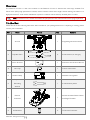
1 In the Box
Check that all of the following items have been included in your package before use. If anything is missing, please
contact your local dealer.
NO.
Name
Picture
Qty.
Remarks
1
Aircraft
1
Integrated gimbal and camera
2
Propeller Pairs
4
4 with black nut, 4 with grey
3
Micro-SD Card
1
Inserted in aircraft Micro-SD slot
4
Lens Cap
1
Fixed to camera lens
5
Gimbal Clamp
1
Attached to the gimbal
1
In maintenance packet
Propeller
6
Detaching
Wrench
7
8
Remote
Controller
AA Batteries
©2014 DJI. All Rights Reserved.
1
4
Includes attached Phone Holder
and Range Extender
For Remote Controller
9
DJI Smart Flight
Battery
1
Inside aircraft
10
Charger
1
110-240V Adaptive
11
Power Cables
1
GB & CE
12
Plug Set
1
SAA & BS
13
Micro-USB Cable
1
For Wi-Fi extender charging and
firmware upgrade
Including: Disclaimer, Phantom
14
Manuals
4
Pilot Training Guide, Phantom 2
Vision+ Quick Start Guide, User
Manual
15
Stickers
1
2 Colors: Pink, Blue
16
Spare Dampers
4
In maintenance packet
17
Anti-drop Kit
2
In maintenance packet
18
Spare Screws
11
19
Damper Packet
4
©2014 DJI. All Rights Reserved.
In maintenance packet
M3X5(6pcs); M3X8(5pcs)
In maintenance packet
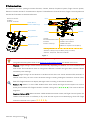
2 Introduction
The Phantom 2 Vision+ package includes: Phantom, Camera, Gimbal, Propulsion System, Flight Control System,
Remote Controller and Wi-Fi Communication System. 5.8 GHz Remote Control Receiver, Flight Control System and
2.4 GHz Wi-Fi Module are inside the Phantom.
Remote Controller
·5.8GHz
·2 sticks, 7channels
Propeller
Motor
Mobile Device,
with DJI VISION App
Aircraft
Phone Holder
Camera
Gimbal
Range Extender
Remote Controller
Outside
·3-axial Stabilized Gimbal
·Camera
·Motors and Props
Inside
·Flight Control System
·2.4GHz Wi-Fi Module
·5.8GHz Receiver
·Electronic Speed Controls (ESCs)
Working Modes
·Phantom - Ready to Fly and Ready to Fly (non-GPS)
·Naza-M - GPS, ATTI., Manual and Failsafe
Figure 1
Choose between Phantom and Naza-M working modes using Phantom 2 Vision+ Assistant Software. If
using Naza-M mode, please refer to the NAZA-M V2 Quick Start Manual for related instructions.
Phantom: Flight settings will be elected automatically depending on whether 6 or more satellites have
been found. This mode allows users to configure the Remote Controller and gain values, and use Failsafe
and battery level warnings.
Naza-M: Flight settings will be identical to the Naza-M V2. Users can choose between GPS, Attitude, or
Manual mode. They can also access advanced settings including Intelligent Orientation Control (IOC).
Rear LED Flight Indicators will display the flight status according to the Naza-M indicator.
Ready to Fly: When 6 or more GPS satellites have been found, the Flight Control System will lock its
home point and Rear LED Flight Indicators will blink a slow green (
). This mode is ideal for
beginners.
Ready to Fly (non-GPS): When less than 6 GPS satellites have been found, the Flight Control System will
stabilize itself less than in full Ready to Fly mode and will require more skilled flying. Rear LED Flight
Indicators will blink a slow yellow (
©2014 DJI. All Rights Reserved.
).
Assembly and Use
Follow the below instructions to prepare for flight.
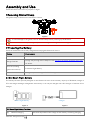
1 Removing Gimbal Clamp
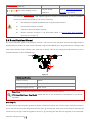
Pull gimbal clamp in the direction indicated to remove.
Figure 2
To avoid damage to the gimbal, remove Gimbal Clamp before powering up the Phantom.
Attach the Gimbal Clamp during transportation or long term storage to avoid damage
2 Preparing the Battery
Ensure all related devices are fully charged before flying the Phantom 2 Vision+.
Device
Power supply
Remote Controller
4 AA batteries.
Charge fully through Micro-USB port. See Charging the Range Extender (Page 30)
Range Extender
for details.
Aircraft (including
DJI Smart Flight Battery.
gimbal and camera)
Mobile Device
Charge fully before using the DJI VISION App.
2.1 DJI Smart Flight Battery
This battery has been specially designed for the Phantom 2 series. It has a battery capacity of 5200mAh, voltage of
11.1V and charge-discharge management functionality. It can only be charged with a DJI charger or Phantom 2 Car
Charger.
Smart Flight Battery
Figure 3
Charger
Figure 4
DJI Smart Flight Battery Functions
(1)
Balance Charging
©2014 DJI. All Rights Reserved.
Automatically balances the voltage of each battery cell during charging.
(2)
Capacity Display
Displays current battery levels.
(3)
Communication
(4)
Overcharge Protection
(5)
Over Discharge Protection
(6)
Short Circuit Protection
Automatically cuts power supply when a short circuit is detected.
(7)
Sleep Protection
Sleep mode is entered after 10 minutes of inactivity to save power.
(8)
Charging Temperature
The battery will charge only when the temperature is between 0℃
Detection
(32°F) and 40℃ (104°F).
Communicates with main controller about battery voltage, capacity,
current and other relevant information.
Charging stops automatically when battery voltage reaches 12.8V to
prevent overcharge damage.
Discharging stops automatically when battery voltage reaches 8.4V to
prevent over discharge damage.
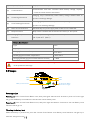
Battery Specifications
Type
LiPo
Capacity
11.1V, 5200mAh
Charging Environment Temperature
0°C~40°C
Discharging Environment Temperature
-20°C~50°C
Charging/Discharging Environment Relative Humidity
<80%
Please read the user manual, disclaimer, and battery warnings before use. Users take full responsibility
for all operations and usage.
2.2 Usages
LED2
LED3
LED1
LED4
Circular Power Button
( Built-in Power Light)
Battery Level Indicators
Figure 5
Powering on/off
Powering on: Press Circular Power Button once, then press again and hold for 2 seconds to power on. Power Light
will go red and Battery Level Indicators will show the current battery level.
Powering off: Press Circular Power Button once, then press again and hold for 2 seconds to turn off. Battery Level
Indicators will all go out.
Checking the battery level
When the battery is powered off, press the Circular Power Button once. Battery Level Indicators will light up to
©2014 DJI. All Rights Reserved.
show battery level. See below for details.
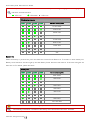
Battery Level Indicators will show the current battery level during charging and discharging. The
indicators are defined below.
: LED is on
: LED blinks
: LED is off
Discharging process
LED1
LED2
LED3
LED4
Current battery level
87.5%~100%
75%~87.5%
62.5%~75%
50%~62.5%
37.5%~50%
25%~37.5%
12.5%~25%
0%~12.5%
<0%
Battery life
When the battery is powered off, press and hold the Circular Power Button for 5 seconds to check battery life.
Battery Level Indicators will show light up and the Battery Power Indicators will blink for 10 seconds. All lights will
then turn off. For details, please see below.
Battery life
LED1
LED2
LED3
LED4
Current battery life
90%~100%
80%~90%
70%~80%
60%~70%
50%~60%
40%~50%
30%~40%
20%~30%
Less than 20%
When batter life reaches 0, it is no longer operational.
More battery information is available in the battery tab of the Phantom 2 Vision+ Assistant.
©2014 DJI. All Rights Reserved.
2.3 Charging the Flight Battery
1.
Connect charger to wall socket (100-240V, 50/60Hz, using the plug set if necessary).
2.
Connect battery to charger. If the current capacity of the battery is over 75%, you should turn it on
before beginning to charge.
3.
Battery Level Indicators will display current capacity level as the battery charges.
4.
Battery is fully charged when Battery Level indicator lights are off. Disconnect the charger and battery
when charging is complete.
Socket
Figure 6
Charging process
LED1
LED2
LED3
LED4
Current battery level
0%~25%
25%~50%
50%~75%
75%~100%
Fully charged
The Smart Flight Battery can be charged using an optional Phantom 2 Car Charger. This can charge the
battery in-car or through 3S-6S Li-Po batteries. Contact your authorized dealer or DJI customer service
for details.
(1)
Battery should only be charged with the charger provided by DJI. DJI does not take any
responsibility for damage caused by third party chargers.
(2)
If current battery level is over 75%, the battery should be turned on before charging.
2.4 Battery Installation
Push battery into battery compartment according to the below diagram. When you hear a click, the battery has
been properly installed.
©2014 DJI. All Rights Reserved.
Figure 7
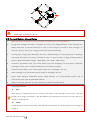
An incorrectly installed battery may cause (1) Bad contact, (2) unavailable battery information, (3)
unsafe flight, (4) inability to take off.
2.5 Correct Battery Usage Notes
1.
When the battery is turned on, do not connect it to or disconnect it from the Phantom.
2.
Charge and discharge the battery completely once every 20 charge/discharge cycles. Discharge the
battery until there is less than 8% power or until it can no longer be turned on, then recharge it to
maximum capacity. This power cycling procedure will optimize the battery.
3.
For long term storage, place the battery with only a 40~50% charge in a strong battery box. Discharge
and charge the battery once every 3 months to keep it in good condition. Charge amount should be
varied in these maintenance charges - (40%~50%)—0%—100%—(40%~50%).
4.
Purchase a new battery after your current battery has been discharged over 300 times. Completely
discharge a battery prior to disposal. Please dispose of batteries properly.
5.
Purchase a new battery if your current battery swells up or is damaged in any way.
6.
Never recharge or fly with a battery that is swollen or damaged in any way.
7.
Never charge batteries unattended. Always charge batteries on a non-flammable surface such as
concrete and never near any flammable materials.
8.
Safety is extremely important. For more information, please see the Disclaimer.
Discharging methods:
1)
Slow
Place battery in Phantom and turn on. Leave on until there is less than 8% of power left or until the
battery can no longer be turned on. See DJI VISION App for battery levels. Motors do not need to be
turned on, reducing wear.
2)
Quick
Fly the Phantom outdoors until there is less than 8% of power left or until the battery can no longer be
turned on.
©2014 DJI. All Rights Reserved.
3 Preparing the Phantom 2 Vision+
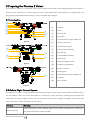
The Phantom 2 Vision+ is a quadrotor with a built-in Flight Control System with integrated gimbal and camera. It
features an FC Assistant Port, Camera Data Port and a specialized battery compartment for its flight battery. All
these features make the Phantom 2 Vision+ easy to assemble and configure.
3.1 Introduction
[1]
[2]
[3]
[4]
[5]
[6]
[7]
[8]
[1]
Propeller
[2]
Motor
[3]
Front Sticker
[4]
Front LED
[5]
FC Assistant Port (Micro-USB port)
[6]
Vibration Absorber
[7]
Camera LED Indicator
[8]
Camera Function Button
[9]
Anti-drop Kit
[10]
3-axial Stabilized Gimbal
[11]
Camera Lens
[12]
Rear LED Flight Indicator
[13]
DJI Smart Flight Battery
[14]
Receiver Antenna
[15]
Landing Gear
[16]
Camera Data Port(Micro-USB port)
[17]
Compass
[18]
Micro-SD Slot
[9]
[10]
[11]
Figure 8
[12]
[13]
[16]
[14]
[15]
[17]
Figure 9
[18]
Figure 10
3.2 Built-in Flight Control System
The Phantom 2 Vision+ is equipped with a DJI Naza-M V2 Flight Control System. This provides incredible ease of
use and stability. Pilots can control the Phantom’s movements in many directions, including pitch (forwards and
backwards), roll (left and right), elevator (up and down) and yaw (turn left or right). The flight control system also
can provide IOC, Failsafe and battery level warnings.
Modules
Main Controller
Functions
Acts as the brains of the complete flight control system, responsible for connecting
and controlling all the modules together.
©2014 DJI. All Rights Reserved.
Has a built-in inertial sensor and a barometric altimeter that measures both attitude
IMU
and altitude.
The compass reads geomagnetic information and assists the GPS (Global Position
GPS & Compass
System) to accurately calculate the position and height of the aircraft.
LED Flight Indicators
Indicates the status of flight control system.
FC Assistant Port
The flight control system communicates with the PC Assistant Software through a Micro-USB cable between the
Phantom FC Assistant Port and the PC. Users can use Assistant Software to configure the aircraft and upgrade the
Phantom firmware. Please refer to Using the Phantom 2 Vision+ Assistant Software (Page 68) for details.
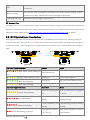
3.3 LED Flight Indicator Descriptions
LED flight indicators are found at the front and the rear of the Phantom. Front LEDs are for indicating where the
nose of the aircraft is. They light up solid red after motors have started spinning. Rear LED Flight Indicators light up
to show the aircraft’s current flight status once the flight battery is powered on. For details, please see the below
table.
Front LEDs
Rear LED
Flight Indicators
Figure 11
Rear LED Flight Indicators
(Red, Green, Yellow flashing in
turn)
Figure 12
Normal
Notes
Power On Self-Test
(Green, Yellow flashing in turn)
Warming Up
Aircraft cannot take off.
(Slow Green flashing)
Ready to Fly
More than 6 GPS satellites found.
(Slow Yellow flashing)
Ready to Fly (non-GPS)
Less than 6 GPS satellites found.
Abnormal
Notes
Rear LED Flight Indicators
Remote Controller Signal Refer to Failsafe Function (Page41)
(Quick Yellow flashing)
(Slow Red flashing)
Lost
for details.
Low Battery Level
DJI VISION App will also show
Warning
warning message.
Critical Low Battery Level DJI VISION App will show warning
(Quick Red flashing)
(Three Red flashing off and on)
©2014 DJI. All Rights Reserved.
Warning
message.
Not Stationary or Sensor
Keep aircraft stationary or perform
Bias is too big
IMU calibration.
(Solid red)
(Red, Yellow flashing in turn)
If a solid red
Error*
Cannot fly.
Compass Needs
Refer to Calibrating the Compass
Calibration
(Page38) to get details.
LED indicator appears, connect to the Phantom 2 Vision+ Assistant
Software for details and resolution. This may be caused by:
1)
IMU calibration required: Recalibrate IMU using Assistant Software.
2)
IMU is abnormal: Repair required.
3)
Compass is abnormal: Repair required.
4)
Remote controller mid-point is set abnormally: Refer to How to solve large margin(s)
mid-point error (Page 73).
3.4 3-axial Stabilized Gimbal
The 3-axial stabilized gimbal of the Phantom 2 Vision+ will power on and self-check each time the flight battery is
installed and powered on. Its pitch can be controlled using the DJI VISION App. This gimbal has two working modes,
video mode and FPV mode, with the video mode set as default. This can be configured inside Phantom 2 Vision+
Assistant Software or the DJI VISION App.
0°
-90°
Figure 13
Gimbal specifications
Control accuracy
±0.03°
Controllable range
Pitch : -90°~0°
Maximum angular velocity
Pitch : 90°/s
Video Mode: the gimbal will stabilize across 3-axial for smooth aerial creativity.
FPV Mode (First Person View Mode): Gimbal will lock to the movements of the Phantom for a true FPV
experience.
Anti-drop Kit
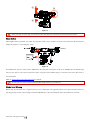
The Anti-drop Kit helps keep the gimbal and camera connected to the aircraft. Two have been mounted on delivery.
If new ones are required, take the gimbal and press part ① through the center hole of the Vibration Absorber the
center hole of part ②. Lock them together as shown in ③. Mounting the Anti-drop Kit diagonally is recommended.
©2014 DJI. All Rights Reserved.
①
③
②
Figure 14
Once part ① and part ② are connected, the Anti-drop Kit cannot be disconnected and reused.
Micro-SD Slot
With flight battery powered off, make sure the Micro-SD card is inserted correctly into the Micro-SD Slot before
taking any photos or recording any video.
Figure 15
The Phantom 2 Vision+ comes with a 4GB Micro-SD card and can support cards up to 32GB. The DJI VISION App
may not be able to read some Micro-SD cards. Using the DJI VISION App to reformat new Micro-SD cards is
recommended.
Refer to Format Micro-SD Card (Page 56) for details.
Do not insert or remove Micro-SD card when flight battery is powered on.
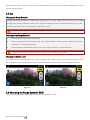
Gimbal Error Warning
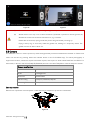
Before the aircraft takes off, if a gimbal motor error is detected or the gimbal clamp is not removed, there will be a
warning prompt on the camera page of the DJI VISION App. This will disappear after the problem is resolved.
©2014 DJI. All Rights Reserved.
Figure 16
Figure 17
(1)
Remove Gimbal Clamp before powering on flight battery.
(2)
Gimbal motor error may occur in these situations: (1) Gimbal is placed on uneven ground. (2)
Gimbal has received an excessive external force, e.g. a collision.
Please take off from flat, open ground and protect the gimbal after powering up.
Flying in heavy fog or cloud may make the gimbal wet, leading to a temporary failure. The
gimbal will recover when it dries out.
3.5 Camera
The Phantom 2 Vision+ camera powers up when the flight battery has been installed and switched on. Photos and
videos can be shot by pressing either the onboard button or the DJI VISION App. For aerial photography it
supports burst shots, continuous capture and timed capture, and exports to both Adobe DNG Raw and JPEG. For
aerial video, it shoots in full HD at (1080p30/1080i60) and can even shoot 720p60 for internet ready slow motion.
Camera specifications
Sensor Size
1/2.3”
Pixels
14 Megapixels
Resolution
4384×3288
HD Recording
1080p30 /1080i60/720p60
Recording FOV
110° / 85°
Lens cap removal
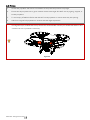
Remove lens cap before use and replace it when shooting is complete to protect the camera lens.
Figure 18
©2014 DJI. All Rights Reserved.
Camera Function Buttons
Capture: Press (hold less than 2 seconds) to take a single capture.
Record: Press (hold longer than 2 seconds) to begin recording. Press again to stop.
Camera Data Port
Connect the Camera Data Port to a PC using a Micro-USB cable to copy photos and videos to a PC.
Figure 19
Photos and videos can only be copied when the flight battery is powered on.
Camera LED Indicator
Camera LED Indicator lights up after the flight battery is powered on. It provides information on the working status
of the camera.
Camera LED Indicator
Wi-Fi status
Camera status
Solid
OFF
Power On; Idle
Slow Blink (0.2s on, 1.8s off)
ON
Idle
Blink (0.1s on, 0.3s off, 0.1s on, 1.8s off)
ON
Micro-SD card connected to PC
Fast Blink (0.1s on, 0.3s off)
ON
Synchronizing
Solid
OFF
Recording
Blink Once (0.2s on, 0.3s off)
ON/OFF
Taking a single picture.
Blink 3 Times(0.1s on, 0.1s off)
ON/OFF
Taking 3 or 5 photos per shot
Fast Blink (0.1s on, 0.3s off)
ON/OFF
Firmware Upgrading
(0.2s green, 1.8s yellow)
ON
Recording
Solid
ON/OFF
Critical error
Slow Blink (0.2s on, 1.8s off)
ON/OFF
CMOS sensor error
Blink Once (0.2s on, 0.3s off)
ON/OFF
Operation failed
Blink 3 Times(0.1s on, 0.1s off)
ON/OFF
Micro-SD card error
Fast Blink (0.1s on, 0.3s off)
ON/OFF
Upgrade error
ON/OFF
Overheated Camera
(0.5s green, 0.5s yellow, 0.5s red, 0.5s Off)
©2014 DJI. All Rights Reserved.
4 Attaching the Propellers
Always use original 9-inch propellers, classified by the color of each central nut.
4.1 Introduction
Propellers
Grey Nut (9443)
Black Nut (9443 R)
Diagram
Assembly Location
Attach to motor without black dot.
Attach to motor with black dot.
Fastening/Un-fastening
Lock: Tighten propeller in this direction.
Instructions
Unlock: Loosen propeller in this direction.
4.2 Assembly
1.
(Figure 20) Remove warning cards from motors after you have read them.
2.
(Figure 21) Spin grey marked propellers clockwise onto unmarked motors and black marked propellers
anti-clockwise for black marked motors.
Figure 20
Figure 21
Propellers self tighten during flight. DO NOT use thread locker.
(1)
Always match marked props with the corresponding motor.
(2)
Protective gloves are recommended during propeller assembly and removal.
4.3 Removing the Propellers
(Figure 22) Prevent motor rotation using the included wrench or a hand, then remove propeller according to the
un-fastening instructions.
Figure 22
©2014 DJI. All Rights Reserved.
4.4 Notes
1.
Check that propellers and motors are installed correctly and firmly before every flight.
2.
Ensure that all propellers are in good condition before each flight. DO NOT use any ageing, chipped, or
broken propellers.
3.
To avoid injury, STAND CLEAR of and DO NOT touch propellers or motors when they are spinning.
4.
ONLY use original DJI propellers for a better and safer flight experience.
For beginner flyers, PHANTOM 2 Prop Guards are recommended. Contact your authorized dealer or DJI
customer service to purchase if necessary.
Figure 23
©2014 DJI. All Rights Reserved.
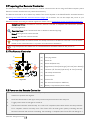
5 Preparing the Remote Controller
The Phantom 2 Vision+ Remote Controller is a wireless communication device using the 5.8GHz frequency band.
Remote Controller and Phantom are paired before delivery.
The Remote Controller is set to Mode 2 by default. This can be adjusted in the PHANTOM RC Assistant Software.
See Using the PHANTOM RC Assistant Software (Page 69) for details. You can also adjust the power of your
Remote Controller according to national regulations. Please refer to Compliance Version Configuration (Page 27).
Compliance Version: The Phantom 2 Vision+ Remote Controller is compliant with CE and FCC (see the
FCC ID) regulations.
Operating Mode: Mode 1 and Mode 2 refer to different channel mappings.
Mode 1: The right stick controls throttle.
Mode 2: The left stick controls throttle.
The Range Extender and Phone Holder are already mounted on the Remote Controller. Twist the Phone
Holder to face outwards and fix it in position for mobile device installation.
Large smartphones and tablets are not recommended for the Phone Holder as they do not fit.
5.1 The Remote Controller
J3
J4
[1]
Antenna
[1]
[2]
Carrying Handle
[2]
[3]
Switch S1
[4]
Switch S2 (Reserved)
[5]
Right Stick (J1: Roll [left & right], J2: Pitch [front & back])
[6]
Left Stick (J3: Throttle [up & down], J4: Yaw [rotation])
[7]
Neck Strap Attachment
[8]
Power Switch
[9]
Power LED
[10]
RC Assistant Port(Micro-USB Port)
[11]
Battery Compartment (On the back)
[4]
[3]
[6]
[5]
J2
J1
[7]
[8]
[9]
[11]
[10]
Figure 24
5.2 Power on the Remote Controller
1.
Install four AA batteries into the battery compartment on the back of the Remote Controller. Pay
attention to positive and negative.
2.
Set S1 and S2 switches to the upper most position and place all sticks in the mid-point.
3.
Toggle power switch to the right to switch on.
4.
The Remote Controller will then beep. If it is set to CE compliance, then there will be one beep while the
FCC compliant version will beep twice. The Power LED will blink green quickly indicating that the
Remote Controller and receiver are binding. Once binding is completed, the Power LED will change to a
©2014 DJI. All Rights Reserved.
solid green.
Figure 25
(1)
If the low voltage warning alert sounds (refer to Remote Controller Power LED Status
Information (Page 24) for details), replace batteries as soon as possible.
(2)
For long term storage, be sure to remove the batteries from Remote Controller.
(3)
Dispose of batteries properly.
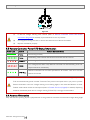
5.3 Remote Controller Power LED Status Information
Power LED
Sound
Remote Controller State
None
Functioning normally.
None
Establishing a link between the Remote Controller and the receiver.
B-B-B……
Low voltage (at 3.9V-4.5V). Replace batteries as soon as possible.
BBBB
B--B--B……
Low voltage (lower than 3.9V). Remote Controller will automatically power off.
Replace batteries immediately.
Remote Controller has not been operated for 15 minutes. Turn off or use the
Remote Controller.
The Remote Controller Power LED will blink red and sound an alert when the voltage drops below
3.9V and automatically power off after 3 seconds. This process will repeat even if you power cycle the
Remote Controller. If this low voltage warning occurs during flight, it will cause the Phantom to enter
Failsafe mode which cannot be interrupted (refer to Failsafe Function (Page41) for details). Replacing
batteries immediately after the low voltage warning (3.9V-4.5V) is strongly recommended.
5.4 Antenna Orientation
Keep the antennas pointing skyward, perpendicular to the ground for maximum communication range during flight.
©2014 DJI. All Rights Reserved.
For maximum range and reliability,
Remote Controller antenna should
point skywards with no
obstructions between it and the
Phantom. Obstacles may cause
Return to Home to trigger. Phone
Holder and Range Extender
should not block the antenna.
Figure 26
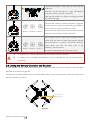
5.5 Remote Controller Operation
The Remote Controller default is set to Mode 2 by default.
Stick Neutral/ mid point: Control sticks of the Remote Controller are placed at the central position.
Move the Stick: The control stick is pushed away from the central position.
Remote Controller
(Mode 2)
Aircraft
(
Operation details
indicates nose direction)
Vertical movements on the left stick control elevation.
Push the stick up to ascend and down to descend.
When both sticks are centered the Phantom will hover
in place.
Push the throttle stick upward beyond the centered
(neutral) position to take off. Push the throttle gently to
prevent sudden and unexpected elevation.
Horizontal movements on the left stick control the
rudder.
Push left to rotate counter clock-wise and right for
clockwise. If the stick is centered, the Phantom will fly
straight.
The more the stick is moved, the faster the Phantom will
rotate.
Vertical movements on the right stick control forward
and backward pitch.
Push up to fly forward and down to fly backward. The
Phantom will hover in place if the stick is centered.
Push the stick further for a larger pitch angle (maximum
35˚) and faster flight.
©2014 DJI. All Rights Reserved.
Horizontal movements on the right stick control left and
right pitch.
Push left to fly left and right to fly right. The Phantom
will hover in place if the stick is centered.
Push the stick further for a larger pitch angle (maximum
35˚) and faster flight.
The S1 switch is used for compass calibration. Toggle the
S1 from position 1 to position 3 and back approximately 5
times to enter into compass calibration mode.
Position 1
Position 2
Position 3
In Naza-M mode, the S1 switch is used to switch between
control modes and enter compass calibration.
S2 is used to record a Home point manually. After a
Home point has been recorded automatically, flipping
S2 from position 1 to position 3 and back 5 times (or
more) rapidly will move the Home point to the
Position 1
Position 2
Position 3
Phantom’s current location.
In Naza-M working mode, S2 is be used for IOC.
(1)
In ‘Ready to Fly’ mode, the Phantom will hover when all sticks are released.
(2)
In ‘Ready to Fly (non-GPS)’ the Phantom will lock its altitude but will not have horizontal
positioning.
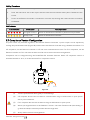
5.6 Linking the Remote Controller and Receiver
A 5.8G receiver is built in to the Phantom 2 Vision+. Its link button and indicator are located on the underside of
the phantom, as shown in Figure 27.
The Remote Controller and the receiver are paired before delivery. Only use this button if you have replaced your
Remote Controller or receiver.
Link Button &
Link Indicator
Figure 27
©2014 DJI. All Rights Reserved.
Linking Procedures
1.
Power off the Remote Controller, power on the aircraft. You will see the link indicator blinking red.
2.
Press the link button with a thin object and hold until the link indicator blinks yellow. Release the link
button.
3.
Power on the Remote Controller. Link indicator will switch off, showing that a link has been successfully
established.
Link Indicator
Link Indicator
Description
Next Operation
No signal received.
Switch on the Remote Controller or perform a link procedure.
Ready to link.
Switch on the Remote Controller.
5.7 Compliance Version Configuration
As power levels vary between regulators, the Phantom Remote Controller’s power output can be adjusted by
twisting the potentiometer knob (Figure 28) on the back of the Remote Controller using a flathead screwdriver. For
CE compliance, set the Remote Controller to CE with a full counterclockwise turn. For FCC compliance, set the
Remote Controller to FCC with a full clockwise turn. Be sure to follow relevant local regulations.
Compliance can be configured using the PHANTOM RC Assistant Software. Select CE compliance version in
Assistant Software to set it, or do the same with FCC compliance version.
CE
FCC
Figure 28
(1)
Turn the potentiometer knob gently to avoid damage.
(2)
CE compliant devices have an effective communication range of 400 meters in open spaces
due to power limitations.
(3)
FCC compliant devices have an effective range of 800 meters in open spaces.
(4)
Watch your flight distance as the Phantom 2 Vision+ will enter Failsafe mode (auto-landing or
go home and land) if it flies beyond the relevant range limits.
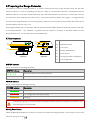
(5)
Always follow local laws and regulations.
©2014 DJI. All Rights Reserved.
(1)
It is recommended to use a Φ2.4mm flathead screwdriver for adjustments.
(2)
There is another potentiometer for reserved use.
©2014 DJI. All Rights Reserved.
6 Preparing the Range Extender
The Phantom 2 Vision+ Range Extender is a wireless communication device that operates within the 2.4 GHz
frequency band. It is used to extending the effective range of communication between a Smartphone and the
Phantom 2 Vision+. In an open, unobstructed area, the transmission distance can reach up to 700 meters. This can
be reduced by trees, buildings and other sources of the same frequency. Before every flight, it is suggested that
you ensure the Range Extender is functioning properly; otherwise communication issues between the mobile device
and the Phantom 2 Vision+ may occur.
Each Range Extender has a unique MAC address and network name (SSID), details of which are printed on the label
as ‘Phantom_XXXXXX’. The ‘XXXXXX’ represents the last 6 letters or numbers of the MAC address for the
Range Extender. This can be renamed in the DJI VISION App.
6.1 Introduction
[1]
[2]
[3]
[4]
[1]
SYSTEM Indicator
[5]
[2]
POWER Indicator
[6]
[3]
Lock-screw
[4]
Binding Reset Button
[5]
Power Switch
[6]
Charging Port(Micro-USB port)
[7]
Mounting Bracket
[7]
Figure 29
Figure 30
SYSTEM Indicator
Shows Wi-Fi status of the Range Extender.
SYSTEM Indicator
Description
The Wi-Fi network is functioning normally.
Off
The Wi-Fi network is functioning abnormally.
POWER Indicator
Shows power levels of the Range Extender.
POWER Indicator
Description
Fully charged.
Low voltage alert, re-charge required.
Charging.
If the power indicator is a solid red light, the Ranger Extender may stop working at any moment. Land
and recharge as soon as possible.
Binding Reset Button
When the Binding Reset Button is pressed, it will reset and restart the Range Extender. You will need to bind it with
©2014 DJI. All Rights Reserved.
the Phantom 2 Vision+ again to recreate its Wi-Fi network. Failure to do so will cause the DJI VISION App to fail to
connect with the camera.
6.2 Use
Charging the Range Extender
Charge the Range Extender by connecting the charging port to a power supply device such as a PC or a USB
charger using a Micro-USB cable. Make sure to charge the Range Extender completely before using it for the
first time. This takes 3~4 hours depending on USB power output.
Make sure the Range Extender has enough power before each use.
Powering on the Range Extender
1.
Flick the power switch to the ON position.
2.
Wait for approximately 30 seconds. The Wi-Fi signal indicator will blink green indicating the Range
Extender is communicating properly.
3.
Keep the Range Extender facing the aircraft during flight for the best communication link.
Power off the Range Extender after every flight to avoid discharging the battery.
Checking the Battery Level
The battery level of the Range Extender can be checked in the camera page of the DJI VISION App as shown
below. When the battery level drops to 20% or lower, the battery level icon will go red as a charging reminder.
Figure 31
6.3 Renaming the Range Extender SSID
Make your Range Extender SSID easier to remember by changing its name..
©2014 DJI. All Rights Reserved.
Figure 32
Figure 33
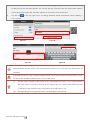
1.
Figure 34
Figure 35
Tap “Rename SSID of Range Extender” in the Settings page. Enter a new name SSID name (e.g.
Phantom_Tom) in the textbox.
2.
Tap
and you will be asked to enter the last six characters of your MAC address on the Range
Extender to confirm the change. The MAC address can be found on the sticker on your Range Extender.
If your MAC address is 60:60:1F:60:41:E7, then enter 6041E7.
3.
Tap “OK” to confirm the change. The Range Extender will automatically restart and the App will return to
the settings page. Approximately 30 seconds later, the new network name can be found in the Wi-Fi list
of your mobile device. Select and connect the renamed network to use the DJI VISION App.
6.4 Binding the Phantom 2 Vision+ and Range Extender
If the connection between the Phantom 2 Vision+ and the Range Extender fails, or one of them needs to be
repaired or replaced, a camera and Range Extender binding will need to be performed through the DJI VISION
App.
Binding
Reset Button
Figure 36
1.
Power on the camera and Range Extender.
2.
Approximately 30 seconds later, press the Binding Reset Button on the Range Extender with a thin
object until the SYSTEM Indicator turns off. The Range Extender will then restart automatically.
3.
Approximately 30 seconds later, the SYSTEM Indicator will start to blink green, indicating that the Range
Extender is ready for binding.
4.
Enable Wi-Fi on your mobile device then select “Phantom_XXXXXX” the (SSIDof your Range Extender)
from theWi-Fi network list.
5.
(Figure 37) Run the DJI VISION App then tap -> Settings -> General -> Binding. (Figure 38) Select ’Scan
©2014 DJI. All Rights Reserved.
QR Code’ to scan the camera QR code on the product packaging. (Figure 39) Get the camera SSID (E.g.
FC200_xxxxxx) and the MAC address. You can also skip the scan and enter the camera MAC address
directly (Figure 38, Figure 40). The MAC address can be found on the camera label.
6.
Tap the tick
in the top right corner. The Range Extender should automatically restart. Binding is
now complete.
QR code
Figure 37
Figure 38
Figure 39
Figure 40
DO NOT push the Binding Reset Button of the Range Extender unless you are ready to rebind the
Range Extender and the camera. This will unbind your camera so you must follow the steps above for
rebinding.
If both the Phantom 2 Vision+ and the Range Extender are powered on and working normally, you will
be able to find the SSID on the Wi-Fi list of your mobile device.
(1)
The QR code is located on the bottom cover of the Phantom 2 Vision+. If you cannot find the
QR code, please contact DJI customer service and provide your camera serial number (printed
on the label of the camera) so they can generate a new QR code for you.
(2)
Photographing and saving the QR code is recommended to prevent loss.
©2014 DJI. All Rights Reserved.
7 Downloading and Installing the DJI VISION App
7.1 Download and Install
Download and install methods
Scan the QR code to get the download link. Download and install the DJI VISION App on your
mobile device. You can find the QR code on the ‘Quick Start Guide’ as well as on the packaging
of the Phantom 2 Vision+.
iOS user
Android user
Search “DJI VISION” on the App Store, download and install on your mobile device.
Search “DJI VISION” on Google Play, download and install on your mobile device.
Supported mobile devices
iOS (iOS6.1 or above)
Android (4.0 or above)
Recommended: iPhone4S, iPhone5, iPhone5S, iPhone5C, iPod Touch4, iPod Touch5;
Available but not recommended: iPad3, iPad4, iPad mini, iPad Air.
Samsung Galaxy S3, S4, Note2, Note3 or mobile devices of similar configuration.
DJI continues to support many mobile devices and any information from users are welcome. Please
send any questions or queries to the following mailbox: [email protected].
The DJI website is regularly updated. Check back often for latest App updates.
7.2 Register and Login
Access the Internet to register and login.
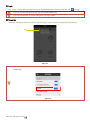
[1]
[2]
Figure 41
Figure 42
Figure 43
[1] Register
Tap ‘Register’ to enter the registration page. Fill in your Email and Password information and then tap
create a new account.
The DJI account works with all DJI Assistant Software and Apps.
©2014 DJI. All Rights Reserved.
to
[2] Login
Tap ‘Login’ to enter the login page. Fill in your registered Email and Password and then tap
to login.
Log in to your account the first time you use the DJI VISION App.
Tap “Forgot Password” if you have forgotten your login details.
[3] Usage tips
Useful tips will display when you enter the welcome page. Tap the screen to display the next useful tip.
[3]
Figure 44
Enable the “Tutorial” switch in the Settings page to get hints and tips the first time you use the DJI
VISION App.
Figure 45
©2014 DJI. All Rights Reserved.
8 Connecting the Camera
Before flight, always connect your smartphone to the Phantom’s Wi-Fi network. This is required for the camera
control and FPV.
8.1 Connecting Procedures
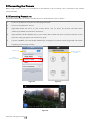
Follow these instructions to connect a mobile device to the Phantom 2 Vision+ camera.
1.
Power on the Remote Controller and the Range Extender.
2.
Power on the Phantom 2 Vision+.
3.
(Figure46) Enable the Wi-Fi on your mobile device; wait for about 30 seconds, and then select
“Phantom_XXXXXX” from theWi-Fi network list.
4.
(Figure47) Run the DJI VISION App on your mobile device. When the Wi-Fi connection indicator on the
App main menu goes green, the connection is good.
5.
Tap the “CAMERA” icon and the DJI VISION App will begin a live camera preview (Figure48). This means
everything is functioning normally.
Enable Wi-Fi
Wi-Fi Connection
Indicator
Select
Phantom_XXXXXX
Figure 46
Figure 47
Figure 48
©2014 DJI. All Rights Reserved.
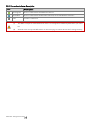
Wi-Fi Connection Indicator Description
Description
Icon
Solid green
Wi-Fi is connected to the Phantom 2 Vision+.
Solid blue
Wi-Fi is connected to another Wi-Fi network, not to the Phantom 2 Vision+.
Off
No Wi-Fi connection.
(1)
The SSID is unique for each Phantom 2 Vision+ It will appear as Phantom_XXXXXX in your Wi-Fi
list.
(2)
Android users can tap the SSID button on the main page to mobile device Wi-Fi settings directly.
©2014 DJI. All Rights Reserved.
Flight
Once pre-flight preparation is complete, it is recommended to carry out the tasks in the Phantom Pilot Training
Guide to prepare for more complex flight maneuvers and learn to fly safely. Ensure that all flights are carried out in
a suitable location.
Flight Environment Requirements
1.
Do not use the aircraft in severe weather conditions. These include wind speed exceeding category 4,
snow, rain and smog.
2.
Fly in open fields as high buildings or steel structures may affect the accuracy of the onboard compass.
3.
Keep the Phantom away from obstacles, crowds, high voltage power lines, trees or bodies of water when
in flight.
4.
Reduce the chance of electromagnetic interference by not flying in areas with high levels of
electromagnetism, including base stations or radio transmission towers.
5.
The Phantom cannot operate within the polar areas.
6.
Do not fly the aircraft within no-fly zones specified by local laws and regulations.
Preflight Checklist
1.
Remote Controller, smart battery, Range Extender and smartphone are fully charged.
2.
Propellers are mounted correctly.
3.
Gimbal clamp has been removed.
4.
Damping absorbers are in good condition, not broken or worn.
5.
Anti-drop kits have been mounted correctly.
6.
Camera lens cap has been removed.
7.
Micro-SD card has been inserted if necessary.
8.
Gimbal is functioning as normal.
9.
Motors can start and are functioning as normal.
10.
DJI VISION App can connect to the camera.
©2014 DJI. All Rights Reserved.
1 Calibrating the Compass
IMPORTANT: Make sure to calibrate the compass in every new flight location. The compass is very sensitive to
electromagnetic interference, which can cause abnormal compass data leading to poor flight performance or even
flight failure. Regular calibration is required for optimum performance.
(1)
DO NOT calibrate your compass where there is a chance of strong magnetic interference, such as
magnetite, parking structures, and steel reinforcements underground.
(2)
DO NOT carry ferromagnetic materials with you during calibration such as keys or cellular phones.
(3)
DO NOT calibrate beside massive metal objects.
1.1 Calibration Procedures
Choose an open space to carry out the following procedures. Watch the Phantom 2 Vision+ quick start video for
more details.
360o Rotate the aircraft
horizontally
Quickly flip the switch S1
360oRotate the aircraft
vertically (Nose downward)
Position-1
Position-3
Start
cali
Position-1->Position-3->Position-1
Flip 5 times or above
LED Flight
Indicator
LED Flight Indicator
LED Flight Indicator
Normal LED
Start vertical calibration
Start horizontal calibration
Succeed
Fail
Position-1
Re-calibrate
Position-3
Position-1->Position-3->Position-1
Flip once
Figure 49
If compass calibration is needed before flight, a prompt will appear on the DJI VISON App’s camera
page. It will disappear after successful calibration.
1.2 When to Recalibrate
1.
When compass data is abnormal, the rear LED flight indicator will blink red and yellow.
2.
Flying in different location to last flight.
3.
Mechanical structure of the Phantom has changed, i.e. changed mounting position of the compass.
4.
Severe drifting occurs in flight, i.e. Phantom does not fly in straight lines.
©2014 DJI. All Rights Reserved.
2 Starting/Stopping the Motors
2.1 Starting Motors
A Combination Stick Command (CSC) is used to start the motors instead of simply pushing the stick up. (Figure 50)
Push both sticks to their bottom corners to start the motors. Once the motors have spun up, release both sticks
simultaneously.
Figure 50
2.2 Stopping Motors
There are two methods to stop the motors.
Method 1: When the Phantom has landed, push the throttle down, then conduct CSC. Motors will stop immediately.
Release both sticks once motors stop.
①
②
Figure 51
Method 2: When the aircraft has landed, push the throttle down and hold. Motors will stop after 3 seconds.
Figure 52
Do not execute CSC during normal flight. This will stop the motors and cause the aircraft to drop without
control.
Conduct the CSC as neatly as you can. Release the sticks once motors start/stop.
©2014 DJI. All Rights Reserved.
3 Flight Test
3.1 Take off/Landing Procedures
1.
Place the Phantom 2 Vision+ on open flat ground with battery indicators facing towards you.
2.
Power on the Remote Controller and Range Extender, then the Smart Flight Battery.
3.
Launch the DJI VISION App and start bind it with your smartphone then enter the camera preview page.
4.
Wait until the Rear LED Flight Indicator blinks green. This means it has initialized and is Ready to Fly. If it
flashes yellow, it is in Ready to Fly (non-GPS) mode and will require more careful flight. Execute the CSC
command to start motors.
5.
Push the throttle up slowly to take off. Refer to Remote Controller Operation (Page 25) for more details.
6.
Shoot photos and videos using the DJI VISION App. Refer to DJI VISION App Usage (Page 48) for more
details.
7.
To land, hover over a level surface and gently pull down on the throttle gently to descend.
8.
After landing, execute the CSC command or hold the throttle at its lowest position for 3 seconds or more
until the motors stop.
9.
Turn off the smart battery, Range Extender and Remote Controller.
(1)
When the Rear LED Flight Indicator blinks yellow rapidly during flight, the aircraft has entered
Failsafe mode. Refer to Failsafe Function (Page 41) for details.
(2)
A low battery level warning is indicated by the Rear LED Flight Indicator blinking red slowly or
rapidly during flight. Refer to the Low Battery Level Warning Function (Page) for details.
(3)
View tutorials about flight for more flight information: www.dji.com/phantom2visionplus/training.
3.2 Video Suggestions and Tips
1.
Work through the check list before each flight.
2.
Set the gimbal working mode to Stabilized.
3.
Aim to shoot when flying in Ready to Fly only.
4.
Always fly in good weather, such as sunny or windless days.
5.
Change camera settings to suit you. These include FOV, photo format and exposure compensation.
6.
Take flight tests to establish flight routes and scenes.
7.
Push the sticks gently to make aircraft movements stable and smooth.
©2014 DJI. All Rights Reserved.
4 Failsafe Function
The Phantom will enter Failsafe mode when its connection to the Remote Controller is lost. The Flight Control
System will automatically control the aircraft to return to home and land to prevent injury or damage.
Home Point: When the Phantom enters ’Ready to Fly’ from the ‘Ready to Fly status (non-GPS)’, the
GPS coordinates will be recorded and set as the home point.
1)
When Remote Controller signal is lost, the aircraft will return to the recorded home point
coordinates and land.
2)
Home point coordinates are used to calculate the horizontal distance of the aircraft (shown as
“Distance” on the GUI of the DJI VISION App).
3)
After successfully record the home point, rear LED flight indicators blink fast green.
4.1 When will Failsafe Activate?
1.
The Remote Controller is powered off.
2.
The Phantom has flown out of effective communication range.
3.
The signal between the Remote Controller and the Phantom has been blocked.
4.
There is interference causing a signal problem with the Remote Controller.
4.2 Failsafe Procedure
Initiating the Failsafe mode from different flying statuses will results in different landing processes.
Ready to Fly (non-GPS) ---- Automatic landing
The Flight Control System will keep the aircraft level during descent and landing. It may be drift during the
descent and landing process.
Ready to Fly ---- Automatic go home and land
The Flight Control System will automatically control the aircraft to fly back to the home point and land.
The below demonstrates the complete Ready to Fly Failsafe landing process.
1
2 Flying.
Record Home Point.
3 Remote controller signal lost.
OFF CAM ON WIFI ON
OFF CAM ON WIFI ON
MICRO SD
MICRO SD
OFF CAM ON WIFI ON
MICRO SD
LED Flight Indicator
à
4 Signal lost lasts 3s, begin to go home.
LED Flight Indicator
LED Flight Indicator
6 Landing after hovering 15s.
5 Fly back to home point.
OFF CAM ON WIFI ON
MICRO SD
Height over home point>20m
OFF CAM ON WIFI ON
OFF CAM ON WIFI ON
MICRO SD
MICRO SD
20m
Elevate to 20m
OFF CAM ON WIFI ON
MICRO SD
Height over home point<=20m
LED Flight Indicator
LED Flight Indicator
LED Flight Indicator
Figure 53
(1)
To ensure the aircraft successful return to home after Failsafe activation, aim to only fly in Ready
to Fly mode.
©2014 DJI. All Rights Reserved.
(2)
The Phantom will automatically descend during the Failsafe process if there are less than 6 GPS
satellites detected for more than 20 seconds.
(3)
The aircraft cannot avoid obstacles during Failsafe.
Quickly flipping the S2 switch of the Remote Controller from top to bottom 5 times or more will reset
the current aircraft position as a new home point. Rear LED flight indicators will blink green rapidly
when successful.
Failsafe on the DJI VISION App
The DJI VISION App will provide information during Failsafe.
Figure 54
Figure 55
4.3 Regaining Control During Failsafe Procedures
Position of
Switch S1
How to regain
control
Position-1
When the S1 switch is switched to Position-1, toggle the S1 switch to
any other position once to regain control. If the Remote Controller
signal is recovered, control is returned to the pilot.
©2014 DJI. All Rights Reserved.
Position-2
Position-3
Regain control as soon as
signal is recovered.
5 Low Battery Level Warning Function
The low battery level warning alerts users when the battery is close to depletion during flight. When it appears,
users should promptly fly back and land to avoid accidental damage. The Phantom 2 Vision+ has two levels of low
battery level warning. The default battery level warning thresholds are 30% (low battery level warning) and 15%
(critical low battery level warning) respectively.
Battery Level Rest Battery
Rear LED Flight
Warning
Indicator
Level
Low battery
level warning
Critical low
battery level
warning
≤threshold of
low battery
level warning
Flight Instructions
The battery level icon will
Fly the Phantom 2 Vision+ back
become red (e.g.
Slow red blinks
) , and land it as soon as possible,
and a red rectangle will
stop motors and replace the
blink on the camera screen. battery.
≤threshold of
The battery level icon will The Phantom 2 Vision+ will begin
critical low
battery level
DJI VISION App
become red (e.g.
Fast red blinks
warning
) , to descend and land automatically.
and a red rectangle will After it has landed, stop motors
blink on the camera screen. and replace the battery.
When the Phantom 2 Vision+ is descending and landing automatically, you are able to push the
throttle upward to hover the aircraft and navigate it to a more appropriate location for landing.
When a low battery warning is triggered, you must bring the aircraft back to the home point
to avoid losing power during flight.
Low Battery Level Warning on the DJI VISION App
Battery level warnings will show on the camera page of the DJI VISION App when the battery level is low.
(1)
A red rectangle will blink on the camera screen.
(2)
Audible alarm. Make sure sound is turned on and volume is turned up on your mobile device.
(3)
The aircraft battery icon will turn red.
Figure 56
©2014 DJI. All Rights Reserved.
6 Flight Limits
All unmanned aerial vehicle (UAV) operators should abide by all regulations from such organizations as the ICAO
(International Civil Aviation Organization) and their own national airspace regulations. For safety reasons, the flight
limits function is enabled by default to help users use this product safely and legally. The flight limits function
includes height, distance limits and No Fly Zones.
In Ready to Fly mode, height, distance limits and No Fly Zones work together to manage flight. In Ready to Fly
(non-GPS) status, only height limits work and flights cannot go higher than 120m.
Default parameters in Assistant Software are compliant within the definitions of class G ruled by ICAO.
(Refer to Airspace Classification to get more details). As each country has its own rules, make sure to
configure these parameters to comply with these rules before flying.
6.1 Max Height & Radius Limits
Max Height & Radius limits flying height and distance. Configuration can be done in the Phantom 2 Vision+
Assistant (Figure 57). Once complete, your Phantom will fly in a restricted cylinder (Figure 58).
Max
Height
Max
Radius
Home Point
Height of
aircraft when
powered on
Figure 57
Figure 58
Ready to Fly
Limits
Max Height
Max Radius
DJI VISION App
Rear LED flight indicator
Flight height must be under the set
Warning: Height limit
height.
reached.
Flight distance must be within the
Warning: Distance limit Rapid red flashing
max radius.
reached.
©2014 DJI. All Rights Reserved.
None.
when close to the max radius limit.
Ready to Fly(non-GPS)
Flight Limits
DJI VISION App
Flight height restricted to 120m and
Max Height
under.
Rear LED flight indicator
Warning: Height limit reached.
Max Radius
None.
No limits
(1)
If you fly out of the limit, you can still control the Phantom, but cannot fly it further.
(2)
If the Phantom flies out of the max radius in Ready to Fly (non-GPS) mode, it will fly back within
range automatically.
6.2 Flight Limits of Special Areas
Special areas include airports worldwide. All special areas are listed on the DJI official website. Please refer to
http://www.dji.com/fly-safe/category-mc for details. These areas have been divided into category A and category B.
8100m
c
8000m
Center of
Special
Area
b
Center of
Special
Area
2000m c
a
a
1000m
2400m
cb
a
Airspace: A,B,C,D
Boundary: a, b, c, d
A
c
bc
a
B
C
Airspace: A,C,D
Boundary: a, c,
a
a
A
D
c
C
D
120m
d
d
10.5m
Figure 59: Category A
Figure 60: Category B
Ready to Fly mode
Airspace
Limits
Motors will not start.
A
Orange
DJI VISION App
Warning: You are in a restricted zone.
Take off prohibited
If the Phantom flies into a special area
in Ready to Fly (non-GPS) mode and
Ready to Fly mode activates, it will
automatically descend and land then
Warning: You are in a restricted zone.
Now descending.
stop its motors.
B
If the Phantom flies into a special area in
©2014 DJI. All Rights Reserved.
Warning: You Are In A Restricted Zone,
Rear LED Flight
Indicator
Yellow
Ready to Fly (non-GPS) mode and Ready Now Descending.
to Fly mode activates, it will descend to
airspace C and hover 5 meters below
edge d.
No restrictions of flight, but the Phantom Warning: You are close to a restricted
will not enter Category A, the aircraft can zone, Fly Cautiously. (Note: For airspace
C
Green
D
Blue
fly free, but it will not enter Airspace B
A, when aircraft enters the area beneath
through Boundary b & d.
the Boundary d, the warning message
Around Category B sites, the phantom
changes to “You are in a restricted area.
can fly freely, but it will not enter into
Max flight height restricted to between
Airspace A through Boundary a.
10.5m and 120m. Fly Cautiously.”)
No restrictions.
None.
None.
Semi-automatic descent: All stick commands are available except the throttle stick command during
the descent and landing process. Motors will stop automatically after landing. Users must toggle the S1
switch to regain control. This is the same as regaining control during Failsafe. Please refer to Regaining
Control During Failsafe Procedure (Page42).
(1)
When flying in the airspace (A/B/C) of restricted special area, LED flight indicators will blink red
quickly and continue for 3 seconds, then switch to indicate current flying
status and continue for 5 seconds at which point it will switch back to red blinking.
(2)
For safety reasons, please do not fly close to airports, highways, railway stations, railway lines,
city centers and other special areas. Try to ensure the aircraft is visible.
6.3 Conditions of Flight Limits
In different working modes and flight modes, flight limits will differ according to number of GPS satellites found.
The following table demonstrates all the cases(√: available; ×:unavailable).
All flights are restricted by height, distance and special areas simultaneously. The Failsafe and Ground Station
operations are not restricted to flight limits, but if Ground Station function is used, the flight will be restricted the
special area limits built in to Ground Station. Refer to the Ground Station manual for details.
Phantom mode
Flight Status
Limits of Special Area
Max Height
Max Radius
Ready to Fly
√
√
√
Ready to Fly (non-GPS)
×
√
×
©2014 DJI. All Rights Reserved.
Naza-M mode
Control Mode
number of GPS found
Limits of Special Area
Max Height
Max Radius
≥6
√
√
√
<6
×
√
×
≥6
√
√
×
<6
×
√
×
≥6
×
×
×
<6
×
×
×
GPS
ATTI.
Manual
6.4 Disclaimer
Please ensure that you are up to date with international and domestic airspace rules and regulations before using
this product. By using this product, you hereby agree to this disclaimer and signify that you have read this fully. You
agree that you are responsible for your own conduct and content while using this product, and for any direct or
indirect consequences caused by not following this manual, violating or disregarding other applicable local laws,
administrative rules and social habits thereof.
©2014 DJI. All Rights Reserved.
DJI VISION App Usage
The DJI VISION App controls the Phantom 2 Vision+ camera including capture, recording, settings and pitch angle.
It also displays essential flight information including flight parameters and battery level.
1 DJI VISION App Main Menu
After logging in you will see the VISION App home screen. This shows current Wi-Fi connection status and the four
main features of the App.
Figure 61
Icons
Description
Camera
Tap to enter camera preview
Album
Tap to enter album
News
Tap to enter DJI news
Settings
(1)
Tap to enter App settings
When using the camera and the SD card album (Page 57), connect your mobile device to the
Phantom 2 Vision+ Wi-Fi network.
(2)
Internet access is required for sharing photos, videos and reading DJI news.
(3)
If you receive a phone call during a flight, the live camera preview screen may be interrupted. It's
recommended to ignore the call and pay attention to your flight.
©2014 DJI. All Rights Reserved.
2 Camera Page
[5]
[6]
[7]
[8]
[9]
[10]
[1]
[2]
[11]
[12]
[13]
[3]
[14]
[4]
Figure 62
[1]Return [2] Camera Pitch Control [3] Flight Attitude and Radar Function [4] Flight Parameters [5] Wi-Fi Signal
Intensity [6] Flight Battery Level [7] Aircraft GPS Status [8] Micro-SD Card Status [9] Range Extender Battery Level
[10] Remaining Shots [11] Shutter Button [12] Video Recording Button [13] Camera Settings [14] Hide or Show Flight
Parameters
[1] Return
- Return to the preview page
[2] Camera Pitch Control
- Pitch Control switch is white
tap once to highlight it
and enter Accelerometer Sensor Mode. Tap
again to return to normal.
Normal Mode
Tap up arrow
to pitch camera upwards and down arrow
to pitch downwards. Green slider
current camera pitch.
Gimbal pitch control (Normal Mode)
Gimbal pitch movement
Figure 64
Figure 63
©2014 DJI. All Rights Reserved.
indicates
Accelerometer Sensor Mode
The gimbal pitch movement is controlled by moving your mobile device. Pitch forward to pitch camera down and
backward to pitch camera up.
Gimbal pitch control (Accelerometer Sensor Mode)
Figure 66
Figure 65
Gimbal pitch movement
Figure 67
In Accelerometer Sensor Mode, the pitch angle indicator will show a grey area. When the green pitch
indicator is inside the grey area, the camera will move according to pitch gestures. When the indicator
reaches the boundary of the grey area, pitch gestures will control the camera’s pitch speed at a
constant rate.
[3] Flight Attitude and Radar Function
Flight attitude is indicated by the flight attitude icon.
(1)
The red arrow shows which direction the Phantom 2 Vision+ is facing.
(2)
Light blue and dark blue areas indicate pitch.
(3)
Pitching of the boundary between light blue and dark blue area shows roll angle.
©2014 DJI. All Rights Reserved.
Figure 68
Tap flight attitude icon to turn on the radar function. Home in the center of the radar and the red icon indicates
the Phantom 2 Vision+’s current heading, direction, and approximate distance from home. Tap flight attitude
icon again to disable the radar.
Aircraft
Position
Home
Point
Mobile Device
Position
Distance
Figure 69
(1)
Figure 70
By default, the center of the radar indicates the home point recorded by the Phantom 2 Vision+.
Tap the center of the radar to switch the center to your mobile device's current location.
(2)
If your mobile device contains a compass, the top portion of the Radar is the direction you are
pointing. If not, the radar will be oriented due north.
(3)
Distance units are metric in Figure 69 and Figure 70. Users can switch the unit to imperial in the
settings page.
[4] Flight Parameters
Distance: Horizontal distance from home point.
Altitude: Vertical distance from home point.
Speed: Horizontal flying speed.
Distance value will show as N/A if the Phantom 2 Vision+ is not in “Ready to Fly” mode.
[5] Wi-Fi Signal Intensity
Indicates camera is connected to your mobile device and Wi-Fi is working normally.
The connection between the camera and mobile device may fail if Wi-Fi signal strength is low. Refer to <
Phantom 2 Vision+ CONNECTION BROKEN> for more information.
[6] Flight Battery Level
Show current flight battery level. When battery level is low and the battery icon turns red it is recommended to fly
©2014 DJI. All Rights Reserved.
the aircraft back and land it as soon as possible. Please refer to Low Battery Level Warning Function (Page 43) to
get more details.
[7] Aircraft GPS Status
GPS status icon display the number of satellites found by the aircraft. The icon is highlighted when more than 6
satellites are found, allow the Phantom to fly in “Ready to Fly” mode.
[8] Micro-SD Card Status
Displays Micro-SD Card Status. Icon is highlighted when a valid Micro-SD card is inserted. If there is no
Micro-SD card present, it is grayed out.
[9] Range Extender Battery Level
Shows current battery level of the Range Extender. Refer to Checking the Battery Level (Page 30) for more
details.
[10] Remaining Shots
Displays estimated shots remaining, based on the current photo size setting and storage capacity of the Micro-SD
card. This shows ‘0’ if: (1) Micro-SD card is not inserted. (2) Micro-SD card is full. (3) Micro-SD card is damaged.
(4) Connection between the DJI VISION App and camera is broken.
[11] Shutter Button
Tap to take photos.
Single capture: press once for a single capture.
Continuous capture: press once for 3 or 5 captures.
Timed capture: press once to begin a timed capture, press again to stop.
(1)
Shutter button is disabled during video recording.
(2)
Capture modes can be reconfigured in camera settings; refer to the Camera Settings (Page53).
[12] Video Recording Button
Start and stop video recording. Tap once to start recording. A red dot will blink to indicate recording is in
progress and a time code will appear in the top right corner of the preview screen. Press again to stop
recording.
Figure 71
©2014 DJI. All Rights Reserved.
[13] Camera Settings
Tap to open the camera settings menu, refer to Camera Settings (Page 53).
[14] Hide or Show Flight Parameters.
Tap to hide flight parameters. Tap again to show.
Figure 72
©2014 DJI. All Rights Reserved.
Figure 73
3 Camera Settings
[1]
[2]
[3]
[4]
[5]
[6]
[7]
[8]
[9]
[10]
[11]
[12]
Figure 74
Figure 75
[1] Capture Mode [2] Photo Size [3] Video Resolution [4] Photo Format [5]ISO [6] White Balance [7] Exposure
Metering [8] Exposure Compensation [9] Sharpness [10] Anti-flicker [11] Restore Default Settings [12] Format
Micro-SD Card
[1] Capture Mode
Single capture.
3 captures.
5 captures.
Configurable timed capture:
a)
Interval between shots (3~60 s)
b)
Number of shots (2~254, or number of
picture is subject to the capacity of the memory card.)
Capture Button will change according to the mode selected
,
,
,
.
[2] Photo Size
Large:
4384 x 3288, 4:3,
14.4MP
Medium: 4384 x 2922, 3:2,
12.8MP
Small:
4384 x 2466, 16:9, 10.8MP
[3] Video Resolution
1920 x 1080 60i,
16:9
1920 x 1080 30p,
16:9
1920 x 1080 25p,
16:9
1280 x 720 60p,
16:9
1280 x 720 30p,
16:9
640 x 480 30p,
4:3(VGA)
Three Field of View (FOV) options are supported when shooting in 1920x1080 60i, 1920x1080
30p and 1920x1080 25p: Medium (110°) and Narrow (85°).
©2014 DJI. All Rights Reserved.
[4] Photo Format
JPEG
RAW
The Phantom 2 Vision+ camera shoots in JPEG and RAW file formats
simultaneously when this option is selected. See the following table for
detailed specifications.
JPEG photo size
4384 X 3288
4384 X 2922
4384 X 2466
RAW photo size
4384 X 3288
4384 X 2920
4384 X 2464
RAW can be edited using the most recent versions of Adobe Camera Raw for Photoshop and Adobe
Lightroom.
[5] Selectable ISO
AUTO
100
200
400
[6] White Balance
AWB (auto white balance)
Sunny
Cloudy
Incandescent lamp
[7] Exposure Metering
Center
Average
Spot
Center: The meter concentrates most on the center of the scene.
Average: Averages out the light levels for the entire image. This mode is used when the scene has no
significant light difference.
Spot: Measures a small area in the center of the scene. This mode is used in a high contrast scene
where the subject must be accurately exposed.
[8] Exposure Compensation
©2014 DJI. All Rights Reserved.
-2.0(EV)
2.0(EV)
-1.7(EV)
1.7(EV)
-1.3(EV)
1.3(EV)
-1.0(EV)
1.0(EV)
-0.7(EV)
0.7(EV)
-0.3(EV)
0.3(EV)
0(EV)
[9] Sharpness
Standard
Hard
Soft
[10] Anti-flicker
Auto
50Hz
60Hz
[11] Restore Default Settings
Restores all default camera settings. Flight battery restart is needed to allow restoration to take effect.
[12] Format Micro-SD Card
Format the Micro-SD card. All data stored in the Micro-SD card will be lost after formatting. Remember to
backup before formatting.
©2014 DJI. All Rights Reserved.
4 Album Page
The DJI VISION App has an SD Card album and a Mobile Device album. Images and videos on the SD Card album
can be synchronized to the Mobile Device album.
In the DJI VISION App, tap
to enter into the SD Card album and tap
to enter into Mobile Device album.
SD CARD Album
Mobile Device Album
Figure 76
SD CARD album is accessible when the mobile device is connected to Phantom 2 Vision+ Wi-Fi.
4.1 SD Card Album
Pictures stored in the camera are presented using thumbnails. Tap the corresponding thumbnail to view the picture.
[4]
[1]
[3]
[2]
Figure 77
[1] Photos and videos are listed and grouped by date.
[2] All photos and videos that have been synced to your mobile device are marked with
.
[3] Tap any thumbnail for single view mode. Tap a Photo thumbnail that hasn’t been synchronized to the mobile
©2014 DJI. All Rights Reserved.
device to view the photo. Swipe left or right to view the previous or next photo. Tap on a video thumbnail to
play it and view the video length. A progress bar will appear at the bottom of the screen. Tap
to enter single
synchronization mode to synchronize a single photo or video, or to synchronize and play a video at the same
time.
Figure 78
[4] Tap the
Figure 79
button to enter multiple synchronization mode (as shown in the following diagram). Tap thumbnails
to select photos or videos to synchronize to your mobile device (selected thumbnails are marked with a tick).
Select one or more groups to be synchronized by checking the box before the group, then tap
synchronizing. During the synchronization process, users can tap
to start
to cancel synchronization. Photos and
videos that have been synchronized to the mobile device will remain.
Some mobile devices cannot support the synchronization of 1080i60 video files.
[5]
Select a group
Select a single
photo or video
Figure 80
Figure 81
[5] Tap “Cancel” or “Finished” to exit multiple synchronization mode and return to the SD Card page.
Connect camera data port to a PC via a Micro-USB cable to copy photos or videos on the SD card
album from the Micro-SD card to the PC conveniently.
©2014 DJI. All Rights Reserved.
4.2 Mobile Device Album
[2]
[1]
[3]
[4]
Figure 82
[1] Browse all synchronized photos and videos in the album. Tap to view selected photos or videos.
[2] Photos and videos are displayed using thumbnails and sorted by capture time.
[3] Pictures and videos are sorted by captured/recorded geo-tagged locations.
Internet access is required for map downloads.
Geo-tagged locations
Figure 83
[4] Tap any thumbnail for single view; you can slide left or right to view the previous or next photo. Tap a video
thumbnail to play a single video.
©2014 DJI. All Rights Reserved.
[5]
Figure 84
[5] Tap
Figure 85
to share your photos and videos to social networks.
Access to the Internet is required for photo and video sharing.
Figure 86
©2014 DJI. All Rights Reserved.
5 News Page
View the latest DJI news. (Internet access is required.)
Figure 87
©2014 DJI. All Rights Reserved.
Figure 88
6 Settings Page
[7]
[1]
[8]
[2]
[9]
[3]
[10]
[4]
[11]
[12]
[13]
[5]
[6]
[14]
[15]
[16]
Figure 89
Figure 90
[1] Toolbar Auto Hide
Slide the switch from left to right to enable this function. Toolbar will auto hide on the camera page.
Figure 91: Toolbar Auto Hide Enabled
Figure 92: Toolbar Auto Hide Disabled
[2] When Connection Lost
[17]
[18]
Figure 93
©2014 DJI. All Rights Reserved.
[17] Stop Recording:
Enabled: Stop recording if the Wi-Fi connection between the mobile device and the camera breaks while the
camera is recording.
Disabled: Keeps recording if the Wi-Fi connection between the mobile device and the camera breaks while the
camera is recording.
[18] Select the state the camera will enter in the event of a Wi-Fi Connection break between the mobile device and
the camera. Use this function to ensure you can continue don’t miss out on a shot.
[3] Camera Settings Display
iOS users will see an enabled item display in the camera settings toolbar and disabled items will be hidden.
This feature is not available on Android.
3 items displayed
by default
Figure 94
Figure 95
[4] Preview Quality
Figure 96
High: 640 x 480@30fps
Medium: 640 x 480@15fps
Medium: 320 x 240@30fps
Low: 320 x 240@15fps (Recommended when there is a lot of interference.)
©2014 DJI. All Rights Reserved.
[5] Parameter Unit
Select imperial or metric units of measurement.
[6] FPV Mode
Switched on, the gimbal will work in FPV mode. Switched off, the gimbal will work in Stabilize mode.
[7] Auto Flips
The user interface of the DJI VISION App will flip if the mobile device’s auto-flip is enabled.
[8] Battery Low Warning
If enabled, an alarm will sound when the battery level is too low.
We recommended adjusting the mobile device volume to the highest level.
[9] Tutorial
Hints and Tips
[10] Clear News Cache
Tap to flush news cache.
[11] Binding
In the event that camera and Range Extender binding is lost or an item has been repaired or replaced, binding
must be performed using the DJI VISION App. Refer to Binding the Phantom 2 Vision+ and Range Extender
(Page 31) for details.
[12] Rename SSID of Range Extender
Tap to rename the SSID of the Range Extender. Refer to Renaming the Range Extender SSID (Page 30) for
details.
©2014 DJI. All Rights Reserved.
[13] Find My PHANTOM 2 VISION
My location
My location
PHANTOM 2
VISION’
S location
PHANTOM 2
VISION’
S location
Figure 97
Figure 98
[14] Account
Tap to see user account information.
[15] Rate
Tap to rate the DJI VISION App. Internet access required.
Android App does not include rating.
[16] About
Tap to see the current version of the DJI VISION App and contact information.
©2014 DJI. All Rights Reserved.
Assistant Software
For better use of the Phantom 2 Vision+, Phantom 2 Vision+ Assistant Software and PHANTOM RC Assistant
Software are required. Both run on Windows or Mac OS X operating systems.
1 Installing Driver and Phantom 2 Vision+ Assistant Software
1.1 Installing and Running on Windows
1.
Download the driver installer and Assistant Software installer (.EXE) from the Phantom 2 Vision+
download page.
2.
Connect the Phantom 2 Vision+ to a PC using a Micro-USB cable.
3.
Run the driver installer and follow the prompts to finish installation.
4.
Run the Assistant Software installer and follow the prompts to finish installation.
5.
Double click the Phantom 2 Vision+ icon on your desktop to launch Assistant Software.
Supports Windows XP, Windows 7 and Windows 8 (32 or 64 bit).
1.2 Installing and Running on Mac OS X
1.
Download the Assistant Software installer (.DMG) format from the Phantom 2 Vision+ download page.
2.
Run the installer and follow the prompts to finish installation.
Figure 99
3.
When launching for the first time, if using Launchpad to run the Phantom 2 Vision+ Assistant Software,
Launchpad will not allow access because Assistant has not been reviewed by the Mac App Store.
Figure 100
4.
Locate the Phantom 2 Vision+ icon in Finder, press Control then click the icon (or right-click the icon
using a mouse). Choose Open from the shortcut menu, then click Open in the prompt dialog box to
launch.
©2014 DJI. All Rights Reserved.
5.
After the first successful launch, double click the Phantom 2 Vision+ icon as normal to launch using
Finder or Launchpad.
Figure 101
.DMG installer supports Mac OS X 10.6 or above.
Phantom 2 Vision+ Assistant Software on Mac OS X and Windows are the same. Assistant Software
pages shown in this manual are from the Windows version.
©2014 DJI. All Rights Reserved.
2 Using Assistant Software
The Phantom 2 Vision+ Assistant Software is used to configure the flight control system and upgrade firmware. The
PHANTOM RC Assistant Software is used to configure the Remote Controller and upgrade its firmware.
2.1 Using the Phantom 2 Vision+ Assistant Software
Figure 102
1.
Power on the PC and the Phantom 2 Vision+. Connect the Phantom 2 Vision+ to the PC with a Micro-USB
cable. DO NOT disconnect until configuration is finished.
2.
Run Phantom 2 Vision+ Assistant Software and wait for the Phantom 2 Vision+ to connect. Watch the
indicators
on the bottom of the screen. When connected successfully, the connection indicator is
and communication indicator is blinks
.
3.
Choose [Basic] or [Advanced] configuration pages.
4.
View and check the current configuration in the [View] page.
Function switch between Phantom
and NAZA-M working mode
Language swap
Account, software
version
Firmware upgrade
View configurations
RC, Gain
Gimbal, Battery,
Flight Limits
IMU calibration
Communication
indicator
*This image is for reference
only. Please refer to the
actual user interface.
Connection indicator
Figure 103
(1)
Do not enable Naza-M mode before finishing “Advanced Flight Maneuvers” in the "Phantom
Pilot Training Guide”.
(2)
Enable Phantom mode by tapping the same button if Naza-M mode is enabled. Once changed
to Phantom working mode, all parameters will return to factory settings.
©2014 DJI. All Rights Reserved.
2.2 Firmware Upgrade of the Phantom 2 Vision+
1.
Click [Upgrade] icon to check the current firmware version and whether the installed firmware is the
latest version. If not, click links to upgrade.
2.
Wait until the Assistant Software shows “finished”. Click OK and power cycle the Phantom 2 Vision+
after 5 seconds. Once complete, firmware is up to date.
Firmware upgradable items
Upgrade link
Current firmware version
*This image is for reference
only. Please refer to the
actual user interface.
Figure 104
(1)
An internet connection is required to upgrade the Phantom 2 Vision+ firmware.
(2)
DO NOT power off until the upgrade is finished.
(3)
If the firmware upgrade fails, the main controller will enter a waiting for firmware upgrade status
automatically. If this happens, repeat the above procedures.
Firmware upgradable items: (1)Main Controller (2)GPS (3)5.8G Receiver (4) Main Board (P330CB)
(5)Battery (6)Gimbal IMU
2.3 Using the PHANTOM RC Assistant Software
Use the Phantom 2 Vision+ Assistant Software to install PHANTOM RC Assistant Software on your Windows PC or
Mac, and then follow the below steps to configure the Remote Controller.
DT7调参软件
Figure 105
1.
Turn off the Remote Controller and find its Micro-USB port.
2.
Power on PC and Remote Controller then connect Remote Controller to the PC with a Micro-USB cable.
©2014 DJI. All Rights Reserved.
DO NOT disconnect until configuration is finished.
3.
Run the PHANTOM RC Assistant Software and wait for the Remote Controller to connect to Assistant
Software. Watch the indicators
connection indicator is
on the bottom left of the screen. When connected successfully, the
and communication indicator blinks
4.
Finish configuration in the [Main] page.
5.
Finish upgrade in the [Info] page if necessary.
.
Language swap
Main page
Firmware upgrade
Account, software
version
*This image is for
reference only. Please
refer to the actual
user interface.
Communication indicator
Connection indicator
Figure 106
©2014 DJI. All Rights Reserved.
Appendix
1 Rear LED Flight Indicator Status
Rear LED Flight Indicators
Normal status
(Red, Green, Yellow flashes in turn)
Power On Self-Test
(Green, Yellow flashes in turn)
Warming Up
(Slow Green flashes)
Ready to Fly
(Slow Yellow flashes)
Ready to Fly (non-GPS)
Rear LED Flight Indicators
(Quick Yellow flashes)
Abnormal status
Remote Controller Signal Lost
(Slow Red flashes)
Low Battery Level Warning
(Quick Red flashes)
Critical Low Battery Level Warning
(Three Red flashes off and on)
Not Stationary or Sensor Bias is too big
(Solid red)
Error*
(Red, Yellow flashes in turn)
Compass Needs Calibration
*You can investigate the error by connecting the Phantom 2 Vision+ to the Phantom 2 Vision+’s Assistant
Software.
©2014 DJI. All Rights Reserved.
2 Specifications
Aircraft
Supported Battery
DJI 5200mAh Li-Po Battery
Weight (Battery & Propellers included)
1242g
Hovering Accuracy (Ready to Fly)
Vertical: 0.8m; Horizontal: 2.5m
Max Yaw Angular Velocity
200°/s
Max Tiltable Angle
35°
Max Ascent / Descent Speed
Ascent: 6m/s; Descent: 3m/s
Max Flight Speed
15m/s (Not Recommended)
Diagonal motor-motor distance
350mm
Gimbal
Working Current
Static : 750mA; Dynamic : 900mA
Control Accuracy
±0.03°
Controllable Range
Pitch : -90°-0°
Maximum Angular Speed
Pitch : 90°/s
Camera
Operating Environment Temperature
0℃-40℃
Sensor Size
1/2.3”
Effective Pixels
14 Megapixels
Resolution
4384×3288
HD Recording
1080p30 /1080i60
Recording FOV
110° / 85°
Remote Controller
Operating Frequency
5.728 GHz-5.85 GHz
Communication Distance (open area)
CE Compliance: 400m; FCC Compliance: 800m
Receiver Sensitivity (1%PER)
-93dBm
Transmitting Power (EIRP)
CE Compliance: 25mW; FCC Compliance: 100mW
Working Current/Voltage
80 mA@6V
Battery
4 AA Batteries
Range Extender
Operating Frequency
2412MHz - 2462MHz
Communication Distance (open area)
500m - 700m
Transmitting Power
20dBm
Power Consumption
2W
©2014 DJI. All Rights Reserved.
3 Troubleshooting (FAQ)
3.1 How to solve large margin(s) mid-point error?
If the Remote Controller stick(s) mid-point margin of error is too big, the motors will fail to start when you execute
the CSC and the Phantom will not take off. The below are some possible fixes for this.
(1) One of the Remote Controller’s stick positions (except the throttle stick) is not centered when powering on the
Phantom 2 Vision+.
Solution: Place all Remote Controller sticks at their mid-point positions and then power cycle the Phantom 2
Vision+ to re-record the mid-point.
(2) The Remote Control sticks have been trimmed, leading to a deviation in the mid-point position.
Solution: Use Assistant to perform a Remote Control calibration.
(1) Connect to Assistant Software, tap Basic -> RC -> Command Sticks Calibration and push all Remote Control
sticks through their complete travel range to see if any stick cannot reach its outermost position.
(b) Power cycle the Phantom 2 Vision+. Power cycling is required.
(c) Re-attempt Remote Controller calibration in Assistant.
If the above solutions do not solve your issue, please send your Remote Control to DJI Customer service for repair.
3.2 How to restore a video file if power is turned off during a recording session?
Solution: Keep or place the Micro-SD card back into the camera. Power cycle the camera and wait about 30
seconds for the video file to be restored.
3.3 Failure to acquire the SSID.
Solution: Double check whether both the camera and Range Extender are powered on and the power switch of the
camera is switched to “Wi-Fi ON.”
3.4 What to do if Phantom 2 Vision+ is out of sight and the Wi-Fi connections is lost?
Solution: Turn off the Remote Controller to trigger the Failsafe mode and the aircraft will start to fly back, descend,
and land at the Home point. Please make sure there are no obstacles between the Phantom and the home point and
that you are familiar with the procedure for regaining control.
3.5 Wi-Fi connection fails all the time.
Solution: Double check the current Wi-Fi connection status of the mobile device. The mobile device may be
connecting to other Wi-Fi networks after a connection breaks with the Phantom 2 Vision+.
3.6 Files fail to synchronize.
Solution: Video files that are too large (file sizes close to 4GB) cannot be synchronized to the mobile device. Some
mobile devices do not support the synchronization of the 1080i60 video files.
3.7 iOS Albums fail to synchronize.
Solution: Reset the settings of your mobile device as illustrated below. Enable the Settings -> Private -> Photos -> DJI
VISION. Otherwise Albums will fail to synchronize with your mobile device.
©2014 DJI. All Rights Reserved.
3.8 Failure to share.
Solution: Make sure your mobile device has access to the Internet.
3.9 Some Android devices have a problem connecting to the Phantom 2 Vision+ Wi-Fi Extender.
Solution: Some Android devices do not allow for both a Wi-Fi connection and a mobile data connection at the same
time. When trying to connect to the Phantom 2 Vision+ Wi-Fi network, most devices will check whether an Internet
connection has a certain Wi-Fi setting enabled, e.g. Auto network switch or Test for Internet connection. If no
Internet connection is found because the Phantom 2 Vision+ creates a non-routable connection it will drop the
Phantom 2 Vision+ Wi-Fi network connection and scan for the next available connection. Example: For the Samsung
Note 3, carry out the following procedures to solve this issue. Tap Settings -> Wi-Fi, and then tap the “Menu” button.
Select “Advanced” then uncheck the “Auto network switch”. You might see a warning that indicates the Internet
connection is unstable this message can be ignored.
3.10 App tips for mobile devices.
If using the App on multiple mobile devices turn off the App on the first mobile device then turn it on on the second
one to ensure normal functions on the second mobile device.
3.11 How to land the aircraft more smoothly?
First pull the throttle stick position down to lower than 5%, then execute the CSC command to stop the motors.
3.12 Why is the discharge time of a battery not zero when unused?
A battery aging test is performed prior to delivery which affects the discharge time of the new battery. This is why
the discharge time of a new battery is not zero. The battery is okay to use.
©2014 DJI. All Rights Reserved.