1
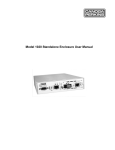
Model 1502
Domain Management
Module
User Manual
EdgeAccess Universal Chassis System
NOTICE
Canoga Perkins has prepared this users manual for use by customers and Canoga Perkins personnel as
a guide for the proper installation, operation and/or maintenance of Canoga Perkins equipment. The
drawings, specifications and information contained in this document are the property of Canoga
Perkins and any unauthorized use or disclosure of such drawings, specifications and information is
prohibited.
Canoga Perkins reserves the right to change or update the contents of this manual and to change the
specifications of its products at any time without prior notification. Every effort has been made to
keep the information in this document current and accurate as of the date of publication or revision.
However, no guarantee is given or implied that the document is error free or that is accurate with
regard to any specification.
Canoga Perkins Corporation
20600 Prairie Street
Chatsworth, California 91311-6008
Business Phone: (818) 718-6300
(Monday - Friday 7 a.m. - 5 p.m. Pacific Time)
FAX: (818) 718-6312 (24 hrs.)
Web Site: www.canoga.com
Email: [email protected]
Copyright © 2003 - 2005 Canoga Perkins Corporation
All Rights Reserved
EdgeAccess®
Universal Chassis System
Model 1502 Domain Management Module
User Manual
Model Number 1502-UM
Product Number 6912513
Rev. G 01/2008
EdgeAccess and Canoga Perkins are registered trademarks of Canoga Perkins Corp.
To reference Technical Advisories and Product Release Notes, go to Canoga Perkins'
website: http://www.canoga.com/cservice.htm
ii
Model 1502 Domain Management Module
EdgeAccess Universal Chassis System
Table of Contents
Chapter 1 Overview and Management Architecture ............................................1-1
Features of the Domain Management Module ....................................................................................1-2
DMM Management and SBMC ..........................................................................................................1-3
Security................................................................................................................................................1-4
Chapter 2 Hardware Installation and Functions...................................................2-1
Setup and Installation ..........................................................................................................................2-1
Front Panel Functions..........................................................................................................................2-2
Chapter 3 Software Management Through VT100...............................................3-1
Setting Up for Network Management .................................................................................................3-1
Set Up the Network Management Platform ..................................................................................3-1
Set Up the PC for Terminal Operation .........................................................................................3-1
Management User Interface ................................................................................................................3-2
General Screen Format.................................................................................................................3-3
User Interface Organization .........................................................................................................3-4
Login and DMM Main Menu ........................................................................................................3-5
Manage the DMM ...............................................................................................................................3-5
Configure the DMM for the System ..............................................................................................3-6
Manage Traps and Alarms............................................................................................................3-8
Manage the Date and Time...........................................................................................................3-9
Set Up the Modem/SLIP/PPP Parameters..................................................................................3-10
Test a Connection With PING.....................................................................................................3-10
Update Software .........................................................................................................................3-11
Manage Security................................................................................................................................3-12
Set General Security Parameters................................................................................................3-13
Set Up and Manage a User Account...........................................................................................3-14
Set Up Host Access .....................................................................................................................3-15
Set Up a Radius Client................................................................................................................3-16
Change Your Password...............................................................................................................3-17
Set Up the Notification Destination for Traps ............................................................................3-17
Manage the Domain ..........................................................................................................................3-18
View Events in the System Log....................................................................................................3-19
Manage System Status and Alarms .............................................................................................3-20
Manage the Module Code Library..............................................................................................3-20
Manage Logged In Users............................................................................................................3-20
Create and Manage Virtual Groups...................................................................................................3-21
Manage a Chassis ..............................................................................................................................3-22
Manage a CIM...................................................................................................................................3-24
Manage a Module..............................................................................................................................3-25
Chapter 4 Specifications...........................................................................................4-1
Appendix A Warranty Information .......................................................................A-1
Model 1502 Domain Management Module
iii
EdgeAccess Universal Chassis System
Index ......................................................................................................................... I-1
List of Figures
Figure 1. UCS 1002 Chassis .............................................................................................................. 1-1
Figure 2. The Domain Management Module..................................................................................... 1-2
Figure 3. SW3 for Full Duplex (FD) or Half Duplex (HD) Ethernet and MDX/MDI Switch........... 2-1
Figure 4. General Screen Format ....................................................................................................... 3-3
Figure 5. Typical System Log Screen.............................................................................................. 3-19
Figure 6. Typical Virtual Group Management Screen..................................................................... 3-21
Figure 7. Typical Chassis Management Screen, Module Information............................................. 3-23
Figure 8. Typical Chassis Management Screen, Firmware Information.......................................... 3-23
Figure 9. Typical Chassis Management Screen, Power Consumption Information. ....................... 3-23
Figure 10. CIM Management Screen............................................................................................... 3-24
List of Tables
Table 1.
Table 2.
Table 3.
Table 4.
Table 5.
Table 6.
Table 7.
Table 8.
iv
Status LEDs ......................................................................................................................... 2-2
DMM Main Menu Functions ............................................................................................... 3-5
Domain Management Module Menu Selections.................................................................. 3-6
System Configuration Report .............................................................................................. 3-6
System Configuration Options............................................................................................. 3-7
IP Address Classes............................................................................................................... 3-7
Trap Configuration Options................................................................................................. 3-8
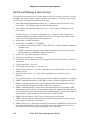
Virtual Group Menu Options ............................................................................................. 3-21
Model 1502 Domain Management Module
EdgeAccess Universal Chassis System
Chapter 1
Overview and Management Architecture
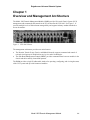
The Model 1502 Domain Management Module (DMM) provides Universal Chassis System (UCS)
management with commands and controls in the 2U size that fits the UCS 1002. See Figure 1. It
provides multiple levels of fault-tolerant manageability and supports industry-standard methods to
access the module.
Figure 1. UCS 1002 Chassis
The management architecture provides two main features:
•
•
The Domain, Virtual Group, Chassis, and Module hierarchy supports command and control of
real and virtual groups of modules that vary by size and/or technologies.
The Side-Band Management Channel (SBMC) provides communications between modules in the
chassis and their remotely located link partners.
The DMM provides a single IP addressable window for operating, configuring, and viewing the status
of the UCS system and up to 448 connected modules.
Model 1502 Domain Management Module
1-1
EdgeAccess Universal Chassis System
Features of the Domain Management Module
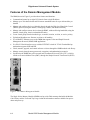
The DMM, shown in Figure 2, provides these features and functions:
•
•
•
•
•
•
•
•
•
•
•
Command and control up to eight UCS chassis from a single IP address
Manage up to 224 chassis-based and 224 remote standalone units for up to 448 modules per
domain
Manage and configure devices within this chassis through the High-level Data-Link Control
(HDLC) protocol, using the domain, virtual group, chassis, and module hierarchy
Manage and configure remote devices through SBMC, without affecting bandwidth, using the
domain, virtual group, chassis, and module hierarchy
Create virtual groups based on module type, customer, location, revision, or service priority
Upload and distribute new firmware revisions to all modules
Use 10BASE-T Ethernet access to the DMM that supports Telnet and Simple Network
Management Protocol (SNMP) NMS applications
Use EIA-232 Serial interface access with the DTE/DCE switch for VT100 Terminal/dial-up
modem that supports SLIP and PPP
Check, monitor, upgrade, and control software revisions through the DMM module code library
Manage security through strong passwords, encryption, and authentication protocols
Synchronize the DMM time to the network and Coordinated Universal Time (UTC), which is
similar to Greenwich Mean Time (GMT), through the Simple Network Time Protocol (SNTP)
Figure 2. The Domain Management Module
The Single In-line Memory Module (SIMM) card provides Flash memory that holds the Module
Code Library and the Event and Traps logs so that the information remains available after powerdown and power-up.
1-2
Model 1502 Domain Management Module
EdgeAccess Universal Chassis System
DMM Management and SBMC
Depending on the number and organization of modules and chassis, DMM management can include
these four levels:
•
•
•
•
Domain: One to eight chassis logically linked in a single management environment; the top level
of DMM management
Virtual Group: A logical set of two to 128 of the same type of module that can be in different
chassis or remote linked partners, but all within the domain; the DMM supports up to 32 Virtual
Groups
Chassis: An enclosure that holds and provides power to two or more modules
Module: A single card, typically mounted in a chassis; you can access and manage some
modules directly through the EIA-232 serial port
Two modules support management at the chassis and domain levels:
•
•
A Chassis Interconnect Module (CIM) in each chassis in the domain collects data and alarms
from all modules and power supplies in the chassis. The CIM also monitors status of all linked
chassis. For details, see the User Manual for your CIM(s).
The DMM provides a serial port for VT100 Terminal and modem support and a 10BASE-T port
for IP based protocol support with SNMP MIB II and Canoga Perkins Enterprise MIBs for each
module in the Domain.
Features of
The DMM uses HDLC to extend management
from the DMM, across the backplane to local modules,
the Domain
and through the CIM to modules in other chassis. SBMC extends management through chassis-based
Managemen
modules to their remote link partners. When CIMs interconnect two or more UCS chassis in a
domain, the DMM can manage all connected
chassis and remote devices through the CIMs. SBMC
t Module
carries these controls and information across the fiber optic links to remote locations:
•
•
•
•
Software upgrades and flash memory bank switching
Configuration data and changes
Operational status
Alarm indicators
Exact SBMC implementation varies between devices, and may not be available for a passive module.
Software upgrades for the DMM and all active modules are available on the Canoga Perkins Web
site. You can transfer upgrades to the DMM by Trivial File Transfer Protocol (TFTP) and archive
them in the DMM Software Library to store, track, and distribute current and former software
revisions to all connected devices.
For example, you may need to upgrade a group of modules with new firmware when you install a
new module, with newer firmware than its link partner, in the domain. The discrepancy in versions
appears in the DMM status. Through various Domain and Virtual Group functions, you can
distribute the new firmware to the older modules, then reset them to use the new firmware.
Model 1502 Domain Management Module
1-3
EdgeAccess Universal Chassis System
Security
For enhanced security, the DMM supports four network security protocols: SNMPv3, Remote
Access Dial In User Security (Radius), Secure Shell version 2 (SSH-2) and Secure File Transfer
Protocol (SFTP). You can set values and options within the DMM software that will work with the
security protocols on your network; for specific information, see the documentation for your
implementation. In addition, the DMM supports strong passwords, independent of the security
protocol.
•
•
•
•
•
1-4
SNMPv3 provides authentication and encryption across a network.
The Radius server maintains user account information. At login, it authenticates the username
and password and sends a message to the DMM to allow the login. The Radius server can also be
set up to require additional authentication information before accepting the user. If the username
or password is not valid, the Radius server sends a message to the DMM to disallow the login and
reject the user. Set up the parameters for the DMM on the Radius Client Configuration screen.
SSH-2 provides authentication and encryption for a secure remote connection that is similar to a
standard Telnet connection, but more secure. Set up the SSH access option individually for each
User Account.
SFTP adds encryption to protect uploaded files during the file transfer process, such as for a
software update.
In software, Security Configuration provides nine options to define password characteristics, as
well as parameters that configure lockout and logout for failed access attempts.
Model 1502 Domain Management Module
EdgeAccess Universal Chassis System
Chapter 2
Hardware Installation and Functions
This section describes how to install the DMM in the UCS Model 1002.
Setup and Installation
The DMM is installed in the UCS 1002 Chassis in slot 1 at the factory. Occasionally, you may need
to install a DMM in a UCS 1002, if ordered separately. The DMM can be installed anywhere from
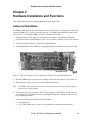
slot 1 to slot 14. To install the DMM, see Figure 3 and follow these steps:
1. If multiple chassis will be linked, set up the chassis ID numbers. For details on setting the
Chassis ID switch on each backplane, see the Universal Chassis System UCS 1002 User Manual.
2. Set SW3 to FD for full duplex or HD for half duplex Ethernet.
3. Set the MDX/MDI switch to MDI for a straight through cable or to MDX for a crossover cable.
SW3
MDX/MDI Switch
Figure 3. SW3 for Full Duplex (FD) or Half Duplex (HD) Ethernet and MDX/MDI Switch
4. Insert the DMM in any slot except slot 0, pushing it firmly into the connector. Do not force it.
5. Hand-tighten the captive screws to secure the DMM in the chassis.
Note:
The DMM is hot-swappable and can be inserted or removed at any time without affecting
data transfer in other modules.
6. If the chassis power is off, switch on the DC power supply(s) for the chassis or plug in the AC
power supply(s). The DMM receives power through the backplane. During the power-on selftest, all LEDs light amber.
7. At the end of self-test, check for these LED conditions:
•
•
STA lights green
ACT, LNK, and Rx may be green or off, depending on current management activity
Model 1502 Domain Management Module
2-1
EdgeAccess Universal Chassis System
Front Panel Functions
The DMM front panel includes these features (see Figure 2):
•
•
•
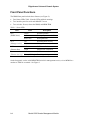
Four Status LEDs; Table 1 lists the LEDs and their meanings
Two interface ports for serial and 10BASE-T access
Two switches: Reset (reboots the DMM) and MDM/TRM
Table 1. Status LEDs
LED
Color
Description
STA
Green
Normal operation
(DMM Status)
Amber
Boot-up sequence and self-test
Red or Off
Non-operational
ACT
Off
No management activity
(Manager Active)
Green
Management activity
LNK
Off
No Ethernet link
(Ethernet Port)
Green
Ethernet link established
Rx
Off
No Ethernet receive activity
(Ethernet Activity) Green (blinking)
Receiving activity
On the front panel, set the serial MDM/TRM switch for management access; set it to MDM for a
modem or TRM for a terminal. See Figure 2.
2-2
Model 1502 Domain Management Module
EdgeAccess Universal Chassis System
Chapter 3
Software Management Through VT100
You can manage the system with VT100 Terminal Emulation through the Command Port on the
DMM, which is accessible by a Telnet session, HyperTerminal or similar terminal emulation
software; a standard SNMP network manager; and CanogaView. For details on CanogaView, see
the CanogaView User Manual.
Setting Up for Network Management
Typically, the DMM runs within the network on an Ethernet connection, communicating with
your Network Management Platform.
Set Up the Network Management Platform
You must run several Management Information Bases (MIBs) on your Network Management
Platform in order to successfully manage this module. Before you start, check that these
industry-standard MIBs are loaded:
•
•
standard.mib
rfc1213.mib
In addition, download Cp.mib, which supports all Canoga Perkins products and is available from
the Canoga Perkins web site. Go to www.Canoga.com, click Support, then click Software
Download, and follow the prompts on screen.
Set Up the PC for Terminal Operation
Setting up the VT100 session depends on which connection, serial port or Ethernet, you have
available for access to the VT100 management program. Canoga Perkins suggests that you use
HyperTerminal for your first session.
Note:
You must set up TCP/IP for the DMM before you can use Telnet or CanogaView.
Use the terminal to directly manage the DMM or to configure it with the network or modem
parameters necessary for remote management.
These steps briefly describe how to set up your PC for a terminal connection. For details on
using Windows, see your Windows documentation.
1. Plug a DE-9 straight-through serial cable into the EIA-232 port on the DMM and the serial
port on the PC or terminal.
2. On the DMM, set the MDM/TRM switch to TRM.
3. Turn on your PC.
Model 1502 Domain Management Module
3-1
EdgeAccess Universal Chassis System
4. When the main Windows screen (desktop) appears, click Start, highlight Programs,
Accessories, the HyperTerminal Folder, and click HyperTerminal.
5. At the Connection Description dialog, select an icon, enter a name for the connection to the
system, and click OK.
6. At the Connect To dialog, pull down the Connect using menu, select the COM port, and click
OK.
7. At the COM port Properties dialog, set these values to communicate with the DMM:
•
•
•
•
•
Bits per second: 19200
Data bits: 8
Parity: None
Stop bits: 1
Flow control: None
8. Click OK. At the prompt to save the HyperTerminal file, select Yes.
Management User Interface
The Management User Interface for the DMM provides screens for setup, monitoring, and
diagnostics. You can access the screens directly by connecting to the serial port of the DMM in
the chassis or by establishing a Telnet session with the DMM. These sections discuss the screens
for the DMM. For details about any other module in the domain, see the user manual for that
module.
3-2
Model 1502 Domain Management Module
EdgeAccess Universal Chassis System
General Screen Format
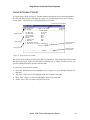
A typical screen, shown in Figure 4, includes standard descriptions and reference designations.
Use this and other screens to configure the system, set operational parameters, and verify the
system status. All screens use a common method for navigation.
Chassis and slot information
Model number
Status reports
Screen navigation
instructions
Change options
Messages and
urgent status
Figure 4. General Screen Format
Not all screens and menus provide options that you can change. Some menu items reach screens
that only report status, such as revision numbers, module type, or alarms. On other screens, you
can move through and select options, and enter data.
Use these keys to navigate the screens:
•
•
•
•
Space bar When a menu item is highlighted, press <Space> to cycle through all options for
that item.
Tab Press <Tab> to move the highlight to the next column to the right.
Enter Press <Enter> to select the highlighted option for a menu item.
Escape Press <Esc> to return to the previous screen.
Model 1502 Domain Management Module
3-3
EdgeAccess Universal Chassis System
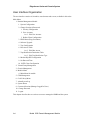
User Interface Organization
The user interface consists of selectable, nested menus and screens, available in this order:
Main Menu
1. Domain Management Module
1. System Configuration
2. Change Security & Passwords
1. Security Configuration
2. User Accounts
1. or 3. Edit User Account
3. Radius Client Configuration
3. PING Menu (Ping Generation)
4. Software Upgrade
5. Trap Configuration
6. Host Access Table
1. or 3. Edit Host Access
7. Trap/Notification Destination Table
1. or 3. Edit Trap/Notification Type
8. Modem/Slip/PPP Configuration
9. Set Date and Time
10. SNTP Client Configuration
2. Virtual Group Management
3. Chassis Management
4. Module Menu
4. Main Menu for module
5. CIM Management
6. Code Library Menu
7. Alarm/System Log
8. System Status
9. Connected Sessions (Manage Logged In Users)
10. Change Password
11. Logout
This chapter describes how to use these screens to manage the DMM and the system.
3-4
Model 1502 Domain Management Module
EdgeAccess Universal Chassis System
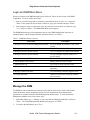
Login and DMM Main Menu
When you connect to the DMM through HyperTerminal or Telnet, the first screen is the DMM
Login Menu. To log in, follow these steps:
1. If this is your initial setup and no username or password has been set, type admin and press
<Enter> at the prompt for the username. Otherwise, type your username and press <Enter>.
2. At the prompt to enter your password, enter the password if one has been set; otherwise, type
admin and press <Enter>. The DMM Main Menu screen appears.
The DMM Main menu provides management access to the DMM management functions, all
managed chassis, and all managed modules within the domain. See Table 2.
Table 2. DMM Main Menu Functions
Menu Item
Description
1. Manage or access the Domain Management Module
Set up the DMM, then manage it and system
security
2. Manage or access a specific Virtual Group
Create, edit and/or delete Virtual Groups
3. Manage or access a specific Chassis
View or configure any chassis in the domain
4. Manage or access a specific Module
View or configure a specific module in a
specific chassis
5. Manage or access the CIM modules
View the CIM and manage chassis alarms
6. Access Module Code Library
Manage firmware for the domain
7. Alarm/System Log
View a list of recent traps and events
8. System Status
View real time system status and static
parameters
9. Manage Connected Sessions
View and manage currently logged in users
10. Change Password
Update the password as needed to maintain
system security
11. Logout
Log out of this management session
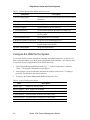
Manage the DMM
The DMM provides communication with and some controls of the various chassis and modules
within the domain. Most configuration options for basic information and communications
parameters are available from the Domain Management Module menu. To reach the Domain
Management Module screen, follow these steps:
1. At the Main Menu, type 1, "Manage or access the Domain Management Module," and press
<Enter>. The Domain Management Module menu appears; see Table 3.
2. To return to the Main Menu, press <Esc>.
Model 1502 Domain Management Module
3-5
EdgeAccess Universal Chassis System
Table 3. Domain Management Module Menu Selections
Menu Item
Description
1. System Configuration
Set values for the system information and communications
parameters
2. Change Security & Passwords
Set up system security and access
3. Ping Generation
Send a PING from the DMM to a specific IP address
4. Software Upgrade
Download and install new firmware
5. Trap Configuration
Set the DMM conditions that generate SNMP traps
6. Host Table
Set up managing hosts for accessing the DMM and
receiving traps
7. Trap Destination Table
Set up notification by destination
8. Modem/SLIP/PPP Configuration Set up the serial communication port
9. Set Date and Time
Set date and time for the DMM; this information is passed
to each module in the domain
10. SNTP Configuration
Set up SNTP parameters.
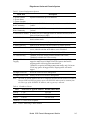
Configure the DMM for the System
To set values for basic system parameters, including some SNMP parameters, as well as view
basic system information, go to the System Configuration report and menu. See Tables 4 and 5.
To access the System Configuration screen, follow these steps:
1. At the Domain Management Module menu, type 1, "System Configuration," and press
<Enter>. The System Configuration screen appears.
2. At the prompt, type an item number and follow the prompts on the screen. To change a
password, you must know the current password.
3. To return to the Domain Management Module menu, press <Esc>.
Table 4. System Configuration Report
Item
Chassis Type
Description
Always 2U, the UCS 1002
Ethernet Address MAC address for the DMM
Ethernet Link
Shows link status (up or down) and current full or half-duplex
Current Bootcode Version number for bootcode for this module
Current Firmware Version number for firmware for this module
Active Bank
3-6
Flash memory that holds the currently-used firmware
Model 1502 Domain Management Module
EdgeAccess Universal Chassis System
Table 5. System Configuration Options
Menu Item
1. System Contact
2. System Name
3. System Location
Description
Optional information, up to 50 characters
4. Default SNMPv1/v2c Password for SNMP Read access, up to 14 characters, default is
Read Community
"public"
5. Default SNMPv1/v2c Password for SNMP Write access, up to 14 characters, default is
Write Community
"private"
6. SLIP/PPP IP Address IP address for access through Serial Line Internet Protocol (SLIP) or
Point-to-Point Protocol (PPP)
7. DMM IP Address
IP address for this DMM; Table 6 lists the IP address classes and
default subnet masks
8. Subnet Mask
Mask that sets the network ID part of the IP address
9. Default Gateway
Address of the network node that connects to another network
10. BOOTP
"Enabled" if the module needs to obtain its IP address from a BOOTP
server; when the unit has an IP address, set to "Disabled"
11. Serial Port Mode
Type of serial port connection: VT100, SLIP, or PPP
12. Telnet Security
"Enabled" to use the security features included with Telnet;
"Disabled" to disable the Telnet security
13. Mgmt VLAN
Tagging
"Enabled" recognizes incoming management traffic only if it is
tagged to match item 14, Mgmt VLAN ID, ignores other traffic;
outgoing traffic will be tagged to match item 14
"Disabled" recognizes incoming management traffic only if it has no
VLAN tag, ignores all tagged traffic; outgoing traffic will not be
tagged
14. Mgmt VLAN ID
ID for the VLAN used for management
15. Mgmt VLAN P-Bit
Priority for the VLAN used for management
Note:
The SLIP or PPP IP address must be on a different network than the Ethernet IP address.
Because SLIP and PPP run point to point, the SLIP/PPP subnet mask is assumed from
the Class type of the SLIP/PPP IP address, and no gateway is allowed.
Table 6. IP Address Classes
Class
First Octet of Agent IP Address Default Subnet Mask
Class A
1-126
255.0.0.0
Class B
* 128-191
255.255.0.0
Class C
192-233
255.255.255.0
*Address 127 is reserved for loopback.
Note:
Class C addressing is most common.
Model 1502 Domain Management Module
3-7
EdgeAccess Universal Chassis System
The MAC or Ethernet hardware address for the DMM is fixed. If BOOTP is enabled during the
initialization process, it broadcasts BOOTP request packets until it receives a response from the
BOOTP server or you press <Esc> to continue. If the DMM has a fixed IP address, disable
BOOTP. To assign an IP address to the DMM through the BOOTP request process, follow these
steps:
1. At the Domain Management Module menu, type 1; the System Configuration screen appears.
2. Check item 10, BOOTP.
•
•
If it is set to "Yes," reset the DMM to start the BOOTP process.
If it is set to "No," follow these steps:
a. Type 10; the BOOTP Options screen appears.
b. Type Y to enable BOOTP. The next time you reset the DMM, it will start the BOOTP
process.
3. To return to the Domain Management Module menu, press <Esc>.
Manage Traps and Alarms
Traps are messages that require management attention and are routed to the Network Manager
and the DMM Alarm Log, but do not trigger alarms. Use the Trap Configuration screen to view
the current configuration and to enable or disable traps for the DMM. For a list of events that
trigger traps, see Table 7. To set up the traps, follow these steps:
1. At the Domain Management Module menu, type 5, "Trap Configuration," and press <Enter>.
2. At the Trap Configuration screen, type the number for a trap and press <Enter>. See Table 7.
3. Press <Space> to cycle to Enabled or Disabled and press <Enter>.
4. To return to the Domain Management Module menu, press <Esc>.
These selections do not affect how the CIM Major and Minor LEDs report alarms.
Table 7. Trap Configuration Options
Trap
When enabled, sends a Trap if. . .
Cold Start
The DMM is reset by a power failure or forced reset
Setup Error
The DMM is set up incorrectly
Fan/Power/Over Temperature
The chassis power supply or fan malfunctions or the temperature is too
high
Chassis On/Off Line
The chassis in the domain does not respond
Module Insert/Removed
A module is inserted or removed
Authentication Error
An unauthorized host attempts SNMP access to the DMM
Chassis Power Exceeded
The installed modules draw more total power than the chassis supplies
3-8
Model 1502 Domain Management Module
EdgeAccess Universal Chassis System
Manage the Date and Time
An accurate date and time in the DMM assures accuracy for events listed in the System Log and
for traps and alarms sent to the system administrator, as well as for all events listed in event logs
for individual modules within the system. The date and time for the DMM overrides any date and
time set in another module in the domain.
You can choose either of two methods for setting the date and time, depending on your access to
an external network and your need for accuracy.
•
•
For accuracy within a large network, you can set up the DMM to synchronize the system date
and time to an SNTP server. The SNTP date and time overrides the date and time set
anywhere else in the system. When the DMM contacts the SNTP server to synchronize the
time, the event appears in the System Log, whether or not the SNTP server responds.
If you choose to not use SNTP to maintain the date and time, or do not have access to the
Internet and an SNTP server, you can set it directly at the DMM. In any case, the date and
time for the DMM overrides any date and time set in another module in the domain.
To set up synchronization with SNTP, follow these steps:
1. At the Domain Management Module menu, type 10, "SNTP Configuration" and press
<Enter>.
2. At the SNTP Client Configuration screen, type the number for a parameter and press
<Enter>, then follow the prompts on the screen.
•
•
•
Sntp Client UTP Offset (hours): Set the difference, in hours, between this DMM and
Coordinated Universal Time (UTC), which is similar to Greenwich Mean Time (GMT);
Range is -12 to 12
Sntp Client Sync Interval (minutes): Set how often, in minutes, that the DMM tries to
synchronize its time to the Sntp server; Range is 0 (attempt to synchronize at DMM bootup,
only) to 1440 (once daily)
Enter the values for primary and alternate SNTP servers:
• IP Address: Set the address for the server; 0.0.0.0 indicates no server
• Retries: How many times the DMM tries to synchronize before trying the alternate
server or giving up; Range is 0 to 10
• Timeout (seconds): How long between unsuccessful attempts; Range is 1 to 30
• Priority: Set which server to contact first; Range is 1 to 255 with higher priority for
lower numbers; if priority is the same for two servers, the DMM alternates tries between
the servers
3. To return to the Domain Management Module menu, press <Esc>.
To directly set the date and time, follow these steps:
1. At the Domain Management Module menu, type 9, "Set Date and Time" and press <Enter>.
2. At the prompt to enter the current date and time, type the current information in
DD/MM/YYYY HH:MM format.
Model 1502 Domain Management Module
3-9
EdgeAccess Universal Chassis System
3. To return to the Domain Management Module menu, press <Esc>.
Note:
Because the Clock circuit exerts a large power drain on the lithium battery in the DMM,
the Clock may lose time when the power is off or the DMM is out of the chassis. Reset
the date and time whenever you install the DMM in the chassis or turn the power on.
Set Up the Modem/SLIP/PPP Parameters
Although the default values for the serial communication parameters meet requirements for most
systems, you made need to update them for a particular situation; use the Modem/SLIP/PPP
Configuration menu to update the serial communication parameters. To access the
Modem/SLIP/PPP Configuration menu, follow these steps:
1. At the Domain Management menu, type 8, "Modem/SLIP/PPP Configuration," and press
<Enter>. The Modem/SLIP/PPP menu appears.
2. To select the baud rate for the serial port, type 1 and press <Space> to cycle through the baud
rate options; options include 9600, 19200, 38400, 57600, or 115200 bps.
3. To enter a new Modem Initialization String, type 2, type the new string, and press <Enter>;
the default string is "AT".
Note:
For details on a different initialization string, see the documentation for your modem.
4. To return to the Domain Management Module menu, press <Esc>.
Test a Connection With PING
When you set up a new connection or need to troubleshoot an existing connection to another
device, you can send a PING to the specific IP address for that device. Use the PING Generation
screen to test the connection. To set up and send a PING, follow these steps:
1. At the Domain Management Module menu, type 3, "Ping Generation," and press <Enter>.
2. At the PING Generation screen, to set the PING Address, type 1 and press <Enter>, then type
the IP address to PING and press <Enter>.
3. To set the number of times to send a PING, type 2, Ping Count, and press <Enter>, then type
a number from 1 to 256, or type 0 to PING continuously every 3 seconds, press <Enter>.
4. To start to PING, type 3; the display includes Time to Live (TTL) for each packet.
A good connection appears similar to this with all requests returned:
Pinging 216.109.112.135 with 64 bytes.
Reply from 216.109.112.135 Seq #0 time = 63.496 ms TTL=47
. . .
Reply from 216.109.112.135 Seq #5 time = 63.120 ms TTL=48
6 packets transmitted, 6 packets received, %0.000 packet loss
round-trip min/avg/max = 63.120/65.862/75.810 ms
Press ESC to continue.
3-10
Model 1502 Domain Management Module
EdgeAccess Universal Chassis System
A faulty connection can appear similar to this with one or more requests timed out:
Reply from 216.109.112.135 Seq #4 time <70 ms TTL=47
Request timed out
Request timed out
Reply from 216.109.112.135 Seq #12 time <70 ms TTL=47
Reply from 216.109.112.135 Seq #13 time <70 ms TTL=48
14 packets transmitted, 10 packets received, %28.571 packet loss
round-trip min/avg/max < 70.000/71.000/80.000 ms
Press ESC to continue.
5. To stop the PING and return to the Domain Management Module menu, press <Esc>.
Update Software
Each module in the Universal Chassis System has two flash memory banks that store software:
•
•
The Active Flash Memory holds the software currently in use
The Inactive Flash Memory holds the new software from a download or the older version of
software
Software is downloaded to the inactive region to avoid disrupting service. Resetting the module
and swapping banks does not affect module operation and is transparent to user traffic.
Use the Software Upgrade report and menu screen to check the current version of the DMM
firmware and to upgrade software for any module in the domain or a managed module partner, if
necessary.
To access the Software Upgrade screen, follow these steps:
1. At the Domain Management Module menu, type 4, Software Upgrade, and press <Enter>.
The Software Upgrade screen appears.
2. Record the Processor Version and the numbers for the Active and Inactive Firmware.
3. Access the Canoga Perkins Web site, click Downloads, scroll to the DMM filename, and
compare the version number listed there with the version numbers you recorded. The DMM
firmware file name is similar to DMM0106.zip, where "DMM" indicates the module and
"0106" indicates the version.
Caution:
To insure compatibility when a system includes two or more of the same module,
you must upgrade all those modules with the same software.
If the firmware for the DMM or other module is outdated, you need to upgrade it. To start the
software upgrade, follow these steps:
1. Go to the Host Access Table (see page 3-15) and verify that the entry for the host you will
use for the file transfer allows FTP or SFTP access, depending on the method you plan to use.
2. Log in to the FTP or SFTP server from the account that allows access.
Note:
You can run only one FTP or SFTP session at a time.
Model 1502 Domain Management Module
3-11
EdgeAccess Universal Chassis System
3. Download the new firmware from the Canoga Perkins web site to your TFTP server; put the
firmware in the "/BURNING" directory. For FTP, enable binary transfer mode. When the
transfer is complete, the file is moved automatically to the "/INACTIVE" directory if it is
DMM firmware, or to the "/MODULES" directory if it is firmware for another module.
4. Go to the System Configuration menu and enter the IP address, subnet Mask, and default
gateway for the DMM.
5. At the Domain Management Module menu, type 5, Upgrade Software, and press <Enter>.
6. At the Software Upgrade menu, type 3, Get New File with TFTP, and press <Enter>.
7. Follow the prompts on the screen to enter the IP address for the TFTP server and the file
name for the new firmware, then start the upgrade.
8. If this is new firmware for the DMM, when the file transfer is complete, go to the Software
Upgrade menu, type 2, Swap Bank, and press <Enter>. The DMM resets and starts using the
new firmware.
9. If this is new firmware for another module in the domain, follow these steps when the file
transfer is complete:
a. At the Software Upgrade menu, type 4, Copy Software from Source to Destination, and
press <Enter>.
b. At the prompts, press <Space> to cycle through the information for the Source and
Destination, and press <Enter>; the upgrade runs automatically.
c. Go to the Module Menu to swap banks and reset the module.
Manage Security
To effectively provide system security for a variety of network applications, the DMM works
with Radius, SSH, and SNMPv3. For a brief discussion of security options, see page 1-4. To set
up DMM security, first set up the associated server(s); for details, see the documentation for the
server and software.
•
•
•
To use a Radius server, you must specify the IP address for the DMM and the Shared Secret
that will authenticate communication between the DMM and the Radius server.
To communicate with an SSH server, you must first download the SSH Client to your PC and
test connectivity.
To use SNMPv3 security, set up the engine ID for the SNMPv3 agent in the device.
As you set up values for various security parameters on your DMM, see the documentation for
your network security system for details on and values for those security parameters. Typically,
you must have supervisor access to set up security for the DMM.
3-12
Model 1502 Domain Management Module
EdgeAccess Universal Chassis System
Set General Security Parameters
General security parameters include values for passwords, lockout, and logout, which are basic to
maintaining security regardless of which security application runs on your network. To set values
for general parameters, access the Security Configuration screen and follow these steps:
1. At the Domain Management Module menu, type 2, "Change Security & Passwords," and
press <Enter>. The Change Security & Passwords menu appears.
2. At the Change Security & Passwords menu type 1, "Security Configuration," and press
<Enter>.
3. At the Security Configuration screen, type the number for an item and press <Enter>, then
type a value or press <Space> to cycle through the options and press <Enter> to select the
value or option.
•
•
•
•
•
•
•
•
•
Minimum Length/Minimum Alpha Characters/Minimum Numeric Characters/Minimum
Punctuation Characters/Maximum Consecutive Character Types/Maximum Same Character:
Define characteristics of passwords; the range for all fields is from 0 through 15
Allow Username in Password: Enable or disable the username appearing as or within the
password
Password Expiration Time: Set how often in days, 1 through 365, that the passwords must be
reset; 0 = disabled
Password Reuse Count: Set whether the password must be changed or can be used again
immediately; values are 0 (new password can be the same) or 1 (new password must be
different)
Lockout After Failed Attempts: Set how many times, from 1 to 10, that a user can try to log
in before a lockout; 0 = disabled
Lockout Type/Lockout Time: Set the type and length of lockout
• Hard requires another user with Supervisor access to unlock the account on the User
Accounts screen
• Timed requires that the user wait for Lockout time before trying again
• Lockout Time is from 0 (none) to 30 minutes
Display Lockout Message/Lockout Message: Enable or disable and set the message, up to 30
characters, that appears at lockout
Lockout Craft Port: Disable access to the serial port to prevent any unauthorized access; to
re-enable the craft port, run a Telnet session
Inactivity Logout Time: Set the time, between 1 and 30 minutes, before automatic log-out
with no activity; 0 = disabled
Model 1502 Domain Management Module
3-13
EdgeAccess Universal Chassis System
Set Up and Manage a User Account
You can set up an account for a user, whether another supervisor, operator, or observer, to access
the DMM. You can also update or delete usernames or permissions. To manage a user account,
access the User Accounts screen and follow these steps:
1. At the Domain Management Module menu, type 2, "Change Security & Passwords," and
press <Enter>. The Change Security & Passwords menu appears.
2. At the Change Security & Passwords menu, type 2, "User Accounts Configuration," and
press <Enter>.
3. To add a user, type 1, or to edit an existing user, type 3, and press <Enter>, then type the
Username and follow the prompts on the Edit User Account screen to enter values or press
<Space> to cycle through options for these parameters:
•
•
•
•
•
•
•
•
•
•
•
•
•
•
•
•
Account State: enabled or disabled
Access From: UI, SNMPv3, or UI/SNMPv3
• UI indicates access through Telnet, Console, SSH, FTP, or SFTP, and requires additional
parameter setup
• SNMPv3 enhances security and requires additional parameter setup; for details, see the
documentation for your SNMPv3 application and server
Access level: Supervisor, Operator, or Observer
Description: optional; up to 17 characters
UI Password: password that allows access through Telnet, Console, SSH, FTP, or SFTP; 8 to
15 characters
UI Password Expires: Yes or No
UI Password Expires in (days): 0 (never) to 365
Allow UI Lockout of User: Yes or No; can disable access for this user after excessive failed
attempts to log in
Allow UI Logout of User: Yes or No; can automatically log user out after excessive
inactivity
UI Logout Locked State: shows current state as Locked, Unlocked, Logged out, or Logged in
SNMPv3 Authentication Protocol: MD5, SHA, or None; sets how to authenticate the user
SNMPv3 Authentication Password: password that generates the authentication key for the
user if the authentication protocol is MD5 or SHA; 8 to 15 characters.
SNMPv3 Authentication Key: Shows the key that authenticates the user for MD5 or SHA
Authentication Protocol; this is generated automatically for the Authentication Password, but
can be changed if the user's host uses a different Authentication Key generation algorithm; 16
Hex characters for MD5 protocol or 20 Hex characters for SHA protocol.
SNMPv3 Privacy Protocol: DES or None; sets the protocol for encryption
SNMPv3 Privacy Password: password that generates the encryption key for the user if the
privacy protocol is DES; 8 to 15 characters
SNMPv3 Privacy Key: Shows the key that encrypts messages for DES Privacy Protocol; this
is generated automatically for the Privacy Password, but can be changed if the user's host
uses a different Privacy Key generation algorithm; 16 Hex characters
3-14
Model 1502 Domain Management Module
EdgeAccess Universal Chassis System
4. To delete a user, type 2, then follow the prompts to select the user name and confirm the
choice; the User Accounts Configuration screen reappears.
5. To return to the Change Security & Passwords menu, press <Esc>.
Set Up Host Access
The SNMP agent allows access to up to 24 Host IP addresses listed in the Host Access Table. Set
up the Host and network information for access to the DMM on the Host Access Table screen.
When a host attempts to access the DMM, the IP address is authenticated against the entries on
the host table, from the most restrictive entry to the least restrictive entry. If a user attempts
SNMP access from a host or network that is not listed in this table, the DMM rejects that host and
generates an authentication trap. To access the Host Table, follow these steps:
1. At the Domain Management Module menu, type 6, "Host Access Table," and press <Enter>.
The Host Table screen appears.
2. To add a host, type 1 and press <Enter>, or to edit an existing host, type 3 and press <Enter>,
then follow the prompts on the Edit Host Access screen to enter values or press <Space> to
cycle through options for these parameters:
a. IP Address: for the Host
b. IP Mask Size: 0 to 32 (bits) to match the bits from the left of the IP address; only one
entry is allowed with 0 bits of Mask Size
c. Telnet Access: Telnet Only, Telnet and SSH, SSH Only, or None
d. FTP Access: FTP Only, FTP and SFTP, SFTP Only, or None
e. SNMP Access: Read, Write (includes Read), or None
f.
SNMP Protocol: V1/V2c, V1/V2c/V3, or V3; sets the type of access allowed from the
specific host or network
g. V1/V2c Read Community, Write Community, and Access Level: set the matches for
community names and permissions level (Supervisor, Operator, or Observer) for requests
from the V1 or V2c host or network
3. To delete a host, type 2 and press <Enter>, then at the prompt, highlight the IP Address for
that Host and press <Enter>. The host table appears again with your changes.
4. To return to the Domain Management Module menu, press <Esc>.
Model 1502 Domain Management Module
3-15
EdgeAccess Universal Chassis System
Set Up a Radius Client
Before you can set up the DMM as a Radius Client, you must set related attributes on the Radius
server to predefined values in order to properly authenticate and configure the user. The DMM
uses four vendor-specific attributes, type 25 in the Radius RFC; the Canoga Perkins vendor
identifier is 919.
•
•
•
•
Attribute 1 is Access From; values: 1, UI; 2, SNMP; and 3, UI and SNMP; default is UI
Attribute 2 is Access Level; values: 2, Observer; 3, Operator; and 4, Supervisor; default is
Observer
Attribute 3 is Description, a string, optional and not predefined; default is "Radius Account"
Attribute 4 is Logout User; values: 0, No, and 1, Yes; default is Yes
Use the Radius Client Configuration screen to set up communication with the Radius server in
order to authenticate users at login. To access the Radius Client Configuration screen, follow
these steps:
1. From the Change Security & Passwords menu, type 3, "Radius Client Configuration," and
press <Enter>. The Radius Client Configuration appears.
2. At the prompt, type 1 to set the authentication mode, or 2 or 3 to set up communication with
a primary or alternate Radius server, then follow the prompts on the screen.
•
•
Radius Client Mode: Radius then Local, Local then Radius, or None; Selects the primary
authentication source and the secondary source if the primary does not respond or rejects the
user; "Radius" means the radius server, "Local" means the DMM account database, "None"
indicates only the DMM account database
Radius Server: Enter values for these parameters for a primary or alternate Radius server:
• IP Address: Set the address for the server; 0.0.0.0 indicates no server
• Shared Secret: Must match the Shared Secret set on the Radius server
• Retries: How many times the DMM tries to authenticate the user before trying the
alternate server or giving up; Range is 0 to 10
• Timeout: How long, in seconds, between unsuccessful attempts; Range is 1 to 30
• Priority: Set which server to contact first; Range is 1 (highest priority) to 255 lowest
priority); if priority is the same for two servers, the DMM will alternate tries between the
servers
3. To return to the Change Security & Passwords menu, press <Esc>.
3-16
Model 1502 Domain Management Module
EdgeAccess Universal Chassis System
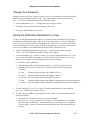
Change Your Password
Whether you have supervisor, operator, or observer access, you can update your password for the
domain in order to maintain system security. You cannot change the password for any other
users. To access the Change Password screen, follow these steps:
1. From the Main Menu, type 10, "Change Password," and press <Enter>.
2. To change your password, follow the prompts on the screen.
3. To return to the Main Menu, press <Esc>.
Set Up the Notification Destination for Traps
Use the Trap Notification/Destination Table to view and set up the destination for Trap messages.
In addition to setting the host address and port, you can set the security level for the notification,
then set values for various parameters, depending on the security level. For details on and values
for security parameters for your system, see the documentation for your network security system.
To access and update the Trap Notification/Destination Table, follow these steps:
1. At the Domain Management Module menu, type 7, Trap Destination Table, and press
<Enter>. The Trap Notification/Destination Table screen appears.
2. To add a destination, type 1 and press <Enter>, or to edit an existing destination, type 3 and
press <Enter>, then follow the prompts on the Edit Trap/Notification Type screen to enter
values, or press <Space> to cycle through options for these parameters:
•
•
•
IP Address for the destination
Trap Notification Port for the destination; Range is 1 to 65535; typically set to 162
Notification Type sets the security level for the destination, from V1-Trap through
V3-Inform
V1-Trap:
Unacknowledged message with SNMPv1 protocol
V2c-Trap:
Unacknowledged message with SNMPv2c protocol
V2c-Inform: Acknowledged message with SNMPv2c protocol
V3-Trap:
Unacknowledged message with SNMPv3 authentication and optional encryption
V3-Inform:
Acknowledged message with SNMPv3 authentication and optional encryption
3. To finish setting up V1-Trap, V2c-Trap, or V2c-Inform notification, type the community
name, up to 10 characters, and press <Enter>.
4. To finish setting up SNMPv3-Trap notification, press <Space> to cycle through the options
for these parameters:
•
•
Security Name: The name of the user account at the DMM.
Security Level: Can be "No Auth/No Priv" means no user authentication or encryption
for the message; "Auth/No Priv" means authentication by user name, but no encryption
for the message; "Auth/Priv" means authentication by user name and encryption for the
message.
Model 1502 Domain Management Module
3-17
EdgeAccess Universal Chassis System
5. To finish setting up SNMPv3-Inform notification, either type a value and press <Enter> or
press <Space> to cycle through the options for these parameters:
•
•
•
•
•
•
•
•
•
•
•
Security Name: Enter the name of the user account at the destination, up to 10 characters
Engine ID: Enter the SNMP Engine ID at the destination; view it at the destination
configuration; 64 Hex characters.
Authentication Protocol: Set how to authenticate the notification; can be MD5, SHA, or
None.
Authentication Password: Enter the password that generates the authentication key for
the message if the authentication protocol is MD5 or SHA; 8 to 15 characters.
Authentication Key: Shows the key that authenticates the notification for MD5 or SHA
Authentication Protocol; this is generated automatically for the Authentication Password,
but can be changed if the destination uses a different Authentication Key generation
algorithm; 16 Hex characters for MD5 protocol or 20 Hex characters for SHA protocol.
Privacy Protocol: Set the protocol for encrypting the notification; can be DES
(authentication Protocol must be MD5 or SHA) or None
Privacy Password: If the privacy protocol is DES, enter the password that generates the
encryption key for the message; 8 to 15 characters
Privacy Key: Shows the key that encrypts the message for DES Privacy Protocol; this
is generated automatically for the Privacy Password, but can be changed if the destination
uses a different Privacy Key generation algorithm; 16 Hex characters
Security Level: Can be "No Auth/No Priv," no user authentication or encryption for the
message; "Auth/No Priv," authenticates by user name, but no encryption for the message;
or "Auth/Priv," authenticates by user name and encrypts the message.
Retries: How many times to try to resend the message if not acknowledged; Range is 0
to 10
Timeout in Seconds: How long to wait, in seconds, for an acknowledgement before
retrying; Range is 1 to 30
6. To delete a destination, type 2 and press <Enter>, then at the prompt, highlight the IP
Address for that Host and press <Enter>. The host table appears again with your changes.
7. To return to the Domain Management Module menu, press <Esc>.
Manage the Domain
The domain is a group of up to eight linked chassis that are managed as a group through the
DMM. You can view events, including status and alarms, manage firmware for modules in the
domain, and manage logged-in users.
3-18
Model 1502 Domain Management Module
EdgeAccess Universal Chassis System
View Events in the System Log
You can use the information on the log and status screens for maintaining the system or
troubleshooting a fault. In addition to external notification of traps, the System Log screen lists
events generated by the DMM and managed modules within the domain, including traps. For a
typical System Log, see Figure 5. The events appear in chronological order with the most recent
event at the top of the list. Each entry lists the event, type, user, location, date, and time. The
Local column indicates the type of user with either a "*" for a locally-authenticated user or a
blank for a Radius-authenticated user. Events include both failed and successful attempts by
either the SNTP server or a user to set the system time.
The Flash Memory holds the System Log so that the event and trap information remains available
after power-down and power-up.
To view the System Log screen, follow these steps:
1. From the Main Menu, type 7, "Alarm/System Log," and press <Enter>. The System Log
Screen appears.
•
•
To view earlier events, press <Tab>.
To clear the log, press <Ctrl D> (this can take up to several minutes).
2. To return to the Main Menu, press <Esc>.
Description
SYSTEM LOG
Type
Username
Local
Date/Time
Ch1 Online
Trap
Module Inserted in Ch 1, Sl 7
Trap
Module Inserted in Ch 1, Sl 8
Trap
Module Inserted in Ch 1, Sl 10
Trap
Module Inserted in Ch 1, Sl 14
Trap
Module Inserted in Ch 1, Sl 15
Trap
user logged in
Security
user logged in
Security
SYSTEM
*
11-Mar-2004 08:53:56.02
SYSTEM
*
11-Mar-2004 08:53:56.12
SYSTEM
*
11-Mar-2004 08:53:56.22
SYSTEM
*
11-Mar-2004 08:53:56.32
SYSTEM
*
11-Mar-2004 08:53:57.42
SYSTEM
*
11-Mar-2004 08:53:57.52
admin
*
11-Mar-2004 08:56:43.32
admin
*
11-Mar-2004 09:54:32.22
Figure 5. Typical System Log Screen
Model 1502 Domain Management Module
3-19
EdgeAccess Universal Chassis System
Manage System Status and Alarms
If an alarm occurs, it sets the Alarm Relays on the CIM for the chassis with the module with the
problem. The System Status screen shows general alarm and error information about the system,
such as which chassis has an alarm, as well as hardware and software data for the DMM, and
provides an option to reset all alarms relays in the system. To access the System Status screen
and reset all relays after resolving a problem, follow these steps:
1. From the Main Menu, type 8, "System Status," and press <Enter>. The System Status screen
appears.
2. To reset all Major and Minor alarm relays in the domain, type 1 and follow the prompts on
the screen.
3. To return to the Main Menu, press <Esc>.
Manage the Module Code Library
The Module Code Library, located in Flash Memory so that the information remains available
after power-down and power-up, can store one version of code for each module in the domain.
You may need to view or delete the Library Code files (the firmware for various modules and the
DMM). To access the Code Library menu, follow these steps:
1. From the DMM Main Menu, type 6, or "Access Module Code Library," and press <Enter>.
The Code Library menu appears.
2. At the Code Library menu, select an option:
•
To view files in the current working directory, type 1.
•
To change to another working directory, type 2. At the prompt, enter the path to the new
directory or enter "//" to go to the top of the directory tree.
•
To remove files, type 3, and follow the prompt on screen.
•
To remove a directory, type 4, and follow the prompt on screen.
3. To return to the Main Menu, press <Esc>.
Manage Logged In Users
At times, you may need to monitor which users are currently logged in to the system through the
DMM and, if needed, you can force a specific session off (requires supervisor access). The
Connected Sessions screen shows information about the current users by session number; an
asterisk (*) next to the session number indicates your session. To access the Connected Sessions
screen, follow these steps:
1. From the Main Menu, type 9, "Manage Connected Sessions," and press <Enter>. The
Connected Sessions screen appears.
3-20
Model 1502 Domain Management Module
EdgeAccess Universal Chassis System
2. To force a session off, type the number for that session and press <Enter>.
Note:
Although a user with any level of access can view the information, a user must have
supervisor access to force a session off.
3. To return to the Main Menu, press <Esc>.
Create and Manage Virtual Groups
You can set up a Virtual Group to upgrade software or swap memory banks on two or more
modules of the same type at the same time; the DMM can support up to 32 Virtual Groups. You
can create, edit, and delete Virtual Groups within the Domain. To access the Virtual Group menu
and manage the groups, follow these steps:
1. At the Main Menu, type 2, "Manage or access a specific Virtual Group" and press <Enter>.
The Virtual Group Management screen appears. See Table 8.
Table 8. Virtual Group Menu Options
Menu Option
Description
1. Select Virtual Group
Choose an existing Virtual Group; opens the Virtual Group Management
menu
2. Create Virtual Group Opens the Virtual Group Management menu
3. Delete Virtual Group Remove an existing Virtual Group
2. To create a Virtual Group, at the Virtual Group Management menu, type 2, "Create Virtual
Group."
3. At the prompt, enter the name, up to 15 characters, and press <Enter>. The Virtual Group
Management screen appears; it identifies the module type and Chassis and slot numbers for
each item in the group. See Figure 6.
VIRTUAL GROUP MANAGEMENT
Virtual Group Name: 2345
Item
1
2
3
Chassis
1
1
1
Slot
2
3
4
Module-Model
2345-Modem
2345-Modem
2345-Modem
Figure 6. Typical Virtual Group Management Screen
Model 1502 Domain Management Module
3-21
EdgeAccess Universal Chassis System
4. At the Virtual Group Management screen, make any of these selections:
•
To add a module to a Virtual Group, type 1, then at the prompt, enter the Chassis and
Slot for the module, and press <Enter>.
•
To delete a module from the selected Virtual Group, type 2, then at the prompt, enter the
Chassis and Slot for the module, and press <Enter>.
Note
The delete option in the Virtual Group Management menu deletes an entire Virtual
Group. To delete a single module in a Virtual Group, first select the Virtual Group, then
at the Virtual Group Management screen, select and delete that module.
•
To save the Virtual Group information, type 3 and press <Enter>. Always save changes
to Virtual Groups before you return to the Virtual Group Management menu.
•
To reset all modules in the selected Virtual Group, type r and press <Enter>.
•
To swap firmware banks in all modules in the selected Virtual Group, type s and press
<Enter>.
5. To return to the Main Menu, press <Esc>.
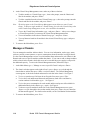
Manage a Chassis
You can manage the modules within a chassis. You can view information, such as type, status,
software versions, remote partners, or power consumption, about all modules in a single chassis.
Use the Chassis Management screen to view information about and status for each Chassis in the
Domain and to access specific modules within that chassis. If you want to add or change modules
within a chassis in the domain, check this screen to be sure that the power supply(s) can provide
the additional capacity. To access the Chassis Management menu, follow these steps:
1. At the Main Menu, type 3, "Manage or access a specific Chassis" and press <Enter>.
2. The chassis selection appears at the right of item 3; press <Space> to cycle through the
chassis that are online, then press <Enter> to select a chassis. The Chassis Management
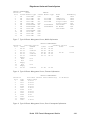
screen appears; it shows the module and status for each slot in the chassis. See Figure 7.
•
•
To view a second screen if all slots do not fit on the first screen, press <Tab>.
To view the Local and Remote Bootcode and Firmware, both Active and Inactive,
version numbers for all modules, type t. See Figure 8.
•
To view the power consumption for each module and the total power still available for
additional modules in the chassis, type t again. See Figure 9.
•
To choose a specific module from the list on the Chassis Management screen, press
<Space> to cycle through the slots to that module, then press <Enter>; the user interface
for that module appears. For details on the module, see the User Manual for that module.
3. To return to the Main Menu, press <Esc>.
3-22
Model 1502 Domain Management Module
EdgeAccess Universal Chassis System
CHASSIS MANAGEMENT
Chassis:2
LOCAL
Slot
Status Module Type
1
OK
1502-DMM
2
OK
L311-LAN
3
OK
L321-LAN
4
OK
L321-LAN
5
OK
L322-LAN
6
OK
2346-Modem
7
OK
2446-Modem
8
OK
L322-LAN
9
OK
L342-Modem
10
OK
L312-LAN
11
OK
L322-LAN
12
OK
L332-LAN
REMOTE
Status Module Type
N/A
OK
L311-LAN
OK
L321-LAN
OK
L321-LAN
N/A
OK
2346-Modem
OK
2446-Modem
N/A
N/A
N/A
N/A
N/A
Name
Redundancy
DMM
None
10Base-Tx
None
100Base-Tx
None
Single Fiber
None
Single Fiber
N/A
DS3 Modem
None
E3 Modem
N/A
DS3 Modem
N/A
Figure 7. Typical Chassis Management Screen, Module Information
Chassis:5
Bootcode Version
Slot
LOCAL
REMOTE
1
06.30
N/A
2
05.70
Offline
3
05.70
05.70
4
05.70
Offline
5
05.70
Offline
6
Empty
7
N/A
N/A
8
N/A
N/A
9
Empty
10
N/A
N/A
11
Empty
12
05.50
Offline
CHASSIS MANAGEMENT
Firmware Version
L/ACT
L/INA
R/ACT
05.03
05.00
04.30
04.20
04.30
04.30
04.30
01.60
01.45
02.13
02.13
01.60
R/INA
04.30
01.60
Figure 8. Typical Chassis Management Screen, Firmware Information.
Chassis:5
Slot
Type
1
1502
2
L311
3
L321
4
2346
5
L357
6
2346
7
L312
8
L322
9
2446
10
L342
11
Empty
12
L357
CHASSIS MANAGEMENT
Available Chassis Power Remaining:
Power Usage
4.00 W
4.00 W
4.00 W
4.00 W
5.60 W
4.00
4.00 W
4.00 W
4.00
4.00 W
37.80 Watts
5.60 W
Figure 9. Typical Chassis Management Screen, Power Consumption Information.
Model 1502 Domain Management Module
3-23
EdgeAccess Universal Chassis System
Manage a CIM
The CIMs can interconnect up to eight chassis in one domain. Use the CIM Management screen
to view real time and static information about the chassis. Each CIM monitors a variety of
operational parameters for the chassis that it is in, including:
•
•
•
•
Chassis type
Power supply status and chassis temperature
Clock status
Major and Minor alarms status
To access the CIM Management screen, follow these steps:
1. From the DMM Main Menu, type 5, or "Manage or access the CIM modules," and press
<Enter>.
2. The CIM selection appears at the right of item 5; press <Space> to cycle through the options,
then press <Enter> to select a CIM. The CIM Management screen appears with information
and status for the chassis and CIM. See Figure 10.
3. To return to the Main Menu, press <Esc>.
CIM MANAGEMENT
Chassis Type:
Redundant Power:
Primary Power Type:
Primary Power status:
Secondary Power Type:
Secondary Power Status:
Fan Installed:
Fan Status:
Up Link Installed:
Down Link Installed:
CIM Model:
CIM Firmware:
CIM Serial Number:
CIM Hardware Version:
CIM : 2
2U Chassis
CIM Status: Online
Yes
DC isolated
CIM clock: Good
Good
CIM Providing Clock:
Enabled
DC isolated
CIM Interlink Clock:
N/A
Good
Alarm Relay Status:
Major & Minor
Yes
Alarm Latch Status:
Major & Minor
Good
Backplane Alarm Inputs: Off
No
CIM Major Alarm:
Off
No
CIM Minor Alarm:
Off
1202-2000
Chassis Temperature:
OK
3.5
20011195838
A2A
1. Reset Major and Minor Alarm Relay
Figure 10. CIM Management Screen
Note:
For details on the CIM, the Alarms, and the soft reset, see the Model 1202 Chassis
Interconnect Module User Manual.
3-24
Model 1502 Domain Management Module
EdgeAccess Universal Chassis System
Manage a Module
If you know which chassis and slot a specific module is installed in, you can directly access and
manage it through the Module Menu. For details about a specific module, see the User Manual
for that module.
Note:
You can manage most features of a module by opening the chassis management screen,
then selecting the module in the chassis; however, you cannot name a module through
that path.
To update software for a module, either follow the steps in the User Manual for the module or see
the steps on page 3-11.
To access the Module Menu, follow these steps:
1. From the DMM Main Menu, type 4, or "Manage or access a specific Module," and press
<Enter>.
2. At the prompt, type the Chassis/Slot numbers for the module, such as "1/4," for Chassis 1
and Slot 4, and press <Enter>. The Module Menu appears.
3. At the prompt, type the number for one of these options and follow the prompts on the
screen:
•
•
•
•
Name the Module: Enter a string of up to 15 characters
Reset the Module: Reboot the module, load the firmware stored in the active flash
memory, and reset counters, but retain the configuration information; follow the prompts
on the screen
Reset and Switch Firmware on the Module: Reboot the module and load the alternate
firmware stored in the previously inactive flash memory; follow the prompts on the
screen
Access User Interface: Opens the Main Menu for the module
4. To return to the Main Menu, press <Esc>.
Model 1502 Domain Management Module
3-25
EdgeAccess Universal Chassis System
3-26
Model 1502 Domain Management Module
EdgeAccess Universal Chassis System
Chapter 4
Specifications
Physical Specifications
Dimensions
3.0"H x 1.0"W x 9.0"D (76.2 mm x 25.4 mm x 228.6 mm)
Weight
0.3 lb (0.1 kg)
Environment
0° to 50° C
Up to 95% Humidity (non-condensing)
Power
+5.15 VDC, 400 mA maximum
EIA Interface Pinout
Signal
Pin
Switch at MDM
Switch at TRM
CD
1
to DMM
from DMM
RXD
2
to DMM
from DMM
TXD
3
from DMM
to DMM
DTR
4
from DMM
to DMM
GND
5
DSR
6
to DMM
from DMM
RTS
7
from DMM
to DMM
CTS
8
to DMM
from DMM
RI
9
to DMM
from DMM
Regulatory Compliance
•
•
•
•
•
•
•
•
•
•
ETL, cETL (CAN/CSA-C22.2 No.60950/UL 60950)
EN 60950
FCC Part 15B, Class A, IC CS-003, C-Tick (AS/NZS 3548)
EN 55022
EN 55024
EN 61000-3-2
EN 61000-3-3
R&TTE Directive (EN 300 386)
NEBS Level 3
CE Mark
Model 1502 Domain Management Module
4-1
EdgeAccess Universal Chassis System
4-2
Model 1502 Domain Management Module
EdgeAccess Universal Chassis System
Appendix A
Warranty Information
Current Warranty information is available on-line in the Client Login Area of the Canoga Perkins
web site (www.canoga.com) or by contacting Technical Support at 800-360-6642 (voice) or
[email protected] (email).
Model 1502 Domain Management Module
A-1
EdgeAccess Universal Chassis System
Index
A
E
add
edit
host access, 3-15
host access, 3-15
trap destination, 3-17
trap destination, 3-17
user account, 3-14
user account, 3-14
virtual group, 3-21
virtual group, 3-22
alarms
Edit Host Access screen, 3-15
CIM Management screen, 3-24
EIA interface pinout, 4-1
reset, 3-20
F
view, 3-19
firmware download
C
FTP or SFTP, 3-11
Change Password screen, 3-17
IP address, 3-12
Change Security & Passwords menu, 3-13
firmware revision
by module, 3-22
Chassis Management screen, 3-22
CIM Management screen, 3-24
Code Library menu, 3-20
Connected Sessions screen, 3-20
G
group managment, 1-3
H
create
host access, 3-15
HDLC, 1-3
trap destination, 3-17
I
user account, 3-14
installation, 2-1
virtual group, 3-21
IP address
D
and BOOTP, 3-7
date and time, 3-9
classes and octets, 3-7
delete
for DMM, 3-7
host access, 3-15
for firmware download, 3-12
trap destination, 3-18
Host, 3-15
user account, 3-15
Radius server, 3-16
virtual group, 3-22
SLIP/PPP, 3-7
DMM Main Menu, 3-5
SNTP server, 3-9
domain management, 1-3
subnet mask, 3-7
Domain Management Module menu, 3-5
trap destination, 3-17
L
LEDs, 2-2
logged in users, 3-20
Model 1502 Domain Management Module
I-1
EdgeAccess Universal Chassis System
M
S
MAC address, 3-8
SBMC, 1-3
menu
screen
Change Security & Passwords, 3-13
Change Password, 3-17
DMM Main Menu, 3-5
Change Security & Passwords menu, 3-13
Domain Management Module, 3-5
Chassis Management, 3-22
Module, 3-25
CIM Management, 3-24
System Configuration, 3-6
Code Library menu, 3-20
Virtual Group Management, 3-21
Connected Sessions, 3-20
mibs, required, 3-1
DMM Main Menu, 3-5
Modem/SLIP/PPP menu, 3-10
Domain Management Module menu, 3-5
module
Edit Host Access screen, 3-15
access user interface, 3-25
general format, 3-3
list and status, 3-22
Modem/SLIP/PPP menu, 3-10
reset and switch firmware, 3-25
Module Menu, 3-25
Module Code Library, 3-20
organization and nesting, 3-4
Module Menu, 3-25
PING Generation, 3-10
P
Radius Client Configuration, 3-16
PING Generation screen, 3-10
pinout, serial port, 4-1
Security Configuration screen, 3-13
Set Date and Time, 3-9
SNTP Configuration, 3-9
power consumption
Software Upgrade, 3-11
in chassis, 3-23
System Configuration, 3-6
module, 3-22
System Log, 3-19
power source, 2-1
System Status, 3-20
R
Trap Configuration, 3-8
Radius Client Configuration screen, 3-16
Trap Notification/Destination Table, 3-17
Radius client server values, 3-16
Virtual Group Management, 3-21
required mibs, 3-1
security
reset alarms
general parameters, 3-13
CIM Management screen, 3-24
lockout, 3-13
System Status screen, 3-20
logout, 3-13
reset and switch firmware
options and descriptions, 1-4
DMM, 3-12
password characteristics, 3-13
module, 3-25
Radius, 3-16
reset module, 3-25
SNMPv3 for traps, 3-17
SNMPv3 parameters, 3-18
Security Configuration screen, 3-13
serial port pinout, 4-1
Set Date and Time screen, 3-9
I-2
Model 1502 Domain Management Module
EdgeAccess Universal Chassis System
sideband management channel, 1-3
system date and time, 3-9
SIMM card functions, 1-2
System Log screen, 3-19
SNMP, 3-15
System Status screen, 3-20
for traps, 3-17
T
v3 parameters, 3-18
SNTP Configuration screen, 3-9
SNTP date and time, 3-9
Software Upgrade screen, 3-11
software version, 3-11
time and date, 3-9
Trap Configuration screen, 3-8
Trap Notification/Destination Table screen, 3-17
troubleshooting and PING, 3-10
status LEDs, 2-2
U
switch
user interface
front panel reset, 2-2
organization, 3-4
full/half duplex, 2-1
screen format, 3-3
MDM/TRM, 2-2
V
MDX/MDI, 2-1
System Configuration menu, 3-7
System Configuration report, 3-6
System Configuration screen, 3-6
virtual group
reset modules, 3-22
swap firmware, 3-22
Virtual Group Management screen, 3-21
VT100 emulation, 3-1
Model 1502 Domain Management Module
I-3
CANOGA PERKINS CORPORATION
20600 Prairie Street
Chatsworth, California 91311-6008 USA
Phone: (818) 718-6300 FAX: (818) 718-6312
Web Site: www.canoga.com
Email: [email protected]