1
Ba r cod e St udi o Us e r M anual
8.2
8.2.1
8.2.2
8.2.3
8.2.4
8.3
8.3.1
8.3.2
8.4
8.4.1
8.4.2
8.4.3
8.5
8.5.1
8.5.2
8.5.3
8.5.4
9
39
39
40
40
40
41
41
43
43
44
44
44
45
45
46
46
46
9.1
9.1.1
9.2
9.2.1
9.2.2
9.2.3
Options
Output
Draw Mode
EPS Export
Add Preview (TIFF)
Font Substitution
Surrogate Font
47
47
47
47
47
48
48
10.1
10.2
10.3
10.4
FAQ
How can I encode the FNC1 character in EAN128?
How can I encode the FNC1 character in GS1/UCC/EAN Data Matrix?
Escape-Sequences are not encoded (and the scanner signals an error)
After saving the bar code to an image file, my bar code scanner cannot read the bar code!
49
49
49
49
49
11.1
11.2
11.2.1
11.2.2
Licensing
License Types
Entering your License Data
Online Activation using an Activation Key
Manual Licensing
50
50
50
50
51
Contact and Support Information
52
10
11
12
Data List View
List Content
Symbol Size / Module Width
Editing
Error Status
File Import
Import Dialog
Data Mapping
Sequence Generator
Start Value / End Value / Increment
Format
Create
Export
Export Settings
File Name Generation
Preview
Export
Appendix A : Bar Codes
A.1
Supported Bar Codes
A.1.1
MaxiCode
A.2
Check Digits
A.3
Print Ratio
A.4
Format
A.5
Escape Sequences
53
53
53
53
53
53
53
Appendix B : Error Messages
54
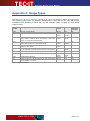
Appendix C : Image Types
55
Appendix D : Command Line Parameters
D.1
Syntax
D.2
Examples
56
56
57
1.1 Table of Figures
Figure 1: Quick-Start – Barcode Studio Main Window
8
Figure 2: User Interface
14
Figure 3: Toolbar
16
Figure 4: Quality Watch
16
Figure 5: Bar Code View
17
Figure 6: Data Section
18
Figure 7: Input Data (Dialog)
18
Figure 8: Add Control Character
19
Figure 9: Appearance Section
20
Figure 10: Text Placement Section
22
Figure 11: Drawing Section
22
Page 3 of 57