1
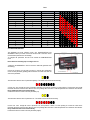
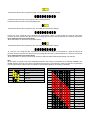
Table 2
Pulses of rear wheel
Pulses of front wheel
Value to set
3
3
0
3
3
4
5
1
2
3
6
3
4
3
4
4
4
4
5
5
6
4
6
7
5
3
8
5
5
4
5
9
10
5
6
11
6
3
12
6
6
4
5
13
14
6
6
15
Value show by leds
4.2 CONFIGURATION Mode
The GRIPONE has three different modes: ON, CONFIGURATION and
ADVANCED. When you switch on the ECU the ON mode is activated. In this
mode the three parameter leds are flashing.
To configure the parameters the user must activate the CONFIGURATION
mode.
Please follow the following step to configure the ecu.
1. Switch on the GRIPONE ecu. The ecu must be in ON mode (parameter leds
are flashing).
2. Push the P button on front panel (one time) to activate the configuration
mode. The first parameter (spinning) will be selected. The Value leds show the
value of this parameter.
The Value leds show the value of parameter “spinning”. The default value should be the following:
3. If the user want change the value of parameter “spinning” must push the V button. For each pushing of V button the value will be
increased until the its maximum value allowed. One more pushing will fix the value of selected parameter to its minimum value allowed.
Every modification will be saved automatically.
4. Push the P button to switch to the next parameter (cut).
The Value leds show the value of parameter “cut”. The default value should be the following:
5. If the user want change the value of parameter “cut” must push the V button. For each pushing of V button the value will be
increased until the its maximum value allowed. One more pushing will fix the value of selected parameter to its minimum value allowed.
Every modification will be saved automatically.
6. Push the P button to switch to the next parameter (engine).