1
■ ALARM
• The daily alarm sounds once at the designated time (hour, minute) every 24 hours.
■ BATTERY LIFE INDICATOR
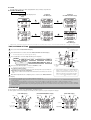
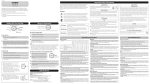
CHANGE OF DISPLAYS
Press Button D to change the display mode.
STOPWATCH
<LAP TIME IN PROGRESS>display
STOPWATCH
<LAP TIME> display
TIME/CALENDAR
display
D
D
D
D
D
D
ALARM display
*
TIMER display
STOPWATCH
<SPLIT TIME> display
If Buttons A, B, C and D are pressed at the same time, all the data in memory will be erased. Refer to “HOW TO RESET THE BUILT-IN IC” on page 13 for further details.
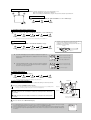
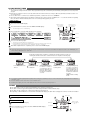
TIME/CALENDAR SETTING
D
Day
Press to show the TIME/CALENDAR display.
▼
Press repeatedly to select the digits (flashing) to be adjusted.
HOUR
▼
▼
A
▼
AUTOMATIC SHUT-OFF
(ECO)
DATE(DAY)
12-/24-HOUR INDICATION
▼
Year
MINUTES
MONTH
▼
SECONDS
▼
C
▼
YEAR
Seconds
“A” (AM)/
“P” (PM)
mark
Hour
Minutes
The digits move quickly if Button A is kept pressed.
● 12-/24-hour indication setting:
*
Change between 12- and 24-hour indications is made alternately with each press of Button A.
● Automatic shut-off function setting (ECO) :
B
Date
Month
Press to set the flashing digits or reset the SECONDS to “00.”
*
▼
C
The DAY disappears and the SECOND digits start flashing.
▼
▼
*
B
A
Press and hold for 2 seconds to show the TIME/CALENDAR SETTING display.
▼
B
Confirmation sound
for button operation
With each press of Button A, the automatic shut-off function(ECO) is alternately set to "ON" and
"OFF."
After all the adjustments are completed, press to return to the TIME/CALENDAR
display.
D
With each press of Button C in TIME/CALENDAR
display, the confirmation sound for button
operation is alternately switched "ON" and "OFF."
While the confirmation sound for button operation
is set to "ON," the
mark appears on display.
● The DAY is automatically set once the YEAR, MONTH and DATE are set.
● To quit the time/calendar setting, press Button B. When the stopwatch is left untouched, it automatically returns to the TIME/CALENDAR display within two
to three minutes.
● The calendar adjusts automatically for odd and even months including February of leap years from January 1, 2006 to December 31, 2055.
● When setting the HOUR digits in the 12-hour indication, check that “A” (AM)/“P” (PM) mark is correctly set. In the 24-hour indication, no mark is displayed.
● If Button A and C are pressed simultaneously, all the digital segments light up. This is not a malfunction. Press any of Button A, B, C or D to return to the TIME/
CALENDAR display.
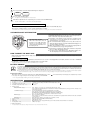
STOPWATCH
● The stopwatch can measure up to 99999.9 DM in 1/10 DM increments.
● Three separate measurement displays are available; lap time, lap time in progress and split time displays.
[LAP TIME display]
“LAP” mark
A
B
[SPLIT TIME display]
[LAP TIME IN PROGRESS display]
Lap No.
“RLP” mark
C
Lap time
A
B
Lap No.
“SPL” mark
C
Lap time
in progress
D
Split No.
C
Split time
Lap time
Accumulated
elapsed time
A
B
Accumulated
elapsed time
D
D