1
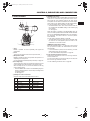
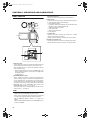
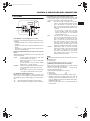
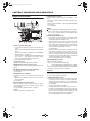
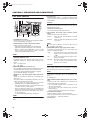
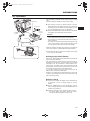
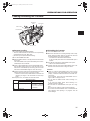
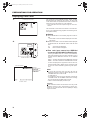
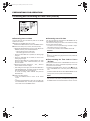
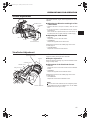
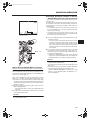
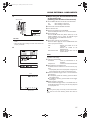
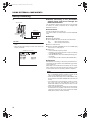
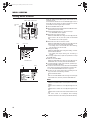
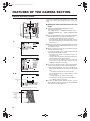
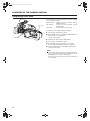
e_hd100.book Page 48 Tuesday, October 4, 2005 10:31 AM SHOOTING OPERATION Basic Recording Operation 1. Set the POWER switch to ON. • The unit turns on in camera mode. 2. Start recording. FRONT TALLY lamp Press the REC/VTR trigger button on the GY-HD100 to start recording. Once recording has started, the FRONT TALLY lamp and BACK TALLY lamp light red. MEMO The way the FRONT TALLY and the BACK TALLY lamps flash differ depending on what you set in the FRONT TALLY and BACK TALLY items on the OTHERS [1/2] menu screen. X See page 77. CAUTION FOCUS ASSIST button POWER switch REC trigger button BACK TALLY lamp RET button • The unit enters the stop mode automatically at TAPE END. If this mode continues for 3 minutes, the mode switches to the tape protect mode. X See “OTHERS [1/2] Menu Screen” on page 77. (LONG PAUSE TIME item) • If the REC/VTR trigger button is pressed very quickly and repeatedly, or the POWER switch is moved immediately after the trigger button is pressed, the GY-HD100 may not enter the record mode. To remedy this condition set the POWER switch to OFF and wait for 5 seconds or more before turning the power on again. • A neat transition to the next recorded scene cannot be guaranteed if a recording is ended by turning the POWER switch or DC power supply OFF, or by removing the battery pack. • Trial-shooting is always recommended before recording important events to confirm the recording is satisfactory. • The microphone may pick up the sound of the lens’ iris if the iris is changed abruptly or the iris is manually moved abruptly during recording. About the Focus Assist Function VTR trigger button About the QUICK REC START Mode If the REC/VTR trigger button is pressed immediately after the videocassette is inserted, the mode becomes the QUICK REC START mode that enables quick start of recording. However, when shooting starts in the middle of the tape, a blank space appears as the new scene will not be linked smoothly with the previous image. Also, the time code does not continue. (Some overlap may also occur.) 48 When you press this button during shooting, the area of focus is displayed in blue, red or green, making it easy to focus accurately. X See “LCD/VF [1/3] Menu Screen” on page 71. You can also set this function from the RET button. X See “SWITCH MODE Menu Screen” on page 69. (LENS RET item)