1
Page 3 of 6
Page 2 of 6
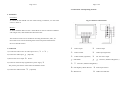
4. Connections And Operating elements
2 . Installation
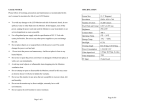
Sun Shield :
To attach the Sun Shield onto the metal housing of Monitor, use the small
Fig. 2 Connectors and Controls
screws to fasten it.
Bracket :
To fasten the Back Plate into the 4 VESA Holes on the rear Cabinet of Monitor
with 4 big Screws, then attached into the bracket foot..
The model in a metal case is suitable for mounting into furniture, walls , etc.
Insert four screws into the mounting holes at the front panel and mount the
device to desired location.
3. Connection
1) Connect the Video source to Video input I or II ( ○1 or ○2
2) Connect the Audio input ○4
(Optional)
11 Source
3) Selector the correct Input ○
4) Connect an electronically regulated 12V power supply ○6
The positive pole must be connected to the medium contact.
5) Connect the Audio Out Put
○
5
(Optional)
).
○1
Video I Input
○2
Video II Input
○3
Video Out-Put
○4
Audio Input (Optional)
○5
Audio Out-Put ((Optional)
○6
DC 12V Power Input
○7
OSD Manu
○9 □-
○8 □+
Increase ( default to Brightness )
Decrease ( default to Brightness)
○10
Left-Right-Up-Down Reverse
○11
Video Input selector
○12
Main Power
○13
LED Power Indicator