1
3.
4.
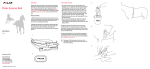
Place the cover with the battery inside it
into the sensor.
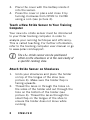
Press the cover in place and close it by
turning clockwise from OPEN to CLOSE
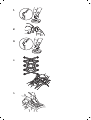
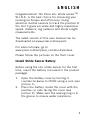
using a coin (see picture 3).
Teach a New Stride Sensor to Your Training
Computer
Your new s3+ stride sensor must be introduced
to your Polar training computer in order to
analyze your running technique and efficiency.
This is called teaching. For further information,
refer to the training computer user manual or go
to www.polar.com/support.
The s3+ stride sensor can be positioned
either on the shoelaces or in the sole cavity of
a specific running shoe.
Attach Stride Sensor on Shoelaces
1.
2.
2
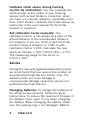
Undo your shoelaces and place the holder
on top of the tongue of the shoe (see
picture 4). Make sure the holder flap is
facing upwards.
Thread the laces in through the holes on
the sides of the holder and out through the
hole on the bottom of the holder (see
picture 4). Thread the laces through the
small flap on the tongue of the shoe to
ensure the holder does not move while
running.
ENGLISH