1
Instruction Manual
4.3.
CV 2000
Terminal Adapter to PBX transport
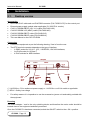
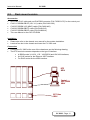
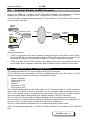
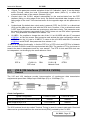
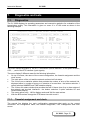
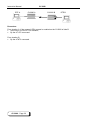
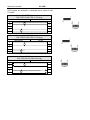
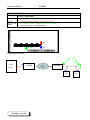
A pair of CV 24BR can transport up to 4 ISDN Basic Accesses. For example four Terminal
Adapters are connected to a remote PBX , through two CV 24BR over a G704 link.
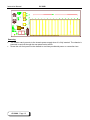
The four B1+B2+D channels are transported in 12 Time Slots or 9 Times Slots if all D channels
are in the same Time Slot.
ISDN-S
Adapter
4 ISDN-S access
G704
G704
……
ISDN
phone
CV24BR
A
……
4 ISDN-S
access
CV24BR
B
PBX
ISDN-S
Adapter
Timing Consideration
•
If PBX is connected to the public telephone network and gives the master source timing.
The CV24VBR “B” uses this clock and must be in DTE clock mode, then it sends its clock to
the private E1 Network G704, and the CV24BR “A” must be in Network clock mode.
•
If PBX is private, the E1 G704 network is the master timing source and gives the clock to
the CV24BR, phone, adapters, and PABX. Both CV24BR must be in Network clock mode.
5.
Operation and Configuration
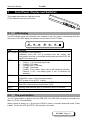
This chapter describes the CV 2000 operation through its Control port.
The CV 2000 must be connected to a VT100 compatible terminal or to a PC running a VT100
terminal emulation software that should be configured as follows:
Speed: 19200 bps
Data format: 8 bits
Parity: none
Stop bit: 1
Emulation: VT100
Flow control: none
The CV2000 configuration can be made either in AT command mode or VT100 Interactive
menu mode. The choice of mode is automatic: the AT command mode is activated when an
“AT” or ”at” character string is received from the control port. The VT100 menu mode is started
when the modem detects three consecutive carriage returns or “ENTER” characters.
The use of the VT100 mode offers valuable advantages such as simplicity and on line help.
The use of the AT commands allows writing configuration programs which can be saved out of
the unit on a PC for instance and can also be protected with a password.
All the CV 2000 operation parameters can be modified and saved in either mode.
All AT commands are described in "FO8000, CV2000, MX2000 AT Commands" (P/N : 8000 601
836)
CV 2000 - Page 15