1
g eT
MoRe ouT of neTwoRk ResouRces
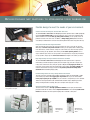
Streamline your document workflow and enhance your productivity with Sharp OSA technology.
integrating with Network applications and cloud services has
Never been so easy
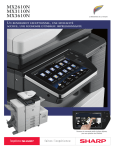
The MX2640N/3140N/3640N colour series offers powerful document
workflow capabilities to help businesses leverage their network
infrastructure, cloud-enabled services and more!* While others are limited
to a small circle of productivity, the Sharp OSA development platform allows
businesses to leverage the power of their network applications, back-end
systems, even cloud-enabled services, right from the touch-screen panel
of this new series.
save time, increase efficiency
You’ll save time and increase the efficiency of everyday tasks with Sharp
OSA technology because it can be virtually seamless to the user. Any
MX2640N/3140N/3640N anywhere in the organization can display choices
that were once only available on a desktop PC. With one-touch access
to business applications via Sharp OSA integration, you can start and finish
a document distribution task without worry.
customized integration
Sharp OSA technology also provides powerful customization. With the
ability to personalize applications and processes specific to your business,
Sharp OSA technology can help eliminate redundancy and streamline
workflow, helping to save time and optimize productivity. The latest
version of Sharp OSA technology can reach beyond the firewall, enabling
cloud-based applications over the Internet. And since Sharp OSA technology
utilizes industry-standard network protocols such as SOAP and XHTML, third
party software developers can deliver customized solutions to your business
faster than ever.
the convenience you want with the security you Need
The MX2640N/3140N/3640N colour series with the Sharp OSA development
platform is the logical choice for providing fast, flexible access to documents
and applications...no matter where you are in
the office. You also get the controlled access
and tracking ability you require with tighter
integration capabilities for network security
and accounting applications.
*Some features require optional equipment.
a dvanced
device ManageMenT Tools MaXiMize efficiency
The MX2640N/3140N/3640N colour series document systems enhance operational
efficiency through versatile device management capabilities.
sharp remote device Manager (srdM)
Make management of your MX2640N/3140N/3640N simple and straight
forward with Sharp Remote Device Manager (SRDM). This easy-to-use
software allows you to take control of the versatile system features and
simplifies installation and management.
• With printer status Monitor, network users can view printer
conditions, check paper levels, toner, and more, all through an
easy-to-use interface.
• With Sharp Remote Device Manager, administrators can easily
manage the setup, configuration, device settings, cloning and more!
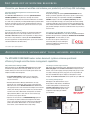
Advanced features such as remote front panel allow administrators
and support personnel to view and control the LCD panel of the machine
remotely from virtually any PC on the network. Plus, with event-driven,
real-time service alerts, administrators and supervisors can achieve
higher productivity. Now it is easier than ever to view service logs,
click counts, history reports and more.
take charge of colour usage and costs
With Sharp’s device management system, administrators and supervisors can
define user groups on the MX2640N/3140N/3640N to manage and restrict
features, such as colour copying, scanning or printing. Easily set up a custom
user group to manage page counts (copy, print, scan or fax operations) for
both colour and B&W. This helps to simplify cost management of colour
imaging. The MX2640N/3140N/3640N can store profiles for up to 1,000 users.
24/7 training with My sharp™
Managing all of the advanced features of your
Sharp product is simple and easy. This dedicated
customer training website is customized to your
MX2640N/3140N/3640N and allows you to locate
resources and find information specific to your
configuration, truly helping you maximize
your investment.
• Experience the convenience of an embedded web page right from
your desktop! This advanced web-based management tool allows
users to create and manage their own network scanning destinations,
profiles and web-links. Administrators can access device settings,
colour control, account information and security settings.
Remote Front Panel.
Embedded Web Page.