1
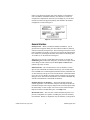
relative to the physical quantity units of the channel, not the hardware
units.) In addition, LabVIEW calibrates your hardware, accounts for
cold-junction compensation, and scales your readings for you. The data
returned is scaled to the physical quantity units defined in the channel
configuration, as shown in Figure 2.
Figure 2. Channel Name Usage
General Interface
Startup Screen—When you launch LabVIEW in Windows, you are
greeted with a navigation dialog box that contains introductory material,
common commands, and Quick Tips. This new dialog box helps new users
learn LabVIEW more quickly. If you prefer to bypass the navigation dialog
box, disable it by checking the checkbox at the bottom of the dialog box.
To reenable it, use the Preferences dialog box.
When all VIs are closed, a similar dialog box appears. If you click the
Small Dialog button within this dialog box, you switch to a simple version
of the dialog box that contains only the New, Open, and Exit buttons
(similar to previous versions).
Online Tutorial—The LabVIEW Online Tutorial introduces various
aspects of the LabVIEW environment interactively. We recommend that
new LabVIEW users work through this tutorial before they build their first
VI. The following concepts are covered in this tutorial: virtual instruments
(VIs), parts of a VI, dataflow execution, subVIs, hierarchy, pop-up menus,
data type colors, and controls and indicators. The tutorial is included only
with the CD distribution of LabVIEW for Windows.
Examples Browser for Windows—The Search Examples Help file
contains hyperlinks to all LabVIEW examples. This Help file divides the
LabVIEW examples into categories and provides a brief description about
the functionality of each example. You can access the Search Examples
Help file from the LabVIEW dialog box or the Help menu.
Basic Palette View—The new basic control and functions palette view
provides a simplified set of palettes, including only the most commonly
used functions. Because it emphasizes only the functions you might need
© National Instruments Corporation
21
LabVIEW Upgrade Notes